Executive Summary and Key Takeaways
What this review covers. D-ID's Creative Reality™ Studio is a cloud generative-video platform that turns a script, an audio file, or a single portrait photo into a lip-synced presenter video, and through a separate product track, into a real-time conversational avatar. This analysis maps the four ecosystem modules (Studio, Visual AI Agents, AI Video API, third-party plug-ins), the full production pipeline, the pricing and licensing boundaries, and the governance controls a regulated enterprise must impose before publishing synthetic video.
Five decisions this article helps you make:
- Product fitbatch-rendered digital presenters (Studio) versus two-way interactive agents (Agents SDK, WebRTC, sub-second latency).
- Licensingcommercial distribution rights begin at the Pro tier; Trial and Lite outputs are personal-use only and carry watermarks.
- Cost modelmonthly minute pools that expire at renewal, billed in 15-second credit blocks, with a worked calculation example below.
- Compliance posturebiometric consent capture, voiceprint retention, ISO/IEC 27018:2019 alignment, and the audit-evidence gaps you must close with the vendor before signing an Enterprise SLA.
- Access hygieneofficial web and app-store distribution only; unofficial APK mirrors are a documented malware vector.
Reading note: pricing figures, minute allocations, and API limits cited here reflect publicly available 2026 data and vendor documentation. Verify all commercial and security parameters directly with D-ID before executing procurement.
The Governance Question Behind the Tool Choice
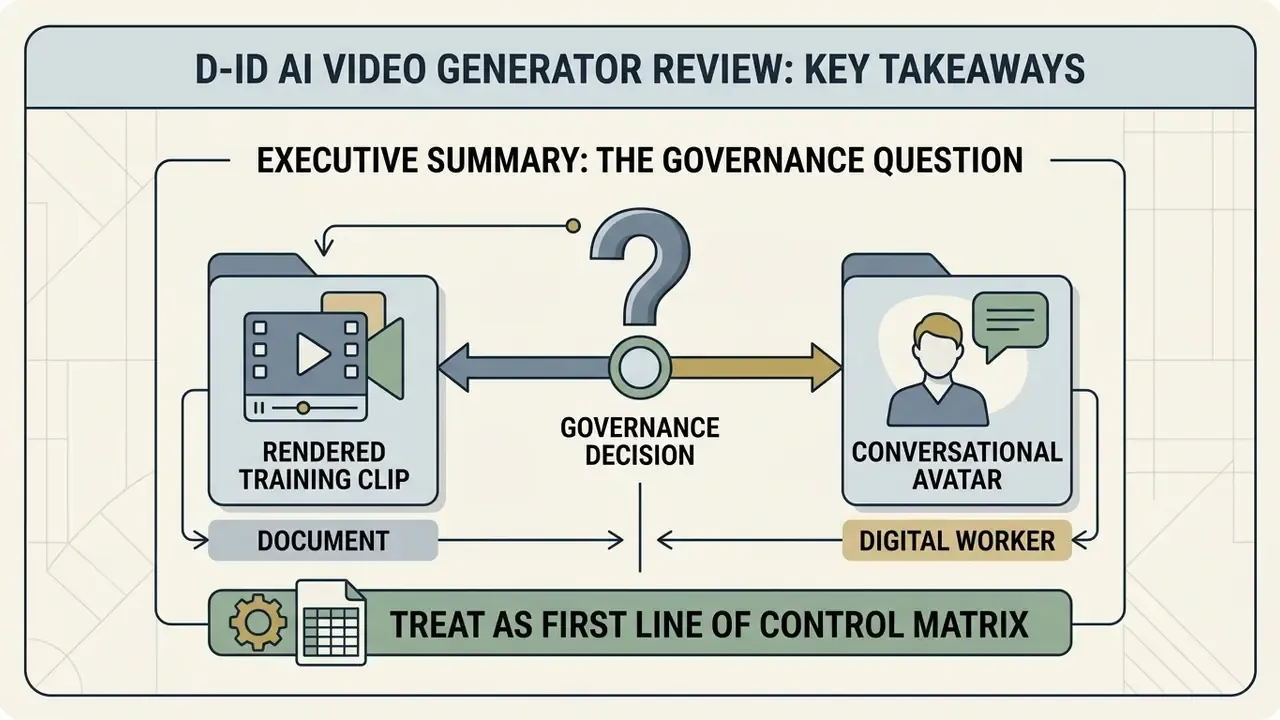
Before the feature comparison, one question decides everything else: is this asset a document or a decision-maker?
A rendered training clip is a document. It is approved once, hashed, stored, and republished on a schedule. Risk is mostly about consent, likeness rights, and factual drift in the script.
A conversational avatar is closer to a digital worker. It talks to customers, retrieves from a knowledge base, and can be wrong in public, in real time. That version needs a named owner, an approved scope of topics, an escalation path to a human, logging that an examiner would accept, and a shutdown switch. Same vendor. Two entirely different control sets.
Treat that split as the first line of your control matrix, not as an afterthought.
What Is the D-ID AI Video Generator and Creative Reality Studio
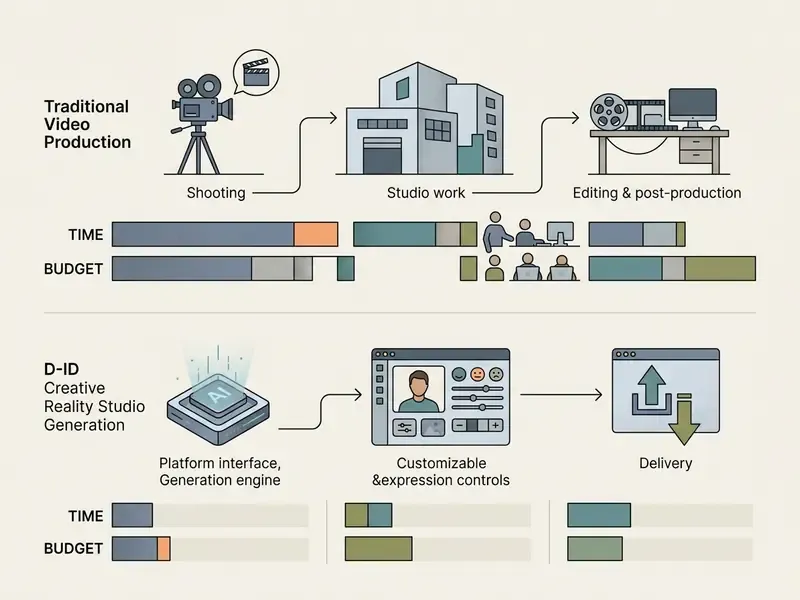
The d id ai video generator is a cloud-based generative AI video platform designed to transform text, audio scripts, and static images into photorealistic video content featuring digital presenters. Operating primarily through its self-service web interface known as the Creative Reality™ Studio, the d id ai video generation platform integrates deep-learning facial animation models with large language models (LLMs) and Stable Diffusion image synthesis. This architecture lets organizations generate presenter-led video content without physical camera hardware, studio space, or production crews, a category shift explained in more depth in our overview of AI video generators.
Scale context matters for procurement: D-ID states that more than 150 million videos have been produced on the platform and that over 140,000 developers have used its API, with a new sign-up registered roughly every three seconds during the mobile launch period (D-ID Corporate Press Release, 2023–2024). Those are vendor-side numbers. They tell you the platform is not a weekend project; they tell you nothing about its fit for your control environment.
In institutional environments, the d id creative reality studio ai video generator bridges the gap between static enterprise documentation and interactive communication. Multi-dimensional evaluation frameworks that score visual quality, lip-audio synchronization, and head-movement naturalness correlate significantly better with human realism ratings than legacy image-quality metrics such as FID or PSNR. Worth remembering when a vendor deck shows you a single benchmark score.
"THEval collected 3,519 human ratings across 17 talking-head models and found most standard metrics correlate weakly with viewer preference."
D-ID leverages these multi-modal generative principles to serve both offline batch video rendering and real-time conversational applications. For teams evaluating enterprise visual tools, the broader AI Media Commercial-Use Hub provides comparative frameworks for vendor selection and risk tiering.
AI Video, Digital Presenters, and Interactive Avatars
Digital presenters and interactive avatars serve distinct operational functions across enterprise workflows. A digital presenter operates as a one-way, batch-rendered ai video generated from a pre-written script or an uploaded audio file, delivering structured communication such as corporate compliance modules or marketing updates; this pattern belongs to the wider family of text-to-video tools. Interactive avatars, by contrast, act as two-way conversational agents that process real-time multimodal inputs (speech, video feeds, user queries) and answer with sub-second latency.
The distinction is also architectural. Batch presenters tolerate queued, asynchronous synthesis; interactive avatars require streaming input, incremental frame generation, and a hard latency budget. D-ID reinforces this split at the model level: Express (Instant) avatars are documented as offline-video-only and are not supported in streaming or D-ID Agents, while V2, V3 Pro, and V4 avatar classes are eligible for Visual Agents.
Academic evaluations of real-time interactive avatars show that dynamic diffusion forcing mechanisms can reach roughly 500 ms end-to-end latency while generating responsive head movements, nods, and facial expressions during live dialogue. In user studies, the method was preferred in more than 80% of pairwise comparisons against a strong baseline.
"Avatar Forcing reaches roughly 500 ms end-to-end latency and is preferred by viewers in about 80% of comparisons against the baseline."
Static digital presenters deliver deterministic output ideal for formal reporting. Interactive visual agents need integrated safeguards, continuous intent validation, and defined guardrails to manage residual operational risk. That difference is a budget line, not a philosophy.
What Products Make Up the D-ID Ecosystem
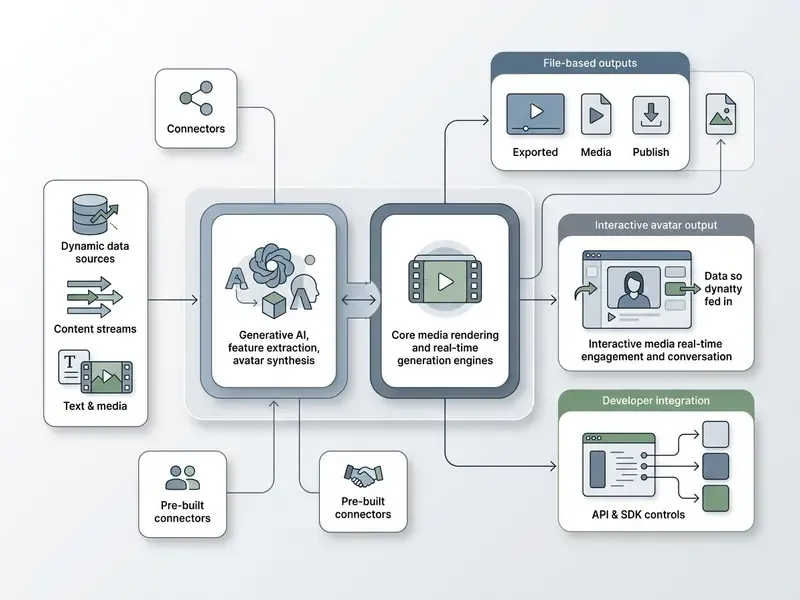
The D-ID product ecosystem consists of four core operational modules tailored to different deployment scales:
- Creative Reality™ Studio the primary self-service SaaS web and mobile interface used to create ai videos from text prompts, uploaded images, or script documents.
- Visual AI Agents conversational digital humans embedded on websites or enterprise portals that use external knowledge bases (RAG) and webhooks for live interactions.
- AI Video API and Agents SDK developer-facing REST endpoints and WebRTC streaming protocols that enable programmatic video synthesis and real-time avatar integration into custom applications.
- Third-party integrations turnkey plug-ins for Microsoft PowerPoint, Canva, and Google Slides, plus voice platforms such as ElevenLabs, which allow an existing voice-based conversational agent to be converted into a real-time visual agent.
Organizations assessing deployment costs and architectural trade-offs across these modules can use the AI Media Calculators to estimate credit burn rates and operational overhead, and can benchmark the stack against rivals in our comparison of AI video generators.
How Video Creation Works in D-ID
Video creation inside the d id ai video creation tool follows a structured four-stage pipeline: visual asset selection, audio and script configuration, canvas scene design, and backend cloud rendering. The system takes input data, for example a single portrait photo plus a text script, then applies neural motion transfer to synthesize lip movements, eye blinks, and subtle head shifts into a cohesive generated video.
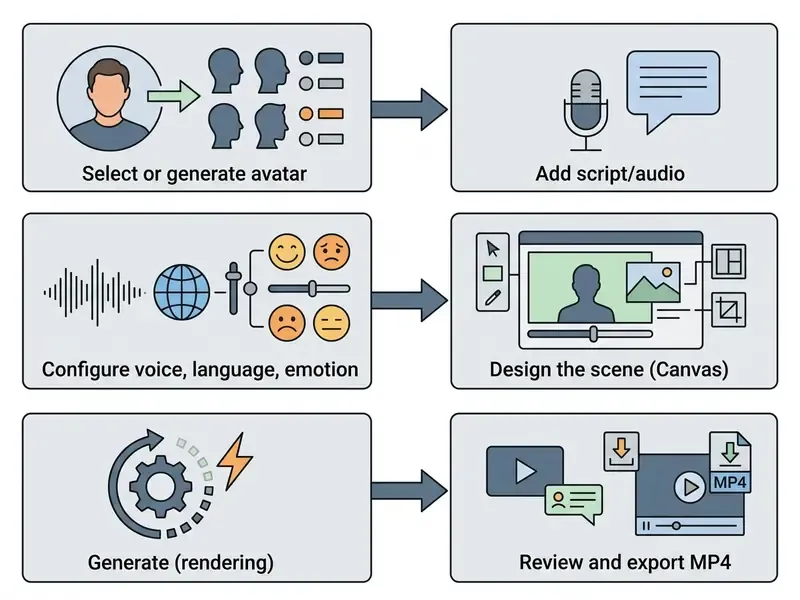
To keep production auditable, teams should place a validation checkpoint at each stage of the synthesis pipeline rather than at the end. Operational workflows often overlap with automated reporting tools; teams managing large asset libraries frequently pair output tracking with an ai spreadsheet generator to maintain an inventory of generated assets, script versions, and consent metadata.
Choosing a Template, an Image, or an AI Avatar
Users start generation by clicking Create Video, then selecting a pre-made stock presenter, uploading a custom headshot via "Upload your own photo," or generating a synthetic face with the built-in generative prompt tool. Supported uploaded image formats include JPEG, JPG, and WEBP, with a maximum file size of 10 MB.
For custom images, the system needs a clear, front-facing portrait with neutral lighting so facial landmark tracking stays accurate. Backlit conference photos fail here more often than people expect. For synthetic image generation, the embedded text-to-image engine (powered by Stable Diffusion) returns four candidate frontal portraits per text prompt, and users may regenerate an additional set until a suitable face appears. All generated faces are optimized for downstream motion synthesis rather than general-purpose illustration; teams that need studio-grade corporate portraits should instead review dedicated AI headshot generators.
Canvas Layout is selected at this stage as well, with wide, square, and vertical presets covering desktop, presentation, social-media, and mobile-first distribution formats.
Adding the Script, Audio, Language, Voice, and Expression
Speech input arrives one of two ways: typed directly into the Studio script editor, or uploaded as a pre-recorded audio file. A single script is capped at roughly 700 words (about 5 minutes of speech). Inside the editor, users can invoke the built-in "magic wand" GPT assistant, which drafts, expands, or rewrites narration automatically. Useful for turning bullet-point policy notes into spoken narrative without leaving the Studio. Useful, and also the exact point where an unreviewed script can slip into a compliance module, so keep legal review downstream of the wand.
When using text-to-speech (TTS), users select from over 120 supported languages and accents (D-ID's mobile launch materials cite 119 to 120 language options) and a wide range of synthetic voice profiles with adjustable emotional inflection. Voices are auditioned with the listen icon before rendering, and gender plus voice identity are set independently of script language. If script language and voice language differ, the presenter speaks with the selected accent.
Facial delivery is controlled separately: the Studio exposes four avatar expressions, neutral, happy, serious, and surprised, applied for the duration of the clip. Some avatar classes do not expose emotion controls at all, so validate expression availability per avatar before standardizing a template across a training series.
For custom audio uploads, the D-ID API accepts multi-part audio files up to 6 MB, converted to 16 kHz WAV for precise phoneme-to-viseme alignment and retained on D-ID infrastructure for roughly 24 to 48 hours before deletion. Public Studio FAQ material cites a broader limit of 10 MB and 5 minutes for uploaded audio, so the stricter API constraint should govern automated pipelines. Eligible enterprise tiers can also use voice cloning, provided that explicit verbal consent recordings are submitted before voice model synthesis (D-ID Clone Voice Documentation, 2026); cloned voices can then drive TTS in additional languages. Teams comparing synthesis quality and licensing terms across vendors can consult our guide to AI voice generators.
Generation, Review, and Export of the Finished Clip
Once script and visual assets are locked, the video is named and the generation request goes to D-ID's cloud infrastructure. Output arrives as an MP4 file with standard H.264 compression, in line with enterprise media distribution standards (NIST IR 8161r1 video export guidelines, which require an MP4 container, a single video stream per container, and H.264 compression).
"The open Talking Slide Avatars pipeline (OpenVoice + Ditto-TalkingHead) shows short MP4 avatar clips can be embedded directly into lecture slides as compact talking elements."
Video resolution depends on the plan tier, supporting 720p HD up to 1280×1280 px, or 1080p Full HD outputs. Rendering throughput is a stated differentiator: D-ID reports an industry-leading 100 FPS render rate, roughly four times faster than real-time playback, according to CEO Gil Perry, while third-party reviews cite a 60 FPS figure for standard Studio jobs. Treat both numbers as vendor-side performance claims pending independent benchmarking.
Duration limits differ by surface. A single clip generated in the web Studio or via API is capped at 5 minutes, whereas the official mobile app supports clips of up to 10 minutes. Credit consumption is calculated in 15-second billing blocks, so a 40-second video consumes three credits. After rendering, the clip lands in the Video Library, where it can be reviewed for lip-sync drift and factual accuracy, then downloaded as MP4 or shared directly to connected social channels. Teams preparing that MP4 for publishing pipelines often pair it with a YouTube video editing workflow or a video compressor to hit platform bitrate ceilings.
One practical note from review cycles: reviewers catch script errors quickly and lip-sync artefacts slowly. Build both checks into the sign-off form.
D-ID Capabilities for AI Animation and Video Content
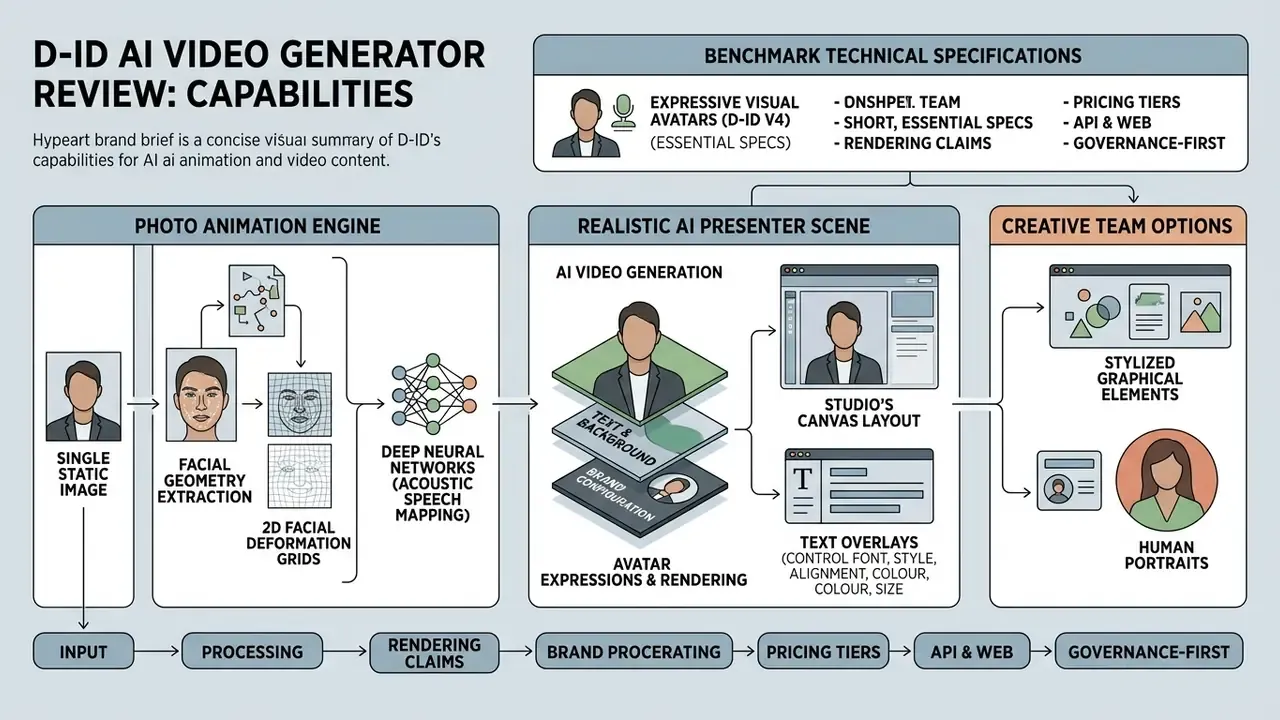
The core engine driving d id ai animation relies on deep neural networks trained to map acoustic speech features directly to 2D facial deformation grids. That approach lets the d id ai video maker animate static 2D portraits without complex 3D rigging or motion-capture suits.
Consider an illustrative, composite example rather than a client case. A financial services firm needs to convert 120 pages of static compliance documentation into internal training modules. Using D-ID's video synthesis engine alongside structured script templates, the team produces 45 localized modules in under two weeks and cuts video production lead times by roughly 75%, while keeping policy wording intact. The interesting part is the parallel control workflow: every script passes legal review before rendering, and each exported MP4 is hashed and logged against its approved script version. Without that second track, speed becomes an audit finding.
Photo Animation and Building a Realistic AI Presenter
D-ID's photo animation technology processes a single static image to extract facial geometry, letting the neural driver synthesize realistic head motion and expressive lip synchronization while preserving the original background. That is the documented behaviour of the Talks endpoint, which "transforms any photo into a speaking avatar" from an image URL plus text. A Live Portrait mode can additionally drive a still photo from a source video or audio track. Readers exploring adjacent techniques can review our primer on image-to-video animation.
Benchmark technical specifications for modern visual avatars (D-ID V4 Expressive Visual Avatars Tech Specs, 2026) report lip-sync accuracy scores of LSE-D 7.16 and LSE-C 8.67, indicating close alignment between spoken phonemes and visual mouth movements. These figures originate from vendor documentation and have not been independently replicated, so treat them as directional rather than audited metrics.
"Perceptual experiments show lip-sync and head-motion naturalness metrics track viewer preference far better than generic image-quality scores."
For applications needing stylized graphical elements rather than human portraits, creative teams can evaluate alternative asset pipelines such as an ai sprite generator or general-purpose animation makers.
Scene, Text, Background, and Brand Configuration
The Studio's Canvas Layout lets users layer visual elements to hold corporate brand standards. Editors can position the digital presenter, swap background images, solid colours, or video tracks, apply text overlays, and adjust element transparency with a slider or a numeric value.
Text overlays are added through the text icon, with control over font, style, alignment, colour, size, and effects. Custom brand typefaces can be uploaded under "My fonts," which is the practical requirement for brand-book compliance in regulated marketing. Because avatar expression (neutral, happy, serious, surprised) is set per clip, brand teams usually standardize a "serious" or "neutral" delivery for compliance content and reserve "happy" for consumer campaigns.
Layer positioning controls let brand assets, corporate logos or compliance disclaimers for instance, sit in front of or behind the animated presenter, while transparency governs how opaque each element renders. A small but consequential detail: a disclaimer placed behind the presenter can be partly occluded, which defeats its purpose. Check the rendered frame, not the editor preview. This flexibility keeps videos featuring digital presenters aligned with corporate visual guidelines.
Multilingual Video and Translation of Existing Content
"Virtual presenters outperformed human influencers on persuasiveness in specific product categories, particularly when the avatar's persona matched the product context."
Who the D-ID AI Video Creation Platform Is Built For
The d id ai video creation platform is engineered for enterprise teams that need scalable visual content production without traditional video logistics. Primary institutional adopters include marketing operations, learning and development (L&D) divisions, sales enablement groups, and customer support organizations. D-ID additionally names e-learning platforms, Fortune 500 firms, financial services, automotive, retail, entertainment, agencies, and game studios among its customer base. Budget-constrained teams running a first proof of concept may want to review the trade-offs of free AI video generators before committing to a paid minute pool.
When generative tools spread across departments, IP and governance standards need to be written down early. Reviewing legal perspectives on synthetic content via ai stealing art discussions helps legal and risk officers build internal usage policies that survive contact with a real campaign deadline.
Marketing and Personalized Video Campaigns
Marketing teams use D-ID to produce personalized video outreach at scale. Combining dynamic script tags with API-driven generation, marketers can send tailored video messages to individual prospects.
Published vendor campaign data (D-ID Marketing Case Studies, 2024) indicates that personalized video email initiatives achieved a 16.3% click-through rate (CTR) compared with 11.6% for non-personalized text emails, alongside 1,812 coupon redemptions in one pilot. A separate agency case (Envy) reports open rates above 50%, 15 direct replies, seven booked meetings, and CTR growth from 2.6% to 5.9%. These figures are vendor-reported, lack disclosed control groups or sample sizes, and should be read as directional benchmarks rather than validated effect sizes. Run your own A/B test inside your CRM before forecasting revenue impact.
"A human influencer was more persuasive on average, yet the VTuber outperformed in niches where virtual identity matched the audience's cultural context."
Training, Internal Communications, and HR
Enterprise L&D and HR divisions deploy AI avatars for employee onboarding, compliance and policy training, product launches, leadership development, LMS modules, and microlearning. Multinational organizations such as the Diplomat Group (D-ID Case Study, 2024) have integrated D-ID with slide software to build modular training decks featuring AI presenters in several regional languages, generating localized versions from a single source script.
The practical effect is that a corporate policy update can be produced and distributed globally within hours, which removes localization backlogs. HR teams often pair a scripted process explainer with an interactive avatar coach that answers employee questions live, while internal-communications teams use an avatar spokesperson to narrate change-management updates. For narrative-driven training scenarios, an ai story generator app or an ai story generator can help draft the underlying course scripts quickly.
One caution. Fast localization also means fast propagation of an error. Version control on the source script matters more than the rendering speed.
Sales, Support, and Product Communications
Sales enablement and customer support teams deploy Visual AI Agents for round-the-clock interactive product walkthroughs and pre-sales assistance. Embedded on web portals, these agents answer customer queries, guide users through feature documentation, and escalate complex technical issues to human representatives.
D-ID's agentic-video documentation describes a hybrid pattern: a viewer watches a feature walkthrough, clicks "Ask," and is handed to a live conversational agent, covering product marketing, pre-sales, and support intents in one asset. Nice pattern. It only works safely when the handoff threshold is explicit, because a support avatar that improvises around a fee schedule creates a conduct issue, not a CX win. Detailed vendor feature breakdowns are available through the AI Media Comparison Matrices.
D-ID Pricing, the Free Tier, and Commercial-Use Terms
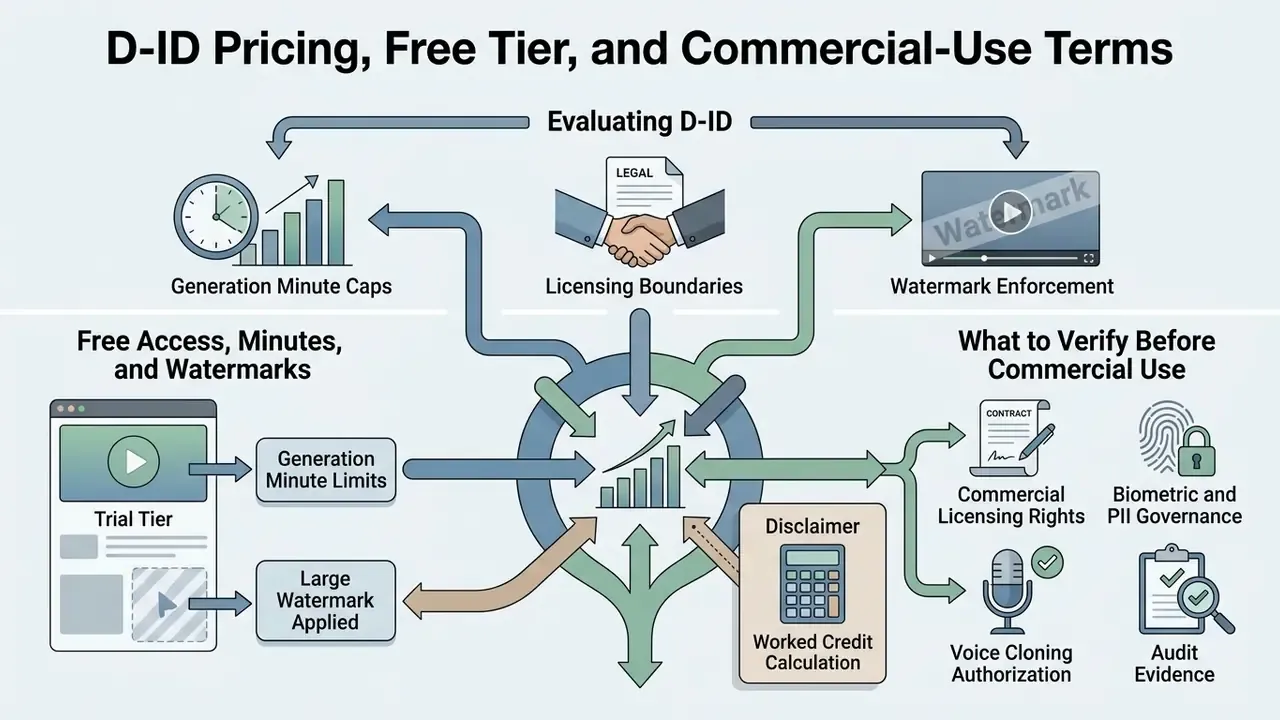
Evaluating the d id free ai video generator and the paid subscription tiers means checking three things: generation minute caps, licensing boundaries, and watermark enforcement. D-ID structures pricing around recurring monthly minute allocations; unused minutes expire at the end of each billing cycle and do not roll over.
| Parameter / Plan | Free Trial | Lite Plan | Pro Plan | Advanced Plan | Enterprise Tier |
|---|---|---|---|---|---|
| Monthly price (indicative) | $0 (14 days) | ~$5.90 / mo | ~$29.99 / mo | ~$57.90 / mo | Custom quote |
| Annual-billing price (indicative) | n/a | ~$4.70 / mo | ~$16.00 / mo | ~$108.00 / mo (larger credit pack) | Negotiated |
| Minute allowance | 5 minutes total | 10 minutes / mo | ~30 minutes / mo | ~60 minutes / mo | Custom volume |
| Watermark | Full-screen overlay | D-ID watermark (corner) | Generic AI watermark (corner) | Generic AI watermark (corner) | None / custom |
| Commercial-use rights | No (personal only) | No (personal only) | Yes (commercial) | Yes (per agreement) | Yes (full commercial) |
| API access | None | None | Included | Included | Full access + priority |
| Support level | Basic | Standard | Standard | Priority | Dedicated manager |
Free Access, Minutes, and Watermarks
The d id ai video generator free version comes as a 14-day trial account with 5 total video credits, about 5 minutes of generated content. Trial outputs carry a full-screen semi-transparent watermark across the rendered video, and trial accounts are treated in D-ID's terms as limited-feature "Guest User" accounts.
The trial tier is strictly for non-commercial evaluation. Upgrading to the entry-level Lite plan removes the full-screen overlay but keeps a small D-ID watermark in the lower corner, while full commercial generation rights require Pro, Advanced, or Enterprise plans. D-ID also documents Launch and Scale developer tiers as commercial-eligible, with Build classified as personal use. Teams weighing the trial against zero-cost rivals can start from our comparison of free AI video generators.
What to Verify Before Commercial Use of D-ID
Before deploying D-ID assets in commercial campaigns or regulated business operations, risk officers should verify the following controls:
- Commercial licensing rights. Confirm the active account tier explicitly permits commercial distribution (Pro tier or higher; Trial, Lite, and Build are personal-use only).
- Biometric and PII governance. Review retention schedules for uploaded facial images and voiceprints (D-ID Biometric Privacy Policy). D-ID's public compliance page cites ISO/IEC 27018:2019 for protection of Personally Identifiable Information in public cloud environments, and its products privacy policy states that personal data is retained until deletion or a valid deletion request submitted to [email protected].
- Voice cloning authorization. Verify that explicit, recorded consent statements are archived for every cloned executive or employee voice model, together with the scope and expiry of that consent. Employment ending does not automatically end the licence you thought you had.
- Audit evidence. Ensure generated video files, prompt histories, and API execution logs are archived in internal GRC systems for executive oversight, with a mapping between each published asset and its approved script version.
Detailed operational guidelines for enterprise API security are collected in the AI Media API Guides.
Alternative Platforms on the AI Video Generation Market
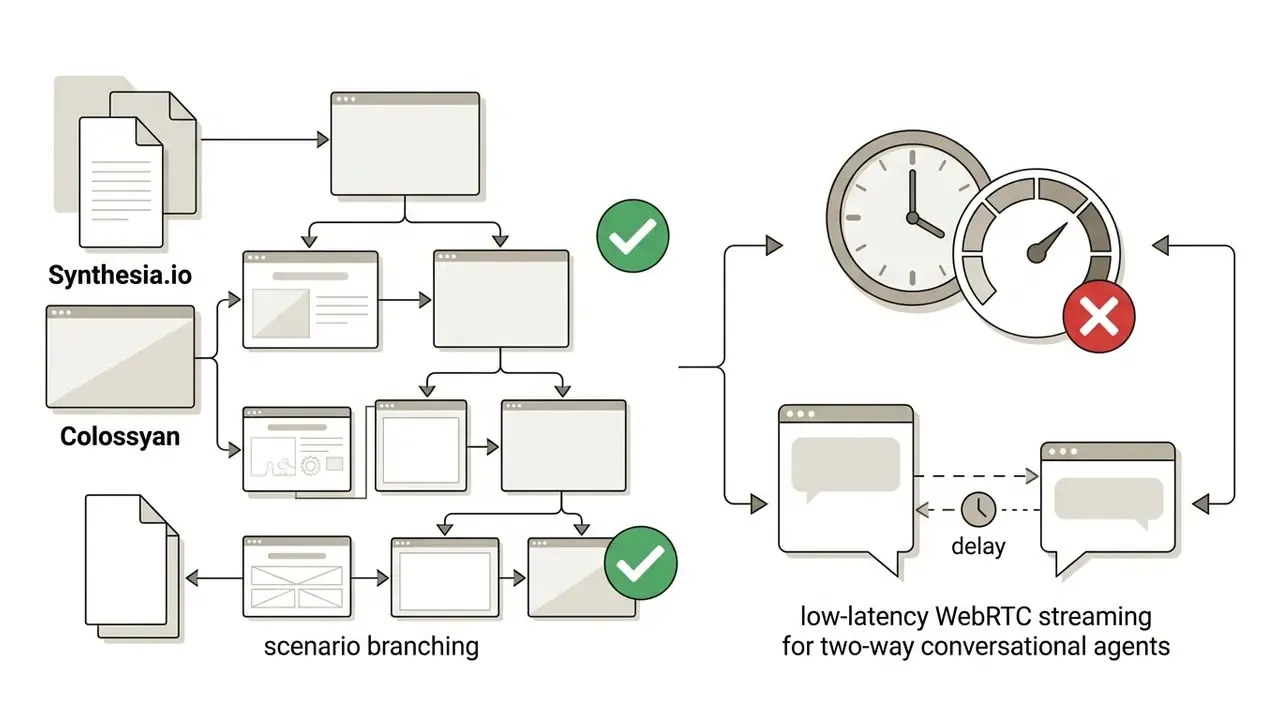
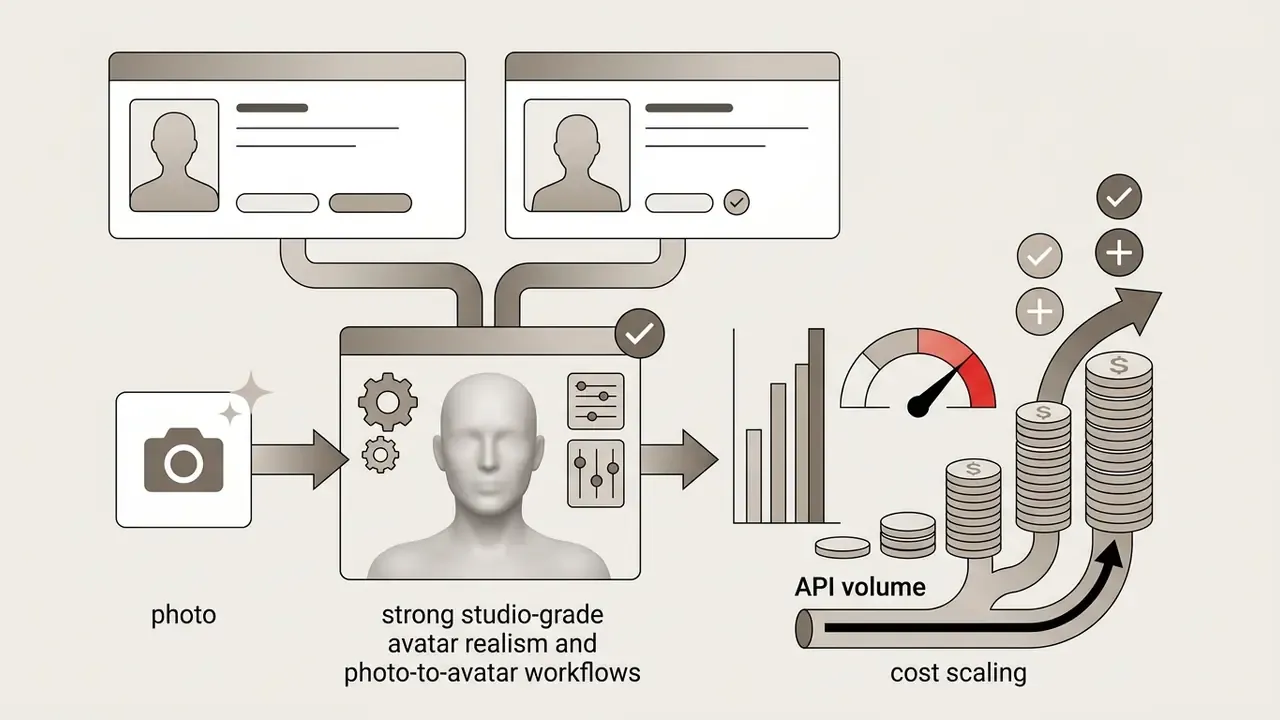
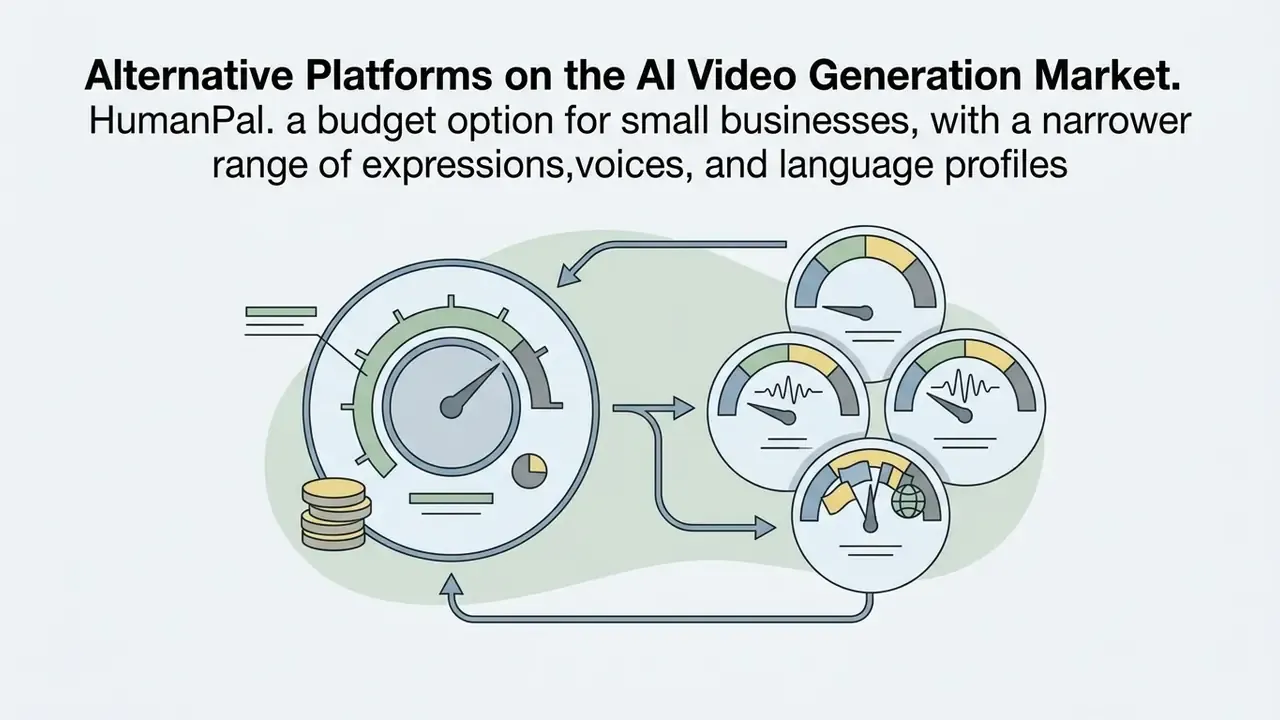
Enterprise buyers rarely evaluate D-ID in isolation. The most frequently shortlisted alternatives are HeyGen, DeepBrain AI, HumanPal, Colossyan, and Synthesia.io:
Where D-ID tends to win is the combination of API maturity (140k+ developers), real-time agent streaming, and a documented biometric and consent policy stack. Where it tends to lose is depth in template-driven course authoring. A structured feature-by-feature view is maintained in our AI video platform comparisons.
D-ID API, Integrations, and Real-Time AI Video
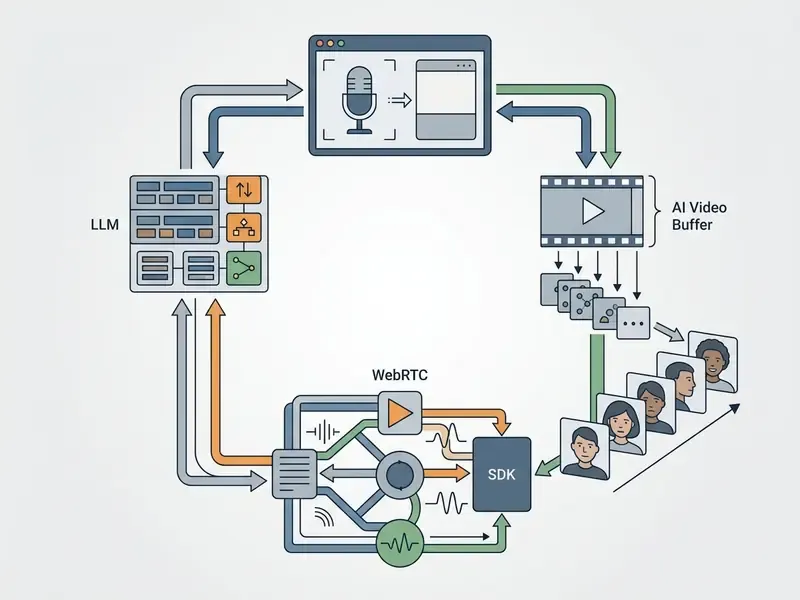
The D-ID REST API and WebRTC streaming stack let enterprise developers integrate synthetic video generation directly into core business applications, using platform comparisons for AI video generation to benchmark latency and cost per minute. The API supports asynchronous batch rendering as well as continuous low-latency avatar streaming for interactive visual agents.
In automated customer support architectures, AI visual agents usually sit next to secondary visual tools. Teams generating custom UI graphics or campaign assets, for instance, often run asset generation workflows alongside an ai sticker generator for complete visual asset automation.
API for Programmatic Generation and Scaling
Developers obtain access by generating a secret key in D-ID Studio account settings. API requests use HTTP Basic Authentication (API_KEY:SECRET passed in the Authorization header) and draw from the same centralized minute credit pool as web Studio usage. That last detail is a cost-allocation trap: one runaway batch job consumes the marketing team's minutes for the month.
Documented endpoints include POST /animations for photo-to-video animation, POST /talks for script-driven speaking avatars, video-translate request creation (requiring a source video URL and a target-language array), and POST /agents/{agentId}/streams/{streamId} for live streams. Programmatic requests are capped at 5 minutes per clip, duration is rounded up to 15-second billing increments, and monthly minutes do not accumulate across renewal cycles.
For regulated deployments, instrument the integration layer instead of relying on vendor logs alone. Persist the request payload (script text, avatar ID, voice ID), the returned job ID, the rendering timestamp, and the requesting internal user_id in your own audit store. Developers building high-volume pipelines can also track reliability and regulatory exposure through dedicated monitors such as AI Litigation and Case Timelines.
Integrations and Real-Time Streaming Animation
D-ID's real-time streaming stack uses WebRTC to deliver continuous video streams of conversational digital humans. The newer Agents SDK and Agents Streams endpoints let developers embed interactive avatars in web applications, connecting them to custom LLMs, enterprise knowledge bases (RAG), and external webhooks; the Agents Embed component adds avatar, voice, and chat surfaces to an existing website.
Legacy Talks/Clips Streams endpoints remain supported for existing enterprise deployments, but D-ID directs all new production builds to the Agents SDK infrastructure (D-ID Developer Documentation, 2026). This architecture supports real-time visual support agents, interactive digital tutors, and automated pre-sales representatives operating with sub-second response times.
Authorization control does not end at the API key. Verification research is emerging for confirming that a synthetic video was driven by an authorized operator:
"Avatar Fingerprinting verifies synthetic video through a motion-embedding space where facial signatures cluster by driving identity, independent of avatar appearance."
Enterprises deploying executive-likeness avatars should therefore treat driver-identity verification and stream provenance as part of the security model, not as a research curiosity. If a CEO avatar can be driven by anyone with a key, the key is the deepfake.
The D-ID AI Video Generator App: Web, Android, and iOS
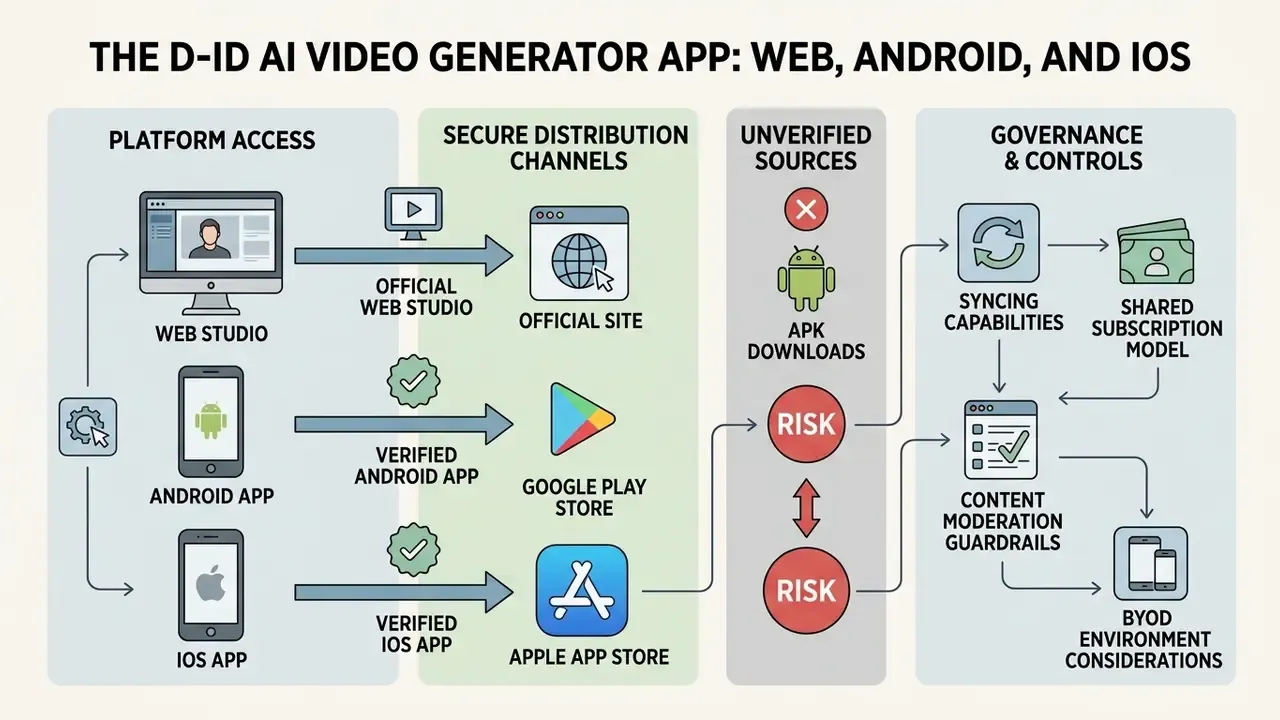
The d id ai video generator app extends Creative Reality Studio to mobile, letting users create talking-head videos on a phone. Animating a single portrait photo is the most common workflow, as covered in our guide to AI portrait generators. Launched officially on 26 October 2023, the mobile application passed 1 million downloads globally within its first five months (D-ID Corporate Press Release, 2024).
Documented capabilities of the d id ai video generator android app and its iOS counterpart include syncing with an existing D-ID account, writing or importing avatar scripts, access to standard and premium avatar banks, uploading images from the phone library, voice selection across 120 languages, direct download of rendered videos to the device, and clip lengths of up to 10 minutes, a longer ceiling than the 5-minute web Studio cap.
Mobile apps run under the same subscription architecture and content moderation guardrails as the desktop web studio; D-ID states that videos are subject to moderation policies designed to prevent misuse. For troubleshooting mobile sync issues or account configuration, consult AI Media Support and Troubleshooting.
One governance note for BYOD environments: a phone-based d id ai video generator platform session means corporate scripts and employee likenesses transit a personal device. Bring that into the mobile risk assessment, not just the marketing plan.
Where to Find Official Links to D-ID Studio and the Mobile App
Why You Should Not Download a D-ID APK from Unverified Sites
Searching for an unofficial d id ai video generator apk download exposes mobile devices to serious cybersecurity risk. Unofficial APK packages on third-party mirrors frequently contain modified executable code, locker ransomware, or credential-stealing trojans.
Public-sector security reporting has documented sideloaded Android packages carrying locker ransomware that blocks device access, plus fake APKs that harvest login credentials and read SMS, contacts, and location data. NIST also notes that third-party app stores may not apply the same review standards as official channels. Installing a modified APK bypasses Android OS security verification and opens a clear path to data exfiltration. Given that D-ID processes sensitive facial geometry and voice samples, a compromised device could leak proprietary corporate assets or biometric credentials. Block sideloading through MDM policy and be done with it.
Enterprise Security and Compliance FAQ
Is D-ID certified under SOC 2 Type II?
D-ID's public compliance page cites ISO/IEC 27018:2019 alignment for protection of PII in cloud environments. A SOC 2 Type II attestation is not stated in the publicly available material reviewed here, so procurement teams should request the current attestation report, penetration-test summary, and subprocessor list directly from the vendor under NDA. Status: requires vendor confirmation.
Does D-ID support HIPAA or GLBA-regulated workloads?
No HIPAA Business Associate Agreement or GLBA-specific commitment appears in D-ID's public documentation. Financial and healthcare institutions should therefore treat scripts and uploaded likenesses as data that must not contain PHI, account numbers, or other regulated identifiers, unless a bespoke Enterprise contract explicitly permits it. Status: requires vendor confirmation.
How long are uploaded assets retained?
API-uploaded audio is documented as converted to 16 kHz WAV and retained for roughly 24 to 48 hours. Broader personal data is retained until deletion or a valid deletion request ([email protected]), while biometric information is governed by a separate biometric privacy policy with its own consent-withdrawal channel.
Is private-cloud, VPC, or on-premise deployment available?
D-ID markets Enterprise plans with advanced security, custom integrations, and professional services, but publicly available material does not specify a self-hosted or dedicated-VPC option. Institutions prohibited from sending PII to public cloud should make isolated deployment a written pre-condition in the RFP. Status: requires vendor confirmation.
What audit trail is available for API calls?
The API surface documents job creation and retrieval, but do not assume regulator-grade logging by default. Implement a proxy or middleware layer that records prompt text, avatar and voice IDs, internal requester identity, timestamps, and output hashes, then feed those records into the GRC system.
Can generated video be used in paid advertising?
Yes, from the Pro tier upward, plus Advanced, Enterprise, Launch, and Scale. Trial, Lite, and Build outputs are personal-use only.
Who owns the incident if an avatar says something wrong?
The platform will not answer this for you. Name an accountable owner per avatar, define the topics it may address, log every published asset, and document the shutdown procedure. No evidence, no autonomy.
Conclusion and Implementation Checklist
Integrating generative video into enterprise operations is a balancing act between workflow efficiency and demonstrable control. D-ID Creative Reality Studio offers mature, scalable infrastructure for turning text and audio into avatar-led video content, and readers broadening the evaluation can also review adjacent animation creation tools for non-presenter formats.
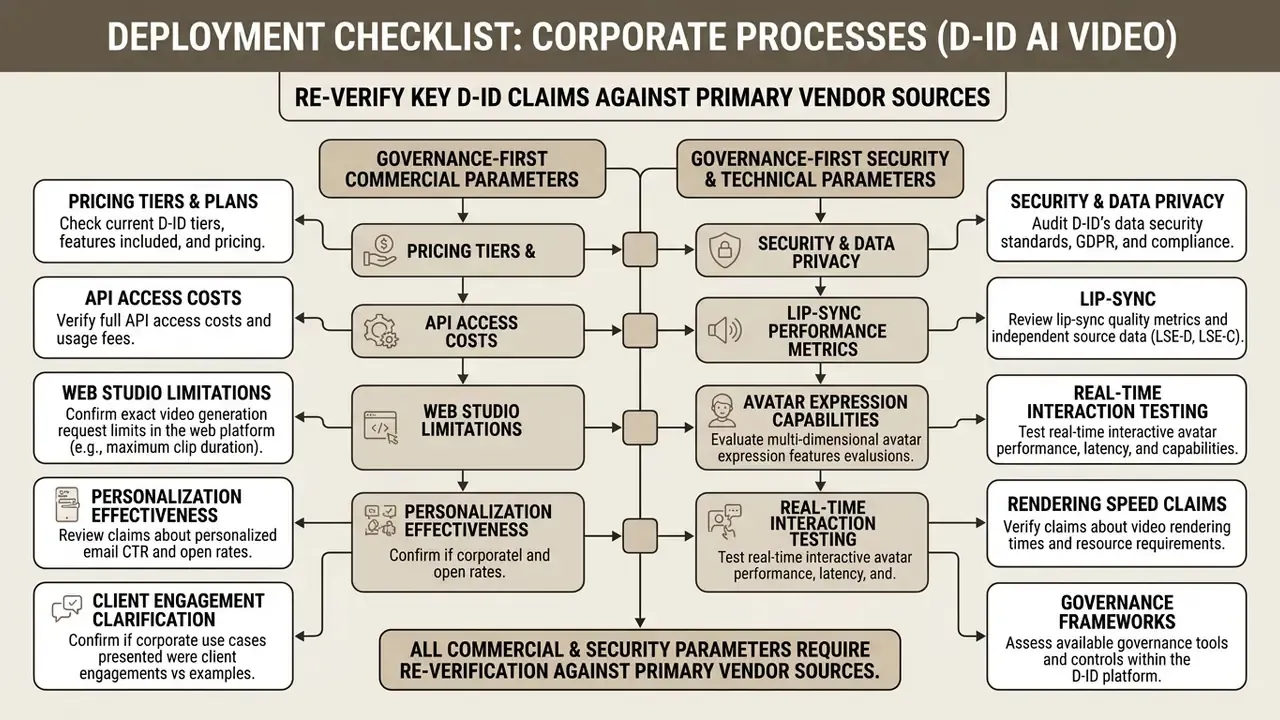
Checklist for Deploying D-ID in Corporate Processes
- Audit objectives and format.Decide which solution type you need, one-way training or marketing video (Creative Reality Studio) versus real-time interactive conversation (Visual AI Agents), and confirm the avatar class supports that mode (Express/Instant avatars are offline-video only).
- Verify commercial rights.Confirm that the chosen plan (Pro, Advanced, Enterprise, Launch, or Scale) formally permits commercial use of generated content, and that watermark policy matches your distribution channels.
- Secure biometrics and consent.Capture and archive written and recorded consent from every employee, executive, or voice actor whose face or voice is cloned, including scope, territory, and expiry.
- Lock down software access.Restrict web studio access to the official
d-id.comdomain and require mobile installs from Google Play and the App Store only. Block APK sideloading via MDM policy. - Integrate with GRC and control the API.Pipe generation logs and API call metadata into internal audit systems to track minute consumption, script approvals, and published assets, then reconcile monthly, since unused minutes expire at renewal.
- Model total cost, not subscription cost.Use the 15-second credit formula to forecast minute burn, then add legal review, localization QA, and archival storage to reach a defensible TCO figure.
- Close vendor questionnaires before scale-up.Get written answers on SOC 2 status, retention windows, subprocessors, isolated deployment options, and audit-log export before moving from pilot to production.
A safe next step, if you are still at pilot stage: run one controlled use case with a single named owner, full logging, and a fixed review date. Then decide whether the control cost is worth the production speed.
Appendix A: Superseded Statements and Corrections