This guide is written for three kinds of reader: the player who wants one good portrait for a character sheet, the Dungeon Master who needs forty assets before Saturday, and the self-publisher who has to answer legal questions before shipping a paid module. The workflows overlap. The risk profile does not.
A DnD AI art generator turns text descriptions into visual representations of characters, creatures, and environments for tabletop role-playing games. Using modern text-to-image diffusion models, tabletop players and Dungeon Masters can convert race, class, armor, and setting details into production-ready fantasy visuals within seconds.
What a DnD AI Art Generator Can Create
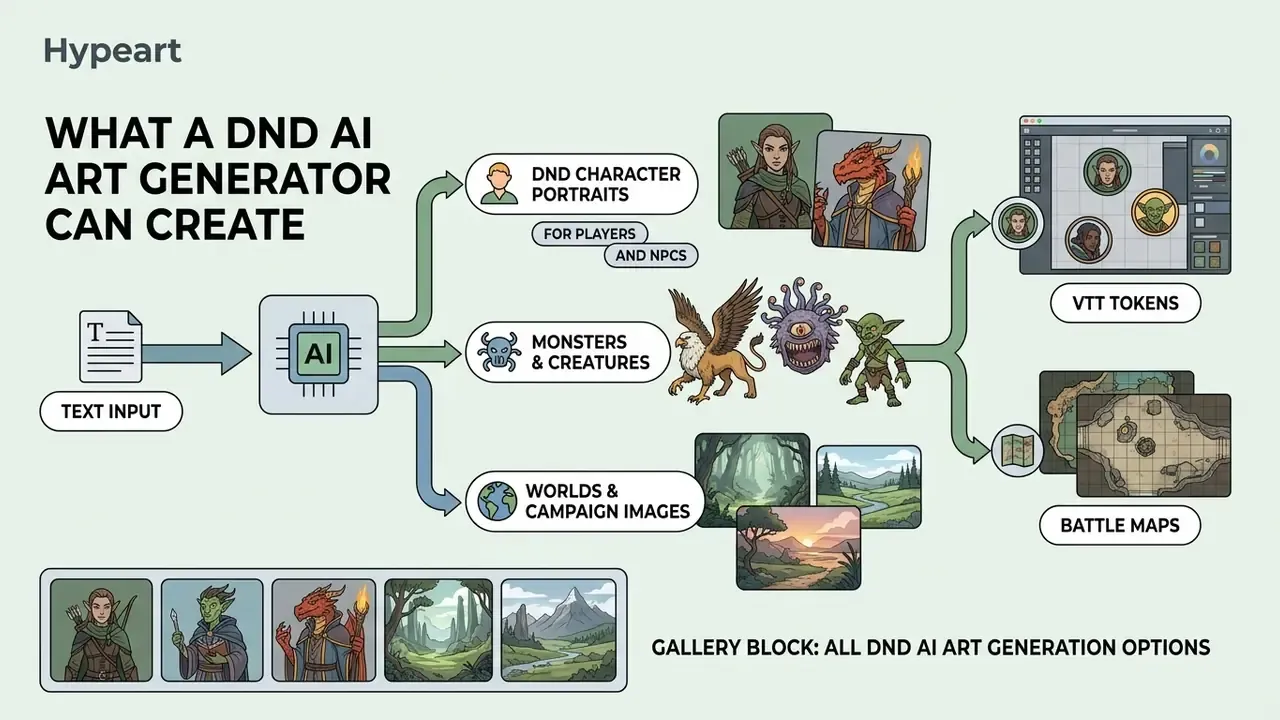
A DnD AI art generator converts structured text inputs into high-fidelity visual assets, ranging from individual hero tokens to expansive campaign battle maps. Modern diffusion architectures learn statistical mappings between descriptive language and visual features, enabling rapid visual prototyping without manual illustration skills.
«In a user study with 56 participants, an interactive diffusion visualization significantly improved understanding of how keyword changes reshape generated images.»
That finding matters practically: the fastest way to improve a D&D portrait is not a longer prompt, but understanding which words actually move the image. If you want to see how different engines respond to the same fantasy prompt, compare AI art generators side by side before committing to a subscription. Our broader AI Media Comparison Matrices cover the same engines across style control, resolution and licensing.
In an operational evaluation of generative workflows, an independent gaming studio integrated an automated text-to-image pipeline to produce visual assets for a 12-session campaign module. The team generated 45 custom NPC headshots and 12 environment concept sketches over three days, reducing visual pre-production time by 60%. The resulting visual asset library enabled immediate player orientation during live game sessions. Treat that example as illustrative rather than benchmarked; your own numbers will depend on how much rework each image needs.
DnD Character Portraits for Players and NPCs
A DnD AI art generator creates individual character portraits by translating race, class, physical attributes, and clothing descriptions into composite image outputs. Empirical work on contrastive test-time optimization confirms that diffusion models handle complex multi-attribute prompts, combining ancestry traits with specific armor and weapons, far more reliably when attribute binding is optimized.
«In a user study with 25 participants, contrast-optimized images received 72–94% of votes as the most faithful match to the text prompt.»
Players can generate custom hero portraits that reflect specific equipment upgrades, while Dungeon Masters can quickly establish visual headshots for recurring non-player characters (NPCs) to increase campaign engagement. Race-specific anchors do most of the work: horn shape, skin tone and eye color for tieflings; scale pattern, snout shape and crest for dragonborn; ear shape, facial proportions and one cultural styling cue for elves.
Naming often lags behind the art. If a face appears before a name does, a generic baby name generator ai is a surprisingly usable source of phonetic seeds for tavern keepers and minor nobles, and identity-conditioning tools such as a baby picture generator run on the same face-encoder stack you will use later for photo-to-avatar work.
Monsters, Fantasy Creatures, Worlds and Campaign Images
Generative visual tools create encounter visual aids, homebrew monster illustrations, and atmospheric location art from spatial and thematic prompt descriptors. Research in zero-shot diffusion editing demonstrates that generative frameworks effectively maintain spatial relationships and lighting cues across complex multi-object scenes.
«In a study with 130 Prolific participants, RAVE delivered competitive editing quality while running roughly 25% faster than comparable methods.»
Dungeon Masters use these capabilities to render cavernous dungeons, ancient ruins, and custom beasts directly from campaign notes, giving players clear spatial references during tactical gameplay and narrative exploration.
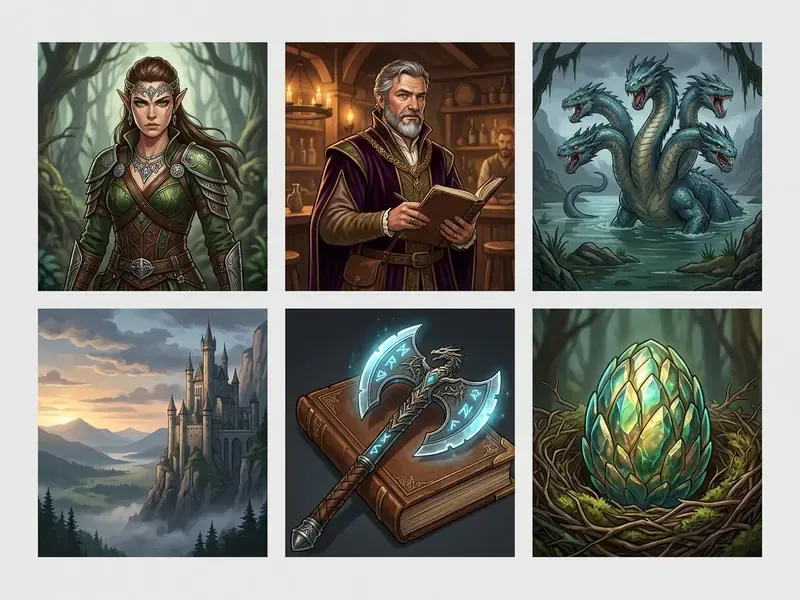
Purpose of the gallery block: it shows output variability (player portrait, NPC, monster, fantasy location, item) so readers can judge visual quality before running a generation.
How to Generate DnD Character Art from Text
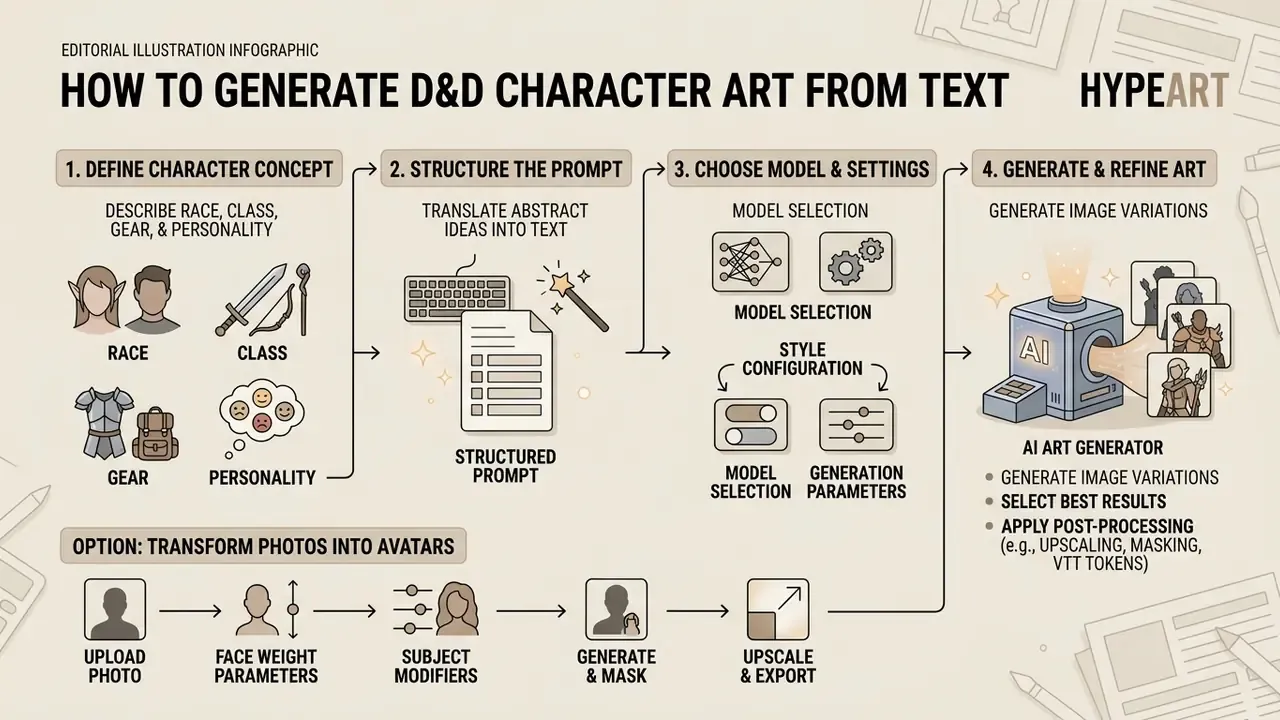
Generating character art from text requires translating an abstract character concept into a structured prompt, selecting an appropriate model configuration, and performing iterative image refinement. Research shows that outcome quality improves through model capability and user prompt adaptation, meaning that structured inputs directly yield higher-fidelity outputs.
«Across 1,891 participants, DALL·E 3 users wrote longer, more descriptive prompts; quality gains split roughly evenly between model improvement and user prompt adaptation.»
During a campaign preparation sprint, a Dungeon Master used a structured four-step prompting framework to generate custom encounter visuals for an upcoming session. By defining identity, equipment, lighting, and medium in sequence, the creator produced six distinct monster tokens in under 15 minutes. The systematic refinement process eliminated visual artifacts before exporting the final assets for virtual tabletop deployment.
Transform Personal Photos into Fantasy Character Avatars
Modern image-to-image diffusion pipelines allow players to transfer their facial identity onto a fantasy character sheet asset. By passing a high-resolution headshot into an IP-Adapter face encoder along with a structured prompt, the model preserves facial geometry while rendering requested fantasy attributes such as tiefling horns, elven ears, or plate armor.
Step-by-step photo-to-avatar workflow:
- Upload a reference photo.Supply a clear, well-lit, front-facing photograph at a minimum of 512×512 px. Neutral expression and even lighting reduce identity drift.
- Apply face weight parameters.Set the identity preservation scale (IP-Adapter strength) between 0.6 and 0.8 to balance facial likeness against fantasy transformation. Below 0.5 the likeness disappears; above 0.85 horns, scales and armor start losing definition.
- Define subject modifiers.Add prompt anchors for the target ancestry and gear, for example:
"dwarf warrior with braided beard, wearing ornate iron armor, in the style of fantasy concept art". - Generate and mask.Run the model, then use local inpainting to resolve artifacts around facial boundaries, hairlines, horn roots or helmet edges.
- Upscale and export.Finish at 2K–4K, then crop separately for the sheet portrait and the square VTT token.
If you plan to reuse the same likeness for professional or streaming avatars as well, the mechanics overlap heavily with AI headshot generators, which use the same identity-conditioning stack.
Describe the Race, Class, Gear and Personality
Effective character generation begins with a clear description of visual anchors, including ancestry markers, class silhouettes, signature equipment, and facial expressions. Studies on prompt engineering reveal that non-expert users naturally describe primary semantic subjects, such as a tiefling sorcerer or dwarf paladin, but often omit stylistic or compositional anchors.
«Three consecutive studies show users describe core content but struggle with stylistic vocabulary; prompt engineering is a learned creative skill.»
Specifying permanent features alongside variable gear ensures that the underlying image generator accurately renders key details like horns, scale patterns, or glowing magical focus items. A reliable habit is to fix five traits and never change them between generations: one ancestry cue, one face or hair detail, one signature item, one dominant color, and one story mark such as a scar or brand. If you are still experimenting, start with free AI art generators before paying for compute.
Choose a Model, Style and Generation Settings
Selecting the base generation model, aspect ratio, and style preset defines the overarching aesthetic of the visual asset. Base models differ in rendering detail, with parameters like aspect ratio (such as 1:1 for tokens or 9:16 for full-body portraits) and seed values controlling layout and reproducibility (Google Gemini API Documentation, 2026). Google's Imagen documentation lists supported ratios as 1:1, 3:4, 4:3, 9:16 and 16:9, with 1:1 as the default; Midjourney-style engines expose quality and seed as separate controls for render detail and reproducibility. Using curated style tags or built-in style selectors helps maintain visual consistency without requiring complex art-history terminology.
One practical note. Changing the checkpoint mid-campaign is the single most common cause of a villain who no longer looks like himself. Lock the model first, then experiment with everything else.
Negative Prompts and Artifact Control
Fantasy art fails in predictable places: hands, weapon geometry, armor symmetry and text on scrolls. A short negative prompt removes most of it before you ever open an editor. If you want a catalogue of what goes wrong and why, the reference notes on bad ai art and on recognisable bad ai images map failure types to fixes.
| Failure mode | Negative prompt tokens | Backup fix |
|---|---|---|
| Hands and fingers | extra fingers, fused fingers, malformed hands, six fingers, deformed hands | Mask the hand, inpaint at low denoise (0.3–0.45) |
| Weapons and shields | bent sword, duplicate weapon, floating weapon, broken perspective | Inpaint the blade only; keep the grip locked |
| Anatomy and pose | extra limbs, bad anatomy, disfigured, mutated, asymmetrical eyes | Add ControlNet OpenPose from a reference pose |
| Faces at small size | blurry, low detail, plastic skin, waxy, jpeg artifacts | Upscale, then face-restore at low strength |
| Unwanted text or marks | watermark, signature, text, logo, caption, frame | State exclusions explicitly in the prompt |
When a generation fails repeatedly for reasons the prompt cannot explain, it is usually a platform issue rather than a prompting one; our AI Media Support and Troubleshooting notes cover queue errors, safety-filter rejections and failed uploads.
Generate, Refine and Download the Image
The generation step produces initial image options, which are subsequently polished using local editing tools like inpainting, outpainting, or upscaling. Local masking allows creators to fix minor details, such as hand anatomy or weapon shapes, without altering the underlying facial structure (Vertex AI Documentation, 2026). In Vertex AI's outpaint flow, the mask is a same-resolution black-and-white image and the edited output keeps the input dimensions, which is exactly the behaviour you want when repairing a single hand or pauldron.
Once refined, images can be downloaded in high-resolution PNG or JPEG formats for immediate integration into digital character sheets or virtual tabletop software. For quick colour balancing, cropping or background cleanup without installing anything, a browser tool such as the befunky photo editor is enough. If a portrait needs a wider battle-scene crop, an AI image expansion tool can extend the canvas instead of forcing a re-generation.
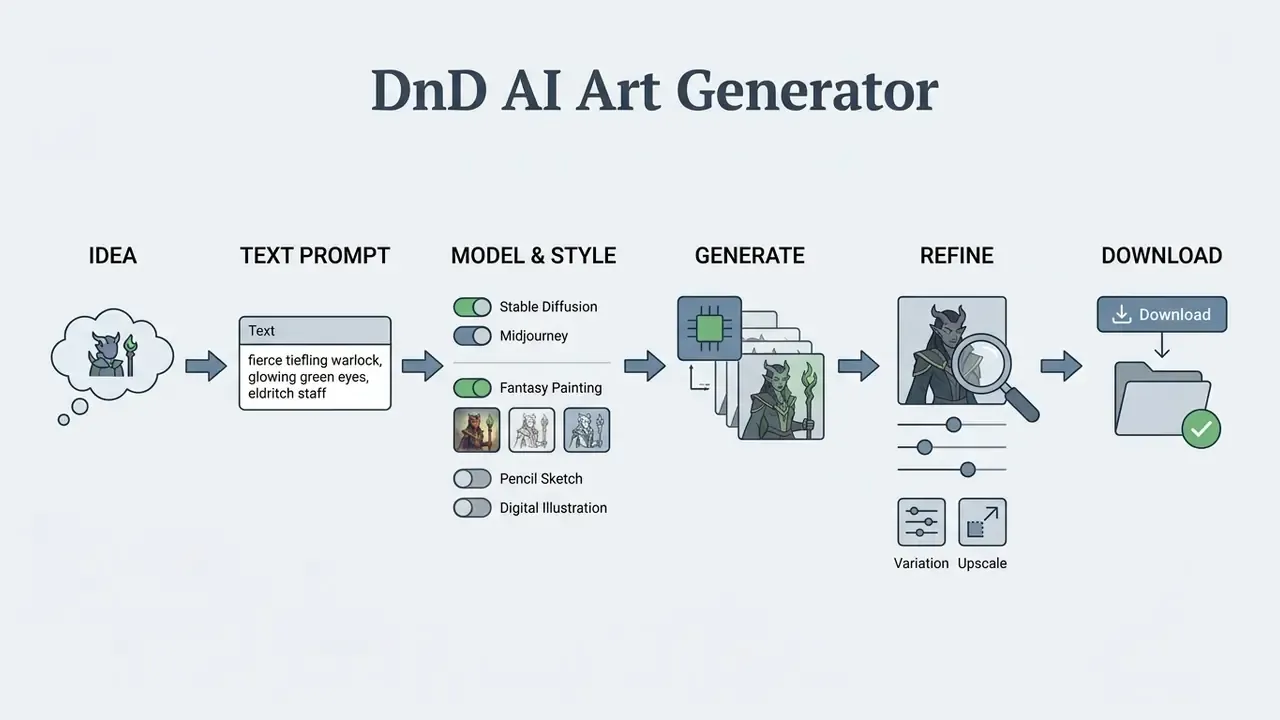
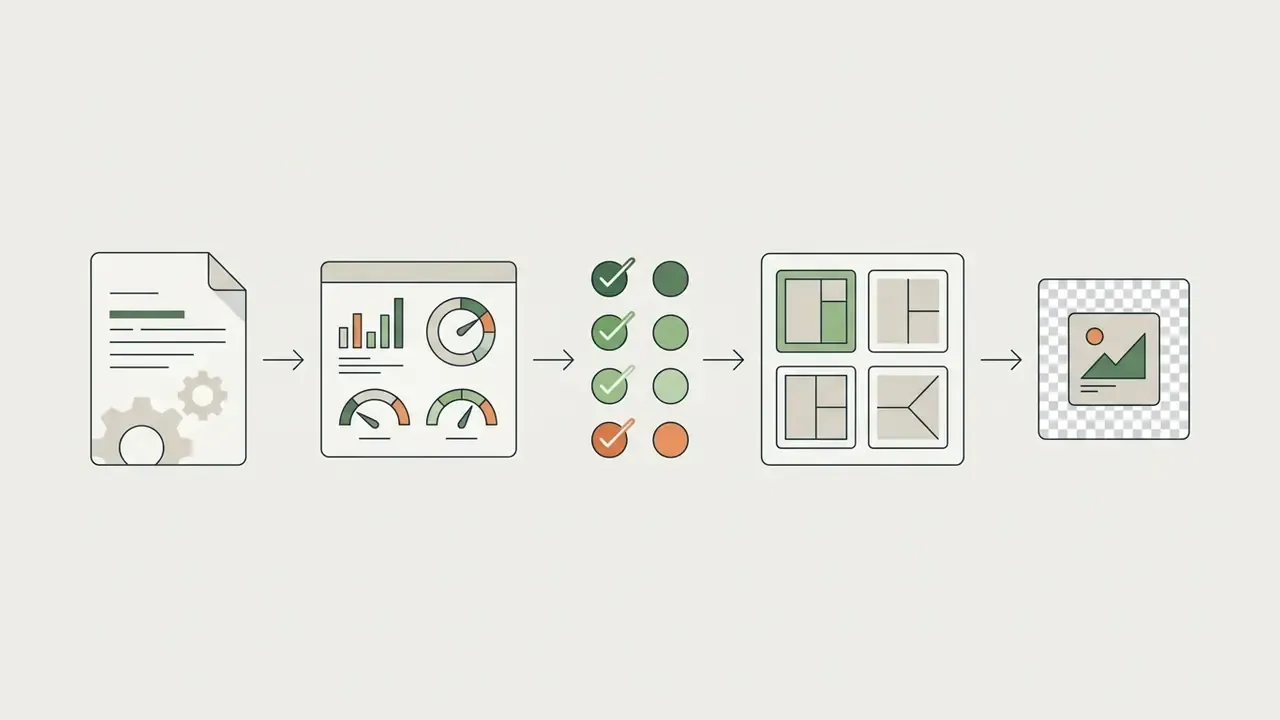
Purpose of the schema: it documents the practical algorithm for creating DnD character art from text. All stages are duplicated as text for accessibility: Idea → Text Prompt → Model & Style → Generate → Refine → Download.
Prompt Formula for an AI DnD Character Generator
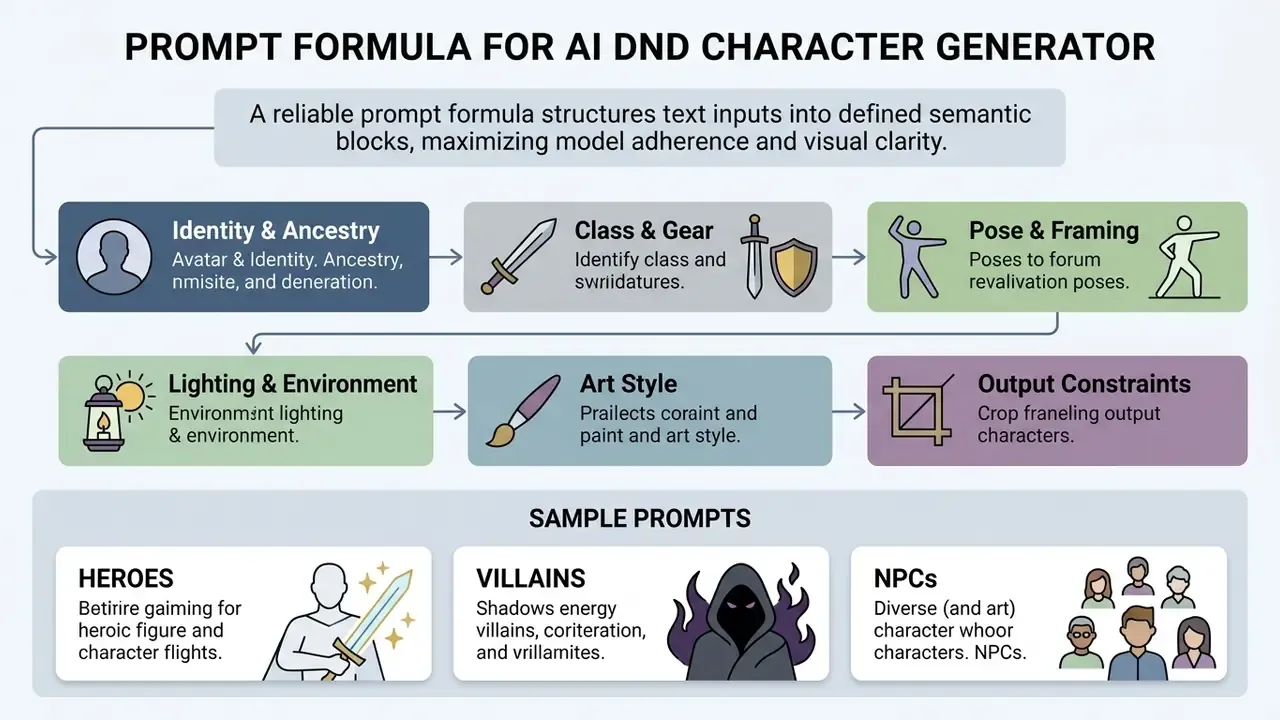
A reliable prompt formula structures text inputs into defined semantic blocks, maximizing model adherence and visual clarity. Studies on automated prompt optimization demonstrate that structured, goal-oriented prompts produce significantly higher evaluation scores than unstructured free-form text.
«A controlled experiment found that multi-goal orientation in prompts correlated with design ratings more strongly than prompt length or editing time.»
[Role/Ancestry] + [Class/Level] + [Visual Anchors] + [Gear/Equipment] + [Pose/Expression] + [Art Style/Lighting] + [Output Constraints]
Core Prompt Elements for a DnD Character Portrait
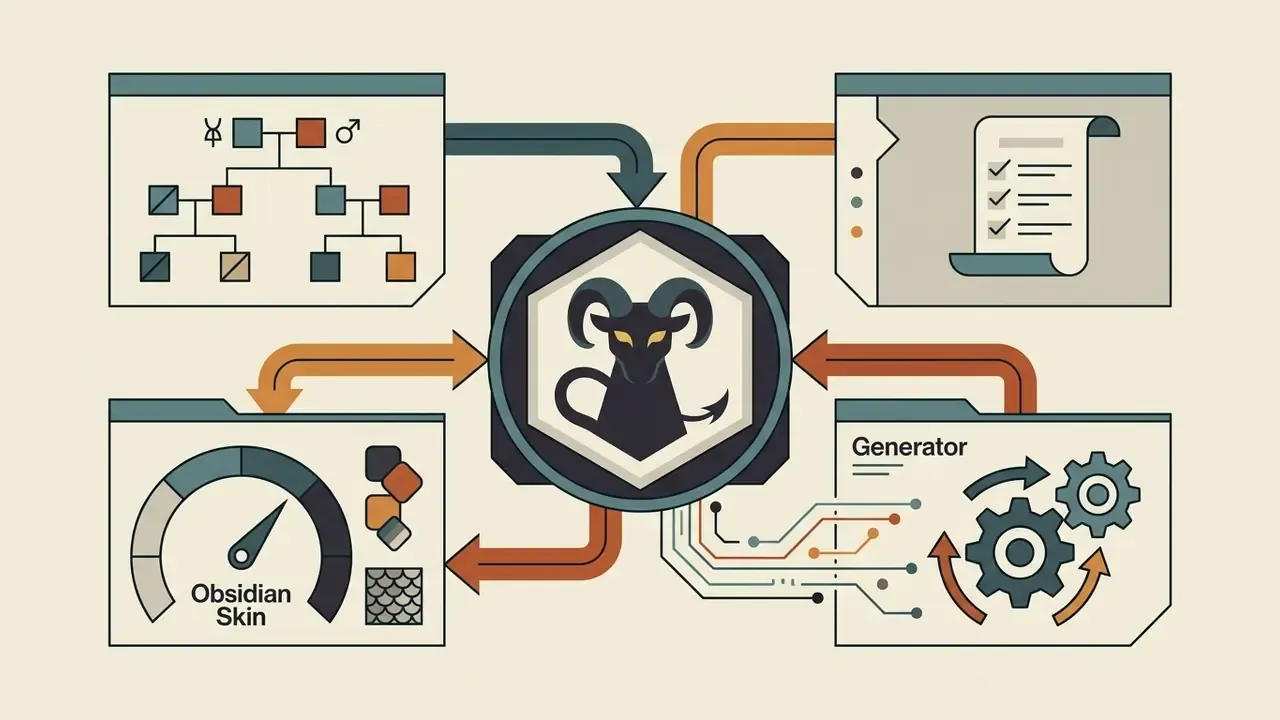
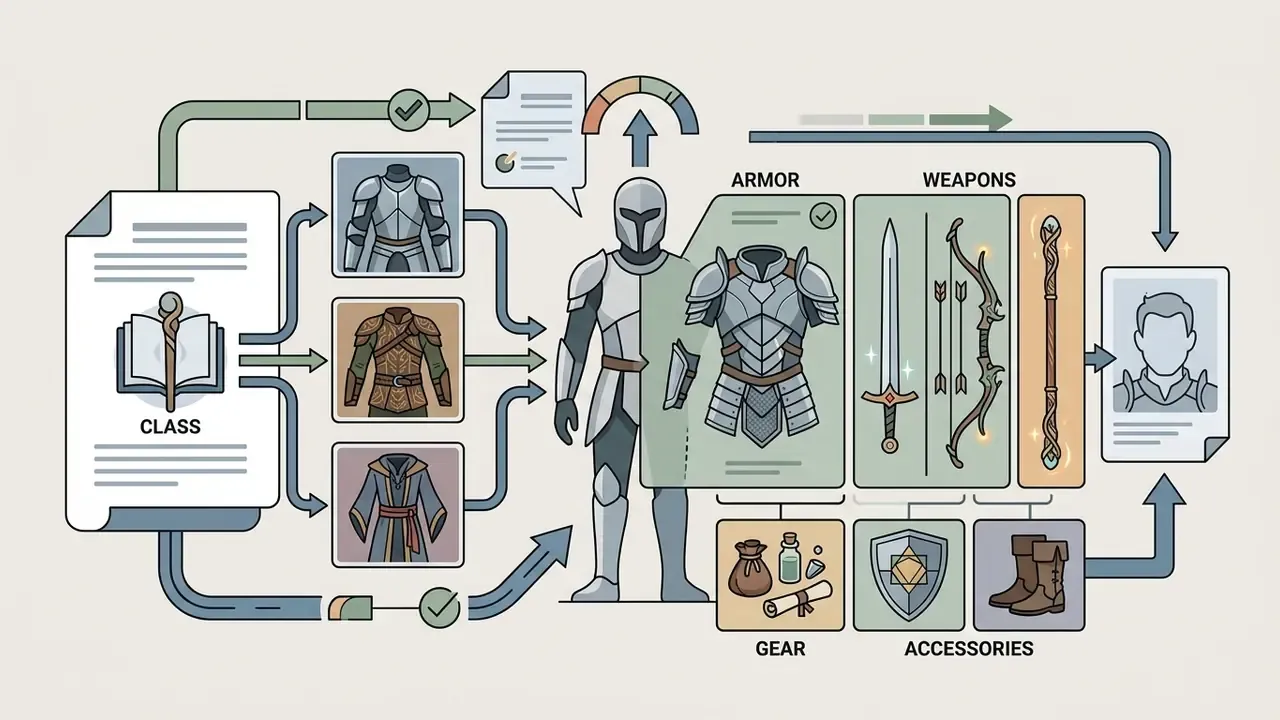
A character portrait prompt should explicitly balance subject identity, equipment details, framing, and environmental lighting. Research on adaptive prompt elicitation indicates that segmenting prompt inputs into distinct visual attributes improves alignment without adding effort for the user.
«Structured visual questions instead of manual prompt writing achieved 19.8% higher alignment with user intent at no increase in workload.»
Sample Prompts for Heroes, Villains and NPCs
«Analysis of over 6 million prompts found 40–50% are repeats, and lexical homogeneity correlates directly with visual similarity of outputs.»
- Hero Archetype "Heroic paladin, male dragonborn with brass scales, ornate silver plate armor with a sun symbol, holding a glowing broadsword, determined expression, three-quarter portrait, heroic lighting, detailed fantasy art."
- Villain Archetype "Powerful necromancer, female high elf with pale skin, dark raven hair, velvet robes with bone embroidery, sinister smirk, holding a glowing skull orb, dark cavern background, dramatic rim lighting, cinematic concept art."
- Merchant NPC "Amiable shopkeeper, elderly gnome male with a bushy white beard, wearing a patched leather apron and spectacles, warm inviting smile, holding a magnifying glass, cluttered potion shop background, soft ambient lighting, painterly illustration."
- Support NPC "Guard captain, stern human female with a weathered face and facial scar, practical steel chainmail, hand resting on hilt of a longsword, vigilant stance, town square background, overcast daylight, detailed RPG portrait."
Once the templates are working, the remaining variable is the engine itself. A head-to-head of Midjourney versus competing image generators shows how differently each model interprets the same armor and lighting tokens.
DnD AI Art Use Cases for Players and Dungeon Masters
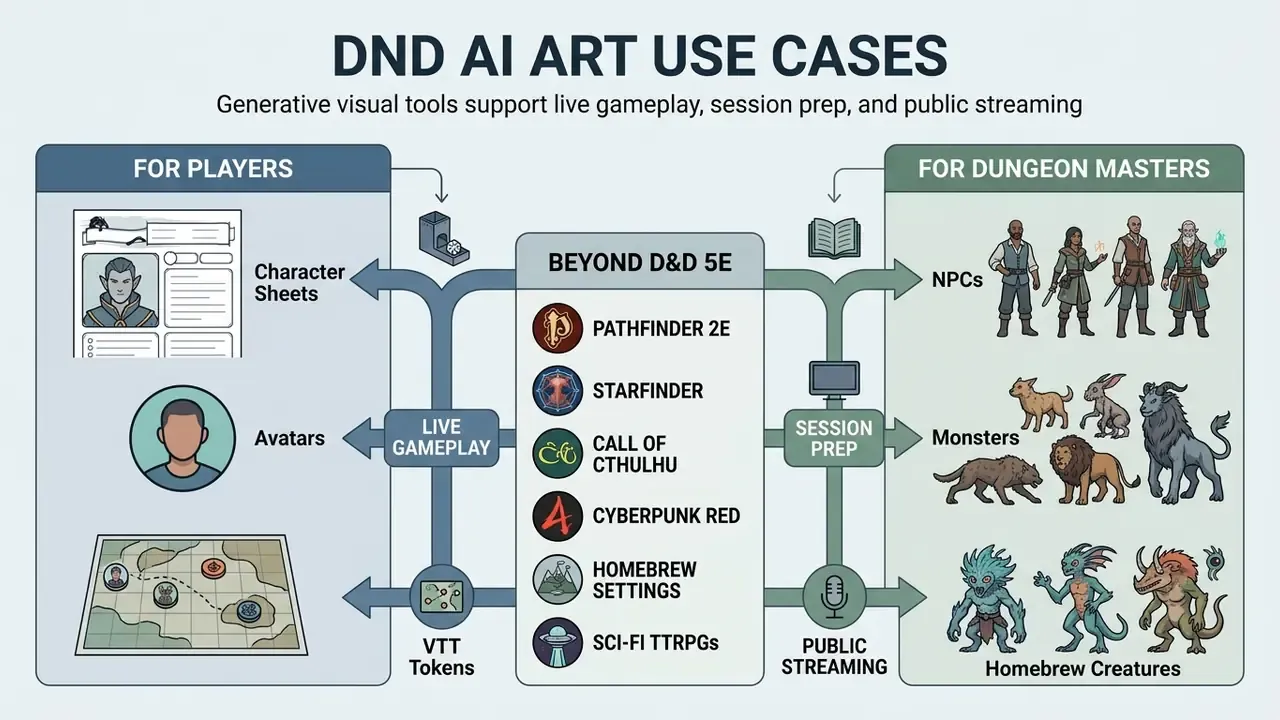
Generative visual tools integrate into multiple stages of tabletop role-playing game production, supporting live gameplay, session prep, and public streaming. Qualitative research on professional practice indicates that creators rely on AI outputs mainly for rapid prototyping and visual communication rather than final polish.
«Interviews with 10 professional game designers found AI tools most valuable for fast concept iteration and visual communication between designers and artists.»
Player Character Art for Sheets, Avatars and Tokens
Players use AI character generators to transform written character sheets into visual avatars and tabletop tokens. Digital character sheets and virtual tabletop platforms including Roll20, Foundry VTT, Fantasy Grounds, TaleSpire, and D&D Beyond all accept high-resolution PNG or JPG imports, but each has its own framing expectations.
Formatting guidelines for virtual tabletops recommend exporting square PNG images with transparent padding at 280×280 pixels per grid unit to ensure crisp rendering during gameplay (Roll20 marketplace asset guidance, verified 2026). Note that Roll20's character-portrait field and its token field are not the same target: portrait uploads are capped around 250×512 px in the wiki, while marketplace token art is specified at 280×280 px per square regardless of in-game creature size.
| Asset type | Aspect ratio | Recommended export | Notes |
|---|---|---|---|
| VTT token (1×1 creature) | 1:1 | 280×280 px PNG, transparent padding | Scale to 560×560 for 2×2, 840×840 for 3×3 |
| Sheet portrait | 3:4 or 1:1 | 1024×1365 px, then downscale | Bust or three-quarter framing reads best at small sizes |
| Full-body reference | 9:16 | 1080×1920 px | Useful for gear continuity across sessions |
| Scene / handout | 16:9 | 1920×1080 px or 4K | Add outpainted margins before cropping |
Custom portraits enhance player immersion and provide clear visual identity during online and in-person sessions.
Beyond D&D 5e. While optimized for Dungeons & Dragons 5e conventions, structured AI image generation workflows apply seamlessly to alternative tabletop RPG systems. Creators can generate visual assets tailored to the distinct aesthetics of:
- Pathfinder 2e
- complex multi-layered armor, unusual ancestries (Leshy, Automaton, Kobold) and iconic class weaponry.
- Starfinder
- void-suited operatives, alien ancestries and starship interior scenes.
- Call of Cthulhu
- 1920s monochrome or sepia investigator portraits, lovecraftian cosmic horrors, and period-accurate item handouts such as newspaper clippings and telegrams.
- Cyberpunk RED and other sci-fi TTRPGs
- neon-lit avatars, chrome prosthetics, futuristic weaponry and tactical grid maps.
- Homebrew settings
- entirely new ancestries, deities and guild insignia with no official reference art at all.
NPCs, Monsters and Homebrew Creatures
Dungeon Masters utilize visual generators to rapidly flesh out homebrew bestiaries and unexpected NPC encounters. Bestiary-style presentation pairs a structured record (name, challenge rating, stat block, short description) with a single illustration, which gives immediate clarity during combat and social interactions. That structure is why published bestiaries pair every creature record with one dedicated image rather than a gallery.
Creature-design practice also transfers directly to prompting: describe large forms first (mass, silhouette, number of limbs), then joints and shadow direction, and only then surface detail. Rapid image generation lets DMs react when players wander off the planned path. An NPC invented mid-session can have a face within a minute. Not a masterpiece, but a face.
Fantasy Locations, Battle Maps and Campaign Handouts
Generative image tools produce environmental concept art, regional landscape views, and custom campaign handouts like letters or ancient scrolls. Multi-layer workflows matter here: documented battle-map pipelines digitize and evaluate spatial data, then export each phase of an engagement as a separate layer or PDF, so a single encounter can be revealed to players step by step (Koukoletsos et al., battle-map workflow, 2023). Sequential map reveals are used the same way in military teaching materials, where each map stage carries one movement phase instead of the whole battle.
For tabletop use, that translates into three exports per location: a clean player-facing map, a DM layer with secrets and traps, and an atmospheric establishing illustration for the reveal moment. Typography deserves a thought too, since handouts live or die on legibility; a themed display font from something like a barbie font generator can be repurposed for playful shop signs and carnival flyers, while gothic serifs suit necromancer correspondence.
Animated Campaign Handouts and Video Reveals
Beyond static 2D illustrations, tabletop creators use image-to-video diffusion models to convert rendered character portraits and landscape art into dynamic MP4 animations. Adding subtle ambient motion, such as flickering torchlight in a dungeon corridor, drifting snow over a mountain pass, glowing runes crawling along a staff or a villain's cloak shifting in wind, turns a static visual aid into an immersive teaser for a second screen, a Discord reveal or a social media campaign recap.
Practical constraints are worth knowing before you plan a session around it: most hosted image-to-video models generate 4–10 second clips, motion strength is a separate parameter from prompt text, and faces degrade faster than environments, so wide shots animate more reliably than close-up portraits. Creators who need longer sequences typically chain several clips in an animation maker or generate them programmatically through a video generation API.
Styles, Consistency and Customization of Generated DnD Images
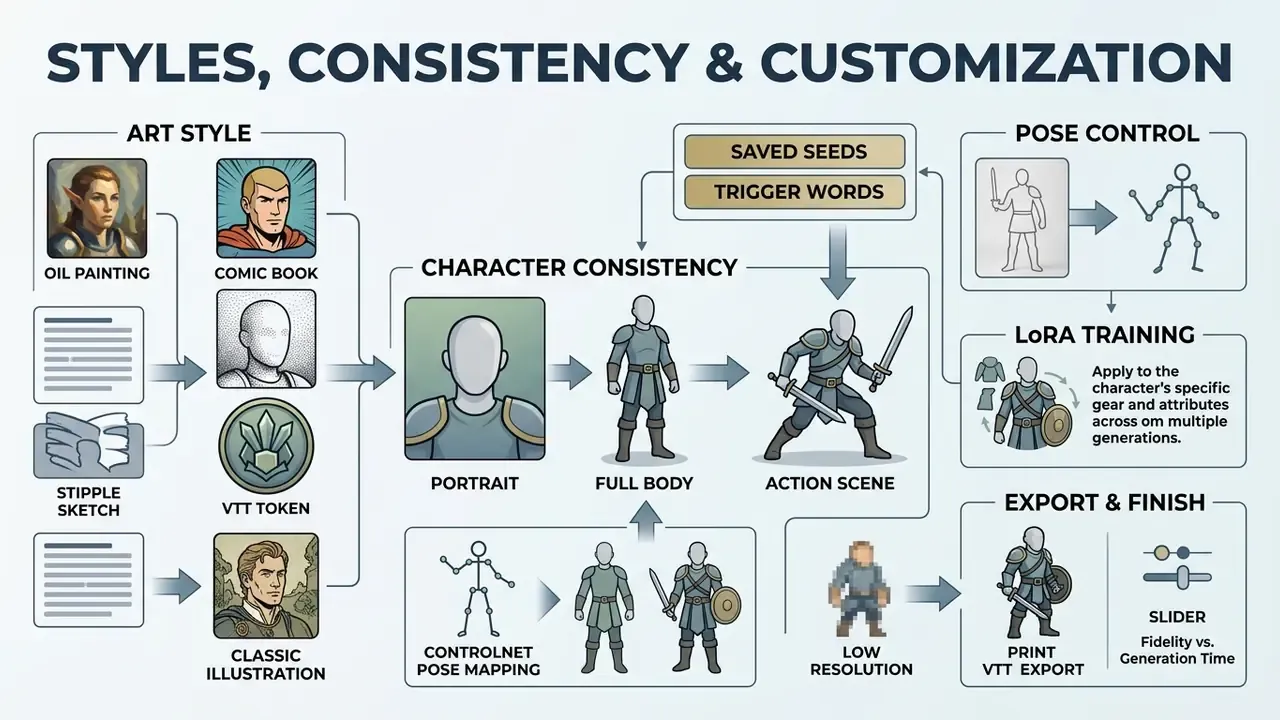
Maintaining visual continuity across multiple campaign assets requires controlling artistic styles and anchoring character identities across successive generations. Empirical studies reveal that unconstrained diffusion models frequently alter facial features across generations unless specific identity preservation techniques are applied.
«A user study with 1,104 ratings per task found iterative model personalization delivers higher character-identity consistency while preserving prompt alignment.»
During a published module build, a tabletop creator maintained character consistency for a main antagonist across four distinct adventure acts. By combining a fixed seed value, an IP-Adapter structural reference, and a saved style preset, the creator generated 15 scene illustrations featuring the same recognizable villain face. This preserved visual continuity across chapter handouts and promotional banners.
Choose a Fantasy Art Style for Your Campaign
Selecting a unified visual style establishes a cohesive atmosphere for a tabletop campaign. Common visual modes include modern 5e cinematic concept art, classic 1980s oil painting aesthetics, detailed comic book line art, and muted watercolor illustrations. Historically the label "80s D&D art" is itself mixed: early AD&D material leaned toward comic-book linework, later TSR covers toward painted oils, and some 1980 modules, such as Jim Roslof's Keep on the Borderlands cover, were watercolor studies.
| Fantasy Art Style | Key Prompt Keywords | Recommended Use Case |
|---|---|---|
| Cinematic Concept Art | concept art, character sheet, cinematic lighting, detailed armor, 8k resolution | Modern 5e campaign hero portraits and key scenes |
| Classic 80s TSR | 1980s TSR, AD&D style, heroic fantasy oil painting, Larry Elmore mood | Retro dungeon crawls and classic-style modules |
| Watercolor Illustration | watercolor, ink wash, soft edges, muted earthy palette, hand-painted map | Regional maps, campaign handouts, and travel logs |
| Comic Book Line Art | comic book style, bold outlines, flat shading, dynamic pose, graphic novel | High-action campaigns and stylized character tokens |
| Grimdark / Dark Fantasy | grimdark, desaturated palette, heavy shadow, weathered armor, oppressive fog | Horror arcs, undead campaigns, Call of Cthulhu crossovers |
If your table prefers a softer, hand-painted look, the same style-locking logic used by Ghibli-style AI image generators applies: fix one style reference and change only the subject block.
Keep the Same Character Across Portraits and Scenes
Achieving character consistency across different angles, costumes, and campaign scenes requires structured technical controls rather than simple prompt repetition. Advanced workflows combine text prompts with reference image conditioning, LoRA adapters, or ControlNet pose structures to fix facial geometry. Hugging Face's Diffusers documentation describes IP-Adapter as a lightweight module that extracts features from a reference image and injects them into the UNet cross-attention layers, and explicitly notes that it can be combined with ControlNet for structural control from depth, edge or pose maps (Diffusers IP-Adapter documentation, 2025–2026). Tencent's reference implementation ships an ip_adapter_controlnet_demo example for exactly this pattern.
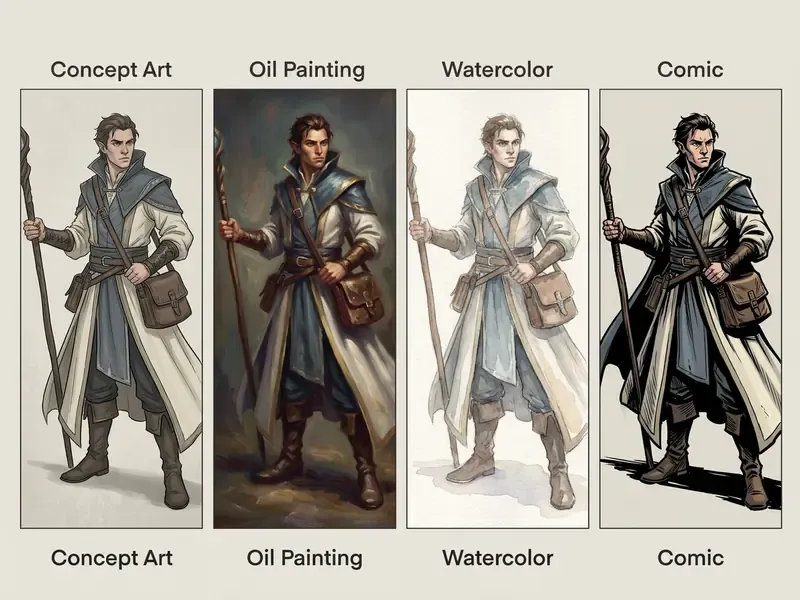
Purpose of the slider: it demonstrates how style choice changes the final image while character features stay fixed.
Free DnD AI Art Generator, Pricing and Commercial Use
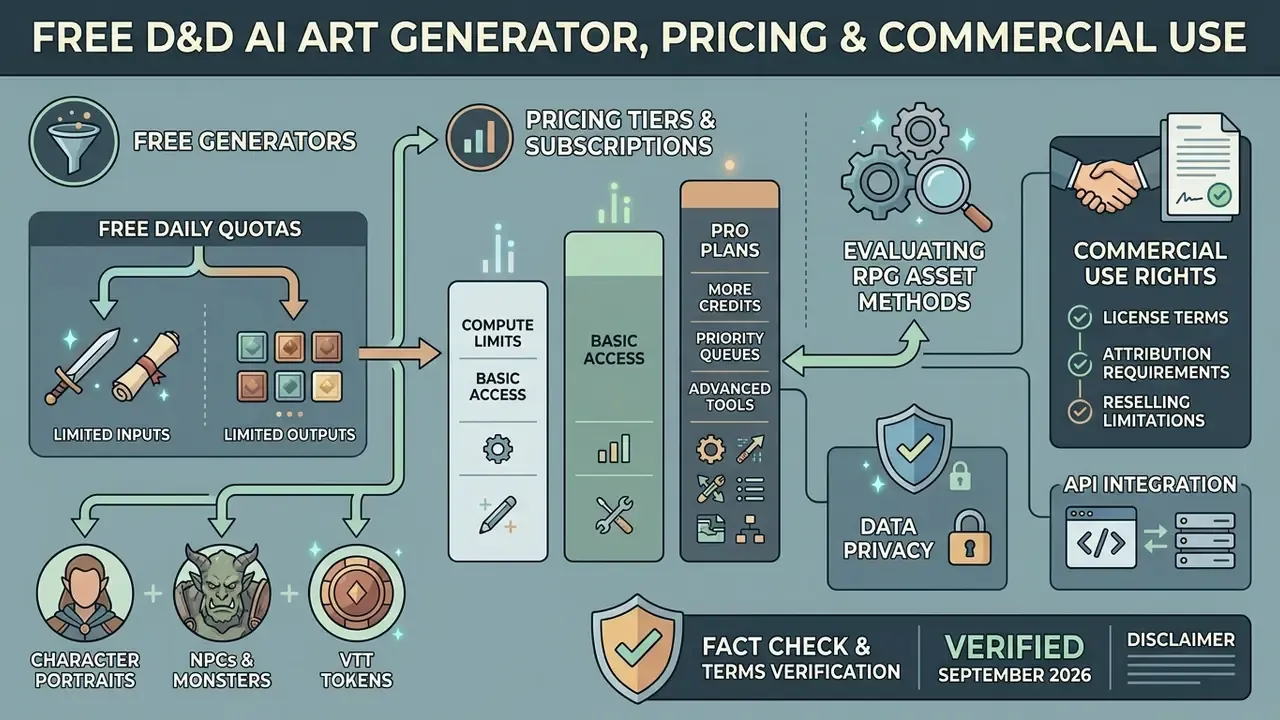
Selecting an AI art generator involves evaluating free daily quotas, subscription pricing tiers, compute limits, and commercial usage rights. Platform terms vary significantly between personal hobby use and commercial publishing models. If budget is the deciding factor, start from a shortlist of free AI art generators and upgrade only when consistency tools become the bottleneck.
Evaluating RPG Visual Asset Creation Methods
Choosing between custom AI generation, commercial stock art repositories, and custom artist commissions depends on project deadlines, budgetary constraints, and required lore specificity.
| Evaluation Metric | DnD AI Art Generators | Stock Art Platforms | Manual Artist Commission |
|---|---|---|---|
| Lore Specificity | Unlimited custom prompt tailoring | Restricted to existing pre-rendered assets | High (requires detailed design briefs) |
| Turnaround Time | 10 to 45 seconds per portrait | 15 to 60 minutes searching and filtering | 2 to 4 weeks production window |
| Average Unit Cost | Free to about $0.04 per image | $5 to $25 per stock license | $50 to $250+ per single asset |
| VTT Integration | Instant square framing and PNG export | Manual cropping and background removal | Depends on artist deliverable package |
| Character Consistency | Controllable via seeds, IP-Adapter, ControlNet | Virtually impossible across scenes | High visual continuity across assets |
| Copyright Position | Human-authored contribution only | Licensed, clearly enforceable | Strongest; assignable by contract |
The honest read: AI wins on speed, volume and specificity; commissions still win on legal clarity and on the single flagship image that sells a published module.
What Free Character Generators Usually Include
Free AI character generators typically operate on daily token or credit allocation systems. For instance, platforms may provide 150 fast generation tokens per day (with no rollover and one concurrent task) or basic zero-credit generation queues with standard processing speeds and rate limits (Leonardo AI Documentation, 2026; NightCafe Terms, 2026). Free tiers allow casual players to generate basic character portraits, though high-resolution exports, batch generation and advanced consistency tools are often restricted to paid subscriptions. Readers who simply want to test a prompt can also look at browser-based generators that need no account.
How to Compare Prices, Credits and Pro Plans
Paid subscription plans offer increased compute quotas, priority processing queues, and access to premium base models. Commercial subscription tiers generally range from $8 to $30 per month depending on generation volume and model access (Google AI Subscription Overview, 2026), with premium research tiers priced far higher: Google AI Plus at $7.99, AI Pro at $19.99 and AI Ultra at $199.99 per month, where Pro is documented at roughly 4× free usage and Ultra at up to 20× Pro. Midjourney's paid plans were reported at $10, $30, $60 and $120 per month, with commercial rights attached to paid tiers and higher-revenue users directed to Pro or Mega.
Evaluating plans requires balancing monthly credit allowances against the frequency of session preparation and asset generation needs. A weekly campaign with 5–8 new visuals per session rarely exceeds an entry paid tier; a published module with 60+ illustrations usually does. To model the difference before you subscribe, run your expected volume through the AI Media Calculators and cross-check current tiers in the AI Media Pricing Guides.
What to Check Before Using AI Art Commercially
Creators planning to sell adventure modules, stream content, or publish game products must review platform Terms of Service regarding commercial ownership. While several platforms assign commercial usage rights to paid subscribers, copyright registration for AI-generated assets remains limited to human-authored contributions under US copyright law (US Copyright Office, 2026; Canva AI Terms, 2026). Canva's AI product terms state the user owns input and output and that Canva makes no copyright ownership claim; Fotor's terms similarly permit personal and commercial use without a copyright claim on output. Neither contractual grant converts into copyright protection for the machine-generated portion. See the broader breakdown of commercial rights for AI-generated art and the vendor-by-vendor summaries in the AI Media Commercial-Use Hub.
Data privacy and API integration. When choosing an enterprise or hosted generation tool, verify whether uploaded reference photos or generated assets are stored or used for model training. This matters most in photo-to-avatar workflows, where you are uploading a real face. Professional platforms guarantee encrypted transit (TLS 1.3) and encryption at rest, publish non-training policies for private user assets, allow immediate deletion of uploads and account content, and expose REST API endpoints for direct integration into custom campaign management software or web applications. For teams building an internal asset pipeline, api access also removes manual downloads from the loop entirely; Microsoft's image generation stack is one commonly used enterprise entry point.
| Generator Platform | Free Tier Access | Standard Paid Tier | Commercial Usage Rights | Primary D&D Strength |
|---|---|---|---|---|
| Leonardo AI | 150 daily fast tokens | ~$10 – $12 / month | Included on paid tiers | High custom model and style control |
| DALL·E 3 (ChatGPT) | Limited free access | ~$20 / month (Plus) | Full commercial rights granted | Superior prompt adherence for complex text |
| Midjourney | No free tier reported | $10 – $120 / month | Included on paid tiers | Strongest painterly fantasy aesthetics |
| Stable Diffusion / FLUX (open) | Free (local hosting) | Usage-based cloud hosting | Depends on the specific model license | Complete privacy, ControlNet, LoRA fine-tuning |
| Adobe Firefly | Free generations included | From ~$9.99 / month | Marketed as safe for commercial use | Prompt enhancement plus style and composition controls |
| CharGen | Basic personal generations | Paid tier plans available | Included on Elite / Ultimate tiers | Specialized D&D character sheet and token templates |
Fact Check and Terms Verification (Verified September 2026)
FAQ About DnD AI Art Generators
Do You Need Drawing or Prompt-Writing Experience?
No drawing skills or advanced prompt engineering experience are required to use modern DnD AI art generators. Contemporary tools incorporate built-in prompt enhancement features and LLM-based prompt rewriters that automatically expand simple descriptions into detailed, model-optimized prompts (Adobe Firefly Documentation, 2026; Vertex AI Imagen Docs, 2026). Adobe Firefly's prompt-enhancement toggle rewrites the prompt in the background and lets you inspect or edit the expanded text; Vertex AI's "Enhance my prompt" flow inserts an expanded prompt you can modify before generating. Users can enter basic character details, for example "elf ranger with a longbow", and rely on automated systems to supply appropriate stylistic, lighting, and composition tags.
«Automatically expanding short user prompts into detailed versions improved results by about 5% on average across six image quality and aesthetics metrics.» Source: Hei et al., UF-FGTG: A User-Friendly Framework for Generating Model-Preferred Prompts, arXiv (2024). https://arxiv.org/abs/2402.12760
How Do I Fix Broken Hands, Fingers and Weapons?
Use a two-stage fix. First, prevent it: add negative tokens such as extra fingers, fused fingers, malformed hands, bent sword, duplicate weapon and prefer poses that hide hands (crossed arms, hand on hilt, gauntlets). Second, repair locally: mask only the failing region and inpaint at a low denoising strength of roughly 0.3–0.45 so the surrounding armor and face stay untouched. Because masked edits in documented pipelines return an output at the same resolution as the input, you can iterate on a single hand repeatedly without degrading the rest of the portrait.
Can I Use AI-Generated D&D Art Commercially?
Contractually, usually yes on paid tiers. Several platforms explicitly assign commercial use rights and make no copyright claim over your output. Legally, the picture is narrower: US copyright protection covers only your human-authored contributions, and more-than-de-minimis AI content must be disclosed during registration. Marketplace rules add a third layer, since DriveThruRPG and DMs Guild require AI tagging and refuse standalone AI-art products, and Wizards of the Coast bars generative AI in final official D&D deliverables. For paid publishing, keep records of prompts, edits and human rework.
Which Generator Is Best for D&D Portraits, Midjourney, DALL·E 3 or Stable Diffusion?
It depends on what fails first in your workflow. Midjourney produces the most immediately painterly fantasy look with the least prompt effort. DALL·E 3 follows long multi-attribute prompts most literally, which helps when a character has six specific pieces of gear. Open-weight Stable Diffusion and FLUX models win when you need ControlNet, LoRA training, local privacy for uploaded photos, or repeated identity locking across dozens of scenes; the trade-off is setup time and per-model license checks. Many DMs use two: a hosted model for exploration, an open model for the final consistent set.
Can I Turn My Own Photo Into a D&D Character?
Yes. Upload a clear, front-facing headshot of at least 512×512 px, set IP-Adapter identity strength to roughly 0.6–0.8, add ancestry and gear anchors to the prompt, then inpaint the hairline, horn roots and armor edges. Before uploading a real face to a hosted service, confirm the provider's non-training policy, retention window and deletion controls; running an open-weight model locally removes the upload question entirely.
Are AI Images Compatible With Roll20, Foundry VTT and D&D Beyond?
Yes, all of these platforms accept standard PNG or JPG uploads. Export square PNGs with transparent padding at 280×280 px per grid square for tokens, keep sheet portraits in 3:4 or 1:1 framing, and use 16:9 at 1920×1080 or higher for scene art and battle maps. Foundry VTT and TaleSpire benefit from larger source files because of zoom; D&D Beyond and Roll20 portraits are cropped tightly, so keep the face away from the edges.
Appendix A: Editorial Revision Log
For transparency, the following weakly sourced references from the earlier version of this guide were replaced with verifiable, quantified citations in the body text above:
| Original in-text reference | Replaced with (Updated) |
|---|---|
| Lee et al., 2024 | Diffusion Explainer user study, 56 participants: https://arxiv.org/abs/2305.03509 |
| CONFORM, 2023 | CONFORM user study, 25 participants, 72–94% preference: https://arxiv.org/abs/2312.06059 |
| RAVE, 2023 | RAVE study, 130 Prolific participants, ~25% faster: https://arxiv.org/abs/2312.02137 |
| DALL·E Prompt Adaptation Study, 2024 | 1,891-participant prompt adaptation study: https://arxiv.org/abs/2407.09307 |
| Oppenlaender et al., 2024 | Three-study prompt-engineering skill investigation: https://arxiv.org/abs/2303.13534 |
| Bike Design Study, 2024 | Controlled goal-orientation experiment: https://arxiv.org/abs/2401.06537 |
| APE, 2026 | Adaptive Prompt Elicitation, +19.8% intent alignment: https://arxiv.org/abs/2501.09897 |
| Civiverse Study, 2025 | 6M-prompt corpus analysis, 40–50% repeats: https://arxiv.org/abs/2503.01947 |
| Sketchar Study, 2024 | 10 professional designer interviews: https://arxiv.org/abs/2407.02900 |
| The Chosen One, 2024 | 1,104 ratings per task, SIGGRAPH 2024: https://arxiv.org/abs/2311.10093 |
| Library of Congress Primary Source Methods, 2025 (off-topic) | Layered battle-map export workflow, Koukoletsos et al. (2023) |
Vendor-documentation claims (Roll20 token sizing, Leonardo AI and NightCafe free limits, Google and Midjourney subscription pricing, DALL·E API rates) are cited to the vendors' own published pages and were verified in September 2026. Vendor pricing and free-tier limits change frequently; re-check before purchase.
A Safe Next Step
Do not start with the flagship illustration. Start with one token and one bust portrait for a single character, lock the model and seed that produced them, and write both values into your campaign notes. If the likeness survives three unrelated scenes, the workflow is stable enough to scale to a full module. If it drifts, add a reference image before you add prompt words.
More definitions, format notes and tool profiles are collected in the AI Media Glossary.