Executive Summary
- What it is.An AI graffiti art generator converts text prompts or reference images into street-style artwork: tags, throw-ups, blockbusters, wildstyle pieces, stencils, heaven pieces, scribes, stickers, logos, and full murals.
- Two pipelines matter.Text-to-image controls wording, palette, and surface. Image-to-image (reference-conditioned) preserves an uploaded logo, photo, or sketch structure under paint effects.
- Model choice drives text accuracy.Frontier engines (GPT-4o-class image models, Gemini/Nano Banana Pro, Ideogram, Adobe Firefly, FLUX.1, SD3.5 Large) outperform older open-source backbones on letter accuracy and instruction adherence. That is the single biggest source of rework in graffiti lettering.
- Free tiers are creative sandboxes, not production licenses.Expect 5 to 50 monthly credits, 72 to 150 DPI exports, watermarks, and non-commercial (CC BY-NC 4.0-style) terms. Commercial rights are almost universally gated behind paid plans.
- Two governance gaps most teams miss.First, data handling: whether prompts and uploaded brand logos are retained or used for model training, which is a classic shadow AI risk. Second, IP clearance: human-authorship documentation, a USPTO TESS trademark search, and reverse-image checks before printing merchandise.
- Repeatability is engineering, not luck.Lock seeds, log negative prompts and CFG values, store raw PNG masters, and verify lettering through OCR before export.
How to use this guide
This is a buyer-and-operator guide, not a gallery tour. It moves from capability to control, then to money and legal exposure, because that is the order in which most creative-ops decisions actually get approved.
Three reader profiles fit it well. Designers who need readable lettering on the first or second attempt. Marketing leads who must sign off on assets that will be printed. And risk, brand, or compliance owners who care where an uploaded logo travels.
One small note on search vocabulary. Variants such as "ai generator graffiti", "graffiti ai generator free", "graffiti art ai generator", and even the frequent misspelling "grafiti art generator" all resolve to the same product category: a diffusion-based engine that paints text and imagery onto simulated urban surfaces. Same tooling, different spellings.
Read the licensing section before the prompt section if merchandise is the goal. Sequence matters more than most people expect.
What an AI graffiti art generator is and what it can create
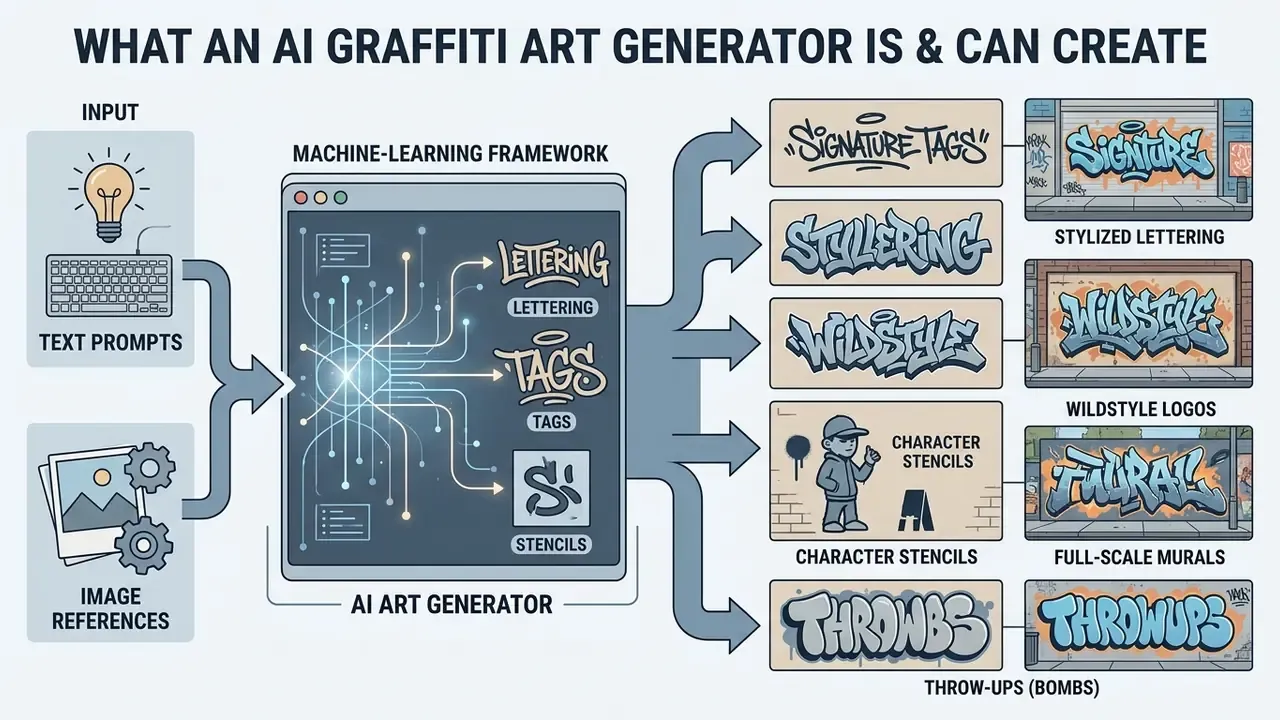
An AI graffiti art generator is a machine learning framework that converts text prompts or reference images into street-style visual artwork, including single-color tags, stylized lettering, logos, and full-scale murals. These systems rely on deep generative models, such as diffusion architectures and vision-language transformers, fine-tuned on specialized visual datasets of urban art, typography, and surface textures. In practice, the engines behind consumer-facing tools are recognizable: diffusion families such as Stable Diffusion 3.5 and FLUX.1, proprietary systems like Midjourney v6+, DALL·E 3, Ideogram, Adobe Firefly, and Gemini-class multimodal models (marketed by some vendors as "Nano Banana Pro").
By conditioning the generative process on text or reference images, an ai graffiti art generator enables creators, graphic designers, and brand managers to produce complex street-style graphics without manual spray painting or vector drawing. If you are new to the broader category, start with the foundations of AI art generators before narrowing down to street-art-specific engines. Modern ai generated graffiti art tools bridge the gap between conceptual typography and photorealistic surface rendering, placing stylized lettering onto realistic substrates like weathered brick, poured concrete, metal shutters, or digital canvases.
Generating graffiti from text, image, and reference
Text-to-image graffiti generation creates street art directly from descriptive prompts, while image-to-image and reference-based workflows use existing visual inputs to guide structure, composition, and style.
In a text-to-image configuration, an ai graffiti text generator uses textual conditioning to define the target word, typography style, color palette, and background environment. For example, inputting a specific phrase alongside style descriptors prompts the neural network to synthesize letterforms with spray-paint drips, drop shadows, and wall textures.
In reference-based workflows, an ai graffiti image generator accepts an input photograph, sketch, or vector graphic. Techniques such as reference guidance and spatial attention masking allow the model to preserve structural layout while applying street-art filters. The mechanism is now documented explicitly in controllable diffusion research: spatial attention anchors decide where text is written, while spectral glyph injection decides what is written and how structurally accurate the characters are.
Practically, this means an uploaded brand mark stays legible under heavy paint effects if you keep the image-strength (denoise) parameter in the moderate range instead of pushing it toward full re-generation. Push it too far and you get a beautiful wall with an unrecognizable logo on it.
Tags, names, lettering, logos, and street-style designs
AI graffiti tools produce ten distinct categories of street-art artifacts, from single-stroke signatures to monumental wall compositions. Below is the full reference taxonomy, which is also the vocabulary you should actually put into prompts.
- Signature Tags Single-color, line-based writer pseudonyms synthesized by an ai graffiti tag generator, replicating marker or spray-can stroke dynamics.
- Stylized Lettering Bold block letters, straight-letter pieces, and 3D lettering generated by an ai graffiti maker, complete with bevels, drop shadows, and paint drips.
- Wildstyle Logos Intricate, interlocking typography with sharp arrows, splatters, and complex geometry created via an ai graffiti logo generator.
- Character Stencils Figurative elements, cartoon characters, or portrait stencils integrated alongside textual pieces.
- Full-Scale Murals Complex, multi-element street-art compositions rendered across expansive urban wall environments.
- Throw-Ups (Bombs) Quick, two-color bubble letters with thick outlines and solid fills, designed for high-contrast visibility.
- Blockbusters Massive, square, blocky letters painted to cover large surface areas, highly legible from extreme distances.
- Heaven Pieces High-altitude graffiti artwork executed on hard-to-reach urban infrastructure like highway overpasses and rooftops.
- Scribes & Etches Fine-line designs visually carved or etched into glass, metal shutters, or polished reflective surfaces.
- Slaps & Stickers Compact graphic designs formatted with die-cut borders for adhesive vinyl or sticker deployment, often carrying short slogans.
Accuracy of the lettering inside these artifacts depends on architecture, not luck. Research on scene-text generation quantifies why character-level conditioning matters.
How to choose an AI graffiti generator: free plans, features, and quality
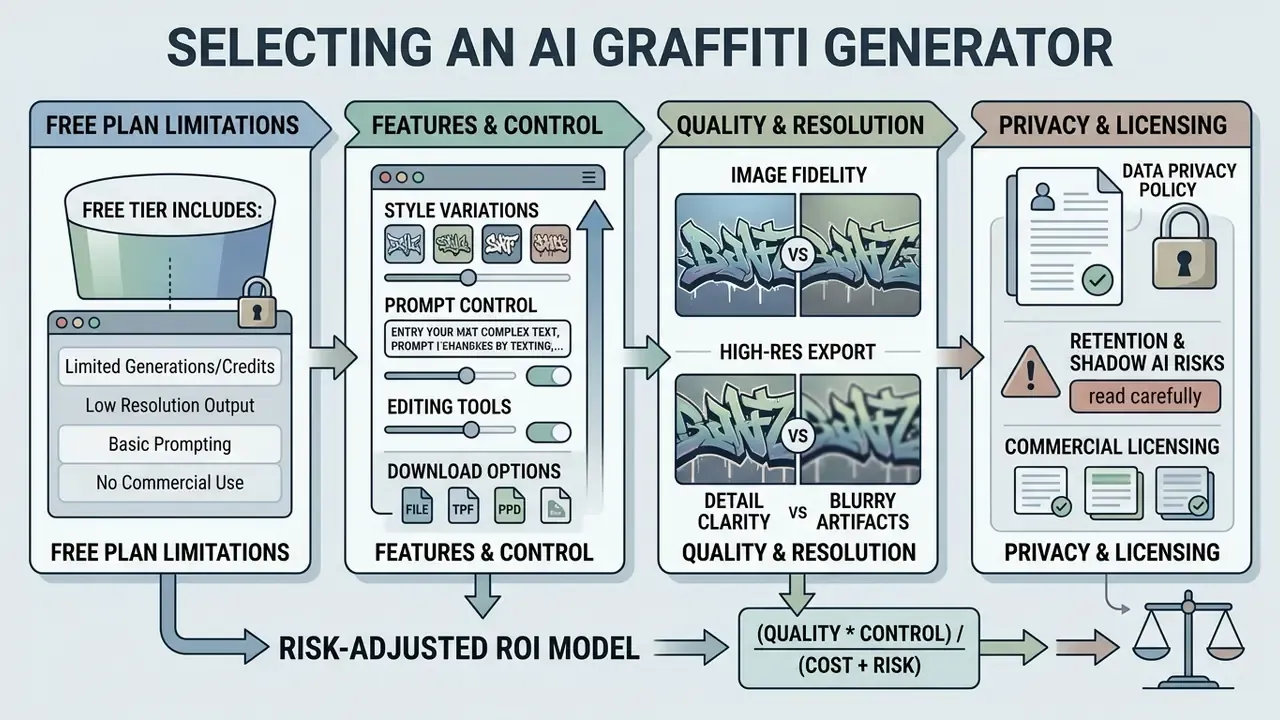
Selecting an ai graffiti generator requires evaluating free-tier limitations, prompt control features, image resolution output, data-handling policies, and commercial licensing terms. While many tools advertise a free ai graffiti generator option, operational capabilities vary significantly between open-source baseline models and advanced commercial engines.
When choosing a graffiti generator ai free platform, decision-makers must distinguish between basic raster filters and full generative diffusion models. Basic platforms apply fixed stylistic overlays. True diffusion-based platforms synthesize original letterforms, custom lighting, and surface textures based on user prompts. Before committing budget, benchmark candidates against the wider field of best AI image generators rather than judging a single vendor landing page.
The quality gap between frontier and legacy open-source backbones is now measurable on dedicated long-text datasets.
Consequently, free online tools built on older open-source backbones frequently struggle with complex typography, requiring multiple regeneration attempts or manual post-editing. If your deliverable contains more than one word of brand copy, model selection is the primary lever. Prompt tuning is secondary.
To evaluate overall software investment costs across creative automation stacks, organizations consult standardized AI Media Pricing Guides and systematic platform evaluations on AI Media Comparison Matrices.
What a free AI graffiti generator usually includes
Free tiers for AI graffiti platforms typically provide daily generation credits, standard-resolution exports, public gallery publishing, and non-commercial usage rights.
Platform operators implement credit caps, ranging from 5 to 50 generations per month, to manage compute infrastructure overhead. Free accounts often restrict export resolutions to standard web formats (72 to 150 DPI PNG or JPG files) and may apply visual watermarks. Advanced parameters such as image-to-image reference uploads, seed control, and vector SVG exports are frequently reserved for paid subscription tiers. Documented examples of this pattern in 2026 include free-forever plans capped at roughly 50 generations per month with print-ready PNG up to 4K only on higher tiers, and free-account access to Firefly-class generation with saving through cloud libraries.
Data privacy, retention, and shadow AI: what landing pages omit
Free graffiti generators are the classic entry point for shadow AI. A marketing specialist uploads a proprietary logo into an unvetted browser tool to "just try a street-art version". Before that happens, evaluate four data-governance parameters that rarely appear in feature tables.
| Governance parameter | What to verify | Typical free-tier reality | Enterprise-tier expectation |
|---|---|---|---|
| Prompt & upload retention | How long prompts and reference images are stored | Indefinite storage in an account gallery, sometimes public by default | Configurable retention, private-by-default projects |
| Training on user data | Whether uploads and prompts feed future model training | Frequently permitted by ToS; opt-out unavailable | Contractual no-training commitment |
| Output visibility | Whether generations appear in a public community feed | Public gallery is often the default trade-off for free credits | Private workspace, per-seat access control |
| Vendor subprocessing | Which cloud or API providers process the image | Undisclosed | Documented subprocessor list, DPA available |
Practical control measures: never upload unregistered trademark assets or unreleased packaging artwork to a free consumer tier; generate the street-art texture and lettering separately and composite the protected logo locally in a design editor; and maintain an approved-tool register so creative teams do not improvise. Vendors that explicitly state prompts and uploaded files remain private during use are preferable, though "private during use" is not the same as "excluded from training". Request the written distinction.
One more control that costs nothing: name an owner. Every approved tool needs a person who signs off on the plan tier, the retention setting, and the escalation path when an asset leaks into a public feed.
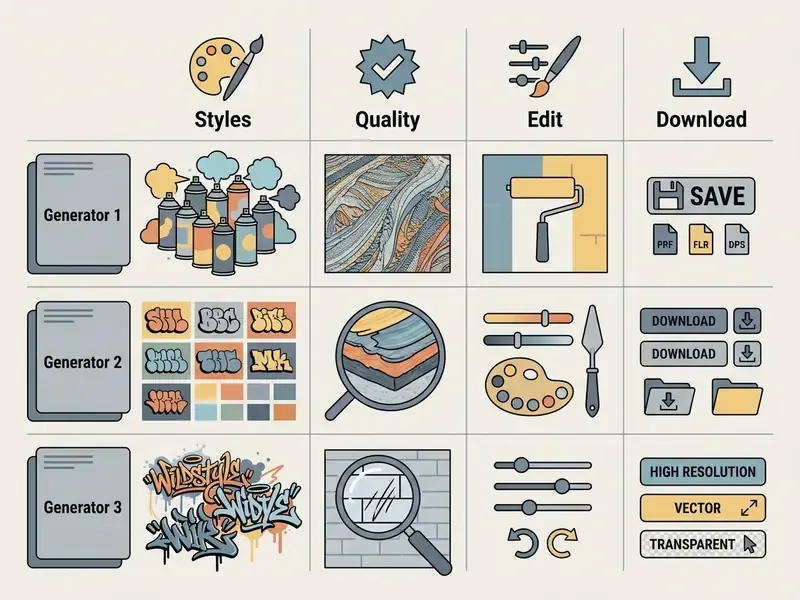
Features to compare: styles, quality, edit, and download
Evaluating an ai graffiti generator free or paid tool requires testing four core technical parameters: style diversity, background control, editing capabilities, and export fidelity.
| Parameter | Basic Free Tier | Advanced Commercial Tier |
|---|---|---|
| Style Selection | Fixed presets (Bubble, Basic Stencil) | Custom styles (Wildstyle, Calligraffiti, 3D Block, Blockbuster, Chicano) |
| Background Control | Plain white or generic brick texture | Custom surface material, weather aging, and lighting controls |
| In-App Editing | Basic crop and global color adjustment | Regional inpainting, text correction, and layer adjustments |
| Export Formats | Standard JPG / PNG (72 to 150 DPI) | High-res 4K PNG, uncompressed TIFF, or vector SVG |
| Reproducibility | No seed access | Seed lock, negative prompts, CFG scale control |
| Licensing | Non-commercial (CC BY-NC 4.0) | Full commercial usage rights with indemnification options |
Read the table as a decision aid: if any two of seed access, high-resolution export, and commercial licensing are missing, the tool is a sketchpad rather than a production engine.
Quantitative quality baselines help cut through marketing language. Single-stage diffusion frameworks purpose-built for design imagery now publish both perceptual and text-accuracy metrics, giving buyers a reference point when vendors only show curated samples.
Standardized public evaluations reinforce which parameters actually get measured: background control, aspect-ratio and resolution constraints, and output file formats (lossless WebP submissions, for instance) are explicit dimensions in national benchmark documentation.
Risk-adjusted ROI: how to model generation economics
Time savings are only half the equation. Post-processing and licensing costs decide whether automation pays. Use a simple total-cost model per approved asset:
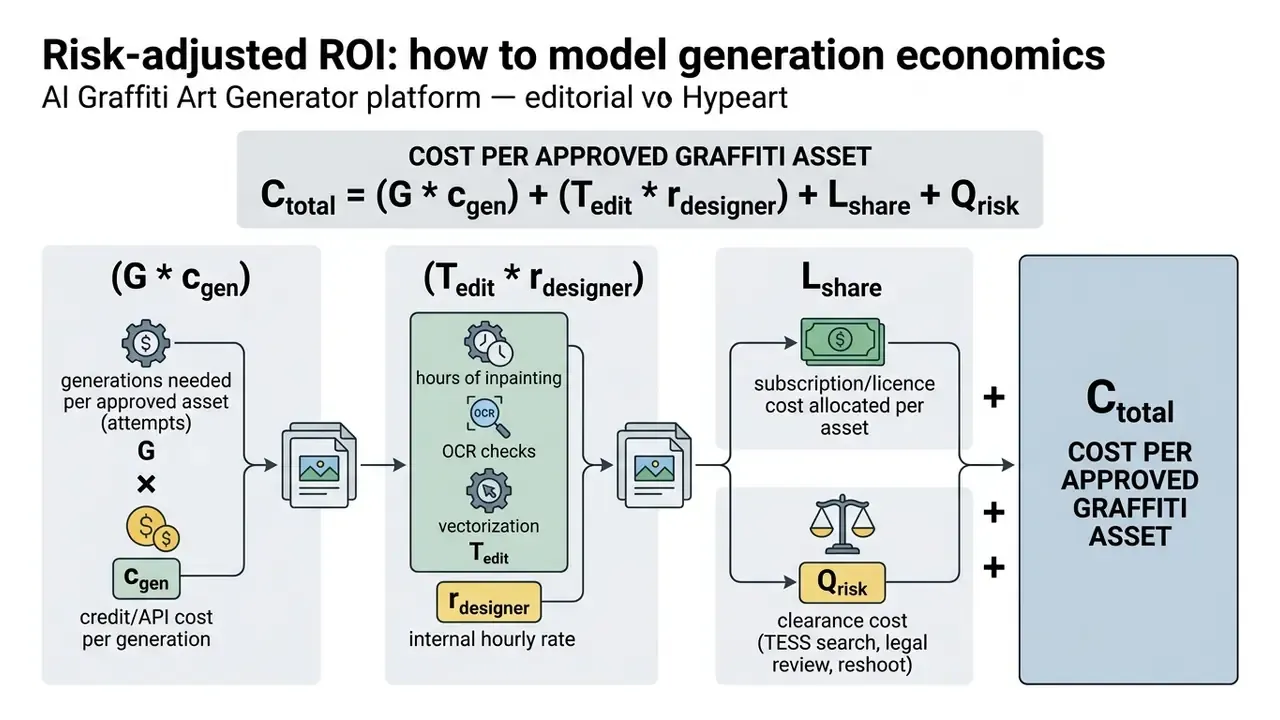
Worked illustration for the apparel pilot described above: at 14 hours of manual drafting versus 20 minutes of generation plus roughly 40 minutes of inpainting and upscaling per concept, the designer-time component falls by an order of magnitude. But the pass rate term G dominates on text-heavy pieces. Teams that skip seed logging typically burn three to six extra generations per asset, silently erasing the savings.
Track two KPIs: first-pass OCR accuracy and average generations per approved asset. Rework is the real cost.
How to create graffiti art with AI: the step-by-step process
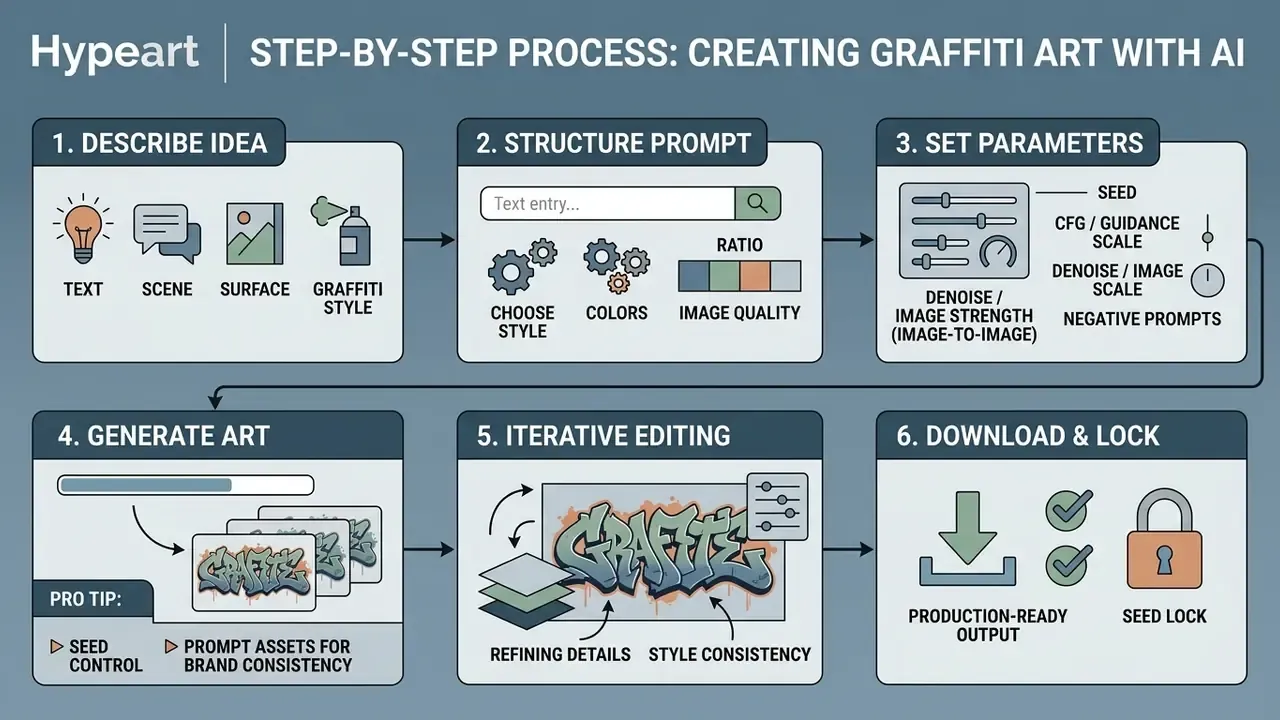
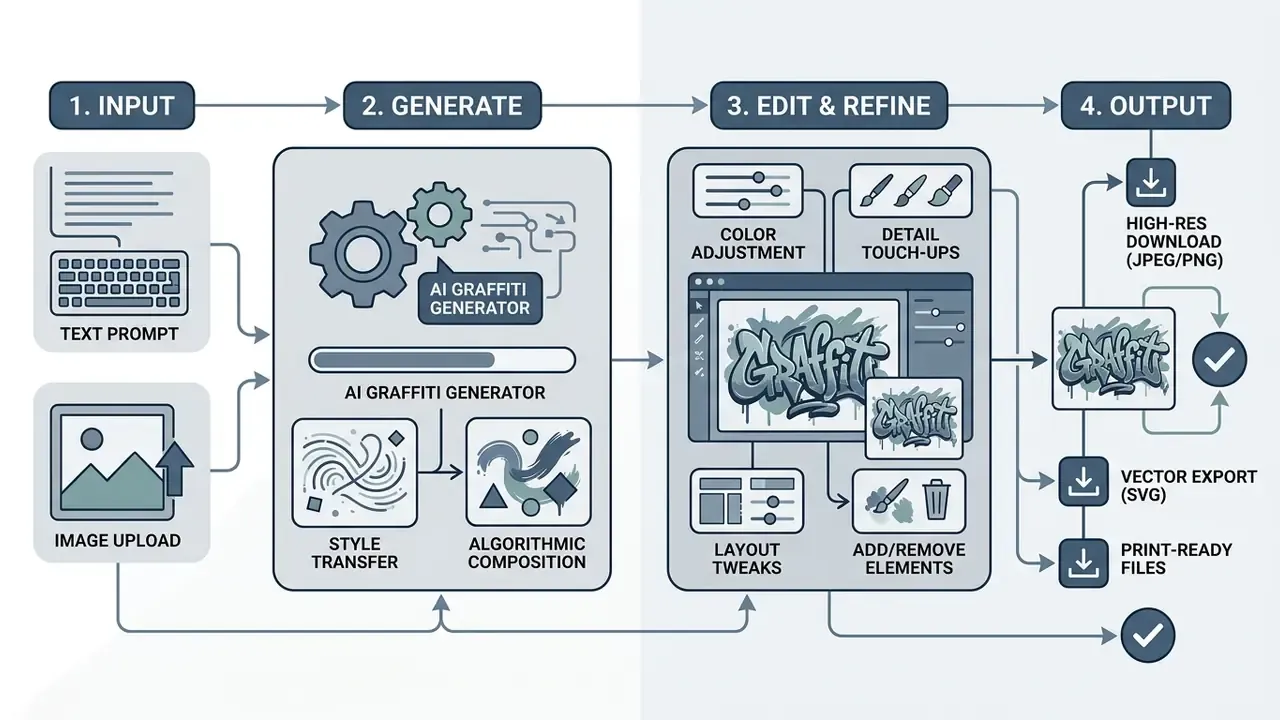
Creating production-ready street art with an ai graffiti maker involves a six-stage workflow: ideation, prompt structuring, parameter selection, generation, iterative editing, and high-resolution export.
To create graffiti art reliably, users must systematically control both structural letterforms and environmental textures. Skipping parameter configuration often leads to unreadable typography or chaotic background artifacts.
In an asset production workflow for digital promotions, a design team used an ai graffiti image generator to build custom event graphics. By establishing a structured workflow that included post-generation upscaling, the team eliminated font distortion defects and achieved a 100% pass rate for digital print preparation. Teams that regularly repurpose existing photography into street-art visuals should also review the capabilities of dedicated image-to-image generators alongside pure text-to-image engines.
Creative teams managing broader headshot or media automation workflows often cross-reference these street-art steps with specialized systems, such as an ai portrait generator or an ai portrait generator free online, to keep visual consistency across multichannel campaigns.
Describe the idea: text, scene, surface, and graffiti style
The prompt must explicitly state the target word in quotation marks, name the desired street-art sub-style, specify the surface material, and define the lighting environment.
The most reliable structural rule, separating what the text says from how it looks, is supported by academic work on text-aware diffusion rather than vendor marketing guides.
Place the exact string early in the prompt, keep it in quotation marks, and push stylistic modifiers into a separate clause. Specifying concrete surfaces such as "weathered red brick wall", "poured concrete", or "corrugated metal shutter" makes the model render realistic surface interaction, paint drips, and overspray.
Choose style, colors, ratio, and image quality
Before initiating generation, select the aspect ratio, define a controlled color palette, and set the rendering quality mode.
For social media posts and album covers, set aspect ratios to 1:1 or 4:5. For wide posters and digital banners, select 16:9. To maintain visual clarity, constrain the color prompt to two or three primary hues alongside a single accent color, for example "electric blue and matte black with neon yellow accents".
Reproducibility parameters matter as much as aesthetics:
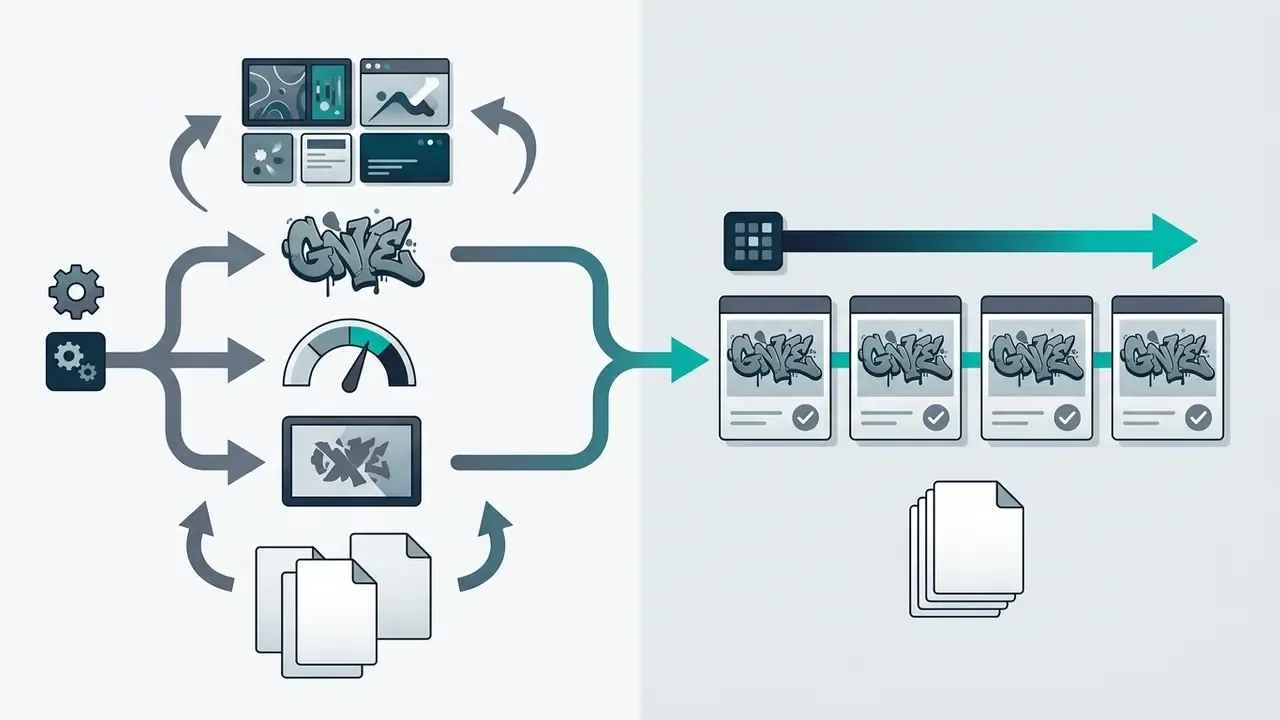
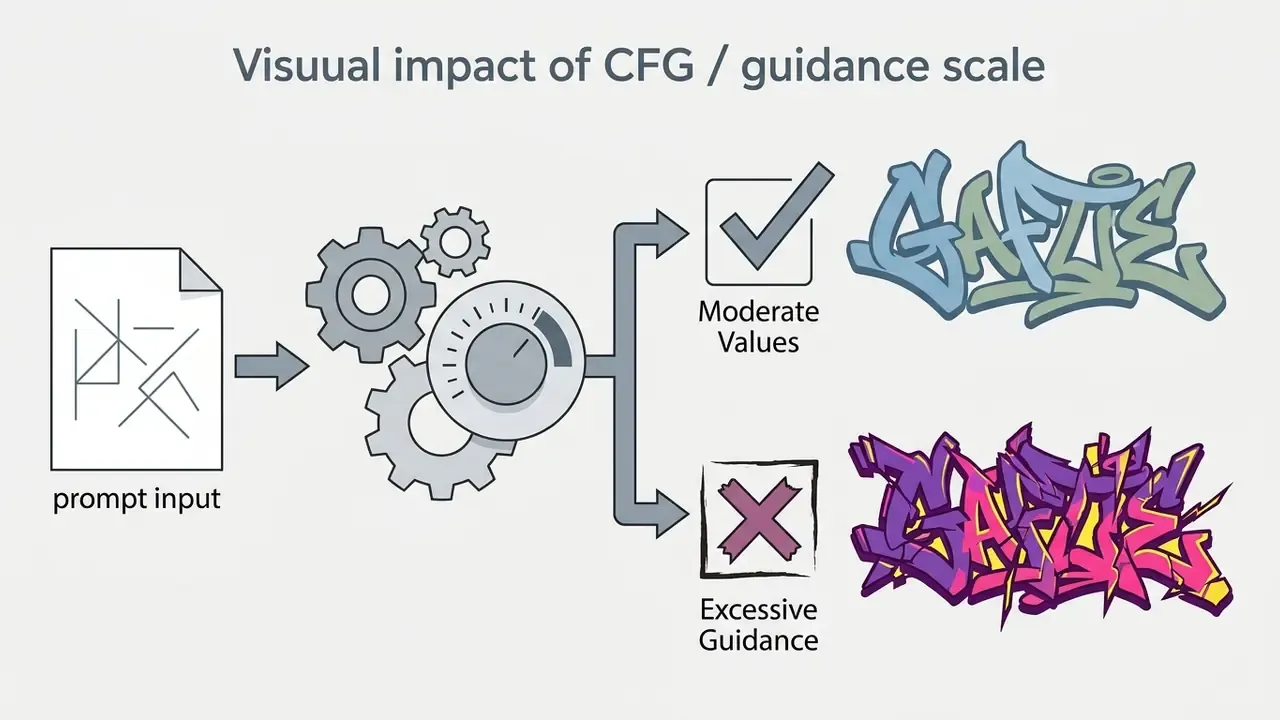
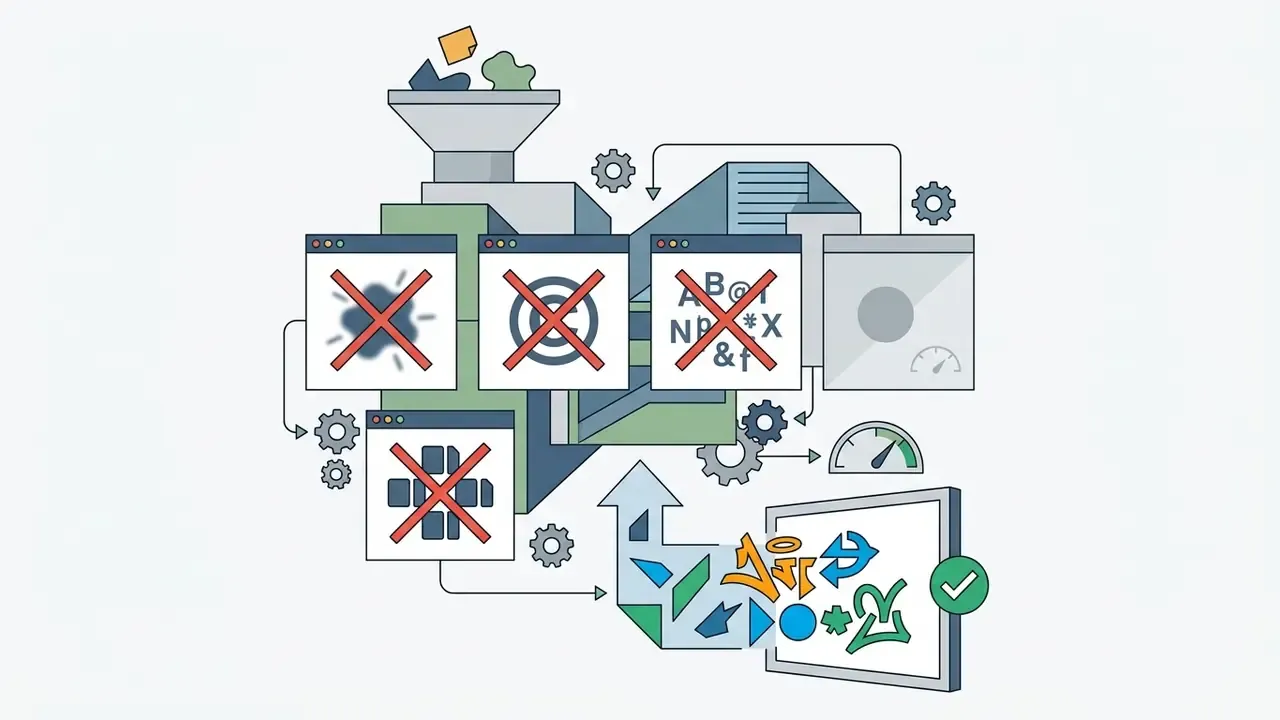
blurry, watermark, extra letters, misspelled text, duplicated glyphs, low contrast to suppress the most common lettering defects.Legibility targets can be borrowed from accessibility engineering, even though the standard was written for interfaces rather than walls. WCAG 2.2 sets a minimum 3:1 contrast ratio for graphical objects and large text. That is a practical, testable threshold for keeping letter outlines readable against adjacent wall textures. Treat it as a design heuristic for street-art typography, not as a formal compliance requirement.
Pro tip: seed control and prompt assets for brand consistency
When generating multi-asset campaigns (matching apparel prints, stickers, and posters), consistency across separate generation runs is critical:
- Seed lockRecord the numerical seed value of successful base renders. Re-using the same seed with minor prompt adjustments preserves character geometry and background lighting.
- Metadata loggingStore full prompt strings, negative prompts, CFG values, model version, and aspect ratios in a centralized prompt library or workflow canvas. Version them like code, not pasted into chat threads.
- Asset repositoriesSave raw, uncompressed 1x PNG outputs alongside upscaled 4K versions to allow future re-inpainting if brand text changes.
- Personal gallery hygieneIf the platform auto-saves generations to a gallery, verify the default visibility (private versus public) and export masters to your own storage. Vendor galleries are convenience layers, not archives.
Generate, edit, and download the artwork
Execute the model run, inspect the output for letterform defects at 100% zoom, apply localized inpainting if needed, and export the file in an appropriate format.
If letter strokes appear broken or extra glyphs emerge, use localized inpainting tools to mask and regenerate the affected area. Once the design meets visual standards, process the image through an AI upscaler (typically offering 1x to 16x enlargement) and download the final file in uncompressed PNG or TIFF format for print and digital publishing.
Rather than citing a single vendor's processing standard, apply the vendor-neutral rule documented across upscaling workflows. Inspect results at 100% zoom, and if letter counters, stroke thickness, or edges break, the upscale is not clean and should be redone at a lower factor or after inpainting. For interchange and print, keep the original format where possible: RAW and DNG inputs export as TIFF, and CMYK output is TIFF-only in mainstream enhancement pipelines.
AI graffiti text, logo, and image generator: design fine-tuning
Fine-tuning generated artwork requires managing letter geometry, preserving text legibility, and adjusting background composition through targeted editing tools.
When working with an ai graffiti text generator or an ai graffiti logo generator, model outputs may exhibit distorted letter loops, extra strokes, or illegible glyphs. Correcting these artifacts requires specialized post-processing techniques.
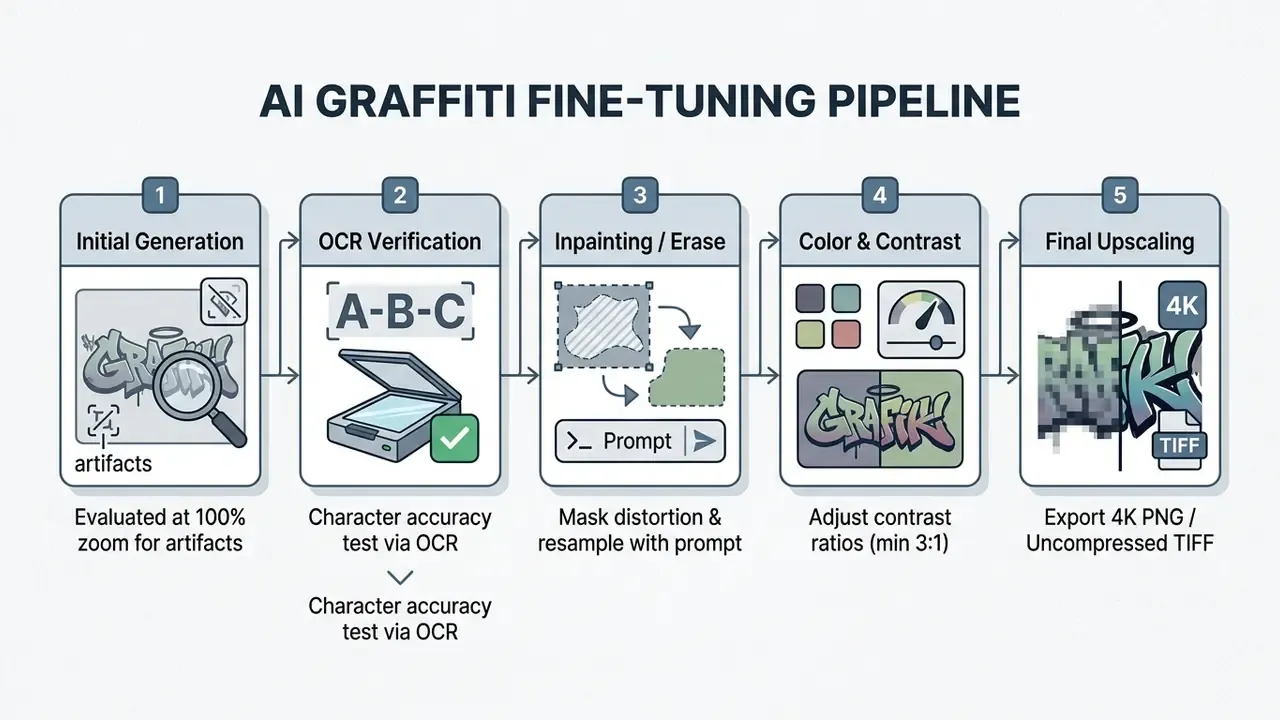
Stages 3 and 4 usually happen outside the generator itself. Mask-based repair, layer separation, and CMYK preparation are handled in dedicated AI photo editors and raster or vector suites.
How to keep text and lettering readable
Maintaining letter legibility in an ai graffiti picture generator requires constraining prompt complexity and applying localized regional inpainting when stroke defects occur.
Recursive, OCR-aware repair is now the best-documented remedy, with published gains on two separate benchmarks.
When generating long phrases, breaking text into shorter single-word prompts or using font-conditioned control layers prevents character merging and stroke corruption. A three-word slogan is far more likely to survive generation as three separate renders composited on one wall texture.
Deletion frameworks close the loop when generation simply refuses to spell correctly.
In production, that yields a dependable fallback. Generate the wall, lighting, drips, and overspray with AI; erase all generated glyphs; then overlay vector typography with real font metrics. W3C font guidance is a useful sanity check here: avoid rendered type below roughly 9 device pixels per EM unit, since sub-threshold letterforms collapse at export.
How to adjust logo, color, background, and graphic elements
Customizing graphic elements involves isolating background layers, enforcing contrast standards, and applying secondary visual accents.
- Background swappingUse layer masking to replace complex urban backgrounds with solid fills or transparent layers for logo usage. Page and design editors also support background replacement by color or image with opacity, scale, and position controls.
- Color managementAdjust color balance to meet accessibility standards, maintaining a minimum 3:1 contrast ratio between graphics and adjacent background surfaces, and 4.5:1 for any small supporting text. Reference: Web Content Accessibility Guidelines (WCAG) 2.2, W3C (2023). https://www.w3.org/TR/WCAG22/
- Secondary accentsIntroduce paint splatters, drips, or stencil shadows as separate overlay layers to keep the file editable.
- Structural typographic controlSemantic typographic logo research demonstrates control at multiple structural granularities through an ideation, selection, generation, evaluation, and iteration loop. That is the same loop designers should run manually when refining letter geometry.
Model choice measurably changes logo quality, and the effect size has been quantified in a controlled setting:
For brand marks specifically, compare street-art engines against purpose-built AI logo generators before standardizing a toolchain. In an enterprise brand modernization pilot, a fintech design group evaluated an ai graffiti logo generator to create temporary campaign branding. Using modular layer masking and vector conversion pipelines, the team deployed 20 customized campaign logos across digital ad placements while keeping full brand trademark compliance. Illustrative example, again, rather than a published case study.
Prompts for convincing AI generated graffiti
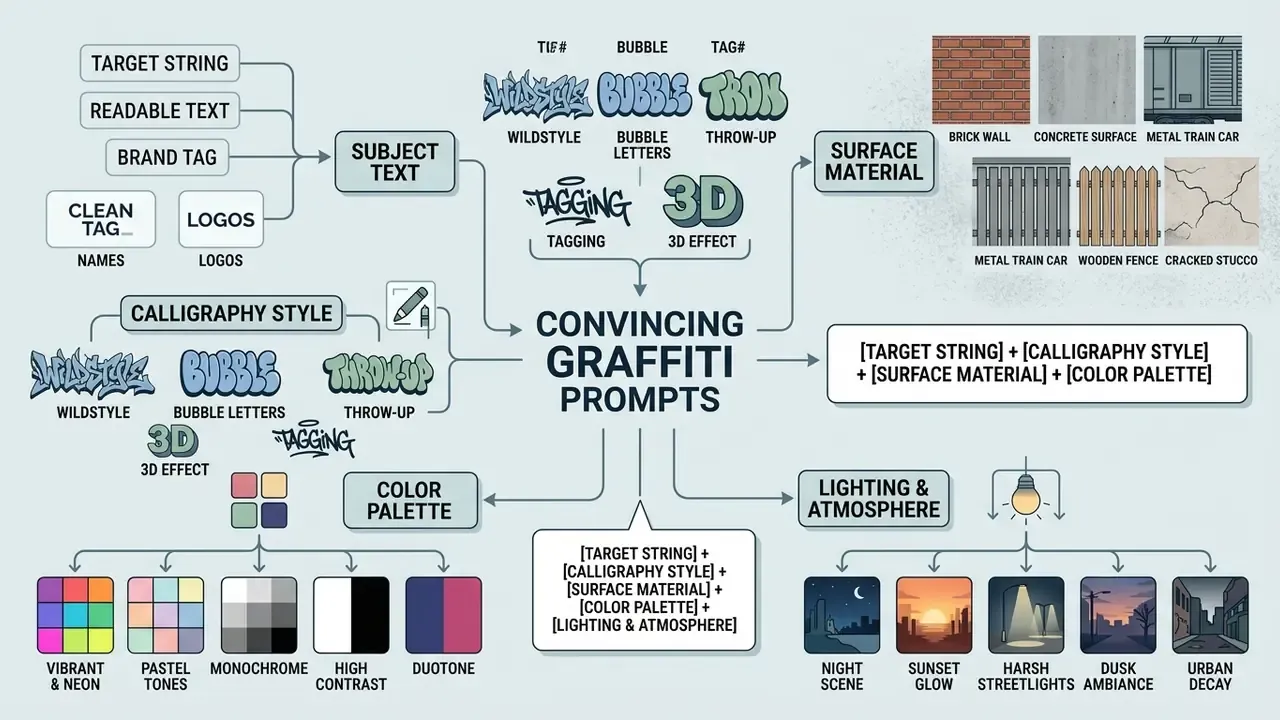
Crafting effective prompts for an ai generated graffiti piece requires structuring descriptive keywords into logical categories: subject text, calligraphy style, surface texture, color scheme, and lighting parameters.
Including explicit street-art terminology such as "spray paint texture", "drips", "overspray", "bold outlines", and "stencil cutouts" measurably increases output authenticity, because these tokens map to visual features the models were trained to associate with the genre. The underlying division of labour inside the model explains why prompt order works.
What a graffiti-style prompt consists of
A complete graffiti prompt consists of five core structural components:
- Target stringThe exact word or name rendered in quotation marks, for example
"METRO". - Calligraphy styleSpecific sub-style descriptors such as
wildstyle lettering,bubble letters,stencil print,throw-up style,blockbuster block letters. - Surface materialBackground substrate descriptions such as
cracked urban brick wall,subway car body,weathered plaster,dark glass panel. - Color paletteA defined combination of two to four colors plus one accent, for example
vibrant magenta and cyan gradient with white outlines. - Lighting and atmosphereEnvironmental cues such as
cinematic rim lighting,night streetlamp glow,hard midday sun,studio lighting.
Prompts for murals, covers, and photo-to-graffiti
For complex compositions, album covers, and reference-conditioned generation, incorporate scene integration keywords:
- Album cover piece
"Square album cover art featuring the phrase 'CITY SOUNDS' in dynamic wildstyle graffiti across a dark urban brick wall, ambient neon street lighting, cinematic mood, 1:1 aspect ratio." - Large-scale wall mural
"A massive street mural covering a multi-story concrete building, intricate character art alongside stylized lettering reading 'FUTURE', vibrant colors, daylight perspective shot, 8K detail." - Photo-to-graffiti conversion
"Transform the uploaded portrait into a two-tone stencil graffiti artwork on a weathered concrete wall, preserving subject pose, adding spray paint drips and subtle overspray textures." - Political stencil set
"A series of bold graphic stencil stickers with short slogan text, slapped across lamp posts and bus stops in a busy city centre, high-contrast two-color print, documentary photo framing." - Piece on a train
"An elaborate graffiti piece rich in color and detail blending multiple lettering styles along the side of a freight train car, hard midday sun, realistic metal panel texture."
For creators who want to extend these static pieces into motion content, such as animated album loops, story backdrops, or looping social posts, the next step is animating static designs with dedicated animation tooling while keeping the original PNG master untouched.
Where to use AI generated graffiti: content, branding, and personal designs
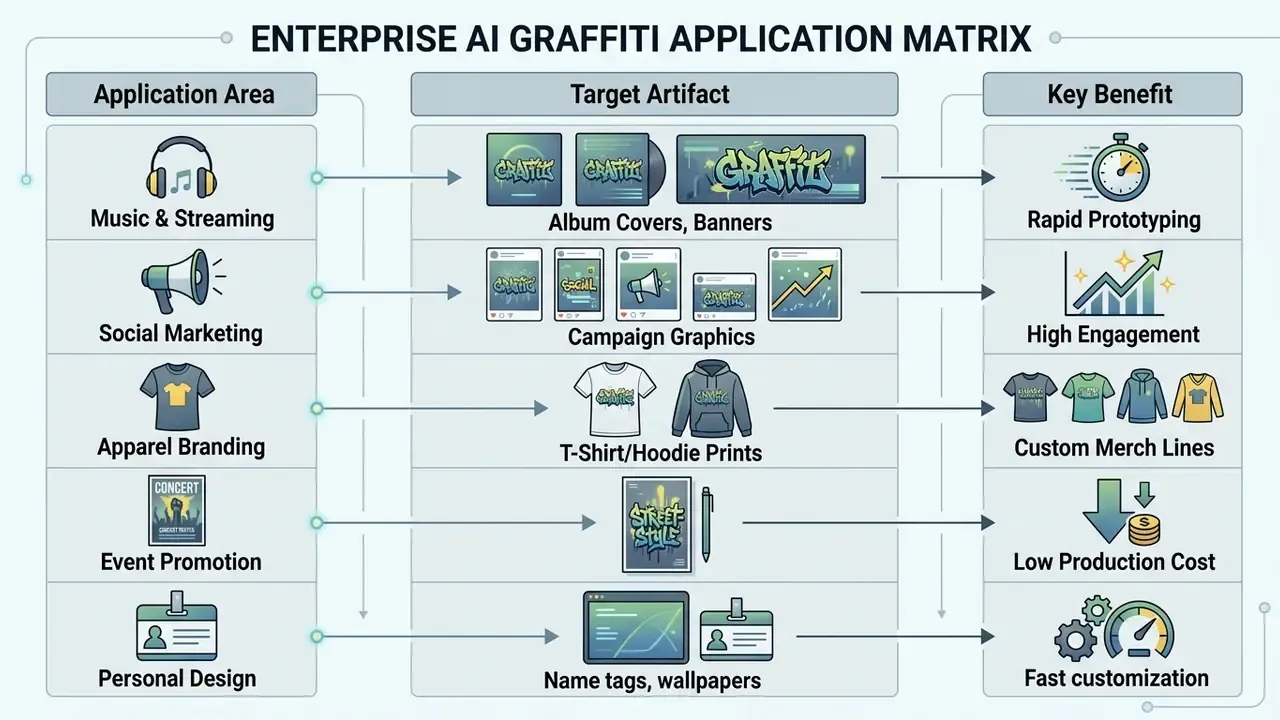
Deploying ai generated graffiti art provides high-impact visual communication across digital marketing, entertainment promotion, apparel branding, and personal merchandise.
As street-art aesthetics continue to shape youth culture and urban fashion, brands use a graffiti art generator to produce authentic urban visual assets rapidly, without the costs of physical site installations.
Logos, promotional designs, posters, and merch
Commercial brands use create graffiti art workflows to develop apparel prints, promotional event posters, and packaging designs. For high-volume commercial production, benchmark candidates against the field of best AI art generators with explicit commercial licences.
Documented industry precedents are more useful here than unverifiable case-study claims. A UK advertising agency (10 Days) produced a widely discussed set of experimental brand posters with Midjourney in June 2022, showing how quickly the concept presentation phase can be compressed. Vendor-documented 2026 workflows apply the same pattern to packaging concept visuals that are later refined into production mockups, and logo-maker platforms position downloadable brand assets specifically for print and apparel. Apparel manufacturers convert generated high-resolution graffiti images into screen-printing vector files for t-shirts, hoodies, and streetwear merchandise.
Authenticity perception is a commercial variable too, especially in subcultural markets where handmade provenance carries value.
To calculate infrastructure costs for high-volume automated image rendering, technical teams use standardized AI Media Calculators to estimate batch processing expenses across cloud APIs.
Commercial use of AI graffiti: what to check before publishing and selling
Using ai generated graffiti art for commercial promotion, product packaging, or resale requires verifying software license terms, reviewing copyrightability requirements, and conducting trademark clearance searches.
Generative tools offer speed. Commercial deployment introduces legal risk when generated outputs inadvertently replicate existing copyrighted artworks or registered corporate trademarks.
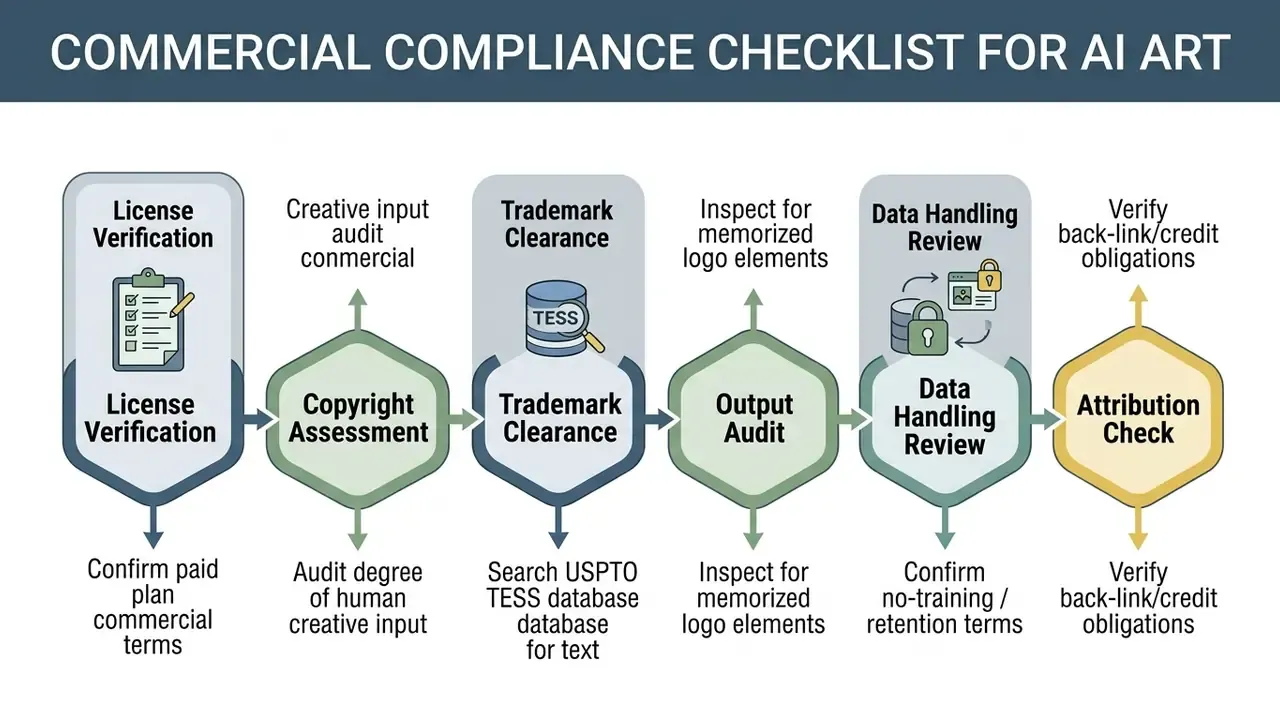
Before scaling this into a repeatable process, review the general framework for commercial use of AI image generators, which covers licence tiers, indemnification, and attribution obligations across tool categories.
Free versus paid generation terms
Commercial rights are almost universally restricted to paid subscription tiers, while free tiers grant non-commercial usage rights only.
| Platform Tier | Commercial License | Resolution Cap | Watermark | Usage Scope |
|---|---|---|---|---|
| Free Tier | No (personal or educational) | Standard (72 to 150 DPI) | Often included | Non-commercial social posts |
| Paid Tier | Yes (full ownership) | High-res, 4K, or vector | Removed | Merchandise, ads, packaging |
Major platform terms explicitly state that free trial outputs are licensed under non-commercial Creative Commons frameworks (CC BY-NC 4.0), whereas paid subscribers receive full commercial usage rights. Midjourney's documented licensing grants no commercial rights to free-trial users, while paid subscribers receive commercial use. Other vendors gate a commercial licence together with HD or 4K export and watermark removal on paid plans. Some providers assign users the rights in generated output and permit commercial use subject to policy compliance. So the operative question is always "which plan and which model", not "is it AI-generated".
The quality delta between tiers is not only about licensing. Controlled experimentation on logo creation shows how much the underlying model version matters for commercial-grade output.
Commercial rights across model architectures
When evaluating commercial viability, creators must distinguish between proprietary SaaS engines and open-weight foundation models:
- Open-weight models (Stable Diffusion, FLUX, and similar) Outputs created via un-customized open-source base models are generally free of proprietary licensing restrictions, granting immediate commercial usage rights. Specific platform terms may still mandate attribution or back-links when the image is generated through a hosted web interface. One major gallery platform, for example, requires attribution and a back-link for images its users created, while separately stating that Stable Diffusion outputs on the platform can be used commercially without additional licensing.
- Proprietary commercial engines Closed-source generators tie commercial ownership strictly to paid subscription tiers. Generating art under a free trial on these platforms grants only non-commercial (CC BY-NC 4.0) rights, so a tier upgrade is required before monetization.
- Fine-tuned or custom-trained checkpoints If you train a style model on scraped graffiti photographs, the licence of the training data becomes your exposure, not only the licence of the base weights. Document dataset provenance before commercial release.
Checking logo, text, and image before commercial use
Before printing merchandise or launching commercial ad campaigns featuring AI graffiti, run a thorough intellectual property audit.
- Trademark clearance: Conduct a comprehensive clearance search through the USPTO trademark database to verify that generated brand text or logos do not conflict with existing registered marks. Official guidance is explicit that a conflicting mark should be abandoned in favour of a new one, and that mark drawings must show all words and design elements clearly.
«Before filing, conduct a comprehensive clearance search to determine whether the mark conflicts with another owner's rights; if it does, create a new trademark.»
- Human authorship audit: Purely machine-generated visual elements are ineligible for copyright protection without substantial human creative control, modification, or arrangement. Registration materials must identify AI-generated portions and claim only human contributions.
«Works containing AI-generated material may be copyrightable only where there is sufficient human authorship, or human arrangement and modification of the AI output.»
Source: Copyright and Artificial Intelligence, U.S. Copyright Office (2025). https://www.copyright.gov/ai/
- Visual similarity inspection: Run AI reverse image search checks to ensure the model has not reproduced protected elements from its training data. Memorized logos and recognizable mural compositions are the highest-risk failure mode.
- Jurisdictional note: EU analysis reaches the same conclusion on authorship. Purely AI-generated output without substantial human intervention falls outside copyright protection, yet it can still infringe existing rights if it reproduces protected material. Commentators in several other jurisdictions note the absence of a dedicated AI-specific copyright rule, so general copyright principles apply by default.
Organizations seeking detailed guidance on legal precedents, commercial licensing standards, and platform usage terms can consult the AI Media Commercial-Use Hub and track ongoing developments via AI Litigation and Case Timelines.
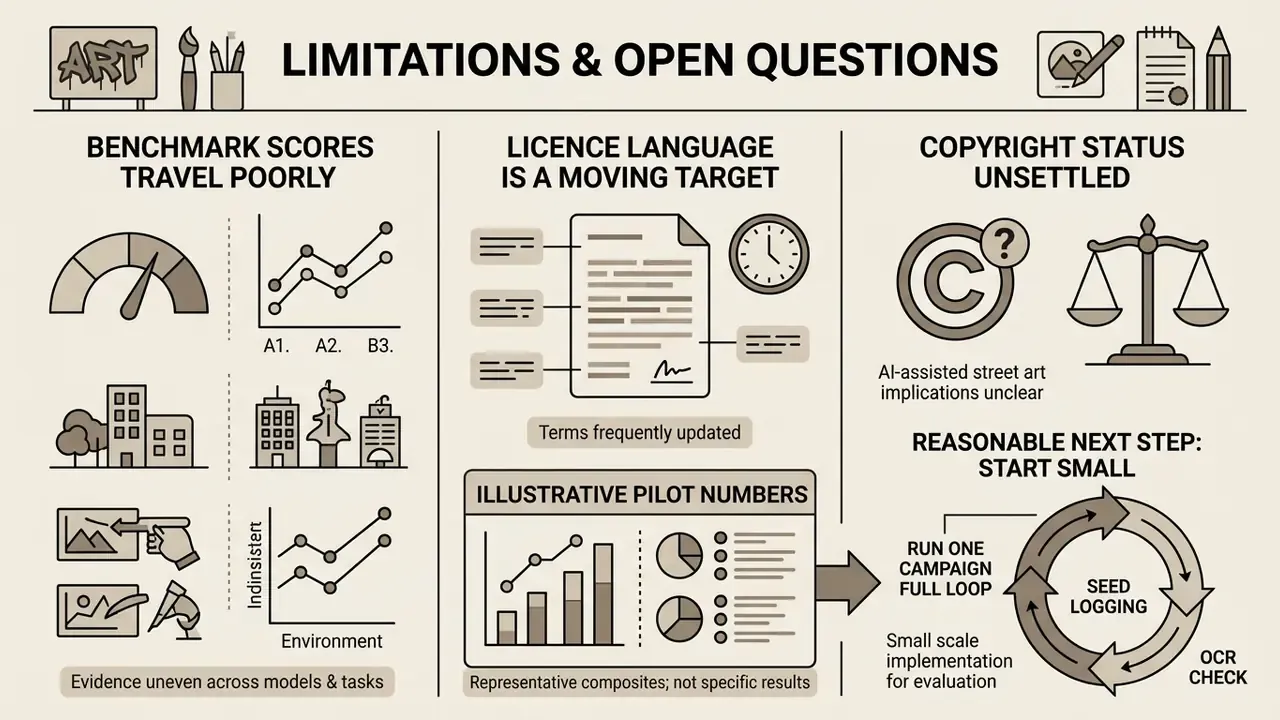
Limitations and open questions
FAQ about AI graffiti generators
Can I copyright an AI-generated graffiti design?
Under U.S. Copyright Office guidance, purely machine-generated outputs created without substantial human creative input are not registrable. If a human designer meaningfully modifies the work, edits it via inpainting, or arranges the generated graffiti as part of a complex original composition, the human-authored contributions may qualify for protection, and the AI-generated portions must be identified in the registration materials (Copyright and Artificial Intelligence, U.S. Copyright Office, 2025. https://www.copyright.gov/ai/).
Is a free AI graffiti generator sufficient for commercial merchandise?
No. Most free AI graffiti generators restrict output usage to personal, non-commercial licences and export files in lower resolutions, sometimes with watermarks. Commercial merchandise printing requires high-resolution 4K or vector exports plus explicit commercial rights, which are typically limited to paid tiers. If you still want to prototype at zero cost, review the limits of free AI image generators before committing artwork to production.
How do I fix distorted letters in generated graffiti text?
Use localized inpainting to mask the unreadable letters and resample the region with targeted prompts, then verify the result with an OCR pass. For multi-word slogans, a more reliable route is to generate the background street-art wall separately, erase all generated glyphs, and overlay clean vector typography in photo or vector editing software.
Can I transform an existing logo into graffiti using AI?
Yes. Using an ai graffiti logo generator in image-to-image mode, you can upload a high-resolution logo as a visual reference. Adjusting the image strength parameter lets the model apply street-art textures and paint splatters while retaining the underlying logo structure. One caution: do not upload unreleased or trademark-sensitive marks to a free consumer tier whose terms permit training on user uploads.
What export formats are best for printing AI graffiti on apparel?
Uncompressed PNG files at 300 DPI with transparent backgrounds, or vector SVG files, are the safest for apparel printing. If vector export is unavailable, process the raster image through an AI image enhancer or upscaler to reach a minimum of 4000x4000 pixels before screen printing. CMYK deliverables are normally exported as TIFF.
Which graffiti styles are most reliable for readable brand text?
Blockbusters, straight-letter pieces, and stencil styles are the most legible, because their letterforms are geometrically simple. Wildstyle and scribe or etch styles maximize authenticity but sacrifice readability. Use them for texture, mood, and background, and place brand-critical copy in a simpler style or as an overlaid vector layer.
Are my prompts and uploaded images private?
It depends entirely on the platform tier. Some vendors state that prompts and uploaded files remain private during use, while many free tiers publish generations to a community gallery by default and reserve the right to use submitted data for product improvement. Verify retention duration, training opt-out, gallery visibility, and subprocessor disclosure before uploading any brand asset.
Footer and navigation
For additional technical guides, software specifications, and generative AI terminology, visit the AI Media Glossary. Developers looking for integration parameters for generative media pipelines can consult the core api documentation, while users who need help can reach customer support.