Key Takeaways Before You Generate
| Decision Point | Practical Answer |
|---|---|
| What the technology does | Image-to-video (I2V) models treat your still photo as a conditioning first frame, then synthesize 4 to 10 seconds of new pixels with temporal diffusion. It is generation, not a slideshow pan. |
| Input formats you can actually upload | Standard web (.jpg, .png, .webp, .bmp, .gif), high-efficiency mobile (.heic, .heif, .avif), and professional RAW (.arw, .cr2, .cr3, .nef, .dng, .orf, .rw2, .raf, .pef, .psd, .tiff). |
| Biggest legal risk | Free tiers on Runway, Luma, and Kling restrict commercial use. The U.S. Copyright Office does not register fully machine-generated works that lack human authorship. |
| Biggest security risk | Cloud rendering plus employee-driven Shadow AI. Verify data opt-out from model training, retention windows, and SOC 2 Type II attestation before any client asset leaves your perimeter. |
| Fastest quality win | Upload noise-free, high-contrast source images and keep the motion slider at 2 to 4. Most morphing and flicker artifacts are amplitude and compression problems, not model problems. |
| Standard workflow | Upload, write a structured prompt (Subject + Action + Camera + Environment + Style), set motion, duration and keyframes, preview, export H.264 MP4 at 1080p or 4K. |
Generative artificial intelligence turned static visual media into controllable video assets, and it happened faster than most procurement cycles can absorb. Modern image-to-video systems use deep generative diffusion and temporal attention to animate photos, produce promotional video clips, and convert image sequences into high-definition digital media. That is the upside. The other half of the story is who approves the tool, where the files go, and who owns the output.
This guide serves two overlapping audiences and keeps their needs separate on purpose. Sections 1, 3, 4 and 7 are for creators, marketers, and operations specialists who need a reproducible production workflow. Section 2 and the governance block are for risk, compliance, and procurement owners who must approve a vendor before a single client photograph leaves the corporate network.
What Is Images to Video and What Video Content You Can Create
Image-to-video technology converts a static reference image into a temporally coherent video clip. The model is conditioned on visual features, a text prompt, or motion vectors. Unlike traditional frame stitching, AI video generation and adjacent animation makers synthesize entirely new intermediate pixels to simulate object movement, lighting change, and continuous camera paths.
So when someone says they want to change image to video, the honest first question is: do you want real generated motion, or a clean parametric pan across a photo? The two paths have different costs, different risks, and very different failure modes.
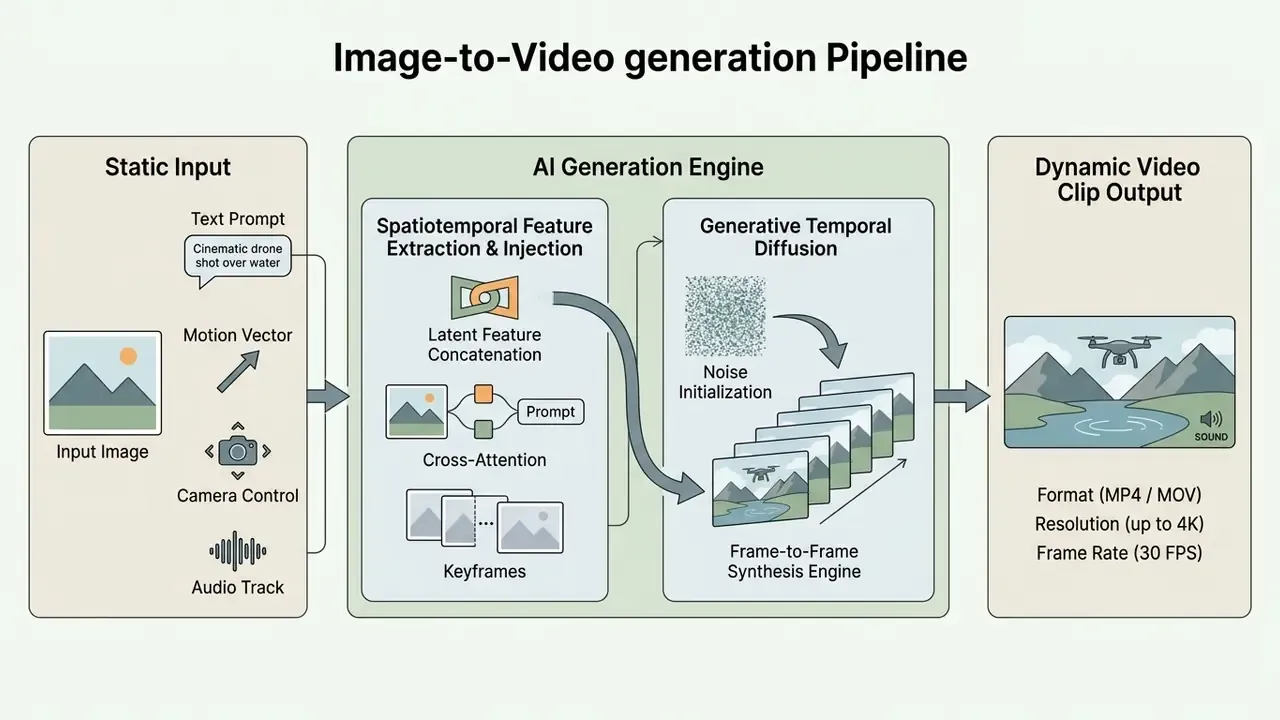
Contemporary I2V architectures are benchmarked on four measurable dimensions rather than subjective impressions.
The benchmark operationalizes those dimensions with concrete metrics: MSE and SSIM for first-frame fidelity, CLIP-based similarity for semantic alignment, frame-to-frame feature distance for temporal stability. Which is exactly why "looks good" is not an acceptance criterion in a production pipeline. If you cannot restate quality as a number, you cannot sign off on it.
Standard video editing manipulates existing optical pixels through two-dimensional pans or hard cuts. Generative image to video systems instead apply learned spatial priors to predict three-dimensional scene geometry, occluded surfaces, and plausible physics. Stop-motion animation, the third historical alternative, requires physically re-photographing incremental object changes. I2V predicts those increments numerically from a single exposure.
Video from a Single Photo, Photo Series, and Image Sequence
Single-photo animation generates synthetic motion starting from one initial frame. Models such as DreamVideo and AtomoVideo retain low-level structural detail from the uploaded photo while generating future frames through spatiotemporal attention networks.
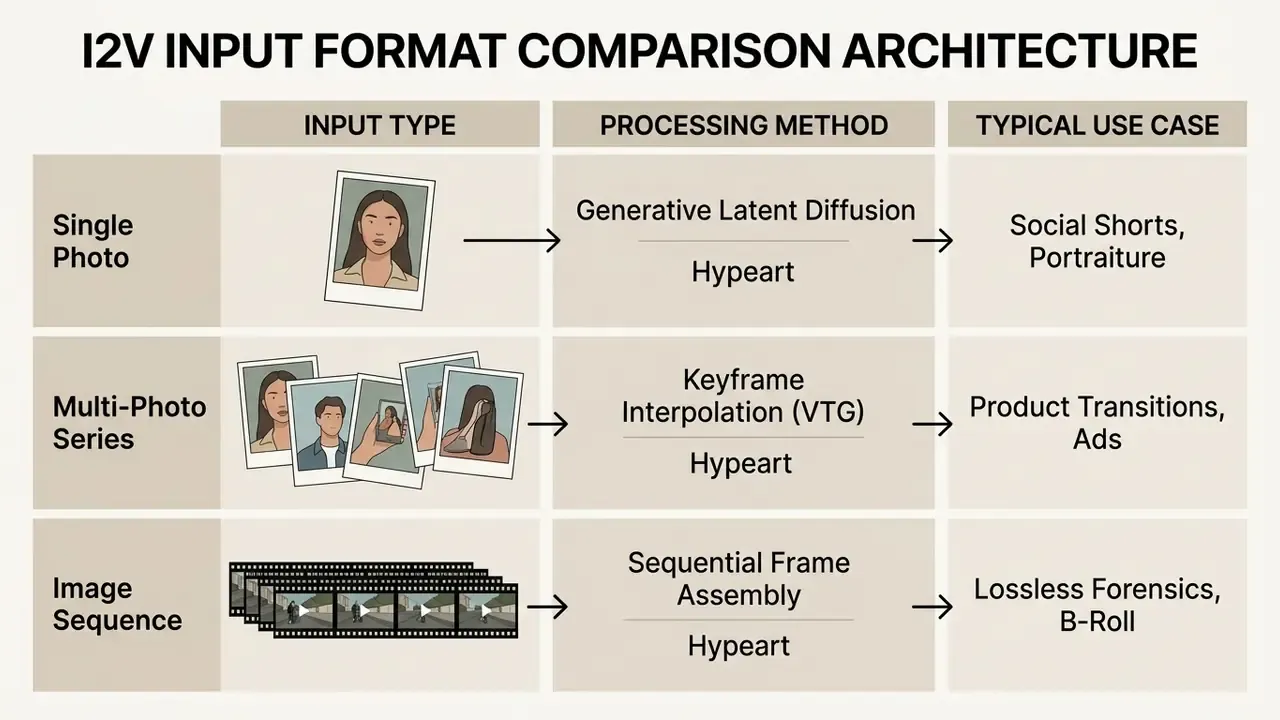
How to choose between the three input paths:
- One photo available, motion required. Use single-photo AI animation with a virtual camera move (dolly, orbit, parallax push-in). Output is a cinematic clip of 4 to 10 seconds, which is enough for a hook, a product reveal, or a title card.
- Several product or property photos available. Use keyframe interpolation between ordered stills. You get generative transitions instead of hard cuts, which is the fastest way to change photo to video without a filmed shoot.
- A directory of ordered frames already exists. Use sequential frame assembly at a fixed frame rate. Chronological integrity is preserved and no hallucinated pixels appear. This is the correct mode for evidence reconstruction, time-lapse, microscopy, and scientific visualization.
Multi-photo series generation connects discrete keyframes through interpolation. Frameworks such as Versatile Transition Generation (VTG) use dual-directional motion tuning to build smooth transitions between a specified first and last frame. Sequential image processing turns ordered frame directories into near-uncompressed video streams and keeps the chain of custody intact, which matters when the clip may later become an exhibit rather than an ad.
Fidelity to the original photograph differs sharply between engines, and the benchmark numbers here are unusually blunt.
In practice, a model with weak first-frame SSIM will redraw your product, your logo, or your model's face during the first half-second. For brand-controlled assets that is an unacceptable failure mode, and it is the main reason to test candidate engines on your own catalogue images before you commit budget. Ten of your own SKUs tell you more than any leaderboard.
AI Photo Animation: Motion, Camera, and Styles
Controlling AI photo animation means specifying three things: subject dynamics, camera positioning, and the stylistic rendering layer. Models such as Google Veo 3.1 and Kling AI expose explicit camera variables, including horizontal pan, vertical tilt, directional dolly, tracking truck, orbital rotation, and roll.
Vendor documentation differs in granularity. Kling exposes a fixed set of six camera movements as UI parameters, while Veo and Runway accept camera language inside the natural-language prompt. Developers integrating Google's stack should review the Google Veo implementation guide for parameter names, credit costs, and duration limits (4, 6, or 8 seconds, with 8 seconds gated to 1080p/4K or reference-image workflows).
Figure: comparison of image-to-video input workflows
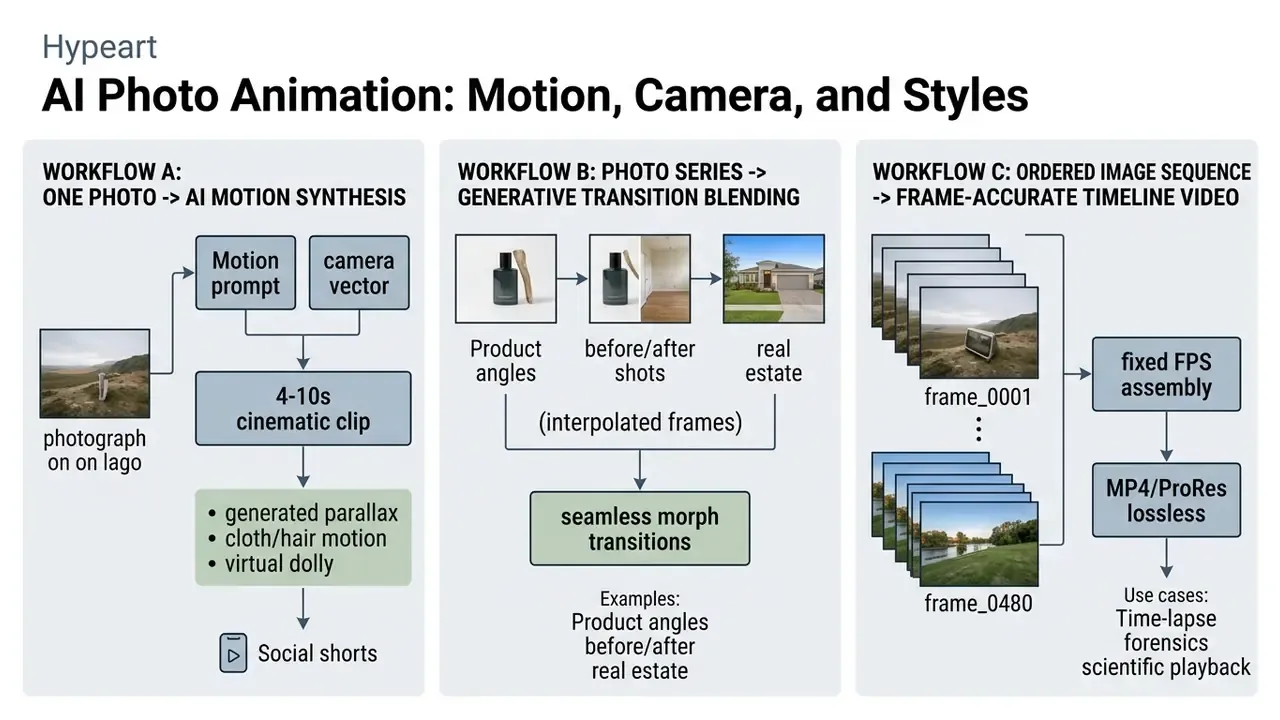
Animation styles run from photorealistic live-action movement to stylized stop-motion and digital illustration. Style descriptors sit in a separate prompt field from camera motion in Runway Gen-4 documentation, where "live action," "smooth animation," and "stop motion" behave as distinct rendering modes. Advanced camera controllers such as CamCo push constraints deeper, into every denoising layer.
"CamCo parameterizes camera poses with Plücker coordinates and enforces epipolar constraints, producing markedly better 3D consistency than baseline image-to-video models."
That is what keeps perspective honest during a complex virtual camera move across a flat photograph. It is the difference between a genuine dolly through a room and a digital zoom that bends the architecture.
How to Select an Image to Video Tool: Features, Free Plan, and Commercial Use
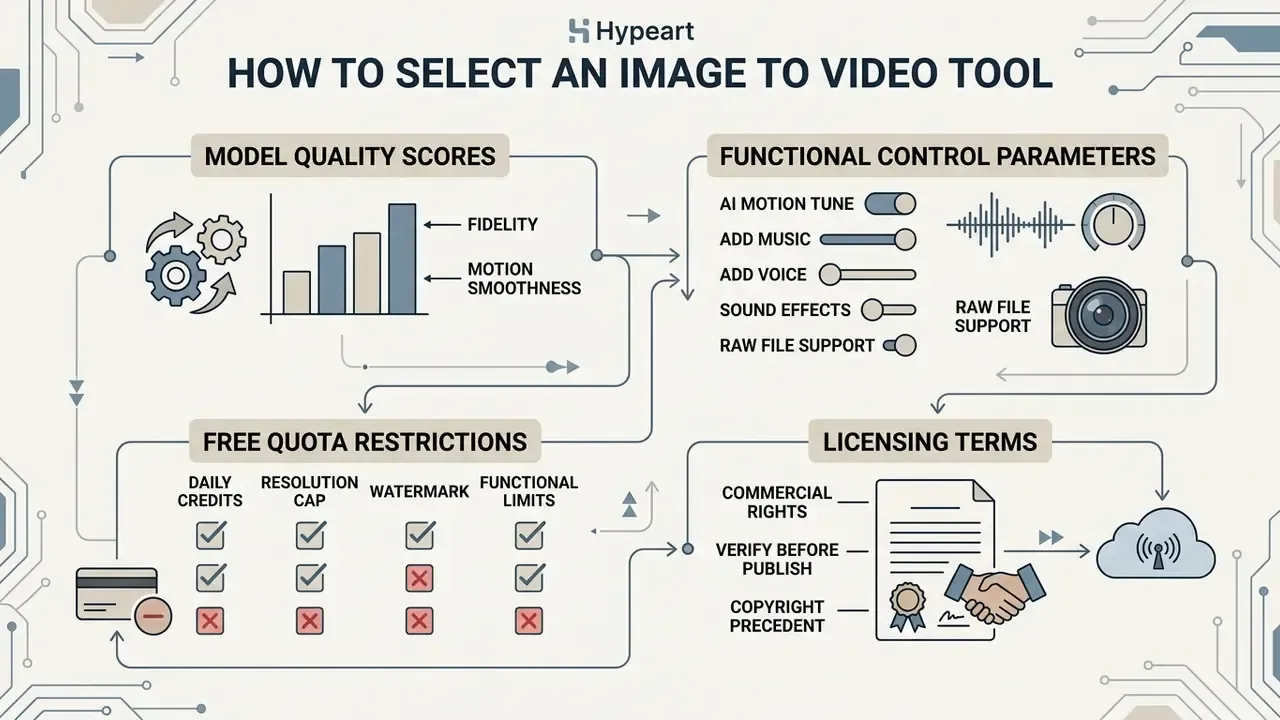
Choosing an online video maker comes down to four things: model quality scores, functional control parameters, free quota restrictions, and licensing terms. Buyers comparing engines side by side should read the shortlist of free AI video generators and the broader AI Media Comparison Matrices before paying for pilots. Enterprise operators need to know whether a tool supports granular asset upload, prompt weighting, precise motion sliders, and near-uncompressed export.
Search demand here is fairly literal. People type "best free image to video converter," "best websites to convert image to video," or "best free tools to convert images to video," and they usually mean one question: which video converter will not watermark my work or quietly claim it?
Essential Features Needed for Image-to-Video Generation
A professional online converter should carry the whole creation and editing loop inside one interface. Core requirements: multi-format image upload, a text prompt field, explicit camera direction selectors, and timeline preview.
Advanced platforms add audio generation switches, motion amplitude sliders, and timeline editing. Engines such as PixVerse V6 expose exactly these parameters through API fields (prompt, resolution, duration, motion amplitude, and a generate_audio_switch toggle), while Vidu Q3 Image-to-Video Pro adds background-music generation on the same call. A robust image to video suite lets you trim generated clips, apply text overlays, and adjust output frame rates without opening an external video editor.
Minimum feature checklist for a production-grade video tool:
- Multi-format and RAW-tolerant upload with drag-and-drop plus cloud import (Google Drive, Dropbox).
- A free-text prompt field and structured motion presets, so non-technical users are not forced to write prompts.
- Explicit camera vector controls: pan, tilt, dolly, truck, pedestal, zoom, orbit.
- A motion amplitude slider with a numeric value, not a vague low/medium/high toggle.
- First-frame and last-frame keyframe locking for controlled transitions.
- A native audio layer: music library, upload, voiceover recorder, SFX generation.
- Timeline trimming, text overlays, and caption burn-in.
- Export control over container, codec, resolution, and frame rate.
- Watermark-free export on the tier you actually intend to buy, not the tier above it.
- A documented retention policy, data opt-out from model training, and downloadable licensing terms.
What to Verify in a Free Plan and Before Commercial Publication
Free tiers routinely impose functional limits, visible watermarks, lower resolution caps, and restricted rights. Runway and Luma Dream Machine enforce non-commercial terms on basic or free accounts and require a paid upgrade for monetization. Luma's terms are stricter than most: generations produced while on the Free or Lite tier stay non-commercial even after the account is upgraded. A pilot run on a free plan cannot be retroactively laundered into a campaign asset. Worth checking before, not after, the media buy.
| Platform / Tool | Free Tier Quota | Output Resolution | Watermark Present | Commercial Rights on Free Tier | Data Opt-Out from Model Training | Enterprise Security (SOC 2 / SLA) | Paid Upgrade Starting Price |
|---|---|---|---|---|---|---|---|
| Runway Gen-3 / Gen-4 | 125 one-time credits (~25s) | 720p draft | Yes | No (personal use only) | Verify per plan; enterprise agreements typically required | Enterprise tier only (request attestation) | $12 / month (Standard) |
| Luma Dream Machine | ~30 generations / month | 720p draft | Yes | No (personal use only; free-tier assets stay restricted) | Verify per plan | Enterprise tier only (request attestation) | $9.99 / month (Plus) |
| Kling AI | 66 credits / daily refresh | 720p | Yes | Limited / non-commercial | Verify in current ToS | Not documented for self-serve tiers | $10 / month (Standard) |
| Hailuo (MiniMax) | 200 signup credits + daily | 768p | Reduced | Yes (commercial allowed) | Verify in current ToS | Not documented for self-serve tiers | $10 / month (Basic) |
| Google Veo 3.1 (API) | Trial credits via cloud console | 720p to 4K, 4/6/8s | Depends on surface | Governed by cloud enterprise agreement | Contractual opt-out available under enterprise cloud terms | Cloud-grade controls and SLA available | Metered per-second API pricing |
"Legal status of AI-generated content varies across jurisdictions, with unresolved debate over whether the user, the model developer, or no party holds rights."
Two consequences follow. First, a vendor licence is not copyright: a platform can grant you a broad commercial licence to use an output while that output stays unregistrable as your original work. Second, your practical protection is contractual, specifically an IP indemnification clause that names defence costs and damages caps. Evaluate the wider compliance picture through the AI Media Commercial-Use guidelines, and cross-check adjacent policies in the guide to commercial use of AI image generators.
Governance, Shadow AI, and Data Security Controls
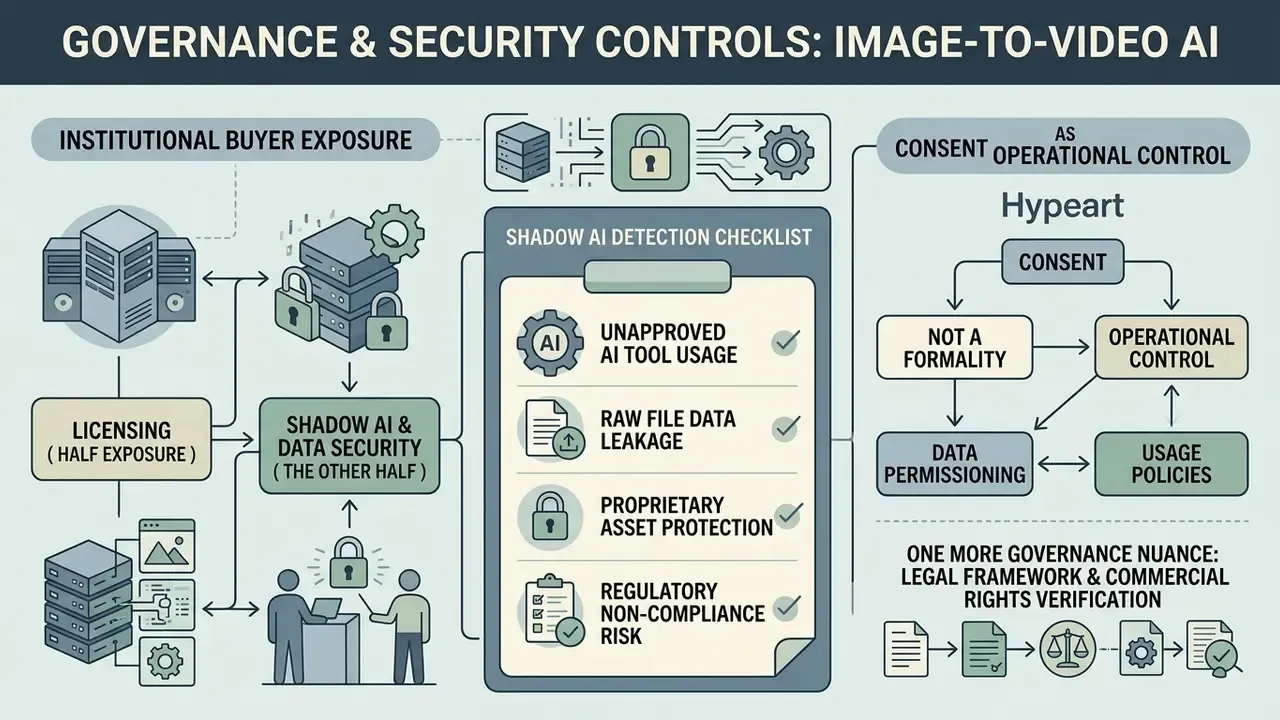
For institutional buyers, licensing is only half the exposure. The other half is uncontrolled adoption: employees pasting client photography, unreleased packaging designs, or identifiable customer faces into consumer-grade converters whose terms permit training on submitted content. Nobody files a change request for that. It just happens on a Tuesday.
Shadow AI Detection Checklist for Image-to-Video Tools
| Control | What to Verify | Evidence to Collect |
|---|---|---|
| Discovery | Egress logs and CASB rules for known converter domains and generic "image to video" endpoints | Monthly domain-hit report by department |
| Approval gate | Whether the tool sits on an approved-vendor register with a recorded owner | Signed vendor intake form plus risk rating |
| Data classification | Whether uploaded assets may include PII, biometric likeness, or pre-release IP | Data map for the marketing asset pipeline |
| Training opt-out | Written confirmation that uploads are excluded from foundation-model training | Contract clause or vendor DPA reference |
| Retention | Documented purge window for source images and rendered outputs | Vendor retention policy, typically 24 to 48 hours |
| Attestation | SOC 2 Type II, ISO 27001, or equivalent independent report | Current report under NDA |
| Regulated data | GLBA, HIPAA, or GDPR applicability where photos depict customers or patients | Legal sign-off memo |
| IP indemnification | Whether the vendor defends and indemnifies against third-party IP claims | Named clause, cap, and exclusions |
| Deployment model | Public multi-tenant SaaS versus private cloud versus on-premise inference | Architecture diagram from vendor |
| Human-in-the-loop | Named reviewer approving each published generative asset | Approval log with reviewer initials |
Consent is an operational control, not a formality. Release notes for the major engines now require the uploader to attest that they hold rights to the media and, where identifiable people appear, that consent was obtained. Where employees animate customer or model photographs, that attestation has to be backed by a signed release stored outside the generation tool. If the only copy of the release lives inside the vendor's workspace, you do not really have an audit trail.
One more governance nuance. Generative motion is a judgement call, not just a rendering choice: an animated customer photo can imply an endorsement that never happened. Keep that decision with a named owner.
How to Convert Image to Video Online: Step-by-Step Tutorial
Turning a static photograph into an animated video clip online is a four-stage workflow: asset preparation, parameter configuration, generation, and post-production export. The whole loop takes a few minutes once you stop guessing at settings.
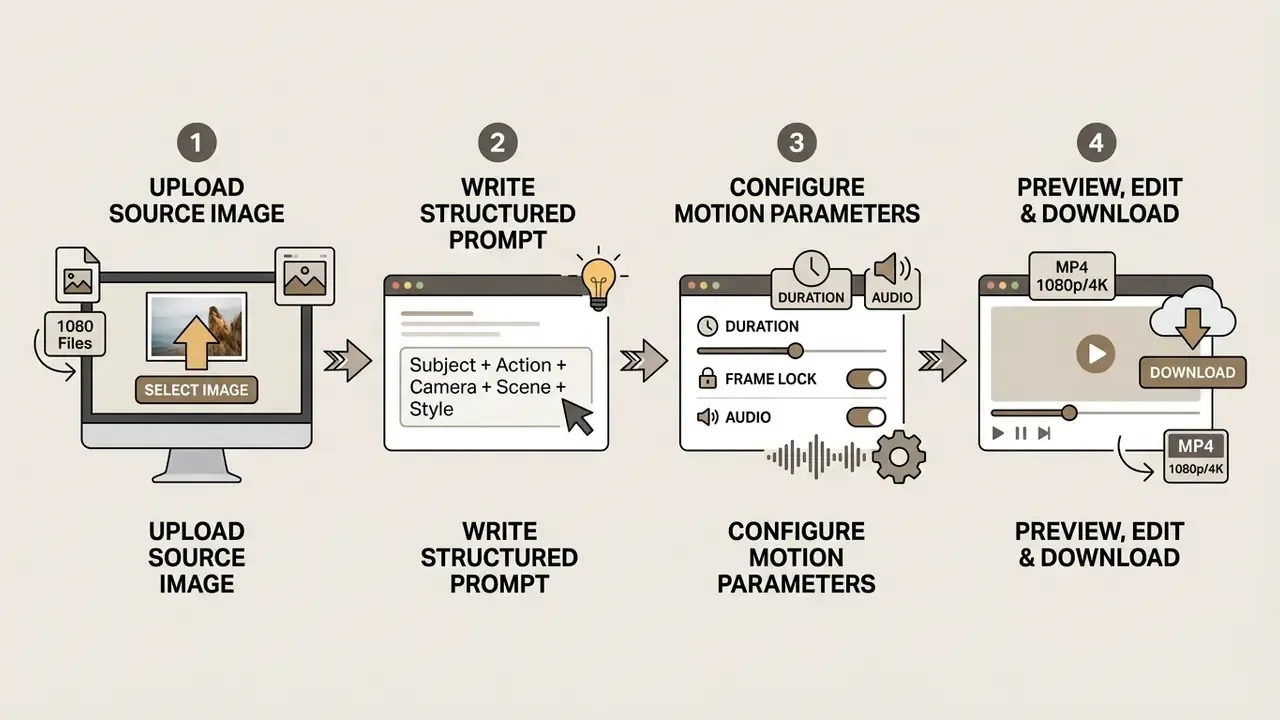
Upload Image and Select the Target Video Format
Open a web-based converter and upload a high-resolution source image in JPEG, PNG, or WebP. Set the aspect ratio to match the destination: 16:9 landscape for YouTube, 9:16 vertical for mobile social feeds, 1:1 square for banner units. Choose this first. Re-cropping a generated clip costs you resolution you cannot get back.
Check that the file meets the converter's minimum pixel dimensions, typically at least 512×512 pixels, though some ingestion pipelines accept from 128×128 px with a 32 MB ceiling. If you want to animate photo to video free online before committing to a subscription, the entry-level platforms listed in the image to video ai free directory are a reasonable sandbox.
Then set the clip duration. Most engines land between 4 and 10 seconds per generation cycle, and vendor minimums differ: 4 seconds is common for AI engines, 5 seconds for stock-video submissions, 6 seconds for some ad platforms. If your brief says convert image to 5 second video, check that the platform offers exactly 5 rather than rounding you into 6 and forcing a trim.
Describe Motion and Configure AI Video Parameters
Write a descriptive prompt to steer the generation. Structure it around five elements: core subject, specific motion, environment, camera movement, lighting style.
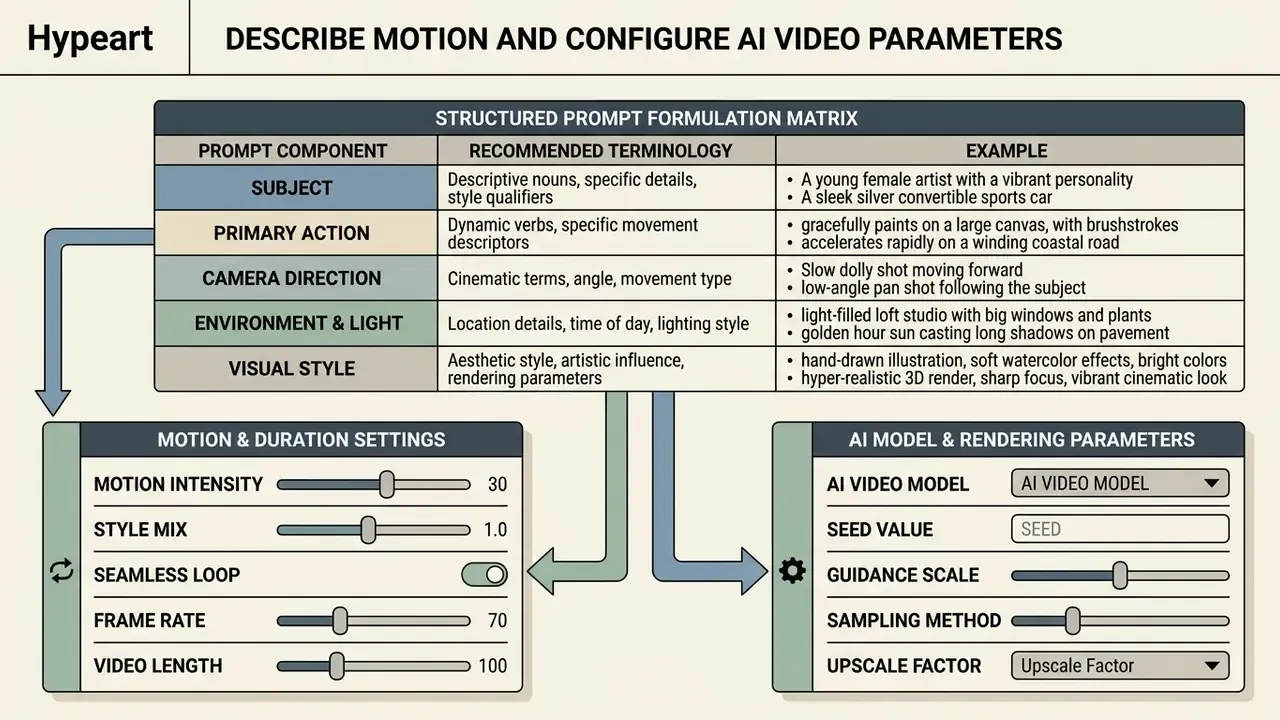
Set the motion intensity slider to a moderate level, usually 3 to 5 on a 10-point scale, to keep distortion down. For API-based integrations and custom application workflows, consult the AI Media API Guides.
Preview, Edit, and Download Your Final Video
Run the generation and wait for the temporal diffusion pipeline, normally 30 to 120 seconds. Watch the preview for three things: motion smoothness, subject consistency, perspective accuracy. Many rendering engines offer a "use previews" export option that reuses already-generated preview media instead of re-rendering, which shortens iteration cycles on long timelines considerably.
Figure: annotated interface walkthrough (four screens)
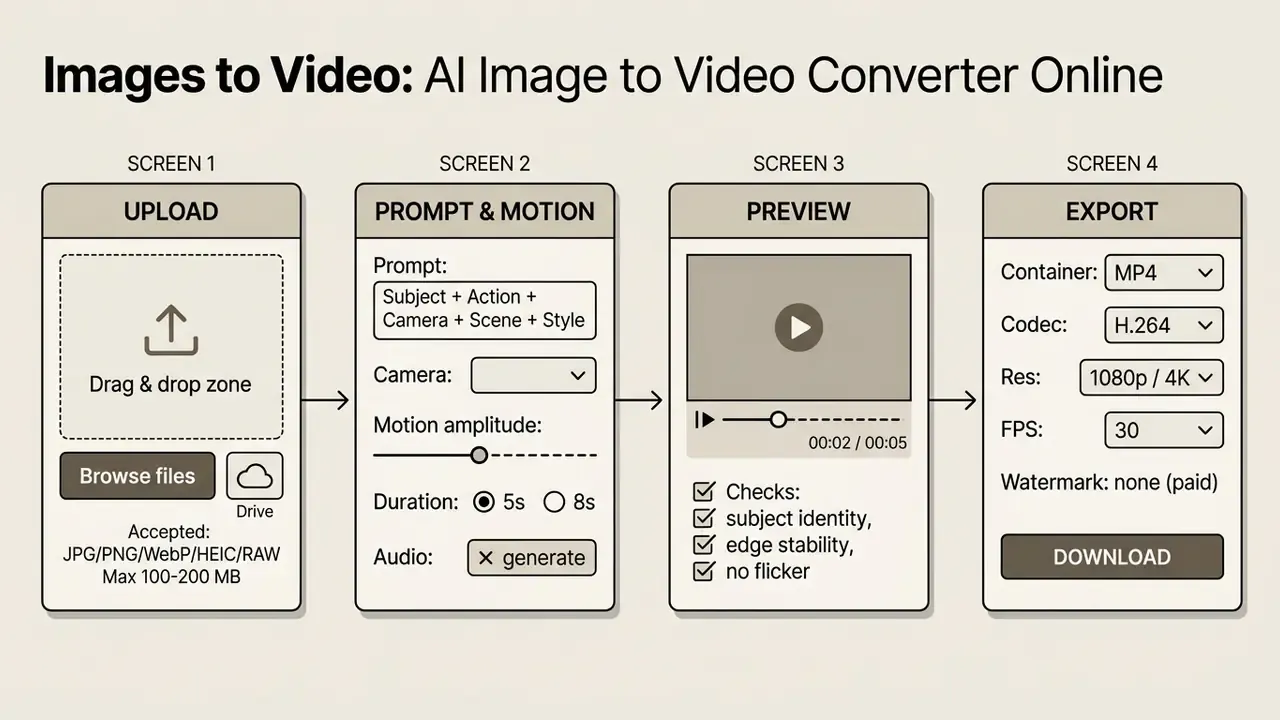
If the preview shows artifacts, refine the prompt or reduce motion amplitude before regenerating. Change one variable per iteration, otherwise you will never know which edit helped. Once you are satisfied, pick your output settings (MP4 container, H.264 or HEVC codec, 1080p or 4K, 30 frames per second) and download the file locally. Clips destined for a longer edit can move into dedicated video editors for multi-clip sequencing, chaptering, and platform-specific publishing. Oversized deliverables can be shrunk with a video compressor instead of re-rendering the generation from scratch.
How to Add Music, Sound, Voice, and Text to Image-Based Video
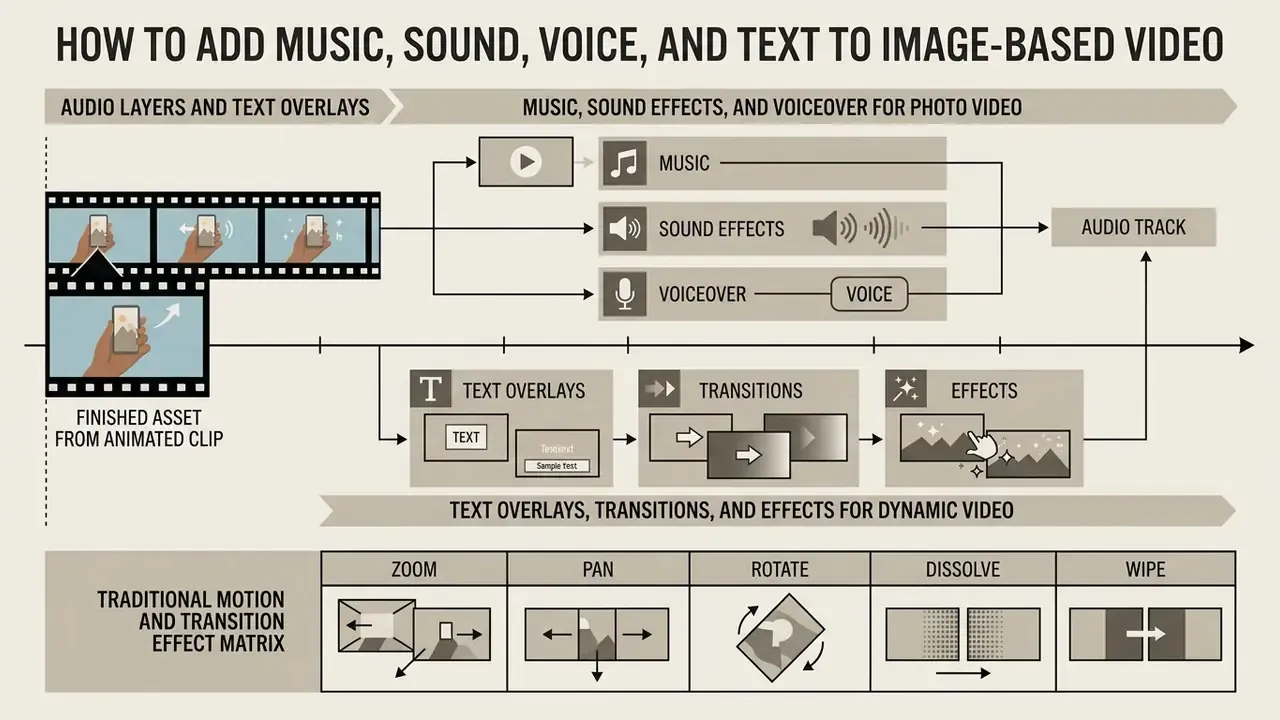
Audio layers and text overlays are what turn a short animated clip into a finished asset. Modern video-making environments fold automated audio synthesis, voiceover recording, and synchronized subtitles straight into the timeline, so you rarely need a separate mixing pass.
Music, Sound Effects, and Voiceover for Photo Video
Combining background music, sound effects, and spoken voice takes precise cue-point alignment. Park the playhead on the exact frame before you insert a generated effect. Perceptual studies place asynchrony detection thresholds around 45 ms for audio-lead and 200 ms for audio-delay conditions, so there is less slack than people assume.
For delivery, normalize the mix to the loudness target of the channel. EBU Tech 3343 recommends integrated loudness normalization under EBU R128 at -23 LUFS, while ATSC A/85 practice targets -24 LKFS for North American broadcast. Web and social platforms apply their own normalization anyway, so the practical rule stays simple: normalize integrated loudness, never peak-normalize, and keep dialogue clearly above the music bed.
Specialized talking-head models such as StyleTalker and VASA-1 accept a single facial photograph plus an audio file, then generate synchronized lip movement, head pose, and expression.
For general scene animation, drop the music bed by -6 dB to -12 dB under narration. Broadcast mixing guidance calls this cutting a "hole for the voice-over," and it works better through volume automation or a gentle mid-band filter than through brute-force ducking. Narration itself can come from AI voice generators when human recording is impractical, provided the licence covers commercial synthesis. If you need to convert image to video with sound and the sync drifts, the fixes in AI Media Support and Troubleshooting cover the usual offenders.
Text Overlays, Transitions, and Effects for Dynamic Video
On-screen text, title cards, and closed captions lift retention and accessibility across muted feeds. Standard caption design guidance limits overlays to two lines per frame, 37 to 45 characters per line, held for at least two full seconds.
These figures come from published accessibility standards rather than informal practice. U.S. Section 508 caption guidance caps lines at two and characters at up to 45 per line while requiring synchronization with audio. The University of Melbourne captioning guide is stricter: a 37-character limit, a reading speed under 180 words per minute, and a two-second minimum on-screen duration. Both advise against scrolling, flashing, and decorative animation on caption text.
Transitions between animated image clips should stay subtle and purposeful. Cross dissolves, gentle directional fades, and linear wipes preserve continuity, while elaborate 3D transitions distract viewers and cheapen the perceived production value. Professional NLE documentation identifies fades, cross dissolves, and wipes as the three canonical transition families, and treats a transition as the replacement of one shot by another across a defined duration. Teams assembling longer sequences from generated clips can evaluate free video editing software for subtitle burn-in, SRT export, and multi-track audio.
Traditional Motion and Transition Effect Matrix
When AI generative motion is not required, or is prohibited outright by brand and compliance rules, online tools apply parametric 2D/3D frame transformations instead. These are deterministic, artifact-free, and reproducible. For regulated creatives that reproducibility is the whole point: the same input plus the same settings gives you the same file, every time. Check that your chosen video converter supports these effect vectors.
| Effect Category | Available Transformations & Mechanics | Best Applied For |
|---|---|---|
| Zoom Parameters | Zoom In Center, Zoom Out Center, Zoom In/Out Left, Zoom In/Out Right (off-center focal zoom) | Simulating physical depth and subject focus. |
| Pan & Tilt | Pan Left, Pan Right, Pan Up, Pan Down, diagonal tracking | Scanning wide landscape and architectural photos. |
| Rotation | Rotate Left 45°, Rotate Left 90°, Rotate Right 45°, Rotate Right 90° | Reframing verticals, stylized reveals, packaging spins. |
| Blur & Reveal | Blurred-to-Clear, Pixelized-to-Clear, Clear-to-Blurred, Clear-to-Pixelized | Dramatic title-card intros and transitions. |
| Geometric Transitions | Circle Crop, Circle Open/Close, Rect Crop, Squeeze Vertical, Squeeze Horizontal, Horizontal/Vertical Wind, Wipe Left/Right/Up/Down, Slice Open/Close | Moving between discrete keyframes in slideshows. |
| Fades & Dissolves | Fade Black, Fade White, Fade Grays, Fade Fast/Slow, Cross Dissolve, Radial, Distance, Alpha Channel Fade | Preserving continuity across multi-photo timelines. |
| Cover & Reveal | Cover Left/Right/Up/Down, Reveal Left/Right/Up/Down, Smooth Left/Right/Up/Down | Editorial slideshows, listicles, before/after pairs. |
Three parameters govern how these effects render: effect duration in seconds, effect enlarge (the magnification applied during zoom, pan, or rotate so edges never expose empty canvas), and effect background (the fill colour behind geometric transitions, often inherited from the dominant colour of the source image). Duration itself can be bound to the image (3 seconds by default for a static photo, native length for an animated GIF), to the length of the music file, or to a fixed value from 1 to 60 seconds. That last option is how most people convert image to video with music without hand-trimming anything.
Motion, Duration, and Prompt Settings for Controlled AI Video
Precise control over AI video generation rests on four levers: prompt structure, duration, keyframe endpoint locking, and explicit virtual camera vectors.
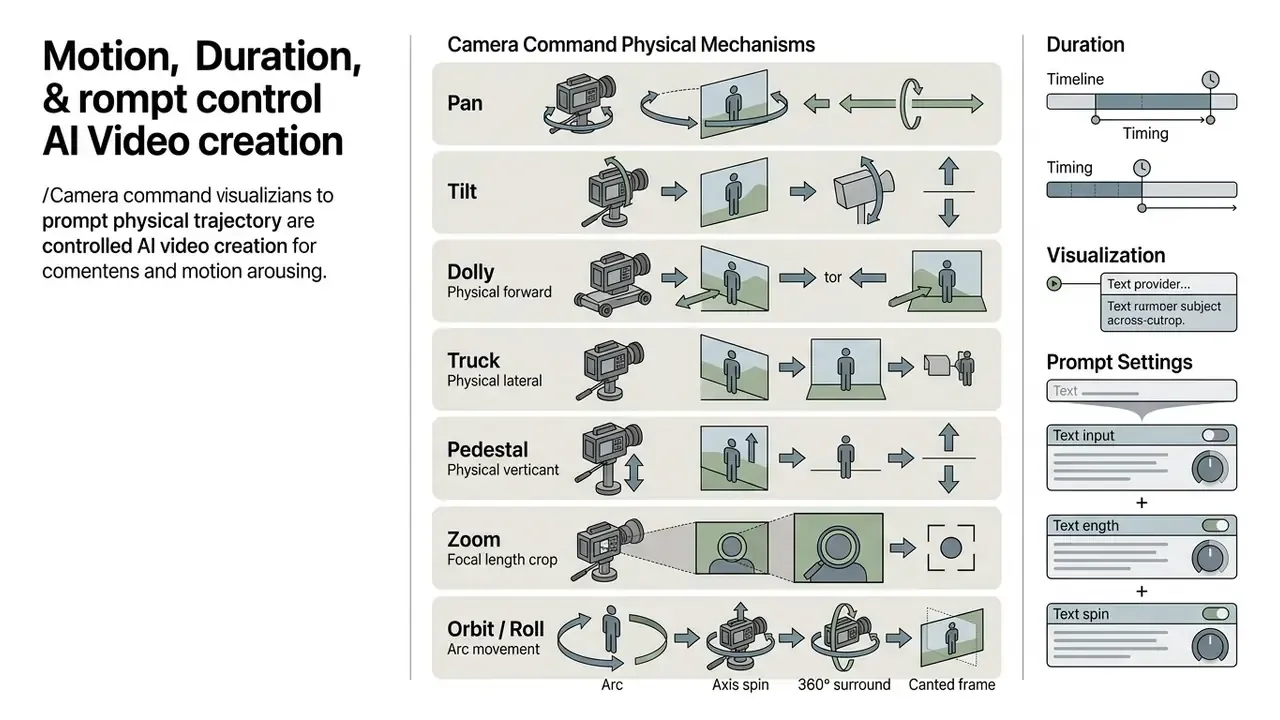
How to Write Prompts for Natural Motion
Good video prompts describe motion explicitly and leave static visual detail to the reference image. That is the core difference from text-to-video prompting, where the prompt has to invent the scene as well. Do not re-describe what is already visible in the uploaded photo. Spend the words on movement, lighting change, and camera direction instead.
Published vendor formulas converge on nearly the same skeleton. Tencent's HunyuanVideo handbook uses Subject + Motion + Scene + [Shot Type] + [Camera Movement] + [Lighting] + [Style] + [Atmosphere]. Kling AI uses Subject + Subject Movement + Scene + Camera Language + Lighting + Atmosphere. Runway Gen-4 orders it as shot size, angle, movement, subject and action, lens and look, lighting and mood.
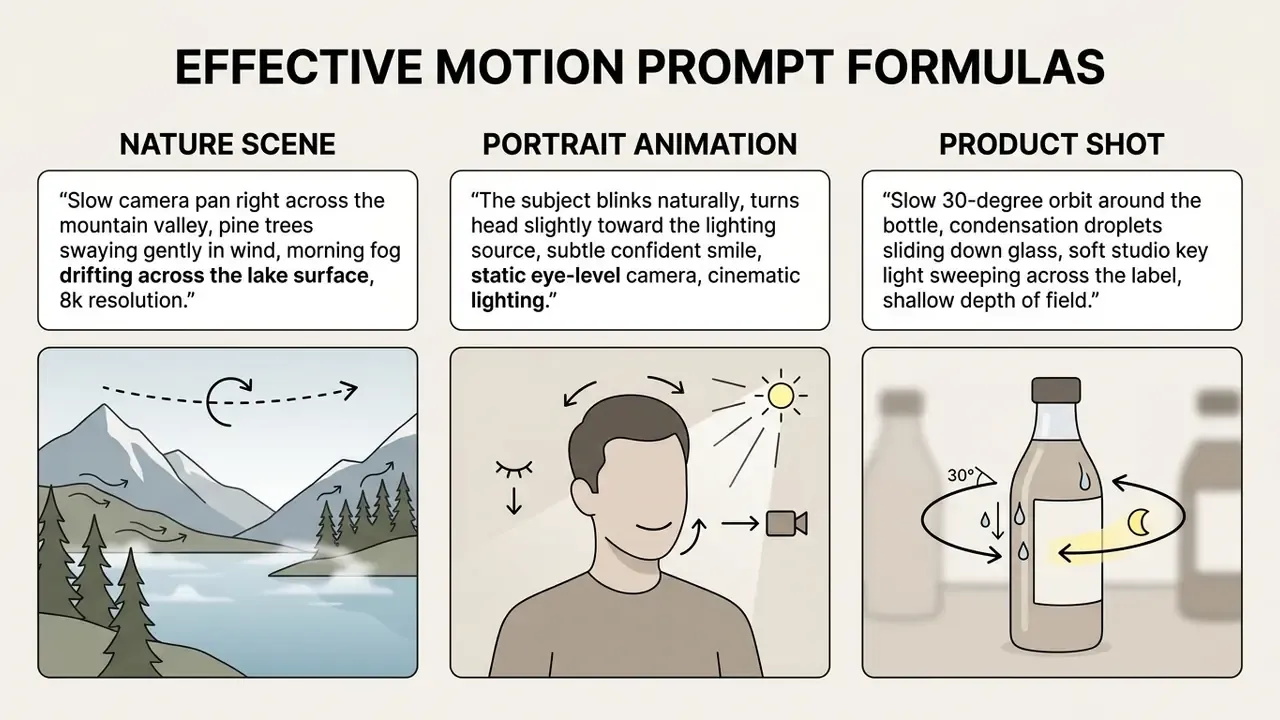
Avoid ambiguous velocity terms such as "fast" or "ultra-quick." They invite warping and frame jitter. Use specific descriptors instead: "slow-motion push in," "gentle breeze motion," "steady tracking shot." Qualitative modifiers ("subtle," "steady," "dramatic") beat numeric speed claims the model cannot interpret anyway.
Where physically plausible object motion matters more than aesthetics, think falling objects, collisions, swinging signage, hybrid simulation now outperforms purely data-driven generation.
"PhysGen couples rigid-body simulation with a diffusion renderer, producing physically plausible object motion under specified forces and outperforming data-driven baselines."
Motion can also arrive non-textually. Kling's motion-reference mode transfers character movement, expression, and camera behaviour from a reference clip, and research controllers such as MotionCtrl separate camera motion from object motion so each can be tuned on its own. Newer methods encode trajectories as explicit point tracks rather than words, which removes prompt ambiguity almost entirely.
Duration, First and Last Frame Control, and Camera Movement
Most commercial image-to-video platforms generate clips between 4 and 10 seconds. API-level parameters tend to be discrete rather than continuous: Veo 3.1 accepts 4, 6, or 8 seconds, while Kling's O1 endpoint accepts 5 or 10. Advanced platforms, including Google Veo 3.1 and Adobe Firefly Video, expose endpoint keyframe controls (firstFrame and lastFrame), and ComfyUI's MiniMax node documents both as optional conditioning images attached at the start and end of the clip.
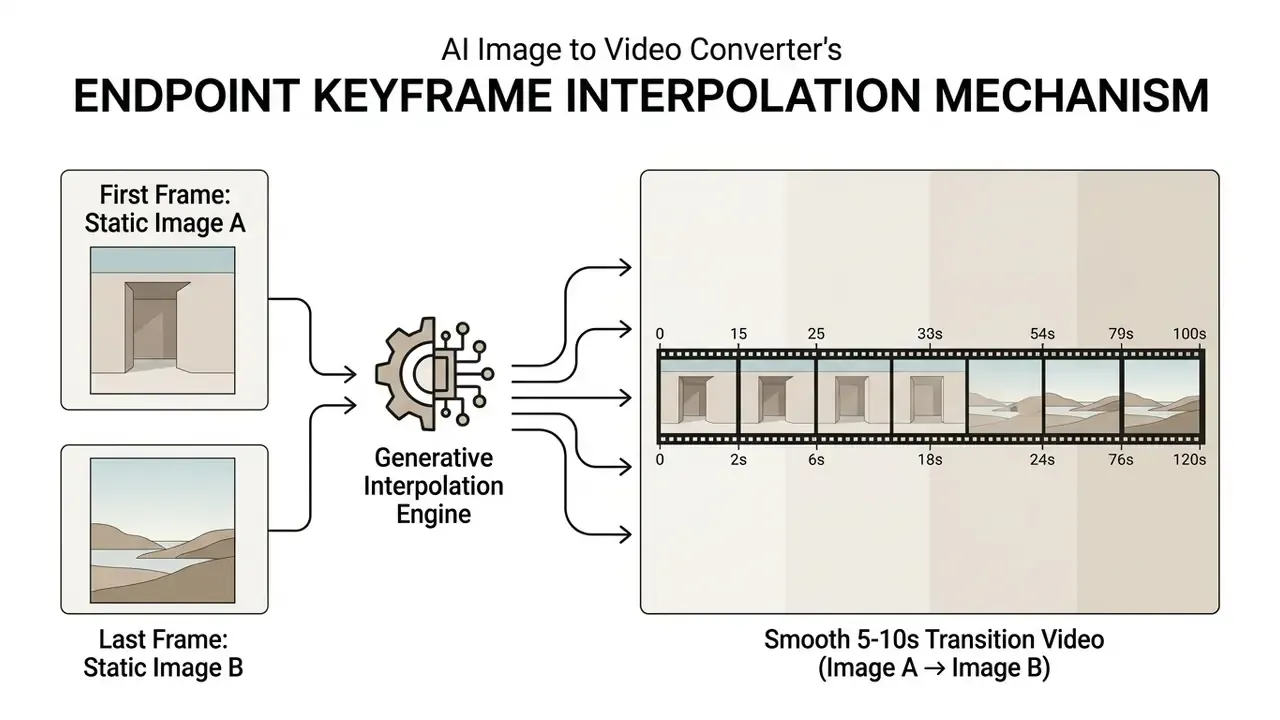
Upload a starting image alongside a final target frame and you force the diffusion model to build a smooth, contextually logical animation between the two visual states.
"VTG applies bidirectional motion fine-tuning and representation alignment regularization, consistently surpassing baselines across four TransitBench tasks."
Endpoint locking removes arbitrary visual drift and gives you real control over the scene change. It is the practical basis for before-and-after reveals, packaging variant swaps, and property walkthroughs assembled from two fixed photographs. Two images, one controlled clip, no shoot.
How to Get High Quality and Professional Video from Images
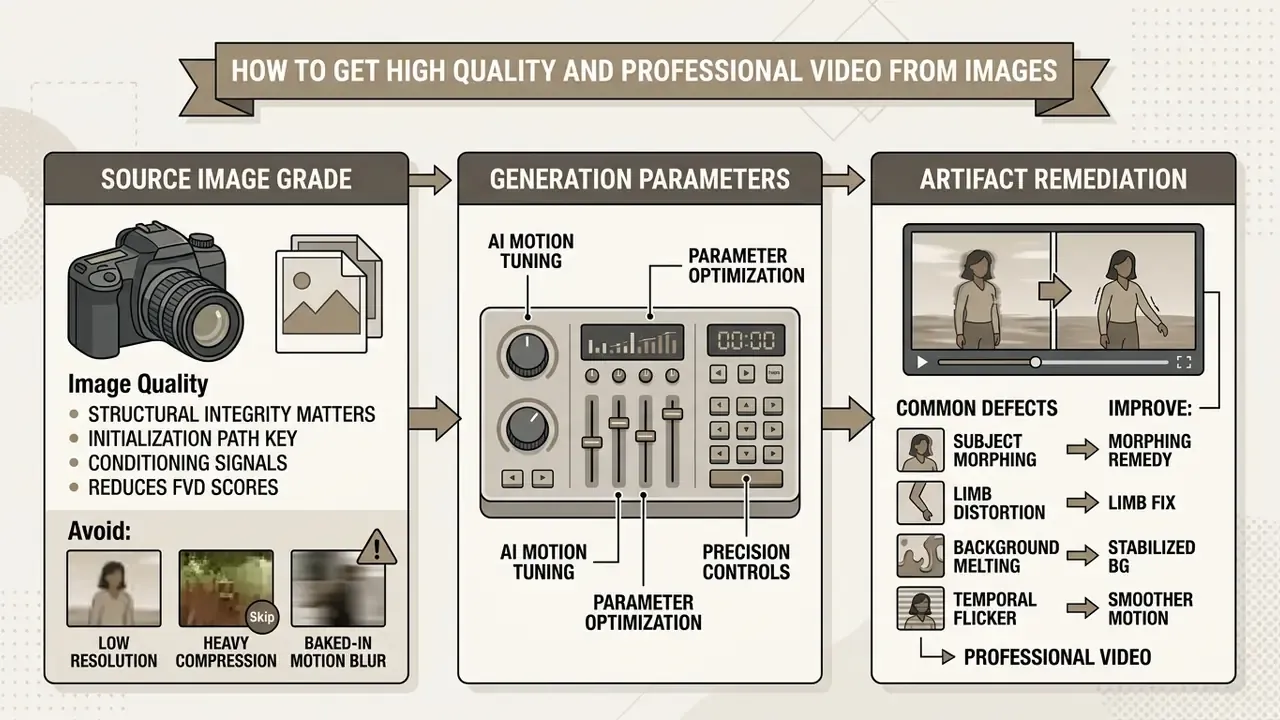
Professional, cinematic output depends on three things in this order: source image grade, generation parameters, and artifact remediation. Reverse that order and you will burn credits.
Source Image Requirements Before Upload
The perceptual quality of a generated video tracks the structural integrity of the input. Uploads should be sharp (roughly 300 ppi equivalent capture quality), correctly focused, balanced in dynamic range, and low in compression noise. Where the original file is small or soft, run it through AI image upscalers or a dedicated photo editor before generation, not after.
A precision note, because this claim is often stated too loosely. The relevant standards describe capture and measurement quality, not diffusion behaviour. FADGI's Technical Guidelines for Digitizing Cultural Heritage Materials (2023) defines 300 ppi and 400 ppi capture classes, a sharpening ceiling expressed as maximum MTF between <1.2 and ≤1.0, and luminance-noise limits that tighten from three count levels to one across quality tiers. ISO 12233:2023 specifies how resolution and spatial frequency response are measured; ISO 15739:2023 specifies noise-versus-signal and dynamic-range measurement. Together they give you an objective way to qualify a source image, high measured SFR and low measured luminance noise, rather than a claim that these standards govern generative models. They do not.
What the generative research does show is that the initialization and conditioning path matters as much as pixel count.
Skip heavily compressed JPEGs, low-resolution screen captures, and images with baked-in motion blur. Neural models read compression artifacts as surface texture, and the result is a noisy, flickering animation that no prompt will rescue. Portrait sources animate most reliably when the head is centred, empty margins are cropped, the background is plain or softly blurred, and hair or eyewear does not occlude facial landmarks. Pre-processing in a free photo editor, so crop, denoise, separate the background, export as PNG, is frequently the highest-leverage single step in the whole pipeline. Unglamorous, but it works.
AI Animation Errors and Methods to Improve Results
Common generative defects: subject morphing, limb distortion, background melting, temporal flicker. They appear when diffusion models misread spatial boundary conditions or when motion force is set too high. A useful triage taxonomy sorts defects into anatomical (hands, faces, limb counts), stylistic (inconsistent rendering), functional (objects that could not work as depicted), and physics violations (impossible shadows, gravity, reflections).
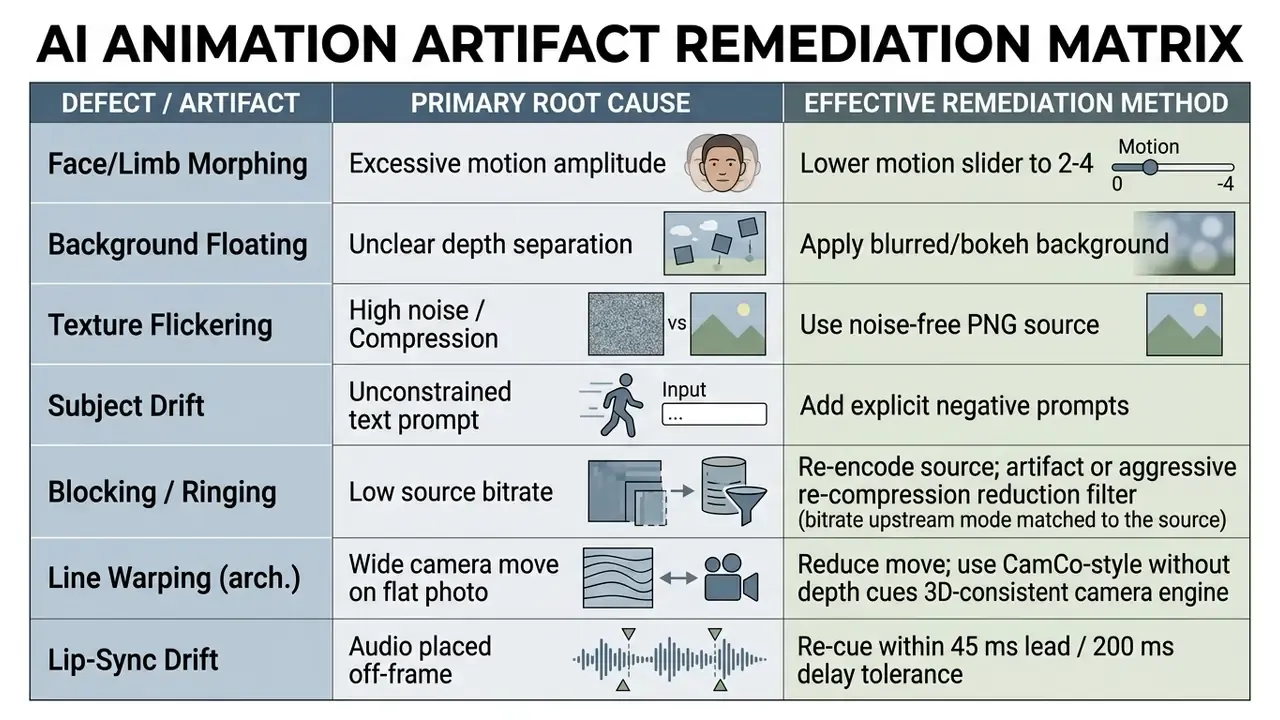
Targeted negative prompts help suppress deformities: distorted faces, extra limbs, morphing, flickering, floating background. One important exception is documented by LTX. When motion is already controlled by a reference video or a motion LoRA, removing motion language from the prompt improves temporal coherence, because two competing motion signals fight each other. Counter-intuitive, and easy to miss.
For specialized aesthetic styles such as portrait character rendering, the production workflow in our guide to generating a hyper realistic beautiful ai girl covers identity control in detail, and for identity-stable business portraits see the AI headshot generator guide.
The mechanism behind flicker suppression is now documented in peer-reviewed work rather than forum folklore.
Read alongside FrameBridge's FVD reduction, the operator conclusion is consistent: input signal clarity plus constrained motion beats prompt elaboration. When an input image lacks sharp edge boundaries or carries heavy compression noise, temporal attention layers cannot hold structural identity, and you get texture melting and background drift no matter how elaborate the prompt becomes.
Commercial and Creative Use Cases for Image to Video
Image-to-video generation earns its keep across digital marketing, e-commerce merchandising, advertising, and social media production. The common thread: you already own the stills.
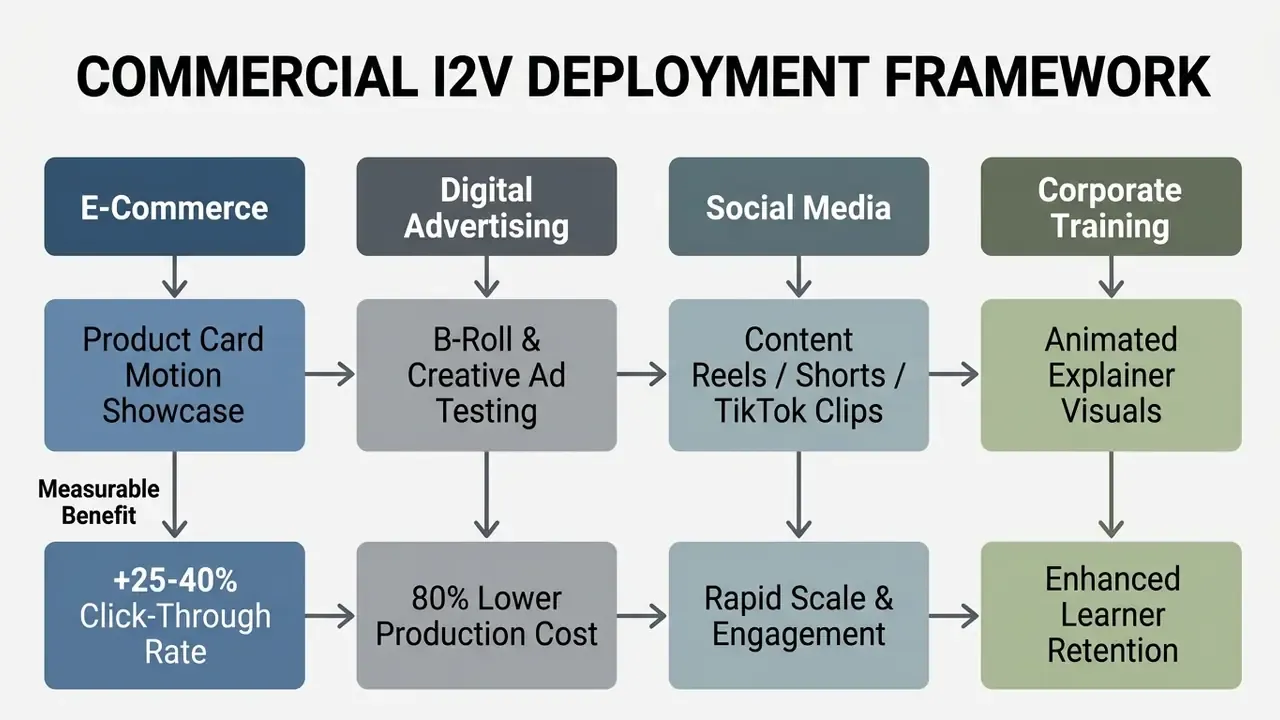
The uplift figures in that framework are vendor-reported and account-specific ranges, not audited benchmarks. Treat them as hypotheses to test, not as inputs to a budget model.
Product Videos, Ads, and Business Visuals
Teams building brand-consistent asset libraries can pair generation with the best AI art generators for the still frames themselves, then animate only the approved frames. Approval before animation. It saves a rework cycle.
Niche-Specific Workflow Solutions
- Real Estate & Architecture. Turn static listing photos (
.jpg,.heic) into smooth cinematic walkthroughs. Keep the motion slider at 2 to 3, pair it with aslow horizontal tracking dollyprompt to protect architectural lines, and prefer a 3D-consistent camera engine over a flat digital zoom. Add logo bugs and address lower-thirds for listing compliance. - Educators & E-Learning. Animate instructional diagrams, historical maps, and scientific charts. Gentle continuous background motion holds attention across slide transitions, while burned-in captions that respect the two-line and 37 to 45 character rule keep the asset accessible for lecture capture and LMS distribution.
- Photographers & Visual Artists. Convert portfolio shots into motion teasers for client pitches and gallery submissions. Protect original IP with transparent, motion-tracked watermarks across target frames, and keep the RAW original out of any tool whose terms permit training on uploads.
- Coaches & Consultants. Animate testimonial cards, quote snapshots, and visual frameworks into scroll-stopping assets for LinkedIn and landing pages. A subtle 4-second push-in plus a synthesized voiceover mixed 6 to 12 dB above the music bed is usually enough.
- Graphic & UX Designers. Present UI mockups, brand identity guidelines, and packaging concepts as motion reels that convey depth and lighting response. Keyframe locking (first frame flat mockup, last frame applied mockup) communicates the concept without a physical prototype.
- Small Business Owners & Marketers. Convert existing product photography and static banners into video ad variants for creative testing, then retire underperformers weekly instead of commissioning a new shoot per campaign.
- Event & Community Managers. Build recap reels and invitation clips from event photography. Use geometric transitions (circle open, wipe) between discrete moments rather than generative morphs, which keeps faces stable.
- Business Presentations & Internal Comms. Animate charts, product shots, and team photos for pitch decks, quarterly reports, and internal updates where a filmed segment would be disproportionate to the message.
FAQ About Image to Video Online
Supported Image and Video File Formats in Online Converters
Most online image-to-video converters accept JPG/JPEG, PNG, WebP, and increasingly HEIC, TIFF, and camera RAW. Recommended upload specs favour uncompressed PNG at a minimum resolution of 512×512 pixels and up to 4096×4096 pixels.
| Category | Supported Input Extensions | Processing Notes |
|---|---|---|
| Standard Web Formats | .jpg, .jpeg, .png, .webp, .bmp, .gif | Native lossy/lossless input; recommended minimum 512×512 px. Animated GIF duration may be inherited by the output clip. |
| High-Efficiency Mobile | .heic, .heif, .avif | Automatically converted to uncompressed RGB frame buffers before generation. Motion photos may have their embedded video extracted directly. |
| Professional & RAW | .arw (Sony), .cr2 / .cr3 / .crw (Canon), .nef / .nrw (Nikon), .dng (Adobe), .orf (Olympus), .rw2 (Panasonic), .raf (Fuji), .pef (Pentax), .dcr (Kodak), .mrw (Minolta), .sr2 / .srf / .srw (Sony/Samsung), .x3f (Sigma), .psd, .pcx, .wmf, .tif, .tiff, .raw | Direct raw demosaicing applied; retains high dynamic range for motion gradients. Encrypted or password-protected files cannot be processed. |
| Audio Container Support | .mp3, .wav, .aac, .flac, .m4a, .ogg, .aiff, .amr, .wma, .mid / .midi | Auto-sampled to 48 kHz / 24-bit streams on timeline import; output duration can be bound to the music file length. |
| Video Export Containers | .mp4 (H.264 / HEVC), .mov (including ProRes on higher tiers), .webm, .gif, .avi, .mkv | MP4/H.264 is the universal default; WebM supports alpha-channel transparency; GIF is capped in colour depth. |
Export defaults to MP4 with the H.264 codec, which plays everywhere: mobile, browsers, editing suites. Higher tiers add MOV with ProRes, WebM for transparent backgrounds, and 4K upscaling with H.264 or H.265 output.
What Are the Best Free Tools to Convert Images to Video?
There is no single winner, and any list published today ages within a quarter. Judge a best free image to video converter on five checks: watermark policy on the free tier, resolution cap, whether commercial rights are granted in writing, whether uploads are excluded from model training, and whether the motion controls are numeric rather than vague. Hailuo currently permits commercial use on its free tier, which puts it ahead of Runway, Luma, and Kling for unpaid pilots. For a maintained side-by-side view, start with the AI Media Comparison Matrices and verify each claim in the vendor's own terms.
Can I Save My Video Project and Resume Editing Later?
Browser-based guest sessions process files in temporary local memory, so closing the window clears an unsaved timeline. That is why unregistered users on most converters have to finish all edits in one sitting. Registered free and premium users get cloud-project persistence, with cross-device syncing, draft saving, and direct import or export via Google Drive, Dropbox, or native cloud connectors. Premium tiers usually extend the draft retention window, raise upload ceilings, and remove watermarks. Before starting a long timeline, confirm your tier supports project saving. Recovering a lost guest session is not possible.
What Are the File Size Limits for Image to Video Uploads?
Standard web-based converters cap source uploads between 100 MB and 200 MB per asset, with 200 MB the most commonly documented ceiling. For raw camera files (.CR3, .NEF, .PSD) above that limit, downsample toward 4K bounds (4096×4096 px) or pre-convert to lossy WebP first. If an upload stalls, cancel and resubmit rather than waiting, because most browser uploaders do not resume interrupted transfers. API ingestion pipelines can be stricter still, sometimes capping individual images near 32 MB.
Is Server-Based AI Processing Secure for Private Images?
Security posture varies a lot. Browser-based local converters process files in client memory without transmitting assets anywhere. Cloud-hosted platforms upload source images to remote server clusters over HTTPS, which is a different risk profile entirely.
Enterprise platforms typically purge uploaded media and generated video from temporary storage within 24 to 48 hours. If you handle confidential business visuals, proprietary designs, or regulated personal data, verify that the vendor specifies end-to-end encryption and guarantees that uploads are not used to train foundation models. For regulated environments, escalate further: request the current SOC 2 Type II or ISO 27001 report, confirm whether an isolated private-cloud or on-premise inference option exists, and establish whether GLBA, HIPAA, or GDPR obligations attach to the photographs in scope. Ask before the pilot, not during the audit.
How Well Do I2V Models Understand What They Are Animating?
Visual fidelity and semantic understanding are separate capabilities, and current models are noticeably stronger at the first.
"UI2V-Bench finds that current image-to-video models struggle with spatial relationships and attribute binding even when visual quality is high." UI2V-Bench (2025), arXiv preprint.
The operational implication: instructions that require reasoning ("the left product moves behind the right one," "the red label rotates while the blue one stays fixed") fail far more often than instructions about texture or camera motion. Split such requests into separate generations with keyframe locking, or handle the relational logic in a conventional editor where you can see the layers.
Can I Use Free-Tier Output in a Paid Campaign?
Only if the vendor's licence says so in writing. Hailuo currently permits commercial use on its free tier, while Runway, Luma, and Kling restrict it, and Luma keeps free-tier generations non-commercial even after an upgrade. Separately, remember that a commercial licence does not create ownership: a fully machine-generated clip with no meaningful human authorship stays unregistrable in the United States, so contractual indemnification is your practical protection.
Appendix A: Acceptance Criteria and Evidence Log for Generated Clips
Governance fails quietly when quality is judged by eye. The fix is boring: write acceptance criteria down, then log the evidence. This appendix gives a minimum viable version you can adapt to an existing model-risk or marketing-approval workflow.
| Check | Pass Criterion | How It Is Evidenced |
|---|---|---|
| First-frame fidelity | Product, logo, and face match the source still through the first 0.5 s | Side-by-side frame grab attached to the approval ticket |
| Temporal stability | No visible flicker or background drift across the full clip | Reviewer initials plus timestamped preview link |
| Motion plausibility | No morphing limbs, impossible shadows, or warped architectural lines | Artifact triage note referencing the remediation matrix |
| Audio sync | Voice within 45 ms lead and 200 ms delay tolerance | Timeline screenshot with cue points visible |
| Caption compliance | Two lines maximum, 37 to 45 characters, minimum two seconds on screen | SRT file archived with the deliverable |
| Loudness | Integrated loudness normalized to the channel target | Loudness meter reading saved to the asset record |
| Rights and consent | Signed release on file for any identifiable person | Release reference ID stored outside the generation tool |
| Licence scope | Paid tier covering the intended commercial placement | Invoice plus current terms snapshot with retrieval date |
| Prompt reproducibility | Prompt, seed, model version, and settings recorded | Generation log export |
| Named approver | One accountable human sign-off before publication | Approval log entry |
Two habits make the log useful rather than decorative. First, snapshot the vendor terms on the day you generate, because pricing and licence pages change without notice and a screenshot with a retrieval date is what an auditor will actually accept. Second, record the model version and seed. Without them you cannot reproduce a disputed asset, and "we think it was Gen-4" is not evidence.