Executive Summary for Decision-Makers
- What it is: MiniMax H3 (also written Hailuo 3.0) is a 33-billion-parameter single-stream omni-modal transformer. It renders 4-to-15-second clips at up to native 2K (1440p short edge) and 24 fps, with 32 kHz stereo audio produced inside the same denoising pass, not bolted on afterwards by a separate vocoder.
- What it costs: API metering runs at $0.08 per rendered second at 768P and $0.13 per rendered second at 2K. Enterprise monthly packages sit at $1,000 / $2,500 / $4,500 / $6,000 (Standard through Business, 20 to 50 RPM).
- Where the legal line sits: Free HailuoAI web renders are watermarked and personal, non-commercial only. Paid API and package tiers grant commercial rights. Open-weight derivatives shipped inside products above $20 million annual revenue require prior written authorization plus visible "MiniMax H3" attribution.
- Where the risk sits: MiniMax is a Shanghai-headquartered vendor. Cross-border data flow, prompt-retention policy, and model-risk documentation (SR 11-7 and OCC-aligned evidence) must be assessed before any regulated-industry pilot. A reproducible audit trail (
task_id, seed,prompt_hash, reference asset IDs) is the minimum control set. Nothing less will survive an internal audit walkthrough.
This article is informational and does not constitute legal, financial, or compliance advice. Verify all licensing and data-handling terms with counsel and directly against vendor documentation before deployment.
What Is MiniMax AI Video Generator and Which Tasks It Solves
The MiniMax AI Video Generator is an enterprise-grade multimodal AI video generation platform built by Shanghai-based MiniMax. It synthesizes photorealistic clips up to 15 seconds long at 2K resolution with native 32 kHz stereo audio, driven by text, image, video, and audio inputs.
It covers the familiar enterprise media task cluster: commercial video creation, marketing asset production, social video scaling, automated visual effects (VFX) motion transfer, and dynamic video editing. That is the same job set handled across the broader category of AI video generators. One caveat before you evaluate anything: the platform only makes sense once you separate the underlying neural network models, the consumer-facing web tools, and the enterprise API developer services. Those three layers carry different rights and different logging capability.
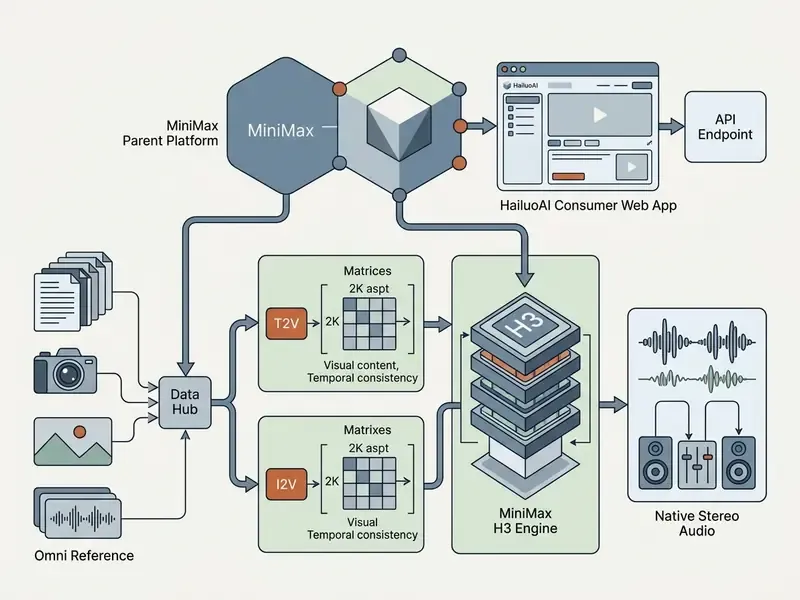
MiniMax, HailuoAI, and MiniMax H3: How the Service and Models Are Connected
MiniMax is the parent AI institution and API provider. HailuoAI (also known as Hailuo Video) is the consumer web and mobile interface. MiniMax H3 is the flagship 33-billion-parameter multimodal family powering both. Legacy systems such as Hailuo-02 and Hailuo-2.3 worked as specialized diffusion models for 6-to-10-second clips. The newer minimax video generation model operates instead as a unified omni-modal transformer core.
Developers reach these capabilities programmatically through the MiniMax API platform. Creators work through the browser, on the official Hailuo AI video generator website. That channel split is not cosmetic. It determines watermarking, commercial rights, retention policy, and whether you can produce audit logging at all. For definitions of the generative media terms used throughout, consult our AI Media Glossary.
Video Creation Formats Supported by MiniMax AI
The minimax ai generator supports text-to-video (T2V), image-to-video (I2V), photo-to-video animation, multimodal reference generation, and native audiovisual synthesis inside one pipeline. You can feed it pure text descriptions, static images, reference clips, or sample audio to control subject identity, camera trajectory, lighting transitions, and dialogue synchronization.
Unlike legacy models that treat sound as post-processing, the minimax ai video generation model denoises video latents and stereo audio latents together, in a single transformer loop.
"H3 denoises a single packed sequence containing text conditioning, media conditions, and target video and audio latents."
That multimodal audio loop also includes automated spectral noise reduction and voice-isolation latents. Synthesized dialogue and ambient cues arrive clean, separated from unwanted background frequencies, without post-production noise gates, de-hum filters, or manual stem separation before the clip lands on a timeline. Teams that used to push every generated take through an external cleanup chain can compress that step out entirely. Small change on paper. Noticeable in delivery schedules.
Capabilities of MiniMax H3 for Video Generation and Editing
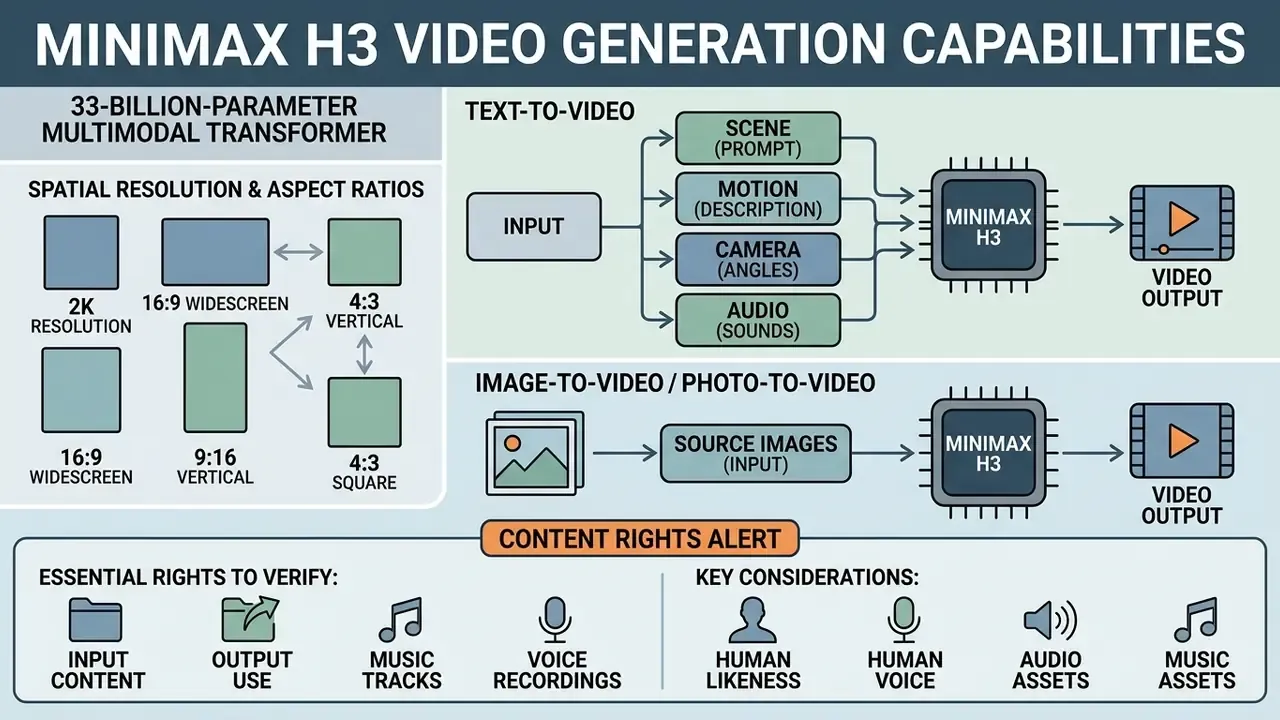
MiniMax H3 is a 33-billion-parameter dense single-stream multimodal transformer. It generates high-definition output up to 2K resolution at 24 frames per second with synchronized 32 kHz stereo audio.
"MiniMax H3 is built on a single-stream transformer with 3D multimodal rotary position embeddings (MM-RoPE) unifying text, image, video, and audio tokens in a shared space."
Built on 3D Multimodal Rotary Position Embeddings (MM-RoPE), H3 unifies text, image, video, and audio tokens into one spatial-temporal context window. Practically, that enables native instruction following, precise camera motion control, first-and-last-frame temporal interpolation, and reference-driven style and subject preservation across renders.
Independent evaluation of the previous generation gives a useful quality baseline for the family:
"Hailuo-02 achieved FVD 85.01 and an overall perceptual score of 56.09, above Kling-2.1 at 53.24 on five-second 768p clips."
| Generation Mode | Primary Input Types | Motion & Camera Controls | Audio Capabilities | Output Duration | Output Resolution |
|---|---|---|---|---|---|
| Text-to-Video (T2V) | Text Prompt string | Prompt commands ([Pan], [Zoom], [Truck], [Static]) | Native synthesized stereo audio (effects, ambience, voice) | 4–15 seconds | 768P Base / 2K Regenerated |
| Image-to-Video (I2V) | Text Prompt + First Frame image | First-frame starting motion anchor; optional Last-frame targeting | Native audio synthesized from scene context | 4–15 seconds | Matches First Frame ratio (768P / 2K) |
| Omni Reference Mode | Text Prompt + up to 9 images, 3 videos, 3 audio clips | Character motion transfer, pose copy, style and lighting matching | Voice reference conditioning and soundscape alignment | 4–15 seconds | 768P / 2K |
| 2K Video Regeneration | Base 768P Video + Original Context | Context-preserving detail sharpening and upscale | Retains and aligns base audio track | 4–15 seconds | Native 2K (1440P short edge) |
Spatial resolution and aspect ratio specifications. At the 2K tier, MiniMax H3 renders a native 1440p short edge across six frame-geometry presets: 21:9 (ultrawide cinematic), 16:9 (standard widescreen), 4:3 (classic academy), 1:1 (square), 3:4 (vertical tall), and 9:16 (mobile story). For ultrawide 21:9 renders, the model outputs roughly 3.7 megapixels per frame (about 2976 × 1248 pixels at 24 fps), which removes spatial scaling distortion when clips import straight into professional NLE timelines. An adaptive ratio mode exists too, and the ratio actually rendered can be read back from the task-query endpoint. That read-back matters for automated pipelines that must confirm frame geometry before conform and delivery.
Text-to-Video: Generating Scene, Motion, Camera, and Audio via Prompt
In text-to-video mode, the minimax ai text to video engine builds a whole audiovisual scene from a natural language prompt string, following the same conditioning logic as the wider class of text-to-video generation systems. You specify subject action, scene lighting, material physics, camera movement, and audio ambience directly in the prompt text.
Per official MiniMax API documentation, explicit camera commands in brackets, such as [Dolly in], [Pan right], or [Tracking shot], give deterministic control over virtual camera motion (MiniMax Platform API Guide, 2026). Up to three simultaneous camera moves can sit inside one bracket. A full camera expression has three dimensions: motion type, amplitude, speed. Medium amplitude at normal speed is usually omitted, since it is the default. In the same pass the model synthesizes environmental soundscapes, voice dialogue, and background music matched to the visual scene, without any external vocoder in the chain.
Image-to-Video and Photo-to-Video: Animating Source Images
Multimodal References and Editing Finished Video Output
MiniMax H3 supports omni-reference generation. Creators can supply up to nine images, three video clips, and three audio samples as contextual anchors in one request. The H3-Context-IR module parses those assets for character facial identity, costume detail, motion rhythm, and vocal acoustic traits. Reference audio must be accompanied by at least one image or video reference. Per-asset ceilings: 30 MB for images, 50 MB for video, 15 MB for audio.
For editing or refinement, supply a base 768P output alongside modified prompt instructions to trigger targeted regeneration. Used this way, the platform behaves less like a generator and more like a minimax ai video editor: the iterative pass updates visual details, lighting color temperature, or camera speed while holding subject identity and core composition from the original render.
Can You Use MiniMax AI Videos in Commercial Projects?
Public-figure likeness deserves its own line in the policy. Synthetic political imagery of the kind catalogued in our note on gavin newsom ai pictures sits well outside acceptable commercial use for a regulated brand, regardless of what the model license technically permits. The same caution applies to stylized horror or costume renders, for example a ghost face ai picture built from a protected film character, where the underlying IP, not the generator, creates the exposure.
Organizations building policy across generative formats should align this with their broader stance on commercial use of AI-generated assets. Input-provenance obligations are effectively identical for image and video pipelines.
Essential Rights to Verify for Input, Output, Music, and Voice
Under official MiniMax platform terms, users keep intellectual property ownership in their input assets and are granted ownership rights in generated output clips to the extent permitted by law (MiniMax Platform Terms of Service, Section 6, 2026). The app and web terms similarly state that the vendor does not claim ownership of user contributions or user-generated content. That ownership, though, is contingent on input legality:
- Human likeness and voice. If inputs contain identifiable faces or voice samples, you need signed personal releases or explicit commercial authorization from the rights holder.
- Audio and music assets. Native synthesized audio and uploaded reference audio must not infringe existing mechanical, synchronization, or performance licenses. Commercial model rights never substitute for publishing, sync, or performing-rights clearance. The same principle governs AI voice generators and synthetic-vocal workflows.
- Revenue boundaries. Under the MiniMax H3 Community License, commercial deployment of open-weight derivatives inside products generating over $20 million in annual revenue requires prior written commercial authorization from MiniMax plus mandatory "MiniMax H3" attribution in the product interface (MiniMax H3 Open Source License, 2026).
- Territorial carve-outs. Third-party reviews of the H3 community license report commercial-use exclusions covering the United States, European Union, United Kingdom, and South Korea for open-weight deployment. Vendor licenses differ from open-weight licenses, so confirm which instrument governs your channel before sign-off.
Commercial Use via Web App vs. Official API: Key Differences
A critical legal distinction runs between access channels:
- Web app (HailuoAI free and standard web interface).Governed by consumer terms that restrict free-tier outputs to personal, non-commercial use only. Commercial use of watermarked free renders is prohibited (MiniMax App & Web Terms, 2026).
- Enterprise API and paid subscription packages.Paid API accounts and package subscriptions ($1,000 per month and above) explicitly include commercial usage grants, remove platform watermarks, and provide high-resolution downloads suitable for monetization (MiniMax Commercial Video Terms, 2026).
- Distribution constraint.MiniMax video terms define commercial purposes as direct or indirect commercial benefit or financial gain, and restrict onward distribution to third parties who agree to non-commercial use. That clause matters for agencies handing master files to clients.
Shadow AI Controls: Preventing Unsanctioned Web-Tier Use
The most common compliance failure is not licensing at all. It is an employee generating assets on the free consumer tier and dropping them into a sanctioned campaign. A workable control set:
- Network policy.Restrict consumer endpoints (
hailuoai.video,hailuoai.org) at the egress proxy for corporate devices, while allowlisting the API host used by the sanctioned pipeline. - Watermark detection.Add an automated pre-flight check in the DAM that rejects ingested files carrying platform watermark signatures or missing an internal generation record.
- Provenance metadata.Require every asset entering the DAM to carry an internal generation ID linking back to prompt, seed, and reference-asset licenses.
- Procurement channel.Route all generative video spend through one billing account, so finance reporting surfaces unsanctioned card-level subscriptions. Expense reports are, frankly, the best shadow-AI detector most institutions already own.
Teams auditing intellectual property risk across generative media platforms can reference our tracking of AI Litigation and Case Timelines. For detailed licensing terms by asset type, see our guide on commercial use.
Data Privacy, Jurisdictional Risk, and Infrastructure Security
Because MiniMax is headquartered in Shanghai, regulated buyers (banks, insurers, healthcare and public-sector media teams) should treat jurisdiction as a first-order control question rather than a footnote in the vendor pack.
Diligence questions to answer before any pilot:
| Risk Domain | What to Verify | Why It Matters |
|---|---|---|
| Data residency | Which region processes API calls; whether US or EU regional endpoints or a reseller-hosted deployment exists | Cross-border transfer exposure and contractual data-localization commitments |
| Training on inputs | Whether prompts, reference images, and voice samples are used for model improvement, and whether opt-out is contractual | Confidential product, brand, and personnel data leakage |
| Retention windows | Cache purge interval (7 days on public distribution endpoints), log retention, deletion attestation | Evidence for records-management and privacy programs |
| Certifications | SOC 2 Type II or ISO 27001 scope letters for the specific service consumed; platform intermediaries may hold certifications separate from the model vendor | Third-party assurance instead of vendor self-attestation |
| Open-weight alternative | Self-hosting H3 weights inside a VPC to remove third-party inference entirely | Highest-control path when confidentiality outweighs cost |
| Deployment via intermediary | Whether a certified aggregator (for example a SOC 2-certified workspace reselling H3) sits between you and the model host | Shifts some controls to a vendor already inside your assurance perimeter |
For institutions unable to accept third-party inference on sensitive briefs, the pragmatic pattern is a two-tier deployment. Non-confidential marketing and social assets run on the hosted API for speed and cost. Confidential or customer-data-adjacent work is either self-hosted on open weights or kept out of generative pipelines entirely. Not elegant. Defensible, though, which is the point.
Free Access Options, Pricing, and Limits of MiniMax AI Video Generator
Working out the real cost of minimax ai free video generation, API meters, and monthly enterprise packages means auditing official rate cards against deployment tiers rather than trusting a headline price.
| Access Tier / Plan | Monthly Cost | Video Points / Rate Limits | Max Resolution | Duration Limits | Commercial Rights | Watermark |
|---|---|---|---|---|---|---|
| Free Access / Trial | $0 | Daily bonus credits (about 2 to 3 clips per day) | 720P / 768P | Up to 5–6 seconds | Non-commercial personal use | Watermarked |
| API Pay-As-You-Go (768P) | $0.08 per output sec | Pay per generated second | 768P Base | 4–15 seconds | Included | No Watermark |
| API Pay-As-You-Go (2K) | $0.13 per output sec | Pay per generated second | Native 2K | 4–15 seconds | Included | No Watermark |
| Standard Package | $1,000 / month | 3,760 Video Points (20 RPM) | 1080P / 2K | 4–15 seconds | Included | No Watermark |
| Pro Package | $2,500 / month | 9,920 Video Points (30 RPM) | 1080P / 2K | 4–15 seconds | Included | No Watermark |
| Scale Package | $4,500 / month | 18,900 Video Points (40 RPM) | 1080P / 2K | 4–15 seconds | Included | No Watermark |
| Business Package | $6,000 / month | 26,780 Video Points (50 RPM) | 1080P / 2K | 4–15 seconds | Included | No Watermark |
Pricing compiled from official MiniMax Platform API documentation and subscription rate cards as of August 2026. Per-second API billing applies to rendered video seconds, including 2K regeneration passes.
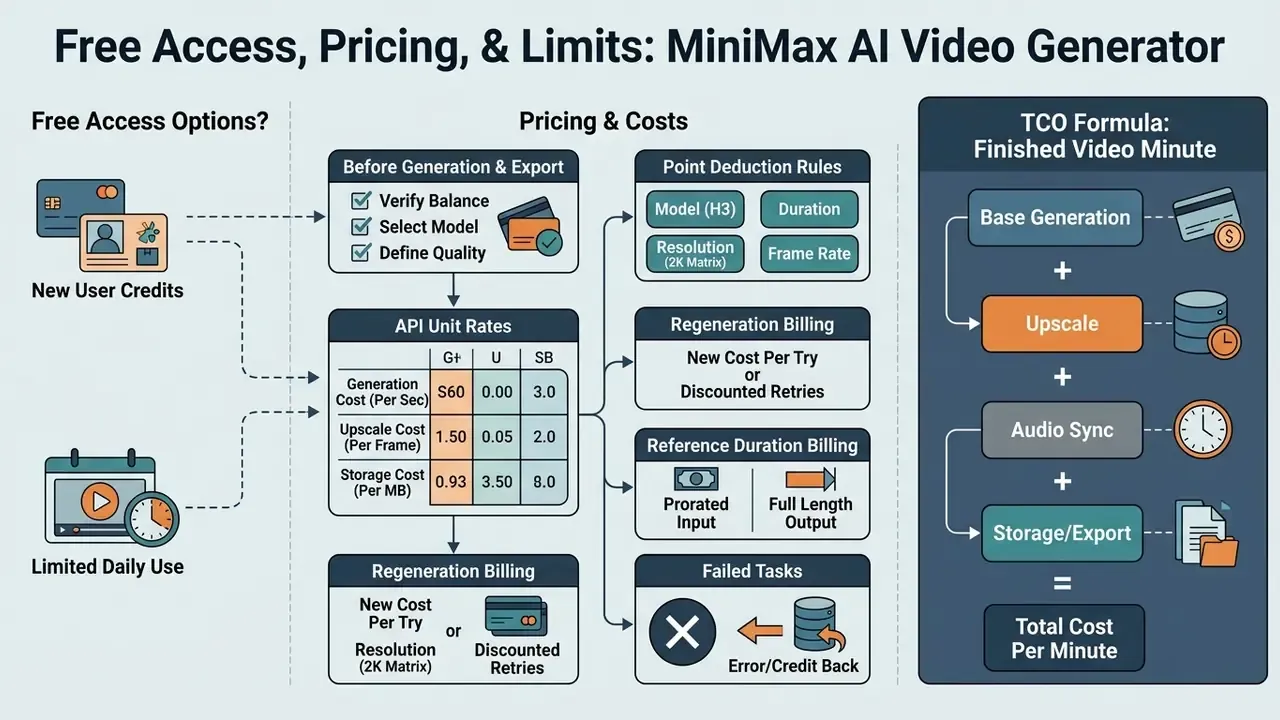
Is There Free Video Generation in MiniMax AI?
Yes, with limits. The minimax free ai video generator path runs through the Hailuo AI web interface, comparable to other free AI video generators with credit-metered trials. New web accounts receive non-recurring welcome credits plus daily login bonuses, roughly 2 to 3 short generations per day at 720P/768P.
Free renders carry visible Hailuo AI watermarks, sit behind queue priority restrictions that cap active tasks at three queued requests, and fall under strict non-commercial terms of service (HailuoAI Terms of Use, 2026). Reported ceilings vary by product generation and reporting date. Some 2026 coverage describes 360P and 5-second caps on H3-specific free access, other coverage describes 720P watermarked renders with credits expiring after roughly three days. We could not reconcile those accounts, so treat both as provisional. Anyone hunting minimax ai video generator free access for production work should assume free allocations cannot be exported cleanly without watermarks, and cannot be used for commercial deployment. There is also no desktop installer: searches for a minimax ai video generator download land on the mobile app or on API client libraries, not on a local generation binary.
Key Pricing Terms to Verify Before Generation and Export
Before you approve an enterprise-scale rendering campaign, have finance audit these billing parameters line by line:
- API unit rates. MiniMax H3 meters output at $0.08 per rendered second for 768P and $0.13 per rendered second for 2K (MiniMax API Rate Card, 2026).
- Point deduction rules. On legacy Hailuo-2.3 endpoints, a 6-second 768P render deducts 1 video point, a 10-second 768P render deducts 2 points, and a 6-second 1080P render deducts 2 points.
- Regeneration billing. A 2K upscale pass via
H3-Regenerate-2Kincurs a separate per-second charge, billed from roughly $0.05 up to $0.13 per output second depending on base context input. - Reference duration billing. Reference video duration is metered at the applicable output-resolution rate, so long reference clips quietly inflate cost per generation.
- Failed tasks. Tasks that fail on platform server errors or trip automated safety filters do not deduct points or incur charges.
TCO Formula: Costing One Finished Minute of Video
Per-second rates understate true cost, because not every render is usable. Model total cost with an explicit first-pass yield term:
Cost_per_usable_second =
    ( Rate_768P / Yield_draft ) + ( Rate_2K / Yield_final ) + Overhead_review
Where:
  Rate_768P       = $0.08   (draft pass)
  Rate_2K         = $0.13   (or regeneration rate on base video)
  Yield_draft     = share of drafts accepted for upscale (e.g., 0.40)
  Yield_final     = share of 2K passes accepted for delivery (e.g., 0.85)
  Overhead_review = human review + governance logging cost per second
Worked example, 60 seconds of delivered marketing video:
| Line Item | Calculation | Cost |
|---|---|---|
| Draft renders at 768P (yield 0.40) | 60 s ÷ 0.40 = 150 s × $0.08 | $12.00 |
| 2K passes (yield 0.85) | 60 s ÷ 0.85 = 71 s × $0.13 | $9.23 |
| Reference clip metering (est.) | 30 s × $0.08 | $2.40 |
| Machine subtotal | $23.63 | |
| Human review and prompt engineering | 2.5 h × $75/h | $187.50 |
| Governance logging and rights clearance | 1.0 h × $95/h | $95.00 |
| Total per finished minute | about $306 |
The exact figure is not the point. The ratio is. Inference lands near 8% of total cost at these yields, and human review plus governance dominates the TCO. Budget cases built on API rates alone will understate spend by an order of magnitude. Yield improvement (better prompts, locked references, fewer variants per beat) moves the number far more than negotiating per-second pricing. For broader software budget planning across generative media, explore our AI Media Pricing Guides, and for constrained evaluation, compare free AI video generation options.
MiniMax AI Video Generator vs. Alternative AI Video Generators
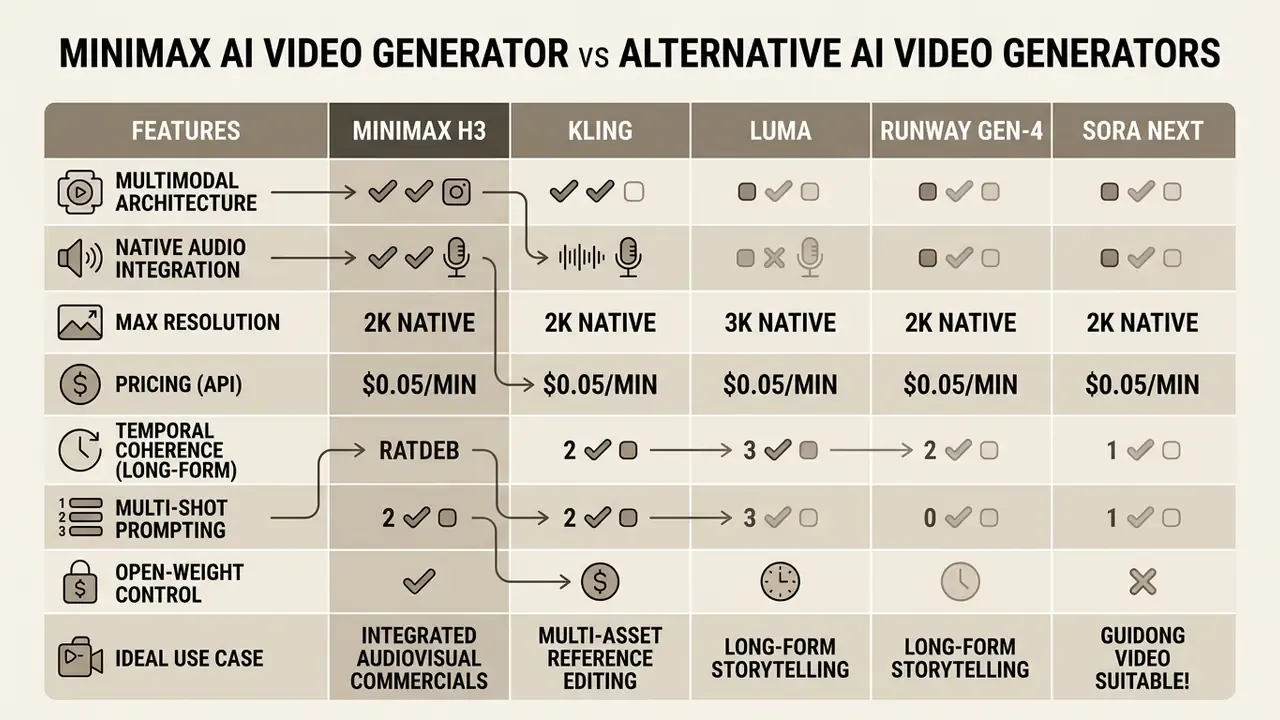
Placing minimax video generation ai in the competitive field means comparing multimodal architecture, native audio, maximum resolution, and pricing against frontier models: Kling AI, Luma AI DreamMachine, Runway Gen-3 Alpha, and OpenAI Sora 2. A wider field view sits in our roundup of leading AI video generators.
"Sora, Veo, Kling and Hailuo are tier-one diffusion T2V models capable of generating high-quality short videos."
| AI Video Generator | Native Audio Synthesis | Max Output Resolution | Max Clip Duration | Primary Modality Strengths | Commercial API Rates |
|---|---|---|---|---|---|
| MiniMax H3 | Yes (native 32 kHz stereo) | 2K (1440p short edge) | 15 seconds | Omni-reference editing, T2V and I2V, motion transfer, timed multi-shot | $0.08 (768P) / $0.13 (2K) per sec |
| Kling AI (v2.6) | Yes (native multi-language) | 1080P / 4K | 10 seconds | Motion dynamics, camera control, T2V photorealism | Credit subscription or API metered |
| OpenAI Sora 2 | Yes (native sync audio) | 1080P / 2K | 60 seconds | Extended cinematic temporal coherence, world physics | Closed API, selective enterprise |
| Luma DreamMachine | Third-party or post pass | 1080P | 10 seconds | Camera tracking, rapid web generation, I2V keyframing | Subscription tiered |
| Runway Gen-3 Alpha | Third-party or post pass | 1080P | 10 seconds | Motion brush editing, style transfer, director controls | Credit subscription or tiered API |
Comparing MiniMax, Kling, Luma, Runway, and Sora Across Operational Scenarios
When choosing an ai video generator minimax alternative against specific production requirements:
- Integrated audiovisual commercials. MiniMax H3 and OpenAI Sora 2 lead here, synthesizing synchronized 32 kHz stereo dialogue, ambient effects, and visuals in a single denoising loop. MiniMax holds a clear cost advantage for short-form ad creation at $0.13 per second for 2K.
- Long-form temporal coherence. Sora 2 handles continuous minute-long shots that need complex world simulation and multi-character movement.
"Sora is a sophisticated world simulator capable of producing videos up to one minute long with high visual quality and coherence."
MiniMax H3 caps clips at 15 seconds, which optimizes it for short-form ad creative, product previews, and social campaigns rather than extended narrative film. Worth noting: OpenAI retired the original Sora product surface in April 2026 and consolidated on Sora 2. Closed-product roadmaps carry discontinuation risk that open weights do not.
- Multi-asset reference editing. Omni Reference mode accepts up to 15 simultaneous reference assets, 9 images, 3 video clips, and 3 audio files, well beyond legacy diffusion tools that take only a single starting keyframe. Each reference can be assigned a declared role (face, location, motion, voice). That declaration is what turns continuity from luck into instruction.
- Open-weight control. MiniMax publishes H3 weights, so self-hosted inference is viable for confidentiality-constrained teams. Kling, Sora 2, Luma, and Runway remain closed-hosted, which forecloses that option entirely.
For teams building comparative benchmarks, our Google Veo implementation guide covers API costs and developer limits for the closest closed-model alternative. To weigh still-image models alongside video, examine our analysis of the best free AI art generator. Developers building custom pipelines can start from our AI Media API Guides.
How to Create a Video in MiniMax AI: Step-by-Step Workflow
Producing usable clips with the minimax ai video generator comes down to five moves: pick the model variant, structure multimodal inputs, configure spatial and temporal parameters, submit the generation request, then review or regenerate.
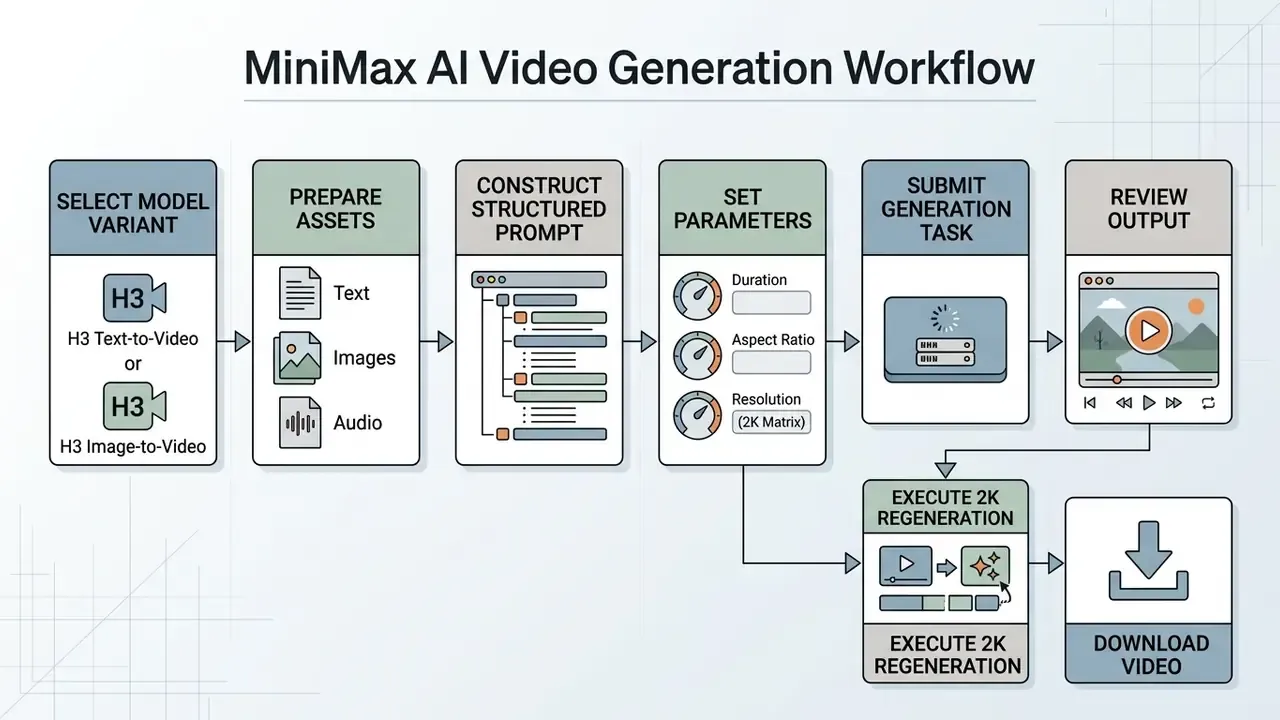
Selecting Model and Preparing Text, Image, or Reference Input
Start by choosing between variants such as MiniMax-H3 (full multimodal performance, 768P and 2K) or MiniMax-H3-Max and MiniMax-Hailuo-2.3 (faster short-form generation, lower resolution ceiling). Source materials must meet specific technical parameters:
- Images
- JPG, JPEG, PNG, WEBP, HEIC, or HEIF, dimensions between 256px and 5760px per side, up to 30 MB per asset.
- Videos
- H.264 (AVC) or H.265 (HEVC) encoded files, including
.MP4, QuickTime.MOV, and.WEBMcontainers, up to 50 MB and up to 15 seconds. - Audio
- AAC or MP3 up to 15 MB; reference audio must be paired with at least one image or video reference.
- Aspect ratios
- 16:9, 9:16, 1:1, 4:3, 3:4, 21:9, or adaptive fitting.
Writing Prompts for Controlled Motion, Camera, and Content
For precise motion and subject stability in minimax ai video creation, follow a structured four-part prompt format: subject description, action and motion dynamics, scene and lighting context, camera trajectory.
For camera control, combine up to three explicit tags. For example:
Skip ambiguous filler like "hyperrealistic" or "photorealistic". Concrete visual description yields noticeably higher prompt adherence (MiniMax H3 Prompt Engineering Manual, 2026).
Timed multi-shot and dialogue prompting (shot-reverse-shot). MiniMax H3 can resolve timed multi-shot sequences inside a single 5-to-15-second pass. Rather than rendering isolated clips and cutting them later, block the clip in beats with explicit time anchors and dialogue markers. The shots come back in the order you wrote them:
Because dialogue is spoken as the take generates, performance and delivery arrive together with no dub pass. The same pattern resolves title sequences, interface walkthroughs, and product reveals inside one render, which changes unit economics directly: one billed generation replaces three or four.
Configuring Duration, Aspect Ratio, Resolution, and Reviewing Output
Model Risk, Audit Trail, and Reproducibility Controls
Download, Regeneration, and Further Video Editing
When a task completes, the platform returns a secure download URL (content.url). You can inspect the preview clip in the browser or app. If minor flaws or motion artifacts show up, submit the base video URL back into the H3-Regenerate-2K endpoint with adjusted prompt parameters for targeted refinement. The regeneration request must reproduce all content used for the 768P render and add exactly one source item with type=video_url and role=base_video.
Field observation. When one enterprise creative team hit subject distortion across 10-second marketing sequences, they swapped generic style keywords for precise shot-by-shot motion parameters plus a single locked identity-anchor reference image. They reported a materially higher first-pass acceptance rate and fewer regeneration loops per asset afterwards. The improvement was measured internally against their own prior batch and has not been independently benchmarked, so read it as directional rather than as a published metric.
Final MP4 files download directly for post-production assembly in external video editing tools. Delivery-side compression is a separate decision: see our guide to video compressors for file-size and quality-loss trade-offs, and our YouTube video editor workflows for publishing pipelines. Turning a clip into a lightweight loop for email or docs is a different job again, handled by a gif maker from video or, for frame-by-frame control, a dedicated gif animation maker.
How to Get Higher-Quality MiniMax AI Videos
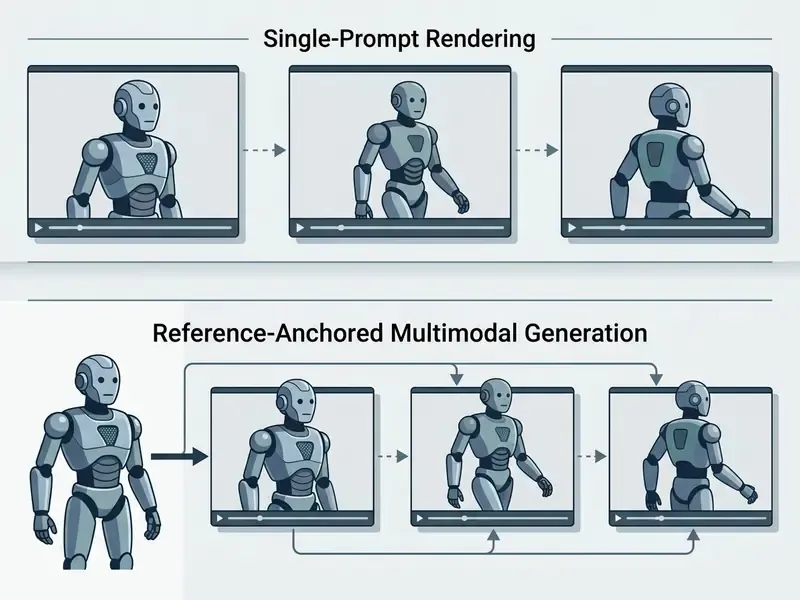
Production-ready stability, believable physics, and character consistency in minimax ai videos come from three habits: structured prompting, identity anchoring through reference images, and systematic iterative regeneration. In that order.
Prompting: Describing Action, Composition, Motion, and Camera Angle
Quality depends on physical description, not abstract adjectives. When writing prompts for minimax ai animation:
- Define shot composition.State focal length and frame type, for example "medium close-up shot" or "wide cinematic shot".
- Specify subject physics.Describe movement, weight distribution, and object interaction step by step: "the actor picks up the ceramic mug with their right hand, turning slowly toward the window". To trigger high-density latent rendering, describe micro-movements explicitly: individual hair strands lifting in wind, cloth rippling along movement vectors as a character walks, subtle facial micro-expressions such as eye twitches, breath, or a lip quiver. Those cues separate output that reads as filmed from output that reads as generated.
- Describe lighting and atmosphere.Detail light sources, color temperature, atmospheric conditions ("warm 3200K tungsten lamp light casting soft shadows across the desk"), including how lighting shifts across the clip.
- Direct camera trajectory.Include speed, direction, framing adjustments (
[Slow pan left],[Dolly back]), expressed as motion type plus amplitude plus speed.
A reliable default for a single beat: one main subject, one primary action, one camera move, one lighting condition. Stack more and adherence degrades. Stack it across timed beats instead, using the multi-shot pattern above.
Reference Input for Visual and Character Consistency
To hold face, hair, costume, and object identity across sequential shots, use Omni Reference mode. Upload 1 to 9 identity references showing the subject from multiple angles under clean lighting, and declare each reference's role so the model knows whether an asset carries a face, a location, a motion, or a voice.
"Hailuo-ID-based pipelines reach identity-preservation scores of 0.542–0.557 on facial recognition embeddings."
Do not swap reference sets between shots in a continuous sequence. Keeping anchors identical is what holds identity stable across multi-scene edits. Fewer, cleaner references transfer more reliably than large mixed sets, and reference mode cannot be combined with first-and-last-frame control in the same request.
Review and Regeneration: Refining Output Without Losing Creative Intent
Iterative refinement relies on the two-stage Context-IR pipeline. H3-Context-IR restructures the original multimodal intent into a structured prompt while preserving user intent; it does not generate video itself. Then H3-Regenerate-2K recreates the clip at 2K using the full 768P generation content plus the base video item. Rather than starting a fresh render whenever something needs adjusting:
- Keep the original reference assets and seed values locked.
- Change only the specific phrase describing the correction, for example camera speed from fast to medium.
- Submit the 768P result into
H3-Regenerate-2Kto refine edge sharpness, material texture, and lighting coherence without disturbing character position or scene layout.
For stylized and non-photoreal work, where timing matters more than physics realism, compare this workflow against template-driven approaches in our guide to animation makers.
Limitations and Open Questions
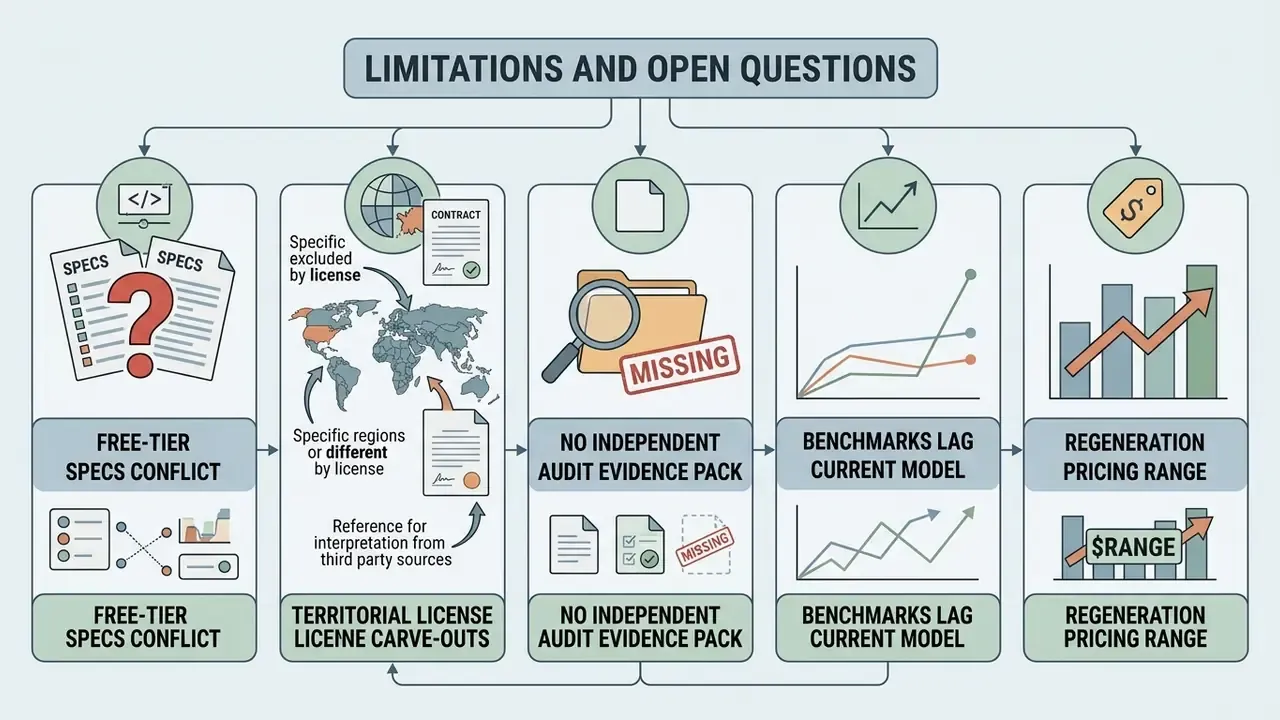
Honest gaps, stated plainly, because they affect approval decisions:
- Free-tier specs conflict across sources. Resolution and duration caps for H3 free access are reported inconsistently in 2026 coverage. Treat any figure as provisional until confirmed in your own account.
- Territorial license carve-outs come from third-party readings. The reported US, EU, UK, and South Korea exclusions for open-weight commercial use are secondary-source claims. Counsel should read the license instrument itself.
- No independent audit evidence pack. We found no published SOC 2 or ISO 27001 scope letter tied specifically to the video endpoints. Intermediary platforms may carry their own certifications, which is not the same thing.
- Benchmarks lag the current model. The strongest independent quality numbers cover Hailuo-02, not H3. Extrapolating generation to generation is reasonable, not rigorous.
- Regeneration pricing is a range. The 2K pass is documented between roughly $0.05 and $0.13 per output second depending on base context. Model your budget at the top of the range.
Summary Recommendations for Enterprise Decision-Makers
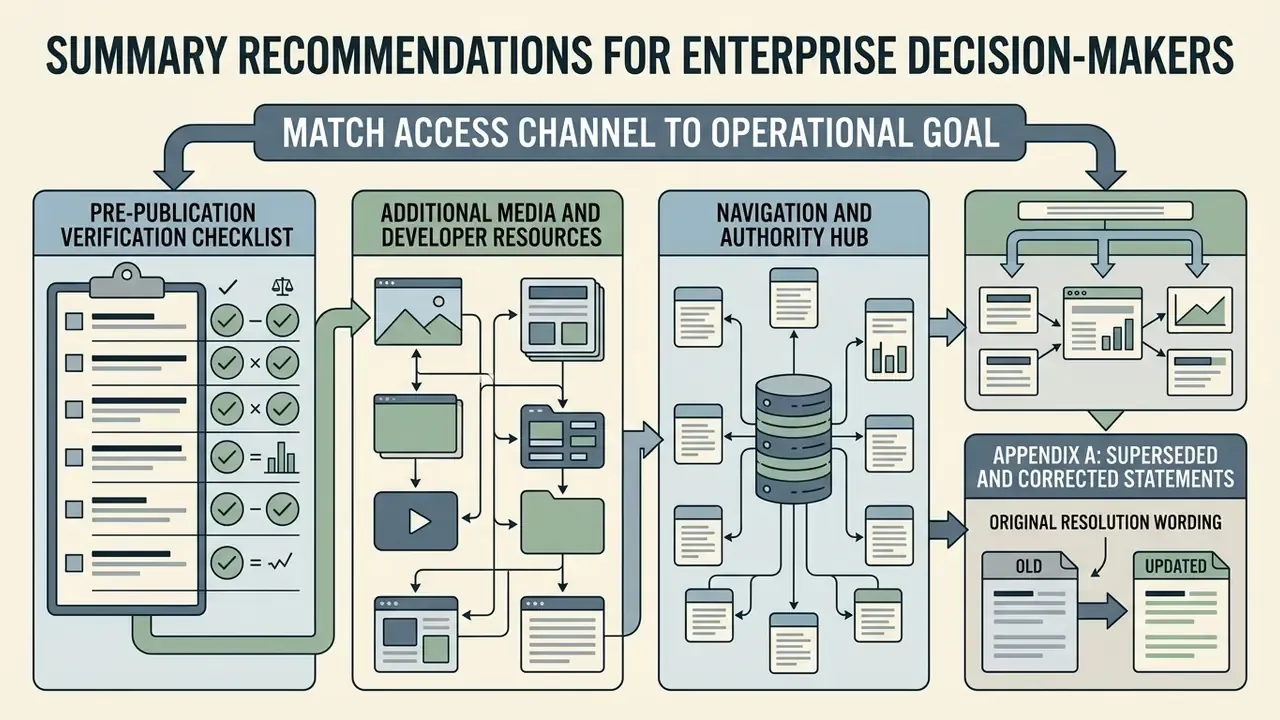
- Match access channel to operational goal. Use the HailuoAI web app for creative prototyping only. Deploy the official API (
MiniMax-H3) for automated production, commercial assets, and ERP or GRC integration. It is the only channel offering both commercial rights and machine-readable audit logging. - Enforce input asset governance. Keep documented releases for every reference image, voice recording, and product asset uploaded, and link each release to the reference asset ID used at generation time.
- Optimize unit economics with two-stage rendering. Draft at 768P ($0.08 per second) to verify prompt adherence and motion, then run 2K passes ($0.13 per second). After that, attack yield rather than rate. First-pass acceptance moves TCO far more than per-second pricing does.
- Consolidate shots into single generations. Use timed multi-shot beats to resolve dialogue exchanges, title cards, and product reveals inside one billed render instead of three.
- Resolve jurisdiction before volume. Settle data residency, training-on-inputs, retention, and certification questions in the third-party risk file before scaling spend, not after a campaign is already in market.
- Re-audit pricing and rate limits on a cadence. Verify per-second meters, package point deduction rules, and license territorial carve-outs against official MiniMax developer portals before any high-volume campaign.
Pre-Publication Verification Checklist
Checklist0 / 10
Additional Media and Developer Resources
For further technical exploration, budgeting tools, and system documentation:
- Model project rendering costs and first-pass-yield scenarios with our interactive AI Media Calculators.
- Review technical developer resources at support.
- Compare closed-model economics in our Google Veo API implementation guide.
- Plan delivery-side file handling with our video compressor guide and YouTube publishing workflows.
- Evaluate synthetic voice licensing constraints in our AI voice generator guide.
- Benchmark budget-tier options in our comparison of free AI video generators.
- For slide design and deck creation, see our analysis of the gamma ai presentation maker.
Appendix A: Superseded and Corrected Statements
Retained for transparency and version tracking: