Executive Summary
An anime character generator is a diffusion- or GAN-based system that turns text prompts, reference images, or sketches into stylized anime characters. Usable production output depends on three controllable levers: a structured prompt stack, explicit identity anchors (hair, eyes, outfit, signature detail), and a consistency mechanism (reference sheet plus IP-Adapter/ControlNet or attention-sharing methods).
Commercial deployment is a separate question from image quality. Free tiers rarely grant commercial rights. Prompts containing copyrighted character names void most vendor protections. Purely machine-generated elements are not registrable with the U.S. Copyright Office. Read the legal verification block before you generate assets you intend to sell.
One more thing worth saying early: consistency is a control problem, not a talent problem.
Who This Guide Is For and How to Read It
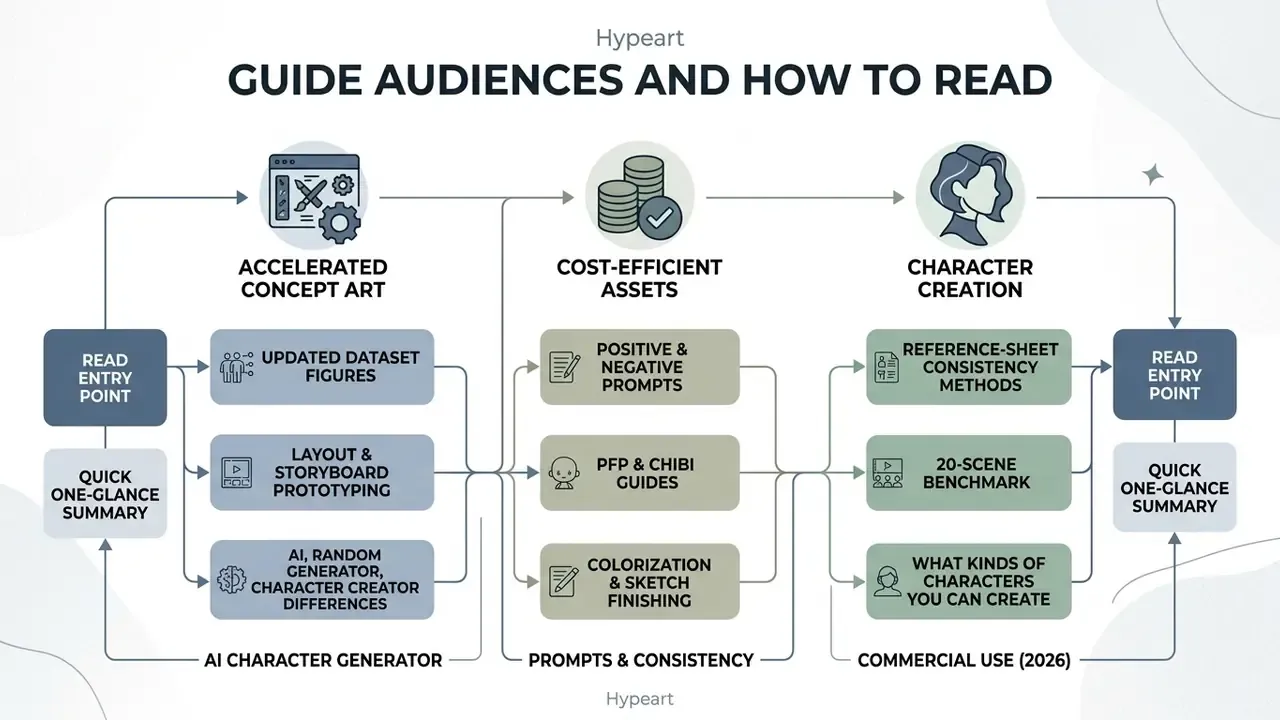
Three reader profiles keep showing up in questions about this topic, and each needs a different entry point.
- Solo creators and OC artists. Start with the prompt library, then the format guides for PFP, chibi, and full-body output. Skip the audit checklist until you monetize.
- Studio and publishing teams. Read the consistency section and the 20-scene benchmark first. Your bottleneck is not image quality; it is the twentieth appearance of the same character.
- Governance, legal, and procurement reviewers. Go straight to the free-tier, pricing, and commercial-use section, then to the evidence checklist. Everything you need to store as proof is listed there in rows.
The sequence below follows production order: understand the tool class, choose the mechanism, clear the licensing question, then build. Terminology varies by vendor, so treat "anime character generator", "character anime generator", and "anime maker" as marketing labels for overlapping mechanisms rather than as distinct technologies.
What Is an Anime Character Generator and What Problems Does It Solve
«AnimeDL-2M includes 639,268 real and 779,502 synthetic images, purpose-built for training anime generative models.»
These tools solve primary operational bottlenecks in creative workflows:
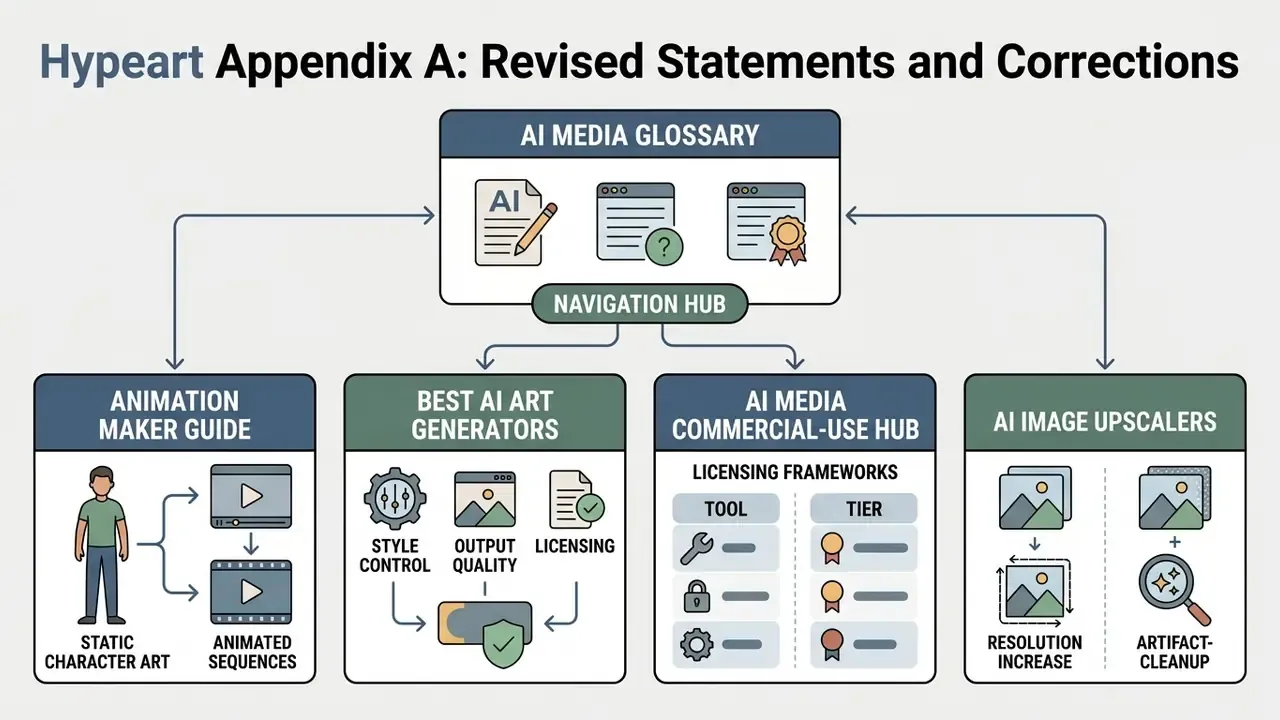
Organizations evaluating media workflows can explore standardized tools via our AI Media Glossary, which categorizes foundational architecture types across image and video models.
AI Generator, Random Generator, and Character Creator: What Is the Difference
An AI anime generator uses natural language processing and latent diffusion to build images dynamically from text prompts or input references. A random generator relies on stochastic attribute sampling over pre-selected templates or seed values, producing immediate but unguided variations. A character creator (or agentic framework) provides step-by-step control over explicit parameters such as facial features, outfit layers, and pose models, maintaining consistent identity across multiple scenes.
Research by Avrahami et al. (2024) highlights that cross-image attention mechanisms in AI text-to-image systems allow user-defined prompts to dictate fine-grained appearance, unlike basic randomized generators, which treat every output as an isolated event.
«Users iteratively refine prompts, adding specific attributes, hair color, clothing, mood, to converge on the intended character.»
For complex multi-shot production, agentic pipelines like MangaFlow (2026) combine language guidance with layout control to track entity attributes across panels.
One terminology caution. The phrase "random character generator" is used in two incompatible ways across the market. Some vendors mean prompt-driven AI image generation with a randomized seed; others mean attribute-randomized assembly from a fixed template library, where no new pixels are synthesized at all. Verify which mechanism a tool actually implements before planning production around it. The difference decides whether you own a design or a shuffled template.
What Kinds of Anime Characters You Can Create
Modern architectures support a broad spectrum of character archetypes, genres, and render styles. Users can synthesize female and male protagonists, gender-neutral OCs, dark fantasy antiheroes, sci-fi cyberpunk operators, shounen and shoujo leads, moe and mecha designs, retro 90s cel-shaded characters, Ghibli-adjacent pastoral aesthetics, and simplified chibi mascots.
Models handle structural variations effectively. For instance, GANime (2025) demonstrates that conditional GAN architectures (C-GAN) accurately translate monochrome line sketches into fully shaded character drawings, preserving proportions across human-like and stylized fantasy designs.
«C-GAN is identified as the most effective model for producing high-quality anime character drawings close to human-artist output.»
Whether you generate a detailed manga hero or a casual anime girl avatar, precise prompt construction determines structural fidelity. Style is cheap now. Structure is not.
Tool Comparison: Anime Character Generation Mechanisms
| Tool Type | Input Modalities | User Control Level | Character Consistency | Learning Curve | Primary Use Cases |
|---|---|---|---|---|---|
| AI Anime Text-to-Image Generator | Text prompts, reference images | High (via prompt engineering and references) | Medium to high (with LoRA / attention sharing) | Low to medium: prompt syntax and negative prompts | OC creation, concept art, illustration, PFP |
| Random Anime Character Generator | Random seed, basic tags | Low (stochastic attribute sampling) | Low (each generation is isolated) | Very low: single-click operation | Fast ideation, inspiration, throwaway avatars |
| Custom Character Creator / Agentic Framework | Prompts, model sheets, skeleton poses, panel layouts | Very high (layered control and memory) | High (identity preserved across scenes) | High: ControlNet, IP-Adapter, LoRA, sheet management | Manga, comics, game dev, animation |
Table 1: Comparative analysis of anime character generation mechanisms. Baseline conclusions: text-driven AI generators balance flexibility and speed; random generators serve ideation only; specialized creators and agentic frameworks are required for commercial projects that must preserve one identity. Before committing a pipeline, compare shortlisted platforms in our matrix of the best AI image generators and our breakdown of AI art generators with extended style control.
Free Tiers, Pricing, and Commercial Use: What to Verify Before Using a Generator
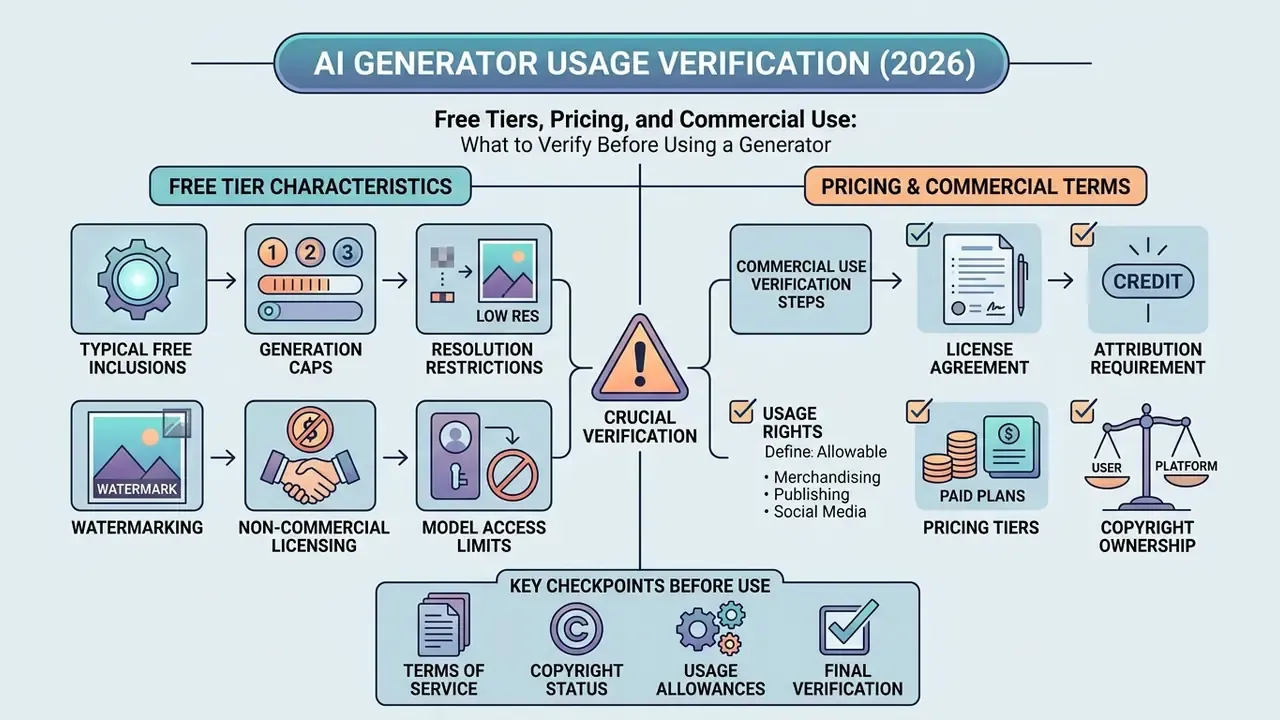
Commercial deployment of AI-generated anime images requires rigorous legal and platform verification. This is the section most creators skip and most legal reviewers open first.
«Generative AI is transforming artistic practice, yet academic literature does not analyze the concrete end-user licensing conditions of these tools.»
Licensing structures vary significantly between free tiers and commercial subscriptions, and the legal question splits into two distinct layers: rights in the training data and rights in your output. EU and UK materials in 2026 push toward licensing, transparency, and rights-holder control over training use, while U.S. guidance is narrower and fact-specific, focused on human authorship and registration scope.
What a Free Anime Character Generator Typically Includes
Free access tiers generally serve as technical evaluations. Typical free-tier limitations include:
- Generation caps daily credit allocations (for example, 10 to 30 generations per day, or 2 to 15 "boosts" on some consumer platforms). If access friction is your constraint, review free AI generators with no sign-up.
- Resolution restrictions outputs limited to standard resolutions (512×512, 1024×1024, or a 2K ceiling) with PNG/JPG/WebP export only.
- Watermarking mandatory platform watermarks on downloaded files, though some vendors watermark only free downloads.
- Non-commercial licensing usage terms explicitly limiting generated files to personal, non-monetized applications. Before monetizing, cross-check the terms summarized in our guide to commercial use of AI image generators.
- Model access limits free tiers often expose only older checkpoints (SD 1.5, SDXL) while newer anime-tuned or flagship models sit behind paid plans.
For price-tier context, anime-specific vendors in 2026 publish paid plans in a broad range: roughly $6.79 to $12.99 per month at entry level, $20 to $34 per month for mid tiers, and up to $72 per month for studio plans, with commercial-use rights normally attached to paid plans only. Creators evaluating tool tiers can review platform breakdowns across our AI Media Comparison Matrices, compare the best free AI image generators, and verify structural costs on our pricing directory.
A small budget note from practice: the subscription is rarely the expensive part. Review hours, repair passes, and archived evidence usually cost more than the plan.
How to Verify Commercial-Use Terms for a Generated Anime Image
Compliance Audit Evidence Checklist (Governance and Model Risk)
| # | Control | What to Verify | Evidence Artifact |
|---|---|---|---|
| 1 | Tool inventory | Every generator, checkpoint, and LoRA is registered in the model inventory with version and date | Model registry entry |
| 2 | Plan and license tier | Active paid tier grants commercial rights for the entity's revenue band | Invoice plus archived ToS snapshot (PDF, dated) |
| 3 | Prompt safety | Prompts contain no copyrighted character names, studio names, or trademarks | Stored prompt log per asset |
| 4 | Reference provenance | Uploaded references are owned, licensed, or consented; no third-party art or unconsented likeness | Signed reference-rights record |
| 5 | LoRA / adapter origin | Custom weights trained only on owned or licensed material | Training-data manifest |
| 6 | Human authorship record | Documented human creative control: briefs, prompt iterations, inpainting decisions, edits | Versioned iteration log |
| 7 | Output disclosure | AI-generated portions identified for registration disclaimers and platform disclosure rules | Disclosure statement |
| 8 | Seed and parameter capture | Seed, sampler, CFG, denoise, ControlNet/IP-Adapter settings archived for reproducibility | Generation metadata JSON |
| 9 | Consistency QA | Identity anchors reviewed per appearance against the approved reference sheet | Pass/fail appearance sheet |
| 10 | Shadow-AI escalation | Unregistered tools or unlogged assets discovered in production are escalated and re-audited | Incident ticket |
One caveat on row 10. Shadow use rarely looks like defiance; it usually looks like a deadline. Make the approved path faster than the unapproved one and most of the problem quietly disappears.
Step-by-Step Guide: How to Create an Anime Character from Concept to Final Render
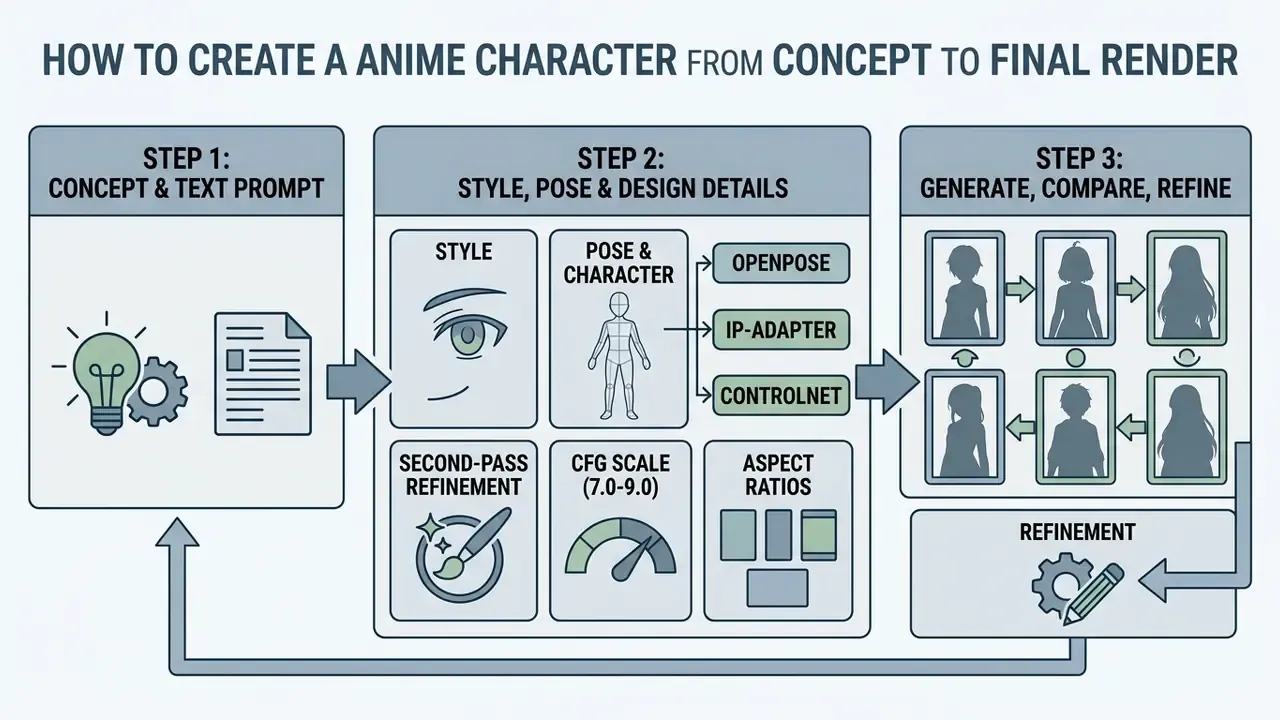
To generate a precise anime character image, follow a structured workflow: define the initial concept, write a structured prompt, configure style and pose conditions, execute the generation, and refine visual artifacts. Iterative prompt tuning and post-processing keep the final output aligned with production requirements without synthetic noise.
Step 1: Define the Character Idea and Text Prompt
A successful prompt translates abstract narrative identity into visual cues. Begin by detailing core physical traits, clothing, facial expression, framing, and artistic style.
Empirical studies on prompt journeys by Mahdavi Goloujeh et al. (ACM CHI 2024) indicate that users achieve optimal alignment when they move from broad descriptions to structured attribute stacks.
«Users frequently under- or over-estimate how strongly detailed descriptions influence text-to-image output.»
Using an anime character idea generator approach involves establishing fixed anchors:
[Subject & Archetype] + [Hair & Eyes] + [Outfit & Accessories] + [Pose & Expression] + [Art Style & Lighting]
Example: 1girl, solo, cyber-samurai hero, short neon-blue hair, sharp amber eyes, glowing katana, tactical jacket, confident smile, dynamic angle, crisp cel-shaded anime style, dramatic backlighting.
Keep identity descriptors byte-identical across generations. Drift usually starts in the prompt, not in the model. Copy and paste the block; do not retype it from memory.
Step 2: Choose Style, Pose, and Design Details
Step 3: Generate, Compare, and Refine the Image
Run the initial seed generation and evaluate outputs against your brief. Minor flaws such as distorted hands or inconsistent linework can be corrected without regenerating the entire frame.
Bring in localized refinement techniques:
- Inpainting: mask problematic regions and apply low-denoising prompts to redraw details. For stylization and masked-edit tooling, see our overview of image-to-image generators.
- Face repair: run Adetailer (detection-based inpainting) on faces and eyes when the character is small in frame. This is the single highest-yield fix for full-body renders.
- Artifact removal first, then enlargement: clear JPEG and synthetic artifacts and unstable textures before scaling, since upscalers amplify whatever noise they receive.
- Upscaling: pass the clean render through specialized upscalers like RealESRGAN (
realesrgan-x4plus-animeis anime-specific) to enhance resolution up to 4K; documented AI-upscaling ceilings are typically 4× enlargement. Compare options in our guide to AI image upscalers. - Editing: use external software for final color balancing. For simple crops, level fixes, and quick retouching on Windows, the built-in microsoft photo editor is enough; for heavier work, review software options in our guide to photo editor capabilities and AI photo editors.
Change one variable per iteration. Single-change edits ("change only the jacket color") converge faster than rewriting the whole prompt. I learned that one the slow way, after three days of prompt rewrites that produced three unrelated characters.
Visual Workflow: Character Generation Sequence
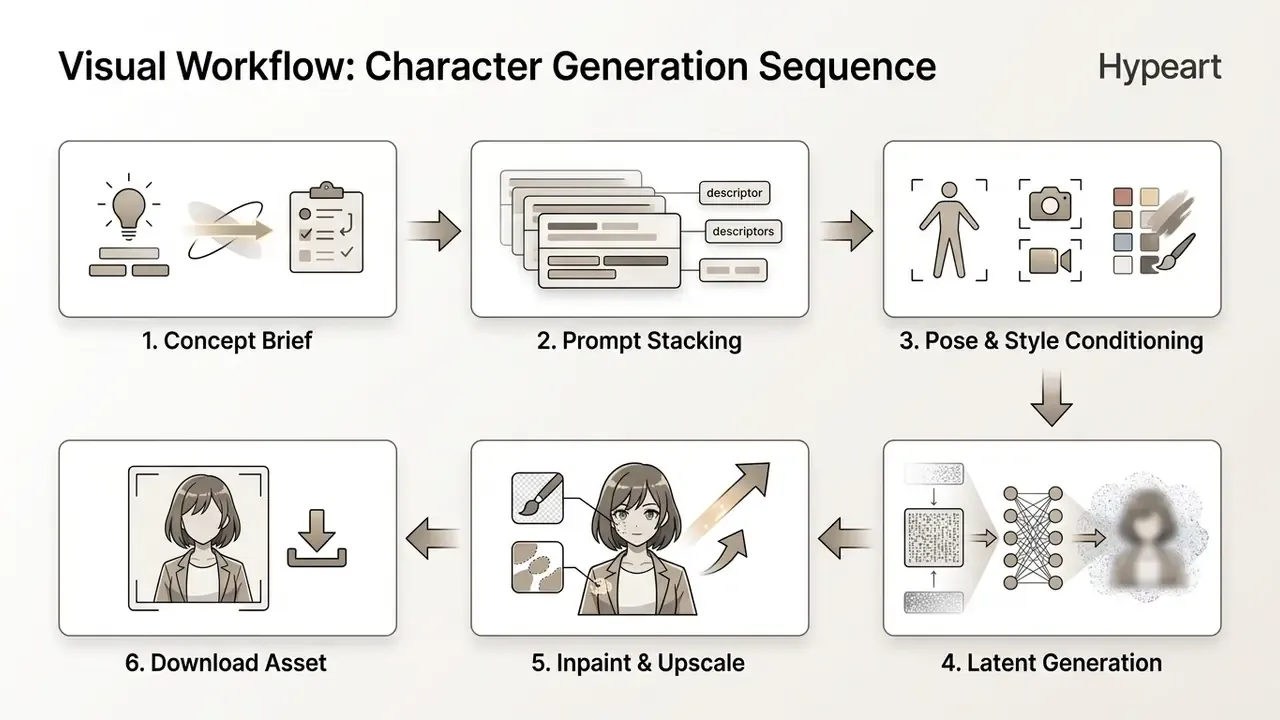
Figure 1: Sequential pipeline for controlled anime character generation. Step 1 defines role; Step 2 builds the structural prompt; Step 3 injects style and keypoint limits; Step 4 executes diffusion; Step 5 repairs localized artifacts; Step 6 exports the finalized asset. Alt text for graphic replacement: "Six-stage anime character generator pipeline from concept brief to final asset export."
Prompt Builder Matrix
Combine one cell per column to assemble a complete prompt without freezing on a blank field.
| Archetype | Hair & Eyes | Outfit & Prop | Pose & Expression | Art Style & Light |
|---|---|---|---|---|
| Shonen protagonist | Spiky crimson hair, amber eyes | Battle-torn jacket, bandaged fists | Dynamic action pose, determined | Sharp cel shading, high contrast |
| Shojo lead | Wavy chestnut hair, large violet eyes | School uniform, floral hairpin | Gentle smile, three-quarter turn | Soft pastel palette, bloom light |
| Fantasy mage | Long silver hair, pale blue eyes | Embroidered cloak, glowing tome | Casting stance, focused | Painterly fantasy, rim light |
| Cyberpunk antihero | Undercut black hair, red iris | Techwear coat, neon visor | Leaning, smirk | Neon noir, wet reflections |
| Chibi mascot | Oversized round eyes, tuft hair | Oversized hoodie, star badge | Cheerful hop, sticker pose | Thick lineart, flat colors |
| Kemonomimi / furry OC | Fox ears and tail, gold eyes | Modern streetwear, sling bag | Playful lean, open smile | Clean anime lineart, soft shadow |
Archetype Prompt Library: Copy-Ready Prompts and Negative Prompts
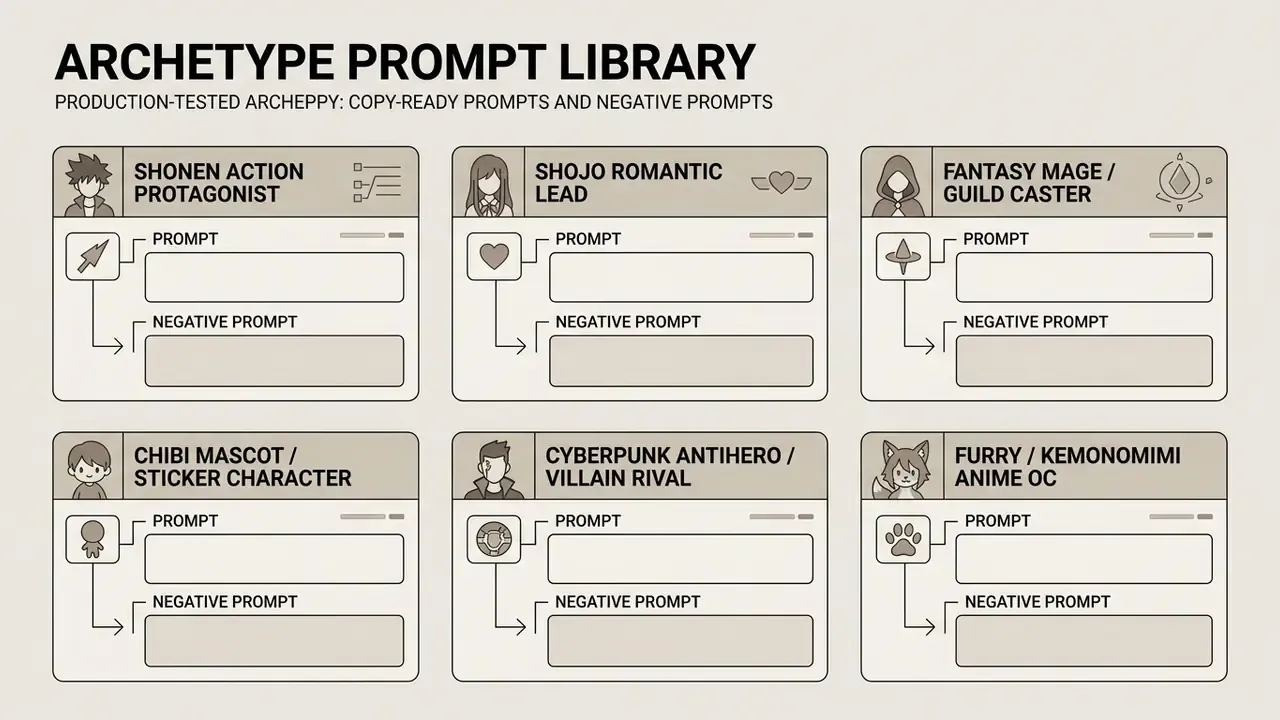
Six production-tested archetype blocks. Each includes framing, style, and a negative prompt to suppress the most common failure modes.
Archetype 1: Shonen Action Protagonist
Prompt:
1boy, male focus, shonen protagonist, spiky crimson hair, determined amber eyes, battle-torn jacket, bandaged hands, dynamic action pose, energy aura, sharp cel-shaded lines, high contrast, full body character design, clean studio lighting --ar 2:3
Negative Prompt:
1girl, soft pastel lighting, blurry hands, extra limbs, extra fingers, lowres, watermark, text, jpeg artifacts, deformed anatomy
Archetype 2: Shojo Romantic Lead
Prompt:
1girl, solo, shojo anime heroine, wavy chestnut hair, large violet eyes, detailed eyelashes, school uniform with cardigan, floral hair accessory, gentle expression, three-quarter view, soft pastel palette, delicate lineart, warm bloom lighting, full body character reference --ar 2:3
Negative Prompt:
harsh shadows, muscular build, gore, cluttered background, extra arms, malformed eyes, oversaturated colors, text, signature
Archetype 3: Fantasy Mage / Guild Caster
Prompt:
1girl, anime fantasy mage, long silver hair, pale blue eyes, ornate blue cloak with gold embroidery, glowing spell book, carved wooden staff, casting stance, focused expression, painterly fantasy anime style, rim lighting, character sheet style, neutral grey background --ar 2:3
Negative Prompt:
modern clothing, firearms, photorealistic skin, low detail fabric, broken fingers, duplicated staff, blurry, lowres, frame border
Archetype 4: Chibi Mascot / Sticker Character
Prompt:
chibi anime mascot, oversized head, small body, two-heads-tall proportions, star-shaped eyes, oversized hoodie, cheerful hopping pose, exaggerated expression, thick bold lineart, flat vibrant colors, sticker aesthetic, transparent or plain white background --ar 1:1
Negative Prompt:
realistic proportions, detailed background, complex shading, small eyes, gritty texture, long limbs, text, watermark
Archetype 5: Cyberpunk Antihero / Villain Rival
Prompt:
1boy, anime rival antagonist, long black coat, asymmetrical undercut hair, intense crimson eyes, techwear harness, neon visor on forehead, sharp silhouette, low-angle dramatic lighting, rain-slick neon street, neon noir anime style, full body design --ar 2:3
Negative Prompt:
cute expression, pastel palette, chibi proportions, flat even lighting, extra fingers, melted face, cluttered text overlays, lowres
Archetype 6: Furry / Kemonomimi Anime OC
Prompt:
anthro fox-inspired anime character, orange fur, cream muzzle, expressive gold eyes, tall ears, fluffy tail, modern streetwear with sling bag, playful confident expression, standing full body reference, clean anime lineart, soft cel shading, plain background --ar 2:3
Negative Prompt:
human ears, missing tail, photorealistic fur, mutated paws, extra tails, distorted muzzle, nsfw, text, watermark
How to reuse a library block: keep the identity segment (hair, eyes, signature garment, prop) frozen, and change only pose, framing, and background terms. That single discipline is what converts a prompt into a character.
Format-Specific Guides: PFP, Chibi, Waifu, Furry, and Full-Body
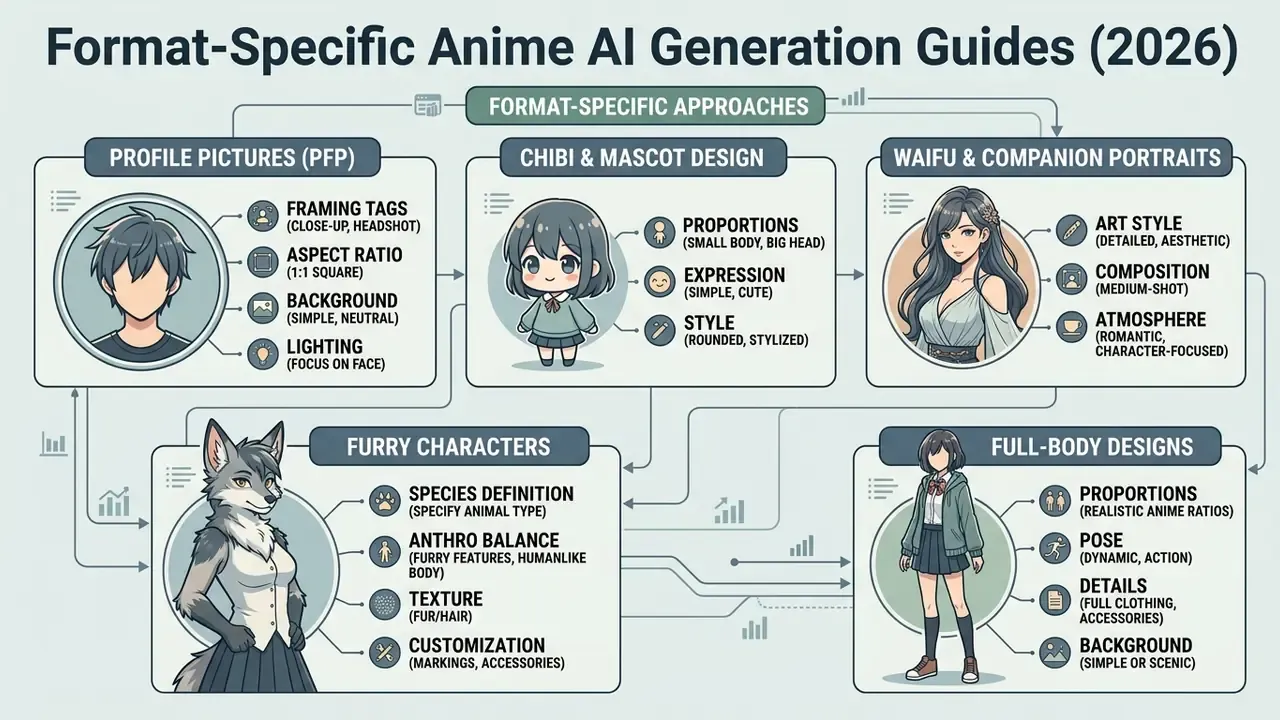
Different output formats need different prompts. A portrait recipe applied to a full-body render loses the face; a full-body recipe applied to an avatar loses legibility at 48 pixels.
How to Generate Anime PFPs (Profile Pictures)
For an avatar, the full outfit matters far less than the face, silhouette, and expression. Optimize for legibility at small sizes:
1girl, close-up anime portrait, head and shoulders, silver-white hair, floral headpiece, sharp teal eyes, calm confident expression, simple soft gradient background, soft rim light, clean anime lineart, centered composition --ar 1:1
Negative Prompt: full body, busy background, multiple characters, cropped forehead, text, watermark, blurry eyes
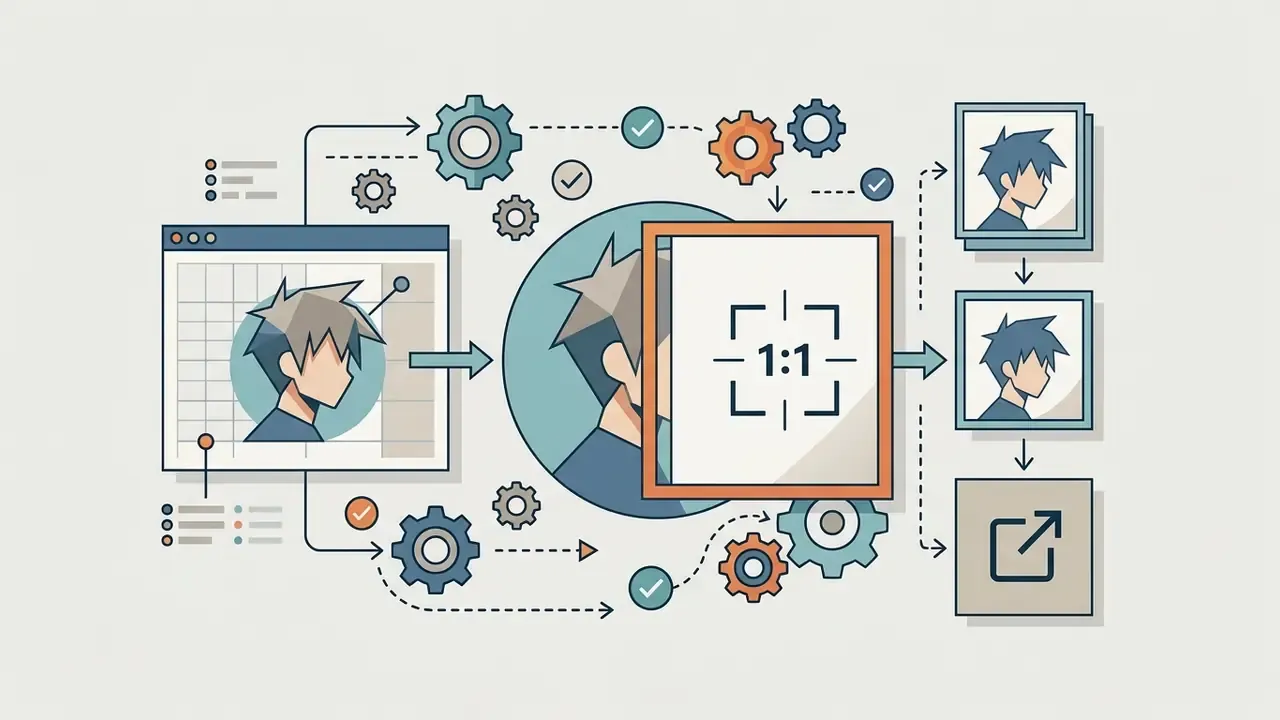
1:1, exported square.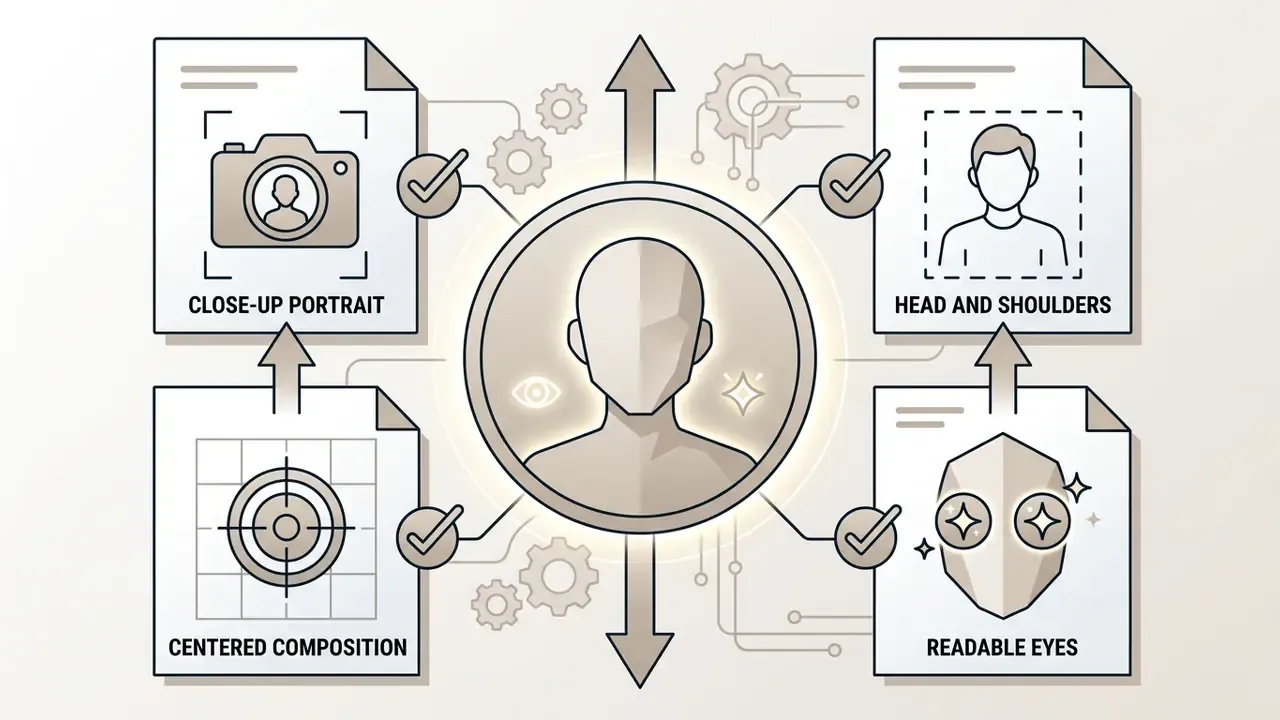
close-up portrait, head and shoulders, centered composition, readable eyes.
simple studio background, soft gradient, bokeh. No scene clutter, no props crossing the frame edge.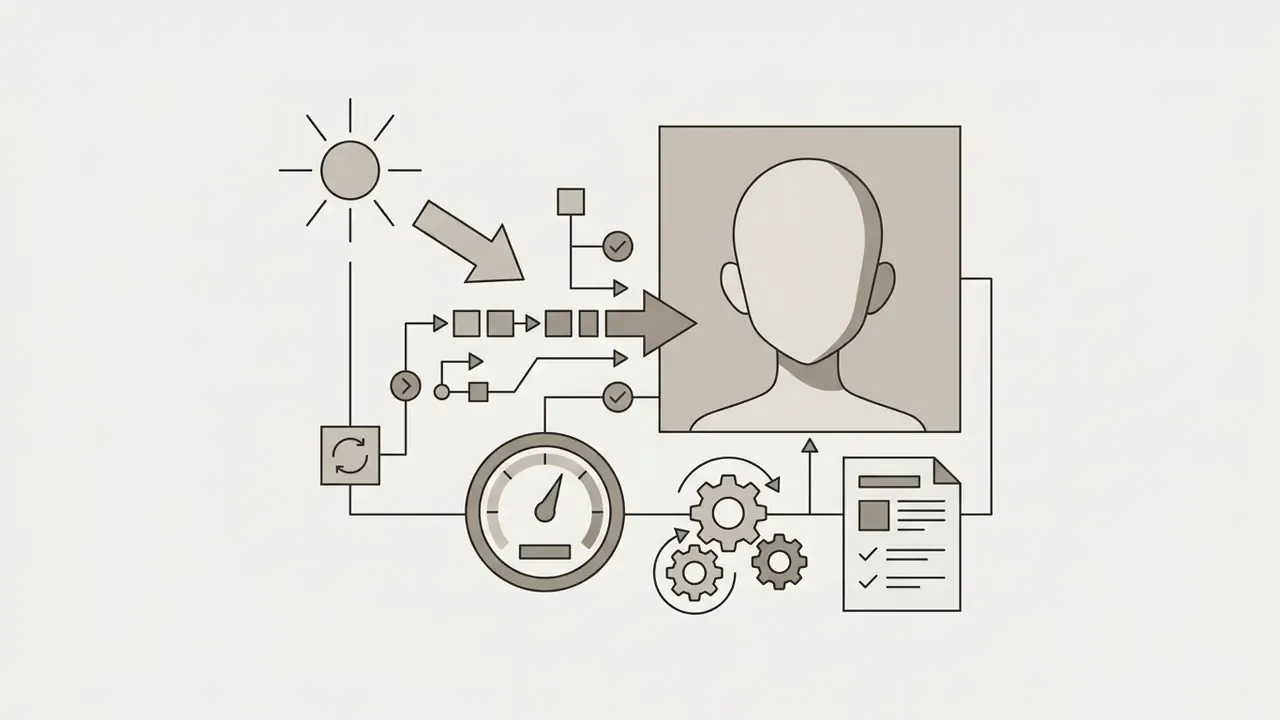

Chibi and Mascot Character Design
Chibi is a proportion decision before it is a style decision. Use two-to-three-heads-tall proportions and remove shading complexity:
- Tags:
chibi, oversized head, small body, exaggerated expression, thick lineart, flat colors, sticker aesthetic. - Ratio:
1:1for sticker packs,4:5for merch mockups. - Export: request
plain white backgroundfor easy cutout, and keep line weight heavy so the design survives downscaling to sticker size.
Waifu-Style and Companion Portraits
"Waifu-style" requests fail when the prompt asks for beauty instead of identity. Add a personality temperature (cheerful, distant, elegant, smug, quietly intense) plus one narrative role such as idol trainee, shrine keeper, or street musician. Then hold hair, eyes, and one garment constant across every subsequent render so the character becomes recognizable rather than merely attractive.
Furry, Anthro, and Kemonomimi Characters
Anthro designs need explicit species anatomy or the model will default to human features with animal ears pasted on. Specify: species reference, fur color zones (orange fur, cream muzzle and chest), ear shape, tail volume, digit structure (five-fingered hands), and clothing fit over fur. Negative prompts should exclude human ears, missing tail, and photorealistic fur for a clean anime read.
Full-Body Anime Characters
To avoid automatic portrait cropping, include framing tags such as full-body shot, standing posture, head-to-toe view, feet visible, and use a vertical ratio (2:3 or 9:16). When the face degrades at distance, run Adetailer for localized face inpainting rather than regenerating the frame.
How to Make an Anime Character Design Recognizable, Not Generic
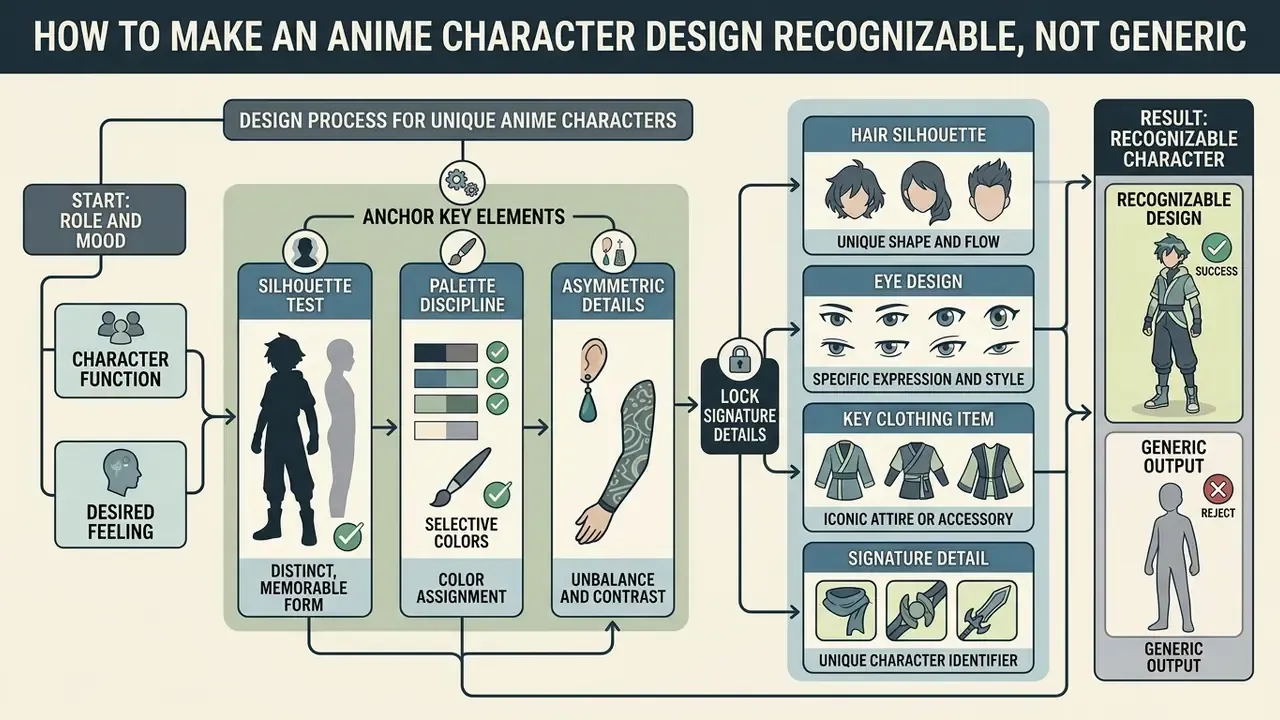
To avoid generic, boilerplate visual outputs, anchor character designs in distinct silhouettes, selective color palettes, and asymmetric details.
«Systems with explicit character modeling and quality control preserve recognizable identities across scenes better than baseline methods.»
Generic outputs happen when text prompts lean on overused tags (cute anime girl, cool anime boy) without specific design constraints. Tools with deeper style control help, but the constraint has to exist in the brief first, so compare capability levels across AI art generators before blaming the model.
Two practical tests separate a design from a stock image:
- Silhouette test black out the character in a default pose. If the outline is still identifiable, the silhouette is doing work.
- Palette discipline hold to 3 to 5 core colors using a 60/30/10 split, dominant hue for mood, secondary for support, accent for focal detail. Warm palettes read as energetic and action-oriented; cool palettes read as calm, isolated, or tense; muted and monochrome ranges push melancholy or drama.
Start With the Character's Role and Mood
Visual aesthetics should reflect character backstory and narrative function directly. A battle-worn mercenary needs different proportions, posture, and line weight than a studio idol. Anime anatomy references commonly place female figures at 6 to 7 heads tall and male figures at 7 to 8, with broader angular male torsos and more curved female torsos. Proportion itself is a storytelling channel.
Research on story-driven generation models like DiffSensei (2024) highlights that anchoring identity in multi-modal LLM memory structures preserves narrative coherence across panels.
«DiffSensei integrates a multimodal LLM as an identity adapter, letting textual role and personality descriptions persist into visual representations.»
Translating this principle to prompting means selecting costume elements and expressions that communicate personality immediately, in the first half-second of viewing.
Lock Hair, Eyes, Outfit, and One Signature Detail
A recognizable character passes the silhouette-and-color test. Select three to four distinct visual anchors that stay unchanged regardless of environment:
- Hair silhouette asymmetrical cuts, distinct locks, defined bangs, twin tails, or signature hair ribbons.
- Eye design specific iris patterns, dual-tone colors, or sharp pupil shapes.
- Key clothing item a customized jacket emblem, asymmetrical shoulder armor, or branded scarf.
- Signature detail a subtle facial scar, unique hairclip, choker, glasses, or glowing tattoo.
Frameworks such as AnimeAdapter (2026) show that locking these explicit appearance anchors via lightweight adapters preserves visual identity across diverse background edits and lighting conditions.
«CharaConsist uses point-tracking attention and adaptive token merge for fine-grained character preservation, the first training-free method built on a DiT model.»
Female and Male Anime Character Generators: Ideas for Different Characters
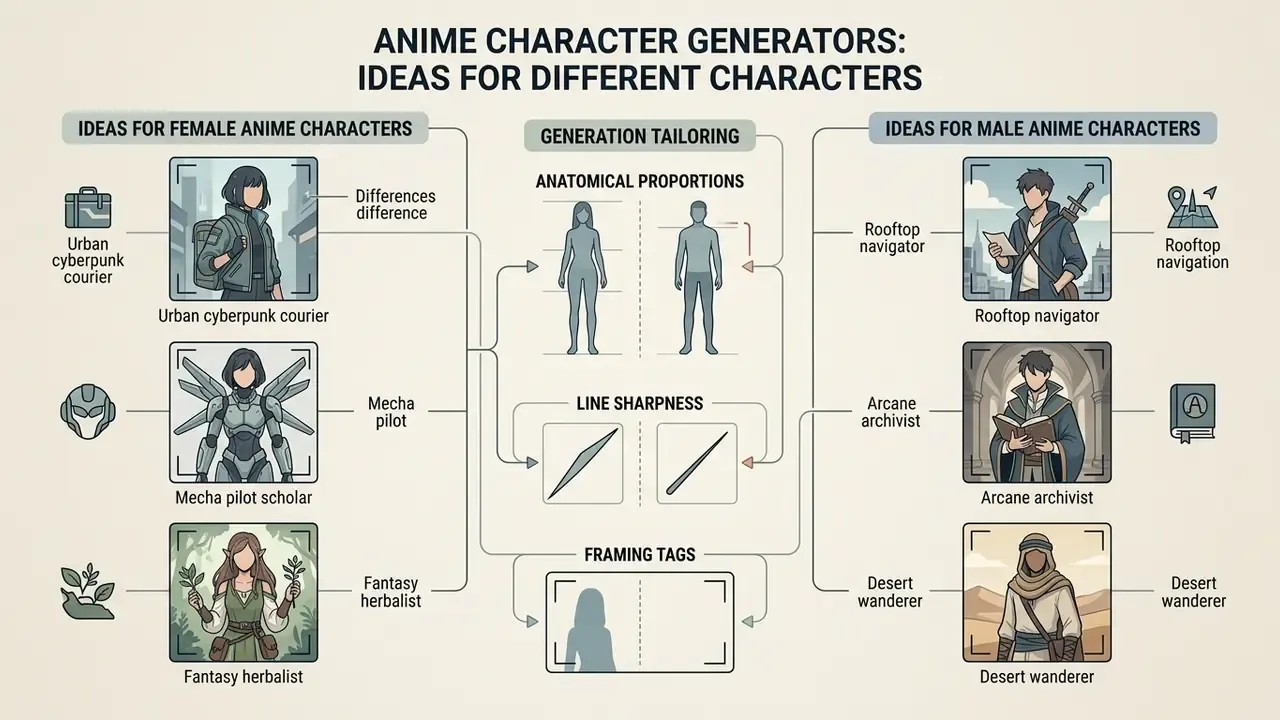
Generating distinct male and female characters requires tailoring anatomical proportions, line sharpness, and framing tags within the character generator anime environment.
Ideas for Female Anime Characters and Anime Girls
When using a female anime character generator or random anime girl character generator, standard prompts can easily produce repetitive aesthetics. Same bob, same big eyes, same soft gradient.
«C-GAN models effectively translate female anime character sketches into full-color images while preserving proportion and stylistic nuance.»
To achieve unique results, combine contrasting archetypes with specific aesthetic movements:
For softer, pastoral, hand-painted directions, study the aesthetic conventions covered in our review of Ghibli-style AI image generators.
When testing tools, a random anime female character generator or random girl anime character generator can surface unexpected color combinations, which you can then convert into a structured prompt.
Ideas for Male Anime Characters
Using a male anime character generator means focusing on sharp jawlines, broad shoulder framing, and distinct costume layers:
- Rooftop navigatorspiky dark blue hair, amber eyes, wind-blown trench coat, tactical gloves, perched on a skyscraper edge at dusk.
- Arcane archivistslicked-back platinum hair, monocle, embroidered velvet vest, holding a glowing tome in an ancient library.
- Desert wandererscarred cheek, dark hair under a frayed scarf, weathered leather armor, standing before a sandstorm.
- Crimson-eyed cyber samuraihalf-tied black hair, crimson iris, plated haori over techwear, drawn blade with light trail.
- Armored academy duelistash-blond crop, grey eyes, fencing-style uniform with house crest, formal ready stance.
A compact tag stack works well here: 1boy, solo, [mood], [hairstyle], [hair color], [eye color], [body type], [clothing], [setting].
How to Use Random Anime Ideas Productively
Randomized outputs from an anime character idea generator should serve as creative catalysts rather than finished products.
When you hit an interesting random output:
- Identify one standout design element, for example an unusual color combination or accessory.
- Extract that element into a text prompt anchor.
- Discard the rest of the random noise and generate controlled iterations around that single anchor.
A useful discipline borrowed from creative-writing practice: pair a random character with a random incident, then establish the character through action, perception, physical experience, and social response. The load-bearing anchors should be fixed before you generate the second image, not after the twentieth.
How to Keep a Character Recognizable Across Different Images and Scenes
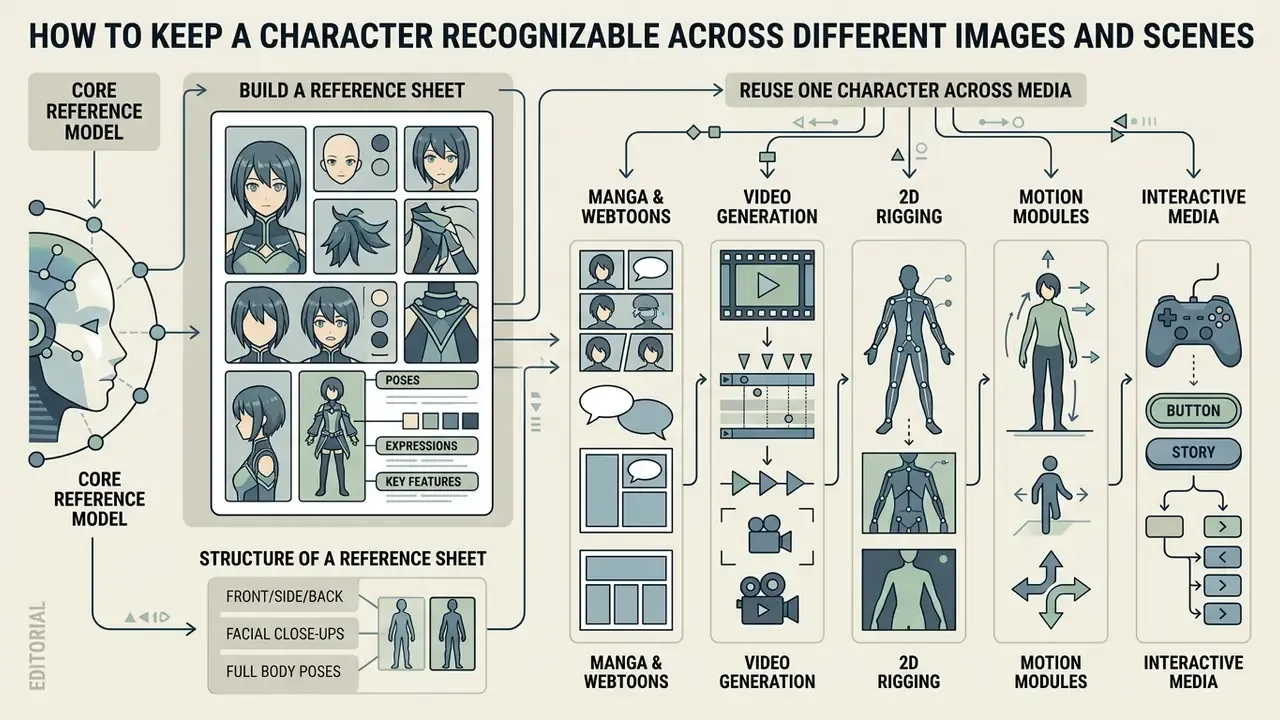
Maintaining character consistency across changing scenes, poses, and camera angles is a core technical challenge in AI art production.
«Cross-image attention lets tokens of one image attend to tokens of another, transferring appearance details without additional model training.»
Without strict consistency controls, sequential renders suffer from facial feature drift and costume mutation. Contemporary methods combine reference-image conditioning, pose-aware control modules, dual-consistency attention, pixel-wise guidance, and fine-grained appearance injection: LatentMan (CVPRW 2024) for frame-to-frame stability, pose-controllable zero-shot animation (IJCAI 2024) for identity under pose change, and CharaConsist for continuous shots inside one scene plus discrete shots across scenes.
Build a Character Reference Sheet With Poses and Expressions
A character reference sheet (model sheet) establishes the definitive visual standard for an asset. Documented sheet structures converge on: 1 neutral full-body master view (the largest drawing), 2 to 4 additional body or angle poses (front, 3/4, side, back), and 3 to 6 head-and-shoulders expressions, plus an outfit breakdown and a color-palette strip.
To generate a reference sheet, structure your prompt specifically:
character reference sheet, multiple views, front view, side view, back view, facial expression grid, 1girl, [fixed visual anchors], clean white background, character design sheet.
Research on DiT-based models like CharaConsist (2025) uses point-tracking attention to bind identity traits across multiple camera perspectives without retraining the underlying network.
«FreeStory stores character attention features and reuses them through KV injection, holding consistency under free-form prompts without fine-tuning.»
Structure of a Character Reference Sheet
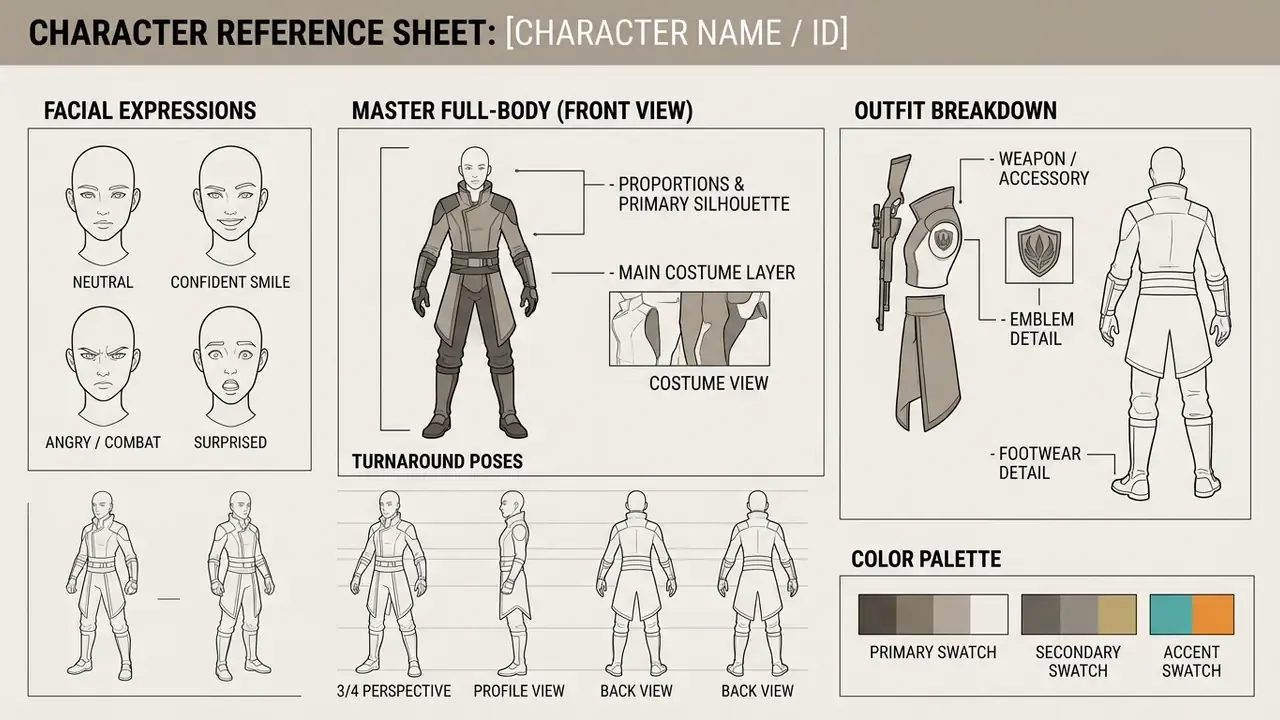
Figure 2: Layout specification for an AI-generated character reference sheet. Standardizing spatial zones keeps feature tracking consistent across sequential model renders. Alt text for graphic replacement: "Anime character generator reference sheet layout with master full-body view, turnaround poses, expression grid, outfit breakdown, and color palette."
Reuse One Character Across Manga, Illustration, and Video
Once an asset's reference sheet is locked, it can be deployed across multi-shot media pipelines:
- Manga and webtoons: implement attention-sharing techniques like FreeStory (2026) to reuse character features across sequential comic panels.
«Video Storyboarding is a training-free method that generates multiple video shots with consistent characters via feature sharing across frames.»
Consistency Benchmark: Controlled 20-Scene Case Study
Theory needs a measured run. What follows is a single controlled internal test, documented so the method, not the marketing claim, can be reproduced.
Setup
- Character
Cyber-Samurai Female, identity anchors fixed as neon-blue asymmetric bob, amber eyes, asymmetrical jacket with a three-line shoulder emblem, red cord on the scabbard. - Assets one master reference sheet (front, 3/4, side, back, 4 expressions) generated first and frozen as the approval standard.
- Pipeline anime-tuned checkpoint, IP-Adapter conditioning from the master front view, ControlNet OpenPose for each new pose, second-pass refinement at denoise
0.5, CFG8.0, Adetailer on faces, RealESRGAN anime 4× upscale. - Test 20 sequential scenes across 4 environments (rain street, interior dojo, rooftop night, daylight market), with pose, scale, and partial occlusion changes.
Results (per-appearance review against the reference sheet)
| Reviewed attribute | Passed first render | Notes |
|---|---|---|
| Hair color and silhouette | 20 / 20 | Stable across all lighting conditions |
| Eye color | 18 / 20 | Two shifts toward orange under warm market light |
| Jacket geometry and emblem | 18 / 20 | Emblem line count drifted in two occluded shots |
| Scabbard cord (micro-detail) | 15 / 20 | Weakest anchor; small props drift first |
| Hand anatomy | 16 / 20 | Four frames required targeted repair |
Interpretation. Overall first-pass acceptance was 15 of 20 scenes with zero rework. Four scenes needed one targeted redraw (three hand repairs via Adetailer or inpainting, one emblem correction), and one scene needed two passes because occlusion removed the emblem entirely from view. Final accepted delivery: 20 of 20 after localized repair only, with no full regenerations.
Known artifacts and limitations. Micro-details (cords, earrings, scar rendering, fine mechanical hand geometry) show measurable variation even when the character stays unmistakably recognizable. Warm-light scenes are the main cause of eye-color drift; add the eye color explicitly to every prompt and it largely disappears. This is one controlled run on one design, so first-pass rates vary by character complexity, checkpoint, and scene difficulty. Human review time and exact provider cost were not measured separately, which is a real gap if you plan to budget from these numbers.
Practical rule derived from the run: rank your anchors. Put the two most robust anchors (hair silhouette, garment shape) in every prompt, and treat micro-props as inpainting targets rather than identity carriers. Public multi-character benchmarks published by vendors report comparable behavior, for example 8-character casts scored across 40 panels with roughly 92.5% first-delivery acceptance and disclosed minor variation in small jewelry and hand geometry, which is consistent with the pattern above.
What to Use Generated Anime Characters For
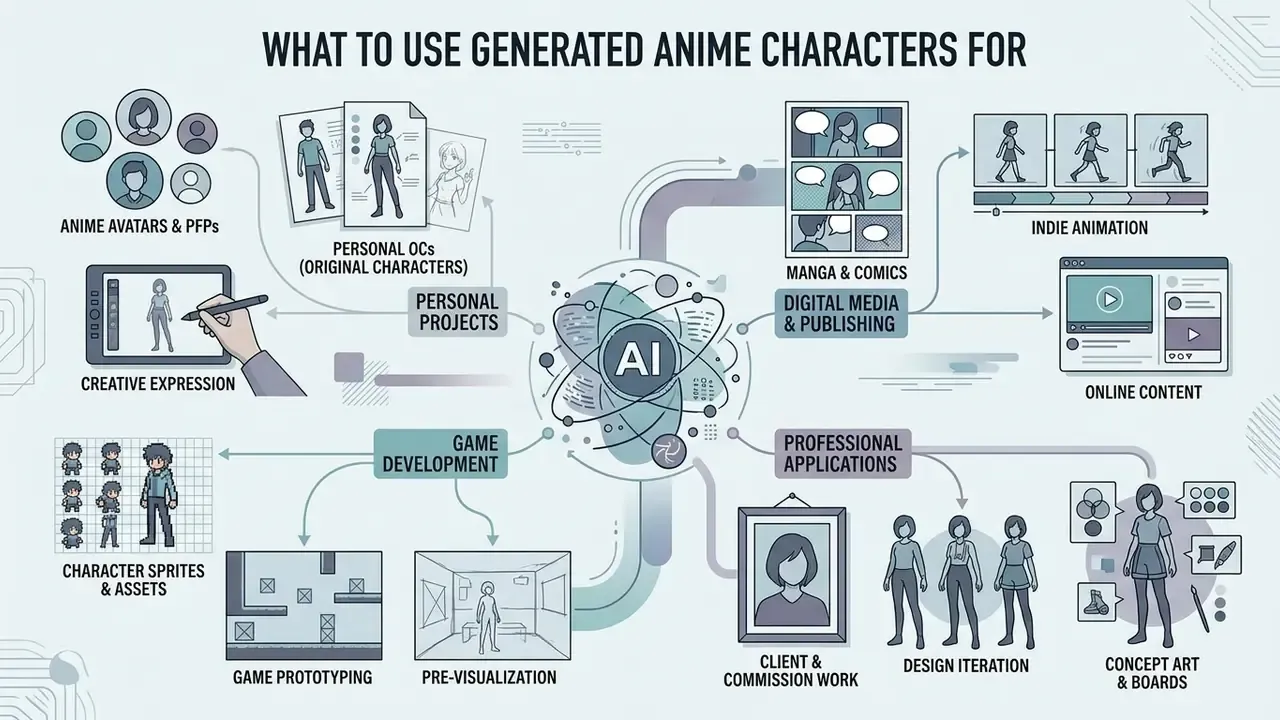
AI-generated anime characters integrate into numerous digital production workflows, scaling from individual creative projects to commercial game design. National industry guidance in Japan lists generative AI for production efficiency, advertising optimization, and creative work built from characters, backgrounds, objects, logos, and generated voices, which is a useful map of where these assets actually land.
Anime Avatars, PFPs, and Personal OCs
Individual creators produce profile pictures (PFPs) and personal original characters (OCs) for social platforms and virtual identity branding.
«NijiGAN proposes a contrastive semi-supervised image-to-image approach for converting arbitrary images, including photos, into anime style.»
Manga, Game, Animation, and Video Projects
Commercial visual production relies on generated characters for rapid asset creation:
- Indie game development 2D dialogue portraits for visual novels, sprite references, NPC concepts, companion and villain casts. Voxel and block-style projects usually branch off to a minecraft animation maker workflow rather than a 2D anime pipeline, so decide the target render style before you commission a cast.
- Animation pre-visualization dynamic storyboards built before manual keyframing, with generative assistance spanning scriptwriting, storyboarding, and asset creation in 2D and 3D workflows.
«MagicAnime contains 400,000 video clips, 50,000 video–keypoint pairs, and 12,000 face-animation pairs, supporting high-quality controllable generation.»
Teams moving from static key art to motion can review our guide to animation makers. Production teams extending video assets can review formatting workflows using tools like merge video online, assemble rough cuts in the free microsoft video editor, or study publishing-side post-production in our YouTube video editor guide.
- Digital publishing
- formatting webtoon chapters and reusing one registered cast across chapters and arcs. Teams evaluating commercial terms across creation suites can review our AI Media Commercial-Use Hub for licensing frameworks.
- Client and commission work
- character sheets delivered as production references for games, published manga, animation, and merchandise, always subject to the tool's terms and to the rights held in any uploaded reference material.
FAQ: Anime Character Generator
Can I turn a photo into an anime character (photo to anime)?
Yes. The process runs through image-to-image (I2I) models and adapters such as IP-Adapter or ControlNet.
«NijiGAN applies contrastive semi-supervised learning to convert arbitrary images into anime style while preserving key structural features.» — "Transform What You See into Anime with Contrastive Semi-Supervised NijiGAN", arXiv (2024). https://arxiv.org/html/2412.19455v1 Upload the source photo, set denoising strength (typically 0.4 to 0.6), and write a text prompt describing the target anime style. The network keeps the pose and facial proportions from the photograph while re-rendering textures and linework in anime style. If the source depicts a real person other than yourself, secure documented consent first.
How do I generate a full-body anime character?
To avoid automatic cropping to a portrait, include framing tags: full-body shot, standing posture, head-to-toe view, feet visible. Use a vertical aspect ratio (2:3 or 9:16). When the face blurs at distance, apply a Detailer tool (Adetailer) for localized face inpainting rather than regenerating the whole frame.
Are there AI-based 3D anime character creators?
Yes. The technology has moved from 2D image synthesis to mesh generation.
«SmartAvatar is a vision-language-agent framework generating fully rigged, animation-ready 3D avatars from a single photo or text prompt.» — "SmartAvatar: Text- and Image-Guided Human Avatar Generation", arXiv (2025). https://arxiv.org/html/2506.04606v1 Commercial text-or-image-to-3D services likewise advertise rigged full-body anime characters for VTubing, games, and animation. Verify rig quality and topology before committing to a production pipeline; a clean silhouette can still hide an unusable mesh.
How do prompt auto-translators and prompt enhancers work?
Many modern interfaces integrate an LLM that automatically translates user input from any language into English and expands short concepts (for example, "girl mage") into structured prompts detailing outfit, lighting, and art style. Several vendors expose this as a dedicated "improve prompt" endpoint. Enhancers are useful for exploration, but they also rewrite identity descriptors. For consistency work, keep your own frozen identity block and let the enhancer touch only scene and lighting terms.
How do negative prompts actually help?
Negative prompts suppress the failure modes a checkpoint tends toward, rather than describing what you want. The highest-value entries for anime characters are anatomical (extra fingers, extra limbs, deformed hands), quality-related (lowres, jpeg artifacts, blurry), compositional (cropped head, frame border, multiple characters), and contamination-related (text, watermark, signature). Keep them short: an over-stuffed negative prompt fights the positive prompt and flattens style.
How do I generate furry or kemonomimi anime characters?
Specify species anatomy explicitly, including fur color zones, ear shape, tail volume, muzzle length, and digit structure, plus how clothing sits over fur. Without those terms, models default to a human face with animal ears attached. Add human ears, missing tail, extra tails, and photorealistic fur to the negative prompt to keep the design anthro and stylistically anime.
How do I make chibi characters and sticker packs?
Treat chibi as a proportion instruction first: chibi, oversized head, small body, two-heads-tall proportions. Add thick lineart, flat colors, exaggerated expression, sticker aesthetic and request a plain white background for clean cutouts. Generate at 1:1, keep line weight heavy, and test legibility at 128 px before producing a full set.
Why do my characters keep drifting between images?
Three usual causes: the identity block changes wording between prompts; no reference conditioning (IP-Adapter or attention sharing) is applied; or micro-details are carrying the identity. Freeze the identity text, condition on the master reference view, and rank anchors so hair silhouette and garment shape carry recognition while small props are repaired by inpainting.
Can anime effects be applied to non-standard videos or images?
Yes. Video-stream stylization uses diffusion models with cross-frame control (AnimateDiff, ControlNet Tile or SparseCtrl) to transfer anime aesthetics onto live-action footage. For frame-level cleanup and final stylization passes, review our overview of AI photo editors.
Can I use generated anime characters commercially?
Only after verifying three things: that your plan's terms grant commercial rights for your entity's revenue band, that your prompts and references contain no third-party protected material, and that your human creative contribution is documented for jurisdictions where authorship determines protection. Run the Compliance Audit Evidence Checklist above before delivery.
Technical Documentation and Integration
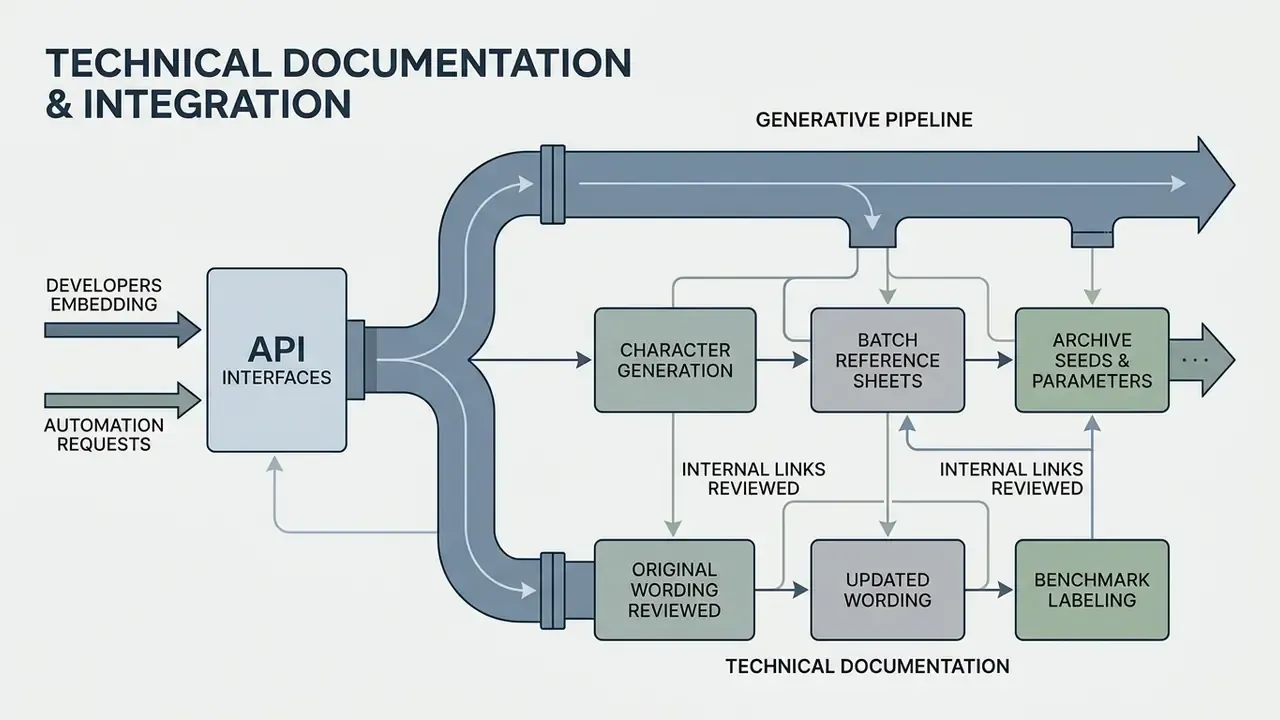
Developers embedding generative pipelines into applications can use API interfaces to automate character generation, batch reference sheets, and archive seeds and parameters automatically for audit. Review the technical guides in our AI Media API Guides section, and if questions arise, consult AI Media Support and Troubleshooting.
Appendix A: Revised Statements and Corrections
Navigation Hub