Generating synthetic video directly in a browser, with no account, is the fastest way to test a generative video model. You type a description, wait, and a clip appears. No installation, no card, no procurement ticket. That convenience is exactly why risk owners in banking should care: the same frictionless path that helps a marketer storyboard an idea also moves prompts outside the perimeter.
So the practical question is not "does it work?" It is: what did the organization just give away, and what can it legally publish?
Key takeaways before you generate anything
- True "no login" access is rare and heavily capped.Most headline tools (Runway, Pika, Luma, Veo) require registration. Genuine guest-mode services typically allow one short clip, around 6 seconds at 720p, per browser per day.
- Free tiers restrict four variables at onceclip duration (4 to 10 seconds), resolution (480p to 720p), model access (premium checkpoints disabled), and export cleanliness (watermarks burned into frames).
- Guest mode is a data-governance event, not just a creative shortcut.Anonymous web forms carry no data processing agreement, no audit log, and often no opt-out from input retention.
- Long-form output is achievable for free,but only by stitching multiple 5-second clips with anchored prompts and carried-over end frames.
- Commercial deployment requires labeling.Synthetic media in advertising must be machine-readable marked and disclosed under the EU AI Act, with substantiated performance claims under FTC rules.
Reality check: audited conditions of free guest access
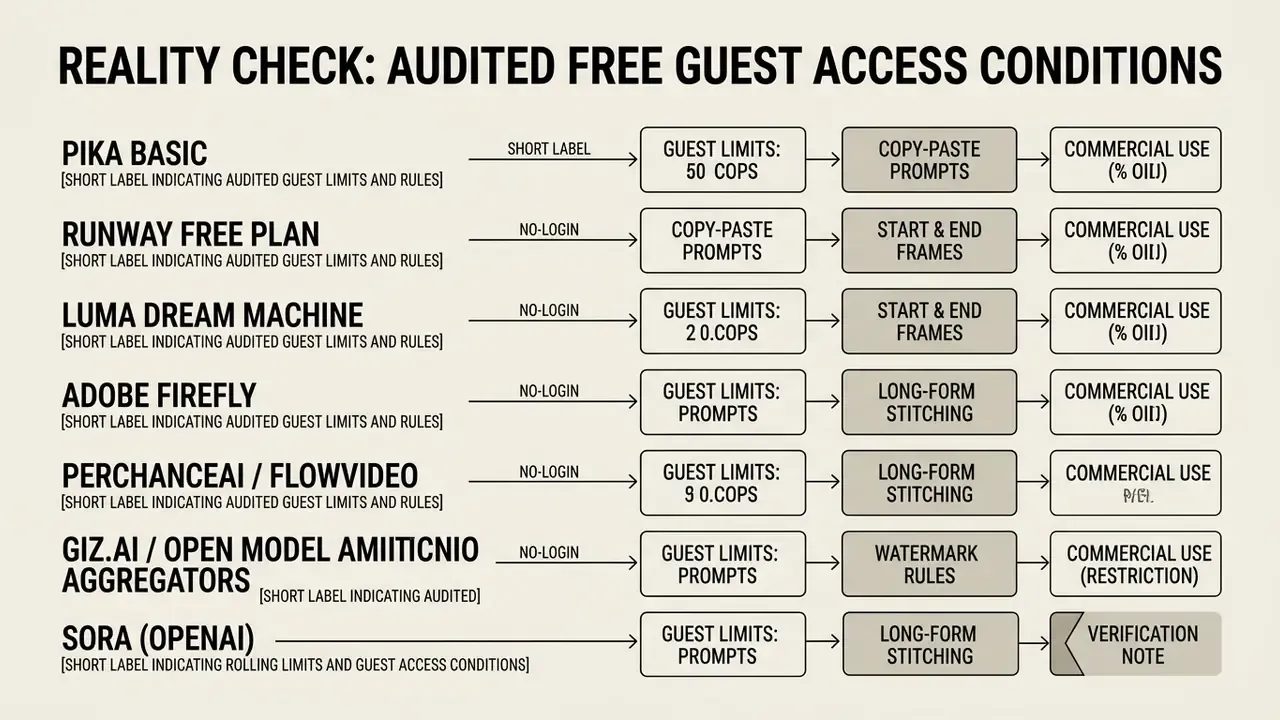
Before debating prompt strategy or model quality, establish what the market actually delivers without an account. The audit below reflects verified 2026 tier conditions. It dismantles the "unlimited, watermark-free, no login" narrative in about thirty seconds of reading.
Marketing-claim debunk. Competing landing pages advertise "every top model, Sora 2 and Veo 3.1, free to start, no watermark, up to 10 minutes." Frontier-class inference consumes substantial GPU time per second of output. No provider sustains unmetered anonymous access to those checkpoints for long. In practice such offers resolve into daily credit pools, model substitution (a fast or distilled variant instead of the flagship), or plain authenticated accounts. Treat "unlimited" as a claim requiring substantiation, not a specification.
One more nuance worth logging. Quotas drift. A tier verified in January can tighten by March without notice, which is why the audit note above carries a verification date rather than a promise.
Shadow AI and data privacy risks in guest mode
Anonymous generation removes friction for creators. It also removes visibility for whoever owns the risk. When a marketer, an agency contractor, or a junior analyst pastes a prompt into an unauthenticated web form, the institution loses four controls simultaneously: identity, data lineage, retention governance, and output provenance.
Risk matrix for unauthenticated sessions
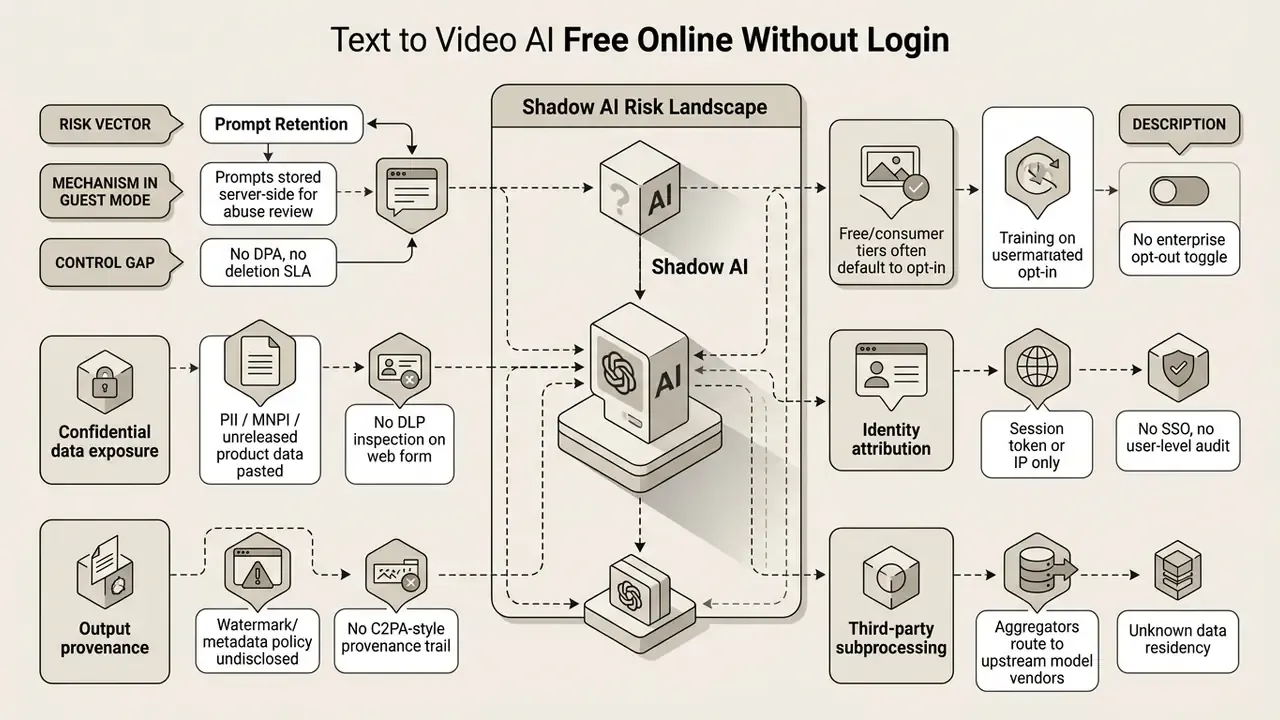
Practical rules for regulated teams
Consider an illustrative composite scenario, not verified research: a risk assessment team reviews shadow AI usage across corporate creative departments and finds that roughly four in ten contractors used external guest-mode video tools for rapid storyboarding. Moving that traffic onto one approved, logged platform reduced data-leakage exposure while keeping iteration speed intact. Treat the ratio as a hypothesis to test with your own egress logs, not a benchmark.

What "free online without login" means for AI video generation
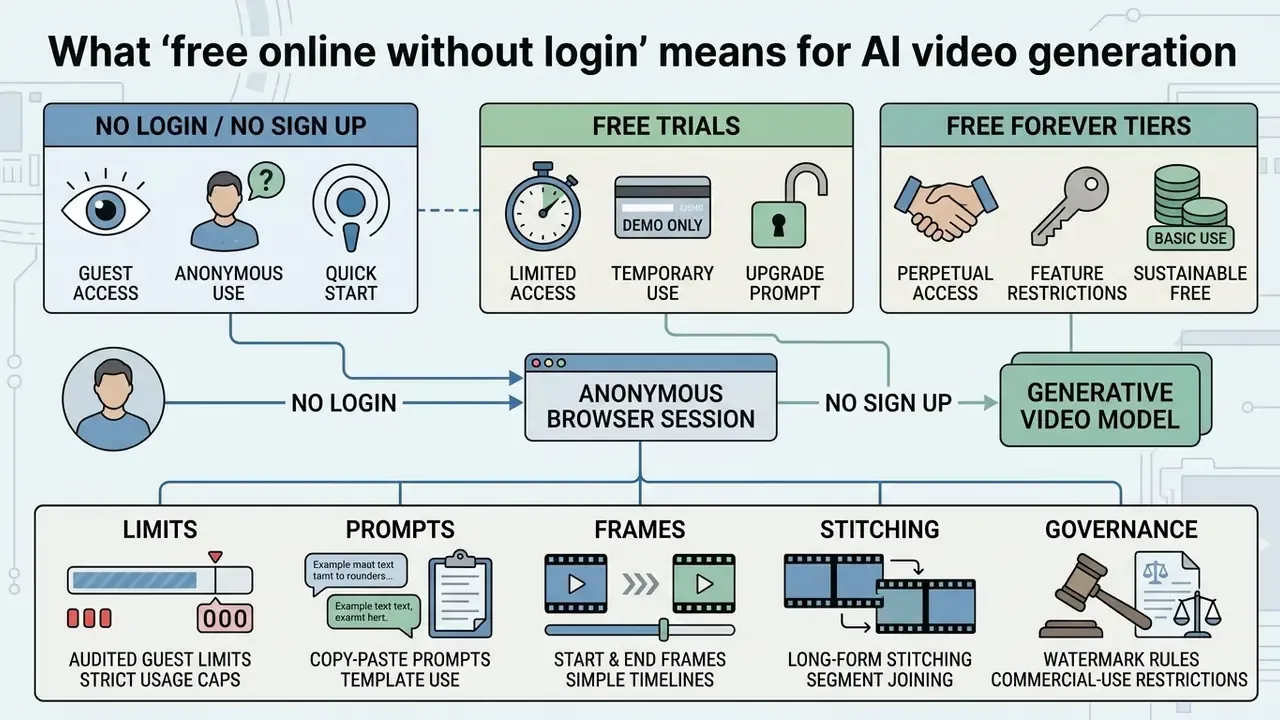
Using a text to video ai free online without login tool means reaching a generative video model through an anonymous browser session. You enter a text prompt, pick a few parameters, and receive a short AI generated clip. No email, no card, no onboarding flow.
In guest mode, platforms assign temporary session identifiers or browser tokens to meter usage. These session allowances enable instant testing, but they differ fundamentally from persistent free tiers. Services hosting an ai video generator free online no login path commonly enforce session limits, lower rendering priority, or reduced export resolutions to contain GPU cost.
"The quality of text-video training pairs directly determines the upper bound of a generation model's capability."
That dependency explains why guest tiers rarely feel equivalent to paid ones. Free access is usually routed to smaller or older checkpoints, trained and tuned differently from the flagship models shown in the demo reel.
No login, no sign up, and free forever are different offers
"No login," "no sign up," and "free forever" describe distinct service models with different operational boundaries. None is a standardized legal category. Each is a marketing label whose real obligations live in the terms of service and the quota rules.
- No login and no sign up Immediate, account-free access to generate clips. Usage attaches to a temporary browser session or an IP address. When the allocation ends, access halts unless you register. Marketing copy for an ai video maker without login or an ai video generator free without login almost always sits in this bucket.
- Free trials Temporary access to premium models or full feature sets for a fixed credit count or time window. After trial credits expire, paid conversion is required.
- Free forever tiers A recurring allowance, such as a daily token reset, on a permanent basis. Rarely unrestricted; they routinely limit clip duration, queue priority, and advanced model availability. For credit mechanics and export rights in detail, see our reference on free AI video generators.
Before committing a workflow to any single tool, check our comparison of free AI video generators and match quota structure against project volume. To compare structured pricing tiers and recurring credit models across vendors, review our AI Media Pricing Guides.
Watermarks, downloads, and browser-based access
Browser-based generators run video synthesis on cloud GPU servers, so nothing installs locally. An ai video generator no download architecture executes in standard browsers such as Chrome and Edge, which currently offer the most reliable local MP4 export support.
Export policy varies widely. Many services attach a visible watermark or metadata tag to free output and reserve clean downloads for subscribers. Others allow ai video generator free no login no watermark exports on low-resolution clips only, at 480p or 720p, keeping 1080p and 4K behind an account. Common browser tools accept MP4, MOV, AVI, WMV, WebM, and MKV inputs when image-to-video or overlay editing is involved. For technical detail on local browser rendering and memory bounds, consult our AI Media Support and Troubleshooting resource.
How to generate AI videos from a text prompt without editing skills
Creating videos from text requires no timeline editing, keyframing, or compositing. Generative pipelines convert natural language text descriptions directly into rendered frames using diffusion and transformer models.
You type a simple text prompt describing the scene, choose framing, and click generate. The model interprets the prompt, holds visual coherence across frames, and returns a finished MP4 ready for review. Control collapses into three primitives across nearly every documented API: the prompt (what to include), frame count or seconds (clip length), and the negative prompt (what to exclude). That is the whole interface. Really.
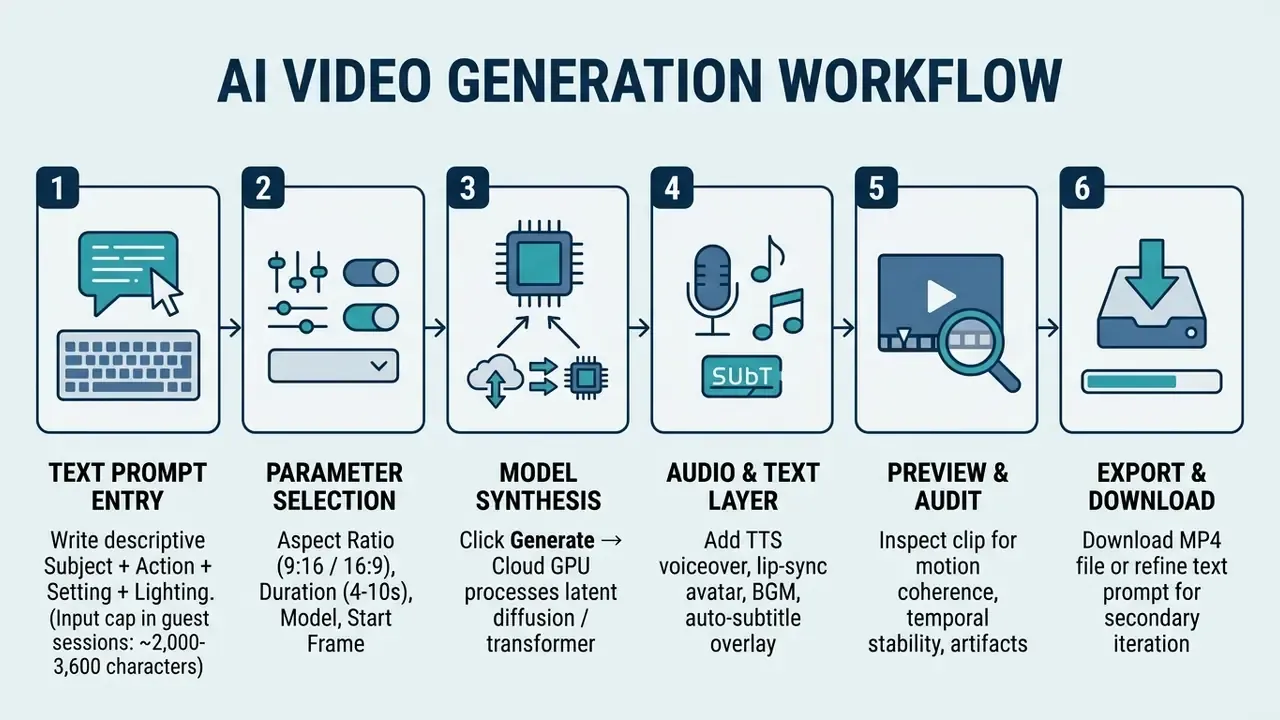
Step-by-step description: The user enters a structured text prompt in the web interface. Next, the user sets aspect ratio, duration, and any anchor frames. Clicking "Generate" sends the payload to a cloud GPU cluster, which returns a preview. Optional audio and subtitle layers are attached, the output is audited for artifacts, and the final file is exported.
Write a clear text prompt for the video idea
A good prompt communicates one complete visual concept in direct language. Vague instructions force the model to guess, and guessing shows up as unstable motion or melted hands.
Effective prompts define six elements, the same structure documented across vendor guides for text-to-video AI tools:
- Subjectthe focal point, for example "an editorial female executive."
- Actionspecific motion, "walking briskly through a glass office lobby."
- Environmentsetting detail, "modern financial district skyscraper at sunset."
- Camera movement"smooth slow pan, tracking shot at eye level."
- Lighting"warm golden hour side-lighting with soft reflections."
- Style and quality"photorealistic 35mm film grain, cinematic depth of field."
In practice: retrieve a phrasing that already works for your shot type, refine it with the six-element structure, then rank two or three variants against the same seed before spending credits. This is where creative control actually lives, not in the slider panel.
Choose video parameters before you generate
Before triggering generation, configure the spatial and temporal parameters:
- Aspect ratio 16:9 widescreen for desktop and web, 9:16 vertical for TikTok and YouTube Shorts. Documented APIs also expose 1:1, 4:3, 3:4, and 21:9, though some ratios require 720p or higher.
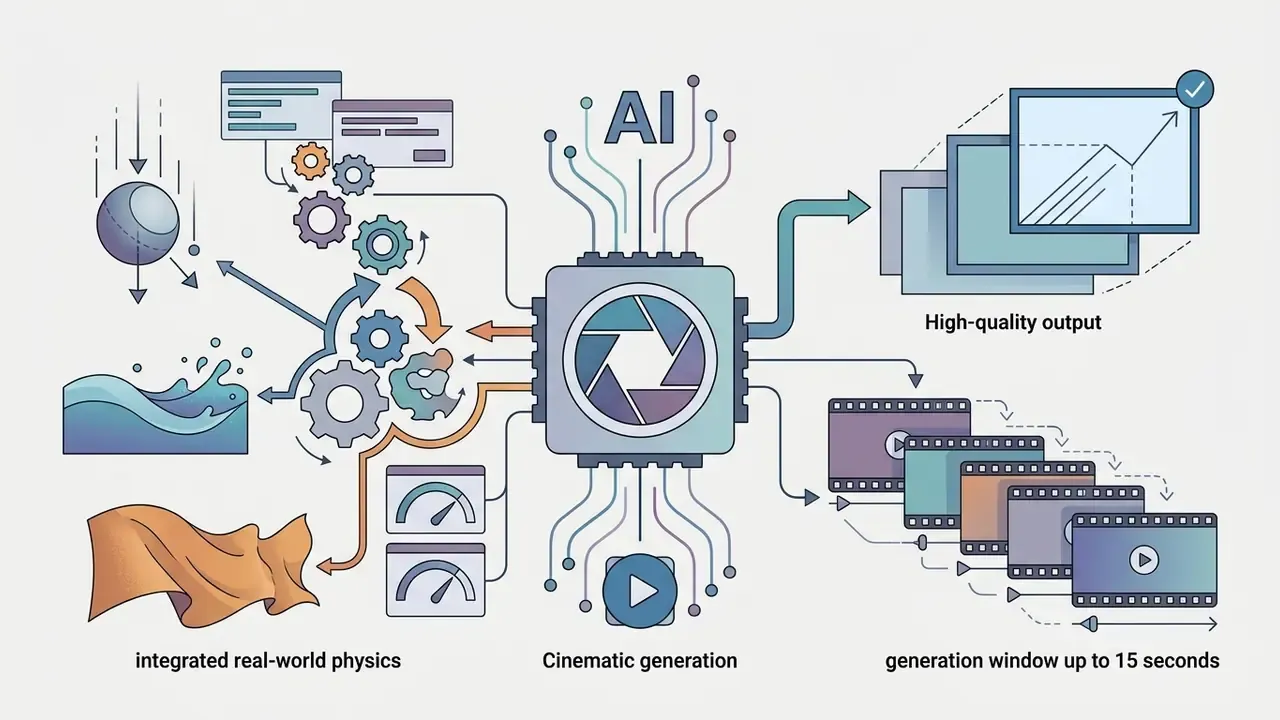
- Duration free tiers usually cap clips at 4, 5, or 6 seconds per generation; commercial APIs document 4 to 15 second windows.
- Start and end frames advanced generators accept a starting image to anchor character consistency, and optionally an ending image to define where motion resolves.
- Motion controls camera speed, zoom intensity, pan, and tilt orientation.
- Audio generation some models synthesize ambience or dialogue natively; others need a separate voiceover layer.
To estimate render times, credit burn rates, and cloud compute costs across workflows, use our interactive AI Media Calculators.
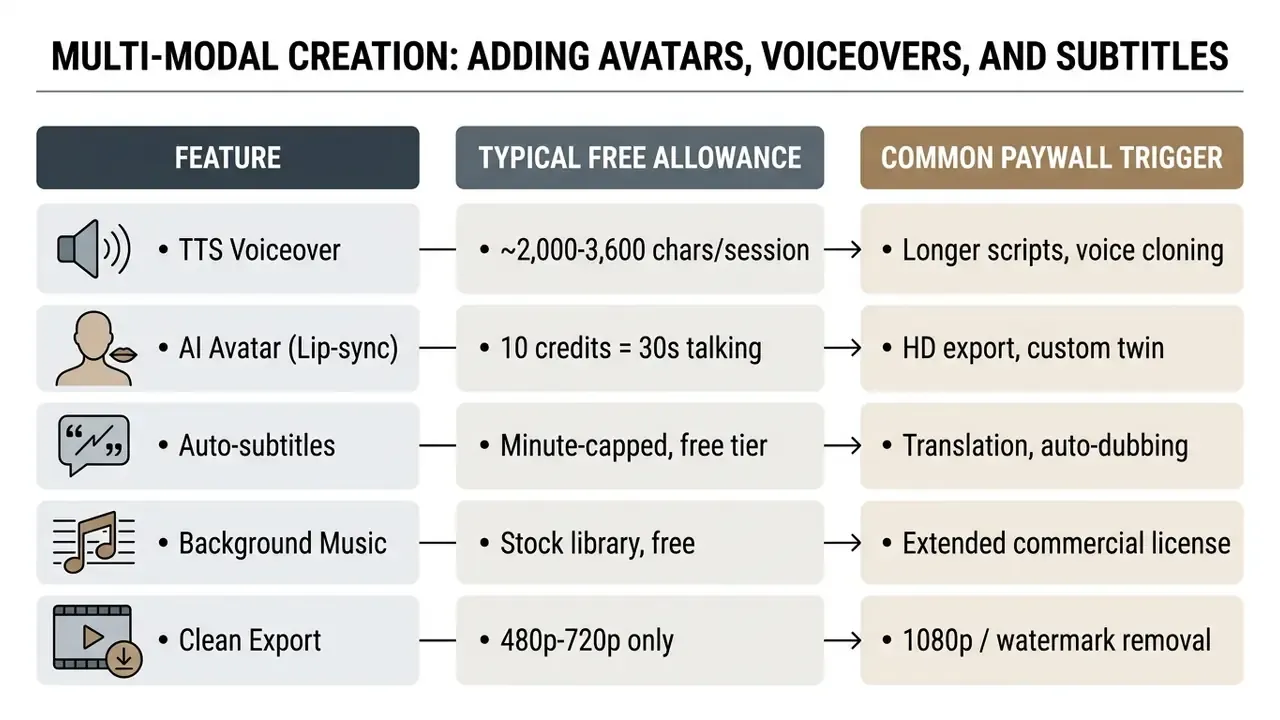
Multi-modal creation: adding avatars, voiceovers, and subtitles
Pure frame synthesis rarely ships as finished content. A publishable clip usually needs narration, on-screen text, and for explainers or training material, a presenter. Free web suites expose these layers but meter them separately from video credits.
Step-by-step multi-modal pipeline
- Text scriptdraft or paste the narration. Most services cap prompt and script input for anonymous sessions near 2,000 to 3,600 characters, roughly 2 to 4 minutes of speech.
- TTS engine (voiceover)select voice, gender, age, accent, and emotional tone. Large libraries advertise 2,000+ realistic AI voices across 84 languages; free tiers restrict render minutes rather than the catalogue. See our reference on AI voice generators for quality and licensing detail.
- Lip-sync avatar generationbind the audio track to a stock presenter, a prompt-generated character, or a photo-derived digital twin. Libraries of 1,900+ AI avatars exist on hosted platforms; free access is typically "free to try" with credit deductions per render.
- Auto-subtitle overlaygenerate captions from the audio, then style position and font. Basic transcription is commonly free with a monthly minute allowance; translated subtitles and auto-dubbing sit behind paid tiers.
- Background musicattach a royalty-cleared mood track. Verify the licence covers commercial distribution before publishing.
Free-tier allowance snapshot for multi-modal features
Choose the best free AI video generator and model for your task
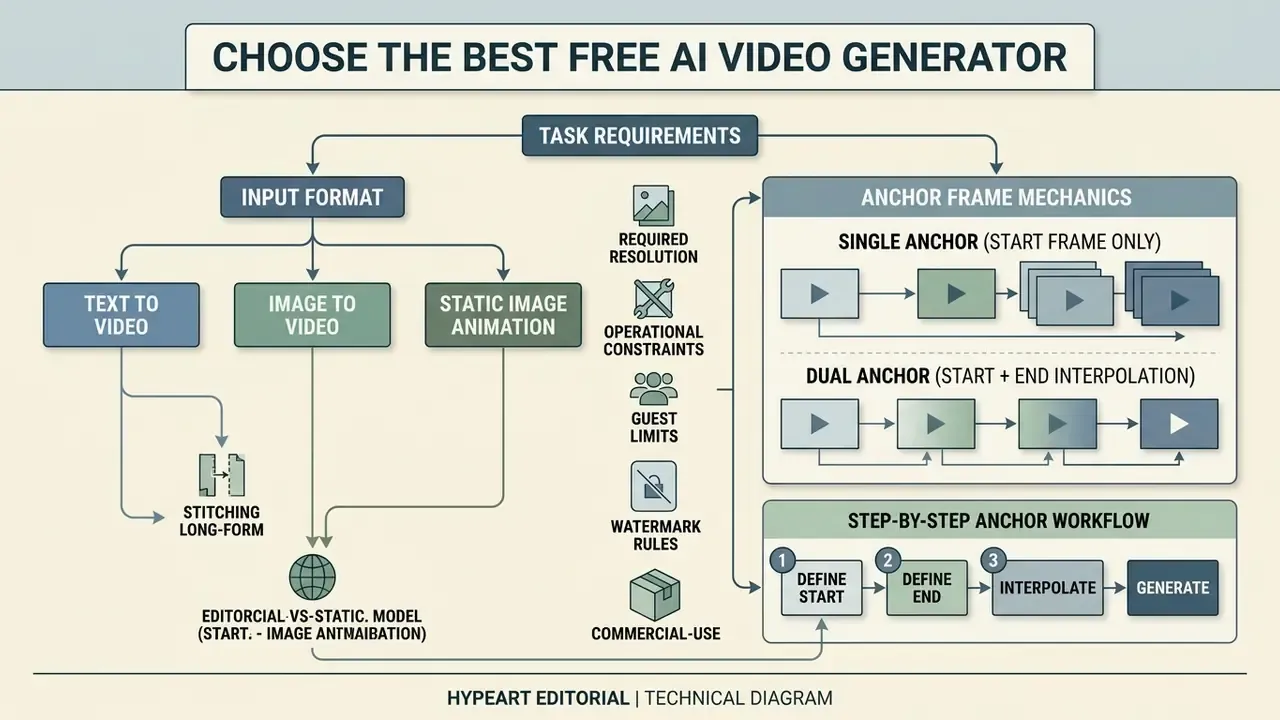
Selecting an ai video generator without login free tool depends on input format, required resolution, and operational constraints. Platforms run different architectures, and each trades rendering speed against motion realism.
For a side-by-side breakdown of interface, credit mechanics, and export rights, consult our comparison of AI video generators.
| AI Model / Tool | Input Modes | No-Login Access | Max Free Clip | Default Watermark | Max Free Specs | Data Retention / Training on Inputs | Enterprise SSO | Commercial License |
|---|---|---|---|---|---|---|---|---|
| Kling 3.0 Turbo | Text-to-Video, Image-to-Video | Guest Daily Credits | 5 s | Yes (Free Tier) | 720p / 1080p | Retained for abuse review; consumer-tier training opt-out unclear | Paid tiers | Paid Tiers Only |
| Seedance 2.0 | Text-to-Video, Image-to-Video | Session-Based | 5 to 15 s | No (Select Partner Nodes) | 1080p to 2K | Varies by reseller node; verify subprocessors | Via partner | Included on Free Outputs |
| Veo 3.1 (Google) | Text-to-Video, Image-to-Video | Account Required | 4 / 6 / 8 s | SynthID Implicit | 1080p (4K in Flow) | Enterprise terms exclude training on customer data | Yes | Enterprise / Paid Tiers |
| Wan 2.5 Video | Text-to-Video, Image-to-Video | Open Weights / Guest | 5 s | No | 480p to 1080p | Self-hosting keeps inputs on-premise | N/A (self-hosted) | Open Commercial License |
| MiniMax H3 Max | Text-to-Video | API / Web Guest | 5 s (24 fps) | Yes | 480p to 1080p | API terms govern; web guest undisclosed | Paid | Standard Terms Apply |
| PerchanceAI (guest) | Text-to-Video | True Guest Mode | 6 s | Varies | 720p | No account, no deletion controls | No | Personal-use default |
For regulated teams, the rightmost three columns matter more than resolution. Self-hosted open-weight models such as Wan 2.5 are the only configuration where prompts never leave controlled infrastructure. That is why sandbox evaluations in banking and healthcare often start there rather than on a hosted guest tier, even at a visible quality cost.
To review detailed performance benchmarks across leading commercial and open systems, use our side-by-side analysis to compare top generative frameworks. For programmatic deployment economics, see our AI Media API Guides and the Google Veo implementation guide.
Text to video, image to video, and image animation
Generative video platforms operate in three creation modes:
- Text-to-video: synthesizes frames purely from text descriptions. Best for concept work with no existing assets, and the mode behind most searches for an ai text to video free no login option.
- Image-to-video: uses a static source image as the anchor frame, with a prompt driving camera motion and subject movement. Our guide to image-to-video AI tools covers anchor-frame workflows in depth.
- Static image animation: an image animator applies localized motion vectors, such as facial movement or background displacement, to animate images with pan, zoom, tilt, and directional drift.
Anchor frame mechanics: single frame versus start plus end interpolation
AI video models for realistic motion and cinematic quality
Video foundation models released across 2025 and 2026 added physics-aware components to improve motion realism:
Benchmarks published in VBench (CVPR 2024) show that while modern models score above 85% on visual fidelity, complex multi-subject physical interaction still fails temporally in unconstrained prompts (https://arxiv.org/abs/2311.17982).
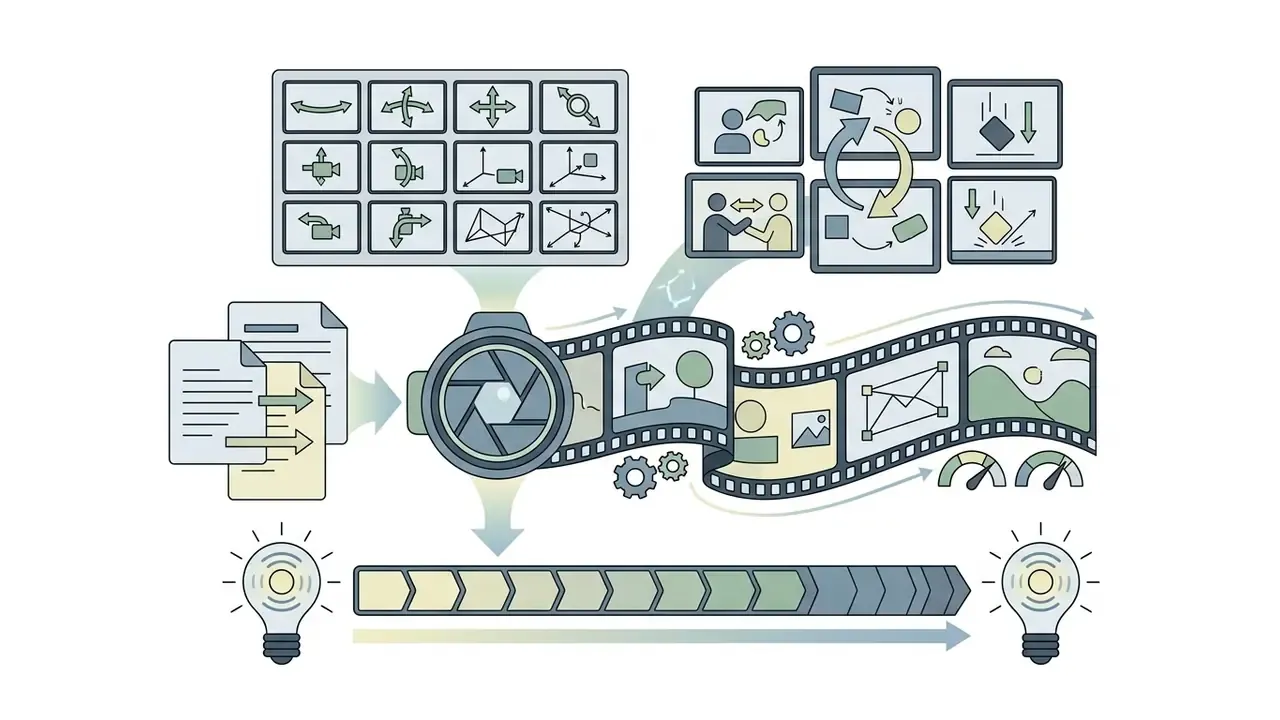
"Most video generators complete fewer than 20% of requested compositional changes over time, indicating systemic limitations."
The operational implication is blunt. Do not request sequential state changes ("the glass fills, then tips over, then shatters") inside one free-tier generation. Split each state change into its own clip and stitch.
Get higher-quality AI generated videos from the first prompt
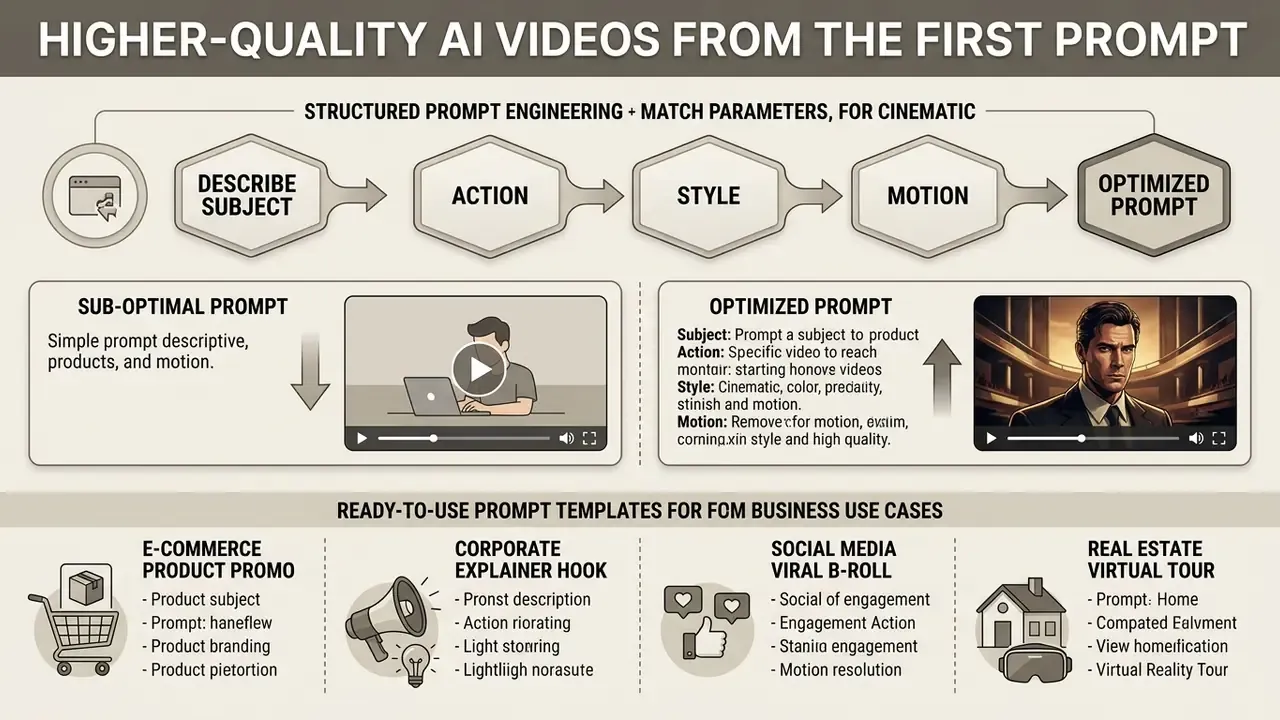
Getting cinematic quality from an ai text to video generator free no login tool comes down to structured prompt engineering and matching parameters. Trial and error burns session credits and delays delivery, and on a guest tier you may only get one attempt per day.
"A 2,543-video dataset confirmed that T2VScore, combining text alignment and visual quality, correlates better with human judgement."
Because human perception weighs text alignment alongside raw polish, a prompt that names every intended attribute usually beats a shorter prompt sent to a better model. Worth remembering before you pay for an upgrade.
Describe subject, action, style, and motion in one prompt
Combine subject identity, movement vectors, lighting, and camera behavior into a single unified string.
Sub-optimal prompt:
Optimized prompt:
The second version constrains every visual dimension, which reduces model ambiguity and produces more stable motion. To turn static UI wireframes or corporate graphics into dynamic video mockups, see our guide on ai ui generator integration.
Ready-to-use prompt templates by business use case
Copy these directly and swap the bracketed nouns for your own subject. Each already contains all six structural elements, so it is engineered to land on the first generation rather than the fifth.
1. E-commerce product promo
2. Corporate explainer hook
3. Social media viral B-roll
4. Real estate virtual tour
5. SaaS UI feature demo
6. Training and compliance scene (brand-safe)
7. Anime or stylized narrative beat
Prompt-hygiene rules for all templates: stay under the session character cap of 2,000 to 3,600 characters, avoid on-screen text requests, never name real individuals, and specify one motion event per clip.
Match aspect ratio and duration to the publishing format
Distribution channels enforce strict format and length rules. Choose the wrong frame before generating and you inherit awkward cropping or resolution loss in post.
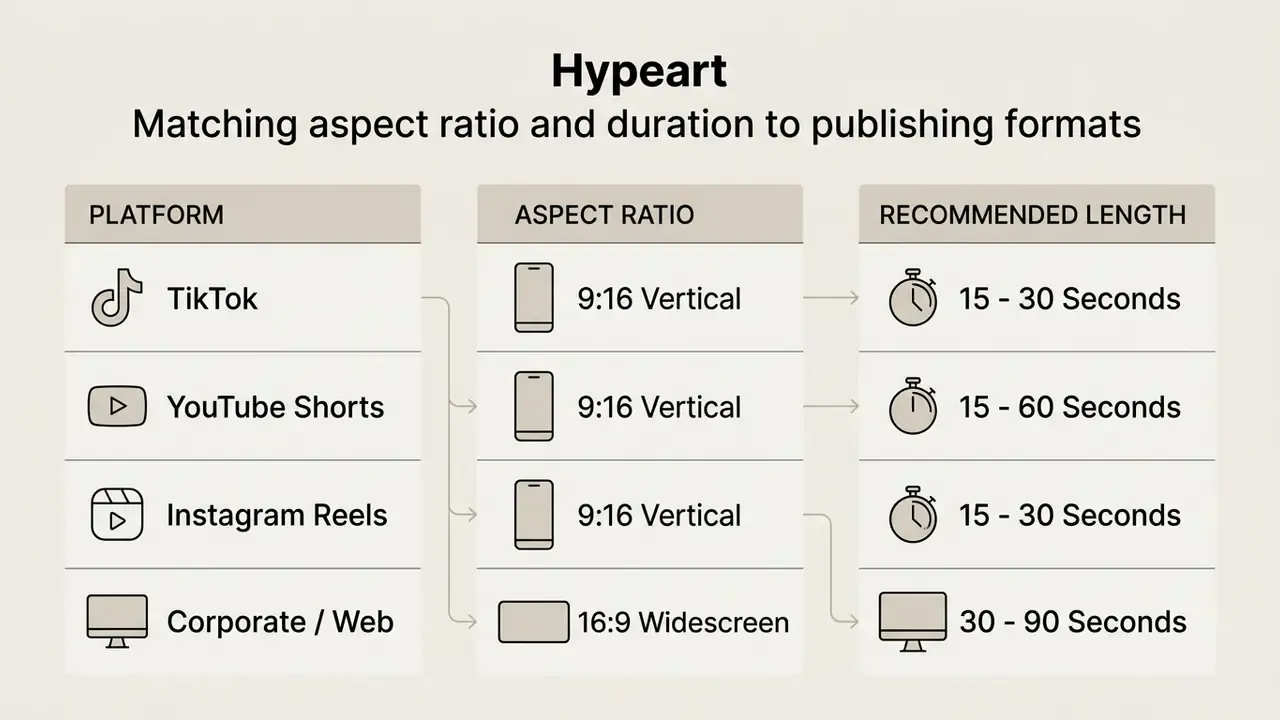
YouTube policy specifies that square or vertical videos up to 3 minutes uploaded on or after 15 October 2024 qualify as Shorts. Even so, generating several 5-second clips and stitching them remains the most reliable way to hold character consistency across longer short-form pieces. For publishing-side trimming, chaptering, and end-screen setup, see our YouTube video editor workflow guide.
How to create long-form AI videos (up to 10 minutes) for free
Free generation caps clips at 4 to 10 seconds. That is a per-request limit, not a project limit. Multi-scene assembly turns a stack of short generations into explainers, video ads, tutorials, and narrated episodes of one to ten minutes. It is the same mechanism commercial "long-form AI video" agents automate behind the scenes, and the same logic behind every ai movie maker free no sign up pitch.
Step 1. Scene scripting (shot list). Write the full narration first, then cut it into 5-second visual beats. A 10-minute video is roughly 120 beats; a realistic first project is 12 to 24 beats, so one to two minutes. Number every beat and note its purpose: hook, problem, mechanism, proof, call to action.
Step 2. Character and style consistency (anchor prompt). Build one reusable anchor block describing appearance, wardrobe, lens, and lighting, then prepend it to every beat. Example: "Same subject throughout: woman, mid-30s, shoulder-length dark hair, charcoal blazer, white shirt; 35mm lens, soft north-facing window light, muted corporate color grade." Where the platform exposes a seed value, reuse the identical seed. Where it does not, anchor with an image instead of text.
Step 3. Sequential generation with frame carry-over. Export the final frame of clip n and upload it as the start frame of clip n+1. This is the single highest-impact continuity technique, because it removes identity drift at the cut. For beats that must land on a specific composition, use dual-anchor interpolation: start frame equals the previous clip's last frame, end frame equals the target composition.
Step 4. Audio bed. Generate the full narration as one continuous TTS file rather than clip by clip. A single take keeps pacing and breath natural, and the visuals are then cut to the audio, not the reverse.
Step 5. Free timeline stitching. Assemble the MP4 clips in a browser-based video editor, matching resolution and frame rate across all files to avoid re-encoding penalties. Place cuts on narration beats, add 6 to 10 frame cross-dissolves only where the subject changes, and overlay auto-generated subtitles last. Compare capable no-cost editors in our free video editing software comparison, and shrink delivery file size with the techniques in our video compressor guide.
Step 6. Continuity audit. Review at 0.25x speed at every cut point. Typical defects: wardrobe color shift, hand count changes, background object teleportation, and lighting direction flips. Regenerate the offending beat, not the whole sequence.
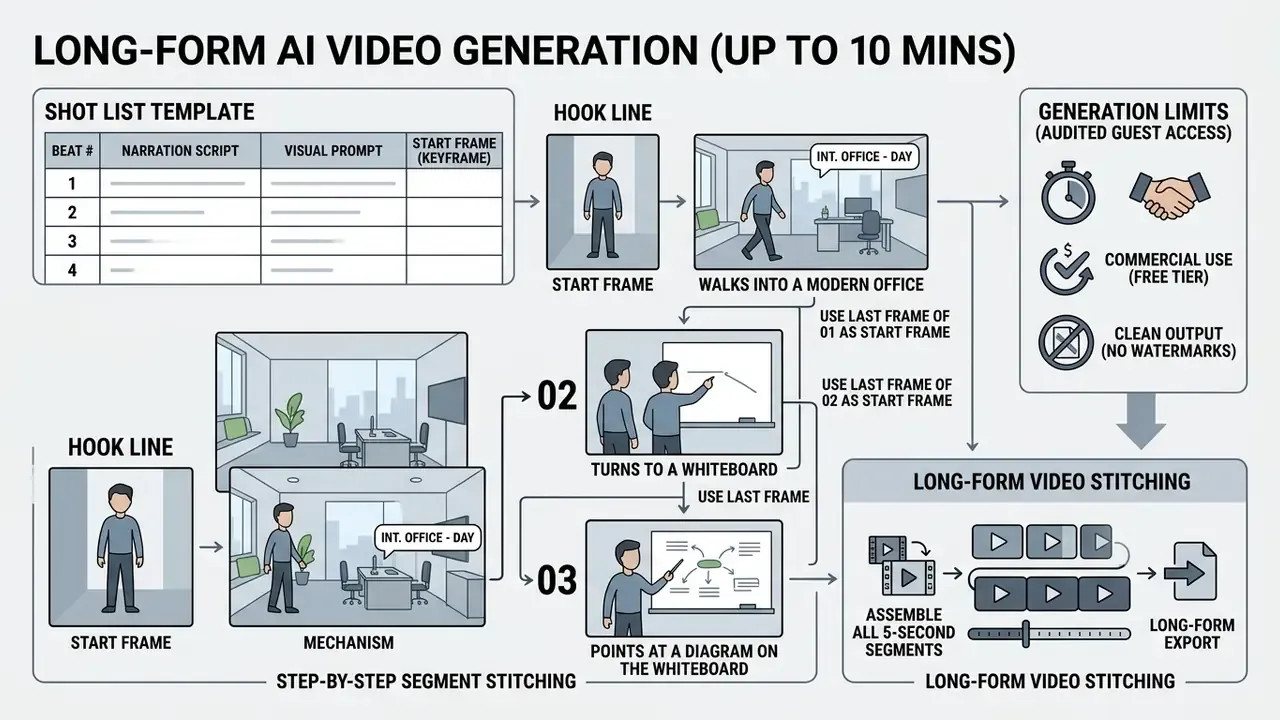
A blunt note on effort. A two-minute stitched explainer costs a working afternoon the first time, mostly in continuity fixes. Budget it honestly before promising a weekly publishing cadence.
Free AI video generator limits: duration, models, exports, and restrictions
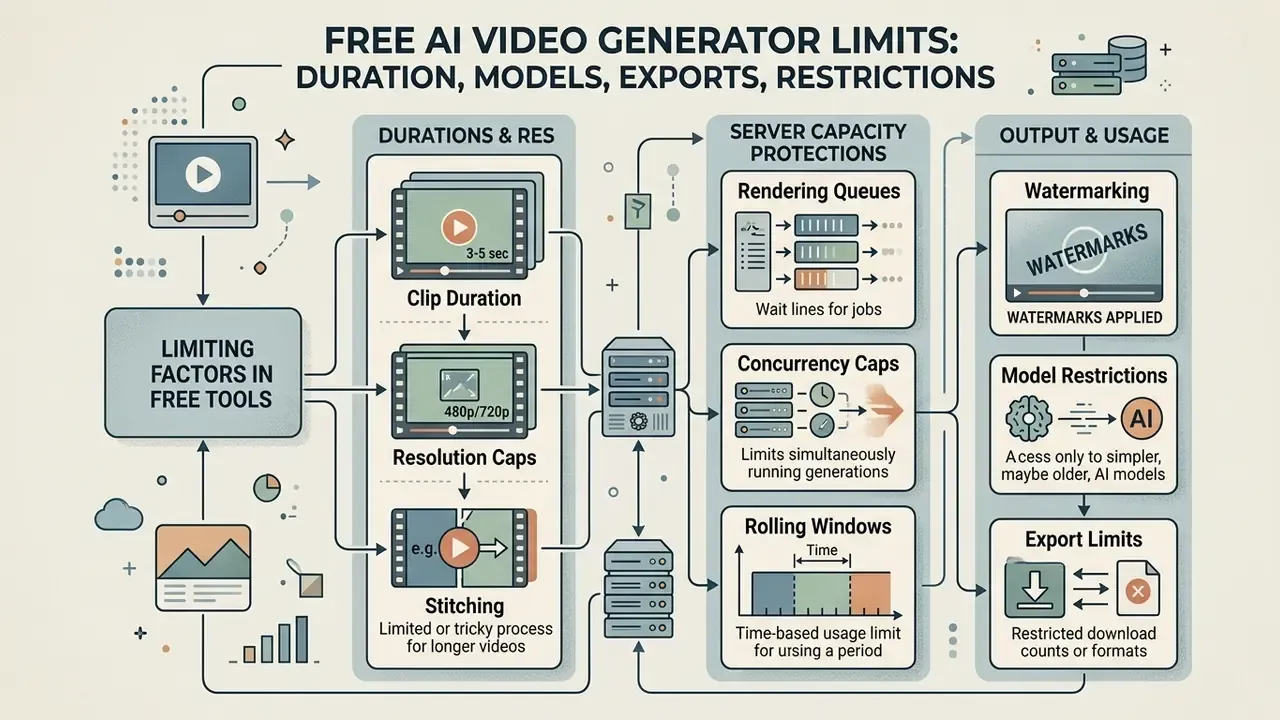
Free browser tools impose boundaries to protect server capacity. Knowing them in advance prevents a project stalling mid-sprint.
What can limit free video creation
Free access platforms commonly apply these caps:
- Clip duration 4 to 10 seconds per execution.
- Resolution caps frequently 480p or 720p, with 1080p and 4K reserved for paid accounts. Frame rate may also be pinned at 24 fps.
- Rendering queues anonymous guest requests land in low-priority queues. Peak-hour delays stretch from minutes to hours, sometimes even for paying users on flagship models.
- Concurrency caps consumer tiers often allow two simultaneous generations; higher tiers raise this to five.
- Rolling windows some platforms meter a rolling 24-hour allowance where longer clips consume multiple units, with no midnight reset.
- Watermarking brand logos or translucent overlays burned into exported frames.
- Model restrictions advanced foundation models such as Veo 3.1 or premium Kling checkpoints stay disabled on guest tiers.
- Input length prompt and script fields typically cap near 2,000 to 3,600 characters in anonymous sessions.
Do the credit math before planning. If a tier grants 80 monthly credits and a 5-second 720p clip costs 10, you have eight generations, not eight finished videos. Failed attempts still spend.
Research using T2VTextBench evaluated ten leading generative video systems and found that most struggle to keep legible, stable on-screen text across multi-second output.
"T2VTextBench evaluated ten systems, from SD Video (1.4B parameters) to Sora, and found most fail to maintain legible, stable text overlays."
Practical consequence: never generate headlines, logos, prices, or legal disclaimers inside the model. Render clean footage, then add typography in an editor where text is vector-accurate and legally reviewable. Post-production options are compared in our free video editing software guide.
How to evaluate "no restrictions" claims before generating
Slogans promising an ai video generator no sign up no restrictions service rarely match operational reality. Under the FTC Policy Statement Regarding Advertising Substantiation, advertisers must hold competent and reliable evidence for objective performance claims at the time those claims are made (https://www.ftc.gov/legal-library/browse/ftc-policy-statement-regarding-advertising-substantiation).
Before committing a workflow, run this checklist:
- Check export terms.Does full 1080p and watermark-free download require account creation or hidden credits?
- Review usage caps.Is "unlimited" subject to daily IP rate limits, rolling 24-hour token caps, or concurrency limits?
- Identify model substitution.Is the advertised flagship actually served on the free path, or swapped for a distilled variant?
- Inspect rights standards.Do free outputs carry commercial usage rights, or are they restricted to personal and educational use?
- Test the implied claim.Under FTC principles, omitting material limits can make a literally true claim deceptive. If the limits appear only in a collapsed FAQ, treat the headline as unsubstantiated.
- Log the evidence.Screenshot the tier page with a date stamp. Quotas change often, and your governance file needs the version you actually relied on.
Commercial use, watermark policy, and safe content decisions
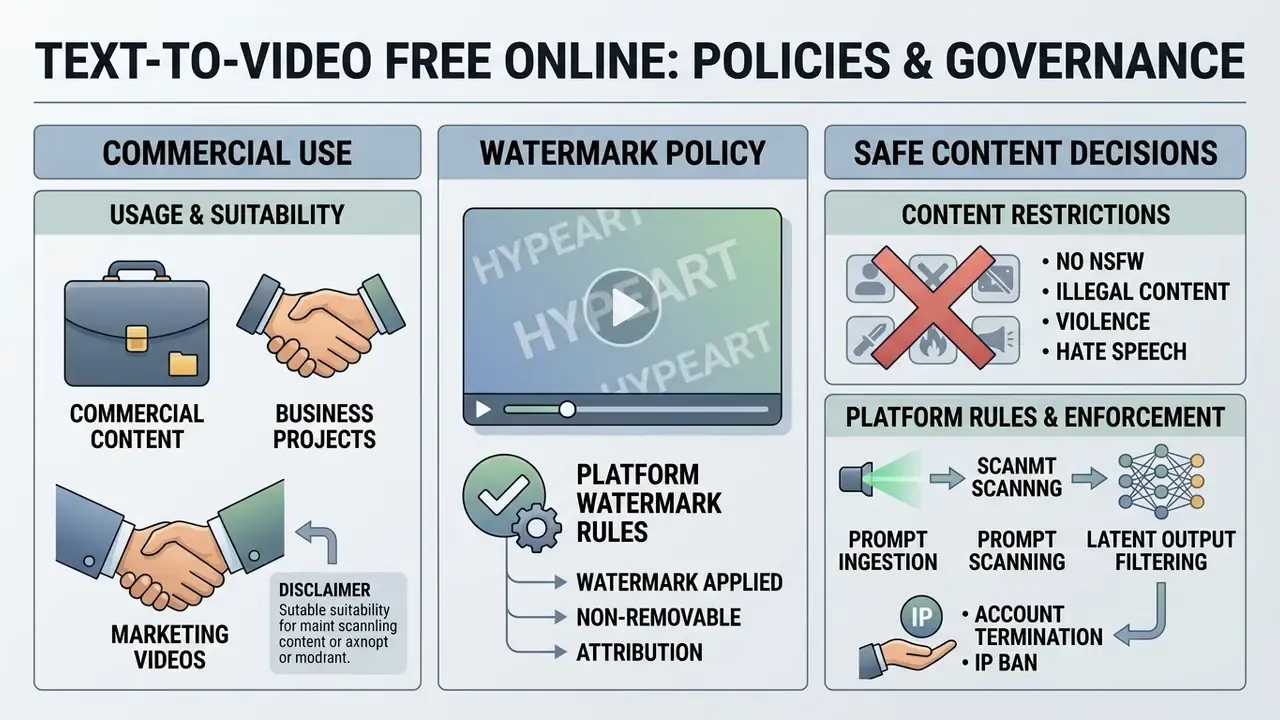
Putting AI-generated video into marketing campaigns, product promos, or client-facing material triggers legal and regulatory obligations. Not eventually. At publication.
When AI-generated videos are suitable for commercial content
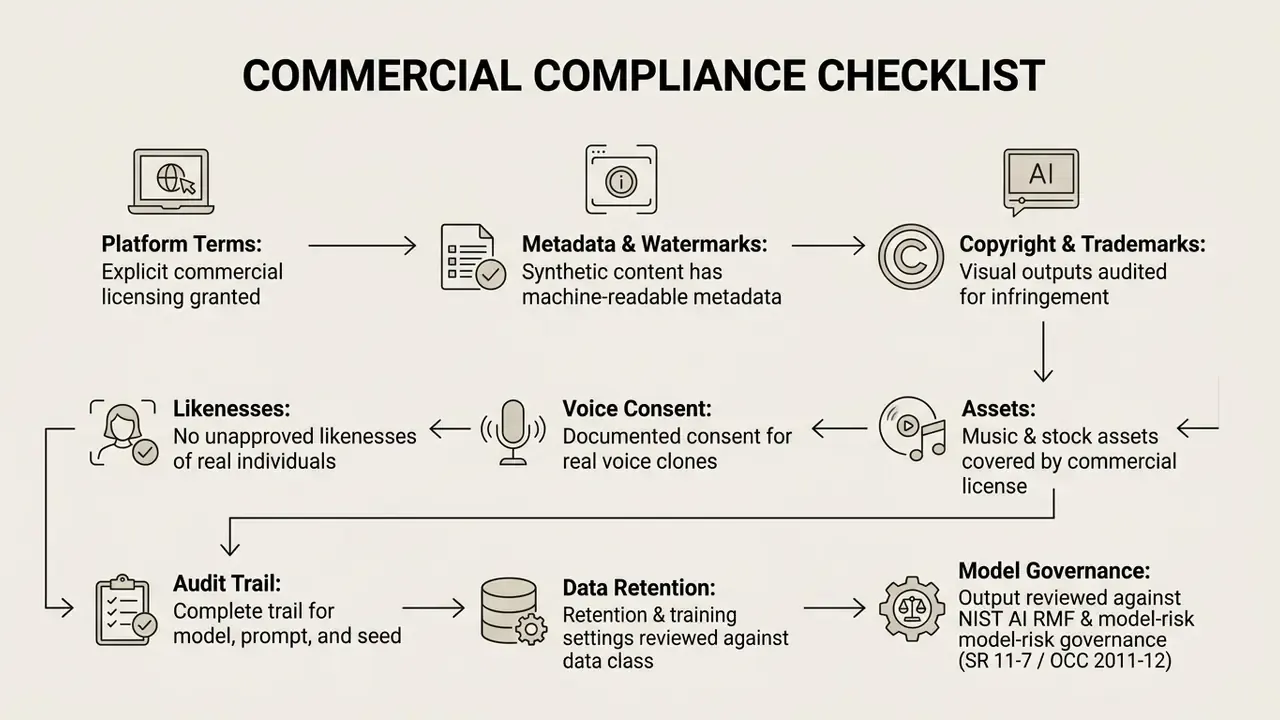
Output is suitable for commercial use only when the hosting platform explicitly grants commercial rights in its terms, and the content complies with regional synthetic media rules.
Under Regulation (EU) 2024/1689 (EU AI Act), commercial deployers of systems generating synthetic media must ensure outputs are marked in machine-readable format and detectable as artificially created. Deepfake content or synthetic human depictions in advertising must clearly disclose their artificial origin. The European Commission's Code of Practice on Transparency of AI-generated Content lists accepted mechanisms: visible labels, metadata, cryptographic provenance, logging, and fingerprints. Comparable duties exist elsewhere. Australia's AI technical standard requires visual watermarks plus metadata on generated media, and China's 2025 labeling rules mandate explicit labels, implicit metadata, and platform-side detection. NIST AI 100-4 frames the same problem as synthetic-content transparency and provenance rather than rights clearance.
"T2VEval-Bench assessed 1,783 videos from 13 models across four dimensions: overall impression, text alignment, realness, and technical quality."
Those four dimensions make a usable internal acceptance rubric. Score every candidate clip on alignment, realness, and technical quality before it enters a paid campaign, and keep the scores in the audit file. Reviewers disagree less when the rubric is written down.
For legal guidance on commercial rights, copyright, and licensing frameworks, visit the AI Media Commercial-Use Hub. Adjacent questions for still assets are covered in our analysis of commercial use of AI image generators.
NSFW requests, platform rules, and content restrictions
Platforms advertising an ai text to video generator free no sign up nsfw environment carry severe security, brand safety, and legal risk. They are categorically out of scope for professional or institutional deployment, and an acceptable-use standard should name the whole tool class explicitly. That includes adjacent categories that surface in the same search neighborhood, such as an ai undress photo editor, an ai undress picture generator, or an ai twerk generator interface. Naming them in policy is what lets a blocklist be defended rather than debated.
Reputable cloud-hosted tools run strict automated moderation. Major vendor policies, including Adobe's Generative AI User Guidelines and Google's Generative AI Prohibited Use Policy, explicitly prohibit pornographic material, explicit nudity, depictions of minors, and prompts designed to reproduce copyrighted or trademarked content.
Safety layers operate three gates:
Guidelines published by the U.S. Copyright Office specify that purely machine-generated visual content lacking human authorship cannot be registered. AI material is registrable only where the human contribution is more than de minimis.
Trustworthiness as a measurable axis matters for governance. It lets a risk function argue about model selection with evidence instead of instinct.
To track active intellectual property disputes and regulatory litigation timelines affecting generative models, see our index of AI Litigation and Case Timelines.
What to create with a no-login AI video maker
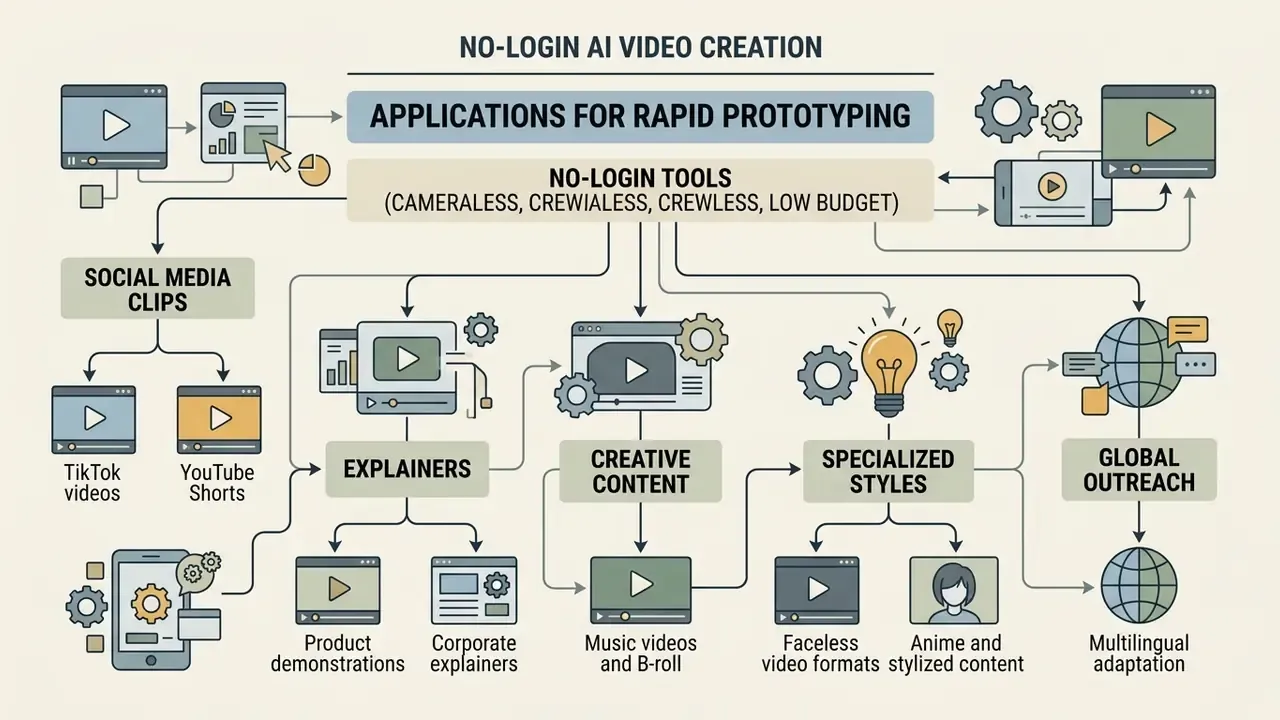
No-login tools suit rapid prototyping across marketing, internal communications, and social media, without cameras, crews, or a production budget. Documented public-sector and enterprise use cases cluster around four groups: training and presentation material, campaign and event communications, multilingual adaptation of existing footage, and trailer-style summarization of long recordings.
Explainers, product ads, music videos, and anime video
Beyond social clips, teams use no-login tools to build:
- Product demonstrations dynamic background environments that showcase physical or digital products.
- Corporate explainers abstract concepts, financial workflows, or technology infrastructure visualized through cinematic metaphor. Established explainer methodology runs story, script, storyboard, animatic, master, budgeting roughly 135 seconds of usable narration per 2.5-minute script.
- Music videos and B-roll an ai music video or background loop aligned to audio tempo and mood.
- Faceless video formats narrated tutorials and listicles where no presenter appears on camera, which sidesteps likeness risk entirely.
- Anime and stylized content animated narrative sequences produced with style-specific models.
- Multilingual adaptation the same explainer regenerated with localized voiceover and subtitles for regional audiences.
"Human-AGVQA analyzed 6,000 AI videos from 15 models and identified systematic defects in human appearance quality and action continuity."
This is the most important expectation-setting finding for marketing teams. Synthetic humans remain the weakest output class. Where a person must appear on camera in a regulated communication, prefer an approved avatar bound to a reviewed script, or an image-to-video animation of a pre-cleared photograph, over open text-to-video generation of a human actor. For advanced human representation workflows, teams add ai to human conversion tools under documented consent and review policies.
From guest-mode pilots to a governed enterprise AI video inventory
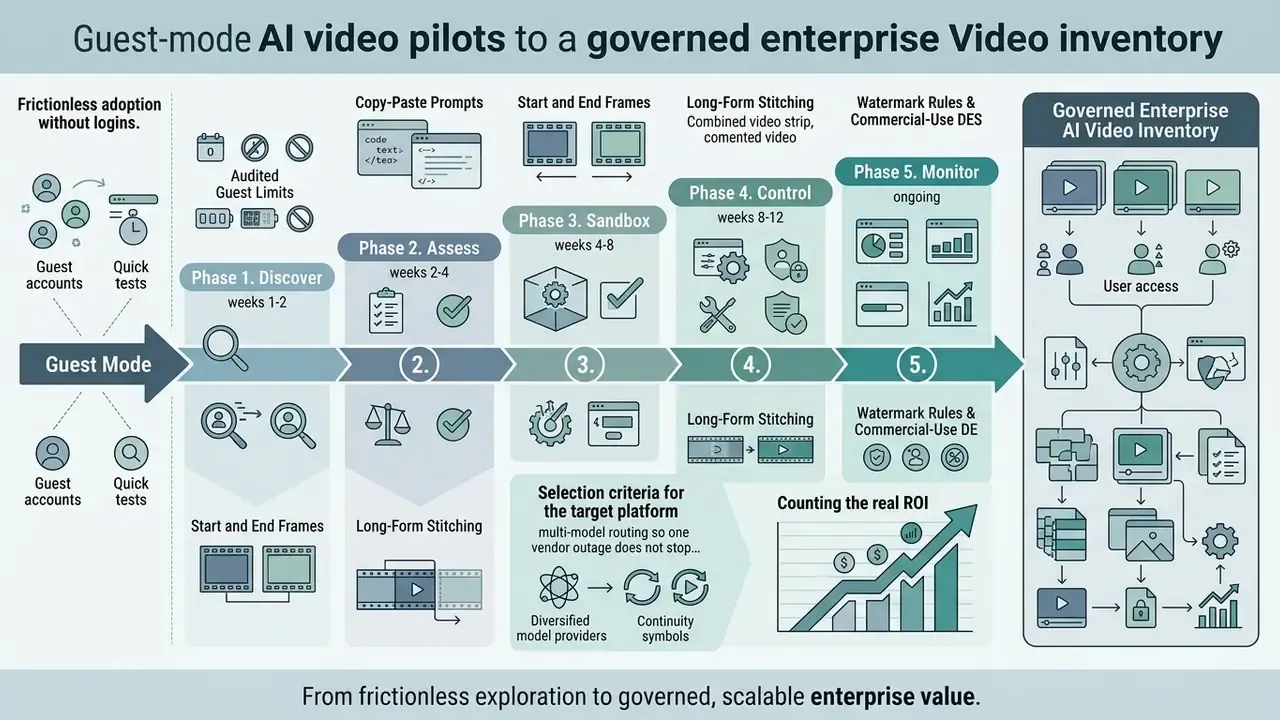
Guest-mode tools win adoption because they are frictionless. They lose audits for exactly the same reason. The path below converts uncontrolled experimentation into an inventoried capability without stalling the creative teams that now depend on it.
Phase 1. Discover (weeks 1 to 2). Pull egress logs and browser telemetry for known generator domains. Survey marketing, sales enablement, learning and development, and agency contractors about which tools they used and what they pasted in. Classify findings by data sensitivity, not by tool popularity.
Phase 2. Assess (weeks 2 to 4). Score each discovered tool on retention policy, training-on-inputs default, subprocessor list and data residency, watermarking and provenance support, SSO and RBAC availability, export licence, and incident-response contact. Anything without a retention answer is a candidate for blocking, not negotiation.
Phase 3. Sandbox (weeks 4 to 8). Stand up an approved evaluation environment: one self-hosted open-weight model for confidential material, plus one contracted hosted model with enterprise terms for scale and quality. Restrict inputs to synthetic or pre-approved assets. Record model version, prompt, seed, and reviewer for every output.
Phase 4. Control (weeks 8 to 12). Implement SSO, role-based access, prompt logging, DLP inspection on upload paths, and an output register that stores the provenance metadata required for EU AI Act transparency. Publish an acceptable-use standard naming prohibited content classes and mandatory disclosure language for ads.
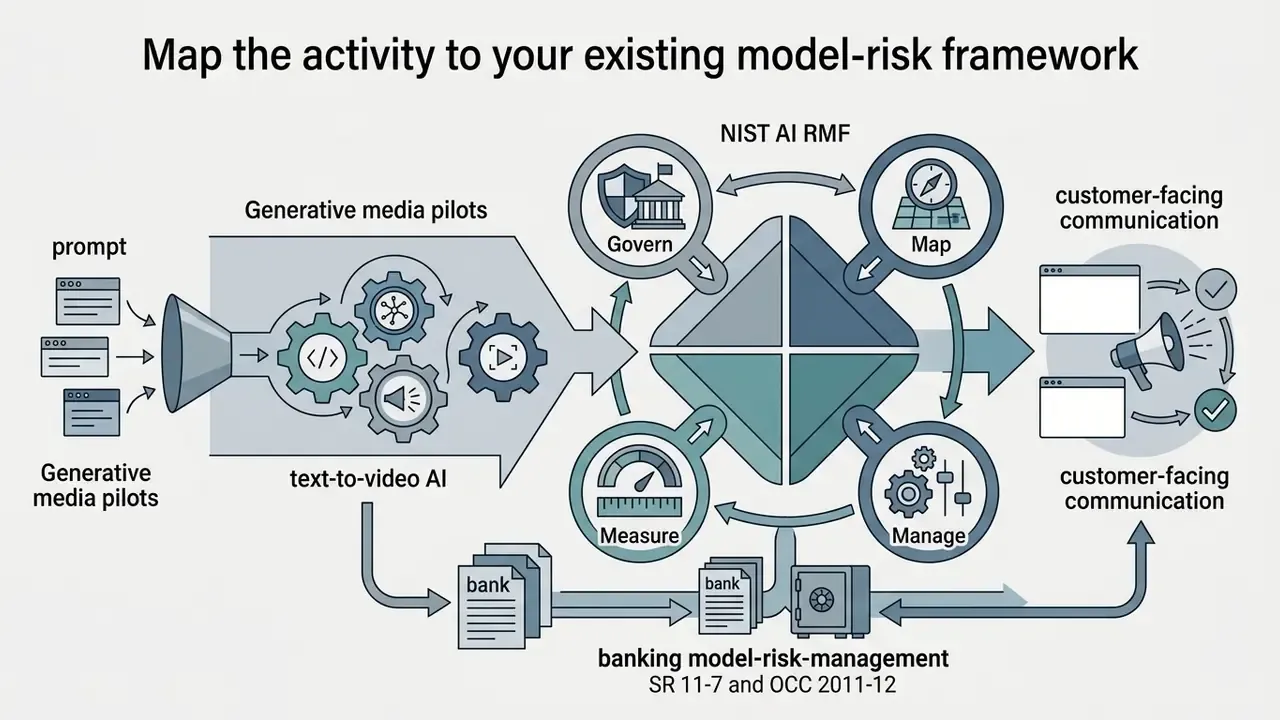
Phase 5. Monitor (ongoing). Re-audit quotas and vendor terms quarterly, re-score models against updated benchmarks, and track regulatory movement. Map the programme to NIST AI RMF functions, and in banking align validation evidence with model-risk-management supervisory expectations (SR 11-7, OCC 2011-12) for any output that reaches customers.
Counting the real ROI. Most business cases for creative automation compare vendor cost against agency invoices and stop there. Incomplete. A defensible calculation also carries the control cost: reviewer hours per published asset, provenance tooling, log storage, legal review of disclosure language, and the residual risk of a retraction. Where those lines are missing, treat the stated payback period as an estimate awaiting validation, not a result.
Selection criteria for the target platform: multi-model routing so one vendor outage does not stop production, a contractual no-training clause, exportable audit logs, provenance marking by default, per-seat rather than per-browser identity, and a documented deletion SLA.
FAQ about free text to video AI without login
Do I need technical or video editing skills to use AI video tools?
No. Generative platforms convert text prompts directly into finished clips. The model handles camera motion, lighting, subject rendering, and frame transitions, with no manual timeline work or keyframing. Control simply shifts from the timeline to the prompt: describe subject, motion, and style, then iterate on wording rather than on frames. An ai video editor still helps at the assembly stage, but it is optional for a single clip.
Can a free AI video maker add avatars, voiceovers, and subtitles?
Yes, under separate limits. Basic guest-mode generators focus on visual frame synthesis from text or images. Several web suites add AI avatars, text-to-speech voiceover, and automated subtitles; free access to these features is usually capped by monthly credits or video minutes. Roughly 10 credits buys about 30 seconds of talking-avatar output, while translated subtitles and auto-dubbing sit behind paid tiers.
How long can a free AI video actually be?
A single free generation is normally 4 to 10 seconds. Longer runtimes come from assembly, not from one request. Script the piece as 5-second beats, reuse an anchor prompt and seed for consistency, carry each clip's final frame into the next as a start frame, and stitch in a free browser editor. That method reliably produces one to ten minute videos online.
Is there a character limit on the prompt or script?
Yes. Anonymous sessions commonly cap text input near 2,000 to 3,600 characters. For longer narration, generate the voiceover from a segmented script and attach it during assembly rather than forcing everything into one prompt field.
Do free tools train on my prompts or store my inputs?
Assume yes unless the terms say otherwise. Consumer and guest tiers frequently retain inputs for abuse review and may use them for model improvement by default, with no enterprise opt-out and no data processing agreement. That is why confidential, personal, or material non-public information must never enter an unauthenticated form.
How should a risk function evaluate these tools against SR 11-7 or NIST AI RMF?
Treat the generator as a third-party model whose output influences customer-facing communication. Document intended use and limitations, evidence of performance on relevant benchmarks, human review controls, disclosure and labeling procedures, and change management for version updates. Map activities to the NIST AI RMF Govern, Map, Measure, Manage functions, and retain prompt, seed, model version, and reviewer identity as validation evidence.
How do we audit for deepfake and likeness risk?
Prohibit prompts naming real individuals, require documented consent for any voice or face clone, run reverse-image and reverse-video checks on published assets, and apply visible AI disclosure plus machine-readable provenance marking to every synthetic asset used in advertising. Keep a register linking each published clip to its prompt, model, and approval.
Who owns the copyright in an AI-generated clip?
Purely machine-generated output with no meaningful human authorship is not registrable for copyright protection in the United States; registrability depends on a more-than-de-minimis human contribution. Separately, platform terms govern whether you may use the output commercially at all. Treat those as two independent questions, usage rights and copyright ownership, and document both.
Why does my clip look worse than the demo reel on the landing page?
Three usual causes. The free path serves a distilled or older checkpoint instead of the advertised flagship. Resolution is capped at 480p to 720p with a 24 fps ceiling. And the prompt omits camera, lighting, or style attributes that the demo prompt contained. Fix the prompt first, since that costs nothing, then decide whether the model tier is the real constraint.
Social media clips, TikTok videos, and YouTube Shorts
Short form is the primary application for fast generation. For a full survey of methods, credit models, and pricing tiers, see our overview of AI video generators.
Creators build visual hooks, background loops, and dynamic motion scenes to carry an audio track, a workflow well served by credit-based tools such as PixVerse AI. Documented short-form pipelines add a hook layer with five opener archetypes (pattern interrupt, pain-point call-out, stat lead, curiosity gap, direct question), then split the script into scenes, auto-caption, and export at 9:16.
To convert static portraits into engaging videos for social media content, explore workflows using an ai ugc video tool. For stylized output, creators also reach for an ai anime video generator free no sign up interface to produce animated short-form visuals. Searches for the best ai video generator no sign up and the best free ai video generator no sign up usually end in this category, where clip length matters less than volume.