Last updated: August 2026 · Editorial review: AI Media governance desk · Scope: enterprise evaluation of the Tome AI presentation generator, its pricing, export fidelity, data-governance posture, and competitive alternatives.
Executive Summary for Risk, Compliance, and Transformation Leaders
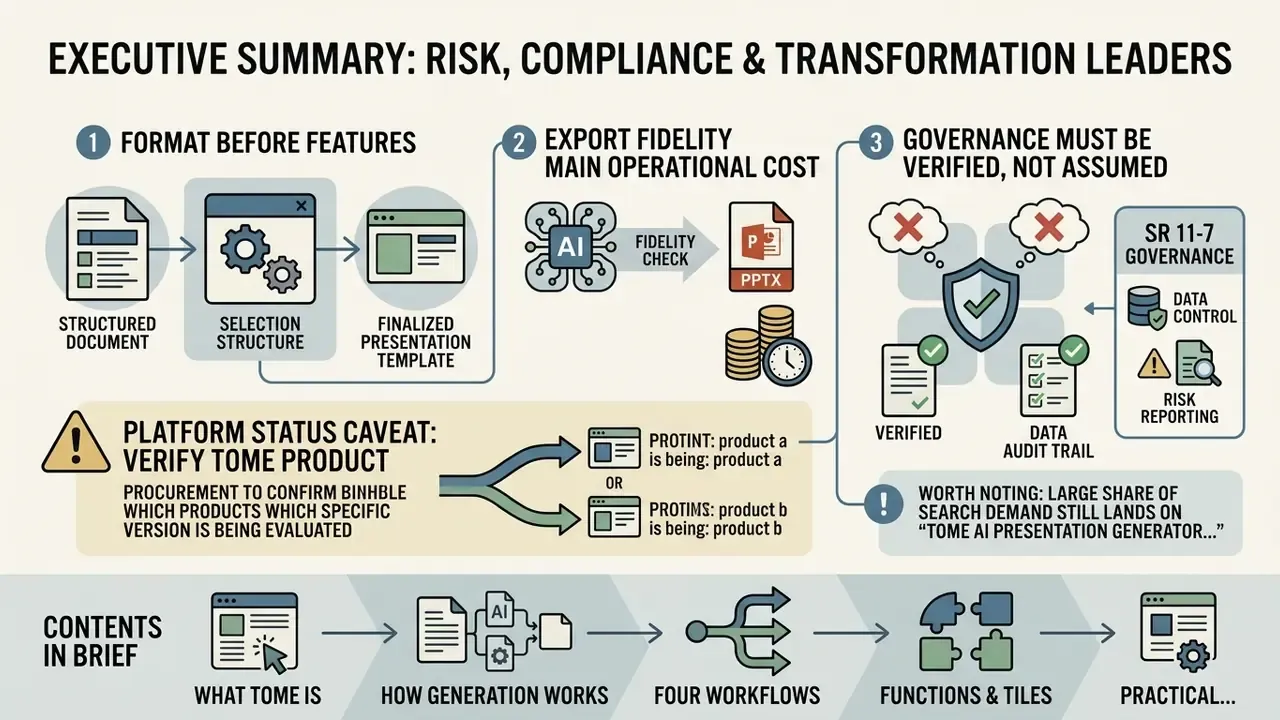
Three findings matter most if you are assessing the Tome AI presentation generator for a governed environment such as a bank, an insurer, or a regulated healthcare organization.
- Format before features. Tome is a web-native narrative document tool, not a PowerPoint clone. Decks live as scrollable pages built from modular tiles; fixed 16:9 output is a conversion, not the native artifact. That single design decision drives every downstream export, branding, and archiving question you will later argue about with internal audit.
- Export fidelity is the main operational cost. Converting fluid web layouts into PPTX flattens interactive tiles, substitutes fonts, and splits long pages across slides. Benchmark evidence puts human repair time at roughly 18 to 42 minutes per deck. That belongs in your total cost of ownership model, not in a footnote.
- Governance must be verified, not assumed. Encryption in transit, AWS hosting, prompt anonymization, and vault-only document storage are documented by the vendor. SOC 2 Type II attestation, contractual zero-data-retention, and audit-grade prompt logs must be confirmed in writing before any material non-public information (MNPI) or personally identifiable information (PII) touches the platform.
Platform status caveat, and please verify this before procurement: the original Tome presentation product was reported as discontinued on 30 April 2025 (some 2026 write-ups cite March 2025), while other 2026 sources describe a rebranded Tome AI presentation maker (formerly GenPPT, rebranded March 2026) that advertises generation "powered by Claude Opus 4.7". Treat brand continuity as unconfirmed. Validate which legal entity and which product you are actually contracting with.
Worth noting: a large share of search demand still lands on the phrase "tome ai presentation generator 2025", which points at the older, discontinued build. Stale queries produce stale procurement assumptions.
Contents in brief: what Tome is, how generation works, four workflows, functions and tiles, the practical use workflow, PowerPoint export, security and model-risk governance, pricing and risk-adjusted ROI, an alternatives matrix, a board-readiness checklist, and an FAQ.
What Is the Tome AI Presentation Generator and Which Presentations It Suits
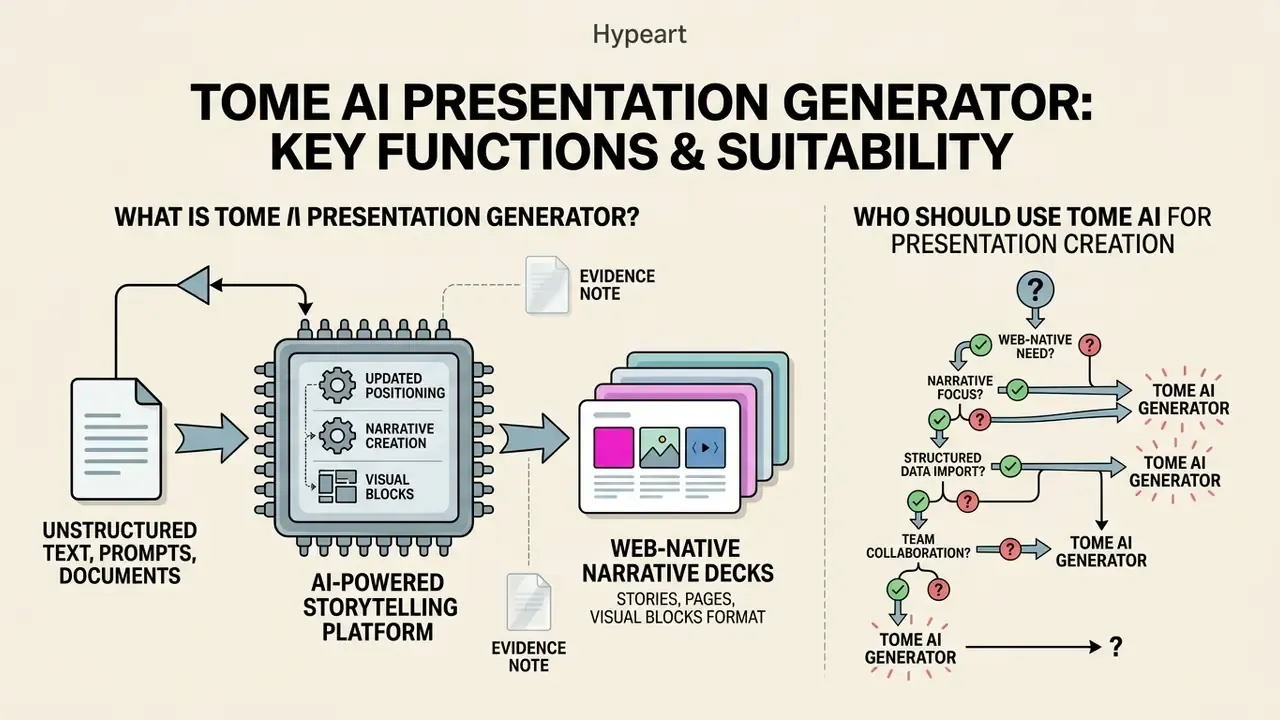
The tome ai presentation generator is an AI-powered storytelling platform designed to convert unstructured text, prompts, and documents into web-native narrative decks. Unlike a traditional slide editor, the tome presentation platform prioritizes continuous page flow, modular visual tiles, and automated outline generation for executive summaries, pitch decks, and strategic proposals.
«Tome uses OpenAI language models and DALL·E image generation to build structured slides automatically from user descriptions.»
Tome App: Presentations in the Format of Stories, Pages, and Visual Blocks
The tome app structures content as vertically scrollable web pages and dynamic visual blocks rather than fixed, independent slides. This canvas format lets text, embedded data widgets, live media, and AI graphics adapt responsively to different screen dimensions. Each web page behaves like a section of an argument, not a frame.
Unlike classic slide construction in PowerPoint or Keynote, the presentation creation workflow in Tome emphasizes continuous narrative flow. Each page carries one narrative job: problem, context, evidence, option, recommendation, implementation, next action. Users then interact with adaptive tiles that rearrange based on content volume. For teams that also standardize motion and explainer assets alongside decks, our guide to animation makers and template-driven motion design adds useful context on prompt-driven asset production, and teams editing recorded walkthroughs on a budget often start with an openshot video editor workflow before moving to paid tooling.
Who Should Use Tome AI for Presentation Creation
Tome AI is most effective for startup founders, sales enablement leaders, product managers, and educators who need to create professional presentations rapidly from text summaries. It excels at turning high-level briefs into a visually appealing presentation layout without manual graphic design work.
However, the platform is less suited to organizations that require strict offline PowerPoint execution, complex object animations, or rigid corporate master templates. Vendor and third-party documentation both note limited granular layout control and the absence of a true offline mode. For regulated reporting cycles that must run without network access, those two gaps are hard blockers, not inconveniences.
Enterprise teams evaluating commercial AI tool deployments can examine our analysis in the AI Media Commercial-Use Hub for licensing and regulatory compliance guidelines, and review commercial-use terms for enterprise AI image generation when generated visuals will appear in client-facing or regulator-facing material.
How Tome AI Creates a Presentation From Text and Prompts
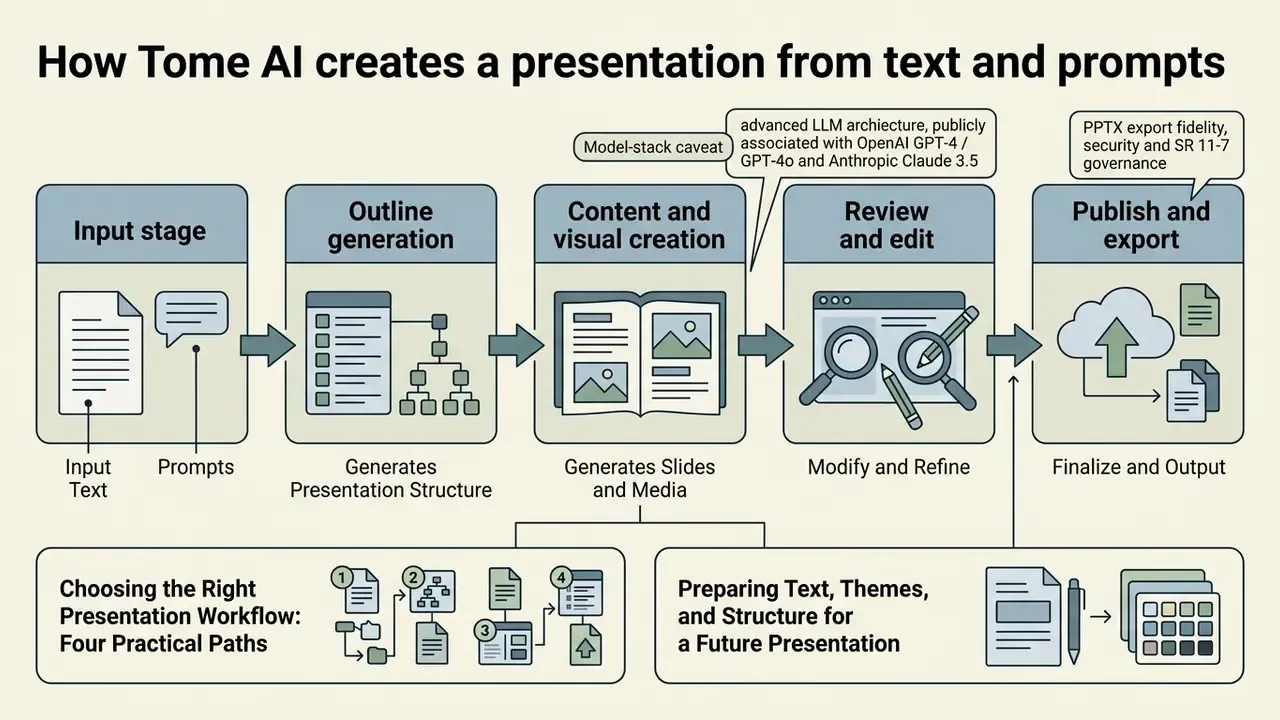
The ai presentation generator tome pipeline processes input text through advanced LLM architectures, publicly associated with OpenAI GPT-4 / GPT-4o and Anthropic Claude 3.5 Sonnet or Claude Opus class models in the rebranded 2026 product, to build a structural narrative outline, slide copy, and layout assignment. For visual asset generation, the integrated tome ai image generator has been described by third-party sources as running DALL·E 3 alongside Stable Diffusion XL or FLUX-class diffusion pipelines matched to the active visual theme.
Workflow: from text prompt to published presentation
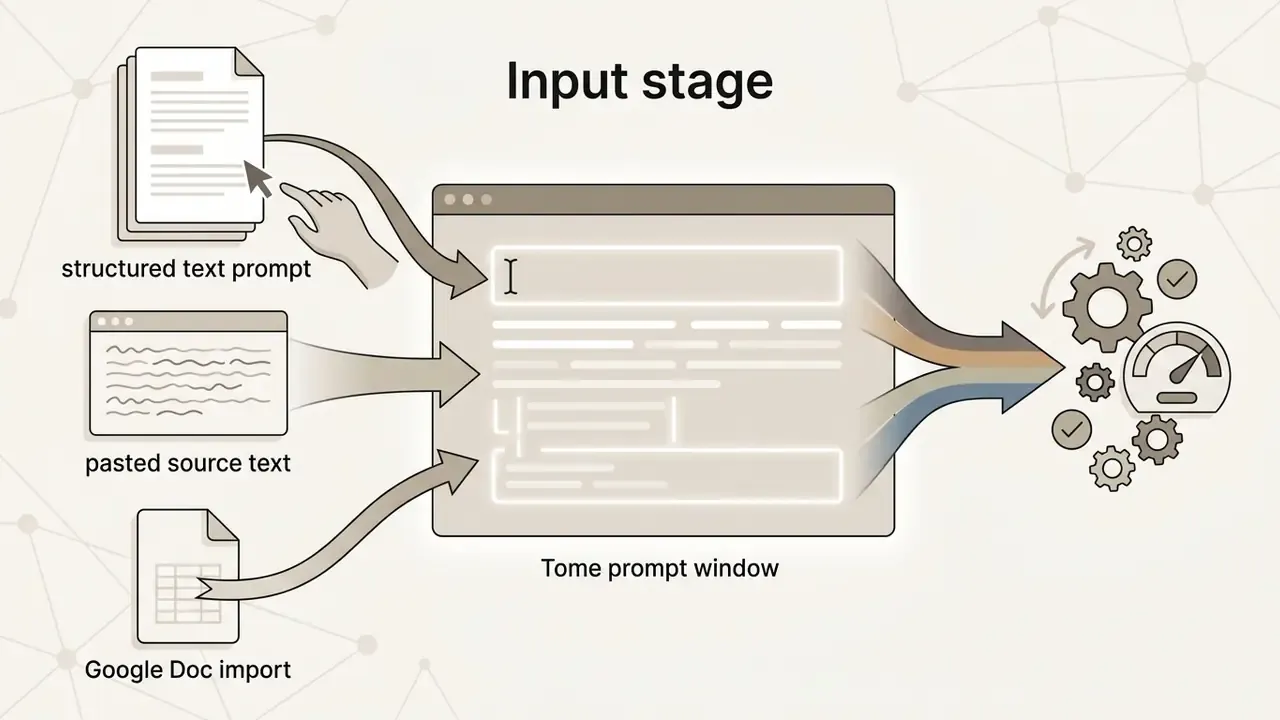
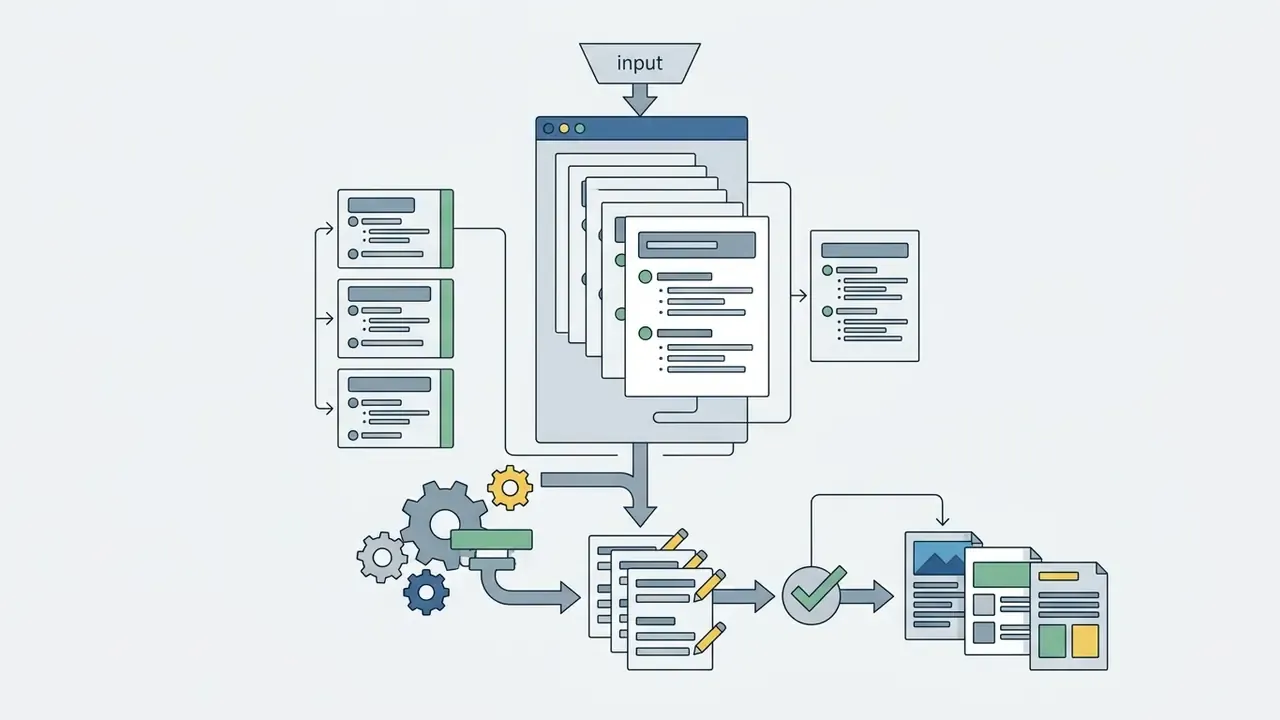
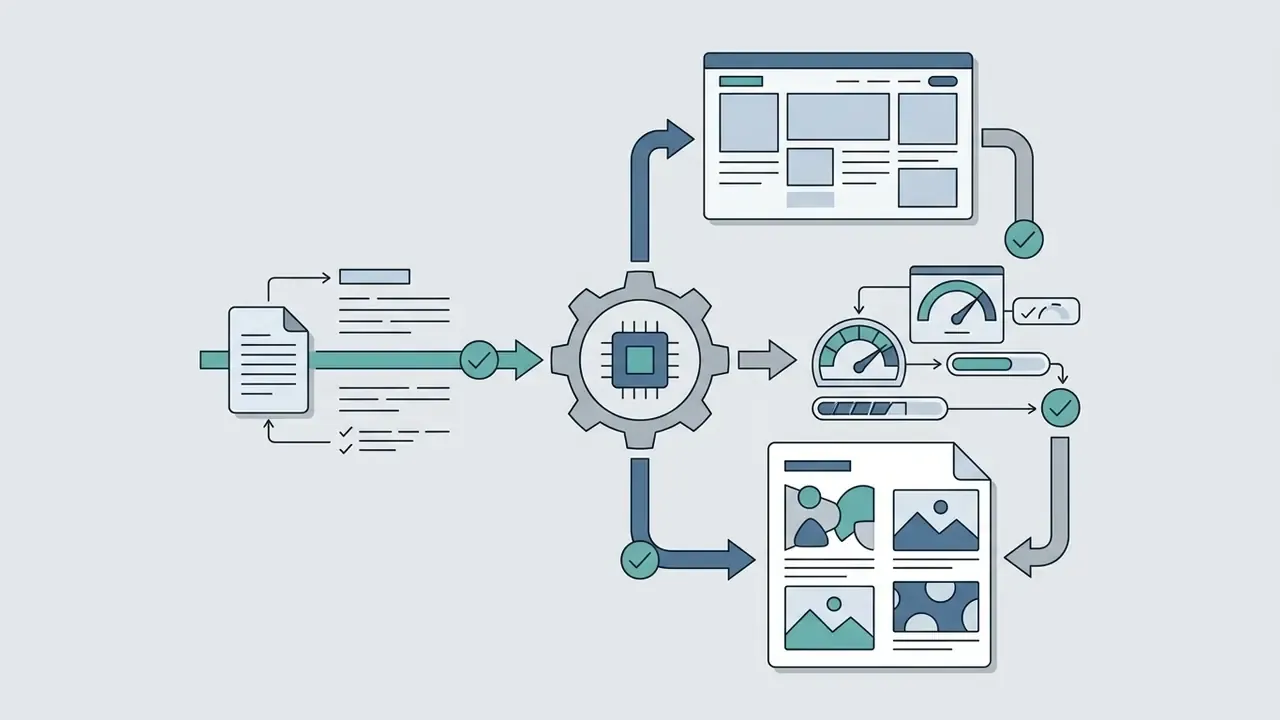

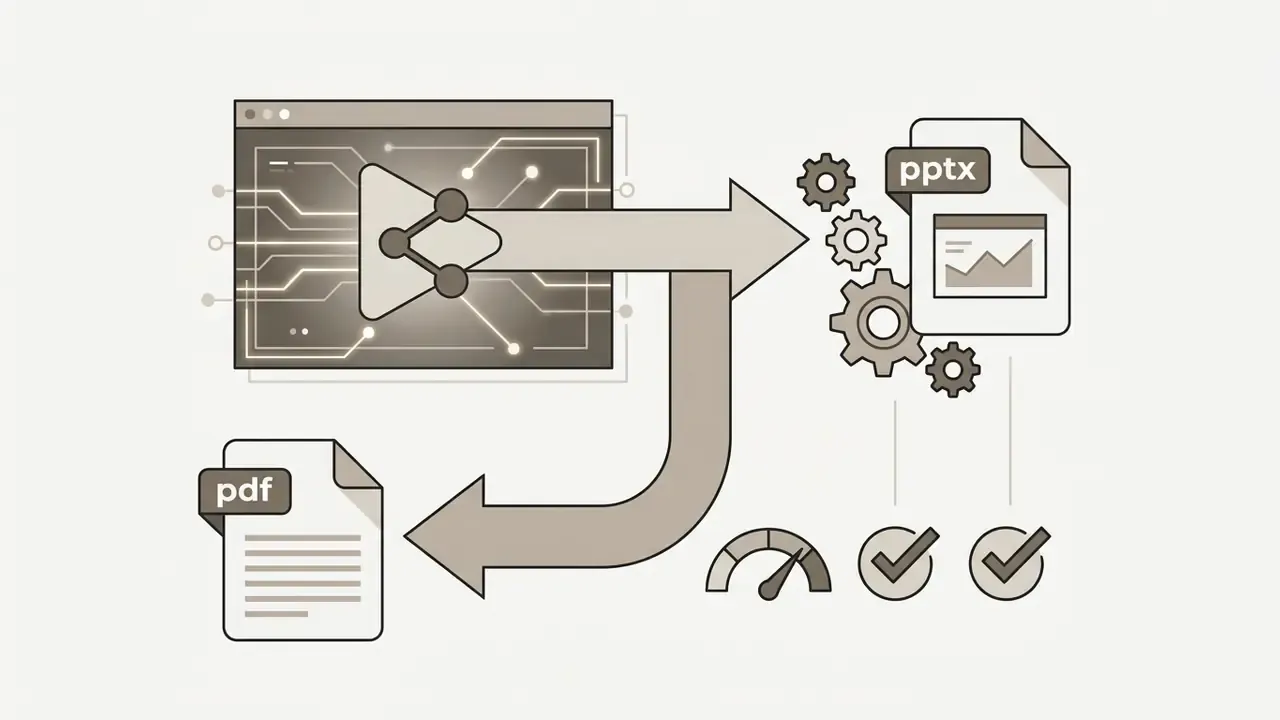
To use tome ai create presentation capabilities effectively, provide explicit context on target audience, scope, and structural boundaries. Whether you are generating a new presentation from scratch or running tome ai create presentation from text workflows, clear inputs cut downstream editing effort more than any styling trick.
Choosing the Right Presentation Workflow: Four Practical Paths
Modern AI presentation platforms, including the current Tome AI build, support four distinct input-to-output paths. Selecting the correct one before generating saves most of the rework.
| Workflow | Input | Output | Best for |
|---|---|---|---|
| Prompt to presentation | Topic, audience, tone, page count, constraints | Editable narrative deck or slide draft | Starting a brand-new deck from a blank page |
| Document to presentation | Pasted text, Google Doc, PDF, Word, Excel, Markdown, HTML, or video transcript | Structured multi-page draft | Converting an existing report, memo, or policy into slides |
| Beautify an existing PPT | A .pptx or .pdf file | Redesigned, editable presentation | Repairing layout and visual consistency in legacy decks |
| Generate speaker notes | A finished presentation file | Slide-by-slide talking points | Rehearsal, board delivery, and Q&A preparation |
Output formats and export rights vary by tool tier and plan. Confirm the selected workflow's export permissions before you generate a deck you intend to hand off externally.
Preparing Text, Themes, and Structure for a Future Presentation
Producing high-quality generated presentations in any ai presentation generator requires a structured prompt that defines audience, decision goals, slide count, and stylistic boundaries. A structured draft keeps the model from inventing a logical order it does not understand, and it suppresses generic claims.
Academic research on outline-driven presentation tools, notably the OutlineSpark study (2024), shows that user-provided outlines improve output coherence compared with raw document dumps.
«OutlineSpark generates slides from user-supplied outlines and automatically extracts relevant data cells; an evaluation with 12 participants confirmed the approach.»
What to Check in AI Generated Presentations After Generation
After an ai slide generator tome run produces a draft deck, human review is not optional. You are verifying factual accuracy, structural logic, visual hierarchy, and formatting consistency. Automated generation tends to introduce overly broad claims plus minor stylistic misalignments that need manual correction.
«Tools are scored by manual repair time before delivery: in Tosea AI tests it ranged from 18 to 42 minutes depending on the platform.»
Key Functions of Tome AI for Creating and Styling Presentations
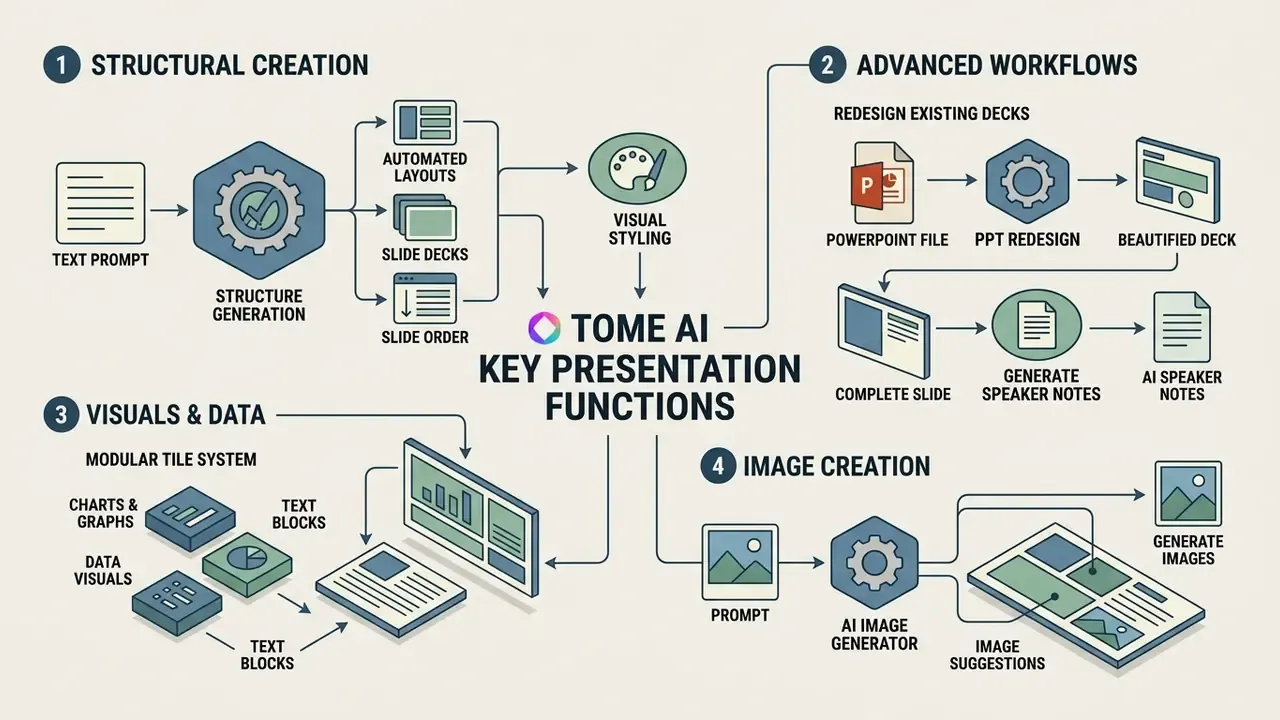
Tome AI provides a broad set of ai presentation tools aimed at automating layout generation, visual styling, data visualization, and image creation. Together they let users turn plain text into a polished ai powered presentation without leaning on manual graphic design templates. Teams standardizing visual pipelines across decks and campaigns can also review our overview of AI art generators for visual content production.
| Function category | Core capability | Business benefit |
|---|---|---|
| Layout suggestions | Content-aware adaptive tiling | Removes manual alignment and spacing work |
| Theme and styling | One-click color and font palette application | Keeps visual consistency across all pages |
| Data visuals | CSV chart generation and tile embedding | Displays financial metrics and live software embeds |
| AI image generator | Prompt-matched image generation | Delivers custom visual assets per slide |
| Deck beautification | Legacy PPTX or PDF re-layout | Modernizes inherited decks without rewriting content |
| Speaker notes | Slide-level talking points | Shortens rehearsal and board Q&A preparation |
That four-stage model is the fairest lens for judging any ai presentation maker tome variant. A tool that automates only the implementation stage, meaning slide rendering, leaves analysis, planning, and delivery rehearsal entirely with the human team. Tome offers a workable balance between automated layout generation and browser-based manual editing, which makes it a user friendly platform for rapid deck prototyping. Planning quality, though, still depends on the prompt and the source facts you supply. No model fixes a weak argument.
Generating Structure, Layouts, and Visual Styling for Slide Decks
The layout engine analyzes the volume and type of page content, then assigns matching visual layouts automatically. The platform selects typography, color palettes, and structural hierarchy based on the theme chosen for the slide decks.
Rather than relying on static templates, Tome applies design rules dynamically to produce professional slides that adjust as text is added or removed. Theme controls let users change colors, fonts, and block styling in a few clicks, applying a visual theme either to the whole presentation or to selected pages. Readers who want comparative analysis of presentation design tools can review our AI Media Comparison Matrices for side-by-side feature evaluations.
Advanced Workflows: Redesigning Existing Decks and Generating Speaker Notes
Beyond generating decks from raw text, the platform handles two high-value enterprise tasks that most reviews skip entirely.
- PowerPoint beautification, or PPT redesign. Users upload legacy
.pptxor.pdffiles. The layout engine parses the underlying text hierarchy, strips outdated formatting, and re-maps content onto adaptive, web-native tiles while preserving the key source arguments. This is the fastest route for teams that inherited decade-old committee decks with inconsistent typography, mismatched chart styles, and unreadable dense tables. Anyone who has opened a 2014 credit-committee pack knows the feeling. - AI speaker notes generation. Once slides are final, the integrated language model reads slide context and outputs structured talking points: statistics to emphasize, transition cues between sections, and likely executive Q&A responses. For a quarterly model-validation walkthrough, those notes work as a rehearsal script a reviewer can fact-check line by line.
Both workflows need the same post-generation controls as prompt-to-deck output. Redesign can silently drop a footnote or a source citation during re-layout. Generated speaker notes can overstate a hedged finding. Treat both as drafts under human sign-off, always.
Charts, Data Visuals, and Visual Blocks in Presentations
Tome AI handles data presentation through dedicated Chart tiles, drawing tools, and interactive content embeds. Users upload CSV files or edit underlying data tables directly to generate line, area, vertical bar, horizontal bar, scatter, and pie charts. Drawing and shape tiles support text, arrows, circles, squares, parallelograms, and triangles, which can be combined into Venn diagrams, Cartesian grids, and simple flowcharts.
The "More tiles" feature supports live web embeds from external services such as Figma, Miro, Airtable, Framer, Looker, Notion, Salesforce, Typeform, Google Sheets, YouTube, and Spline 3D scenes. Use the operational table below to map a business scenario to a template and an embed type.
| Enterprise use case | Recommended template | Native tile or interactive embed | Primary output metric |
|---|---|---|---|
| Investor pitch deck | Fundraising pitch | Figma prototype embed plus CSV financial chart | Burn rate and valuation flow |
| Product roadmap | Feature launch portfolio | Airtable live database plus Miro board tile | Sprint deliverables |
| Technical architecture | Executive brief | Spline 3D scene plus code snippet tile | System throughput and SLA |
| Quarterly business review | Strategic report | Live Google Sheets embed plus YouTube video | YoY growth and team KPIs |
| Sales enablement | Sales pitch | Typeform lead capture plus comparison chart | Win rate and objection coverage |
| Training and onboarding | Lecture or course module | Video tile plus shape-based process diagram | Completion and comprehension |
| Hiring and portfolio | Resume or work portfolio | Image gallery plus mood board tiles | Case coverage and credibility |
One caution for regulated reporting: every live embed is a network dependency. A live Google Sheets tile inside a board deck can change value between review and delivery, which breaks reproducibility outright. For audit-bound decks, freeze the data source, export a static chart, and record the extraction timestamp. Teams calculating software deployment costs and resource allocation will find planning frameworks in our AI Media Calculators.
AI Image Generator Tome: Images and Image Suggestions
The ai image generator tome integration uses diffusion models to produce custom visual assets matched to page content. During generation, the system reads slide context and creates corresponding artwork through the integrated tome ai image generator. Readers weighing alternatives can consult our comparison of AI image and art generators and our evaluation of Midjourney versus competing generators for style control and licensing differences.
Users adjust prompts directly inside the editor with tome ai image tools to regenerate artwork or refine visual style. The tome ai images feature gives creative flexibility, although corporate teams often replace generated art with approved brand photography. For adjacent visual and identity requirements, such as headshots for team slides, logo lockups, and corporate identity assets, examine our guides to AI headshot generation for professional portraits and photo editing workflows for corporate assets. Compliance-driven imagery has its own rules; for document photos, a dedicated passport photo editor remains the safer tool, since generative models are not built to meet biometric specifications.
Governance note: generated imagery in regulator-facing material should be labeled illustrative. A synthetic photograph of "our operations center" inside a supervisory submission is an unnecessary credibility risk. Cheap to avoid, expensive to explain.
How to Use Tome AI: Creation, Editing, and Publication Workflow
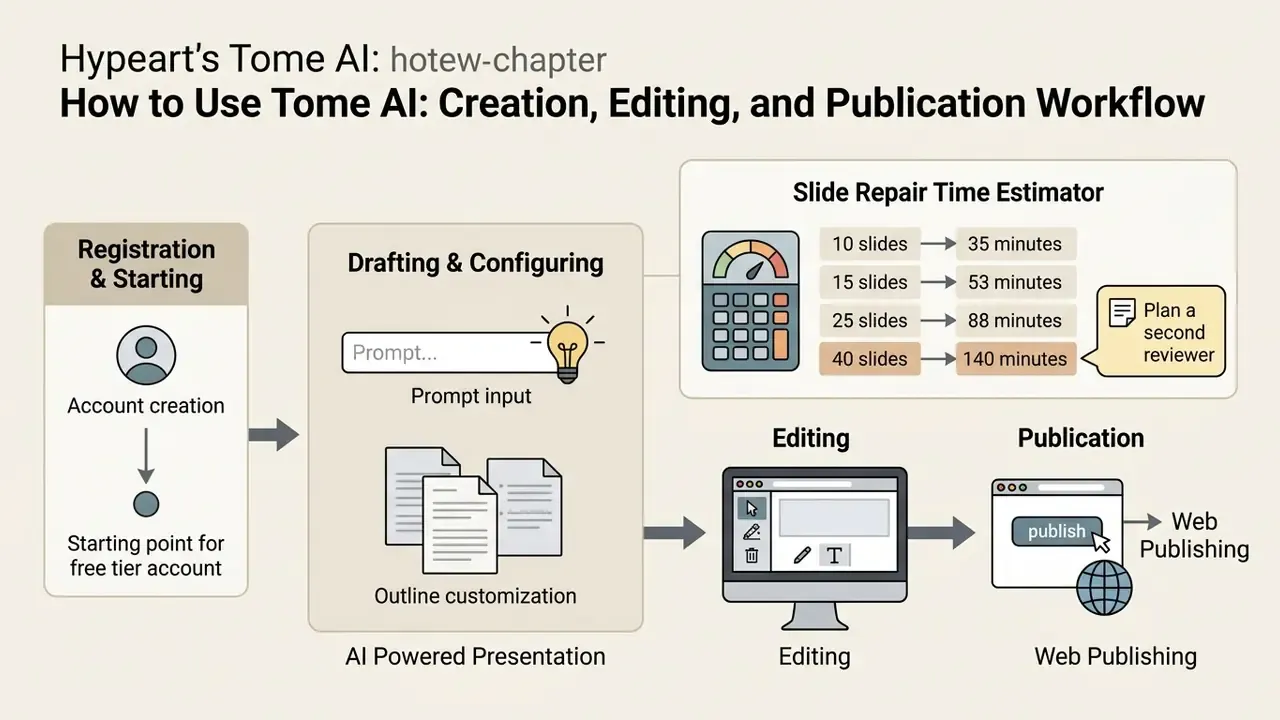
The practical workflow spans account creation, prompt input, outline customization, browser-based editing, and web publishing. Understanding the sequence helps teams fold the tool into standard content operations instead of bolting it on.
Slide repair time estimator
Enter your deck length to estimate the human effort required after export. Baseline: roughly 3.5 minutes per slide of manual repair on exported PPTX files, derived from the Tosea AI PPTX benchmark range of 18 to 42 minutes per standard executive deck.
- 10 slides gives about 35 minutes of repair.
- 15 slides gives about 53 minutes of repair.
- 25 slides gives about 88 minutes of repair.
- 40 slides gives about 140 minutes of repair, so plan a second reviewer.
Figure 4. Repair-time estimator replacing a static workflow quiz. Multiply the output by your blended analyst hourly rate to get the labor line in your TCO model.
To use tome efficiently, prepare structured text briefs before opening the editor. The tome ai create presentation process is tuned for iterative refinement, where human editors polish AI-generated drafts before distribution.
Registration and Starting With the Free Tier
To start, users use tome ai through an account created with an email address or single sign-on via Google or Apple. Authorization is mandatory for creating, editing, and saving decks; there is no meaningful anonymous mode for production work. The platform historically provided an initial credit allowance on sign-up, commonly documented as 500 credits per user per month, enough for roughly five AI-generated decks, which lets users test core presentation generation features.
Access through the free tier or free plan allows creators to explore basic layout suggestions and share read-only web links. Advanced capabilities, including PDF and PPTX export, custom branding, and unlimited AI credits, require an upgrade. This credit-gating pattern is standard across generative platforms; our guide to free AI video generators and their credit limits documents how the same mechanics shape export rights and watermarks elsewhere. Detailed plan breakdowns sit in our AI Media Pricing Guides.
Drafting and Configuring an AI Powered Presentation
Drafting a new presentation starts in the creation prompt window: topic details, audience parameters, tone, and desired page count, documented in walkthroughs as roughly 1 to 25 pages. The presentation generator returns a structural outline that users can edit before full page generation runs, either page by page or all pages at once.
Once the initial draft renders, authors refine content with inline AI editing tools to rewrite text, adjust tone, or make sections longer or shorter, then insert additional text, media, tables, tiles, images, and charts. It is closer to editing a document than to nudging boxes on a canvas. Creators adding video assets to web decks can consult our YouTube video editing and publishing workflow guide, and teams layering narration should review our overview of AI voice generators and licensing terms.
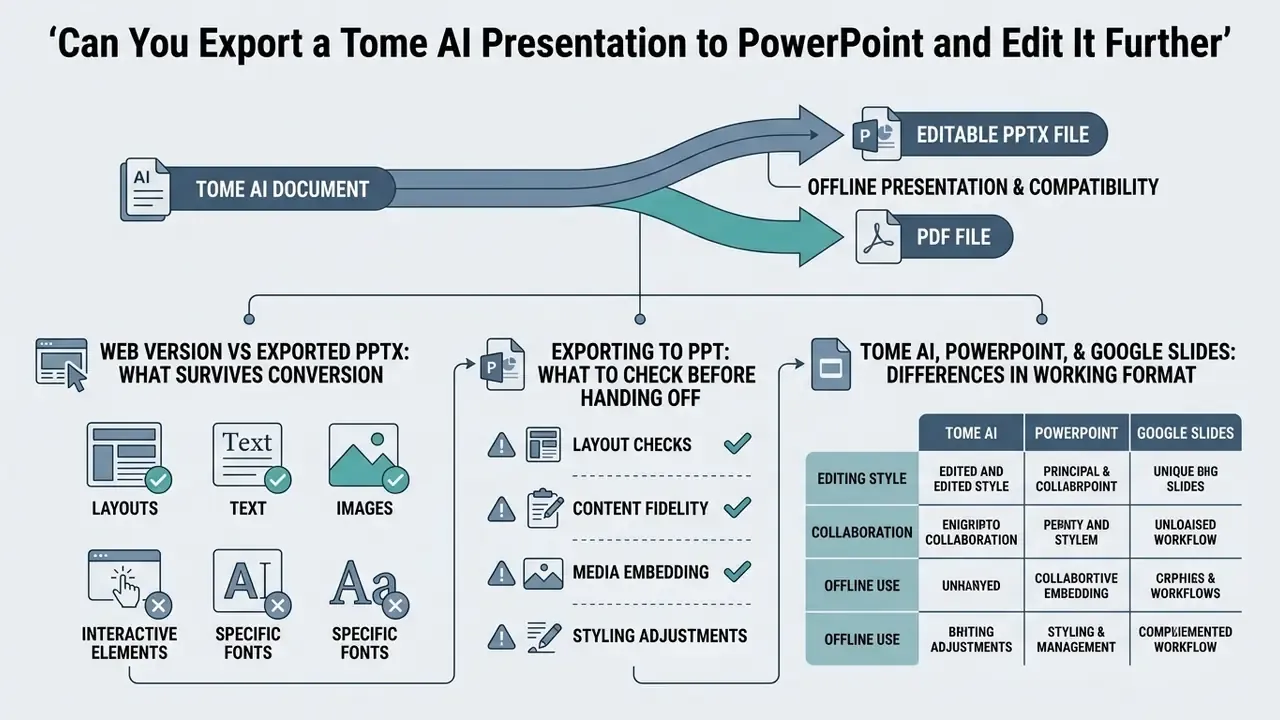
Can You Export a Tome AI Presentation to PowerPoint and Edit It Further
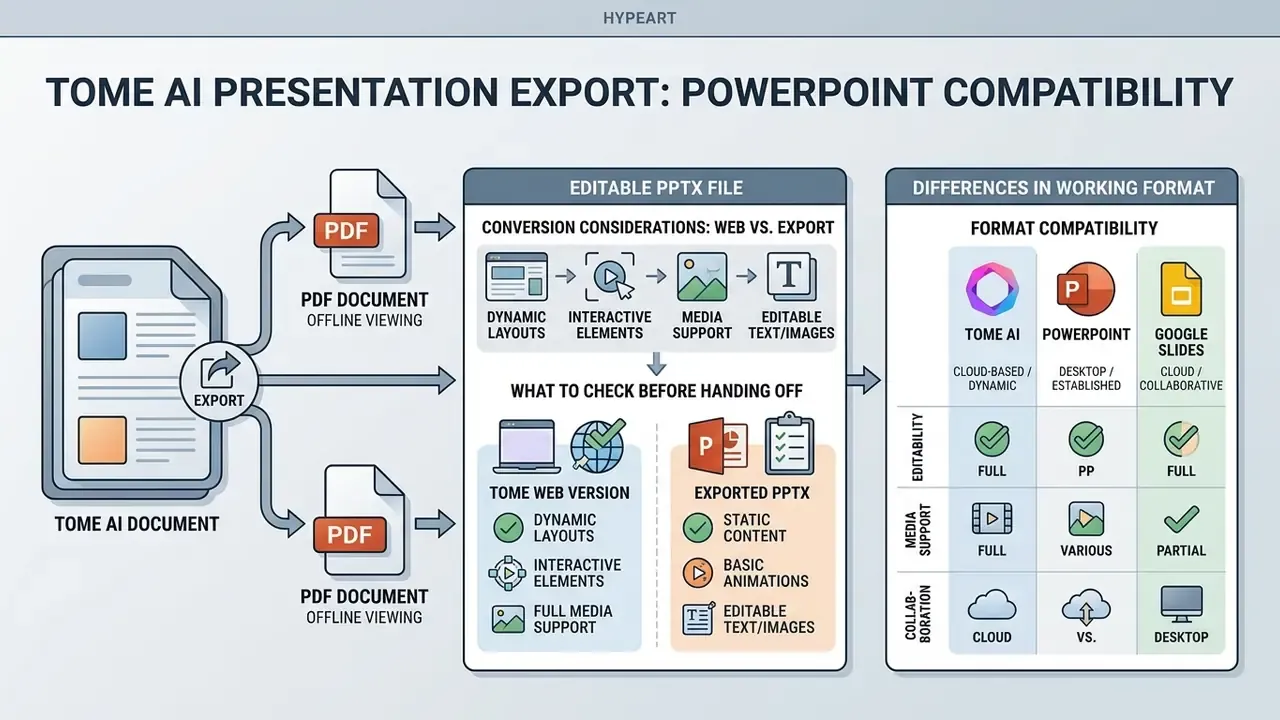
Tome AI documents export to an editable PPTX file as well as PDF, which supports offline presentation and compatibility with traditional software. Because Tome uses a fluid web layout, though, exporting to fixed 16:9 slides flattens interactive tiles and converts web embeds into static images.
«When Tome is converted to PPTX, interactive elements become static images and long pages split across several slides, which breaks the structure.»
An ai powerpoint generator tome workflow therefore demands post-export validation. While an ai ppt generator tome or tome ai ppt generator run does produce editable text boxes in PowerPoint, layout density, spacing, and animation behavior may shift during conversion. Note a documented source conflict as well: some coverage of earlier product generations states that only PDF export was available and native PowerPoint export absent, while current vendor material advertises editable PPTX. Verify export rights on your own plan before you promise a PPTX handoff.
Search demand arrives through many spellings of the same question, from tome ai ppt maker and ppt ai maker tome to ppt maker ai tome, presentation maker ai tome, and tome ai presentation creator. The underlying concern never changes: will the file survive the handoff intact?
Web Version vs Exported PPTX: What Survives Conversion
| Element | Tome web version | Exported PPTX | Required action |
|---|---|---|---|
| Body text and headings | Responsive, reflows | Editable text boxes, may split or overflow | Re-fit frames, re-check line breaks |
| Custom web fonts | Rendered as designed | Substituted with system fallback | Embed fonts or remap to an installed Office typeface |
| Charts from CSV tiles | Interactive, data-linked | Static image in most cases | Rebuild as a native PowerPoint chart for editability |
| Live embeds (Airtable, Figma, Sheets, YouTube) | Interactive and live | Static placeholder screenshot | Replace with a frozen, timestamped export |
| Long scrolling pages | Single continuous page | Split across multiple slides | Re-sequence and re-title the split slides |
| Transitions and motion | Web-native scroll effects | Largely lost | Re-author in PowerPoint if motion is required |
| Brand template compliance | Theme-level control | No native slide master inheritance | Apply the corporate master and re-check placeholders |
Exporting to PPT: What to Check Before Handing Off a Presentation
Before distributing an exported powerpoint presentation, inspect element alignment, verify font rendering, and fix split text boxes. Because web fonts often fall back to default system fonts in Microsoft Office, manual font re-assignment is frequently necessary.
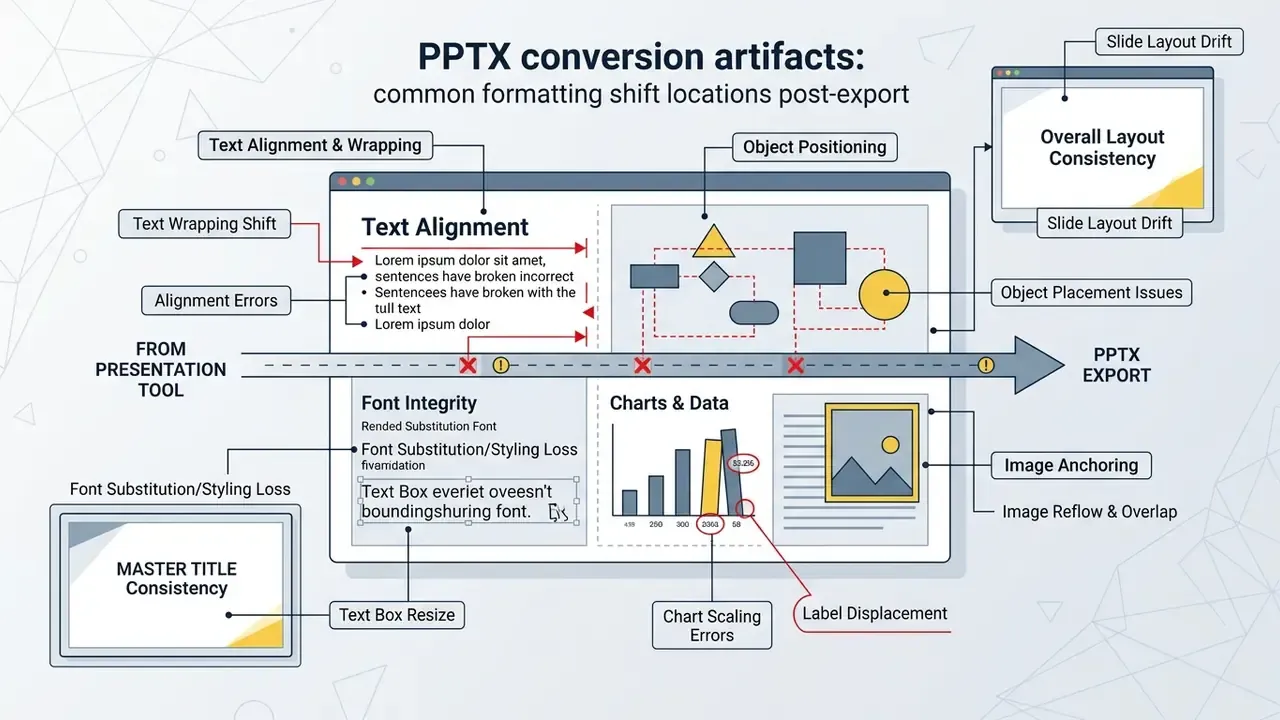
Key post-export verification steps:
- Confirm that multi-column web tiles convert into distinct, non-overlapping text frames.
- Replace static placeholder images with live charts or original high-resolution assets.
- Verify that slide master layouts in PowerPoint reflect organizational branding, including approved logo lockups and color tokens. See our notes on branded design systems in Canva AI for template governance patterns.
- Check that every data point keeps its source footnote after re-layout.
- Test the deck on the presentation machine, offline, with the corporate font set installed.
«Tosea AI evaluates PPTX export against six criteria: source accuracy, narrative logic, theme clarity, font accuracy, aspect ratio and repair time.»
Engineers and operations teams wiring presentation APIs into automated workflows can refer to our AI Media API Guides for integration specifications, including the quota and cost patterns documented in our Google Veo API implementation guide.
Tome AI, PowerPoint, and Google Slides: Differences in Working Format
Tome AI operates as a browser-first storytelling platform built around responsive web pages, whereas PowerPoint and google slides rely on static 16:9 slide decks. Google Slides creates and stores presentations in Google Drive. PowerPoint for the web autosaves to OneDrive and, uniquely among the three, explicitly supports saving a local copy to the device. Standard slide editors also store files natively in local or cloud drives and offer precise object-level animation controls, grouped animations, transition effect options, and "apply to all" behavior.
Tome, by contrast, emphasizes rapid AI-assisted drafting, web link sharing, and viewer analytics. Traditional editors win on complex offline slide control; Tome wins on web-native delivery and narrative composition. Different jobs. For teams whose distribution includes recorded walkthroughs, our guides to video compression for large media files and animation production tooling complement digital deck workflows.
Data Security, Governance, and Regulatory Compliance
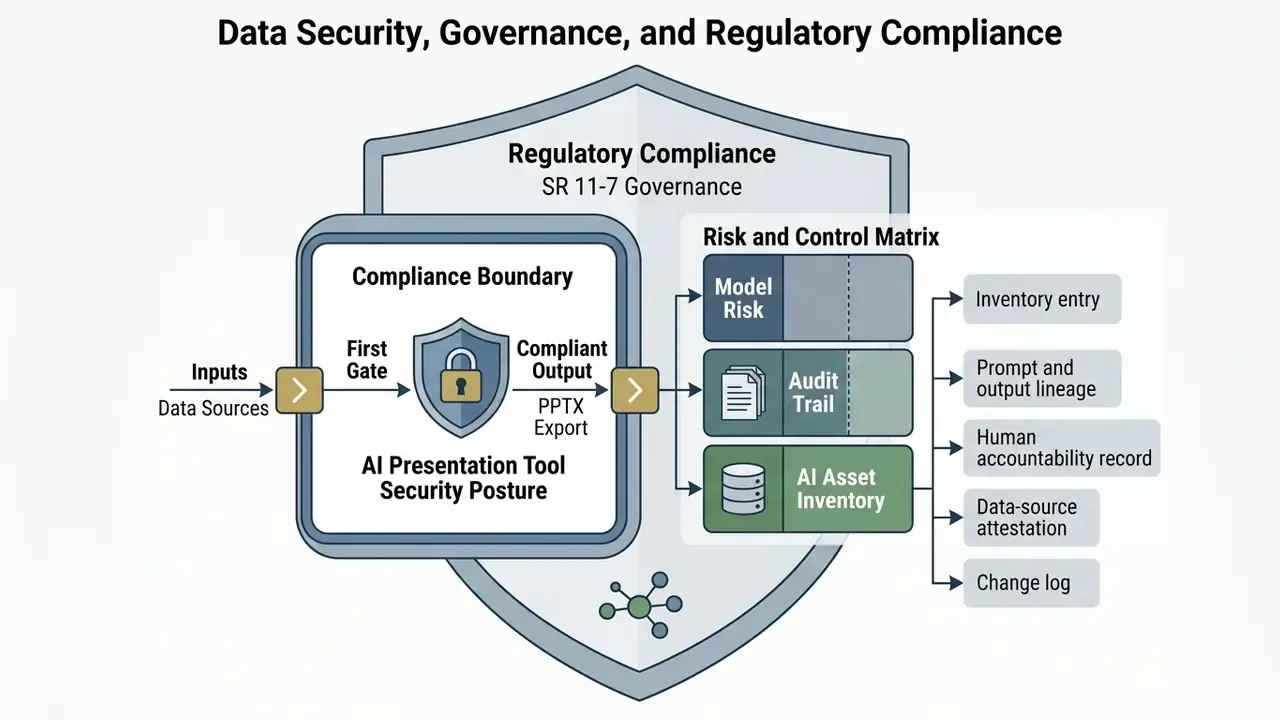
For banks, insurers, and other supervised institutions, the security posture of an AI presentation tool is the first gate, not the closing paragraph. This section consolidates what is documented, what must be confirmed contractually, and how to record the tool inside a model-risk framework.
What vendor documentation states:
- Access is restricted to authenticated users through a third-party auth provider (Stytch), with sign-in by email and password or via Google, Apple, or Facebook.
- Data is encrypted in transit over HTTPS, and systems are hosted on AWS infrastructure.
- Prompts sent to large language models are anonymized and deleted after 30 days.
- Uploaded documents are described as encrypted and stored in the user's Tome Vault, treated as confidential, and retained only as long as needed.
- Tome states it does not view user data without explicit permission; engineer access for troubleshooting requires user permission and is logged.
- Terms of Service grant the provider a worldwide, non-exclusive, royalty-free license to host, store, reproduce, modify, create derivative works from, and process user content in order to provide, improve, and protect the service.
What must be obtained in writing before enterprise deployment:
- SOC 2 Type II attestation and/or an ISO 27001 certificate. Not referenced in the public documentation reviewed here, so request the report and the bridge letter.
- Contractual zero-data-retention and no-training clauses covering both the platform and its downstream model providers, since the standard content license permits "improve the service" processing.
- A Data Processing Addendum (DPA), sub-processor list, data residency commitments, and breach notification timelines.
- Tenant isolation and key management details, plus encryption-at-rest specifics.
- SSO/SAML, SCIM provisioning, role-based permissions, and admin audit logs, typically Enterprise tier features.
- DLP and CASB compatibility, so prompt submissions can be inspected or blocked by existing controls.
Risk and Control Matrix for AI Presentation Tools
| Risk | Risk factor | Control in an AI presentation workflow |
|---|---|---|
| Confidential data leakage via prompts | Analysts paste MNPI or PII into a browser prompt window | Written zero-retention clause, DLP inspection, prompt-content policy, redaction before upload, enterprise tenant only |
| Hallucinated figures in executive material | Model generates plausible but unsourced statistics | Source-facts-only prompting, four-part review checklist, named reviewer sign-off per deck |
| Loss of reproducibility | Live embeds change after review; prompts not retained | Freeze data sources, archive prompt, output and timestamp, store the final PDF or PPTX as the record copy |
| Export fidelity failure at delivery | Fonts substitute, frames split, charts flatten | Pre-delivery export check, offline rehearsal on the presenting machine, corporate master applied |
| Shadow AI adoption | Individual free-tier accounts outside procurement | SSO enforcement, domain capture, blocklist of consumer tiers, inclusion in the AI asset inventory |
| Third-party dependency risk | Vendor pivots or discontinues the product | Export-on-cadence policy, contractual data portability, documented exit plan |
| Unclear IP position on generated assets | Broad content license, unclear ownership of outputs | Legal review of output ownership, replace generated imagery with licensed brand assets in external material |
Model Risk, Audit Trail, and AI Asset Inventory
US supervisory expectations for model risk management (Federal Reserve SR 11-7 and OCC 2011-12) and the risk-management structure of the NIST AI Risk Management Framework do not exempt "productivity" tools when their output informs governance reporting. In practice, an AI presentation generator used to assemble a model-validation summary should be recorded as a supporting tool, not a model, with these artifacts retained:
- Inventory entry tool name, vendor, version or model family, business owner, permitted data classification, approval date, and review cadence.
- Prompt and output lineage the prompt text, the source documents supplied, the generated draft, and the final approved deck, all timestamped. Because platform prompt logs are anonymized and deleted after 30 days, the institution must keep its own copy in an internal repository.
- Human accountability record named reviewer, review date, and the four-part checklist result. That is the evidence that a person, not the model, owns every assertion delivered to a committee or a supervisor.
- Data-source attestation for every chart, the extraction source, the extraction timestamp, and whether the value was frozen or live.
- Change log model or vendor changes that could alter output behavior between reporting cycles.
Tome AI Pricing, Free Plan, and Solution for Commercial Use
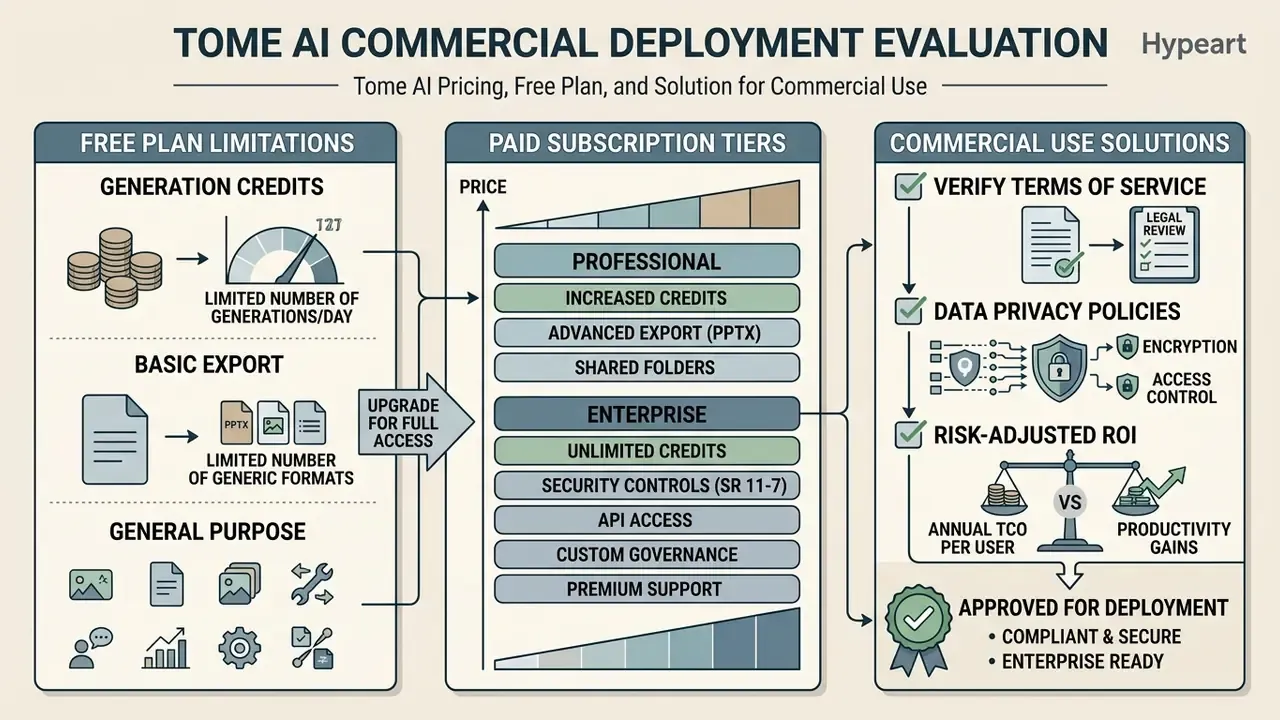
Evaluating Tome AI for commercial deployment means analyzing subscription tiers, generation limits, export capabilities, and data privacy policies. Enterprise buyers weigh initial software costs against expected productivity gains in deck creation, and the second number is much harder to pin down than the first.
Table: Tome AI subscription tiers and feature comparison (conditions verified across 2025 to 2026 sources)
| Plan tier | Indicative pricing | AI generation limits | Export and branding features | Commercial rights |
|---|---|---|---|---|
| Free tier | $0 per month | Limited credits, commonly documented as about 500 credits per user per month, roughly 5 AI decks | Web link sharing only; Tome branding enforced; PDF and PPTX export restricted or unavailable | Basic non-exclusive usage rights under terms |
| Pro plan | About $16 per user per month billed annually, roughly $20 to $24 month-to-month | Unlimited AI generation credits | PDF and, per current vendor material, editable PPTX export; custom logos; custom fonts; viewer analytics | Commercial use of generated content permitted under the terms of service |
| Enterprise plan | Custom quote | Unlimited AI generation plus custom quotas | SSO and SAML; advanced permissions and admin controls; data connectors; SLAs; white-glove onboarding and priority support | Full commercial rights with custom enterprise terms and a negotiated DPA |
Secondary sources disagree on free-tier mechanics. Some describe a cap on the number of decks, others an unlimited number of decks limited only by AI credits, and credit figures of 150, 400, and 500 all appear across review snapshots taken at different dates. Choosing between paid plans and the free tier comes down to whether your organization needs custom branding, engagement tracking, and offline PDF or PPTX export.
What Is Available in the Free Plan and When Paid Plans Are Needed
The free plan gives access to basic presentation creation and browser-based editing, which makes it fine for testing platform mechanics. Strict credit caps and mandatory Tome branding, however, limit its usefulness for formal client communication.
Upgrade to a paid tier once monthly credit allowances run out, or when workflows demand unbranded PDF or PPTX export. Professional sales and marketing teams need Pro or Enterprise to reach engagement analytics and brand customization. Regulated institutions realistically have one viable tier, Enterprise, because SSO, admin audit logs, and a negotiated DPA are controls, not conveniences.
Total Cost of Ownership and Risk-Adjusted ROI
License price is the smallest line in an enterprise business case. Use this structure when you present to a CFO.
Annual TCO per user equals license cost, plus (decks per year x repair minutes x blended analyst rate), plus (decks per year x compliance review minutes x reviewer rate), plus onboarding and training, plus governance overhead such as inventory upkeep, vendor due diligence, and annual re-assessment.
A worked illustration for a 20-analyst team producing four decks per analyst per month, at a blended $95 per hour and 35 minutes of repair per 10-slide deck:
| Cost component | Calculation | Annual cost |
|---|---|---|
| Licenses (Pro-equivalent, annual) | 20 x $16 x 12 | $3,840 |
| Post-export repair labor | 960 decks x 0.58 h x $95 | about $52,900 |
| Compliance or second review (15 min per external deck, 40% of decks) | 384 decks x 0.25 h x $120 | about $11,500 |
| Vendor due diligence and annual reassessment | Fixed governance allocation | about $8,000 |
| Indicative annual TCO | about $76,200 |
The offsetting benefit is drafting time avoided. If a deck previously took 4 hours to draft and now takes 1 hour plus repair, the saving is roughly 2.4 hours per deck, or about 2,300 hours per year for this team. Even at a conservative 50% realization rate, the labor offset dominates the license line, provided repair time is measured rather than assumed. Two sensitivities flip the case negative: decks that must be rebuilt natively in PowerPoint for template compliance, and any workflow that triggers legal review of generated content.
Compare the structure against a suite-embedded alternative. When the institution already licenses Microsoft 365, the marginal license cost of a Copilot-based deck workflow may run higher per seat, yet repair time and template-compliance cost are usually lower, because the output is natively PPTX. That trade is worth modeling before signing anything.
Data, Access, and Verifying Conditions Before Commercial Use
Before deploying ai tools for corporate presentations, compliance officers should audit vendor data retention policies, encryption standards, and data processing terms. Enterprise risk management requires proof that sensitive corporate inputs stay out of unauthorized model training.
E-E-A-T fact check: terms and privacy verification
Official legal terms for Tome services are maintained across domain documentation:
Compliance note: enterprise users should confirm explicitly that uploaded documents stored in platform vaults are excluded from third-party model training datasets, and should check mytome.com/terms for current enterprise data processing addendums before onboarding regulated data.
mytome.com/terms (page updated August 2026). Confirms user licensing terms, the content license granted to the provider, payment authorization, and service conditions.
tome.com/terms-of-service carries a last-updated date of 19 July 2023 and should be treated as stale relative to the newer domain.
tomeapp.com/pricing (updated August 2026), showing monthly and annual billing options.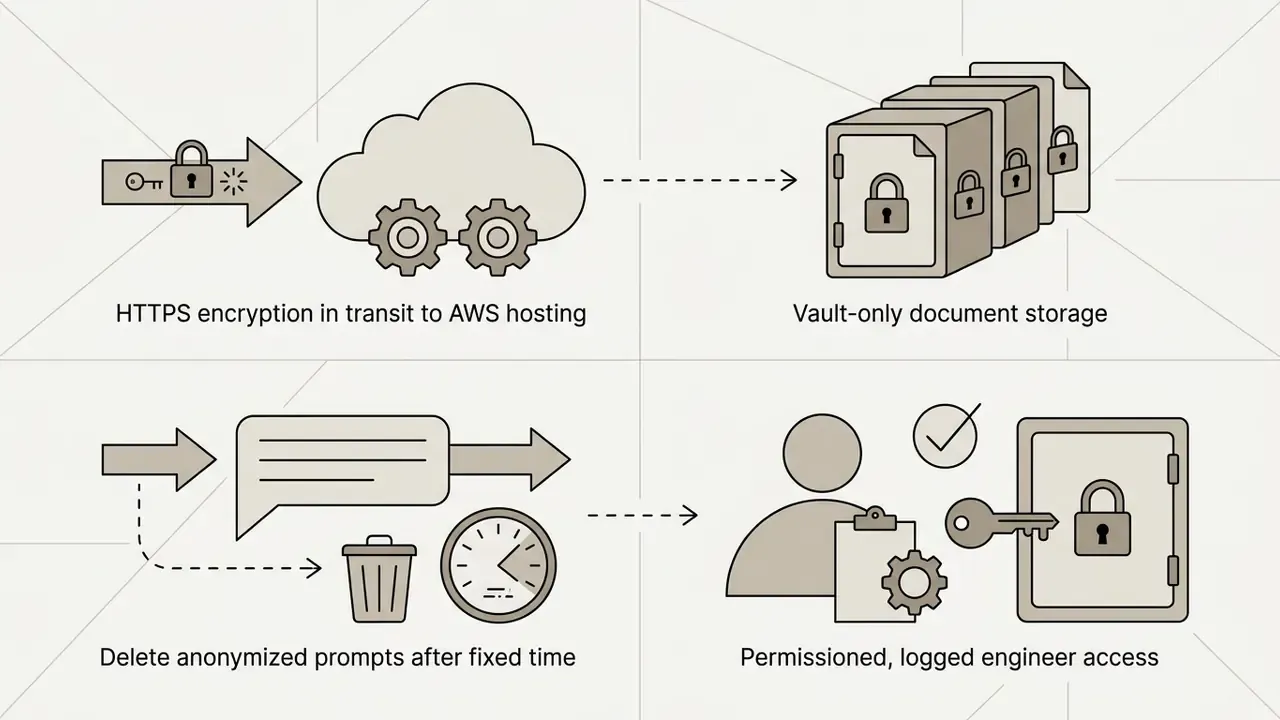
tome.com/privacy-policy plus the security help article. Confirms HTTPS encryption in transit, AWS hosting, vault-only document storage, anonymized prompts deleted after 30 days, and permissioned, logged engineer access.Risk leaders looking for customer support channels or deployment documentation can consult the AI Media Support directory for assistance resources.
Alternatives to Tome AI and Selection Criteria for AI Presentation Tools
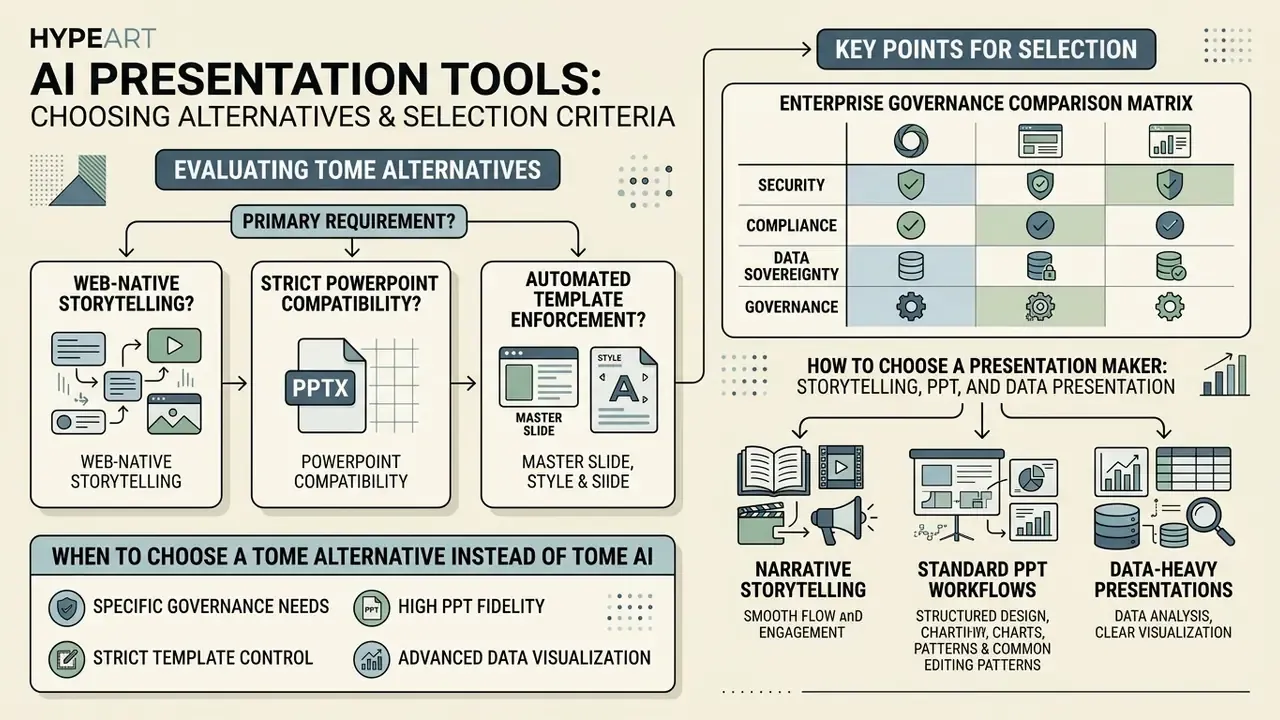
When evaluating a tome alternative, first decide whether your primary requirement is web-native storytelling, strict PowerPoint compatibility, or automated template enforcement. The market spreads across quite different enterprise workflows: Gamma for web-first narrative decks with PPT, PDF, and Google Slides export; Canva for brand-heavy design systems; Beautiful.ai for layout automation; Presentations.AI and Plus AI for editable-export workflows; PowerPoint with Copilot for suite-native generation; and WPS AI Slides for one-click generation with fully editable output.
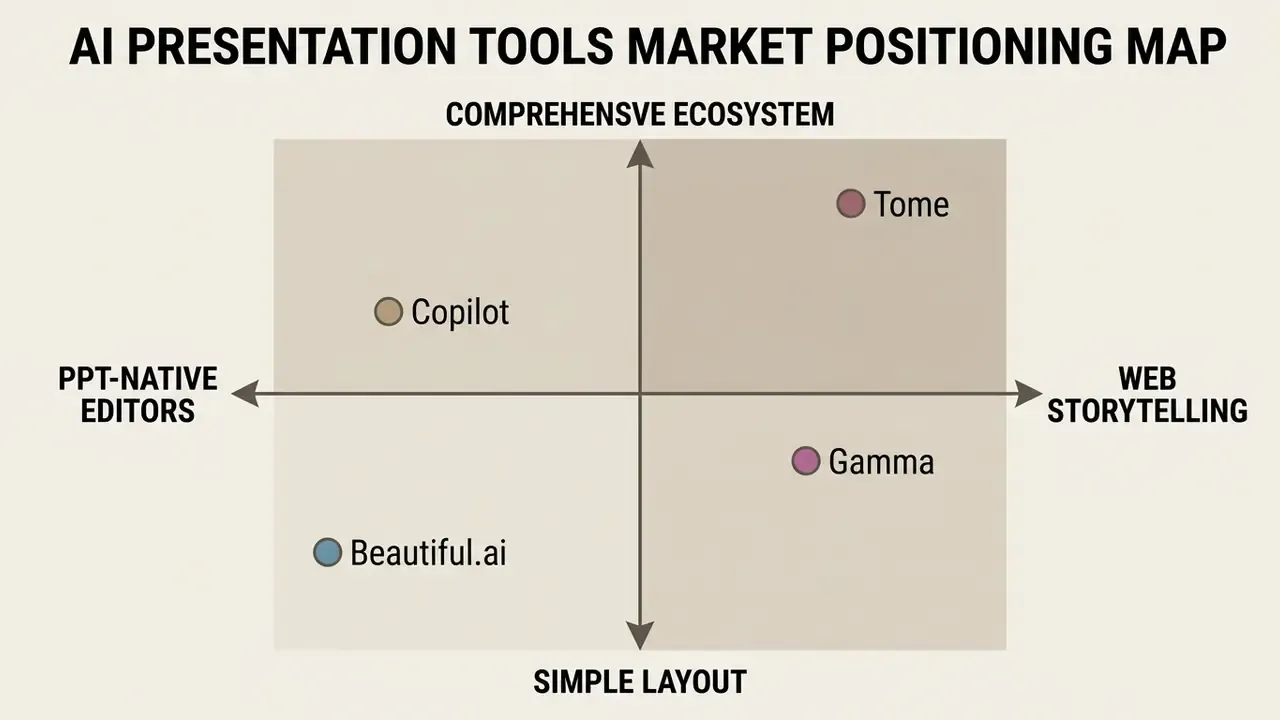
Enterprise Governance Comparison Matrix
| Criterion | Tome AI | PowerPoint + Copilot | Gamma | Beautiful.ai | WPS AI Slides |
|---|---|---|---|---|---|
| Native output format | Web pages; PPTX or PDF via export | Native .pptx | Web pages; PPT, PDF, Slides export | Web plus PPTX export | Native editable slides |
| Corporate master template enforcement | Weak (theme-level only) | Strong (slide masters, brand kits) | Moderate | Strong (locked smart layouts) | Strong |
| Export fidelity risk | High (fluid to fixed conversion) | Minimal (no conversion step) | Moderate | Moderate | Low |
| Offline delivery | Not supported natively | Full offline desktop | Export-dependent | Export-dependent | Full offline desktop |
| SSO / SAML, admin controls | Enterprise tier | Tenant-wide, existing IdP | Enterprise tier | Business tier | Suite-level |
| Data residency and existing DPA coverage | Requires new vendor review | Usually covered by the existing M365 agreement | Requires new vendor review | Requires new vendor review | Requires vendor review |
| Audit trail and version history | Basic version history | Full version history, eDiscovery, retention policies | Basic | Basic | File-level versioning |
| Speaker notes generation | Yes, from an uploaded deck | Yes, native Copilot | Yes | Limited | Yes |
| Beautify an existing PPT | Yes | Designer plus Copilot rewrite | Limited | Yes, layout re-flow | Yes |
| Complex animation control | Weak | Strong (grouped animations, effect options) | Weak | Weak | Moderate |
| Best fit | Narrative pitch and portfolio decks | Regulated reporting, board packs | Fast web-first decks | Layout-consistent corporate decks | Daily editable slide work |
For regulated institutions, the decisive column is usually "existing DPA coverage". A tool already inside the Microsoft 365 or Google Workspace tenancy inherits security review, retention policy, and eDiscovery coverage that a standalone web platform has to earn from scratch, over months.
When to Choose a Tome Alternative Instead of Tome AI
Choose an alternative when your core workflow requires native PowerPoint file creation without conversion artifacts. If a project depends on complex object animations, grouped motion sequencing, slide-by-slide transition control, offline editing, or rigid adherence to corporate master templates, traditional add-ins or specialized slide engines perform better. Microsoft documentation confirms native support for object animations, grouped animations, transitions, and effect options that a web-first canvas simply does not model.
Independent benchmarks, such as SlideBench (2026), indicate that tools embedded directly inside Microsoft 365 or Google Workspace score higher on export fidelity than standalone web-native generators.
«SlideBench tracks five tools across 11 cases and 30 presentations, scoring artifact quality, editability and a final score over more than 1,200 slides.»
Treat that benchmark as directional. It is a five-tool sample published without a full public methodology appendix, so replicate the test on two of your own real decks before standardizing anything. Teams that prioritize offline presentation safety should shortlist PPT-native tools. Product-status risk is the other trigger: the original Tome presentation product was reported discontinued in 2025, a live reminder to keep exported record copies and a documented exit path for any single-vendor deck workflow.
How to Choose a Presentation Maker for Storytelling, PPT, and Data Presentation
Selecting the best ai presentation software means matching tool capabilities to the target presentation format.
- Narrative storytelling.Standalone web platforms such as Tome and Gamma excel at pitch decks, onboarding guides, and interactive web documents. Where brand-system consistency matters more than narrative novelty, evaluate Canva AI Generator for branded design and licensing terms as a template-driven alternative.
- Standard PPT workflows.Office-native plugins, Microsoft Copilot and Plus AI among them, suit corporate reporting where master template compliance is mandatory, because generation happens inside the file format rather than upstream of it.
- Data-heavy presentations.Document-to-slide converters that preserve editable chart objects suit complex technical, financial, and analytical reporting. The acceptance test is simple: does the exported chart stay a data-linked object, or has it become a flat image?
«Pi (2026) ranks 12 AI tools by "Agentic Presentation Readiness": Pi leads on autonomous composition, Plus AI is the best PowerPoint plugin, Gamma the best web format option.»
Four screening questions settle most enterprise selections. Does the tool produce the format my audience must receive? Does it inherit my existing security and retention controls? Can every number on a slide be traced to a frozen source? And can a reviewer sign off in under fifteen minutes? If the answer to the last one is no, the tool is not saving time; it is relocating it.
Board Delivery Readiness Checklist
Run this before any deck generated with an AI tool goes to a board, an audit committee, or a supervisor.
Checklist0 / 10
FAQ: Frequently Asked Questions About the Tome AI Presentation Generator
This section answers the practical questions that keep coming back: account access, mobile device support, multi-language capability, export rights, and security.
Is an Account Required, Does Tome Work on Mobile Devices, and Does It Support Multiple Languages
Yes, authorization through a registered account is mandatory to create, edit, and save presentations in Tome. Sign-in works by email and password or via Google, Apple, or Facebook. The platform runs primarily through desktop web browsers. An official App Store listing for a Tome AI application specifies iPhone only, iOS 16.6 or later, so mobile support is best described as iOS viewing plus lightweight editing. No official Android application was confirmed in the sources reviewed.
On languages, vendor material states "multiple presentation languages" and lets you select the presentation language before generation. Competing generators in this category document 15 or more languages, including Chinese, Japanese, Spanish, French, German, and Russian. Russian-language generation for Tome specifically is asserted by third-party descriptions rather than official documentation, so confirm your required locale with a test deck before committing.
Can Tome AI Export to PowerPoint, or Only PDF?
Current vendor material advertises editable PPTX export alongside PDF. Earlier product documentation and several reviews state PDF-only export with no native PowerPoint output. Since this differs by product generation and by plan, test an export on your own account before you promise a PPTX handoff to anyone.
Does Tome AI Generate Speaker Notes and Redesign Existing Decks?
Yes. Uploading a finished .pptx returns slide-by-slide talking points, and uploading a legacy deck returns a re-laid-out, editable version. Both outputs need the same fact and formatting review as prompt-generated decks.
Is Tome AI Free, and What Does the Free Tier Actually Block?
There is a $0 tier for testing. It enforces credit caps, commonly around 500 credits or roughly five decks, applies platform branding, and restricts or removes PDF and PPTX export. Free tiers are unsuitable for client-facing or regulator-facing material.
Is Tome AI Secure Enough for a Bank?
Documented controls include HTTPS in transit, AWS hosting, vault-only document storage, anonymized prompts deleted after 30 days, and permissioned, logged support access. Not evidenced in public documentation: SOC 2 Type II attestation, contractual zero-data-retention, or audit-grade prompt retention. Obtain all three in writing, plus a DPA and SSO enforcement, before processing confidential material.
Is the Product Still Available in 2026?
Status is contested. Multiple 2026 sources report that the original Tome presentation product was discontinued on 30 April 2025, some citing March 2025, while other 2026 sources describe a rebranded Tome AI presentation maker, formerly GenPPT, rebranded in March 2026. Confirm the contracting entity, the product roadmap, and a data-portability clause before purchase.
How Much Manual Work Remains After Generation?
Plan for roughly 3.5 minutes per slide of repair on exported PPTX, so about 18 to 42 minutes for a standard 10-to-15-slide executive deck, per the Tosea AI PPTX benchmark. Decks with dense tables, custom charts, or strict brand templates run higher.
Appendix A: Superseded Statements and Corrected Citations