Last updated: August 2026. Reviewed by the AI Governance & Model Risk editorial desk.
Key Takeaways for Enterprise Risk Officers
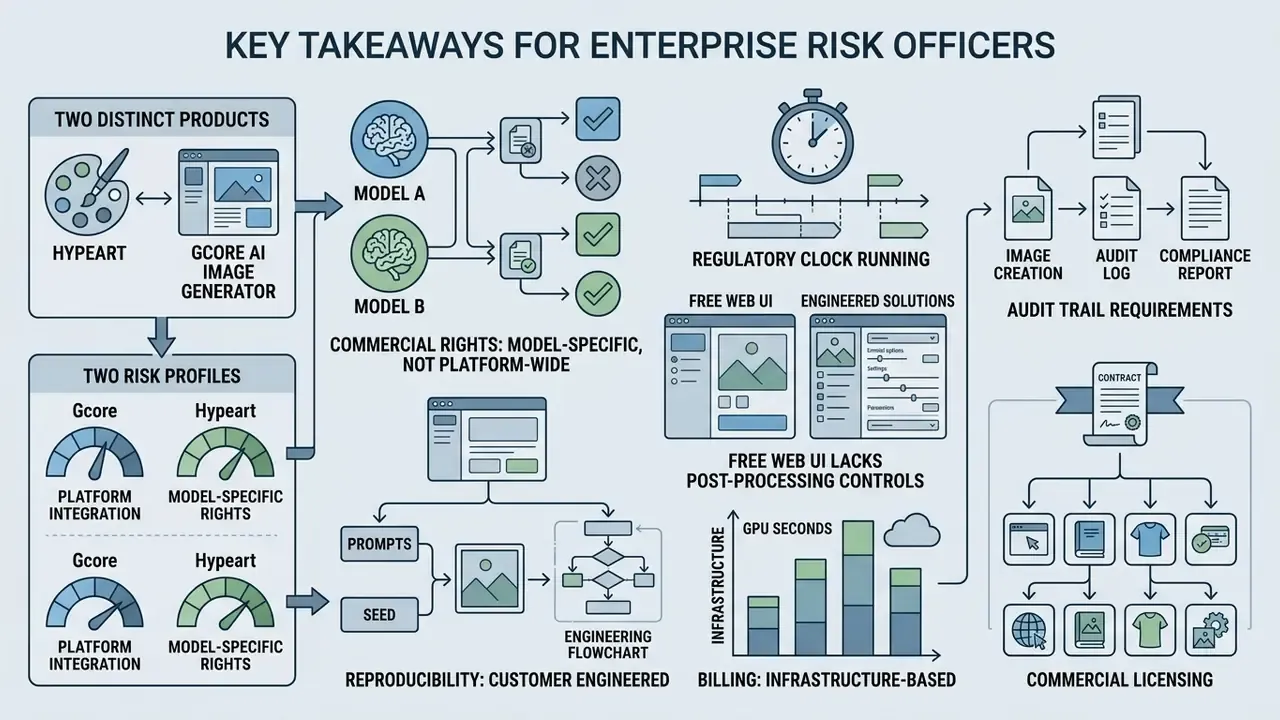
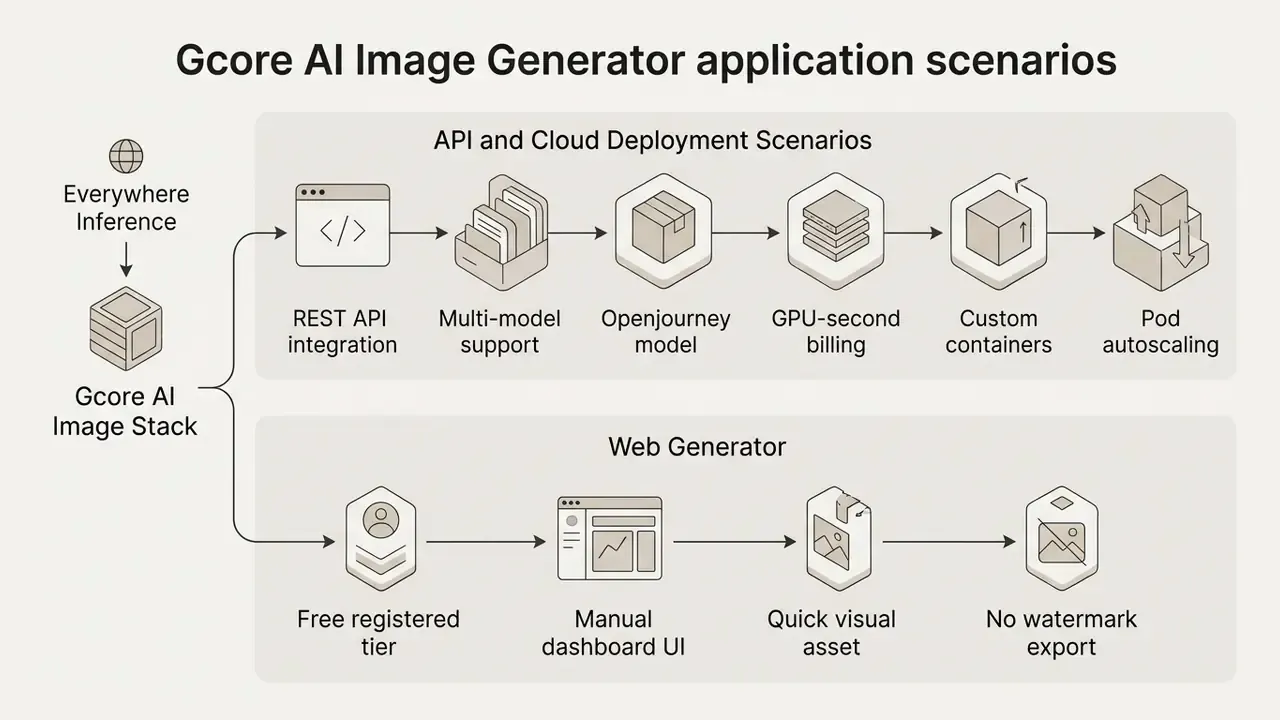
- Two distinct products, two risk profiles. The free web generator (Openjourney-based) is a creative sandbox. Everywhere Inference is the API and GPU infrastructure layer intended for regulated production workloads. Govern them separately, or you will end up governing neither.
- Commercial rights are model-specific, not platform-wide. FLUX.1-schnell permits unrestricted commercial deployment. FLUX.1-dev is non-commercial only. Stable Diffusion 3.5 Large carries a $1M annual revenue threshold under the Stability AI Community License.
- The regulatory clock is running. EU AI Act transparency obligations for synthetic media, including machine-readable marking and deepfake disclosure, became enforceable on 2 August 2026.
- The free web UI lacks post-processing controls. No native Image-to-Image, inpainting, outpainting, background eraser, or batch generation. Enterprise workarounds run through the API or external editors.
- Reproducibility must be engineered by the customer. Gcore does not publish a fixed latency SLA or a pre-built audit ledger. Prompt hashes, seeds, model versions, and user identifiers have to be logged in the calling application to satisfy internal model risk management (MRM) review.
- Billing is infrastructure-based. Everywhere Inference charges GPU-seconds rather than software seats, which pushes total cost of ownership modelling toward throughput, concurrency, and validation labour.
What Is Gcore AI Image Generator and Which Tasks Is It Built For?
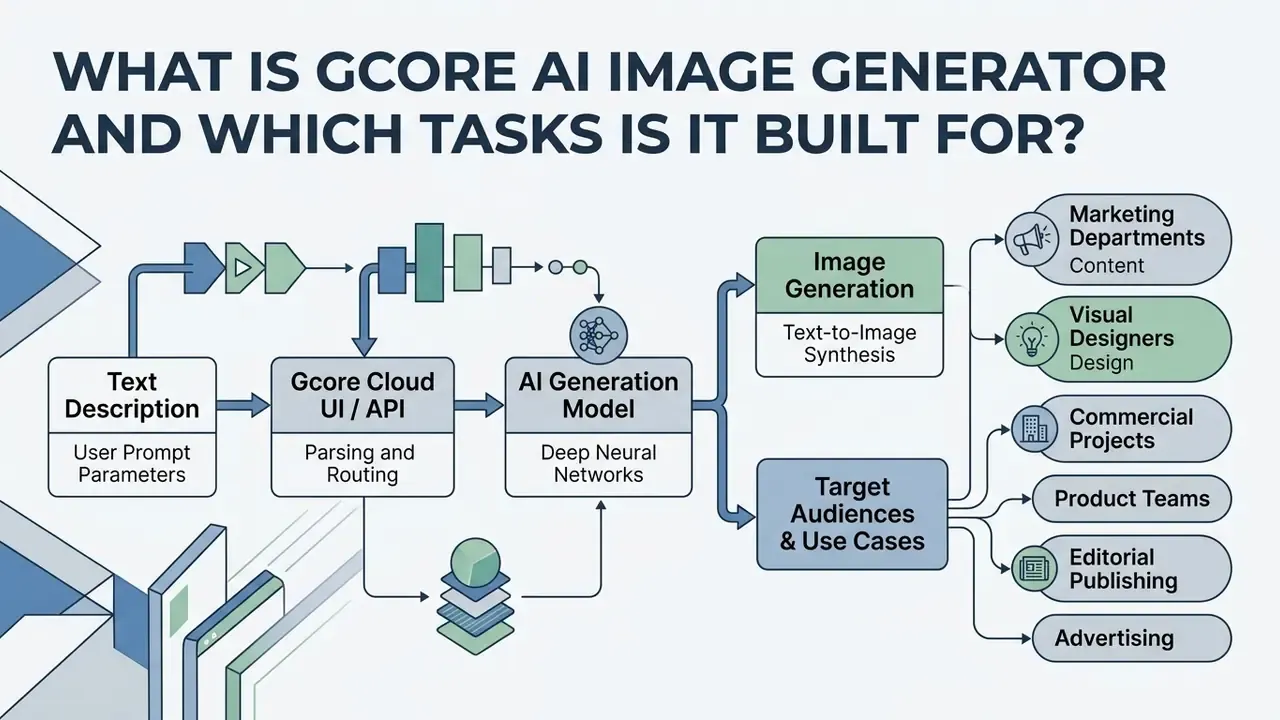
The Gcore AI Image Generator is an AI powered text-to-image solution integrated directly into the Gcore Cloud platform. It lets non-technical creators and engineering teams produce unique images from natural language instructions, without buying or babysitting local GPU hardware. The product works as a dual-layer ecosystem: an accessible web interface built on a fine-tuned diffusion architecture, plus an API-driven inference network aimed at enterprise workloads.
«Openjourney is a fine-tuned version of Stable Diffusion v1.5, trained on more than 124,000 Midjourney images across 12,400 training steps.»
That lineage matters for governance. The free web tool inherits the behavioural characteristics, resolution ceiling, and aesthetic bias of a 2022-generation diffusion checkpoint, while the enterprise inference layer exposes current generation SDXL and FLUX.1 architectures. Same brand, very different capability envelope.
Image Generation from Text Description
Text-to-image synthesis in Gcore works by pushing a text description through deep neural networks that synthesise visual content. The system reads subject details, artistic medium, environment, and lighting parameters from the prompt, then constructs a high resolution output. You type descriptive text, and the model returns photorealistic imagery, digital artwork, or conceptual illustrations in seconds. Request a specific camera lens or a named material and the difference in output is usually visible on the first attempt.
Target Audiences: Content, Design, and Commercial Projects
Gcore AI image generator use cases cluster around four groups: marketing departments, visual designers, media agencies, and software engineering teams. Marketers create images for social campaigns, ad creative variations, and blog visual headers. Designers lean on the platform for rapid concept rendering, mood board assembly, and background generation. Product teams wire the backend API into customer-facing applications so that images based on user input appear automatically. Teams building a shortlist can benchmark this tool against other AI image generators for commercial use before committing budget or engineering cycles.
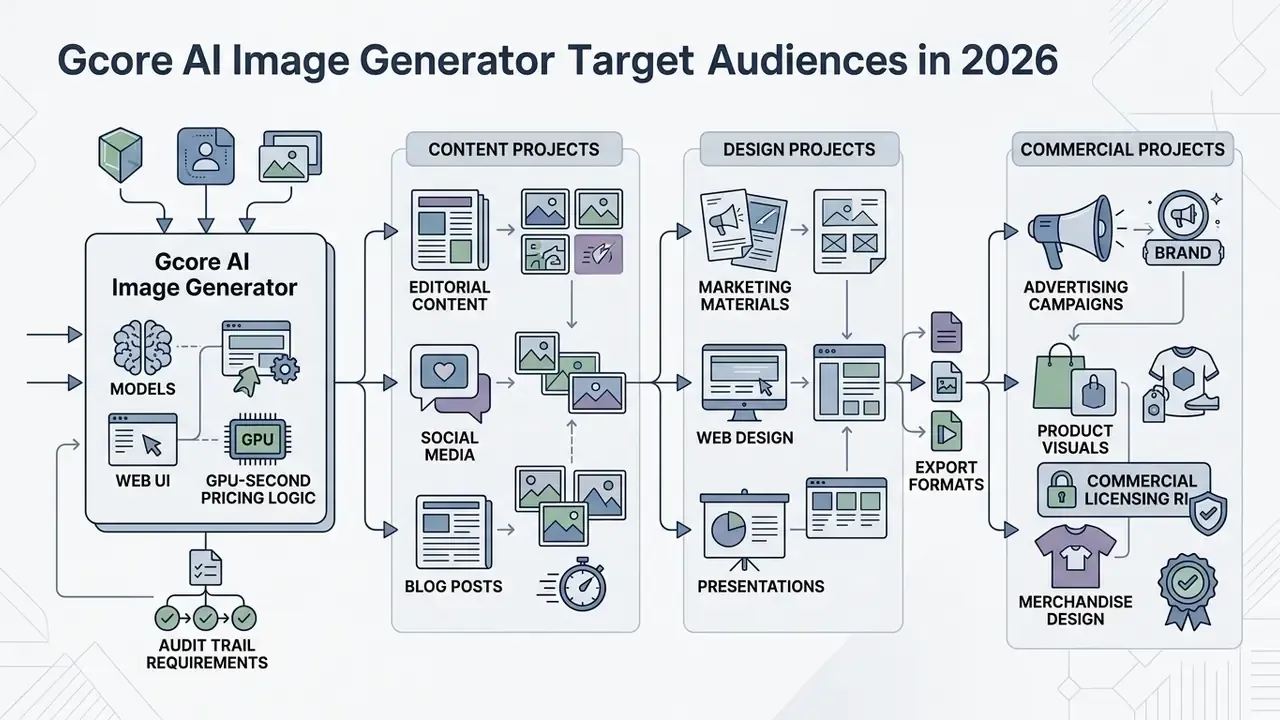
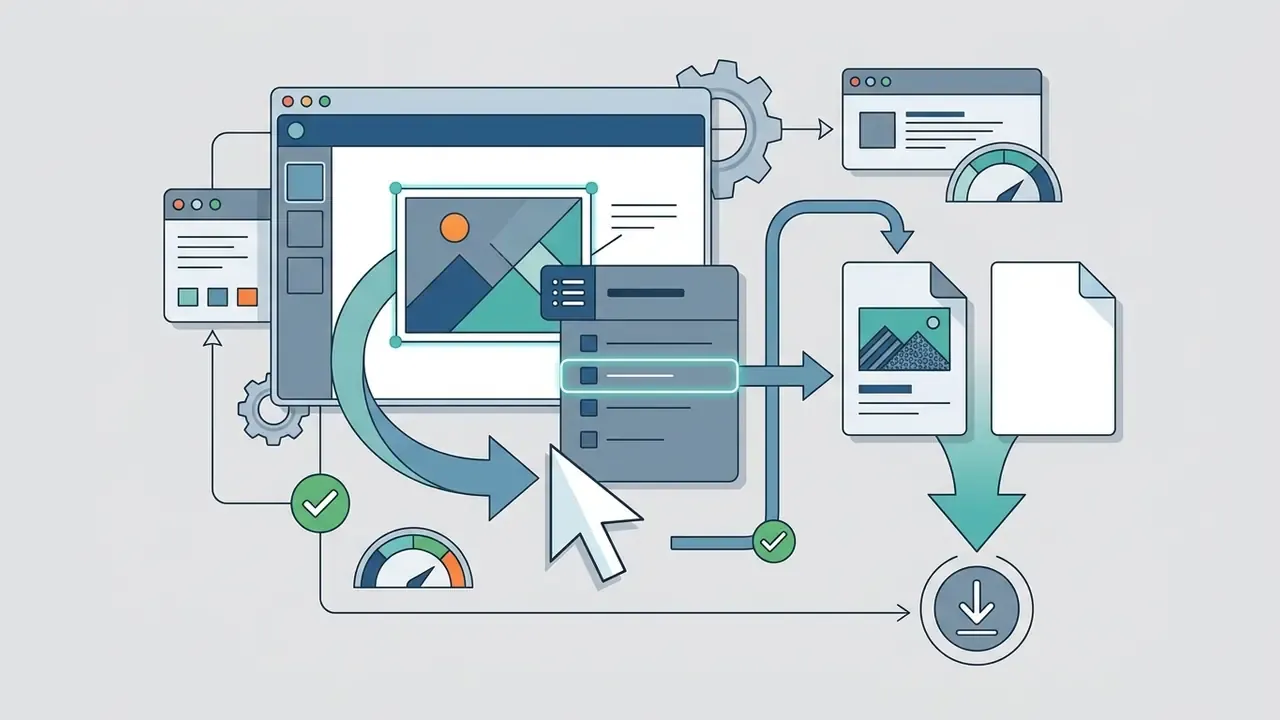
Stages: Text Description (user prompt and parameters) → Gcore Cloud UI / API (parsing and routing) → AI Models Infrastructure (GPU / IPU execution) → Generated Images (download and export).
Figure 1 caption: Technical pipeline of the Gcore AI Image Generator, showing data flow from prompt submission through cloud inference to visual asset export.
The diagram above breaks the flow into four operational steps. The input stage collects user text descriptions and structural constraints. The Gcore Cloud control panel then sanitises inputs and routes execution requests. The AI model layer processes the prompt on edge-accelerated GPU nodes. Finished high resolution files return to the web interface or the API client, ready for download.
How Image Generation Works Using Gcore
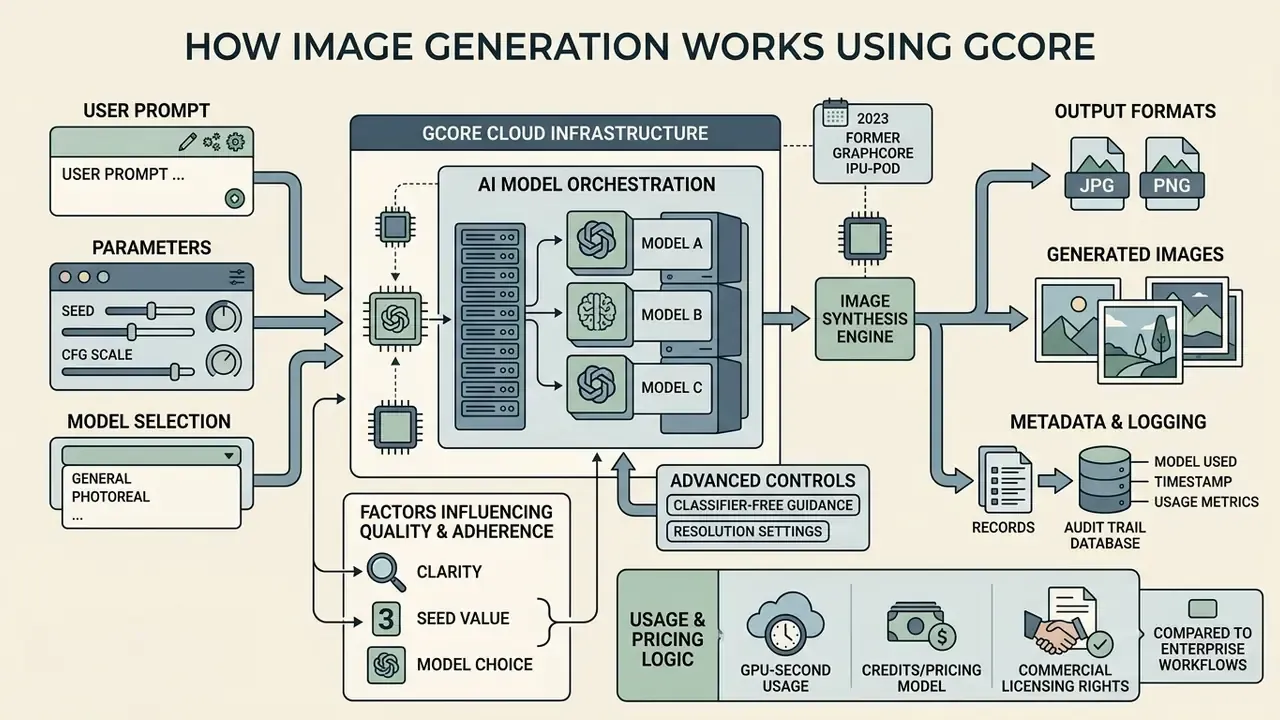
Image synthesis using Gcore depends on cloud platform infrastructure that hosts specialised generative AI models. Rendering does not happen on the client device. It happens across global data centres equipped with hardware accelerators, which is why a laptop with integrated graphics can request a 1024-pixel render without complaint.
The Role of AI Models and Cloud Infrastructure
The Gcore AI ecosystem runs a range of ai models suited to different visual tasks, all inside Gcore Cloud data centres. The web-based generator was developed on a fine-tuned Openjourney model built on diffusion architectures (Gcore, 2023). For enterprise inference, Gcore supports Stable Diffusion XL (SDXL), SDXL-Lightning, Stable Cascade, Stable Diffusion 3.5 Large Turbo, FLUX.1-schnell, and FLUX.1-dev (Gcore Learning, 2025). These engines execute on NVIDIA A100, H100, and L40S GPU instances distributed across global edge locations.
One historical footnote that confuses buyers: the 2023 consumer generator ran on Graphcore Bow IPU-POD scale-out clusters. The current enterprise stack is GPU-based. That is why older Gcore blog posts and today's documentation name different accelerators, and it is not a contradiction so much as a migration.
Factors Influencing Image Quality and Prompt Adherence
Output quality and prompt fidelity depend on text description clarity, seed values, model selection, and sampling parameters. Structured prompts that name subject, camera angle, visual style, and lighting conditions produce higher quality images than short abstract queries. Predictably.
«The recommended prompt structure, subject plus environment plus lighting plus style or medium plus mood or camera detail, delivers consistently more accurate results.»
Advanced parameters such as Classifier-Free Guidance (CFG) scale govern how strictly the algorithm follows prompt tokens versus introducing generative variation. Seed values set the starting noise pattern. Keep the same prompt, seed, sampler, and CFG value, and you reproduce the same or near-identical output. That determinism is the technical foundation for every reproducibility requirement in a regulated workflow, and it is the single setting most creative teams forget to record.
Resolution settings matter too. Push dimensions far beyond a model's training distribution and the failure modes arrive quickly: duplicated limbs, repeated background motifs, compositional drift.
When comparing this stack against enterprise workflow standards, organisations usually want more than one data point. Teams analysing visual generation against alternative design platforms can review our analysis of ai that can create images to benchmark output fidelity, or study the broader field of best AI image generators alongside our ranking of the best AI art generators.
Core Features of Gcore AI Image Generator
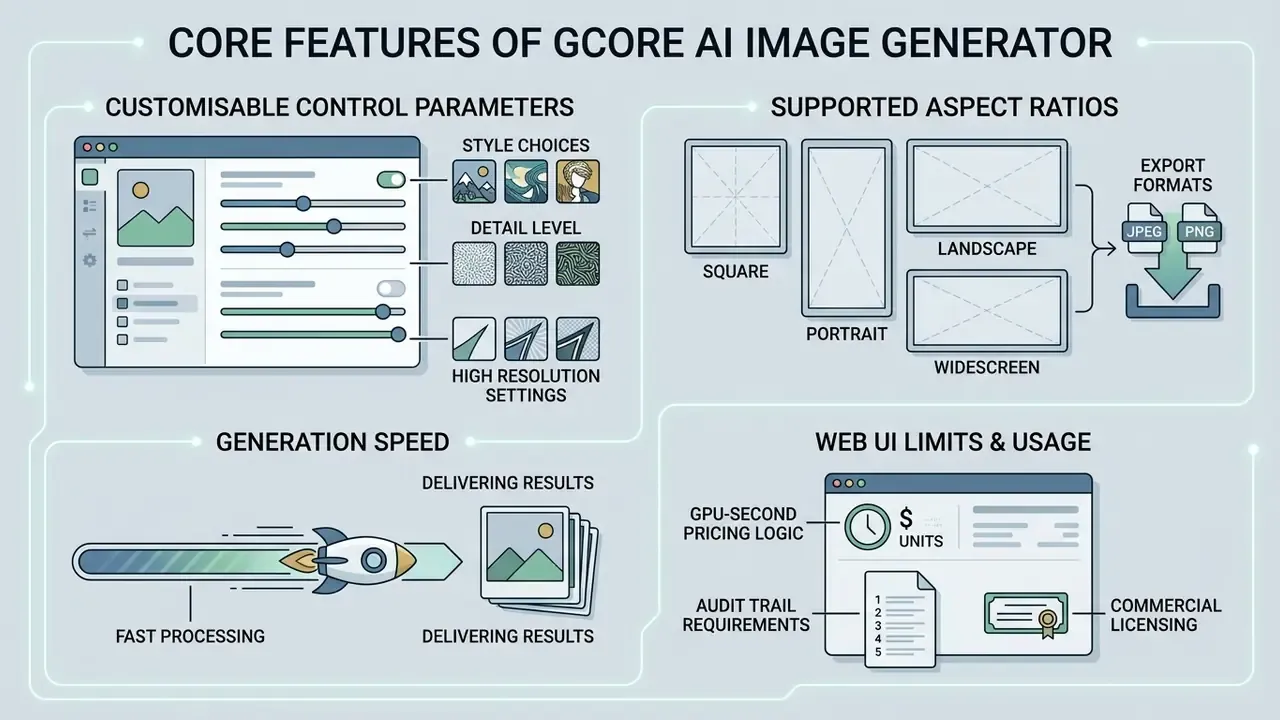
Gcore AI Image Generator combines customisable control parameters, style choices, high resolution outputs, and fast processing. The platform tries to hold two audiences at once: casual users who want one click generation, and developers who want parameters exposed.
Style Controls, Detail Level, and High Resolution Settings
Users can configure custom visual parameters that control artistic representation, aspect ratios, and detail level. The platform supports multiple artistic styles, among them photorealism, digital illustration, 3D rendering, anime, and architectural concepts. Depending on the model deployed behind the Gcore Cloud interface, images come out at native high-resolution baselines such as 1024×1024 pixels for SDXL-class checkpoints.
«SDXL-Lightning supports 1024-pixel image output and is optimized for high-speed workflows; Stable Diffusion 3.5 Large Turbo generates images in four steps.»
Supported Aspect Ratios and Export Formats in the Web Interface
Batch API calls accept arbitrary resolutions within model limits. The standard Gcore web console workflow, by contrast, is organised around pre-configured aspect ratio presets for immediate layout matching:
| Aspect Ratio | Typical Pixel Output | Primary Deployment Target |
|---|---|---|
| 1:1 (Square) | 1024×1024 px | Social profile avatars, Instagram grid posts, product thumbnails, app icons |
| 16:9 (Landscape) | 1024×576 px / 1280×720 px | Website hero headers, YouTube thumbnails, digital signage, slide backgrounds |
| 2:3 (Portrait) | 832×1248 px | Editorial print layouts, Pinterest pins, vertical ad creative |
| 3:2 (Wide) | 1248×832 px | Side-banner marketing displays, blog feature images, catalogue spreads |
Output files export natively as PNG (lossless compression, transparency where the model allows it) and JPEG (smaller payloads, faster delivery, no transparency channel). In the web console, export is a plain browser save action. Through the Everywhere Inference API, images return as base64-encoded strings or binary image URLs, which can be piped straight into a CMS, an object storage bucket, or a digital asset management system with no manual handling at all.
Generation Speed and Delivering Results
Processing speed is tuned through low-latency edge cloud hosting. Standard text-to-image jobs finish fast, often within seconds under nominal server load. You launch a task in one click from the web console, review the generated output, and download it immediately. No render queue to monitor, no local GPU heating up.
| Feature Category | Web Interface Capabilities | Everywhere Inference API Capabilities | Business Application |
|---|---|---|---|
| Model Selection | Pre-configured Openjourney GenAI model | SDXL, SDXL-Lightning, Stable Cascade, FLUX.1-schnell, FLUX.1-dev, SD 3.5 Large Turbo, custom models | Tailored balance between rendering speed and visual fidelity |
| Input Interface | Web console prompt box | RESTful API / FastAPI container endpoints | Automated application integration and programmatic calls |
| Resolution Support | Standard web resolution outputs (1024×1024 baseline) | Up to 1024px and above, depending on model | Marketing headers, print assets, high-res design |
| Aspect Ratio Control | Preset toggles (1:1, 16:9, 2:3, 3:2) | Arbitrary width and height within model constraints | Platform-specific layout matching without recropping |
| Execution Infrastructure | Shared Gcore AI IPU/GPU clusters | Serverless or dedicated NVIDIA A100/H100/L40S GPUs | High-concurrency enterprise batch processing |
| Export Formats | Standard browser download (PNG/JPEG) | Programmatic base64 strings or binary image URLs | Direct CMS ingestion, automated digital asset management |
| Post-Processing Tools | None (no inpainting, eraser, or Img2Img) | Custom pipelines on dedicated GPU instances | Controlled editing and masking workflows |
| Billing Model | Free for registered platform users | GPU-second consumption | Predictable unit economics at scale |
The table makes the split visible: a turnkey web application on one side, enterprise inference infrastructure on the other. Organisations that need automated asset generation almost always land on the API layer with containerised execution. Teams evaluating broader media automation can explore our resource on AI Video Generator capabilities, or measure the Gcore no-cost tier against other free AI image generators and free AI art generators.
Quality, Speed, and Limitations of Generated Images
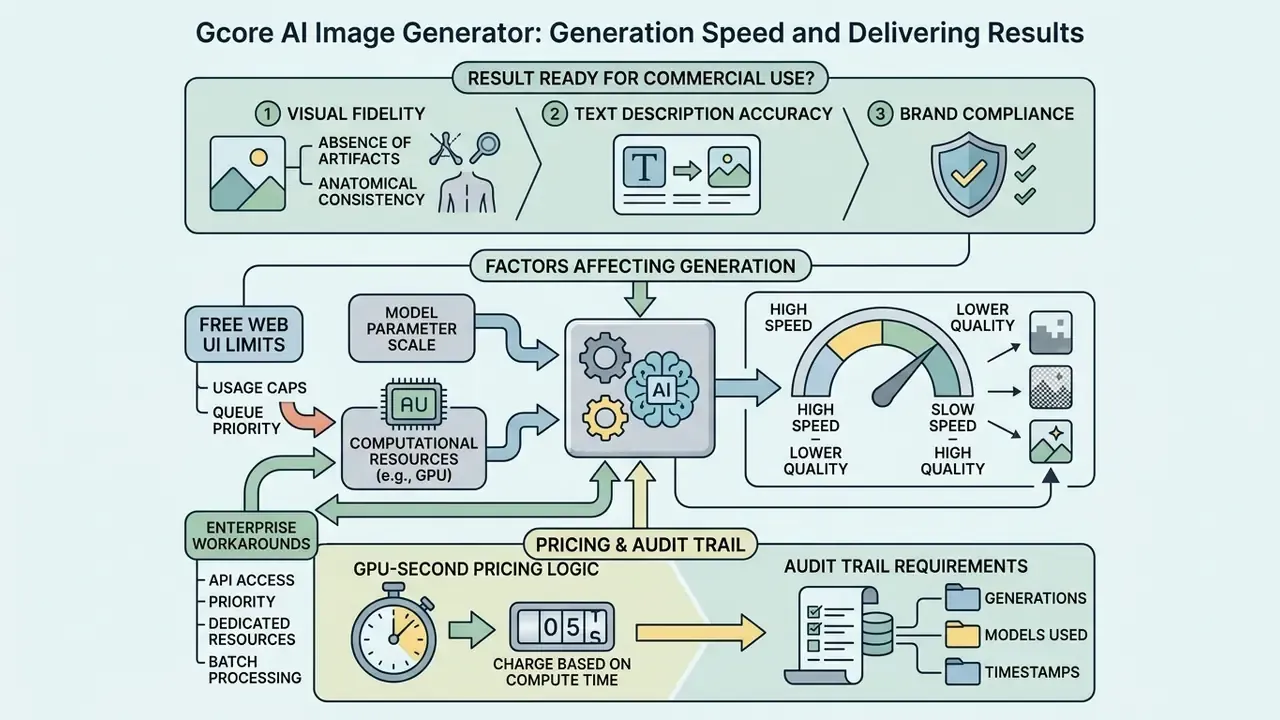
When Is a Result Ready for Commercial Use?
A generated visual asset counts as production-ready when it clears four criteria:
- Absence of visual artifacts.Sharp, well-defined outlines. No melted textures, smeared edges, ghosted duplicate objects, aliasing, or visible pixelation. Industry quality benchmarks treat unnatural smoothing and residual noise as failures, not cosmetic quirks.
- Anatomical consistency.Correct human features, facial proportions, hands, limb length, joint placement, and structural proportion.
- Text description accuracy.Faithful translation of every primary subject element defined in the prompt, including count, position, and material attributes.
- Brand compliance.Alignment with brand colour schemes, logo integrity, composition guidelines, and content safety policy.
In practice the four criteria work as a first-pass screen run by the creative team. A second-line review, whether legal, compliance, or brand governance, signs off anything destined for paid media, prospectuses, or customer-facing product surfaces. One reviewer, one timestamp, one record. That is the whole trick.
Organisations evaluating advanced image processing, including background expansion and asset enhancement, can review our analysis of tools that ai transform image, options to ai unblur image, comparisons of AI outpainting tools that expand images, and reviews of AI image enhancers.
Functional Limitations of the Free Web UI and Enterprise Workarounds
| Missing Capability | Status in Free Web UI | Enterprise Workaround |
|---|---|---|
| Image-to-Image (Img2Img) | Not natively supported | Available programmatically by passing image tensors or reference inputs through Everywhere Inference API endpoints |
| Inpainting / Outpainting | No native canvas expansion or element replacement | Export PNG into a dedicated editor, or deploy a custom Stable Diffusion inpainting pipeline on Gcore GPU instances |
| Background Eraser | Not available | Handle in an external editor or a containerised segmentation model |
| Batch Generation | Manual, one prompt at a time | Scripted parallel API calls with pod autoscaling |
| Animation / Video Output | Not supported | Separate AI video services, or a third-party motion pipeline |
| Legible Text Inside Images | Frequent typographic artifacts | Generate the plate without text, then overlay vector typography for logos and headlines |
| Style Reference / ControlNet | Not available | Custom model deployment; structural control sits on the platform roadmap |
Independent reviews land in the same place, noting that the tool "lacks deep customization or animation support" and "may limit output resolution, style variety, and advanced editing options" next to full creative suites. For a regulated marketing team, that narrowness is often a feature. A single generation surface is far easier to monitor than a general-purpose editor with a thousand exits.
Why Generation Speed and Quality Vary
E-E-A-T Technical Verification (as of August 2026):
How to Get Started with Gcore AI Image Generator
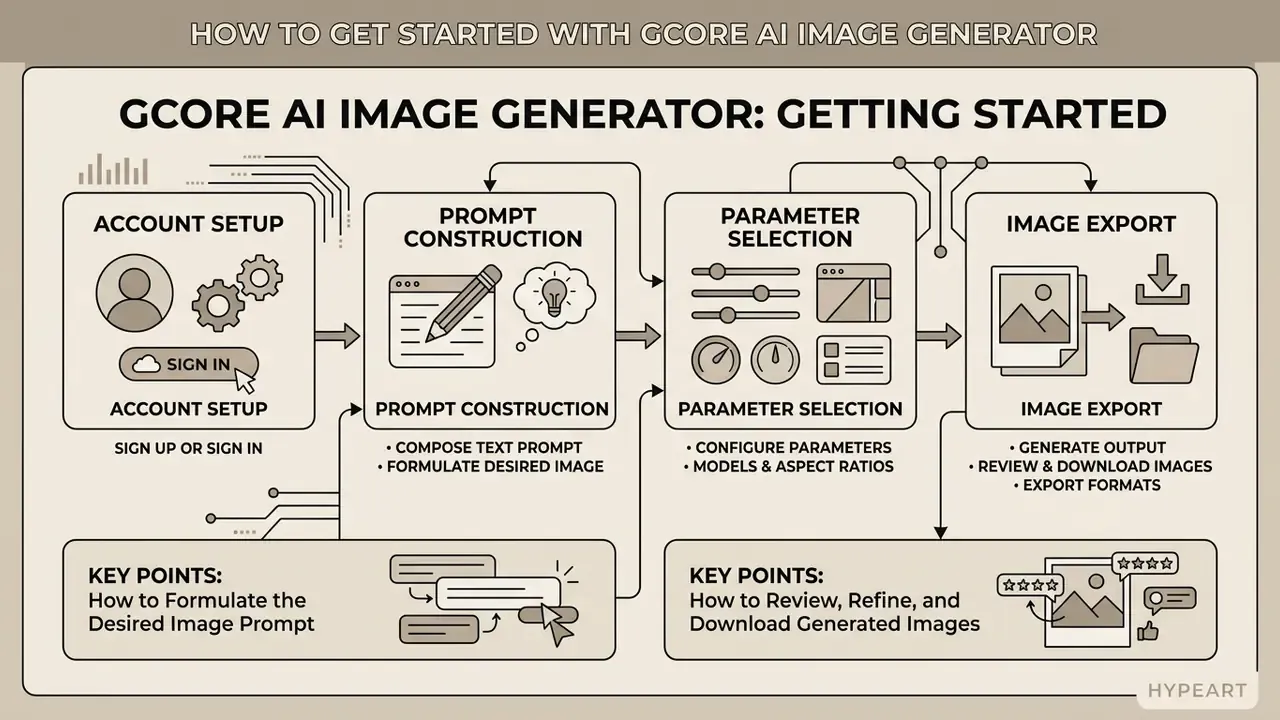
Getting the first asset out of Gcore takes four things: account setup, prompt construction, parameter selection, image export. This is the practical layer that follows the quality and limitation analysis above.
How to Formulate the Desired Image Prompt
An effective text description needs structure, not adjectives. Engineering practice recommends ordering the components in sequence: [Background/Setting] → [Primary Subject] → [Key Visual Details] → [Artistic Style/Medium] → [Lighting & Constraints]. Independent testing of Gcore confirms the same logic, with subject, environment, lighting, style or medium, then mood or camera detail (TechyPulse, 2024).
For example, entering "Modern office interior background, a professional compliance manager reviewing financial audit documentation on a tablet, photorealistic style, soft daylighting, high detail, no blur" returns a clearer, more contextually accurate visual asset than an unorganised query about "a person working".
Two extra rules cut rework noticeably. First, state the intended use ("website hero header", "print brochure plate") so the model calibrates polish level and framing. Second, avoid negation-heavy phrasing: diffusion models handle "empty desk" far more reliably than "desk without papers".
How to Review, Refine, and Download Generated Images
After submitting a prompt, check the result against your visual accuracy standards. If artifacts or compositional mismatches show up, adjust the prompt by clarifying subject positioning or tightening the style descriptors.
«Start with small batches of two to four images, compare variants, and scale only after identifying prompts that work.»
Once output quality holds, save the asset through the standard context menu or the interface download option, then hand it to the downstream workflow.


Data Security, Privacy, and Shadow AI Control
For banks, insurers, and mature fintechs, the deciding question is rarely image quality. It is where the prompt goes. A creative brief can carry unreleased campaign strategy, deal codenames, client identifiers, or product roadmaps. So any generative image workflow needs the same data-classification treatment you already apply to a document management system.
Governance questions to resolve before pilot approval:
- Prompt and output retention.Confirm in writing, through the contract or data processing agreement, how long prompts and generated images are retained, and whether a zero-retention configuration exists for API traffic. A public product page is not a contractual commitment.
- Model training on customer inputs.Get explicit confirmation that prompts, uploaded reference images, and outputs are not used to train or fine-tune models served to other tenants.
- Isolation mode.Dedicated GPU instances and containerised custom models give tenant isolation that shared serverless endpoints do not. Regulated workloads with confidential inputs belong on dedicated or self-hosted deployments.
- Certification evidence.Request current SOC 2 Type II and ISO/IEC 27001 reports, GDPR data-processing terms, sub-processor lists, and regional data-residency options. Gcore's European footprint and sovereign-AI positioning are relevant here, but the artefacts must be read, not assumed.
- Shadow AI containment.The free web generator needs no payment details and stamps no watermark on downloads, which makes it trivially reachable by any employee with a browser.
«Downloaded images carry no watermark; registration is available via email, Google, or GitHub with no payment details required.»
That frictionlessness is a genuine advantage for an individual creator and a genuine control gap for a supervised institution. Practical mitigations are unglamorous but effective: publish an approved-tools list, route all production generation through the API contour behind SSO and DLP inspection, apply egress filtering or CASB policy to consumer generative endpoints, and give staff a sanctioned internal path so they stop improvising one. Where synthetic media leaves the organisation, pair generation with verification tooling. Our comparison of AI image detectors and AI reverse-image-search tools covers provenance checks and downstream reuse.
Audit Trail and Model Validation Requirements
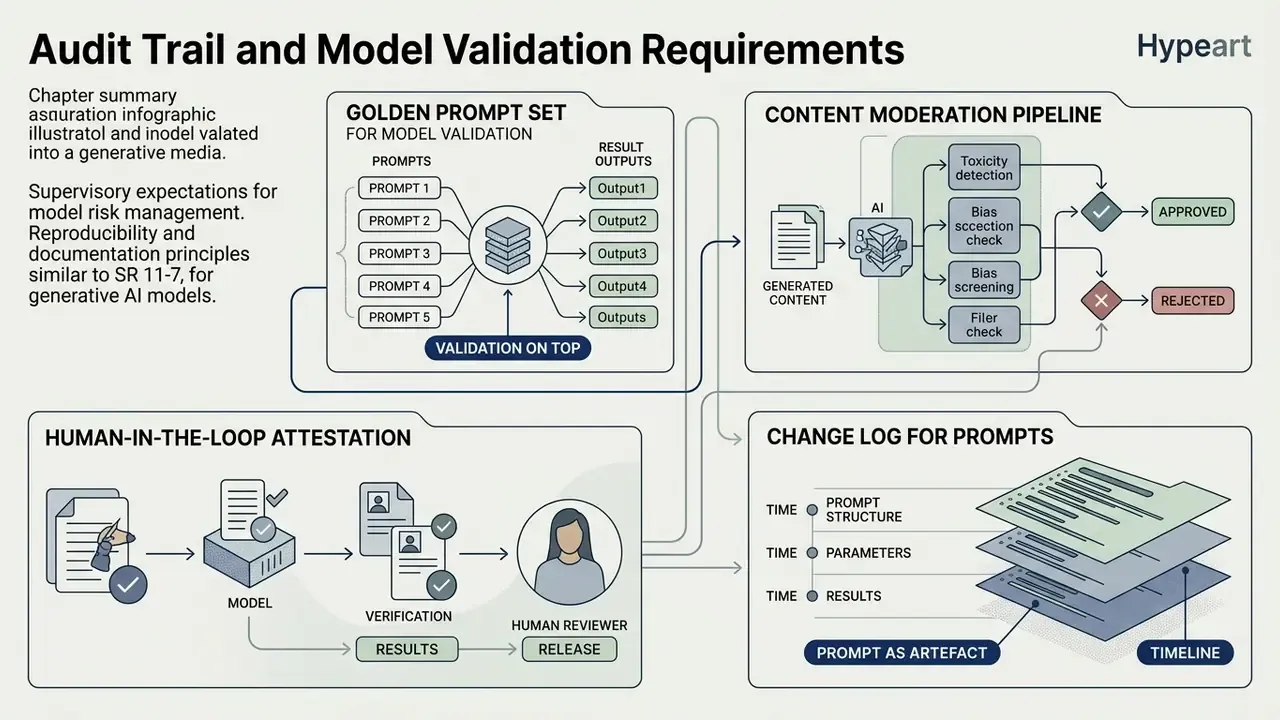
Supervisory expectations for model risk management, including the reproducibility and documentation principles familiar from SR 11-7, do not exempt generative media. If a synthetic image appears in regulated marketing material, the institution must be able to reconstruct how it was produced. Months later. Without the original creator in the room.
Minimum log schema for each generation call:
| Field | Purpose |
|---|---|
request_id | Unique key joining the log entry to the stored asset |
prompt_text / prompt_hash | Full prompt where classification permits, salted hash where it does not |
negative_prompt | Completes the input specification |
seed | Enables deterministic re-generation of the same output |
model_id + model_version | Establishes which licence and which weights applied |
sampler, steps, cfg_scale | Reproduces the denoising trajectory |
width, height, output_format | Documents the delivered artefact |
timestamp (UTC) | Sequences the evidence chain |
user_id / service_account | Attributes the action to an accountable identity |
review_status, reviewer_id | Records human sign-off against the four readiness criteria |
watermark_applied | Evidences EU AI Act machine-readable marking |
Validation practices to layer on top:
- Golden prompt set. Keep 30 to 50 fixed prompts that mirror your real use cases, re-run them at every model version change, and score outputs against the four readiness criteria. This turns vendor model updates from a surprise into a scheduled revalidation event.
- Content moderation pipeline. Screen outputs for prohibited categories, recognisable real individuals, protected trademarks, and deepfake-adjacent likenesses before publication.
- Human-in-the-loop attestation. Because reproducibility rests on customer-side logging rather than a vendor-supplied ledger, the sign-off record becomes your primary audit evidence.
- Change log for prompts as artefacts. Version-control approved prompt templates the way you version report queries. Prompt drift is a quiet source of brand inconsistency, and nobody notices it until a campaign looks subtly wrong.
Can You Use Gcore AI Images for Commercial Purposes?
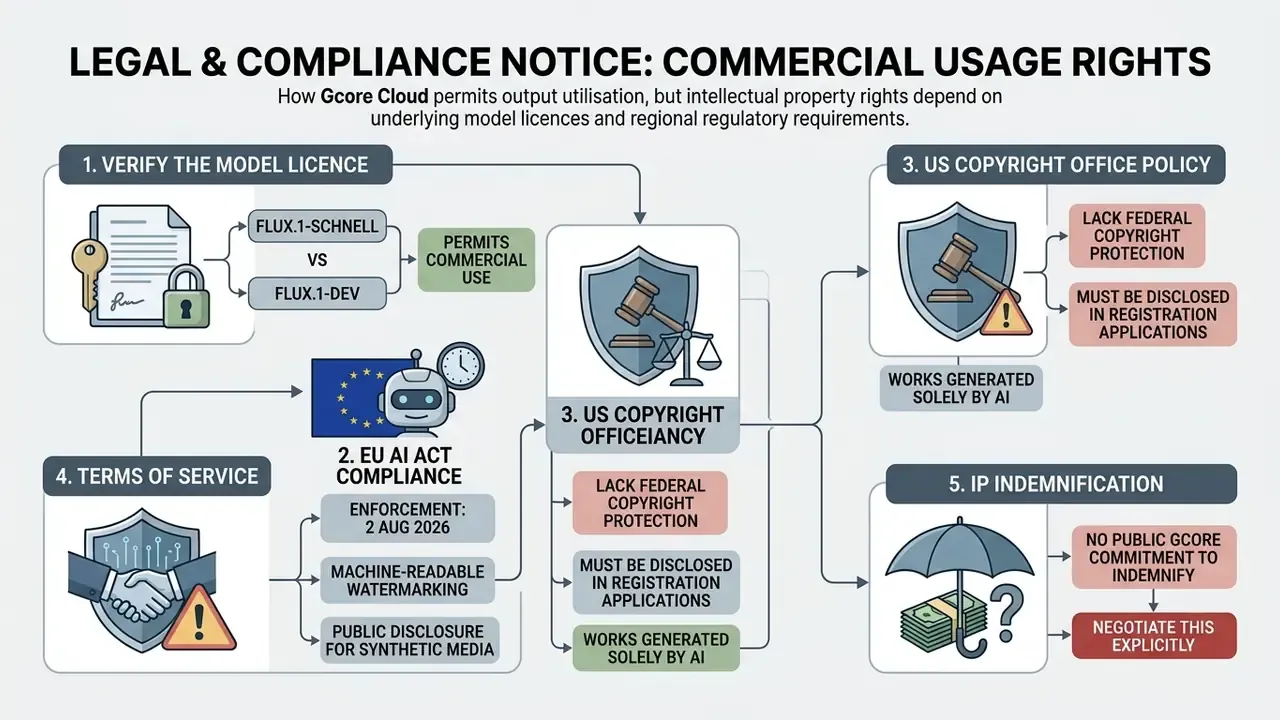
Legal status and commercial usage rights for generated visual assets decide whether the tool is usable at all. Those rights come from three places: the underlying model licence, the platform service terms, and regional copyright statute.
Licensing Terms and Commercial Rights to Verify
Commercial rights for images generated on Gcore follow the specific model licence behind the inference request:
- FLUX.1-schnell. Permitted for commercial deployment without licensing restrictions, consistent with its open Apache 2.0 release from Black Forest Labs (Gcore Documentation).
- Stable Diffusion 3.5 Large. Commercial use is permitted under the Stability AI Community License for organisations with annual revenue under $1,000,000 USD. Larger institutions require enterprise licensing (Gcore Learning, 2025).
- Stable Diffusion 3.5 Large Turbo. Positioned by Gcore as optimised for commercial and non-commercial applications with flexible business licensing (Gcore, Stable Diffusion 3.5 Large Turbo deployment page, 2025).
- FLUX.1-dev. Designated strictly for non-commercial research and development.
This model-by-model reality contradicts a claim circulating on third-party landing pages, namely that "all images generated with Gcore AI Image Generator can be used for personal and commercial purposes without additional licensing." That statement is inaccurate. Rights follow the weights, not the interface.
Intellectual Property Indemnification: What Is and Is Not Covered
Gcore's published legal terms follow a standard infrastructure pattern. The customer keeps all rights, title, and interest in customer content and associated intellectual property. Gcore receives a non-exclusive worldwide licence to access, store, reproduce, format, and process that content for the purpose of delivering the service. And Gcore states that it carries no liability for infringement of patents, copyrights, or other IP rights arising from customer content, from use not specified in Gcore documentation, or from third-party services and products.
For a Head of Model Risk the consequence is blunt: no public, output-level IP indemnity is offered. Some hyperscalers and commercial image vendors do provide contractual indemnification for copyright claims on generated outputs. An infrastructure-plus-open-weights model does not, by default. Mitigations worth pricing: negotiate an indemnity clause into the enterprise agreement, restrict production use to permissively licensed models, avoid style prompts naming living artists or existing brands, run reverse-image checks on high-exposure assets, and confirm that media liability insurance explicitly contemplates synthetic content.
One more point, easy to overlook. Because only works with sufficient human authorship are registrable in the United States, high-value assets should carry a documented record of human creative contribution: prompt iteration, selection rationale, compositing, editorial changes. A single unedited generation gives you nothing to point at.
Practical Commercial Use Cases for AI Visual Assets
Companies deploy generated images across several approved commercial domains:
- Marketing campaigns. Ad variations, banner designs, and visual media concepts, including multiple variants for A/B testing and channel-specific crops.
- E-commerce visuals. Lifestyle backgrounds behind physical products, product mockups, and category header imagery for online stores.
- Concept artwork. Pre-visualisation assets for game design and video production.
- Game development and asset concepting. Fast 2D environment concept art, tileable texture drafts, weapon and prop sheets, and character mood boards for indie studios before anyone commits 3D modelling hours. Gcore's own materials note that the Openjourney model was fine-tuned on domain datasets including gaming.
- Corporate presentations and pitch decks. Custom royalty-free background illustrations, sectional dividers, and iconography for executive slides and investor decks, instead of the generic stock photography your competitors also license.
- UI/UX mockups. Placeholder illustrations, empty-state graphics, and onboarding artwork for digital product prototypes.
- Architectural and data visualisation. High quality environment renders and abstract backdrops for dashboards, research notes, and client reporting.
To compare specialised creative models across competitive benchmarks, consult our guide to akool ai image tools, review options to animate image ai for video production, weigh AI image generators for commercial projects side by side, or examine how this stack reads against Midjourney image generation and Canva AI Generator for brand-controlled design teams.
Free Tier Access, API Integration, and Team Selection Criteria
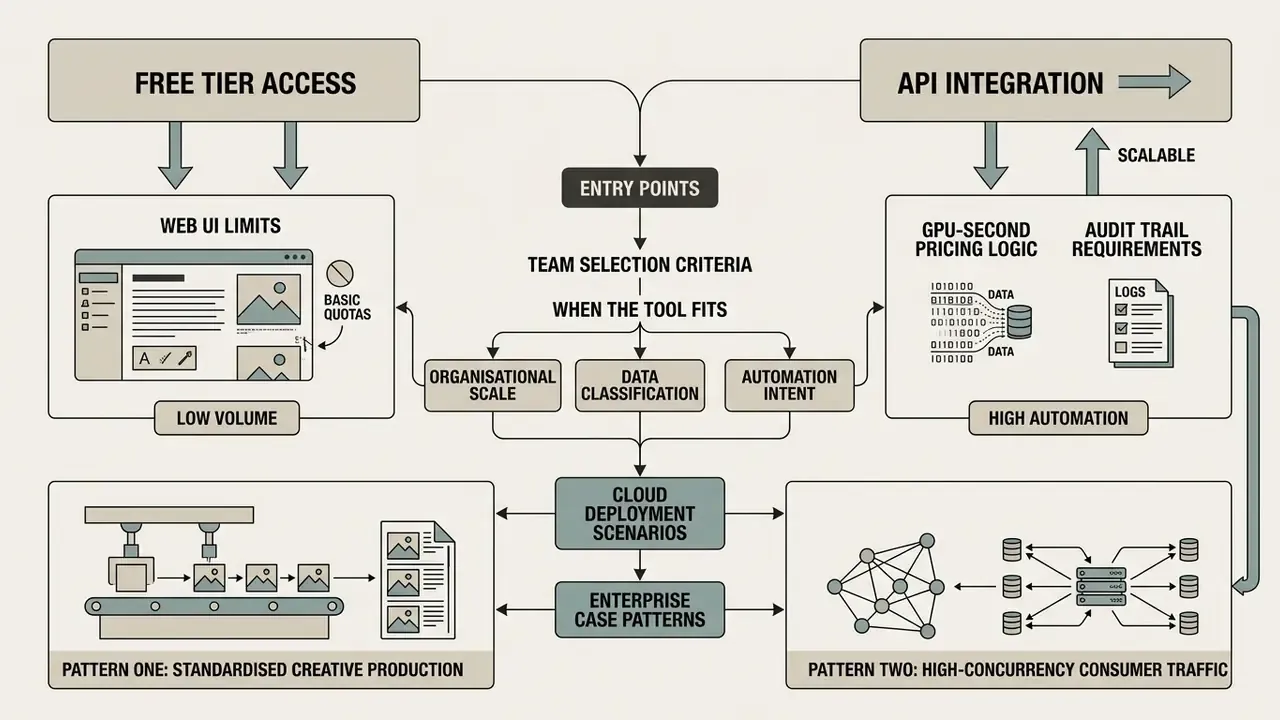
Gcore offers two entry points, and the choice between web access and API integration depends on organisational scale, data classification, and how much you intend to automate.
When the Tool Fits API and Cloud Deployment Scenarios
Gcore AI image generator free access lets registered platform users generate visual assets in the web dashboard without a credit card (Gcore, 2023). Registration goes through email, Google, or GitHub, and downloaded files carry no watermark, which is unusual for a no-cost tier. Readers comparing entry paths can review other no-sign-up AI image generators to see the trade-offs.
For engineering teams scaling visual generation, the Everywhere Inference platform provides RESTful API integration billed on GPU-second consumption through the shared https://api.gcore.com/cloud base path, authenticated with a single API token that also covers other Gcore products. That serverless cloud architecture supports containerised custom models, automated pod autoscaling, and global edge execution across 150+ points of presence with more than 110 Tbps of aggregate network capacity (Gcore Infrastructure Leaflet, 2025).
«Everywhere Inference is an API- and infrastructure-first product: customers pay for GPU-seconds rather than software features such as a prompt editor or gallery.»
Autoscaling is configured through minimum and maximum pod counts, cooldown period, pod lifetime, and CPU/GPU utilisation triggers with an 80% default threshold. Those are the levers that decide whether a prime-time traffic spike is absorbed or quietly queued.
Deployment Evidence: Enterprise Case Patterns
https://gcore.com/
Cost Structure, TCO, and Risk-Adjusted ROI
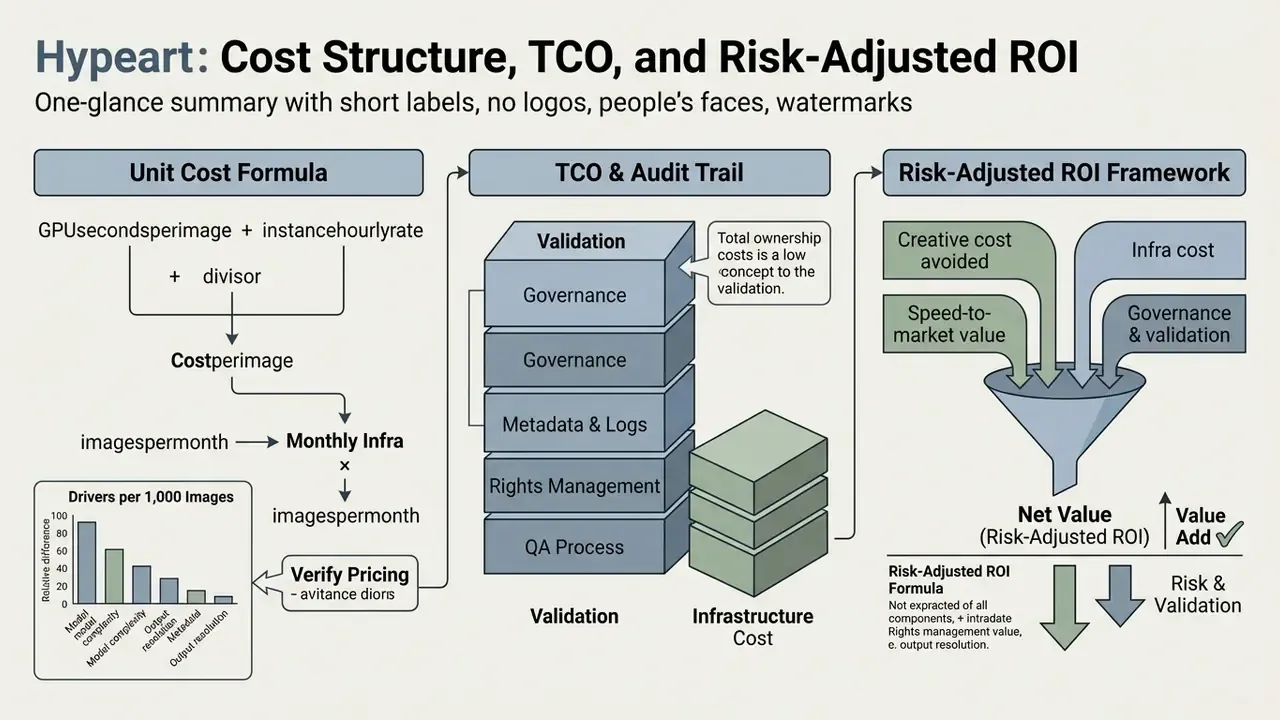
Because Everywhere Inference charges GPU-seconds rather than seats or credits, cost modelling rests on three measurable variables: seconds per image, images per month, hourly instance rate. Published per-second rates move, so the framework below is parameterised on purpose.
Unit cost formula:
cost_per_image = (GPU_seconds_per_image x instance_hourly_rate) / 3600

monthly_infra  = cost_per_image x images_per_month
Illustrative cost drivers per 1,000 images:
| Variable | Fast configuration | Quality configuration |
|---|---|---|
| Model | SDXL-Lightning / SD 3.5 Large Turbo (about 4 steps) | FLUX.1-schnell / SDXL (full step count) |
| Typical accelerator | L40S | A100 / H100 |
| Relative GPU-seconds per image | Baseline (1x) | 4x to 10x baseline |
| Relative infra cost per 1,000 images | Lowest | Materially higher |
| Best fit | High-volume thumbnails, A/B variants, drafts | Hero imagery, print, brand-critical assets |
Confirm current per-instance pricing in the Gcore customer portal before budgeting. The table expresses relative magnitude, not quoted rates.
Risk-adjusted ROI framework:
Risk-Adjusted ROI = (Creative cost avoided + Speed-to-market value
                     - Infra cost - Governance & validation cost
                     - Expected residual risk cost)
                    / (Infra cost + Governance & validation cost)
where Expected residual risk cost =
      sum of (probability of event x financial impact)
      across IP claims, regulatory findings, and brand-damage events
Three cost lines almost never appear in vendor-side business cases, and they belong in yours: validation labour (golden-prompt re-runs, human review hours per approved asset), governance overhead (logging infrastructure, DLP integration, policy maintenance), and residual regulatory exposure (the cost of mislabelled synthetic media under EU AI Act transparency rules). A workflow that trims agency spend while adding two compliance reviewers per campaign can still be net positive. Only a model that names those lines can prove it.
Gcore AI Platform Roadmap and Feature Evolution
Gcore has widened its generative AI ecosystem steadily since the generator launched in November 2023, moving from one fine-tuned Openjourney model on IPU hardware to a multi-model GPU inference catalogue with custom deployment. Engineering milestones signalled publicly on the platform's development track include:
- Native Image-to-Image generation.Prompting with reference visual inputs directly in the web UI, not only through API calls.
- Advanced image editing.In-console post-processing, including region-level correction and asset clean-up.
- Advanced canvas control.Fine-grained regional masking and structural control layers, ControlNet-style conditioning.
- Extended control functionality.Broader exposure of sampler, seed, and guidance parameters in the interface, which happens to improve reproducibility for audit purposes.
- Turnkey API access.One click promotion from the web UI to dedicated serverless endpoints, plus integration with external services, without manual container configuration.
For risk owners this roadmap is not a marketing footnote. Every item on it expands the attack surface and the governance surface at the same time. Reference-image upload opens a new data-egress path. Canvas editing introduces manipulation capability that may trigger extra disclosure under synthetic-media rules. Plan the policy update alongside the feature adoption, not six weeks after it.
FAQ: Frequently Asked Questions About Gcore AI Image Generator
Which Aspect Ratios and File Formats Are Supported?
The web console workflow centres on four presets, 1:1 square, 16:9 landscape, 2:3 portrait, and 3:2 wide, with a 1024×1024 baseline for SDXL-class models. Exports come as PNG for lossless publishing and JPEG for lighter payloads. Through the Everywhere Inference API, dimensions are set programmatically within each model's supported range, and images return as base64 strings or binary URLs.
Does the Generator Support Image Text Capabilities?
The Gcore AI Image Generator parses complex text descriptions to synthesise subjects, background elements, and artistic styles. Rendering legible text characters inside generated images, though, remains a known weakness of diffusion models. For precise typography, brand logos, or text overlays, finish the asset in a design tool. See our reviews of AI image enhancers and online photo editors for suitable workflows.
Can I Edit or Inpaint Images Inside the Free Web Interface?
No. The free web UI has no inpainting, outpainting, background eraser, or Image-to-Image controls, and no batch queue. Element replacement and canvas expansion need either an external editor or a custom diffusion pipeline deployed on Gcore GPU instances through the API. Native Image-to-Image and advanced editing sit on the platform's development track.
Are Generated Images Watermarked?
Downloads from the free web generator are not watermarked. That is a separate matter from regulatory watermarking. EU AI Act transparency obligations effective 2 August 2026 require machine-readable marking of generative AI outputs and visible disclosure for deepfake-style content, so commercial publishers in scope must add their own marking and disclosure layer.
Does Gcore Indemnify Customers Against Copyright Claims on Outputs?
No public, output-level IP indemnity has been identified. Gcore's terms state that customers retain rights in their content and that Gcore disclaims liability for IP infringement arising from customer content or undocumented use. Institutions that need indemnification should negotiate it contractually and confine production use to permissively licensed models such as FLUX.1-schnell.
What Is the Guaranteed Generation Latency?
There is no published latency SLA. Gcore describes outputs as arriving in seconds, and third-party testing reports variability driven by cluster load, model size, output resolution, and distance to the nearest edge node. Teams with hard latency requirements should provision dedicated GPU instances and measure against their own prompt set rather than trusting a marketing number.
Is Gcore AI Image Generator Connected to AI Video?
Gcore AI Image Generator works primarily as a text-to-image synthesis tool inside Gcore Cloud. Gcore does offer separate AI video services for content moderation, automated subtitle generation, and video super-resolution under Everywhere Inference, but there is no public workflow that fuses image generation and ai video generation into one automated pipeline. Readers exploring motion workflows can consult our guide to AI video generators and our comparison of free AI video generators.
Does It Work on Mobile Browsers?
The web generator runs in most modern mobile browsers. Rendering and interface handling are more comfortable on a desktop display, especially when you are iterating over small batches and squinting at outputs for artifacts.
Where to Find Technical Support and Documentation
Technical support for Gcore services is available 24/7 through the Gcore Help Center, customer portal tickets, chat, email ([email protected]), WhatsApp, regional phone lines, and official Discord channels. Technical specifications and API guides live in the official documentation portal (docs.gcore.com), and the Help Center hosts a user community for product questions and feature suggestions.
A Safe Next Step for Regulated Teams
If you are evaluating this stack inside a bank or a supervised fintech, keep the first move small and reversible. Pick one low-exposure use case, internal presentation backgrounds work well, run it on a permissively licensed model, and log every field in the schema above from day one. Then re-run your golden prompt set after the first model version change and see whether your evidence chain actually holds. If it does, widen the scope. If it does not, you learned that for the price of a few GPU-seconds rather than a regulatory finding.
Open questions we cannot close from public sources: quantified quality metrics, a contractual latency commitment, and output-level IP indemnity. All three have to be settled in your own testing and your own paperwork.
Appendix A: Superseded Formulations (Editorial Record)
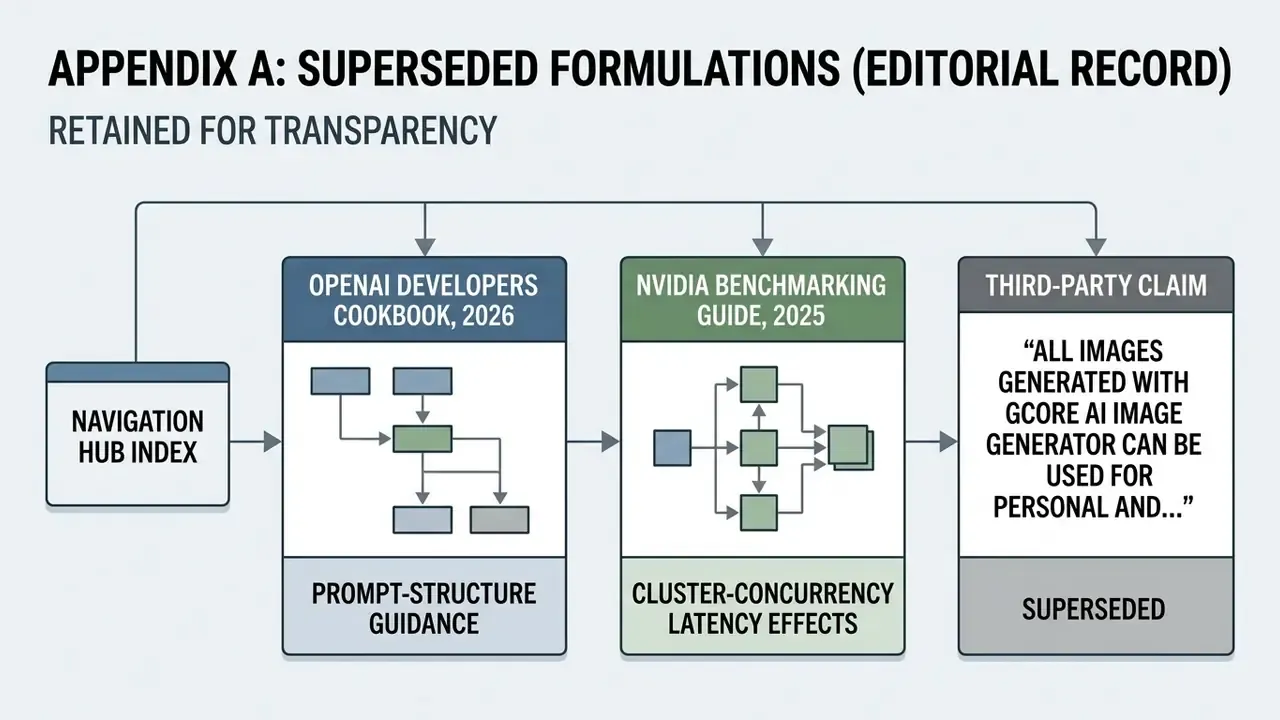
Retained for transparency. The main text carries the corrected versions.
- An earlier draft attributed prompt-structure guidance to OpenAI Developers Cookbook, 2026 and image-readiness criteria to OpenAI Eval Guidance, 2026. Both attributions were replaced with a Gcore-specific independent review (TechyPulse, 2024) and general quality-benchmark language, because the original citations could not be verified within the research set.
- An earlier draft attributed cluster-concurrency latency effects to NVIDIA Benchmarking Guide, 2025. The observation stays, as a general operational statement without vendor attribution.
- The third-party claim that "all images generated with Gcore AI Image Generator can be used for personal and commercial purposes without additional licensing" is recorded here as inaccurate. Commercial rights are determined per model licence, as set out in the licensing section above.