If you sit in risk, compliance or finance operations, the relevance is narrower than it looks. Any workflow that uploads a picture to a third-party model is a data-transfer decision first and a creative decision second. That is why this guide treats prompt extraction as a controllable pipeline, not a party trick.
Executive Summary for Decision-Makers
- The technology is auditable, not magic. An image-to-prompt pipeline is a deterministic chain: vision encoder (CLIP / BLIP-2 / GPT-4o Vision / DINOv2), feature extraction across roughly twelve caption dimensions, language decoder, then a structured text prompt. Every step can be logged, versioned and reviewed, which makes the workflow compatible with model-risk and model-validation controls.
- Manual descriptions lose measurable information. Benchmarks show that replacing an image with a human-written text description costs real downstream utility, and that detailed captions outperform short ones. Automated extraction plus manual refinement is currently the strongest combination.
- The main residual risks are legal, not technical. Uploading PII, biometrics or unreleased commercial source material to public endpoints creates exposure under the EU AI Act and GDPR, while purely machine-generated outputs are ineligible for U.S. copyright registration. Procurement must validate API security controls, retention windows and provenance metadata (C2PA) before rollout.
Quick actions: use English-language output, store every prompt in a version-controlled registry with a JSON audit record, and adapt syntax per target model (weighted keywords for Stable Diffusion, parameter flags for Midjourney, natural-language paragraphs for GPT Image and Nano Banana Pro).
Who This Guide Is For, and How to Read It
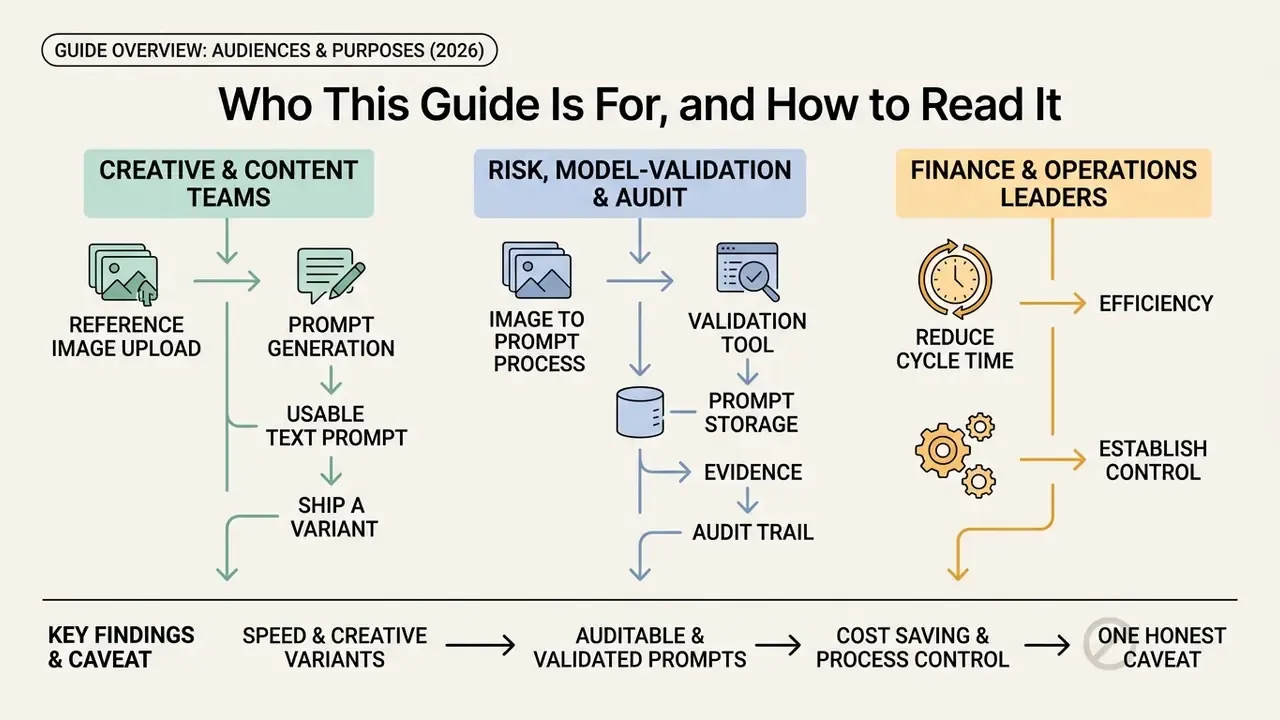
Three audiences tend to arrive at this page with different questions. It helps to name them up front.
Creative and content teams want speed: upload a reference image, get a usable text prompt, ship a variant. Sections 4 through 12 answer that directly, including copy-paste formulas and per-model syntax.
Risk, model-validation and audit functions want evidence. They care about what was uploaded, which encoder produced the description, who approved it, and whether the output can be reproduced next quarter. Sections 6, 15, 19 and 21 carry that weight.
Finance and operations leaders want the boring version: does this reduce cycle time, and what does control actually cost? Sections 13, 15, 16 and 18.1 cover volume tiers, hidden compliance overhead and document-heavy workflows.
One honest caveat before we start. Vendor marketing in this category is loud, and measured accuracy benchmarks are rare. Where a claim is unverified, this guide says so instead of dressing it up.
What Is an Image to AI Prompt Generator and Why You Need One
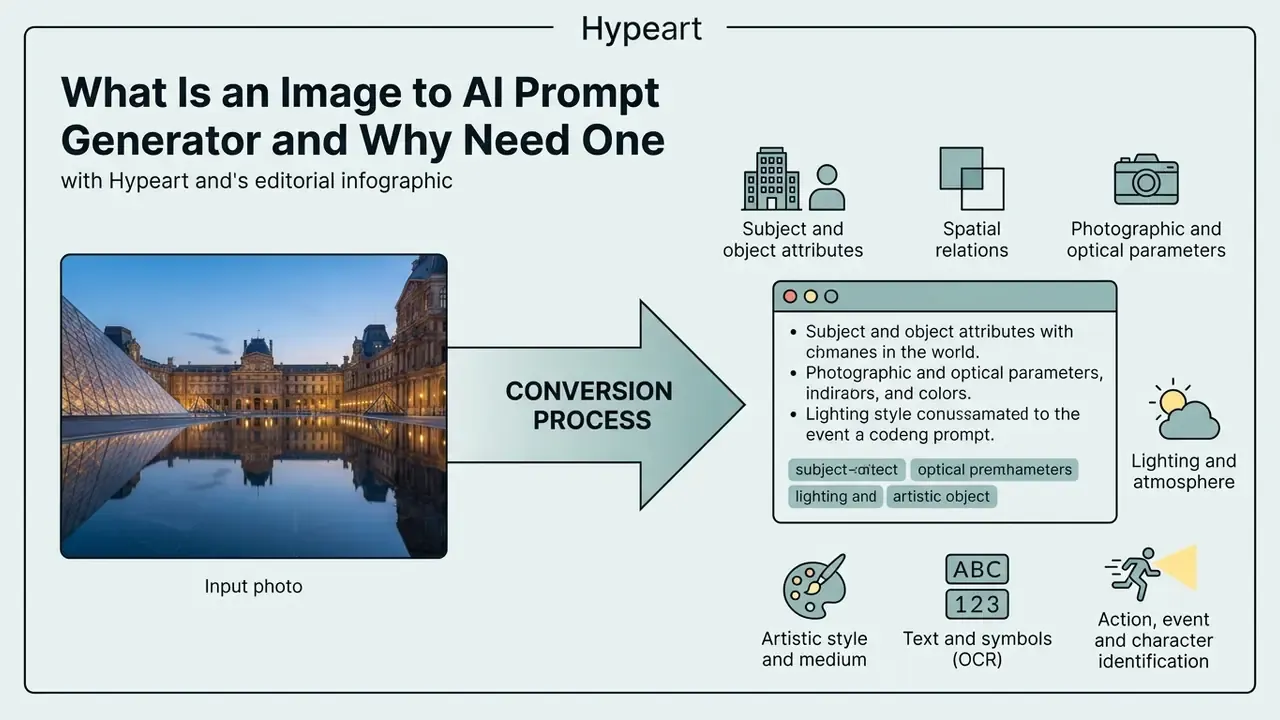
An image to ai prompt generator is an automated tool that converts a visual file into a structured text prompt for downstream generative models. It operates by extracting visual features through vision encoders (such as CLIP, BLIP-2, or GPT-4o Vision) and decoding them into structured natural language. This reverse-engineering process enables creators and systems to analyze ai generated images, replicate specific artistic styles, and feed accurate instructions into an image generator. By using an ai image to prompt generator, teams transform an existing reference image into a standardized ai image to text prompt that preserves spatial layout, lighting, and subject attributes across production cycles.
«Detailed image captions substantially improve the downstream performance of large vision-language models compared with short descriptions.»
Architecturally, every tool in this category is the same three-stage chain: a vision encoder that turns pixels into embeddings, a projection or alignment layer that maps those embeddings into the language model's token space, and a language decoder that emits the prompt. GPT-4o accepts images by URL or Base64 and can reason over multiple images in a single request. BLIP-style systems pair an image encoder with a language decoder, while LLaVA-style systems connect a frozen vision encoder to an LLM through a learned projection. Research on prompt inversion formalizes the same pipeline: CLIP-based encoding, keyword extraction, modifier extraction, then LLM prompt generation.
Worth stressing, because it changes the governance conversation: nothing here is opaque by nature. Each stage emits an artifact you can store.
Which Image Elements AI Converts into a Prompt
An ai image to text prompt system breaks down a visual input into distinct semantic, structural, and aesthetic dimensions. Modern multimodal benchmarks, such as CAPability (NeurIPS 2025) and CAPEval (2026), establish that vision encoders categorize images across twelve key dimensions:
- Subject and object attributes object categories, counts, material textures, colors, and relative scale.
- Spatial relations foreground-to-background positioning, human-object interactions, and compositional alignment.
- Photographic and optical parameters lens focal length, depth of field, framing (macro, wide-angle, close-up), and camera angle.
- Lighting and atmosphere light source direction, color temperature (golden hour, high-contrast neon), and diffuse versus direct shadows.
- Artistic style and medium medium type (digital illustration, oil on canvas, 3D render), grain structure, and color palette.
- Text and symbols (OCR) embedded typography, logotypes, signage and their placement inside the frame.
- Action, event and character identification what is happening, to whom, and in what narrative context.
CAPEval additionally annotates shot size, light source and shooting angle as separate fields, while FINECAPTION (CVPR 2025) adds camera viewpoint, associative visual effects, shape, materials and texture, facial expression and relative location. Older style-recognition stacks relied on handcrafted descriptors such as SIFT, HOG, LBP and color histograms. Contemporary style classifiers extract higher-level features from CNN backbones such as ResNet, VGG and EfficientNet.
For an image prompt generator used in production, those twelve dimensions double as a QA checklist. If the output misses lighting or spatial relations entirely, the extraction was shallow, and the downstream generation will drift.
When Prompt From Image Beats Writing a Description Manually
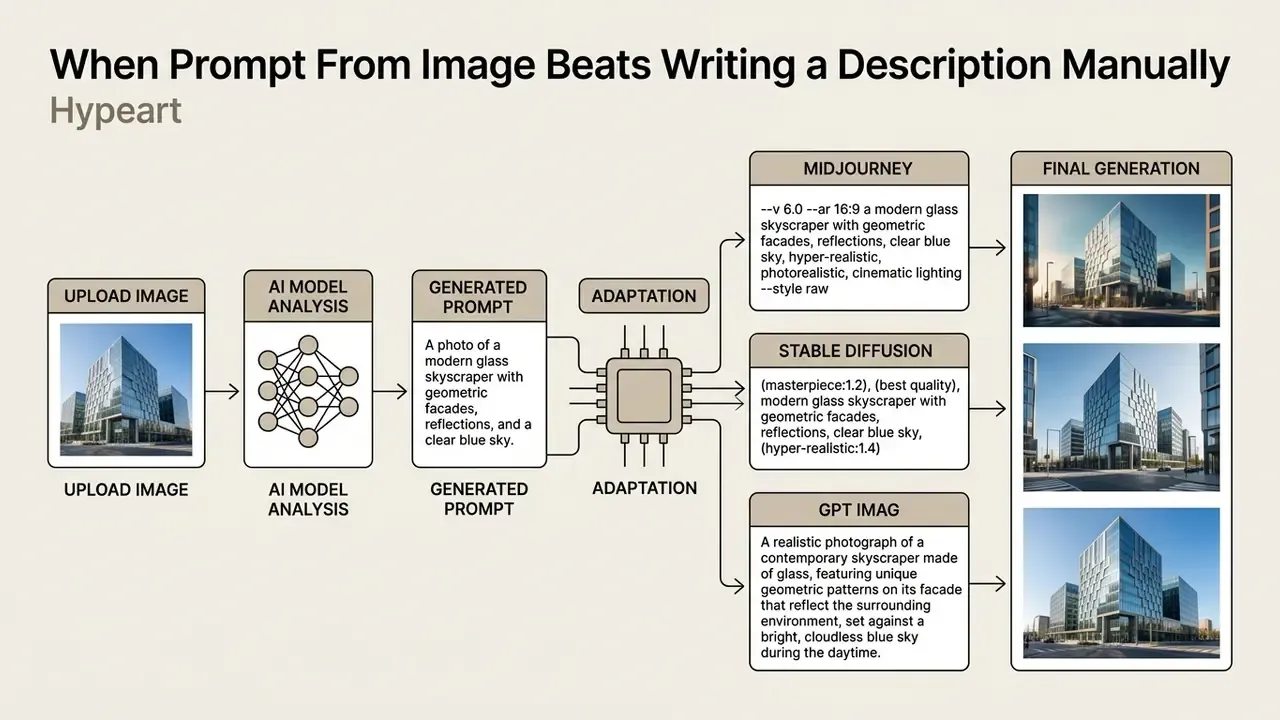
Generating a prompt generator output directly from a reference photo is significantly faster and more reliable than manual phrasing when capturing complex visual styles. Empirical evidence now quantifies the gap rather than merely asserting it.
«Even the strongest multimodal models lose up to 32% of caption utility compared with the original image when solving text-only downstream tasks.»
How to Create an AI Prompt From Image: Step-by-Step Process
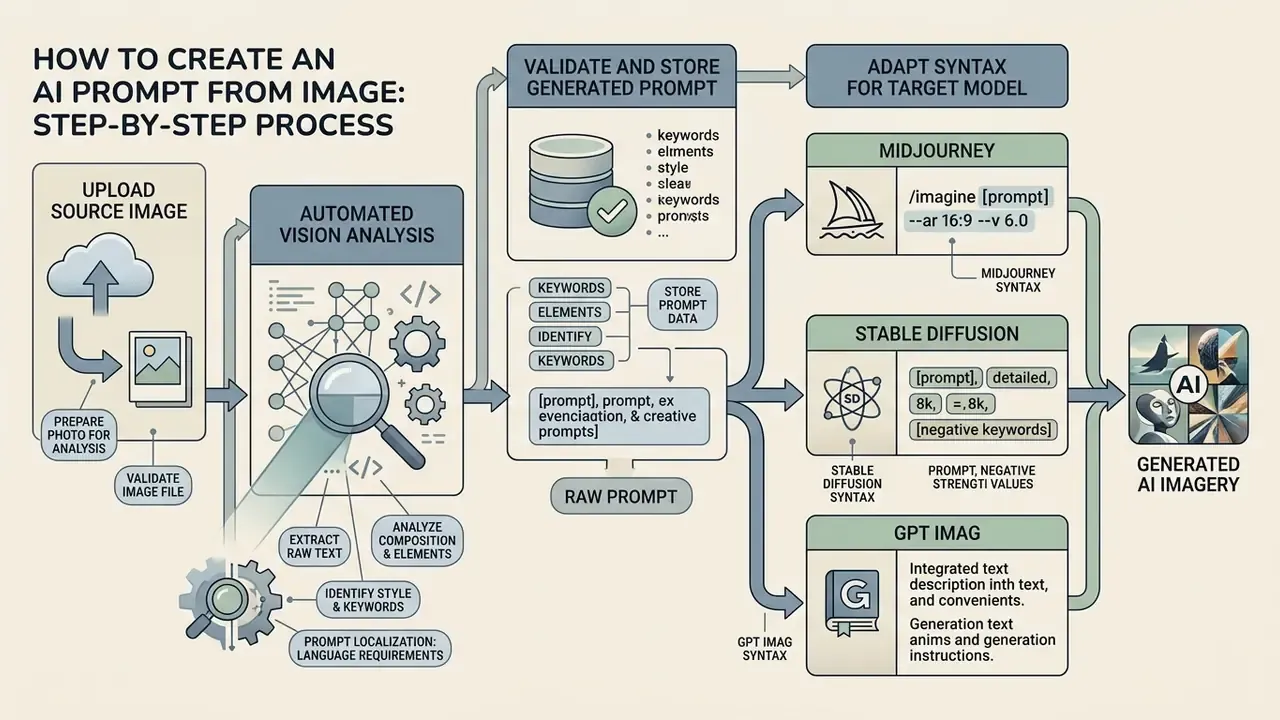
To create an ai prompt from image files, you must upload a source image, run an automated vision analysis, extract the raw text, and adapt the syntax for your target model. This process allows users to convert image to text prompt structures without manually guessing visual parameters. When you run an ai photo to prompt or ai picture to prompt workflow, the underlying system translates pixels into structured descriptors. Following a standardized conversion pipeline ensures that the output is ready to generate prompt scripts for any target AI tool.
Vendor documentation converges on the same sequence: prepare the file, define the intended result, describe visible details, separate constraints from content, assign a role to each reference image, then iterate one change at a time. OpenAI's 2026 image prompting guidance orders the prompt as scene, subject, key details, constraints, and recommends labelled sections for complex requests. Google's Gemini guidance stresses that higher-resolution, correctly oriented, non-blurry images work measurably better before any prompt is written.
Prompt Localization: language requirements
Although a modern interface may run in any language, the core neural architectures (CLIP, T5-XXL) are trained predominantly on English-dominant datasets such as LAION and Common Crawl. When processing a photo through a generator, make sure the final output language is set to English.
If your source notes or keywords were authored in another language, translate them before submitting them to the target model. Otherwise recognition accuracy for styles and professional photographic terminology drops noticeably, and niche terms (for example chiaroscuro, tilt-shift, subsurface scattering) are frequently dropped or mistranslated. A practical pattern: generate in English, then keep a localized human-readable comment field in your prompt registry for internal reviewers.
How to Prepare a Photo or Picture for Analysis
High-quality visual analysis requires clear, high-resolution source images that are free from heavy distortion, compression artifacts, and obscuring watermarks. Rather than citing generic guidance, the requirement can be stated precisely. NIST's face-image quality work (The Specification and Measurement of Face Image Quality, NIST, 2010) names focus and sharpness, brightness and contrast, background consistency, spatial resolution and signal-to-noise ratio as measurable quality factors. Current NIST and OSAC standards continue to treat image quality as a formal technical requirement in identity and forensic workflows. Feature extraction therefore degrades whenever inputs suffer from low contrast, motion blur, or poor signal-to-noise ratios.
«Models hallucinate and omit details when working with low-quality images, which lowers caption-completeness scores.»
Before submitting a photo to an ai create prompt from image tool, crop out irrelevant background elements and ensure the primary subject is fully in focus. Before processing blurry inputs, using tools to unblur image ai free can significantly improve model recognition accuracy, and an AI image enhancer can restore contrast and micro-texture before upload. High-clarity inputs allow the vision encoder to accurately distinguish subtle textures and secondary lighting sources, resulting in higher quality ai prompt descriptions.
Practical minimums used by production teams: longest edge at least 1024 px, no visible JPEG blocking at 100% zoom, correct EXIF orientation, and no watermark overlapping the primary subject. One small operational note from repeated runs: a re-crop usually beats a re-prompt when the subject is ambiguous.
How to Validate and Store the Generated Prompt
Validating a generated prompt requires verifying its descriptive accuracy against the source image and storing it in a version-controlled registry. The governance requirement can be stated with concrete, published practice rather than a vague vendor reference. AWS prescriptive guidance recommends decoupling prompts from application code and keeping them in a centralized prompt store or registry, with version control, defined success criteria, automated testing pipelines, approval workflows and audit trails. OpenAI's deployment guidance recommends covering prompt changes with tests and representative fixtures, and Google recommends running an evaluation dataset with manual review or LLM-as-a-judge scoring before iterating.
Once verified, store the output in a central prompt tool catalog with associated metadata, model parameters, and revision histories to streamline future team workflows. A minimal audit record that satisfies most model-risk reviews looks like this:
{
  "prompt_id": "img2prompt-2026-03-014",
  "created_utc": "2026-03-14T09:22:11Z",
  "source_asset": {
    "asset_hash_sha256": "9f2b...c41e",
    "resolution": "2048x2048",
    "rights_status": "owned_internal",
    "contains_pii": false
  },
  "extraction": {
    "vision_model": "gpt-4o-vision",
    "encoder_notes": "CLIP+DINOv2 fusion for small-object grounding",
    "output_language": "en"
  },
  "prompt_text": "isometric 3D render of a payment terminal, clay material...",
  "target_models": ["sdxl-1.0", "gpt-image-1.5", "gemini-3-pro-image", "midjourney-v6"],
  "human_edits": ["added lens spec", "removed hallucinated logo"],
  "validation": {
    "reviewer": "design-ops@company",
    "eval_set": "brand-consistency-v3",
    "alignment_score": 0.91,
    "status": "approved"
  },
  "provenance": { "c2pa_attached": true },
  "version": 3
}
Two fields in that record do most of the compliance work: rights_status and contains_pii. If neither is populated, an auditor cannot tell whether the upload was permissible, and the prompt becomes an undocumented artifact in your AI inventory.
- Select a clear reference image free of visual noise.
- Upload the file into your chosen image to prompt generator.
- Generate and review the structured text description.
- Copy the text and make targeted edits for the destination AI model.
- Log the prompt, metadata and reviewer in the prompt registry.
How to Refine an Image Prompt for More Accurate Generation
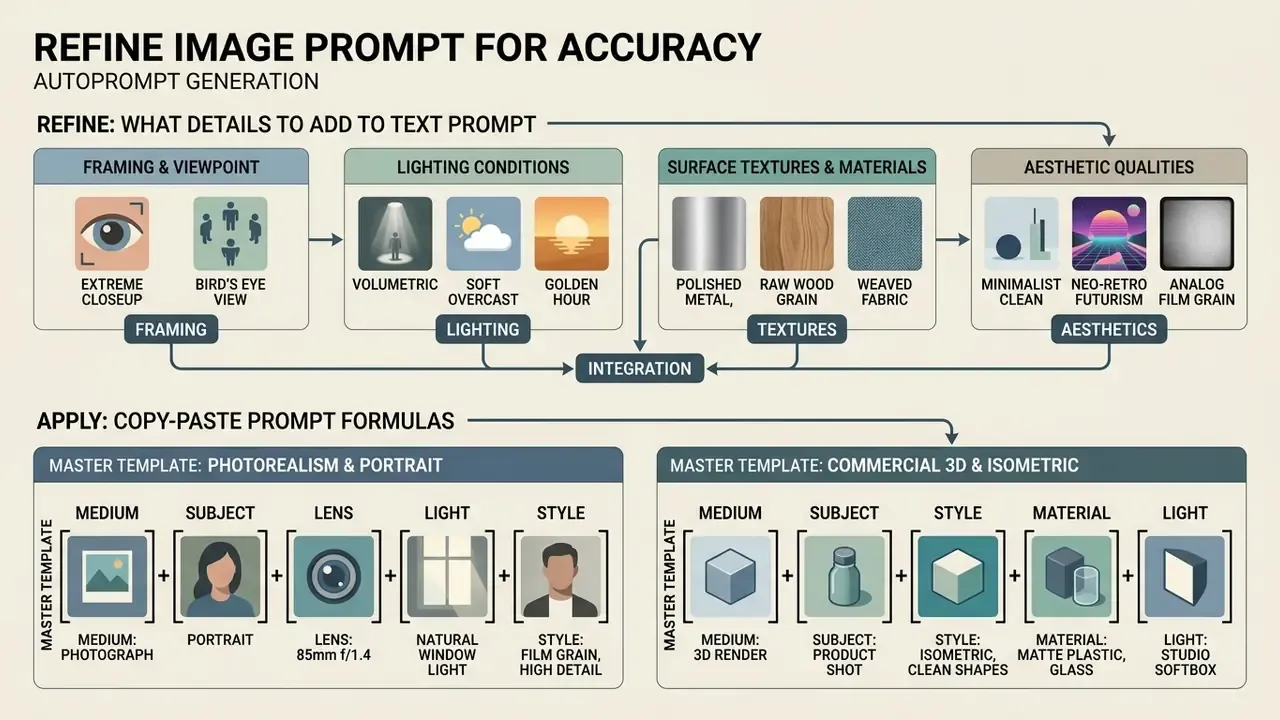
Refining an automatically generated image prompt involves adding concrete camera settings, explicit material descriptions, and targeted stylistic constraints. While automated conversion captures core subjects, fine-tuning the wording ensures that an ai image generator reproduces exact visual nuances. The claim that structured rewriting improves alignment is supported here by named, verifiable work rather than an unattributed conference reference.
«A multi-agent system improves the factual precision of detailed captions by decomposing them into atomic claims and verifying each one with a vision model.»
Peer-reviewed prompt-optimization literature supports the same direction from a different angle. Optimizing Prompts for Text-to-Image Generation (NeurIPS 2023) combines supervised fine-tuning with reinforcement learning to adapt user prompts while preserving intent. Dynamic Prompt Optimizing for Text-to-Image Generation (CVPR 2024) converts plain prompts into higher-quality DF-prompts via RL. Tailored Visions: Enhancing Text-to-Image Generation with Personalized Prompt Rewriting (CVPR 2024) reports stronger alignment and quality than baselines by rewriting prompts from historical user interactions.
By testing modified iterations in your target ai generate pipeline, and the comparison of best AI image generators helps pick the right validation target, you achieve high quality visual consistency across all generated images.
What Details to Add to an Auto-Generated Text Prompt
To elevate a baseline text prompt into a high quality ai descriptor, explicitly inject precise environmental and optical keywords. OpenAI's model documentation recommends adding specific details across four main categories:
- Framing and viewpointspecify explicit shots, such as
macro close-up,eye-level framing,low-angle perspective, orcinematic wide shot. - Lighting conditionsreplace generic terms with descriptive lighting, such as
volumetric rim lighting,soft diffuse studio light, orgolden hour backlight. - Surface textures and materialsdetail physical characteristics like
brushed anodized aluminum,subsurface scattering skin effect, orcoarse linen weave. - Aesthetic qualitiesadd stylistic tokens such as
fine film grain,35mm photograph, oranalog color grade.
OpenAI's GPT Image prompting guide adds a further layer for difficult scenes: state composition and scale explicitly, and name atmosphere and color for wide, cinematic, low-light, rain or neon setups.
Copy-Paste Prompt Formulas (Prompt Master Templates)
Use the following structures to manually upgrade the raw text returned by a generator. Replace bracketed slots and delete parameters your target model does not support.
Photorealism and portrait photography:
[Subject description], shot on 35mm lens, f/1.8 aperture, volumetric studio lighting, fine skin texture, detailed background of [setting], color graded in cinematic teal and orange --ar 16:9Commercial 3D and isometric graphics:
Isometric 3D render of [subject/object], clay material, soft shadows, vibrant pastel color palette, clean white background, Octane Render, 8k resolutionConcept art and stylization:
Digital concept art of [subject], painted in the style of [movement/medium], dramatic rim light, coarse brush strokes, atmospheric depth, matte finish --stylize 250Product and e-commerce packshot:
Studio packshot of [product], centered composition, seamless light-grey backdrop, three-point softbox lighting, crisp specular highlights, shallow depth of field, no text, no logo --ar 4:5Editorial or infographic layout (for GPT Image or Nano Banana Pro):
Create a [format: ad / UI mock / infographic] for [use case]. Background: [scene]. Subject: [subject]. Key details: [materials, colors, typography]. Constraints: keep the top-right corner as negative space for a logo, render the exact text "[TEXT]" in quotes, do not add extra elements.
Why the Same Prompt Produces Different Results Across AI Models
Identical text prompts produce distinct visual outputs across different models because each platform utilizes unique text encoders, conditioning mechanisms, and latent diffusion architectures. Stable Diffusion 2.0 switched to OpenCLIP ViT-H, altering how prompt tokens map to latent vectors compared with earlier versions, and Stability AI explicitly warns that prompting techniques carried over from earlier checkpoints may behave differently. SDXL uses two-stage generation (base plus refiner) with image-size and micro-conditionings, whereas native multimodal models process prompt context as direct natural language paragraphs. Stable Diffusion 3 loads three separate text encoders, CLIP-L, CLIP-G and a 4.7B-parameter T5-XXL, and the SD3 paper notes that dropping T5 reduces memory with only a small loss in text adherence. Understanding these architectural variations enables engineers to adapt raw prompts effectively across diverse ai tools.
«Fourteen million images show that specific prompt styles and hyperparameter values correlate with generation artifacts and errors in Stable Diffusion.»
The practical cross-model adaptation rules follow directly from the architecture. Keyword-and-weight pipelines expect explicit prompt and negative_prompt fields plus external control modules. Native multimodal systems expect plain-language sequencing, indexed reference roles and direct exclusions stated inside the sentence.
Which AI Image Generators to Use an Image-Derived Prompt With
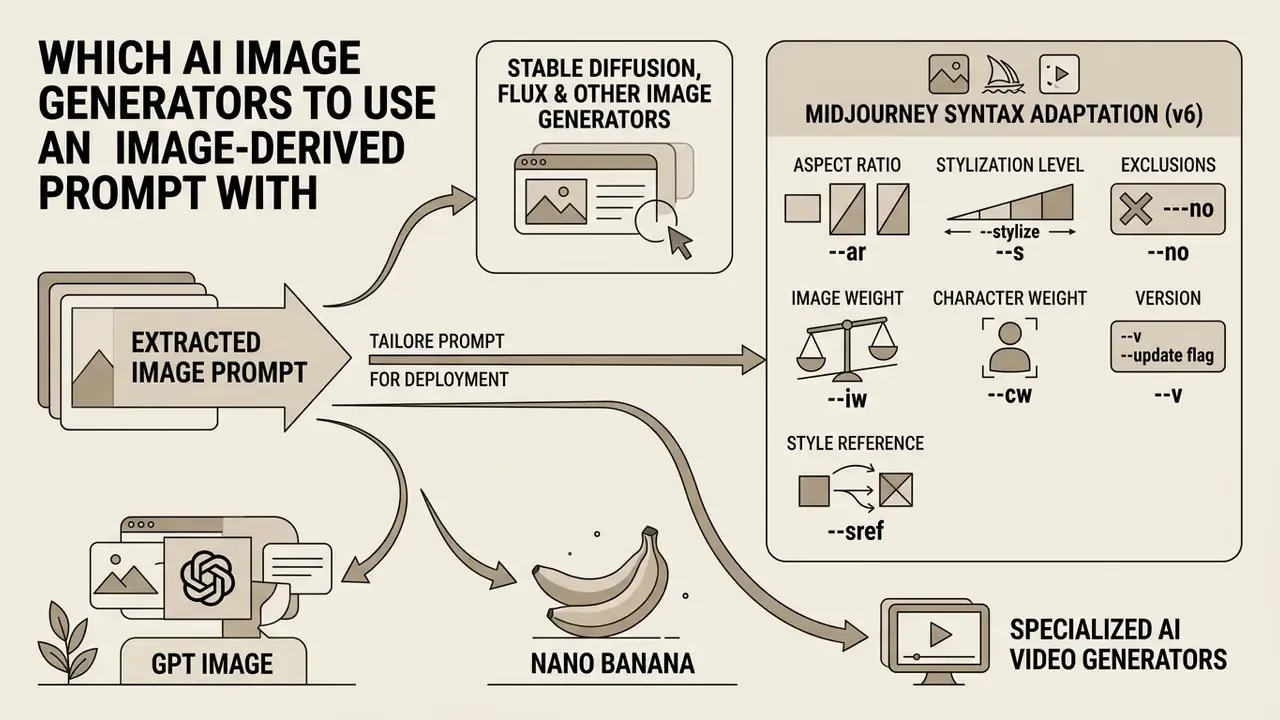
Extracted image prompts can be tailored for deployment across major platforms including stable diffusion, gpt image, nano banana, Midjourney, and specialized ai video generators. Each target ai model requires specific syntax formatting and token density to interpret descriptions accurately. Tailoring the output structure to match the destination image model prevents interpretation errors and optimizes rendering quality.
Prompts for Stable Diffusion, FLUX and Other Image Generators
Stable Diffusion models perform best when prompts follow a structured keyword sequence complemented by weight multipliers and negative prompts. Models like SDXL utilize weighted syntax, such as (photorealistic:1.2) or [blurred background], to emphasize critical visual elements. Diffusers documents emphasis and de-emphasis through +, -, (text), (text:number) and []. In contrast, Stable Diffusion 3 enforces a 256-token limit on its T5-XXL text encoder, requiring concise descriptors. Notably, modern architectures like FLUX.1 do not natively expose a negative_prompt parameter in their standard execution pipelines, so users must state exclusions directly within the main text description.
Adapting the Prompt to Midjourney Syntax (v6)
Unlike the natural-language interfaces of native multimodal models, Midjourney expects a descriptive sentence followed by control parameters (flags) appended at the end of the text:
A converted prompt therefore changes shape per destination. (cinematic portrait:1.3), 35mm, volumetric rim light, negative prompt: text, watermark for SDXL becomes cinematic portrait, 35mm lens, volumetric rim light --ar 4:5 --s 250 --no text, watermark --v 6.0 for Midjourney, and a single flowing paragraph with an explicit "keep everything else unchanged" clause for GPT Image.
- Aspect ratio (
--ar) - sets the frame format, for example
--ar 16:9for landscapes or--ar 4:5for social feeds. - Stylization level (
--stylizeor--s) - values from
0to1000govern how far the model drifts from the literal text toward its own aesthetic defaults. - Exclusions (
--no) - functions as a negative prompt, for example
--no text, blur, watermark. - Image weight (
--iw) - sets how strongly an attached reference image influences the result, typically from
0to3.0. - Character weight (
--cw) - controls how much of a referenced character is preserved (face only versus full outfit and framing).
- Style reference (
--sref) and version (--v) --sref [url]transfers the aesthetic of a reference image, and--v 6.0pins the model generation so results stay reproducible across a campaign.
Nano Banana, Nano Banana Pro and GPT Image: What to Account For
Native multimodal models such as Nano Banana (Gemini's image capability), Nano Banana Pro (Gemini 3 Pro Image, introduced 20 November 2025), and GPT Image interpret full natural language paragraphs more effectively than comma-separated keyword stacks. Nano banana pro handles complex visual tasks, precise text rendering, advanced localization and brand consistency across indexed inputs labeled as Image 1 or Image 2. Google AI Studio documents Nano Banana with text and image input, a 65,536-token limit and 1K, 2K or 4K output options. GPT Image expects direct instructions regarding composition, intended output format, and preservation rules for existing elements, including background="transparent" combined with output_format="png" or "webp" when transparency is required. To evaluate competitive model options, see the overview of available tools.
| Parameter | Stable Diffusion (SDXL / SD3) | Midjourney v6 | GPT Image | Nano Banana Pro (Gemini 3 Pro Image) |
|---|---|---|---|---|
| Syntax format | Weighted keywords, tags, negative prompts | Natural language plus parameter flags (--ar, --s, --no) | Natural language paragraphs, explicit rules | Structured natural language, compositional tags |
| Reference image handling | External modules (ControlNet, IP-Adapter) | Image prompts via URL, --iw, --cw, --sref | Indexed multi-image inputs (Image 1, Image 2) | Direct multimodal role assignment |
| Manual refinement effort | High (weight tuning, step counts) | Medium (flag value tuning) | Low (direct conversational refinement) | Medium (aspect ratio and style parameter tags) |
| Style parameters | Embeddings, LoRAs, weighted tokens | --s, --personalize, style references (--sref) | In-prompt descriptive text | Native style_ids and preset parameters |
| Negative prompting | Native field (absent natively in FLUX.1) | --no flag | Inline exclusions ("do not add…") | Inline exclusions and constraints |
| Token or length limits | 256 tokens on SD3 T5-XXL | Short descriptive sentence plus flags | Long structured prompts supported | Up to 65,536 tokens (Nano Banana) |
The comparative analysis demonstrates a clear shift in prompt engineering approaches. Traditional open-weights diffusion pipelines rely on explicit weight syntax and external control networks. Parameter-driven platforms such as Midjourney externalize control into flags. Modern native multimodal platforms require structured conversational descriptions and index labels.
How to Choose an AI Image to Prompt Generator: Free or Paid
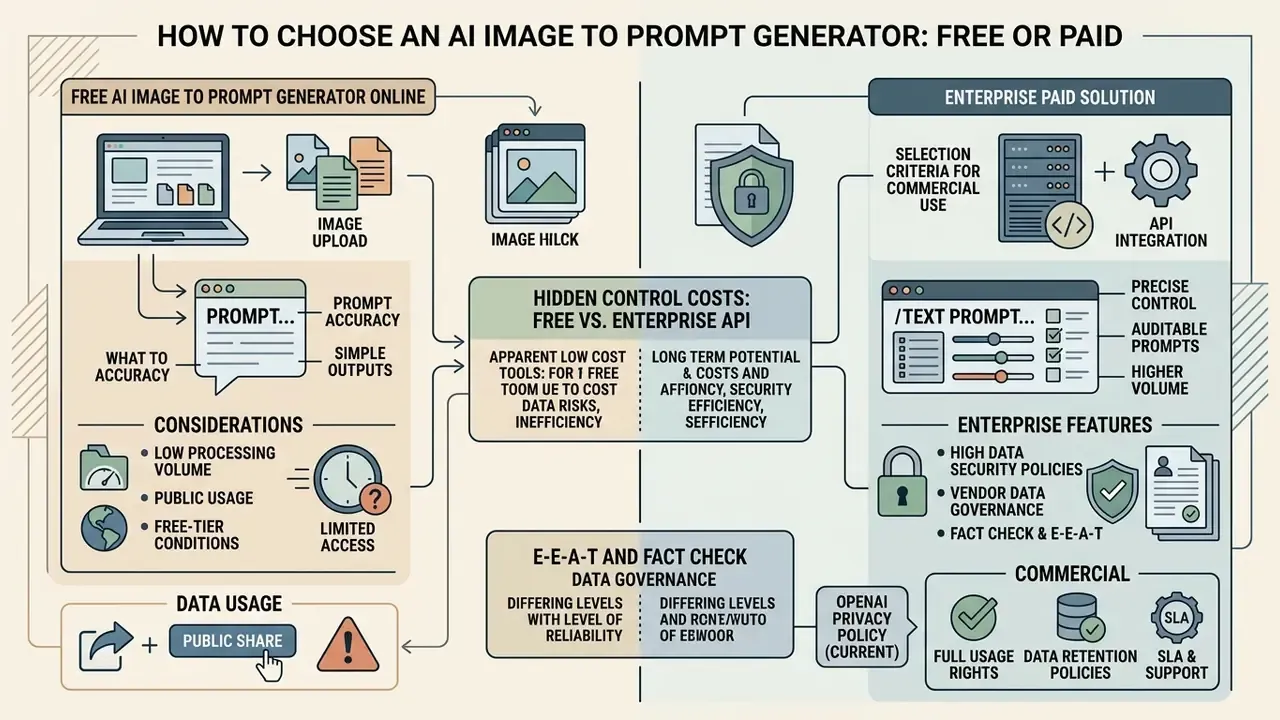
Selecting between a free ai image to prompt generator and an enterprise paid solution depends on required processing volume, data security policies, and API integration capabilities. While a free image to prompt generator ai tool offers immediate accessibility for casual tasks, enterprise workflows demand automated batch processing and audit trails. Evaluating your organization's daily query volume helps determine whether a generator free tier meets your operational needs or if premium ai tools are required.
Published tiers illustrate the spread. Some services allow 10 analyses per day for free and start paid plans around $12.9 per month with 100 monthly credits, higher-quality analysis modes, batch workflows and 30-day history. Others allow a single free homepage analysis per day and reserve their best-quality mode for subscribers.
What to Check in a Free Image to Prompt Generator Online
Selection Criteria for Commercial Use
Commercial procurement of a prompt tool requires verifying API security controls, compliance with data privacy regulations, and explicit commercial license grants. The control expectation is best framed through current, citable guidance. NIST SP 800-228 (2025) defines API protection as risk-factor analysis plus pre-runtime and runtime controls, which translates into concrete procurement checks for runtime authentication, access logging and encryption in transit and at rest.
Furthermore, organizations processing user data must conduct a Privacy Impact Assessment (PIA). The U.S. Department of Commerce PIA Guide (2024) requires one whenever a new system collects or processes PII or BII, and the platform must comply with regional requirements such as GDPR and the EU ePrivacy Guidelines 2/2023 issued by the EDPB. NIST's Privacy Risk Assessment Methodology (PRAM) is a practical framework for prioritizing those risks before deployment.
E-E-A-T and Fact Check: vendor data governance and usage rights
- OpenAI Privacy Policy (current) files and photos uploaded to API endpoints are classified as user content. Data submitted via non-API consumer interfaces may be utilized for model training unless explicit privacy opt-out toggles are activated.
- Commercial usage rights outputs generated through paid API tiers generally grant full commercial ownership to the user. However, OpenAI's Service Terms state that publicly shared images and videos may be reproduced, distributed, modified and displayed by OpenAI to operate and promote the services.
- Data retention cloud-based conversion platforms process free uploads in ephemeral memory, but permanent deletion timelines vary across vendor privacy frameworks. Several image-to-prompt services state that uploads are processed in real time and not permanently stored, while others state that prompts are never logged.
- Free-tier access conditions typical patterns include a personal account requirement, a daily credit allowance (for example 50 credits per day on some video and image platforms), and paid tiers that convert the allowance into large monthly or annual credit pools with priority processing.
Use Cases: Where to Apply AI Prompt From Image
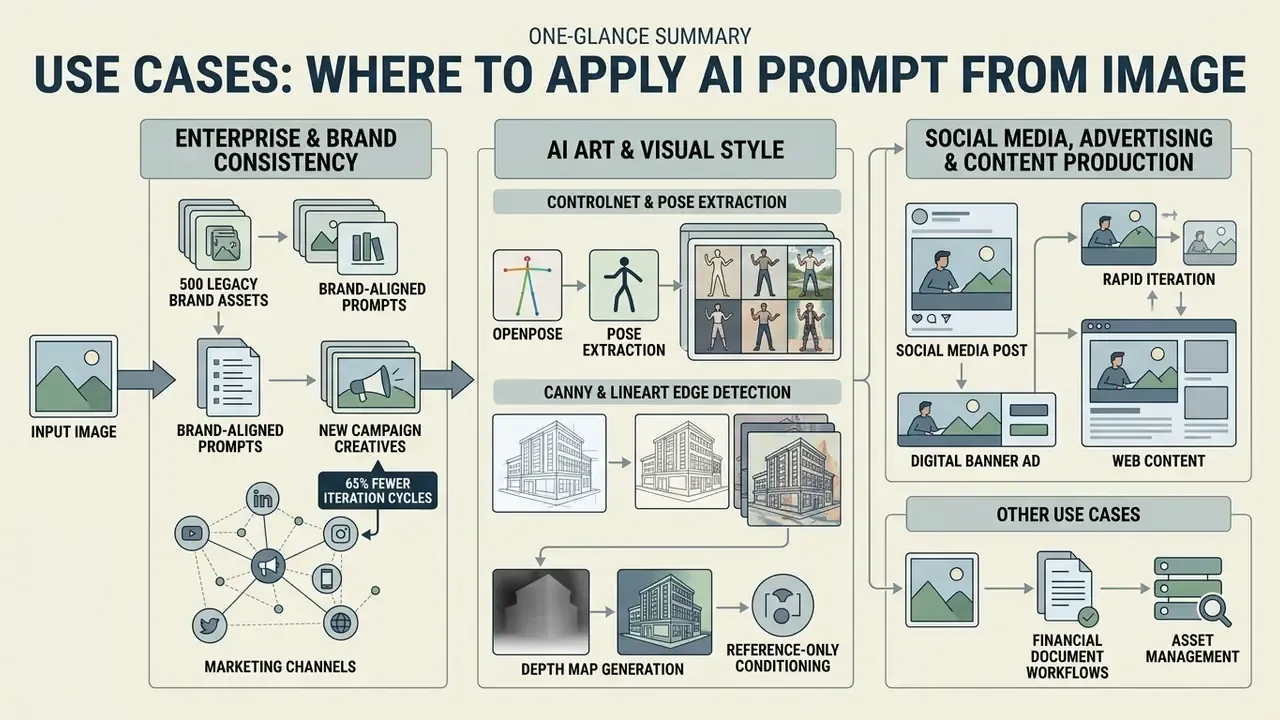
Commercial use cases for image-to-prompt conversion span ai art production, digital advertising campaigns, brand identity maintenance, financial document workflows, and asset prep for ai video generation. Extracting structured descriptors from a reference image allows creative teams to automate asset iteration while preserving core aesthetic parameters. Whether producing marketing materials or building character storyboards, turning visuals into text streamlines creative workflows across digital media platforms.
AI Art and Finding a Repeatable Visual Style
In ai art development, extracting prompts from reference artwork allows artists to deconstruct complex techniques into reusable style templates. The claim that isolating medium, color temperature and brushstroke characteristics enables consistent series generation is now backed by measured results.
«Extracting style keywords from a reference image with a VLM and embedding them into style identifiers improves CLIP R-Precision and CLIP-IQA over baseline methods.»
Artists can capture the exact aesthetic parameters of a master illustration and apply that prompt framework to create unified character portfolios and thematic art sets. The overview of AI art generators lists tools that support style identifiers natively. Prompt-art research describes reusable "prompt templates" that encapsulate a visual concept for customization, and a 2026 benchmark on prompted-artist recognition shows the field now measures whether generated images encode which artist names were invoked. That is a useful reminder: style attribution is technically detectable and ethically consequential.
«Across 6,000 pairwise comparisons, GPT-4o matches or exceeds human-written captions in quality.»
For reference, style-specific pipelines such as Ghibli-style generators illustrate how narrowly a single extracted style recipe can be targeted.
Using ControlNet, Pose Extraction and LineArt
If the goal is to reproduce composition or a character's pose precisely rather than to copy an entire style, a text prompt alone is insufficient. In those cases, the text extracted from an image is combined with ControlNet conditioning maps:
- OpenPose extraction the model isolates a skeletal keypoint map from the reference, guaranteeing that the target generation preserves the pose while the prompt controls wardrobe, lighting and style.
- Canny and LineArt edge detection scans contour lines from the source image. Used to carry 2D sketches, line art and technical drawings into finished 3D or photorealistic renders, and for line-coloring workflows where the outline must stay fixed.
- Depth map generation extracts a scene depth map so foreground and background placement remain exact even when the visual style changes completely.
- Reference-only conditioning applies the reference's texture and palette without geometric constraint. In ControlNet Reference workflows this requires manual tuning of control weight and start or end steps.
Typical stylized-character stacks combine these maps with tag-based style vocabularies (chibi, mecha, cyberpunk, watercolor, pixel, manga, realistic) and a pose editor. That is why anime and character-art platforms expose Text to Image, Image to Image, Pose to Image and Face Swap as separate entry points rather than a single prompt box.
Commercial Use, Privacy and Working with Reference Images
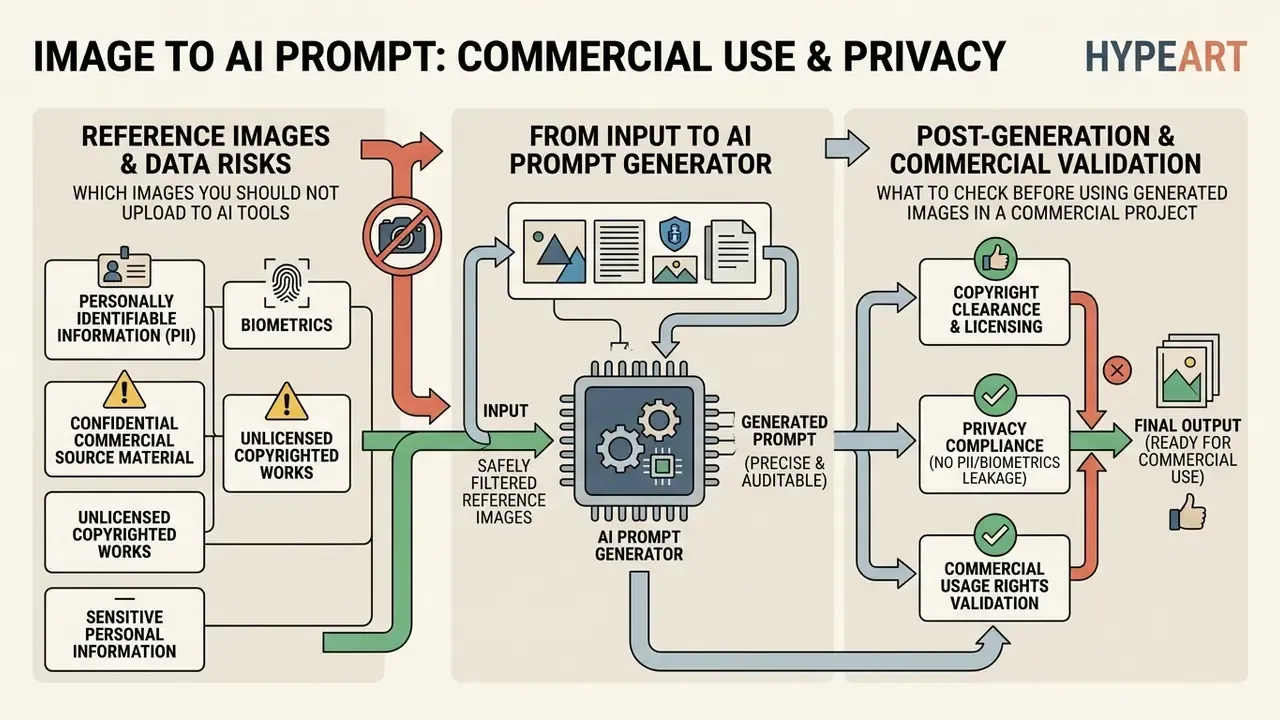
Deploying image-to-prompt workflows within commercial projects requires strict adherence to corporate privacy policies, copyright regulations, and user data safeguards. Uploading a sensitive image to public ai tools can expose proprietary visual assets or violate copyright protections. Where possible, pre-process, crop and upscale assets locally before any external call.
Organizations must establish clear guidelines regarding which generated images and reference files are cleared for automated analysis and commercial deployment. Current U.S. federal guidance instructs users to review prompts and uploaded documents for PII and controlled unclassified information before submitting them to generative AI systems, and the EDPS 2024 guidance sets equivalent expectations for EU institutions.
Which Images You Should Not Upload to AI Tools
To protect personal privacy and corporate IP, specific categories of visual data must never be submitted to public cloud-based AI tools:
- Personally identifiable information (PII) and biometrics high-resolution facial close-ups, ID documents, or medical imagery. Regulation (EU) 2024/1689 (EU AI Act) explicitly prohibits untargeted web scraping of facial images and the building or expansion of facial-recognition databases, and the European Commission's 2025 guidance reiterates this under Article 5(1)(e).
- Confidential commercial source material unreleased product prototypes, internal financial charts, or proprietary engineering schematics. Regulatory and institutional guidance is consistent that confidential or proprietary material should not be entered into publicly available generative AI tools.
- Unlicensed copyrighted works third-party artistic works where rights have not been cleared for commercial training or reverse engineering. If a work is used as input and stored for future use by the system, that can constitute copying and requires the rights holder's permission.
- Sensitive personal information privacy regulators, including the OAIC, advise that organisations should not enter personal information, and especially sensitive information, into public generative AI tools at all.
What to Check Before Using Generated Images in a Commercial Project
Before commercializing assets derived from image prompts, compliance officers must verify copyright eligibility and provenance metadata. AI image detectors are a useful first-pass screen for unlabeled synthetic inputs. The U.S. Copyright Office (2025 Guidance and the Part 2 Copyrightability Report) mandates that copyright protection applies only to human-authored creative contributions. Purely machine-generated outputs are ineligible for registration, and AI-generated material must be disclosed in the application. A 2025 European Parliament study reaches the same conclusion for the EU: purely AI-generated output lacks protection absent meaningful human creative input.
Additionally, commercial workflows should integrate Coalition for Content Provenance and Authenticity (C2PA) metadata standards, such as Content Credentials, cited in U.S. Department of Defense guidance (2025) as a provenance method for multimedia integrity. Provenance metadata tracks visual asset origin and confirms compliance with contributor guidelines on platforms like Adobe Stock, which requires all necessary rights including model and property releases before generative content can be licensed. Where litigation risk around training data is a live concern, see the overview of pending disputes before standardizing a vendor.
Frequently Asked Questions (FAQ) About Image to Prompt
This faq section addresses common operational queries regarding image to prompt conversions, model recognition errors, and platform access requirements. Understanding how vision models interpret uploaded inputs helps users troubleshoot inaccuracies and optimize their generated prompt workflows. Whether managing free tier limitations or adjusting complex text descriptions, these direct frequently asked questions responses provide immediate operational guidance.
Why Can an AI Image to Text Prompt Describe a Picture Inaccurately?
An ai image to text prompt system may generate inaccurate descriptions due to low input contrast, visual noise, or abstract artistic styles that cause domain shift in vision encoders. Language models can also suffer from hallucinations, where internal language priors override actual visual evidence, resulting in missing objects or false style attributions. Rather than quoting an unattributed percentage, the mechanism and the detection method are sourced below.
«ALOHa uses an LLM to extract objects from a caption and open-vocabulary semantic matching, catching hallucinations that COCO-based metrics miss.» Image Captioning Evaluation in the Age of Multimodal LLMs, arXiv:2503.14604 (2025). https://arxiv.org/abs/2503.14604
Published mitigations are consistent: raise input resolution to improve small-object recognition, fuse multiple visual encoders (for example CLIP together with DINOv2) instead of relying on a single backbone, apply visual contrastive decoding and prompt-relevant local attention, and use style-consistent augmentation to reduce domain shift on abstract or heavily stylized inputs.
Do Users Need to Register to Use a Free Generator?
Account registration requirements vary based on the service architecture of the chosen generator free tool. Cloud-hosted enterprise platforms usually require personal account creation, for example a Google or OpenAI login, to track credit quotas and manage API keys. Google Flow, for instance, grants 50 credits per day without a subscription, tied to a personal Google account. Conversely, privacy-focused open-source tools and WebAssembly browser applications allow users to run image-to-prompt conversions completely anonymously, without creating an account or logging into an external server.
What Should I Do If the Generated Prompt Is Not Accurate Enough?
Edit it manually rather than regenerating blindly. First remove hallucinated elements: logos, text, objects that are not in the source. Then add the four detail categories from section [8], covering framing, lighting, materials and aesthetic tokens. Re-shoot or re-crop the reference from a different angle if the subject is ambiguous. Finally, iterate one change at a time and pass the previous output into the next edit, repeating the details that must be preserved. OpenAI's guidance is explicit that batching multiple changes into a single revision makes failures hard to attribute.
Which Image Formats and Sizes Work Best?
Standard JPEG, PNG and WebP are universally supported. Prioritize a clearly defined subject, correct orientation, minimal compression artifacts and a longest edge of at least 1024 px. Screenshots of charts and documents work, but OCR-heavy inputs benefit from higher resolution because text recognition degrades faster than object recognition.
Are Image Generation Errors Retryable?
Distinguish transient from non-transient failures. Rate-limit and server-side errors should be retried with exponential backoff. A user-side error such as image_generation_user_error should not be retried unchanged, so modify the prompt or the input images first. Access-denied responses typically indicate an invalid subscription key or the wrong API endpoint rather than a content problem.
Can One Extracted Prompt Serve Image and Video Models Simultaneously?
Not without rewriting. Image-model prompts encode single-frame composition semantics, while video-model prompts must convert static nouns and adjectives into verbs, temporal order and camera motion. Keep the extracted description as the canonical base record in your registry, then maintain per-model derivations (SDXL, Midjourney, GPT Image, Runway, Sora) as separate versioned children of that record.
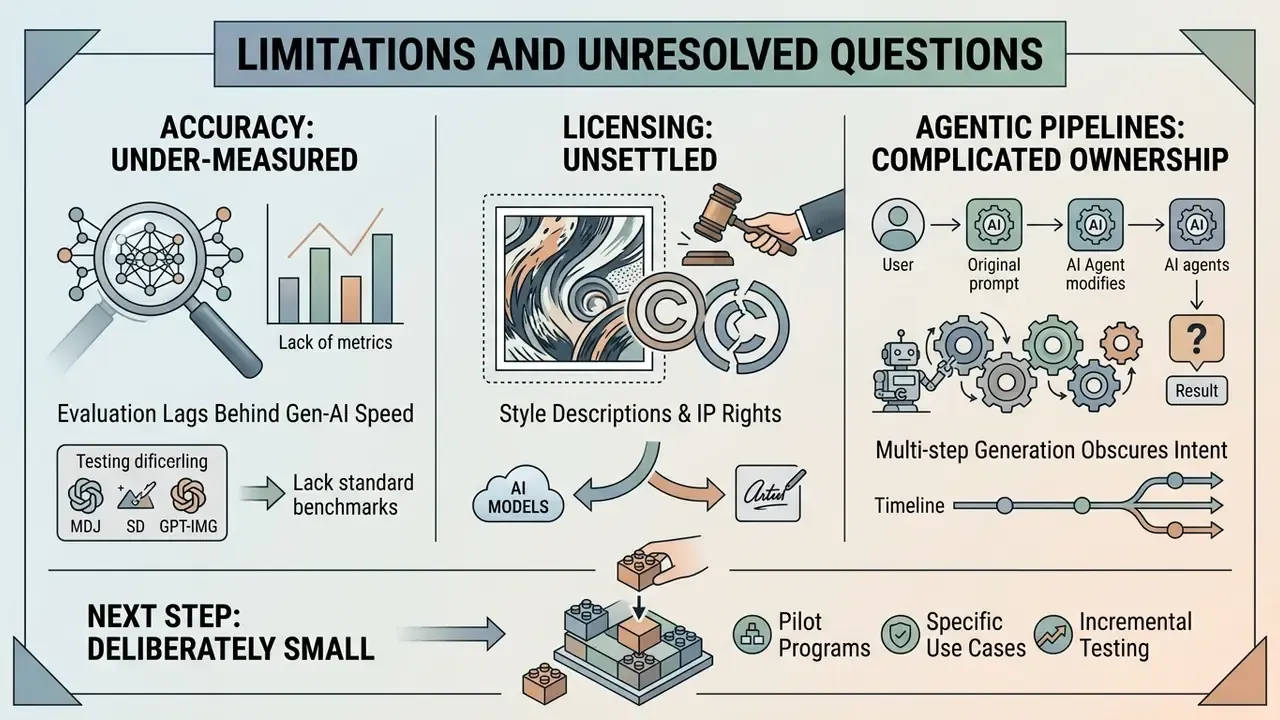
Limitations and Unresolved Questions
Appendix A: Revision Log (superseded formulations retained for transparency)
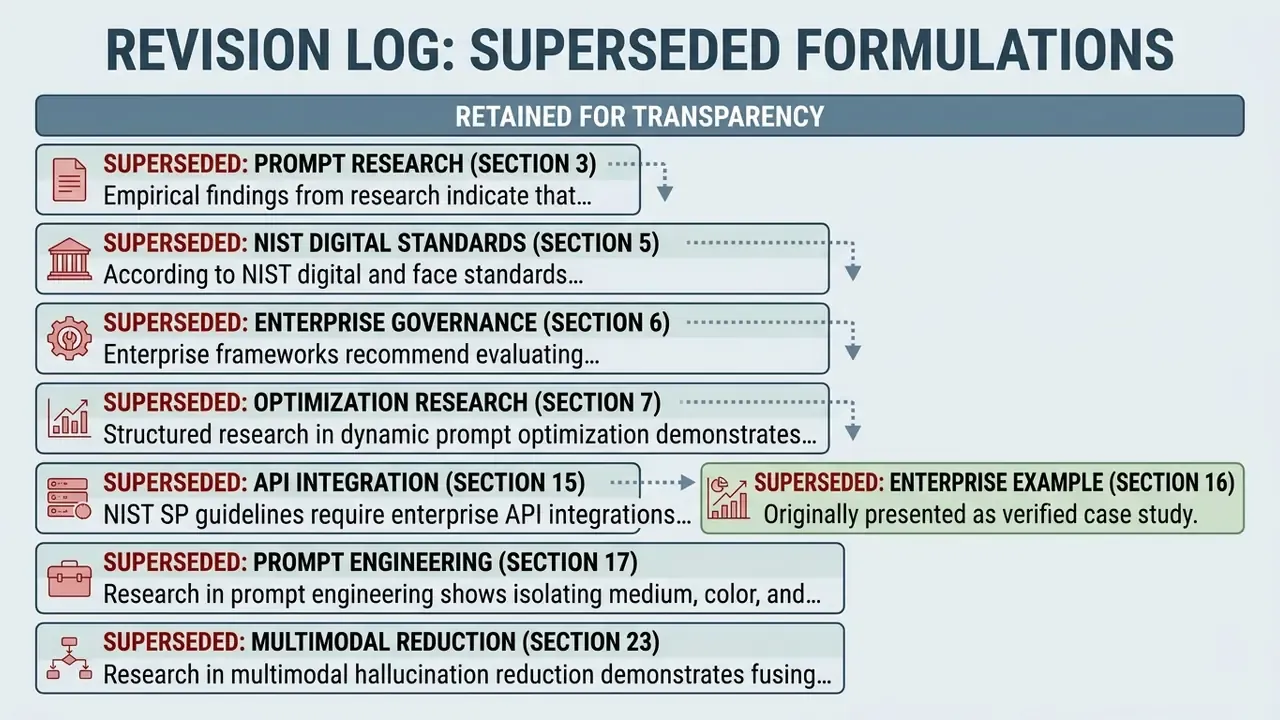
The following original formulations were superseded by the sourced versions above. They are retained here so readers can audit what changed and why.
- Superseded (section 3): "Empirical research on prompt engineering (Dong et al., 2024) indicates that human-written prompts often omit secondary spatial relationships and precise color science descriptions." Reason: no URL, no metric, no methodology. Replaced by CAPTURE (arXiv:2405.19092) and CaptionQA (arXiv:2511.21025) with a quantified 32% utility loss.
- Superseded (section 5): "According to National Institute of Standards and Technology (NIST) face and digital image quality guidelines, feature extraction accuracy degrades significantly when inputs suffer from low contrast, motion blur, or severe signal-to-noise ratios." Reason: the document was not named. Replaced with a named NIST publication (The Specification and Measurement of Face Image Quality, 2010) plus DeCapBench (arXiv:2503.07906).
- Superseded (section 6): "Enterprise prompt governance frameworks from AWS and OpenAI recommend evaluating output prompts against standardized test suites before production deployment." Reason: no specific document. Replaced with the concrete control set (centralized prompt registry, version control, success criteria, automated tests, approval workflows, audit trails) and a JSON audit record example.
- Superseded (section 7): "Research in dynamic prompt optimization (CVPR 2024) demonstrates that structured prompt rewriting improves text-to-image alignment by up to 28%." Reason: no title, authors or URL for the 28% figure. Replaced with CapMAS (arXiv:2412.15484) plus named NeurIPS 2023 and CVPR 2024 prompt-optimization papers.
- Superseded (section 15): "Under NIST SP 800-228 guidelines, enterprise API integrations must support runtime authentication, access logging, and data encryption standards." Reason: paraphrase presented as a mandate. Reframed as risk-factor analysis plus pre-runtime and runtime controls, with the PIA requirement sourced separately.
- Superseded (section 17): "Research in prompt engineering shows that isolating medium, color temperature, and brushstroke characteristics enables consistent series generation." Reason: no source. Replaced with arXiv:2504.15309 reporting CLIP R-Precision and CLIP-IQA improvements, and CapArena (arXiv:2503.12329).
- Superseded (section 23): "Research in multimodal hallucination reduction demonstrates that fusing multiple vision encoders (e.g., combining CLIP and DINOv2) improves small-object recognition and attribute grounding by over 40%." Reason: unsourced percentage. Replaced with the ALOHa methodology (arXiv:2503.14604) and the documented mitigation stack.
- Superseded (section 16): the enterprise example was originally presented as a verified case study. It is now labeled as a composite, illustrative scenario, because no client-attributable evidence was available for the 65% figure.
- Replaced commercial anchors: the previously listed navigation anchors "trump ai image", "trump ai pope", "uncensored ai image", "uncensored ai image generator" and the in-text "uncensored ai generator" link were replaced with topically relevant guides on generator comparison, licensing, provenance detection and governance, because the original anchors conflicted with the regulatory and enterprise scope of this article.