Google AI video generation in 2026 centers on the Veo model architecture, reachable through enterprise APIs, conversational interfaces and a dedicated creative environment. For a bank or a mature fintech, that matters for one blunt reason: marketing, HR and product teams are already generating synthetic media, with or without an approved control path.
Risk leaders therefore evaluate these models not as novelty media toys, but as digital automation engines that need governance, auditability and measurable risk-adjusted returns. The question is rarely "can it render a nice clip". It is "who owns the asset, where did the inputs come from, and can we reproduce the output during an audit".
Executive Summary for Decision-Makers
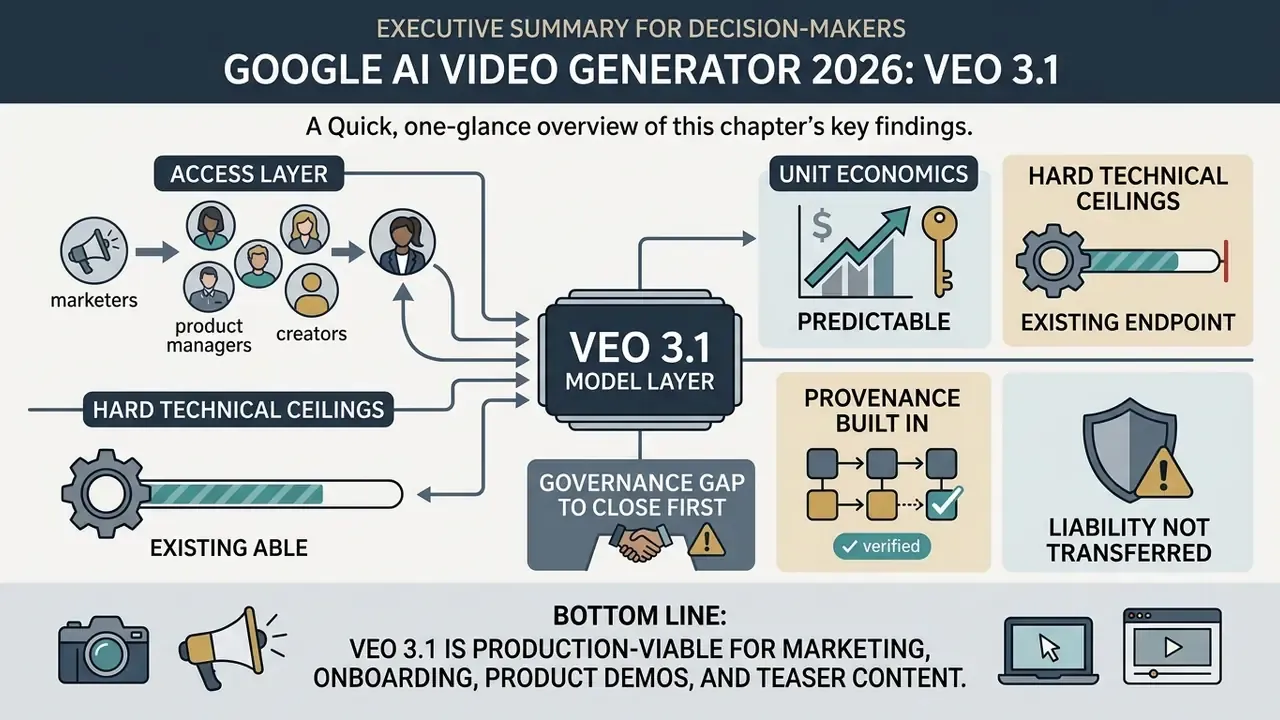
- The model layer is Veo 3.1. It renders 720p, 1080p and 4K clips at 24 FPS with natively synchronized audio, accepts up to three reference images and supports first-and-last-frame conditioning.
- The access layer is fragmented by audience. Flow serves creative production teams, Gemini web and mobile serve conversational drafting, Google AI Studio serves prototyping, and the Gemini API plus Vertex AI serve automated enterprise pipelines.
- Unit economics are predictable. Standard Veo 3.1 generation is billed at $0.40 per 720p/1080p clip with audio and $0.60 per 4K clip with audio. Fast and Lite variants reduce cost to $0.10 to $0.30 and $0.05 to $0.08 respectively.
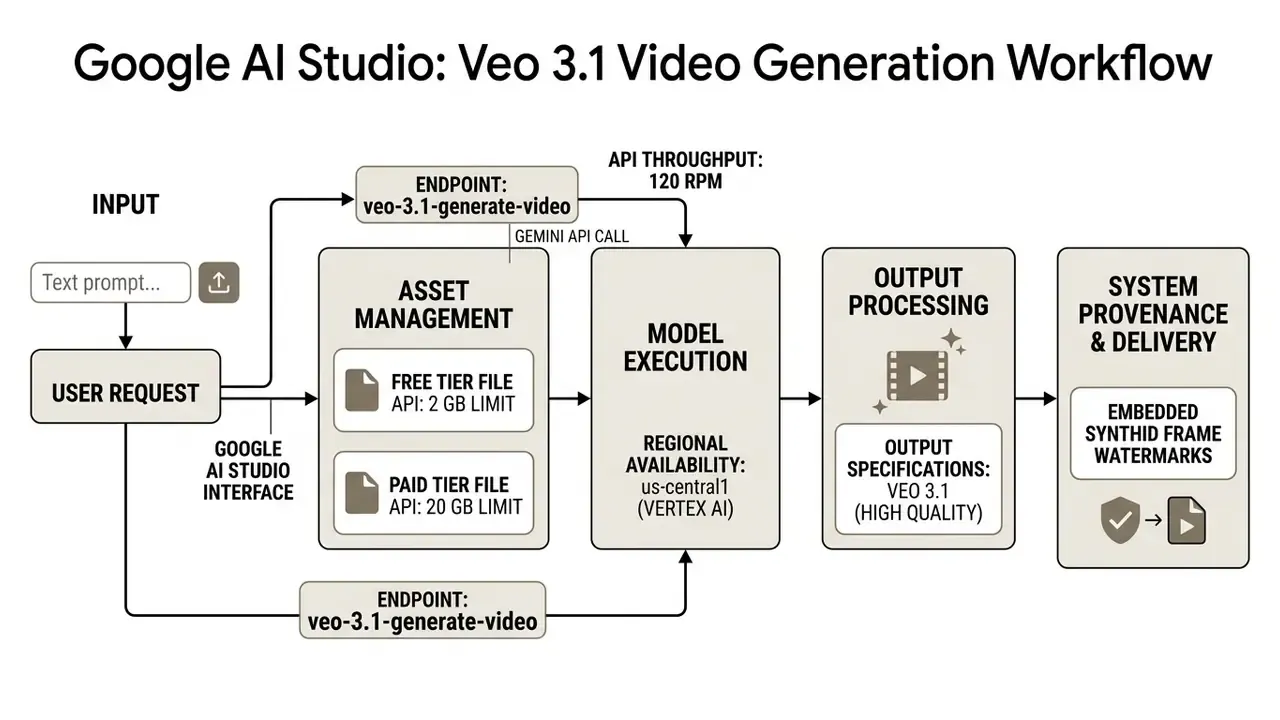
- Hard technical ceilings exist. Public API throughput is capped at 120 requests per minute (1 RPS recommended), model execution is anchored in
us-central1on Vertex AI, and the File API allows 2 GB on free tiers versus 20 GB on paid tiers. - Provenance is built in, but liability is not transferred. Every Veo output carries an invisible SynthID watermark across frames and audio, and C2PA Content Credentials expose edit history. Even so, the US Copyright Office still grants protection only to human-authored elements.
- Governance gap to close first. Before production rollout, confirm your enterprise data-handling tier (prompt and asset retention), your IP indemnification position, and a documented human review step for cultural and factual faithfulness.
- Bottom line: Veo 3.1 is production-viable for marketing, onboarding, product demos and teaser content at roughly 8-second clip granularity, provided every asset passes a documented pre-publication validation checklist.
How to Read This Guide by Role
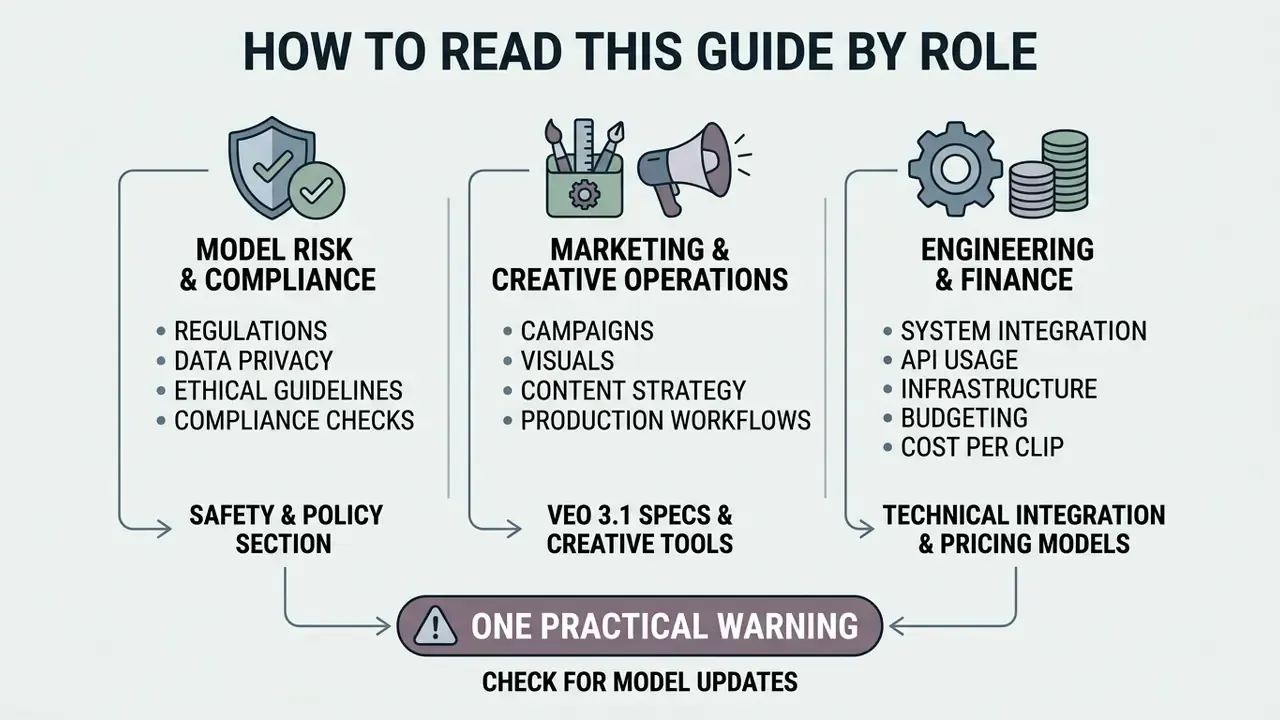
Three audiences usually arrive here with different questions, and the fastest path differs for each. These are working hypotheses about reader intent, drawn from search behaviour rather than from interviews, so treat them as starting points and not as validated segments.
- Model risk and compliance. Start with data governance, then indemnification, then the pre-publication validation checklist. Those three sections carry the approvable evidence.
- Marketing and creative operations. Start with the prompt templates and business scenarios. They define what a realistic deliverable looks like at 8 seconds per shot.
- Engineering and finance. Start with access surfaces, per-clip pricing and control costs. That is where total cost of ownership actually lives.
One practical warning before you go further. Every capability described below sits inside a shared inventory problem: if a surface is unregistered, it is unmanaged. Simple as that.
What Google AI Video Generator Is and Which Google Tools Create Video
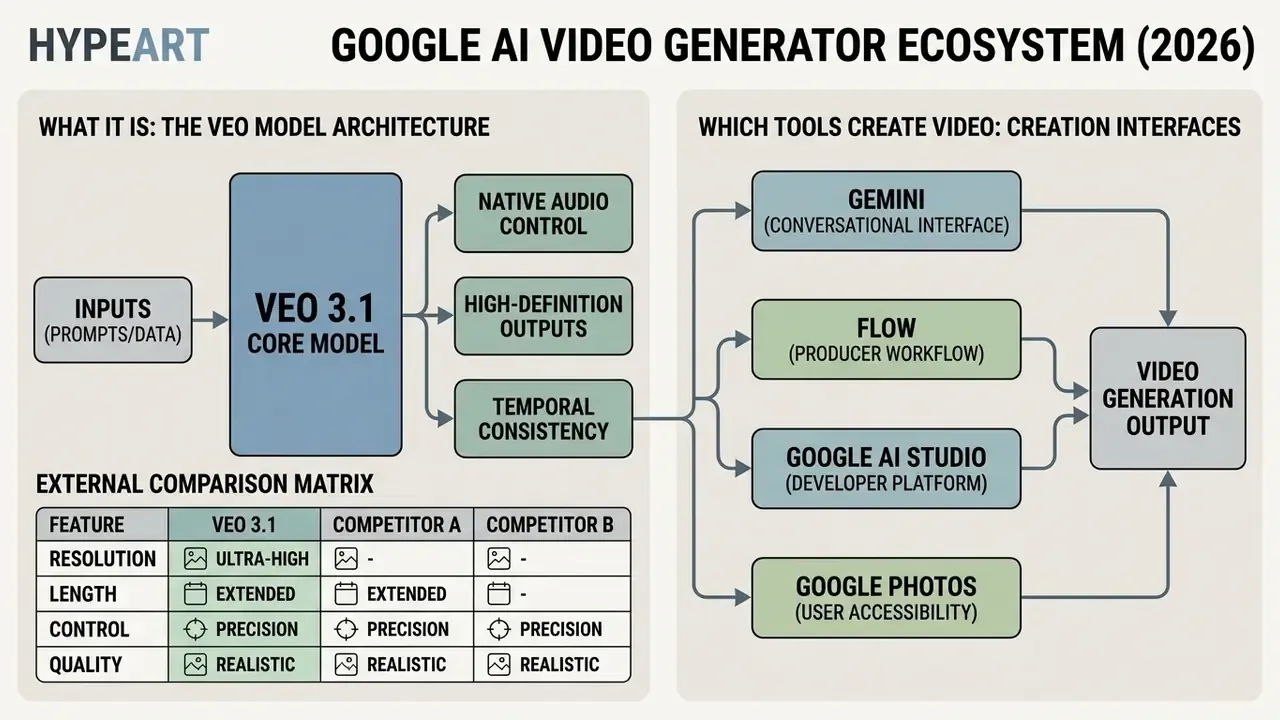
Google AI video generator refers to Google's integrated ecosystem of generative media tools powered primarily by the Veo underlying model architecture. The ecosystem spans consumer surfaces, developer platforms and professional filmmaking environments, including Veo, Flow, Gemini, Google AI Studio and media workflows in Google Photos.
Organizations evaluating a google ai video generator must separate two layers that marketing pages tend to blur: the underlying generative foundation model, and the user-facing distribution channel. Consumer tools optimize for speed of asset creation. Enterprise deployments need formal governance across data lineage, output validation and alignment with the institution's stated risk appetite.
A small vocabulary note, because it shapes procurement. Users who search for a google ai movie maker, a google video maker or a google video creator are usually looking for Flow or Gemini, not for a separate product. Google does not ship a distinct desktop movie editor under those names.
Veo as Google's Model for AI Video Generation
Veo is Google's flagship video generation model family, designed to synthesize high-definition, temporally consistent video clips from text and image prompts. The iteration sequence, from Veo 2 to Veo 3 and Veo 3.1, introduced native audio synthesis, 4K resolution rendering, 24 FPS temporal dynamics and precise camera conditioning.
Independent evaluations, such as the AVGen-Bench text-to-audio-video benchmark (2025), report that Veo 3.1 achieves state-of-the-art alignment scores across cross-modal video and audio tracks. Benchmark research published in Video models are zero-shot learners and reasoners (Wiedemer et al., 2025) also indicates that Veo 3 exhibits emergent zero-shot visual capabilities, solving physical property and spatial reasoning tasks without domain-specific fine-tuning. Emergent, in this context, simply means the behaviour was not an explicit training target.
Procurement teams that need a wider market view, including latency, licensing and watermark policies across vendors, should benchmark Veo against the best AI video generators before committing budget to a single stack. Single-vendor dependence is itself a risk finding in most AI governance frameworks.
External comparison matrix: Veo 3.1 versus competing video models (2026)
| Model | Developer | Max resolution | Native audio | Multi-shot / sequence continuity | Primary strength |
|---|---|---|---|---|---|
| Google Veo 3.1 | Google DeepMind | 4K (3840×2160) | Yes (synchronized) | Yes (up to 3 reference images + clip extension) | Motion physics, native sound design, Google Cloud and Vertex AI integration |
| Sora 2 | OpenAI | 1080p | Yes | Partial | Style persistence and complex physical scene reasoning |
| Kling V2 | Kuaishou | 1080p | No (requires external audio model) | No | Facial realism and human expression fidelity |
| Seedance Lite | ByteDance | 720p | No | No | Fastest generation, lowest cost per clip |
| Runway Gen-3 Alpha | Runway | 1080p | No | Yes | Granular camera control and directorial tooling |
Note: Positioning reflects publicly documented capabilities as of 2026. Third-party aggregators frequently expose these models side by side in tiered form, for example "Fast" (Seedance Lite), "Pro" (Kling V2) and "Ultra" (Google Veo). That tiering is a rough but useful proxy for cost-versus-fidelity tradeoffs.
Flow, Gemini, Google AI Studio and Google Photos: Where Videos Are Created
Google distributes video creation tools across specialized workspaces built for creative teams, software developers and everyday business users. Flow operates as an AI filmmaking studio integrating Veo 3.1, Imagen 3 and Gemini in one workspace, while Gemini and Google AI Studio expose programmatic endpoints for developer integration.
To compare technical access parameters across competing generative platforms, risk teams lean on AI Media Comparison Matrices alongside developer cost documentation in AI Media API Guides. Consumer application layers such as Google Photos, by contrast, provide lightweight photo-to-video capabilities rather than full prompt-driven synthesis. Teams new to the category can review how AI video generators differ from traditional editors and template-based animation makers before mapping tools to workflows.
| Tool / Surface | Underlying Model(s) | Primary Purpose | Supported Inputs | Typical Outputs | Access Modality |
|---|---|---|---|---|---|
| Veo 3.1 (Gemini API) | Veo 3.1 / Veo 3.1 Fast | Programmatic google ai video creation and pipeline integration | Text prompts, up to 3 reference images, video clips | 8-second 720p/1080p/4K videos with native audio | Gemini API / Google Cloud Vertex AI (pay-as-you-go) |
| Google Flow | Veo 3.1 Lite, Imagen 3, Gemini | Professional creative filmmaking and storyboard design | Text prompts, media assets, reference frames | Multi-shot cinematic clips, archived via Takeout | Web workspace (Google AI Pro/Ultra subscription) |
| Gemini Web and Mobile | Gemini Omni / Veo 3.1 | Conversational asset drafting and photo-to-video conversion | Text prompts, uploaded photos (up to 5), single video | 6 to 8 second clips with ambient sound | Conversational interface (free and tiered plans) |
| Google AI Studio | Veo 3.1 / Gemini Omni Flash | Prototyping, prompt testing and API key management | Text, image and video inputs | Test clips, REST/SDK code payloads | Developer web console (free quota and pay-as-you-go) |
| Google Photos | Internal motion algorithms | Personal memory animation and basic video remixing | Gallery photos (.jpg / .png) | 6-second motion clips, slideshows | Android / iOS native application |
Note: The tools listed above represent Google's verified 2026 media stack. Product access rights and API throughput vary by region and institutional tier, so verify entitlements per account rather than per article.
What Videos You Can Create with Google AI: Text-to-Video, Image-to-Video, Animation
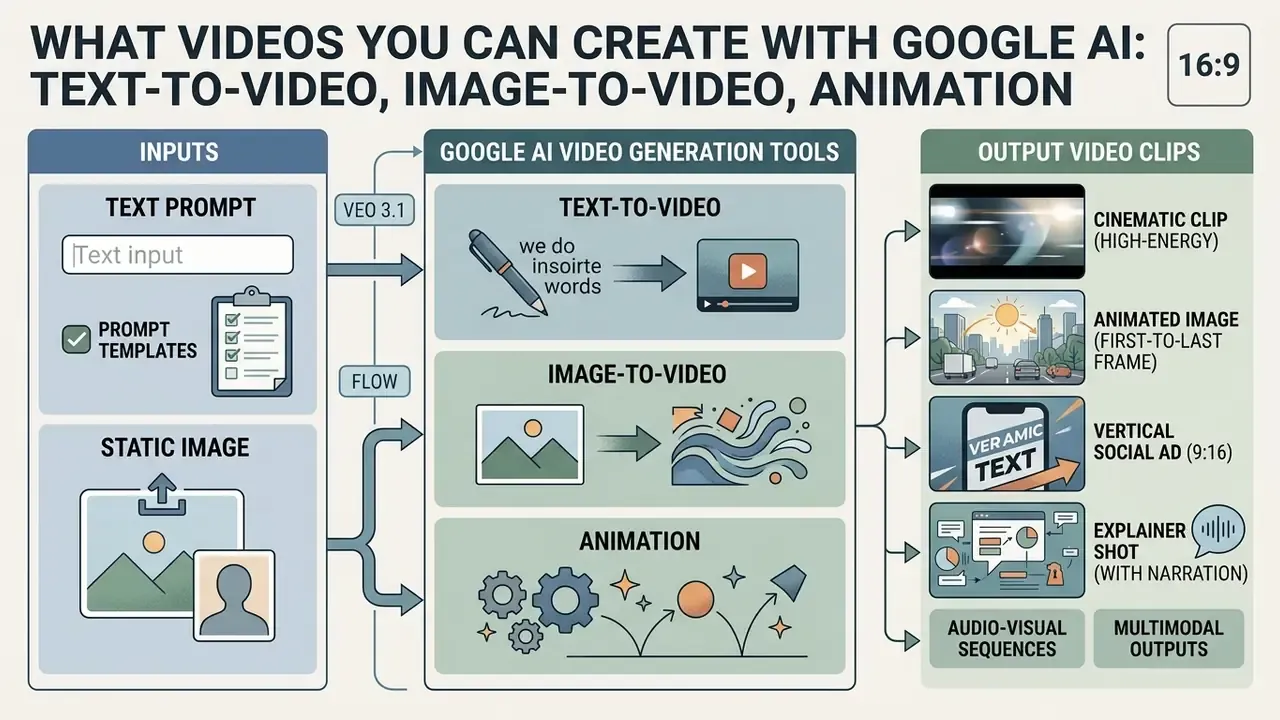
Google AI video tools generate short-form video clips, dynamic visual animation and multimodal audio-visual sequences from structured text descriptions or static image uploads. These systems support standard landscape (16:9) and portrait (9:16) aspect ratios, which covers internal training, product visualization and digital marketing workflows.
The output vocabulary is worth stating plainly, since "google ai animation" means different things to different teams. A google ai animation generator here does not mean keyframe animation software: it means motion synthesized from a prompt or from an anchor image, with no editable rig underneath. That distinction changes how much you can revise later.
Enterprise governance teams should evaluate output constraints before approving automated content generation. Short video assets do improve communication efficiency. Unvalidated outputs, however, can push visual hallucinations or brand distortion into public channels, and a retraction costs far more than a regeneration.
Google AI Text-to-Video: Generating a Clip from a Text Prompt
Google AI text-to-video synthesis converts written prompts into coherent video sequences by interpreting spatial semantics, camera motion directives and lighting parameters. A structured prompt formula combining subject, action, context, cinematography and style yields predictable visual physics across the generated clip. This is the mode most people mean when they search for a google ai text to video generator or a google ai text to video tool.
According to Google DeepMind's Veo 3.1 Technical Documentation (2025), specifying precise camera framing, such as eye-level tracking or top-down aerial shots, measurably improves prompt adherence.
Specialized stylization utilities, including niche consumer tools such as a barbie font generator, are useful here only as an illustration of a broader engineering principle: text-based visual conditioning steers generative diffusion models toward tightly bounded aesthetic outcomes. In enterprise pipelines the same principle is applied through locked brand descriptors rather than novelty presets.
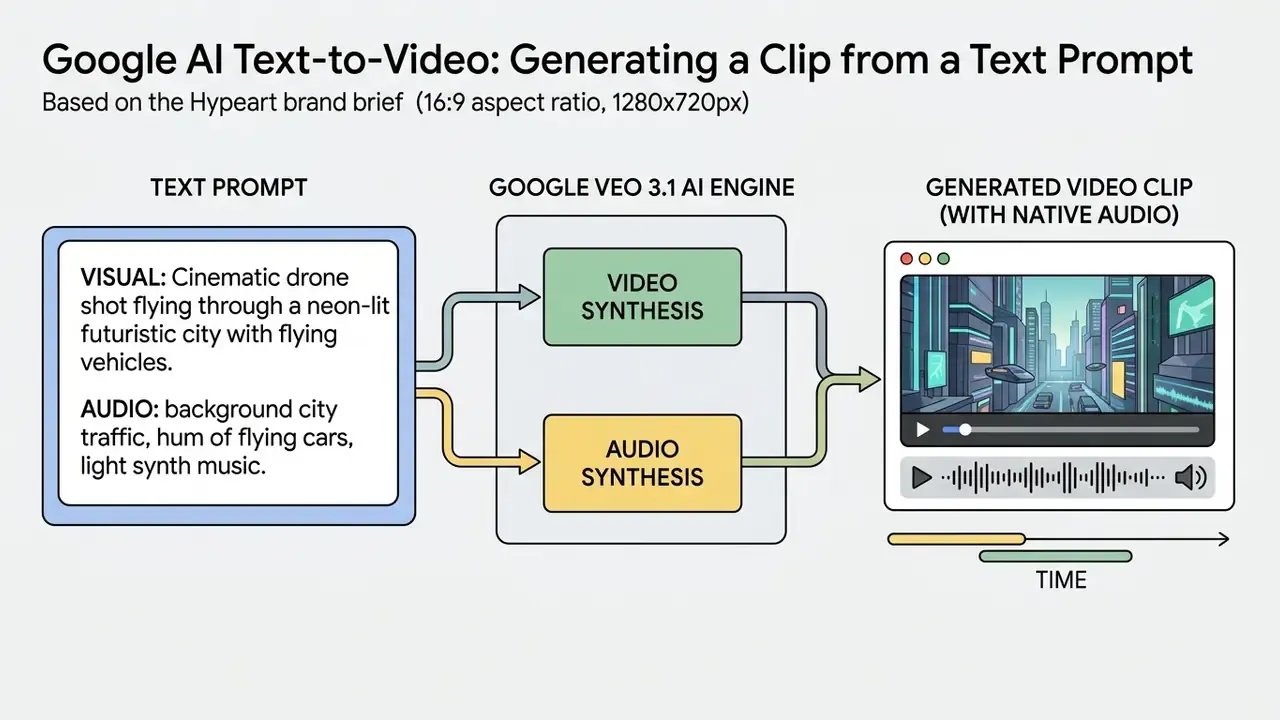
Ready-to-Use Prompt Templates for Veo 3.1 (Text-to-Video and Image-to-Video)
For cinematic-grade output, build every Veo 3.1 prompt on the same five-slot skeleton: [Subject] + [Action] + [Environment / Lighting] + [Camera movement / Lens] + [Audio Spec]. Fixing the slot order improves reproducibility across regenerations and simplifies review, because each reviewer knows exactly which slot to edit when an artifact appears.
Template 1. Cinematic text-to-video (high-energy scene)
Template 2. Image-to-video with first-and-last-frame control
Template 3. Vertical social ad (9:16, 8 seconds)
Template 4. Explainer or instructional shot with narration
Template 5. Abstract brand teaser
Prompting guardrails: request a single unbroken scene, a single continuous shot or no scene cuts when continuity matters; name what should not appear (text overlays, extra hands, competitor logos) to reduce rejected renders; and keep seed values fixed while iterating a single slot. One change per run. It sounds pedantic, and it is the only way to attribute a quality shift to a cause.
Google AI Image-to-Video: Animating Photos and Source Images
Google AI image-to-video tools transform static photography into animated video clips by treating the input image as the initial anchor frame. Models like Veo 3.1 support first-and-last-frame conditioning, generating smooth temporal transitions between two distinct stills. Because the input frame already carries composition, subject matter, lighting and style, image-to-video AI workflows hold brand identity far more reliably than text-only generation. That is also why a google ai image to video tool tends to be the safer first pilot for a regulated brand team.
Using an image-to-video workflow preserves subject composition, character identity and brand lighting parameters better than prompt-only attempts. Organizations that clean stills through a befunky photo editor or strip backgrounds with a bg remover free utility can feed tidy reference images straight into Veo and keep visual continuity across a campaign. For regulated teams the operational rule is stricter: only rights-cleared, artifact-free, colour-managed source frames enter the pipeline, because every defect in the anchor frame is amplified across all 8 seconds of motion.
Practical Business Scenarios for Google AI Video
Generic capability lists rarely survive a budget review. The five scenarios below map Veo 3.1 to concrete deliverables, with a recommended surface and a repeatable method for each.
- Objective: convert a product listing into an 8-second vertical (9:16) ad-ready clip.
- Tool: Google Flow (Veo 3.1 Fast) for cost-efficient iteration.
- Method: upload the product photo as the anchor frame, prompt a dolly-zoom or slow orbit, add a particle or light-sweep accent, then export a clean MP4 and layer licensed music in post. Compress deliverables with a video compressor to meet platform upload ceilings without visible quality loss.
- Objective: turn written specifications and UI screenshots into a watchable feature walkthrough.
- Tool: Gemini API plus Veo 3.1 Standard.
- Method: generate a sequence of multi-shot clips from interface screenshots, use native audio for feature narration, and assemble the timeline with consistent reference frames so UI chrome does not drift between shots.
- Objective: animate policies, safety rules and process documents that nobody reads in text form.
- Tool: Flow with agent-assisted editing.
- Method: convert each policy clause into a storyboard tile, visualize the hazardous scenario and the correct procedure, and keep one narrator voice profile across all modules. Pair with an AI voice generator when localized narration is required in several languages.
- Objective: produce warm-up content on a minimal budget and a short lead time.
- Tool: Gemini web or mobile.
- Method: generate 6 to 8 second abstract cinematic clips built around brand descriptors and a logo silhouette, then version them per channel aspect ratio.
- Objective: build visual micro-lessons for products, software or internal processes.
- Tool: Google AI Studio.
- Method: batch-generate short fragments through the Python SDK, check each fragment against the source procedure, then assemble one timeline in Flow or in a channel editor such as a YouTube video editor for publishing and captioning.
A quick observation from reviewing this kind of pilot: the scenario that fails least often is onboarding, because the script already exists and legal has already approved the wording. Marketing pilots fail more often, not on quality, but on claim substantiation.

Veo and Flow Capabilities for Controlling Scene, Style and Motion
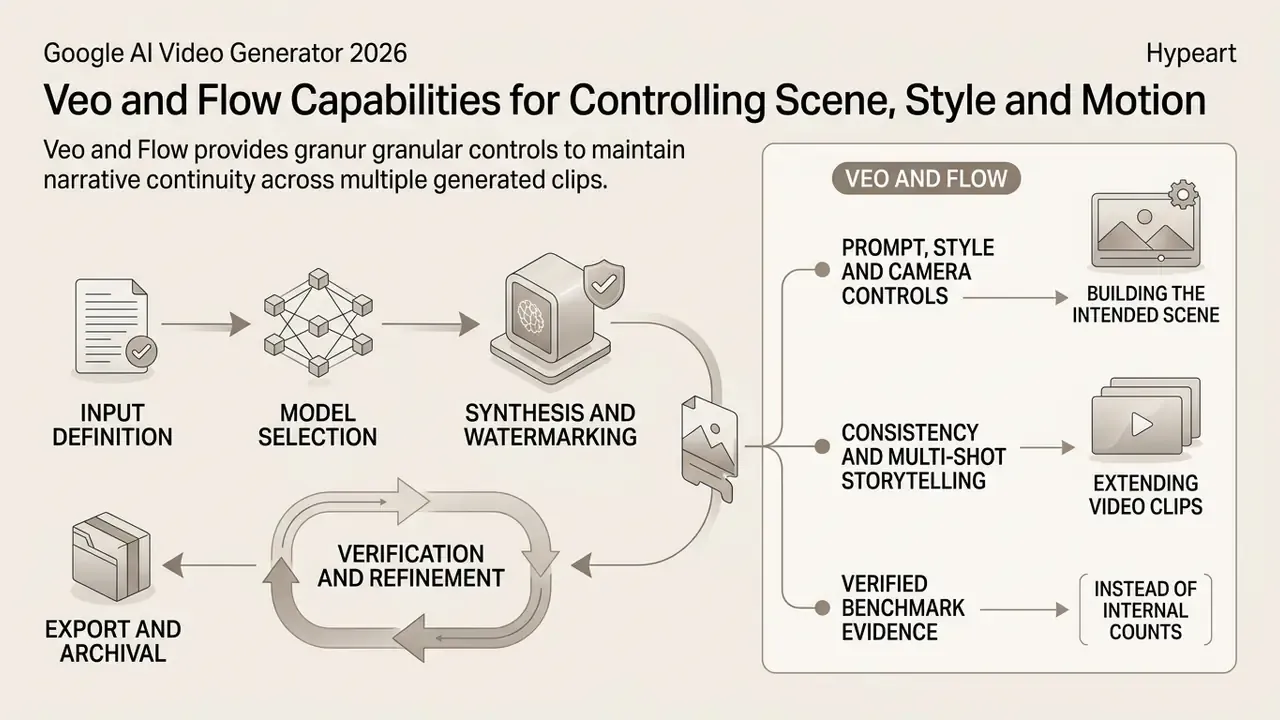
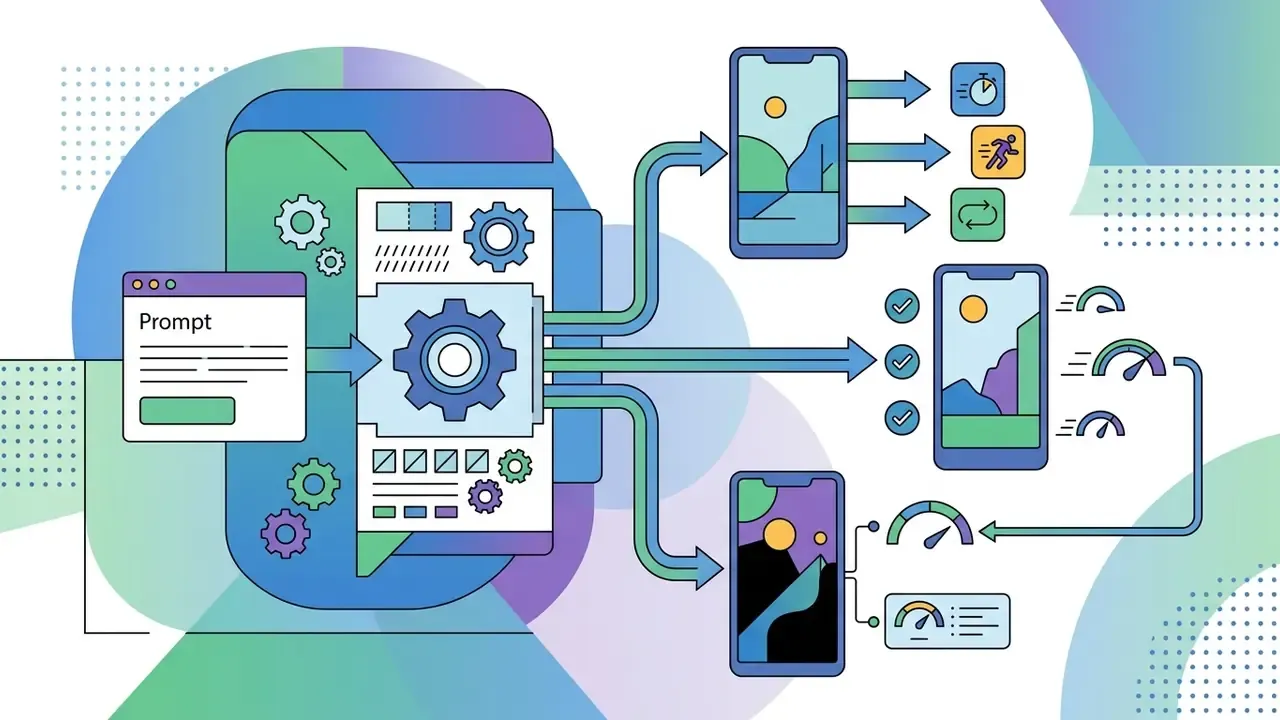
Veo and Flow provide granular scene controls, camera motion vectors and character consistency features built to keep narrative continuity across multiple generated clips. These controls let operators manage framing, execute pan, zoom and tilt adjustments, and extend scene boundaries without resetting model parameters.
Prompt, Style and Camera Controls for Building the Intended Scene
In practice the operational lever is the one marketing teams already use elsewhere in the stack: fixed seed values plus explicit camera directives inside a repeatable workflow, whether that workflow runs through a bing video creator or a Veo pipeline. Fewer regeneration cycles follow, because each output difference becomes attributable to one changed prompt slot.
Consistency, Multi-Shot Storytelling and Extending Video Clips
Holding character consistency across sequential video clips depends on reference image conditioning and temporal outpainting. Veo 3.1 accepts up to three reference images to anchor subject appearance, while its extension feature adds 8-second increments to an existing clip without breaking motion logic.
Research on video outpainting supports the same architecture-level conclusion. Background estimation, optical-flow-driven temporal consistency, latent alignment loss and iterative long-video strategies with cross-clip refiners are what keep colour and geometry stable when frames extend beyond the original viewport.
For long-form production, operators assemble individual clips into multi-shot sequences through timeline editing. Practitioners working with text-to-video AI usually follow a two-stage edit: an assembly pass that fixes clip order and runtime, then a refinement pass that corrects timing, transitions and narrative coherence. Post-processing utilities, from a consumer-grade birthday video maker to privacy tooling such as blur video online, illustrate how raw AI fragments become compliant final assets. In enterprise workflows the equivalent steps are trimming, colour correction, face and PII redaction, caption burn-in and codec-compliant export.
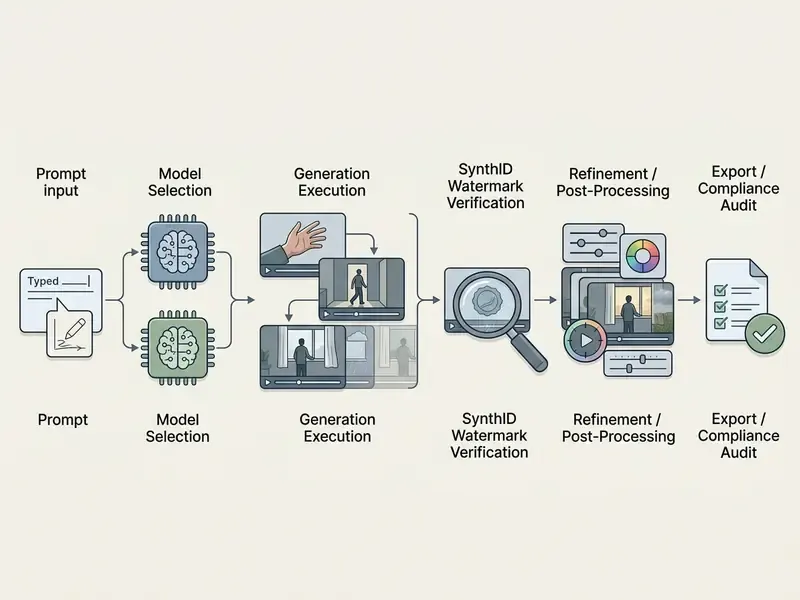
- Input definitionformulate a five-part structured prompt or upload cleared reference images.
- Model selectionchoose target resolution (720p, 1080p or 4K) and model variant (Veo 3.1 Standard versus Fast) in Flow or the Gemini API.
- Synthesis and watermarkingexecute the generation job; the system automatically embeds invisible SynthID pixel and audio watermarks.
- Verification and refinementinspect spatial geometry, temporal consistency and cultural faithfulness, then apply post-processing where needed.
- Export and archivalexport the final MP4 asset alongside generation metadata for compliance review.
How to Create a Video in Google AI: from Prompt to Finished Clip
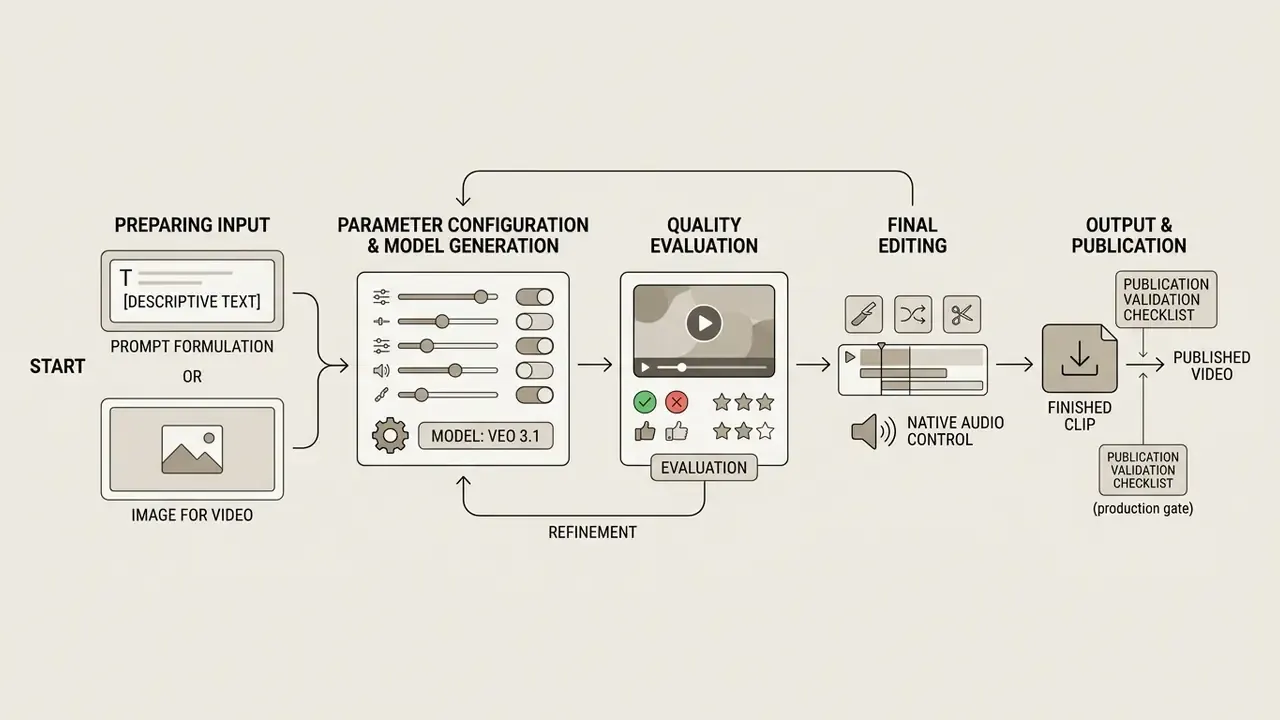
Creating professional assets with Google AI requires a structured workflow: prompt formulation, parameter configuration, model generation, quality evaluation and final editing. Following an established protocol keeps generation costs down and keeps output inside policy. A google ai video creation tool without a protocol tends to produce volume, not value.
Preparing the Prompt or Image for Video Generation
Effective generation starts with a precise text prompt or a clean reference image. A compliant prompt states the subject, motion dynamics, visual environment, camera angle and lighting conditions, and avoids ambiguous phrasing that the model will resolve on its own.
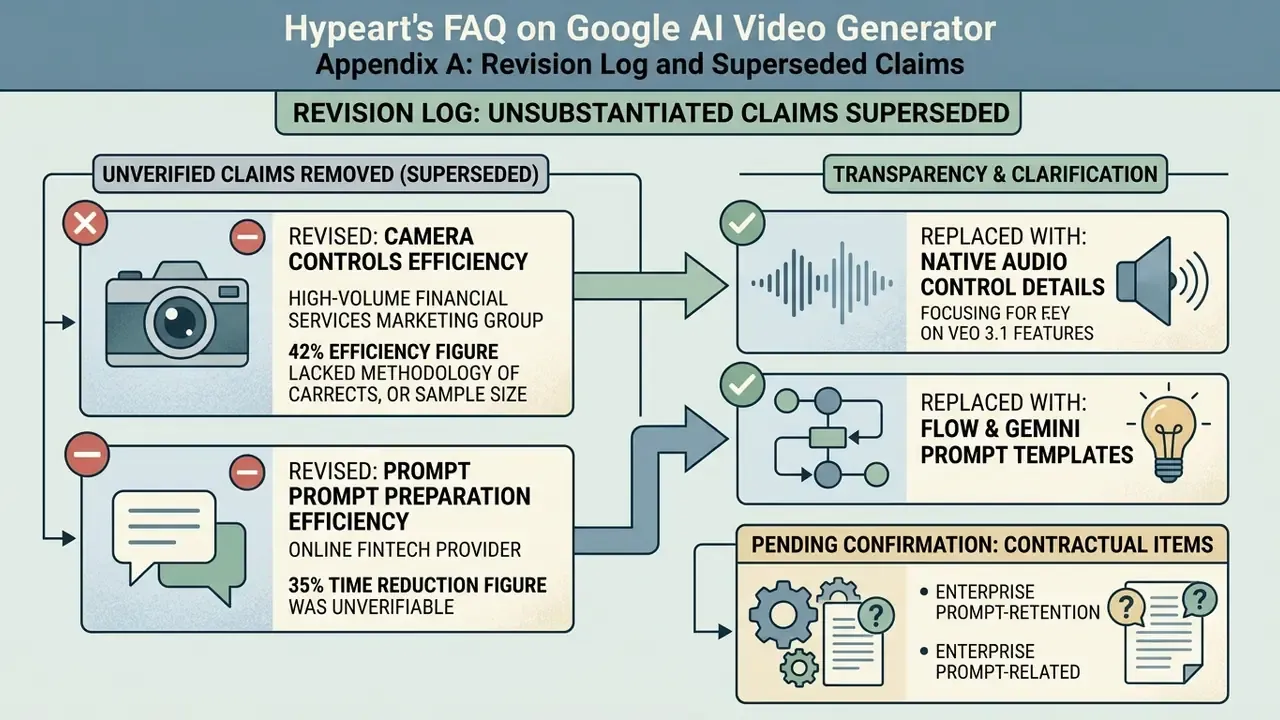
Official guidance instead of unverified internal metrics.
Applied to a production pipeline, that guidance becomes template discipline: standardized prompt slots plus a fixed set of approved reference images, reused across localized versions and across adjacent generative components such as an AI voice generator and the Veo video stage. The measurable benefit is fewer regeneration cycles and a stable brand character across regional variants, because every localized asset differs only in the narration slot rather than in the whole prompt.
Generation, Refinement and Preparing Videos for Publication
After the first 8-second clip lands, operators evaluate spatial geometry, temporal smoothness and audio alignment. If artifacts appear, either the prompt gets refined or the clip moves into a google ai video editor step: trim frames, adjust colour, overlay text graphics, then export. Where jobs fail on quota, region or payload size, the diagnostics live in AI Media Support and Troubleshooting rather than in the prompt itself.
Pre-publication validation checklist (production gate)
| # | Control | Owner | Pass criterion |
|---|---|---|---|
| 1 | Source media rights cleared (images, audio, trademarks, likenesses) | Legal / Brand | Written licence or in-house asset ID on file |
| 2 | Prompt archived with model version, seed and parameters | Engineering | Reproducible generation record stored |
| 3 | Geometry and temporal consistency review | Creative QA | No limb or object drift, no flicker across cuts |
| 4 | Audio review (dialogue accuracy, no unintended speech) | Creative QA | Narration matches approved script verbatim |
| 5 | Factual and cultural faithfulness review | Subject-matter expert | No misleading claims, no stereotyped depiction |
| 6 | Provenance verification (SynthID and C2PA credentials intact) | Compliance | Watermark detectable post-export |
| 7 | Disclosure label applied where required (ads, synthetic media) | Compliance / Media | Visible or audible AI label present |
| 8 | Export specification compliance (codec, frame rate, resolution, file size) | Production | Meets destination platform spec |
| 9 | Metadata and audit trail archived | Model Risk | Asset traceable to prompt, reviewer and approval date |
Nine controls look heavy for an 8-second clip. In practice they collapse into two reviewer passes, and they are the difference between a demo and an approvable process.
Where to Use Google AI Video Generator: Flow, Gemini API and AI Studio
Google provides access to its video models through four primary interfaces: the Flow web workspace, the conversational Gemini web and mobile apps, the developer-focused Google AI Studio, and programmatic REST and SDK endpoints in the Gemini API. People searching for a google search video generator generally land on one of these four, not on a separate search-embedded product.
Choosing the right surface depends on technical maturity, deployment scale and governance requirements. Non-technical marketing teams favour web interfaces. Engineering teams build automated asset pipelines with direct API integration, then wire the outputs into an approval queue.
Creating Videos Through Flow and Gemini Interfaces
End users create AI videos inside Gemini by selecting "Create video", uploading reference media and submitting a descriptive prompt. On desktop the documented path is: open gemini.google.com, click Create video, optionally pick a template, describe the scene, attach up to five images and one video, then submit.
In Google Flow, creative teams manage multi-asset projects, adjust aspect ratios, toggle agent-assisted editing modes and export completed storyboards to Google Takeout. The Flow workflow is: open or create a project, select Video in generation settings, choose Text to Video or Frames to Video, add prompts plus optional reference frames, configure aspect ratio, number of outputs, model and clip length, then generate.
Video Generation in the Gemini API and Google AI Studio
Developers reach Veo 3.1 programmatically through Google AI Studio by generating API keys and issuing REST or Python SDK calls to the generateContent endpoint. Large media payloads use the File API, which supports files up to 20 GB on paid tiers, while rapid prototyping runs on inline data inputs under 100 MB. Request shapes, polling patterns, quota handling and cost modelling are documented in our API guide for Google Veo.
Data Governance: Prompt Confidentiality and Retention Controls
For regulated institutions the decisive question is not output quality but input handling. What happens to prompts, uploaded reference frames and generated assets after a job completes? Enterprise-grade access through Vertex AI and Gemini Enterprise sits under different terms than consumer surfaces, and the two must never be merged into one line of a model inventory.
Governance actions to complete before pilot approval:
- Confirm the contractual data-handling tier in writing. Consumer Gemini terms, the Generative AI Additional Terms and enterprise Google Cloud terms are distinct instruments. Only the applicable enterprise agreement governs whether customer content may be used to improve models.
- Set retention explicitly. Define where outputs land, for example a controlled Cloud Storage bucket in an approved region, how long generation logs persist, and who can retrieve them.
- Pin the processing region. Veo execution is anchored in
us-central1on Vertex AI. If data residency requirements prohibit that region, the workload is not approvable regardless of model quality. - Restrict sensitive inputs by policy. Prohibit uploading customer PII, unreleased financial disclosures or biometric material into any generative video surface, and enforce it with DLP scanning at the upload boundary.
- Eliminate shadow AI. Register every surface, Flow, Gemini web and mobile, AI Studio and each API key, in the central AI system inventory with a named owner and a documented shutdown path.
Data-handling commitments vary by contract, plan and region. Verify the current terms applicable to your agreement with Google before processing confidential material. Contractual language, not documentation summaries, is the controlling source.
Google AI Video Generator Free: Free Access, Tariffs and Limits
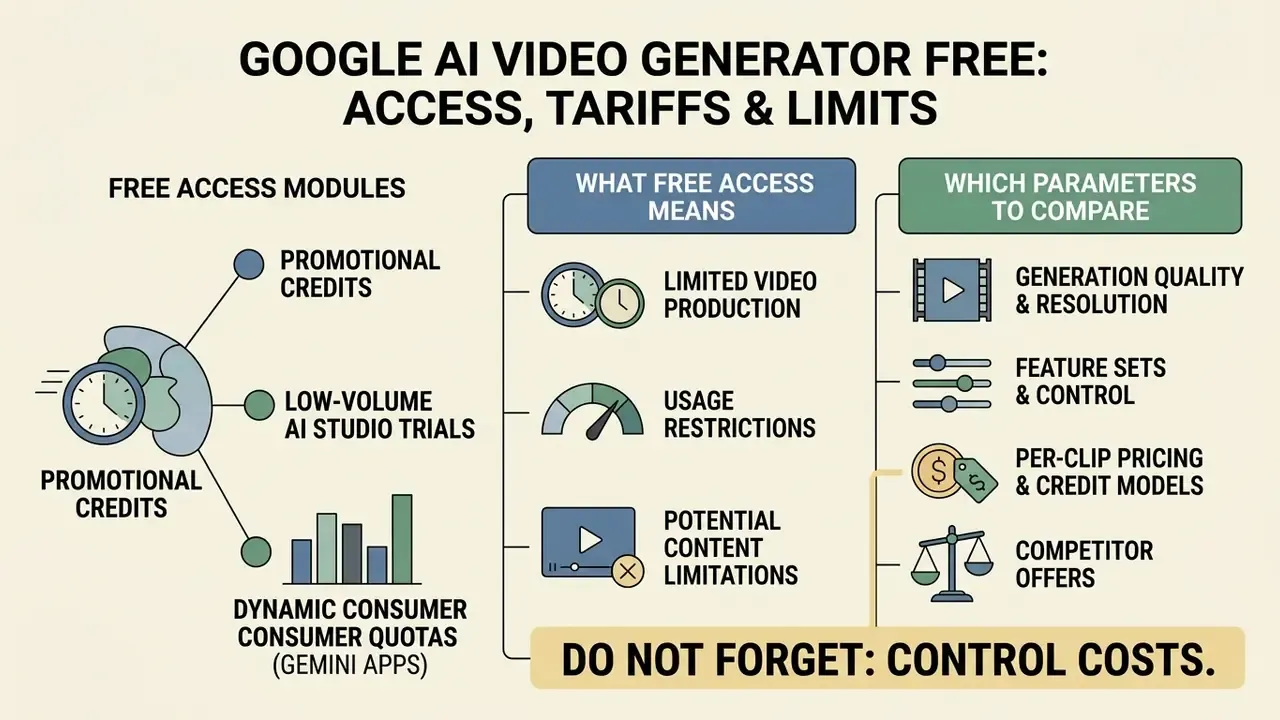
Free access to Google AI video generation is limited to promotional credits, low-volume trial tiers in Google AI Studio and dynamic consumer quotas inside the Gemini apps. Production use at enterprise scale requires a paid subscription or pay-as-you-go billing. Teams benchmarking entry-level options should also review how free AI video generators handle watermarks, duration caps and licensing, since those three factors, not raw quality, usually decide whether a free tier is usable commercially.
Cost control is a baseline requirement for institutional AI adoption. Compute costs across large-scale video pipelines can be modelled with AI Media Calculators, while detailed subscription comparisons are indexed in AI Media Pricing Guides.
What Free Access to AI Video Generation Actually Means
Free tier access lets developers and creators test model capability without upfront commitment. Free usage in Google AI Studio, however, enforces zero-spend rate quotas, lower processing priority and daily usage resets calculated at midnight Pacific Time. Anyone hunting for google ai studio video generation free or google text to video ai free should read that as a sandbox, not a supply chain.
Free-tier constraints also extend to input handling. Free-tier video understanding caps YouTube ingestion at eight hours per day, while paid tiers remove the length limit. Consumer app caps are dynamic and not always published, which makes free surfaces unsuitable for scheduled production runs. One missed campaign deadline usually settles that argument internally.
Which Parameters to Compare Before Choosing a Tier or Tool
When comparing tiers, for example Google One AI Premium versus Gemini API pay-as-you-go, weigh output resolution caps, generation latency, batch execution discounts and commercial usage rights together rather than one at a time.
| Access Plan / Tier | Model Availability | Monthly Clip Quota | Max Resolution | Native Audio | Commercial Usage Rights |
|---|---|---|---|---|---|
| Gemini API Free Tier | Veo 3.1 Lite / Preview | Dynamic, rate-limited (120 RPM cap) | 720p | Optional | Personal / non-commercial trial |
| Google One AI Premium | Veo 3.1 / Gemini Omni | Tiered consumer cap (about 50 clips per month) | 1080p / 4K upscaled | Yes | Subject to Google Terms of Service |
| Gemini API Pay-as-you-go | Veo 3.1 / Veo 3.1 Fast | Unlimited, subject to project quotas | 720p / 1080p / 4K | Configurable | Full commercial rights cleared |
| Enterprise / Vertex AI | Veo 3.1 Standard and Fast | Custom SLA and dedicated quotas | 4K native | Yes | Enterprise SLA and full IP coverage |
Commercial Use of Google AI Generated Video: Rights, Transparency and Terms Verification
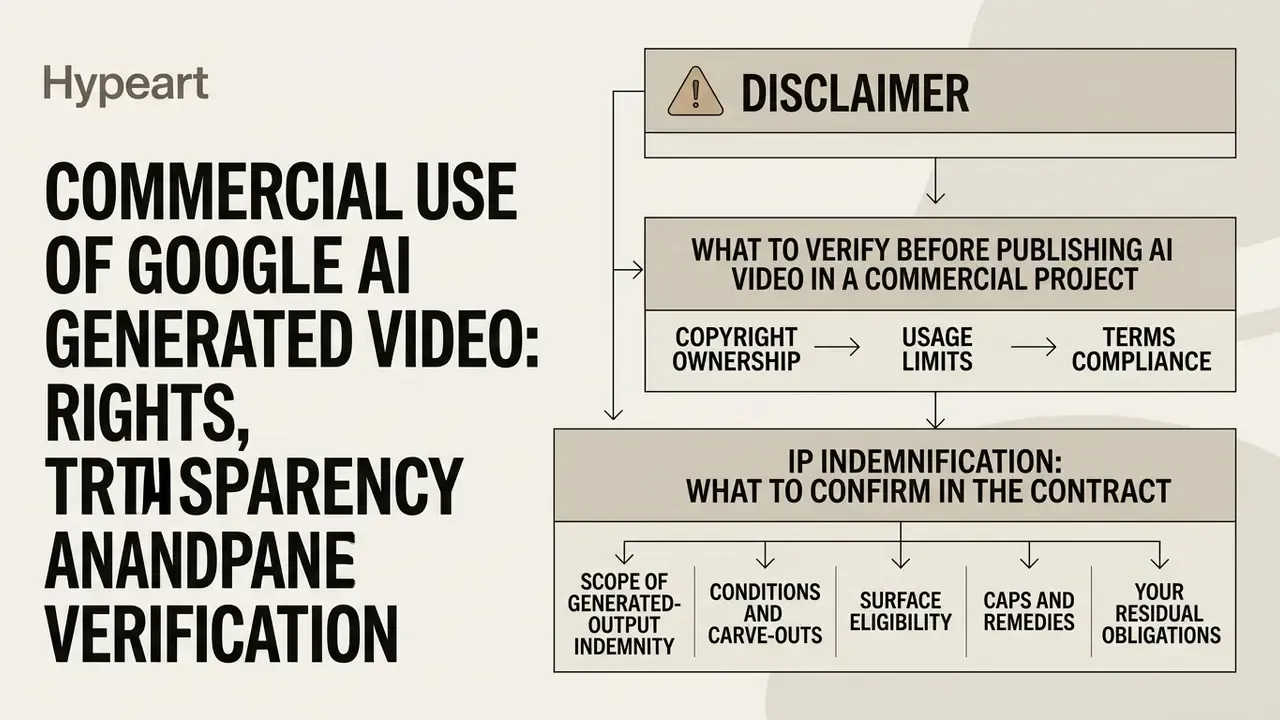
Commercial deployment of Google AI generated video requires compliance with Google's Generative AI Additional Terms of Service, regional intellectual property law and advertising transparency mandates. Organizations remain responsible for clearing third-party copyrights on uploaded source media before publishing generated output. The same rights-clearance logic applies across modalities, as covered in our analysis of commercial use of AI generators and the parallel guidance for the Google AI image generator.
Legal departments should evaluate platform terms before generative media enters a public campaign. Updated regulatory analyses and precedents are aggregated in the AI Litigation and Case Timelines database, while licensing frameworks sit in the AI Media Commercial-Use Hub.
What to Verify Before Publishing AI Video in a Commercial Project
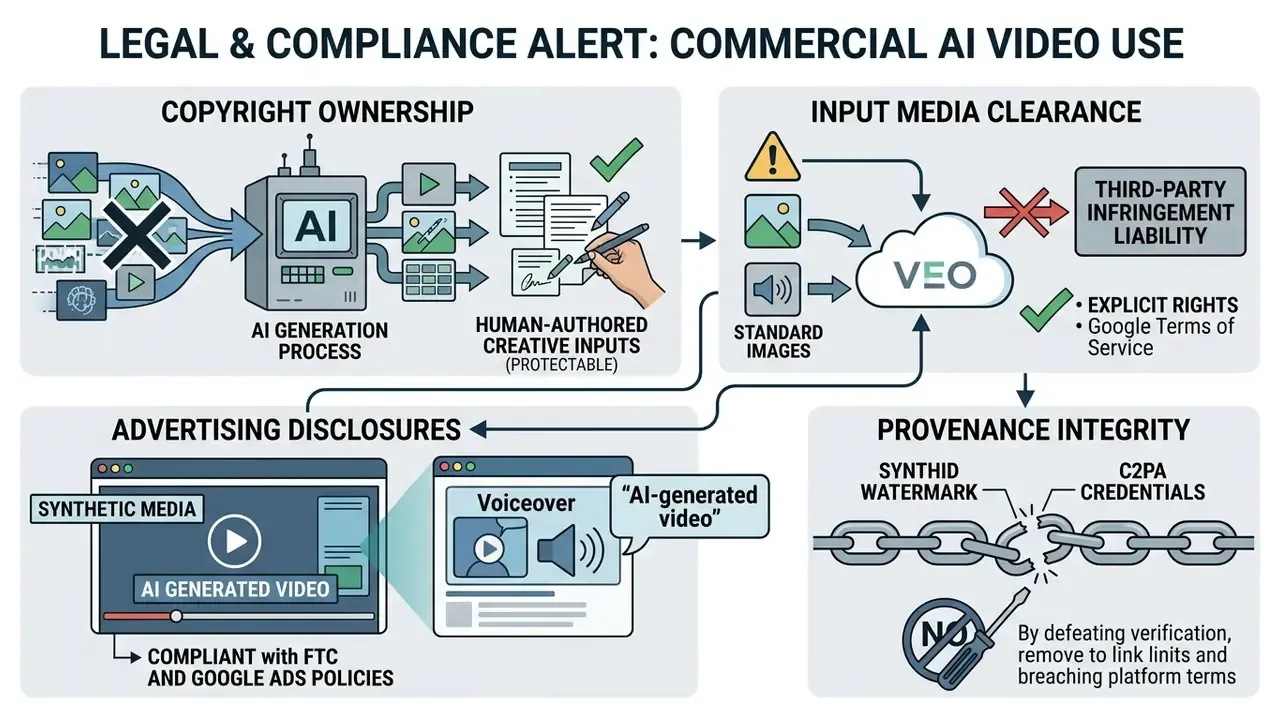
Before an asset ships, risk managers verify that all uploaded reference images, brand trademarks and background audio tracks are fully licensed. Google's Prohibited Use Policy forbids generating deceptive media, deepfakes or content that infringes third-party privacy rights, and Google Ads policy separately prohibits manipulated media intended to deceive or mislead users.
That finding is the strongest available argument for a mandatory human review gate. Models that score well on visual fidelity can still misrepresent cultural context, professional attire, ritual or behaviour in ways that create reputational and regulatory exposure in localized campaigns. Fidelity is not faithfulness.
IP Indemnification: What to Confirm in the Contract
Enterprise buyers routinely ask whether the platform provider absorbs third-party copyright claims arising from generated output. This is a contractual question, not a product feature, and it must be answered from the executed agreement rather than from a marketing page.
Confirm, in writing, before production use:
- Scope of any generated-output indemnity, meaning whether it covers training-data-related claims, output claims, or neither.
- Conditions and carve-outs. Indemnities are typically void where the customer supplied infringing input media, disabled safety filters or bypassed provenance and citation controls.
- Surface eligibility. Indemnity commitments, where offered, generally attach to enterprise cloud agreements rather than consumer subscriptions or free tiers.
- Caps and remedies, including the liability ceiling and whether defence costs are covered.
- Your residual obligations. Clearing uploaded images, audio, trademarks and personal likenesses remains a customer duty under Google's Generative AI Additional Terms and Prohibited Use Policy in every case.
Because indemnification language shifts between contract cycles and regions, treat the executed agreement as the single source of truth and re-verify at each renewal.
Transparency of AI Generated Videos and Labelling of Created Content
Google embeds imperceptible SynthID digital watermarks into the pixel matrices and audio tracks of all Veo-generated videos. Google also supports C2PA Content Credentials to carry verifiable origin metadata, so automated systems and end users can confirm whether media was generated or edited by artificial intelligence. That workflow is closely related to the broader class of AI content detectors used in verification pipelines.
SynthID video watermarking was publicly introduced in May 2024 and applies the mark frame by frame rather than as a visible overlay. The SynthID Detector, together with verification inside the Gemini app, can confirm whether uploaded image, audio or video content carries the watermark, and which segments contain Google AI-generated elements. Note the practical limit: a watermark proves origin, it does not prove that the content is accurate or cleared.
FAQ on Google AI Video Generator
Is There a Google Play AI Video Generator App for Creating Videos on a Phone?
Google does not publish a standalone Android application titled "Google AI Video Generator" on Google Play. Mobile users reach Google's generation features through the Gemini mobile app on Android and iOS, or through a mobile browser at gemini.google.com. The Google Photos app additionally provides native photo-to-video memory animation in selected regions, producing clips of roughly six seconds from gallery photos. So an ai video generator google play search will return third-party apps, many of which are wrappers, not Google products. Feature availability differs by country and subscription tier, so mobile access should never be assumed uniform across a global workforce.
What Happened to Google Veo 2 and Which Models Should Be Used Instead?
Google Veo 2 arrived in late 2024 as an intermediate milestone supporting up to 4K resolution and improved real-world physics. By 2026 it has been superseded by the Veo 3 and Veo 3.1 series and retired from Google Cloud surfaces and third-party platforms. Anyone still evaluating a google veo 2 ai video generator integration is effectively evaluating a deprecated dependency. Key differences and reasons to migrate:
- Resolution: Veo 2 was commonly served at 720p on third-party surfaces, while Veo 3.1 renders native 1080p and 4K.
- Audio: Veo 2 produced silent clips, Veo 3.1 generates synchronized native audio.
- Frame control: Veo 2 accepted only a first-frame image, Veo 3.1 supports first-and-last-frame conditioning.
- Reference images: Veo 2 had no reference-character support, Veo 3.1 accepts up to three reference images for subject consistency.
- Clip continuity: Veo 2 had no extension mechanism, Veo 3.1 extends existing clips in 8-second increments.
- Timeline: Veo 2 (2024), then Veo 3 (2025, native audio and stronger motion control), then Veo 3.1 (2025 to 2026, current line). Developers and creative teams should use Veo 3.1 or Veo 3.1 Fast through the Gemini API or Google Flow, since those models deliver better temporal consistency, native synchronized audio and reference image conditioning.
"On abstract reasoning tasks (chess, sudoku, Raven's matrices), Veo 3.1 reaches 34.7% success versus 68.0% for Sora-2, which requires human oversight." Source: Video Generation as a Promising Multimodal Reasoning Testbed (2026).
How Do I Control Sound, Music and Narration in Veo 3.1?
Audio is generated jointly with video, so it is controlled in the prompt rather than added afterwards. Declare an explicit Audio: segment covering ambience, sound effects and any spoken line verbatim, specify tempo and instrumentation for music beds, and state "no dialogue" or "no voiceover" when narration must not appear. Where a fully silent master is required, for instance when licensed music will be laid in during post-production, disable audio synthesis in the API payload and treat the video track as a picture-only deliverable.
Can Google AI Video Be Used in Paid Advertising?
Technically yes, subject to three conditions. First, all source media and claims must be rights-cleared and substantiated. Second, the creative must not fall under prohibited manipulated-media categories in Google Ads misrepresentation policy. Third, synthetic or AI-modified creatives may require disclosure labels under platform and regulatory rules. Plan for that label at the design stage instead of retrofitting it after approval, because a retrofit usually forces a re-render.
What Are the Practical Duration and Aspect-Ratio Limits?
Veo 3.1 outputs are built around roughly 8-second clips at 24 FPS, in 16:9 landscape or 9:16 portrait, with extension available in 8-second increments. Longer narratives come from generating multiple shots and assembling them on a timeline, not from requesting one long render. Plan storyboards around that granularity from the start. It is the single most common cause of schedule slippage in first-time pilots.
Which Google AI Videos Are Safe to Publish Without a Legal Review?
None, strictly speaking, if the asset carries a product claim, a person's likeness, a third-party trademark or regulated financial language. Low-risk exceptions in practice are abstract brand textures and internal-only training fragments with an approved script. Everything else moves through the nine-control gate above, and the archive record matters as much as the clip itself.
Appendix A: Revision Log and Superseded Claims
A Safe Next Step
If generative video is already in use somewhere in your organization, and it probably is, the first move is not a platform decision. It is an inventory pass: list every Google surface in use, name an owner for each, record the data-handling tier, and attach the nine-control gate to one low-risk asset class such as internal onboarding. Measure the review time. Then decide whether to scale.
Nothing here should be read as legal or regulatory advice, and the audience assumptions in this guide remain hypotheses until validated against your own analytics, interviews and CRM data.