Feeds are crowded, attention is thin, and most viewers scroll with the sound off. That is the practical reason a text animation generator now sits inside ordinary marketing workflows. It applies motion, timing, and visual effects to type layers, then renders an animated text video without anyone opening desktop compositing software.
The interesting part is not whether the animation looks good. It usually does. The harder questions are licensing, accessibility, and who approved the tool that now holds your unreleased campaign copy.
«Motion graphics and kinetic typography turn static messaging into high-retention digital assets, but controlled design, legibility, and compliance boundaries decide the real commercial ROI.»
Executive Summary
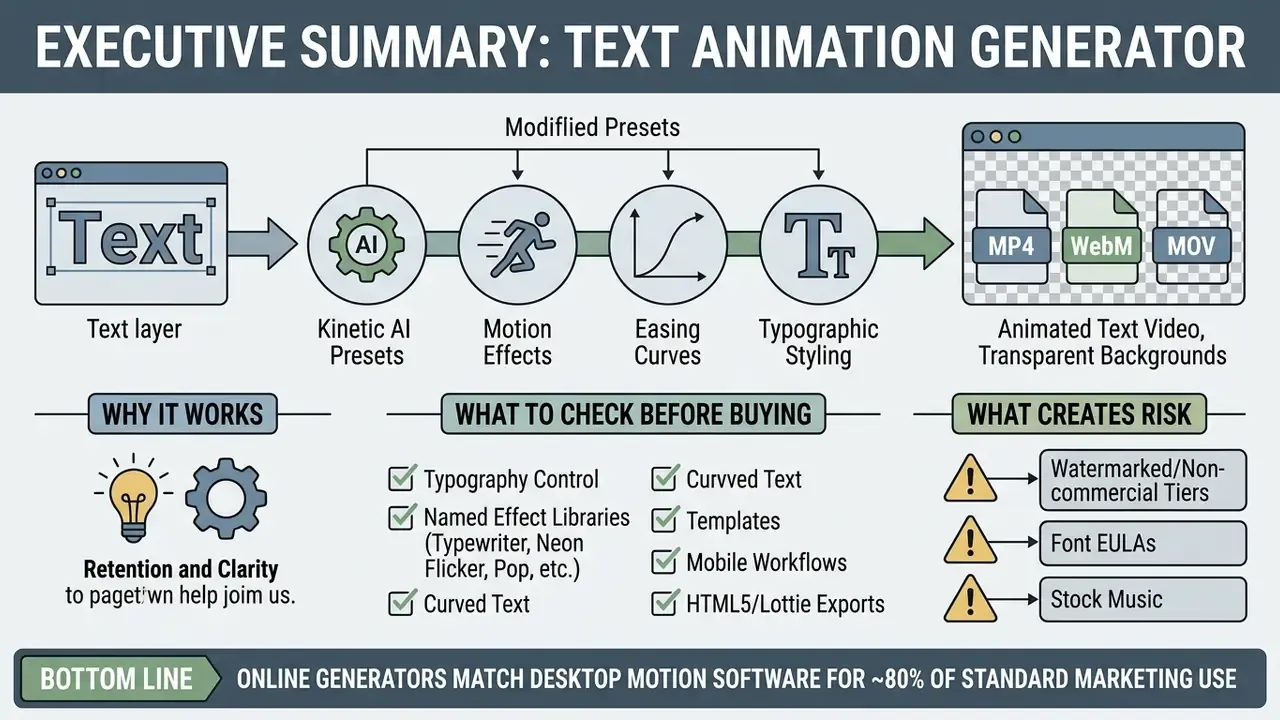
- What it is: A text animation generator applies motion, easing curves, and visual effects to text layers, then renders the result as an animated text video (MP4, WebM, MOV with alpha), a GIF, or a web-native asset (HTML5, Lottie JSON, SVG).
- Why it works: Peer-reviewed evidence supports kinetic typography for retention and clarity. In one comparative study, 87.5% of surveyed participants preferred animated visuals over static formats, and controlled research confirms that motion speed and interpolation curves drive comprehension.
- What to check before buying: Typography control, named effect libraries (Typewriter, Neon Flicker, Pop, Color Shuffle, Slide, Grow, Fade), auto-captions with beat-sync, curved-text paths, mobile (iOS/Android) parity, export breadth including Lottie and HTML5, CSV batch generation, and enterprise security posture (SOC 2 / ISO 27001, SSO/RBAC, no-data-retention, IP indemnification).
- What creates risk: Watermarked or non-commercial free tiers, third-party font EULAs, stock music restrictions, AI-authorship limits under U.S. Copyright Office guidance, WCAG 2.1 contrast and motion-pause failures, and unmanaged Shadow AI usage where brand copy is pasted into unvetted SaaS editors.
- Bottom line: Online generators now match desktop motion software for roughly 80% of standard marketing deliverables. The buying decision is driven less by animation quality and more by licensing clarity, accessibility compliance, and procurement controls.
Who Should Read This Guide and What Decision It Supports
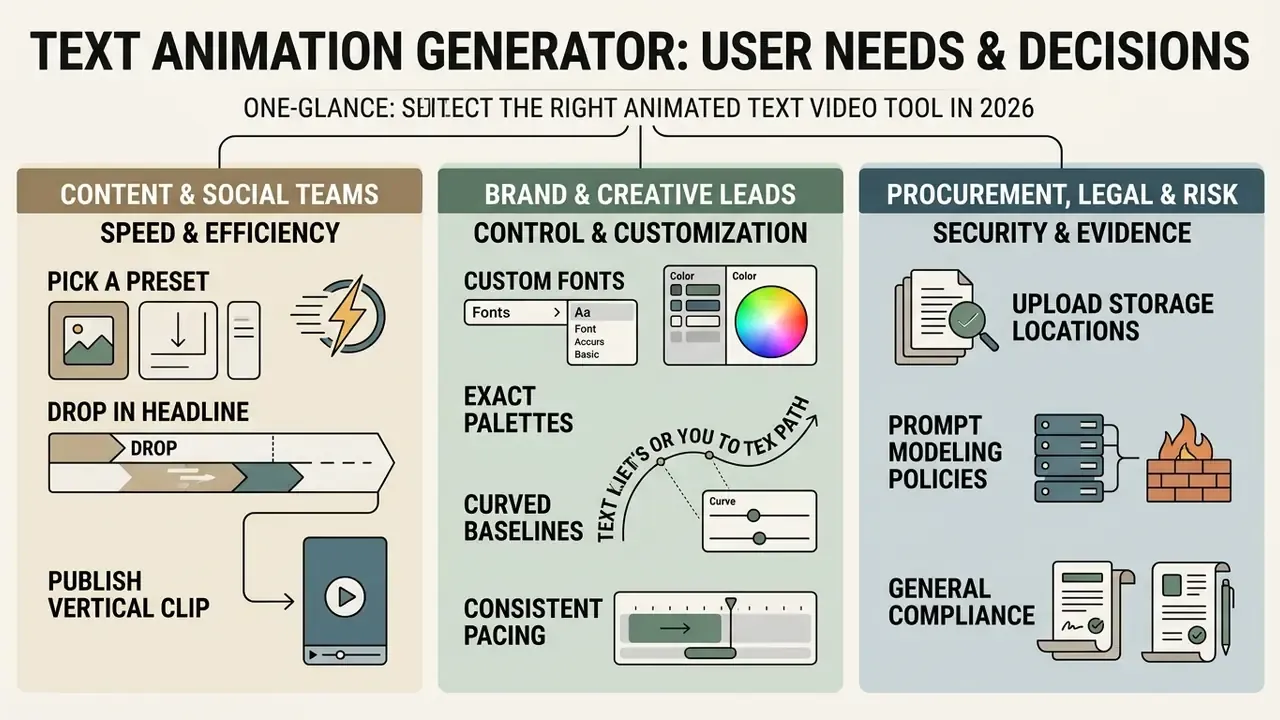
This guide is written for three overlapping readers, and each one needs a different answer from the same tool.
- Content and social teams want speed: pick a preset, drop in the headline, publish a vertical clip before the trend cools.
- Brand and creative leads want control: custom fonts, exact palettes, curved baselines, consistent pacing across channels.
- Procurement, legal, and risk reviewers want evidence: where uploads are stored, whether prompts feed model training, which license covers paid media, and what the audit trail looks like.
The sections below follow that order. First the craft (what kinetic typography actually does), then the workflow, then the feature matrix, then the money and the controls. If you are only here to compare vendors, our AI Media Comparison Matrices will get you there faster than a feature list ever could.
One caveat before we start. Vendor plan names, template counts, watermark rules, and interface labels change between releases. Treat every specific number in this guide as a starting hypothesis to be verified on the vendor's own pricing and help pages.
What Is a Text Animation Generator and What Is It Used For?
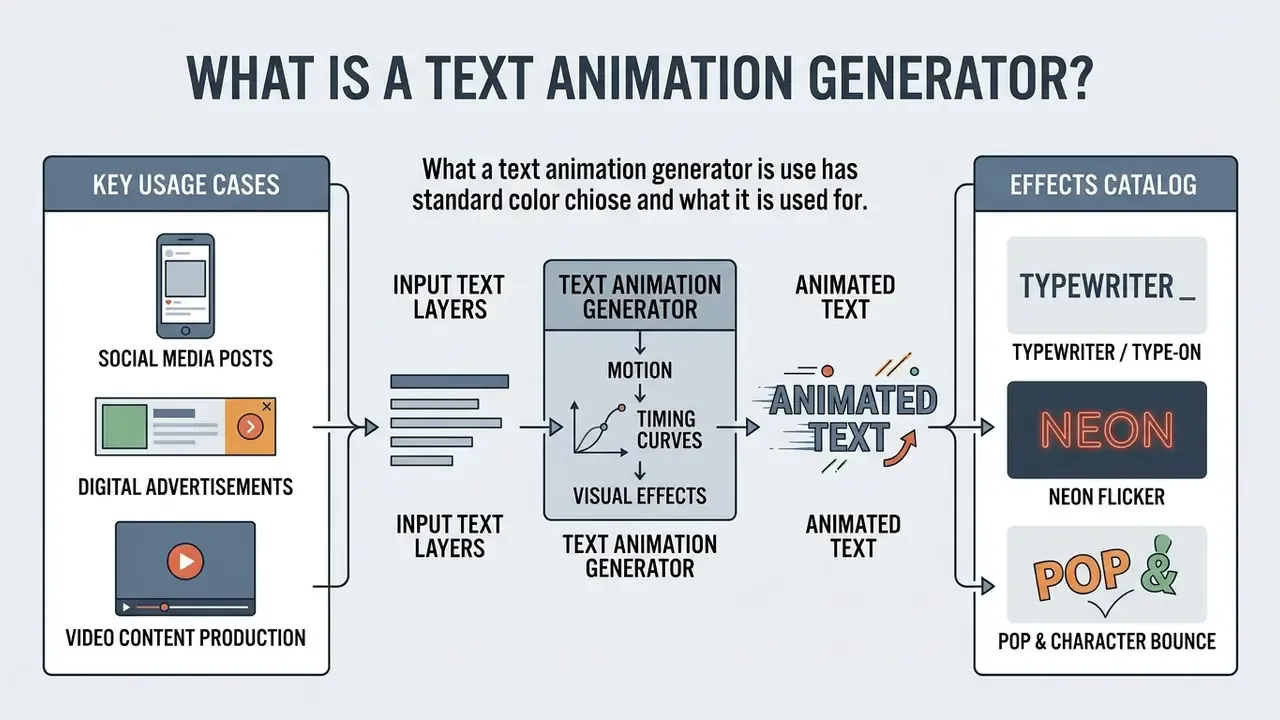
A text animation generator is a software tool or web application that applies motion, timing curves, and visual effects to text layers. The output is exported as an animated text video, a GIF, or a dynamic HTML5 asset.
Marketing teams use these tools to build animated text videos for social media posts, promotional ad campaigns, YouTube intros, and video presentations. Research published in the European Journal of Arts, Humanities and Social Sciences (V & Rosh, 2024) notes that kinetic typography combines moving letters with sound and graphical elements to strengthen message retention compared with static text overlays.
«Kinetic typography captures viewers' attention and delivers messages in an interesting and memorable way», improving retention relative to static text. V & Rosh, European Journal of Arts, Humanities and Social Sciences (2024). https://doi.org/10.5281/zenodo.10951234
«87.5% of respondents preferred animation over static visuals; 64.3% rated animated material as clearer, and 82.1% rated it as more relevant.»
Beyond marketing, the format has institutional use cases. A 2024 BMJ Open paper documents animated moving-picture public health materials designed specifically to promote health behaviours. Which tells you something useful: kinetic typography already appears in regulated communication, not only in commercial promotion.
Kinetic Typography, Animated Effects, and Animation Style
Kinetic typography is the technical foundation here: text that moves and evolves over time to convey emotion and visual hierarchy. Different animation style choices change how an audience processes the same sentence. Carnegie Mellon University's kinetic typography research pages define the discipline as animated text that adds emotive content and expressive appeal to written language.
Common animated effects include sliding entrance, scaling, rotation, character bounce, glitching, chromatic aberration, dispersion, jumping, flowing, and flying text. To implement them, designers rely on an animation font generator or a font animation generator to choose typefaces that hold legibility while in motion. Specialized tools such as a cursive animation generator apply stroke-by-stroke handwriting paths to simulate manual lettering in real time, a technique formalized in the Stroke-by-Stroke Glyph Animation research line, which computes stroke sequences per font to automate glyph animation. Readers comparing typography motion with full generative pipelines can consult our breakdown of text-to-video AI tools.
In a landmark computer vision study presented at ECCV 2024, Park et al. introduced a Kinetic Typography Diffusion Model trained on 584 designer-crafted motion templates across roughly 600,000 kinetic typography clips. The model generates legible kinetic text directly from text prompts while preserving aesthetics and glyph readability, covering glyph-level effects such as position, size, glitch, chromatic aberration, and reflection. Their conclusion is blunt: automated motion systems must strictly preserve glyph legibility while applying spatial transformations.
Complementary research by Dolic et al. (2024) on temporal typography showed that display speed (words per minute) and keyframe interpolation curves jointly determine information transmission efficiency. Updated:
«There is an optimal speed band: animation that is too slow reduces engagement, while animation that is too fast degrades comprehension; smooth interpolation curves improve readability.»
In subjective testing from the same research line, sequences displayed at roughly 90 words per minute were rated most attractive by viewers. That gives designers a concrete starting point for headline pacing instead of guesswork.
Catalog of Standard Commercial Text Animation Effects
Academic terminology (spatial transformation, chromatic aberration, glyph deformation) describes how motion works. Commercial editors expose the same mechanics under product names. Knowing both vocabularies shortens the path from creative brief to preset selection.
- Typewriter / Type-on simulates real-time keyboard typing character by character; ideal for educational videos, narrative storytelling, and vintage-styled titles.
- Neon Flicker emulates an unstable glowing neon sign; optimal for nightlife promos, party announcements, gaming content, and retro aesthetics.
- Pop & Character Bounce characters scale up rapidly with spring physics; high-converting for retail sale callouts and price badges.
- Color Shuffle & Gradient Wave rotates fill colors across the brand palette during display time to lock visual focus on a single phrase.
- Slide (Pan) & Grow (Scale-In) subtle entrance motion that introduces copy without stealing attention from the underlying footage.
- Fade / Dissolve the lowest-distraction option, and the safest choice for long sentences, legal disclaimers, and dense subtitles.
- Dynamic / Kinetic Emphasis word-by-word scaling and repositioning that mirrors vocal stress in a voice-over track.
- Glitch, Dispersion, and Chromatic Aberration high-energy distortion effects for tech, crypto, and gaming verticals; use sparingly, since they cost legibility.
- Tumble, Skate, and Flow continuous path motion for lyric videos and music clips.
- Cursive Write-On stroke-by-stroke handwriting reveal for wedding, invitation, and premium-lifestyle content.
Figure: Examples of animated text video applications. Kinetic typography styles across social media clips, promo ads, and video titles, presented as a card gallery with VideoObject schema markup so each demo clip is machine-readable, plus alt text describing each animated text video.
How to Create an Animated Text Video Online
To create animated text video online free or through a professional editor, creators follow a browser-based workflow that has become fairly standardized. Modern online tools remove the manual keyframing that desktop software demands. Buyers comparing specific platforms can review our matrix of leading AI video generators before committing to a subscription.
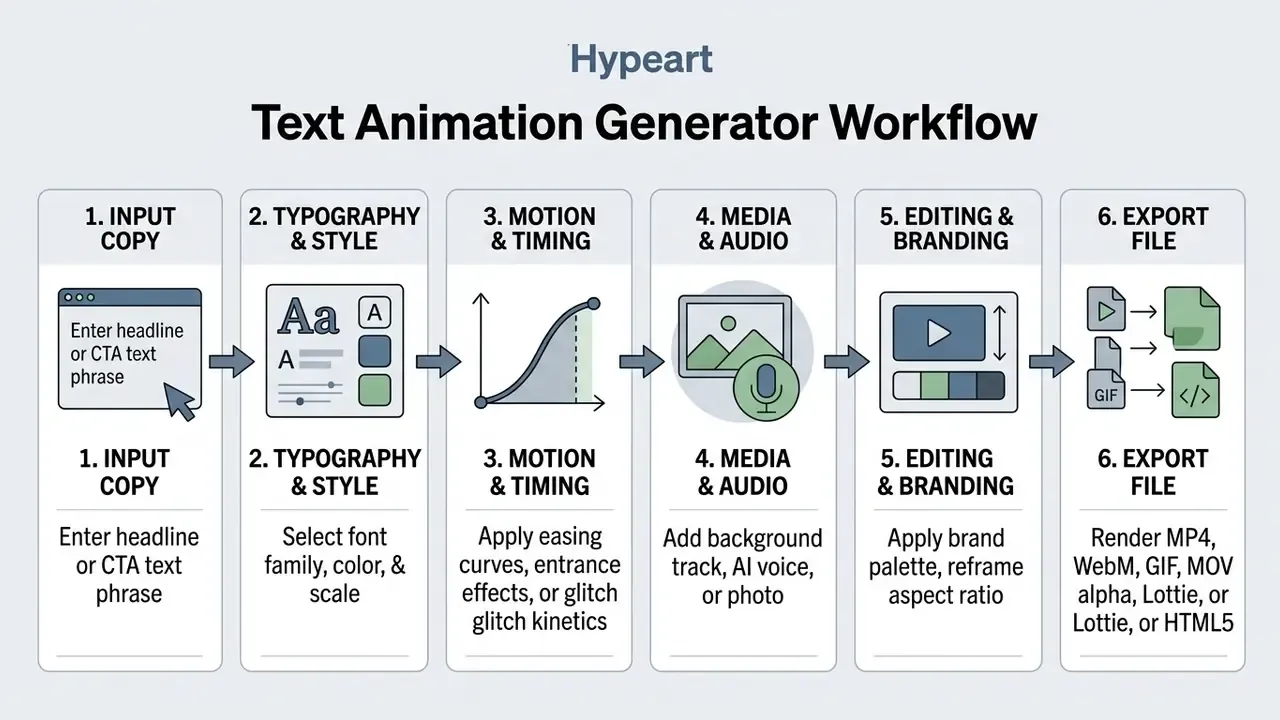
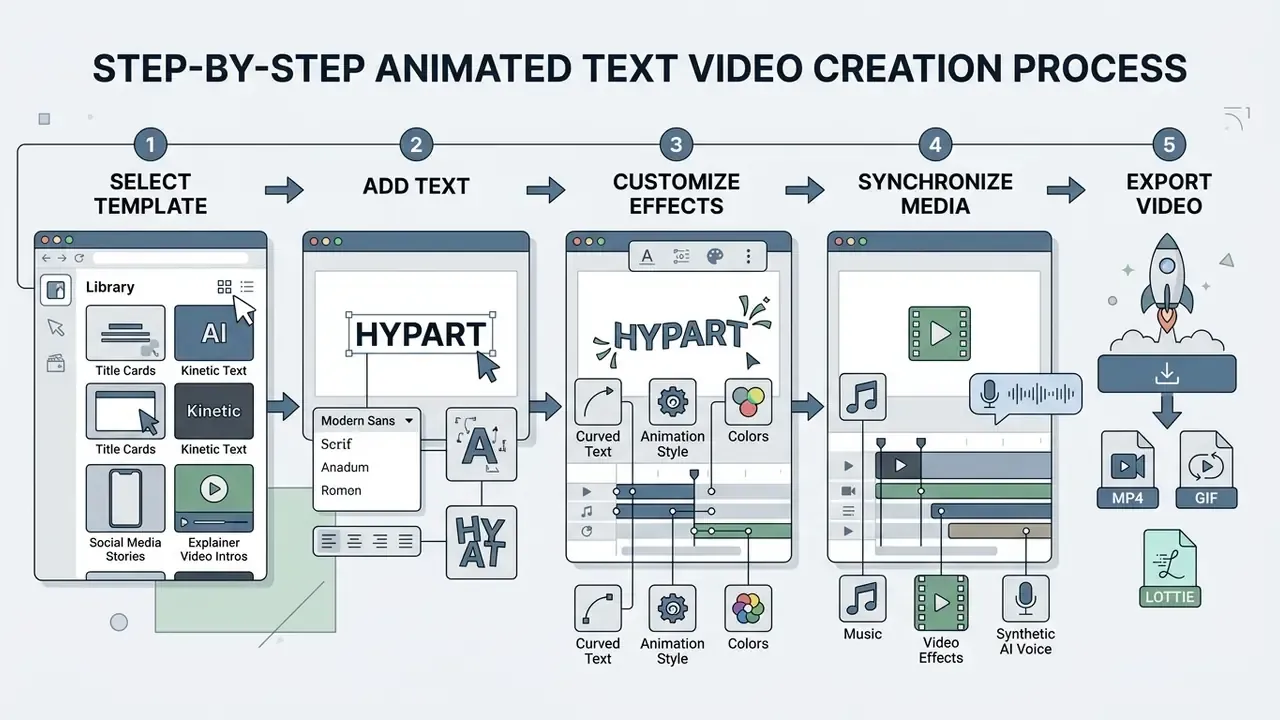
The process centers on four things: selection, customization, media synchronization, and rendering. With pre-built motion presets, raw text becomes a finished video file in minutes rather than an afternoon.
Choose a Template or Create Text Animation from Scratch
Most online generators ship a library of animation templates tailored to specific social formats, corporate presentations, or marketing campaigns. Choosing a pre-built template lets users create text animation quickly by swapping placeholder copy for their own messaging.
Alternatively, an animation text maker lets you start from a blank canvas. You insert custom text layers, set spatial coordinates, and apply independent entry and exit motion paths. Updated: vendor documentation across the current market (template-first kinetic typography builders advertising dozens of typography templates, and browser editors that also support blank-canvas projects) consistently exposes two parallel modes: template customization and timeline-based editing from scratch. Specific plan names, template counts, and interface labels change often, so verify them on the vendor's own pricing and help pages before procurement.
A typical template flow is three steps: select a template, customize text, style, colors, and media, then export the video. A from-scratch flow adds layer creation, keyframe placement, and per-character animator configuration. Slower, but it is the only route to strict brand compliance.
Add Text and Adjust Font, Style, and Effects
Once the layout exists, you can add text and configure precise typographic parameters. This step decides visual hierarchy, readability, and brand alignment, and it is where most amateur clips fall apart.
Editing interfaces normally allow creators to add animation parameters to individual characters, words, or full sentences. Users select fonts via an animation font generator or font animation generator, adjust weight, and apply styling such as drop shadows, color gradients, and stroke outlines. When branding calls for handwriting aesthetics, creators turn to a cursive animation generator or an animated word art generator to introduce stylized glyph deformations while keeping contrast readable.
Practical customization parameters documented across design systems and editors include:
- Font family, size, weight, and italic style, including cursive and handwriting faces.
- Line height, tracking, and per-character color gradients (some engines support up to four colors per character).
- Mixed styling inside one text block, so a single headline can combine emphasis weights and colors.
- Prompt-driven generative text effects, where a description plus font, tint, and style options produce a stylized lettering treatment that remains editable.
- Appearance and disappearance timing, including fade-in/fade-out and marquee-style continuous scrolling.
Creating Animated Curved Text and Circular Kinetic Typography
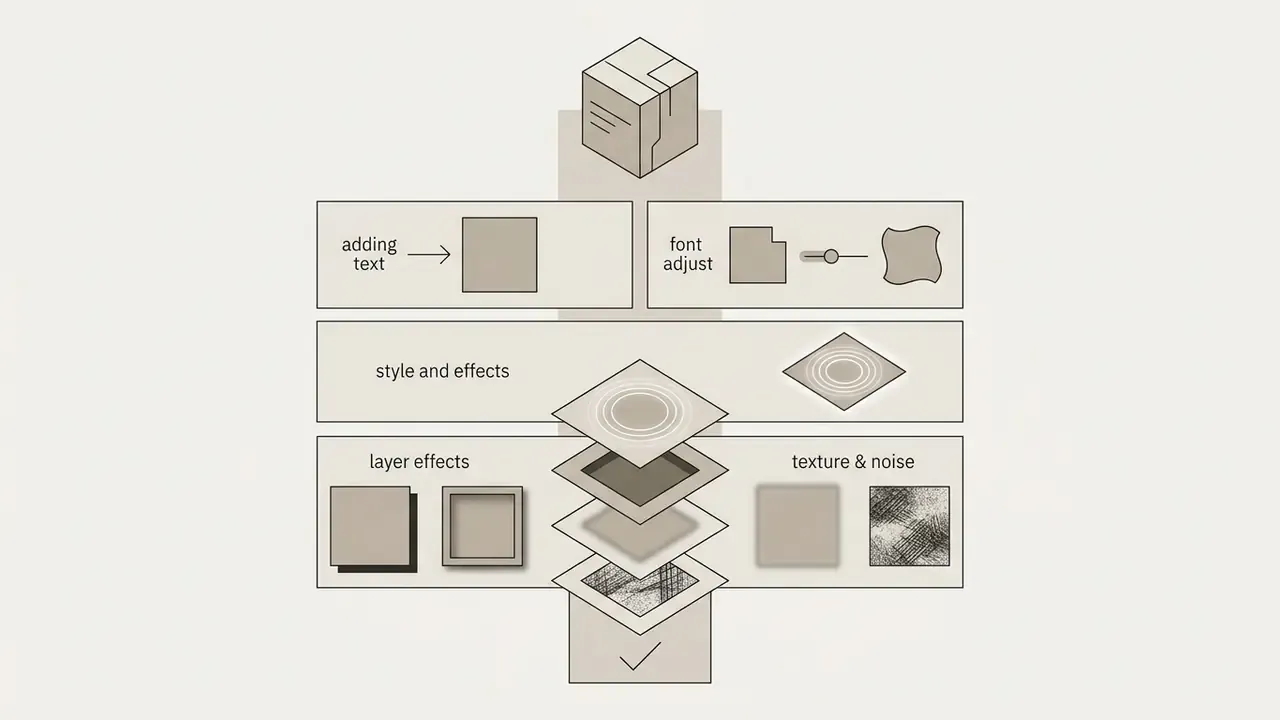
Curved text is one of the most requested practical features in online editors. Badges, seals, circular logos, and vinyl-style social callouts all depend on type following an arc rather than a straight baseline.
To animate text along a curved vector path:
- Add your text layer and select the text box.
- Open the Edit text menu and choose the Curve (curved text) option.
- Adjust the arc angle slider, typically from minus 180 degrees (inward arc) to plus 180 degrees (outward arc), until the lettering matches the underlying shape or logo mark.
- Open the Animation menu and apply a preset: rotation, wave motion, write-on, or fade. Most editors re-map the preset onto the curved baseline automatically, so each glyph animates along the arc instead of a straight line.
- Pair a continuous slow rotation with a static center element (logo, product shot, price tag) to create a self-contained circular kinetic badge.
Curved text animation suits anniversary seals, limited-offer badges, podcast cover motion, and circular lower-thirds. Because glyphs rotate individually on a curve, increase tracking by 5 to 15% and re-check contrast after animation. Letters near the arc extremes are always the first to lose legibility.
Supplement the Video with Media, Music, and Export the Result
How to Create Text Animations on iPhone and Android
Mobile devices account for the majority of consumer-side text animation projects, and most major editors ship feature-comparable iOS and Android apps alongside their browser builds.
The mobile workflow compresses into four steps:
- Install and open the app(App Store or Google Play), or open the mobile browser build, and select a 9:16 vertical canvas, the native frame for TikTok, Reels, and Shorts.
- Tap Text, then Add Text, type your caption, and pick a mobile-optimized typeface. On small screens, favour geometric sans-serif faces at 48pt or larger and avoid thin weights.
- Tap Animateto apply a one-tap kinetic preset (Pop, Typewriter, Slide, Grow, Flicker), or drag your finger across the canvas to record a custom motion path with variable speed.
- Add music, stickers, or voiceover, then export straight to the camera roll as MP4, or publish to TikTok, Instagram Reels, or YouTube Shorts from the share sheet.
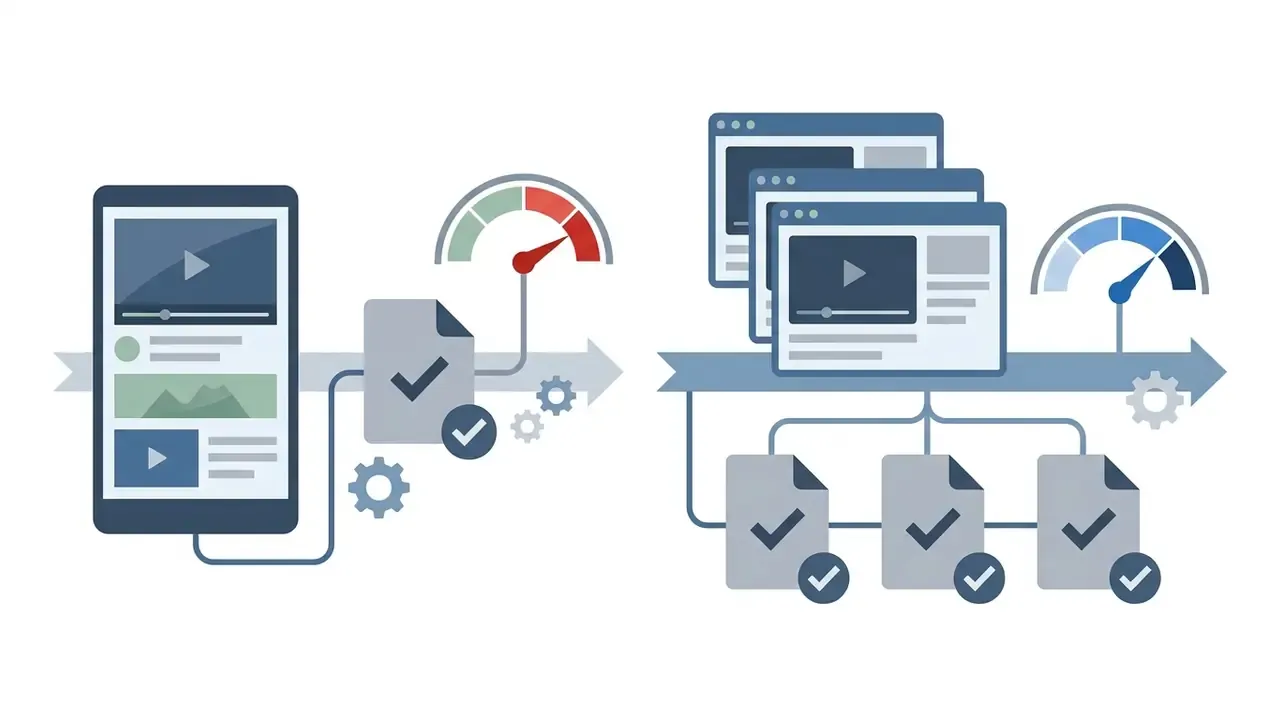
Three mobile-specific constraints matter. First, keep critical copy inside the central safe zone, because platform UI overlays (captions, profile handles, buttons) occupy roughly the bottom 20% and top 10% of a vertical frame. Second, if the project started on desktop, duplicate and resize rather than rebuilding it, so brand kit colors and fonts carry over. Third, check that mobile export resolution is not capped below your desktop plan tier. Free mobile tiers frequently cap output at 720p, and nobody enjoys discovering that after the render.
What Features to Look For in an Animation Text Maker
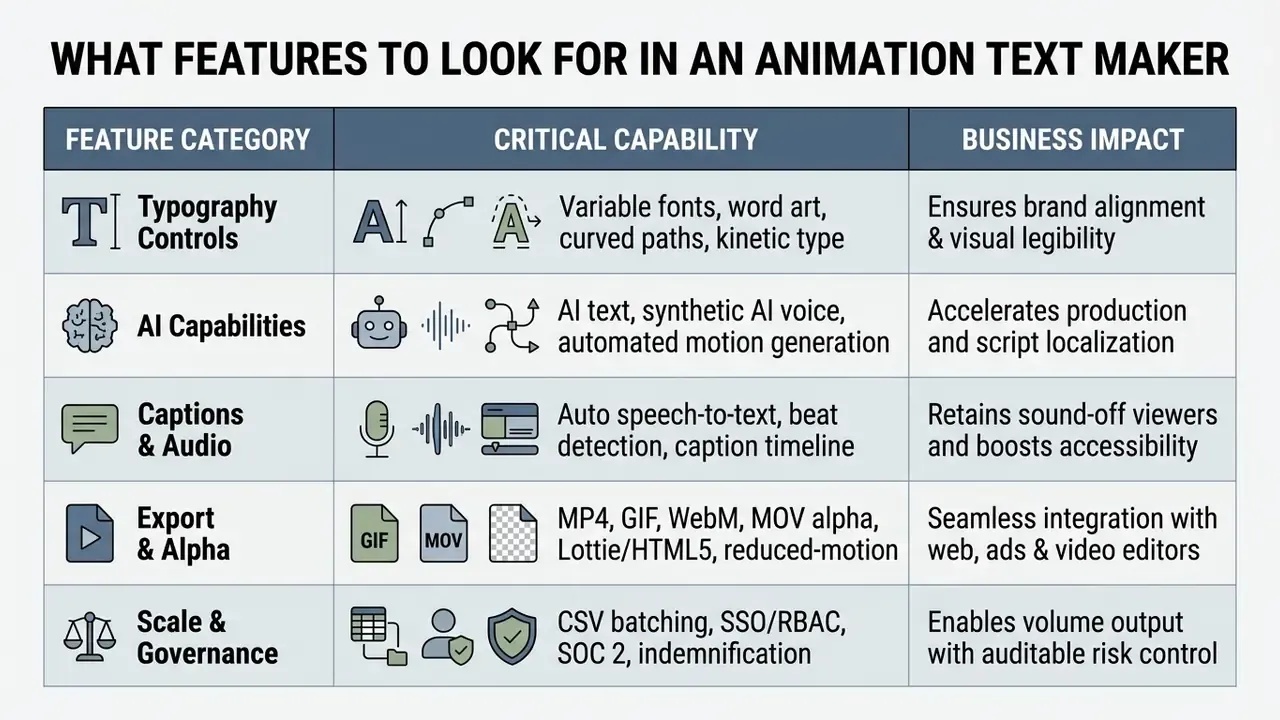
Selecting an animation text maker means evaluating core functionality, render speed, export flexibility, and technical compatibility. A versatile animation generator balances automated presets against granular control over typography and timing.
Templates, Fonts, and Customizable Typography
A professional text generator and animation generator suite should offer deep typographic customization. Standard motion presets rarely satisfy strict corporate design guidelines without adjustable baseline parameters.
Key capabilities include support for custom OTF/TTF font uploads, fine-grained control over tracking and line height, curved and circular baselines, and specialized design modes such as word-art layouts (words inside letters, a controlled number of standout words). Creators building promotional assets for entertainment or narrative campaigns often combine text generators with an ai movie poster generator or an ai movie script generator to keep script development and graphic title design thematically consistent. Fitness and wellness brands sometimes go further and pair typography motion with concept visuals from an ai muscle generator before committing to a shoot.
AI Text, AI Voice, and AI-Powered Animation
Generative AI has widened the feature set of modern text animation tools. AI text assistants help marketers draft concise ad copy and headline variations inside the editor, which removes one browser tab from the process.
Integrated AI voice text-to-speech engines synthesize natural voiceovers that align automatically with keyframe text entrances. An ai video generator pipeline goes further, using deep learning models such as the kinetic typography diffusion architectures reviewed by Bai et al. (2024) to generate customized AI Motion Graphics and AI Typeface Animation directly from prompts. Some vendors market this as an ai animated text generator, which is accurate enough as long as you remember the output still needs a legibility review. Updated:
Creators managing voice workflows can evaluate dedicated options in our guide to AI voice generators.
Auto-Captions and Beat-Synced Text Animation
Since a large share of short-form video is consumed with sound off, animated captions are no longer an accessibility afterthought. They are the primary reading surface.
- Automatic speech-to-text captions. Top-tier generators transcribe the audio bed and convert it into styled, animated caption blocks. You then drag the corners of each caption frame on the timeline to control display duration frame by frame, and restyle the whole track (font, highlight color, active-word emphasis) in one pass.
- Word-level highlighting. Active-word emphasis, where the spoken word scales or changes color, increases reading speed on vertical video without adding text to the frame.
- Beat-synced typography. Beat-detection algorithms analyze the music track and drop keyframes on audio transients, so scale pops, color flips, and cut-ins land exactly on the beat. That is the look used in lyric videos, product reveals, and sale countdowns, and it removes manual keyframe hunting.
- Caption export for compliance. Always export the caption track as WebVTT in addition to burning captions into the frame. WCAG 2.1 SC 1.2.2 requires captions for all prerecorded audio in synchronized media, covering speech plus non-speech audio such as sound effects and speaker identification, while SC 1.2.4 covers live captions.
Video Editing and Branding Animated Text
An integrated video editor inside an animation platform lets teams enforce brand guidelines across every exported asset. Consistency requires saved brand kits: color swatches, approved typography, official logos. Readers evaluating editor capabilities in more depth can review our overview of video-editing tools and workflows.
Robust tools enable one-click palette application, real-time preview, custom aspect ratio reframing (16:9, 9:16, 1:1), and multi-track video editing. In enterprise workflows, marketing teams use these features to adapt one primary campaign asset for every social placement. Creators working with YouTube publishing timelines can explore tailored practices in our guide to YouTube video editors.
Sector guidelines show how strict channel intake can get. CDC motion graphics specifications, for example, mandate branded treatment, a runtime under one minute, a file size below 3 MB, and mandatory logo plus source-link placement. Enterprise brand kits should encode equivalent hard limits so animated text assets never fail review at the door.
Web-Native Code Exports: HTML5, Lottie JSON, and SVG
For website integration and display ad networks (Google Display Network, programmatic banner inventory, AdRoll), static video files can be far too heavy. Advanced animation text makers therefore export motion typography as code rather than pixels:
- HTML5 bundles for banner ad networks, where the animation ships as markup plus CSS/canvas instructions and respects strict per-creative weight budgets.
- Lottie JSON for app and website integration: vector-based, resolution-independent, and typically a fraction of the file size of an equivalent MP4 loop.
- SVG and CSS animation for hero headlines, where text remains real text in the DOM, preserving crawlability and screen-reader access.
- APNG and PNG sequences for compositing pipelines that need frame-accurate transparency.
- MOV with alpha channel and WebM for overlay use inside other video projects.
Two technical checks belong in every web-export decision. First, verify cross-browser support for the exact animation properties used, because support varies by browser and version and some effects fail silently in Safari. Second, confirm the exported code includes a prefers-reduced-motion fallback, so users with vestibular sensitivities see legible static text instead of motion, and confirm that copied output does not inject unexpected runtime JavaScript into your page.
Enterprise Security, Shadow AI, and Procurement Controls
For regulated organizations, banks, insurers, fintechs, healthcare providers, animation quality is rarely the binding constraint. The binding constraints are data handling, licensing, and auditability. Unmanaged adoption creates classic Shadow AI exposure: an employee pastes an unreleased product name, a pricing table, or an earnings headline into a consumer-tier SaaS editor whose terms permit model training on submitted content.
Evaluate vendors against the following controls before approving a text animation tool for brand use:
| Control area | What to require | Why it matters |
|---|---|---|
| Data retention | Documented opt-out from model training; defined deletion window for uploads and prompts | Prevents unreleased copy, pricing, and campaign plans from leaking into third-party training sets |
| Certification | SOC 2 Type II and/or ISO 27001 report available under NDA | Provides reproducible audit evidence instead of marketing assurances |
| Identity & access | SAML/SSO, SCIM provisioning, role-based access control, admin audit logs | Enables joiner, mover, leaver control and per-asset accountability |
| Sub-processors | Published list of model providers, storage, and CDN sub-processors | Required for vendor risk registers and cross-border transfer assessments |
| IP indemnification | Written commercial-use license plus indemnity for generated output | Shifts residual copyright risk away from the brand |
| Regional hosting | Selectable data residency for uploads and renders | Supports data-localization obligations |
| Export integrity | Watermark-free, resolution-locked renders with reproducible settings | Prevents non-compliant assets reaching paid media |
| Governance hooks | API access and approval workflow that can be logged into GRC/MRM systems | Makes creative output part of existing model-risk reporting |
Practical mitigation for Shadow AI is unglamorous but effective: publish an approved-tool list, gate uploads of unreleased material behind an enterprise tenant, disable personal-account logins on managed devices, and require that every AI-assisted asset carries a stored record of prompt, model, and license terms. Developers automating this at scale can review our AI Media API Guides.
Feature Comparison Matrix
| Feature Parameter | Basic Online Generator | Advanced AI Animation Maker | Desktop Motion Software |
|---|---|---|---|
| Animation Templates | Standard pre-built library | AI-generated & customizable | Manual keyframes & presets |
| Named Effect Presets | Fade, Slide, Pop | Typewriter, Flicker, Color Shuffle, Glitch, Cursive | Fully custom per-character animators |
| Typography Control | System fonts & basic sizing | Custom fonts, curved text, word art tools | Unlimited vector control |
| Curved / Circular Text | Rarely available | Arc slider (minus 180 to plus 180 degrees) with motion presets | Path-based text on vector shapes |
| AI Voice & AI Text | Not included | Integrated TTS & script AI | Requires third-party plugins |
| Auto-Captions & Beat-Sync | Not included | Speech-to-text + beat detection | Manual or plugin-based |
| Video Editing Scope | Single-scene text overlay | Multi-track video & audio timeline | Multi-layer compositor |
| Mobile App Parity (iOS/Android) | Browser only | Full iOS + Android apps | Desktop only |
| Export Formats | MP4, GIF (720p) | MP4, WebM, MOV Alpha, Lottie, HTML5, SVG (1080p/4K) | Uncompressed master files |
| CSV Data Batching | Not available | Spreadsheet-driven bulk render of localized variants | Scriptable via expressions/automation |
| Enterprise Security (SSO, SOC 2) | Typically absent | Available on business/enterprise tiers | Governed by desktop deployment policy |
| Commercial License | Watermarked or restricted | Included in paid plans | Depends on asset licensing |
CSV Data Batching deserves separate attention for volume teams. Connect a spreadsheet of headlines, prices, locales, and CTAs to one animated text template, and a single render batch produces dozens or hundreds of localized ad variants. As one platform user put it, design sets save time, "while batch creation via CSV is very interesting, it's fast to design ads and post on social media." For performance marketing teams running multivariate creative tests, batching turns text animation from a design task into a data operation. That shift is easy to underestimate until the first campaign needs 40 language variants by Friday.
Free Animated Text Video Maker vs. Paid Subscriptions: What to Check Before Choosing
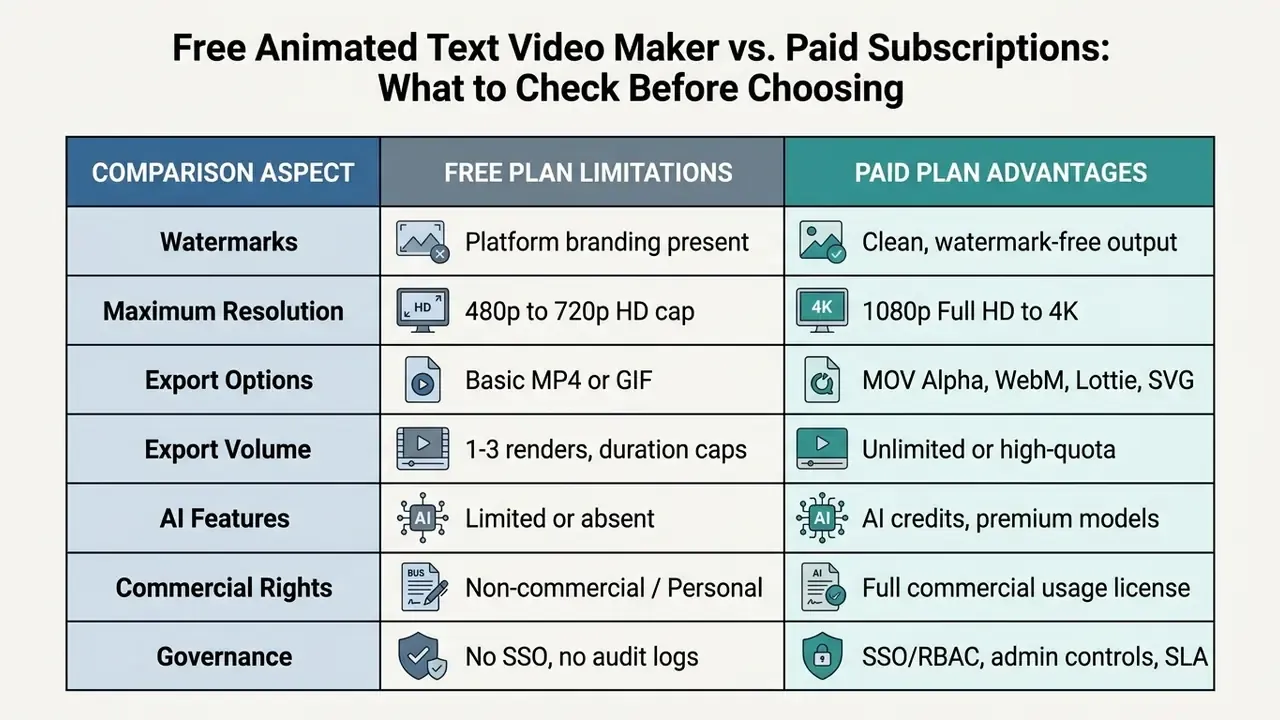
Choosing between a free animated text video maker and a paid commercial plan means inspecting export limitations, resolution caps, watermark policies, and usage rights. Free tools handle casual projects perfectly well; commercial campaigns generally need a paid tier. Readers comparing adjacent categories can also review our roundup of free video editing software.
What Is Typically Available in Free Text Animation
Options for free text animation let users test platform behaviour before paying. Queries like animated text video maker online free, create text animation video online free, or free online text animation maker point to tools with accessible basic features.
Free plans generally include standard animation templates, basic font selection, and simple motion controls. In practice, free-tier limits cluster around a few patterns documented on vendor pricing pages:

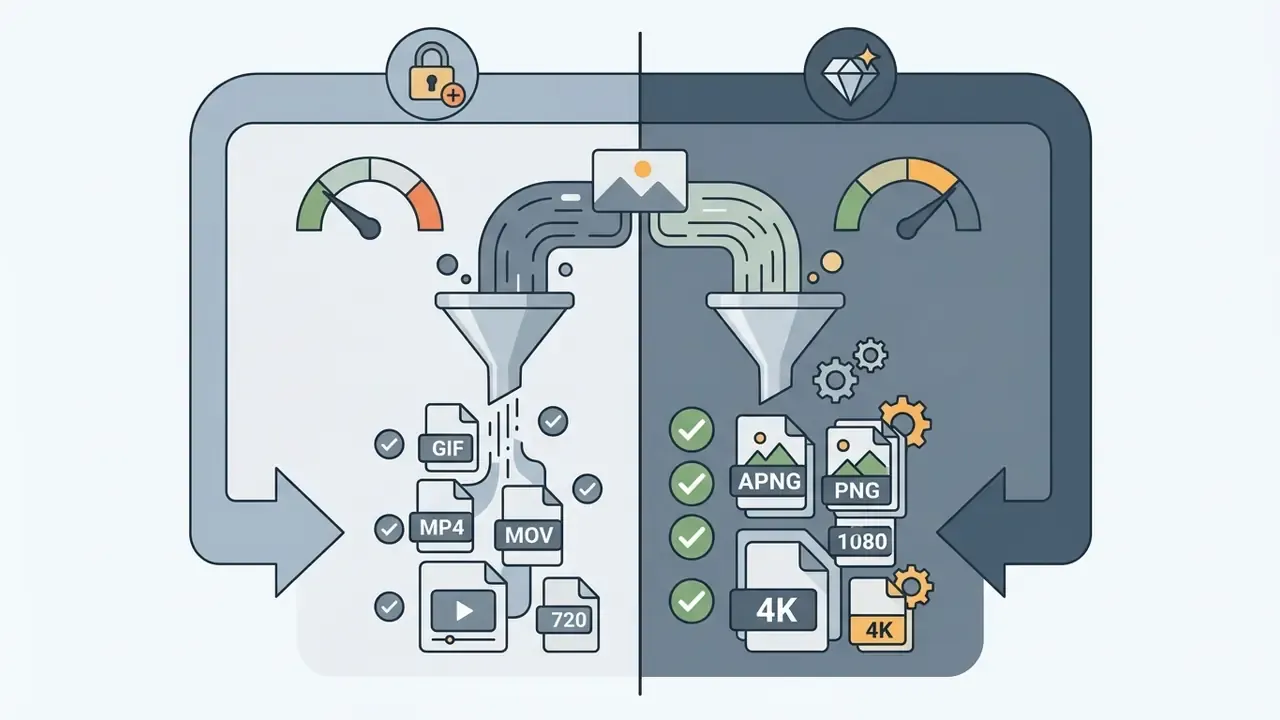
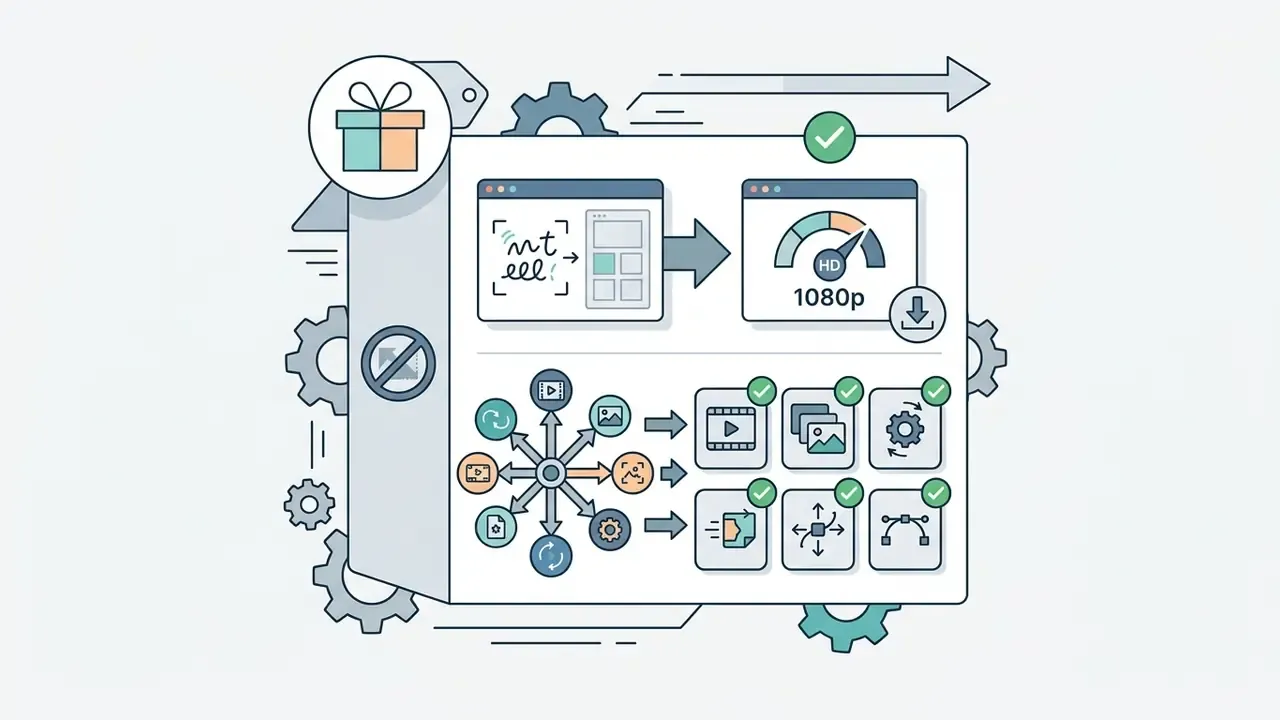
Because these limits shift release to release, and because some vendors' published caps contradict their own older documentation, verify the current watermark and resolution policy on the vendor's pricing page immediately before production. Creators looking for cost-effective media tools can review our guide to free photo editors, the breakdown of free AI video generators, and the detailed comparison of the best free AI video generators.
How to Evaluate Paid Features for Commercial Videos
Commercial campaigns need watermark-free output, high-definition rendering (1080p or 4K), and formal intellectual property indemnification. Paid subscriptions unlock expanded asset libraries, advanced video editing, synthetic AI voice credits, priority render queues, premium AI model access, and full commercial usage licenses. Typical bundles pair Full HD or 4K export and watermark removal with monthly AI credit allowances plus explicit commercial or reselling rights.
When evaluating tool economics, weigh subscription cost against production time saved versus manual motion graphic editing. For regulated buyers, the honest comparison is risk-adjusted:
Risk-Adjusted ROI = (Hours saved × blended creative rate + media performance uplift) minus (Subscription cost + security review hours + legal/licensing review hours + expected remediation cost × probability of a compliance failure)
Populate that formula with the four inputs most teams omit: security review effort for a new SaaS vendor, font and music license verification per campaign, accessibility remediation (re-rendering assets that fail contrast or caption checks), and the cost of pulling a live creative. A cheap consumer tier that triggers a legal review every campaign is frequently more expensive than an enterprise seat with indemnification and an SLA. For enterprise plans, also confirm uptime SLA, render-queue priority, support response times, seat-based versus usage-based pricing, and contractual audit rights.
Teams that prefer to model this before a procurement conversation can run the numbers with our AI Media Calculators, review software tier structures in the AI Media Pricing Guides, and compare feature sets via our AI Media Comparison Matrices.
Fact Check: Commercial Licensing & Copyright Verification
How to Adapt Animated Text for Your Brand and Audience
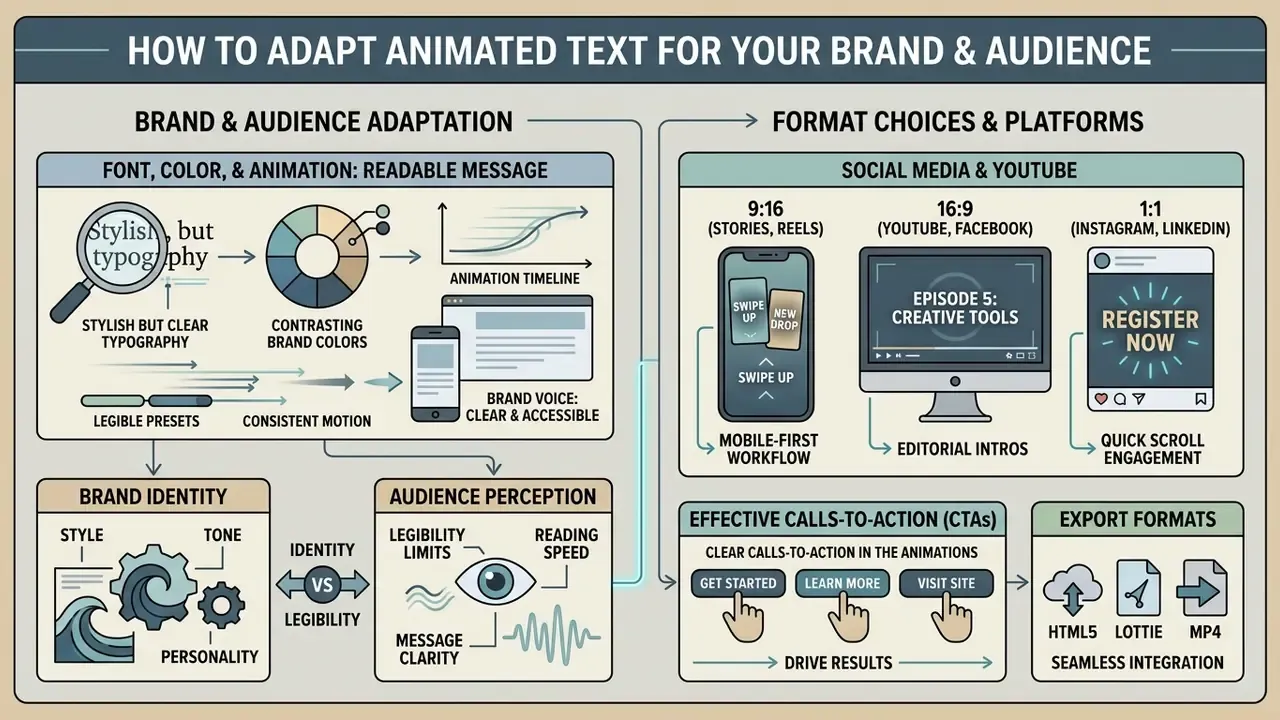
Adapting animated text for a target audience means balancing brand identity against perceptual legibility limits. Overly aggressive motion graphics induce cognitive fatigue and reduce comprehension, which is the opposite of the intended effect. Institutional brand-motion guidance recommends choosing animation by text length and on-screen duration: short copy tolerates expressive motion, longer passages need restrained motion so reading is not disrupted.
Research on short-form video consumption (IJSET, 2024) reports a negative correlation (r = minus 0.45, p < 0.01) between high daily short-form video exposure and sustained attention span among young adults. Updated:
«Users watching short-form video more than 3 hours per day report a 35% decline in concentration; beyond 4 hours, 40% report reduced comprehension of complex content.»
A CHI 2023 study went further and showed that fast-paced short-form feeds can impair prospective memory. Updated:
The design consequence is direct. Animated text must deliver a clear, digestible message, and calls to action must be executable now rather than remembered later.
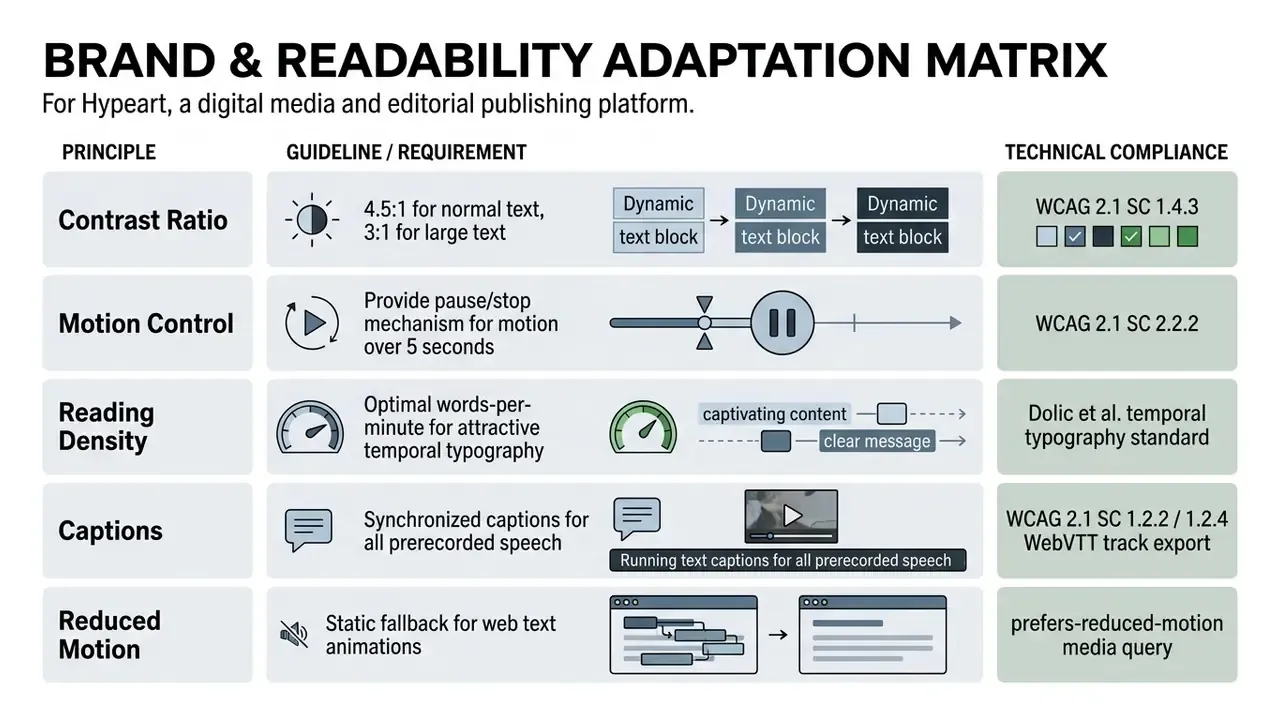
Font, Color, and Animation for a Readable Message
Legibility in kinetic text depends on strict adherence to accessibility standards. High-contrast color pairs, sensible font sizes, smooth easing curves. Nothing exotic.
The W3C Web Content Accessibility Guidelines (WCAG 2.1 / 2.2 SC 1.4.3) mandate a minimum visual contrast ratio of 4.5:1 for standard text and 3:1 for large text (18pt, or 14pt bold); incidental, decorative, and inactive text is exempt. SC 2.2.2 additionally requires controls to pause, stop, or hide moving content that plays automatically for longer than 5 seconds.
Accessibility rules and user experience point the same way here:
«Animation improves UX in four ways: it reduces perceived waiting time, supports cognitive processing, provides feedback, and holds attention, provided its intensity is tuned correctly.»
Empirical reading research reinforces the cautionary half of that finding: adding motion behind text measurably slows reading speed. To avoid visual noise, skip chaotic jitter, separate essential copy from busy background motion, and pick stable typography when working with an animation font generator or a cursive animation generator. Designers preparing static frames, thumbnails, and end cards alongside animated type can explore related techniques in our guides on photo editors and AI headshot generators.
For web-embedded text animation, add two safeguards: a text alternative or transcript giving viewers an equivalent understanding of the animation (title plus "Text Version," a short intro, the embedded media, and the full wording of speech, text, and action, per federal accessibility guidance), and a reduced-motion fallback that carries the same message without movement.
Pre-Launch Compliance Checklist for Marketing, Audit, and GRC Teams
Use this checklist as reproducible audit evidence before an animated text campaign goes live. Store the completed record with the final render.
Checklist0 / 20
Disclaimer: this checklist is a general operational aid, not legal, compliance, or financial advice. Validate requirements with your own legal, accessibility, and risk functions before publication.
FAQ About Text Animation Generators
Can You Create Animated Text Without Premiere Pro or After Effects?
Yes. An online animation text generator produces animated text videos directly in the browser, with no desktop motion graphics application involved. Updated: professional software such as Adobe After Effects still offers complete control through keyframes, text animators, range selectors, and expressions, but it is a manual, multi-step workflow with real hardware demands. Adobe's own 2026 system requirements documentation specifies a minimum of 16 GB RAM for HD media and 32 GB or more for 4K and above, so verify current specifications on the vendor's requirements page before buying hardware. Premiere Pro sits in between: timeline keyframing of title graphics is simpler than After Effects, but specialized motion control is thinner. Online tools automate keyframing with pre-built templates, which means faster turnaround for standard marketing videos at the cost of fine-grained precision. For a broader overview of visual animation tools, visit our guide on animation makers. For technical inquiries, refer to AI Media Support and Troubleshooting.
How Does an Animated Word Art Generator Differ From a Text Animation Maker?
An animated word art generator focuses on styling, deforming, and animating isolated typography, single words, or logos. Its output is the type itself. A universal animation text maker gives you a multi-track video timeline instead: kinetic typography plus background footage, photo layers, sound effects, synthetic voiceovers, scene sequencing, and closed captions, with text, timing, and audio editable up to export. The difference is scope rather than goal.
Can I Create Animated Text With a Curve?
Yes. Add the text to your project, select the text box, and choose Curved text from the Edit text menu. Set the arc angle, then open the Animation menu and pick a preset. The editor re-maps the animation onto the curved baseline automatically, so each glyph animates along the arc. Increase letter spacing slightly and re-check contrast afterwards, because glyphs at the arc extremes lose legibility first.
How Do I Create Text Animations on an iPhone or Android Phone?
Install the editor's mobile app (App Store or Google Play), or open its mobile web build. Choose a 9:16 vertical canvas, tap Text, then Add Text, type your caption, and tap Animate to apply a one-tap preset such as Pop, Typewriter, Slide, or Flicker. You can also drag your finger across the canvas to record a custom motion path. Add music or voiceover, then export to the camera roll as MP4 or publish directly to TikTok, Reels, or Shorts. Check whether your plan caps mobile exports at 720p.
How Do You Animate Text in a GIF?
Build the animation as usual, keep the sequence short (under 6 seconds is a safe default), limit the palette to reduce banding, and export as GIF. GIF has no alpha-channel video equivalent and no audio, so use MOV with alpha or WebM when you need transparency and MP4 when you need sound. If you started from a still image and added text animation, the deliverable has to become a video or GIF file to preserve motion. The design quality does not change, only the file type.
How Do I Make a Text Animation Pop or Flicker?
Select the text layer, open the animation panel, and apply the Pop preset so each character bounces in with spring physics, or Flicker for a neon-sign effect. Then tune three parameters: speed, delay between characters, and transition duration. For headline copy, aim near 90 words per minute, the pacing that subjective testing found most attractive to viewers.
Where to Find Help with Animation Setup and Exporting?
Help resources sit in platform help centers, product documentation, video editing tutorials, and support desks. Vendor troubleshooting guidance for render and export failures converges on a repeatable sequence: update the application, restart the app or machine, review the system compatibility report, then retry with a different output format, a built-in preset, software-only playback rendering, or a dedicated media encoder. Project-specific failures are frequently caused by third-party plugins, transitions, or LUTs, so importing the project into a fresh project file and re-exporting isolates the fault. Export-location permissions are another common culprit: change the output folder and confirm the audio encoding setting before assuming a software bug. For web video accessibility under WCAG 2.1 SC 1.2.2, exported videos containing speech should ship with synchronized caption tracks in WebVTT format. If the problem persists, escalate through the vendor's help center with the render log, project file, and system report attached, or contact us through the support channel listed on this site if the issue concerns the guidance in these frequently asked questions. The FAQ above is published as an accessible accordion using semantic and elements, so every question can be expanded independently by keyboard and screen-reader users.
Appendix A: Revised Statements and Source Verification Log
For editorial transparency, the following statements were revised during the February 2026 review. Original phrasing is retained here; the main text carries the corrected version.
| Original statement | Status | Revision applied |
|---|---|---|
| "an empirical study at the School of Saint Anthony evaluated promotional media formats, finding that 87.5% of surveyed participants preferred animated visuals over static visual formats for communication clarity and overall appeal." | Incomplete | Expanded to all three reported metrics (87.5% preference, 64.3% clarity, 82.1% relevance) with the study title. |
| "display speed (words per minute) and keyframe interpolation curves jointly determine information transmission efficiency." | Abstract | Added the practical finding: an optimal speed band exists, and smooth interpolation curves improve readability. |
| "Platforms like Renderforest (2026) and CapCut provide dual editing modes…" | Unverified vendor claim | Reformulated as a market-wide pattern (template mode plus from-scratch timeline mode) with instruction to verify current vendor pages. |
| "Tools documented by VEED (2026) and ElevenLabs (2026) enable timeline synchronization…" | Unverified vendor claim | Reformulated as a documented category pattern (upload, voiceover, music, SFX, auto-captions, timeline sync) with a verification note. |
| "requires substantial local hardware resources (minimum 16 GB to 32 GB+ RAM)" | Needed attribution | Attributed to Adobe's published 2026 After Effects system requirements (16 GB minimum for HD, 32 GB or more for 4K and above) with a verification note. |
| LinkedIn motion-graphics uplift (+1% social actions, +3% CTR, +8% engagements) | Vendor report | Retained and explicitly labeled as a platform performance report (The Fundamental Strategies of Video Ads on LinkedIn, 2022) requiring first-party re-validation. |
| Author note | Removed | Marcus Hale, author. |
Sources retained without change: Park et al., Kinetic Typography Diffusion Model (ECCV 2024); Dolic et al., Temporal Typography (2024); Bai et al., Intelligent Artistic Typography (arXiv, July 2024); V & Rosh, European Journal of Arts, Humanities and Social Sciences (2024); DOAJ short-form video study (2024); IJSET short-form video and attention study (2024); CHI 2023 prospective memory study; Animation and UX, 5th International Conference on Image, Video and Signal Processing (2023); W3C WCAG 2.1/2.2 SC 1.2.2, 1.2.4, 1.4.3, 2.2.2; U.S. Copyright Office AI registration guidance (2023); Google Ads video ad specifications.
Explore related documentation, technical guides, and usage terms in our AI Media Glossary, check platform pricing details in our AI Media Pricing Guides, or review legal updates in AI Litigation and Case Timelines.