«In evaluating generative creative platforms for enterprise and scaled workflows, decision-makers must look beyond raw novelty. Our core governance rule remains strict: no evidence, no autonomy. Every automated photo edit, batch action, or synthetic image generation must operate within defined access controls, verifiable license terms, and clear risk parameters.»
Marcus Hale, author
That rule is the lens used throughout this guide. Before we get to one-tap background removal and sticker packs, it is worth stating plainly what a modern photo editor app actually is inside an organization: a cloud service that ingests corporate imagery, routes it through third-party generative models, and returns assets that will eventually appear in paid advertising. Everything below, from features and credits to prices, licensing, and retention, is documented with that dual perspective. What a creator gains. What a risk owner must verify.
Why should a compliance or finance lead care about a consumer editing tool? Because the tool is already inside the building. Marketing teams adopt it in minutes, without procurement, and corporate images leave the perimeter before anyone writes a policy.
Key Takeaways for Decision-Makers
| Question | Short answer |
|---|---|
| What is it? | An all-in-one AI photo editor, video editor, and design studio (web + iOS + Android) combining raster editing, vector text, templates, and generative diffusion models. |
| Who is it for? | Content creators, SMM and performance marketers, e-commerce sellers, brand and design teams, and enterprises embedding editing via SDK or API. |
| Is there a free tier? | Yes, Picsart Free. Core editing is unrestricted; premium assets, high-resolution exports, and heavy generative jobs are capped or watermarked. |
| What does it cost? | Pro: $15.00/mo, or $10.50/mo billed yearly ($126/year). Ultra: $45.00/mo, or $24.50/mo billed yearly, per seat ($294/year, a $246 annual saving). Enterprise: custom pricing with SDK/API, white-label, SLA. |
| What is new in 2026? | 140+ frontier AI models in one subscription, 15+ creative AI agents, the Picsart CLI, and Picsart inside Claude Code, Cursor, and ChatGPT via MCP. |
| Biggest commercial risk | AI outputs are licensed for commercial use, but Picsart does not guarantee copyright ownership or third-party non-infringement, and purely synthetic images may not be copyrightable in the US. |
| Biggest governance gap to check | Data retention and model-training policy for uploaded corporate imagery, plus reproducibility (seed and metadata capture) for audit trails. |
How to read this guide. The first three sections describe capability: what the app does, which models it exposes, and how automation works. The middle sections handle money and access: free-tier limits, plan economics, and the security questions a second-line reviewer will ask. The final sections cover workflow and licensing, which is where most commercial mistakes actually happen. If you only have five minutes, read the security section and the commercial risk checklist.
What Is the Picsart Photo Editor App and Which Tasks It Fits
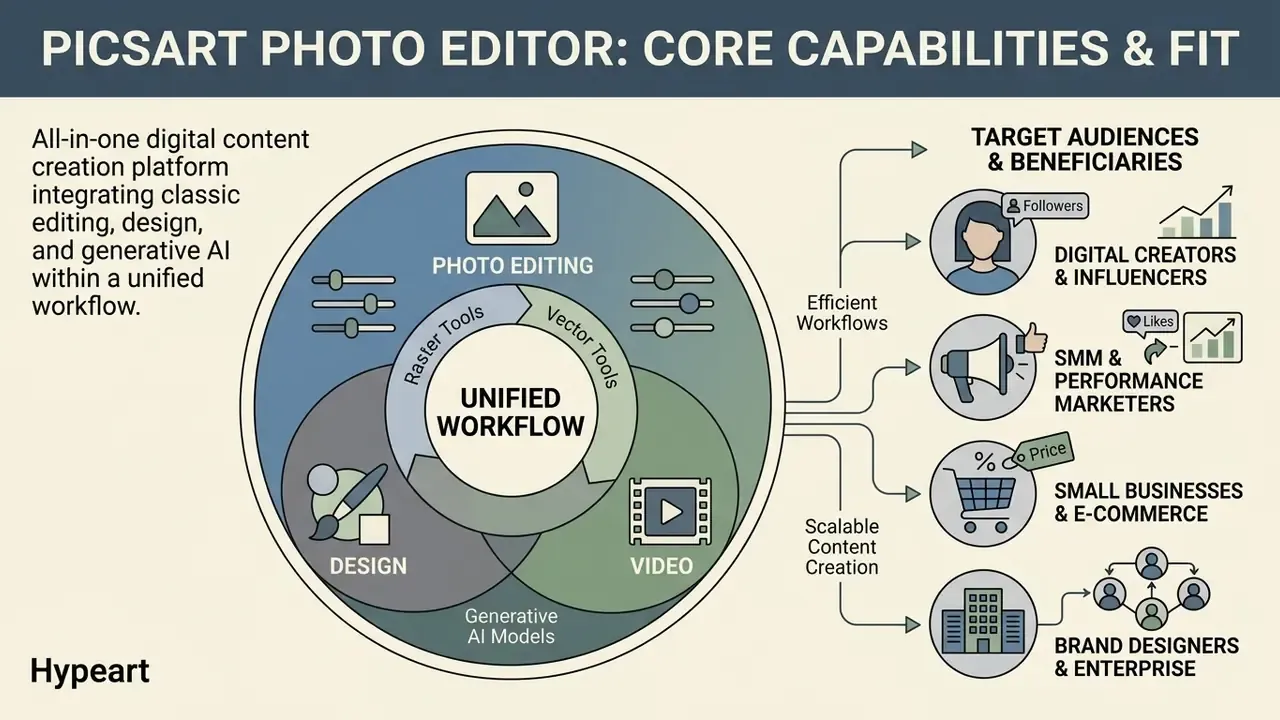
The Picsart photo editor app is an all-in-one digital content creation platform that integrates classic raster editing, vector design, and generative AI models within a unified mobile and web interface. It sits in the broader category of the AI photo editor: software that replaces manual masking, curve pulling, and hand retouching with model-driven automation. Originally launched in 2011, with a web platform added in 2020 and enterprise solutions arriving in 2025, Picsart has grown into a full photo editor app ai environment rather than a single-purpose filter tool.
According to the company's own reporting, the platform serves more than 130 million monthly active users and a creator community exceeding 100 million registered accounts. Those figures are vendor-published and have not been independently audited, so read them as scale indicators, not verified metrics. The platform covers creative tasks ranging from basic retouching and background removal to multi-track video editing, text-to-image synthesis, and branded graphic design.
For modern creative teams, SMM specialists, and commercial operators, the photo editor picsart suite works as a centralized hub for multi-channel content pipelines. Rather than maintaining fragmented toolchains for image processing, video clipping, and template layout, users lean on pics art photo editor tools to execute end-to-end visual campaigns. Research into generative design workflows points the same way.
«Unifying asset creation and post-processing measurably reduces operational friction in generative design workflows.»
By bridging classical manipulation with generative diffusion models, the app supports both exploratory concept development and production-ready asset delivery. That combination is the reason it shows up in marketing departments faster than most enterprise software.
Photo Editing, Design, and Video in a Single Platform
Integrating photo, design, and video editing into a single photo video editor framework lets users run cross-modal campaigns without switching environments. The pic art ai ecosystem combines a multi-layer photo video editing engine with vector text controls, sticker generation, and video sequencing. One static photograph can become an animated social story, a promotional video overlay, a banner ad layout, and a high-resolution print graphic inside one session.
The platform's all photo video capability runs on a cloud-synchronized asset engine that handles raster layers, video clips, and AI-generated outputs together. A typical sequence: load a source photo, isolate the background, apply brand-compliant typography, then convert the static composition into a short ai video snippet for video-first channels. Teams benchmarking motion output against dedicated tools can review our comparison of free AI video generators and, for long-form channels, our guide to YouTube video editing workflows. Removing export and re-import cycles between separate applications is unglamorous, but it is where the hours actually get saved.
Who Benefits from an AI Photo Editor
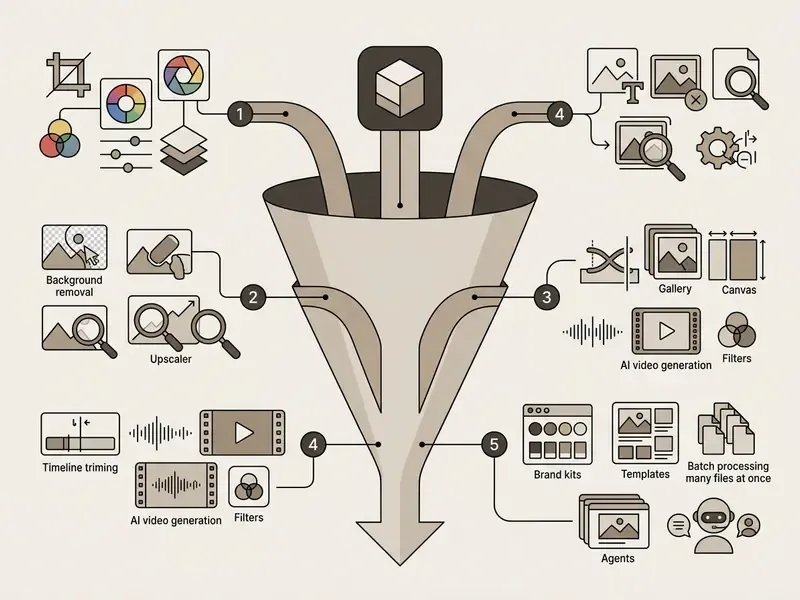
Core Features of the Picsart AI Photo Editor
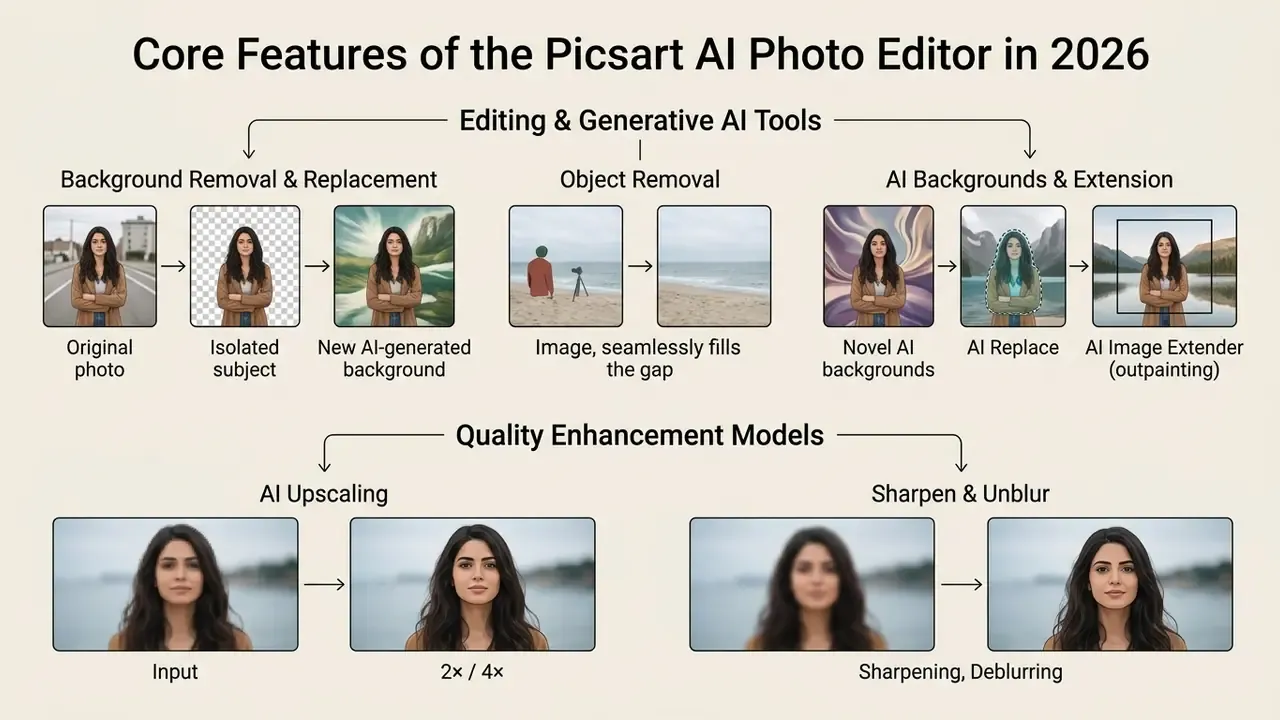
Evaluating the picsart ai photo editor features means examining both traditional raster tools and specialized generative models. The picsart ai photo editor app houses over 25 distinct AI-driven utilities alongside classical manipulation controls. Updated for 2026: current official platform pages state access to more than 140 leading AI image, video, and audio models, with model-specific pages listing 59 image models inside the generator alone. Earlier figures circulating as "179 models across 32 providers" trace back to a single vendor playground page and are not independently verifiable, so the conservative "140+ frontier models" framing is used throughout.
The core capability of the ai photo editor app revolves around automated image manipulation, quality restoration, and generative image synthesis. Instead of manual layer masking and complex selection paths, the system uses deep neural networks trained on large visual datasets to recognize subjects, textures, foregrounds, and backgrounds automatically. Useful, yes. Also opaque, which is exactly why the failure-mode table below matters more than the marketing copy.
Background Removal and Replacement, Object Removal, and AI Backgrounds
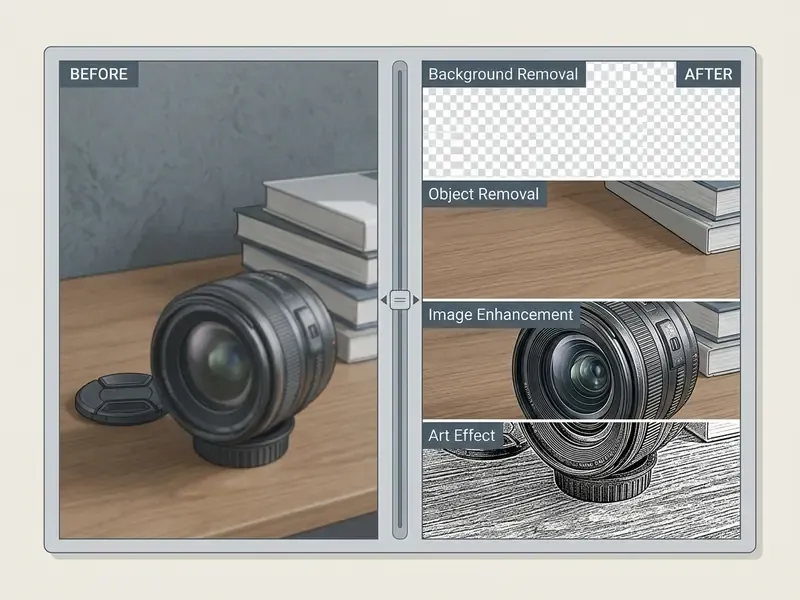
Background isolation and object erasure are the most frequently used features in the ai photo editor picsart toolkit. The automated background remover applies semantic segmentation to detect the primary subject, whether a person, product, or vehicle, then isolates it from the surrounding scene and outputs a transparent PNG in one tap.
- AI Backgrounds. After isolation, users generate contextual new backgrounds from natural language prompts. The system synthesizes lighting, shadows, and perspective so the isolated foreground blends with the new environment.
- Object Remover. The AI eraser lets users highlight unwanted elements, text overlays, watermarks, or blemishes with a brush. Selection modes include brush, background, foreground, and automatic text detection. The inpainting model reads surrounding textures and context to erase the target.
- AI Replace. Instead of erasing, substitute an object from a text description: swap a jacket, a mug, or a background prop while preserving scene geometry.
- AI Image Extender (outpainting). Canvas extends beyond the original frame with generative fill, a technique compared across tools in our guide to AI outpainting and image expansion.
Empirical work on diffusion-based inpainting stresses that reference-free object removal has to maintain background continuity while eliminating target pixels, without leaving residual edge artifacts.
«Effective object erasure requires seamless inpainting inside the mask while preserving background continuity outside it.»
Picsart's own developer documentation notes that its removal engine is tuned for less busy, high-contrast scenes with clear edges, and claims handling of complex boundaries such as hair, jewelry, and fur only under recommended composition conditions. No independent benchmark of removal quality was available at the time of writing. The practical performance envelope:
| Operation type | Underlying mechanism | Ideal scene conditions | Common failure modes |
|---|---|---|---|
| Background isolation | Semantic edge segmentation | High-contrast foreground, clear lighting, distinct subject boundaries | Fine hair details, transparent glass objects, low-contrast edges |
| AI background synthesis | Prompt-guided diffusion inpainting | Specific descriptive prompts, neutral foreground lighting | Lighting direction mismatch, unnatural shadow projection |
| Object erasure | Context-aware inpainting | Uniform background textures (sky, grass, clean walls), small targets | Complex repeating patterns, large targets covering structural lines |
| AI Replace / object swap | Masked text-conditioned diffusion | Tight mask, single object, unambiguous prompt | Perspective drift, scale errors, texture seams at mask border |
| Generative extension (outpainting) | Prompt-guided canvas fill | Simple, continuous scenery beyond the frame | Repeated motifs, broken architectural lines, horizon misalignment |
Quality Enhancement: Upscale, Sharpen, Unblur, and Color Correction
Photo restoration and resolution enhancement in the picsart ai photo editor run on deep learning upscaling models. The integrated image enhancer suite addresses four visual quality problems:
- AI upscaling (2× / 4×).Rather than simple bicubic interpolation, the generative upscaler synthesizes plausible micro-details and textures, converting low-resolution images into crisp HD or 4K output. Buyers comparing engines can review our breakdown of commercial-grade image expansion and enhancement tools.
- Sharpening and deblurring.The unblur tool analyzes motion blur and lens defocus vectors, restoring edge definition and facial clarity in soft-focus photographs while aiming to keep a natural look.
- Automatic color correction.Color algorithms evaluate tonal distribution, white balance, and contrast, then adjust underexposed, flat, or unevenly lit frames.
- Noise reduction.Denoising filters strip digital grain from low-light photography without smoothing away essential subject detail.
Peer-reviewed work on generative data augmentation reports that diffusion-based enhancement models reconstruct missing high-frequency detail while preserving semantic content (Alimisis et al., 2024, Diffusion models for data augmentation; DOI pending verification, cited descriptively rather than by link until the record is confirmed). Practically, this lets creative teams repurpose low-resolution legacy assets or compressed mobile photos for high-resolution web and print media.
One hard paywall, documented by Picsart itself: the upscaler permits a free low-resolution download, while the high-resolution file requires an active paid plan. Worth knowing before you promise a print-ready file to a client.
Cropping, Text, Effects, Filters, and Batch Processing
Beyond the generative layer, the platform keeps a solid set of standard editing tools for daily production. Canvas controls support custom cropping, aspect ratio presets for all major social platforms, precise color grading curves, and multi-layer compositing.
- Typography and text layouts. Hundreds of curated fonts, custom color gradients, text bending, shadow controls, AI Text Styles, and automated caption alignment.
- Creative filters and effects. An extensive library of visual filters, color presets, vintage overlays, and artistic transformations (sketch, pop art, dual-tone). Documented processing effects include Emboss, Sharpen, Blur, Edge Detection, Twirl, and Chroma Key.
- Batch editing (bulk processing). The batch photo editor processes up to 50 images at once on Pro and 100 images on Ultra. Teams apply uniform cropping, watermarking, color presets, resizing, and automated background removal across a whole product line in one operation, using either a single look for the set or per-image settings.
- Collages, stickers, memes, and QR codes. Grid layouts, custom margins, AI sticker generation, meme text, and QR generation cover fast social formats. Motion-first teams can extend the same assets with tools reviewed in our animation maker guide.
For creators scaling visual output, the financial and technical trade-offs between automated tools deserve a spreadsheet, not a guess. Estimate computational and asset budget requirements with our interactive AI Media Calculators, or review current platform tiers in our AI Media Pricing Guides.
AI Agents, the Picsart CLI, and MCP Integration for Developers
The 2026 platform has moved past manual, click-by-click editing. Three automation layers now ship with paid subscriptions, and they change how teams operate a photo editor app at scale:
- Autonomous creative AI agents (15+). Specialized agents plan, execute, and deliver complete work packages from a high-level brief: Reeva (Reel director), Marc (video director), Mira (brand designer), Kai (content strategist), Sage (interior designer), and Riley (listing broker), alongside agents for content repurposing, smart resizing, localization, marketplace listings, and UX reviews. Instead of one edit, an agent produces a chain of outputs: script, cutdowns, resized variants, localized copy.
- Picsart CLI. A command-line interface lets developers and content engineers generate and process assets straight from a terminal or an agent runtime. This is the practical entry point for scheduled batch rendering, CI-driven asset builds, and nightly catalog refreshes.
- MCP (Model Context Protocol) integration. Editing and generation functions can be invoked from inside Claude Code, Cursor, and ChatGPT, so an engineer can request a background swap or a set of ad variants without leaving the development environment.
For governance owners, this deserves the closest reading in the whole guide. Agents and CLI access convert a creative tool into a programmatic pipeline with service credentials, machine-initiated calls, and outputs that can bypass human design review entirely. An agent is a digital worker: it needs a named owner, an approved role, access limits, an escalation path, an audit trail, and a shutdown mechanism. Treat CLI keys and agent runs like any other API credential, scoped, logged, and rotated on a schedule.
Teams designing that layer can compare endpoint economics in our AI Media API Guides and, for motion pipelines, the Google Veo implementation guide.
AI Model Matrix and Documented Daily Limits
Model names below come from official Picsart product and pricing pages. They are vendor-published rather than independently benchmarked, and line-ups rotate as new frontier models ship, so verify current availability before committing budget.
| AI tool category | Available generative models (vendor-listed) | Pro limits | Ultra limits |
|---|---|---|---|
| Image and art generation | Flux 2 Pro / Flux 2 Max / Flux 2, Nano Banana Pro, Imagen 4 Ultra, Ideogram V3, Recraft V4.1, Seedream 4.5 / 5.0 Lite, GPT-image 1.5, Gemini 3 Pro | AI Image Generator: 50 generations/day; unlimited generations with Flex.2 Klein | Same daily tool caps plus 1,500 to 25,000 monthly credits and early access to new models |
| Video generation | Seedance 2.5 (1080p, up to 30s), Kling 3.0 Pro, Kling v2.5 Pro/Turbo, Kling Avatar, Sora 2 / Sora 2 Pro, Veo 3.1 / Veo 3.1 Fast, Luma Ray 2, Runway Gen 4.5, Runway Aleph | AI Video Generator: 50/day; parallel video generations included | Parallel generations across the full 140+ model library, higher credit ceiling |
| Replace and edit | AI Replace, Smart Background, AI Object Eraser, inpainting, AI Filters, AI Style Transfer | AI Replace: 50/day · Smart Background: 50/day · AI Filters: 50/day | Same tool caps, larger credit pool for heavy days |
| Copy and text | AI Writer (captions, ad copy, product descriptions), AI Text Styles | AI Writer: 100 generations/day | AI Writer: 100 generations/day |
| Brand and identity | AI Logo Generator, AI Sticker Generator, AI GIF Generator, QR Code Generator | 50/day per tool | 50/day per tool |
| Audio and voice | Eleven V3 and related audio models | Included in credit pool | Included, with early access tiers; compare alternatives in our AI voice generator guide |
Data Security, Retention, and Audit Readiness
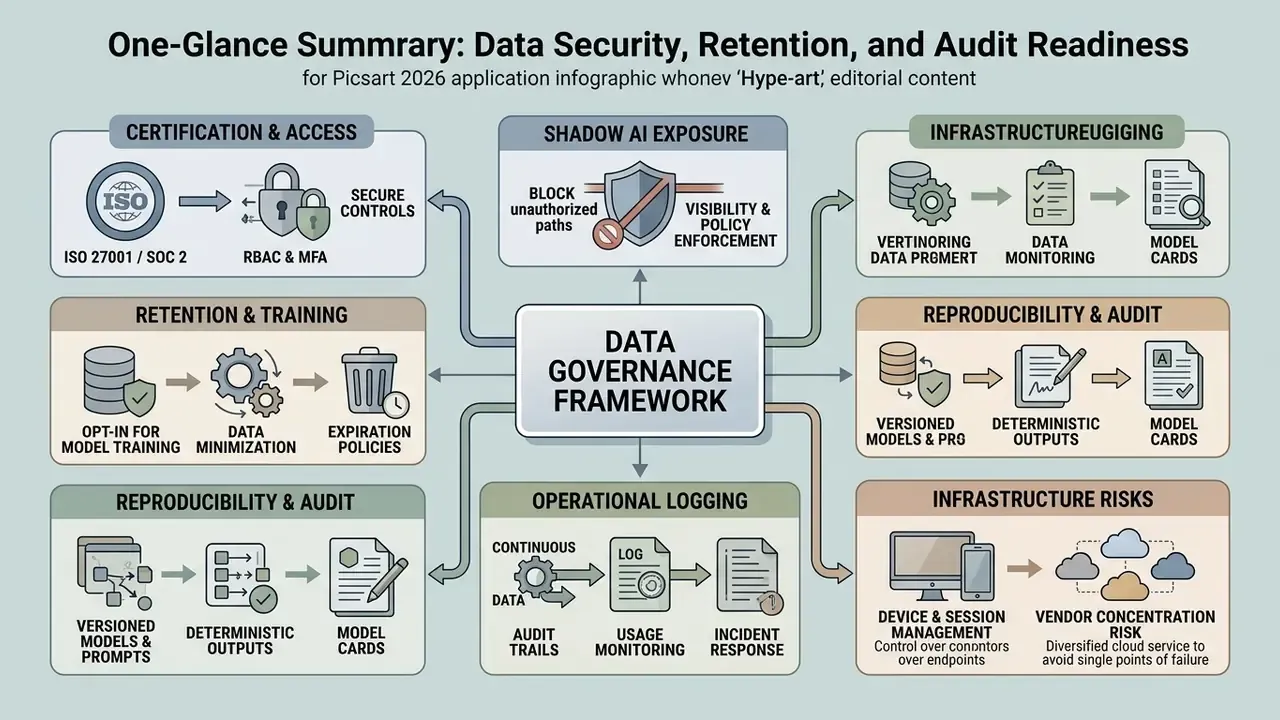
This section answers the questions a Head of AI Governance or Model Risk lead asks first, and which most tool reviews skip entirely.
- Certification and access control. Picsart's business-facing pages state SOC 2 compliance, encrypted storage, and granular access control, alongside team seats, centralized billing, and administrative management. Enterprise agreements add enterprise-grade security, SLAs, dedicated account management, and white-labeling. Request the current SOC 2 report and the data processing addendum directly from the vendor rather than trusting marketing pages. Certification scope matters far more than the badge.
- Shadow AI exposure. Because the free tier needs no payment card and runs in any browser, employees can upload corporate imagery without procurement ever hearing about it. The mitigation is standard: block or allow-list the domain, provision an authenticated team workspace with centralized billing, and publish an internal rule naming asset classes that may never be uploaded, such as unreleased products, customer photos, and regulated documents.
- Retention and training on user content. Picsart's Generative AI Additional Terms grant the platform broad rights over Input and Output. That makes training and retention a contract question, not a settings question. Confirm in writing whether business-tier inputs are excluded from model training, whether an opt-out exists, and what the deletion SLA is for uploaded assets and cloud projects. Requires vendor confirmation in your contract. Do not assume default exclusion.
- Reproducibility for audit. Generative outputs vary run to run, which breaks any control that requires an asset to be reproducible on demand. Compensating controls that actually work: store the exact prompt string, negative prompt, model name, style preset, aspect ratio, reference-image influence value, and seed where the model exposes one, all in your DAM next to the exported file. Where seeds are unavailable, treat the exported asset as the record of truth rather than the generation recipe.
- Operational logging. Ask specifically for admin-visible activity logs, seat-level export history, and API or CLI call logs. Programmatic surfaces generate machine actions, and every machine action must trace back to a named human owner.
- Device and session sprawl. Subscriptions permit use on up to 10 devices, and mobile-to-web project access is advertised. Confirm SSO availability and session revocation with the vendor before rolling out to a distributed team.
- Vendor concentration. One more item that rarely appears in tool reviews: the platform aggregates third-party models, so its model availability depends on upstream providers. If a specific engine underpins a production template, document a fallback model so a mid-campaign deprecation does not stall delivery.
Is the Picsart AI Photo Editor Free, and Which Features Are Available Without Payment
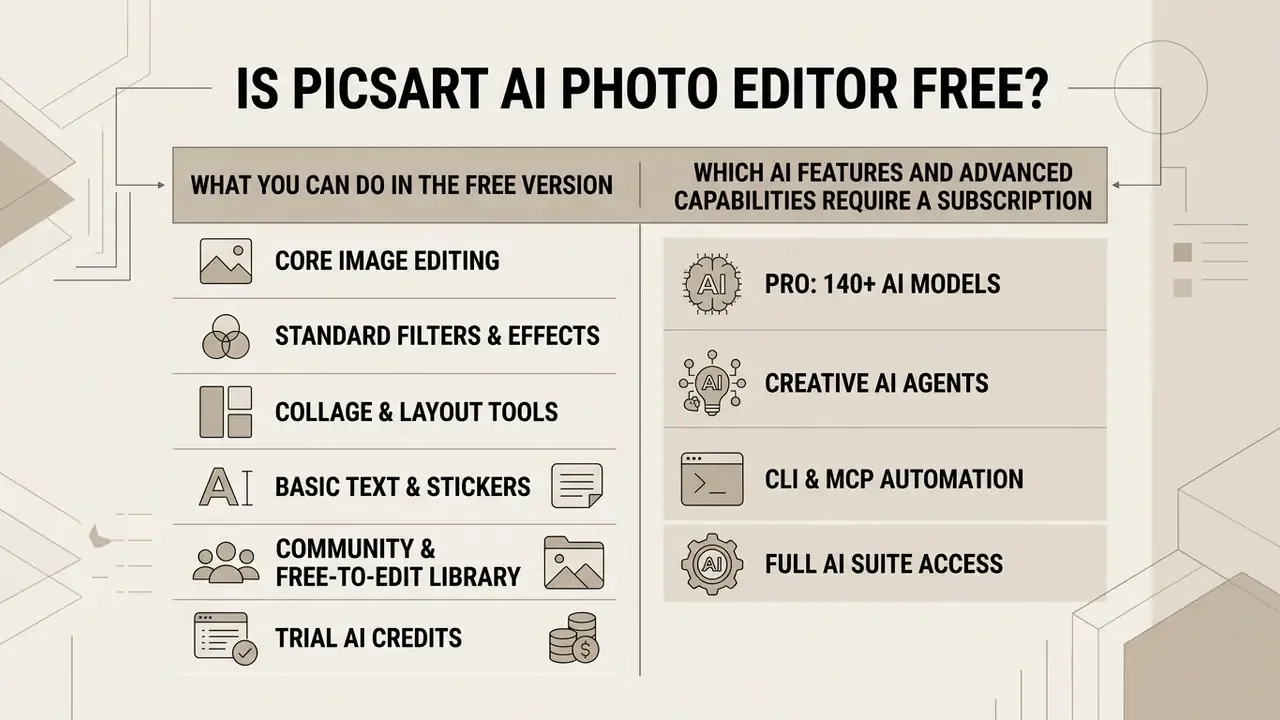
A primary question for new users: is picsart ai photo editor free? Short answer, yes. Picsart runs a freemium model, and its Terms of Use state explicitly that much of the service is free of charge under the tier named Picsart Free. Anyone can complete a free ai picture editor app download on iOS or Android, or simply open the web workspace without entering card details. Those searching for ai photo editing apps free or an ai photo editor app free download land in the same place: the free plan grants core raster editing, standard filters, basic collage makers, and a limited selection of free templates and stock assets. Readers surveying the wider category can compare limits across free photo editors and free AI art generators.
However, anyone asking is picsart photo editor free for advanced AI workflows needs to understand the service limits. Basic edits are unrestricted. Premium creative assets, high-resolution export formats, and computationally intensive generative tools are paywalled or metered through a monthly credit allocation.
What You Can Do in the Free Version of the Photo Editor App
The picsart ai photo editor free tier is a reasonable entry point for casual creators and non-commercial use. Without a paid subscription, users can:
- Core image editing. Full access to cropping, resizing, manual rotation, brightness and contrast adjustments, and canvas flipping.
- Standard filters and effects. Dozens of free color filters, basic photo effects, and standard blend modes.
- Collage and layout tools. Combining photos with free grid layouts, custom margins, and standard background colors.
- Basic text and stickers. A library of free fonts, community stickers, and non-premium visual elements.
- Community and free-to-edit library. Access to one-of-a-kind community images and a remixable asset pool.
- Trial AI credits. A restricted, recurring allocation of free AI credits for testing text-to-image generation and basic background removal. Third-party 2026 summaries describe the free allowance as roughly 5 AI credits per week with about 100 MB of cloud storage. Those numbers appear in secondary coverage and require confirmation against the live pricing page, since free-tier caps change often.
Anyone treating this as an ai pic editor app for occasional personal use will rarely hit a wall. Anyone shipping client work will hit one on day two.
Which AI Features and Advanced Capabilities Require a Subscription
To unlock the platform's most powerful ai models and commercial-grade output, you need a paid tier. Subscription-gated capabilities include:
- High-resolution upscaling export.The free tier permits a low-resolution download only; the high-resolution file requires an active subscription.
- Advanced background and object removal.Unlimited one-tap isolation and smart object erasure are reserved for paid subscribers.
- Full generative suite.Frontier-model image, video, and audio generation draws on the monthly credit balance included in paid plans.
- Batch processing.Bulk editing of 50 files (Pro) or 100 files (Ultra) at once is entirely paywalled.
- Commercial asset library and brand kits.Premium stock, Getty video clips, unlimited brand kit storage, and commercial font licenses require Pro or Ultra.
- Automation layer.Picsart CLI, MCP integrations, and creative AI agents are subscription features.
- Watermark-free and PDF export.Free-tier exports involving premium assets or specialized AI tools may carry watermarks or resolution caps; PNG and PDF export are listed as subscription features.
| Feature category | Picsart Free | Picsart Pro / Ultra subscription |
|---|---|---|
| Core photo editing tools | Full access (crop, resize, basic adjustments) | Full access plus premium presets |
| AI generation credits | Restricted trial, limited weekly caps | 500 credits/month (Pro) to 1,500 or 25,000 credits/month (Ultra) |
| Background & object removal | Basic access (watermarked or capped) | Unlimited, high-precision AI engine |
| Batch processing (bulk edit) | Not available | Up to 50 (Pro) or 100 (Ultra) images at once |
| Export formats & resolution | Standard resolution; watermarks on premium items | High-resolution PNG, JPG, WEBP, PDF; print-ready output |
| Stock assets & templates | Free library only | Full premium library plus Getty video clips |
| Automation (CLI, MCP, agents) | Not available | Included with Pro and Ultra |
| Cloud storage | Minimal | 100 GB (Pro) / 300 GB per seat (Ultra) |
Fact check and subscription verification.
For technical troubleshooting or billing questions during a subscription upgrade, see our dedicated guide on AI Media Support and Troubleshooting.
How Much Does the Picsart AI Photo Editor Cost: Pro, Ultra, and Enterprise
When evaluating how much is picsart ai photo editor, buyers choose between two self-serve paid plans and one custom tier. Prices vary by billing frequency and region; the figures below reflect current official US pricing.
- Picsart Pro, for individual creators, freelancers, and small business owners. $15.00 per month billed monthly, or $10.50 per month billed yearly ($126.00 per year). Includes 500 AI credits per month, all photo and video editing features, advanced background and object removal, premium templates, millions of stock photos and Getty video clips, 3+ brand kits, bulk editing up to 50 images, 100 GB of cloud storage, unlimited image generations with Flex.2 Klein, parallel video generations, plus Picsart CLI, MCP, and creative agents.
- Picsart Ultra, for professional agencies, marketing teams, and heavy AI users. $45.00 per month billed monthly, or $24.50 per month billed yearly, per seat ($294.00 per year, saving $246 versus monthly). Includes everything in Pro plus 1,500 to 25,000 credits per month depending on the selected tier, 140+ frontier models, early access to new AI features, add-on credits that never expire, up to 6.5 million Getty stock videos, 10+ brand kits, team seats, ad-variation creation and localization, ad performance tracking, 2,000 credits for API services, bulk editing up to 100 images, and 300 GB of cloud storage per seat.
- Picsart Enterprise, custom pricing for large organizations. Photo and video editor SDKs, mobile and web SDK support, prepaid or pay-as-you-go creative APIs, fully configurable editing embedded into your own product, white-labeling to match your brand, bring-your-own assets (images, templates, fonts), custom credit volume with volume discounts and on-demand top-ups, enterprise-grade security, SLAs, and a dedicated account manager.
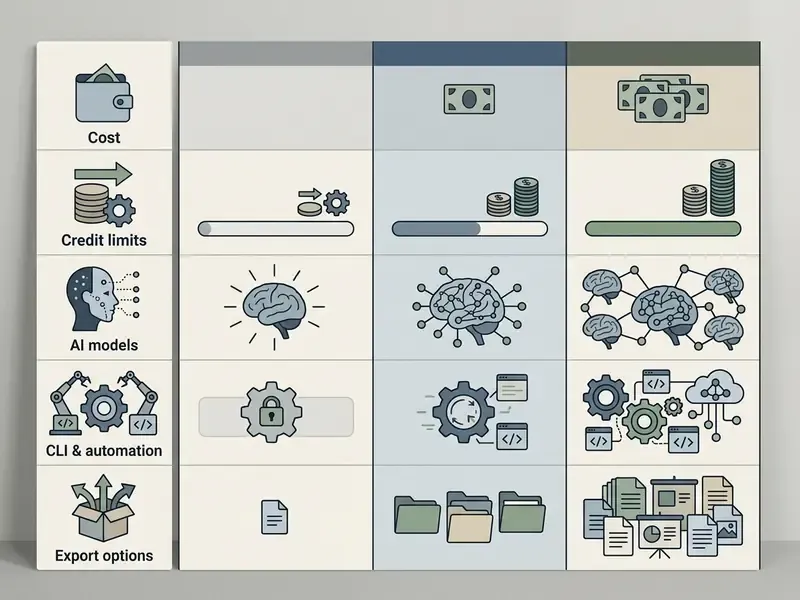
| Criterion / feature | Picsart Free | Picsart Pro ($10.50/mo yearly) | Picsart Ultra ($24.50/mo yearly, per seat) | Picsart Enterprise |
|---|---|---|---|---|
| Monthly AI credits | Limited trial pool | 500 credits/month | 1,500 to 25,000 credits/month | Custom volume plus top-ups |
| Supported AI models | Standard base generator | Core AI image and video suite, unlimited Flex.2 Klein | 140+ vendor-listed frontier models (Flux 2 Pro, Nano Banana Pro, Seedance 2.5, Kling 3.0, Veo 3.1, Sora 2) | Model access via creative APIs |
| Automation | None | Picsart CLI, MCP (Claude Code, Cursor, ChatGPT), 15+ agents | Same, plus early access and parallel video generation | SDK embedding, API pipelines, white-label |
| Batch photo editing | None | Up to 50 images per batch | Up to 100 images per batch | Configurable |
| Cloud storage | Minimal | 100 GB | 300 GB per seat | Custom |
| Brand kits | 0 | 3+ customizable brand kits | 10+ brand kits, team seats, roles | Bring your own asset system |
| Ads workflow | None | Basic | Ad variations, localization, performance tracking | Marketing, e-commerce, print use cases |
| Export formats | Standard web formats | High-res PNG, JPG, WEBP, PDF | High-res print-ready PDF and uncompressed PNG, output up to 4 MP on Ultra image tiers | Fully configurable export |
| Support | Community and help center | Standard | Priority plus team billing | SLA plus dedicated account manager |
When Pro Is Enough for Regular Content Production
Picsart Pro hits the practical balance of cost and functionality for solo creators, social media managers, and small business operators. With 500 monthly AI credits, which replaced the older daily-cap model for generative tools, plus unlimited standard editing, Pro subscribers can comfortably ship daily social posts, marketing banners, and product imagery.
Pro covers automated background removal, object erasure, premium stock photos, font collections, unlimited Flex.2 Klein image generations, and batch editing up to 50 files. For creators who do not need ultra-high-resolution print output, per-seat team administration, or heavy parallel video synthesis, Pro delivers a full toolkit at an accessible price. At $10.50 per month billed annually it also undercuts most single-purpose generators reviewed in our pricing guides.
When Ultra Is Worth Considering
Picsart Ultra targets creative directors, production agencies, and commercial brands that need high-volume output and access to newer AI architectures. Ultra provides five times or more the credit capacity of Pro, which means heavy generative experimentation without slamming into a monthly ceiling mid-campaign.
Ultra unlocks frontier models including Flux 2 Pro, Imagen 4 Ultra, Nano Banana Pro, Recraft V4.1, and Ideogram V3, plus video engines such as Seedance 2.5 at 1080p and 30 seconds, Kling 3.0 Pro, Runway Gen 4.5, Veo 3.1, and Sora 2 Pro. It also raises batch editing to 100 images at once, expands cloud storage to 300 GB per seat, adds ad-variation and localization workflows with performance tracking, includes 2,000 credits for API services, and supports multi-megapixel rendering (up to 4 MP on Ultra image tiers) suitable for print scale and large-format display. Teams weighing Ultra against subscription-only image services may also want our comparisons of Midjourney and ChatGPT image generation.
How to Compare Plans by AI Tools, Credit Limits, and Unit Economics
When comparing Pro and Ultra, work from monthly generation volume and required model complexity:
- Credit consumption rates.Basic text-to-image generations and simple object removals consume few credits. Multi-second AI video synthesis or ultra-HD upscaling consumes many. Video is the dominant cost driver in almost every real plan, and it is the line item that blows up forecasts.
- Unit-cost calculation.A formula finance owners can defend: effective cost per generation = (annual plan price ÷ 12) ÷ monthly generations actually shipped. At Pro ($10.50/mo, 500 credits), a workflow that consumes one credit per image and ships 300 usable images per month lands near $0.035 per shipped asset. At Ultra ($24.50/mo per seat, 1,500 credits) the same logic yields roughly $0.016 per asset at full utilization. Two adjustments matter: divide by usable outputs rather than total generations, because iteration is normal, and price the marginal cost of add-on credit packs for spike months.
- Credit expiry rules.Monthly subscription credits expire at the end of each billing cycle and do not roll over. Add-on packs purchased separately on Ultra do not expire. Credits consumed by a failed generation are returned automatically.
- Model diversity.Pro covers core image and video generation. Ultra adds niche third-party models tuned for photorealism, typography inside images, stylized vector art, or complex physics in video rendering.
- Team collaboration and procurement.Ultra includes team seats, centralized billing and account management, shared brand kit libraries, and the security posture (including SOC 2) that procurement will ask about. Enterprise adds SLAs, invoicing, and a dedicated account manager for organizations that cannot buy on a card.
- Control cost, not just licence cost.Risk-adjusted ROI has to include the work that surrounds the tool: metadata capture, licence checks, template governance, and periodic review of agent output. Skip that line, and the business case looks better than reality.
- Cross-tool substitution.Before scaling seats, check whether adjacent needs are already covered. Our library includes reviews of Google's AI image generator, Bing AI image creation, and Microsoft's AI image generator, any of which may absorb part of the workload at zero marginal cost.
How to Edit Photos with AI in Picsart: A Step-by-Step Scenario
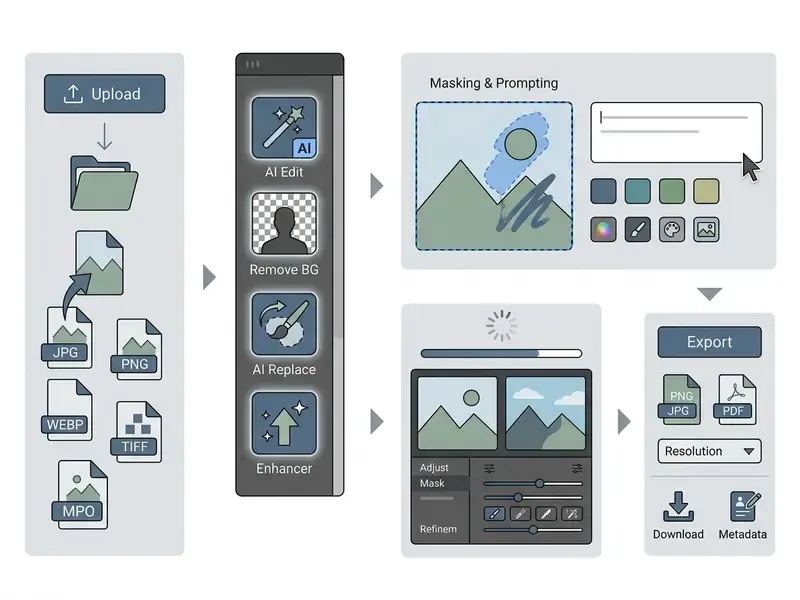
To get real efficiency out of the picsart ai photo editor app interface, follow a structured sequence. Whether you work on the web app or mobile, the editing path moves logically from raw file ingestion through generative enhancement to high-resolution export.
Uploading an Image and Selecting the Right Tools
- File ingestion.Open the Picsart web editor (
picsart.com/create/editor) or launch the mobile app. Click Upload to load a local file. Supported input formats include JPG, PNG, WEBP, TIFF, and MPO. RAW is not currently supported as an input format, which matters for photographers used to camera originals. - Tool navigation.With the file on canvas, find the primary toolbar. To alter specific scene elements, select AI Edit or AI Replace. To clean up distracting backgrounds or subjects, select Remove BG or Object Remover. To fix blur and exposure, select AI Image Enhancer.
- Region masking.For targeted edits, use the smart brush, lasso, or AI selection tool to mark the exact region you want changed: clothing, a background prop, a text overlay, a facial detail. Tighter masks produce fewer perspective and texture artifacts than loose ones. This is the single highest-leverage habit in the whole workflow.
AI Processing, Result Review, and Export
- Prompt and generation. Enter a clear descriptive prompt specifying the desired change, for example "replace jacket with a black leather motorcycle jacket, high detail, studio lighting". Click Generate or Apply.
- Review and refinement. Evaluate generated variations against the original plate. Empirical work on prompt journeys confirms that iteration is the norm, not a sign of failure.
«Users rarely accept initial generative outputs without iterative refinement, they experiment with styles and rewrite prompts.» «Is It AI or Is It Me?», ACM CHI (2024). https://dl.acm.org/doi/10.1145/3613904.3642738
Tighten selection masks, adjust prompt adjectives, or re-run the edit if lighting direction, shadow projection, or perspective seams look wrong. Check mask-border transitions at 100% zoom, not in the thumbnail. Thumbnails forgive everything.
- Final export. Click Export in the upper right corner. Select the format: PNG for transparent web graphics, JPG for standard publishing, WEBP for performance-optimized delivery, or PDF for commercial printing. Choose target resolution and click Download. For teams under audit, capture the prompt, model, style preset, and export settings in the same commit as the asset. Large media libraries that need distribution-ready file sizes can be post-processed with tools covered in our video compressor guide.
The AI Image Generator in Picsart: Creating Images from a Text Prompt
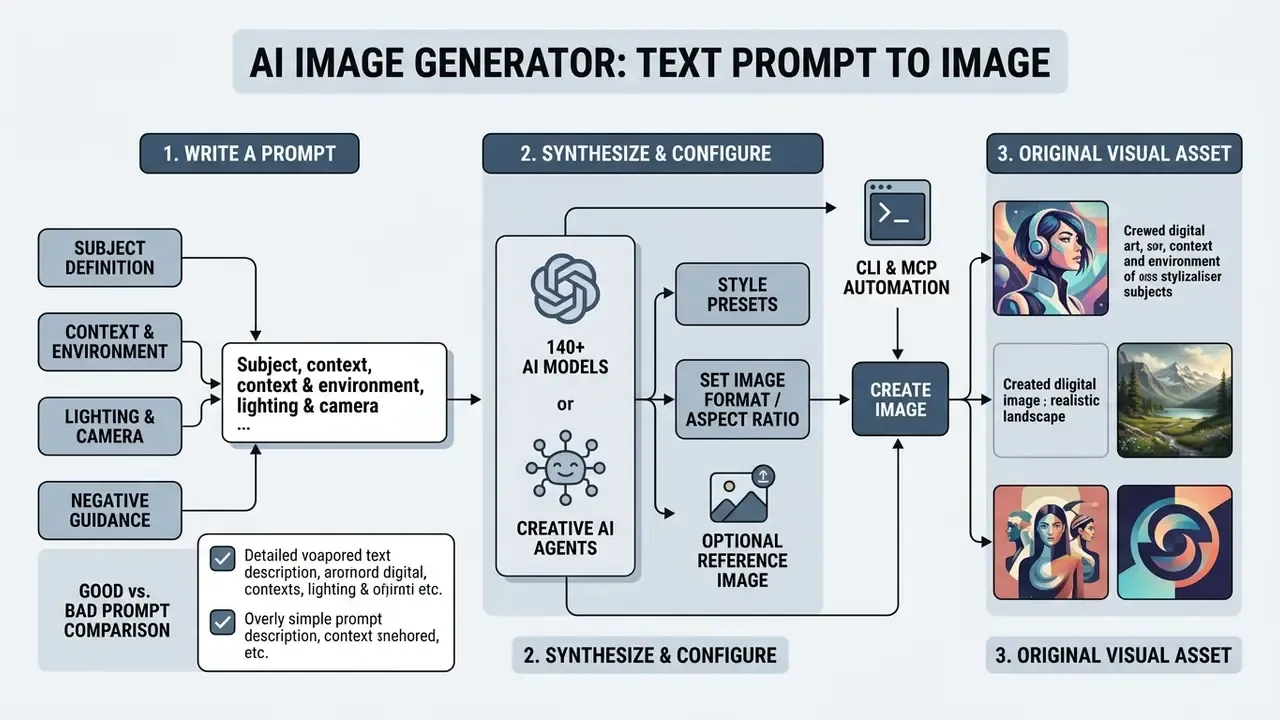
The picsart ai image generator app synthesizes original visual assets from natural language descriptions. Built into both mobile and web, the AI image generator turns written prompts into multi-style visual art, photorealistic portraits, vector graphics, and marketing imagery. Official documentation describes generation of up to four images per prompt, a library of 59 image models, 100 generation presets, 48 style filters, and output up to 8K resolution on supported models.
Under the hood, the system uses multi-modal diffusion architectures that read complex spatial instructions, lighting cues, and style parameters. Users generate images in seconds, then use the output as standalone content or as a base layer for further composition. Model choice genuinely matters here: photorealistic lighting, readable in-image typography, and stylized illustration are each handled best by different engines, which is the actual argument for a multi-model workspace rather than a single generator.
How to Write a Prompt, Choose a Style, and Set the Image Format
To produce ai images that match a creative brief, structure the prompt deliberately:
- 1:1 for Instagram grid feeds
- 9:16 for TikTok, Stories, Reels
- 16:9 for YouTube thumbnails and web banners
- 4:3 / 3:4 for standard photography ratios
- 21:9 / 3:2 / 1:3 for cinematic and model-specific ratios exposed by the API
- Subject definition.State the central subject clearly ("a sleek modern electric sports car").
- Context and environment.Describe background, setting, and atmosphere ("parked on a rain-slicked Tokyo street at night, neon reflections").
- Lighting and camera controls.Specify lighting direction, lens, and palette ("cinematic volumetric lighting, 85mm lens, shallow depth of field, cool blue and magenta tones").
- Style presets and aspect ratios.Pick a style preset such as Photorealistic, Cyberpunk, Watercolor, Anime, Y2K, 3D Clay Render, Oil Painting, or a Studio Ghibli-inspired look, then set the aspect ratio for the destination channel:
- Reference image (optional).Upload one to three reference photographs to guide structural composition, then set the influence strength slider: 20 to 40% for colour and mood only, 50 to 70% for a balanced blend, 80 to 100% for close style and structure matching.
Good Prompt vs. Bad Prompt: A Side-by-Side Comparison
| Element | Weak prompt (Bad) | Strong prompt (Good) |
|---|---|---|
| Request | "A dog in a field" | "A golden retriever playing in a sunny meadow, vibrant watercolour style, bright greens and yellows, highly detailed fur, natural light rays, 8K" |
| What the model must guess | Breed, style, lighting, palette, composition, format | Almost nothing: subject, setting, style, palette, and detail level are all specified |
| Typical result | Random or dull style, unpredictable framing, anatomical errors | Clear subject focus, professional palette, consistent art direction |
| Iterations to usable output | Many, often abandoned | Usually one to three |
| Element | Weak prompt (Bad) | Strong prompt (Good) |
|---|---|---|
| Product shot | "A coffee mug" | "A ceramic coffee mug on a cozy wooden table, morning window light from the left, soft shadow, photorealistic, 50mm, shallow depth of field, 1:1" |
| Concept art | "A robot" | "A weathered industrial robot walking across a desert at dusk, cinematic style, dust particles in backlight, wide 16:9 composition" |
Negative prompt guidance. To suppress common defects, fill the exclusion field with terms such as no blur, no extra limbs, low resolution, deformed fingers, text artifacts, watermark, duplicated objects. The Picsart API exposes prompt, negativePrompt, aspectRatio, resolution, and count, so the same discipline carries into programmatic pipelines.
Known weak spots and workarounds. Hyperrealistic human portraiture remains the hardest case on this platform. Stylized or semi-realistic prompts converge faster, and portrait-specific engines reviewed in our AI headshot generator guide may simply be a better fit. Overloaded prompts also degrade output, so keep one dominant subject and one style per generation, then refine locally with AI Edit rather than regenerating the whole frame. Save prompts that work as reusable presets for cross-project consistency. For style-locked aesthetics such as anime or painterly looks, see our comparison of Ghibli-style AI image generators.
How to Refine AI Images with Built-In Editing Tools
Generative synthesis is rarely the final step in a commercial pipeline. Research on creative AI tools reports that professional designers treat initial outputs as raw material, not deliverables.
«Professional designers treat generative AI tools as clay to play with, for rapid concept exploration rather than final production.»
Once an image is generated in Picsart, move it straight into the core editor:
- Background swapping and isolation. Isolate the generated subject and composite it onto a brand-approved canvas.
- Typography and vector overlays. Add promotional headers, corporate logos, call-to-action buttons, and vector brand elements.
- Localized AI Edit passes. Re-edit only the failing region, a hand, a label, a reflection, with a tight mask and a narrow prompt, then verify lighting, shadows, and transitions still read naturally.
- Colour harmonization. Apply unified colour grading so synthetic elements match existing marketing collateral.
- AI upscaling. Run the final composite through the AI Image Enhancer to sharpen micro-textures and prepare the file for high-resolution digital or print distribution.
- Brand-readiness pass. Apply logo, brand colours, and custom fonts from the brand kit so the asset leaves the platform already compliant.
That last step also carries governance weight. Human editing is not only an aesthetic choice, it is what strengthens your intellectual property position, as the licensing section below explains.
Using Picsart for Content, Brand, and Commercial Projects
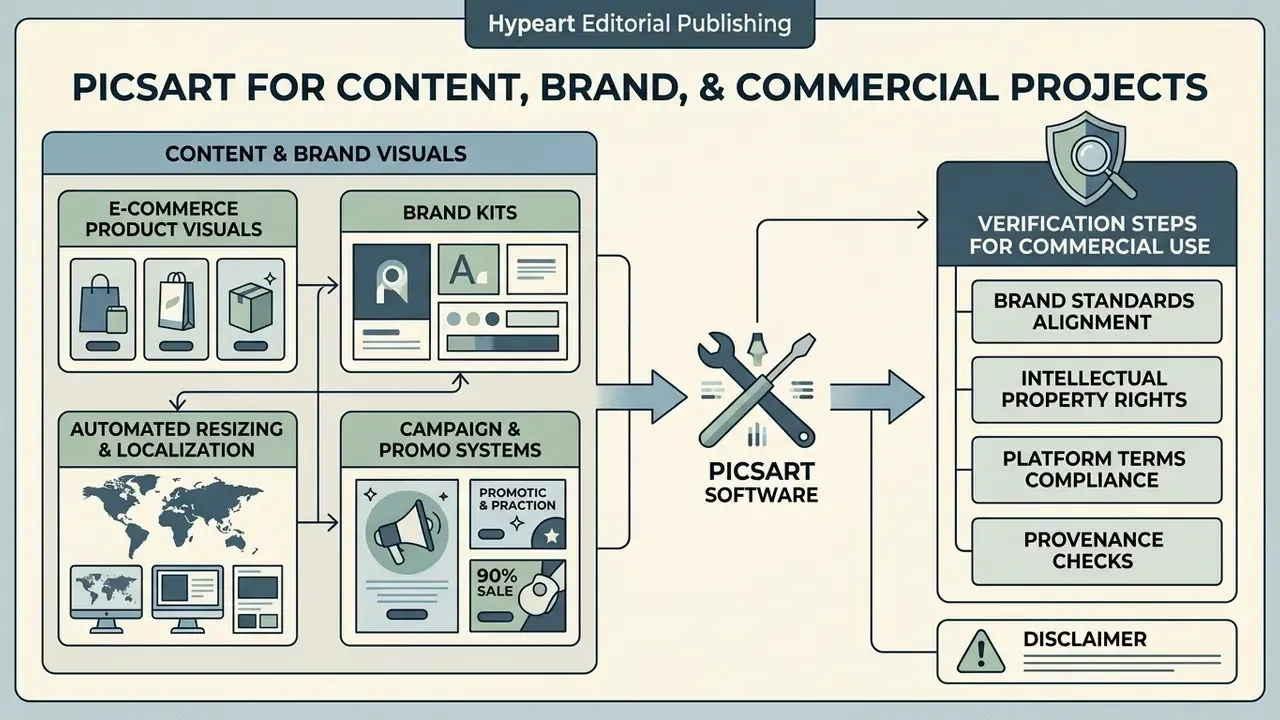
Deploying generative software for commercial publishing demands careful management of brand standards, intellectual property rights, and platform terms. The picsart ai photo editor includes features built for commercial workflows, letting marketing teams and e-commerce operators hold visual consistency while accelerating production. From brand kit synchronization to stock media licensing filters, the platform supports end-to-end production for digital ad campaigns, product listings, and corporate social channels.
Quality measurement deserves a flag here, because "the model scored well" is not an argument that survives a marketing review. The largest published study using Picsart's own community data found that conventional generative metrics predict audience preference poorly.
«Standard FID and CLIPScore poorly predict community preference for AI images; a Social Reward model trained on million-user feedback aligned significantly better.»
The practical implication for brand teams: build a small internal preference set of approved and rejected outputs, then use it as the acceptance gate instead of trusting automatic scores. It takes an afternoon to assemble and pays for itself the first time a campaign passes review without rework.
What to Verify Before Commercial Use of AI Images and Assets
Before putting AI-generated visuals or template assets into commercial campaigns, product packaging, or paid advertising, check three legal parameters:
- Commercial clearance filters. When using built-in stock photos, stickers, or templates, apply the Commercial licence filter or select assets tagged
#freeforbusiness. Picsart's Terms of Use grant a limited licence for ordinary "Picsart Content" for personal, non-commercial use only, while "Commercial Use Picsart Content" may be reproduced, displayed, and used in derivative works commercially. Not all library content is commercially cleared, so verify each asset individually. Comparative licensing rules across platforms are collected in our commercial-use library.- Generative AI IP ownership disclaimers. Picsart states that output from its generative AI tools is available for commercial use and that users hold IP rights in generated images, subject to the Generative AI Additional Terms. The platform explicitly disclaims guarantees on copyright ownership or third-party non-infringement. Under current US legal standards, purely synthetic visuals may lack copyright protection, which means competitors could in principle copy unedited generative output. The mitigation is meaningful human authorship: composite, retouch, typeset, and colour-grade before the file becomes a brand asset.
- Trademark and right-of-publicity checks. Inspect generated visuals to confirm they do not accidentally reproduce recognizable corporate trademarks, proprietary industrial designs, or likenesses of real individuals without consent. Contemporary editing benchmarks explain why manual inspection is still required.
«Instruction-following accuracy and content preservation are the core quality axes for instruction-based image editing.» I²EBench: A Comprehensive Benchmark for Instruction-Based Image Editing, arXiv (2024). https://arxiv.org/abs/2408.14580
Commercial risk checklist, what is safe and what needs review:
| Asset type | Typical commercial status | Required action before publishing |
|---|---|---|
| AI-generated image, then edited and composited by a human | Permitted for commercial use; ownership not guaranteed | Document human authorship steps; archive prompt, model, date |
| Raw, unedited AI output used as-is in paid ads | Permitted, but weakest IP position | Add human-authored elements; avoid using as a registrable logo |
| Stock photo, sticker, or template without commercial tag | Personal use only | Replace, or re-filter to Commercial / #freeforbusiness |
| Stock asset with commercial licence | Permitted per licence scope | Confirm scope covers ads, packaging, and print run size |
| Output resembling a third-party trademark or product design | High risk | Regenerate; legal review before any paid placement |
| Output resembling an identifiable real person | High risk | Obtain consent or regenerate; check local publicity rights |
| Assets produced via CLI or API in an automated pipeline | Same licence rules apply | Add an automated licence-check gate; log the model used |
For developers integrating automated image editing pipelines into enterprise applications, detailed API pricing and endpoint structures live in our AI Media API Guides. Business operators mapping legal exposure around synthetic content can review current precedent timelines in our AI Litigation and Case Timelines portal.
FAQ About the Picsart AI Photo Editor
Is the Picsart AI Photo Editor available on both mobile and web?
Yes. Picsart runs as a cross-platform service via web browsers (picsart.com) and native mobile apps for iOS and Android. Cloud storage lets users start projects on mobile and refine them on desktop web, and subscription benefits are usable on up to 10 devices. Full project-level sync behaviour is not exhaustively documented in official help pages, so validate it against your specific workflow before promising it to a team.
How does Picsart store generated images and user projects?
Generated images and active design files sit in the user's personal cloud space, reachable via the My Images and Projects tabs. Free users receive limited cloud storage, while Pro and Ultra subscribers receive 100 GB and 300 GB per seat respectively. Retention periods after cancellation are not fully specified publicly and should be confirmed with the vendor in writing.
Which export file formats are supported?
The editor supports JPG, PNG (with transparency), WEBP, and print-ready PDF. Video projects export as MP4, MOV, WEBM, or GIF. Enterprise editor documentation lists export MIME types including image/png, image/jpeg, image/webp, print/pdf, and preview/pdf.
Can I use Picsart for batch photo editing?
Yes. Batch editing lets Pro and Ultra subscribers process multiple images at once, up to 50 on Pro and up to 100 on Ultra, applying automated background removal, cropping, resizing, colour adjustments, AI enhancement, and watermarking in a single pass, either uniformly or with per-image settings.
Can I use Picsart from a terminal, or inside Claude Code and Cursor?
Yes. Pro and Ultra include the Picsart CLI for generating and processing content directly from a terminal or an agent runtime, plus MCP integration that exposes Picsart inside Claude Code, Cursor, and ChatGPT. Treat CLI credentials as production secrets and log machine-initiated generations against a named owner.
What are AI credits, and what happens to unused ones?
Standard features such as manual cropping, basic filters, text tools, and layering are unlimited for paid subscribers and largely available to free users. AI credits are the computational currency consumed when you invoke generative models: text-to-image, AI video, AI Replace, or multi-megapixel upscaling. Monthly subscription credits expire at the end of each billing cycle and do not roll over. Separately purchased add-on packs do not expire. If a generation fails, consumed credits are returned automatically.
Are there daily limits on individual AI tools?
Yes, and they sit alongside the credit pool. Official comparison tables list 50 daily generations for AI Image Generator, AI Replace, AI Filters, Smart Background, AI Logo Generator, AI GIF Generator, and AI Video Generator, plus 100 daily generations for AI Writer, on both Pro and Ultra.
Are images created with Picsart AI free from watermarks?
Free-tier exports involving premium assets or specialized AI tools may carry Picsart watermarks or resolution caps, and free-plan generations may appear publicly in the community feed. That visibility point deserves attention in a regulated environment. All exports under an active paid plan are watermark-free and delivered in high resolution.
Is my uploaded corporate imagery used to train models?
Picsart's Generative AI Additional Terms grant the platform broad rights over Input and Output. For business deployments, request explicit written confirmation of the training and retention position for your tier, whether an opt-out exists, and the deletion SLA. This requires contractual verification. Do not infer it from product pages.
Can generations be reproduced for an audit?
Generative outputs are stochastic, so exact reproduction is not guaranteed unless the chosen model exposes a fixed seed. The workable control is metadata capture: store prompt, negative prompt, model, style preset, aspect ratio, reference-image influence, and export settings next to the delivered file, and treat the exported asset as the authoritative record.
How do refunds and cancellations work?
Picsart's Terms of Use state that payments are non-refundable and that cancelling does not create a refund or credit for a partial service period. Access to subscription benefits continues through the end of the paid term. Subscriptions bought via the App Store or Google Play follow those platforms' billing rules.
Which plan should a small team choose?
One or two creators shipping daily social content are usually well served by Pro at $10.50 per month billed yearly. Teams needing seats, ad variations, localization, 100-image batches, 300 GB per seat, and the full frontier-model library should move to Ultra at $24.50 per seat per month billed yearly. Organizations that require SDK embedding, white-labeling, SLAs, or invoicing should evaluate Enterprise. For creators comparing alternative visual tools, our library includes reviews of the best AI art generators, free AI art generators, free AI video generators, and enterprise licensing questions covered in our AI Media Commercial-Use guides.
Appendix A: Corrections, Verification Notes, and Version History
Transparency about what changed, and what remains unverified, is part of the review method used here.
| Item | Earlier or vendor-stated version | Current status in this guide |
|---|---|---|
| Picsart Ultra annual price | Earlier drafts listed Ultra at roughly $45.00 to $47.00 monthly and $37.50/mo billed annually | Corrected: official pricing shows $45/mo monthly or $24.50/mo billed yearly, per seat ($294/year, $246 annual saving) |
| Model count | "179 AI models across 32 technology providers" (single vendor playground page) | Reformulated to "140+ leading AI models," with 59 image models listed on the generator page; awaiting a stable official figure |
| Monthly active users | "130 million MAU, 100 million+ creators" | Retained with attribution as vendor-reported, not independently audited |
| Enhancement research citation | Alimisis et al., 2024 cited with arXiv:2402.12345 | Link removed pending DOI verification; claim retained with descriptive attribution only |
| Enterprise tier | Absent | Added: SDKs, creative APIs, white-label, custom credits, SLA, dedicated account manager |
| Financial-services example | Presented as a client case with specific outcomes | Relabelled as an illustrative composite scenario requiring internal measurement |
| Off-topic outbound links | Adult-content glossary anchors in earlier drafts | Removed entirely and replaced with editorial links relevant to editing, generation, licensing, and pricing |
| Batch limits | Up to 50 (Pro) and 100 (Ultra) images per pass | Verified against official plan pages; unchanged |
| Commercial-use terms | AI output usable commercially; ownership not guaranteed | Verified against Picsart Terms of Use and Generative AI Additional Terms |
| Feature snapshot year | Sources describing "picsart ai photo editor features 2025" | Refreshed to the 2026 line-up, with 2025 items retained only where still current |
Open items requiring vendor or primary-source confirmation: exact free-tier credit and storage caps; project retention after cancellation; SSO availability; admin audit-log granularity; the training and opt-out position for business inputs; the full Free, Pro, and Ultra export-format matrix.
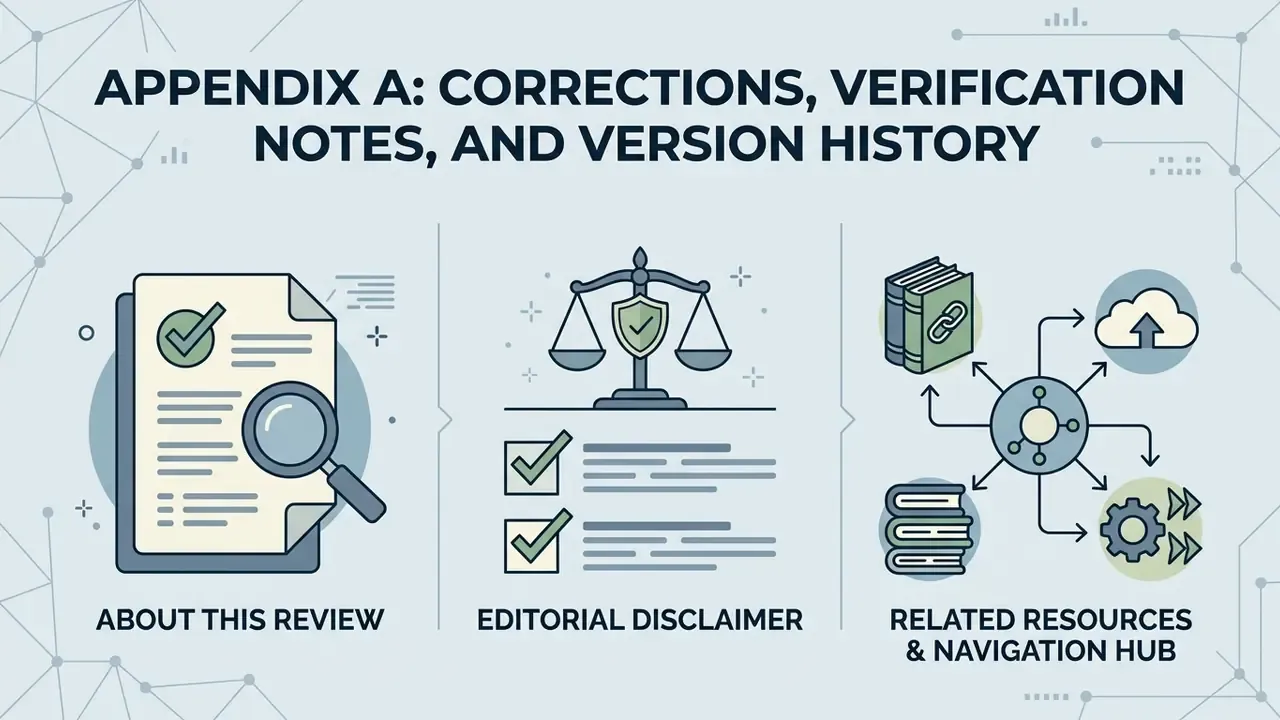
About This Review
This guide was compiled from official Picsart product, pricing, help-center, terms, and developer documentation pages, cross-checked against peer-reviewed research on generative editing workflows and third-party tutorial coverage, then reviewed against an AI governance checklist covering licensing, data handling, and auditability. Pricing, credit allocations, and model line-ups in generative platforms change frequently, so confirm figures on the live Picsart pricing page before purchase or budget approval.
Editorial disclaimer. This material is informational and does not constitute legal, financial, or procurement advice. Intellectual-property outcomes for AI-generated content depend on jurisdiction and on the specific facts of authorship and use; consult qualified counsel before large-scale commercial deployment. Marcus Hale, author.