Everything You Need in 10 Lines
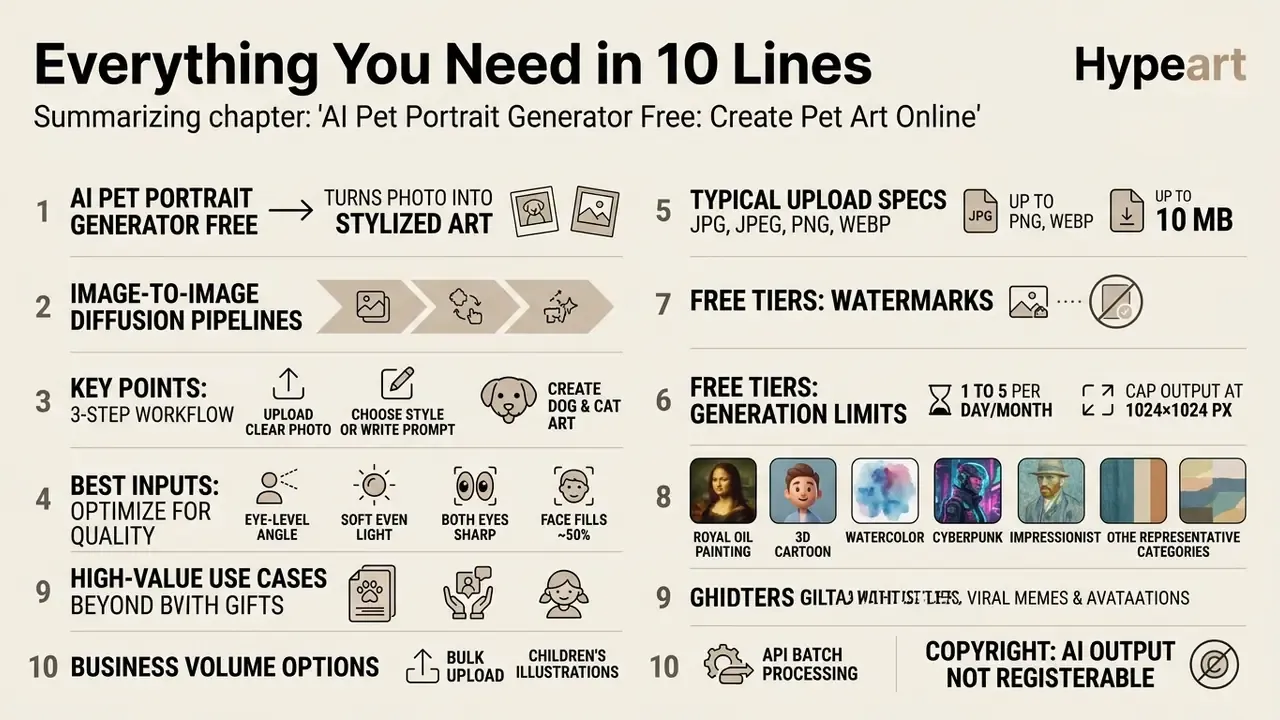
- An AI pet portrait generator free turns an uploaded dog, cat, rabbit, bird, or reptile photo into stylized art using image-to-image diffusion pipelines.
- The workflow is always the same three steps: upload a clear photo, choose a style or write a prompt, generate, compare, download.
- Best inputs: eye-level angle, soft even light, both eyes sharp, pet's face filling at least ~50% of the frame.
- Typical upload specs across free tools: JPG, JPEG, PNG, WEBP files up to 10 MB.
- Free tiers usually allow 1 to 5 generations per day or month, cap output at 1024×1024 px, and may add a watermark; paid tiers unlock 4K / 300 DPI exports and clean files.
- Eight styles dominate consumer demand: royal oil painting, 3D cartoon, watercolor, cyberpunk, impressionist, humanized pet-as-human, Studio Ghibli/anime, and celestial fantasy.
- High-value use cases go far beyond gifts: shelter adoption posters, viral memes and avatars, children's storybook characters, print-on-demand catalogs, and vet/grooming brand assets.
- For business volume, look for bulk upload or API batch processing. Free tiers process one image at a time.
- Copyright: purely AI-generated output without substantial human creative input is not registerable in the U.S.; commercial rights come from the platform license, not from copyright.
- Privacy: retention varies from 24 hours to 12 months depending on vendor; never upload photos showing addresses, documents, or bystanders' faces.
What Changed in Free Pet-Art Tiers Going Into 2026
Two shifts matter for anyone budgeting a project this year. First, credit resets moved: several vendors quietly switched from daily grants to monthly pools, which punishes the "generate twenty variants tonight" habit. Second, licensing language got more explicit. Where 2023-era terms were vague, current plan pages tend to state, in plain words, whether the free output may appear on a product you sell.
That is good news, honestly. It means the decision is now a reading task rather than a guessing game. If you want to sanity-check per-image economics before you start, the credit math is easier with a simple sheet, and our calculators hub can open the hub side of that work for you. Prices and tier structures sit on the pricing page, so browse the hub there rather than trusting a screenshot in a listicle.
What Is an AI Pet Portrait Generator Free?
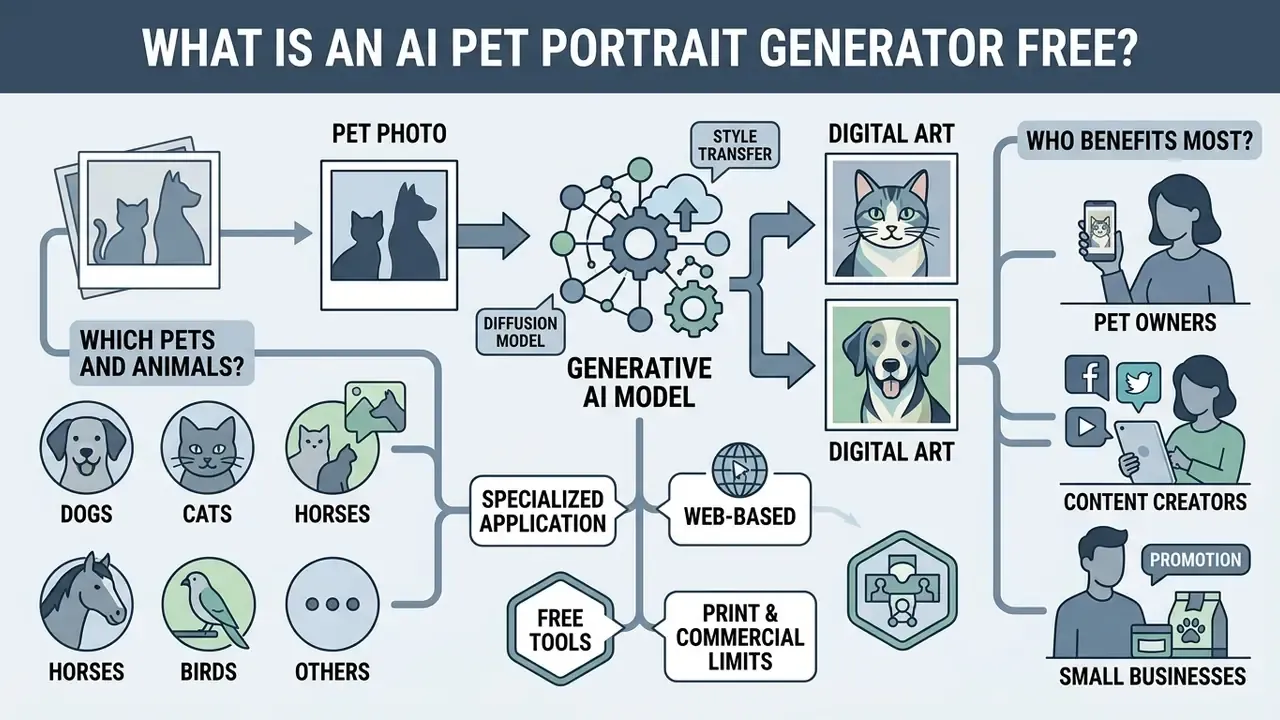
An AI pet portrait generator free is a specialized web-based application that applies generative artificial intelligence, specifically diffusion or style-transfer models, to convert uploaded pet photos or text descriptions into customized digital artwork without upfront costs. Unlike general-purpose image engines, these niche platforms use domain-specific UI controls and pre-conditioned prompt pipelines tuned for animal anatomy, fur textures, and pet portrait aesthetics.
The distinction matters practically. General systems such as Midjourney, Stable Diffusion, and DALL·E are documented by their vendors as universal image generators for any subject. A pet portrait generator is subject-constrained: its presets, aspect ratios, and identity-preservation weights are tuned in advance for four-legged faces, fur, and whiskers. That is why a beginner usually gets a usable ai pet picture on the first attempt, with zero prompt engineering experience.
How AI turns a pet photo into digital art
AI transforms a pet photo into digital art by processing the input image through feature-extraction modules that map facial geometry, eye alignment, and coat patterns into latent mathematical representations. Systems built on image-to-image diffusion pipelines, such as Stable Diffusion or Adobe Firefly, treat the source photo as a structural conditioning anchor. Lightweight conditioning modules like IP-Adapter preserve subject identity, while ControlNet branches lock structural edges so a style transformation (oil painting, 3D render) does not warp the pet's underlying physical traits (Hugging Face Diffusers Documentation, 2024/2025). In practice the pipeline loads the reference photo, applies IP-Adapter weights first, then optional LoRA weights for style or breed bias, and finally uses ControlNet as an additional conditioning branch during sampling.
Identity preservation is a known engineering trade-off rather than a solved problem:
«Stable Diffusion outperformed competing systems on text–image alignment, but demonstrated demographic bias in face generation.»
If you want to explore the broader family of tools that reshape an existing picture rather than generating from scratch, review how image-to-image generators handle structural conditioning across subjects other than pets. The same conditioning logic shows up in unrelated text-and-image tools, from an ai outfit generator to an ai paragraph generator: different output, identical "anchor plus style" mechanics.
Which pets and animals can be used
Most free AI pet tools natively accommodate dogs and cats, but modern generative frameworks can process any animal species with discernible visual features. Platform documentation from services like Adobe Firefly indicates native support for birds, rabbits, bearded dragons, guinea pigs, snakes, goats, chickens, and horses (Adobe Firefly Technical Specifications). However, empirical research shows that algorithmic performance drops on exotic pets or unconventional body silhouettes. Models trained predominantly on domestic quadruped datasets experience a higher rate of anatomical distortion when encountering severe body occlusion or rare species-specific poses.
«Generative models mirror the imbalance of their training data, underrepresenting rare species and non-standard poses.»
Practical consequence: a Labrador in a front-facing sit will almost always render cleanly, while a chameleon on a branch, a snake coiled around an arm, or a long-haired rabbit photographed from above may need several regenerations or a tighter crop before the anatomy holds together. I have seen a bearded dragon come back with five toes on one foot and three on the other. Two regenerations fixed it.
Who benefits most: audience segments
AI pet art is no longer a purely B2C novelty. Six distinct user groups extract measurable value from the same underlying generator, and each one needs a different output specification.
| Segment | Primary goal | What they should prioritize |
|---|---|---|
| Pet owners (B2C) | Gifts, wall art, avatars, memorial keepsakes | Likeness accuracy, 300 DPI export |
| Print-on-demand sellers | Etsy/Shopify catalogs, mockups for mugs, tote bags, apparel | 4K resolution, watermark-free files, commercial license |
| Digital artists & illustrators | Concept art, commission drafts, character sheets | Custom prompt access, style consistency, seed control |
| Pet businesses (grooming salons, veterinary clinics, boutiques) | Flyers, lobby decor, client birthday cards, localized ads | Batch processing, brand-consistent presets |
| Content creators & SMM influencers | Memes, PFPs, TikTok/Instagram/Pinterest visuals | Fast generation, mobile browser access, trending style presets |
| Animal shelters & rescue volunteers | Adoption posters that raise engagement | Fast throughput on many animals, warm/friendly presets |
How to Create an AI Pet Portrait from a Photo
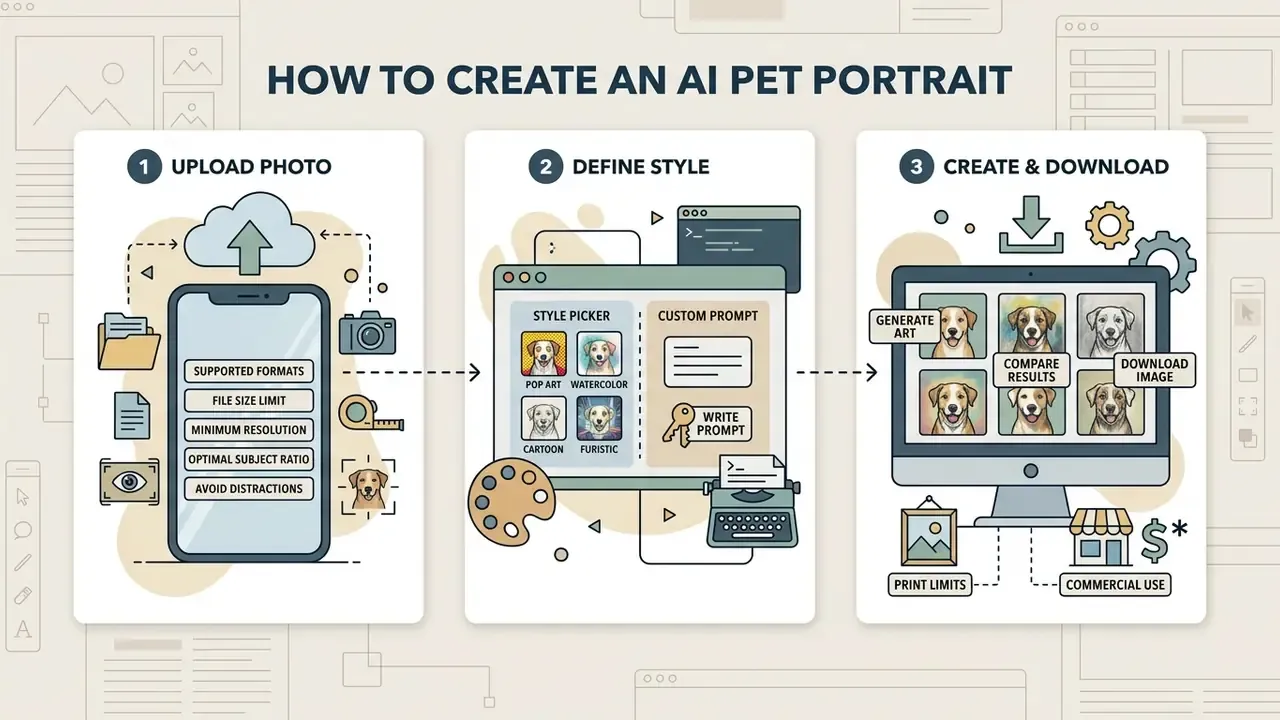
Creating a digital pet portrait online free requires a three-step sequence: uploading a clear reference photo, defining the visual style or custom prompt, and executing the generation before downloading the finalized render. Platforms design these workflows for immediate accessibility, removing the technical barriers traditionally associated with generative model execution.
Upload a clear pet photo
The initial photo upload serves as the foundational data source for the model's feature extractor. To get accurate results from an ai pet portrait generator upload photo flow, the reference image must feature the pet at eye level under soft, balanced lighting. Front-facing or subtle three-quarter angles give the neural network clear exposure to both eyes, the muzzle, and coat texture, preventing structural distortion during latent space sampling.
«Sharp focus on the eyes, soft natural lighting, and an uncluttered background materially improve pet stylization quality.»
If your only good photo is underexposed or slightly soft, run it through AI photo editors for exposure and sharpening before uploading. Cleaning the input is always cheaper than regenerating twenty variants.
Technical source requirements
- Supported file formats
- JPG, JPEG, PNG, WEBP.
- Maximum file size
- up to 10 MB per upload on mainstream free tiers.
- Minimum usable resolution
- avoid images where the facial region falls under roughly 50×50 pixels. Below that threshold the model substitutes invented detail.
- Optimal subject ratio
- the pet's facial features should occupy at least 50% of the image frame under balanced 500+ lux lighting.
- Avoid
- motion blur, heavy Instagram-style filters, backlit silhouettes, and frames where a hand, leash, or toy covers the muzzle.
Choose a style or write a custom prompt
Users can select pre-configured visual presets, such as Renaissance painting, watercolor wash, or vector illustration, or input custom text prompts to guide the output. Pre-structured templates ensure style consistency across generations. Custom prompts allow fine-grained control over lighting, background scenery, and thematic costumes. Adding descriptive keywords about environments or artistic mediums pushes the diffusion process toward a specific visual outcome.
«Users iteratively refine prompts, reacting to unexpected outputs and gradually converging on the intended image.»
Presets win on repeatability, which is useful when a shelter or POD store needs fifty visually consistent portraits. Custom prompts win on specificity, but ambiguous style keywords can be misread by the model, so keep vocabulary concrete: "watercolor wash on cold-press paper" instead of "artistic".
Generate, compare, and download images
Executing the generator produces multiple variations, letting you evaluate structural likeness and aesthetic quality across iterations. Temporary session image links in many web generators are not permanent storage. Vendor documentation for hosted image APIs commonly notes that returned URLs stay valid only for a limited window rather than indefinitely, so final selections should be cached or downloaded immediately to local storage. Treat every generated file as ephemeral until it sits on your own disk.
Review generated renders side by side before deciding which image best captures your pet's likeness, or compare outputs across platforms. Our roundup of the best AI image generators shows how likeness retention differs between engines on identical source photos.
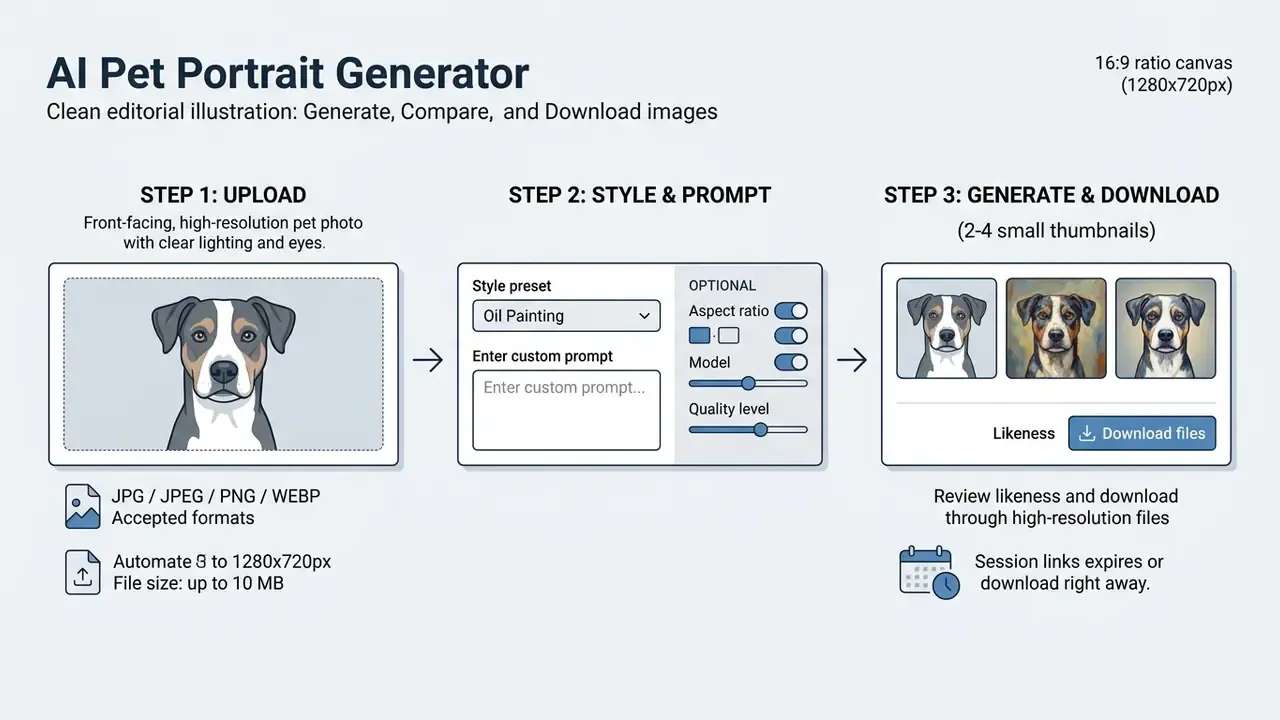
Figure 1: process flow for AI pet portrait generation.
What Pet Photos Give the Best AI Portrait Results?
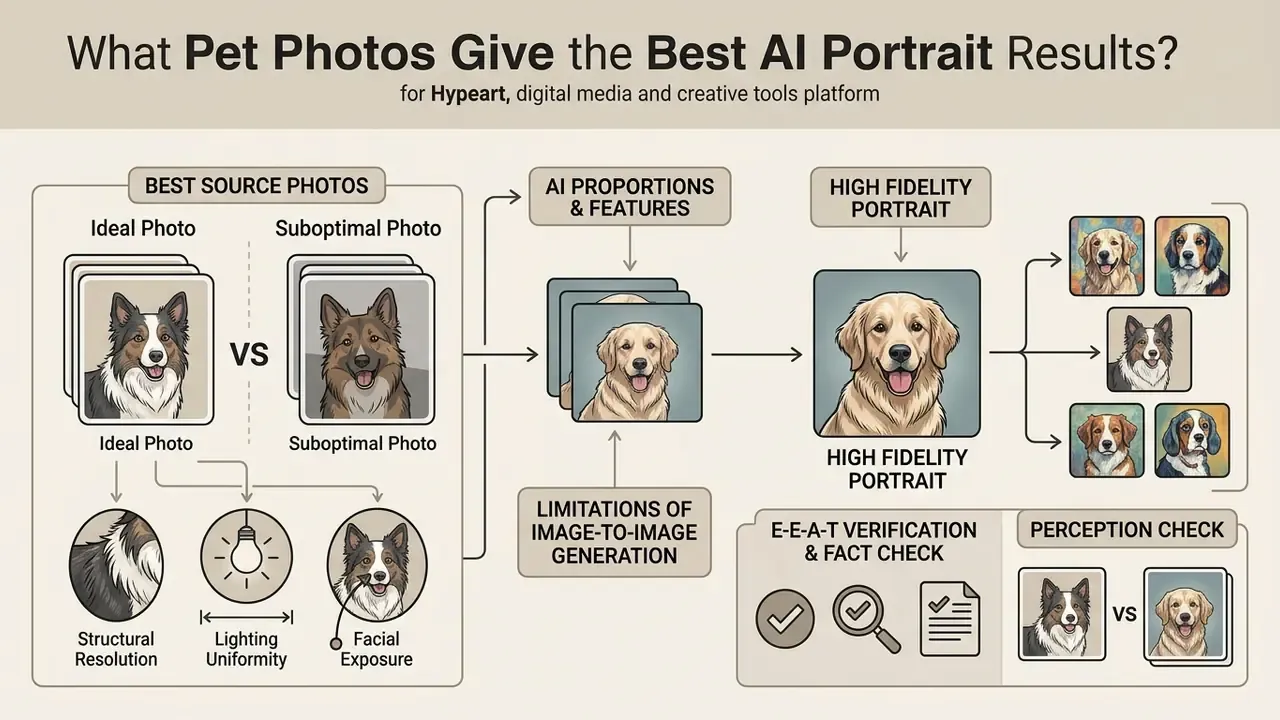
The fidelity and realism of an AI-generated pet portrait depend directly on the structural resolution, lighting uniformity, and facial exposure of the uploaded source photo. Generative models operate on incoming visual metrics; high-contrast, unblurred inputs let latent conditioning branches isolate subject geometry effectively.
Details that help preserve a pet's appearance
Preserving a pet's distinct identity requires explicit clarity across four visual markers: eye color and iris reflections, muzzle curvature, coat marking boundaries, and ear placement and shape. In image-to-image pipelines, low-resolution inputs lacking clear facial boundaries force the model to substitute missing information with generalized dataset averages, which flattens individual recognizability. Choose source images where facial details occupy a substantial portion of the frame and generic output becomes far less likely.
Style choice also measurably affects fidelity, not just mood:
«Romanticism achieved the best ArtFID of 166.26 and FID of 117.78 across 116 tested styles when stylizing pet photos.»
Practical takeaway: if likeness matters more than novelty, for a memorial canvas for example, favor painterly, high-scoring styles over aggressive graphic transformations that discard fine coat detail. Memorial projects sit next to other sensitive formats, and the same restraint applies when people use an ai obituary generator for a tribute page: accuracy first, effects second.
How to create multiple portraits from one photo
A single high-quality reference photo can generate a diverse series by holding the structural content anchor steady and varying the text prompt and style weights. Fixing the content seed and changing only the style conditioning vector keeps identity parameters stable across the whole series, which is exactly what you need for a four-panel gallery wall or a coherent product catalog.
Owners can systematically apply cartoon, impressionist, or vintage looks to one source photo, building a cohesive artwork collection without re-photographing the animal. A simple production routine: generate eight variations, discard anything where the eyes or ear set drift, then keep the four strongest for print.
«Iterative prompt refinement, reacting to surprising outputs and adjusting, is how users actually converge on the image they wanted.»
E-E-A-T verification & fact check:
AI Pet Portrait Styles and Prompt Ideas
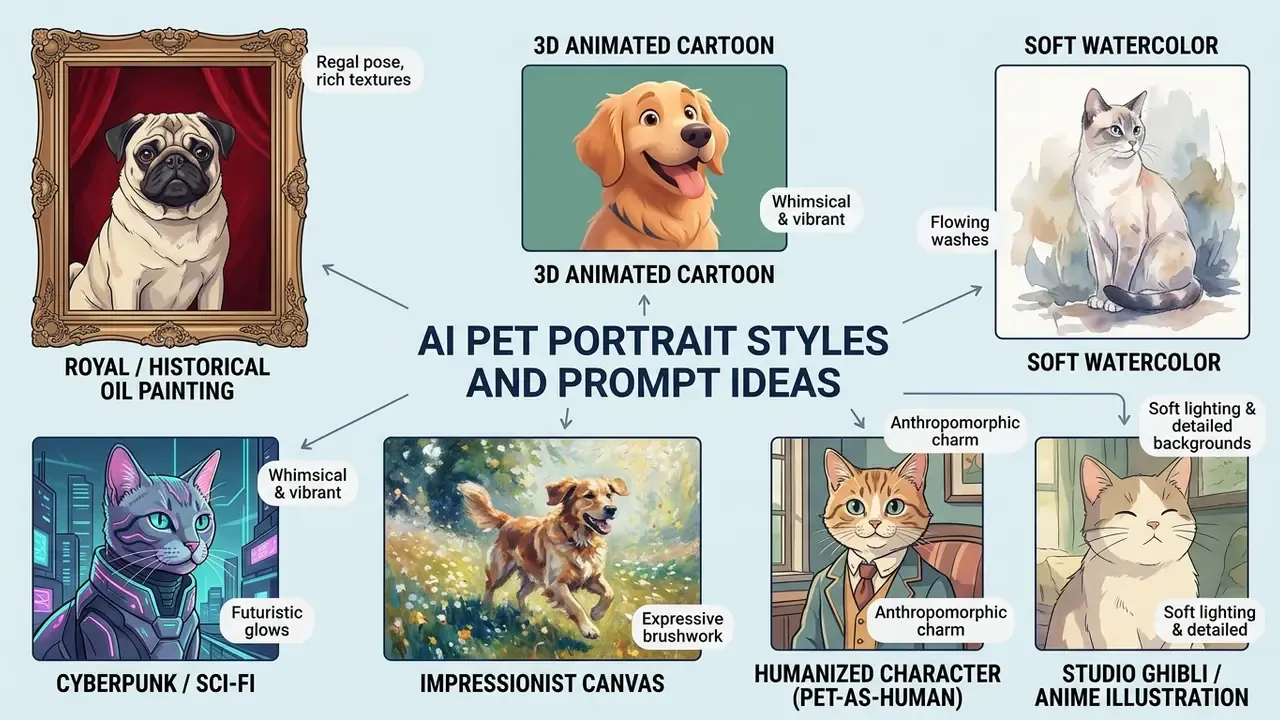
Selecting an aesthetic style defines how the model translates fur texture, lighting contrast, and background elements into final digital art. Modern generators offer extensive style libraries alongside open text prompt fields. Still choosing a platform? Our comparison of the best free AI art generators breaks down style depth against export limits.
Popular styles for dog and cat portraits
Eight artistic categories dominate consumer pet art generation, based on recurring style catalogs across major vendors and empirical style-quality rankings:
- Royal / historical oil paintingpets in aristocratic velvet garments with dark, warm Renaissance lighting.
- 3D animated cartoonrounded features, large expressive eyes, vibrant studio lighting.
- Soft watercolortranslucent color washes, visible paper grain, soft edge blending.
- Cyberpunk / sci-figlowing neon highlights, mechanical implants, futuristic urban backdrops.
- Impressionist canvastextured brushstrokes and dynamic color spots focused on ambient light.
- Humanized character (pet-as-human)blends your pet's facial features and coat markings onto an anthropomorphic body in professional or historical human attire, from Victorian detective to modern CEO to jazz musician.
- Studio Ghibli / anime illustrationhand-painted Japanese animation aesthetics, soft pastel palettes, painterly backgrounds, expressive cartoon eyes. For style-accuracy comparisons across engines, see our review of Ghibli-style AI image generators.
- Celestial & cosmic fantasysurreal space environments with glowing nebulae, bioluminescent flora, or a starry magical aura.
Style choice is measurable, not purely subjective:
«Abstract Art and Color Field also performed strongly in pet photo stylization, with ArtFID scores of 172.02 and 172.81 respectively.»
Readers new to the terminology can review how style libraries and conditioning presets work across AI art generators before committing credits to a specific look.
Prompts for custom pet artwork
To build effective custom prompts, structure the text by defining the primary subject, environmental context, lighting conditions, and stylistic constraints. That is the same subject, then context, then style ordering recommended in mainstream vendor prompt guides.
«Roughly half of the image-quality improvement observed after switching models was attributable to users adapting their prompts, not to the model itself.»
- Template 1 (royal): "A regal portrait of a Golden Retriever wearing a royal red velvet cloak, Renaissance oil painting style, dramatic chiaroscuro lighting, dark studio background, highly detailed fur texture."
- Template 2 (watercolor): "A soft watercolor illustration of a tabby cat sitting in a sunlit garden, pastel color palette, delicate ink outlines, visible paper texture, artistic and gentle aesthetic."
- Template 3 (3D cartoon): "A 3D animated character portrait of a French Bulldog, expressive eyes, Pixar-style lighting, smooth vibrant rendering, clean gradient background."
- Template 4 (cyberpunk): "A cinematic cyberpunk portrait of a German Shepherd with glowing blue neon accents, futuristic jacket, rainy neon-lit city street at night, sharp focus."
- Template 5 (impressionist): "An impressionist oil painting of a black cat lounging near a window, loose textured brushstrokes, rich warm sunlight spots, vivid color palette."
- Template 6 (humanized pet): "An anthropomorphic portrait of a French Bulldog dressed in a tailored tweed suit, standing in a classic mahogany library, Victorian era lighting, highly detailed facial expression, cinematic style."
- Template 7 (Studio Ghibli anime): "A Studio Ghibli style watercolor illustration of a fluffy Golden Retriever sitting on a grassy hill looking at a summer sky with fluffy clouds, anime background, nostalgic warm color palette, soft hand-drawn aesthetic."
- Template 8 (viral meme): "A dramatic superhero portrait of a grumpy orange cat wearing a red cape on a rooftop at sunset, comic book lighting, exaggerated heroic pose, bold saturated colors, meme-ready composition."
Each keyword block does a specific job. The subject phrase (breed, coat, expression) anchors identity. The style phrase selects the rendering medium. The lighting phrase controls mood and contrast. The background phrase stops the model from inventing distracting scenery. Negative constraints such as "no extra limbs, no distorted eyes" reduce the most common anatomical artifacts. If you plan a longer creative series, sketching the sequence first helps, much like drafting with an ai outline generator before writing.
How to change backgrounds, costumes, and themes
Changing backgrounds or adding thematic costumes requires specifying preservation boundaries in your edit instructions. Prompt structures should explicitly direct the model to swap environment elements or apparel while enforcing strict identity constraints on facial geometry, ear shape, and eye structure (ArtRobot, Pets Style Transfer: Complete Guide with AI Quality Rankings, 2024). Four control fields make edit prompts reliable: the action verb ("replace"), the exact target ("the background behind the dog"), the desired look ("autumn park, golden hour"), and the preservation boundary ("keep the face, ear set, coat markings, and pose unchanged").
This approach enables seasonal portrait generation, such as holiday scarves, birthday hats, or Halloween capes, without distorting the pet's underlying likeness. The same technique powers costume swaps for meme content. See how dedicated image-to-image AI generators expose background and outfit controls as separate parameters.
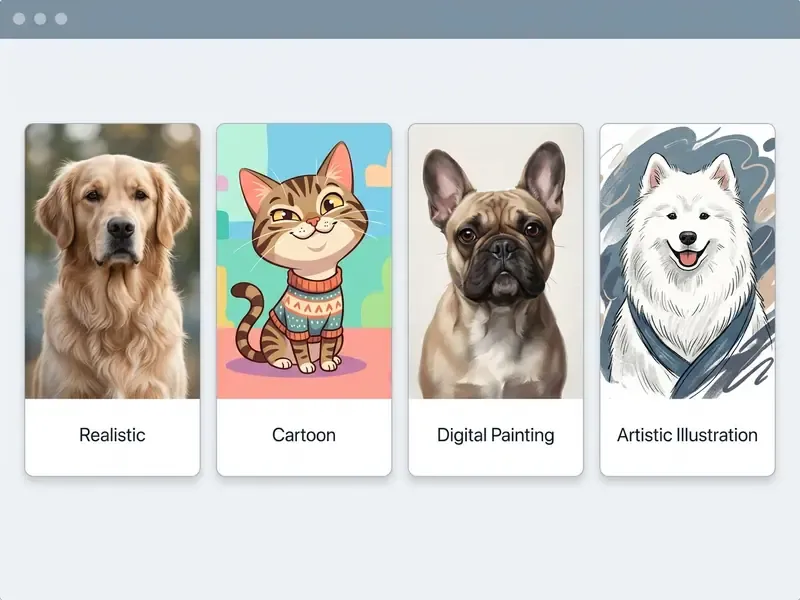
Free AI Pet Portrait Generator: Pricing, Limits, and Watermarks
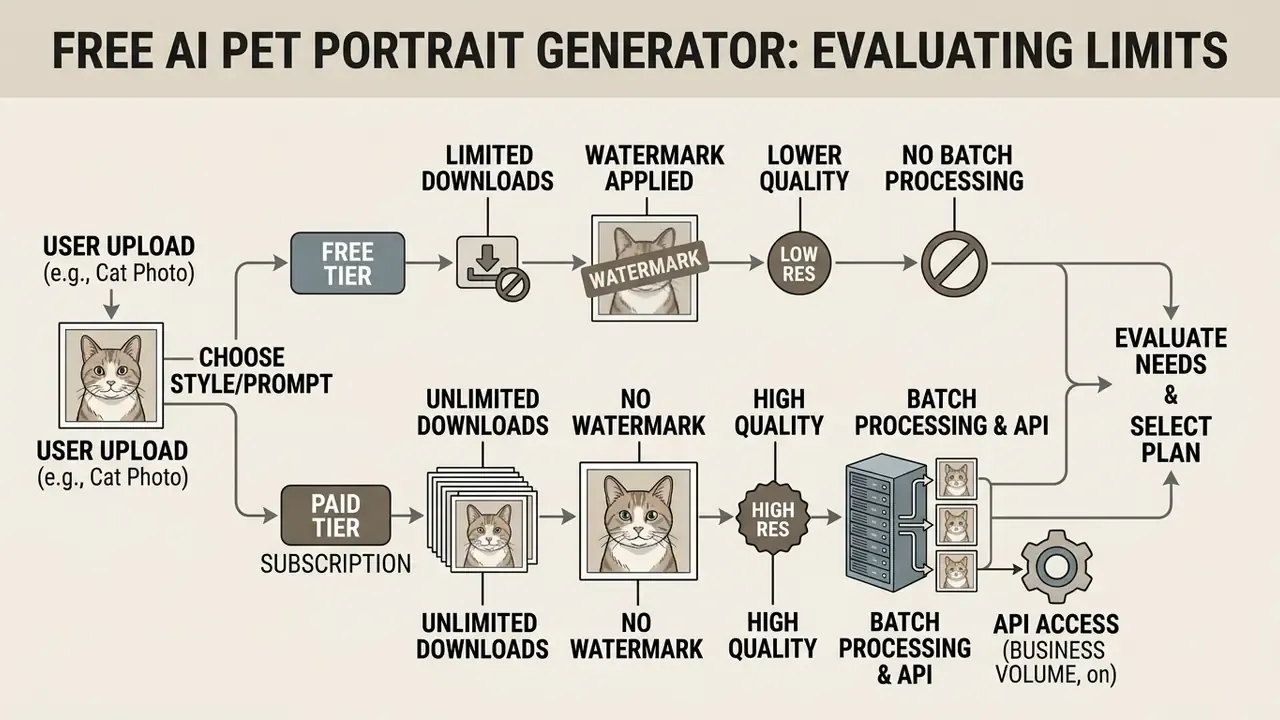
Evaluating "free" AI generation tools means understanding the operational trade-offs between zero-cost trial access and paid tier features. Free access models generally enforce strict daily credit allocations, resolution caps, or embedded watermarks. Before you commit, compare how free AI image generators differ on quota resets, queue priority, and export rights.
What "free" means for an AI pet portrait tool
In consumer software, "free" usually designates either a daily credit grant (say, 5 free generations every 24 hours) or a restricted trial allowance. "No sign-up" options permit immediate testing without account creation, but routinely enforce lower export resolution, longer processing queues, and disabled custom prompt controls. Documented examples span the full range: Adobe Firefly advertises free daily generations with an Adobe account; some tools grant 10 credits per rolling 24 hours; others allow roughly 10 images per day with no registration at all. Unused credits normally do not roll over.
«Flexible and affordable pricing tiers are necessary to attract non-professional users without creating access barriers.»
Pricing structure is the single most common reason users abandon a generator mid-project, so read the credit reset rules, daily versus monthly, before planning a multi-portrait series. If a rule is ambiguous, ask first. Vendor support queues are slow in high season, and you can open the hub for documented answers faster than you will get a reply.
Downloads, image quality, and watermark conditions
Free tier exports generally cap output resolution at standard web display sizes (for example 1024×1024 pixels at 72 DPI), which is fine for social media and inadequate for large-format physical printing. If your only usable render is a low-resolution free-tier file, AI image upscalers can lift it toward print density, though upscaling cannot recover fur detail that was never captured.
Platforms also frequently overlay semi-transparent watermarks or digital signatures on free renders, reserving clean, high-resolution downloads for premium subscribers. Watermarking is technically fragile, too:
«Diffusion purification attacks can strip subtle watermarks, exposing a trade-off between removal robustness and image quality.»
The practical implication for buyers: never assume a watermark-free file automatically carries commercial rights, and never assume a watermarked file is safe to crop for resale. Rights come from the license text, not from the presence or absence of a visual mark.
| Feature / dimension | Free tier access | Paid / premium tier |
|---|---|---|
| Generation credits | 1 to 5 images per day / month | Unlimited or high monthly allowance |
| Account requirement | Optional (no sign-up available) | Account creation required |
| Input file limits | Up to 10 MB (JPG, JPEG, PNG, WEBP) | Up to 50 MB plus RAW format support |
| Output resolution | Web quality (up to 1024×1024 px) | Print quality (up to 4K / 300 DPI) |
| Batch processing | Single image execution | Bulk API and multi-image batching |
| Watermark policy | Visible watermark or branding tag | Clean, watermark-free export |
| Style access | Basic style presets only | Full preset library plus custom prompt engine |
| Commercial rights | Personal use only | Full commercial license included |
Table 1: comparative breakdown of free vs. paid AI pet portrait generator features.
Batch processing and API access for business volume
Which Free Tools to Try First: Quick Platform Comparison
Most readers arrive with one question: which page do I open right now? The table below summarizes free-tier behavior documented by five widely used providers, so you can match a tool to your constraint: no account, no watermark, or print-grade resolution.
| Platform | Free access | Watermark on free tier | Notable strengths | Best for |
|---|---|---|---|---|
| Adobe Firefly | Free daily generations with an Adobe account | No visible watermark on standard output | Reference-image upload, style/composition/lighting controls, commercially oriented terms | Owners who want controlled, safe-to-use output |
| Pixelbin | Up to ~3 portraits per month; instant use without card | Advertised watermark-free HD download | JPG/JPEG/PNG/WEBP up to 10 MB, bulk-editing API on premium, browser-based | Humanized "pet as human" portraits and bulk workflows |
| Fotor | Free credits for new users, plus earnable credits | Watermark-free download advertised | Large style library (cartoon, anime, fantasy), free iOS/Android app, before/after preview | Memes, storybook characters, adoption posters |
| PicLumen | Free tier with model, aspect-ratio and quality controls | Not applied to standard exports per vendor page | High-resolution output up to 4K, explicit segments for POD sellers and pet businesses | Print-ready canvases and merchandise mockups |
| Bylo.ai | Fully usable with no sign-up | Watermark-free output reserved for paid users | Instant prompt-based styling ("Royal Painting", "Celestial Dreams"), mobile-responsive | Fast experimentation without registration |
Can You Use AI Pet Portraits for Printing, Gifts, and Commercial Projects?
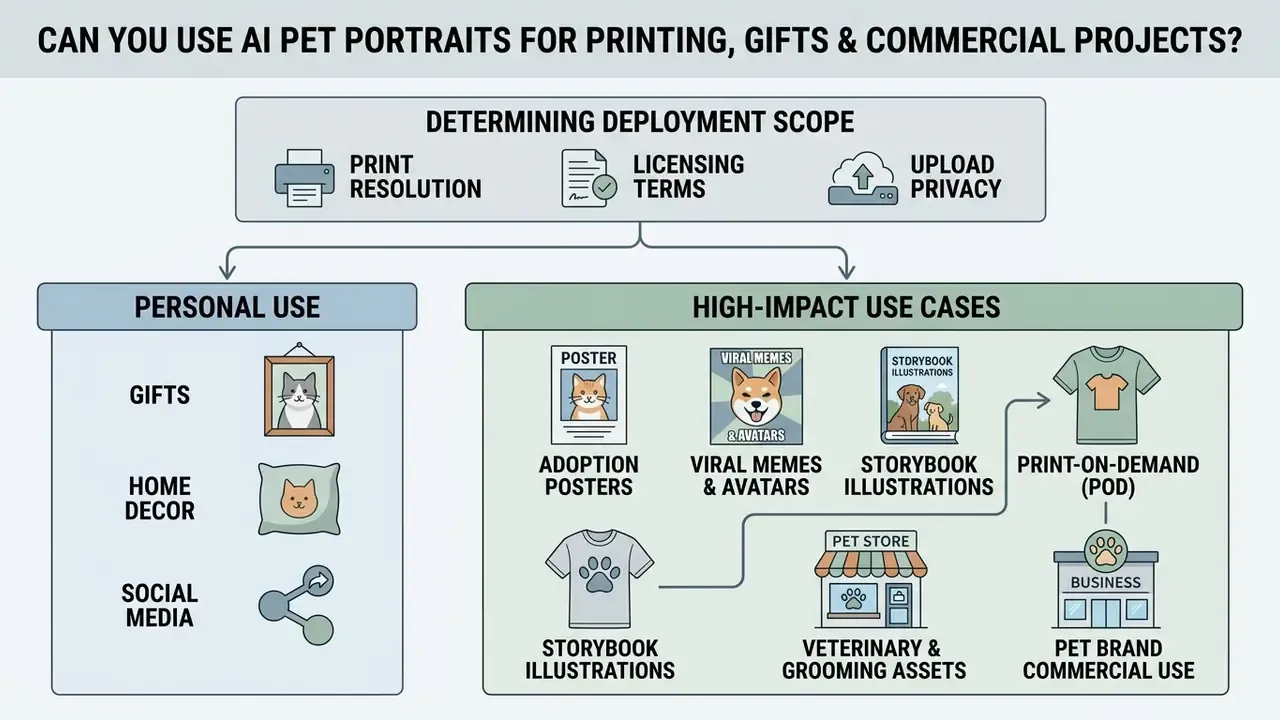
Determining the appropriate deployment scope for AI-generated pet art means evaluating printing resolution requirements, vendor licensing terms, and upload privacy policies.
Commercial use for pet brands and print-on-demand
This section is general information and does not replace advice from a licensed attorney on copyright and the commercial use of AI-generated content.
Using AI pet portraits for merchandise, print-on-demand storefronts, or pet brand marketing requires explicit commercial usage rights under the platform's terms of service. Under current legal frameworks, purely AI-generated outputs created without substantial human creative input are not eligible for copyright registration.
«Copyright protects only material that is the product of human creativity; works lacking human authorship are outside the scope of protection.»
Two consequences follow. First, your right to sell the artwork comes from the provider's license, not from copyright ownership, which is why free tiers routinely restrict output to personal use. Second, where you add substantial human authorship (composition decisions, manual retouching, original arrangement into a larger design), those human-authored elements may be protectable, and AI-generated portions must be disclosed on registration. European analysis reaches a similar conclusion: output produced without substantial human intervention falls outside copyright protection.
Businesses operating in regulated markets or commercial media should review platform terms before selling generated artwork, and confirm that prompts do not reproduce trademarked logos or copyrighted characters. Disputes in this space are still forming, and our litigation tracker helps you compare options for risk posture. For a deeper breakdown of licensing tiers and rights chains, review our guidance on the commercial use of AI image generators.
Adjacent categories inherit the same license logic, including tools with stricter content rules such as an ai paper generator for academic drafts or an ai onlyfans model generator for adult-content workflows. Read the plan, not the banner.
Privacy considerations when you upload a pet photo
Uploading personal photos to cloud-based AI systems exposes visual data to platform retention and model training routines. Retention windows vary widely by vendor and purpose: some services delete uploads within 24 hours, enterprise platforms commonly remove personal data within 30 days of a deletion request, and certain free web utilities retain uploaded images for up to 12 months for detection or model improvement, while paid tiers of the same product may process images in memory and delete them immediately.
«Every uploaded photo may be retained indefinitely and used to train future models; removal from training data is effectively impossible.»
Avoid uploading source photos that expose visible home addresses, license plates, sensitive personal documents, children's faces, or bystanders in the background. Before publishing generated art at scale, it is also worth checking provenance with AI image detectors, especially in editorial or shelter contexts where disclosure matters.
This information is general in nature and does not replace consultation with a data protection specialist or legal adviser.
E-E-A-T alert box (critical compliance checklist):
FAQ About AI Pet Portrait Generator Free
Do I need drawing or design skills to create pet art with AI?
No. Operating an AI pet portrait generator requires no manual drawing, painting, or graphic design skill. Generative tools convert natural language instructions and reference photos into visual output automatically; your input is limited to selecting styles, framing clear prompts, and uploading a suitable source photo.
«AI tools act as creative partners during ideation, generating visuals quickly, but they still require human oversight and remain bounded by ethical considerations.» What's Next? Exploring Utilization, Challenges, and Future Functional Needs for AI-Generated Image Tools in Graphic Design (2024).
The documented requirement across major vendor guides is prompt-writing and visual specification, meaning subject, style, lighting, composition, not illustration ability.
Can I make AI dog portraits on a phone?
Yes. Most free AI pet portrait generators are fully accessible through web browsers on iOS and Android smartphones, no dedicated app install needed. Web interfaces let mobile users upload pet photos straight from the camera roll, apply style filters, and download generated portraits in seconds (Dupple, Privacy-Focused AI Image Generators Comparison). Several providers also ship native apps, though App Store listings impose OS floors (for example iOS 13.0+ through iOS 17.6+), which browser access avoids entirely. Typical mobile generation time reported by vendors ranges from a few seconds to about 30 seconds per image.
If registration is the friction point, start with no-sign-up AI image generators and create an account only once you know the output quality justifies it.
What file formats and sizes can I upload?
Mainstream free generators accept JPG, JPEG, PNG, and WEBP files up to 10 MB. Premium tiers may extend limits to roughly 50 MB and add RAW support. HEIC photos from iPhones often need conversion first; most phones can export a JPEG copy directly from the share sheet.
Can I generate portraits for several pets at once?
On free tiers, generation is normally one image at a time. Bulk upload and API-based batch processing are premium features, and they are the practical option for shelters, grooming salons, and POD sellers producing dozens of portraits in one consistent style.
Which animals work best, and which are risky?
Dogs and cats produce the most reliable results because training data is dominated by domestic quadrupeds. Rabbits, birds, horses, hamsters, and reptiles are supported by most engines but need tighter framing and more regeneration attempts. Expect the highest artifact rate on unusual silhouettes, heavily occluded bodies, and rare species-specific poses.
Will a free 1024×1024 file print well on canvas?
Not at large sizes. At 300 PPI, a 1024×1024 px file covers roughly 3.4 × 3.4 inches: fine for a greeting card, not for a 16 × 20 inch canvas. Either generate at 4K on a paid tier or upscale before ordering, and always request a proof for anything above A3.
Can I use a free portrait on merchandise I sell?
Usually no. Free tiers are commonly restricted to personal, non-commercial use, and commercial licensing attaches to paid plans. Read the specific plan terms, not the marketing headline, before listing a product.
How do I keep the same pet character across multiple images?
Keep the same source photo and seed, change only the style or scene description, and re-state identity constraints in every prompt: "keep the coat markings, ear shape, and eye color unchanged". This is the standard method for storybook characters and multi-panel gallery sets.
Related reading: best AI art generators · online photo editors · Canva AI generator overview · compare options