Executive Summary
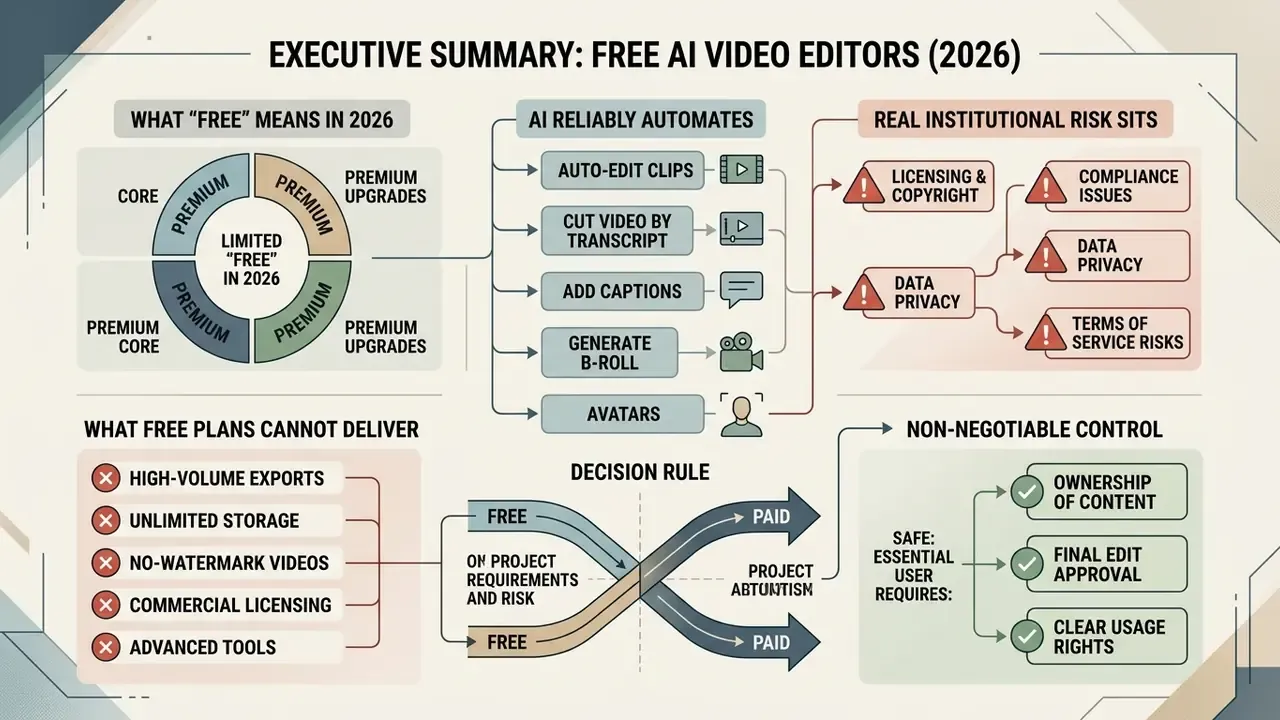
- What "free" actually means in 2026. Free AI video editors give you real timeline editing plus entry-level automation. They enforce boundaries through credits (typically 80 to 125 one-time or monthly credits), resolution caps (480p to 720p, occasionally 1080p), watermarks, and duration or storage limits.
- What AI reliably automates. Transcript-based cutting, silence removal, auto-captioning and translation, content-aware reframing to 9:16, background removal without a green screen, contextual B-roll insertion, avatar and voice synthesis, plus auto-generated social metadata.
- Where the real institutional risk sits. Not in output quality. In data residency, model-training clauses, PII exposure through auto-transcripts, absent audit trails, and the total absence of IP indemnification on free tiers. Treat free cloud editors as untrusted third-party processors.
- What free plans cannot deliver. Watermark-free client deliverables, 1080p or 4K masters at volume, retention controls, single sign-on, export logs, contractual indemnity, or reproducible render provenance.
- Decision rule. A free plan is enough for drafts, internal experiments, and personal social content. It stops being enough the moment output becomes a public brand asset, contains confidential material, or has to survive an audit.
- Non-negotiable control. Human review before publication. Federal guidance requires verification and labeling of AI-generated media prior to public release, and the same principle should govern corporate communications.
Scope and How These Tools Were Assessed
A quick note on method, because "best free video editor" lists rarely explain theirs.
Every capability described below was checked against three things: vendor pricing and terms pages current at the time of update, published research where a performance claim exists, and a repeatable desk test. The desk test is deliberately boring. One three-minute source file, 1080p at 30 fps, two speakers, mild room noise, one product name that speech recognition usually mangles. Same file through every candidate tool. Same four outputs requested: a trimmed 16:9 cut, a 9:16 vertical version, a caption track, and a downloadable transcript.
That last request breaks more free plans than anything else. Editing is generously free; getting your text out is often not.
Where evidence is thin, this article says so. Where a claim comes from marketing copy rather than measurement, it is flagged rather than repeated.
What Is a Free AI Video Editor and What Does "Free" Include?
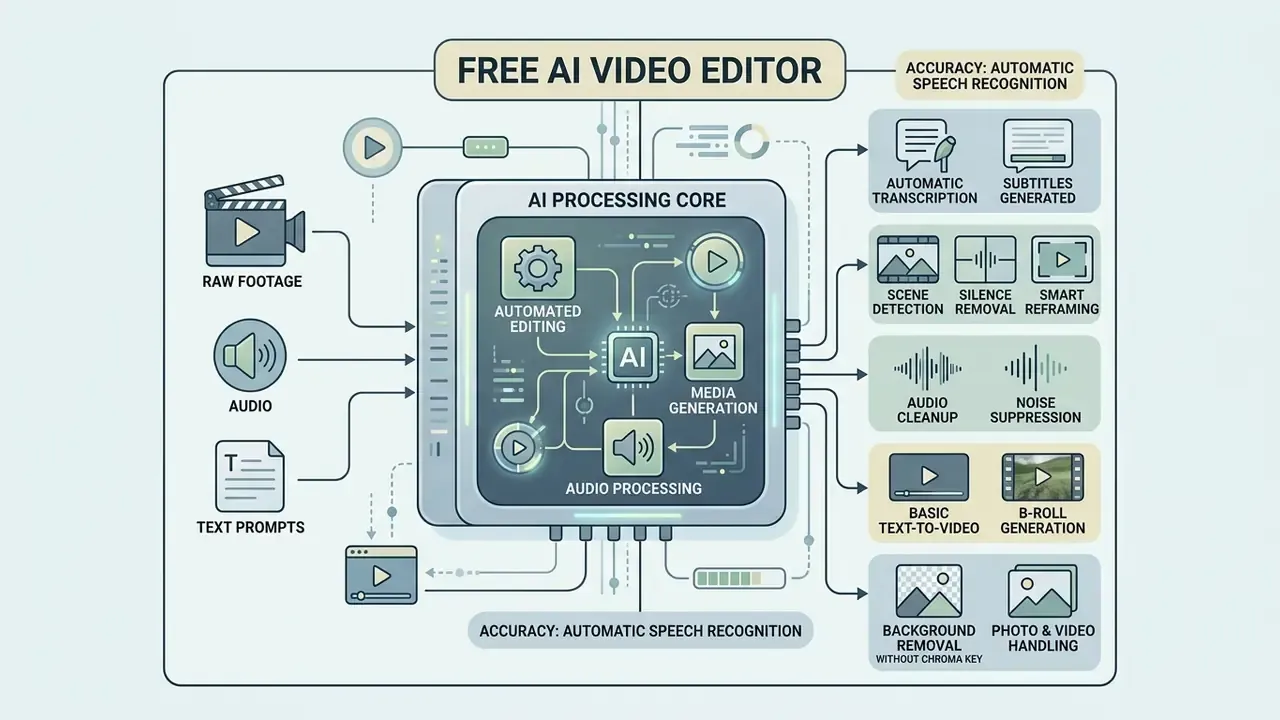
A free AI video editor is a browser-based, desktop, or mobile application that uses machine learning models to automate trimming, captioning, reframing, and media generation without upfront software fees. In practice, free tiers give you basic timeline editing plus entry-level AI processing, then enforce operational boundaries through credit limits, lower resolution caps, or watermarked exports.
Evaluating any free ai video editor means reading the exact parameters of the provider's free plan. Open-source frameworks allow unrestricted deployment. Proprietary cloud services restrict high-compute features to trial credits or monthly allowances. Knowing those boundaries early prevents the classic delay: a finished draft that cannot be exported at usable quality on deadline.
AI Editing Features Available in Free Tools
«Under a fair evaluation with fully disjoint training and test splits, the best fine-tuned Whisper model reaches 25.60% WER and 13.8% content WER for Swiss German speech.»
The practical implication is simple. Expect to correct proper nouns, product names, and accented speech by hand, whatever the vendor promises. Our own test file confirmed it: three tools out of five misspelled the same product name every single time.
Smart cropping holds up better. Automated systems maintain viewer satisfaction across vertical and square social formats without manual keyframing.
«SmartCrop combines object detection, scene detection, and interpolation to convert 16:9 into 1:1 and 9:16; a crowdsourced user study confirmed its advantage over alternative cropping methods.»
Free Plan Limits Before You Start Editing
Before starting a workflow, look at the technical ceilings imposed by the free tier. Most platforms run a freemium model where the fundamentals are open but output quality and volume are throttled.
| Constraint Category | Typical Free Tier Boundary | Operational Impact |
|---|---|---|
| Export resolution | 480p to 720p maximum (1080p occasionally supported) | Unsuitable for high-definition broadcast or client deliverables. |
| Watermarking | Mandatory logo overlay on exported files | Limits output to internal testing, drafts, or personal previews. |
| AI credit quotas | 80 to 125 one-time credits, or daily usage caps | Restricts text-to-video generation and advanced neural edits. |
| Duration and storage | Maximum 5 to 15 minute video length; 500 MB cloud storage | Requires external media management and aggressive compression. |
| Generation length | 4 to 8 second synthetic clips; 5 to 20 second input windows | Forces stitching of multiple renders for any meaningful sequence. |
| Feature gating | Subtitle and transcript downloads, premium stock often paid-only | Blocks reuse of transcripts in documentation or localization pipelines. |
For example, Kapwing's free plan watermarks all exported videos and meters advanced AI through a credit system. Microsoft Clipchamp, by contrast, permits watermark-free export on standard clips, with the free tier capped at lower resolution and limited specialized stock and advanced filters. Runway advertises a "free forever" tier built on 125 one-time credits that never refresh. Pika's entry tier is documented around 80 monthly credits at 480p.
For side-by-side breakdowns across media tools, see the AI Media Comparison Matrices and the dedicated review of free video editing software.
Because these thresholds shift with every pricing update, treat vendor pages as the primary record and comparison articles as secondary. Anyone shortlisting AI video generators should verify credit mechanics first: one-time versus refreshing, per-second versus per-render. Committing a production calendar to a non-refreshing allowance is a mistake you make exactly once.
Shadow AI, Data Privacy, and Audit Trail Exposure
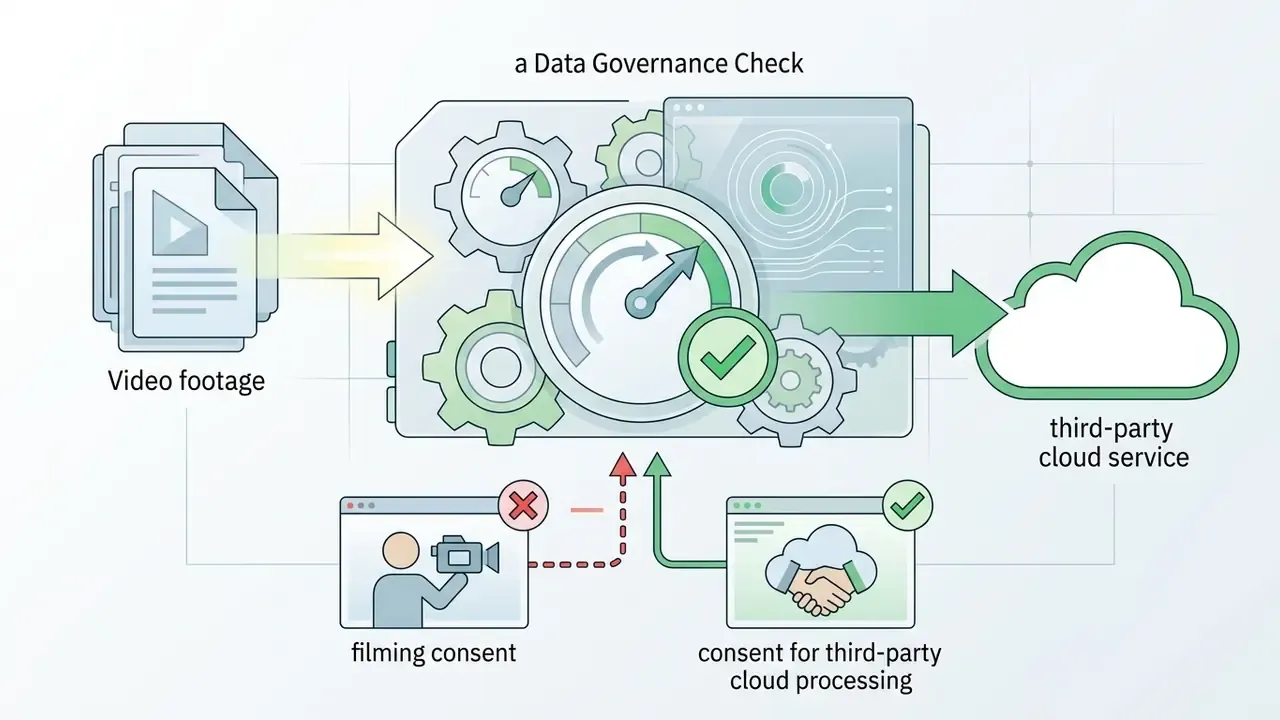
Free browser editors are, functionally, third-party cloud processors. Uploading raw footage transfers source media, audio, and the derived transcript to infrastructure your organization does not control. Frequently without a data processing agreement, a retention commitment, or a deletion guarantee.
Four risk vectors to evaluate before a single upload:
- Model-training clauses.Free tiers are the likeliest place to find terms permitting "service improvement" using uploaded content. Confirm in writing whether uploaded media and transcripts are excluded from model training, and whether that exclusion exists on the free plan or only under a paid enterprise agreement.
- PII and confidentiality leakage through transcripts.Automatic speech recognition converts spoken client names, account numbers, internal system names, and unreleased figures into machine-readable text. That text is then stored, indexed, sometimes translated. Redact sensitive segments before upload, not after.
- Absent audit trail.Free plans rarely expose render logs, prompt histories, version lineage, model identifiers, or exportable activity records. Without them you cannot reconstruct which model produced which frame, who approved it, or when. That is the core of reproducible provenance.
- Retention and residency.Short-lived free storage, say files held for a few days, is not a deletion guarantee. Free tiers seldom specify a processing region at all.
| Governance Control | Typical Free Tier | Practical Mitigation |
|---|---|---|
| Data processing agreement | Not offered | Restrict free tools to non-confidential, public-safe media |
| Training-data opt-out | Rarely guaranteed | Require written confirmation before institutional use |
| Retention or deletion SLA | Undefined or short-window | Delete projects manually after export; keep masters locally |
| Audit log or export history | Absent | Maintain an external render register (date, tool, model, approver) |
| SSO and access control | Paid tiers only | Use dedicated non-corporate accounts, never shared credentials |
| IP indemnification | Never included on free plans | Reserve free output for drafts, never for brand or client assets |
For organizations that have to document tooling decisions, the workable pattern is a two-lane policy. An open lane of approved free browser tools for public-safe marketing footage. A restricted lane of locally installed or contracted software for anything touching confidential data. Two lanes, one rule each, no ambiguity for the person holding the file.
Online Editor, Desktop Software, or Mobile App
Choosing between a browser editor, desktop application, or mobile app depends on hardware, team access needs, editing complexity, and data-control obligations.
| Deployment Format | Core Operational Characteristics | Best-Fit Scenario |
|---|---|---|
| Browser online editors (Kapwing, VEED, Clipchamp, Canva, Flixier) | Zero installation; cross-device access; dependent on cloud render speed; subject to usage caps and credits; media leaves your perimeter | Fast social edits, captioning, resizing, non-confidential drafts |
| Desktop NLE software (Premiere Pro, Final Cut Pro, CapCut PC, DaVinci Resolve) | Full GPU and CPU use; long-form and multi-cam timelines; local storage and privacy control; higher hardware cost | Long-form, multi-cam, color grading, confidential or regulated material |
| Mobile applications (Adobe Express, CapCut mobile, Captions) | Fastest capture-to-publish loop; optimized for vertical content; limited control over complex audio and effects | Field capture, immediate clipping and captioning, event coverage |
| Multiplayer real-time workspace (collaborative browser suites) | Shared workspace; simultaneous timeline editing; frame-accurate comments and review threads; brand-kit sync; no local export round-trips | Distributed teams, client review cycles, agency approval workflows |
Browser-based editors kill installation friction, which makes them effective for quick social edits and for anyone testing free AI apps for video editing before committing budget. Desktop non-linear editors (NLEs) give you sharper timeline precision, deeper multi-track audio control, and unconstrained local rendering. Critically, they also keep media inside your own environment. A free AI video editing app on the phone fills the field gap, letting you clip and caption on the capture device minutes after recording.
The fourth format is quietly becoming the decisive one for teams. Multiplayer editing replaces file-shuttling over email and chat with one shared timeline where reviewers leave timecoded comments on the video itself. Independent testing still finds that creators handling complex, longer projects prefer full-sized computers, while collaborative browser workspaces win on review velocity.
One caution. Collaboration amplifies governance exposure: shared workspaces multiply the number of accounts holding your footage, so access review becomes a recurring control, not a one-time setup task.
What Can AI Tools Automate in Video Editing?
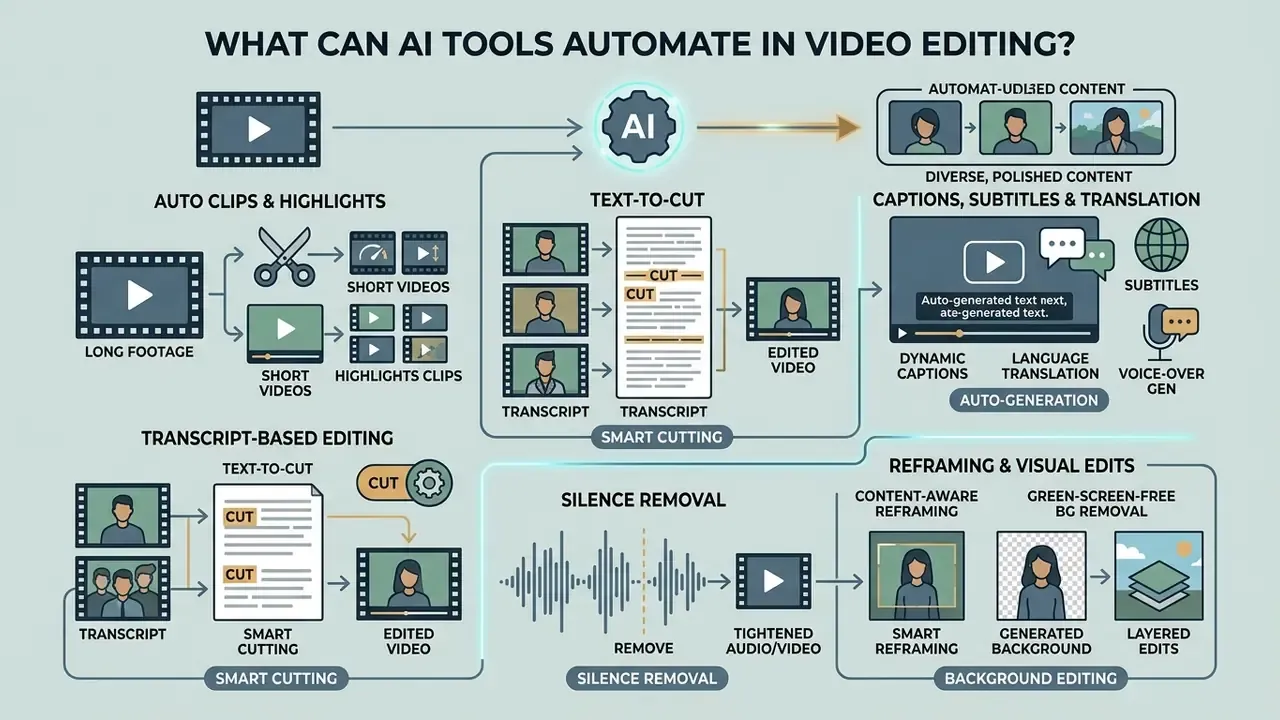
AI video editing tools automate repetitive post-production work: transcript-based cutting, dynamic captioning, language translation, visual reframing. Automation cuts manual timeline scrubbing so editors can spend attention on narrative structure and content strategy instead.
Replacing manual keyframing and transcript alignment with trained models produces measurable time savings. Modern frameworks handle multi-modal inputs, combining audio analysis, computer vision, and large language models (LLMs) to structure raw footage.
Auto Clips, Highlights, and Short Videos from Long Footage
Automated clipping tools process long recordings, such as webinars, lectures, podcasts, and recorded meetings, to identify high-engagement segments for short-form publishing.
These systems analyze vocal inflection, speech pacing, emotional peaks, and visual scene shifts. Multimodal frameworks like the Aesthetic-Guided Multimodal Framework (AMF) combine visual aesthetic encoders with content analysis to score clip saliency across video datasets. In academic settings, LLM-generated lecture summaries have improved learning outcomes when presented alongside the full recording.
«Students who received an automatically generated summary alongside the video lecture scored higher on quizzes than groups receiving only the video or only the summary.»
For YouTube Shorts, TikTok, or Instagram Reels, an AI video clip editor free of charge will isolate complete thoughts, trim filler words, and build vertical framing automatically. The same pipeline serves internal cases: pulling a 90-second highlight out of a two-hour all-hands, or assembling a compliance-training teaser from a recorded expert session. Anyone adapting long recordings for long-form adaptation for YouTube can follow that workflow guide for publishing features and creator use cases.
AI Captions, Subtitles, Translation, and Voice Tools
Automatic subtitle generation uses speech-to-text (STT) neural networks to transcribe spoken audio into synchronized text tracks. Translation models then convert those transcripts into target languages while preserving timecodes.
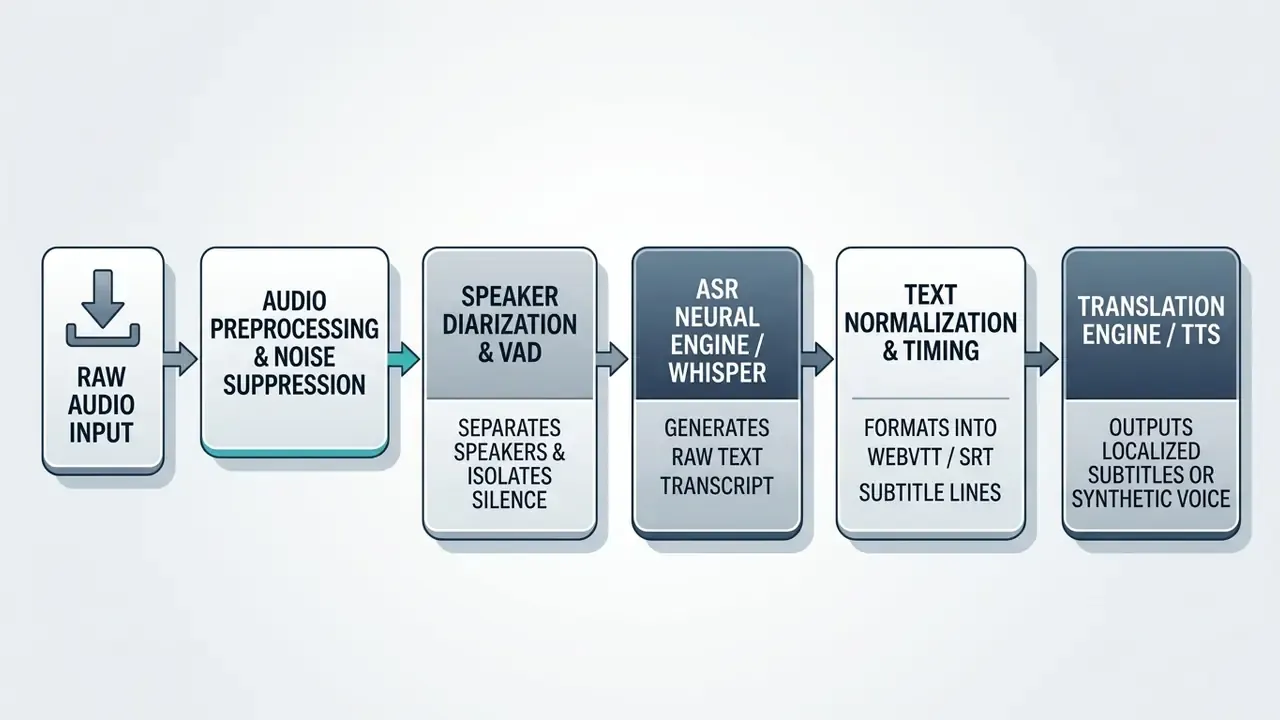
Localization pipelines depend on automated speaker diarization to tell voices apart within a scene.
«Audio preprocessing before diarization significantly lowers Word Error Rates and improves BLEU scores; diarization is especially effective on two-speaker segments.»
Subtitle output should follow the WebVTT specification maintained by the W3C for external text tracks in HTML. That keeps captions editable and machine-readable instead of permanently burned into pixels. Localized audio can then be synthesized with an ai voice generator to deliver translated voiceovers across 30-plus languages, with neural lip-sync alignment where the platform supports it.
Before recording, many teams draft with an ai script generator to structure timing, hook placement, and spoken word density, then feed the footage back into the captioning engine. Worth flagging: free voice tiers commonly exclude commercial licensing even when the audio downloads cleanly. More on that in the export section.
Smart Cuts, Silence Removal, Reframing, and Background Editing
Smart editing features automate spatial and temporal cleanup with no keyframes and no green screen.
- Silence removal (smart cuts). Detects dead air or pauses beyond a set threshold (3.0 seconds in Microsoft Clipchamp, for instance) and removes them across all tracks.
- Content-aware reframing. Systems like Apple Smart Conform and Final Cut Pro center active speakers or moving objects when adapting 16:9 media into 9:16.
- Green-screen-free background removal. Segmentation networks isolate foreground subjects, enabling background swaps or overlays with or without a physical chroma-key setup.
- Layered generative edits. Frameworks like Vera generate layered alpha mattes alongside edit layers, with measurable gains in content preservation over basic video-to-video diffusion.
«Vera generates the edit layer and its alpha matte separately from the source video, delivering 2.8 to 5.0 dB higher PSNR than baseline diffusion models under fixed training data.»
Transcript-based text editing (the text-to-cut workflow). Modern editors pair automatic speech recognition directly with the timeline. Rather than scrubbing raw footage hunting for a stumble, you read the transcript and delete sentences, words, or pauses inside the text window. The engine calculates frame timecodes and cuts the matching video, reducing rough-cut time by up to 70% in vendor-reported workflows. Delete "um, sorry, let me start again" from the transcript and that exact span of picture and sound disappears, gap ripple-closed, without one manual razor cut.
This is mainstream now, not experimental. Adobe Premiere Pro exposes speech-to-text plus transcript editing in its Text panel. Descript is built entirely around editing media by editing text. Browser suites offer "trim with transcript" as a single click. For accessibility, transcript-first editing is transformative rather than merely convenient.
«AVscript significantly reduced NASA-TLX mental workload for 12 visually impaired participants compared with their own editing tools.»
Three cautions apply. Transcript accuracy governs cut accuracy, so verify proper nouns before mass deletion. Deleting text does not remove the underlying media from cloud storage, so confidentiality risk survives the cut. And transcript export is frequently gated behind paid tiers, which quietly kills any localization plan built on reusing the text.
Auto B-Roll, AI Avatars, and Smart Visual Effects
Advanced automation goes past trimming and starts enriching the picture:
- Contextual B-roll overlay. NLP models read script context and fetch matching stock footage, images, or GIFs to lay over the main audio track, filling talking-head stretches with relevant visuals.
- AI digital avatars and lip-sync. Platforms turn plain text into realistic presenters using photorealistic avatars and synthetic voices with tight lip synchronization, no camera, studio, or lighting rig required. Commercial libraries now advertise 100-plus avatars and 150-plus voices across dozens of languages.
- Smart motion and transitions. Computer vision auto-applies camera movement (smart zoom in and out at emphasis points), generates intro and outro title animations, selects mood-matched music, inserts context-aware transitions at cut points, and picks text-animation styles that match edit pacing.
- Sticker, emoji, and emphasis layers. Script-aware systems add reaction stickers and keyword highlights aligned to spoken emphasis, a pattern strongly associated with short-form retention.
For institutional users, two constraints matter more than the feature list. Auto-inserted B-roll draws from stock libraries whose licenses may not extend to free-plan users. And synthetic avatars carry disclosure obligations: audiences and regulators increasingly expect labeling when the presenter is not a real person. Verify both before an avatar shows up in a customer-facing explainer.
How to Choose the Best Free AI Video Editor
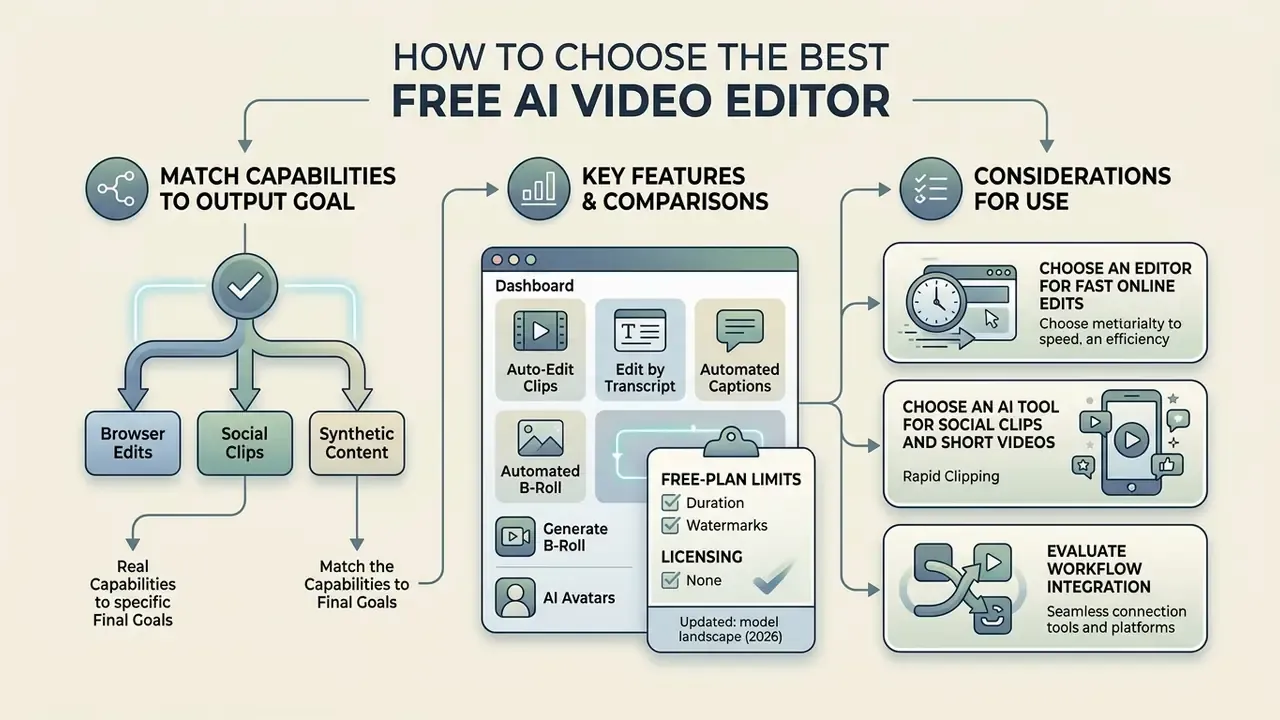
Choosing the best free AI video editor means matching the tool's real capabilities to your output goal: rapid browser edits, automated social clipping, or prompt-based synthetic media.
Because pricing structures churn constantly, selection should follow objective metrics rather than marketing labels. Render speed. Transcription accuracy on your audio. Watermark policy. Credit mechanics. Transcript export rights. Data-handling terms. Run a task-based pilot, same three-minute source file through every candidate, and write down the results. Independent evaluations in the AI Media Comparison Matrices and the comparison of AI video generators help verify features before you commit media assets to a platform.
| Selection Metric | Online Fast Editor | Social Clips Specialist | Prompt Video Generator |
|---|---|---|---|
| Primary task | Rapid trimming, text edits | Long-to-short conversion | Text or image to video generation |
| Key AI feature | Transcript editing, silence cut | Speaker tracking, auto-captions | Motion control, style transfer |
| Free tier limitation | Resolution caps (480p to 720p) | Monthly minute limits | Strict daily or one-time credit allocations |
| Ideal output | Quick presentations, tutorials | TikTok, Reels, Shorts | Concept art, B-roll, background clips |
| Governance note | Media leaves perimeter | Transcript may contain PII | Provenance of generated frames unlogged |
Choose an Editor for Fast Online Edits
An ai editor video online free is optimal when media needs quick adjustments and nobody wants to install anything. Browser editors like Kapwing, VEED, Flixier, Captions, and Microsoft Clipchamp process media directly through Chrome, Edge, or Safari.
Check supported upload formats and file size caps first. Basic web editors accept standard MP4, MOV, AVI, and WebM containers, but caps differ sharply by vendor. Captions allows web files up to 60 minutes. Canva caps uploads around 1 GB. Flixier restricts free monthly export minutes. Specialized generative tools such as the Adobe Firefly Video Model run under strict browser constraints: MP4 or MOV, under 200 MB, 5 to 20 seconds, desktop Chrome only. For team budgets and plan structures, see the AI Media Pricing Guides.
Choose a Generator for Prompt-Based Video Creation
How to Edit a Video with AI for Free: Upload, Prompt, Edit, Export
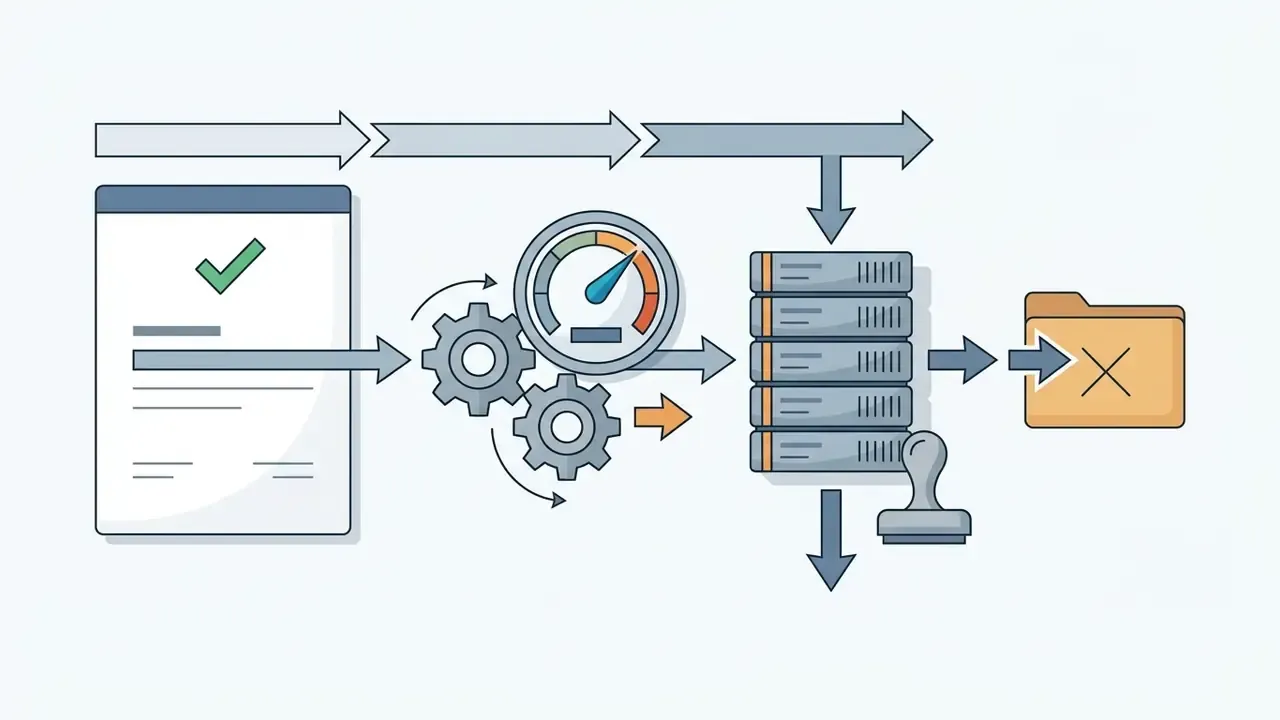
Editing with a free AI editor follows a structured sequence: screen source material for sensitive content, import media, run AI-assisted cuts or prompt commands, review speech and visual accuracy, add audio, export the render.
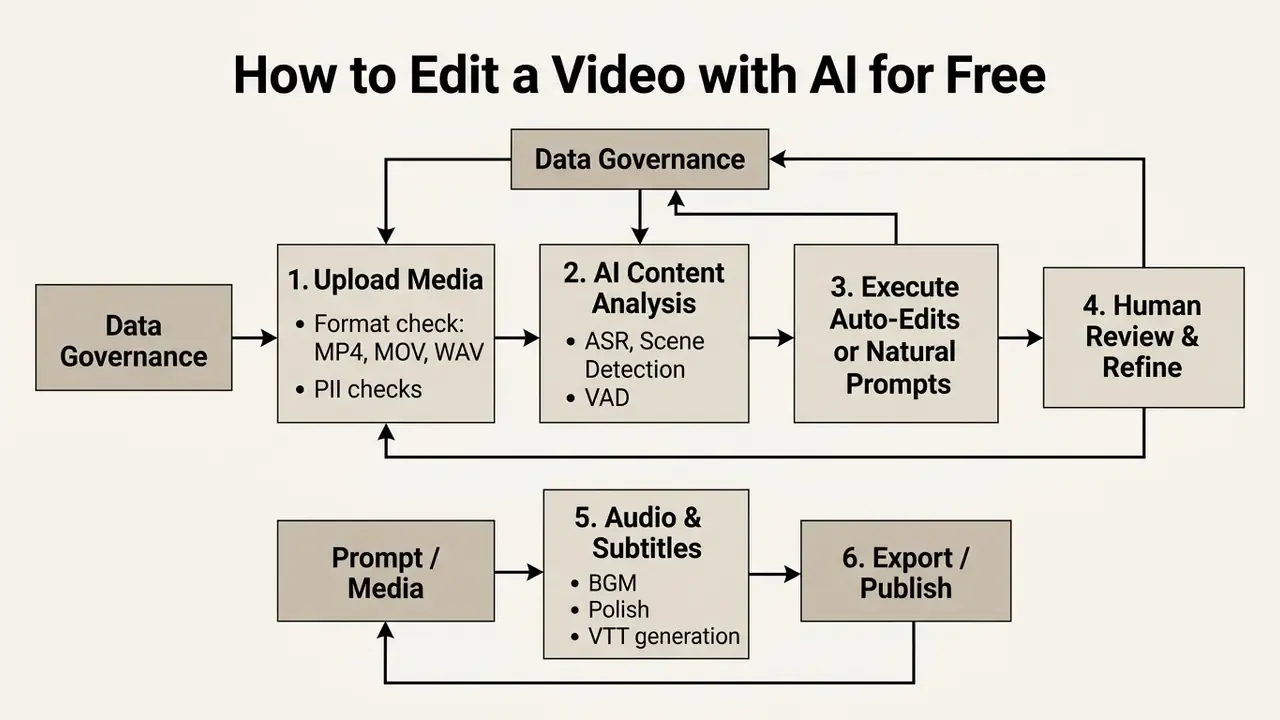
Numbered, the same workflow reads: (0) run a governance check, (1) upload media, (2) let the AI analyze content, (3) apply auto-edits or write a prompt, (4) review and refine as a human, (5) add audio and subtitles, (6) export, label, log, publish. Following it in order prevents the errors that only surface after the render finishes.
Step 0: Run a Data Governance Check Before Upload
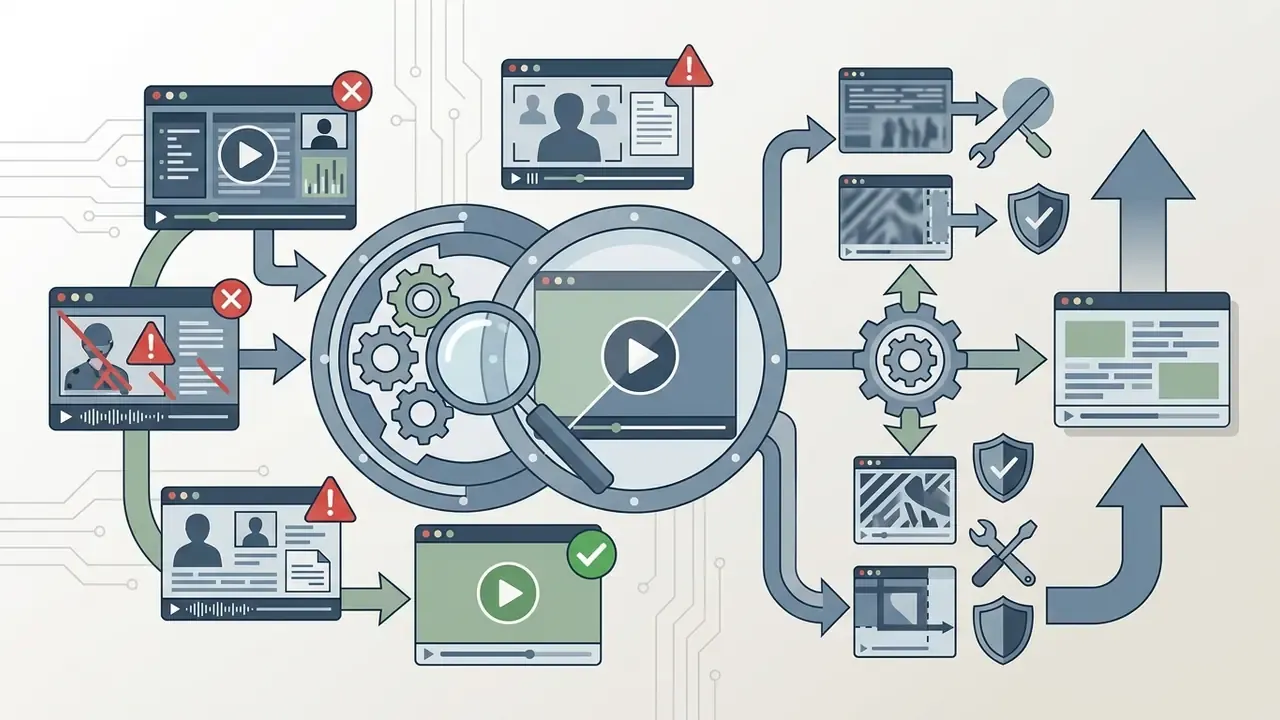
Before any file leaves your machine, screen it. This step costs minutes and prevents the single most expensive failure mode in AI-assisted video work.

Upload Video, Footage, Images, or Media
Preparing assets to platform spec prevents upload failures and processing errors during AI analysis.
| Ingest Parameter | Recommended Specification | Why It Matters |
|---|---|---|
| Container and codec | MP4 or MOV; H.264 video; AAC audio | Universally accepted by browser and desktop AI editors |
| Audio source | Uncompressed WAV or 320 kbps MP3; up to 48 kHz, 16-bit | Higher ASR accuracy; meets common stock-delivery rules |
| Resolution and frame rate | Uniform 1080p at 30 fps across all timeline clips | Avoids scaling artifacts and re-interpolation during cloud render |
| File size | Under the platform cap (200 MB Firefly; about 1 GB Canva) | Prevents silent upload failure mid-session |
| Clip duration | Within tool limits (5 to 20 s Firefly; up to 60 min Captions) | Generative editors reject out-of-range inputs |
| Stills and overlays | Native resolution, rights verified | Prevents upscaling blur and licensing disputes |
Use AI Auto-Edit or Write a Prompt
Once media is in, apply automated controls or type descriptive natural-language instructions to steer the engine.
Format prompts as structured parameter blocks: [Shot Type] + [Primary Subject] + [Action] + [Pacing/Style] + [Transition Rule]. Vendor guidance converges on the same discipline: one action per prompt, positive phrasing, explicit transitions, framing re-established after every cut. Most single generative clips land in the 5 to 10 second range, so complex sequences get written as chained prompts, never one dense paragraph.
| Editing Intent | Natural Language Command Example | Automated AI Action |
|---|---|---|
| Cut and trim | "Remove all pauses longer than 1.5 seconds and delete filler words like 'um' and 'ah'." | Runs VAD silence removal and trims spoken timeline artifacts. |
| Media swap | "Replace the background footage from 01:15 to 01:30 with high-tech server room b-roll." | Isolates foreground subject and overlays stock background media. |
| Audio adjust | "Mute background music during spoken speech and shift voiceover accent to British English." | Applies ducking and executes neural text-to-speech voice swap. |
| Aspect ratio | "Convert timeline to 9:16 vertical and keep speaker's face centered at all times." | Triggers object-tracking smart reframing with dynamic spatial crop. |
| Scene removal | "Delete the third scene and shorten the intro to four seconds." | Ripple-deletes the segment and re-times the opening. |
| Caption styling | "Add bottom-third captions, max 45 characters per line, highlight keywords in yellow." | Re-renders burned-in subtitle layer with emphasis rules applied. |
Research on LLM-assisted editing interfaces confirms that structured storyboard representations beat unstructured natural language.
«L-Storyboard converts individual video shots into structured language descriptions, significantly improving LLM performance on editing tasks compared with naive baselines.»
For the promotional copy that ships alongside a campaign, marketers often pair the editor with an ai seo content generator.
Review the Edit, Add Audio and Export the Final Video
Free AI Video Editing for YouTube, TikTok, Instagram, and Institutional Content
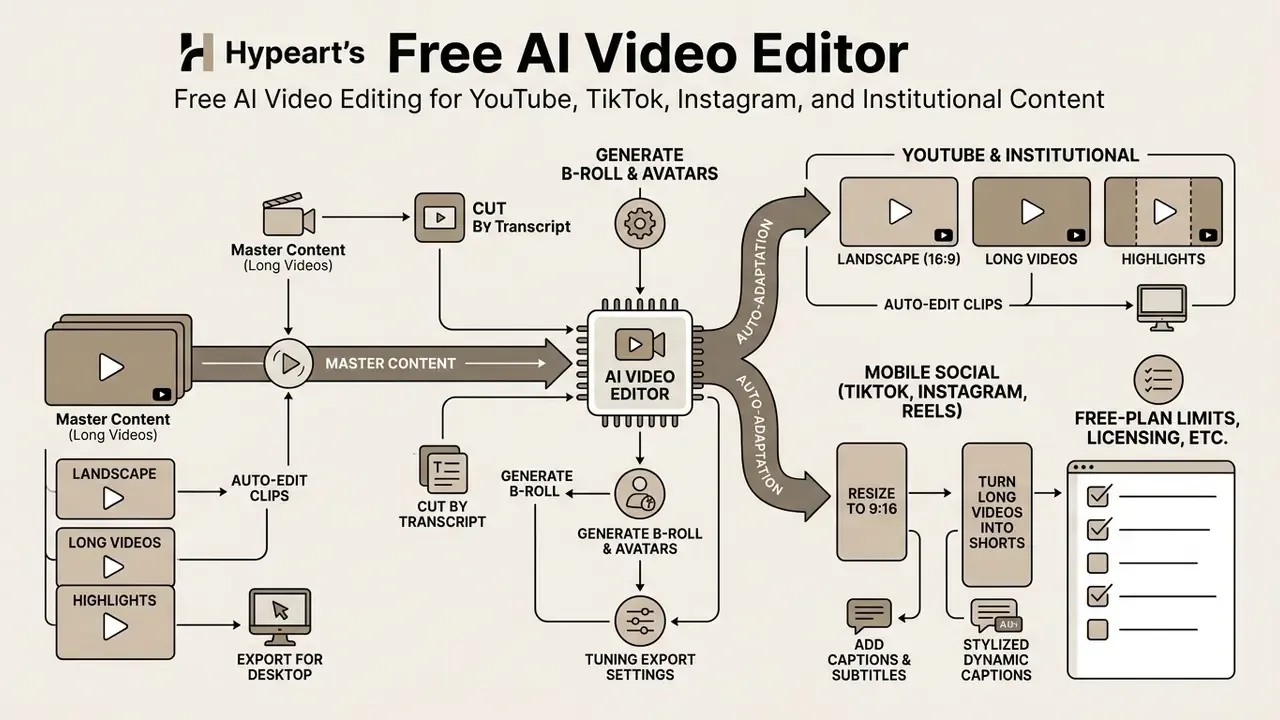
Adapting content across YouTube, TikTok, and Instagram means converting 16:9 masters into 9:16, generating styled dynamic captions, and tuning export settings for mobile feeds. The identical pipeline serves internal distribution: intranet portals, LMS modules, onboarding libraries, client presentation decks. One recorded session, re-cut into a 16:9 desktop version, a 9:16 mobile version, and a captioned accessibility version.
| Destination | Target Aspect | Target Resolution | Max Recommended Duration |
|---|---|---|---|
| YouTube standard | 16:9 landscape | 1920×1080 (up to 4K) | Unlimited |
| YouTube Shorts | 9:16 vertical | 1080×1920 | 60 seconds |
| TikTok feed | 9:16 vertical | 1080×1920 | 60 to 180 seconds |
| Instagram Reels and Stories | 9:16 vertical | 1080×1920 | 90 seconds |
| Square social, in-feed | 1:1 | 1080×1080 | Platform dependent |
| Intranet or LMS module | 16:9 landscape | 1920×1080, captions as WebVTT | Chaptered, 3 to 10 min segments |
| Client presentation cut | 16:9 landscape | 1920×1080, watermark-free master | 90 to 120 seconds |
Turn Long Videos into Shorts and Highlights
Converting long videos into short vertical clips relies on semantic block analysis to extract hooks from extended recordings.
The pipeline transcribes audio, divides content into thematic blocks, then scores each segment on keyword density, vocal emotional peaks, retention proxies, and visual motion. High-scoring clips get trimmed to 30 to 60 seconds and reframed to 9:16. Vendor implementations describe the same four stages under different names: full-video ingestion, transcription, highlight scoring, automatic vertical reframing with subtitle burn-in.
For institutional footage the scoring heuristics need supervision. An algorithm optimizing for emotional peaks will happily surface an off-the-cuff remark from a Q&A that legal never cleared. Review the shortlist of auto-generated clips before any of them reaches a publishing queue. Every time.
Creators managing content calendars often pair clipping tools with an ai schedule maker to organize platform publishing dates.
Add Captions and Subtitles for Social Video
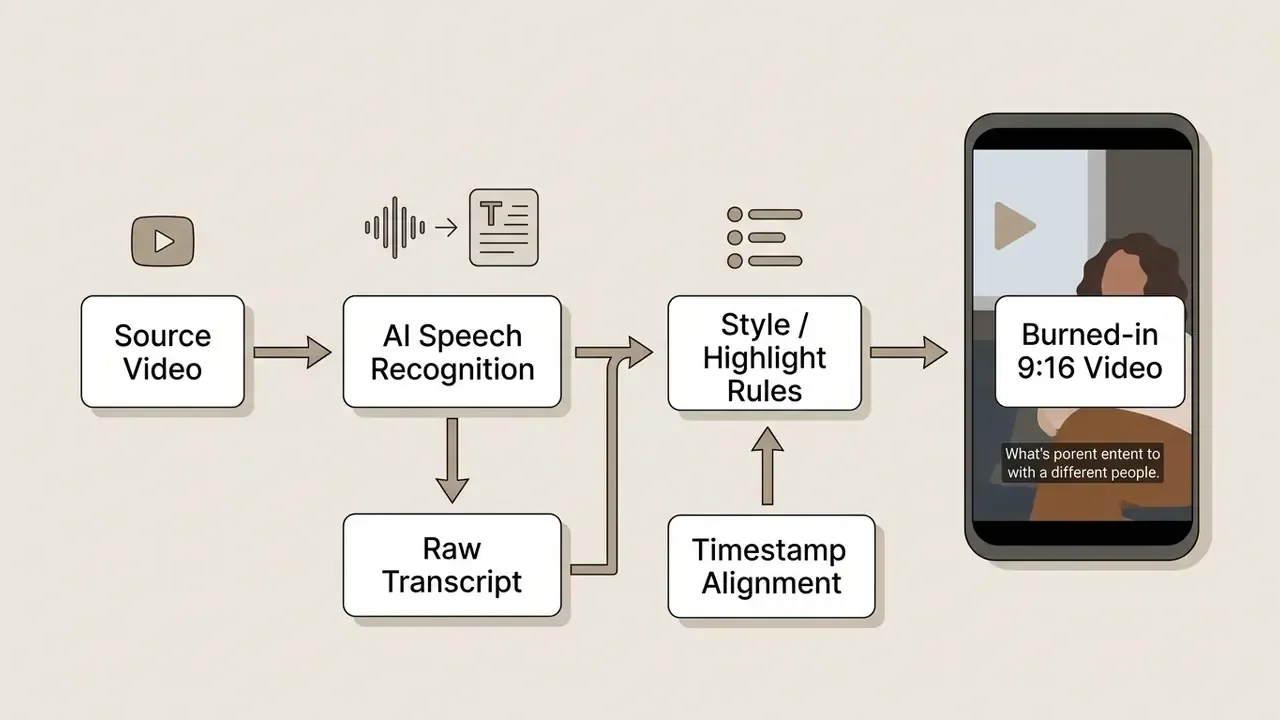
Dynamic animated captions lift retention on mobile platforms where video auto-plays on mute. They are also the baseline accessibility layer for prerecorded synchronized media under W3C WAI guidance.
«An LLM-based text-animation editing system scored SUS = 75 with a mean ease-of-use rating of 4.45 out of 5 across 11 participants.»
AI tools split text into short phrases automatically (maximum 45 characters per line), highlight active words in bright colors, and burn stylized subtitles into the render. For internal and regulated content, prefer a separate WebVTT or SRT track over burned-in pixels. It stays editable, searchable, translatable, and it survives future re-edits.
For niche scripting needs, such as institutional addresses or faith-based broadcasts, creators use an ai sermon generator to draft structured outlines before recording.
Resize and Publish Videos Across Platforms
Cross-platform distribution requires re-rendering to fit each platform's display geometry without cropping out the subject that matters.
Smart reframing analyzes each frame to find faces or moving objects, then keeps them centered inside the 9:16 crop.
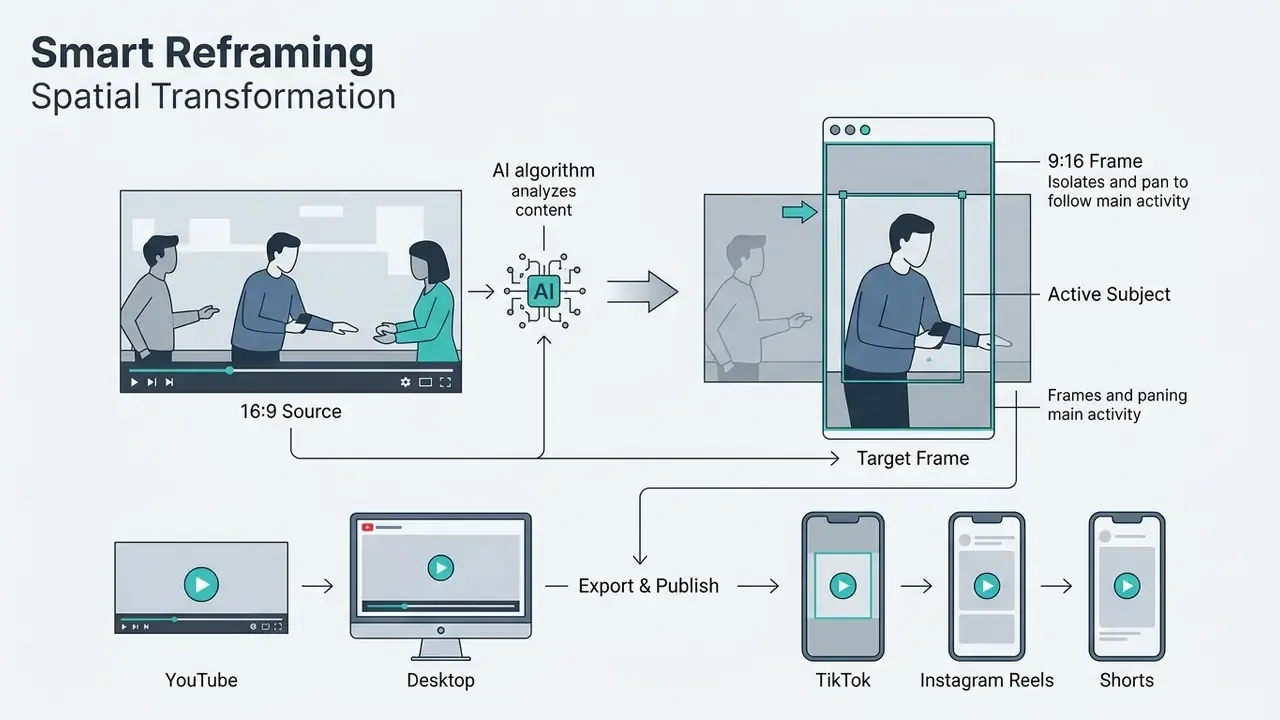
Apple Final Cut Pro Smart Conform and Wondershare Filmora Auto Reframe support presets for 1:1, 9:16, and 16:9, allowing instant re-rendering with no manual mask positioning. Speaker-focus features keep the active talker centered as the crop window travels. Smart Conform explicitly retains faces and other areas of visual interest inside frame when clip ratio differs from project ratio, and Filmora lets you correct the crop path manually after analysis.
To speed distribution, many editors also bolt on automated metadata engines. Once a short clip renders, integrated LLMs read the final transcript and output platform-optimized post captions, viral hook options, SEO titles, chapter markers, and categorized hashtags for TikTok, YouTube Shorts, and Instagram Reels. That removes scheduling friction and, in a corporate context, hands a communications reviewer a first draft to approve instead of a blank field.
One caution before you trust it. Verify auto-generated metadata for claims and disclaimers before publication. An LLM will cheerfully invent a superlative that compliance would never sign off on.
Export, Commercial Use, and Free AI Video Editor Limitations
Using free AI video editors for commercial publishing means evaluating plan limits, watermark policy, and asset licensing across generated video, audio, and stock components.
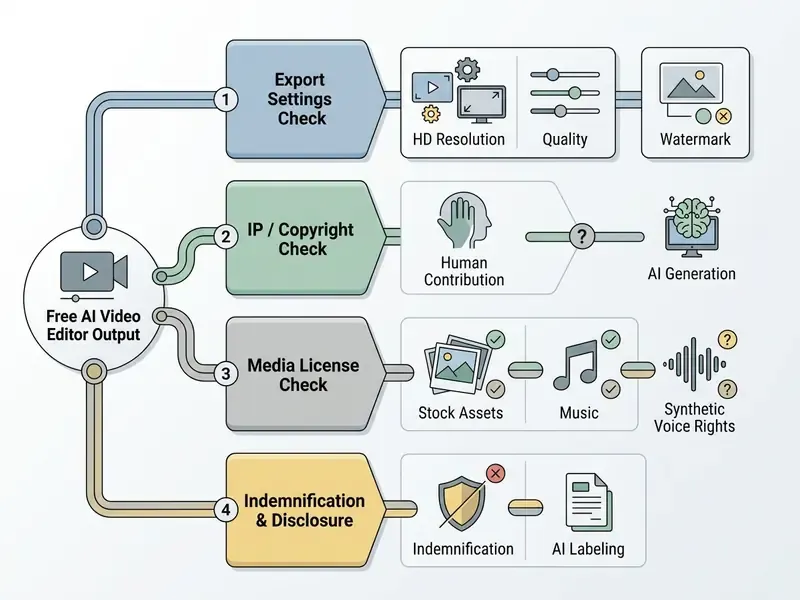
Understanding commercial usage policy prevents liability and copyright disputes once video goes public. Readers assessing adjacent categories can review our reference material on usage rights for AI-generated content.
What to Check Before Exporting a Video
Before clicking export on a free plan, run a structured audit across file quality, audio balance, plan compliance, and licensing exposure. Each row below has a companion instruction: check it in the tool's own current terms, not in a review.
| Audit Category | Technical Target | Verification Action |
|---|---|---|
| Aspect ratio and resolution | 16:9 (1080p) for web; 9:16 (1080×1920) for social | Confirm framing and export pixel dimensions in output settings. |
| Subtitle accuracy | Max 45 characters per line; 2 lines max; 10 s per cue | Review auto-generated captions for phonetic, spelling, and proper-noun errors. |
| Audio balance | Speech track roughly 20 dB above background music | Play the render back on standalone headphones and speakers. |
| Codec and container | MP4 with H.264 video and AAC-LC audio, frame rate matched to source | Export a master at project resolution, then replay the file independently. |
| Watermarks and rights | Clean visual frame, or an acceptable watermark | Check vendor terms to confirm free exports meet distribution rules. |
| Asset licensing | Stock, music, voice cleared for the intended use | Confirm each embedded third-party asset separately from platform terms. |
| AI disclosure | Label applied where required | Add an AI-generated notice in caption or descriptive text. |
| Governance record | Render register entry complete | Log tool, model, date, operator, approver; delete cloud project if sensitive. |
For deeper guidance on operational risk and usage rights across commercial AI deployment, consult the AI Media Commercial-Use Hub and the companion breakdown of commercial use for AI image generators.
Using Generated Video, Voice, Audio, and Stock Media
Commercial rights for synthetic media are set by platform terms of service and third-party asset licenses, not by one universal rule.
Copyright status of AI output. The U.S. Copyright Office's position is that material generated by AI is not protected by copyright where the machine determines the expressive elements. Registration can cover only human-authored contributions, and applicants must disclaim AI-generated portions (U.S. Copyright Office, AI initiative, 2026, https://www.copyright.gov/ai/). In practice: a purely prompt-generated clip cannot be registered, while your human-authored edit structure, script, and arrangement can be.
Synthetic voice. Commercial rights for synthetic voiceover vary by tier. Murf states that its free plan does not include a commercial license while paid plans do. ElevenLabs likewise scopes commercial rights by subscription level. Free-tier audio is therefore usually safe for testing and unsafe for advertising.
Embedded stock media. When pulling stock video or background tracks from a built-in library, verify whether that asset's license extends to free-plan users or demands a paid upgrade. Stock terms are asset-specific: Soundstripe's free users can only purchase single-use licenses tied to one project, and Adobe's guidance makes clear that "free" availability does not equal broad commercial permission. Some vendors also move previously free assets behind paid membership, then require an active subscription to export any project containing them. CapCut documents exactly this behavior.
Indemnification, the free-tier blind spot. Free plans essentially never include intellectual-property indemnification. Paid enterprise agreements from major vendors increasingly carry indemnity for generated output. Free tiers carry none, which means the user absorbs 100% of third-party infringement risk. For any brand, regulated, or client-facing asset, that single clause is a stronger reason to upgrade than resolution or watermarks ever will be.
Platform monetization. Content built with AI tools can generally be monetized on major platforms, but each network sets its own disclosure and monetization rules for synthetic media. Check the destination platform's policy before publishing, not after. To track how the surrounding legal picture is moving, follow AI Litigation and Case Timelines.
When a Free Plan Is Enough and When You Need More Tools
Whether a free plan suffices depends on project scope, branding requirements, confidentiality, and quality standards.
| Free Tier Is Sufficient When | Upgrade or Change Tooling When |
|---|---|
| Creating internal drafts and rough cuts | Watermark removal is mandatory |
| Publishing personal social media | Commercial client deliverables are required |
| Testing AI clipping and captioning workflows | 1080p or 4K masters are needed at volume |
| Processing low-volume, public-safe clips | Large-scale AI generation credits are needed |
| Evaluating a vendor before procurement | Transcript or subtitle export is needed downstream |
| No confidential material is involved | Footage contains PII, client, or secrecy-bound data |
| No audit obligation attaches to the asset | Audit trail, retention control, or SSO is required |
| No third-party IP risk is present | IP indemnification is contractually necessary |
Five measurable triggers make the call objective: watermark, export resolution, credit allowance, project or output length, and storage or feature caps. If one paid-only requirement applies, the free plan is insufficient. There is no partial answer here.
A word on trusting published numbers when you compare tiers. Benchmark figures can be inflated by evaluation design rather than genuine capability.
«Published WER results of 17.1 to 17.5% for Swiss German ASR proved inflated by test-data contamination; fair evaluation yields 25.60% WER.»
Apply the same skepticism to vendor accuracy and speed claims. Run your own pilot, on your own audio, with your own worst-case file. When requirements outgrow free limits, custom API integrations or high-volume rendering for instance, teams move to paid infrastructure and professional video editing tools with local control. Developers and systems architects can compare rendering economics through the AI Media API hub and the detailed Google Veo implementation guide.
Closing the governance loop. Back to the framing at the top of this article. The two controls a free tier cannot supply are a reproducible audit trail and export control. Reconstruct the first by hand: an external register recording source, tool, model version, prompt, operator, reviewer, disclosure label, and export hash. Enforce the second procedurally: a documented rule on which categories of footage may leave your perimeter, who approves exceptions, and where masters live.
With those two controls, free AI video editors become a legitimate acceleration layer. Without them, they are unmanaged shadow IT with a render button.
For budget estimation, use the dedicated calculators to project rendering costs before full production starts. If something breaks during deployment, the troubleshooting material sits at AI Media Support and Troubleshooting.
Frequently Asked Questions (FAQ)
Is there a genuinely free AI video editor with no watermark?
Yes, with trade-offs. Microsoft Clipchamp permits watermark-free export on its free tier while capping resolution. Some newer tools advertise watermark-free output but restrict monthly file counts or storage duration. Kapwing and Vmaker both watermark free exports by design. Verify current terms on the vendor's own pricing page before you plan a deliverable around it.
Can AI cut a video by editing text?
Yes. Transcript-based editing links ASR output to the timeline, so deleting a sentence in the transcript removes the matching frames and audio. Adobe Premiere Pro, Descript, and several browser editors expose this workflow directly. Cut accuracy follows transcript accuracy, nothing more.
Which AI models power free video generation in 2026?
Multi-model workspaces commonly route requests to Google Veo, Kling AI, Sora, MiniMax, Seedance, Wan, and Pika for video, ElevenLabs for voice and dubbing, and image models such as Nano Banana or Seedream for stills that are then animated. Free access is metered by credits, not by model choice.
Do free AI video editors train on my footage?
Sometimes. Free tiers are the likeliest place for permissive service-improvement clauses. Assume training is possible unless the terms explicitly exclude it, and never upload confidential material to a tool that cannot confirm exclusion in writing.
Can I use free-tier AI video commercially?
Only if three conditions all hold: the platform's terms permit commercial use on the free plan, every embedded third-party asset (stock, music, voice) is licensed for that use, and you accept that no indemnification protects you. Free synthetic voice tiers frequently exclude commercial use outright.
Who owns the copyright to an AI-generated video?
Under U.S. Copyright Office guidance, purely AI-generated material lacking human creative input is not registrable. Protection attaches only to human-authored contributions such as script, arrangement, and edit structure, and AI-generated portions must be disclaimed at registration.
What export settings should I use?
MP4 container, H.264 video, AAC-LC audio, resolution matched to source (1080p or higher), frame rate matched to source, speech roughly 20 dB above background music, subtitles as SRT or WebVTT at 45 characters per line or fewer. Always replay the exported file independently before publishing.
How long can free AI-generated clips be?
Typically 4 to 8 seconds per generation, with some editors accepting 5 to 20 second inputs for editing operations. Longer sequences require chaining renders, which burns a free allowance fast.
Are free AI editors suitable for corporate training video?
For non-confidential, public-safe material, yes. Captioning, chaptering, and resizing are strong use cases. For anything containing customer data, financial disclosures, or NDA-bound material, use locally installed software with local rendering instead.
Can a free plan handle both photos and video in one project?
Often, yes. Several browser suites function as a combined AI video and photo editor, so thumbnails, logos, and stills sit in the same timeline as footage. Watch two limits: total cloud storage and whether image upscaling or background removal draws from the same credit pool as video generation.
Appendix A: Revision Log and Superseded Statements
For transparency, the statements below appeared in earlier versions of this article and have been revised. The original wording is preserved alongside the reason for the update.
| Superseded Statement (earlier version) | Status | Reason and Replacement |
|---|---|---|
| "Speech recognition fine-tuned on dialectal speech achieves content word error rates around 13.8% when evaluated under strict disjoint protocols (Swiss German Whisper Fine-Tuning Study, 2024)." | Revised | Incomplete: cited only content WER without the full 25.60% WER, overstating practical accuracy. Replaced with both figures and an explanation of the difference. |
| "Federal agencies like NASA mandate that all AI-generated text, imagery, and video undergo human verification prior to public release (NASA AI Policy Guidelines, 2026)." | Revised | Source reference generalized; replaced with the specific NASA interim directive, its document URL, and the associated labeling requirement. |
| "Verify that speech tracks clear background music by approximately 20 dB (Cloudflare Video Standards)." | Revised | "Cloudflare Video Standards" is production workflow documentation rather than research. Retained as an industry workflow convention and paired with public-sector export guidance from UC ANR and AHRQ. |
| "Generative platforms, including Adobe Firefly, Runway, Pika, Vidu AI, and Canva Magic Media, use diffusion models to construct 4-to-8 second video segments." | Expanded | Model coverage was incomplete for 2026; expanded to include Google Veo, Kling AI, MiniMax, Sora, Seedance, Wan, and ElevenLabs audio, with per-vendor credit mechanics. |
| Placeholder production notes for the media-ingestion diagram and pre-export checklist matrix. | Removed | Replaced with rendered specification tables. |
| Anchor-linked table of contents. | Replaced | Substituted with a scope and testing-method section explaining how capabilities and free-plan limits were verified. |
| Vendor claims of 97% to 98% transcription accuracy (competitor marketing figures). | Not adopted | Marketing benchmarks measured on clean audio; the article cites peer-reviewed WER and cWER figures instead. |
| "Vera generates layered alpha mattes... delivering a 2.8 to 5.0 dB PSNR improvement (Vera, 2026)." | Retained, clarified | Mechanism added: the edit layer and alpha matte are generated separately from the source video under fixed training data. |