Executive Summary
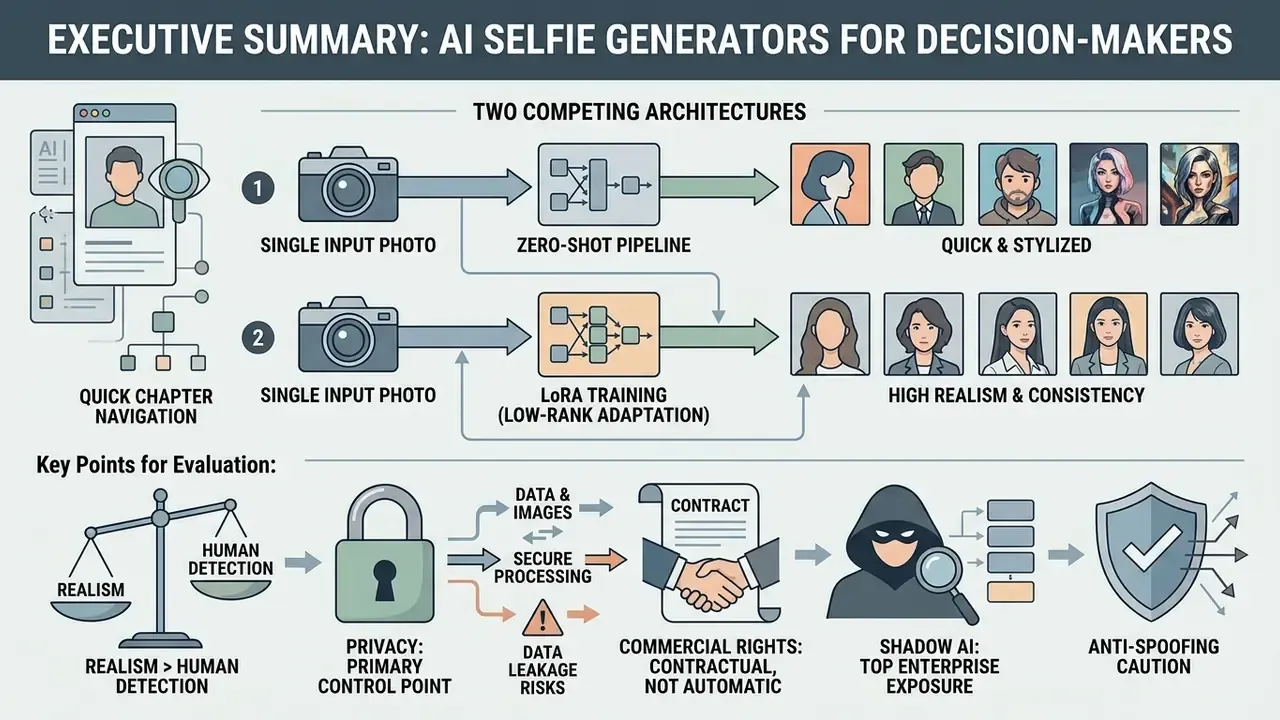
For decision-makers evaluating AI selfie generator technology, whether for personal branding, marketing asset production, or enterprise risk assessment, the essentials are short:
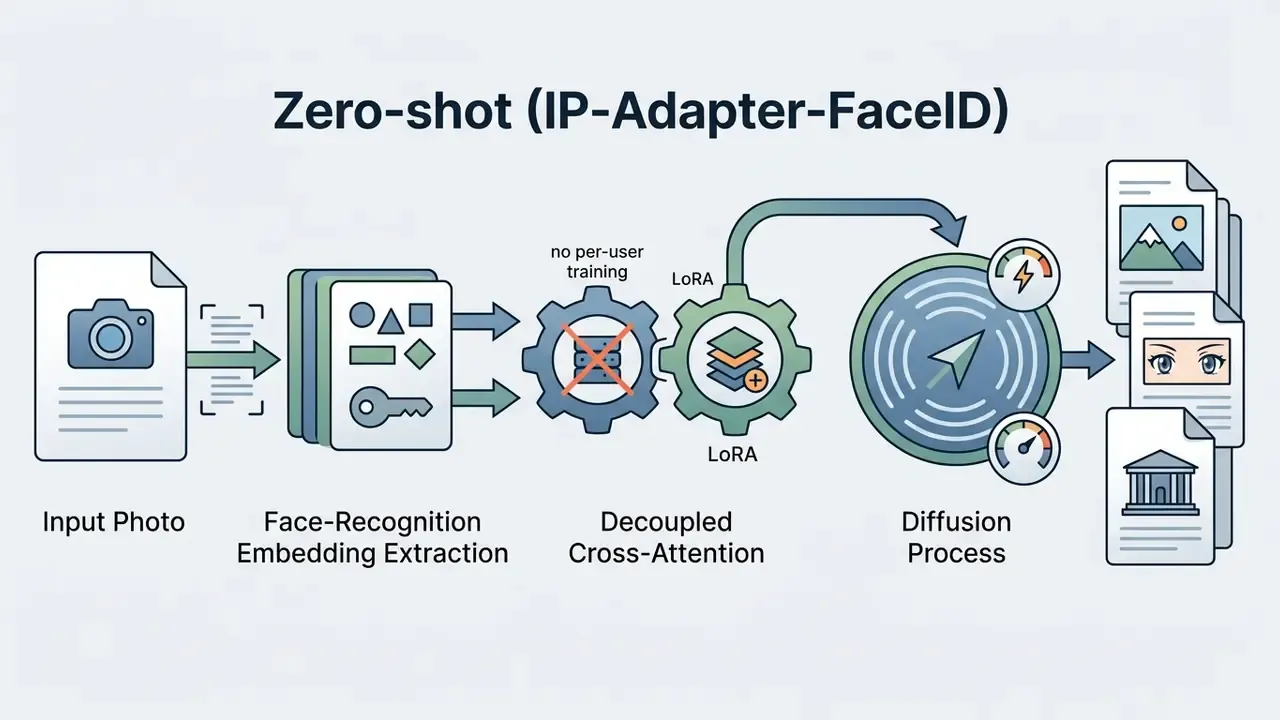
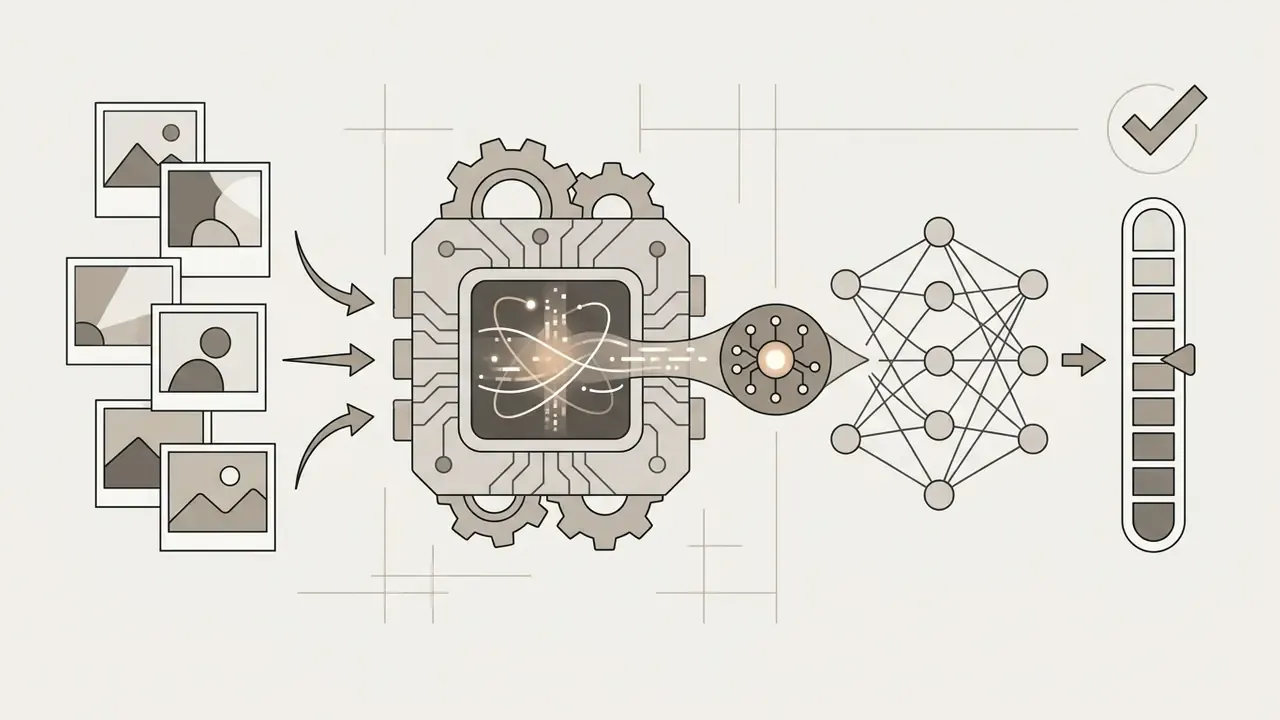
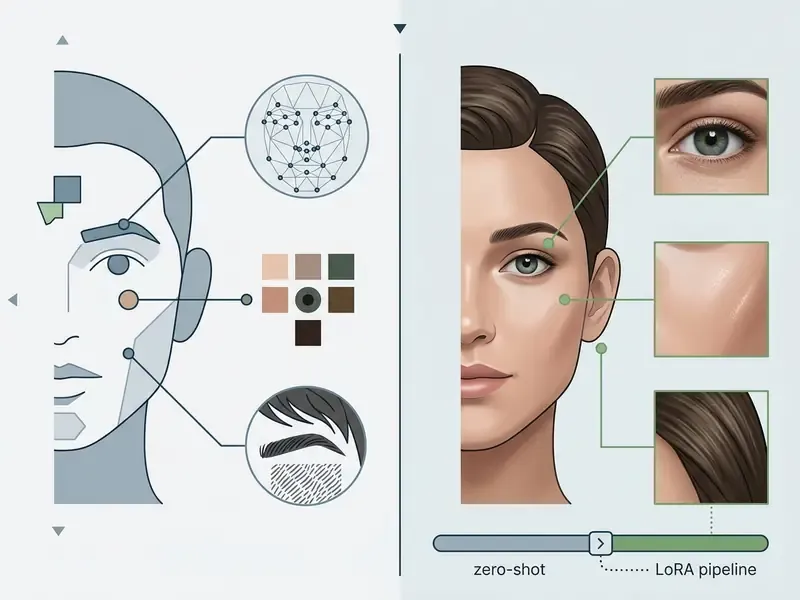
- Two competing architectures. Single-photo zero-shot pipelines (IP-Adapter-FaceID) return results in 5 to 30 seconds with roughly 80-90% facial-geometry match. Multi-photo fine-tuning pipelines (LoRA / DreamBooth) need 10 to 20 reference images and 15 minutes to 2 hours of training, but reach near-perfect identity retention and full 360-degree angle flexibility.
- Realism now exceeds human detection ability. Study participants separated real from AI-generated photos with only 38.7% accuracy, which is below random guessing.
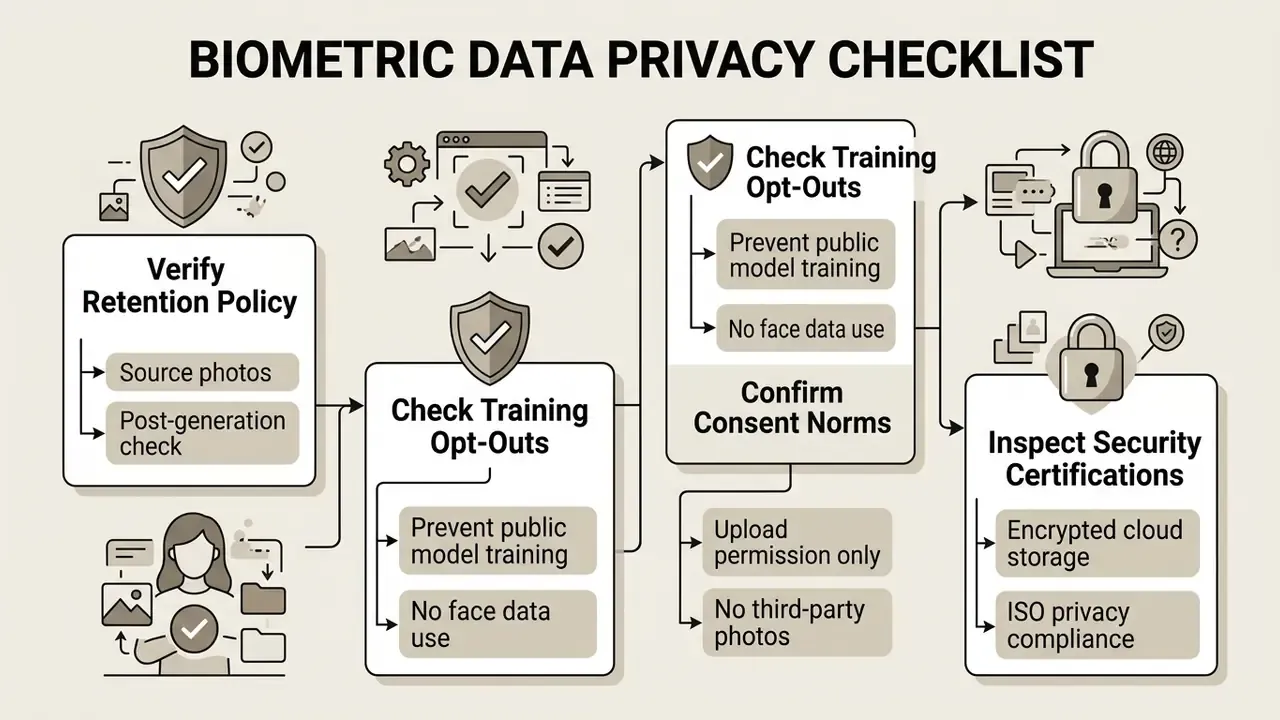
- Privacy is the primary control point. Verify retention windows, training opt-outs, and deletion guarantees before uploading biometric data. ISO/IEC 27555 (deletion policy), ISO/IEC 29100 (privacy framework), and NIST AI RMF 600-1 (consent and PII controls) define the baseline.
- Commercial rights are contractual, not automatic. Under US Copyright Office guidance, purely AI-generated output without substantial human authorship is not protected by copyright. Vendor terms still govern watermark removal and commercial deployment.
- Shadow AI is the top enterprise exposure. Employees uploading client, colleague, or customer photos to consumer generators create unmanaged biometric-data transfers outside sanctioned vendor agreements.
- Anti-spoofing caution. AI-generated selfies must never be used to satisfy identity-verification, liveness-detection, or KYC checks. Selfie-mismatch fraud reached 35.4% of reported fraud cases in APAC in one 2026 industry report.
Quick navigation: What is an AI selfie generator, then zero-shot vs LoRA, privacy and safe uploads, commercial use and rights, the generation workflow, styles, the prompt library, use cases, and the FAQ.
What Is an AI Selfie Generator?
An AI selfie generator is a software system built on generative neural networks that accepts a human portrait as a conditioning input and synthesizes a new selfie-style image with altered lighting, background, context, or artistic styling. Unlike conventional photo editing tools, which perform deterministic pixel adjustments, an ai selfie generator uses deep learning models to produce entirely new pixel distributions while preserving core facial geometry and identity markers. For a wider view of the category, see our overview of AI image generators.
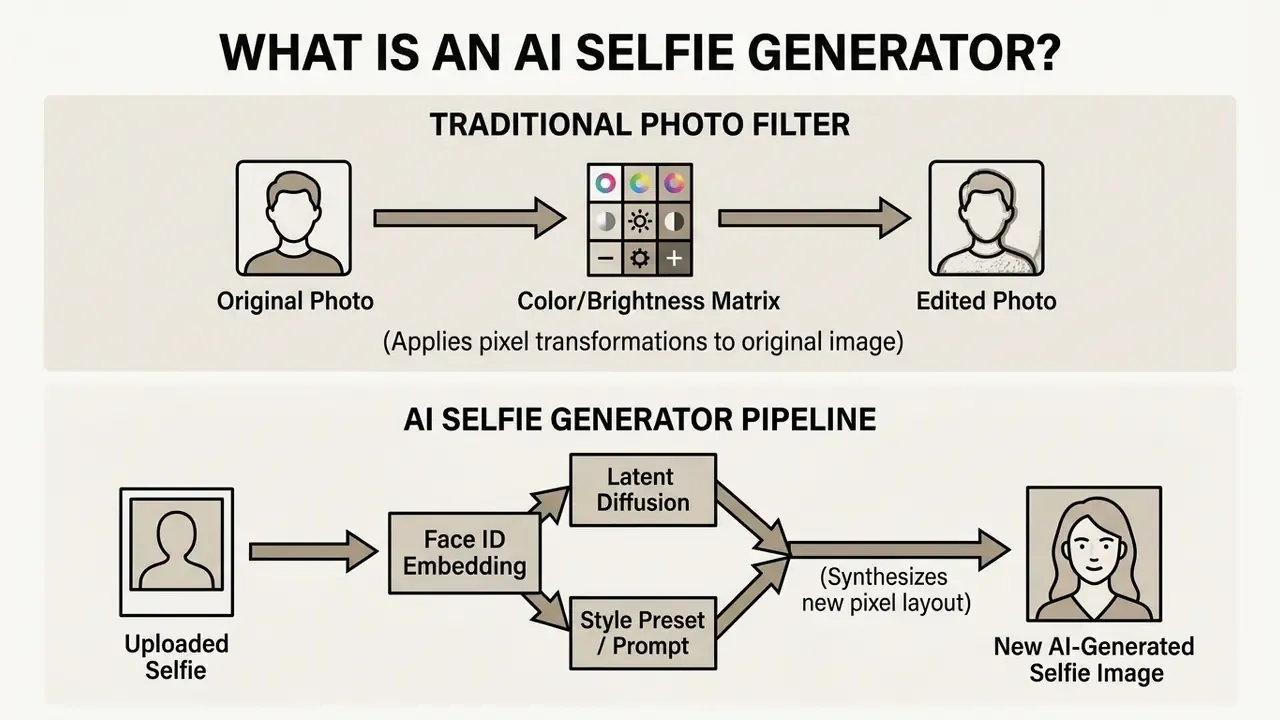
Traditional photo filters change color balance, saturation, or contrast across existing pixels. An ai selfie creator does something different: it extracts visual embeddings from the source face and uses latent diffusion models or Generative Adversarial Networks (GANs) to render a fresh portrait from scratch. That is why you can change the background scene, the outfit, the camera perspective, and the artistic style without losing recognizable features.
Research into synthetic image evaluation confirms that modern neural architectures build novel scenes around identity representations rather than editing the original camera file. One study quantified how convincing that reconstruction is:
Deepfake-style face replacement creates a new synthetic portrait that keeps the pose and lighting of the original frame while substantially altering identity. That is the inverse of what an identity-preserving selfie generator aims to do, and it is a useful reference point for understanding how much of the output is genuinely synthesized rather than filtered.
Platforms functioning as an ai selfie image generator can produce a photorealistic executive portrait, a stylized character avatar, or a full fantasy scene while holding identity consistent across multiple outputs.
Zero-Shot Single Photo vs Multi-Photo Model Training (LoRA)
AI selfie platforms run on two primary technical architectures, and they trade convenience against identity fidelity. This is the single most common source of user confusion: why some services accept one photo and return a result in seconds, while others request 10 to 20 images and ask you to wait hours.
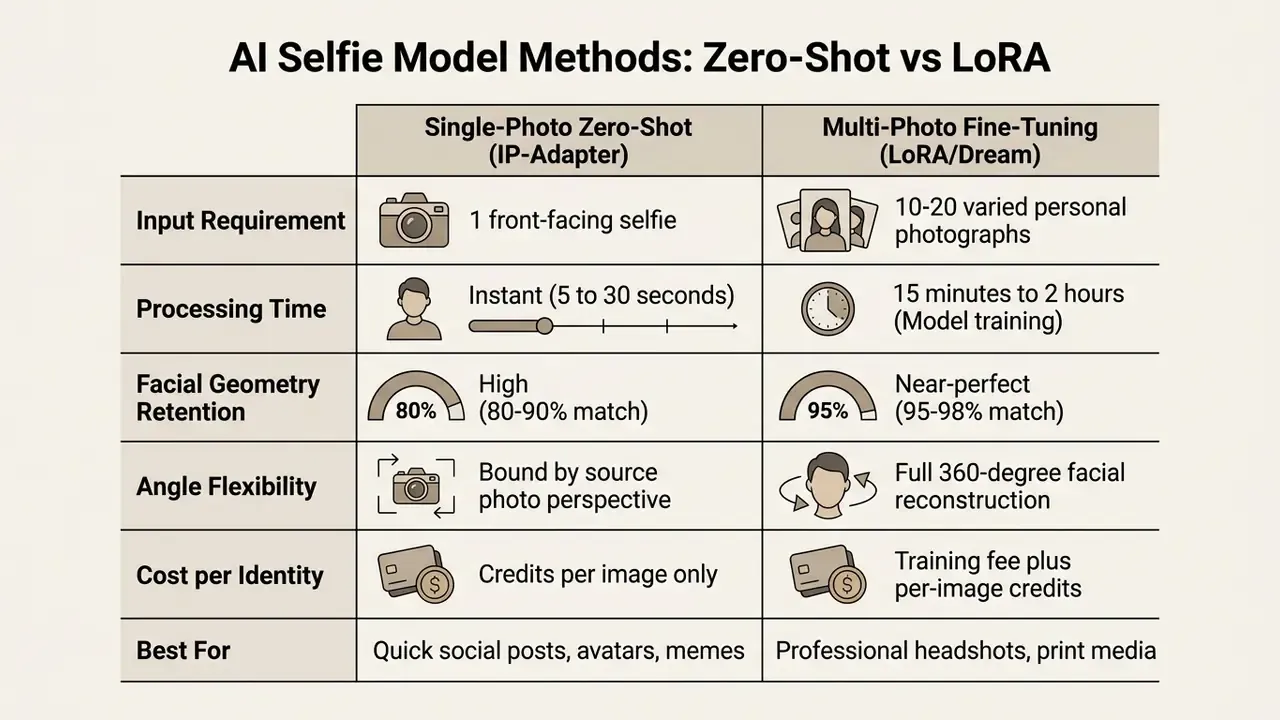
Practical rule: if the output is a 400x400 avatar, zero-shot is enough. If the output will be printed, used on a corporate About page, or projected at a conference, invest in a trained model. The cost difference is small. The credibility difference is not.
AI selfie generator, AI photo generator, and AI image generator from selfie
Search queries treat ai generator selfie, ai photo generator selfie, and ai image generator selfie as synonyms. Functionally, they are not:
- AI selfie generator / AI selfie maker Engineered specifically for identity-preserving portrait synthesis. These tools prioritize facial landmark retention, skin texture consistency, and realistic head-and-shoulders framing.
- AI photo generator A broader category covering text-to-image synthesis, landscape generation, object editing, and portrait creation. It does not necessarily require an input face photo unless you switch it to image-to-image mode.
- AI image generator from selfie Describes a specific image-to-image workflow where an uploaded selfie acts as the primary visual conditioning signal for generating creative or stylized images. Readers comparing tools in this category can review our breakdown of image-to-image generators.
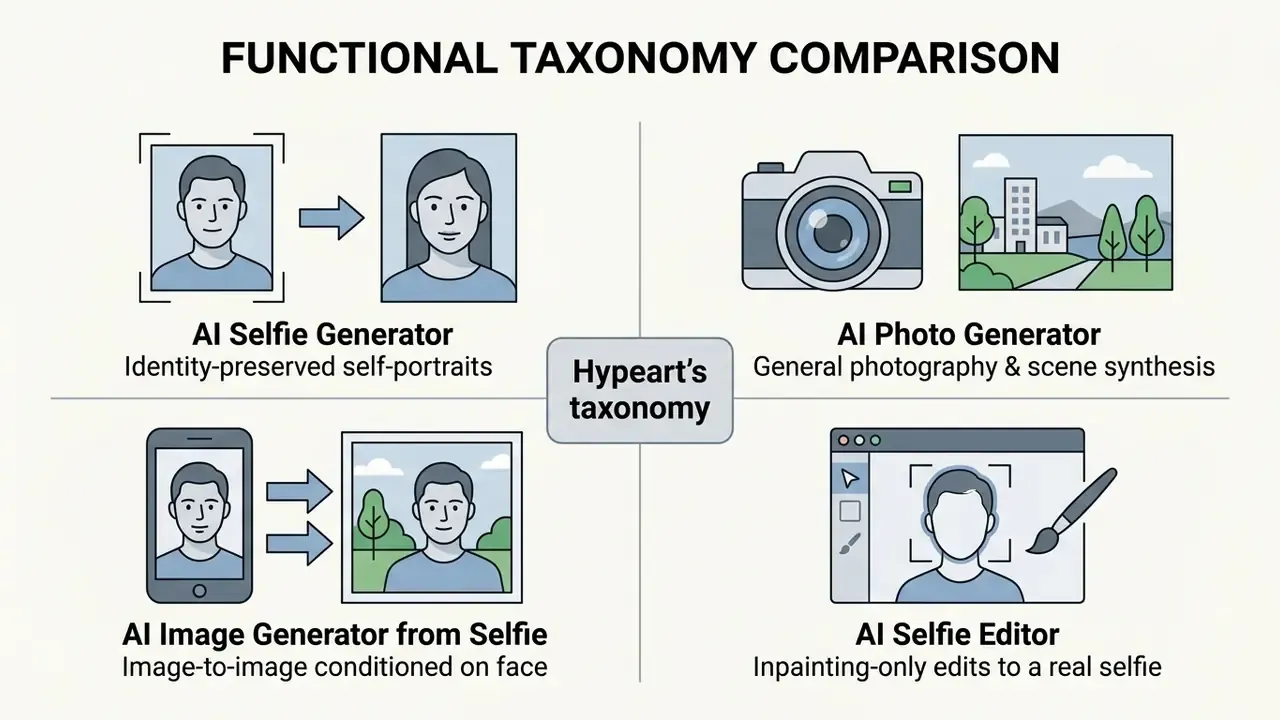
Knowing these operational boundaries saves credits. An ai picture generator selfie query and a landscape prompt do not belong in the same tool session, whether you need a business headshot, a digital art experiment, or a stylized avatar built from one personal photo.
What makes an AI-generated selfie look like you
An ai-generated portrait captures identity when the underlying model preserves the structural features of the human face. Modern synthesis pipelines combine semantic feature extraction with spatial control networks to keep the result recognizable:
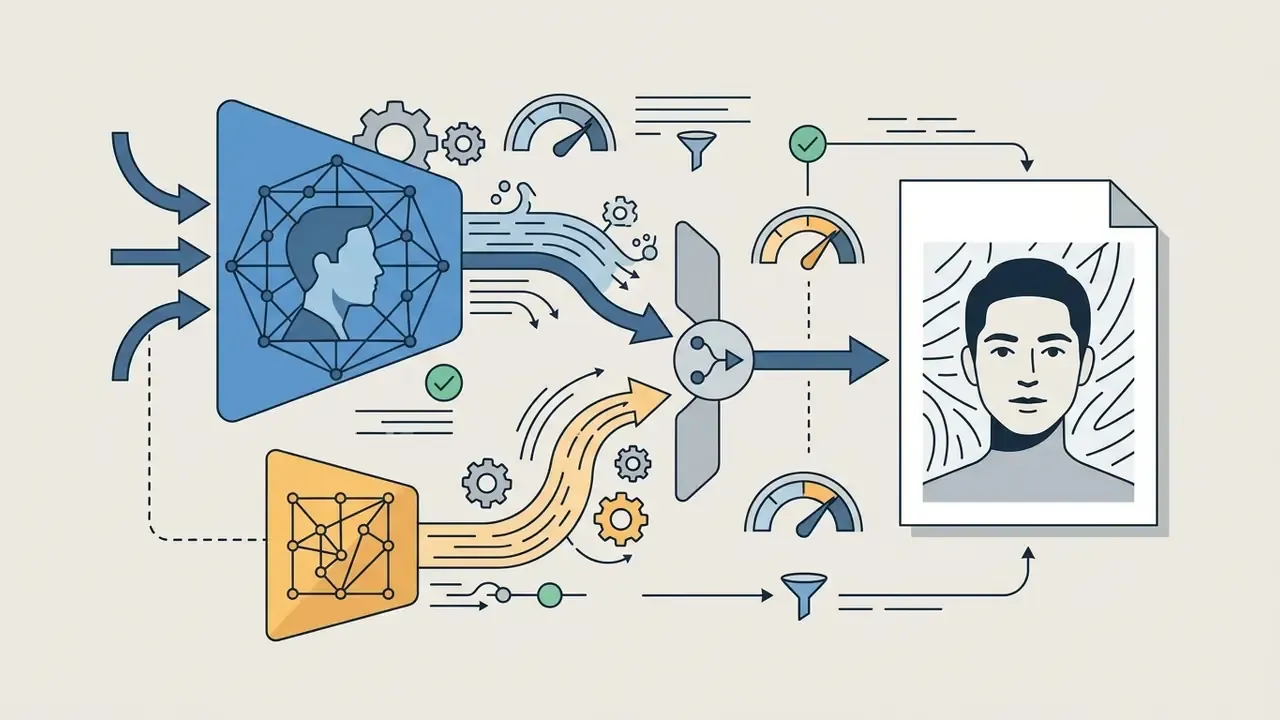
- Identity embeddings (IP-Adapter-FaceID) Specialized adapters extract a high-dimensional feature vector encoding inter-pupillary distance, jawline structure, nose shape, and mouth proportions. That vector steers the diffusion process and holds identity continuous across generations.
- Spatial conditioning (ControlNet and facial landmarks) ControlNet adds trainable conditioning branches to a frozen diffusion backbone, mapping spatial keypoints (eye contours, lip boundaries, facial outline) to lock structural proportions and prevent warping or anatomical distortion during style conversion, all without retraining the base model.
- Micro-texture preservation Realistic generated selfies retain skin detail, natural asymmetry, and facial hair geometry instead of over-smoothing the surface. Skip this and you land straight in the uncanny valley.
When an ai selfie photo generator balances facial embeddings against style prompts, the ai photo selfie generator output stays instantly recognizable as the original individual, and, per the research above, is often indistinguishable from a camera capture. That is convenient for branding. It is also exactly why the privacy section sits next.
Privacy and Safe Uploads for AI Selfie Generation
Readers who want to monitor where their generated portraits end up circulating can use an AI reverse image search to trace redistribution across the web.
How uploaded selfies and faces may be stored
Data handling practices for uploaded photos vary widely across platform architectures:
- Ephemeral processing Privacy-focused platforms state that uploaded source photos sit in temporary server memory only for the duration of the generation pass and are discarded once the output renders. Rules of this type should be documented as a written deletion policy. ISO/IEC 27555:2021 sets out deletion-policy requirements for personally identifiable information, including documented deletion rules, assigned roles, and defined procedures. Vendor claims of "immediate deletion" deserve a check against the actual retention window in the privacy policy, which in practice runs from 1 day to 7 days across major consumer tools.
- Persistent model storage Some services temporarily store face embeddings to accelerate future generation requests or to support account libraries. Fine-tuning services necessarily store the trained LoRA weights, and those weights themselves encode identity.
- Model training policies Enterprise platforms commit explicitly to not using personal biometric uploads to train public foundation models. NIST AI RMF 600-1 requires policies covering collection, retention, minimum data quality, and protection against leakage of personal data, including facial likenesses.
A documented example of what a strong policy looks like in practice:
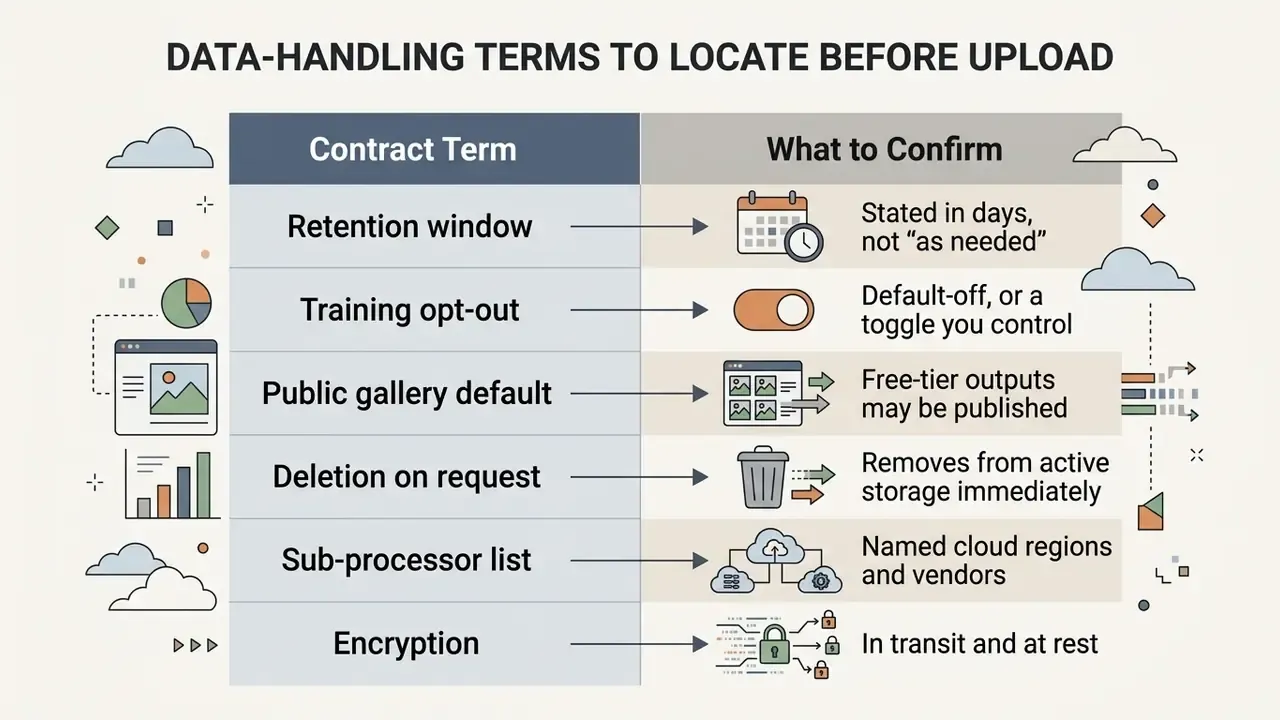
Look closely at the "public gallery" line. Several free tiers publish free-tier generations publicly with a watermark, and reserve the right to reuse free-tool uploads for marketing, model showcases, and partner promotion. Paid outputs are usually excluded from auto-publication. Usually. Read the clause anyway.
Shadow AI, employee uploads, and organizational exposure
The largest unmanaged risk inside an organization is not the technology. It is unsanctioned use. When an employee uploads a colleague's headshot, a client photograph, or a customer identity document into a consumer generator, the organization has just executed an unlogged biometric-data transfer to a third party with no data-processing agreement behind it.
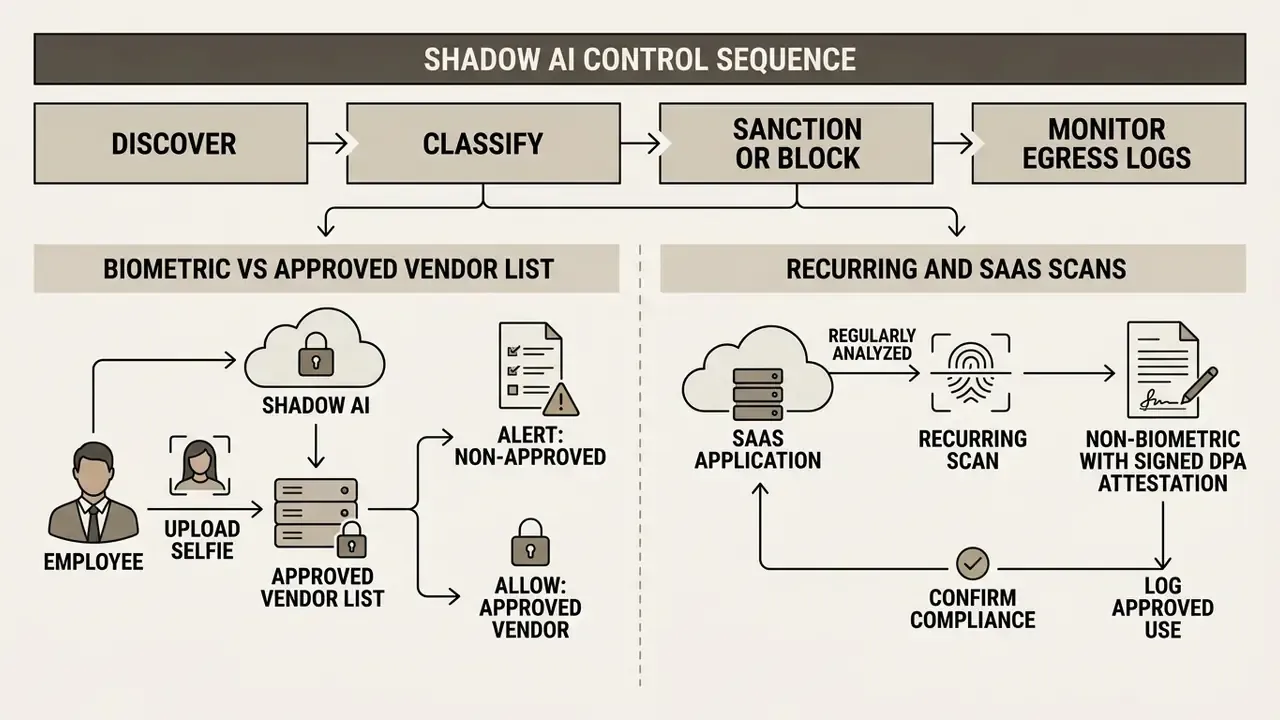
Recommended controls:
- Maintain an approved-vendor register for image generation, with signed data-processing agreements and documented retention terms.
- Classify facial imagery as restricted data in your data-classification policy, on par with identity documents.
- Block consumer image-generation domains at the egress layer for devices handling customer data, and offer a sanctioned alternative, otherwise users simply route around the block.
- Require consent records for any photograph of a person other than the uploader. NIST's Generative AI Profile requires documented verification of consent for use of an individual's likeness.
- Log and periodically review generated output for privacy exposure, as instructed by NIST AI RMF 600-1.
One more governance point that gets skipped: name an owner. An image-generation tool without a named accountable owner, an approved role, access limits, and an escalation path is not a controlled system. It is a habit.
Anti-spoofing: AI selfies must never satisfy identity verification
AI selfie generators produce images that are, by design, statistically similar to authentic phone captures. That creates a direct abuse pathway against biometric onboarding.
- Identity-verification providers compare a live face scan against an ID-reference image and screen for tampering, coercion, and social engineering during onboarding. Synthetic selfies are an attack input aimed at exactly this control.
- One 2026 fraud report attributes 35.4% of fraud cases in APAC to selfie-mismatch conditions, where fabricated personal data is paired with generated imagery to bypass liveness checks.
- Under the EU AI Act, applicable from 2 August 2026 with prohibited practices in force from 2 February 2025, systems generating non-consensual intimate content are banned, and nudification-app provisions take effect 2 December 2026.
Never submit AI-generated imagery to a KYC, AML, remote-onboarding, or liveness-detection process. Doing so is fraud in most jurisdictions regardless of intent, and it sits explicitly outside every legitimate use case described in this guide.
How to protect your privacy when creating AI selfies
To safeguard personal biometric data when generating AI selfies, work through these practical measures:
- Read vendor privacy policies.Confirm that the platform states data retention limits, deletion timelines, and encryption standards. ISO/IEC 29100:2024 provides the privacy framework defining safeguarding considerations for ICT systems processing PII.
- Opt out of model training.Enable the privacy toggles that keep your uploaded images out of training runs and dataset collection.
- Minimize what is in frame.Avoid photos containing visible identity documents, badge numbers, home addresses, license plates, or location-revealing landmarks.
- Respect consent requirements.Never upload photos of third parties without their explicit legal consent. Modern privacy frameworks penalize unauthorized biometric processing (EU AI Act standards), and European privacy authorities have stated that AI-generated imagery depicting identifiable people without their knowledge creates privacy harm and requires rapid takedown mechanisms.
Public sentiment on this point is unambiguous:
Those figures matter commercially as well as ethically. Audiences arriving at a synthetic portrait already carry negative priors about non-consensual synthesis, which is why disclosure practice, covered further below, measurably shapes perception.
Free AI Selfie Generator, Credits, and Commercial Use
Access models, credit allocations, watermarking policies, and commercial usage rights decide whether an ai selfie generator actually fits your workflow. For a side-by-side view of limits and watermark policies across tools, see our comparison of free AI image generators.
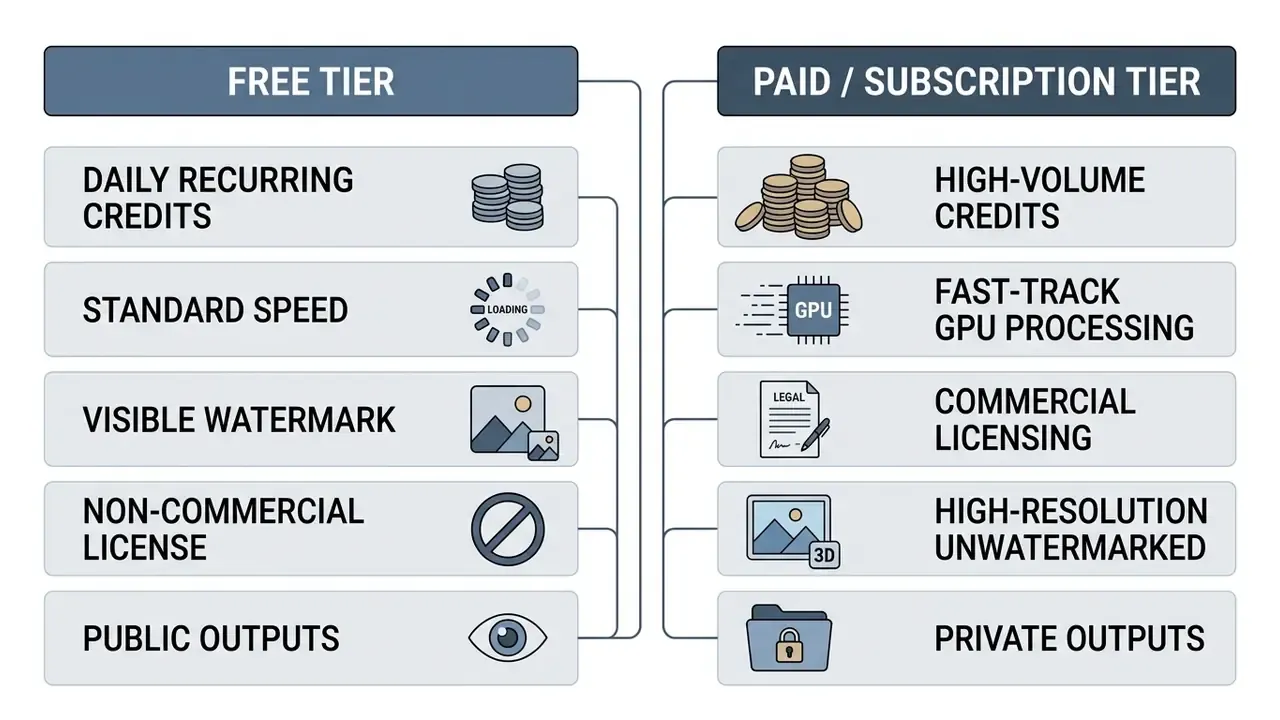
What free generation and credits can include
Free access models generally fall into three structural categories:
- Daily credit allocations.Users receive a recurring bucket of credits, roughly 10 to 50 every 24 hours, for standard-resolution images. Documented 2026 examples include 50 credits per day for non-subscribers on Google Flow and 66 credits per day on Kling AI's free tier, both resetting on a 24-hour cycle.
- Trial generation packs.A one-time credit allocation granted at registration for feature testing.
- Feature-restricted free tiers.Free generation with limits on advanced style presets, priority queues, or batch sizes. Some consumer selfie tools now offer roughly 3 free generations per day with no sign-up required, unlocking account-linked credits and saved projects only after registration. Readers can compare no-sign-up AI image generators for options that skip registration entirely.
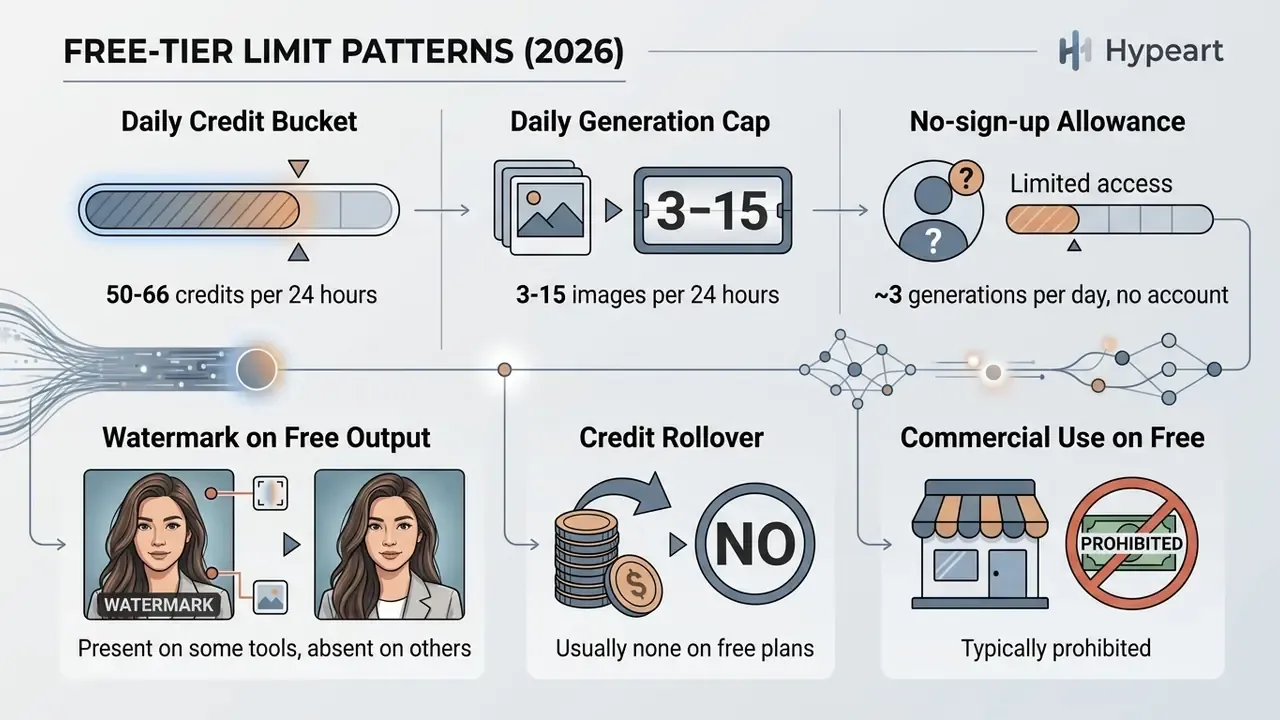
A caveat worth remembering: limits often differ between a vendor's live interface and its help documentation. One comparison found a tool offering 10 fast generations in the UI while its FAQ claimed up to 200 prompts per day, because the two surfaces counted usage under different rules. Test against the interface you will actually use.
For detailed pricing breakdowns and cost benchmarks across platforms, review our AI Media Pricing Guides and our guide to free photo editing tools.
Total cost of ownership beyond credit pricing
Sticker price is only part of the calculation for organizational buyers. A realistic cost model includes control overhead:
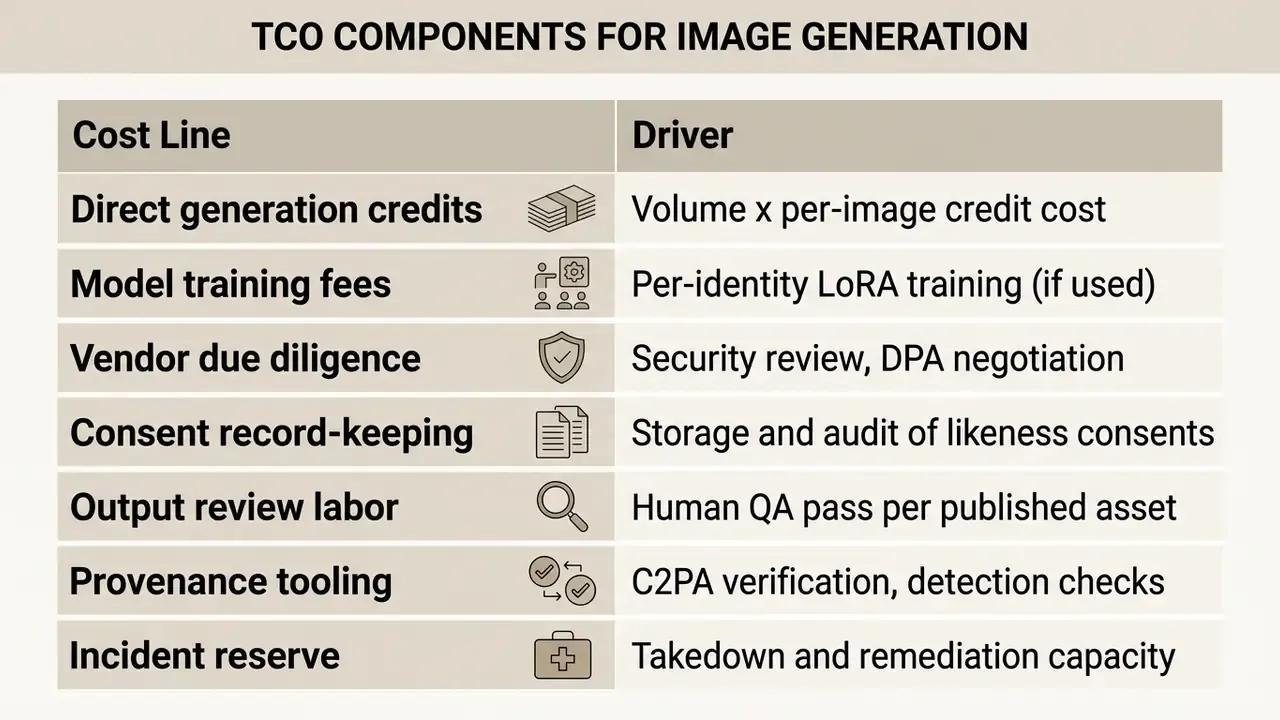
For a single social avatar, only the first line matters. For a company-wide headshot rollout across several hundred employees, control costs frequently exceed generation costs, and that is the correct frame for a risk-adjusted return calculation. Ignore the control lines and your ROI model is not wrong so much as incomplete. Estimated workflow costs can be modelled with our AI Media Calculators.
Commercial use, watermarks, and rights to generated images
Commercial licensing rights for generated selfies depend on platform-specific Terms of Service and on legal standards for human authorship:
- Commercial usage rights. Free tiers often restrict outputs to non-commercial, personal use. Paid plans typically grant deployment rights for marketing, advertising, and commercial media. Vendor practice varies: some platforms grant full commercial rights on every tier while still reserving the right to reuse free-tier uploads for marketing, others gate commercial use behind a paid plan entirely.
- Watermarking and provenance. Free plans frequently embed visual watermarks or C2PA metadata (SynthID / Content Credentials) to signal synthetic origin. Removing platform watermarks without authorization may violate service terms, and it is treated as a terms violation specifically when removal defeats a platform's transparency or rights-management controls. Google states that SynthID marking is designed to persist through common edits; Adobe attaches Content Credentials metadata to generative output.
- Copyright considerations. Under US Copyright Office guidance, purely AI-generated outputs without substantial human creative input do not qualify for traditional copyright protection (US Copyright Office Guidance, 2024). Protection attaches only where a human has determined sufficient expressive elements.
- Likeness and publicity rights. Copyright is not the only right in play. Using a recognizable person's likeness, a celebrity's included, in a generated portrait can trigger publicity-rights and false-endorsement claims independent of copyright status. Japan's 2025 AI guidebook instructs users to check identity match and possible portrait-right violations before publishing generated likenesses, and 2024 UK music-industry analysis flags misappropriation and false endorsement as central risks for artists.
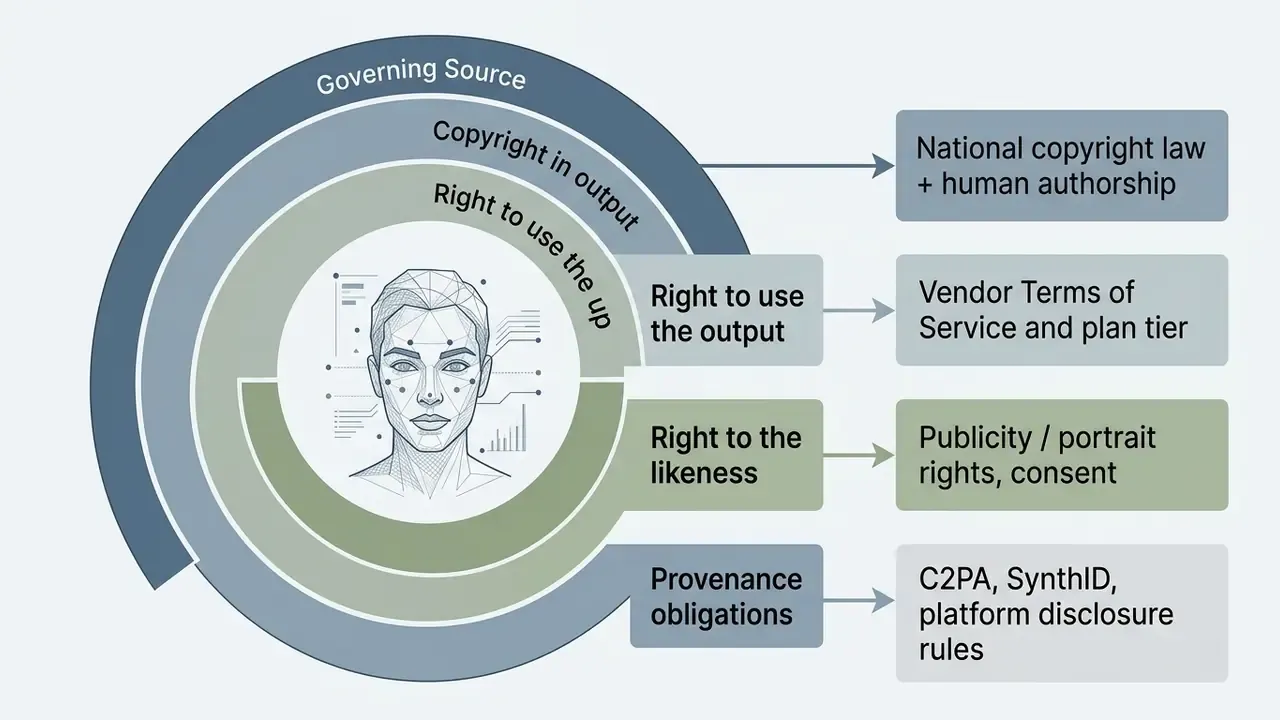
Four layers, four separate checks. Clearing one does not clear the rest.
How to Generate AI Selfies From Your Photo
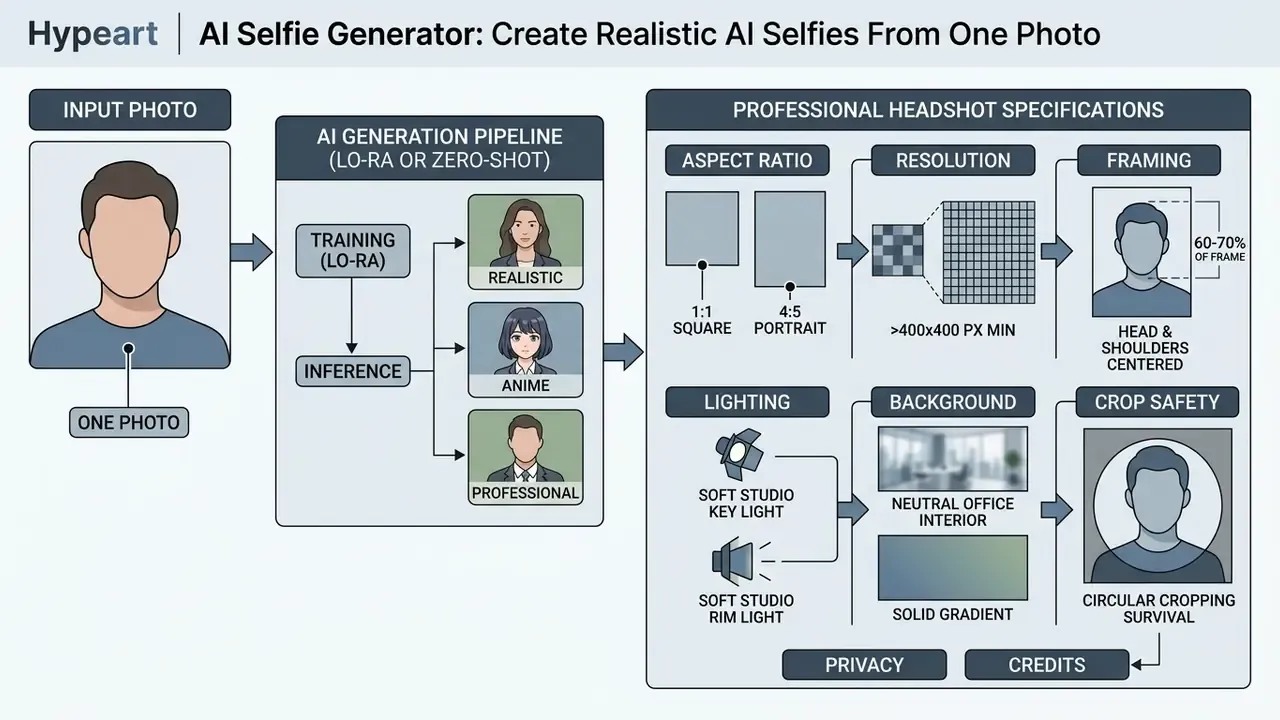
Producing an ai selfie picture generator render online follows a three-stage process: upload a clear reference photo, select a visual style preset or write a descriptive prompt, then run inference to review and download the final outputs. Modern browser-based implementations run entirely in the cloud, so no local GPU is required. Read as a controlled workflow, those same three stages double as a lightweight validation framework: input qualification, configuration control, output acceptance review.
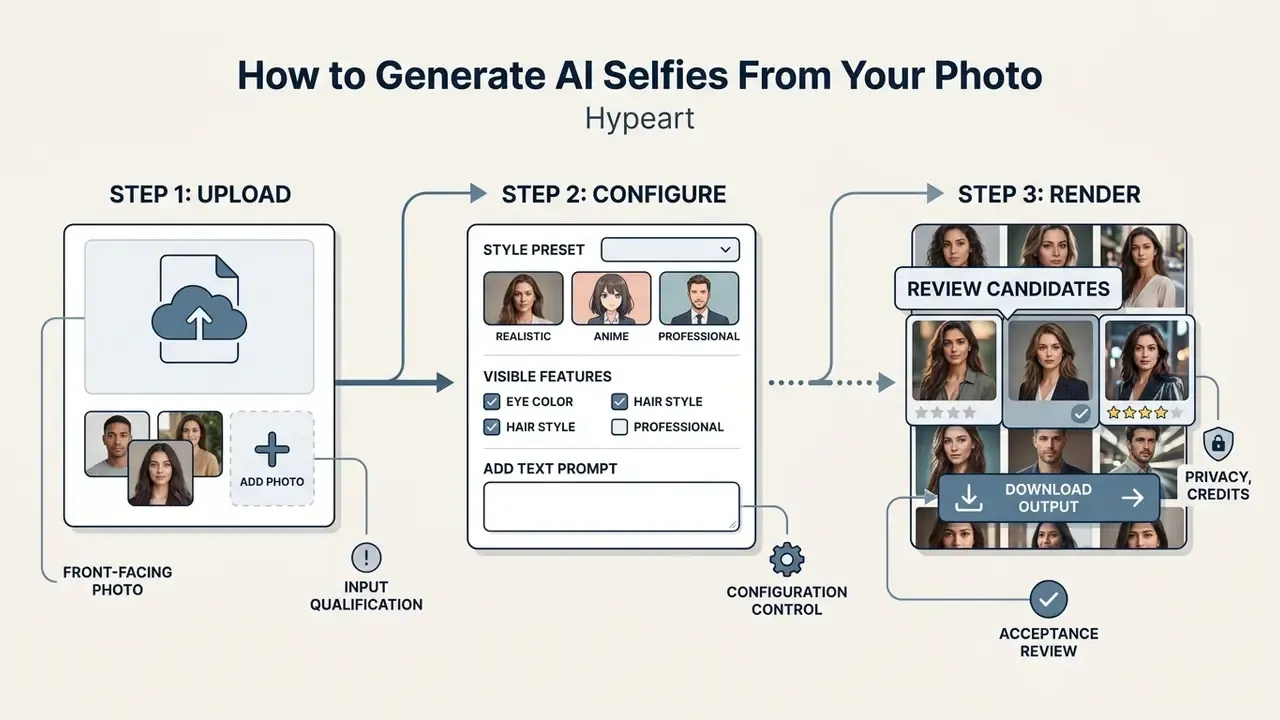
Upload one clear selfie with your face visible
Input photo quality decides the structural accuracy of the result. Nothing downstream repairs a bad source. When using an ai selfie generator from photo or ai photo generator from selfie platform, follow these upload guidelines:
- Lighting Choose photos with even, direct front lighting to avoid heavy facial shadows or blown-out highlights.
- Angle Front-facing or slight three-quarter angles give the cleanest baseline for feature extraction. Biometric capture practice tolerates deviation of no more than roughly 5 degrees in roll, pitch, and yaw for strict identity work.
- Visibility Keep eyes, nose, mouth, and jawline unobstructed by heavy sunglasses, hands, or broad hat brims. Hair should stay clear of the eyes.
- Framing Face and upper shoulders visible, with the face occupying roughly 70-80% of frame height.
- Resolution Sharp, focused images where facial detail holds up when zoomed. Accepted formats across most services are JPG, PNG, JPEG, HEIC, and WebP, typically up to 10 MB.
A capture standard is not evidence of accuracy gains, and it should not be quoted as one. The practical point is narrower: ISO/IEC 19794-5 defines capture conditions, meaning even illumination, no lens tint or glare, absent shadows, unobstructed eyes. Meeting those conditions is what lets a face-recognition embedding be extracted from an unambiguous signal rather than from noise. Feed the ai generator from selfie pipeline a clean source and it establishes a precise identity baseline.
Observer behavior explains why specific zones matter so much:
Choose a style or describe the look with a prompt
Once the reference photo is uploaded, configure the target aesthetic through presets or custom text prompts:
- Style presets Pre-configured themes such as Photorealistic, Corporate Headshot, Anime, 3D Render, Concept Art, or Watercolor. Preset libraries in 2026 tools are usually grouped by scenario, for example Photoshoot, ID Photo, Cartoon, seasonal and event styles, rather than by rendering technique.
- Text prompts Add camera perspective, environment, clothing, and lighting mood, for example "Professional executive portrait, soft studio lighting, neutral office background, shallow depth of field".
- Reference intensity controls Some pipelines expose a slider governing how strongly the reference photo constrains the output, plus separate controls for lighting, camera angle, and color tone.
Rather than citing a single vendor's guidance as a standard, note the convergent recommendation across published prompting research and current vendor documentation: order prompt parameters consistently as background / scene, then subject, then key details, then constraints, and split complex requests into short labeled segments or separate lines. A 2022 Columbia University study on prompt selection found that emphasis belongs on subject and style keywords, that style terms should be chosen to avoid misinterpretation, and that abstract subjects pair better with styles of comparable abstractness. The same study tested 3 to 9 seeds per prompt to judge a prompt's expressive range. Composition cues worth stating explicitly include close-up, wide, top-down, eye-level, low-angle, together with lighting terms such as soft diffuse, golden hour, high-contrast.
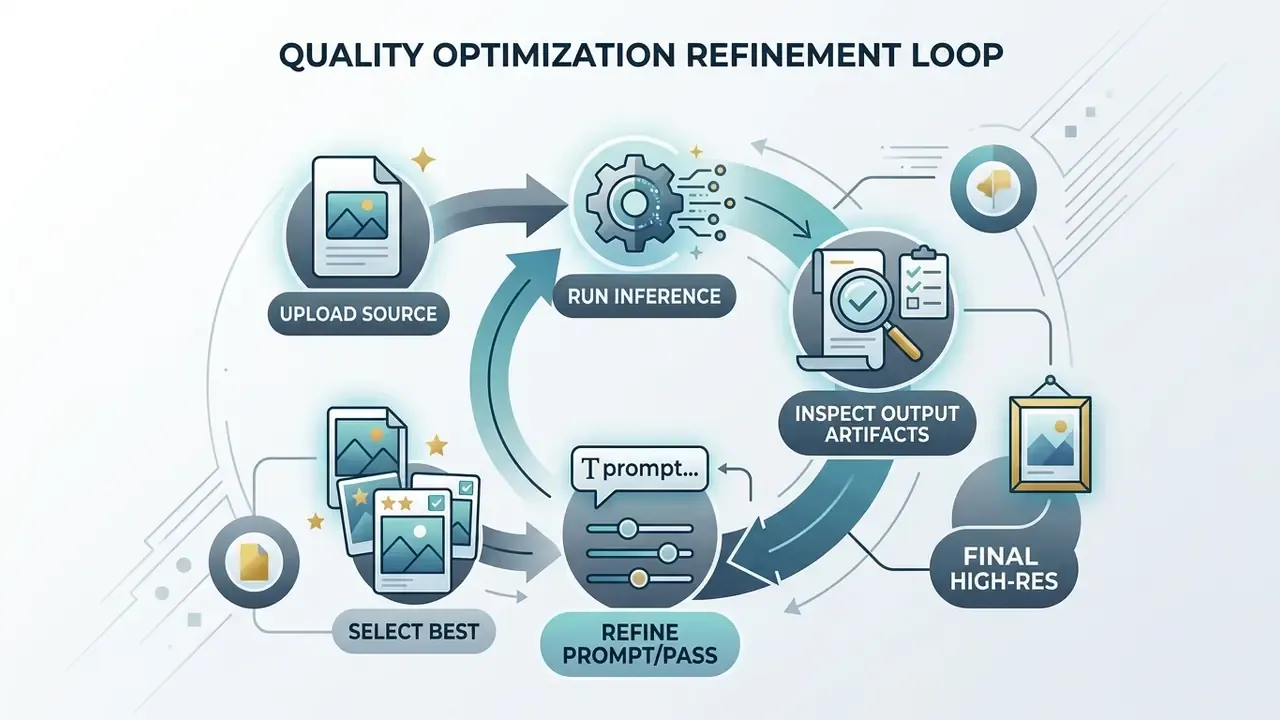
Generate, review, and download multiple results
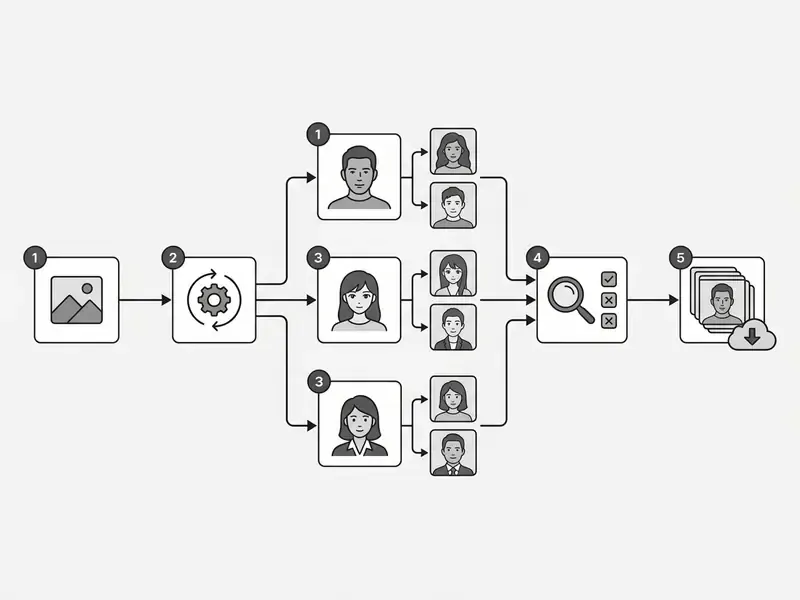
After configuring parameters, start the generation sequence. The system produces multiple image candidates within seconds on zero-shot IP-Adapter pipelines, roughly 10 seconds in practice, and up to an hour or more when a personal LoRA model has to be trained first.
- Candidate review: Compare variations against your source image for identity match, lighting consistency, and anatomical detail.
- Iterative selection: If results drift from the target look, adjust prompt parameters or switch style preset and run another pass.
- High-resolution download: Pick the preferred render and download it as PNG or WebP for web or social use. Paid tiers commonly unlock higher resolutions and transparent backgrounds.
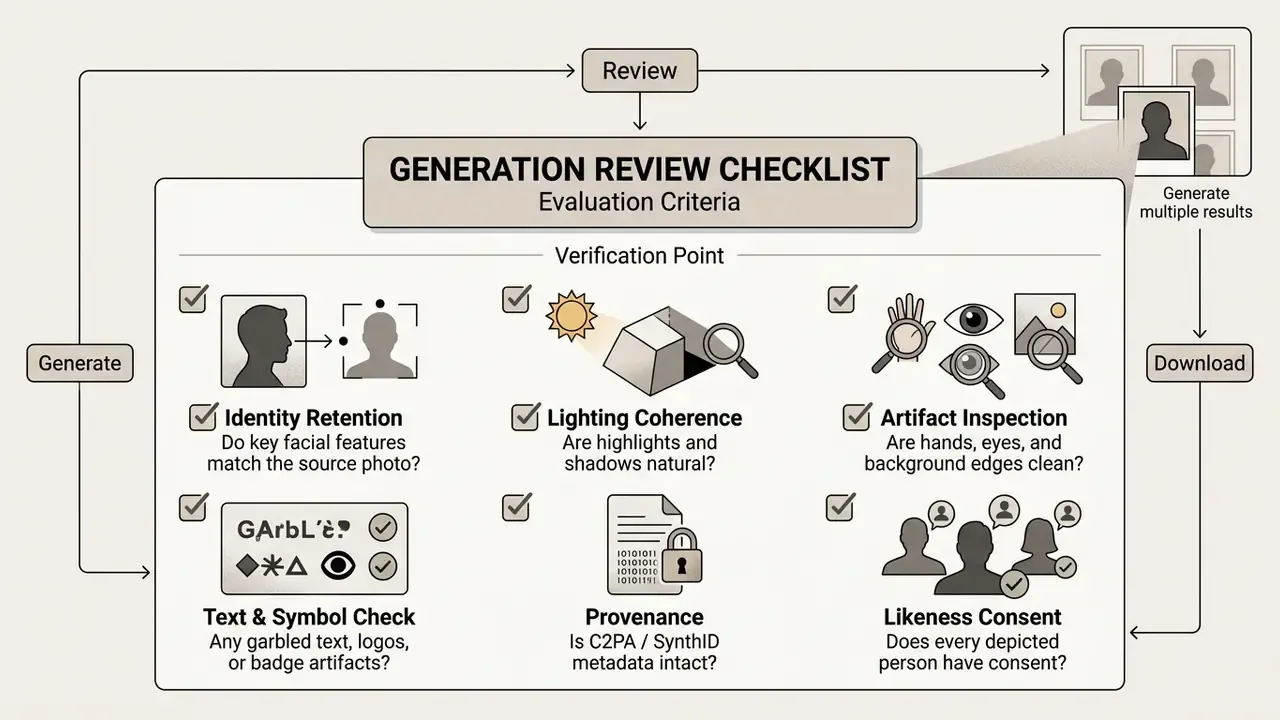
For a more rigorous acceptance pass, pair the qualitative checks with quantitative thresholds:
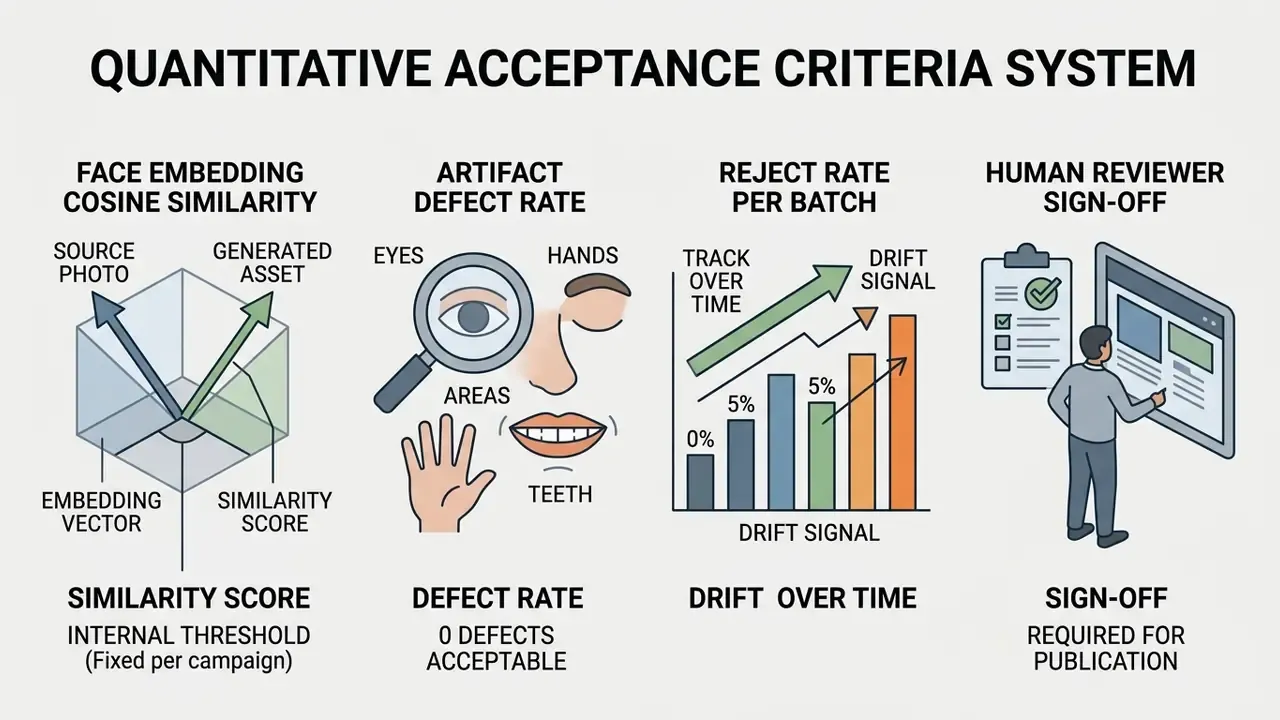
A rising reject rate across batches on unchanged prompts is the clearest early signal that an upstream model version has shifted. Triage where errors cluster: inspect hands, eyes, teeth, and limb merging first, because the most common failure modes are merged body parts, overly glossy eyes, and overlapping teeth.
The selection logic mirrors documented test-time compute practice. Generate n candidates for one input, score each against predefined criteria such as relevance, correctness, fidelity, and adherence to specific requirements, rank them, then promote the top-scoring output. It is model risk management in miniature, applied to pixels.
For broader media workflows, complementary tools such as an online photo editor, AI photo editors, or a utility to add person to an existing photo give you extra options for post-generation composition.
AI Selfie Styles: Realistic, Professional, Anime, and Cartoon
An ai selfie art generator or ai art generator for selfies ships presets tuned for specific personal, creative, and professional contexts. Each style applies distinct neural rendering parameters to transform input photos. Readers choosing between platforms for a particular aesthetic can consult our review of leading AI image generators.
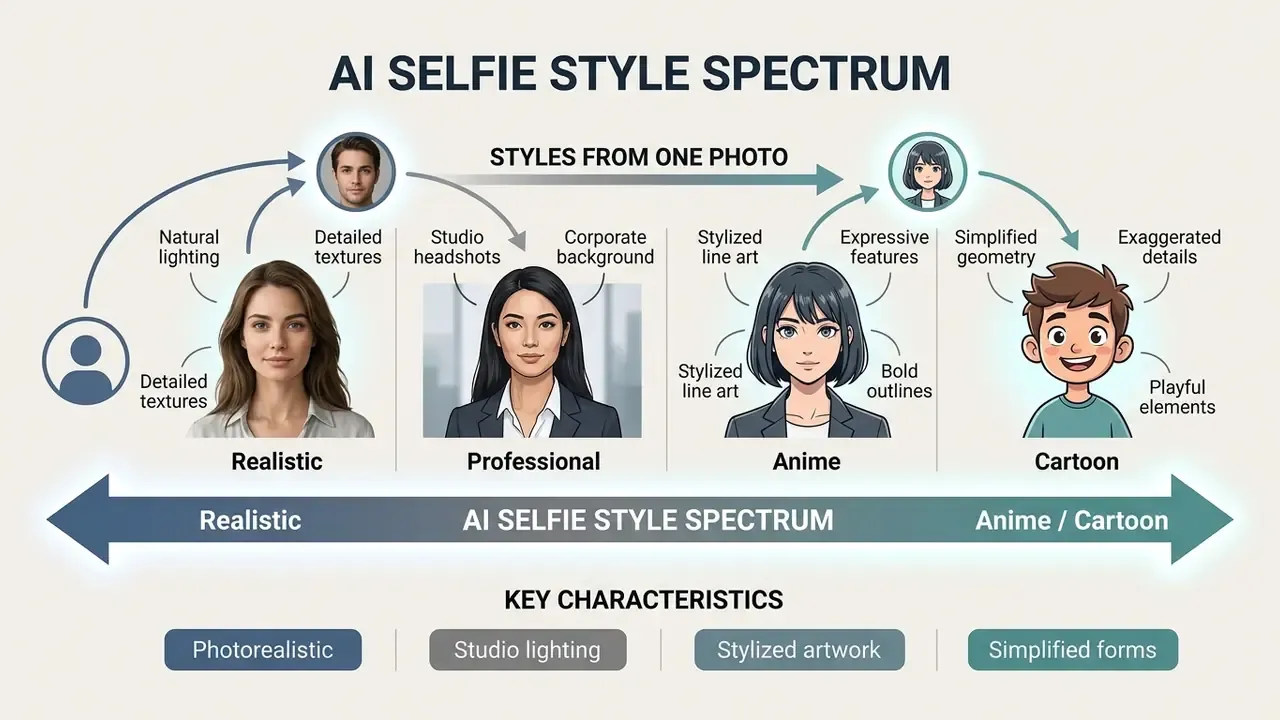
One caution before you compare feature lists: "anime", "cartoon", and "artistic" are implementation-specific preset names rather than universal technical categories. Vendor labels differ by product even when the underlying stylization method is nearly identical.
Realistic AI selfies for natural-looking photos
Realistic presets aim for images indistinguishable from camera-captured photography. These models focus on natural skin micro-texture, meaning pores, fine hairs, slight unevenness, plus authentic catchlights in the eyes and subtle facial asymmetry.
The relevant empirical finding here is not a pass rate but a detection failure rate:
Three controls govern realistic output quality. First, preserve fine skin micro-texture, since over-smoothing and oversharpening both push the result toward artificial. Second, keep light direction and quantity physically consistent, because abnormal light direction or insufficient light measurably increases perceived uncanniness. Third, avoid over-perfect facial geometry. Uncanny-valley research found that appeal can fall as realism rises when natural texture and feature balance fail to rise with it. Skipping artificial skin smoothing is therefore essential to a natural-looking ai image selfie generator render.
Professional AI headshots for profile pictures
Professional presets convert casual selfies into polished business headshots for corporate sites, resumes, and professional networks.
That pair of coefficients is the practical crux of professional use. The image itself outperforms a studio photograph on perceived quality, and the disclosure carries a measurable penalty. Disclosure is still the defensible choice, and audience reaction is generally tolerant in practice: one platform reported that 93% of dating-app users who disclosed using AI to enhance their photos received neutral or positive reactions (Pose AI, internal user data report, 2026).
The governing platform rule is identity-based rather than technical. LinkedIn's guidance requires a profile photo to be a clear, recognizable likeness of the person, with no logos, group shots, or cartoons. In plain terms: the AI headshot must still look like you today, not an idealized alternate. Using an AI headshot generator removes the studio booking without removing that obligation.
Anime, cartoon, and artistic AI selfie styles
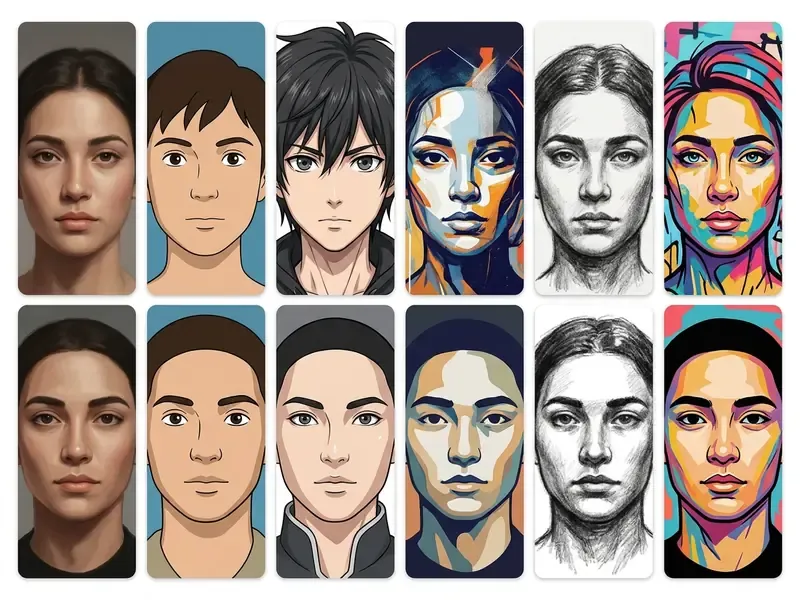
Stylized presets swap photorealistic rendering for artistic technique such as cel-shading, line-art simplification, or painterly brushwork:
- Anime style Clean vector line art, vibrant eye highlights, pastel palettes, and simplified facial planes characteristic of Japanese animation. Face-to-anime research reports exaggerated eyes, clearer face edges, and simplified color and texture (DualStyleGAN framework, which tests cartoon, caricature, and anime settings at 1024x1024).
- Cartoon style Exaggerated features, warm palettes, and bold structural outlines with simplified contours, while image semantics stay intact.
- Artistic styles Classical formats including watercolor, oil painting, sketch art, pixel art, and digital concept art, with visible brush-like texture and a stronger departure from the source photo. Readers drawn to specific animation aesthetics can also review Ghibli-style AI image generators.
Beyond the four canonical families, the highest-engagement presets in 2026 consumer tools are deliberately unusual. They convert well precisely because a camera cannot produce them. Frequently offered examples include marble bust / sculpture, 80s wizard, samurai, retro synthwave, cyberpunk warrior, steampunk adventurer, and fantasy elf. Under the hood, one-shot stylization methods now make the generator "deformation-aware", using spatial transformers to control stylized face shape while keeping identity cues, instead of relying only on the explicit landmark geometry used by older character-transfer pipelines.
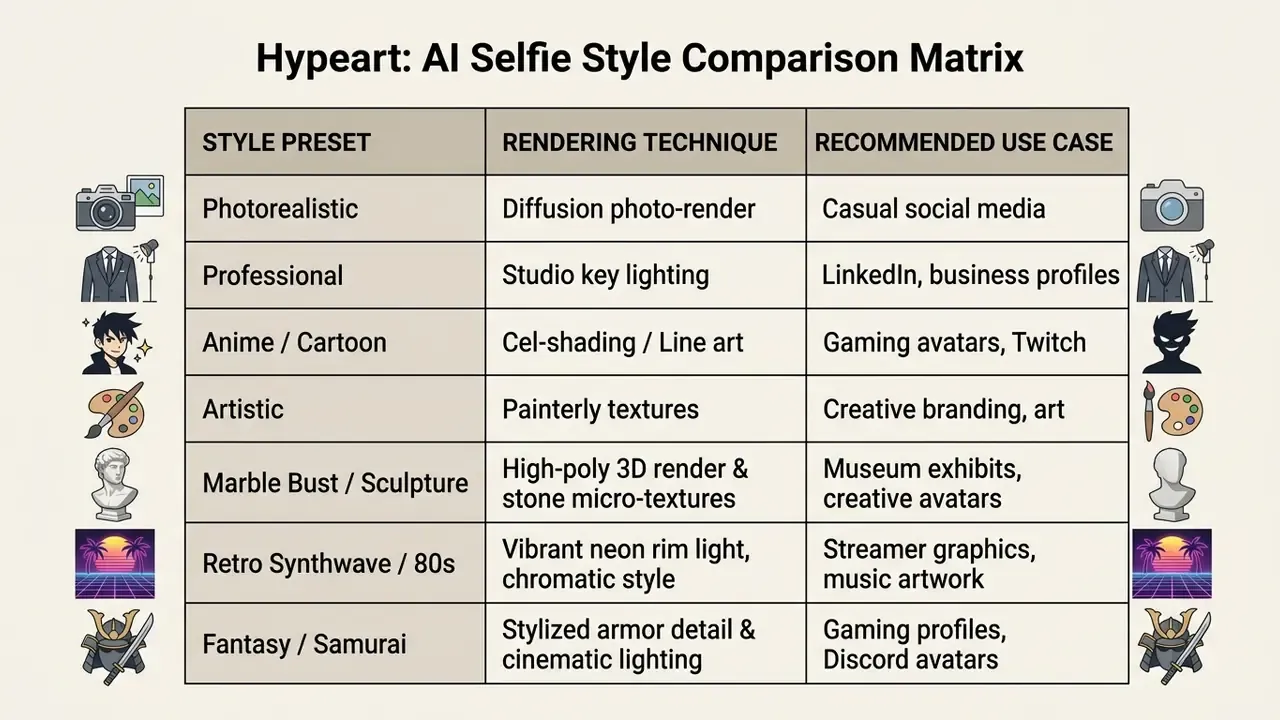
Stylized avatars are not merely decorative. Audience research supports their use as a persistent identity layer:
To compare tool performance across artistic formats, review our best AI art generator comparison and best free AI art generator evaluation.
How to Get Better AI Selfie Results
Getting consistent quality from the best ai selfie generator platforms comes down to three levers: source photo optimization, descriptive prompting, and iterative sampling. Where source resolution is the limiting factor, AI image enhancers can raise input quality before generation and refine detail afterward.
Choose photos that preserve face details and unique features
Selecting the right input photo directly improves identity matching in an ai picture selfie or ai my selfie picture with my face pipeline:
- Preserve key identifiers. Choose source photos that clearly show your signature traits: hairstyle, facial hair, birthmarks. Forensic facial-comparison guidance treats scars, marks, hair geometry, and beards as discriminating facial details, and those are the first things lost when pose, lighting, or occlusion degrade the source.
- Moles and skin characteristics. Capture guidance from facial-imaging standards bodies requires lighting that renders visible skin characteristics, blemishes and moles included, evenly. These small features are frequently the difference between "close" and "unmistakably me".
- Handling eyeglasses. Use sharp, anti-reflective photos so lens glare does not distort the eye region during latent diffusion. ISO/IEC 19794-5:2011 requires avoiding lens tint and glare, and recommends capturing one version with glasses and one without.
- Hair. Move hair back so the full face is visible; hair should not cover the eyes.
- Avoid extreme angles. Steer clear of severe low-angle or high-angle positions that distort facial proportions.
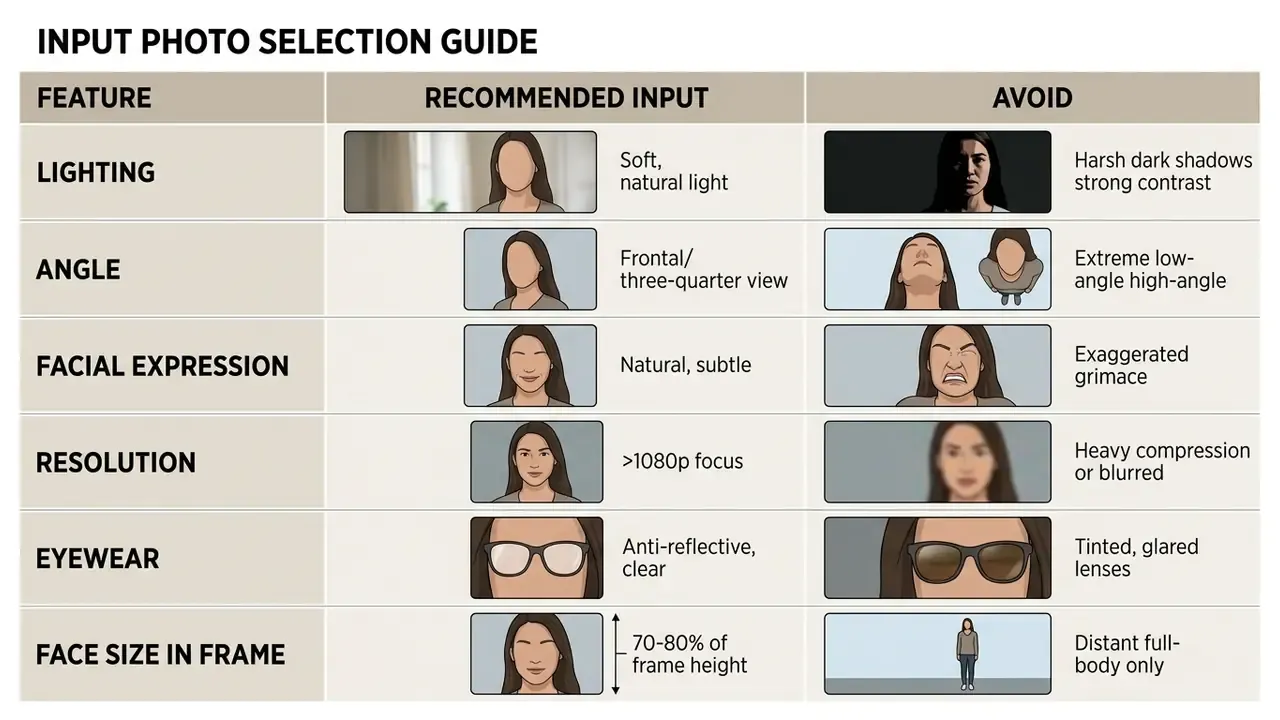
That is the operational justification for the table above. The regions your viewers scan hardest are exactly the regions a poor source photo degrades first.
Use prompts and multiple generations to refine the look
If the first generated image needs work, run a structured refinement loop rather than random re-rolls:
- Specify missing details.Add explicit keywords for clothing, background elements, or lighting parameters, for example "cinematic natural lighting, soft ambient fill".
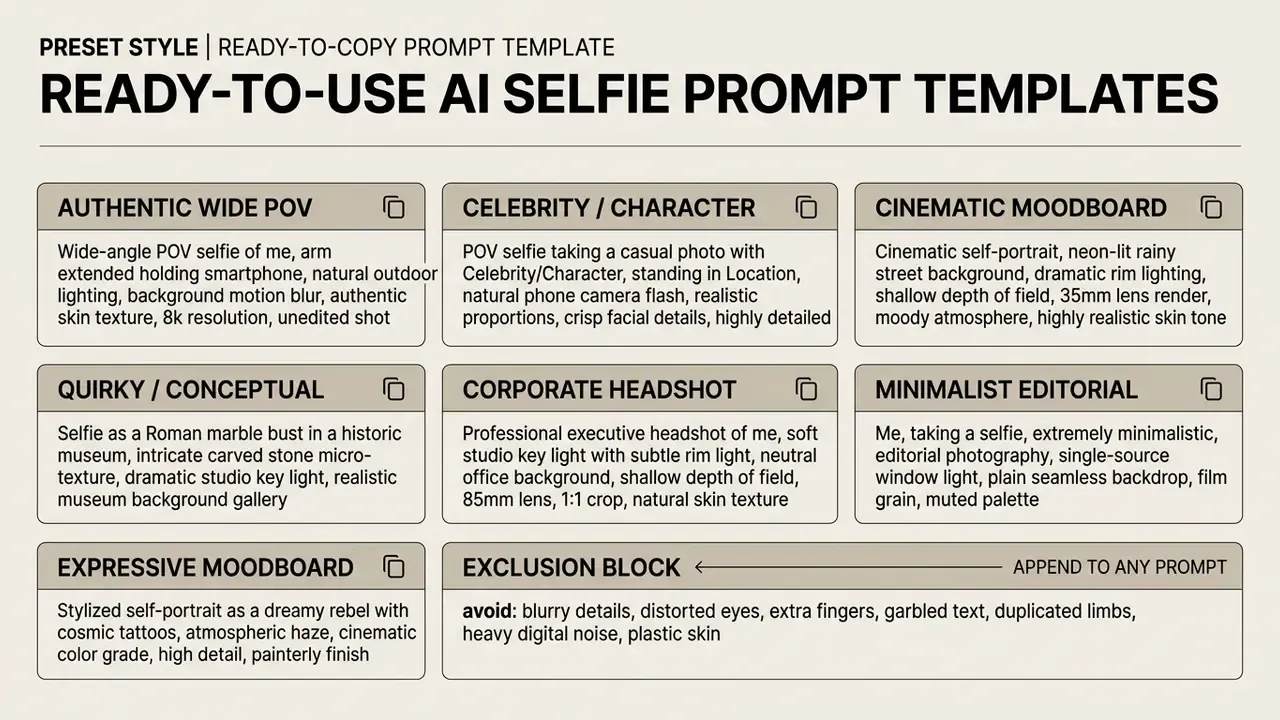
- Use exclusion constraints.Name unwanted elements to reduce artifacts, for example exclude "blurry details, distorted eyes, heavy digital noise". Transparent-background requests should explicitly exclude scenery, solid backdrops, checkerboard patterns, and stray shadows.
- Lock what already works.State "change only X" alongside an explicit preserve list to limit drift between passes.
- Generate multiple batches.Run 3 to 5 candidates per configuration pass. Published iterative-refinement loops follow the same structure: generate, assess the image, rewrite the prompt using the assessment and prior revisions, regenerate, repeat for a fixed budget. Documented budgets range from 3 iterations in closed-loop consistency-analysis systems to roughly 10 iterations before convergence toward a target image under human judgment. Evaluating several outputs lets you pick the pass with the best balance of identity match and visual clarity.
Editing instead of regenerating. Not every fix needs a fresh generation. Inpainting-mode AI selfie editors work on an existing selfie and change only a selected region: relight the face, swap the background, clean a distraction, leave the rest of the frame untouched. When your original photo is already close to right, an editor pass is faster, cheaper in credits, and safer for identity retention than full synthesis.
Ready-to-Use AI Selfie Prompt Templates
Use the following structured prompt matrices directly in your generator. Replace bracketed variables such as [Location] with your own details:
For extra editing control after rendering, explore specialized tools such as an AI image expander for canvas outpainting, or compare platforms using our AI Media Comparison Matrices.
AI Selfie Generator Use Cases
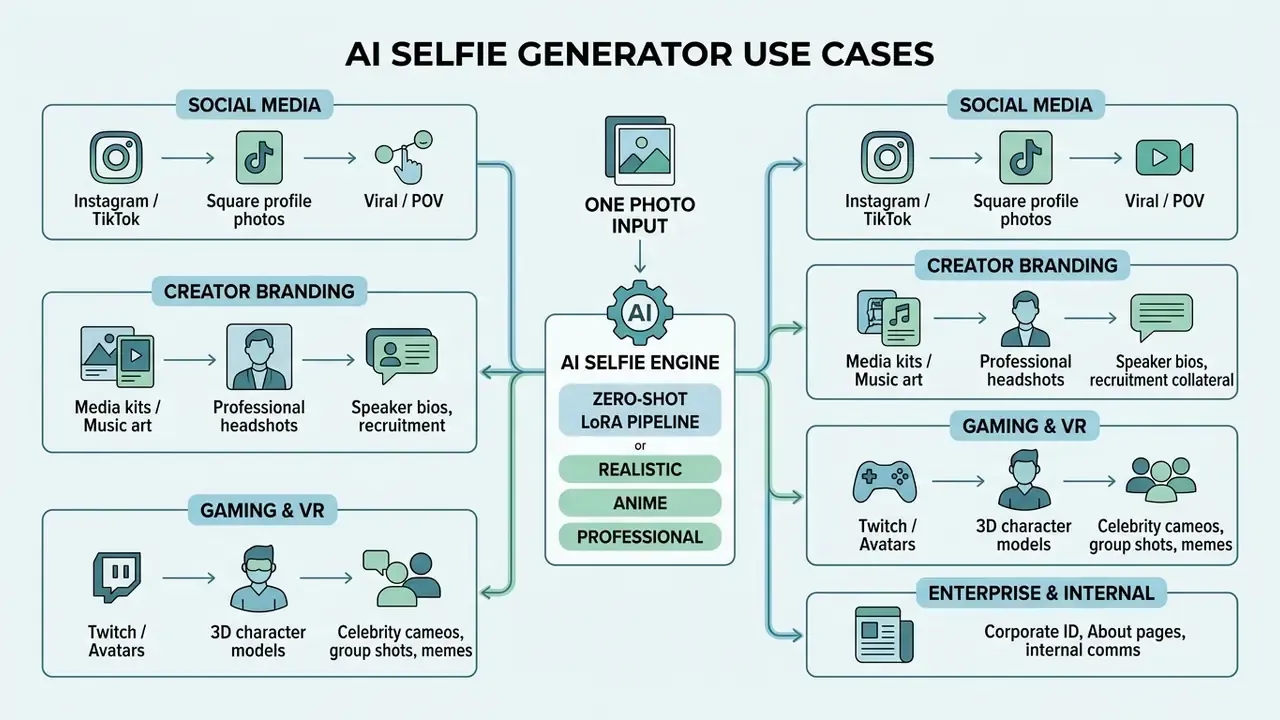
In 2026, ai selfie photo generator platforms serve personal branding, content creation, and digital identity workflows across a wide set of channels.
Creating POV selfies, celebrity cameos, and group shots
Modern AI selfie generators go past studio framing by simulating authentic point-of-view (POV) smartphone optics. By injecting visual cues, an outstretched arm angle, slight wide-lens edge distortion (12mm to 24mm equivalent), on-camera flash falloff, and natural background bokeh, the model synthesizes believable casual snapshots that read as phone captures rather than portraits. That is the defining trait of a POV selfie generator: the output looks like it came from a phone held in one hand.
- Celebrity and fictional cameos. Conditioned on dual-subject prompts, diffusion models align your facial embeddings alongside recognized public profiles or fantasy characters, for example "POV selfie sitting next to a superhero on a skyscraper edge, casual smartphone camera angle, direct sunlight." Typical ai selfie with celebrity requests include vacation shots, backstage frames, and studio cameos.
- Impossible and what-if scenarios. Place your identity inside historical events, deep-space environments, prehistoric settings, or cinematic action scenes while structural facial integrity holds: selfies with dinosaurs, aliens, wild animals, or historical figures.
- Virtual group photos. Composite multiple face embeddings into one coherent scene, matching lighting keypoints and skin tones across subjects automatically. Good for reunion-style images, fan art, and team shots assembled from separate individual photos.
- Portrait-to-POV conversion. Where someone else took the original photograph, the generator can re-render the same subject from a first-person selfie perspective, changing the implied camera position rather than the identity.
Two hard constraints apply here. First, using a recognizable real person's likeness can trigger publicity-rights and false-endorsement claims even where copyright does not attach, so obtain consent, or restrict output to private, clearly parodic, non-commercial contexts and follow platform disclosure rules. Second, keep provenance metadata intact. Realistic POV output is precisely the class of image most likely to be mistaken for a genuine photograph.
Creator branding, music artists, and professional portraits
Content creators, independent musicians, and digital consultants rely on an ai selfie generator online to hold a cohesive brand aesthetic across channels:
- Press kits and promotional assets. High-resolution portraits for banners, podcasts, and digital media kits.
- Cover art. Stylized self-portraits for single releases, album artwork, and video thumbnails. A 2024 study of music artists describes AI as a tool for synthesizing dynamic brand imagery tied to audience emotion and artist identity.
- Executive branding. Consistent corporate headshots for consulting profiles and conference speaker bios.
- Enterprise and internal communications. Standardized employee portraits for intranet directories, recruitment collateral, and About pages where a company-wide photoshoot is impractical. Apply the same consent, retention, and disclosure controls described earlier, because employee likenesses are personal data.
- Personalized merchandise and gifts. Posters, prints, mugs, phone cases, all subject to the commercial-rights checks covered above.
The relevant caution is legal rather than aesthetic. A 2025 Japanese AI guidebook instructs users to verify identity match and possible portrait-right violations before publishing generated likenesses, and 2024 UK music-industry analysis identifies misappropriation and false endorsement as central risks for artists. Treat AI portraits as a branding asset and a rights-and-consent obligation at the same time.
To evaluate tool capabilities for creative design workflows, review our guides on Canva AI Generator options and Bing AI image creation capabilities.
Gaming avatars, characters, and creative projects
Gamers, VTubers, and virtual streamers use stylized AI selfies to build digital avatars:
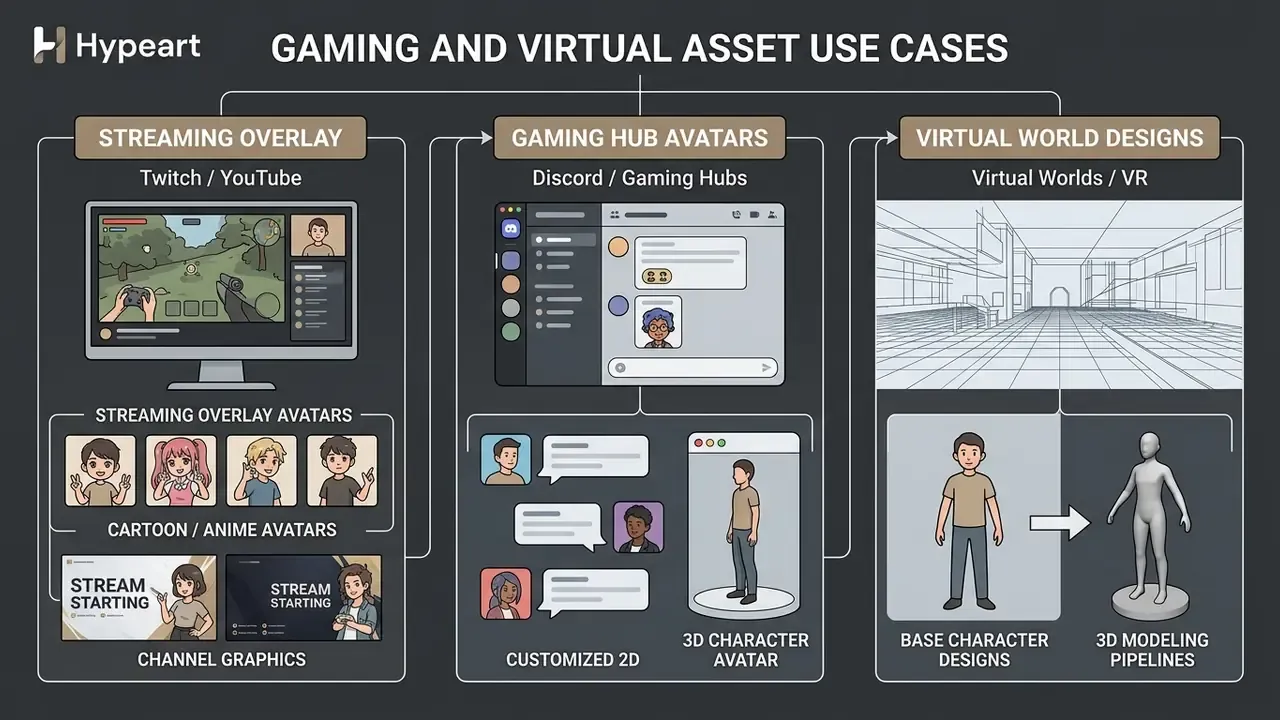
Documented 2025-2026 implementations include avatar frameworks that generate fully rigged, customizable avatars for direct deployment into a game project, digital-human toolkits used to animate in-game avatars, and services that build lifelike or stylized 3D avatars from a single selfie for games, apps, and virtual worlds. On the streaming side, avatar tools publish live to OBS, Twitch, YouTube, and Facebook Gaming.
AI pet selfies and companion portraits
Neural face-embedding adapters are not limited to human biometrics. Updated landmark-detection networks, for example animal-oriented ControlNet variants, extract facial geometry from dogs, cats, and other pets. Users can generate stylized AI pet selfies or combined owner-and-pet portraits by uploading a clear photo of the animal, picking styles such as oil painting, cartoon vector, or cinematic adventure, and letting the model retain identity markers such as fur pattern, eye color, and snout proportions. Common outputs include commemorative pet portraits, gift prints for family members, and matched owner-pet avatar pairs. Input guidance mirrors the human case: even lighting, sharp focus, a front-facing head position, an unobstructed face.
For broader multimedia workflows, creators can integrate visual assets with tools to add image to a video timeline, add custom audio through an online AI voice generator, or explore automated animation options in our animation maker guide.
Enterprise AI Image Tool Audit Checklist
Use this as a pre-procurement screen for any AI selfie or portrait generator entering a managed environment:
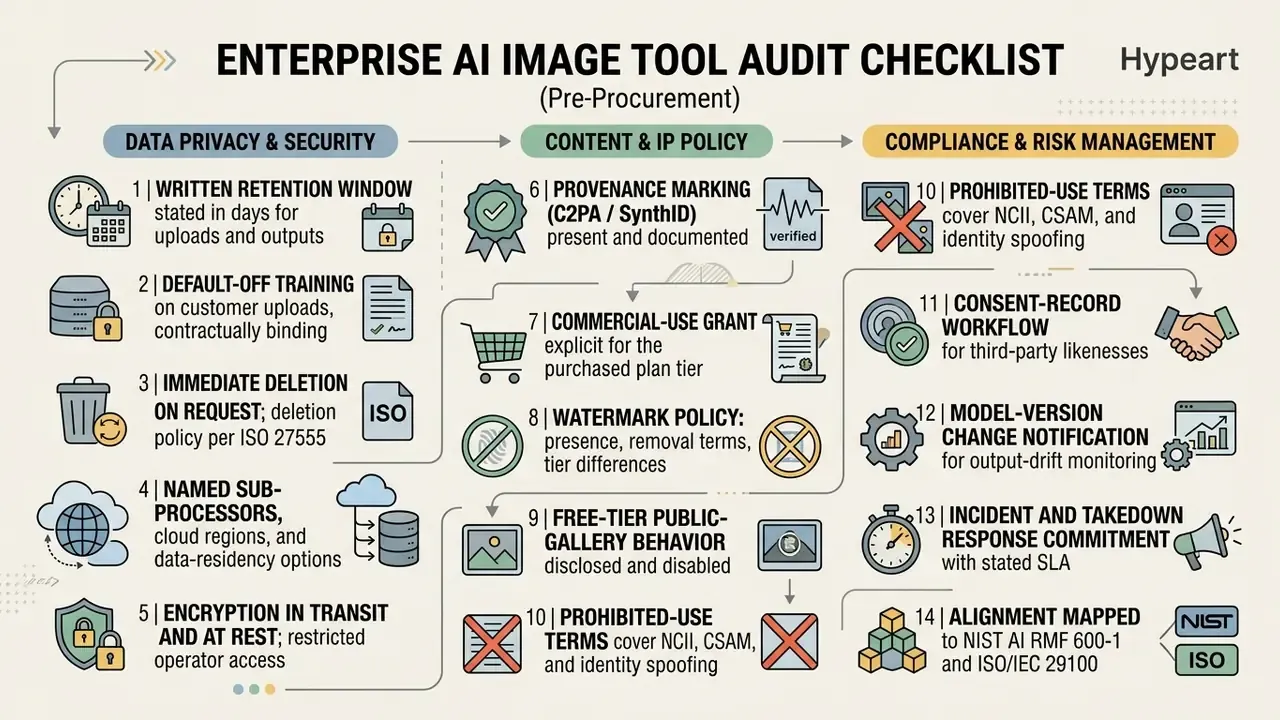
Unresolved questions remain, and it is fair to name them. Vendor watermark durability is asserted more often than independently measured. Retention claims are rarely third-party audited. And no public benchmark yet reports identity-retention scores in a way buyers can reproduce internally. Treat those gaps as residual risk, not as absence of risk.
Frequently Asked Questions (FAQ)
How does an AI selfie generator work from a single photo?
It processes the uploaded facial photo through neural network adapters such as IP-Adapter-FaceID to extract key structural embeddings. Those embeddings guide a latent diffusion model, which renders a fresh portrait with a new background, lighting, or artistic styling while core facial geometry and identity markers survive the pass.
Why do some tools want one photo and others want twenty?
Different architectures. One-photo tools are zero-shot: they read a face embedding and generate immediately, in roughly 5 to 30 seconds, with about 80-90% geometry match. Twenty-photo tools train a personal LoRA or DreamBooth adapter over 15 minutes to 2 hours, reaching 95-98% match and full angle flexibility. Zero-shot for avatars and social posts, trained models for print and professional headshots.
What input photo works best for generating AI selfies?
Well-lit, front-facing source photos with a neutral expression and unobstructed features, with the face occupying roughly 70-80% of frame height. Avoiding dark shadows, heavy compression, lens glare, and extreme camera angles helps the network extract identity keypoints accurately.
Can I make a POV selfie with a celebrity or a fictional character?
Technically yes: dual-subject prompts align your face embedding with a second subject inside POV smartphone framing. Legally, a recognizable person's likeness is protected by publicity and portrait rights independent of copyright, and false-endorsement claims are a real exposure. Obtain consent for commercial use, keep provenance metadata intact, and follow the disclosure rules of the platform where you publish.
Can I generate AI selfies of my pet?
Yes. Animal-oriented landmark detection extracts facial geometry from dogs, cats, and other pets, so the same style presets apply: oil painting, cartoon vector, cinematic. Upload a sharp, evenly lit, front-facing photo of the animal, and the model will retain fur pattern, eye color, and snout proportions.
Is there a watermark on AI selfie results, and can I remove it?
It depends on the tier. Some tools ship free output without a visible watermark, others watermark free-tier results and lift them on paid plans. Separately, many platforms embed invisible provenance metadata such as C2PA Content Credentials or SynthID, designed to survive common edits. Removing a watermark or provenance mark to defeat a platform's transparency controls is a terms violation.
Can I use AI-generated selfies for commercial purposes?
Commercial permissions depend on the platform's Terms of Service and your subscription level. Free plans often restrict usage to personal, non-commercial applications, while paid tiers typically grant full commercial rights for marketing and promotional content. Note separately that under US Copyright Office guidance, output without substantial human authorship is not protected by copyright, and that likeness rights are a distinct layer requiring consent.
Will my uploaded selfies be stored?
This varies by vendor, and it is the single most important term to check. Documented practice ranges from ephemeral in-memory processing deleted after rendering, through automatic deletion within 1 to 7 days, to persistent storage of face embeddings or trained model weights. Verify the stated retention window, the training opt-out, and whether free-tier outputs are published to a public gallery.
Can AI selfies be used to pass identity verification?
No. Submitting synthetic imagery to a KYC, AML, onboarding, or liveness-detection process is fraud in most jurisdictions. Verification providers actively screen for tampering, and one 2026 industry report attributes 35.4% of APAC fraud cases to selfie-mismatch conditions. Legitimate use of these tools stays inside creative, branding, and social contexts.
Should I disclose that a profile photo is AI-generated?
Disclosure carries a measurable perception cost. AEJMC 2024 research found AI images rated higher on quality than professional photographs (B=0.21, p=0.005), then rated lower once AI provenance was disclosed (B=-0.15, p=0.041). Audience tolerance is nonetheless high in practice, with 93% of disclosing dating-app users reporting neutral or positive reactions (Pose AI, 2026). Platform rules also apply: LinkedIn requires the photo to be a clear, recognizable likeness of you. Disclaimer: this guide is informational and does not constitute legal, privacy, or compliance advice. Copyright, likeness, biometric, and AI-disclosure rules differ by jurisdiction and change frequently. Consult qualified counsel or a data-protection specialist before deploying generated imagery commercially or processing biometric data at scale.
Appendix A: Superseded Fragments (Revision Record)