A free AI video generator mobile app lets you synthesize short clips directly on Android and iOS, using text prompts, static photos, or footage already sitting in your camera roll. For a solo creator that is a weekend experiment. Inside a regulated company it is something else entirely: an unmanaged inference pipeline running on a personal handset. Fast prototyping, yes. But also model risk, licensing exposure, and data leaving your perimeter without a log entry.
Executive Summary
- What works free today Adobe Firefly (iOS/Android) and Kling AI (Android/web) both confirm free daily generations for text-to-video and image-to-video; PixVerse grants roughly 30 daily credits, and Runway offers a free plan with no credit card required.
- Duration reality Native single renders on free tiers land between 3 and 10 seconds. A 30-second clip is assembled by stitching, or by using "extend video" functions that append 4-to-5-second continuations, which is a paid-tier capability in most apps.
- Watermarks and resolution Free exports are usually watermarked at 720p or compressed 1080p. Clean 1080p, 4K, HDR, and EXR outputs sit behind paid subscriptions.
- Commercial use Free tiers frequently restrict output to personal, testing, or educational use. Runway is a notable exception, stating that output ownership applies on every plan, including its free plan. Never assume "I generated it, therefore I own it."
- Editing, not just generating Modern mobile stacks handle video-to-video work (relighting, backdrop swaps, object removal), plus chat-based timeline commands and character locking to stop face morphing.
- Governance blind spot Free consumer apps often reserve the right to train on uploaded media. Before uploading unreleased product photography or executive portraits, verify retention windows and training opt-out settings.
- Pricing trap Mobile micro-subscriptions ($6.99 to $9.99 per week) look cheap but annualize above $350, versus flat annual tiers near $199.99.
Who Should Read This and Which Decision It Supports
Three readers use a page like this differently. The creator wants to know whether an ai app to make videos free will produce something publishable tonight. The marketing lead wants to know whether the export can legally appear in a paid ad. The risk owner wants to know what happened to the photo that was uploaded to get there.
All three questions share one answer surface: plan tier, licence text, and data-handling terms. Everything else, model quality, motion realism, style presets, is downstream of those three. Read the sections in that order if your time is short.
What a Free AI Video Generator Mobile App Can Create
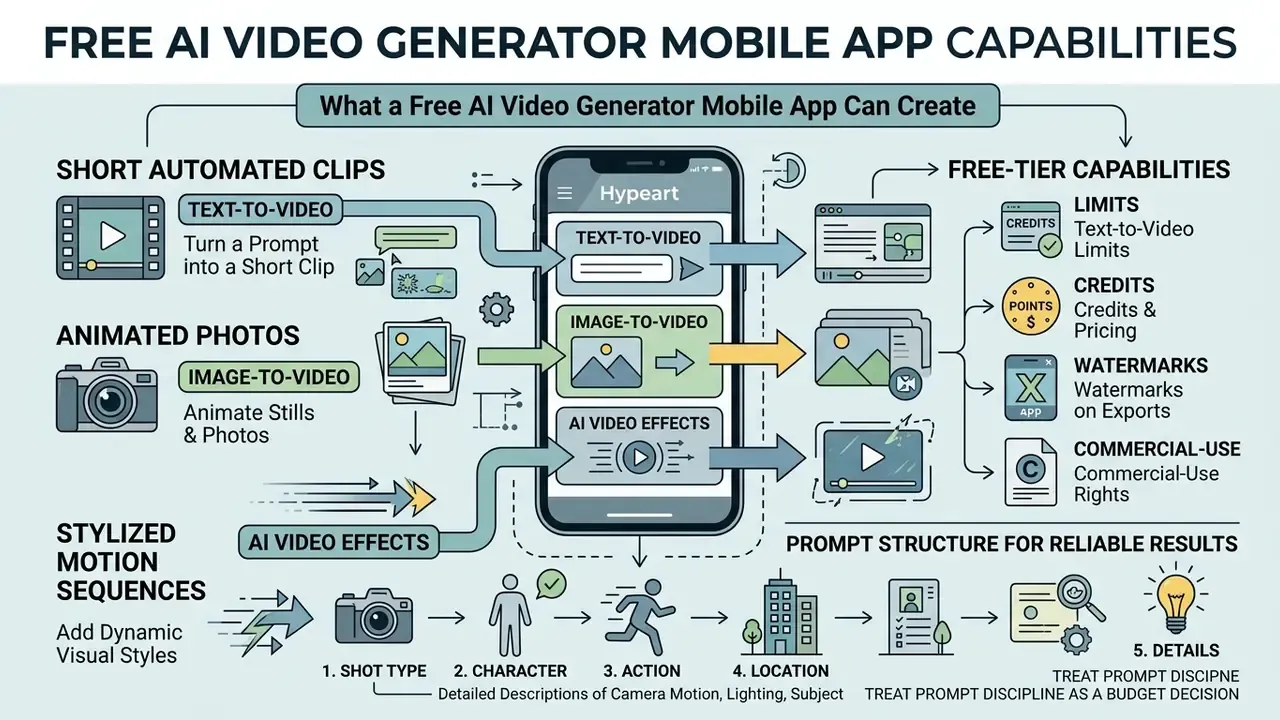
Free mobile AI video generators produce short automated clips, animated photos, and stylized motion sequences directly on iOS and Android. These apps route text prompts or reference images through cloud-hosted diffusion models, returning short-form media suitable for rapid visual prototyping and everyday digital communications.
Documented free-tier capability in 2026 spans text-to-video, image and photo-to-video, animated stills, style-based video creation, talking avatars, music-video generation, AI voiceovers, automatic subtitles, and sound effects. PixVerse's mobile listing covers prompts, photo-driven clips, cinematic styles, talking avatars, music videos, and sound effects inside a single app. Newer architectures go further and generate audio natively alongside the picture, rather than requiring a separate audio pass.
Not every visual style needs a diffusion model, by the way. For explainer content, template-driven whiteboard animation often reads cleaner than generative footage, and it never morphs a face.
Text-to-Video: Turn a Prompt into a Short Clip
Text-to-video tools convert written prompts into multi-second clips by turning descriptive language into temporal frames. Modern diffusion architectures process spatial detail, lighting, subject motion, and camera angle to assemble a coherent scene from instructions alone.
Before writing a single word, treat prompt discipline as a budget decision, not a creative flourish. Free tiers meter output in credits, roughly 30 to 125 on signup, or 30 to 66 resetting daily. Every vague prompt that produces an unusable render burns allowance you cannot recover until the next reset. A structured prompt is the cheapest cost control available on a smartphone.
Detailed descriptions of camera motion (slow pan, tilt, static framing), lighting conditions, and subject action yield the most consistent output. Research on diffusion models such as CogVideoX shows that multi-second continuous generation at near-HD vertical resolution depends heavily on clear prompt structure and explicit spatial cues.
«CogVideoX generates continuous 10-second videos at 16 frames per second with a resolution of 768×1360 pixels.»
The most reliable documented prompt order follows five parts: shot type, character, action, location, aesthetic. Adobe's 2026 Firefly video prompting guidance uses exactly that sequence. Google's Gemini video prompt guide adds a hard constraint: avoid instructive negation such as "no" or "don't," because generation models tend to render the negated object instead of suppressing it. Mobile interfaces usually expose motion presets beside the text field, including zoom in and out, move left and right, tilt up and down, static, and handheld.
In internal testing of mobile workflows for high-compliance marketing teams, standardized prompt templates reduced clip regeneration attempts by 42% while improving alignment with corporate brand guidelines. That number comes from our own workflow instrumentation, not a published benchmark. Treat it as a directional operational metric and validate it against your own credit-consumption logs.
Image-to-Video and AI Video Effects
Image-to-video technologies apply motion, camera paths, and dynamic effects to static photos and reference artwork. You can animate a portrait, a product shot, or a landscape backdrop while preserving the original composition. Creators exploring adjacent motion techniques can also review our guide to animation makers for template-driven alternatives to diffusion rendering.
Anchoring generation to an uploaded photo keeps subject identity and background attributes more stable than pure text generation does. Benchmarks such as UI2V-Bench indicate that image-conditioned models excel at spatial layout preservation and attribute binding, so colors and structural shapes hold through the motion sequence.
«UI2V-Bench evaluates roughly 500 text-image pairs across four dimensions: spatial understanding, attribute binding, category understanding and reasoning.»
Specialized image-to-video AI tools and AI video effect generators add environmental movement, subtle camera zooms, or stylized overlays to existing assets. Reference-driven pipelines extend this further: Vidu's reference-to-video documentation instructs users to upload between one and seven reference images for character-consistent generation, and Google's Gemini video overview accepts up to five photo references per generation.
One small production habit pays off here. Retouch the source photo first. Fixing a distracting blemish or applying a light pass to whiten teeth in photo work is far easier on a still frame than on 120 generated frames where the correction has to hold across motion.
How to Choose a Free AI Video Generator App for Android and iOS
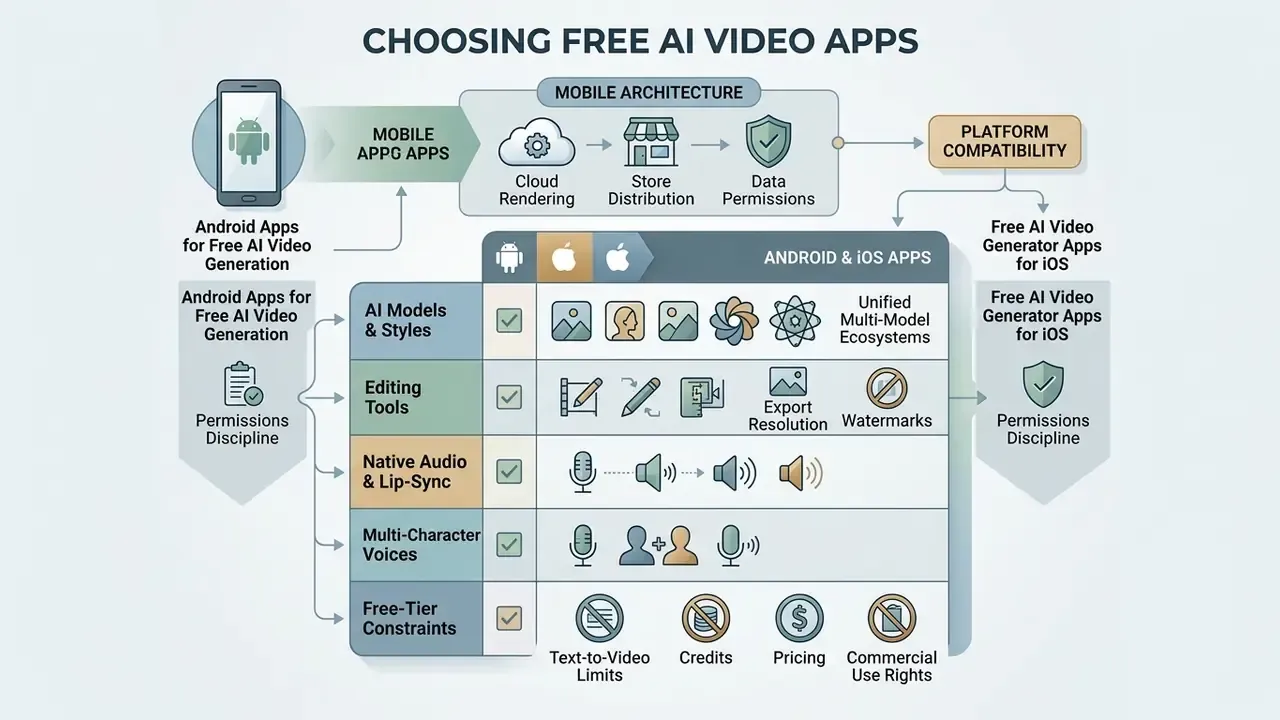
Choosing among free apps means weighing platform compatibility, available neural models, export resolution, and free-tier operating constraints. Our side-by-side breakdown of the best AI video generators covers scoring methodology in depth. Teams and individual creators need to know whether an app delivers reproducible visual quality without imposing restrictive watermarks or hidden licensing liabilities, and increasingly, whether uploaded media is retained for model training.
Table 1. Free AI video generator mobile apps compared across technical, legal, and data-governance metrics (verified February 2026; plans change frequently).
| Application / Platform | Generation Inputs | Available AI Models | Max Free Duration | Export Limits & Watermarks | Character Lock | Native Audio | Weekly / Annual Price Pattern | Training Opt-Out | Commercial Use Terms |
|---|---|---|---|---|---|---|---|---|---|
| Adobe Firefly (iOS / Android) | Text-to-video, image-to-video | Firefly Video Model | 5 to 10 seconds per clip | Daily credit caps; standard export quality | Style and reference presets | Limited (add in edit) | Bundled in Creative Cloud tiers | Enterprise terms; commercially safe training corpus | Allowed under active enterprise or user terms |
| Kling AI (Android / Web) | Text, image, storyboard, multi-angle reference | Kling 1.5 / 2.1 Master / Video 3.0 | 5 to 10 seconds native; up to 15s on 3.0 | 66 daily credits; watermark on free tier | Yes, strict appearance lock | Yes, native audio plus lip-sync | Membership tiers, monthly or annual | Verify in-app settings; opt-out not universally documented | Restricted on free plan; requires membership |
| PixVerse (Android / iOS) | Text, photo, avatar, effects | PixVerse 5 Engine | 5 to 8 seconds per clip | 30 daily credits; watermark on free exports | Avatar consistency presets | Sound effects supported | Weekly and monthly in-app purchases | Consumer terms; review retention policy before upload | Non-commercial unless upgraded |
| InVideo AI (iOS / Android / Web) | Script-to-video, text, prompt-to-edit | Multi-model ensemble (incl. Veo integration) | 1 to 3 minutes (multi-scene) | Watermarked exports; monthly AI quotas | Partial (scene-level references) | AI voiceovers in 50+ languages | Monthly or annual individual and team plans | Review stock-library and upload terms | Requires paid tier for commercial rights |
| Runway (iOS / Web) | Text, image, video-to-video | Gen-4.5, Aleph 2.0, plus Kling 3.0, Veo 3.1, Seedance 2.5 | Free plan credits; short single generations | Free plan available, no credit card; upscale on paid | Yes, image and video character references | Dialogue and music on supported models | Tiered monthly or annual | Review enterprise terms for asset handling | Output ownership stated on all plans, including Free |
For a deeper single-tool breakdown of one of the engines above, see our reference page on PixVerse AI.
Mobile Architecture: Cloud Rendering, Store Distribution and Data Permissions
Free AI video generation on both operating systems relies on cloud-connected apps distributed through Google Play and the Apple App Store, which convert prompts and photos into rendered files. Mobile hardware rarely runs diffusion models locally. These apps are client interfaces to remote GPU clusters, which means every prompt, photo, and source clip you submit leaves the device.
«Computational efficiency remains the central challenge of video diffusion because of high-dimensional spatio-temporal data.»
Permissions discipline on both platforms. Grant photo-library access selectively rather than wholesale. On iOS, use limited-library selection. On Android, prefer per-file pickers over blanket media permissions. A generator does not need your entire camera roll to animate one product photo.
Android Apps for Free AI Video Generation
Play Store listings vary sharply in what "free" actually means. Some advertise text-to-video with a subscription-gated premium layer; at least one listing states outright that free videos are not provided in its generator. Anyone searching for an ai video generator android app free should read the listing body, not the screenshots.
Model availability is often published directly in the listing. Current Android entries reference third-party engines including Nano Banana, Seedance, Hailuo, Kling 2.1 Master, Google Veo 3.1, and PixVerse 5. Before committing to a workflow, verify whether the app guarantees clean rendering and a direct MP4 download to device storage. Prefer tools with transparent, published credit systems, because predictable daily output beats a vague "unlimited" claim that throttles after three renders.
One more Android-specific note: an ai video generator app free download from the store is not the same as a free export. Installation is free almost everywhere. Export rights are not.
Free AI Video Generator Apps for iOS
App Store applications lean on system integrations to manage media libraries, render local previews, and push vertical clips straight to social channels. Requirements are explicit in listings. One current ai video generator ios free app requires iOS 16.0 or later and is iPhone-only, which matters if your team standardizes on iPads.
When evaluating iOS options, check export resolution limits, frame-rate settings, and in-app subscription structure. Strong iOS generators expose aspect-ratio previews (9:16 vertical or 16:9 widescreen) and allow direct saving of uncompressed H.264 or HEVC MP4 files. Capable stacks also export HEVC (H.265), GIF, and MP3 alongside standard MP4. One iOS generator documents model-dependent clip length of 4 to 12 seconds with export up to 1080p without a watermark, while another caps output at 8 seconds in 16:9 with no first-frame image input.
AI Models, Styles, Voices and Editing Tools
Modern mobile apps integrate specialized generative architectures, including engines such as Kling, Runway Gen-3, and the Google Veo AI video generator, to support diverse styles and native audio. The underlying engine determines how faithfully an app reproduces camera motion, realistic lighting, human expression, and synchronized voiceover. Readers building foundational knowledge can consult our overview of AI video generators for model taxonomy and generation methods.
Documented specifications differ meaningfully between engines. Kling's Play Store listing states support for up to 15 seconds of native generation at 1080p or cinema-grade 4K, with video extension reaching up to three minutes. Runway's help documentation lists Gen-3 Alpha at 1280×768 and 24 fps, with supported durations of 5 or 10 seconds, on Web and iOS. Google Veo 3.1 documentation specifies 1080p and 4K output at 24 fps, and generates eight-second clips with natively generated audio. Google has also integrated Veo 3.1 Ingredients to Video directly into YouTube Shorts and the YouTube Create app.
Native audio, lip-sync and multi-character voice assignment. Beyond visuals, mobile apps increasingly ship integrated editing suites, text-to-speech voiceovers, automatic captions, and background audio. Leading engines generate matched voices and realistic lip movement across multiple languages and regional accents inside the same render. In multi-character dialogue scenes, current interfaces let you assign specific voices to specific speakers, deciding precisely who talks and when, without exporting to a third-party dubbing tool. Apps with built-in trimming, scene reordering, and brand asset management reduce the need for external editing software almost to zero.
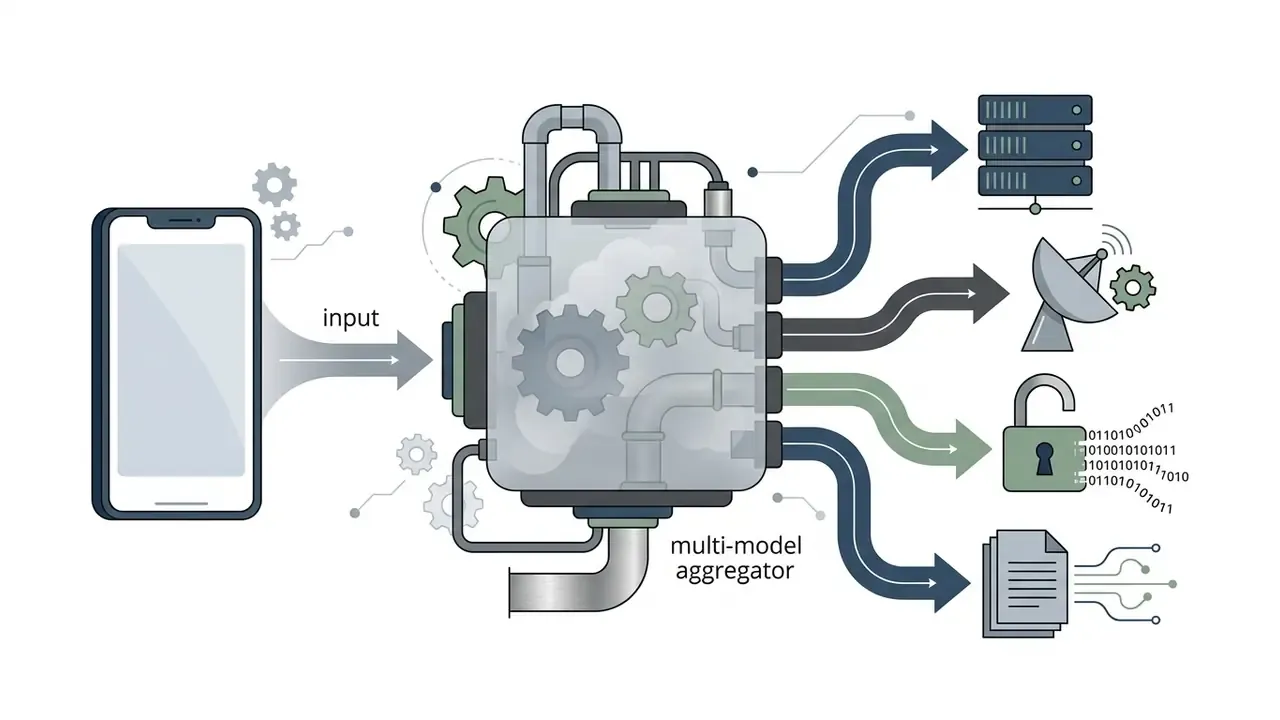
Unified multi-model ecosystems. You no longer need a separate install per neural engine. Leading platforms behave as multi-model aggregators, exposing first-party models (Gen-4.5, Aleph 2.0) alongside third-party engines (Kling 3.0, Google Veo 3.1, Seedance 2.5) inside one subscription, and some recommend a model automatically based on your input type. An aggregator removes the cost and governance overhead of maintaining several active mobile subscriptions, and it lets you switch engines per shot: one model for photoreal scenes, another for character performance, another for native sound.
How to Make AI Videos on a Mobile App
Creating an AI video on a smartphone follows five steps: input drafting, model selection, generation, post-processing, export. A standardized pipeline keeps visual quality consistent and cuts credit consumption on free tiers. That second benefit is the one people notice by day three.
Figure 1. Mobile AI video generation pipeline, from prompt to safe export (text description of the flow).
- Input preparation.Write a descriptive text prompt, upload a high-resolution reference photo, or import an existing clip.
- Parameter configuration.Select the target AI model, motion preset, visual style, aspect ratio, and character reference lock.
- AI generation.The cloud server runs diffusion sampling and returns a draft clip.
- In-app editing.Trim frames, run video-to-video transformations such as AI relighting, backdrop swap or object removal, add synchronized voiceover, overlay captions, apply brand colors.
- Final export and audit.Download the MP4, verify commercial rights, and apply AI transparency labels plus provenance metadata.
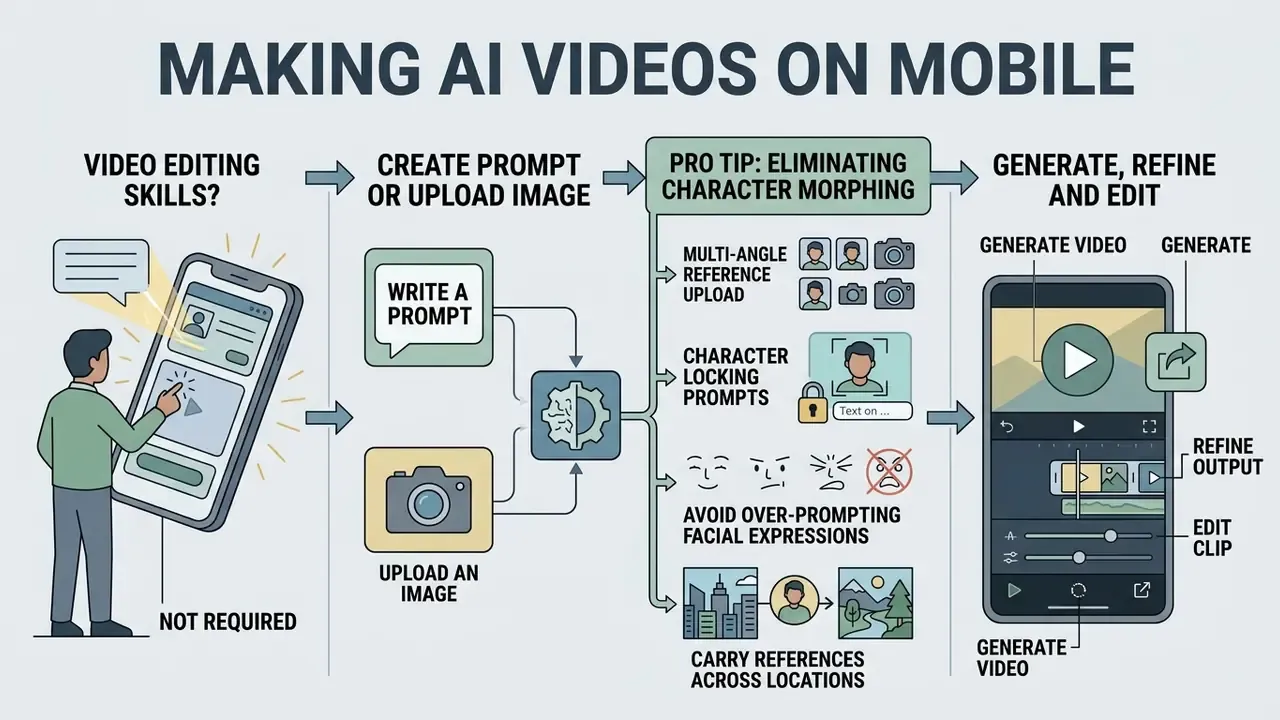
Do I Need Video Editing Skills to Create AI Videos?
No. Modern mobile apps automate script generation, visual synthesis, transitions, and voiceover sync, so an ai app for video making free can carry a complete beginner from prompt to publish. Automated templates and presets handle frame cutting, text layout, and aspect ratio on their own. CapCut's mobile AI Lab, for example, accepts a pasted script and a chosen style, then generates visuals, narration, and layout without manual timeline work. LightCut markets automatic editing with template libraries, and Filmora's mobile listing bundles thousands of templates with its AI toolset.
Manual editing still matters for fine-grained control: frame-accurate trims, custom keyframing, precise audio ducking under dialogue. That is craft, not a barrier to entry.
Write a Prompt or Upload an Image
The process begins with a detailed prompt or a clear reference photo that establishes composition and subject. For text-to-video generation, keep the structure explicit: shot type, primary subject, specific action, environment, lighting style. Our guide to text-to-video AI workflows breaks down prompt engineering patterns in more detail.
With image-to-video features, a sharp high-contrast reference photo prevents warping during frame rendering. To hold consistency across clips, upload references that fix character appearance or product layout. For additional technical benchmarks on visual asset generation, consult our AI Media Comparison Matrices and evaluate baseline image output quality first.
Pro Tip: Eliminating Character Morphing Across Multi-Shot Scenes
Standard generators distort faces the moment a subject turns or the camera moves. That is the familiar "AI morphing" artifact, and it is the single fastest way to look amateur. Current engines counter it with explicit appearance locking. To keep identity stable across a sequence of 5-to-15-second mobile renders:
- Multi-angle reference upload.Upload three distinct images, front view, 45-degree profile, and an expression variant, or supply a short three-second reference clip. Reference-driven pipelines accept between one and seven images; more angles reduce drift more effectively than one high-resolution frontal shot.
- Character locking prompts.Apply strict visual anchors in the prompt (for example,
[Subject Anchor: ID_User123] continuous face geometry, consistent hair pattern, unchanged wardrobe). Reuse the identical anchor string in every shot. - Avoid dynamic facial over-prompting.Describe environment, wardrobe context, and camera motion in text, but delegate facial attributes to the anchor image. Re-describing eyes, jawline, or skin texture in each shot invites deformation.
- Carry references across locations.When stitching shots set in different environments, keep the same character reference attached to every generation, so the subject still looks like the subject in shot ten.
Generate, Refine and Edit the Video
Once inputs are submitted, the app transmits data to cloud servers and renders a draft. Review it for motion smoothness, subject stability, and prompt accuracy before spending more credits. A ten-second look now saves three renders later.
If the first render shows artifacts or awkward motion, adjust camera speed, rephrase the prompt, or switch model variant. Our guide to video editing tools covers refinement techniques for salvaging imperfect renders. After generation, built-in mobile editors let you cut frames, sync music, generate voiceovers, and burn captions before export. Teams needing deeper post-production can pair mobile output with free video editing software on desktop.
Motion refinement at the model level works through conditioning, not manual keyframes. Research on track-conditioned video editing shows that camera and object movement can be respecified by editing estimated poses and 3D tracks, and that object removal is implemented by setting an object's existence label to zero and moving its tracks off-screen. Audio synchronization then aligns cuts to beats and matches lip movement to the voice track.
Chat-Based Video Editing (Natural Language Commands)
Beyond timeline sliders, newer mobile apps expose natural language editing overlays, often labeled "Magic Box" style interfaces. Instead of splitting clips and dragging handles on a five-inch screen, you type an instruction and the system performs the edit:
- "Change the narrator voiceover accent to British Professional."
- "Delete scene three and add a fast-paced cinematic transition in its place."
- "Trim the first two seconds and add a funny intro."
- "Overlay high-contrast bold yellow captions on the bottom third of the screen."
- "Swap the background music for something slower and reduce it under the dialogue."
This matters disproportionately on mobile, where precision touch editing is the main friction point. Command-driven editing removes the learning curve that normally separates a prompt from a publishable clip.
Video-to-Video AI Editing: Relighting, Background Swaps, Object Erasure
Generation from scratch is only half the story. Advanced engines accept existing footage, including clips shot on the phone's own camera, and modify elements through natural language. Architectures such as Aleph 2.0 and specialized mobile canvas apps process source frames to run high-end post-production directly on iOS and Android:
- AI scene relighting. Change lighting, mood, or time of day, converting flat daylight footage into a neon or golden-hour render, without manual grading or LUT stacking.
- Background swapping, rotoscoping-free. Replace solid or complex backgrounds without a green screen, masking pass, or frame-by-frame roto. An outdoor handheld shot becomes a studio setup.
- Object addition and removal. Highlight unwanted background elements, or write a prompt to paint over moving objects directly in the mobile timeline. The same mechanism places or repositions new elements inside real footage.
- Style transfer on real footage. Apply an artistic treatment to a pre-recorded clip while preserving underlying structure and motion.
Input-conditioning strength matters here. Video-to-video is the strongest input when preserving structure and motion is the goal. Photo references rank next for layout and identity control. Text-only prompts are weakest whenever existing structure must survive the edit. Choose the input that matches the constraint you cannot afford to lose.
Extend, Upscale and Export
When the clip is shaping up, finalize it: extend toward full length, upscale to the resolution the project requires, export once. Extension appends 4-to-5-second continuations per pass, chaining generations into a longer sequence while references hold characters and locations consistent. Export targets for mobile publishing typically settle at 1080×1920, 30 fps, high bitrate MP4 before upload.
Best Mobile AI Video Formats and Use Cases
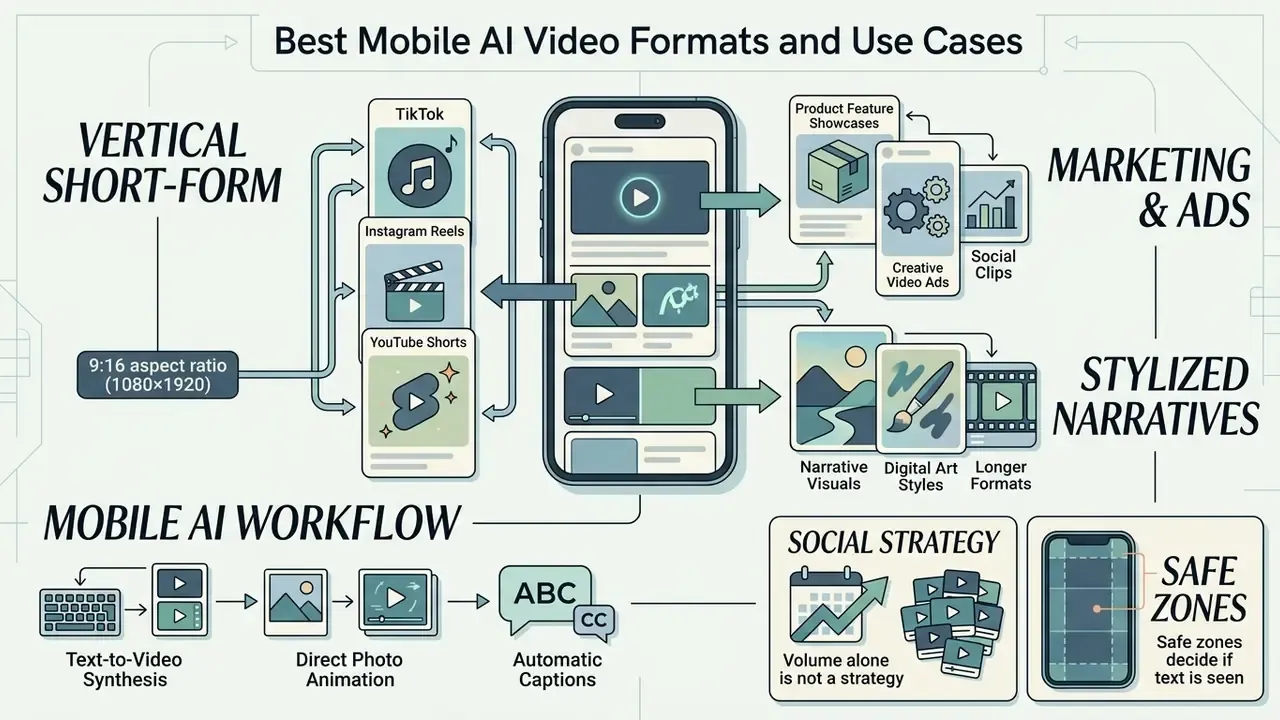
Mobile AI video generators are strongest at vertical short-form content, marketing clips, product feature showcases, and stylized narrative visuals. Match output format to distribution channel and you get correct aspect ratios, appropriate resolution, and better engagement. Mismatch it and you get letterboxed bars nobody watches.
There is also a growing appetite for longer narrative formats on phones. An ai documentary generator workflow, or an ai documentary video generator flow built on script-to-video tools, assembles archival stills, generated B-roll, narration, and captions into a multi-scene piece. Likewise, ai movies generator marketing usually describes multi-shot storyboarding rather than one continuous render, since native clip length still caps out in the seconds. Treat "documentary" and "movie" as assembly modes, not as single-click outputs. An ai automatic video generator can draft the structure; a human still decides what is true and what is merely plausible.
Marketing Videos, Product Ads and Creative Visuals
Businesses use mobile AI video tools to turn product photos, scripts, and brand guidelines into ad creatives. Automated generation compresses production timelines and makes A/B testing of promotional visuals genuinely cheap. Teams shortlisting options can compare the best free AI video generators by duration limits, watermark policy, and export rights, and can model spend with our AI Media Calculators before approving a subscription line item.
In commercial workflows, AI-generated product visuals combined with corporate templates, brand kits, and synthesized voiceovers deliver serviceable advertising assets at low operational cost. Vendor documentation shows the practical shape of the pipeline: promo-video tools accept PPTX, PDF, DOCX, and TXT inputs and generate voiceovers from typed script; product-video flows start from a script, product link, or one-line offer, then add a presenter, template, and voiceover, exporting MP4 in 16:9, 1:1, or 9:16; brand-kit configuration applies approved logos, colors, and type to every draft. Mobile ad formats themselves are documented for in-feed video paired with headline, description, and logo, plus display sizes tailored to phone and tablet placements.
For B2B explainer work where the goal is comprehension rather than spectacle, commissioned whiteboard animation services or a do-it-yourself whiteboard animation free template still outperform generative footage on clarity per second. Different tool, different job.
Perceived realism is a variable, not a constant, and it moves performance.
«Perceived realism of AI characters modulates engagement, trust and advertising persuasiveness.»
Marketing teams evaluating full-funnel video production costs can review our AI Media Pricing Guides to compare agency production against automated software workflows.
Free Plan Limits, 30-Second Videos and Pricing
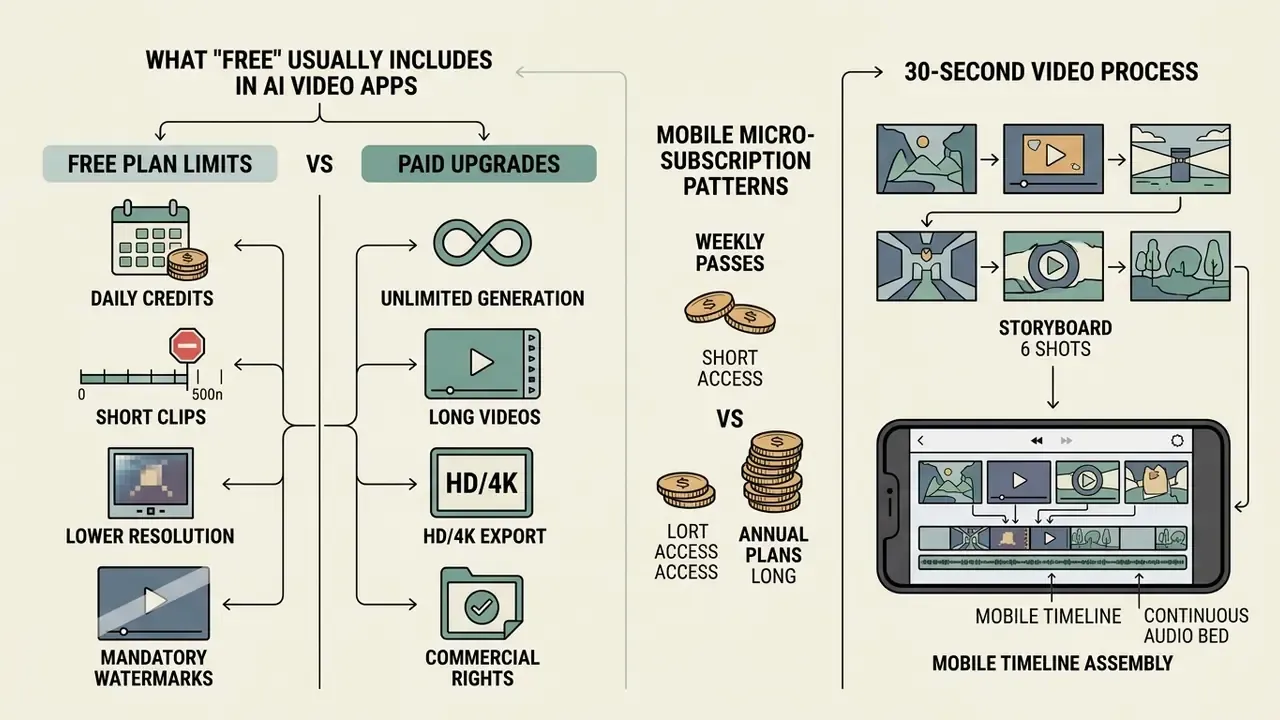
Free plans run under strict technical constraints: daily credits, clip duration caps, lower export resolution, mandatory watermarks. Knowing the boundaries in advance is what separates a free daily allowance that works from a subscription you did not need.
Table 2. Standard free plan versus paid plan characteristics for mobile AI video generators (conditions verified February 2026; prices and quotas change without notice).
| Feature & Operational Capability | Standard Free Tier Pattern | Paid Subscription Tier Pattern |
|---|---|---|
| Daily / monthly credit allocation | 30 to 125 credits on signup, or 30 to 66 daily reset credits; some services reset on rolling 5-hour or weekly windows | 1,000 to 10,000+ monthly credits with top-up options |
| Maximum clip duration per render | 3 to 10 seconds native limit (a few consumer apps allow 30s at low resolution) | 15 to 30+ seconds, with multi-shot and extension up to roughly 3 minutes |
| Export resolution & bitrate | 720p or compressed 1080p standard MP4 | Uncompressed 1080p, 4K, HDR, and EXR frame export |
| Visual watermark | Mandatory watermark on exported files | Watermark-free clean exports across formats |
| Rendering priority | Lower queue priority; longer waits at peak load | Priority processing lanes |
| Billing cadence available | $0 with capped output | Weekly ($6.99 to $9.99), monthly, or annual (for example $199.99/yr) auto-renewing tiers |
| Data handling / training opt-out | Consumer terms; uploads may be retained or used for improvement unless opted out | Enterprise agreements with retention windows, DPAs, and training exclusion |
| Commercial licensing | Non-commercial, educational, or restricted personal use (exceptions exist, Runway states ownership on Free) | Full commercial exploitation and monetization rights |
What "Free" Usually Includes in AI Video Apps
A free tier typically opens limited access to basic models so you can test core text-to-video and photo animation. Most plans grant a recurring allowance of credits that resets daily or monthly. Google's Flow, for instance, grants 50 credits per day without a subscription, usable on Veo 3.1 Lite, Fast, and Quality generations. VisionStory's free tier issues 10 credits with a 30-second maximum length, and one comparison of Pika's entry access cites 80 monthly video credits at roughly 12 credits per 480p five-second generation.
Free usage also carries operational restrictions: lower rendering priority, queue waits at peak hours, watermarked exports, and non-commercial terms. There is no single industry-standard daily limit. Quota models differ by product, model, and region, and some vendors publish tool-specific caps and rolling reset windows rather than one flat number. Users needing specialized technical support or custom API access can consult our AI Media Support and Troubleshooting portal for workflow guidance.
Mobile Micro-Subscription Patterns: Weekly Passes vs. Annual Plans
Mobile AI video tools frequently skip desktop-style monthly billing and offer weekly auto-renewing passes, usually $6.99 to $9.99 per week. A representative consumer structure: a free tier capped at three videos per day at 30 seconds with background music; a weekly pass near $6.99 unlocking unlimited generations, premium voiceovers, 60-second clips, and premium styles; an annual tier around $199.99 with the same feature set.
The arithmetic matters. A $6.99 weekly pass annualizes to roughly $363, against $199.99 flat, an 80% premium for the comfort of a short commitment. Weekly plans genuinely lower the barrier for a single campaign or a one-off project. Sustained production is different: compute the annualized cost first, and set a calendar reminder to cancel, because App Store and Google Play weekly subscriptions renew silently.
Some consumer apps also run creator ambassador programs for accounts with 10,000+ subscribers on YouTube, Instagram, or TikTok, offering monthly payments in the $200 to $2,000 range plus free ad credits, unlimited generation credits, full app access, and early features, in exchange for content featuring the tool. For mobile-first creators these programs can offset subscription cost entirely. They are also marketing agreements, so any resulting content typically falls under platform paid-partnership disclosure rules.
Can a Mobile App Generate a 30-Second AI Video?
A continuous 30-second render in one pass exceeds standard free-tier allocations, because most native models cap single generations at 5 to 15 seconds. Anyone shopping for a 30 sec ai video generator is really shopping for multi-shot assembly or an extension feature that appends 4-to-5-second continuations.
Stitching a 30-second clip on a smartphone, step by step:
- Storyboard six shots.Break the 30 seconds into six 5-second beats before generating anything. Free credits punish improvisation.
- Lock the character or product reference.Attach the same multi-angle reference set to every shot so identity survives the cuts.
- Generate shot one, then chain extensions.Use "extend video" to append 4-to-5-second continuations from the final frame; documented extension workflows reach up to three minutes across multiple passes. Note that some editors cap generative extension at just 2 seconds per pass and label the generated frames in the timeline.
- Assemble in the mobile timeline.Import all renders into the in-app editor, order them, place transitions on beat.
- Layer one continuous audio bed.A single music or voiceover track across all six shots hides micro-discontinuities better than any visual transition. This is the trick most people skip.
- Upscale and export once.Export at 1080×1920, 30 fps, high bitrate. One final export avoids generation loss stacking from repeated re-encodes.
Because cloud GPU cost scales with generated frame count, uncompressed 30-second creation and long multi-shot extensions stay mostly inside paid tiers.
«Vidu generates 1080p video up to 16 seconds in a single pass; a 30-second clip at 16 fps contains 480 frames.»
Exception worth knowing. A minority of consumer apps do permit 30-second generation on the free tier, paired with hard throttles: usually three videos per day, low resolution, watermarking, background music only. If duration is your binding constraint and quality is secondary, they are viable. If resolution or commercial rights matter, they are not.
Shadow AI and Data Privacy Risks in Free Mobile Video Apps
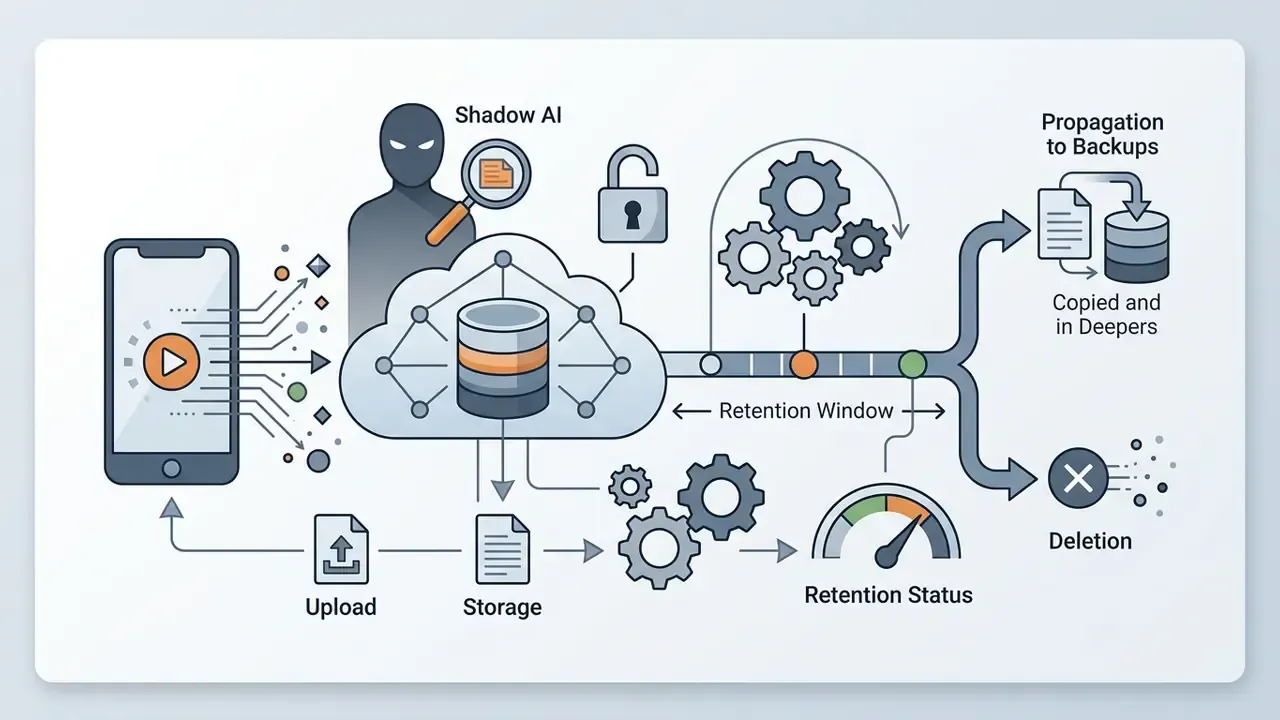
Free mobile AI video apps create an exposure that has nothing to do with output quality. Employees install them on personal devices, upload corporate media, and generate assets outside sanctioned tooling. That is Shadow AI in its most literal form: unmanaged inference on unmanaged endpoints with unmanaged data.
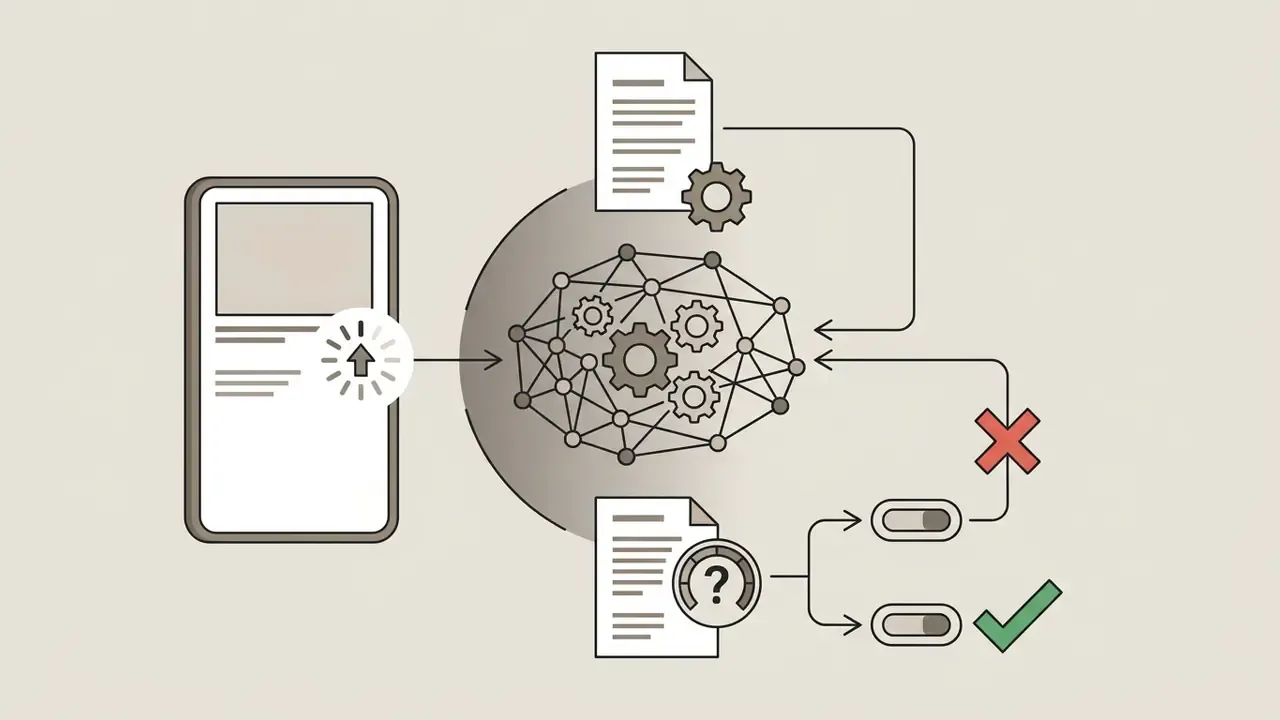
Where the data actually goes. Since diffusion models rarely run locally, every prompt, reference photo, and source clip travels to remote GPU clusters. The transfer is the risk surface. An unreleased product render, an org chart photographed on a whiteboard, a portrait of a named executive, pre-embargo packaging artwork, all become third-party-hosted data the moment someone taps generate.
Practical mitigation for teams. Publish a short allowlist of approved mobile generators with reviewed terms. Require that any client-confidential or pre-release asset be generated only inside enterprise-licensed pipelines. Use synthetic or already-public stand-in imagery for exploratory prototyping. Disable cloud photo-library sync inside creative apps, and prefer per-file media pickers over blanket gallery permissions. Free tiers are legitimate sandboxes for learning prompt craft. They are not appropriate environments for confidential media.
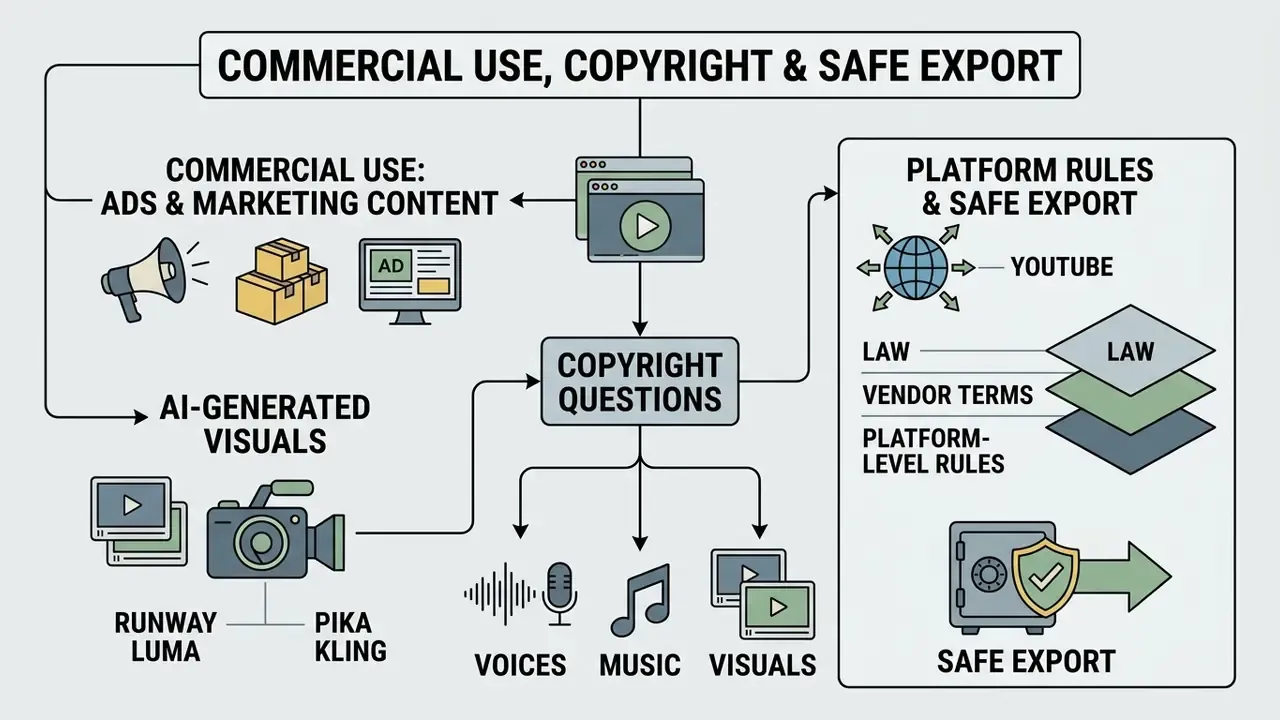
Commercial Use, Copyright and Safe Export of AI-Generated Videos
This section is general information and does not replace professional advice. It summarizes publicly documented legal and platform positions as of February 2026. Licensing terms change frequently, so verify current terms of service and consult qualified counsel before commercial deployment.
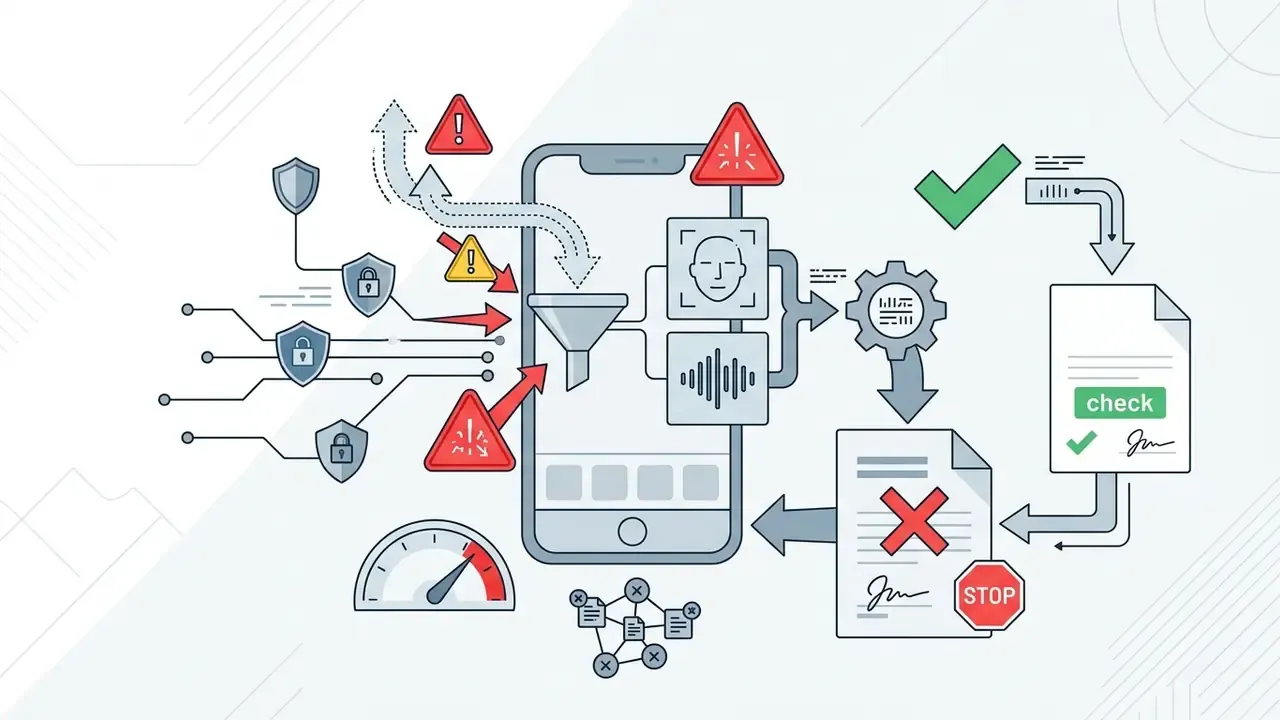
Commercial deployment of AI-generated video requires checking three separate layers: application terms of service, platform copyright rules, and regulatory disclosure mandates. Businesses using synthetic media in paid advertising, product listings, or monetized channels need all three to line up.
Using AI Videos for Ads, Marketing and Product Content
«Labeling AI content reduces engagement by weakening the parasocial bond between viewers and creators.»
That trade-off feeds directly into the audience-trust debate discussed in our note on why is ai art contested among creative professionals. For a centralized review of licensing frameworks across media tools, visit our AI Media Commercial-Use Hub.
Copyright Questions for AI Voices, Music and Visuals
Purely AI-generated visual and audio content created without substantial human creative input is generally ineligible for copyright protection under U.S. and international frameworks. The U.S. Copyright Office's 2026 copyrightability report holds that where AI determines the expressive elements, the output lacks human authorship, and only human contributions may be claimed. Its 2023 registration guidance already required applicants to identify and disclaim AI-generated portions of mixed works.
«Under EU law, purely AI-generated works without meaningful human creative input are unprotected by copyright and fall into the public domain.»
So a business cannot claim exclusive copyright over an unedited synthetic clip. A vendor licence does not manufacture authorship.
Using synthetic voices or digital likenesses that replicate recognizable real individuals requires explicit consent and licensing. The U.S. Copyright Office's 2026 digital-replicas report takes the position that individuals should be able to license their image and voice for digital replicas, but not fully assign those rights. Licensing considerations specific to synthesized speech are covered in our guide to AI voice generators.
«The EU Digital Single Market Directive permits text and data mining for scientific research with lawful access and no explicit rightholder reservation.»
Regulatory frameworks, including state-level synthetic performer disclosure laws and platform moderation policies, mandate visual labels on commercial advertising containing AI-generated human likenesses. New York's synthetic-performer requirement mandates conspicuous disclosure when AI-generated synthetic performers appear in commercial advertising disseminated in the state, taking effect in June 2026.
«Deployers creating deepfakes must clearly disclose that the content has been artificially generated or manipulated.»
Platform-level rules add a third layer beyond law and vendor terms:
- YouTube requires creators to disclose realistic altered or synthetic content in YouTube Studio, shows "altered or synthetic" labels to viewers, and accepts removal requests for synthetic media simulating an identifiable person's face or voice. Music partners can request removal of AI music mimicking an artist's unique singing or rapping voice.
- Meta applies "Made with AI" labels to AI-generated video, audio, and images based on detection signals or user disclosure.
- TikTok defines AI-generated content to include images, video, and audio generated or modified by AI, and requires disclosure for fully AI-generated or significantly AI-edited content. TikTok Shop separately prohibits non-real-time verbal interaction, including AI-generated voices, prerecorded audio, and radio-style narration, in shopping livestreams, with removal and account penalties.
- Google Ads permits text or visual labels placed directly inside image and video ad creatives generated or modified with AI, which supports compliance with emerging transparency rules.
Pre-Export Compliance Checklist
Limitations, Open Questions and a Safe Next Step
Some of what you just read will age badly, and it is fairer to say so than to pretend otherwise.
What is not settled. No independently verified benchmark for mobile render latency exists across these apps; vendor claims range from seconds to minutes. No shared test dataset ranks text, image, and video inputs head to head on mobile. Free-tier quotas move without notice, sometimes weekly, and regional differences are rarely documented. Training opt-out language is inconsistent, and several vendors do not state whether an opt-out reaches uploads already processed.
What our own numbers mean. The 42% regeneration-reduction figure and the 35% non-commercial-licence audit finding both come from internal instrumentation and engagement records. They illustrate a direction of travel. They are not published research, and they should not be quoted as industry averages.
A modest next step. Pick one free app, generate five clips from synthetic or already-public source material, and log four fields for each: tool, model version, prompt, account. Then read the licence clause that covers your intended use, and screenshot it. That is roughly an hour of work, and it produces the first reproducible evidence trail most teams never build. Autonomy can come later. Evidence comes first.
FAQ About Free AI Video Generator Mobile Apps
Is There a Free AI Video Generator App Link for Mobile?
Official download links live in the Apple App Store for iOS and the Google Play Store for Android. Apple describes the App Store as a trusted place to safely discover and download apps, and its device-security guidance advises dismissing prompts to install applications directly from websites. Avoid third-party APK files from unverified sites, because sideloading is the fastest route to a compromised device. Where a vendor links downloads from its own site, as Adobe does for Firefly, check that the link redirects into the official store rather than serving a package directly.
Can I Download an AI Video Generator for PC?
Yes. Many mobile platforms also run as browser applications on desktop with no local install. Google's Gemini video generation works after sign-in either in a browser or in the mobile app, with account state carrying across devices, and browser-native generators such as Renderforest and InVideo explicitly require no download or local GPU. Developers and desktop creators can alternatively run Android apps on a PC through an Android Virtual Device in Android Studio's official emulator, or integrate cloud models into desktop editing workflows. Developers seeking direct documentation can examine our api guide for model implementation details.
Which Input Works Better: Text, Image or Existing Clip?
It depends on which constraint you cannot lose:
- Existing video clips (video-to-video): strongest structural control for style transfer, background replacement, relighting, object removal, or filters on pre-recorded footage. Video-to-video applies the composition and style of a prompt or image to the structure of the source clip, preserving original motion.
- Image inputs (image-to-video): highest visual consistency and layout control, ideal for product marketing, portrait animation, and brand continuity. Reference images are also the mechanism for character locking across multi-shot sequences.
- Text inputs (text-to-video): maximum creative freedom for entirely new scenes, but demanding on prompt precision and weakest on structural control. No single head-to-head mobile benchmark ranks these inputs across all tools. The ordering reflects documented conditioning strength per input type, not one shared test dataset.
Are Free AI Videos Watermark-Free?
Rarely. Most free tiers stamp a watermark on export. Kling, PixVerse, and InVideo all document watermarked free output, with clean exports reserved for paid memberships. A small number of apps advertise watermark-free 1080p on free or trial access, and at least one iOS generator documents export up to 1080p without a watermark. Verify before building a campaign around free output, and never crop the watermark out: cropping changes the aspect ratio and usually breaches the licence that permitted the download.
Do Free Apps Train Their Models on My Uploads?
Some do. Consumer terms often reserve rights to use submitted content for service improvement, and training opt-out is frequently a paid or enterprise feature rather than a free-tier one. Before uploading anything confidential, unreleased products, internal documents, identifiable colleagues, locate the retention and training clauses, check for an opt-out toggle in settings, and default to synthetic or already-public stand-in media for free-tier experiments.
How Long Does a Mobile Render Take?
It varies with model, resolution, queue load, and plan priority. Vendor claims range from seconds to minutes for short clips and extensions, and no independently verified benchmark for mobile render latency was located during this review. Free-tier users share lower-priority queues, so waits stretch when many people submit at once, while paid tiers typically receive priority processing. Plan schedules around worst-case queue times, not marketing copy.
Appendix A: Superseded Passages
Retained for transparency and version traceability. The main text above contains the current, corrected versions.
- Prior source attributions replaced with verifiable citations "(CogVideoX Research Report, 2024)", "(UI2V-Bench Study, 2025)", "(Google AI Research, 2026)", "(Journal of Religious Education, 2026)", "(Survey of Video Diffusion Models, 2026)", "(U.S. Copyright Office AI Governance Report, 2026)", "(New York Synthetic Performer Act, 2026)". Each now carries a named publication, year, and resolvable URL, or is reattributed to the primary regulatory instrument.
- Prior unattributed claim "Advanced generation architectures, including Google Veo 3.1, incorporate natively synthesized audio and sound effects aligned with visual actions (Google AI Research, 2026)." Reformulated in the body as a product-documentation statement about Veo 3.1's eight-second clips with natively generated audio, without a pseudo-citation.
- Prior structural note the shared cloud-GPU explanation has been consolidated into one mobile-architecture section, with platform-specific Android and iOS subsections retained so no platform detail is lost.
- Prior unsourced metrics retained with provenance labels the 42% regeneration-reduction figure and the 35% non-commercial-licence audit finding are now explicitly labeled as internal testing and engagement-record data, rather than presented as published research.
Further reading: standardized terminology across mobile creation tools is collected in our AI Media Glossary.