Modern AI video production relies on latent diffusion pipelines and diffusion-transformer architectures that map visual frames, temporal motion, and sound into unified latent spaces. Across enterprise, marketing, and media teams, creating AI videos has shifted from an experimental technique to a structured workflow governed by prompt engineering, credit management, and commercial licensing checks.
One note on audience before we start. If you sit in compliance, model risk, or internal communications at a bank or a mature fintech, the interesting part of this topic is not the visual novelty. It is the control question: who approved the prompt, where did the source assets go, and can you reconstruct the decision six months later during an audit?
Last updated: August 2026 · Pricing, model versions, and API limits in this guide reflect vendor documentation available at that date. AI platform licensing terms change quarterly, so verify current terms before signing a contract.
How AI Video Generation Works
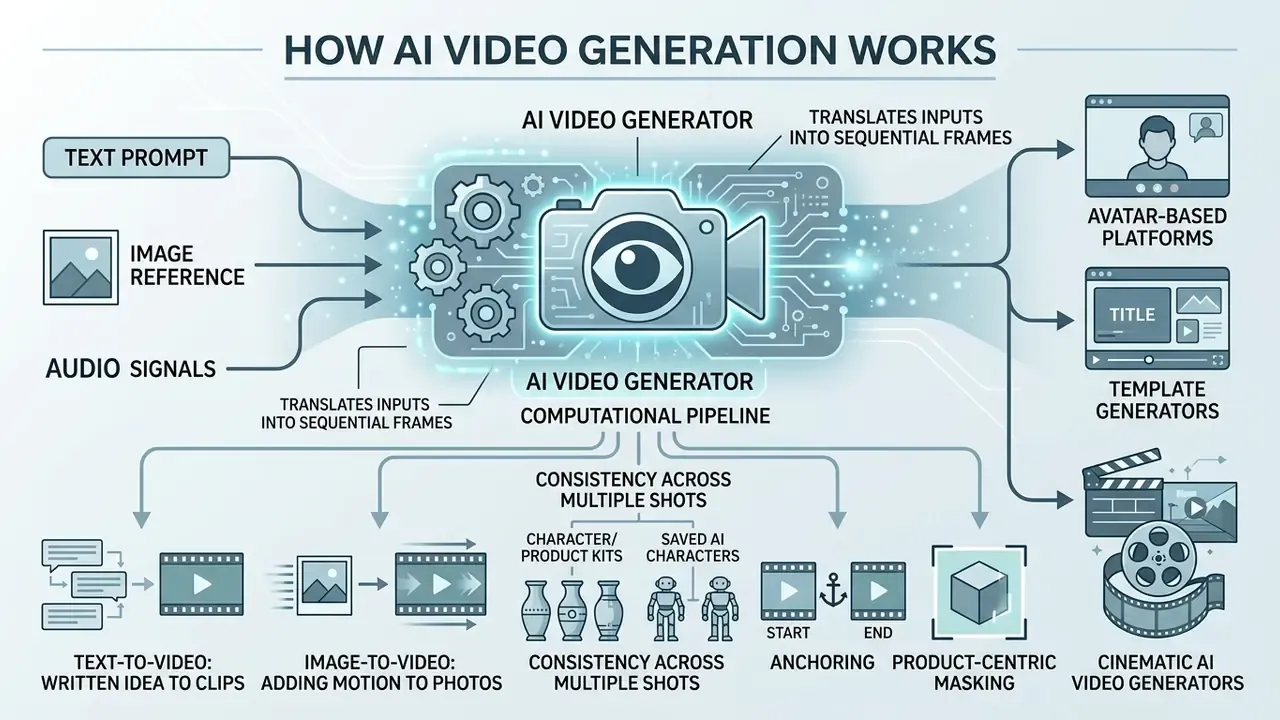
People generate AI videos through computational pipelines that translate text, visual inputs, or audio signals into sequential image frames with continuous temporal motion. Most modern tools use diffusion-based neural networks or diffusion transformers (DiTs) trained on large datasets of video-text pairs to predict frame-to-frame movement.
«Transformer-based diffusion architectures have surpassed GAN systems in temporal consistency and controllability of video generation.»
These models process inputs by conditioning noise reduction across spatial and temporal dimensions simultaneously. Research in video diffusion modeling shows that latent-space compression reduces computational overhead while preserving frame resolution and motion consistency. That is the engineering reason a 1080p clip can now render in under a minute on a shared queue.
«Latent models are trained on large datasets and generate high-resolution video at lower computational cost than pixel-space systems.»
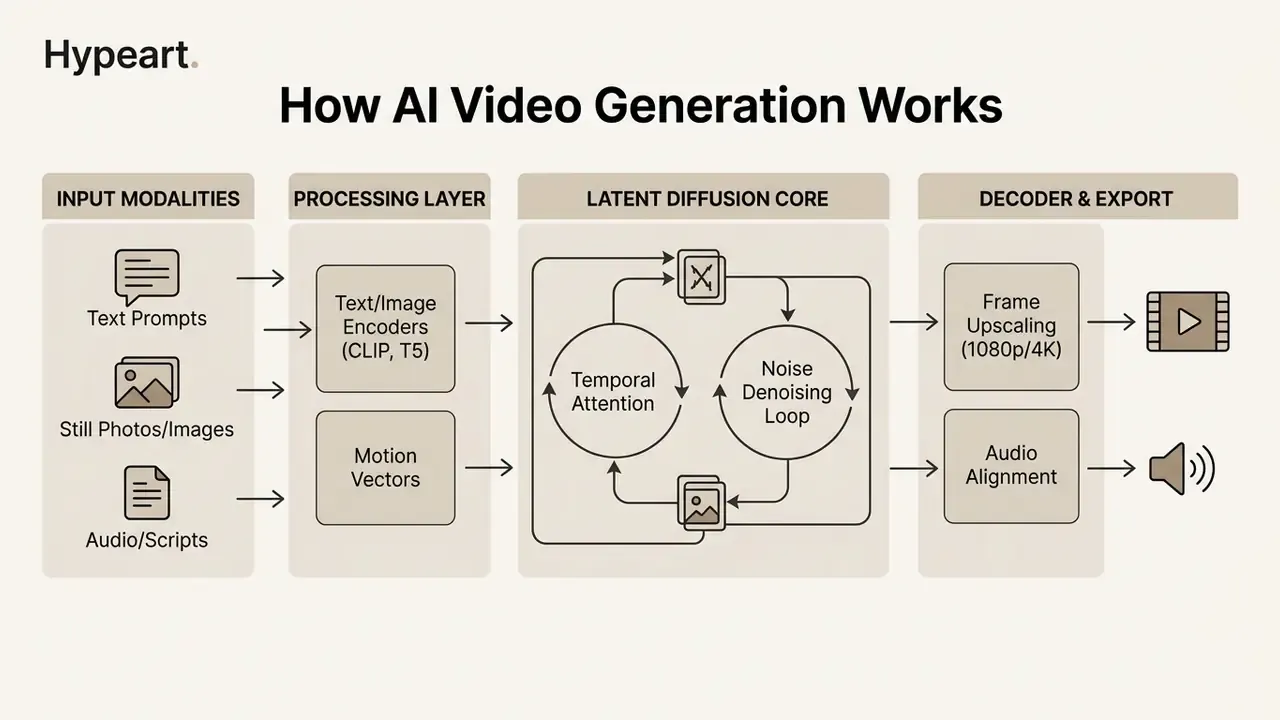
Audio-aware systems extend this pipeline with a second modality branch. Diffusion-transformer models such as AV-DiT and UniForm apply modality-specific conditioning or task tokens so that video frames and sound are denoised jointly rather than stitched together in post-production. That is why native-audio generation now appears as a first-class feature in frontier video models, and why music generated separately (for example with a suno ai song workflow) is increasingly a fallback rather than the default.
Text-to-Video: Turning a Written Idea Into Clips
Text-to-video generation transforms natural language descriptions into complete video clips by parsing text prompts into visual tokens and spatial-temporal features. The underlying model evaluates the prompt structure to infer subject details, background settings, lighting, and camera movement across time.
Advanced systems utilize large language model (LLM) encoders combined with cross-attention mechanisms to align descriptive words with frame transitions. For instance, dynamic prompt weighting balances static scene elements with active motion vectors at each diffusion timestep to prevent visual distortion. Published implementations of this technique use CLIP-based alignment scoring plus temporal smoothness constraints, although the specific weighting schedules described in vendor blogs still require peer-reviewed verification. When teams need to generate video content directly from conceptual scripts, text-to-video AI tools provide the fastest path from raw written ideas to visual drafts.
Image-to-Video: Adding Motion to Photos and AI Images
Image-to-video generation animates static photos, graphics, or synthetic images by applying motion vectors and optical flow fields while retaining original visual details. Users upload a starting image, and the video generator predicts how elements within that frame should move across subsequent frames.
Control mechanisms in image-to-video workflows rely on noise warping, rigid-body physics simulations, and camera trajectory parameters. Models like PhysGen infer physical properties such as elasticity, friction, and gravity from a single photograph to produce plausible physical motion (ECCV, 2024).
«OSV generates high-quality video from an image in a single diffusion step, reaching FVD 171.15 versus 184.79 for eight-step AnimateLCM.»
This modality gives creators higher visual control over subject identity compared to pure text prompts, which makes it suitable for brand assets and product photography. Teams comparing image-to-video AI tools should evaluate first-frame fidelity, motion-scale controls, and whether the platform preserves logo geometry during motion. Stylized inputs behave differently again: an illustrated still, say something close to studio ghibli style ai images, tolerates loose motion far better than a product photo, because viewers do not expect literal physics from a painted frame.
Character and Product Consistency Across Multiple Shots
The most common failure in multi-shot AI video is identity drift: a presenter's face, a mascot, or a product label changes between scenes. Three control methods reduce this drift.
- Image reference and start/end frame anchoring.Supply the same reference image as the first frame of every clip, and where the model supports it, define the last frame as well. Kling's motion-control documentation notes that a reference clip must be a single continuous shot without cuts or camera changes to preserve frame continuity. The same discipline applies to reference stills.
- Saved AI characters, avatars and LoRA-style kits.Platforms such as Kapwing and HeyGen let you create and store an AI character, then reuse that character across different scenes, settings, and aspect ratios without regenerating the appearance for each shot. HeyGen's avatar library documents 1,100+ realistic avatars and photo-to-avatar creation from a single front-facing image, which fixes presenter identity across an entire campaign.
- Product-centric masking.For commerce assets, mask the product region and generate motion or a new background only around it. This keeps packaging text, color codes, and proportions intact, and those are exactly the elements most likely to trigger brand-compliance rejections.
A practical rule for production teams: lock identity assets (character kit, product plate, brand color hex values) before generating a single second of footage. Retrofitting consistency costs more credits than planning it. I have watched a team burn a week of budget rediscovering that.
Avatar, Template and Cinematic AI Video Generators
Avatar, template, and cinematic AI video platforms serve distinct production needs depending on whether the priority is script delivery, standardized editing, or film-style visual rendering.
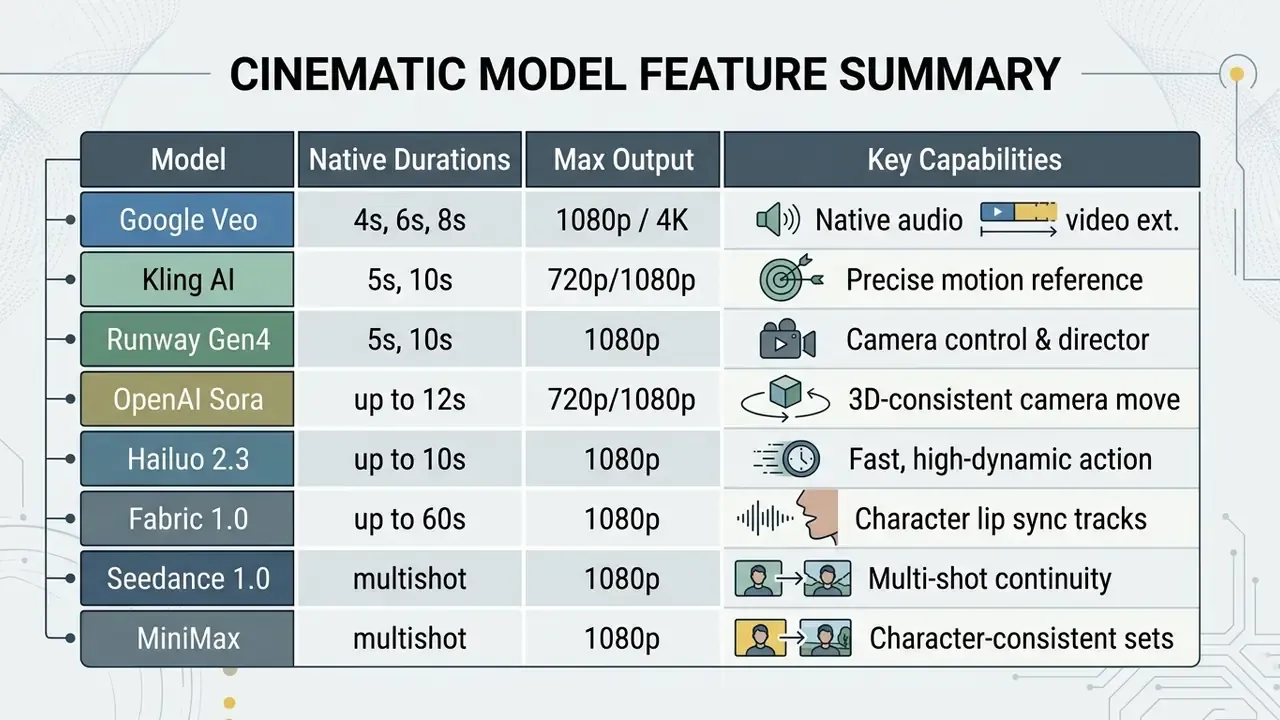
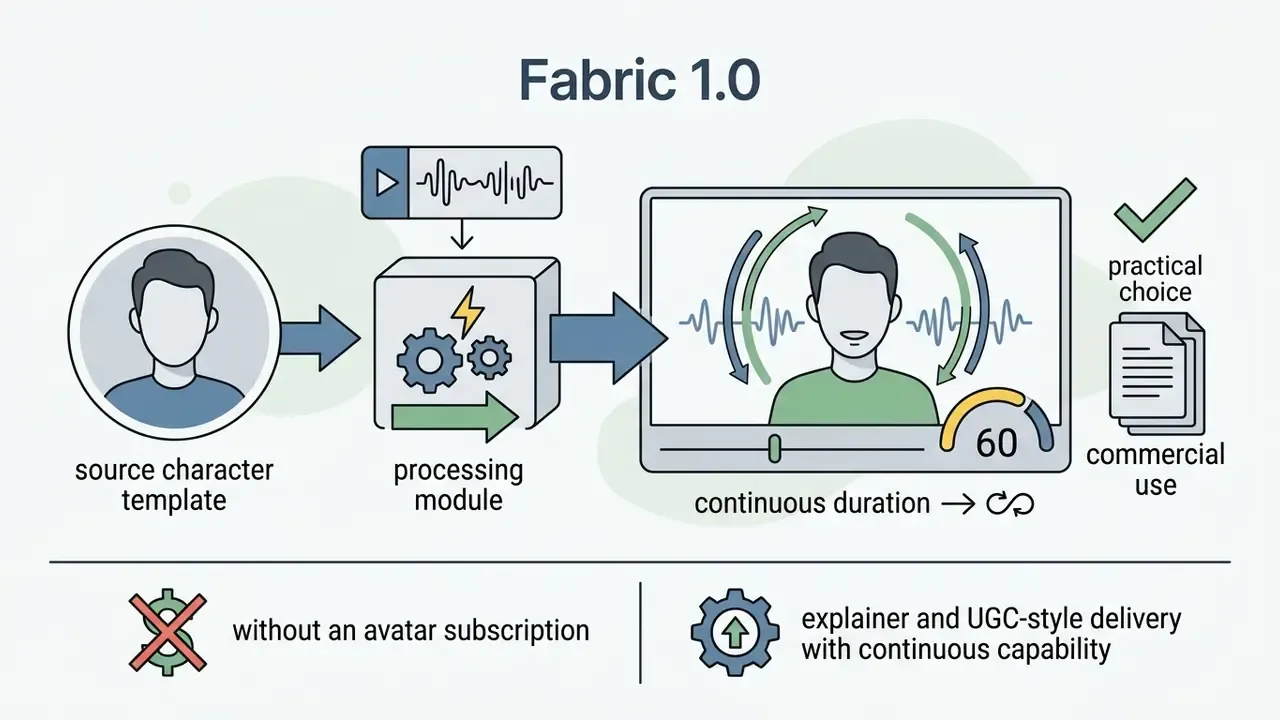
- Avatar-based platformsutilize synthetic digital humans to deliver written scripts through lip-synced speech and natural facial expressions, eliminating the need for physical studio camera setups. D-ID's speaking-portrait workflow accepts an image plus text or audio and returns a reenacted talking video, while Fabric 1.0-class models animate a single character image with realistic lip sync for tracks of up to 60 seconds. Enterprise buyers usually shortlist a synthesia ai video deployment alongside HeyGen when localization volume is high.
- Template-based video editorspackage avatar footage, text overlays, pre-built layouts, and background graphics into structured timelines for rapid corporate communication and marketing. These tools also convert documents and PDFs into scene sequences, which suits recurring internal updates such as quarterly policy refreshers.
- Cinematic AI video modelsgenerate shot-level cinematic scenes with continuous 3D camera motion, realistic lighting, and complex physics directly from descriptive text prompts.
| Creation Modality | Primary Source Material | Output Format & Style | Level of Scene Control | Primary Business & Creative Use Cases | Typical ROI Signal |
|---|---|---|---|---|---|
| Text-to-Video | Written prompts, text scripts, or text documents | Short clips (4–15 seconds) or scene extensions | Medium control over exact framing; high control over general narrative concepts | Creative storytelling, rapid visual prototyping, B-roll generation, social media concept drafts | Replaces stock-footage licensing and location shoots for concept and B-roll needs |
| Image-to-Video | Still photographs, design files, or AI-generated graphics | Motion-animated video clips retaining base image composition | High control over visual identity and subject appearance; medium control over trajectory | Product showcases, animating static brand photography, visual effects, stylized loops | Turns an existing product-photo library into paid-social video creative |
| Avatar & Template | Text scripts, voice recordings, and brand style kits | Presenter-style talking-head videos with structured visual overlays | High control over layout, branding, and speaker script; low control over dynamic background motion | Enterprise training, product explainer videos, internal communication, automated marketing updates | Removes studio day-rates and re-shoots for policy or version updates |
| Hybrid (Generate + Edit) | Generated clips plus filmed footage, voiceover, captions | Multi-scene finished video at 1080p/4K | Highest overall control; editing layer fixes generation defects | Campaign films, YouTube long-form, localized ad variants | Highest output quality per credit because failed takes are salvaged in the edit |
A regional financial services firm needed to standardize corporate compliance training across 1,200 employees without incurring recurring video studio production costs. By deploying an avatar-based template platform paired with verified script controls, the internal communications team converted 45 policy documents into standardized video modules within three weeks. This transition reduced video production costs by 68% while maintaining mandatory compliance audit trails for internal training completion. (Figures reflect internally reported project metrics from a single deployment. They are directional rather than an industry benchmark and require independent verification before use in a business case.)
The AI Video Creation Process: From Idea to Published Video
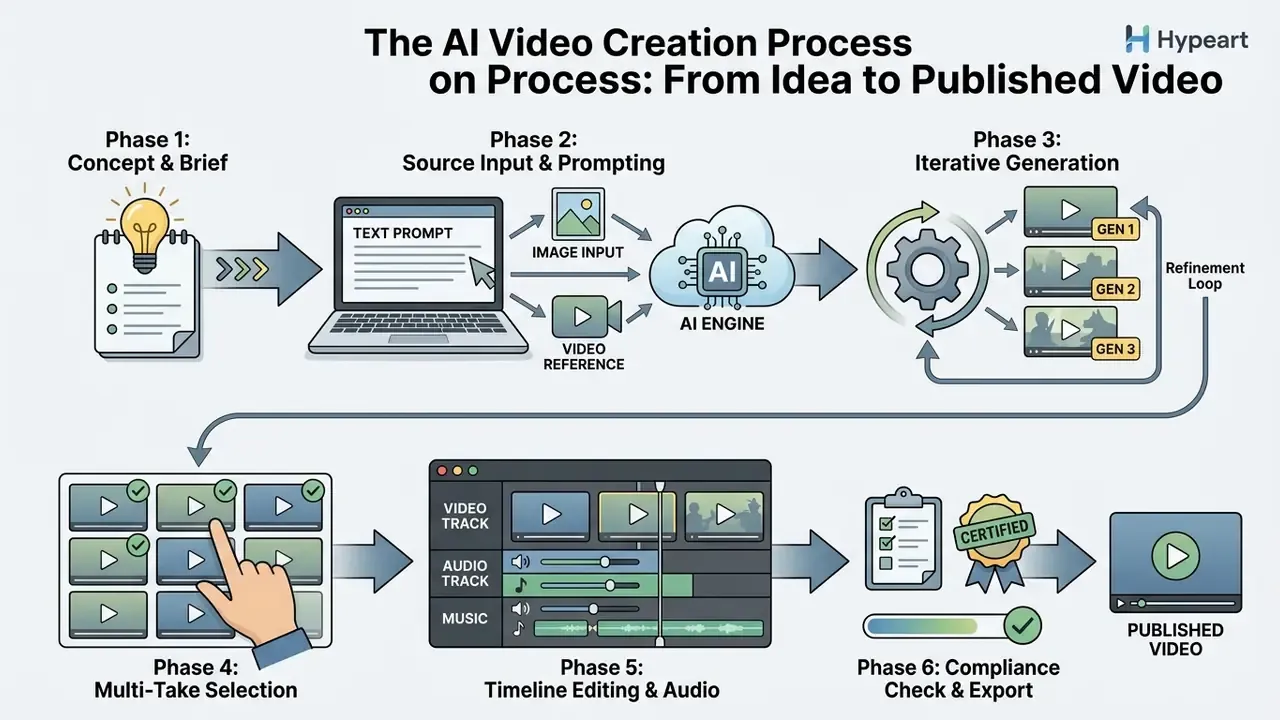
The end-to-end process of making an AI video follows a structured six-stage pipeline: defining the project brief, writing target prompts, generating candidate clips, editing visual sequences, integrating synchronized audio, and exporting compliant media files.
By standardizing this creation workflow, creators and production teams minimize wasted generation credits and avoid inconsistent visual outputs.
«T2VBench includes over 1,600 prompts and 5,000 videos rated across 16 temporal dimensions, including motion smoothness and event order.»
Because temporal quality is measured across many independent dimensions, a single generation almost never satisfies all of them at once. Which is precisely why iterative, multi-take production is the norm rather than a sign of a weak prompt.
Define the Goal, Format and Source Material
Successful video creation starts by establishing a clear production goal, selecting target platform aspect ratios, and preparing high-quality reference inputs. Creators must determine whether the final asset serves marketing, product demonstration, internal training, or social media channels before opening an AI tool. A workable brief states one measurable objective, the target audience, and the exact deliverable list, not a vague ambition to "make a video."
Selecting the aspect ratio prior to generation is critical:
- 16:9 widescreen (1920×1080) for YouTube, corporate websites, and widescreen presentations.
- 9:16 vertical (1080×1920) for TikTok, Instagram Reels, and YouTube Shorts.
- 1:1 square (1080×1080) for specific social feed placements and digital ad displays.
Source material preparation involves compiling brand logos, high-resolution visual references, approved script text, and audio voiceover files. Brand guideline requirements matter here too: lower-third name captions should remain on screen long enough to be read twice, which affects scene duration planning before generation begins. Establishing these parameters early prevents formatting errors during final timeline assembly. Teams testing the approach before committing budget often start with free AI video generators to validate format and pacing decisions, and model the credit burn with AI Media Calculators before requesting a purchase order.
Workflow: Turning Text Content Into a Video Script
Most AI video projects do not start from a blank prompt. They start from an existing article, product page, press release, or ad swipe file. The following four-step transformation converts written copy into a generation-ready script.
- Extract the hook. Compress the source text into one sentence that carries emotion, tension, or a concrete claim. Strong social copy rarely sells the product directly. Sports and FMCG brands build engagement by motivating or amusing the reader first, then routing attention to the offer. Keep that hierarchy in the opening line.
- Format for News-to-Video or UGC pacing. Break the text into semantic blocks of 3–5 seconds, with no more than 15–20 spoken words per shot. For breaking-news formats, pull the freshest facts into the first two blocks. Trend-driven platforms reward recency over polish.
- Generate B-roll prompts per block. For each text block, write one visual prompt using the formula
[Subject] + [Action] + [Setting], then add camera and lighting terms. One block equals one clip equals one generation job. That mapping is what keeps credit spend predictable. - Humanize the narration. Pass the finished script through a naturalness pass (contractions, sentence-length variance, breath points) before sending it to text-to-speech or an avatar. Synthetic delivery fails most often because of written-not-spoken syntax, not voice quality. Voice selection matters equally: compare accent, pacing, and language coverage in AI voice generator options before locking a narrator.
Swipe-file practice: keep a digital folder of high-performing social copy, ad screenshots, and competitor video hooks. Copywriters have collected clippings for decades. The modern equivalent is a shared board that feeds prompt libraries and shortens the concept phase from days to hours.
Generate Multiple Clips and Select the Best Result
Creating AI videos requires generating multiple take variations for each scene and evaluating candidate clips against storyboards or brand requirements. Because diffusion models operate stochastically, generating three to five takes per prompt ensures sufficient visual options for final editing.
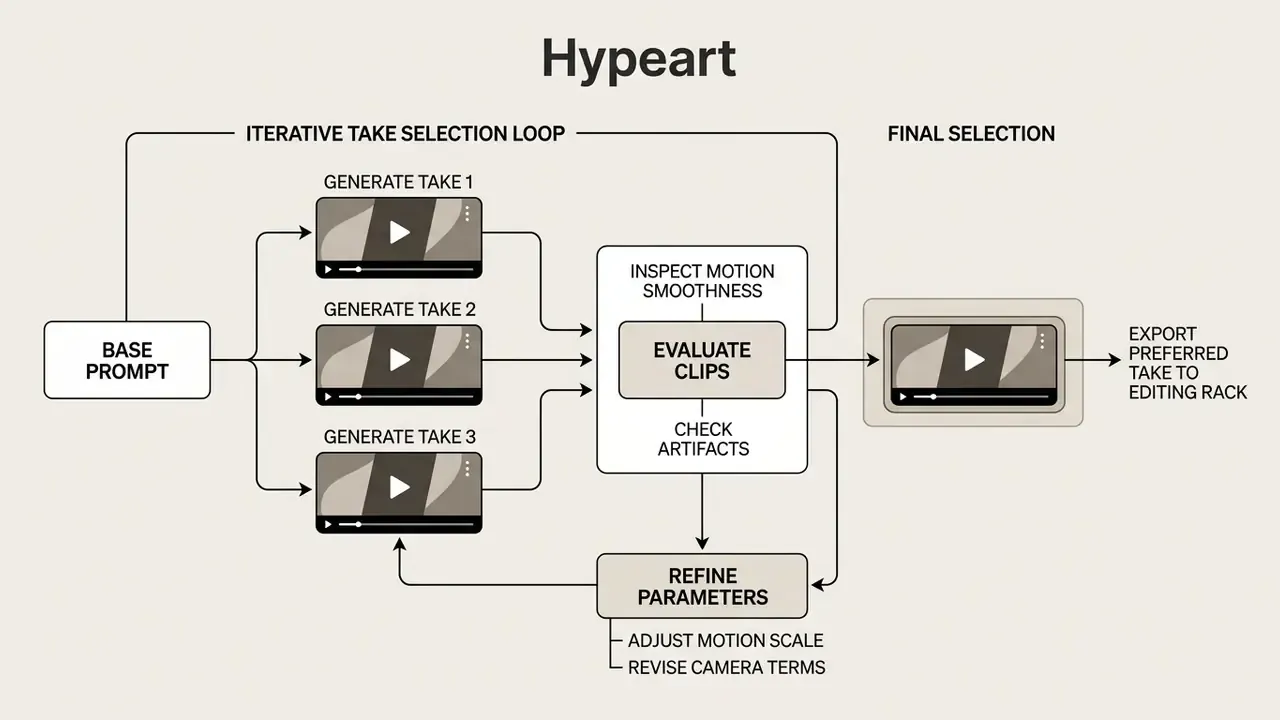
During evaluation, creators inspect generated clips for visual artifacts, unexpected background warping, frame rate dropping, and temporal distortion. Selecting the cleanest visual takes across multiple generations leads to a more coherent final montage than relying on a single output run. Computational-editing research on dialogue-driven scenes formalizes exactly this behavior: the system chooses the most appropriate clip from a set of input takes for each line, guided by film-editing idioms rather than by which take rendered first.
Small habit that pays off: name every take with the prompt version and seed. When a regulator or a brand lead asks why a specific frame looks the way it does, guessing is not an answer.
Edit, Add Audio and Export the Final Video
Finalizing an AI video involves timeline editing, integrating clear audio tracks, generating synchronized captions, and configuring proper export settings. Creators import selected clips into timeline editors to trim excess frames, apply color adjustments, and insert smooth visual transitions between scenes. Independent creators working without a paid suite can assemble the same sequence in free video editing software, while animated inserts and kinetic typography can be produced in a dedicated animation maker.
Audio integration requires combining realistic AI voiceovers or human recordings with background music and sound effects. For accessibility compliance and viewer retention, Web Content Accessibility Guidelines (WCAG 2.2) require synchronized captions for prerecorded video content.
«WCAG 2.2 requires synchronized captions for all prerecorded video content, including key non-speech audio cues.»
Captions must clearly represent spoken dialogue and key non-speech audio cues without obscuring essential visual information on screen. Note the distinction the W3C draws: translated subtitles are not an accessibility substitute for captions, because captions also convey music, laughter, sound effects, and speaker identification. Once timeline assembly is complete, the final video is exported in standard formats such as MP4 (H.264/HEVC) at target resolutions. For web delivery at scale, a video compressor reduces file size before upload without a visible quality drop.
AI Post-Processing and Smart Editing
AI no longer stops at generation. Four editing technologies now handle the cleanup work that used to require a specialist, and they apply equally to generated footage and to filmed material.
«If you're making UGC ads and not using Eye Contact Correction and Noise Reduction, you're missing out on ROI.» Sebastian Schurgers, Head of Growth Marketing, Gronda (VEED customer testimonial, 2026).
- Eye Contact Correction.Automatically reorients the presenter's gaze toward the lens, which raises perceived directness in UGC-style ads and talking-head explainers. Practitioners treat it as a conversion lever, not a cosmetic filter:
- AI Noise Reduction and Audio Clean-up.Isolates the vocal track from room noise, HVAC hum, and street sound, producing near-studio audio from rough recordings. Because audio quality drives retention more than resolution does, this is usually the highest-return single click in the pipeline.
- Transcript-Based Editing.The platform transcribes the audio, and deleting a word, a filler sound, or a pause in the text removes the corresponding frames from the timeline. This turns rough-cut editing into a text task, and it is why transcript-first editors are favored by podcast and webinar teams.
- AI Inpainting and Object Removal.Removes artifacts, stray objects, or unwanted logos from generated frames without re-running the whole clip. A direct saving on generation credits, since one bad element no longer invalidates an otherwise usable take.
A fifth capability increasingly bundled with these tools is automated reframing: converting a 16:9 master into 9:16 and 1:1 crops with subject tracking, so one edit session yields creative for every placement. For channel-specific publishing workflows, see the YouTube video editor guide, and for setup problems that stall a first export, the AI Media Support and Troubleshooting hub covers the usual culprits.
How to Write AI Video Prompts That Produce Better Results
Writing effective AI video prompts requires structuring descriptions in a predictable order that specifies the main subject, continuous action, environmental setting, camera movement, and aesthetic style. Generative video tools process structured prompts more accurately than vague or conversational queries.
A standardized prompt syntax minimizes misinterpretation by the video generation model and reduces unnecessary generation iterations. Still, no current model handles every compositional category equally well, so prompt structure should be paired with realistic expectations about which compositions the model can render.
«T2V-CompBench evaluated 23 models on 1,400 prompts across seven compositional categories; no single model performed well across all of them.»
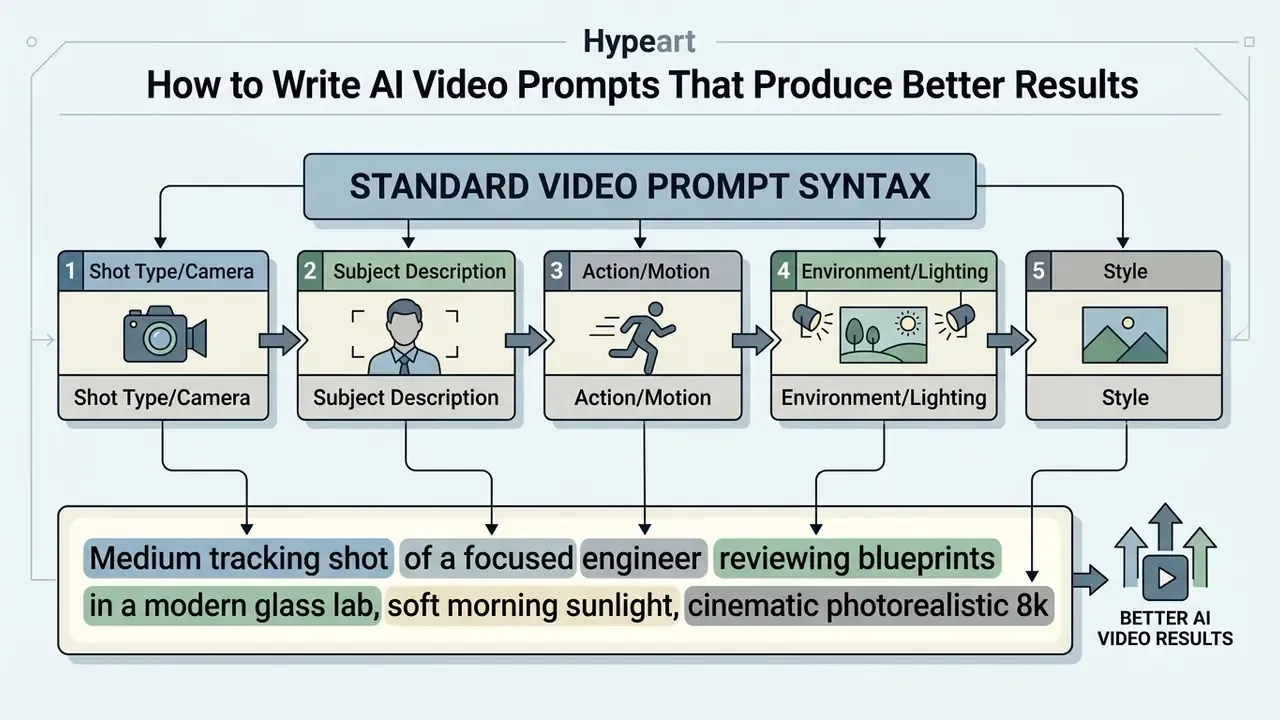
Describe the Subject, Action, Setting and Camera Motion
To achieve accurate visual outcomes, video prompts must contain explicit details regarding the primary subject, specific physical actions, surrounding environment, lighting conditions, and exact camera behavior.
When framing camera movement, precise technical terminology guides the video model effectively:
- Pan Horizontal rotation of the camera from a fixed axis (e.g., "slow pan left across the skyline").
- Tracking Shot Continuous movement of the camera alongside a moving subject (e.g., "tracking shot following the vehicle down the street").
- Zoom Changing lens focal length to move closer or further from the subject (e.g., "slow zoom in on the main product assembly").
- Low-Angle / High-Angle Establishing camera elevation relative to the horizon to convey scale or emphasis.
- Dolly In / Out Physically moving the camera body toward or away from the subject, which changes perspective rather than only magnification.
- Static Shot An explicit instruction to hold the frame, useful when unwanted drift keeps appearing in takes.
Specifying singular physical movements rather than multiple conflicting actions keeps the model focused on producing smooth temporal transitions. Camera-prompt guidance from frontier vendors follows the same ordering logic: shot size, then angle, then movement with direction and speed, then subject and action, then lens and lighting.
Specify Creative Style, Visual Quality and Format
Prompts should clearly define visual aesthetic styles and technical parameters to match the intended publication medium. Common creative styles supported by generative video platforms include:
- Cinematic Photorealism: Mimics real-world feature films with realistic depth of field, natural lighting, and subtle camera motion.
- 3D Render & Animation: Emulates modern stylized 3D graphics with clean surface textures and controlled lighting.
- Sketch and Line Art: Converts visual concepts into hand-drawn pencil sketches, storyboard layouts, or architectural line drawings.
- Commercial Product Style: Focuses on bright, balanced lighting, macro close-ups, and clean studio backgrounds.
- Anime, Retro and Editorial Looks: Stylized presets offered by all-in-one platforms for trend-led social content where realism is not the goal.
Explicitly describing visual details such as "50mm lens," "golden hour illumination," or "minimalist studio setting" yields cleaner outputs than using generic buzzwords like "photorealistic" or "ultra-HD."
Refine the Prompt Instead of Expecting a Perfect First Take
Improving generated videos involves an iterative feedback loop where creators review initial clip outputs, isolate specific defects, and adjust prompt syntax systematically. Instead of rewriting an entire prompt after an unsatisfactory take, creators should adjust one variable at a time, such as camera speed, lighting terms, or action verbs.
Multimodal editing tools also allow users to refine existing video clips using text commands or visual masks. Documented in-context video editing systems accept a combination of reference images, source video, and text to perform swap, add, delete, and restyle operations, though the specific 2025 implementation claims circulating in vendor material still lack an independently verifiable published source.
«Manipulating prompt embeddings using gradients from image space optimizes quality metrics without manual trial-and-error rewording.»
Many all-in-one platforms expose this refinement layer as a natural-language command box over the finished timeline. Typical commands and their effects:
| Natural-Language Command | What the System Changes | When to Use It |
|---|---|---|
| "Change voiceover accent to British female" | Re-synthesizes narration with a new voice profile | Localizing one master video for a second market |
| "Delete scene 3 and re-balance the audio track" | Removes the scene and re-times music and narration | Cutting a weak generated take without a full re-render |
| "Add animated captions with brand color #FF5733" | Generates styled, synchronized captions | Brand-compliant social exports |
| "Extend the last shot by two seconds" | Triggers scene extension on models that support it | Fixing an abrupt ending before the CTA |
| "Replace the background with a bright studio set" | Regenerates background while keeping the subject | Reusing one presenter take across campaigns |
Fact Check: The Probabilistic Nature of AI Video Generation
Generative AI systems are probabilistic models that sample outputs from learned statistical distributions.
«Diffusion models are trained to reverse a noise-adding process; at inference they sample from learned distributions, which precludes deterministic output.» Video Diffusion Models: A Survey, Melnik et al., arXiv (2024). https://arxiv.org/abs/2405.03150
Because generation samples from a probability distribution at every denoising step, submitting the same prompt and parameters twice is not expected to return identical frames unless the platform exposes and fixes the random seed. Final clip quality depends on prompt clarity, underlying model seeds, input image characteristics, and post-generation editing.
Which AI Video Tools and Models Should You Use?
Choosing the right AI video generator depends on specific project constraints, such as required visual realism, avatar synthesis needs, timeline editing capabilities, or budget limits. Modern platforms range from specialized research models to integrated commercial web suites.
When evaluating enterprise tools, organizations assess criteria including data privacy protections, auditability, system integrations, and commercial licensing terms. Buyers who want a feature-by-feature ranking can start with a comparison of the best AI video generators, review the wider set of AI Media Comparison Matrices, and then validate the shortlist against internal security requirements.
Models for Realistic and Cinematic AI-Generated Video
High-end video generation models focus on delivering photorealistic visual quality, complex physical motion, and multi-second narrative continuity.
«Distilling a 50-step diffusion model into a 4-step autoregressive one enables streaming generation at 9.4 frames per second with a VBench-Long score of 84.27.»
- Google Veo: Google's frontier video model generates high-definition clips with native audio generation, frame-specific directing, and scene extension capabilities. Documented clip lengths are 4, 6, or 8 seconds, with 8 seconds required for 1080p and above and when reference images are supplied. Technical specifications support 24 FPS output at 16:9 and 9:16 aspect ratios, up to 4K, and up to four candidate videos per prompt. Veo also parses cinematic vocabulary such as "time-lapse," "aerial shot," and "low angle."
«Google Veo generates 1080p video and understands cinematic terminology including time-lapse, aerial and low-angle shots.» Google AI for Developers: Veo Video Generation Documentation (2026). https://ai.google.dev/
Development teams evaluating programmatic access should review the Google Veo API implementation guide for per-second cost and quota planning, and the broader api documentation index for endpoint patterns across vendors.
- Kling AI: Known for detailed physical motion replication, Kling offers a dedicated Motion Control mode that mirrors movement, facial expressions, and camera trajectories from uploaded reference videos with minimal character distortion, with 720p and 1080p quality modes and clip lengths of 5 or 10 seconds.
«Hybrid LanDiff (5B parameters) scored 85.43 on VBench T2V, surpassing Sora (84.28) and the 13B Hunyuan Video on overall quality.» LanDiff: Integrating Language Model and Diffusion Model for Long Video Generation, arXiv (2025). https://arxiv.org/abs/2503.14611
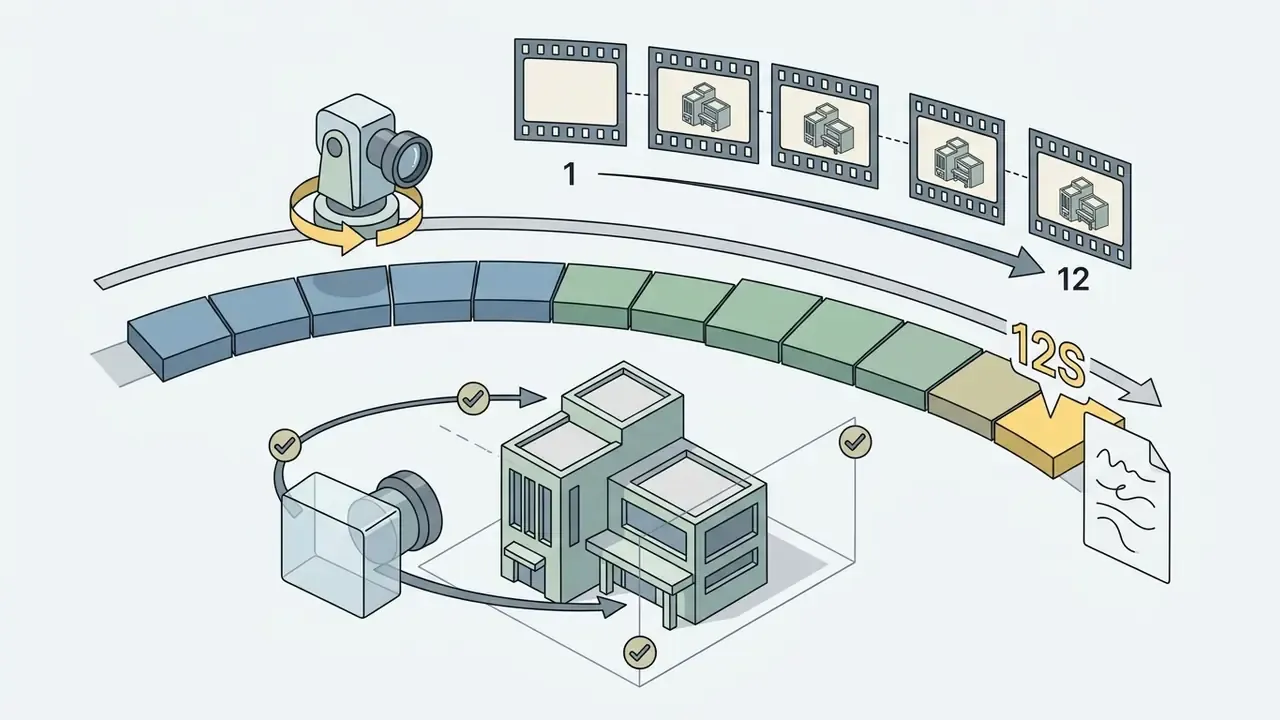
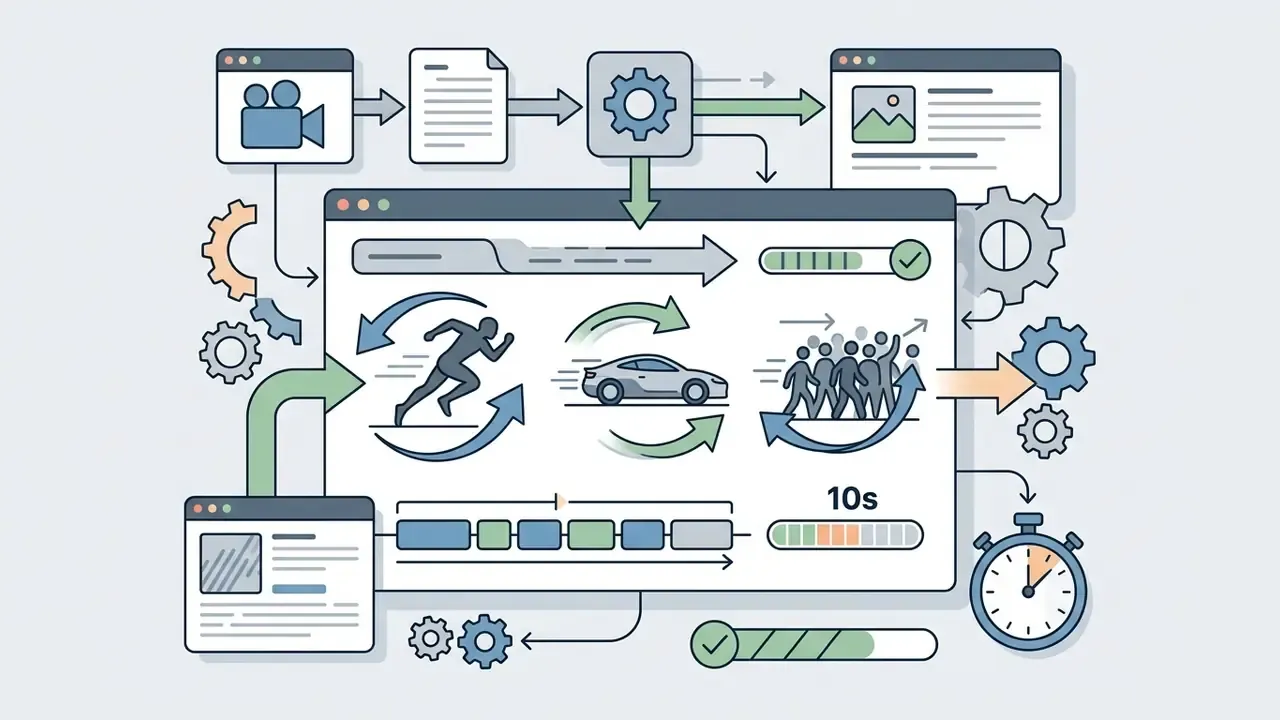


Reality check on physics: a 2025 benchmark evaluating Sora, Runway, Pika, Lumiere, Stable Video Diffusion, and VideoPoet found limited physical understanding even when the output looked convincing. Visual realism and physical correctness are separate properties, so shots involving collisions, liquids, or load-bearing motion still need human review. A card sliding into a reader, a coin drop, a hand signing a document: all three fail in subtle ways that a compliance reviewer will notice before the audience does.
All-in-One Platforms for Generating and Editing Videos
All-in-one video platforms unify script generation, text-to-speech synthesis, timeline editing, and video rendering within a single browser workspace. Tools such as Powtoon, VEED, Kapwing, and Descript combine generative AI features with standard video editing controls. Powtoon positions itself as a unified AI video platform with document-to-video conversion, VEED allows text-to-speech generation directly from the timeline, and Descript centers the workflow on transcript-based editing and publishing.
«AIGVQA-DB contains 36,576 AI-generated videos from 15 models with 370,000 expert ratings on static quality, motion smoothness and text alignment.»
That scale of human evaluation matters for platform selection. Perceived quality varies widely by model even at identical resolutions, which is why multi-model platforms, where you can route each shot to the best-suited engine, outperform single-model tools on mixed briefs.
These unified platforms streamline creation by allowing users to generate initial drafts from text or documents, adjust speech audio directly from interactive transcripts, overlay captions, and export platform-ready video files without switching software applications. Several also pull live information into a draft, turning a breaking-news topic into a publishable clip in minutes, a workflow adopted by journalists, social media managers, and PR teams.
Enterprise Data Privacy and Shadow AI Alert
Every prompt, reference photo, script, and audio file uploaded to a hosted video generator leaves the corporate boundary. Consumer tiers of generative tools frequently reserve the right to process inputs for service improvement, and staff adopting them without approval creates a Shadow AI exposure that security teams cannot audit after the fact. U.S. federal practice illustrates the direction of travel: GSA guidance requires AI uses to be registered through a formal AI Request Form, making approval and tracking part of deployment rather than an afterthought, while NIST SP 800-218A adds secure development practices specific to generative AI systems.
Pre-upload control checklist:
One governance framing that survives contact with reality: treat the generator as a digital worker. It needs a named owner, an approved role, access limits, an escalation path, an audit trail, and a shutdown switch. No evidence, no autonomy.
Free Plans, Video Length and Commercial-Use Decisions
Navigating AI video platforms requires understanding the operational boundaries of free tiers, comparing subscription structures, and reviewing legal commercial rights. Free tiers provide accessible entry points for testing, but commercial deployments generally require paid plan subscriptions. Side-by-side limits are easiest to assess in a dedicated comparison of free AI video generators, with per-tool numbers collected in the AI Media Pricing Guides.
What Free AI Video Generators Usually Limit
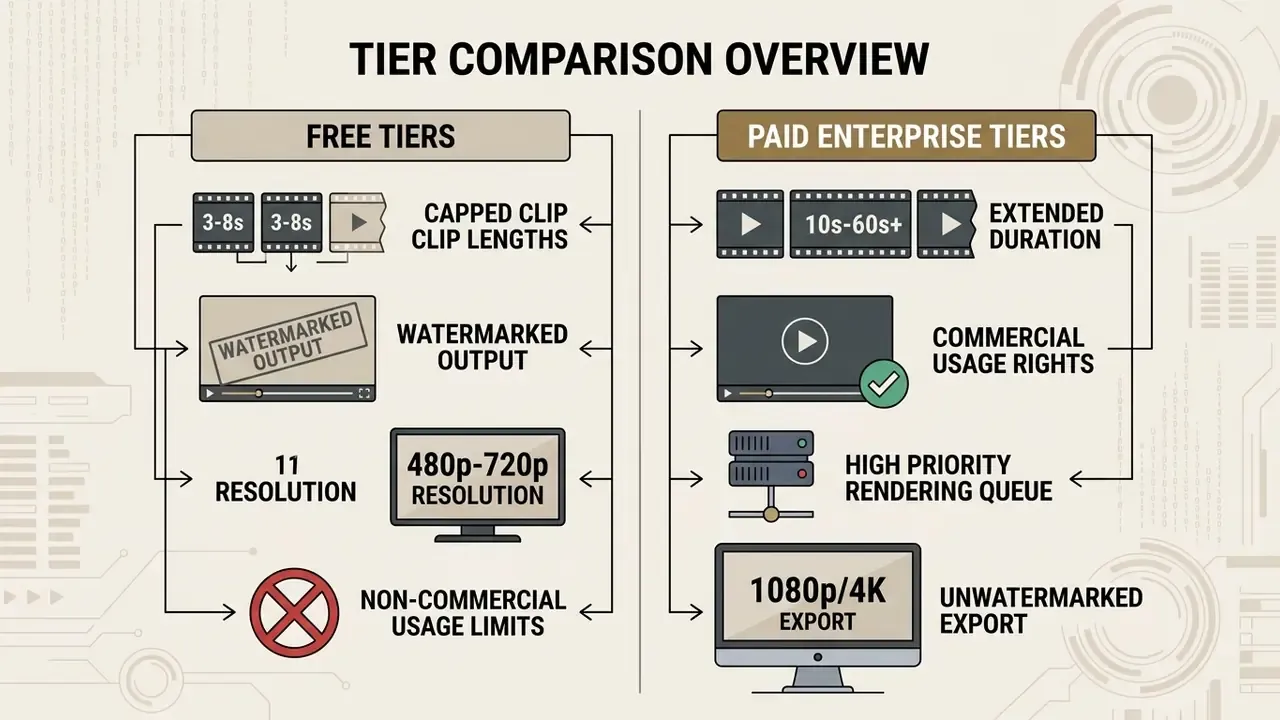
Free plans offered by AI video providers enforce strict operational boundaries to balance server compute costs. Common restrictions include:
- Clip Duration Capping: Single generation outputs are routinely limited to short segments between 3 and 8 seconds, though a few services extend free clips to 10–15 seconds under tighter credit quotas.
- Export Watermarks: Downloaded video files on free plans typically include visible platform logos or watermarks. A minority of vendors ship watermark-free free tiers with lower resolution instead.
- Resolution Limits: Video exports are frequently restricted to standard definition (480p) or 720p resolution.
- Credit Monthly Caps: Users receive a non-refreshing or limited monthly credit allowance, restricting total takes per month. Examples include one-time credit grants that never replenish, or small daily generation counts.
How to Compare Pricing Plans Before You Upgrade
When evaluating paid subscriptions or enterprise licenses, organizations analyze cost per generation credit, rendering queue priority, team seat costs, and access to premium models.
Subscriptions generally range from creator tiers ($10–$30/month) offering fixed monthly generation allowances to business and enterprise tiers ($100–$500+/month) providing custom credit allocation, dedicated rendering queues, API access, and centralized account management. Published examples illustrate the pattern: creator plans priced near $29/month with 1,500 credits, business plans near $149/month plus a per-seat fee, and enterprise plans quoted only through sales with custom per-user credit pools. Per-second API billing is a separate axis, with public snapshots ranging from roughly $0.0247 per second on economy tiers to premium fixed-clip pricing above $0.63 per 10-second output.
Three comparison rules keep the analysis honest:
- Normalize to credits per billing period, then to credits per finished minute of usable video, not per generation.
- Include the failure rate. If one in three takes is unusable, effective cost per delivered second is 50% higher than the price list suggests.
- Check whether premium models are included or metered separately. Access to the top model is often the real differentiator between tiers, not credit volume.
Total Cost of Ownership for AI Video Production
Subscription price is the smallest line in an enterprise AI video budget. A defensible TCO model looks like this:
TCO per published video =
      (Credits consumed × cost per credit)                 [generation]
    + (Rejected takes × cost per credit)                    [waste]
    + (Editor hours × blended hourly rate)                  [human-in-the-loop]
    + (Review hours: brand, legal, accessibility)           [assurance]
    + (Localization: voices, captions, re-renders)          [scale]
    + (Tooling: editor, storage, compression, DAM)          [infrastructure]
    + (Risk reserve: takedown, re-shoot, rights clearance)  [contingency]
Two practical implications follow. First, prompt discipline is a cost control, because waste is a real line item, not a rounding error. Second, governance is cheaper than remediation: a fifteen-minute legal review of a digital-replica script costs far less than withdrawing a published campaign.
What to Check Before Using AI Video Content Commercially
Deploying AI-generated video for commercial advertising, broadcast media, or monetization requires evaluating platform terms of service and intellectual property frameworks.
- Copyright Ownership: Under current guidance from the U.S. Copyright Office, fully AI-generated outputs created solely from text prompts are not eligible for copyright protection due to a lack of human authorship. However, human-authored elements within a composite work, such as original scripts, custom visual edits, and timeline assemblies, retain copyright protection, and using AI to assist creation does not by itself bar copyrightability where human expression is present.
«According to the 2025 U.S. Copyright Office report, fully AI-generated material without human authorship is not eligible for copyright protection.» U.S. Copyright Office: Copyright and Artificial Intelligence, Part 2 Report (2025). https://www.copyright.gov/
- Right of Publicity and Digital Replicas: Utilizing synthetic digital replicas or identifiable likenesses of real individuals in commercial media without explicit authorization creates significant exposure under right-of-publicity laws. The Copyright Office defines a digital replica as a readily identifiable imitation of a person's likeness, and treats commercial use of that likeness as a legal question separate from copyright. Ongoing disputes are tracked in the AI litigation and rights archive.
«The 2024 U.S. Copyright Office report documents the risks of using digital replicas of real people in commercial media without explicit authorization.» U.S. Copyright Office: Digital Replicas Report (2024). https://www.copyright.gov/
- Platform Licensing Terms: Commercial use permissions granted by software platforms do not override third-party trademark, privacy, or publicity rights. Organizations must confirm that chosen subscription tiers explicitly grant commercial usage rights for output media. Adjacent rights questions for still assets are covered in the guide to commercial use of AI image generators and across the AI Media Commercial-Use Hub.
- Disclosure Obligations: Several jurisdictions now require synthetic or manipulated media to be labeled. Saudi Arabia's SDAIA deepfake guidelines, for example, require disclosure of artificially generated content and prompt removal of misleading material by platforms, while the European Parliament describes watermarking as embedding an identification marker into AI output. Practical labeling patterns are summarized under Synthetic Media Disclosure.
E-E-A-T Source Verification & Official Documentation
| Feature Comparison Parameter | Typical Free Tier Conditions | Typical Paid Creator Tier | Typical Enterprise Tier |
|---|---|---|---|
| Max Single Clip Duration | 3 to 8 seconds | 10 to 15 seconds | Extended scene linking (up to several minutes) |
| Maximum Export Resolution | 480p to 720p | 1080p High Definition | 1080p / 4K Ultra HD |
| Visual Watermarking | Mandatory platform watermark | Watermark removed | Watermark removed; custom branding supported |
| Commercial Usage Rights | Restricted or non-commercial use only | Commercial rights granted per terms | Full commercial licensing & indemnification options |
| Render Priority | Standard public queue | Priority rendering queue | Dedicated rendering capacity & SLA |
| Security & Administration | Individual login only | Basic team sharing | SSO, audit logs, workspace isolation, DPA, region controls |
Tariff conditions were last checked in August 2026 against public vendor pricing pages. Treat every figure above as a pattern, not a quote.
AI Video Governance & Compliance Checklist
Run this list before any AI-generated video is published externally.
Checklist0 / 15
Limitations and Open Questions
Three things in this guide remain genuinely unsettled, and pretending otherwise would be dishonest.
First, physical plausibility is not solved. Benchmarks disagree with each other, and vendor demos are selected footage. Second, licensing terms shift faster than documentation: a tier that grants commercial rights today may reclassify output next quarter. Third, disclosure law is fragmenting by jurisdiction, so a single global label policy is a working assumption rather than a compliant answer.
A safe next step for a regulated team is small and reversible: run one pilot, on one approved platform, with a logged prompt archive and a named owner. Then measure cost per usable second before you scale.
FAQ About Making AI Videos
Can a Free AI Video Generator Make Videos Longer Than 8 Seconds?
Most free AI video generators limit single clip generations to 8 seconds or fewer due to computing constraints. However, certain platforms provide longer outputs on free tiers under specific conditions. For example, Renderforest offers free video creation capabilities that allow slide and template sequences extending up to 12 minutes, although free exports remain watermarked and restricted in resolution. In contrast, frontier models such as Google Veo document clip lengths of 4, 6, or 8 seconds on current preview tiers, with 8 seconds required for 1080p and above (Google AI Studio, 2026). Longer finished videos are therefore produced by chaining clips or using scene extension, not by a single long generation.
How Do You Make an AI Video Longer Than One Clip?
Three techniques scale a short generation into a full video: scene extension (models like Veo continue an existing clip from its final frame), multishot generation (Seedance 1.0 and MiniMax hold characters consistent across cuts), and timeline assembly (generate 6–10 short clips against a storyboard, then stitch them in an editor with a single narration track). The third method remains the most reliable for videos over 60 seconds.
How Do People Make AI Sketch Videos?
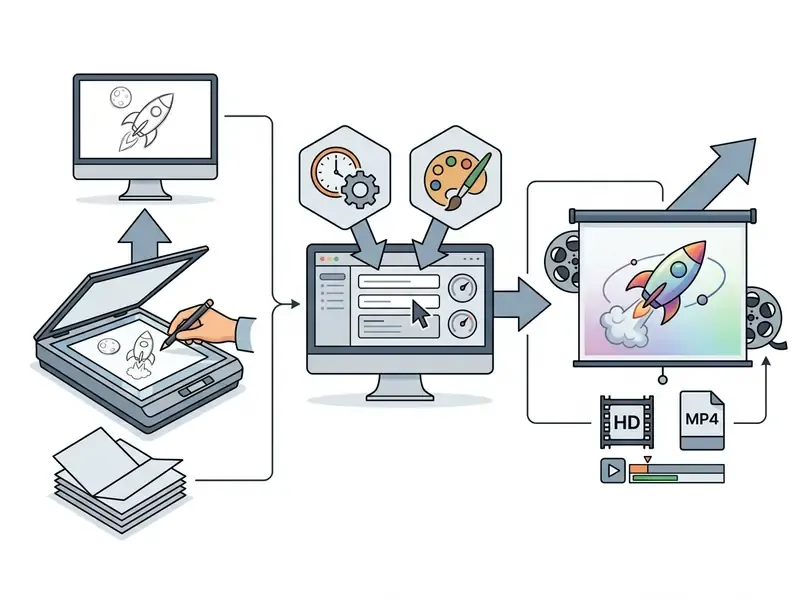
People make AI sketch and hand-drawn whiteboard videos using a specialized ai sketch video generator or by applying sketch style modifiers to text-to-video prompts. The workflow involves three primary steps:
- Prepare Source Image: Creators upload a pencil drawing, storyboard illustration, or line-art image (JPG/PNG/WebP).
- Apply Sketch Prompt Parameters: Users specify motion direction, camera pan, and sketch rendering styles (e.g., "pencil drawing animation, black and white line art") within tools like Higgsfield AI or SketchVideo AI, which also expose duration and output settings.
- Generate and Export: The model animates the static lines into smooth vector-like movement while retaining the original sketch drawing aesthetic, with exports up to 1080p.
Can AI Generate Copywriting Videos for Social Media?
Yes. AI systems can automatically convert copywriting scripts into short-form vertical videos optimized for TikTok, Instagram Reels, and YouTube Shorts. Automated platforms accept a product page URL or text script, extract key selling points, write short ad copy, synthesize a voiceover track, and pair scenes with relevant background B-roll or product graphics. To manage risks surrounding synthetic content, federal AI risk management frameworks recommend embedding provenance metadata or watermarks into generated marketing media at generation time.
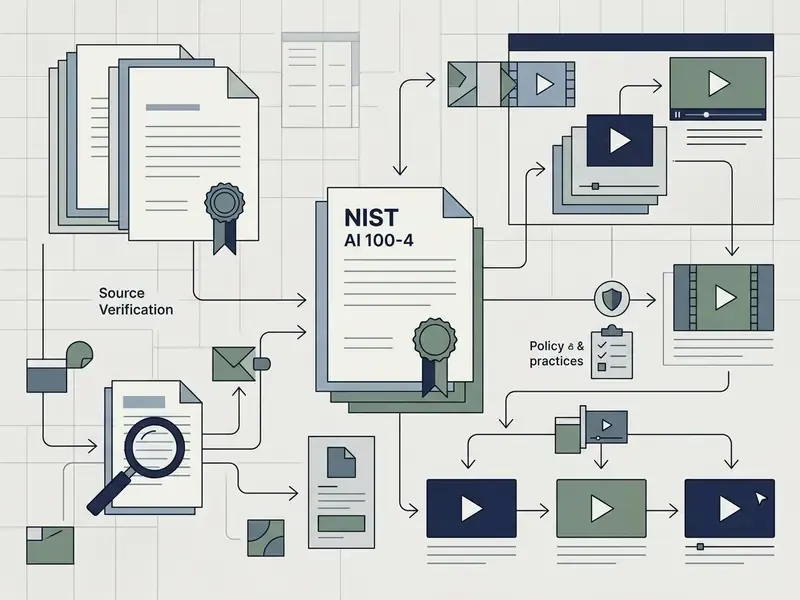
«NIST AI 100-4 recommends embedding provenance metadata or watermarks into synthetic marketing content at generation time.» NIST AI 100-4: Reducing Risks Posed by Synthetic Content (2024). https://csrc.nist.gov/ Verification of published assets can be supported with AI image detection tools, which help confirm whether third-party creative in a campaign is synthetic.
How Many Takes Should You Budget Per Scene?
Plan for three to five generations per shot on cinematic models and two to three on avatar platforms, where output variance is lower. Budget accordingly: a 45-second video with eight shots realistically consumes 24–40 generations before editing.
Which Model Is Best for Talking-Head and Explainer Video?
Character lip-sync models such as Fabric 1.0 handle single-image talking heads with realistic sync for up to 60 seconds, while avatar platforms (Synthesia, HeyGen, D-ID) are stronger where brand-approved presenters, multi-language localization, and enterprise administration are required.
Are AI Videos Safe to Use in Regulated Industries?
They can be, provided three conditions hold: the tool is contractually approved with a data-processing agreement, scripts pass the same review as written policy communications, and every published asset carries provenance labeling and an audit trail of prompts, model versions, and approvals.
Appendix A: Superseded Source References
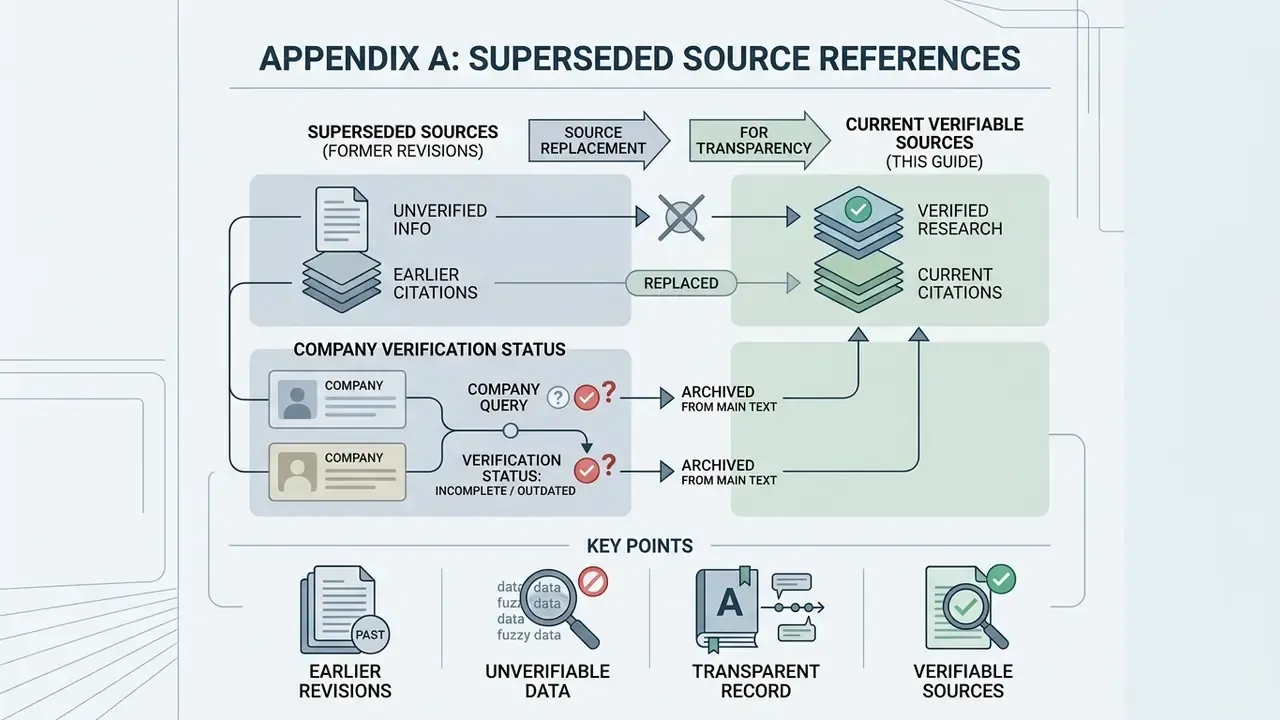
For transparency, the following citations appeared in earlier revisions of this guide and have been replaced in the main text with verifiable sources. They are retained here as a change record, not as supporting evidence.
- «Research in video diffusion modeling demonstrates that latent-space compression reduces computational overhead while maintaining high frame resolution and motion consistency (Video Diffusion Models: A Survey, 2024)» superseded because the original insert carried no URL or metrics; replaced with the Melnik et al. arXiv reference.
- «A standardized prompt syntax minimizes misinterpretation by the video generation model and reduces unnecessary generation iterations (Adobe Firefly Video Guidance, 2026)» superseded because vendor documentation without published metrics cannot support a performance claim; replaced with T2V-CompBench (2024).
- «submitting the exact same prompt and parameters twice does not guarantee identical frame outputs (U.S. Administration for Children and Families GenAI Policy, 2024; OpenAI Cookbook, 2026)» superseded because a policy memo and a code cookbook are weak sources for a technical claim about sampling; replaced with the video diffusion survey.
- «dynamic prompt weighting ... (Coherent Text-to-Video Generation, arXiv, 2026)» and «(UniVideo In-Context Editing, 2025)» retained in the main text as described mechanisms, but flagged as requiring independent verification because the cited records could not be confirmed.
Company Verification Status
Continue researching terms, models, and control patterns in the AI Media Glossary.