In two sentences: an intro template is a pre-animated, editable opening sequence that carries your logo, typography, colour palette and audio sting, and it exists in two technical shapes, either a native project file (.MOGRT, .AEP, .DRP) or a cloud/SaaS template. Choosing correctly means matching three things at once: duration to the platform, aspect ratio to the feed, and licence to the way the video will be monetised or distributed inside a company.
What is an intro template and why you need a video intro
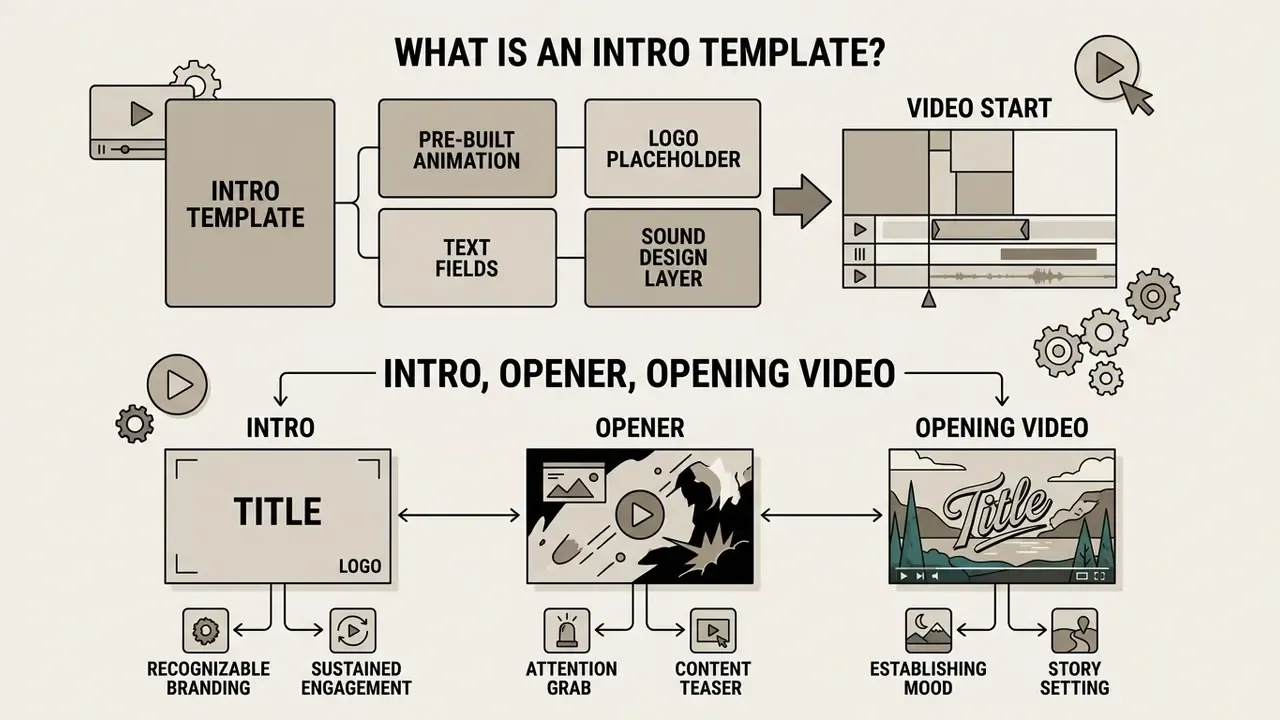
An intro template is a ready-made, editable video fragment with pre-built animation, a logo placeholder, text fields and a sound design layer, placed at the very beginning of a video. It works as a visual brand standard and prepares the audience to receive the main content.
The core purpose of an intro video template is fast brand formation and simplified content production. Creators and video teams use video intro templates as a base frame: it is enough to drop in your own name, graphic mark or slogan to get a professional-looking opening. A ready introduction video template or a universal opening video template removes the need to design motion graphics from scratch for every new release.
Attention is the scarce resource here. In a market with extreme competition for the first two seconds, video intro templates help identify a channel instantly on platforms such as YouTube. The intro communicates brand tone, sets the tempo and moves the user's attention from the external environment into the topic of the publication.
Intro, opener and opening video: how the terms differ
The terms intro, opener and opening video all describe the initial segment of a video, but they carry different functional loads in an edit. In stock catalogues they frequently overlap as search tags, yet they follow a clear internal logic.
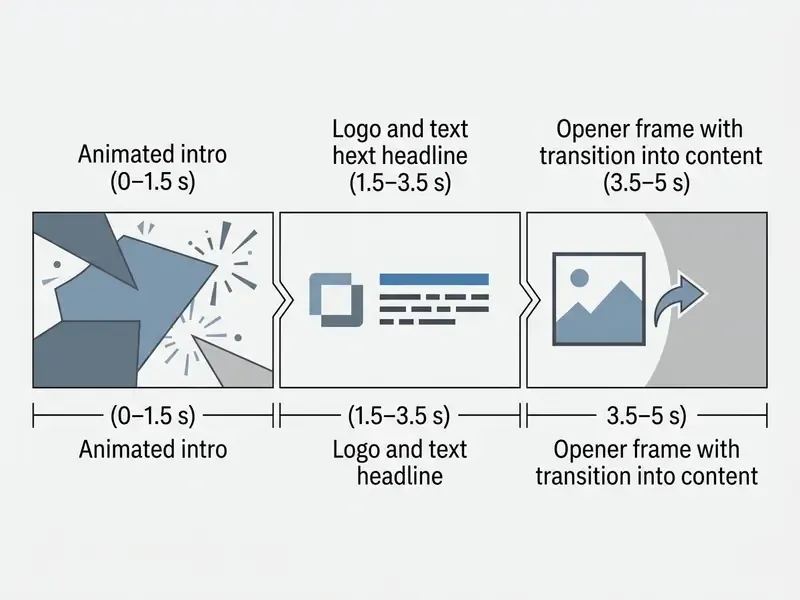
- Intro is a standardised short bumper (usually 2 to 5 seconds) with a logo, brand colours and an audio sting, repeated from video to video.
- Opener is a dynamic hook that may contain a teaser of the best moment, a question to the audience or an expressive shot shown before the brand appears.
- Opening video is the broadest concept, covering the whole introductory part of a video: cold open, bumper and the author's opening monologue.
An audit of stock libraries shows that creators frequently search for template intro video or template video intro, meaning a flexible intro animation template in which graphic elements can be swapped quickly (Envato, 2026; Renderforest, 2026). Practical vendor taxonomy confirms the overlap: Renderforest defines a video intro as "the opening section of a video" that can be a hook, a title card, a logo animation or a branded opener. In everyday usage, then, "opener" behaves as a subtype of "intro". Not a strict standard, more a working convention.
When an intro actually makes a video recognisable
«Short, repeated audio logos and stings at the start of a video act as compressed brand identifiers, capable of triggering automatic recognition even without visual cues.»
«The dominant emotional characteristics of film-studio intros are "grandeur" and "mystery"; for OTT platforms, "darkness" and "tension" prevail.» Study on brand intro video sound for film companies and OTT platforms (2023–2025)
Google's own creative research points in the same direction while adding a caution: ads that show the brand within the first five seconds tend to lift ad recall and awareness, but they are also skipped more often. Which is exactly why brevity is not a stylistic preference; it is a retention requirement (Think with Google, Brand Lift creative studies, 2024). Note for readers who need hard numbers: platform-side skip and recall deltas depend on ad format, audience and market, so treat all published lifts as directional rather than as guaranteed benchmarks.
In business presentations, corporate reports and author-led blogs, a video intro fixes authorship of the content. From the first frames the viewer knows whose material is on screen, which reinforces company status and builds the habit of regular viewing. If you want to assemble those brand markers yourself, start with an animation maker and an AI logo generator.
Types of intro video templates by task and content format
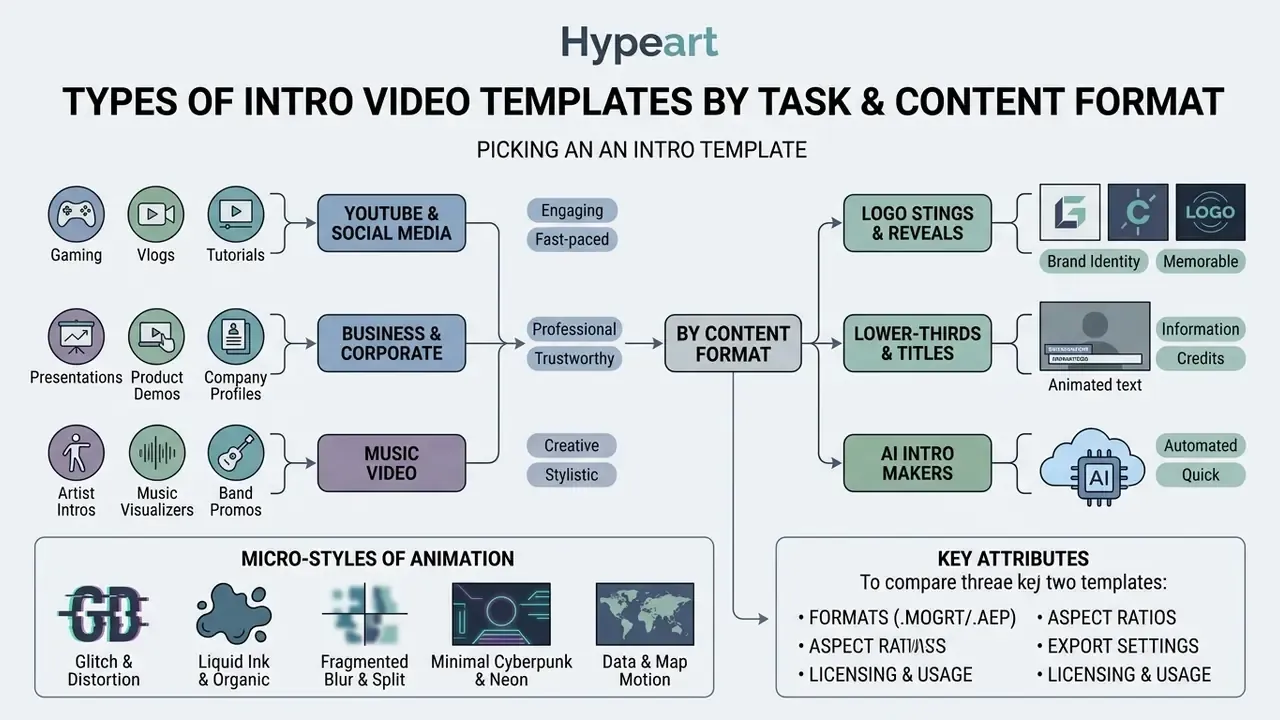
The typology of intro templates is defined by the distribution platform, the nature of the audience and the final goal of the video. Choosing the correct category of intro templates guarantees that the visual style will not clash with viewer expectations.
There are specialised bumpers for creator channels on YouTube, restrained solutions in the company introduction video template free category, dynamic graphic kits of the music video intro template type, and universal video introduction template formats. Understanding the differences lets you match the optimal intro template video to the specifics of the task. For an end-to-end production picture, see the YouTube video editing workflow.
When evaluating a ready template for intro, assess graphic density, cut speed and how well the audio track matches the emotional tone of the main material. One overlooked detail: check the template on a phone speaker, not on studio monitors.
Popular micro-styles of animation in intro templates
Stock catalogues are organised not only by purpose but by visual effect. Naming the style precisely is the fastest way to find the right asset:
- Glitch and distortion. Digital interference, RGB channel offset, frame tearing and distorted type. Ideal for gaming, tech and techno content. Accessibility caution: keep strobing under three flashes per second to stay safe for photosensitive viewers.
- Liquid ink and organic. Smooth wet transitions with spreading paint, subtle colour overlays. Suits art content, storytelling and documentary openers.
- Logo stings. Accent bumpers of 1 to 2 seconds in which a geometric mark resolves with a single sound hit. The standard corporate format.
- Lower-thirds. Text plates at the bottom of the frame introducing a speaker, a segment or the topic; frequently shipped inside the same pack as the opener.
- Minimal cyberpunk and neon. Bright neon lines and glow on a dark grey or black background, often paired with mono typography.
- Fragmented blur and split transitions. Elegant, slower openers built on soft focus breaks and panel splits, common in fashion, real estate and event recaps.
- Data and map motion. Route lines, region highlights and animated pins for travel, logistics or analytics channels; an ai map generator can supply the base graphic before it goes into the opener.
- Broadcast packages. Modular sets combining opener, titles, transitions and lower-thirds for a whole show or series.
YouTube intro templates for channels and videos
Bumpers for YouTube are designed around a very high scroll speed. For regular releases, short video intro templates are used, containing the logo, the channel name and a concise audio signal.
Creator-growth guidance recommends integrating the branded bumper after the primary textual or verbal hook, which keeps the search-driven viewer on the page.
«An intro should take no more than 10 seconds; creators should hook the viewer fast, with an outcome tease, a value promise or a bold claim, within the first eight seconds.»
The standard duration of a YouTube intro is 3 to 5 seconds; for tutorials, reviews and search-driven videos, 0 to 3 seconds of branding is the safer setting. YouTube's own Shorts guidance is broader but consistent: capture attention in the first few seconds to stop the scroll.
«Conversational style, edit rhythm, colour saturation and visual expressiveness correlate significantly with behavioural engagement metrics on short-video platforms.»
If you need to produce several channel variants quickly, compare free AI video generators before committing to a paid template subscription. Channels built on humour and reaction formats often pair the bumper with graphics from an ai meme generator, which keeps the visual joke inside the brand palette instead of outside it.
Company introduction video template for business
Corporate bumpers in the company introduction video format require restraint, high legibility of text blocks and strict compliance with brand guidelines. Unlike entertainment content, aggressive effects or an oversaturated palette are unacceptable here.
Guidelines of international corporations (for example, Daikin and Amcor) prescribe a smooth logo fade-in of 12 to 25 frames, restrained typography and fixed clear-space margins (Daikin Brand Guidelines, 2024; Amcor Brand Execution, 2023). Daikin explicitly states that title animation "should be sober and credible" and bans drop shadows, gradients, 3D characters and swirls; Amcor requires an animated logo screen at the opening and closing of every video, with the horizontal logo locked to the top-right position. Other public brand books add measurable motion rules: motion graphics at 24 or 30 fps for smooth playback, approved fonts only, and no flashy or cluttered movement (OpenTable Global Brand Guidelines, 2024; Feeding America Brand Book, 2024).
Using a company introduction video template free in the B2B segment lets a company standardise presentations, webinars and customer training materials. Hospitality and retail teams sometimes go further and standardise adjacent assets in the same style, from menu boards produced with an ai menu generator to internal training slides.
Music video intro template for music content
Bumpers for music clips and audio releases are built around audio-visual synchronisation. In a music video intro template the key roles belong to audio-reactive equalisers, waveform visualisers, spectrum rings and dynamic text titles.
«Dynamic visual imagery and emotional resonance in animated advertising increase consumer engagement, brand recognition and purchase intent in digital environments.»
Peer-reviewed work on synchronisation formalises the principle: motion events are matched to audio timing, and beat alignment is achieved by detecting motion beats in the video and matching them to music beats with minimal time-warping distortion (audio-visual synchronisation review, 2024; beat-alignment research, 2018). In the graphics of music video bumpers, neon glow, glossy 3D surfaces, abstract geometry and adaptive parameters for vertical formats dominate. To assemble the final clip, pick from the best free video editing software.
To widen your toolkit for multimedia production, explore the AI Media Commercial-Use Hub, which collects licensing and commercial-use guidance for media assets.
How to choose a short, long or simple intro template
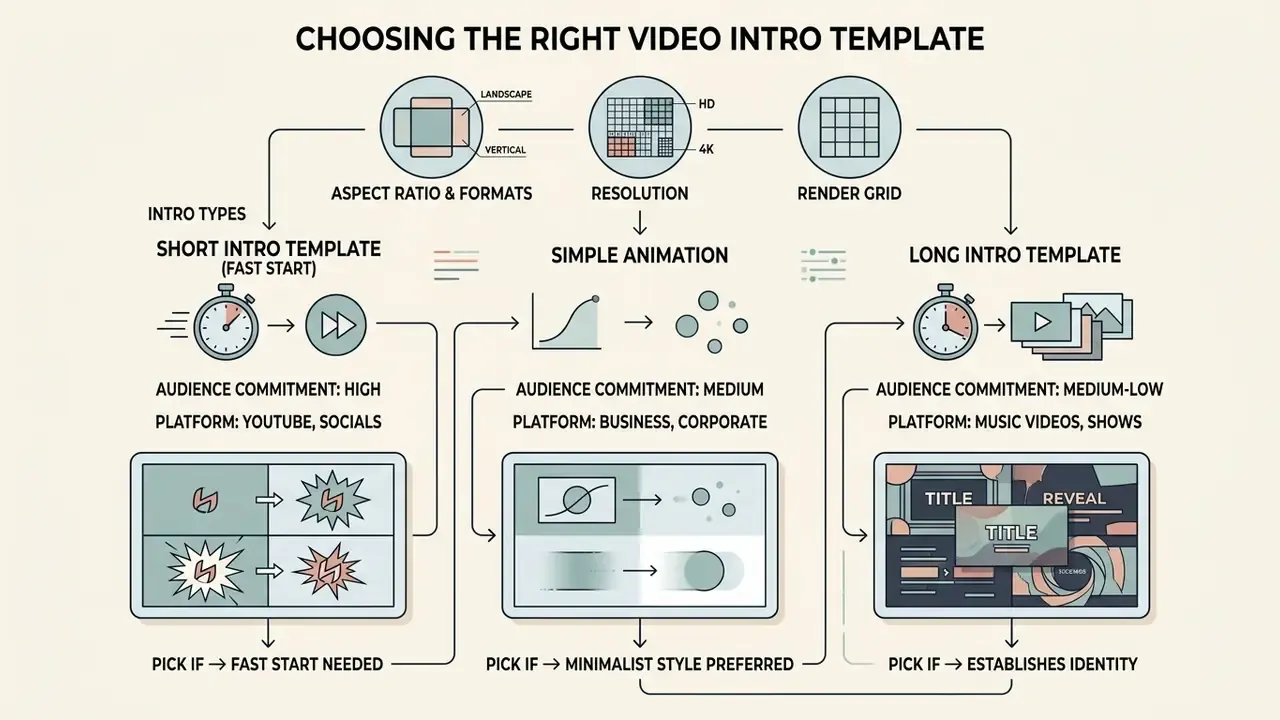
The duration and complexity of a bumper depend on audience commitment and the publication platform. A mistake in intro length directly affects retention rate.
A long intro template suits formats with high pre-existing trust, while a short intro template or a minimalist simple intro template is critical for swipe-first platforms. The choice of intro animation template must be driven by analytics of the first seconds of playback. Compare candidate tools in the roundup of the best AI video generators.
A quality animated bumper must convey the essence of the brand in the minimum possible time (quick start) without making the user wait for the story to begin.
Aspect ratio, resolution and render grid for video intro templates
| Aspect ratio | Resolution (pixels) | Frame rate | Primary platforms | Graphic positioning notes |
|---|---|---|---|---|
| 16:9 (widescreen) | 1920×1080 (FHD), 3840×2160 (4K) | 24 / 30 / 60 fps | YouTube, TV, B2B presentations, webinars | Classic logo placement centre-frame or on the rule of thirds; safe title area inset by 5% |
| 9:16 (portrait) | 1080×1920 | 30 / 60 fps | YouTube Shorts, Reels, TikTok | Logo and text strictly inside the central safe zone; keep 300–400 px clear at top and bottom for UI |
| 1:1 (square) | 1080×1080 | 30 fps | Social feeds, in-app placements, messengers | Compact bumper focused on a large vector mark; avoid long slogans |
| 4:5 (vertical feed) | 1080×1350 | 30 fps | Feed-first social placements | Same safe-zone logic as 9:16, but with more horizontal room for a wordmark |
Practical render expectations differ by production route. Cloud intro makers report that a watermarked preview renders in roughly one minute and a full-HD delivery lands in two hours or less, with download tiers typically offered as 720p, 1080p and 4K60 (Intro Maker, 2026). A local render of a 5-second 1080p60 composition with particles on a modern GPU workstation is usually a matter of minutes; 4K60 with motion blur and depth of field can take substantially longer, which is why render time belongs in the production schedule, not in the "final polish" phase.
Short intro template for a fast video start
A short intro template of 1 to 3 seconds is an ultra-fast logo reveal with a light audio accent. This is the standard for tutorials, reviews and any material that pulls traffic from search.
Retention analytics show that intros longer than 15 seconds can cause up to 30% of the audience to drop off within the first 30 seconds of playback (ReelMind.ai, 2025; vidIQ, 2024. https://vidiq.com/blog/post/youtube-video-intros). Using a short intro template guarantees an instant quick start and minimises the risk of an abandoned view in high-velocity feeds (Shorts, Reels, TikTok), where third-party guidance goes further and recommends 0 to 1 second, or no standalone bumper at all.
«Visually driven openings hold attention more effectively in the first seconds, while combined multisensory hooks deliver higher overall engagement and completion.»
Long intro template and simple animation
An extended long intro template (5 to 8+ seconds) is justified in specific niches: image-driven podcasts, documentaries, author-led shows and large online events, where the viewer has already committed to a long watch. Vendor guidance stretches to 0–30 seconds for webinars and corporate videos, but this is a production convention rather than a platform rule. YouTube publishes no mandatory intro length.
A simple intro template, in turn, focuses on purity of style. Minimalist animation (an animated logo on a flat background with a smooth reveal) creates a sense of high production value and adapts easily to any corporate task.
| Comparison parameter | Short intro template | Long intro template | Simple intro template |
|---|---|---|---|
| Average duration | 1–3 seconds | 5–8+ seconds | 2–4 seconds |
| Target use | Tutorials, reviews, Shorts, Reels | Podcasts, author shows, webinars | Corporate video, B2B, presentations |
| Animation tempo | Dynamic, quick | Moderate, smooth | Restrained, minimalist |
| Logo and text load | Logo plus short text or slogan | Logo, episode name, credits | Vector logo only |
| Drop-off risk | Minimal | High (if no prior hook) | Low |
| Typical file route | .MOGRT or SaaS export | .AEP / .DRP project | .MOGRT or brand-kit preset |
The analysis is consistent: for most commercial and content tasks in 2026, the short intro template and the simple intro template remain the optimal choice, because they preserve retention without losing brand identity. To review adjacent formats and editor comparisons, use the AI Media Comparison Matrices.
How to create and customise an intro video from a template
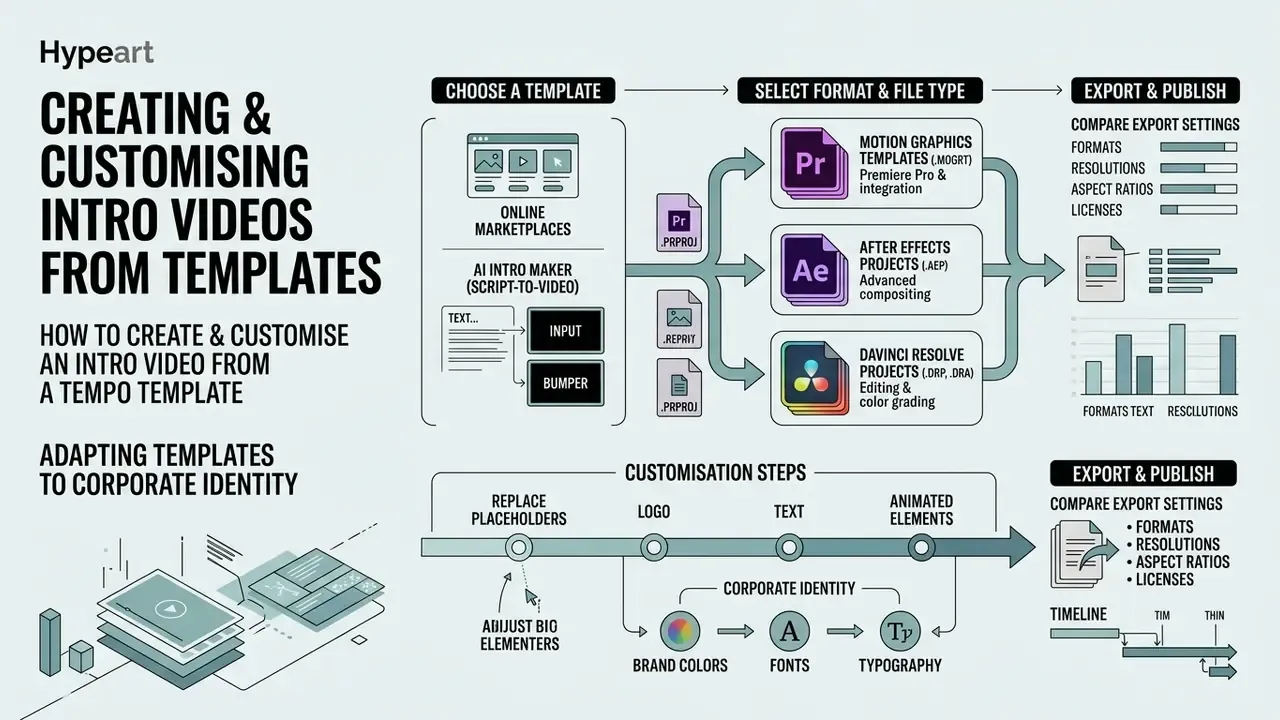
Customising a ready video intro template means adapting graphic and text placeholders to the corporate identity of a company or channel. Browser editors and professional editing suites make this possible without deep motion-graphics skills, and if the brand mark itself is still missing, start with AI logo generators.
To create and correctly use a bumper you need to load source files in sequence, set typography, enter exact colour codes and tune export parameters. A properly prepared template for intro guarantees seamless integration into the final project.
Below are the key technical stages of working with a template intro video that ensure sharpness and visual consistency.
Format compatibility: MOGRT, AEP, DRP and project files
When selecting an intro template, the editing environment and the file extension are as important as the visual style:
- .MOGRT (Motion Graphics Template) is the optimised format for Adobe Premiere Pro. Text, colours and the logo are edited directly in the Essential Graphics panel without opening After Effects. Best choice for teams where editors are not motion designers.
- .AEP (After Effects Project) covers full project files allowing deep customisation of layers, particle systems and 3D animation. Requires basic keyframe skills, and packs often specify a minimum app version (for example, CC 2019 or higher).
- .DRP / .DRA (DaVinci Resolve Project / Archive) are templates for editing and grading in DaVinci Resolve, including Fusion node containers; imported as a project, they restore media, timelines and effects, and many packs explicitly support the free edition.
- .PRPROJ (Premiere Pro project) holds full sequences with overlays, transitions and a logo frame, useful when the opener includes footage panels rather than pure graphics.
- Web and SaaS templates are cloud templates (Canva, Renderforest, CapCut, Adobe Express) that need no local editor and no local render, but usually restrict redistribution of the template itself.
A practical rule for teams: keep the master asset in the native project format for future re-versioning, and archive flattened exports per aspect ratio for daily editing use. Pick the tool that matches your pipeline with the video editor guide.
AI intro maker: generating bumpers from a text description (script-to-video)
Neural tools now build intro video templates from text prompts (prompt-to-video) or a full script (script-to-video). The service analyses the topic of the video and automatically proposes:
- A visual animation style (minimalism, cyberpunk, 3D glyph, liquid ink).
- A synthesised voice-over or an audio sting matched to the tempo of the video.
- Automatic reframing for 16:9, 9:16 and 1:1, plus colour-change presets and 4K output where supported.
The workflow is short: describe the channel or product in two or three sentences, pick a style and duration, replace the generated mark with your official logo file, then export. It is the fastest route from idea to a usable bumper. See text-to-video AI for the underlying model landscape and free AI video generators for zero-budget options.
Limitations of AI generators. Models still cannot guarantee 100% compliance with strict corporate guidelines (pixel-perfect clear space around the logo, locked palettes, approved typefaces), and generated audio or footage may carry unclear provenance. Educational channels hit a related wall: a generated frame that includes formulas or figures needs manual verification, much like output from an ai math solver. For the B2B and regulated segments, classic vector video templates with documented licences remain preferable, and any AI-generated asset should pass the same licence and security review as a stock download.
Logo, text and animated elements in a template
When placing a logo in a bumper, use vector formats (SVG) or high-resolution raster images on a transparent background (PNG-24). This eliminates blur artefacts when the animation scales.
- Typography replace the template's default typeface with the brand font. Limit yourself to one or two families and keep approved weights.
- Colour palette apply exact HEX/RGB values from the identity guide to backgrounds and graphic elements; never eyedrop colours from a compressed preview.
- Motion settings in the intro animation, adjust easing so object movement looks natural and lands on the audio accents.
- Clear space and minimum size respect the logo clear-space diagram from the brand book at every animation stage, including the moment of arrival and the settle.
How to prepare an opener for use in a video
For seamless compositing of an opener over footage, the codec and export format must be chosen correctly. If the intro is layered over the main video, the file must carry a transparent layer (alpha channel).
MP4 (H.264) does not support transparency. To preserve an alpha channel you must use ProRes 4444, HEVC with Alpha or WebM (VP8/VP9) (Apple Developer documentation, 2025; Unity documentation, 2026; Adobe support notes on MP4 alpha limitations). Match the export resolution and frame rate to the target sequence to avoid resampling and judder. At the final mix, make sure the loudness of the intro sting matches the loudness of the main voice-over (the -14 LUFS integrated standard for online video). Then take the assembled sequence into your video editor for the final conform.
Use the AI Media Calculators to estimate the resulting bitrate and file size before the render starts.
- Select the templatefind a suitable template for intro in a catalogue, filtered by topic, duration, aspect ratio and required software.
- Upload brand assetsimport the official logo as a transparent PNG or SVG.
- Edit the textenter the channel or company name using the brand typeface and corporate palette.
- Tune animation and soundadjust the timing of the intro animation and synchronise movement with the audio sting.
- Preview and exportcheck for text overlaps and safe-zone violations, then export in the project's target resolution, with alpha if the bumper is a layer, without alpha if it is a standalone clip.
Where to download free intro video templates and what to check first
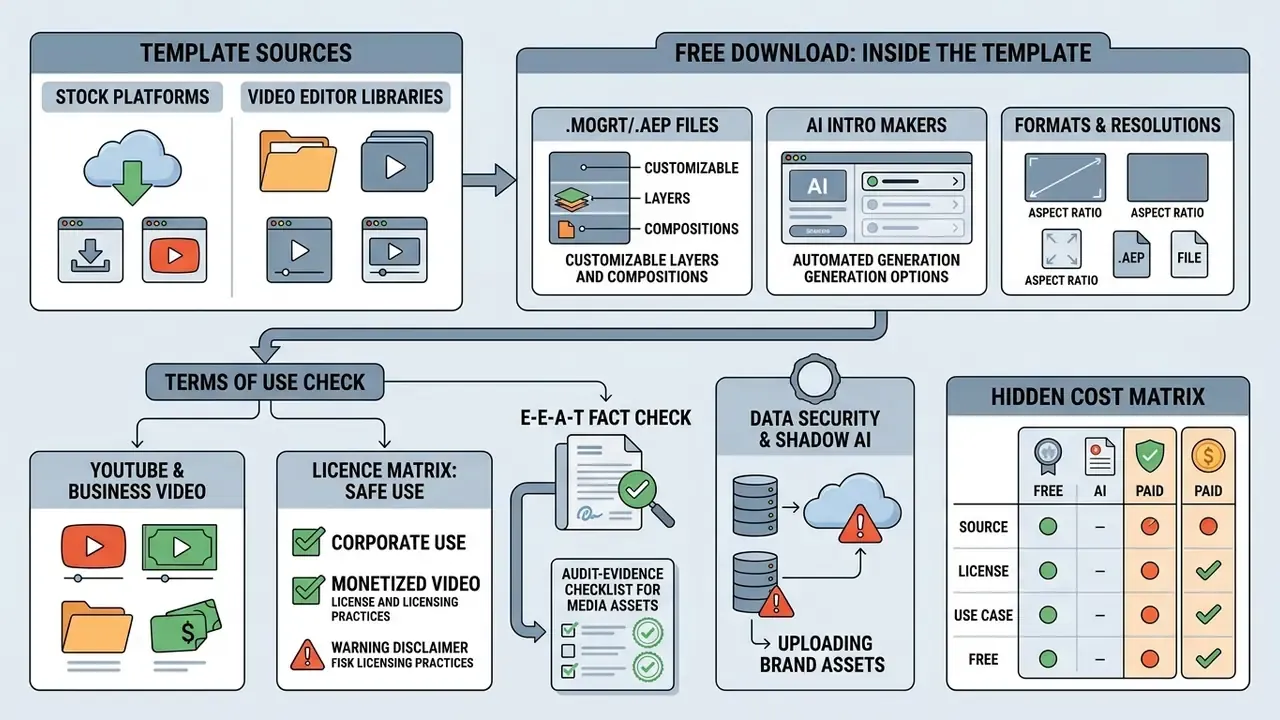
Free intro video templates download is available on numerous stock platforms and inside video-editor libraries. Using free resources, however, demands a careful analysis of the licence agreement.
Many services present stock video intro templates as fully free while embedding hidden restrictions on commercial use or mandatory attribution requirements. Before applying resources labelled intro template free download or intro video templates free download, run a legal check. Large marketplaces list tens of thousands of "royalty-free" intro assets (for example, more than 32,000 items under "video intro template" on Shutterstock in 2025–2026), but a royalty-free label on a search page is not the licence text itself.
Below is a breakdown of what a free pack usually contains and how to avoid legal risk when publishing a free video intro templates download.
Free download: what is inside an intro template
A typical free download accompanying an intro template free download contains the source project file (for Premiere Pro, After Effects, DaVinci Resolve or a web editor) plus a set of graphic placeholders.
Free versions of video templates usually include:
- A project template with editable text and logo layers.
- A text document with links to the free fonts used.
- Basic sound effects (not always bundled in the main archive).
- A help file describing plugin requirements and the supported app version.
Limits of a free pack may include locked complex effects, dependency on a specific software version, exclusion of preview media (the footage and images seen in the demo are typically not included), or the absence of commercial music, which has to be purchased separately (Renderforest, 2026). Where packs differ most is audio: some ship free music links, others exclude every preview asset and provide only the project file plus font links. The packaging rule always comes from the vendor's own licence, not from the download button.
Checking the terms of use for YouTube and business video
Before you use a chosen free intro video template in a monetised video on YouTube or in a business presentation, verify the licence type.
Creative Commons licences vary: CC BY permits commercial use provided the author is credited, while CC BY-NC strictly prohibits business use. YouTube's monetisation policy requires rights to every audiovisual element of a video, and borrowed content must be significantly transformed to qualify as your own; non-unique or incorrectly licensed content may lead to a rejected monetisation application or a copyright strike (YouTube monetisation and reused-content policies).
Licence matrix: what is safe for corporate and monetised video
| Licence type | Commercial use | Attribution | Derivatives / modification | Corporate verdict |
|---|---|---|---|---|
| CC0 / Public Domain | Allowed | Not required | Allowed | Acceptable; still verify asset provenance |
| CC BY | Allowed | Mandatory, must be documented | Allowed | Acceptable if credit is placed and archived |
| CC BY-SA | Allowed | Mandatory | Derivative must carry the same licence | Risky for brand assets, avoid |
| CC BY-NC / NC-ND | Prohibited | Mandatory | Restricted | Blocker for monetised and corporate video |
| Royalty-free commercial (stock) | Allowed, perpetual, worldwide, non-exclusive | Usually not required | Allowed within licence scope | Preferred; check paid-ads, broadcast and OTT extensions |
| Editorial use only | Prohibited in promotion | Required | Restricted | Not usable in marketing or training assets |
| SaaS free tier | Often limited (watermark, attribution) | Varies | Template redistribution prohibited | Use only after reading the tier's terms |
Audit-evidence checklist for media assets
Data security and Shadow AI when uploading brand assets
Uploading a logo pack, an unreleased product name or an internal script into a free online generator is a data-handling decision, not a design one. Before approving a SaaS intro tool, check: whether inputs are used for model training and whether opt-out exists; retention periods for uploads and renders; the sub-processor list and data region; whether outputs are public by default in a community gallery; and whether the vendor will sign a data-processing agreement.
Practical mitigation is unglamorous but effective. Keep confidential names, figures and unpublished dates out of prompts, use a sanitised placeholder version of the brief for generation, and maintain a short list of approved template vendors so that unmanaged "shadow" tools do not quietly become the default. One more habit worth adopting: name an owner for the tool itself, not only for the asset it produces.
Copyable intro asset brief and approval template
INTRO ASSET BRIEF & APPROVAL RECORD
Asset name / version:
Owner (name, team):
Purpose (channel branding / product / training / webinar):
Distribution channels (organic, paid, OTT, internal):
Duration target:                Aspect ratios required:
Logo file + clear-space rule:
Palette (HEX):                  Typography (family, weights):
Audio track / sting + licence ID:
Accessibility checks (captions, flash rate, contrast):
Export specs (codec, resolution, fps, loudness target):
Licence evidence link (screenshot, PDF, order ID):
Approvals: Brand ___  Legal ___  Security ___  Date ___
Next review date:
In a practical media-automation case, a fintech company rolled out a standardised intro template across 50+ training videos. The legal team audited the free video intro templates download and found that the background track in use was distributed under a CC BY-NC licence. Replacing the audio sting with a fully cleared commercial track before publication prevented the risk of a channel strike on an account with 200,000+ subscribers and ensured the asset pack passed the compliance audit. The lesson generalises well: the video layer is usually the safe part, and the audio layer is where the licence breaks.
Related licensing rules for adjacent media assets are covered in the guide to commercial use of AI images. If you need help selecting alternative graphic solutions, see AI Media Support and Troubleshooting.
FAQ: questions about video intro templates
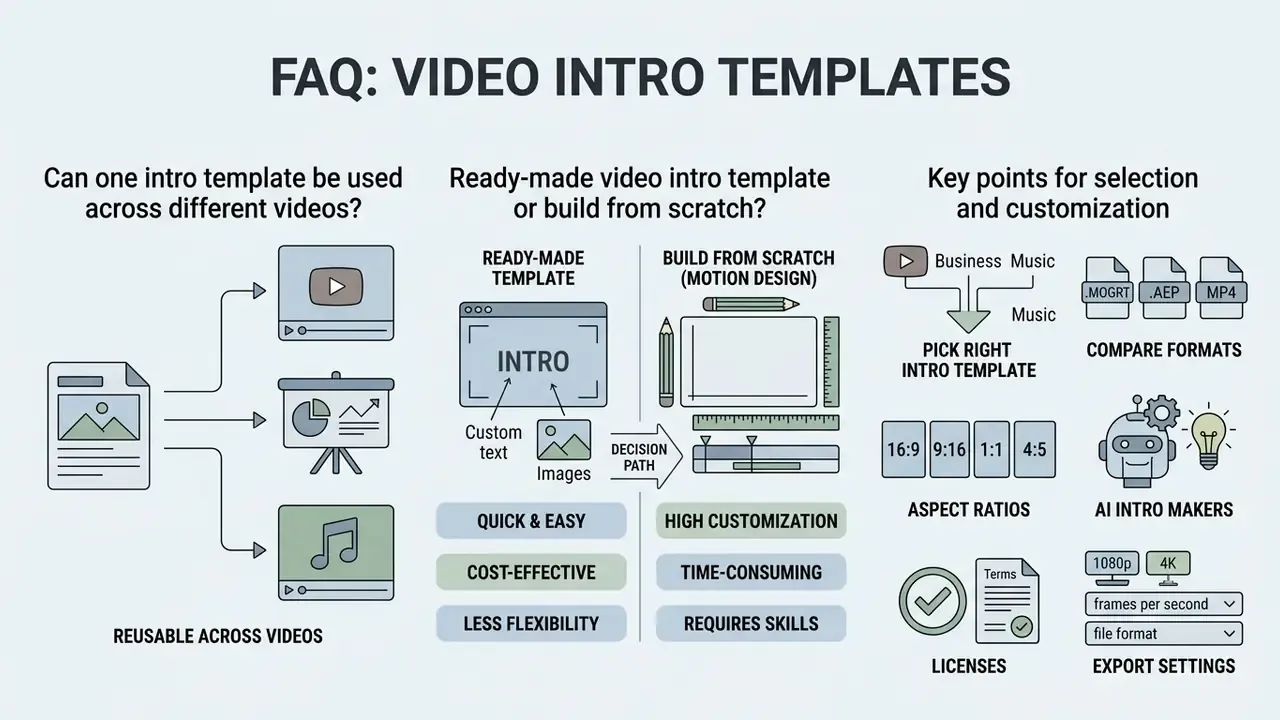
This section answers the most frequent user questions about selecting, customising and reusing intro templates in video production.
Ready-made video templates speed up editing, but they require an understanding of the limits of their adaptability and of how far they can be made unique.
Can one intro template be used across different videos
Yes. The same intro template can and should be applied across a series to build continuous branding. To keep the bumper from reading as monotonous, adapt the sub-theme rather than the structure.
When reusing a template video intro you can change the subheading (for example, the name of a specific episode), refresh the background colour to match the rubric and adjust the text headline, while keeping the logo position and the base animation unchanged. Template systems from Adobe Express, Canva, CapCut and Renderforest all support exactly this pattern: swap logo, palette, text and imagery, keep the layout.
Ready-made video intro template or build from scratch
The answer depends on budget, deadline and project goals. A ready video intro template saves time and money and delivers a quality result in minutes.
Frequently Asked Questions
Can an intro template be edited without video editing experience?
Yes. In modern browser editors and simple desktop apps, customisation is reduced to drag-and-dropping a logo file and replacing text in pre-built fields.
Do I have to pay royalties for using free templates?
If the template is distributed under a royalty-free licence, you pay once (or download for free) and can use the finished video an unlimited number of times with no further payments, within the scope of that licence.
How do I check whether a bumper works for mobile formats (Reels/Shorts)?
For vertical video (9:16), use dedicated adaptive templates. Text and logo must sit in the central safe zone so app interface elements do not cover them; preview on a phone before publishing.
Which file do I hand over to an editor: project or export?
Hand over both: the native project (.MOGRT, .AEP, .DRP) for future re-versioning, and flattened exports per aspect ratio, with alpha where the bumper is used as an overlay layer.
How long does rendering an intro take?
Cloud makers typically deliver a watermarked preview in about a minute and a full-HD file within two hours; local renders of a 1080p60 bumper usually take minutes, while 4K60 with particles and motion blur takes longer and should be scheduled.
Can AI-generated intros be used commercially?
It depends on the vendor's terms and on the provenance of the generated audio and footage. Treat AI output like any stock asset: confirm commercial rights in writing, archive the terms, and clear music separately. For music accompaniment, use the AI melody generator materials. For automation scripts and batch rendering, see the AI Media API Guides.
Corrections log and source notes
For transparency, this guide documents the claims that were revised during editorial review:
This material is informational and does not constitute legal, audit or financial advice. Verify licence terms, platform policies and internal security requirements with your own legal and compliance functions before publishing or distributing branded video assets. Further terminology and standards are collected in the AI Media Glossary.
- Withdrawn
- "According to a System1 study (2026), integrating a logo in the first seconds of a video raises Fast Fluency by 39% and overall brand recall by 13%." The figure could not be matched to a published study with a disclosed methodology, so it was removed from the body of the article and replaced with verified evidence on sonic branding (2024) and on the emotional profiles of studio and OTT intros (2023–2025).
- Replaced
- the "vidIQ, 2025" reference on intro length was replaced with the verified vidIQ YouTube Growth Guide (2024), https://vidiq.com/blog/post/youtube-video-intros
- Replaced
- the generic "[Journal of Business Research, 2025]" citation in the music section was replaced with the Impact of animated advertisements (2025) study, and supplemented with the TikTok audiovisual-features study published in the Journal of Business Research (2025).
- Flagged as directional
- Think with Google brand-lift figures and vendor-reported drop-off percentages (ReelMind.ai, 2025) reflect specific formats and samples; treat them as directional benchmarks, not guarantees.
- Retained on documentation grounds
- alpha-channel codec requirements (ProRes 4444, HEVC with Alpha, WebM VP8/VP9) are sourced from official Apple, Unity and Adobe documentation rather than academic research.