Executive Summary for Risk, Compliance and Creative Leads
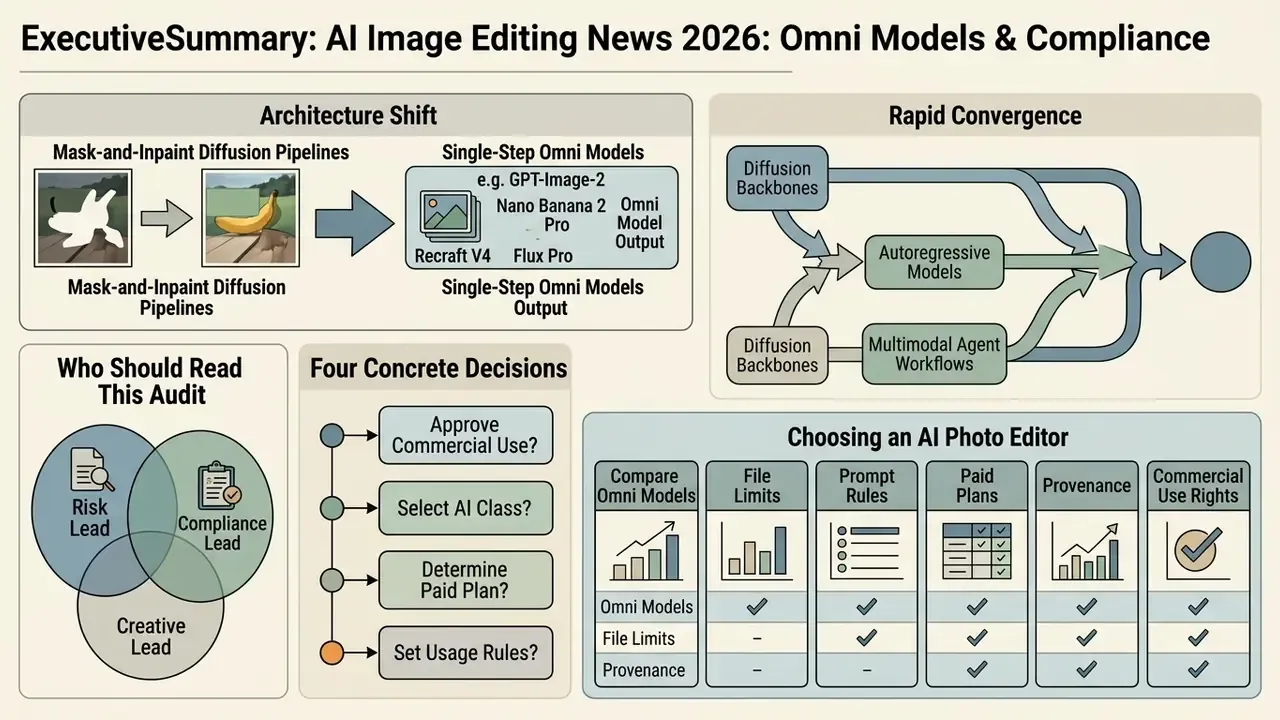
- Architecture shift: The market has moved from mask-and-inpaint diffusion pipelines toward single-step Omni models (GPT-Image-2, Nano Banana 2 Pro, Recraft V4, Flux Pro) that generate and edit in one pass. They interpret text prompts plus visual references instead of manual masks and layers.
- Copyright exposure is asymmetric: Under U.S. Copyright Office guidance (37 CFR Part 202), purely machine-generated visual elements are not registrable. Only human-authored arrangement, compositing and substantial edits are protectable. Disclosure duties in paid advertising sit separately, under FTC/FCC rules and platform policy.
- Provenance is now the control point: C2PA Content Credentials provide the auditable edit history required by Google Ads, Meta and IAB disclosure frameworks. Treat metadata attachment as a mandatory export step, not an optional nicety.
- Validation needs objective metrics: Reference-free erasure metrics (ReMOVE, CVPRW 2024), region-aware instruction metrics (BPM, 2025) and classical PSNR/SSIM fidelity scores belong in model validation, alongside a 100% zoom human artifact review.
- Vendor selection is a security decision: Beyond credits and resolution caps, enterprise buyers must confirm training-data exclusion of customer content, data-retention posture, indemnification scope, and controls against Shadow AI (employees editing brand assets in consumer-grade tools).
- Operational payoff is real but must be measured: In the catalog-migration case documented below, a locked-attention prompt pipeline cut banner post-production effort by roughly three-quarters. That figure is an internal, single-team measurement, not an industry benchmark.
Who Should Read This Audit, and What It Decides
This is written for three overlapping buyers. First, risk and compliance owners who need to know whether AI-edited imagery can pass an internal control review. Second, model-risk and AI governance leads extending existing validation frameworks to generative tools. Third, creative and marketing operations leads who actually press the button.
The article supports four concrete decisions: whether to approve commercial use at all, which class of AI models to standardise on, what to pay for, and how to evidence each edit after the fact. If you only need one takeaway, take this one. Provenance beats preference.
The rapid convergence of diffusion backbones, autoregressive models and multimodal agent workflows has reshaped digital asset creation. Organizations evaluating enterprise deployments now look past simple text-to-image synthesis. Their attention has moved to controllable editing of existing images, reproducible audit trails, and risk-adjusted operational efficiency.
AI Image Editing News Today: What Has Changed
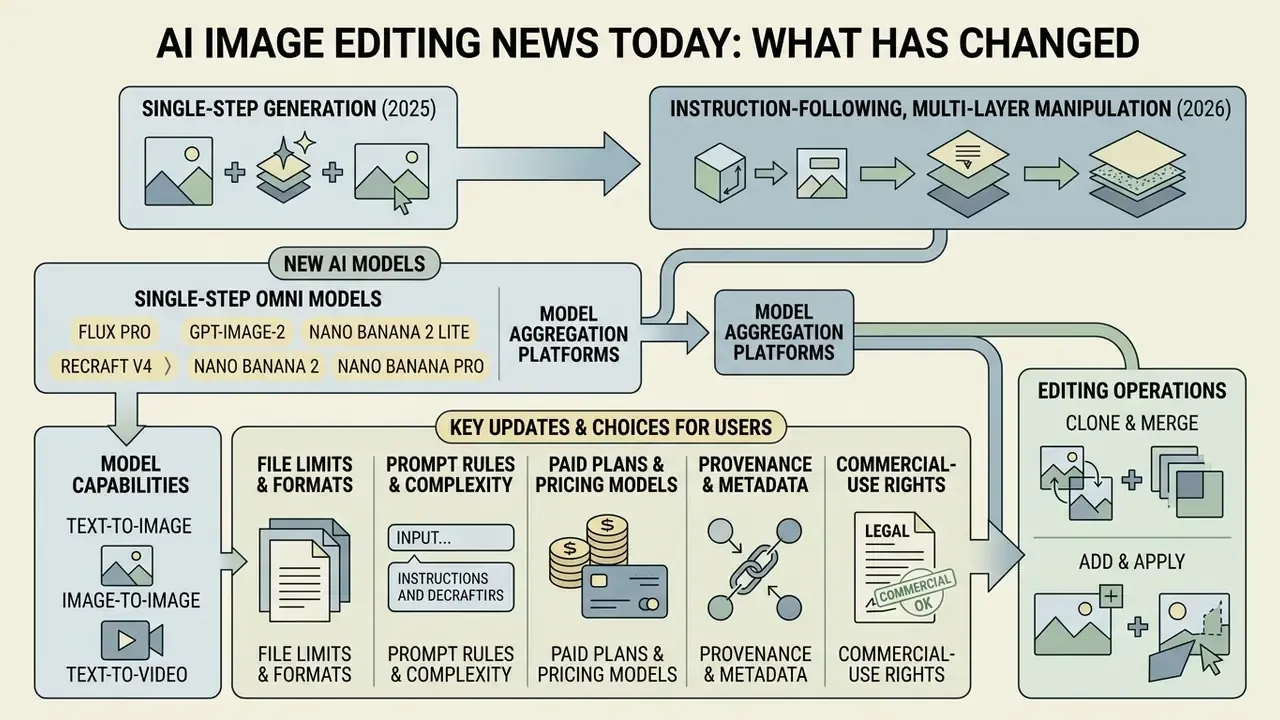
AI image editing news today highlights a structural transition: from single-step generation toward instruction-following, multi-layer image manipulation systems. Enterprise adoption is driven by models that execute precise local modifications without destroying background context or visual identity.
The foundation of mask-less semantic editing was laid by Google's Imagic architecture (2022) and validated on TEdBench (Textual Editing Benchmark), a set of 100 standardized image-plus-instruction test pairs. In that early human study, drawing on 10,346 rater responses, Imagic was preferred roughly 63% of the time against competing text-editing techniques. A modest margin, yes, but it proved that a single input image plus one text directive could replace manual masking. Four years later, diffusion transformer (DiT) editors are evaluated on corpora several orders of magnitude larger, with preservation and instruction adherence scored separately rather than as one blended "quality" judgment.
Recent industry developments show something else worth noting. Modern editing pipelines decompose complex instructions into atomic tool calls, such as mask generation, layer isolation and targeted style transfer, instead of relying on monolithic end-to-end inference.
"Diffusion-based editors support both global and local edits, from full scene reimagining to subtle changes in object appearance."
New AI Models for Image Generation and Editing
Modern AI models for image generation and editing rest on advanced diffusion transformer (DiT) and autoregressive architectures that separate content creation from localized editing. Selecting the right model means answering one question first: does the workflow need standalone prompt-to-image synthesis, or non-destructive manipulation of existing images?
Open-weights models such as Stable Diffusion 3.5 Large and fine-tuned checkpoints allow deep local execution via ControlNet and inpainting pipelines, preserving non-masked regions at 1024×1024 or higher. Meanwhile, closed multi-modal frameworks like Google's Gemini 2.5 Flash Image ("Nano Banana") fold conversational image editing into the same surface, permitting targeted transformations through direct natural language instructions. Organizations evaluating an ai that can create images should distinguish models optimized for zero-shot synthesis from those engineered for fine-grained structural preservation. The two do not validate the same way.
Single-Step Omni Models and Model Aggregation: the 2025 to 2026 Shift
Which AI Photo Editor Updates Matter Most to Users
Recent AI photo editor updates concentrate on one click utility, accelerated multi-step inference, and cross-modal integration spanning static graphics and AI video workflows. These updates let enterprise creative teams execute complex retouching, object removal and canvas extension in a fraction of the time legacy manual layer adjustments demanded.
Commercial platforms like Adobe Photoshop and Express now ship rapid prompt-to-edit capabilities: expand borders, substitute foreground subjects, perform background removal in a pass. Updated framing: the satisfaction percentages below come from a real-world editing-request dataset presented in WACV 2026 research on everyday edit actions. They describe user-reported satisfaction with specific edit actions, not a vendor-agnostic quality ranking, and should be read as directional rather than as validated model-performance scores.

For model-risk teams the implication is blunt. No single satisfaction score or automated metric can stand alone in validation. Satisfaction data captures perceived usefulness. Reference-free metrics capture artifact presence. Structural metrics capture preservation. A defensible validation file combines all three, plus documented human sign-off with a named reviewer.
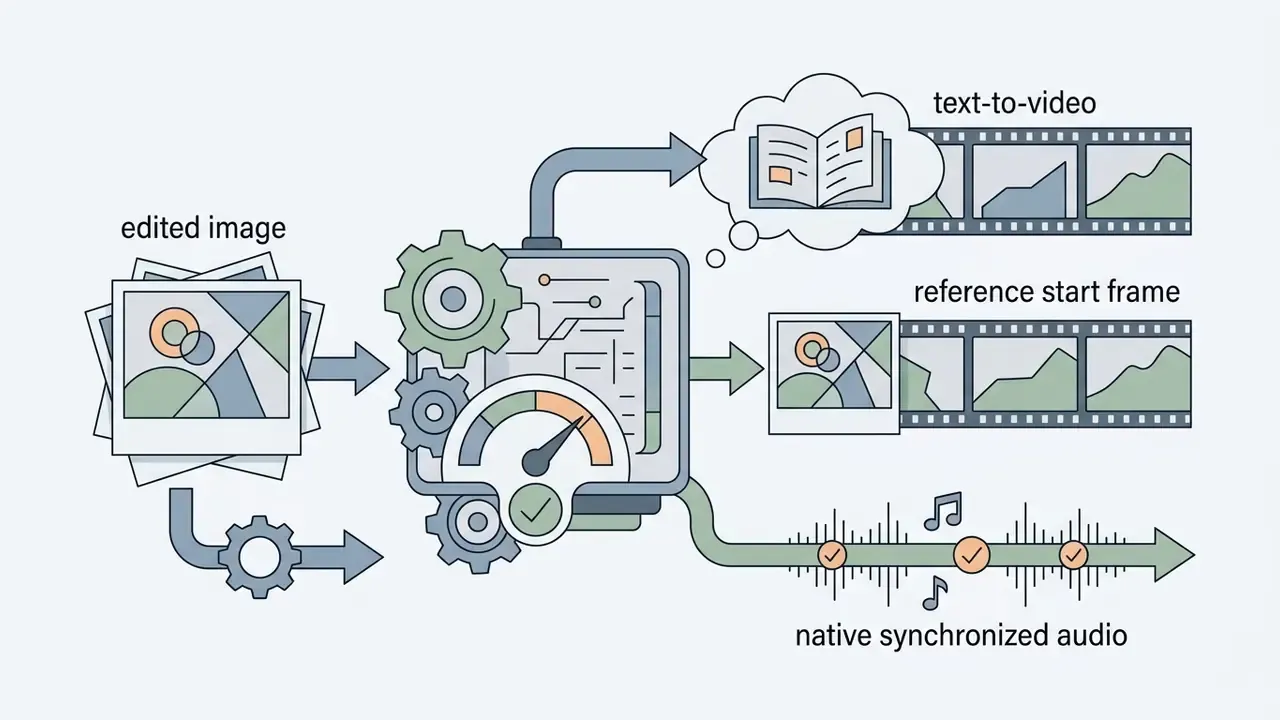
Editors are also connecting static asset modification with video pipelines. Platforms use edited photos as keyframes or initial reference frames for downstream text-to-video generators, creating a unified multimodal asset pipeline. That expansion widens the risk perimeter too: a still image carries one provenance record, whereas a generated clip inherits the provenance of the source frame and the motion model. Two license checks, not one. To explore structural models beyond standard raster graphics, creators can also assess an ai stl generator for 3D asset workflows.



Commercial-Use Decision: Can You Use AI Generated Images at Work
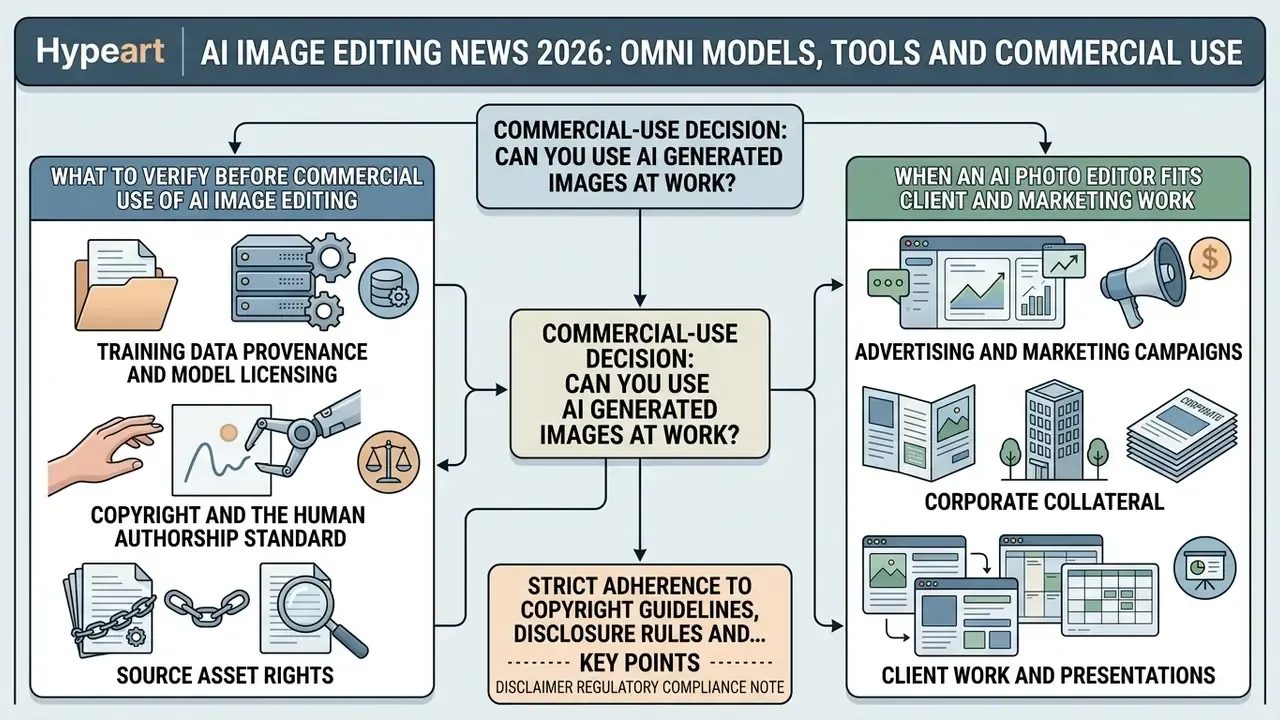
Deploying AI generated and AI-edited images in advertising, marketing campaigns and corporate collateral requires strict adherence to copyright guidelines, disclosure rules and platform advertising policies. Licensing exposure outweighs technical convenience for regulated organizations, which is why this decision gate belongs before tool selection, not after it.
Regulatory compliance note. In the United States, unedited AI generated visuals lack federal copyright protection. Marketers must document human creative input, maintain asset provenance, and follow applicable FTC/FCC and state-level rules on synthetic media disclosure in paid advertising.
What to Verify Before Commercial Use of AI Image Editing
Before deploying AI-edited assets in commercial projects, risk leaders should complete three foundational compliance checks.
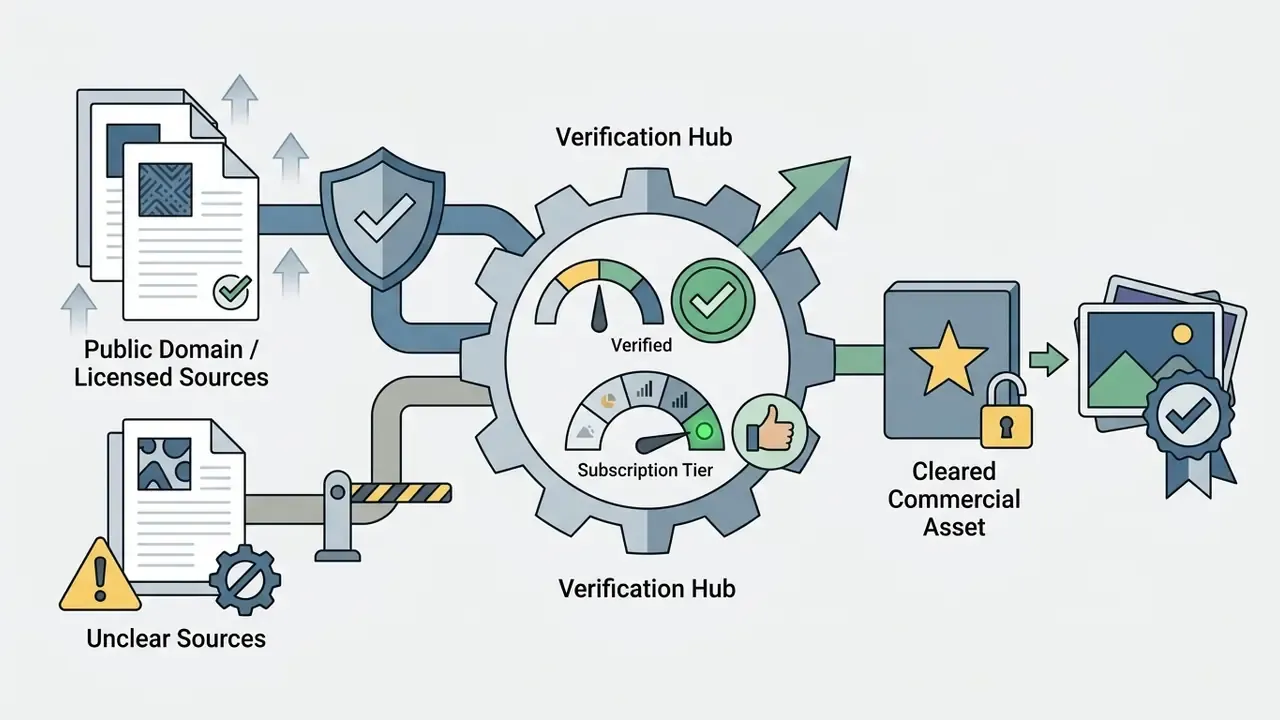
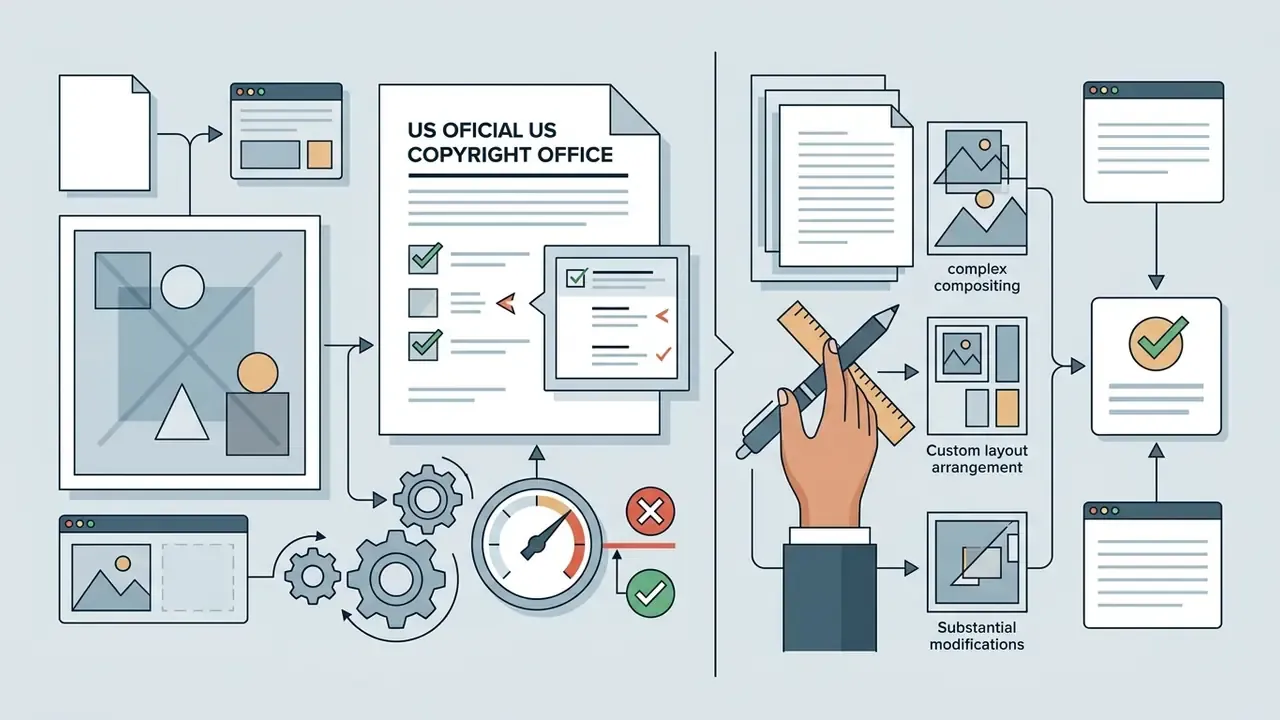
In practice this narrows the fair-use runway for style-replication workflows. Editing a licensed source photo toward a new commercial purpose is materially different from regenerating a protected work for the same market use. The Copyright Office's 2025 work on digital replicas adds a parallel exposure: an image "digitally created or manipulated to realistically but falsely depict a person" raises likeness issues independent of copyright.
- Source asset rights: Ensure that any existing images uploaded for editing, including brand photography and stock photos, do not violate third-party trademark rights or contractual stock usage limits. Marketers sourcing stock imagery should consult guidelines on ai stock image licensing to prevent contract breaches.
When an AI Photo Editor Fits Client and Marketing Work
An AI photo editor earns its keep in commercial marketing workflows: social media visual assets, e-commerce product banner creation, blog illustrations, advertising creative variations. Volume work, mostly.
To mitigate commercial risk, marketing teams should adopt standardized asset tracking such as C2PA content provenance verification (Coalition for Content Provenance and Authenticity). Attaching cryptographic C2PA metadata, marketed as "Content Credentials", gives an auditable editing history and satisfies platform disclosure requirements, including Google Ads and Meta synthetic media labeling rules. Industry frameworks draw a useful line here: routine retouching such as colour correction does not automatically trigger disclosure, whereas synthetic subjects or materially altered creative generally do. Teams sourcing pre-cleared stock visuals can explore AI Media Commercial-Use resources to keep visual asset pipelines compliant.
Checklist0 / 7
What Tasks AI Image Editing Solves Best
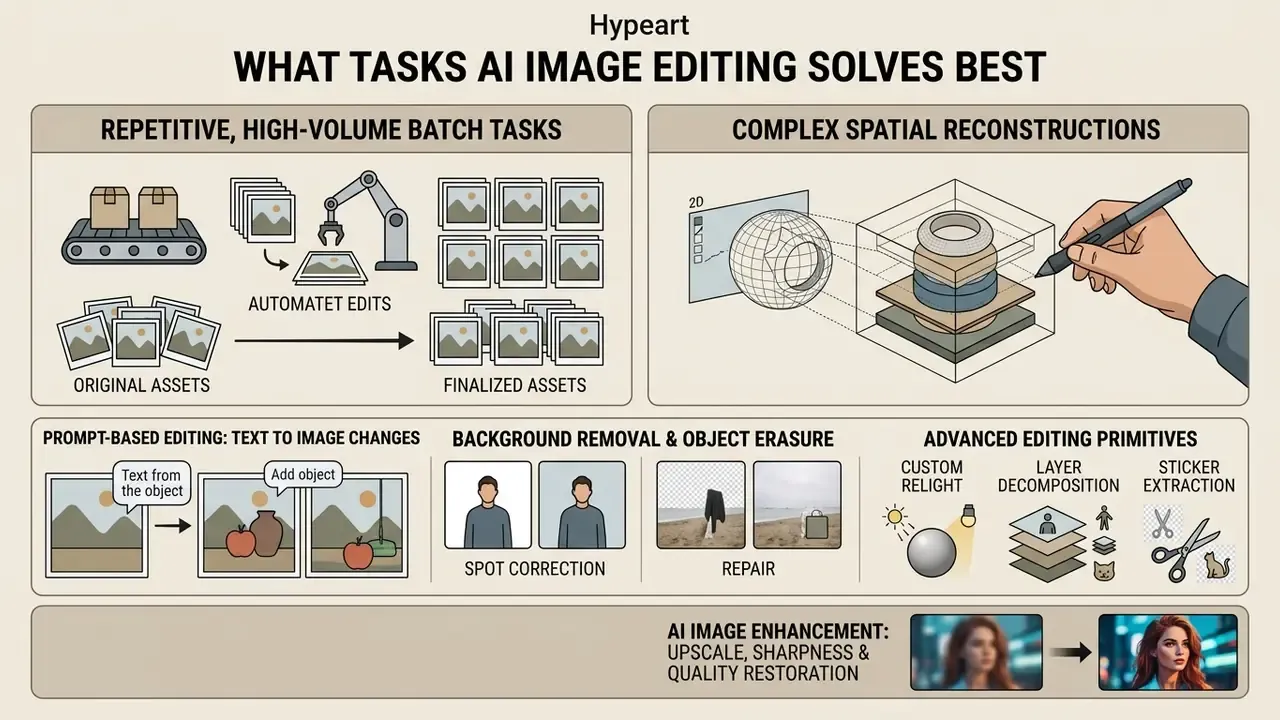
Automated AI image editing beats manual graphic editing in two places above all: repetitive, high-volume batch tasks and complex spatial reconstructions. Using diffusion backbones, these tools perform localized inpainting, background cutouts and detail restoration in seconds without manual layer masking. The advantage grows when the task repeats across many files and the target is well defined: background removal, blemish removal, compositing, bulk stylistic adjustment, preset-based exposure or colour correction across RAW batches.
Prompt-Based Editing: Changing Existing Images With Text
Prompt-based editing modifies existing images through natural language instructions while leaving unmentioned background elements, lighting geometry and subject identity intact. The capability rests on latent noise inversion and cross-attention map control, which isolate edit targets from preserved regions.
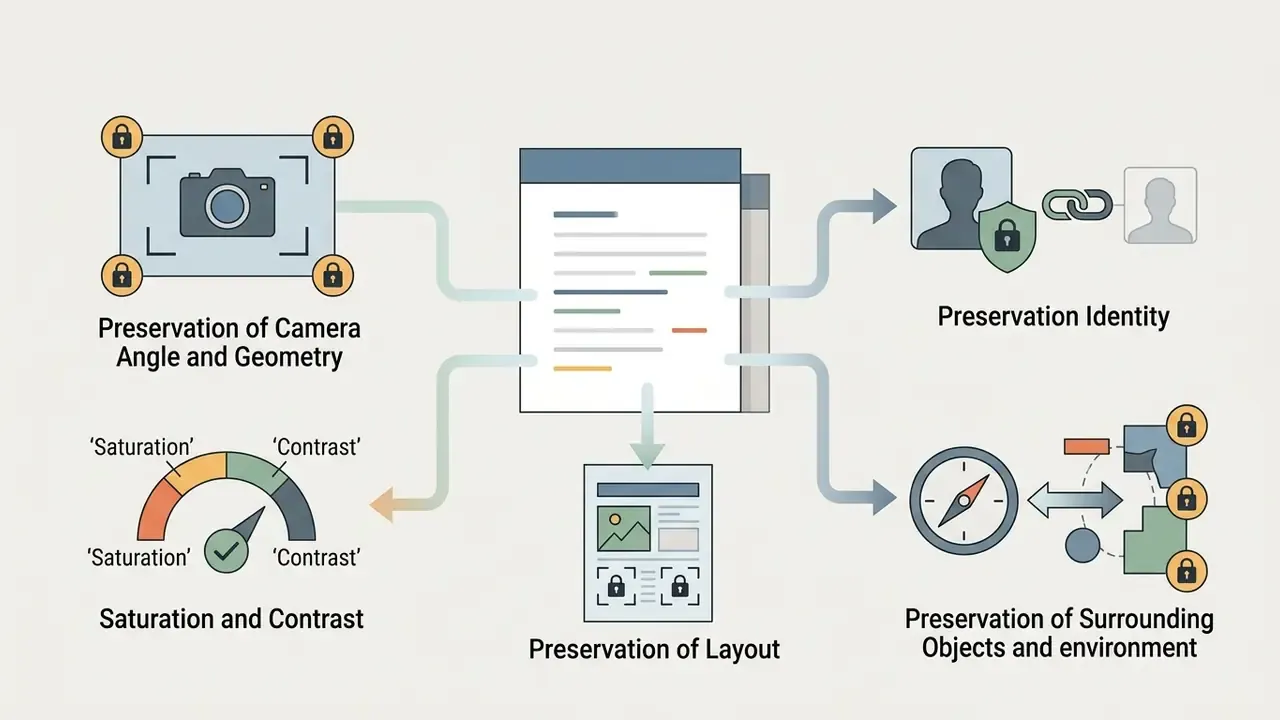
When modifying an existing image through image-to-image workflows using simple text prompts, effective prompt construction follows an explicit structure: state the target modification, then specify constraints on unedited elements. Region-and-semantic-aware evaluation work (the BPM metric line, 2025) formalises this by scoring edited and untouched regions separately, covering position and size correctness, semantic compliance, and preservation of everything outside the edit zone. That separation matters. A model can score well on "instruction followed" while quietly shifting background texture or scene lighting.
"Automatic region localization without user-supplied masks was preferred by participants in 84.9% of comparisons against five baseline models."
In a recent enterprise asset migration, a marketing team needed to update 1,200 product banners for new seasonal branding without re-shooting core products. Using a prompt-based diffusion pipeline with locked cross-attention masks, the team executed localized background shifts and colour updates across the entire catalog in under four hours. The approach maintained exact product geometry while reducing post-production labour by approximately 78% relative to the team's previous manual baseline. Methodology note: this is a single-team internal measurement comparing tracked designer hours on the prior manual cycle against the automated run. It excludes prompt-engineering setup time and should not be generalized as an industry benchmark. Teams reproducing it should log baseline hours before migration, so their own saving is auditable rather than anecdotal.
Background Removal, Object Erasure and Spot Correction
Automated background removal, object erasure and point-level inpainting resolve complex compositing tasks in one click. Unlike legacy threshold-based selection tools, diffusion-based inpainting reads surrounding contextual semantics and synthesizes realistic background textures behind erased subjects.
Evaluation standards such as ReMOVE (CVPRW 2024) measure erasure quality through reference-free metrics that assess background continuity and the absence of residual artifacts together.
"ReMOVE is designed to distinguish object removal from object replacement where no ground-truth reference image is available, and correlates with human perception."
Benchmarks such as I2EBench evaluate "Object Removal" and "Background Replacement" as distinct instruction dimensions, scoring semantic success against the text instruction rather than pixel distance. That design choice is precisely why erasure results from different papers are often not directly comparable. Single-click background removal tools isolate intricate foreground details such as hair strands, transparent glass or complex product edges, then replace background layers while preserving natural contact shadows. Users looking to turn raster compositions into vector or stylized formats can use an ai transform image tool to convert updated visuals into flexible marketing formats.
Advanced Editing Primitives: Custom Relight, Layer Decomposition and Sticker Extraction
Beyond standard object removal, current AI photo editors deploy specialized neural operators for complex asset transformation.
- Custom relight (spatial light remapping) Adjusts key, fill and environmental light angles across an existing subject without triggering generative re-synthesis of background texture. This is the difference between "re-shoot the scene" and "change the mood of the scene you already own", which matters for catalogue harmonization where hundreds of product shots were captured under mismatched studio conditions.
- AI layer segmentation (layer decomposition) Automatically decomposes a flat raster file, JPEG or PNG, into a multi-layer structure by predicting depth channels and synthesizing occluded background regions behind foreground elements. Flat-to-layered output, PSD delivery for example, usually consumes more vendor credits than a flat cutout, because the model must generate what was never photographed.
- Transparent sticker and asset extraction Combines alpha-channel prediction with text-guided generative fill to output isolated assets with clean edge matting, ready for design files and social templates.
- Blueprint-style presets Repeatable operator chains, such as object remover then bulk resize then custom relight, applied consistently across a batch. For governance purposes a saved blueprint doubles as a reproducible configuration record, which is far easier to audit than ad-hoc prompts typed by individual designers.
AI Image Enhancement: Upscale, Sharpness, Colour and Quality Restoration
AI image enhancement news in 2026 is less about bigger multipliers and more about restraint: super-resolution, joint denoising and motion deblurring that improve images without introducing artificial edge distortion or plastic smoothing. Modern RAW pipelines execute these restoration steps in a single model pass, reconstructing missing high-frequency detail.
AI upscaling frameworks scale lower-resolution source files by 2× or 4×, using deep neural networks trained on high-resolution image pairs. In the NTIRE 2024 challenge on light field image super-resolution, nine of 125 registered teams exceeded the baseline PSNR at 4× magnification, a useful reminder that headline upscaling claims depend heavily on content domain (NTIRE 2024 Challenge on Light Field Image Super-Resolution, CVPR Workshops, 2024). For low-light imagery, neural denoisers separate film grain, sensor noise and genuine structural texture, preserving edges without losing micro-detail. To repair soft focus or motion blur, specialized deblurring kernels restore crispness. Creative teams needing targeted restoration can apply an ai sharpen image workflow to recover soft focus detail, or run an ai unblur image pipeline to strip camera shake artifacts from archived media assets.
| Enhancement Task | Primary Mechanism | Input Defect Addressed | Output Quality Metric |
|---|---|---|---|
| 2× / 4× Super-Resolution | Deep learning latent upscaling | Low spatial resolution, pixelation | PSNR / SSIM structural fidelity |
| AI Denoising | Sensor noise distribution modeling | High-ISO grain, digital artifacting | Feature retention without edge blurring |
| Deblurring & Sharpening | Motion kernel inversion | Lens soft focus, camera shake | Crisp edge reconstruction, high-frequency detail |
| Generative Inpainting | Context-aware diffusion fill | Unwanted objects, cropped borders | ReMOVE score / CLIP-D background continuity |
| Layer Decomposition | Depth prediction plus occlusion fill | Flat raster with no editable structure | Edge matting accuracy, background plausibility |
| Custom Relight | Lighting kernel re-estimation | Mismatched studio lighting across a batch | Shadow-direction consistency, colour-temperature match |
- Before: low-resolution, noisy product photo with cluttered background.
- After: 4K upscaled product asset with automated background removal, crisp edge sharpening and generative shadow fill.
Best AI Image Editor and Image Generator: What to Choose
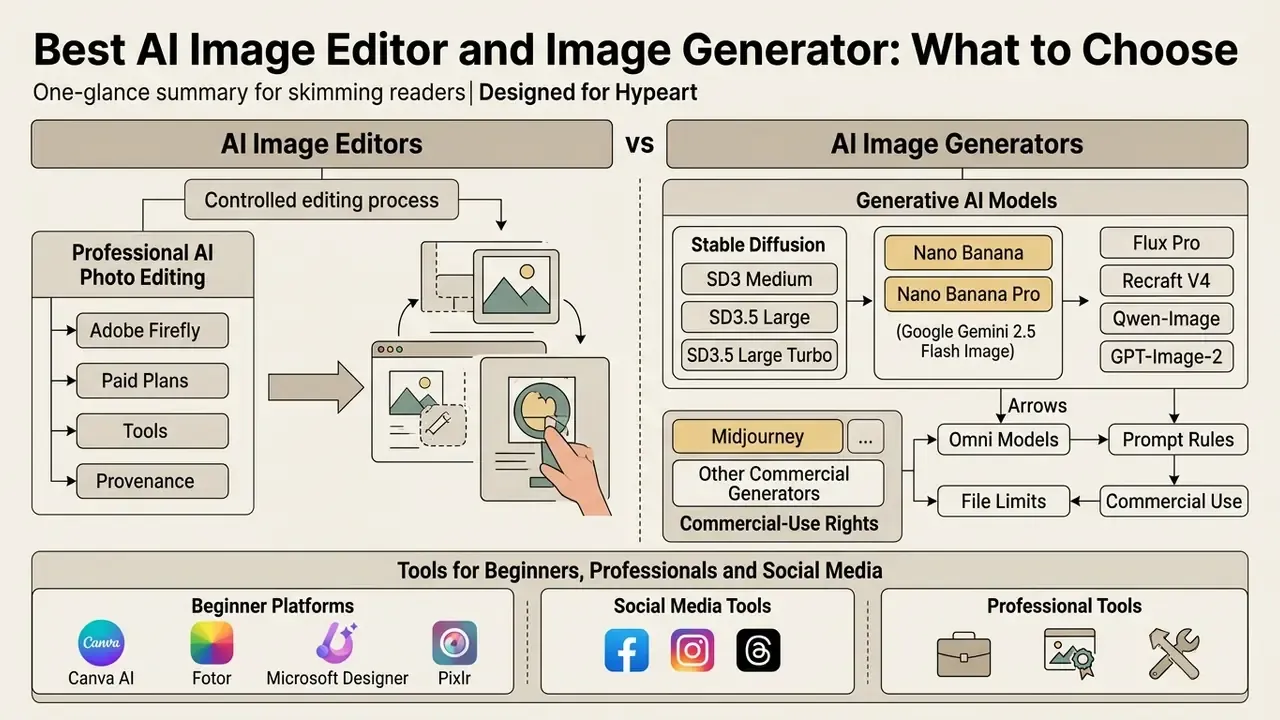
Choosing between an AI image editor and one of the best AI image generators comes down to your operational workflow. Do you need raw visual concepts created from scratch, or controlled modifications to existing corporate graphics?
Adobe Firefly and Professional AI Photo Editing
Adobe Firefly offers a professional-grade generative editing environment embedded natively in Adobe Creative Cloud, Photoshop and Illustrator. Its architecture prioritises non-destructive workflows, high-resolution preservation and clean integration with multi-layer PSD files.
Firefly's Generative Fill and Generative Expand let users enlarge canvases, modify background elements and insert generated assets using detailed text prompts or automatic contextual analysis. Generative Expand accepts either an explicit prompt describing how to extend the background, or a blank prompt that lets the model analyse the existing image. Firefly can also generate at a lower working resolution and upscale at download time, which keeps iteration cheap and final delivery sharp. Standard generations draw on monthly plan credit allocations, with corporate business tiers adding enterprise IP indemnification against third-party copyright claims. For teams scanning the wider market, a guide to the best ai art generator gives comparative benchmarks across competing professional engines.
Stable Diffusion, Nano Banana and Other Generative AI Models
Open and closed generative AI models trade off local execution control, compute demands and conversational flexibility in different ways.
How to Evaluate Paid Plans and Output Quality
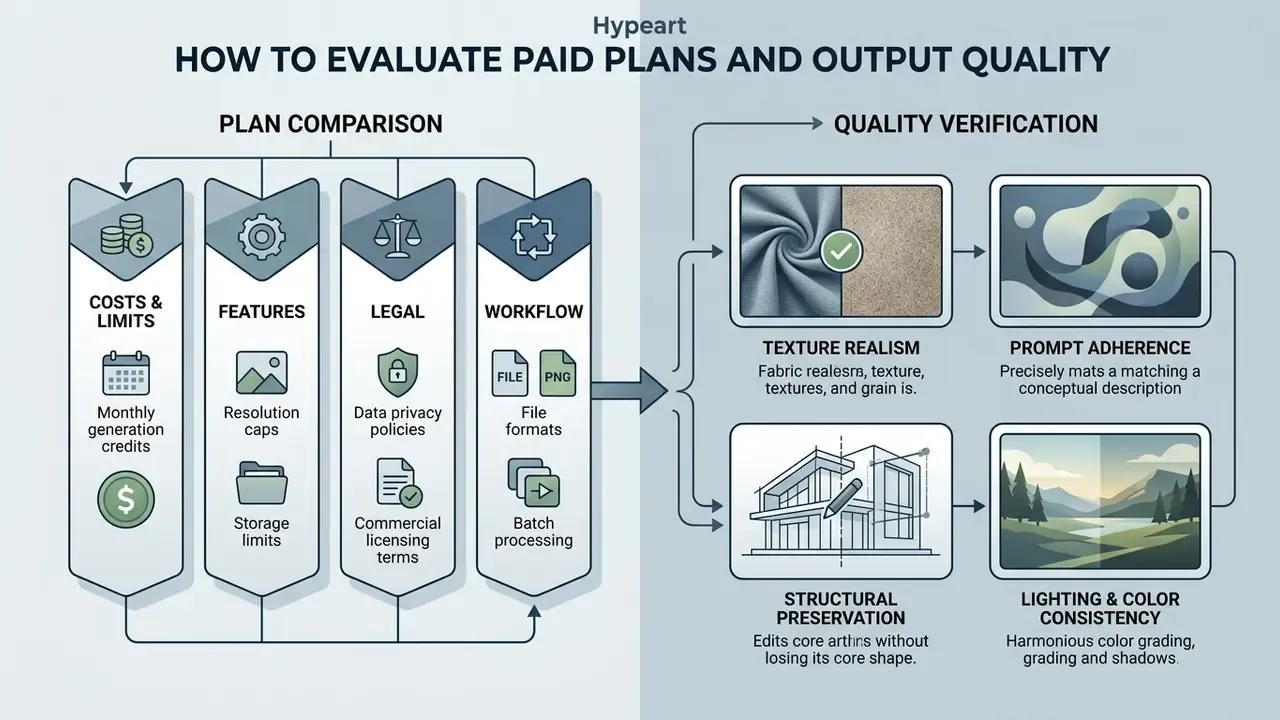
Evaluating paid plans for AI image editing means weighing monthly generation credits, resolution caps, data privacy policies and commercial licensing terms against total cost of ownership.
Translated into procurement language: a plan is only good value if its outputs pass all four dimensions on your asset types. Run the same five representative source files through every candidate tool before signing anything.
What to Compare in Free and Paid AI Tools
Free tiers for AI image tools usually impose hard usage limits: daily generation caps, around 500 images per day at 1024×1024 on some free image APIs, visible watermarks, public feed visibility and lower priority processing queues. Several free video and image tiers also cap export resolution at 1080p and gate 2K or 4K behind a subscription. Paid plans, by contrast, unlock higher output resolutions with 2K and 4K scaling, private asset generation, uploads and reference-image tools, batch processing, team administration and commercial usage rights.
When assessing vendor pricing, review credit consumption per operation rather than headline monthly totals. Simple text-to-image generation may consume 1 credit, whereas complex layered background removal or generative fill might charge 20 to 40 credits per invocation. Before committing to a paid enterprise subscription, study the export, privacy and watermark limits typical of free photo editors, because those constraints usually decide whether a free tier can survive a client project at all.
How to Verify High-Quality Results Before Paying
Before purchasing commercial subscriptions, creative leads should run systematic quality checks across candidate tools using a three-point framework.
Free trials, free tiers and starter credits exist precisely to support this test. Use them on the hardest assets you own, such as transparent packaging, fine hair and small legal type, rather than on easy hero shots. Easy shots flatter every model.
Fact check and verification block. Confirm vendor documentation against official primary sources before commercial deployment.
- Adobe terms of service: Adobe states that customer local or cloud content is not used to train generative AI models, excluding public Adobe Stock submissions. Firefly is trained on licensed and public domain assets, which supports enterprise IP indemnification. See the Adobe General Terms of Use.
- Stability AI terms of service: Platform terms define user responsibilities for generated inputs and outputs. Commercial usage rules and developer credit schedules for API endpoints are set out in the Stability AI API Terms of Service.
- U.S. Copyright Office guidance (37 CFR Part 202): Establishes that purely AI generated visual content lacking human creative control cannot be registered. Human-authored arrangements and substantial edits remain registrable for the human-contributed elements. Review the USCO AI policy and registration guidance.
- Texture realism and artifact absenceInspect outputs at 100% zoom for physical distortion, unnatural skin smoothing, distorted fingers, edge halos, watermark residue or blurred background texture. Public evaluation platforms apply exactly this checklist, including consistency of distance, shadow and lighting plus explicit artifact flags, which makes it a defensible internal standard.
- Prompt adherence and structural preservationVerify whether the editor executed the exact text instruction while preserving surrounding lighting, shadow angles and subject proportions. Score adherence and preservation as two separate marks, never one blended number.
- Lighting and colour consistencyCheck that generated or edited elements match the colour temperature, grain structure and contrast profile of the original source image.
How to Edit Images With AI: The Production Workflow
A structured AI image editing workflow keeps visual quality consistent, maintains asset provenance and cuts trial-and-error generation latency.
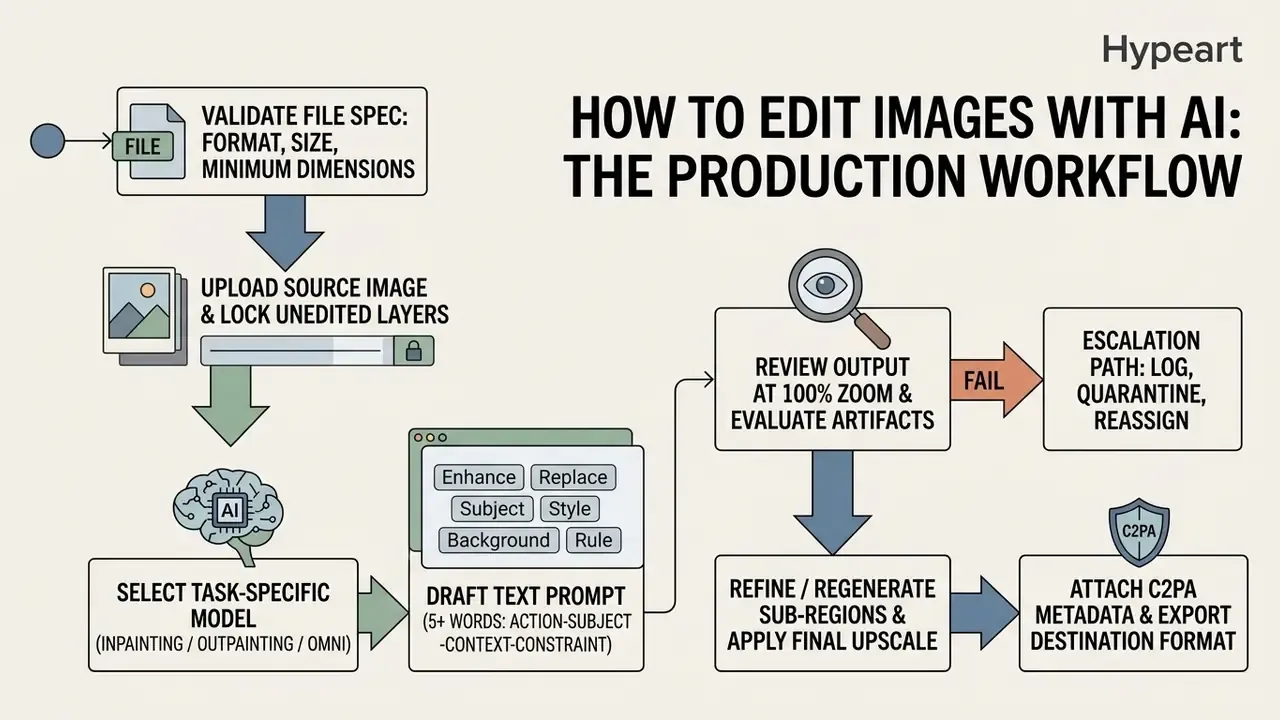
Upload Your Image and Choose an AI Model
Start by importing your high-resolution existing image into the editor workspace, then define the operational mode: localized inpainting, canvas expansion via outpainting, or super-resolution enhancement. Pick an AI model optimized for that specific editing task rather than the one you used last week.
Technical file requirements for AI editing ingestion. Before initializing a diffusion or autoregressive pipeline, confirm the source asset meets ingestion limits.



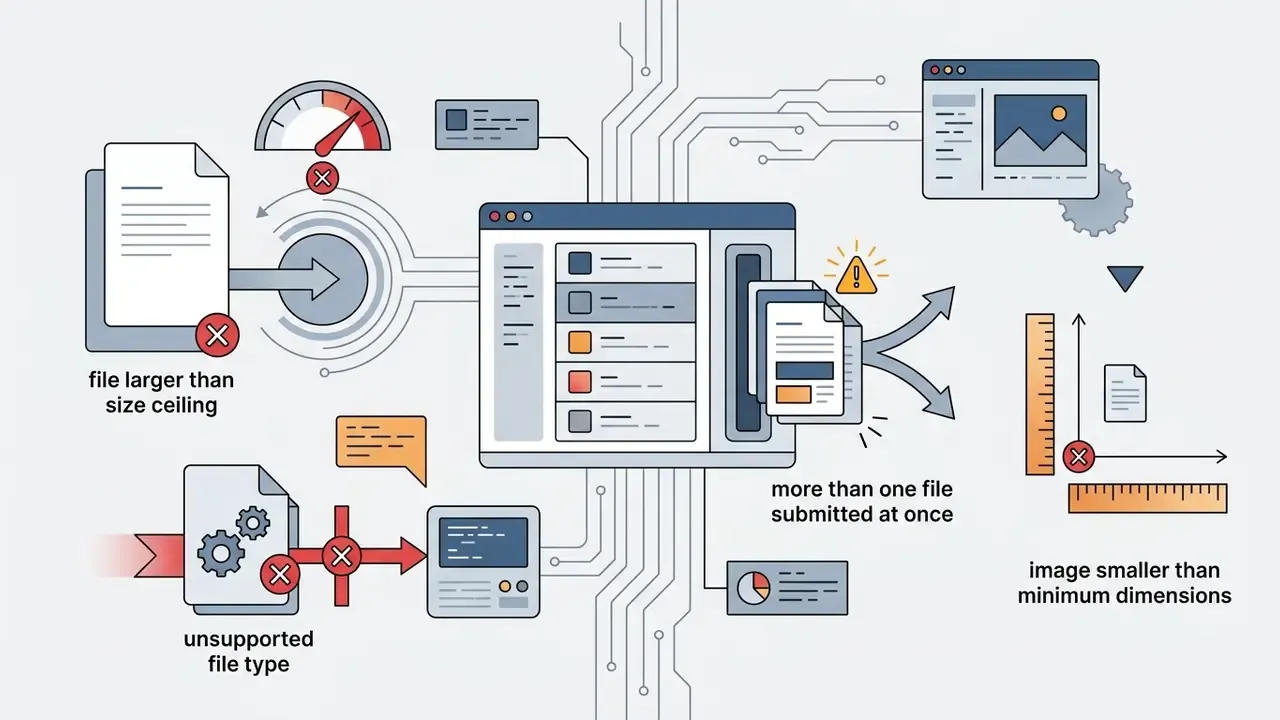
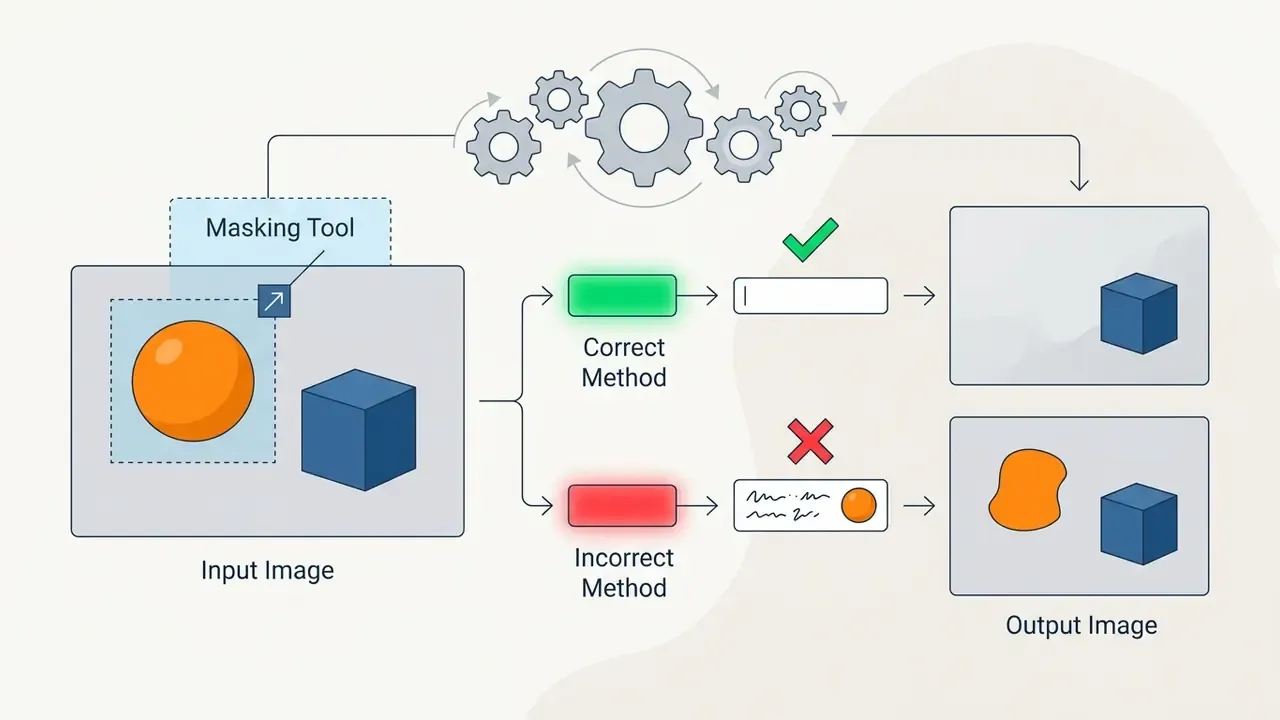
For strict identity preservation, choose an inpainting backbone that accepts structural reference inputs such as ControlNet depth or edge maps. Make sure the imported source image matches the model's recommended aspect ratio and input dimension standards to avoid automatic cropping or stretching. When the API expects it, pass the source image's own dimensions explicitly instead of trusting defaults.
Write a Simple Text Prompt and Check the Result
Draft a clear, concise text prompt naming the exact region to alter and stating preservation constraints for untouched areas.
The five-word minimum rule. To reduce hallucination and unintended global background shifts, an editing instruction should carry at least five descriptive words. Build prompts on an Action, Subject, Context, Constraint frame.
- Non-compliant (under five words): "Change mug to red." This frequently triggers background drift and colour bleed.
- Compliant (five plus words): "Change the central coffee mug colour to crimson red while maintaining the original studio lighting and background wood-grain texture."
Additional prompt patterns worth keeping in a shared library:


"TurboEdit performs text-based image editing in as few as three diffusion steps, removing artifacts through a corrected noise schedule."
Few-step editing matters operationally. Shorter inference loops make it economically sensible to test three prompt variants instead of defending the first one. Review the generated variations against your target composition, checking edge blending, perspective alignment and lighting coherence across the edited boundary.
Refine, Regenerate and Prepare the Image for Publication
If the first result shows minor edge halos or lighting mismatch, refine it: adjust the edit mask, tune denoising strength (typically between 0.35 and 0.65 for localized retouching), or run targeted secondary passes. Change one variable per iteration, mask edge or denoising strength or prompt wording, so the improvement is attributable to something.
Once the edit is final, apply a generative upscale pass at 2× or 4× to hit destination-specific output resolutions. Worth remembering: generative upscaling reconstructs detail, whereas naive resampling after the fact degrades it. Then prepare the finished graphic for distribution across corporate channels with C2PA metadata credentials attached, and match channel specs, for example 72 DPI sRGB minimum for web and 300 DPI for continuous-tone print delivery. Creative teams expanding static visuals into AI-animated promotional clips can review best practices in a guide to free ai video generator platforms, or see the overview of end-to-end production pipelines.
Escalation Path and Residual Risk Ownership
FAQ on AI Image Editing News and AI Photo Editors
Do You Need Design Skills to Use an AI Image Editor?
Basic AI photo editors do not require advanced design skills for standard operations such as automated background removal, simple text-driven adjustments or quick style applications. Modern AI photo editors handle spatial masking, colour balance and subject isolation automatically through simple text prompts, and vendors position them explicitly for users with little or no design experience. Professional-grade commercial projects still need creative oversight, though. Experienced designers manage overall visual composition, enforce brand guidelines, verify lighting realism and execute multi-layer integration that automated single-step tools cannot handle alone. For deeper tool breakdowns, creators can explore the hub of graphic editing guides, or go straight to the general photo editor reference index.
What File Formats and Sizes Do AI Image Editors Accept?
Most browser-based and API-based editors accept JPEG, PNG and WebP, with a typical upload ceiling of 100 MB and a minimum input of 512×512 pixels. PNG is preferred when alpha transparency must survive the round trip, while WebP keeps payloads small for batch jobs. Anything below the minimum dimension should be upscaled before editing, not after. Enhancement applied to an already-degraded edit compounds artifacts instead of removing them.
Can an AI Image Editor Work Together With AI Video?
Yes. Modern AI image editors slot directly into AI video production pipelines. An edited image can act as the primary keyframe or visual style reference for downstream video engines such as Google Veo or Runway. Several APIs also support interpolation between a starting and an ending image, and distinguish reference images, which steer style, from keyframes, which pin specific frames. In this combined workflow, creators edit static graphics first, adjusting subject details, clearing background clutter and scaling resolution, then pass the refined image into a video generator to synthesize camera motion or subject animation. From a governance standpoint, crossing from still to motion widens the model-risk perimeter: the clip inherits provenance obligations from both the edited frame and the video model, and disclosure rules for synthetic performers are stricter than for retouched stills. Teams building full video pipelines can review developer economics in a guide to Google Veo AI video generator access, or weigh alternatives in a comparison of free ai video generator options. For broader platform comparisons across generative tools, explore the hub of comparative reviews, check a guide to ChatGPT picture generator capabilities, review an analysis of Midjourney AI image generator tools, or assess enterprise features in a breakdown of the Google AI image generator.
Which Metrics Should Model Validation Use for Image Editing?
Pair task-specific metrics with human review: ReMOVE for reference-free erasure quality, region-aware instruction metrics from the BPM line for edited versus untouched region scoring, SSIM, LPIPS and PSNR for structural preservation, and CLIP-based scores for prompt alignment. Record each score, the sample size and the reviewer identity in the validation file, so the control is testable by a second line of defence rather than merely asserted.
Is AI-Edited Imagery Safe for Regulated Advertising?
It can be, provided three conditions hold. The model tier grants commercial rights, ideally with indemnification. The human contribution is documented for authorship purposes. And disclosure matches the channel. Routine colour correction typically needs no label, while synthetic subjects, materially altered creative and political advertising generally do, with format-specific disclaimer rules for print, video, internet and audio. When in doubt, attach Content Credentials and seek counsel.
How Does Artificial Intelligence Editing Change Shadow AI Exposure?
It raises it, quietly. Image tools feel harmless, so staff sign up with personal emails and upload brand or customer photography without a second thought. The mitigation is unglamorous: an approved-tool list with named tiers, domain controls for confidential asset owners, and a quarterly review of which generative AI services actually hold your imagery.
Editorial Appendix A: Superseded Wording and Source Notes
For transparency, earlier formulations from previous revisions are retained here and replaced in the main text with more precisely sourced wording.
- Superseded
- "According to product benchmarks from WACV 2026 research, everyday editing tasks show high user satisfaction across specific automated operations." Updated to: figures attributed to a WACV 2026 real-world editing-request dataset measuring satisfaction with specific edit actions, with an explicit note that they are directional and not vendor-agnostic quality scores, supplemented by the CICN 2024 caveat on metric and perception mismatch.
- Superseded
- "reducing post-production labor costs by 78%." Updated to: "reducing post-production labour by approximately 78% relative to the team's previous manual baseline", with a methodology note stating it is a single-team internal measurement excluding prompt-engineering setup time.
- Superseded
- "scalable editing corpora like ImgEdit (1.2 million curated pairs) and GPT-IMAGE-EDIT-1.5M (over 1.5 million triplets) have established new benchmarks", attributed to a single 2026 survey. Updated to: the same corpora described as vendor- and author-reported scale indicators drawn from dataset and model release documentation, with a note on limited independent replication.
- Superseded
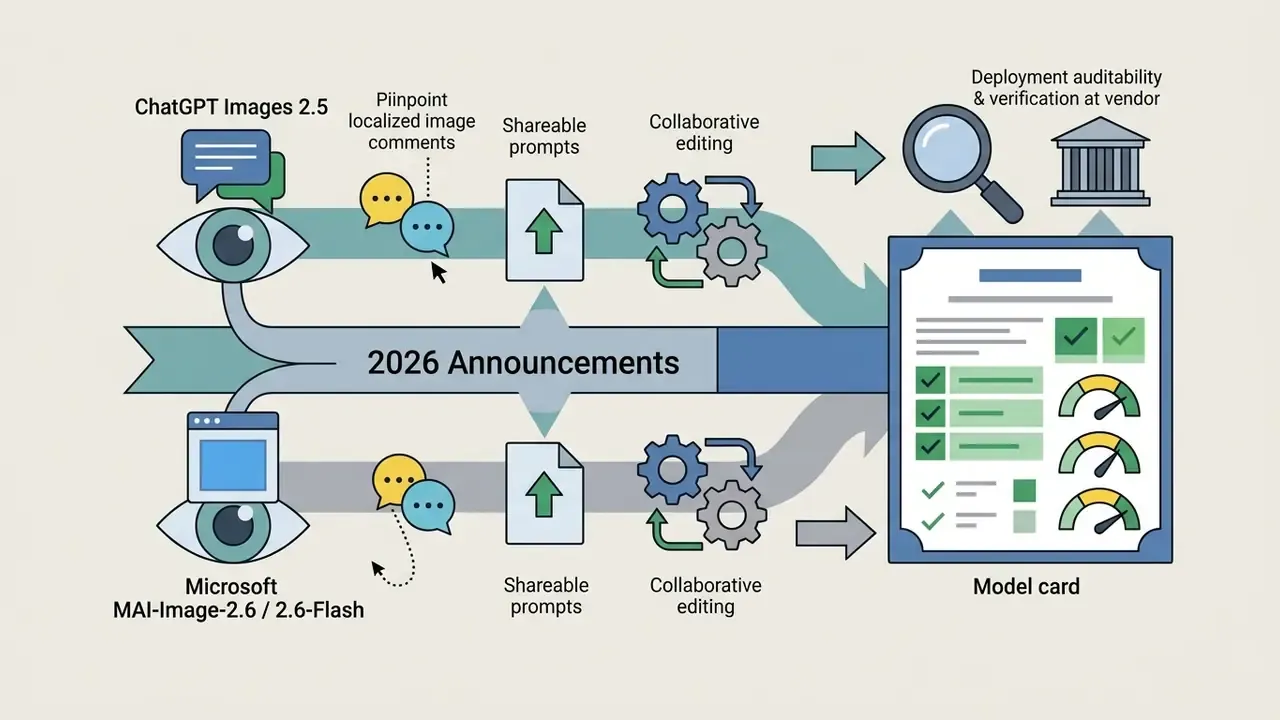
- dated 2026 timeline entries presented as settled fact, for example "August 2026" and "September 2026". Updated to: marked as vendor-announced, with an instruction to confirm build numbers and model-card dates at the vendor source at procurement time.
Editorial disclaimer. This article is informational and does not constitute legal, financial or compliance advice for any institution. Copyright, likeness and advertising-disclosure rules for AI generated and AI-edited imagery vary by jurisdiction and change frequently. Verify vendor terms, indemnification scope and data-retention commitments directly with the provider, and obtain qualified legal counsel before commercial deployment. Pricing, credit costs and model availability cited here reflect publicly documented vendor information at the time of the editorial audit and should be re-verified before purchase.