Picking the best text to video ai platform is a procurement decision, not a taste test. What actually matters: model architecture, motion controls, output fidelity, licensing language, and the governance evidence a vendor can hand your risk function. Marketing copy rarely covers any of that.
Enterprise teams and content creators need to match tool capability to a concrete workflow. A six-second cinematic teaser and a 12-minute avatar-led compliance module are not the same product problem.
What this guide covers
- Tool categories and which generator fits which workflow
- Feature-level comparison criteria (quality, prompt control, 3D camera motion, editing)
- Best AI video maker by use case, including document-to-video ingestion
- Free tiers, pricing, TCO math and commercial-use limits
- Step-by-step text-to-video production pipeline
- Enterprise security, compliance, SCORM export and model-risk validation
- Consent, privacy, guardrails and platform policy enforcement
- FAQ and pre-purchase checklists
Best text to video AI tools: which generator fits your workflow?
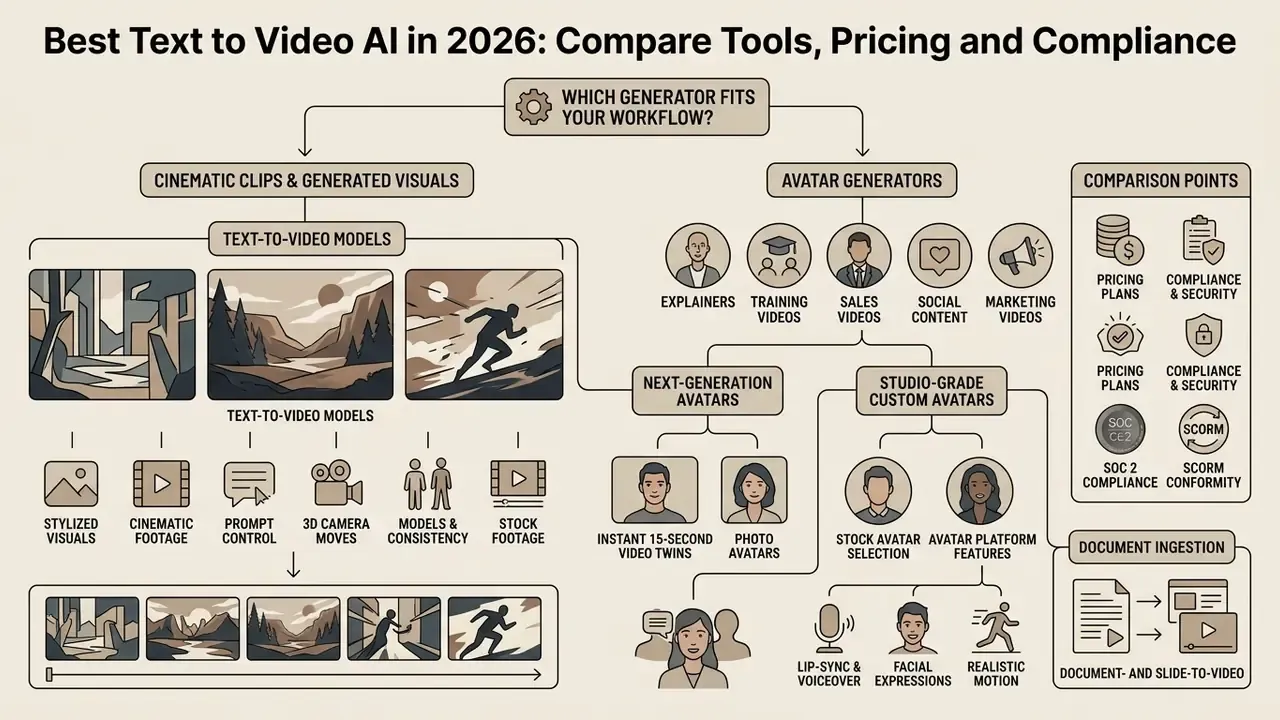
Choosing the best text-to-video AI tool depends on one upstream question. Do you need cinematic motion, a synthetic presenter, or automated short-form publishing at volume? Different platforms lean on specialized video models tuned for specific output constraints, rendering speeds, and input modalities.
Readers who want a baseline definition of the category can start with the glossary entry on AI video generators before comparing individual engines. The shorthand many buyers use, "best ai video maker text to video", usually collapses three distinct product classes into one search box.
«VBench evaluates video generation across 16 independent dimensions, including subject consistency, motion smoothness and temporal stability.»
Comparison of leading AI video generator categories and capabilities (2026)
| Tool category | Primary use cases | Core input / interface | Key features and models | Free tier availability | Enterprise security signals to verify |
|---|---|---|---|---|---|
| Cinematic text-to-video generators | Marketing teasers, B-roll, concept art, cinematic visual clips | Text prompt, reference image, camera direction vectors | High motion fidelity, native audio, physics simulation (e.g. Google Veo 3.1, OpenAI Sora 2, Kling 3.0) | Limited credit allocations or watermarked trial exports | API data-retention terms, opt-out from model training, provenance metadata (SynthID) |
| AI avatar platforms | Corporate training, sales outreach, presenter explainers | Written script, voice clone reference, avatar template, PPTX/PDF upload | Lip-sync alignment, multilingual dubbing, slide-to-video conversion (e.g. HeyGen, Synthesia) | Freemium tiers with strict duration limits (e.g. 1–3 min/mo) | SOC 2 Type II, ISO 42001, GDPR, SSO/RBAC, verifiable consent workflow, SCORM export |
| Social media video makers | TikTok videos, YouTube Shorts, Instagram Reels, viral ads | Long-form video URL, script outline, prompt clips | Auto-cropping (9:16), automated captions, virality scoring (e.g. OpusClip, CapCut AI) | Free export with platform watermark or credit caps | Consumer ToS review, watermark policy, third-party sub-processor list |
| Multi-model workspaces | Product marketing, enterprise brand content, asset generation | Text prompt, image-to-video keyframes, brand asset kits | Timeline editing, prompt-based editing, custom B-roll, asset control, API integration (e.g. Runway Gen-4.5, InVideo AI) | One-time starter credit grants | IP ownership clauses, VPC/private deployment options, audit logging |
Text-to-video models for cinematic clips and generated visuals
Cinematic text-to-video generators use diffusion and transformer architectures to synthesize dynamic, photorealistic footage straight from descriptive text. Systems such as Google Veo 3.1 and OpenAI Sora 2 deliver outputs up to 4K, with complex camera maneuvers, atmospheric lighting, and native audio sync. Google documents Veo 3.1 output at 24 FPS in 720p, 1080p or 4K, with 4-, 6- or 8-second clip durations, 9:16 and 16:9 aspect ratios, and up to four generations per prompt.
According to the PhyWorldBench Physics Evaluation Report (2024), leading models handle fundamental motion realism reasonably well. Compound interactions are another story.
«Sora-Turbo reaches roughly 0.384 overall physical-realism in fundamental scenarios, while compound physical interactions drop performance to 0.261.»
OpenAI's own deployment notes echo the limit: the shipped model "often generates unrealistic physics" and degrades on complex actions over longer durations. So test engines like Runway Gen-4.5 and Kling 3.0 on your actual shot list when you need a short cinematic video clip, custom B-roll, or a high-impact visual storytelling asset. And budget for re-generation cycles when physics fidelity matters, because it usually does on product footage.
A deeper primer on the category sits in the glossary of text-to-video AI tools, while broader comparative frameworks across adjacent generative categories are covered in the category overview.
AI avatar generators for explainers, training and sales videos
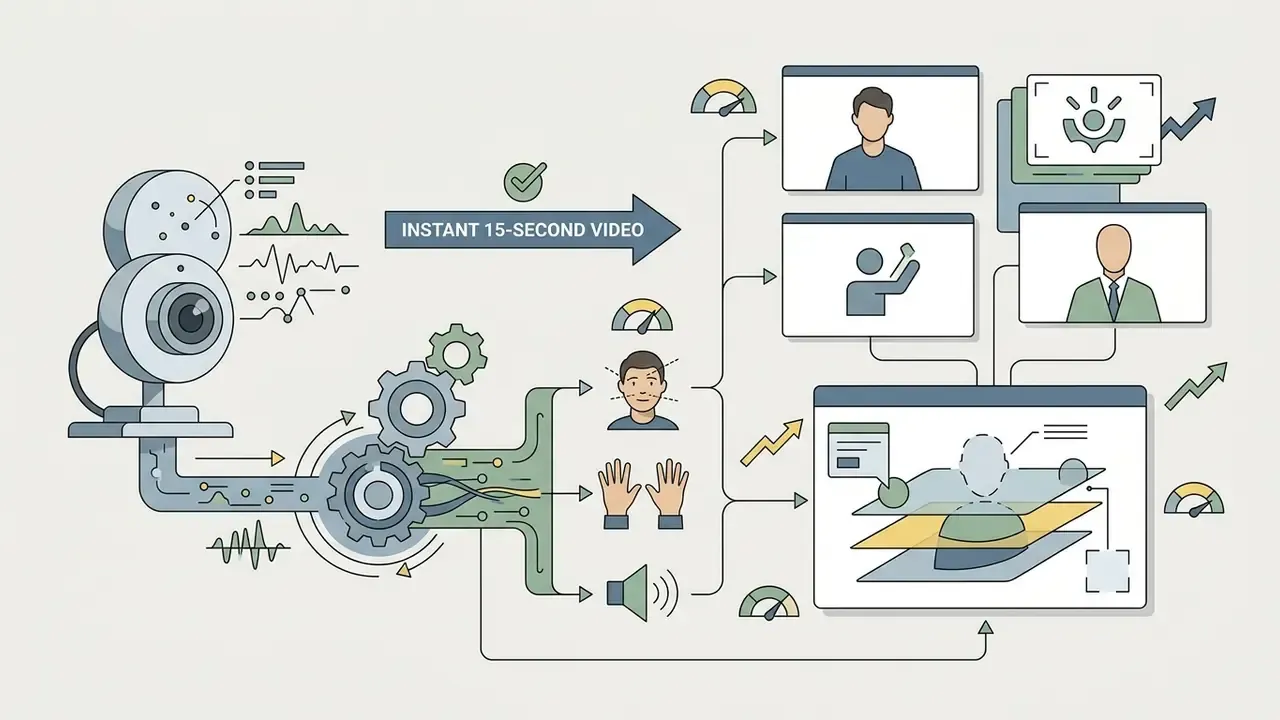
AI avatar platforms turn written text into presenter-led video, using photo-realistic synthetic humans with phoneme-level lip-sync across 175+ languages and regional dialects. HeyGen and Synthesia let enterprise L&D teams produce explainer videos and training video modules without a camera crew or studio booking. Three deployment models dominate:
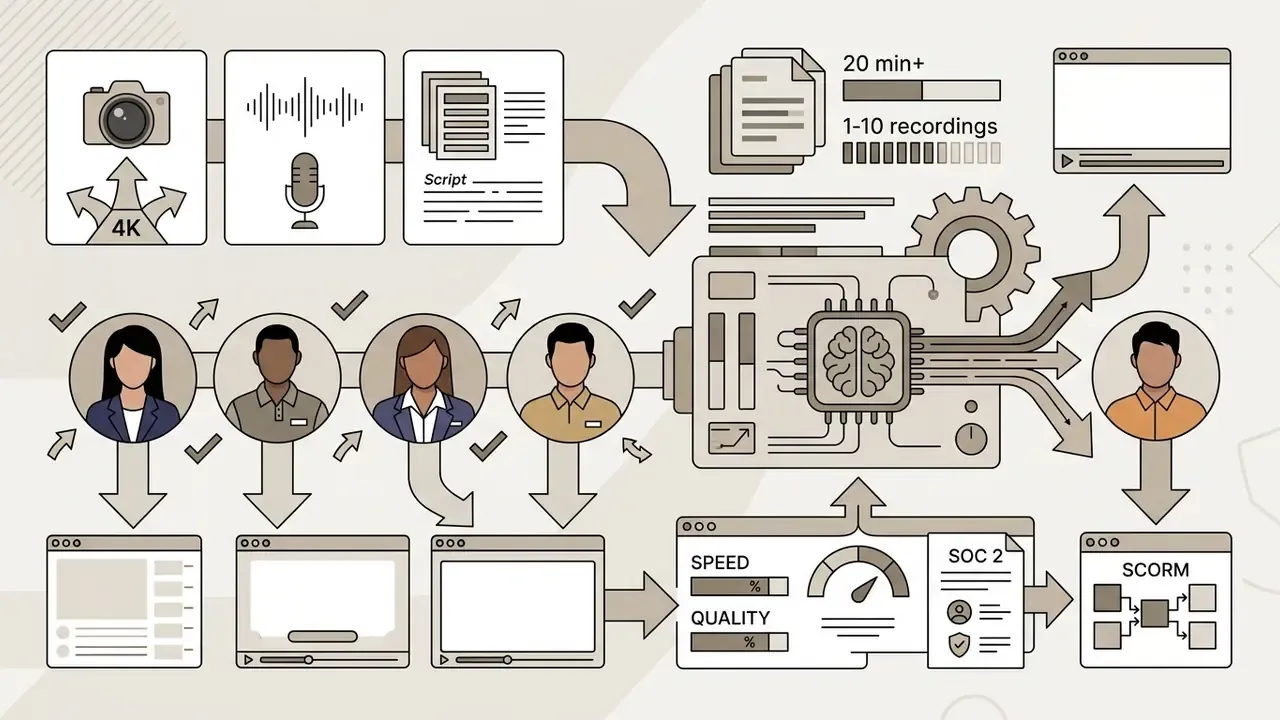

Avatar platform feature comparison
- Stock avatar selection from 240+ (Synthesia) up to 500–1,000+ (HeyGen) pre-built multi-ethnic presenter models, sorted by age, attire and industry scenario.
- Document- and slide-to-video ingestion direct import of PowerPoint (PPTX), PDF, DOCX, TXT or a public URL, converted into multi-scene avatar presentations with narration, captions and branded layouts.
- Phoneme-level lip sync real-time mouth-shape adjustment tracked to the audio waveform, which removes "uncanny valley" artifacts during fast technical pronunciation and acronym-heavy compliance scripts.
- One-click localization avatar re-dubbing into 160–175+ languages with lip-sync retiming and auto-generated captions.
These systems combine voice cloning, script-to-scene translation, and multi-language dubbing across more than 140 languages. In enterprise risk reviews, though, avatar tools are judged mainly on identity consent frameworks, data privacy boundaries, and lip-sync precision during technical demonstrations. Visual polish is table stakes now.
«T2VWorldBench shows Wan 2.1 reaching an average score of 0.68 across six world-knowledge domains, including physics, nature and culture.»
That world-knowledge gap matters for training content. Factual scenes, equipment handling or a regulated procedure, should be storyboarded from verified assets rather than generated from an open prompt.
Key features of an AI video generator to compare before choosing
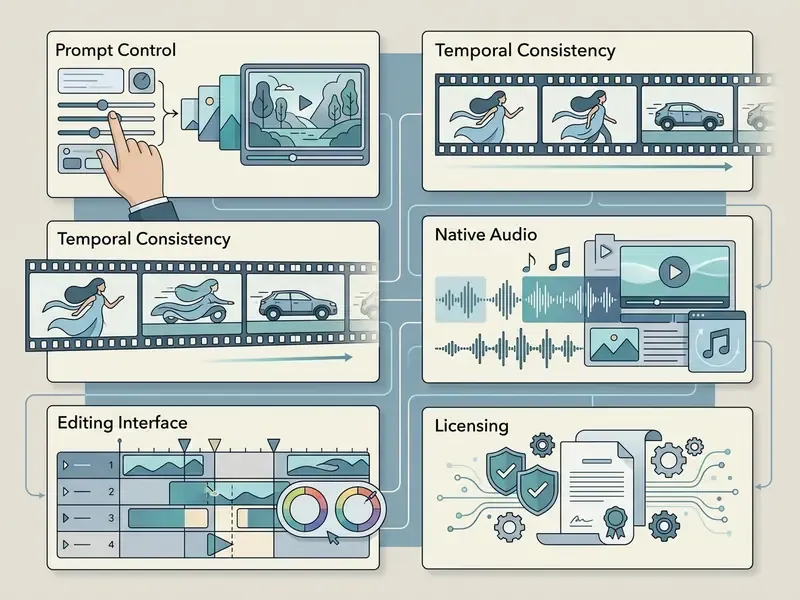
Evaluating an ai video generator means reviewing visual alignment, motion smoothness, audio integration, temporal consistency and prompt adherence. Then balancing raw model performance against editing controls, export permissions and integration depth. A shortlist of shipping products is maintained in our comparison of leading AI video generators.
Video quality, prompt control and AI video models
Output quality depends on the underlying ai video models, frame-rate stability, spatial resolution and text-prompt compliance. VBench (CVPR 2024) scores models across 16 dimensions, including temporal consistency, motion smoothness and subject identity preservation. EvalCrafter (CVPR 2024) splits scoring into visual quality, content quality, motion quality and text-video alignment across 17 objective metrics. MANTISSCORE adds factual consistency as a separate axis.
«DEVIL records Pearson correlation above 0.9 between dynamics metrics and human ratings, confirming the reliability of motion-controllability measurement.»
Prompt control lets users specify camera motion (pan, tilt, zoom), lighting, lens focal length and style. Veo 3.1 and Sora 2 accept detailed cinematic direction, yet empirical testing in TC-Bench (2024) is sobering: most models complete fewer than 20% of complex multi-step state transitions requested in a single prompt.
«TC-Bench shows that most video generators complete fewer than 20% of the compositional changes defined by prompts with explicit initial and final states.»
Precise 3D camera controls and motion kinematics
Modern cinematic models (Veo 3.1, Sora 2, Kling 3.0, Runway Gen-4.5) accept explicit camera-movement vectors. You can bypass chaotic randomized motion by writing operator terminology into the prompt:
- Dolly / push in moving the lens toward the subject to heighten intensity and compress background depth.
- Orbit / arc shot revolving around a central subject while holding focal lock and identity consistency.
- Crane / jib lift vertical elevation shifts that capture architectural context or a dramatic reveal.
- Handheld parallax organic, floating movement with realistic foreground and background depth separation.
- Tracking / follow shot lateral movement locked to a moving subject at a defined speed, useful for product-in-use footage.
- First-frame and last-frame keylocking fixed start and end anchors, so transitions between rendered scenes stay smooth and repeatable.
A practical formula for controllable motion: [Shot size] + [Angle] + [Movement + direction + speed] + [Subject & action] + [Lens/look] + [Lighting/mood] + [What the shot reveals].
Built-in editing, voices, captions and music
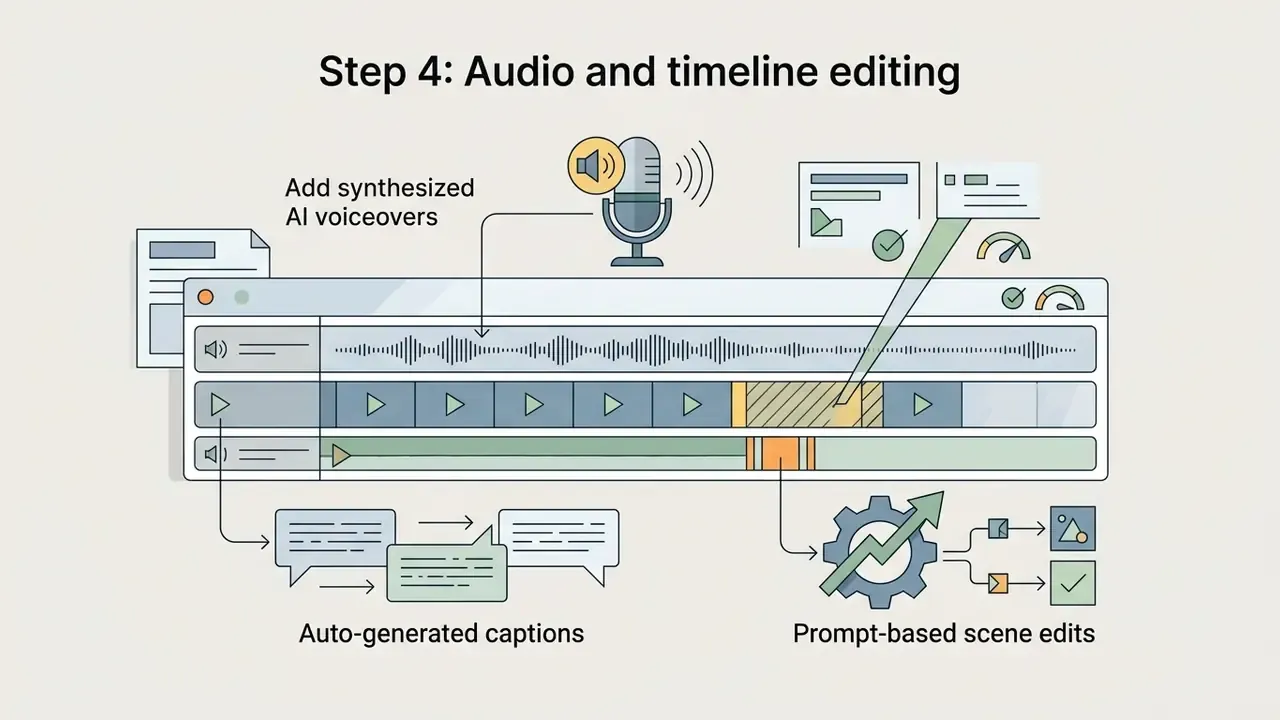
Integrated editing suites let teams adjust synthesized footage without exporting to an external NLE. Teams weighing in-app timelines against desktop alternatives can review our roundup of free video editing software before standardizing on one workspace. Strong platforms ship timeline controls, ai voiceovers, automated caption generation, background ai music pairing and voice cloning; a technical breakdown of synthesis quality and licensing sits in the guide to AI voice generators.
Together these features turn raw generated clips into a polished video ready for distribution. One caveat is worth repeating.
«T2VTextBench found that every tested model scores below 0.43 on on-screen text accuracy: even the best systems distort lettering between frames.»
Practical implication: never let the model render legal disclaimers, prices or brand names inside the frame. Burn critical text in as an overlay during editing, and export captions as sidecar SRT/VTT files where accessibility review applies.
Prompt-driven non-linear editing (Magic Box controls)
Leading workspaces have removed most manual timeline work through prompt-based video editing, usually marketed as "Magic Box" or agentic editing. Instead of splitting tracks and re-rendering the project, creators issue natural-language commands against the existing cut:
- Scene modification "Delete scene 3," "Swap the background to a modern office," "Extend the video by 4 seconds," "Reorder scenes 2 and 5."
- Audio and voice adjustments "Change the voiceover accent to British professional male," "Make the music 20% quieter," "Translate the dialogue into Spanish and re-sync the lips."
- Visual style transformations "Change lighting to dramatic volumetric sunset," "Re-light the scene," "Add motion blur to the passing car," "Replace the product shot with the uploaded PNG."
- Object-level edits on uploaded footage swap an object, refine details, or change style on existing video without reshooting.
This command layer talks directly to the generation timeline, which shortens post-production materially. Vendors report edit-cycle reductions of up to 80%. Independent verification is not available yet, so treat that as a hypothesis to test in a pilot, not a planning figure. Teams that also assemble slide-led content can combine this with automated deck builders: see the best ai powerpoint generators or the best ai presentation makers.
Image-to-video, generated images and custom B-roll
Image-to-video features animate static photographs, graphic designs or ai generated images into moving sequences. By supplying a starting frame or a keyframe pair, you keep tight brand control over character appearance, product design and background scenery. Vendor documentation typically exposes motion type (automatic "smart" motion versus user-defined), camera movement, aspect ratio, duration and resolution, plus optional two-keyframe interpolation where the model fills in the intermediate frames. Source imagery can be produced or refined with the tools compared in our ai image generator hub.
The technique carries most custom B-roll work: animating static product shots and holding character identity consistent across scenes.
«T2V-CompBench shows models systematically fail on attribute binding, object counting and spatial relationships in compositional prompts.»
So for multi-object B-roll, generate one subject per clip and composite in the editor. Asking a single prompt to place five branded objects in correct spatial order is a reliable way to burn credits. Buyers who want interactive cost estimation across creative suites can browse the hub of calculators to model generation budgets.
Best AI video maker by use case
Selecting an ai video maker comes down to the commercial objective, required output format and distribution channel. Match tool architecture to the scenario and you stop paying for specialized features nobody on the team uses.
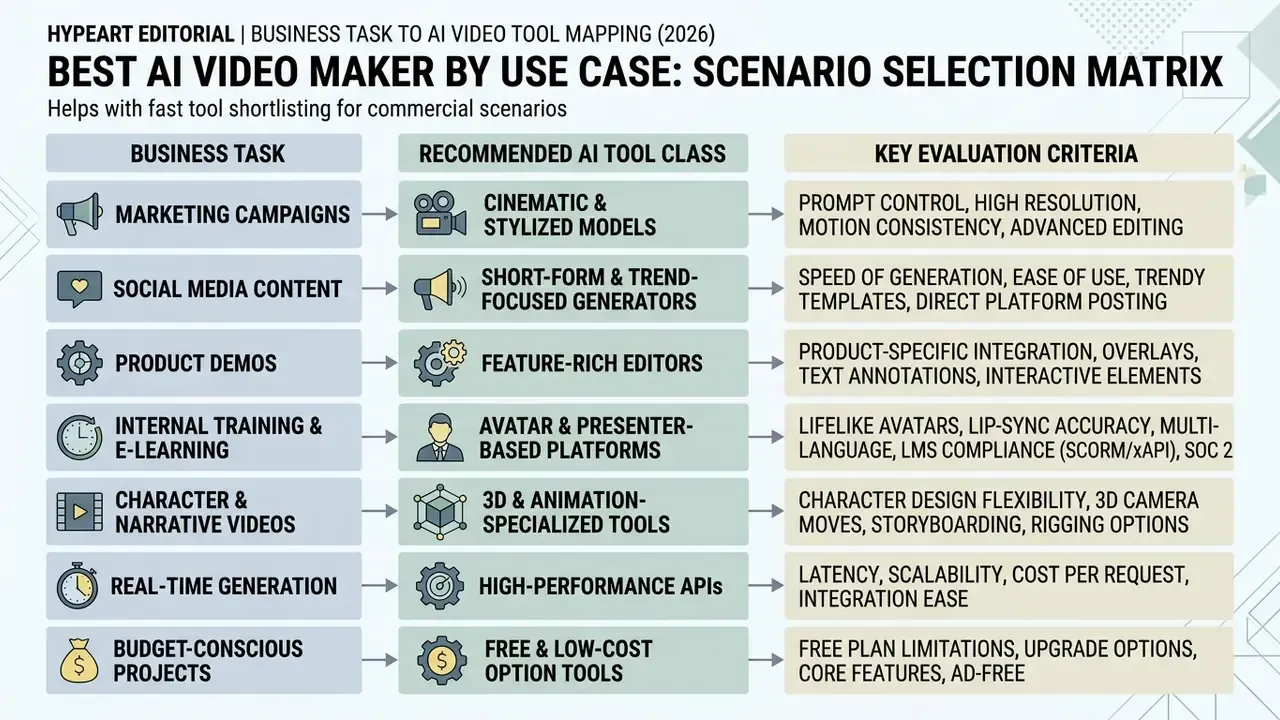
AI video generator selection matrix by enterprise use case
| Business use case | Recommended tool class | Key selection criteria | Target output format | Typical cost driver |
|---|---|---|---|---|
| Product and marketing videos | Multi-model workspaces and cinematic T2V | Brand kit alignment, 4K export, realistic physics, commercial licensing | 16:9 / 1:1, high-bitrate MP4 | Per-second render cost plus retry rate on physics defects |
| Social media and short-form ads | Short-form AI video makers | Auto-captions, vertical re-framing (9:16), dynamic pacing, high motion range | 9:16 vertical video (1080×1920) | Monthly credit cap plus clip volume |
| Training and explainer content | AI avatar platforms | Voice cloning accuracy, lip-sync precision, 160+ language dubbing, PPTX/PDF import, SCORM export | 16:9 HD video, sidecar captions, SCORM 1.2 / 2004 package | Seats plus minutes of rendered video per month |
| Developer and API integration | Hosted model APIs (e.g. fal.ai, Sora API, Veo via Vertex AI) | Metered per-second pricing, latency control, batch generation, programmatic prompts | Raw MP4 streams / JSON webhooks | Seconds generated × per-second rate × retry multiplier |
No matching rows Clear one or more filters to restore the matrix.
Product videos and marketing video creation
Commercial product videos demand strict brand adherence, exact product placement and photorealistic motion. Platforms with integrated brand kits let organizations enforce color palettes, upload official vector logos, and hold visual identity steady across generated scenes. Vendor documentation from Microsoft, HeyGen and Adobe Express describes a brand kit as a governed collection of approved logos, fonts, colors and guidelines, applied automatically to scene backgrounds, text treatments, chart palettes and logo placement.
«CameraCLIP reaches R@1 = 0.83 retrieval accuracy when matching generated frames to cinematographic descriptions, confirming the reliability of shot-level control.»
YouTube, TikTok and short-form video workflows
Short-form workflows for TikTok, Instagram Reels and YouTube Shorts need rapid clip iteration, vertical 9:16 framing and a hook that lands fast. AI tools help by transcribing audio, generating animated word-by-word captions, and inserting relevant B-roll.
Delivery specifications stay fairly stable across platforms. Native 9:16 portrait at 1080×1920; Shorts accepted at 9:16 or 1:1 and now up to three minutes; organic Reels up to 90 seconds. Google's Shorts ad guidance recommends vertical assets and will synthesize a vertical variant from a horizontal master when only landscape footage exists.
Generators tuned for social maintain high dynamic-motion scores, which is what keeps a viewer past the three-second mark. Engines such as PixVerse AI are frequently benchmarked for exactly this high-dynamics profile, and are often searched as a TikTok video generator or reel generator. Creators seeking other software paths can explore the hub of alternatives, or review animation makers when motion graphics suit the brief better than photorealism.
Training, explainer videos and multilingual video translation
Corporate communications, customer onboarding and internal compliance training run on explainer videos and structured presenter modules. Avatar platforms generate natural presenter movement straight from written documentation or a PDF manual. Document-to-video ingestion (PPTX, PDF, DOCX, TXT, URL) turns an existing deck into a scene-by-scene draft without re-authoring the script.
For global organizations, an AI video translator provides lip-synced dubbing across dozens of languages while preserving the speaker's vocal tone. Vendor documentation reports 175+ languages with lip-synced dubbing and cloned voices (HeyGen), 160+ languages with avatar lip synchronization (Synthesia), 135+ languages with optional lip-sync (Rask AI) and 15+ dubbing languages (Adobe Firefly). Independent peer-reviewed accuracy data for translated lip-sync is not published yet. Validate localization quality with native reviewers per language before release, especially for anything regulated.
«The T2VHE protocol standardizes human evaluation of video models and cuts annotation cost by nearly 50% while preserving high reliability.»
To compare head-to-head performance across creative automation tools, browse the hub of versus breakdowns.
Free AI video generators, pricing and commercial-use limits
Most commercial platforms run freemium or credit-based subscriptions. Advanced features, high-resolution export and commercial rights sit behind the paywall almost without exception. Decision-makers should evaluate credit renewal rates, watermark policy and licensing terms before anything ships publicly. The mechanics of each restriction are unpacked in the guide to free AI video generators.
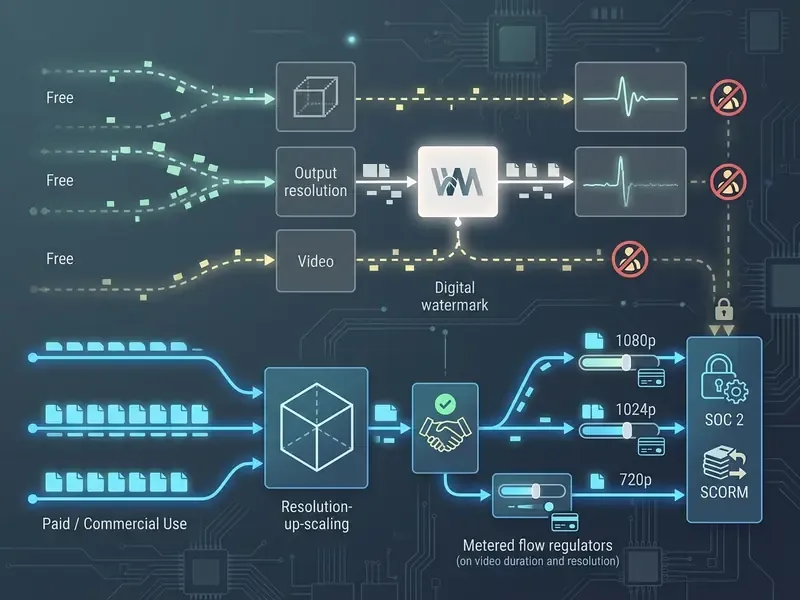
What free AI plans usually include
Free plans are evaluation sandboxes. Nothing more. Standard free tiers provide limited non-replenishing credit grants (commonly 66–150 credits), cap clip duration at 4 to 5 seconds, restrict resolution to 480p or 720p draft quality, and stamp a visible watermark on export.
Those ranges come from vendor pricing pages and third-party 2026 comparisons. Quotas shift by region and release cycle, so verify current limits inside the product before you plan a pilot schedule around them.
Free tiers also tend to gate the newest model variants, leaving no-cost users on legacy engines and "standard" rather than "professional" motion modes. Side-by-side limits for the major plans are tracked in our comparison of the best free AI video generators. Developers who want direct model integration can browse the hub of endpoint guides.
Watermarks, usage rights and commercial projects
Using ai generated videos in commercial projects requires explicit commercial grant language in the terms of service. Free tiers almost universally prohibit monetization, designating output for personal or evaluation use only. A handful of vendors do expose commercial rights on low-cost or even free plans, which is why the clause, not the marketing page, decides.
| Platform / model engine | Free tier limits | Entry paid tier | Max export resolution | Commercial usage rights | Unique core strength |
|---|---|---|---|---|---|
| Synthesia | ~10 min/mo trial, watermark | ~$22–29/mo | 1080p (4K on enterprise) | Paid tiers; SOC 2 Type II, ISO 42001, GDPR, SCORM export | Corporate L&D, 240+ avatars, 160+ languages |
| HeyGen | 3 videos/mo, 1-min cap, 1080p | $29/mo (600 credits) | 4K (Pro $49/mo) | Unlocked on paid plans | 15-second Avatar V instant cloning, 175+ languages |
| InVideo AI | Limited credit trial, watermark | ~$20/mo | 1080p / 4K | Paid tiers only | Prompt-based "Magic Box" editing, 16M+ stock assets |
| Kling AI | ~66 daily non-accumulating credits, 5-sec clips | 1080p | Prohibited on free tier | Physics simulation and high-motion realism | |
| Runway (Gen-3 / Gen-4.5) | 125 one-time credits, 5GB storage | $15/mo | 4K | Unlocked on Standard | Keyframe animation, B-roll, real-time characters |
| OpenAI Sora API | Pay-per-second metered access | $0.10/s (Sora 2) to $0.70/s (Pro 1080p) | Native 1080p+ | Commercial ownership under API terms | Physical realism with native audio |
Visible watermarks usually disappear on upgrade. Invisible provenance metadata, such as DeepMind's SynthID, stays embedded in the file for AI detection and manipulation tracking. Note also that most vendors do not transfer copyright ownership in generated output. U.S. Copyright Office guidance ties protection to human-authored expression, which is precisely why licensing clauses grant usage rights instead of authorship.
To review commercial licensing rules for enterprise asset deployment, open the hub for regulatory guidance, and compare suite-level terms such as the Canva AI generator licensing overview.
Total cost of ownership: modelling retry cost and review overhead
Per-second API rates understate real spend, because a share of generations gets discarded for physics artifacts, prompt drift or mangled on-screen text. A defensible TCO model for a pilot:
TCO (monthly) =
  [ Seconds delivered × (1 + Retry Rate) × Per-Second Rate ]
+ [ Seats × Subscription Price ]
+ [ Review Hours × Blended Hourly Cost ]      // QA, brand and legal review
+ [ Localization Reviews × Languages ]        // native-speaker validation
+ [ Governance Overhead ]                     // logging, consent records, model validation
Worked illustration: 600 delivered seconds per month at $0.10/s with a 40% retry rate equals 840 billed seconds, or $84 in raw generation. Add 20 review hours at $60 blended cost, $1,200, and the dominant line item is human review rather than inference. Risk-adjusted ROI should therefore be modelled against review-hour reduction, not per-second savings. That single reframing changes most business cases we see.
How to generate video from text with AI
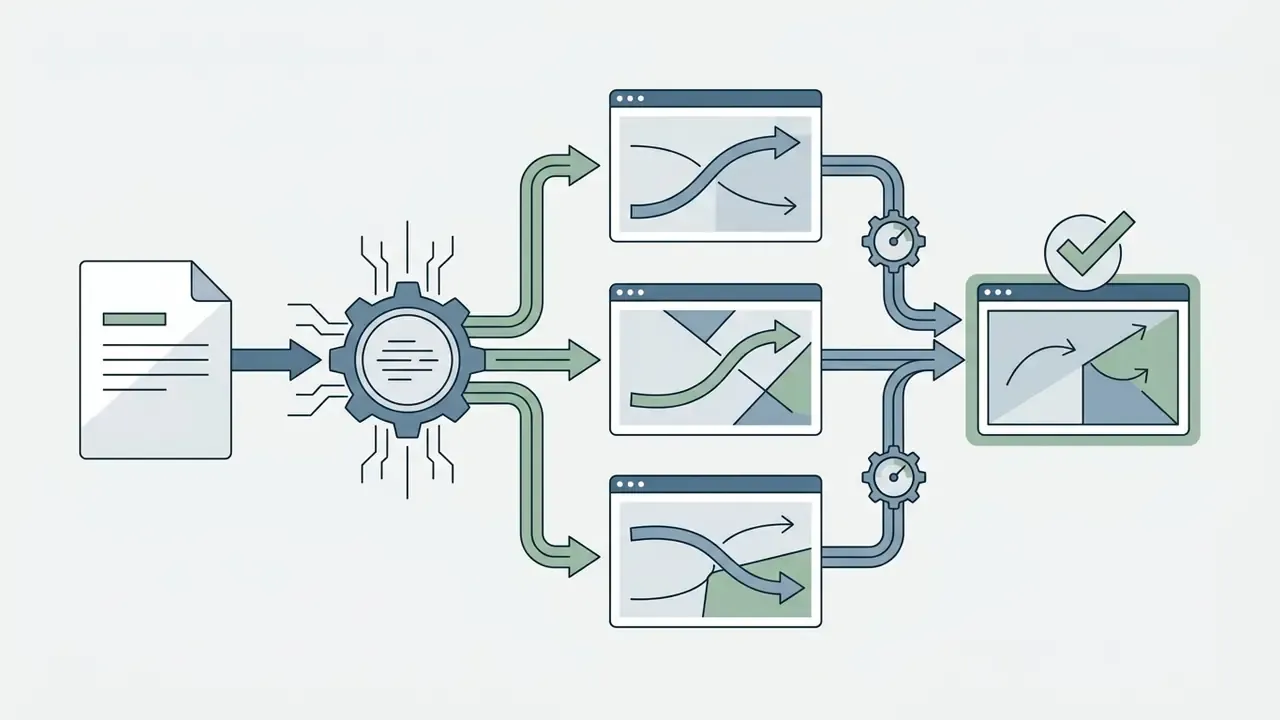
Generating usable video from text follows a structured pipeline: draft descriptive scene prompts, select model parameters, iterate on drafts, then finish audio and visuals in post. Research pipelines mirror the same split. CVPR 2024 work such as MicroCinema divides generation into a keyframe (text-to-image) stage and a temporal video-synthesis stage before post-processing.
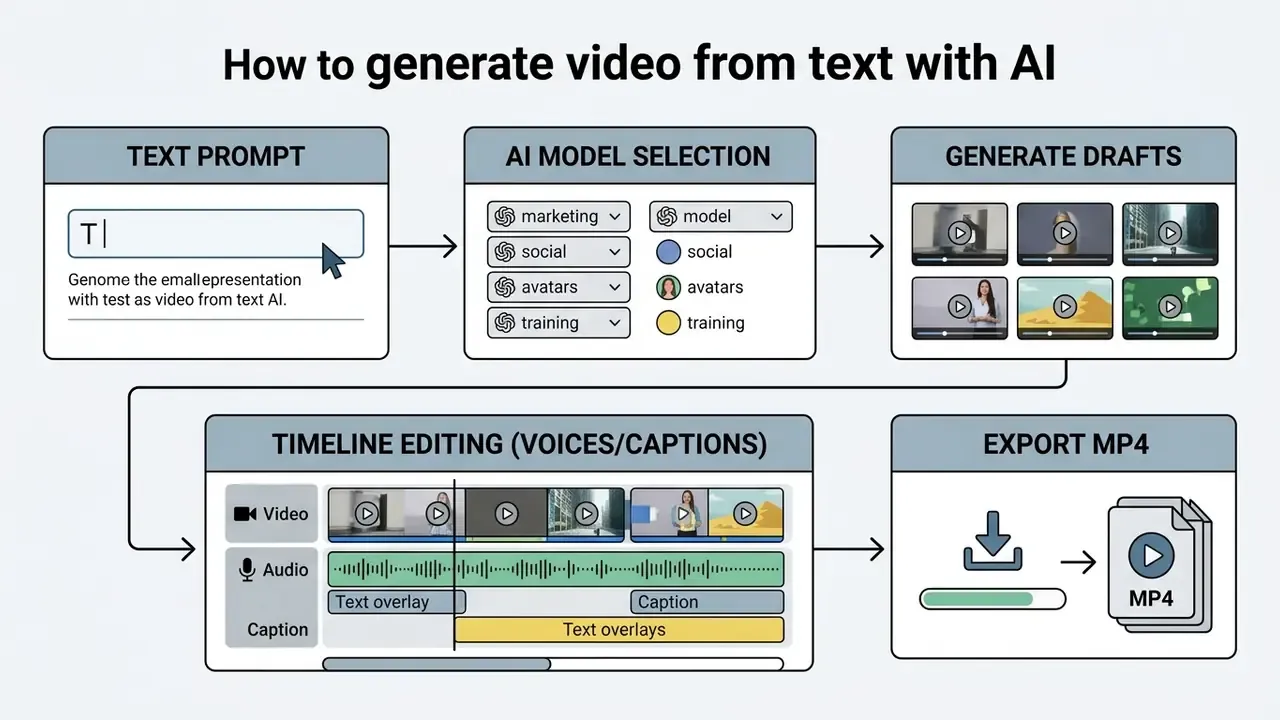


Write a text prompt with subject, action and visual style
A workable prompt names the subject, the setting, the camera movement, the lighting, the lens and the mood. Vague prompts produce unpredictable camera motion and subject warping, and you pay for both attempts.
Standard prompt formula:
[Shot type & camera angle] + [Subject & core action] + [Environment & setting] + [Lighting & color palette] + [Lens & film style] + [What the shot reveals]
Example prompt:
"Cinematic medium close-up, low-angle tracking shot. A sleek autonomous delivery drone glides smoothly through a rain-slicked modern city street at twilight. Soft neon reflections on wet asphalt, volumetric fog, 35mm lens, photorealistic 4K, crisp focus."
Camera-directed variant:
"Slow orbit, 20-degree arc, medium-wide. Subject: matte-black espresso machine on a concrete counter. Environment: minimalist studio kitchen, morning side light. Look: 50mm lens, shallow depth of field, muted warm grade. Reveal: brand logo on the front panel at the end of the arc."
Choose a model, generate variations and refine the video
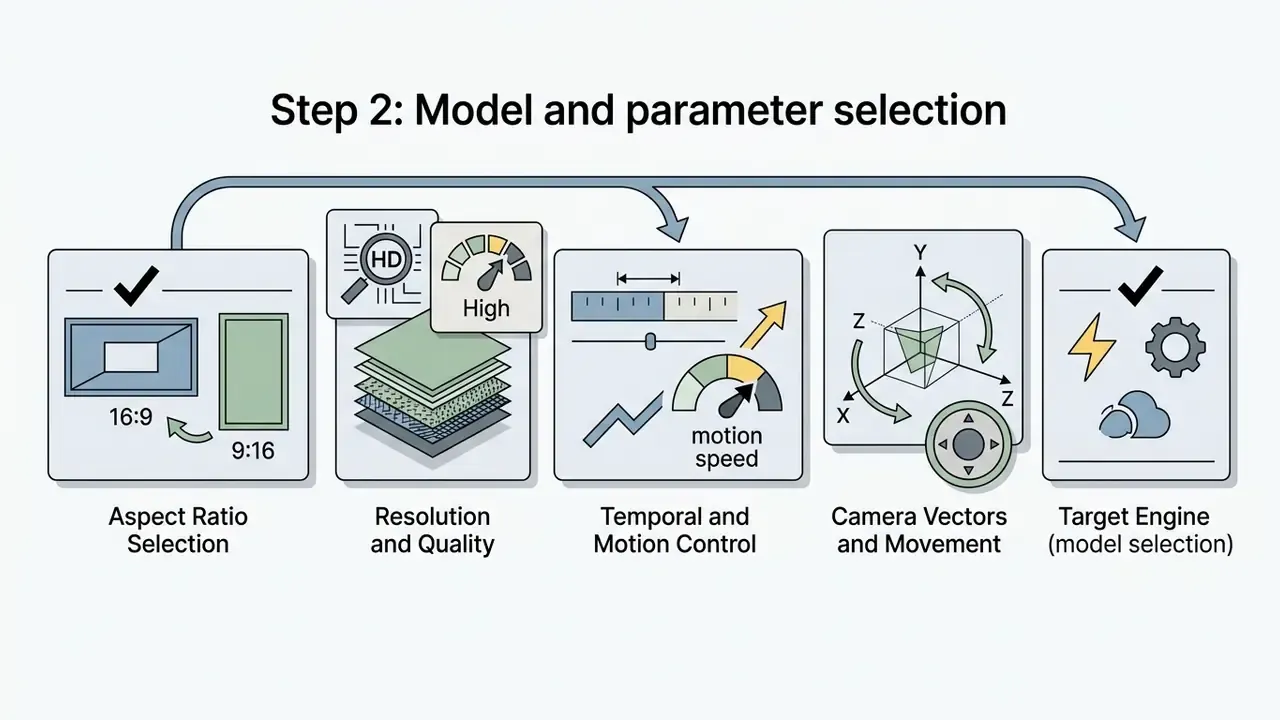
With the prompt drafted, pick a model based on required motion complexity and rendering budget. Two to four draft variations usually surface the best candidate before you spend credits on high-resolution upscaling. OpenAI's own video-generation guidance recommends a baseline prompt, two or three variations, then refinement assembled from the elements that worked.
If the first generation shows motion distortion or prompt drift, adjust camera keywords or motion scale, one parameter at a time, so each result stays attributable. Where a model is fine-tuned on proprietary footage, document the base model, caption schema and dataset columns; otherwise runs will not be reproducible for audit six months later. To benchmark accuracy across technical parameters, compare options in technical testing hubs.
Add voiceovers, captions and export the finished cut
Safe and responsible AI video creation: consent, privacy and platform rules
«VBench++ extends video-model evaluation to trustworthiness dimensions, including safety, potential harm and misinformation, with open access to annotations.»
Enterprise compliance, security standards, and LMS export
At enterprise scale, the purchase decision rests on data-protection posture and LMS compatibility far more than on raw visual metrics.
- Security certifications. Top-tier platforms implement SOC 2 Type II, ISO 42001 (AI management system standard), ISO 27001 controls and GDPR/CCPA compliance, with contractual assurance that corporate prompts and custom assets never train public foundation models. Synthesia, for instance, publicly states SOC 2 Type II certification, ISO 42001 compliance and GDPR compliance for enterprise deployments.
- LMS integration (SCORM). L&D teams need clean export pipelines. Enterprise platforms support SCORM 1.2 and SCORM 2004 packaging for direct ingestion into learning management systems (Cornerstone, Workday, Moodle, SuccessFactors), alongside MP4/H.264 streams, share links and embed codes.
- Single sign-on and governance. RBAC, SAML-based SSO, workspace-level permissions and centrally enforced brand kits keep distributed teams inside corporate identity rules and cut shadow AI usage.
- Deployment topology. In regulated sectors, evaluate private-tenant or VPC deployment, data residency, retention windows, sub-processor disclosure and deletion SLAs. Consumer SaaS tiers and enterprise API tiers often carry very different data-handling terms for the same underlying model.
- Audit trail. Require prompt, seed, model-version and operator logging per generation. Without version pinning, the same prompt will not reproduce after a silent model update, which is a reproducibility problem, not a cosmetic one.
Model-risk validation checklist for text-to-video pilots
Risk functions adapting existing validation frameworks, for example the U.S. Federal Reserve's SR 11-7 and OCC 2011-12 model risk management guidance, can treat a video generator as a third-party model with limited transparency. A practical pre-production checklist:
- Inventory and classification. Register the tool in the model inventory; classify by materiality of what it produces (marketing versus regulatory disclosure versus compliance training).
- Conceptual soundness. Document the model family, known limitations (physics anomalies, on-screen text errors, compositional failures) and the benchmark evidence behind each claim.
- Reproducibility controls. Pin model versions; log prompts, seeds, reference images and parameters; retain the generation manifest with the published asset.
- Output validation. Define a human-review gate with pass/fail criteria for factual accuracy, on-screen text, brand compliance and accessibility (captions, contrast, reading speed).
- Data controls. Confirm confidential inputs are excluded from training; restrict uploads of customer data; block consumer tiers through policy and network controls.
- Consent register. Store signed likeness and voice consents, permitted-use scope, expiry, revocation path and offboarding procedure for departing employees.
- Provenance and disclosure. Retain invisible watermark metadata; apply AI-disclosure labels where platform rules or law require them.
- Ongoing monitoring. Re-test after each vendor model release; track retry rates, rejected generations and policy-filter incidents as risk indicators.
- Benchmark limitation note. Public benchmarks (VBench, TC-Bench, PhyWorldBench) measure general capability. They do not certify the absence of hallucination in your specific corporate scenario, so internal scenario testing stays mandatory.
Consent and privacy when using avatars and uploaded images
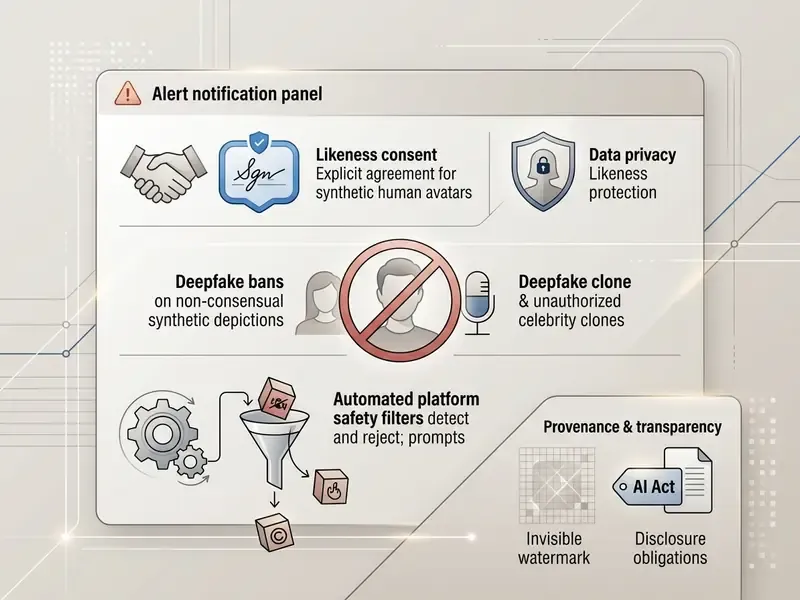
Uploading photographs, voice samples or personal data to an AI video platform triggers privacy and publicity-rights obligations. Enterprise frameworks require written, explicit consent before you generate a digital avatar or voice clone of any employee, actor or customer. Teams that need to verify whether inbound assets are synthetic before publication can use the tools compared in our AI image detector guide.
Under FTC guidance and US state-level digital replica legislation (California and New York among them), unauthorized voice or likeness synthesis creates real legal exposure. The 2023 SAG-AFTRA agreement set an industry reference point by requiring "clear and conspicuous" consent plus a reasonably specific description of intended use for digital replicas. Proposals such as the NO FAKES Act and No AI FRAUD Act anchor liability on the absence of consent. COPPA treats a child's photo, video or voice recording as personal information, so any avatar workflow involving minors triggers notice-and-consent duties.
Platform terms reinforce the same point. HeyGen states that users must hold the legal rights and explicit consent of any individual whose likeness is used, and must honour removal requests. Luma's content policy requires explicit informed consent before uploading images of other people. Several avatar vendors also require a recorded verification statement before unlocking custom voice cloning; requirements vary by provider and tier, so confirm the current onboarding flow with the vendor rather than trusting a secondary summary.
A practical consent workflow includes granular opt-in per intended use, a recorded verification clip, documented retention and deletion periods, revocation tooling, privacy-by-design separation of likeness data from production assets, and an explicit answer to one question people forget: what happens to a digital twin when the employee resigns?
Why adult-content requests require platform-policy checks
Keyword tools show steady demand for adult-oriented generators. Queries like "ai erotic video generator free", "ai sex video generator app", "free ai adult video generator", "ai xxx video generator free", "free nude video generator" and even misspelled variants such as "ai video generator pirn" sit close to mainstream text-to-video searches. For corporate buyers the practical answer is short: reputable commercial platforms refuse these prompts, and using a consumer account to work around a filter is a policy breach, not a workaround.
Commercial AI video platforms run automated prompt filters and moderation classifiers that block adult nudity, explicit eroticism, sexualized depictions of minors and non-consensual intimate imagery. Repeated attempts trigger account suspension or legal escalation designed to prevent illegal deepfake production. If your requirement is genuinely a clean ai video generator for regulated environments, the selection criteria are enterprise tiers, audit logging and enforced guardrails, not the strength of the filter alone.
Major cloud-hosted platforms also prohibit generating real-world public figures without authorization and any content intended to deceive. Two bans are effectively universal in 2025–2026 policy language: sexual content involving minors, and non-consensual intimate deepfakes of real people. Statutory reinforcement includes the U.S. TAKE IT DOWN Act, which obliges covered platforms to accept and act on removal notices for non-consensual intimate visual depictions, plus Australian eSafety guidance treating non-consensual deepfake image-based abuse as a standalone offence. Readers researching that market segment for policy or brand-safety reasons can review category context in the comparisons of the best ai porn generator, the best ai porn video generator and best ai porn videos, which document the licensing and consent problems in that space.
How the guardrail stack actually works, and what enterprises should replicate internally:
- Input classification. Prompts and uploads are screened against policy classifiers before inference; blocked categories return a refusal, not a degraded render.
- Reference-image screening. Face-matching checks flag uploads of public figures or unverified third parties.
- Output classification. Rendered frames are re-scanned after generation, since a benign prompt can still yield a policy-violating frame.
- Provenance marking. Invisible watermarking and metadata support downstream detection and takedown.
- Enterprise-side monitoring. Vendor policies differ on consensual adult content, so do not lean on provider filters alone. Log prompts, alert on policy-filter hits, and prohibit consumer tiers for corporate identity assets so no employee can bypass guardrails with a personal login.
Regulators are converging on the same operating controls. FinCEN's November 2024 alert lists deepfake red flags in identity verification. EDPB Opinion 28/2024 constrains personal-data use in model training. Australia's OAIC advises against entering personal or sensitive information into publicly available generative AI tools. The European Commission expects very large platforms to assess generative-AI risk and label deepfakes clearly, and Hong Kong's PCPD framework requires risk assessment, human oversight and disclosure of AI use.
Frequently asked questions (FAQ) about AI video generators
Can beginners create AI videos without video editing experience?
Yes. Beginners can produce credible AI videos from simple text prompts or script templates with no prior editing background. Cloud platforms automate timeline assembly, scene transitions, synthetic voiceover pairing and captioning. Adobe states that video generation works from simple prompts with "no filming or experience required", and transcript-based editors let users cut a video by deleting words. Basic generation needs no technical skill. Complex multi-scene work or a precise brand commercial still rewards familiarity with prompt structuring and non-linear video editing tools.
«T2VTextBench records that even the best models average around 0.37 on on-screen text accuracy, so complex multi-scene videos require manual finishing.» — T2VTextBench (2025). https://arxiv.org/abs/2503.05568
What apps are people using to make AI videos?
Usage clusters by intent. Cinematic clips go to Veo 3.1, Sora 2, Kling 3.0 and Runway Gen-4.5. Presenter and training content goes to HeyGen and Synthesia. Short-form repurposing runs on OpusClip, CapCut AI and InVideo AI. Developer teams call hosted APIs through fal.ai, the Sora API or Veo via Vertex AI. Popularity is not a control: the same engine can be safe on an enterprise tier and unacceptable on a consumer login.
How long does an AI video take to generate?
Short clips of 4–10 seconds typically render in under a minute on flagship engines. Longer multi-scene avatar videos, 4K exports and audio-inclusive generations stretch to several minutes. Batch API workflows add queue latency, so load-test before you commit to same-day publishing SLAs.
Can AI-generated video be used commercially?
Usually only on paid tiers. Free plans normally restrict output to personal or evaluation use and apply visible watermarks. Paid plans grant usage rights but generally do not transfer copyright ownership, since protection attaches to human-authored expression. Verify the licensing clause on the vendor's own terms page before monetizing an asset.
Can I edit an AI video without regenerating it?
Yes. Prompt-based editing layers, "Magic Box"-style interfaces, accept natural-language commands: delete a scene, change the voiceover accent, re-light a shot, extend the duration. They apply to the existing cut. Frame-level timeline control remains available for precise trims, overlays and burned-in legal text.
Which input formats can become a video?
Beyond plain prompts, enterprise platforms ingest scripts, PPTX decks, PDFs, DOCX and TXT files, plus public URLs, converting each into a structured multi-scene draft with narration and captions. Long-form video uploads can also be repurposed into vertical short-form cuts automatically.
How should camera movement be specified?
Use operator vocabulary in the prompt itself: dolly, push in, orbit, crane, handheld, tracking, plus direction and speed. Lock first and last frames when clips must join seamlessly. Controllability is version-dependent, so re-test camera adherence after every model release.
What are the main quality limitations to plan around?
Three recur across benchmarks. Compound physics interactions degrade realism. Multi-step state changes in a single prompt succeed less than 20% of the time. On-screen text accuracy stays below 0.43 across tested models. Storyboard so that critical text, counting and complex collisions are handled in editing, not generation.
Limitations and open questions
Executive summary and next steps
Choosing the right text-to-video AI platform means balancing model capability against operational needs, licensing cost and safety guardrails. Start with a scoped pilot: verified image inputs, explicit prompt controls, documented governance, measured retry rates.
Pre-purchase checklist for risk and procurement teams:
Teams evaluating video automation workflows can also review the best ai presentation makers, compare no-cost options in the best free AI video generator roundup, or explore integrated asset creation in the best ai photo editing hub. For the full comparison library, see the overview.