Last updated: February 2026. Vendor quotas, watermark policies, and licensing terms cited below were checked against public vendor documentation at the time of writing. Generative platforms revise these terms often, sometimes monthly, so re-verify before any production deployment.
Executive Summary: What "Free" Actually Buys You
- What it is A free AI image-to-video generator conditions a diffusion or Diffusion Transformer (DiT) model on one still frame plus an optional motion prompt, then synthesizes 3 to 10 seconds of temporal motion without manual keyframing.
- What free actually means Free tiers are gated by credits (Runway: 125 one-time credits; Pika: 80 monthly video credits), clip duration (3 to 10 seconds), resolution caps (480p to 1080p), and model access (legacy engines instead of Kling 3.0, Veo 3.1, or Sora 2 Pro).
- Watermarks are not universal Kapwing and VEED brand free exports. Pixlr states that free accounts export clean HD MP4 files with no watermark, and selected engines allow up to 3 daily renders without sign-up.
- Commercial rights are the main risk Luma AI restricts Free and Lite plans to personal use. Somio AI retains content ownership on free tiers. Free-tier outputs are generally not cleared for paid campaigns.
- Governance exposure Many free services reserve rights to retain uploads for model training, which turns unsanctioned use into a Shadow AI and data-loss problem. Log prompt, seed, model version, and export hash for every asset that reaches a public channel.
- Best practice Separate camera motion from subject motion in prompts, verify aspect ratio before rendering, inspect previews for temporal drift, and treat free tiers as a sandbox rather than a production pipeline.
What Is a Free AI Image to Video Generator?
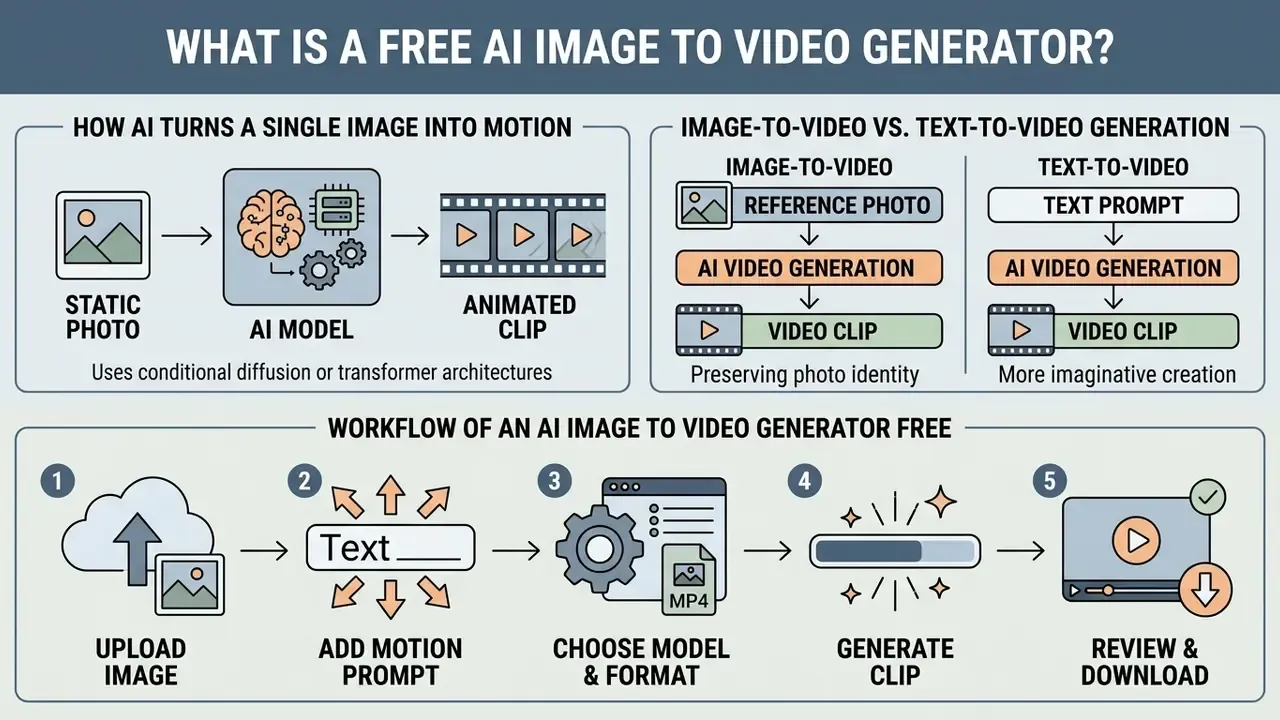
A free AI image-to-video generator is a web-based tool that uses conditional diffusion or transformer architectures to convert a static reference photo into a short animated clip. These tools process visual inputs alongside optional motion prompts to synthesize frame-by-frame temporal transitions, with no manual timeline keyframing required.
Unlike conventional editors that manipulate pre-recorded footage, an ai free image to video platform creates brand-new temporal data. By predicting pixel motion vectors between frames, the underlying video ai model expands a single still visual into dynamic content. Free tiers usually expose core generation features through daily credit quotas or shared cloud processing queues. That is enough to experiment with AI video generators and image to video animation directly in a browser, without a local GPU.
How AI Turns a Single Image into Motion
The reference frame acts as a structural anchor. A diffusion network then predicts temporal frame progressions around it. The system separates background elements from foreground subjects, conditioning the noise-denoising process on the original visual context.
In technical implementations such as STIV (Scalable Text and Image Conditioned Video Generation, 2024), the model replaces the latent representation of the initial frame with the un-noised source image while training temporal attention layers.
«STIV reaches 90.1 on VBench I2V at 512² resolution, setting a new level of source-image preservation accuracy.»
Research on Mask-based Motion Trajectories (CVPR, 2025) shows how bounding masks isolate target subjects, producing separate motion vectors for background camera pans and foreground actions.
The practical result: the generated video image output keeps its visual identity while adding smooth physical motion guided by prompt parameters. Identity first, motion second.
Image-to-Video vs. Text-to-Video Generation
Image-to-video generation uses a fixed visual source to anchor subject identity, spatial layout, and stylistic details across frames. Text-to-video generation invents both the subject and its motion from text inference alone.
When producing generated videos from pure text, the model must guess color palettes, object proportions, and lighting from scratch. Visual drift and anatomical distortion follow. An ai generator free image to video workflow, by contrast, uses the initial photo to fix key aesthetic features. Benchmark work confirms that image-conditioned pipelines reach substantially higher visual fidelity and identity preservation than pure text-to-video models.
That measurement structure makes image-to-video AI tools the preferred choice for animating existing marketing assets or brand photography. Identity preservation is scored directly, rather than inferred from someone's aesthetic judgment.
Workflow of an ai image to video generator free: Upload image → Add motion prompt → Choose model and video format → Generate clip → Review and download video. Each stage should be labeled in text so screen readers and crawlers receive the same sequence as sighted users, with the alt description naming the workflow explicitly.
- Workflow of an ai image to video generator free: *Upload image
- Add motion prompt
- Choose model and video format
- Generate clip
- Review and download video.* Each stage should be labeled in text so screen readers and crawlers receive the same sequence as sighted users, with the alt description naming the workflow explicitly
How to Create an AI Video from an Image for Free
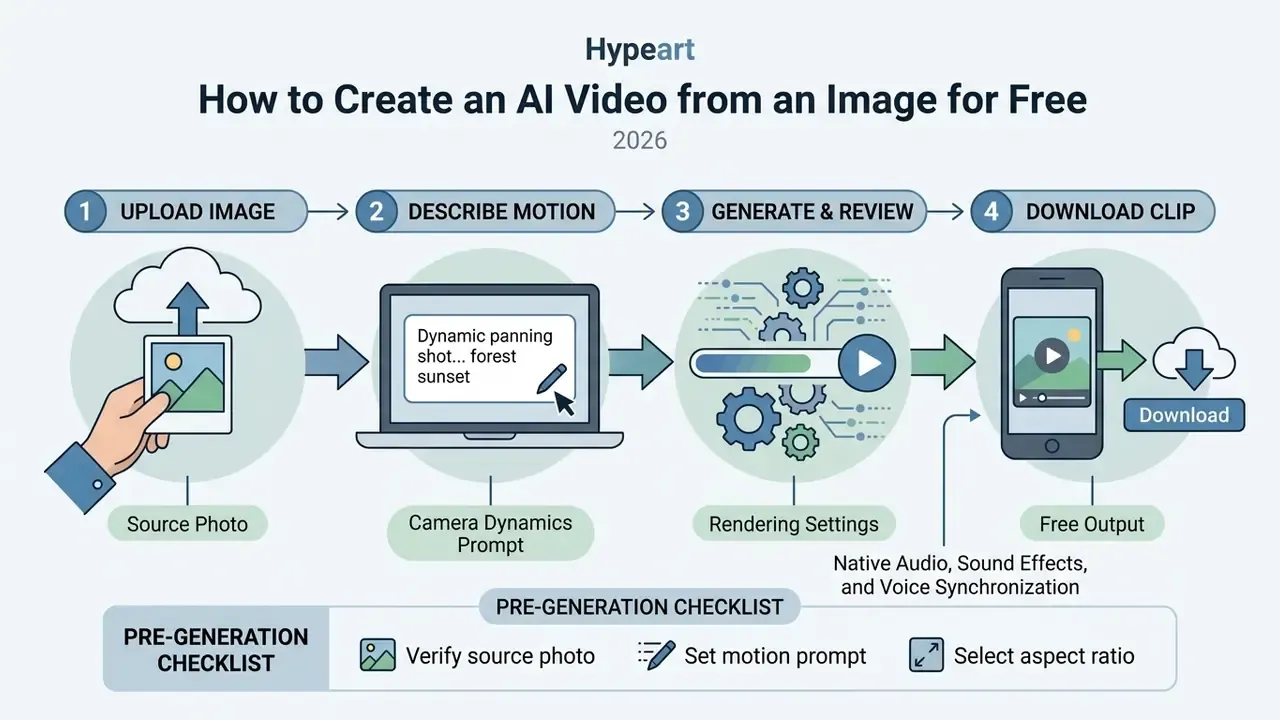
Four moves, in order: upload a prepared source file, define camera dynamics with a descriptive prompt, select rendering settings, download the output. An ai image to video free online tool compresses that into a browser session, with no local install and no GPU driver roulette.
Teams evaluating workflow performance across asset types usually test specialized generators for niche visual styles before scaling anything. Creators building stylized animated assets can view the guide on dedicated visual generation pipelines. Following a fixed execution sequence keeps quality consistent inside any ai image to video tool free online environment.
Upload an Image and Choose the Video Format
Preparing an optimal source photo means clean framing plus an aspect ratio that matches the delivery platform. Most services accept JPEG, PNG, or WEBP files, subject to spatial limits such as OpenAI's recommended maximum edge of 3,840 pixels, edges divisible by 16, and a maximum aspect ratio of 3:1.
Aspect ratio selection determines how the rendering engine scales visual coordinates. Square (1:1) formats follow GS1 product packaging conventions for e-commerce catalog cards. Vertical (9:16) suits mobile feeds and stories. Widescreen (16:9) fits web banners and presentations. Choosing the format before rendering prevents cropping artifacts and ugly letterboxing at export. Anyone testing an ai free picture to video flow for the first time loses the most time here.
Describe the Motion with a Prompt
Prompt engineering for image-to-video platforms needs directional camera verbs alongside one discrete subject action. Effective prompts separate camera movement from object motion, which avoids conflicting instructions that wreck a render.
Camera controls should use precise directional commands: "slow pan left," "tilt up," "gentle zoom in." Updated (corrected figure): explicit camera parameters improve controllability by a measured 25.5%, not a vague "over 25%."
For subject dynamics, pick one action, such as "fabric blowing in the wind" or "steam rising from the cup." Skip descriptors like "hyper-dynamic motion"; the model cannot act on them. A reliable template runs: subject and scene → camera movement with direction and speed → one subject action → stable details to preserve → final framing.
Generate, Review, Edit, and Download the Clip
Generation submits job parameters to cloud processing servers and returns a preview clip. Inspect that preview for temporal artifacts, structural distortion, and camera jitter before downloading anything.
During operational testing at an enterprise marketing unit, analysts converted 50 static product packshots into 5-second clips using cloud diffusion workflows. Updated (reformulated, internal test, not an audited statistic): after refining camera motion prompts based on first-pass preview inspection, reviewers judged the large majority of renders, roughly nine out of ten in this internal sample, free of visible warping, then exported high-definition MP4 files for campaign testing inside a single working session. Figures reflect one unaudited internal test batch and should not be read as a benchmark result.
Perceptual studies support that preview-and-iterate loop, because human raters catch motion errors far more reliably than automated fidelity scores:
If the first render distorts a face, a logo, or a hand, adjust the prompt or switch model modes and re-generate before downloading the final MP4. Cheaper than defending the asset later.
Integrating Native Audio, Sound Effects, and Voice Synchronization
Modern generative video models, including LTX Video 2.3, Kling 3.0, and Google Veo 3.1, support native audio synthesis alongside visual frame generation. Instead of silent MP4 files, the temporal networks predict ambient waveform patterns that match environmental motion parameters, for example aligning rustling leaves to a wind prompt. For character-driven imagery, secondary neural lip-sync modules align uploaded voice tracks or text-to-speech audio to facial keypoints, producing synchronized promotional and narrative assets.
Practical notes for free tiers: native audio is often restricted to one baseline model, frequently a fast lower-resolution engine, while premium audio-capable models sit behind credits. When a model returns a silent clip, the standard fallback is to export the MP4 and layer music, sound design, or narration produced with an AI voice generator in post. Before publishing to bandwidth-constrained channels, run the final render through a video compressor to hold motion clarity at lower bitrates.
Pre-Generation Checklist for Free AI Video Renders
- Verify source photoconfirm the uploaded visual is high-resolution (JPG or PNG), free of blur, and clearly framed.
- Set motion promptwrite explicit camera commands (pan, tilt, zoom) plus a single subject action line.
- Select aspect ratio1:1 for catalog cards, 9:16 for social mobile feeds, 16:9 for desktop video.
- Confirm data policyverify retention and no-training terms before uploading proprietary or client-owned imagery.
- Review render previewcheck subject consistency, temporal flickering, and physics errors.
- Log generation metadatarecord prompt text, seed, model version, and timestamp for audit traceability.
- Export and downloadconfirm resolution settings, then download the finalized MP4 locally.
Keep this list accessible as text on any published version of the checklist, so the steps stay indexable and screen-reader friendly rather than trapped in a widget.
Developer API Integration: Programmatic Image-to-Video Pipelines
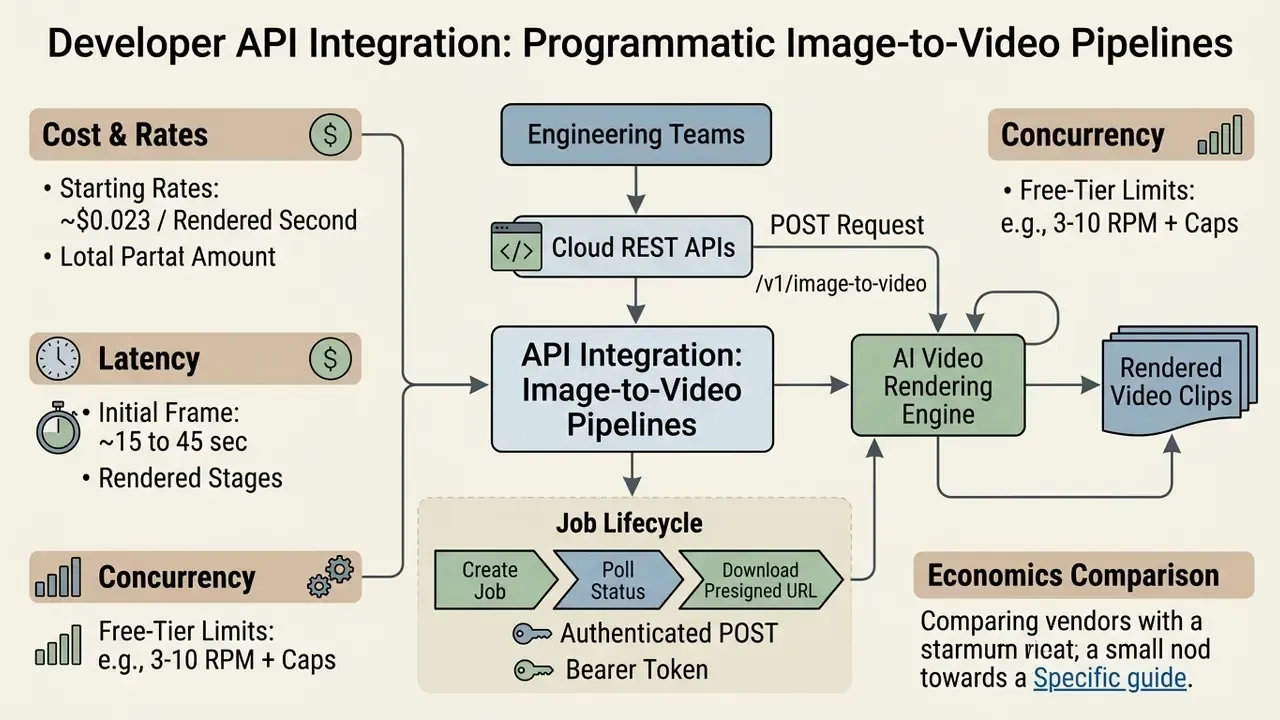
Engineering teams scaling automated rendering use cloud REST APIs to submit source images and frame parameters without touching a UI. The canonical pattern is asynchronous: create a job, poll status until it reports completed, then fetch the MP4 from the returned URL or content endpoint.
A typical request is an authenticated POST to an endpoint such as /v1/image-to-video, carrying a bearer token and a JSON body. Field structure, in plain terms:
| Request field | Example value | Purpose |
|---|---|---|
| model | kling-3.0 | Selects the rendering engine and its capability tier |
| image_url | https://assets.example.com/source.png | Points to the conditioning start frame |
| end_image_file_path | https://assets.example.com/final-frame.png | Optional end frame for keyframed transitions |
| motion_prompt | "slow pan right, fabric waving in wind" | Separates camera motion from subject motion |
| duration_seconds | 5 | Sets clip length inside plan limits |
| resolution | 720p | Controls export quality and credit burn |
| generate_audio | true | Requests native audio where the model supports it |


API Cost and Rate Limit Specifications
What Free Image-to-Video Tools Include and Limit
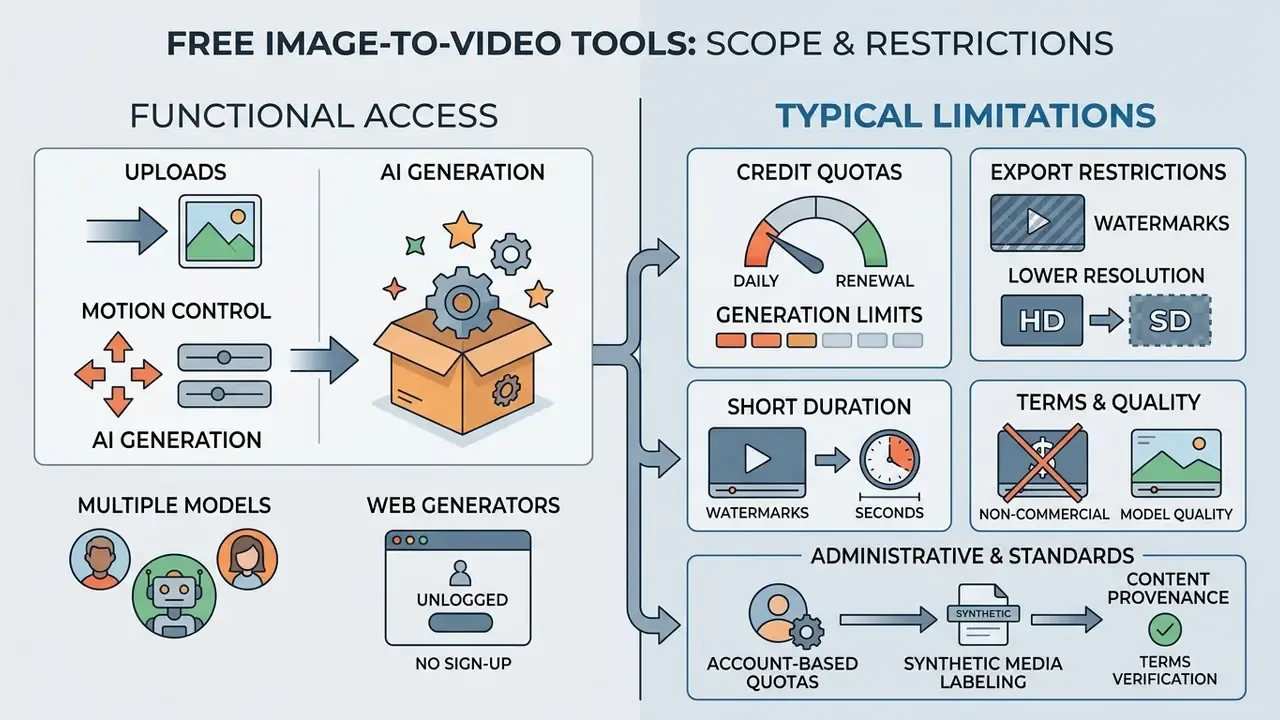
Free platforms give functional access to generative features, then fence it with credit quotas, render durations, export resolutions, and branding. Understanding those boundaries tells you when an ai image to video generator for free actually meets project requirements and when a paid tier becomes unavoidable. Our comparison of free AI video generators tracks how those thresholds shift between vendors.
Credit accounting matters most when specialized media generators sit inside multi-step creative pipelines. Teams producing avatar clips or face-swap assets can review pricing tiers and compare options on licensing terms across automated media platforms. Reading vendor limits first prevents a pipeline stalling at 4pm on credit depletion.
Credits, Generation Limits, and Available Models
Free accounts run on credit allocation frameworks that cap how many generations you get per day or month. Once credits expire, you either wait for a quota reset or upgrade.
Quota models differ sharply. Runway offers 125 one-time credits for new accounts, and that pool does not refresh monthly. Pika provides 80 monthly video credits on its basic tier. Developer endpoints, such as Google's Gemini API free tier, enforce rate limits by requests per minute plus daily request caps. Free tiers also tend to restrict model choice to legacy engines, reserving Kling 3.0 or Sora 2 Pro for paying accounts. Anyone searching for an ai image to video generator free download should note that most of these engines never leave the cloud; local installs are the exception, not the rule.
Watermarks, Resolution, Duration, and Export Quality
Export specs on free tiers are designed to convert you. Duration is short, resolution is capped, and branding usually appears in a corner. Free renders generally land at 4 to 10 seconds, 720p or 1080p.
| Feature / Criteria | Free Tier (Typical Limits) | Pro Tier (Typical Limits) |
|---|---|---|
| Credit Quotas | 125 one-time or 10 to 30 daily credits; 80 monthly video credits on some basic plans | 1,000+ recurring monthly credits or unlimited queues |
| Video Duration | 3 to 10 seconds per clip | 15 to 30+ seconds per clip with extension controls |
| Export Resolution | 480p on no-signup modes; 720p HD or compressed 1080p on free accounts | 1080p Full HD up to 4K exports |
| Watermarks | Visible vendor logo or corner badge on most free tiers (note: selected platforms such as Pixlr state that free accounts export clean HD MP4 files with no watermark) | Clean, unbranded MP4 files |
| Audio Support | Native audio limited to one baseline engine, for example LTX 2.3; otherwise silent MP4 | Native audio and lip-sync on Kling 2.5/3.0, Sora 2, Veo 3.1 |
| Model Access | Standard diffusion engines | Pro and Ultra models (Kling, Veo, Seedance) |
| Commercial Rights | Personal, non-commercial use only on most vendors | Full commercial licensing and enterprise usage grants |
Kapwing and VEED append visible watermarks to free exports, which rules them out for professional advertising without an upgrade. High-frame-rate rendering at 60 fps and extended camera controls also stay locked, reserving professional-grade free ai video processing for paid accounts. That is the honest trade: an ai image to video free website gives you speed, not finishing quality.
No Sign-Up Web Generators vs. Account-Based Quotas
Want to test something in ninety seconds? Instant browser engines exist. Some allow up to 3 daily free renders, roughly 3-second clips at 480p with a watermark, with no email and no card. Registering a free account normally unlocks higher resolution caps (720p or 1080p), saved cloud projects, referral credits, and daily resets. That is the difference between an ai image to video free site used for a quick look and one used repeatedly.
For governance teams, the trade-off runs the other way. No-signup endpoints leave no account-level audit trail, no retention setting, and no contractual data-processing commitment. Where corporate imagery is involved, account-based access with documented no-training terms is the lower-risk path, and unmanaged public endpoints deserve evaluation for proxy-level restriction.
Content Provenance and Synthetic Media Labeling
Watermarking is no longer only a monetization lever. It is a compliance surface. Provenance specifications such as C2PA Content Credentials (https://c2pa.org) embed tamper-evident metadata describing which model produced an asset. Transparency obligations for synthetic media appear in the EU AI Act and in risk-management guidance like the NIST AI Risk Management Framework (https://www.nist.gov/itl/ai-risk-management-framework). Removing a vendor watermark does not remove disclosure duties for regulated advertising. Worth repeating in any marketing standup.
How to Choose an AI Image to Video Generator Website
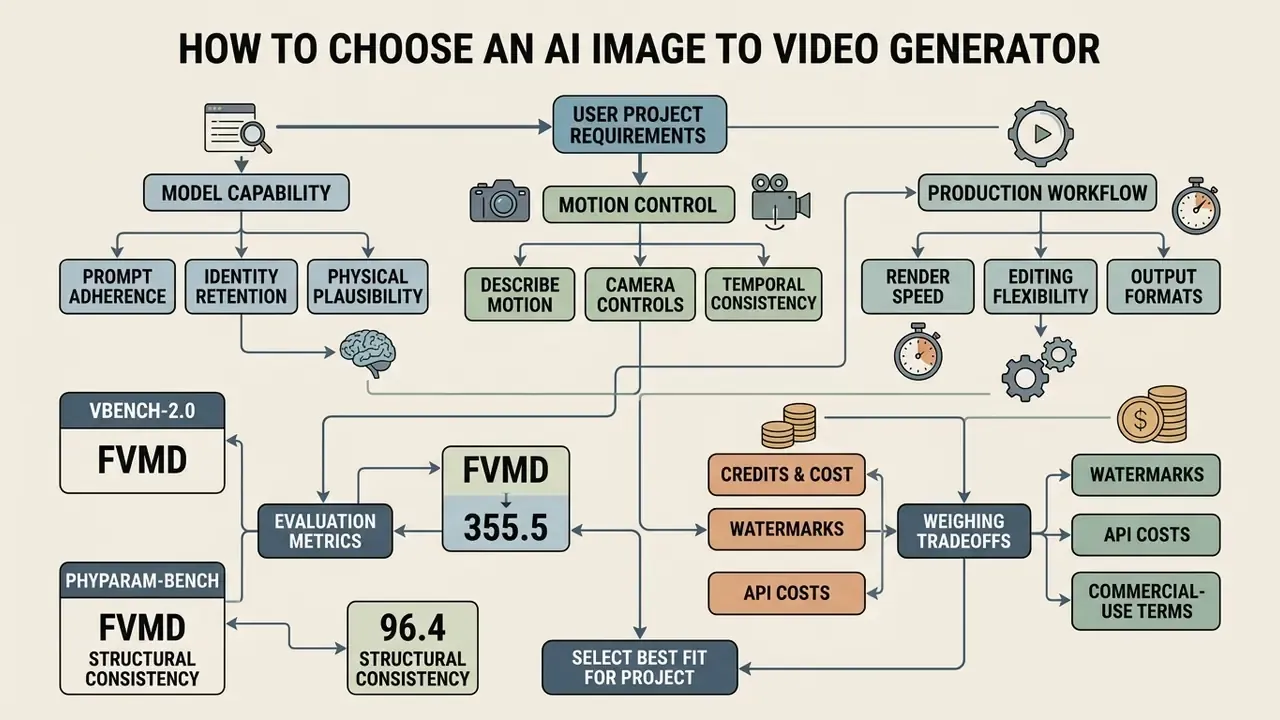
Selecting among ai image to video generator websites means weighing model capability, prompt fidelity, render speed, and editing flexibility against your project requirements. Testing candidates on standardized visual benchmarks shows which site balances control against output quality. Our side-by-side review of leading AI video generators applies the same criteria across vendors.
Creators exploring broader generative media usually trial several specialized tools inside one production workflow. Teams designing stylized background assets can examine a fantasy map generator ai tool, while those building automated content can test a faceless ai video generator to benchmark motion consistency. Engines matter more than interfaces over a twelve-month horizon.
Model Choice and Motion Control
The rendering engine drives identity retention, physical plausibility, and prompt adherence. Architecture choice determines how well a tool handles spatial transforms and character consistency.
| Model Architecture | Developer / Creator | Max Resolution / FPS | Motion Strengths and Physics | Multi-Frame Support | Primary Best Use Case |
|---|---|---|---|---|---|
| Kling AI 3.0 | Kuaishou | Up to 4K at 60 fps, up to 15 s | High physical accuracy, complex pan and tilt, up to 6 camera cuts | Start and end frame | Hero commercial ads, cinematic video |
| Google Veo 3.1 | Google DeepMind | 720p / 1080p / 4K at 24 fps | Photorealistic scene lighting and semantic depth; 20 MB max input image | Single image or prompt-based | High-fidelity brand creative assets |
| Seedance 2.5 | ByteDance | 1080p at 30 fps | Fast rendering, strong character identity preservation | Up to 30 reference images (start, start+end, reference mode) | Multi-scene storyboarding, stylized loops |
| LTX Video 2.3 | Lightricks | 480p free tier / 720p to 1080p paid | Real-time generation speed, native audio sync | Single frame condition | Quick social loops, teasers, audio-enabled drafts |
Strengths are specialized. Kling AI 3.0 supports professional-mode generations up to 4K at 60 fps with sophisticated camera controls, and its image-to-video mode exposes 5- or 10-second outputs across 16:9, 9:16, and 1:1. Veo 3.1 leads on semantic scene understanding and lighting consistency.
Physical plausibility and visual smoothness are separate axes. Recent evaluations show a model can preserve appearance and smooth motion while still violating mechanically admissible dynamics. Seedance 2.5 supports multi-image reference conditioning, up to 30 source frames for keyframed animation, which is worth benchmarking against pure text-to-video AI tools whenever identity preservation matters.
Platforms built on advanced DiT backbones consistently score higher on temporal coherence. The Human Fidelity axis in VBench-2.0 measures identity and clothing consistency across frames, which is the metric closest to brand-safety requirements for recurring characters or spokespeople.
Formats, Speed, and Editing Workflow
Workflow efficiency depends on file handling, batch rendering, and post-processing. Web platforms lean on cloud clusters to run latent diffusion pipelines without touching local hardware, which is why an underpowered laptop is no longer a constraint.
Integrated editing features such as timeline trimming, speed adjustment, and aspect ratio conversion reduce dependence on secondary software like a filmora video editor for basic assembly. Teams building multi-clip sequences can compare alternatives in our review of free video editing software. Automated format adaptation lets creators export the same render for mobile feeds and desktop displays, which keeps multi-channel distribution cheap. Publishing teams working mainly in long-form channels can extend one output into a YouTube editing workflow without re-rendering source assets.
Best Uses for AI Photo to Video Generation
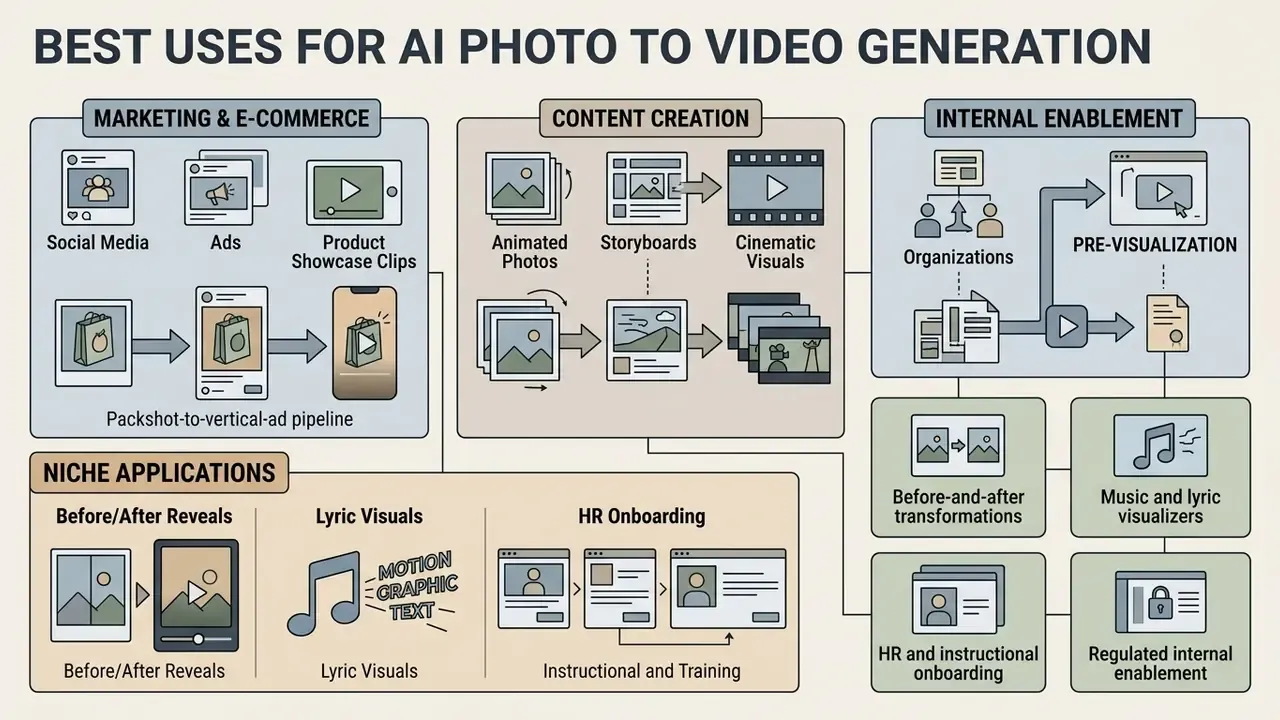
An ai photo to video free tool earns its keep across marketing, e-commerce, content creation, internal enablement, and pre-visualization. Turning static imagery into motion expands a visual content library without a shoot budget. Readers matching a scenario to a specific vendor can start from our roundup of the best free AI video generators.
Different workflows benefit differently. Creators producing automated marketing clips often pair generation with a fliki ai video generator pipeline, while social teams adjusting orientation use web tools to flip video online before publishing. Define the scenario, then pick the engine. Not the reverse.
Animated Photos, Storyboards, and Cinematic Visuals
Filmmakers, animators, and visual storytellers animate archival photos, build dynamic storyboards, and generate cinematic B-roll. Animating historical photography brings static archives back into motion for documentary and educational production, which is one of the few uses where a 3-second clip is genuinely enough.
In pre-production, directors convert static storyboard panels into animatics. Applying camera motion prompts to concept art lets creative teams evaluate pacing, framing, and transitions before principal photography. This use case overlaps directly with conventional animation maker tools and cuts days out of production planning.
Niche Applications: Before/After Reveals, Lyric Visuals, and HR Onboarding
- Before-and-after transformations real estate developers and retouchers use dual-frame keyframing, with the start image as original and the end image as renovated or graded, to animate structural change in one continuous reveal.
- Music and lyric visualizers musicians turn static album art into looping backgrounds with tempo-matched camera oscillation for streaming uploads and lyric clips.
- HR and instructional onboarding learning teams convert process infographics, policy slides, and compliance decks into step-by-step explainers, pairing AI motion with automated voiceover to replace text-heavy PDFs.
- Regulated internal enablement finance and operations teams animate anonymized dashboards, chart snapshots, and interface mockups for internal briefings and investor-report walkthroughs, keeping personal data out of the upload entirely.
- Pitch and storyboard previews agencies communicate mood and camera intent from a single still before any budget is committed.
Governance, Audit Evidence, and Risk-Adjusted ROI
Free tiers rarely fail on output quality first. They fail on traceability. Any clip that reaches a customer-facing channel in a regulated industry should carry reproducible lineage, the same way a scoring model carries validation evidence.
Minimum audit record per rendered asset:
| Field | Example value | Why supervisors ask for it |
|---|---|---|
| Source asset hash | sha256:9f2c… | Proves which input image was animated |
| Model and version | kling-3.0 | Establishes which engine produced the output |
| Prompt text | "slow pan right, fabric waving" | Documents the instruction given to the model |
| Seed / job ID | seed 44219 / job 7c1a | Enables reproduction of the same render |
| Reviewer and date | J. Doe, 2026-02-11 | Records human-in-the-loop sign-off |
| Licence tier at render time | Free (non-commercial) | Demonstrates rights held at time of use |
| Disclosure applied | C2PA credential, on-screen label | Evidences synthetic-media transparency |
Risk-adjusted ROI for free tiers. Nominal cost of a free render is zero. Realistic cost is not. A workable model:
Risk-Adjusted ROI = (Production savings − Control cost − Rework cost − (Residual legal exposure × Probability)) ÷ (Control cost + Rework cost)
Production savings equal the avoided cost of shooting equivalent footage. Control cost covers review, metadata logging, and DLP configuration. Rework cost covers re-prompting, watermark-driven re-renders, and upscaling of 480p exports. Residual legal exposure prices a licence breach or IP dispute on non-commercial output published commercially. In most enterprise scenarios, a paid tier with explicit commercial rights and no-training terms beats a free tier once control and rework hours are priced honestly. Uncomfortable, but that is what the arithmetic keeps showing.
Alignment references: NIST AI Risk Management Framework for control mapping (https://www.nist.gov/itl/ai-risk-management-framework), and C2PA Content Credentials for provenance (https://c2pa.org).
Can You Use Free AI-Generated Videos Commercially?
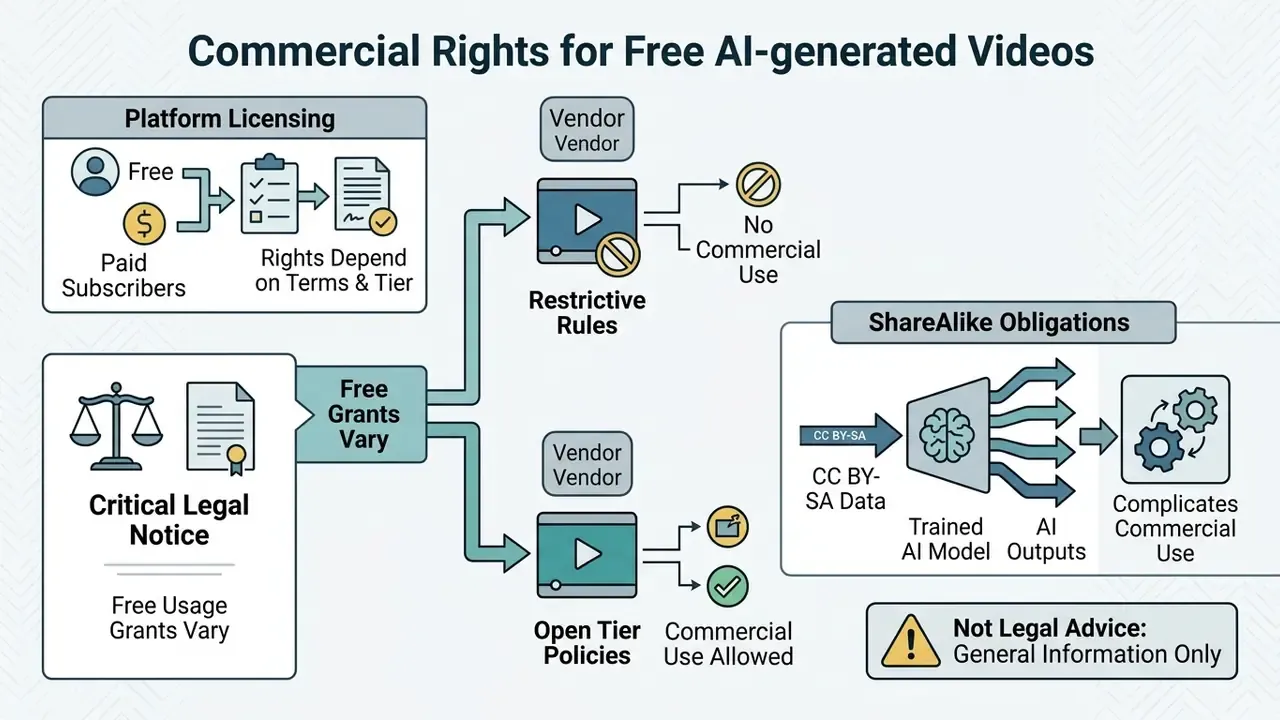
Commercial rights depend on the licence attached to each platform and tier. Most free plans grant personal, non-commercial use only, which blocks paid advertising and client monetization until you upgrade. The same pattern is documented for commercial use of AI image generators.
Not every vendor is restrictive. Some grant a perpetual worldwide commercial licence even on free tiers while prohibiting resale of individual assets. Others state that outputs are cleared for marketing and client work, provided the user owns the input images. The controlling factor is always the platform's own licence language, never general industry practice.
Legal scholarship on generative AI, including SSRN studies on Creative Commons ShareAlike obligations, warns that models trained on copyleft datasets may impose derivative licensing restrictions on outputs.
Uploading proprietary product photos or client assets to public free tools can also expose visual data to model-training pipelines, unless explicit opt-out terms exist.
Organizations that need broader guidelines should review AI Media Commercial-Use terms and our breakdown of AI image generator commercial use before launching a public campaign.
Limitations and Open Questions
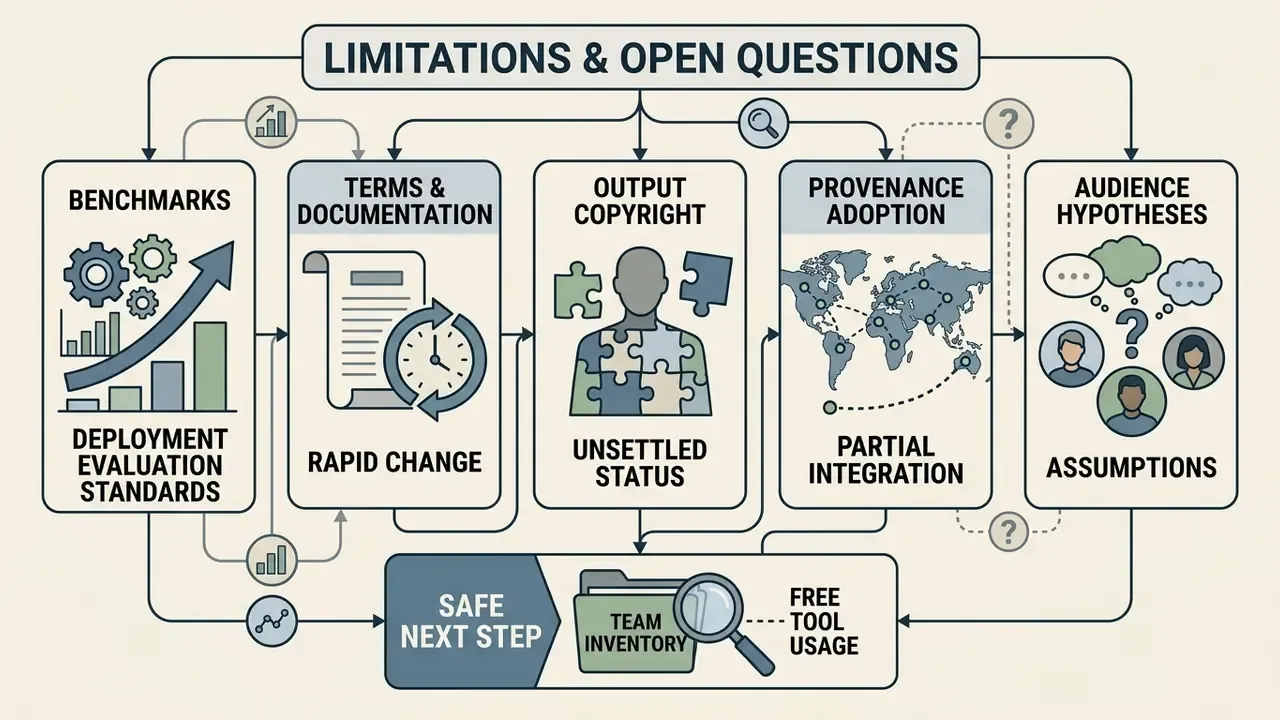
Honesty beats polish here, so a few things remain genuinely unresolved.
- Benchmarks lag deployment. VBench-2.0 and PhyParam-Bench score public checkpoints, not the tuned variants that vendors ship behind free tiers. A model can rank well on paper and still warp a hand in your render.
- Terms drift faster than documentation. Watermark and training-opt-out language changed at multiple vendors during 2025. Any policy captured in a procurement document in February 2026 needs a re-check date, ideally quarterly.
- Copyright status of outputs is unsettled. US registration practice around purely AI-generated material is still developing, and vendor licences do not resolve that question for you.
- Provenance adoption is partial. C2PA credentials survive some editing pipelines and are stripped by others, so metadata alone is not proof of disclosure.
- Audience assumptions stay hypotheses. Statements about how risk, compliance, and finance teams evaluate these tools should be treated as hypotheses until supported by analytics, interviews, CRM data, or verified customer research.
A safe next step, for anyone who has to answer to an audit committee: inventory which teams already use free generative video endpoints, then decide which of those uses needs a licensed tier. Start with the inventory, not the ban.
Free AI Image to Video Generator FAQ
Do I Need to Download Software to Generate Videos?
No. Modern generators run entirely in a standard browser on cloud infrastructure. You upload reference images and motion prompts to an online interface, cloud GPUs process the diffusion models, and the finished MP4 streams back for local download. No desktop install required. Some browsers now expose built-in on-device AI features, but hosted ai image to video online generation remains server-side, which is exactly why an ai image to video tool online is the default choice for small teams.
Can I Turn Multiple Images into One Video?
Yes. Advanced tools support multi-image animation through start-and-end frame keyframing or sequential multi-reference modes. Platforms using models such as TI2V-Zero or Seedance 2.5 let creators define initial and final frames, then generate smooth transitional motion between distinct reference photos. That is the practical route for anyone comparing ai images to video generator free options for slideshow-style sequences.
«TI2V-Zero supports long-video generation and frame filling from multiple images through a training-free autoregressive design.» Source: TI2V-Zero (2024), arxiv.org
Can I Add Audio, Music, or Lip-Sync?
Yes, with tier-dependent limits. LTX Video 2.3, Kling 2.5 and 3.0, Sora 2, and Veo 3.1 can generate synced audio natively alongside frames. For silent renders, export the MP4 and layer music, sound effects, or narration in an editor. Character clips can be lip-synced to a supplied voice track using dedicated sync modules.
Is There a Truly Free Option Without Watermarks or Sign-Up?
Partially. Some platforms state that free accounts export clean HD MP4 files with no watermark, while others brand every free output. Separately, selected engines allow around 3 short renders per day with no account at all, typically 480p and watermarked. Check both the watermark policy and the commercial-rights clause, because watermark-free does not mean commercially licensed. That distinction catches a lot of people testing an ai image to videos free workflow for client work.
Who Owns the Videos I Create on a Free Plan?
It depends on the licence, and the answer is often not "you." Several vendors retain ownership or a broad display licence over free-tier content, which means the videos I create on a sandbox account are not automatically mine to publish. Confirm ownership language, input-asset rights, and any attribution requirement before an ai generator image to video free render leaves internal review.
Are Uploaded Images and Generated Videos Private?
Privacy depends on each platform's stated data usage policy. Enterprise accounts typically enforce data isolation, while many free services reserve rights to store uploaded visuals and outputs for training future models. Policies diverge sharply: some vendors say plainly that uploads and outputs are never used for training, others define uploaded images as user content that may be used to improve their services.
«Responsible AI services should be transparent about how uploads are stored, for what purpose, and whether they are used for further model tuning.» Source: Rethinking Data Protection in the Generative AI Era (2025), arxiv.org Anyone handling confidential assets or personal photography should verify privacy terms and validate a service on non-sensitive test images first, much as you would when trying a novelty consumer tool such as a fotor ai baby generator. Comparable retention questions apply to AI photo editors and free photo editors that touch the same source files earlier in the pipeline.
What Should I Log for Audit Purposes?
Record the source image hash, model version, full prompt, seed or job ID, reviewer name, render date, licence tier in force, and any provenance credential applied to the export. Seven fields. Two minutes per asset, and the evidence exists when someone asks.
Appendix A: Superseded Statements and Corrections
Retained for transparency and version traceability.
| Original statement | Status | Corrected version in main text |
|---|---|---|
| "Watermarks: visible vendor logo or corner badge" (free tier, unqualified) | Corrected | Watermarks are common but not universal; selected platforms export clean HD MP4 files without watermarks on free accounts. |
| "explicit camera parameters reduce rotational error in rendered frames by over 25%" | Refined | 25.5% controllability improvement, measured via RotErr, where 0.1 RotErr is about 0.72° angular error (CamI2V, 2024). |
| "the team eliminated visual warping across 92% of the rendered assets, successfully exporting high-definition MP4 files for campaign testing within three hours" | Reformulated | Described as an unaudited internal test batch, with roughly nine in ten renders judged warping-free by reviewers. |
| "Benchmark studies like UI2V-Bench (2025) confirm… higher visual fidelity" (no methodology) | Expanded | Methodology added: four evaluation dimensions with high human-rating correlation. |
| "Benchmarks like VBench-2.0 (2025) demonstrate… superior temporal coherence" (no model list) | Expanded | Model list and five evaluation dimensions specified. |
| "Adding subtle motion to product packshots increases viewer engagement on mobile feeds." | Qualified | Marked as vendor-reported and directional; identity-preservation metrics cited instead. |
| "Platforms like OpenArt and HeyGen provide specialized product video tools…" | Qualified | Marked as vendor-stated capability requiring validation on your own SKUs. |
| "test consumer applications like a fotor ai baby tool on non-sensitive images" | Reframed | Generalized to validating any service on non-sensitive test images, with the consumer tool kept only as an illustrative example. |
| "hypeart.ai remains an unverified domain with no verified information available" | Flagged | Retained with an explicit unverified-status note at the publication date. |
| Infographic placeholder: comparative benchmark evaluation | Replaced | Rendered as the model comparison matrix (Kling 3.0, Veo 3.1, Seedance 2.5, LTX 2.3). |
| Schematic placeholder: workflow diagram | Replaced | Rendered as the six-stage packshot-to-vertical-ad pipeline table, plus the accessible text flowchart sequence. |
| FAQ accordion duplicating the FAQ answers verbatim | Removed | Replaced by the Limitations and Open Questions section, which adds decision-relevant caveats instead of repeating answers. |
Social Media, Ads, and Product Showcase Clips
E-commerce brands and social managers use ai photo to video generator free workflows to convert catalog photography into video ads. Subtle motion on packshots is widely used to hold attention in mobile feeds. Engagement uplift claims here are vendor-reported rather than independently benchmarked, so treat them as directional and A/B test in your own channel. What is measurable is identity retention:
Packshot-to-vertical-ad pipeline:
Platforms marketed for this workflow, including OpenArt and HeyGen, advertise product video tools that turn marketplace images into animated demo clips, with documented inputs ranging from packshots to product page links and catalog PDFs. Those capability claims are vendor-stated and should be validated on your own SKUs. A studio shooting stills can generate camera orbits around items and ship social assets for Reels and TikTok without filming secondary footage. Teams standardizing this into a repeatable process can review AI video generator workflows for prompt templates and cost planning.