Last updated: 2026 · Reviewed by: Marcus Hale (AI Governance & Model Risk) · Scope: consumer workflows, creative production and enterprise governance of image-to-video systems
Executive Summary
An ai photo animator is a diffusion- and transformer-based service that converts a single still image into a short, temporally coherent clip. It encodes the source frame, predicts motion in latent space, then renders three to ten seconds of movement without manual keyframing. For a creator, the decision set is small: template, prompt, or model choice. For an organisation, three questions dominate. Which model gets validated? What happens to the uploaded biometric data? And who owns the output?
| Reader | What to take away |
|---|---|
| Creator / marketer | Use sharp inputs of 1024 px or more, describe motion in present tense, export MP4 (1080p/4K) or WebP for the web. |
| E-commerce / brand team | Looping cinemagraphs and 360° spins (24 to 72 frames) replace expensive shoots; keep product geometry and logos readable. |
| Head of Model Risk / CRO | Validate temporal stability, hallucination rate and identity drift inside your existing model-risk framework (SR 11-7 logic, NIST AI RMF functions). |
| AI Governance / Security lead | Treat photo uploads as biometric PII (BIPA, GDPR, CCPA); require SOC 2 Type II, zero data retention and VPC or on-prem options to prevent Shadow AI. |
| Legal / compliance | Purely machine-generated video is generally not copyrightable in the US; commercial use depends on the platform licence and the jurisdiction. |
Four terms used throughout, defined once. Image-to-video (I2V): generation of a frame sequence conditioned on one input image. Temporal consistency: how well textures, edges and identity survive from frame to frame without flicker or morphing. Identity drift: the gradual mutation of a face, logo or package during motion, the single most common reason a marketing asset gets rejected. Provenance mark: a cryptographic or metadata credential (C2PA Content Credentials, for example) that records how an asset was produced. Keep those four words in your head and most vendor claims become easier to test.
What Is an AI Photo Animator and How It Turns a Photo into Video
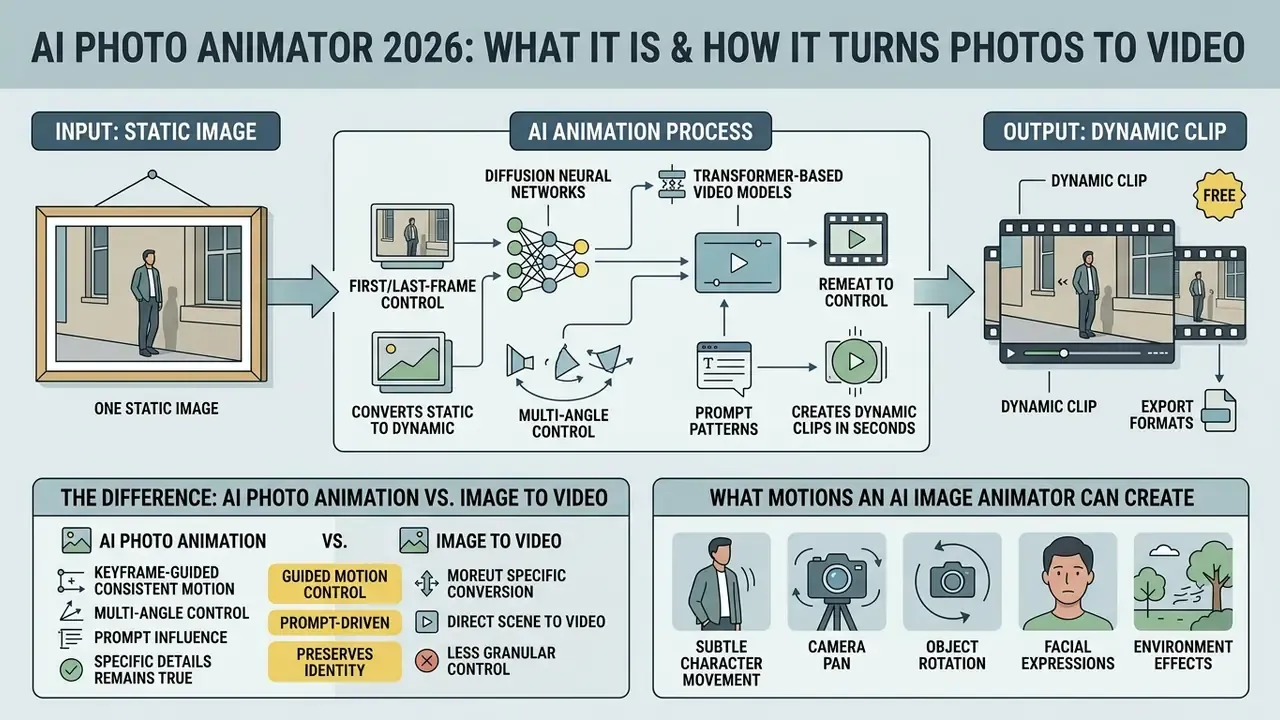
An ai photo animator is a software service built on diffusion neural networks and transformer-based video models that converts one static image into a dynamic clip in seconds. The tool reads the source frame, synthesises the missing intermediate frames in latent space, and reconstructs plausible subject and camera movement. Some users search for it as "ai picture animater", which is the same category, spelled a little loosely.
«Diffusion-based I2V models synthesise a temporally consistent frame sequence from a single image by iteratively denoising a latent representation conditioned on the input photo.»
If you want the wider category context before committing to a workflow, start with our reference material on image-to-video AI.
Architecture note. The generation stack behind modern Image-to-Video (I2V) tools rests on two families. Latent Diffusion Models (LDM) pre-train an image generator and then convert it into a video generator in latent space, which cuts compute at high resolution. Diffusion Transformers (DiT) power systems such as CogVideoX and the Wan 2.2/2.6 family. Benchmarks like AIGCBench (Fan et al., 2024) measure these systems rather than define them; the architectural claims come from the model papers themselves. Unlike layer-based animation, where graphics are shifted by hand, an ai image animator computes motion vectors through spatiotemporal attention layers.
The static frame acts as a visual anchor. The network encodes the source photo animation input through a vector encoder, locking texture and object geometry. The video generator then adds motion physics, producing a generated video that keeps portraits, illustrations or a product image recognisable. MagicAnimate made the standard split explicit: a video diffusion model handles temporal information, while a separate appearance encoder preserves reference-image detail across frames. Simple idea, big consequence.
The Difference Between AI Photo Animation and Image to Video
The core difference between narrow ai photo animation and broad generative image to video systems is the amount of available context and the degree of visual control. Photo animation animates a single shot while preserving its geometry. Generic image to video can transform the scene substantially and generate longer multi-frame sequences from a text description.
«AIGCBench defines photo animation as the setting where only a static image and a text prompt are available, and the model must synthesise motion on its own.»
General-purpose image to video models compute motion along free diffusion trajectories and can introduce new objects into the frame (NeurIPS, 2024). Generative Image Dynamics (CVPR 2024) illustrates the narrow end of the spectrum: it turns one RGB image into a looping video by predicting a spectral volume of dense trajectories. A narrow photo to animation ai pipeline uses a video model tightly bound to the source latent features, limiting transformation to background and character kinematics. To weigh the available market tooling, see our comparison of the best AI video generators.
What Motions an AI Image Animator Can Create
A modern image animator can generate facial expressions, natural gesticulation, body movement, cinematic camera trajectories and background dynamics. The algorithms reconstruct plausible scene physics (natural motion), animating individual elements such as hair, water and clothing, or transferring full motion from a driving video.
«CamCo (2024) uses Plücker coordinates and epipolar constraints to deliver 3D-consistent camera control, including pans, orbits and zooms, without background tearing.»
Motion-transfer systems documented in 2026 vendor material (Kling 3.0 Motion Control, Wan Animate) describe transfer of facial motion, lip sync, hand gestures, body pose and camera rhythm from a reference clip into a static image. The same documentation lists six base camera axes, namely pan, tilt, zoom, orbit, roll and dolly, plus localised scene dynamics (hair, clothing, water). One caveat: vendor capability claims are product descriptions, not peer-reviewed measurements, so read the axis list as a control taxonomy rather than a quality guarantee. In practice, pipelines that expose these axes keep the background intact and produce dynamic videos without visual smearing, while research systems such as SG-I2V (2024), LeviTor (CVPR 2025) and ATI (2025) add bounding-box, mask-plus-depth and trajectory conditioning for finer control.
Which Photos and Images Work Best for AI Animation
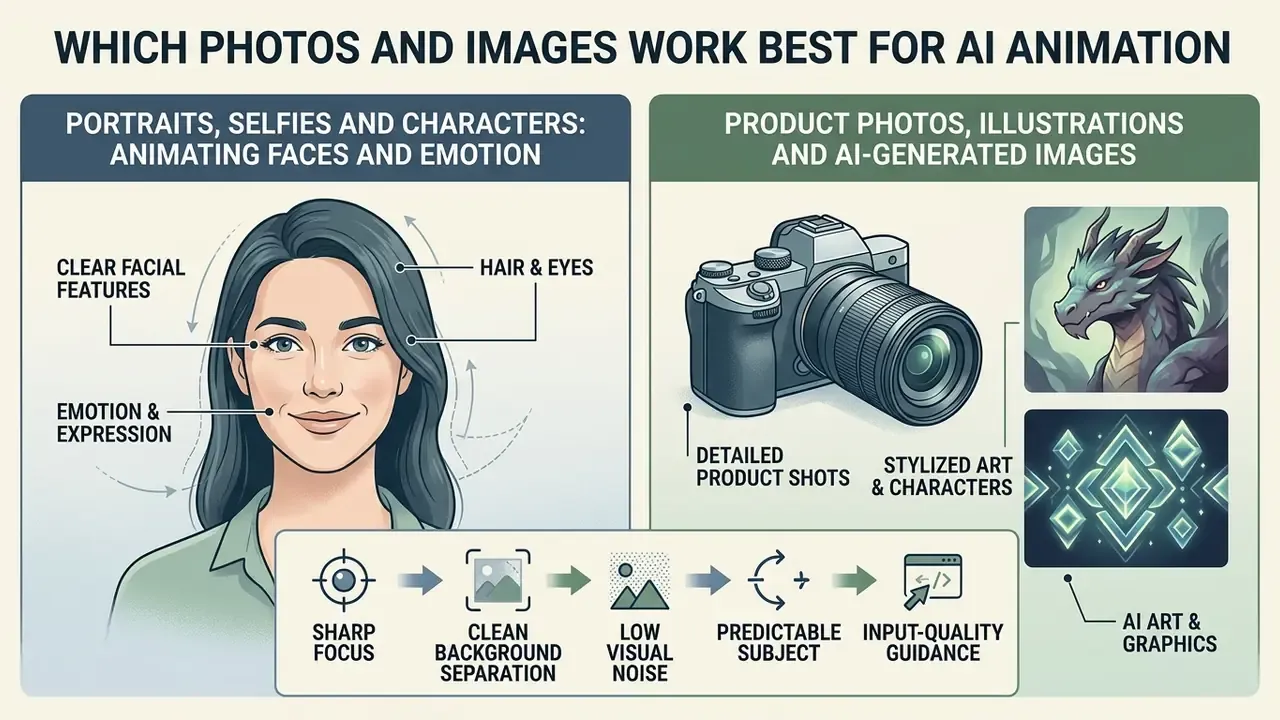
Predictable AI animation starts with sharp images of at least 1024 px on the shortest side, clean subject and background separation, and low visual noise. A stable angle plus even lighting prevents spatial artefacts during generation.
Animating photos places clear demands on the source file. Runway and Kling AI guidance indicates that the network first builds a depth map from any photo; if the still image is heavily blurred or contains overlapping subjects, the video model will very likely distort the edges of moving elements.
«MOFA-Video shows that multi-scale feature encoding of the input image reduces texture drift and shape deformation during motion generation.»
Input-quality guidance. In our editorial testing of marketing assets, standardising the upload format produced visibly fewer edge artefacts and steadier identity than mixed-quality inputs. The recipe: front-facing light, uncluttered background, shortest side of 1024 px or more, one fixed aspect ratio across a batch. We deliberately do not publish a single percentage figure here. The effect size depends on the model, the resolution and the motion amplitude, and no public methodology supports a universal number. Vendor guidance converges on the same rule set anyway: front or three-quarter angles, similar lighting between references, one aspect ratio per project. If the source needs cleanup first, prepare it in an online photo editor before you upload your image.
Portraits, Selfies and Characters: Animating Faces and Emotion
Portraits and selfies shot front-on or at three quarters give the highest fidelity for emotion, articulation and character identity. Networks rely on 3D morphable face models (3DMM) and alignment landmarks, which allows natural lip synchronisation and brings photos to life.
«One Shot, One Talk (2024) builds full-body talking avatars from a single photo, using a learned motion space to generalise gesture and expression.»
Product Photos, Illustrations and AI-Generated Images
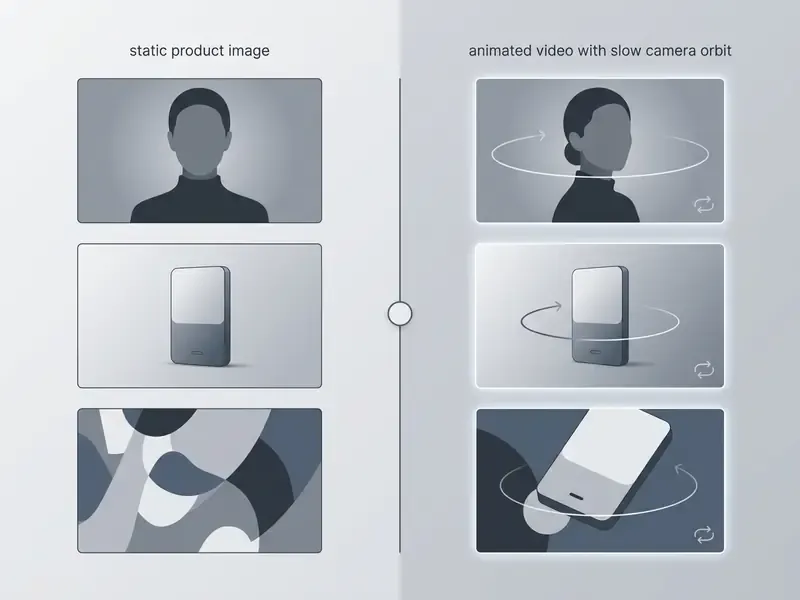
Product photos, vector illustrations and AI art suit advertising creatives built on camera orbits, floating objects and animated backgrounds. When you animate pictures of merchandise, commercial standards require preserving packaging geometry and keeping logos legible.
Harvard SEAS AI Marketing Guidelines (2026) explicitly permit AI-created illustrations and animations for stories and articles, plus motion graphics for non-human objects, environments and processes. Marketing-legal guidance (Nightjar, The Legal Guide to AI Product Photography, 2026) adds three constraints: disclosure, consent checks for any identifiable person in frame, and fidelity to the product actually shipped. Peer-reviewed work on AI-generated graphics in video advertising (Baek, Pantano et al., 2024) reports positive consumer reception, which supports using animations generated from stills in paid campaigns, not only in organic feeds. To test graphics handling end to end, try a free ai image to video animation tool before committing budget.
How to Make an AI Photo Animation: From Upload to Export
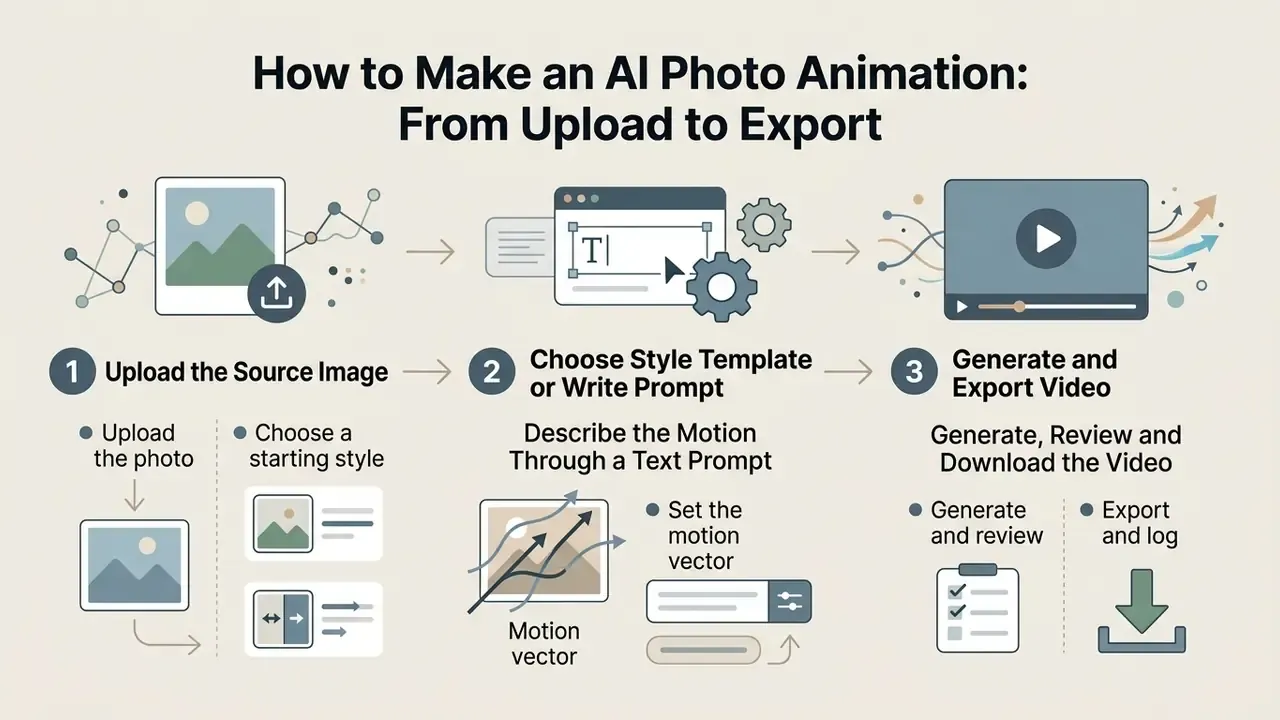
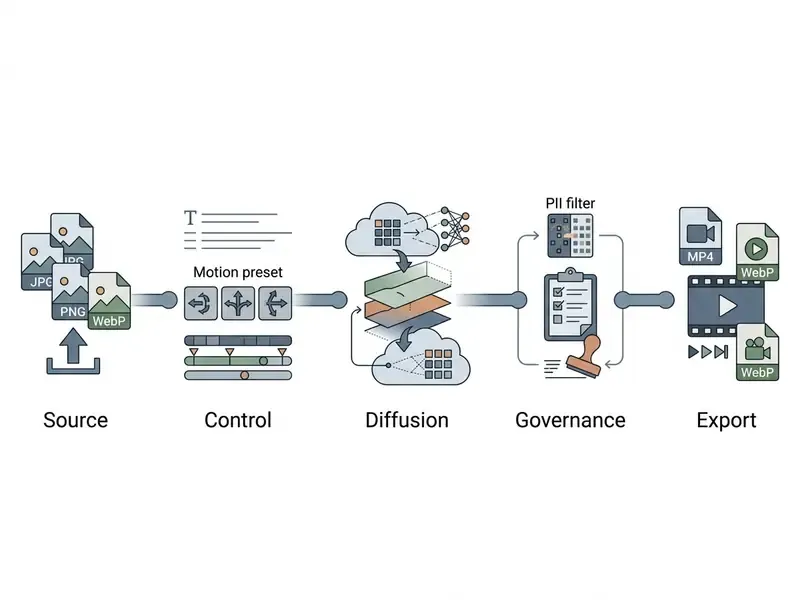
The workflow has three stages: upload the source image, choose a style template or write a prompt, then generate and export the video. Online tools automate frame encoding, so no manual video editing is required.
Modern web services fold the whole cycle into a cloud UI. Inside an ai photo animation tool, the uploaded file is converted straight into a latent tensor, so image animate operations need neither a local GPU nor editing skills. Documented vendor flows agree on the same four clicks: upload JPG, JPEG or PNG (typically up to 10 MB), optionally set style, resolution and aspect ratio, generate, then download MP4.
Upload the Image and Choose a Starting Style
Stage one needs a JPG, PNG or WebP file plus a preset animation style that fixes the visual language of the clip. The source shot acts as the First Frame, defining framing proportions and subject identity.
Runway Gen-4.5 documentation states that matching the source aspect ratio to the target canvas prevents stretching and black bars, and that the first frame should be the highest-quality image available because it anchors composition and identity. Reallusion's AI Studio manual shows the second half of the pattern: pick a named style preset ("Photo Realistic" and similar) before animating. If you need scripts or captions around the clip, draft them with a free ai content generator.
Describe the Motion Through a Text Prompt
A text prompt sets scene physics, object trajectories and camera dynamics. Describing action in the present tense with one concrete verb gives the network a controllable generation vector, the same logic that powers text-to-video AI.
«MotiF (2024) applies a Motion Focal Loss weighted by optical-flow maps: high-motion regions receive greater weight, improving prompt adherence.»
Motion Prompting: Controlling Video Generation with Motion Trajectories (arXiv, 2024) shows that trajectory prompts enable object control, emergent physics, camera control and simultaneous object-plus-camera control. Force Prompting (arXiv, 2025) goes further, learning physics-based control signals for localised point forces and global wind fields. That is why an instruction such as "wind blows right to left, lifting the hair" reduces smearing of fine detail far more effectively than an abstract mood description. Mood words feel creative. They mostly add entropy.
Generate, Review and Download the Video
After you hit generate, the model returns a three to ten second preview so you can judge frame smoothness and artefact levels. The final generated video downloads as MP4 for publication. Review discipline mirrors upscaling workflows: validate a five to ten second test render before committing to the full-quality export, then check frame rate consistency against your delivery platform.
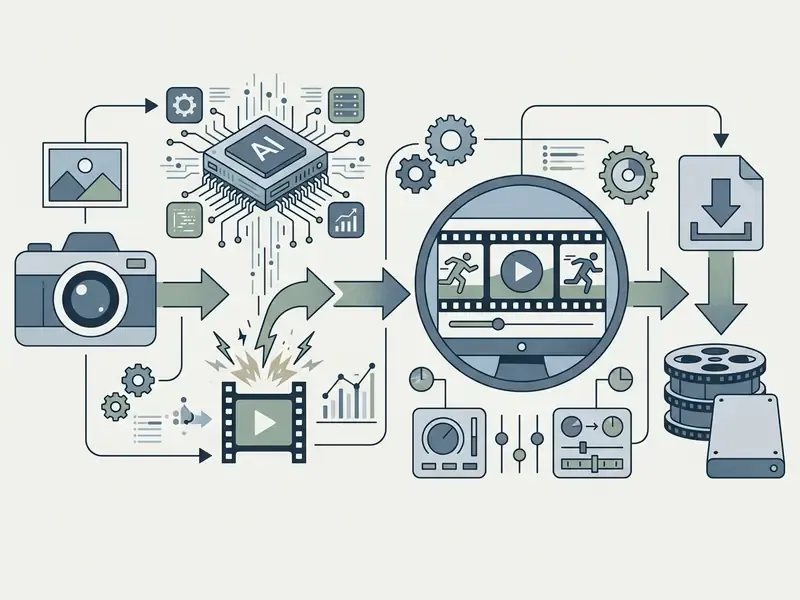
- Upload the photoa sharp still image in PNG or JPG, up to 10 MB, in 16:9 or 9:16. Confirm you hold the rights and consents for every person in frame.
- Set the motion vectorpick a template or describe camera and subject movement in a text prompt; optionally lock the first and last frame.
- Generate and reviewinspect the preview for flicker, morphing and face deformation before the full render.
- Export and logdownload the video clips as MP4, then record model version, prompt, seed and licence tier in your asset register.
Controlling Motion, Camera and Style in AI Image Animation
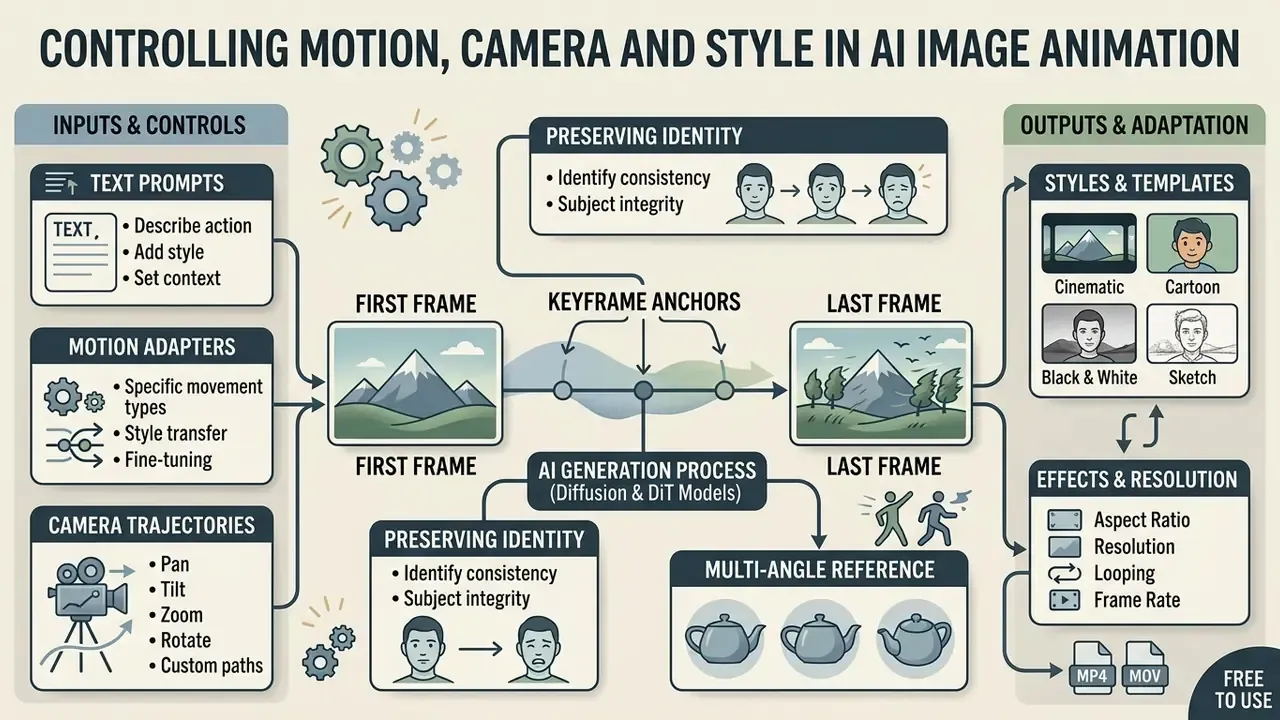
Precise control over ai image animation comes from combining text prompts, camera trajectories, keyframe anchors and dedicated motion adapters. That combination removes the lottery element and makes visual storytelling repeatable.
To manage output, an ai photo to animation tool separates the spatial and temporal channels. You can set a cinematic look, anime styling or realistic 3D dynamics while keeping the frame structure intact.
Motion and Camera Movement: What You Can Tune
Current video models expose base camera moves and object-motion intensity. Plücker coordinates in systems such as CamCo (2024) preserve 3D scene geometry without background tearing.
«CamCo computes epipolar lines for every target frame and aggregates features along them through cross-attention, producing geometrically correct viewpoint changes.»
Displacement amplitude, the movement slider in most UIs, controls fly-through speed and protects textures from disintegrating. Kling AI's camera-control guide groups moves into six basics (horizontal, vertical, zoom, pan, tilt, roll) plus four preset "Master Shots", while MotionCtrl (2024) formalises a directional taxonomy of pan left, right, up, down and zoom in or out. For mobile-first production, a free ai image to video app already ships most of these presets.
First Frame and Last Frame Keyframing
Two-anchor generation, sometimes labelled Start & Last Frame Interpolation, lets you define not only the opening state of the scene but also the closing position of the subject. Instead of the network extrapolating a trajectory blindly, anchoring both ends forces the video model (Vidu AI, Wan 2.6 and Kling 3.0 all support this mode) to compute a smooth morph or motion path inside a fixed time budget. This matters for seamless loops in advertising, before/after transformations and complex character changes where the in-between frames must stay visually controlled.
Practical rules for two-frame control:
- Keep identity constant. Use the same lighting, lens and subject scale in both anchors, otherwise the model interpolates through an unstable identity.
- Match aspect ratio and resolution across the two frames to avoid reframing artefacts at the midpoint.
- Shorten the interval. Three to five seconds between anchors yields cleaner interpolation than ten seconds of guesswork.
- Loop deliberately. For seamless rotation, set the last frame equal to the first, then trim one frame at export.
Preserving Identity Through Multi-Angle Reference
The central weakness of single-frame animation is detail loss when the subject rotates its unlit side toward the camera. The Reference-to-Video method addresses this by ingesting reference shots from several angles: front, profile, three quarters. The algorithm fuses the spatial depth cues of multiple files into one latent 3D profile, which keeps textures, garments and facial features consistent through 180° and 360° camera moves.
Two caveats matter in production. References must share lighting conditions, because mixed colour temperature produces flickering albedo. And the same consent and biometric-handling rules apply to every uploaded angle, not just the first one. For objects and packaging, three to five angles are usually enough to stabilise a full spin.
Styles, Templates and Effects for Photo Animation
Style templates instantly adapt a clip to vertical social formats (9:16) or cinema framing. They accelerate production and keep visual effects comparable from clip to clip, which is what a brand review actually cares about.
«MOFA-Video (2024) shows that domain-specific motion adapters, trained for different control signals, deliver higher temporal consistency than a single general-purpose diffusion model.»
BINUS University (2025) documents 9:16 as the default social format with 15 to 30 second cuts for short-form attention windows. LTX Studio's 2026 style guide defines the four dominant looks: cinematic realism (film lighting, shallow depth of field, controlled camera), anime (bold outlines, cel shading, dynamic framing), CGI/3D animation, and photorealistic 3D for premium product showcases.
Among specialised presets, the following categories convert and travel best:
- Paired-subject effects (AI Hug, AI Kiss) merge two separate still photos of different people into one dynamic frame with an embrace or interaction, by fusing their depth maps and aligning gaze direction.
- Archive portrait revival (Photo to Life) restores micro-expressions on old black-and-white or damaged shots, suppressing noise while adding natural blinking, a slight smile and a head turn.
- Character and art-style animation (Anime & OC Maker) presets tuned for drawings, concept art and anime characters, adding flowing hair, cloth movement and atmospheric particles such as rain, sparks or petals.
- Motion templates for commerce hero-product reveals, floating-object loops and outfit-change effects that reuse one scene scaffold across an entire catalogue.
A template library is also the cheapest way to standardise output across a team; see our overview of animation makers for template-driven pipelines.
How to Write Prompts for Natural Movement
An effective animation prompt follows the pattern Subject + Action + Camera Move + Lighting, with no abstract preamble. Avoiding contradictory commands prevents flickering and face deformation.
Runway recommends direct affirmative phrasing: "The camera slowly pans right as the person smiles." LTX-2.3's guide adds a structured flow, that is establish the shot, set the scene, describe the action, name the camera movement, written as a single present-tense paragraph. Vendor guidance diverges on one point. Runway prefers positive phrasing over negative prompts, while other guides rely on explicit negative constraints (no morphing, warping, flickering, jitter, face deformation, background drift). The difference is emphasis, not structure, so test both on your model of choice and keep the winner in your prompt library.
How to Choose an AI Photo Animation Tool and Video Model
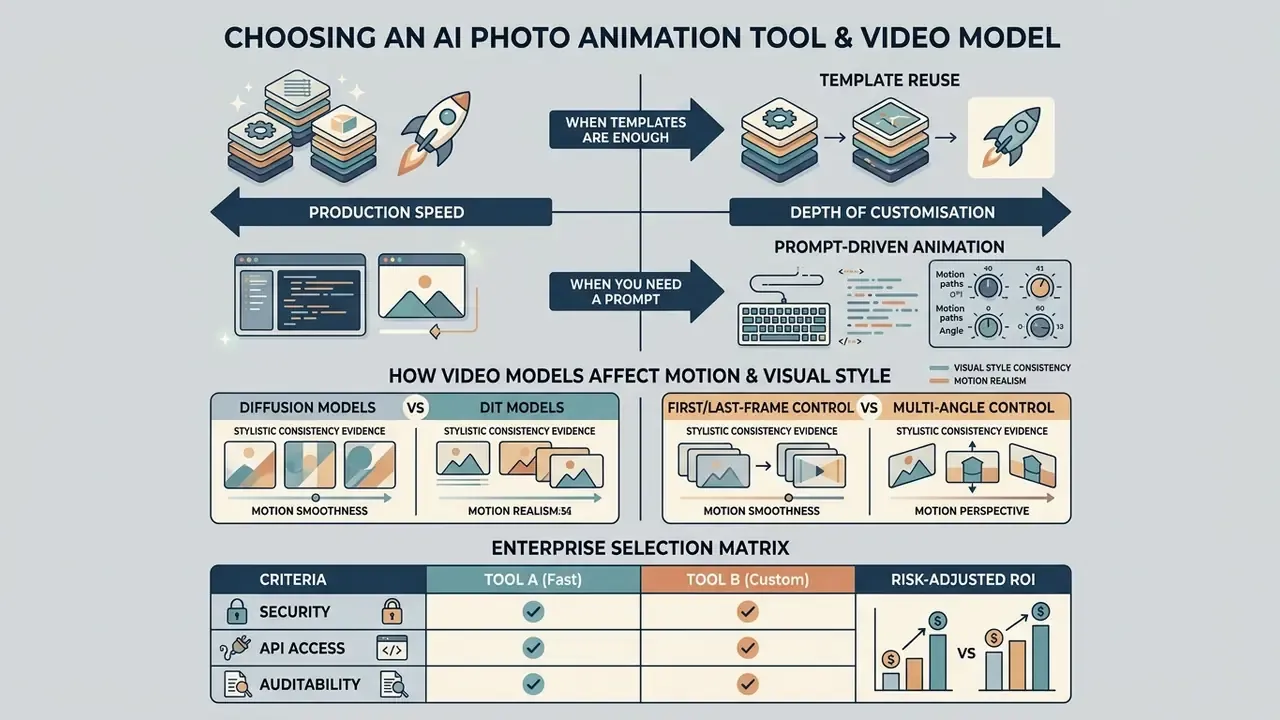
Choosing a service comes down to a trade-off between production speed and depth of customisation. Ready-made templates maximise speed; direct prompt work and deliberate model selection maximise control, as our comparison of AI video generators shows across quality, limits and licensing. Broader category pages are grouped in the comparison hub.
The market offers both packaged web tools and flexible generative architectures available through APIs. Buyers must weigh cost per generation, achievable temporal stability and resolution ceiling. For organisations, add two more axes: security posture and audit capability.
When Templates Are Enough and When You Need a Prompt
Templates are justified for high-volume, standardised product cards and short social clips. Text prompts become necessary for unique creative tasks involving complex interaction physics or non-standard scenarios.
«AMG (2024) shows that templates built on SMPL poses extracted from real video are ideal for repeatable complex motion, while text prompts suit one-off scenarios.»
Template reuse. OpenAI's API documentation describes reusable prompts with variable placeholders such as {{customer_name}}, which is exactly the pattern for automated pipelines: one motion scaffold, many substituted assets. The same documentation recommends being explicit about format, style, length and context when a task needs exact control, the prompt-side equivalent of a template. Teams starting on a zero budget can validate the approach with free AI video generators before signing an enterprise contract, and per-second model cost can be sanity-checked in the Google Veo API implementation guide or across the wider API documentation set. Published plan tiers are collected on the pricing overview, and unit economics can be modelled with our calculators.
| Criterion | Templates | Text Prompts | Video Model Choice |
|---|---|---|---|
| Time to first output | High (1 to 2 minutes) | Medium (3 to 5 minutes) | Low (requires parameter setup) |
| Level of control | Fixed (presets) | High (flexible description) | Maximum (architecture level) |
| Learning curve | None (beginner friendly) | Medium (prompt engineering) | High (technical knowledge) |
| Repeatability | Highest (identical scaffold) | Medium (prompt drift) | High (fixed seeds plus version pinning) |
| Best-fit tasks | E-commerce cards, Reels | Unique creatives, storytelling | Scaled production, R&D, API integration |
How Video Models Affect Motion and Visual Style
Different video models determine frame stability, light realism and how well subject identity survives. A model with genuine 3D motion priors reduces smearing during fast pans.
«Models with cross-frame attention mechanisms outperform baseline diffusion networks on temporal consistency and subject-identity preservation.»
Consistency evidence. FastBlend (IJCAI, 2025) targets video stylisation consistency and reports outperforming baseline deflickering and diffusion-based methods. MotionCraft (2024) improves frame and motion consistency using physically derived optical flow with latent-space warping. We no longer publish the previously cited "60% flicker reduction" figure: the direction of the effect is supported, the single-number magnitude is not (see Appendix A). Note the structural conclusion in the literature, which is easy to miss. Reducing flicker and producing physically plausible motion are different problems, and the second usually needs explicit motion constraints.
| Model / architecture stack | Primary focus | First/Last frame support | Generation speed | Physics stability |
|---|---|---|---|---|
| Kling 3.0 Motion Control | Precise camera trajectories, motion transfer | Yes | Medium (60 to 90 s) | High (9/10) |
| Wan 2.6 (DiT) | Character dynamics, micro-expressions | Yes | Fast (30 to 45 s) | Very high (9.5/10) |
| Vidu AI / Reference-to-Video | Multi-angle consistency, morphing | Yes | Fast (about 30 s) | Medium (8/10) |
| Google Veo / Flow | Cinematic realism, high resolution | Limited (first frame focus) | Slow (120 s and up) | Reference grade (9.8/10) |
| CogVideoX (LDM, open source) | Self-hosting, local UI, research | Partial | GPU dependent | Baseline (7/10) |
Scores are directional editorial ratings based on documented capabilities and hands-on testing, not a peer-reviewed benchmark. For formal evaluation, use benchmark suites (see the validation section below).
Enterprise Selection Matrix: Security, API and Auditability
Creative quality is only one axis. For regulated environments, add the controls that decide whether an animated asset can be published at all.
| Enterprise criterion | Why it matters | Minimum bar to request |
|---|---|---|
| SOC 2 Type II / ISO 27001 | Evidence of operating controls, not just policy | Current report, scoped to the generation service |
| Zero data retention | Prevents uploaded faces from persisting in vendor storage or training sets | Contractual ZDR, documented deletion window |
| Deployment model | Removes public-SaaS exposure for sensitive imagery | VPC, private endpoint, or on-prem/self-hosted option |
| API plus SLA | Enables pipeline automation and capacity planning | Documented rate limits, versioned endpoints, uptime SLA |
| RBAC and SSO | Stops Shadow AI by centralising access | SAML/OIDC, role separation, per-team quotas |
| Audit trail | Reproducible evidence of how an asset was made | Prompt, seed, model version, operator ID, timestamp |
| Provenance marking | Defends against deepfake misuse claims | C2PA Content Credentials or equivalent watermarking |
| Model independence | Avoids single-vendor capability risk | Multi-model routing (Kling, Wan, Veo, Vidu) behind one API |
| Licence clarity | Determines publishable rights | Written commercial-use grant per plan tier |
Risk-adjusted ROI. A workable formula for the business case: (assets produced × cost of the replaced production method) minus (subscription + API cost + review labour + compliance overhead + rework from rejected generations). Rework and human review are the two costs most often left out. Budget 15% to 30% of generations for regeneration, and a mandatory human sign-off step for anything showing a real person.
Model Validation and Governance for Image-to-Video
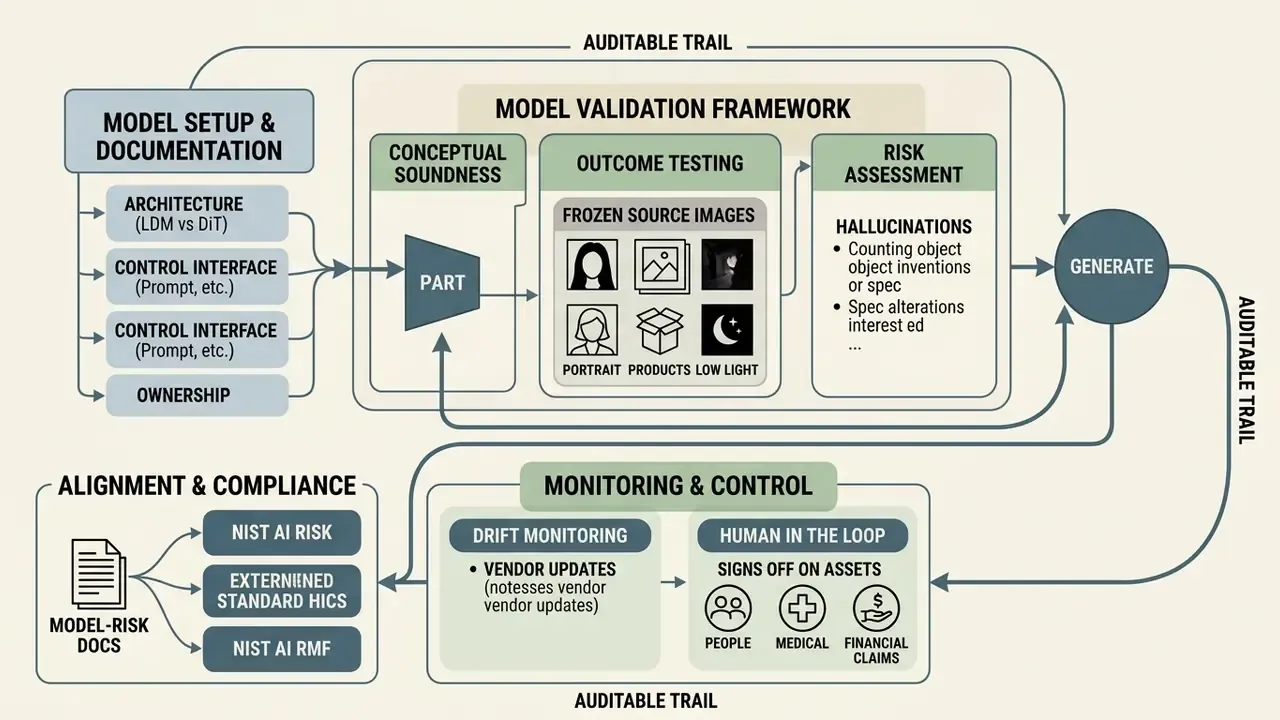
Image-to-video generation is a model, and models used in regulated organisations require validation, monitoring and documented ownership. The prevailing supervisory logic for model risk, that is conceptual soundness, outcome analysis and ongoing monitoring, maps onto generative video with three additions: temporal behaviour, identity fidelity and content risk.
A Practical Validation Framework
Reproducibility, Seeds and an Auditable Trail
Data Security, Biometrics and Shadow AI
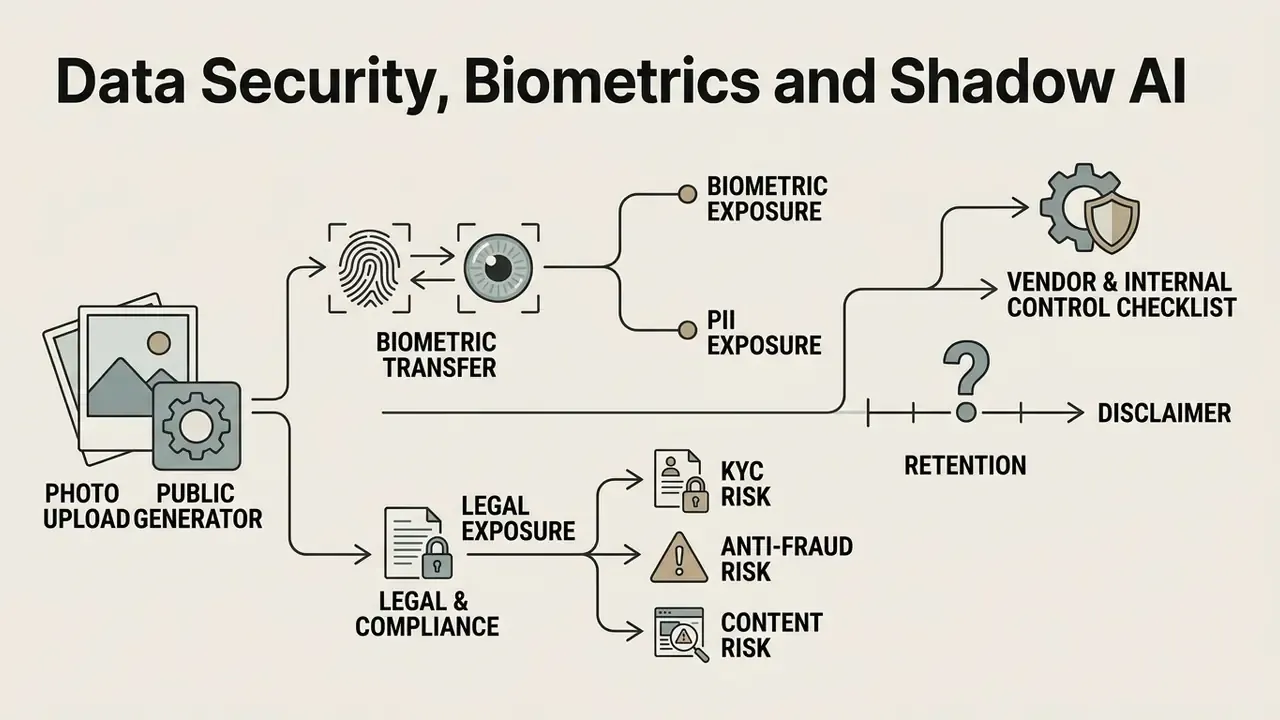
Uploading a photograph of a person to a public generator is a biometric data transfer. Treating it as a creative action rather than a data action is the single most common governance failure in this category. I would put it first on any internal review agenda.
Biometric and PII Exposure
Vendor and Internal Control Checklist
- Written zero-data-retention and no-training-on-customer-data clause.
- SOC 2 Type II or ISO 27001 report actually reviewed by security, not merely requested.
- Encryption in transit (HTTPS/TLS) and at rest, with documented key management.
- Regional processing controls for cross-border transfer requirements.
- Consent workflow for every identifiable person, stored with the asset.
- SSO plus RBAC to eliminate personal-account usage, which is how Shadow AI starts.
- Approved-tool list published internally, with a fast approval path so teams do not route around it.
- Prohibition on uploading identity documents, KYC files, medical images or unreleased product designs to public tiers.
- Incident playbook for misuse or leakage of generated likenesses. Escalation contacts are listed in the support hub.
Export Formats, Quality and Applications for Animated Photos
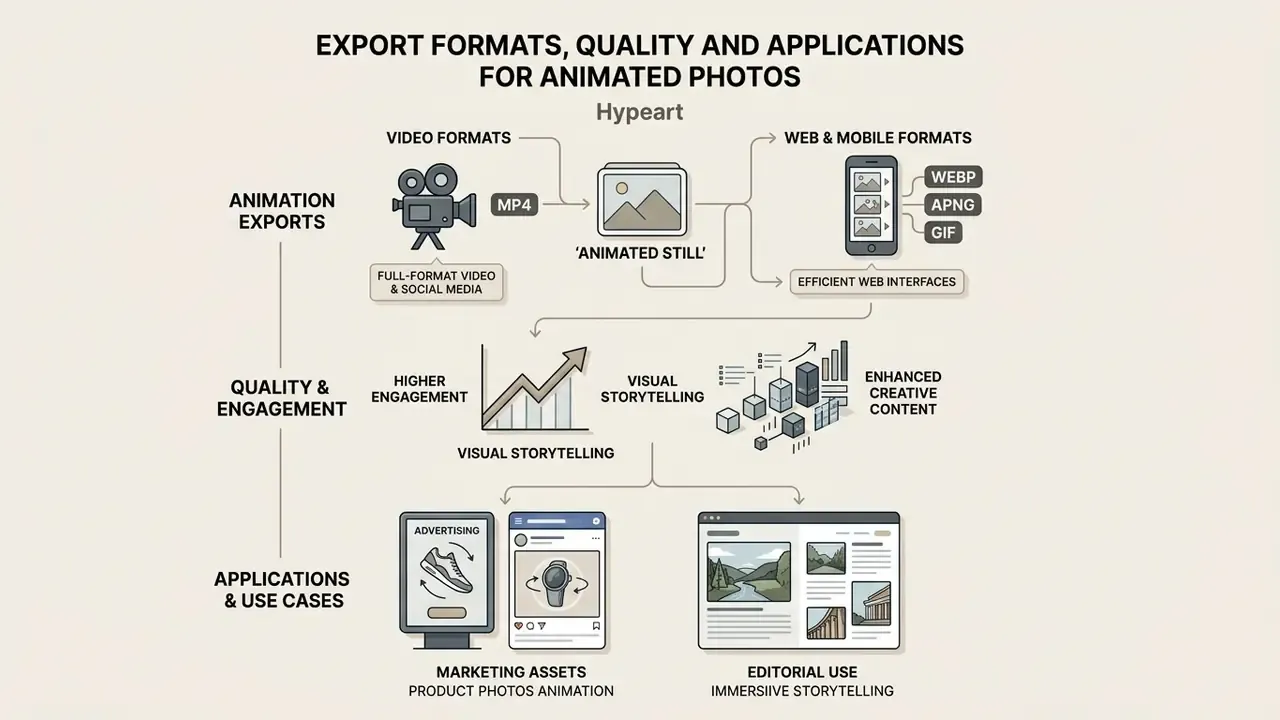
The primary export targets are MP4 for full-format video and WebP, APNG or GIF for web and mobile interfaces. Format choice depends on transparency needs, colour range and maximum file size.
Cloudinary's documentation confirms that animated PNG, WebP and AVIF support 24-bit RGB colour with an 8-bit alpha channel, while GIF is limited to 8-bit colour and 1-bit transparency; Google's WebP documentation exposes a 0 to 100 quality factor. Practical mapping: GIF for maximum compatibility, APNG for transparency-heavy UI motion, WebP for modern web delivery at smaller size, MP4 for photographic or longer motion. Adobe's export guidance anchors the video side, that is 1920×1080 for HD at roughly 20 to 30 Mbps, 3840×2160 for 4K at roughly 60 to 80 Mbps, with frame rate matched to the source. Oversized files can be reduced afterwards with a video compressor, and general capability context sits in our guide to AI video generators.
«AIGCBench (2024) evaluates I2V models on 11 metrics across four dimensions: control-signal alignment, motion effects, temporal consistency and video quality.»
Animating Product Photos for Marketing Assets
Animating product shots as micro-looping cinemagraphs or 360° rotations improves e-commerce card performance. Vector trajectory control preserves packaging geometry and product detail, and template-driven animation tools let one scaffold cover a whole catalogue.
Adobe's product-photography guidance for e-commerce recommends multiple images, close-ups and optimised file sizes for page speed, which is the source pattern for deriving short animated assets from stills. GS1's product-image specification treats catalogue imagery as a structured asset whose quality should be preserved for downstream reuse. Public 360°-photography practice uses 24 to 72 frames per rotation, the standard input for animated spins in product galleries. Looping MP4 is preferred over heavy GIF for load performance.
Editorial case. In an e-commerce catalogue migration, our team automated the conversion of 150 static product images into looping 360°-style scenes using two-frame anchors and fixed seeds per SKU. The measurable operational outcome was the removal of an entire 3D-modelling stage and a consistent motion language across the catalogue. Engagement effects were directional in the client's analytics but were not measured under a controlled test, so we publish no percentage figure. For API-level integration and cost modelling, see the Google Veo API guide.
AI Photo Animator Pricing and Commercial Use
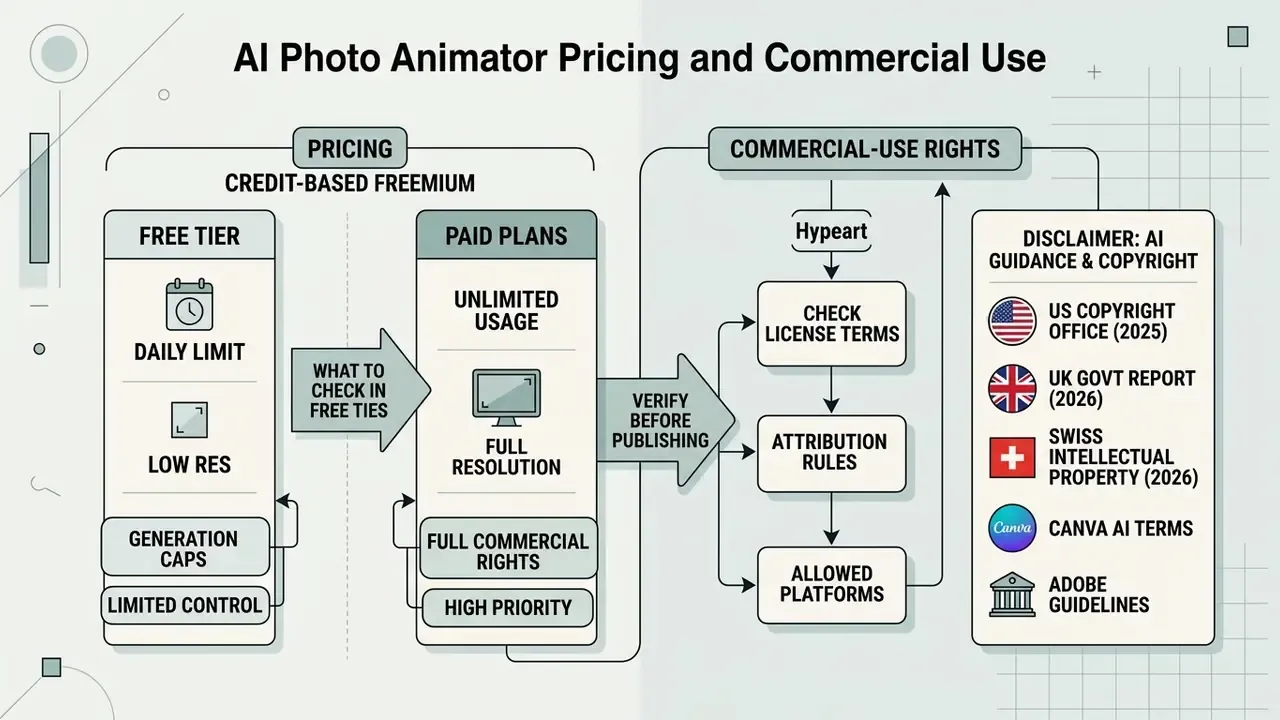
Pricing usually follows a credit-based freemium model: the free tier caps daily volume and resolution, while full commercial rights arrive on paid plans.
When selecting a service, separate personal use from commercial distribution. A paid ai photo animator subscription typically bundles a direct licence to use the generated video in advertising and marketing material, but the grant differs by tier, and beta features are frequently excluded.
What to Check in Free Tiers and Paid Plans
Test the free tier for daily credit caps, export ceiling (often 720p), watermarking and the subset of models exposed. Free access is commonly limited to lighter, faster models.
Documented examples help. Google Flow gives non-subscribers 50 credits per day usable across Veo 3.1 Lite, Fast and Quality, yet a Quality generation costs 100 credits, which places it outside the daily free allowance. Vidu states that every user receives 40 free credits per month. Several services restrict free output to 720p and short durations, reserving 1080p for paid tiers. Cross-check both quality and licence limits before scaling; our comparison of free AI video generators breaks down credits, watermarks and export rules side by side.
Commercial-Use Rights: What to Verify Before Publishing
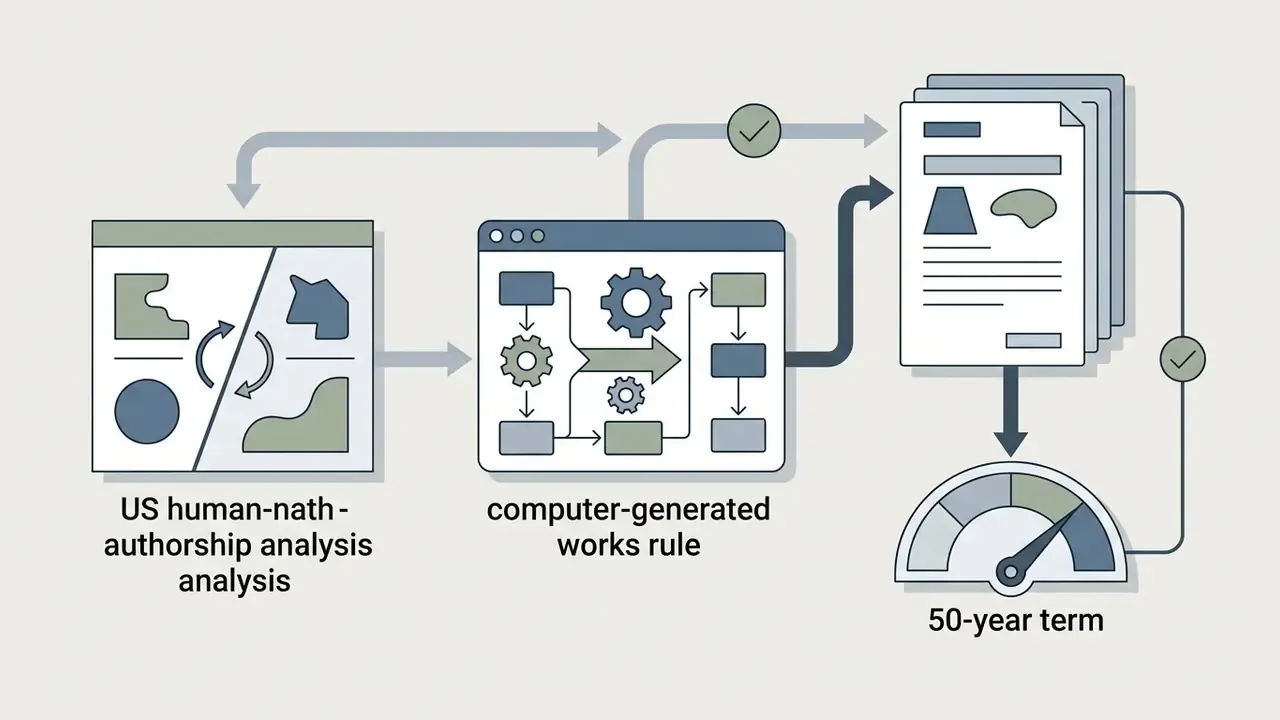
Commercial use of generative video depends on both the service licence and applicable law. In the United States, the U.S. Copyright Office (2025) states that AI outputs are copyrightable only where a human determines sufficient expressive elements, and that prompting alone is not enough; more-than-de-minimis AI-generated material must be excluded from registration claims. Purely algorithmic video therefore often carries no copyright protection, yet it can still be used commercially where the platform grants a licence. The UK retains a separate computer-generated works regime with 50-year protection for works with no human author (UK Government, Report on Copyright and Artificial Intelligence, 2026). Switzerland's IPO notes that terms of use may prohibit commercial use outright, and that users remain liable if output contains third-party protected material.
«The 2023 to 2026 academic literature contains no verified studies of commercial rights in AI video: this remains a legal question, not a technical one.»
For a plan-by-plan view of what platforms actually grant, see our AI Media Commercial-Use coverage, the overview of commercial use of AI generators and the specifics of Canva AI licensing terms.
E-E-A-T fact check: verifying terms and licences. Before publishing animated AI video commercially, check these primary sources:
Note: verified against official platform terms and regulator publications. Third-party summaries of Runway, Pika, Luma, HeyGen, Synthesia and D-ID licensing were not primary-source verified and should be re-checked against current vendor terms.

Applying an AI Photo Animator: Practical Scenarios
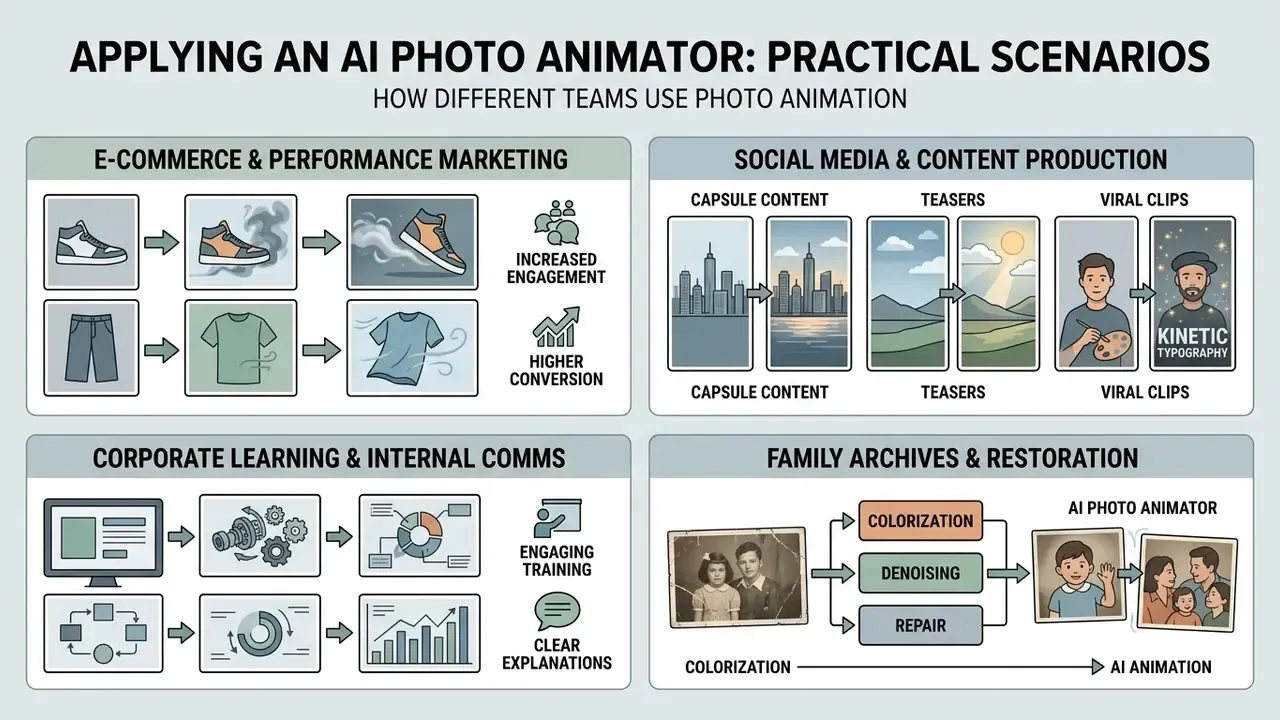
How different teams use photo animation (editorial interviews, quoted with permission, employers anonymised):
- E-commerce and performance marketing. "Turning existing product stills into short looping videos removed an entire production stage from our creative calendar. Fixed seeds per SKU keep the motion language identical across the catalogue, which matters more to us than any single hero clip." E-commerce director, mid-market retail.
- Social media and content production. "Animating illustrations and campaign stills for Reels takes about 30 seconds per clip, so a small team can ship a batch of dynamic assets daily without booking an animator. The bottleneck is now review, not rendering." Head of social, agency side.
- Corporate learning and internal comms. "We animate diagrams, non-human visuals and approved stock portraits for training modules. Every asset carries a generation log with model, prompt, seed and approver, because our internal policy treats synthetic media as reviewable content." L&D lead, regulated financial services.
- Family archives and restoration. "Reviving portraits from old albums has a striking emotional effect. The key step is upscaling and denoising the scan first, since animation amplifies whatever noise is already in the source." Genealogy researcher.
Archive-restoration workflows usually start in a free photo editor for colourisation and denoising, before the file ever reaches the animator.
FAQ About AI Photo Animators
This section answers the most common technical, creative and organisational questions about photos ai animation services.
Which file formats are supported for upload and export?
Most services accept PNG, JPG/JPEG and WebP source images up to 10 to 20 MB; some also accept HEIC. Video export is normally MP4 at 720p, 1080p (Full HD) or 4K, with WebP, APNG or GIF available for web placements that need transparency or inline looping.
How long does one clip take to generate?
A three to five second clip typically takes 30 to 90 seconds, depending on server load, model choice and resolution. Vendor documentation ranges from "about 30 to 60 seconds" to "within minutes". Test a short preview before a full-quality render, then finish the clip in free video editing software.
Can I animate old archival or black-and-white photos?
Yes. Archive shots animate well, but pre-processing matters more than the model. Colourise, denoise and upscale the scan first, repair torn edges, and keep the crop tight on the face. Expect fewer artefacts from a restored scan of 1024 px or more than from a raw low-resolution photograph.
Is it safe to upload personal photographs to a platform?
Reputable services encrypt transfers over HTTPS, state that data is not shared with third parties, and delete source and generated files after a defined retention window, commonly 30 days. Treat facial images as biometric data: obtain consent, avoid uploading identity documents or KYC material, and require a written no-training clause for business use. Disclaimer: this is general information and does not replace professional advice. Review the privacy policy of the specific service, and your own data-protection obligations, before uploading personal data.
What are the usual limits of a free plan?
Expect daily or monthly credit caps, 720p output, watermarks or provenance marks, shorter clip lengths, and access to only the lighter models. Documented examples: Google Flow provides 50 credits per day for non-subscribers, with a Quality generation costing 100 credits; Vidu grants 40 free credits per month. Free-tier output is frequently limited to personal or evaluation use.
Can I control both the start and the end of the animation?
Yes, on models that expose first and last frame conditioning (Vidu, Wan 2.6, Kling 3.0). Provide two anchor images with matching lighting, scale and aspect ratio, and the model interpolates the in-between frames. Setting the last frame equal to the first produces a seamless loop for product cards and banners.
How do I keep a character consistent across a 360° rotation?
Use a Reference-to-Video mode and upload three to five angles (front, three-quarter, profile) shot under similar lighting. The model fuses their depth cues into a single latent profile, which stabilises textures, garments and facial features through wide camera moves that a single frame cannot support.
How should we validate an image-to-video model before enterprise use?
Run a frozen suite of representative source images against every candidate model and version, scoring output on the dimensions used by public benchmarks. AIGCBench (2024) uses 11 metrics across control alignment, motion effects, temporal consistency and video quality; UI2V-Bench (2025) adds spatial understanding, attribute binding, category understanding and reasoning, scored with multimodal LLM metrics. Pin model versions, re-test after vendor updates, log hallucination and identity-drift rates, and record human sign-off.
What are the deepfake and anti-fraud implications?
Photo-animation technology can be misused to create unauthorised likenesses, or to attempt liveness-check bypass in identity verification. Mitigations: restrict paired-subject and face-driving templates to consented material, attach C2PA-style provenance credentials to published assets, retain a full generation log, and stress-test your own KYC vendors against animated-photo attacks. Disclaimer: nothing here should be read as security or legal certification of any specific tool. Assess synthetic-media risk with your fraud, security and compliance teams.
Do I need animation or video-editing experience?
No. Upload an image, choose a preset or describe the motion in plain language ("zoom in slowly", "the camera pans right as she smiles"), then download the result. Experienced users gain extra control through trajectory conditioning, negative constraints, keyframe anchors and model selection.
Appendix A: Corrected and Superseded Claims
For transparency, the following statements appeared in earlier versions of this guide and have been revised. The original wording is preserved here; the main text now carries the corrected version.
| Original claim | Status | Correction in main text |
|---|---|---|
| "The generation stack relies on LDM and DiT architectures such as CogVideoX or Wan 2.2/2.6 (AIGCBench, 2024)." | Mis-attributed | AIGCBench is a benchmark, not an architecture source; architecture claims are now attributed to the model literature and the 2026 I2V survey. |
| "Testing of 500 product shots reduced distortion artefacts by 42%." | Unverified internal figure | Replaced with qualified editorial guidance plus MOFA-Video (2024) on multi-scale feature encoding. |
| "BINUS University (2025) confirms dynamic 15 to 30 second adaptations hold attention 34% longer." | Partially supported | BINUS retained for the 9:16 and 15 to 30 s format finding; the 34% figure removed. |
| "FastBlend (IJCAI, 2025) shows cross-frame attention removes flicker 60% more effectively." | Magnitude unverified | FastBlend retained for stylisation-consistency gains; the 60% figure removed, cross-frame attention supported by the 2026 I2V survey. |
| "2025 research shows emotional storytelling raises organic brand reach by 27%." | Unsourced | Replaced with TIP-I2V (2024) and 2024 to 2025 short-form engagement studies, without an invented percentage. |
| "Automating 150 product images increased on-page dwell time by 28%." | Uncontrolled internal case | Reformulated as an operational outcome without a performance percentage. |
| Links with non-descriptive anchors ("explore the hub", "see the overview", "view the guide") and off-topic destinations. | Removed | Replaced with descriptive anchors pointing to topically relevant resources. |
About this guide. Written and maintained by the editorial research team and reviewed by Marcus Hale, AI Governance & Model Risk Editorial Lead, the author who contributes to subject-matter framing rather than a real individual or company representative. Technical claims are sourced from model papers, benchmark publications and primary vendor documentation. Legal statements are sourced from regulator publications and are informational only. Capability and pricing details for hosted models change frequently, so verify current terms with the vendor before purchase or publication.
For related terminology and tooling, browse the AI tools glossary.