Fotor AI Video Generator is a cloud service for automated generation of short video clips from text prompts and static images. The tool aggregates external neural video engines, including Google Veo (v3.1), OpenAI Sora / Sora 2 Pro, Kling (v2.5 and Kling Motion Control), Seedance (V1 and 2.5) and Alibaba Wan (2.5 / 2.7), into a single working environment for marketing, social media and visual creativity. Fotor's own product page describes the stack plainly: it is "powered by Kling, Seedance, Veo" and integrates these models into one dashboard, removing the need for separate per-engine subscriptions.
Why should a risk or finance leader care about a consumer creative tool? Because marketing teams adopt it first, and procurement hears about it last.
Executive summary
For readers who need the verdict before the detail:
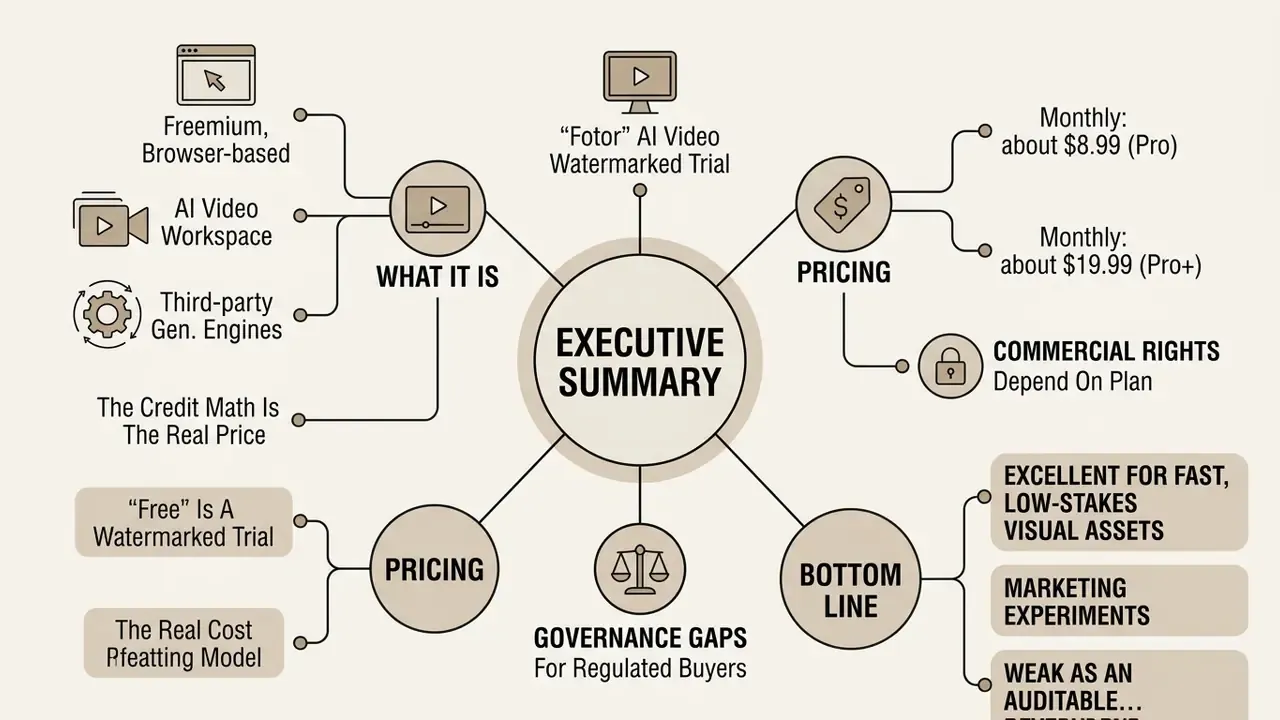
- What it is. A freemium, browser-based AI video workspace built on third-party generative engines. Best understood as a fast producer of isolated 4 to 10-second clips (up to 15 s on some models, up to 30 s at 480p/720p on Seedance 2.5), not as a full production suite. Some buyers search for it as a "fotor ai movie maker"; that framing overpromises.
- The credit math is the real price. A single 4-second 1080p clip costs about 50 credits; 360p costs roughly 10 and 720p about 20 credits for the same 4 seconds. Pro provides 100 credits per month, Pro+ 300 credits per month.
- "Free" is a watermarked trial. The Basic tier gives a small signup bonus (Fotor's support pages document 5 free credits on signup, extendable by daily check-ins), 1 concurrent generation, 512 MB cloud storage, 30-day creation storage and watermarked exports. Not enough for a single clean 1080p render.
- Pricing. Monthly: about $8.99 (Pro) and $19.99 (Pro+). Annualised: roughly $3.33/month (Pro) and $7.49/month (Pro+), a material difference for a departmental budget.
- Commercial rights depend on the plan. Free/Basic output is personal-use only. Pro commercialises free and Pro-marked material; Pro+ commercialises all material. Fotor claims no copyright in the output, and the user carries responsibility for it.
- Governance gaps for regulated buyers. Fotor's public pages do not expose model version pinning, seed values, generation audit logs, IP indemnification, SOC 2 / ISO 27001 attestations for the video pipeline, or SSO and role-based enterprise administration. All prompts and uploads are processed through third-party engines from multiple jurisdictions (the US and China among them). Treat the tool as unsuitable for confidential or customer-identifying material until these controls are contractually confirmed.
- Bottom line. Excellent for fast, low-stakes visual assets and marketing experiments; weak as an auditable component of a controlled model inventory.
How to read this guide, and who it is written for
This review has two readers in mind, and they want different things.
The first is a creator or marketing specialist who typed "fotor ai video generator free" into a search box and wants to know what a zero-dollar account actually produces. For that reader, the sections on modes, prompts, credit costs and export limits carry the answer. Short version: you can test, you cannot ship.
The second reader sits closer to a control function: model risk, compliance, internal audit, or a finance transformation lead who has just discovered a creative tool on a corporate card statement. For that reader, the sections on data handling, reproducibility and licensing matter more than the effect library. A creative utility with no seed logging and no version pinning is still an AI system in scope of an inventory, just a low-risk one, provided the data classification rules hold.
A practical way to use the material: read the credit table before you approve a budget, read the licence tier split before you approve a campaign, and read the checklist in Appendix B before you approve the tool at all. Where evidence is thin, the text says so rather than smoothing it over. That is deliberate. Vendor marketing pages and dated third-party reviews disagree on several numbers, and pretending otherwise would not help anyone signing an invoice.
What Fotor AI Video Generator is and what tasks it fits
Text to Video: generating a clip from a text description
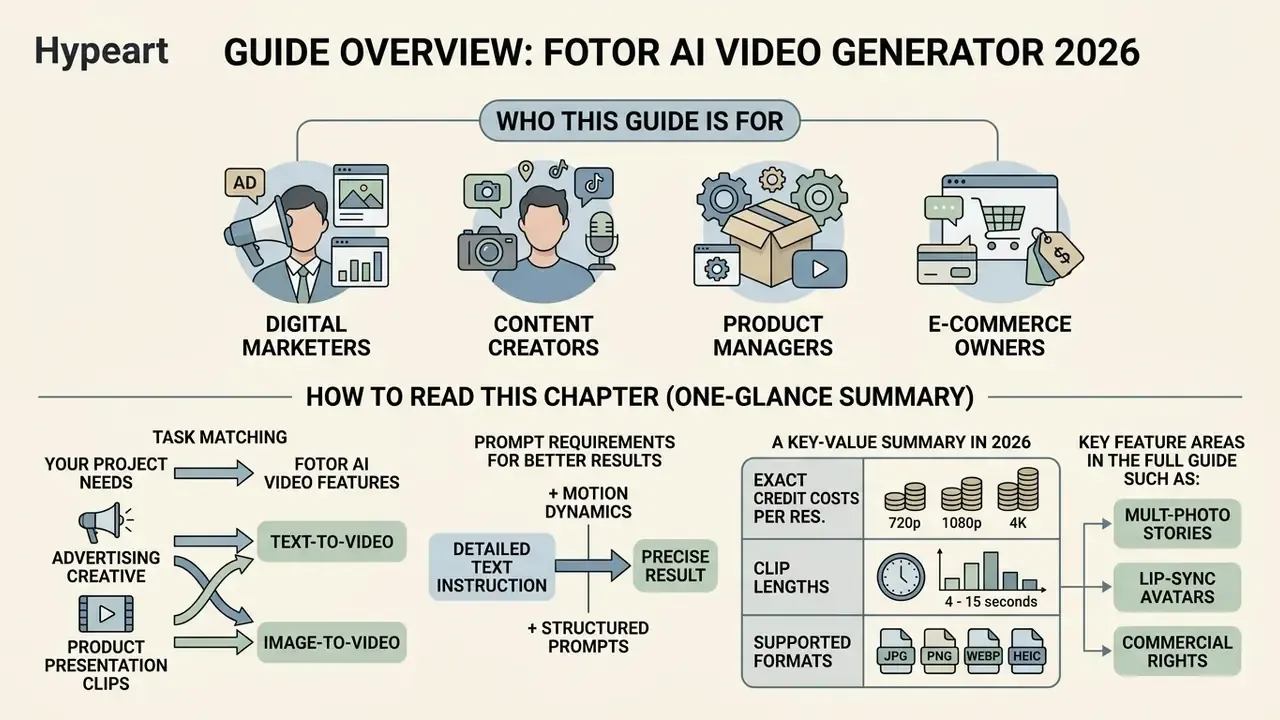
The text-to-video AI mode converts a text prompt into a generated sequence lasting from 4 to 15 seconds, depending on the selected engine. The algorithms parse the key entities of the request, that is subject, action scenario, environment, lighting and camera movement, then synthesise frames at 24 fps. Fotor's localised documentation caps a single prompt at 1,500 characters (French page) and up to 3,000 Chinese characters on the Chinese page, so prompt length is generous but finite.
To obtain a precise result, the text instruction must contain exhaustive detail about the dynamics of the frame. Research on prompt rewriting for video generation makes the mechanism explicit:
«Naive user prompts often align poorly with the model's training distribution, which leads to low-quality or inaccurate generation results.»
The same work reports that structured prompts specifying the character of motion raise the correspondence between generation and intent by roughly 35% compared with short, isolated phrases. Fotor's own Korean-language guidance converges on the same formula: subject + scene + mood + art style + shooting method.
Image to Video: animating photos and AI images
The image-to-video AI mode turns static photos, portraits, landscapes and AI-generated images into dynamic motion clips. The user uploads a source image, after which the network builds the missing frames, creating plausible movement of objects, background elements or facial expression. This is the mode most people mean when they search for fotor ai image to video, and the free variant of it is where the credit ceiling bites first.
Supported input formats are JPG, JPEG, PNG, WEBP, HEIF and HEIC. The inclusion of HEIF/HEIC matters, because it means photos taken on an iPhone can be uploaded without conversion. Final export is delivered in MP4 only, the most widely compatible container across devices and platforms. Fotor's editor and design import limits are documented at up to 60 MB for JPG/JPEG/PNG, with compression applied above 20 MB, and up to 8192×8192 px, compressed above 4096×4096 px.
This approach is in demand for reviving archive photographs, animating characters and presenting products for e-commerce. When animating several frames the service can fill intermediate phases of movement while preserving compositional integrity. For deep media-format conversion tasks a specialised tool such as vidnoz image to video can be used alongside the Fotor image to video generator.
Features of Fotor AI Video Generator: models, effects and scene control
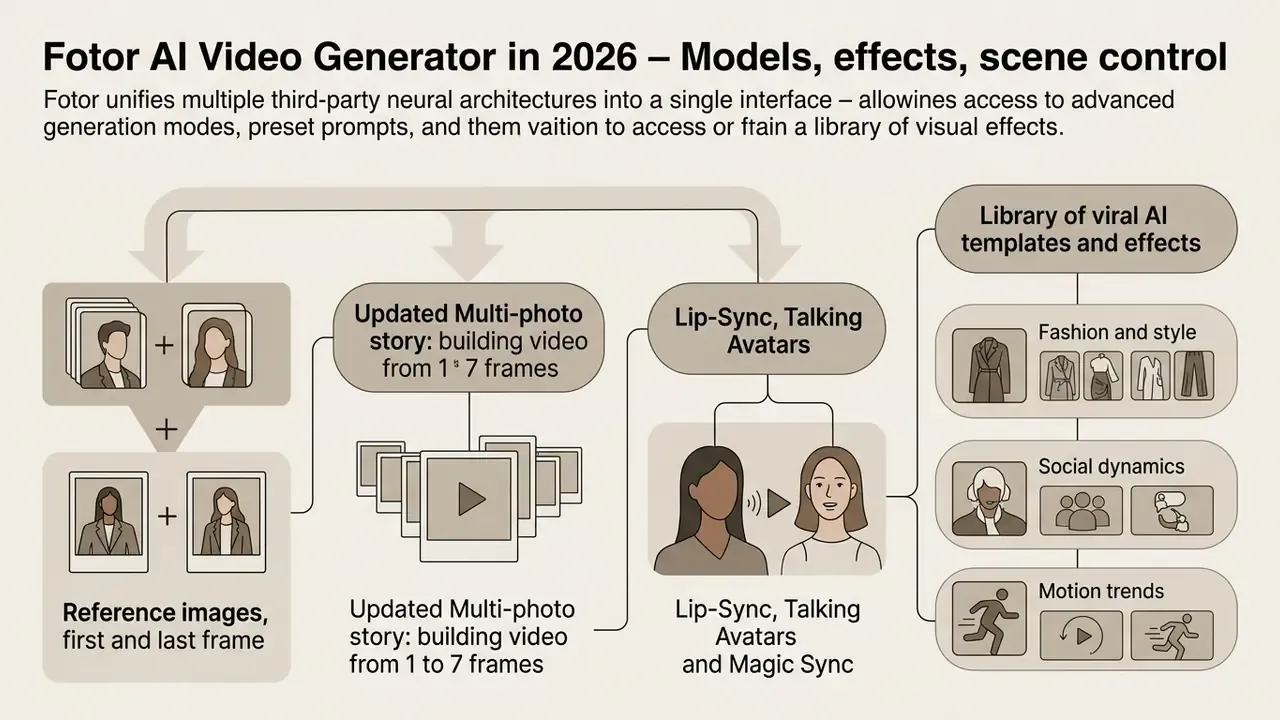
Fotor unifies several third-party neural architectures in one interface, giving the user access to advanced generation modes, preset prompts and a library of visual effects. This removes the need to hold separate subscriptions for each generation engine. If you are still selecting a platform, our comparison of the best AI video generators lines Fotor up against dedicated model hubs on quality, duration and licensing.
Below is a comparative table of the key modes and capabilities:
| Mode / Feature | Input data | Controls | Expected output |
|---|---|---|---|
| Text to Video | Text prompt | Style, aspect ratio, duration, model | Short clip (4 to 15 s) synthesised from the description |
| Image to Video | 1 static photo plus text direction | Motion intensity, stylistic filters | Animated clip preserving source detail |
| Multi-Photo Story | 1 to 7 images (plus a prompt per image) | Order of frames, per-frame prompt | Coherent multi-scene clip with smooth camera movement |
| Reference flow | Up to 3 reference images or video (Seedance 2.5: up to 30 images, 10 video and 10 audio clips) | Reference priority, style control | Video with high character and background consistency |
| First & Last Frame | Start and end frames | Description of the transition | Smooth video with an exact opening and closing frame |
| Motion Control / Magic Sync | Source photo plus reference video | Mapping of gestures, expression, trajectory, timing | Photo subject reproducing the motion of the video source |
| Lip-Sync / Talking Avatar | Portrait plus script or audio | Voice, language, tone, mouth-movement sync | Talking avatar with matched lip movement |
| AI Effect Templates | 1 to 2 photos | Template selection only | Preset viral effect (dance, outfit change, hug and similar) |
| Edit via Prompts | Uploaded clip plus text instructions | Chat commands for element editing | Modified sequence (background swap, restyle, pacing) |
| Native Audio | Generation parameters | Auto-sync of speech, ambience, music | Video with integrated, synchronised audio track |
Reference images, first and last frame
The image-reference and video-reference functions control visual consistency of objects and characters from frame to frame. Fotor's support blog documents that Reference to Video uses up to three reference images to guide the style and essence of the generated clip, which reduces the probability of a character's appearance drifting when the camera angle changes.
The First & Last Frame mode fixes the initial and final state of the scene: the user uploads two images and the network computes a physically plausible transformation trajectory between the two anchors.
«An instance-oriented approach to structured captioning markedly improves a model's ability to reproduce object details and their actions in complex scenes.»
Multi-photo story: building video from 1 to 7 frames
Fotor is not limited to a single source image. The image-to-video module accepts 1 to 7 images, which can include people, scenes, props and other elements, and lets the user attach an individual text prompt to each image. The network then organises the set into a coherent video with smooth camera movement, changing perspectives and consistent scene transitions. Fotor's Japanese product page describes the same logic as an "A image to B image" progression, with AI filling in the motion between the two scenes.
Practically, this converts the tool from a one-shot animator into a lightweight storyboard renderer: frame 1 establishes the setting, frames 2 to 5 carry the action beats, frames 6 and 7 close the sequence. For teams building longer narratives, this is the cheapest way to keep character and location continuity without paying for repeated full re-generations.
Lip-Sync, Talking Avatars and Magic Sync
For portrait and presenter work Fotor integrates a Talking Avatar module. It detects facial features in the photo, overlays an AI voiceover track and synchronises expression and lip movement (lip-sync) with the speech. Language, voice style and tone can be selected, which makes the feature usable for multilingual explainers.
The Magic Sync / Motion Control mode goes further: upload a reference video of a moving person and the network makes the subject in the static photo reproduce the gestures, dance or facial expression of the source, with body alignment, pace and timing mapped across. Fotor documents "stable character motion mapping" as the design goal here. The practical constraint is that extreme, fast or occluded movements still degrade texture stability.
One caution that has nothing to do with picture quality: a talking avatar built from a real person's photograph raises likeness and consent questions long before it raises brand-safety ones. Get written consent, or use a synthetic face.
Motion control, styles, effects and AI audio
Motion control in Fotor transfers gestures, facial expression and camera dynamics from a reference clip onto a static shot. The tool supports diverse styles: photorealism, cinematic colour grades, anime, cartoon, 3D clay and stylistic presets. Kling 3.0 additionally documents smooth camera movement primitives such as pan, zoom, tilt, track, push and pull.
Native AI audio generation is also integrated. Models automatically create ambience, a soundtrack or a synchronised voiceover, removing the need for third-party sound work; Seedance 2.5 generates synchronised sound effects, ambient noise and matched dialogue in a single pass. If you need finer voice control than the built-in track offers, compare dedicated options in our guide to AI voice generators. Model-by-model parameters are collected in AI Media Comparison Matrices, and the capabilities of the underlying Google Veo engine are documented separately.
How to create a video in Fotor AI: from upload to export
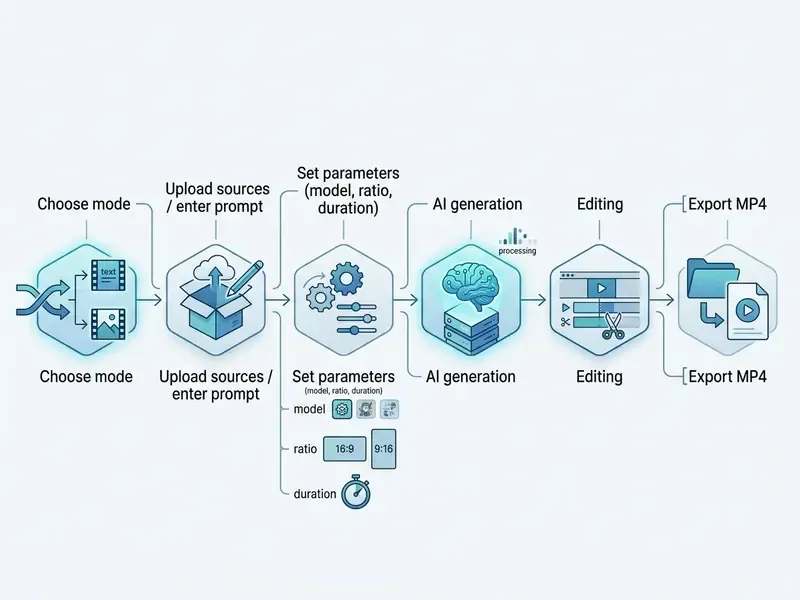
The creation process is deliberately simplified and consists of sequential steps, from choosing a working mode to exporting the finished file.
- Choose the modeText-to-Video, Image-to-Video, Multi-Photo, Reference, First/Last Frame, Motion Control or an effect template.
- Upload media or enter texta quality photo (up to 60 MB; JPG, JPEG, PNG, WEBP, HEIF, HEIC) or a detailed prompt.
- Set parametersengine (Kling, Veo, Seedance, Wan, Sora), aspect ratio, duration, audio on or off, resolution.
- Run generationpress "Generate", typically 1 to 3 minutes; Fotor's own published guidance cites 2 to 3 minutes depending on length and complexity.
- Post-process and editsubtitles, filters, cropping, music, voiceover on the timeline.
- Exportdownload at 720p, 1080p or 4K (the AI Video Editor page lists a 1080p ceiling, see the limits section).
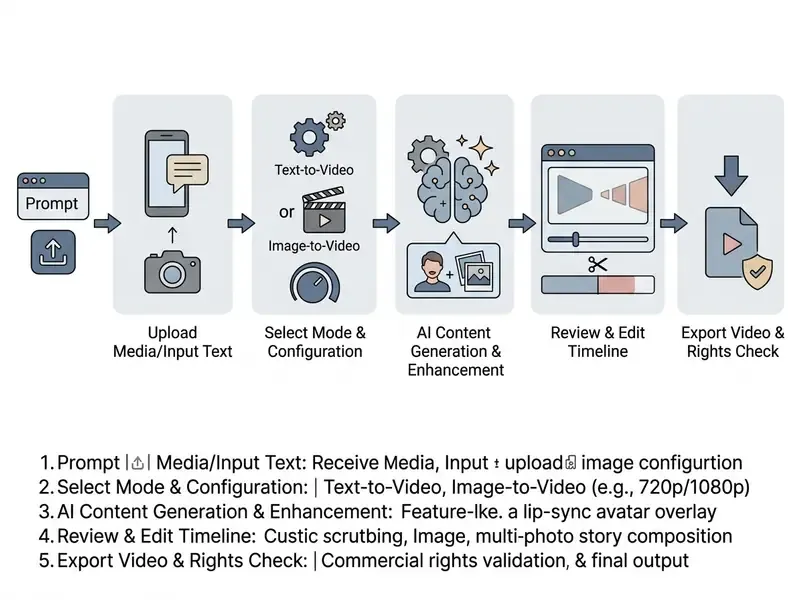
Uploading an image or preparing a text-to-video prompt
In Image-to-Video mode, upload images in JPG, JPEG, PNG, WEBP, HEIF or HEIC with clear separation of subject and background. The platform compresses files above 20 MB, so images up to 4096×4096 px are optimal. Remember that regardless of input format, the export is MP4.
When writing a prompt from scratch, avoid vague formulations. The description should contain unambiguous indications of the subject, its actions, the setting and the behaviour of the virtual camera. If you need to extract static frames from an existing video for use as references, use the video to image function.
Generation settings, editing and downloading the clip
Before rendering, the user can set the aspect ratio, that is 16:9 for YouTube, 9:16 for vertical Reels and TikTok, and 1:1 for square in-feed posts (Fotor's short-form tool additionally exposes 4:5), plus the duration (typically 4, 8, 10 or up to 15 seconds). These parameters directly determine the credit spend.
After generation the file passes into the built-in editor. Here you can correct colour reproduction, trim the resulting clips or overlay text elements; comparable timeline features in dedicated video editors remain deeper, but Fotor covers basic finishing. The clip can then be exported to the device. For upscaling and sharpening third-party sources, a video upscaler is the appropriate tool; if the deliverable is a publishing-ready sequence, our YouTube video editor workflow covers the publishing layer. When file weight matters for web delivery, run the export through a video compressor rather than lowering generation resolution and paying for a re-render.
Advanced production workflow: the hybrid pipeline
Because Fotor generates isolated clips of 4 to 10 seconds (up to 15 s on some engines), full-length pieces are assembled with combined editing. Generated MP4 files are exported into a classical video editor such as Wondershare Filmora, CapCut or DaVinci Resolve, where the generations are laid out on a shared timeline, given final colour grading, precise audio alignment and dynamic titles. This is the standard professional pattern: use Fotor as a shot factory, not as a finishing suite. It also has a budget benefit, since draft beats can be rendered at 360p (10 credits) for timing decisions, with only approved shots re-rendered at 1080p (50 credits).
Quality, duration and limits of AI video generation
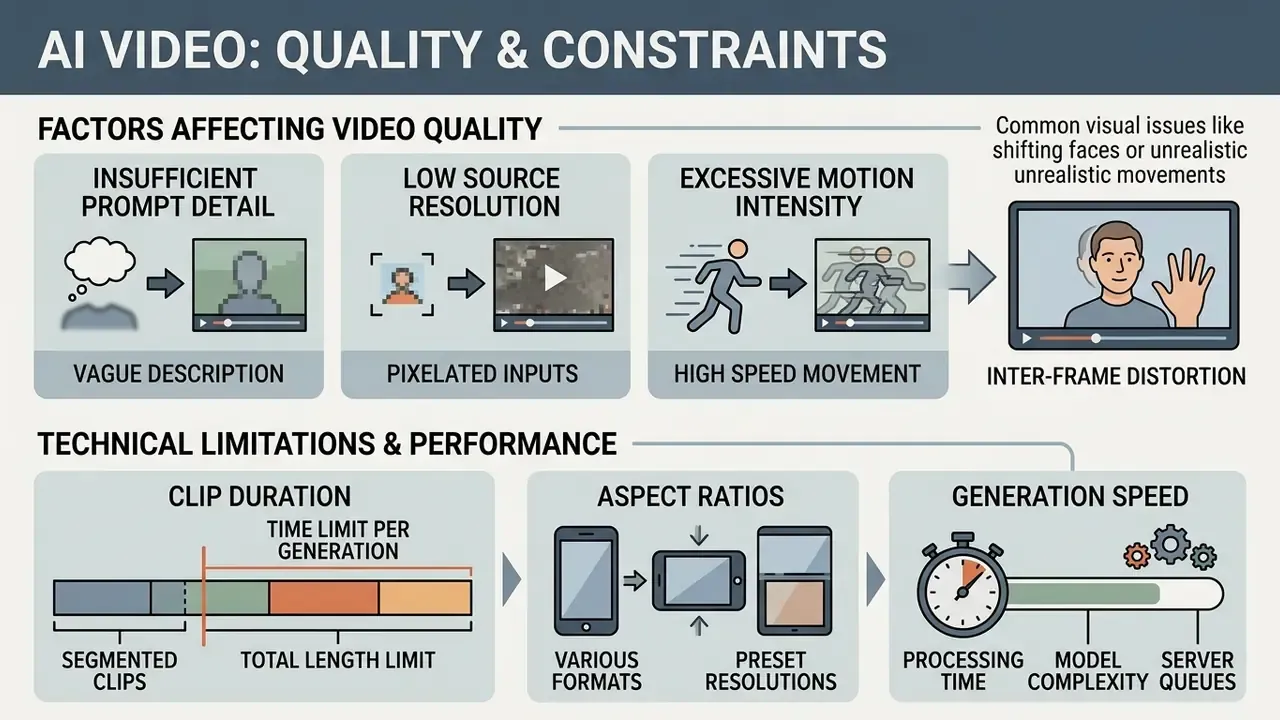
Despite advanced algorithms, AI video generation in Fotor carries a set of technical constraints determined by the capacity of the underlying models. Understanding them first makes the prompting section that follows far more actionable.
Why video comes out blurry, unrealistic or with shifting faces
Visual defects such as blurry output, distortion of facial features and violated physics most often arise from the following factors:
- Insufficient prompt detail.The network fills missing elements by a partly random path, so under-specified inputs produce inconsistent characters and unnatural scenes.
- Low source resolution.In Image-to-Video mode, a shortage of pixels leads to smearing of fine detail; low-quality input also limits how much detail an upscaler can recover afterwards.
- Excessive motion intensity.Forcing a subject through abrupt, complex spatial rotations causes texture breakdown and identity drift.
- Compounding frame-to-frame variation.Because each frame is generated dynamically, small deviations accumulate; without a reference image the model has no strong identity anchor.
These are industry-wide limitations, not a Fotor-specific fault. Large-scale human evaluation confirms the point:
«The AIGVE-60K dataset includes 120,000 human quality ratings across 58,500 videos from 30 different models, and even the best of them exhibit object inconsistency and physically implausible motion.»
To mitigate these problems, use detailed textual references, upload an image or video reference to lock identity, reduce motion dynamics, and generate on advanced engines such as Google Veo 3.1 or Wan 2.5/2.7.
Clip duration, aspect ratio and generation speed
The standard duration of a single generated clip in Fotor is 4 to 8 seconds (Wan 2.5 up to 10 seconds; the product-video generator exposes 4 to 15 s; Seedance 2.5 supports single-pass generation up to 30 seconds at 480p or 720p). Longer pieces are assembled by joining clips on the editor timeline, and the AI Video Extender adds 4 s or 8 s extensions.
Generation time varies from 1 to 3 minutes depending on server load, model and chosen resolution. Note a documented inconsistency in Fotor's own materials: the AI Video Generator page advertises export up to 4K, while the AI Video Editor page lists a 1080p ceiling, and Seedance 2.5 generation is capped at 720p. In practice, 4K is an upscaled export path rather than a native generation resolution on every engine. For users who need automatic text extraction from finished material, the video transcript generator covers that step.
How to write prompts for realistic AI video in Fotor
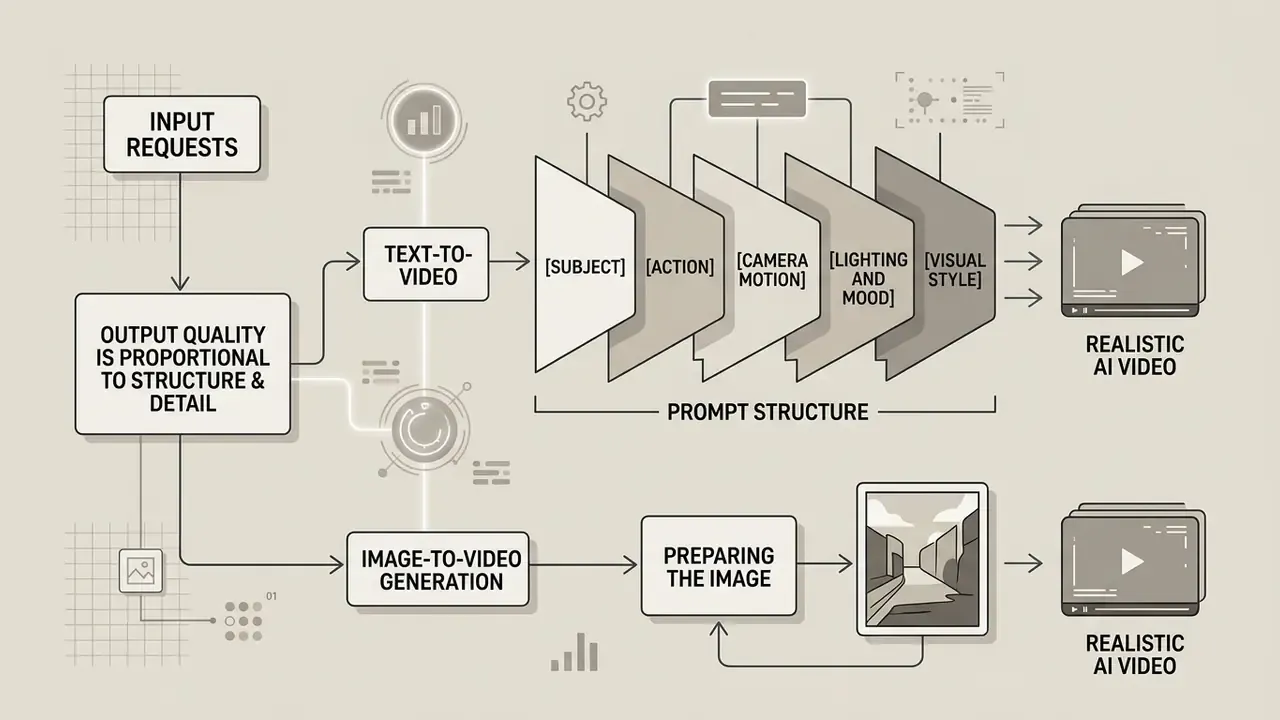
The quality of the output video is directly proportional to the structure and detail of the input request. Neural models interpret direct physical descriptions far better than abstract epithets.
Prompt structure for text-to-video
An effective text-to-video prompt follows a combined formula. Keeping this order produces predictable, cinematic results.
- Subject who or what is at the centre of the frame (for example, "a young engineer in safety goggles").
- Action what the subject does ("assembling a microchip on a laboratory bench").
- Camera motion the dynamics of the shot ("smooth dolly-in, close-up, 24 fps"). Name the movement explicitly: zoom in, zoom out, pan left or right, tilt up or down, tracking, static or handheld.
- Lighting and mood the character of the light ("soft neon lighting, futuristic atmosphere").
- Visual style the aesthetic ("cinematic photorealism, 4K, detailed texture").
Example of a finished prompt: "A professional barista pouring steamed milk into a cup of espresso, close-up shot, slow motion, warm coffee shop background, soft morning sunlight, highly realistic, 4k resolution."
A business-facing example built on the same skeleton: "A financial analyst reviewing a quarterly dashboard on a large wall display, camera slowly pushes in over her shoulder, cool daylight from floor-to-ceiling windows, corporate documentary style, shallow depth of field, 4k." Fotor's own AI-influencer documentation recommends going further still, specifying age, hairstyle, clothing, background, expression, gestures, props, voice and tone.
Preparing the image for image-to-video generation
For natural animation without facial distortion or physics failures, the quality of the source photograph is decisive. The subject's face should be well lit and positioned frontally or in three-quarter view. Fotor's documentation recommends keeping facial features, hairstyle, clothing and lighting consistent when supplying references, and using a reference video when specific motion is required.
If the image contains complex fine decoration in the background, the network may mistakenly treat it as part of the subject and produce visual artefacts.
«Instance-oriented descriptions that separate subject from background significantly improve the accuracy with which object details and actions are reproduced in generated video.»
Fotor AI Video Generator free plan, credits and pricing
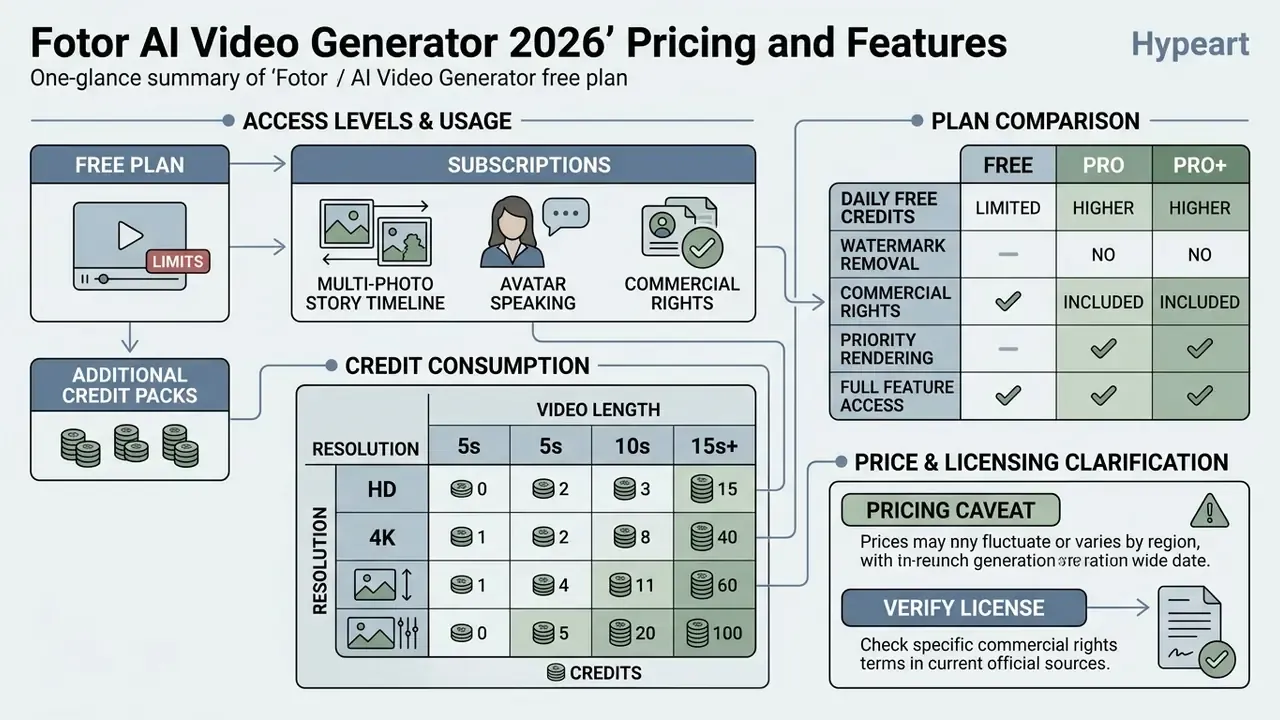
Fotor uses a freemium model with subscriptions and internal AI credits. Because credits, not minutes, are the billing unit, the only meaningful way to evaluate cost is per render.
Exact credit consumption by quality and length
| Quality (resolution) | Clip duration | Credit cost |
|---|---|---|
| 360p (draft) | 4 seconds | about 10 credits |
| 720p (HD) | 4 seconds | about 20 credits |
| 720p (HD) | 8 seconds | about 40 credits |
| 1080p (Full HD) | 4 seconds | about 50 credits |
Plan comparison
| Parameter / Plan | Basic (Free) | Pro | Pro+ |
|---|---|---|---|
| Monthly credits | Limited starting bonus (about 5, plus daily check-ins) | 100 credits / month | 300 credits / month |
| Monthly billing | Free | about $8.99 / month | about $19.99 / month |
| Annual billing (roughly 60% saving) | not applicable | about $3.33 / month ($39.99 to $47.99 / year) | about $7.49 / month ($89.99 to $99.99 / year) |
| Watermark | Watermarked exports | None | None |
| Export resolution | Basic (SD) | HD / 1080p | HD / 1080p / up to 4K |
| Concurrent generations | 1 stream | Up to 10 streams | Up to 30 streams (higher tiers list 50) |
| Cloud storage | 512 MB | 5 GB | 50 GB |
| Creation storage | 30 days | Extended | Extended |
| Commercial rights | Prohibited (personal only) | Free plus Pro-marked material | All material (free and paid) |
Credit validity is also documented: subscription credits renew monthly and can accumulate for a maximum of 5 months, while one-time purchased credits expire 2 years after purchase.
What is available in Fotor AI Video Generator for free
The Basic plan gives access to basic processing tools and a limited set of starter credits. That is enough to test the interface and generate one or two trial clips at low resolution, no more. Exports on the free tier carry a watermark (watermarked JPG, PNG and PDF exports are listed explicitly on the pricing page), queue times can be longer, and only one generation runs at a time. If the credit ceiling blocks you, our overview of free AI video generators explains where the equivalent limits sit elsewhere. Current price calculations and credit consumption data are collected in AI Media Pricing Guides, and per-render cost modelling is easier with the AI Media Calculators.
When Pro, Pro+ and additional credit packs are needed
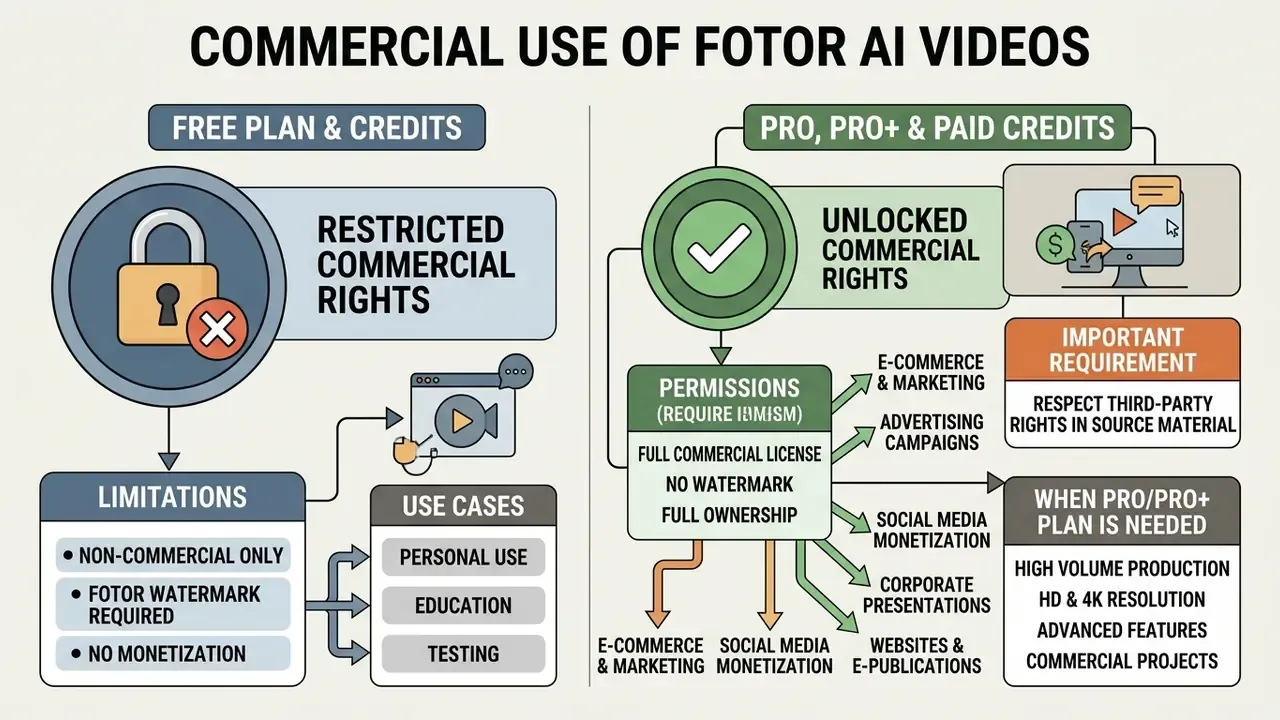
Pro and Pro+ are necessary for regular work and for commercial use of the resulting content. They fully remove the watermark, open HD and 4K export, raise concurrency and provide a larger credit allowance plus premium templates and advanced models.
Because video generation consumes roughly 10 to 15 times more credits than static image generation, active authors should choose Pro+ or buy additional credit packs.
«A single 1080p clip can cost from 50 credits, and once re-generation is factored in, the real yield of usable clips is about 30 to 50% of total attempts.»
That yield figure is the number budget owners tend to miss. At a 40% acceptance rate, 300 Pro+ credits translate into roughly two to three approved 1080p shots per month, which is exactly why the hybrid draft-at-360p workflow matters. A side-by-side of the alternatives is available in our comparison of free AI video generators. For technical questions about credit deductions, see AI Media Support and Troubleshooting.
Can Fotor AI video be used in commercial projects?
Licence, watermark and rights to AI-generated videos
According to Fotor's Terms of Service, users of the free Basic plan do not have the right to use the resulting video material for commercial purposes; free-plan output is intended solely for personal use. Fotor's Terms define "Commercial Use" as use in business or advertorial contexts and explicitly do not permit sublicensing.
A paid subscription (Pro or Pro+) grants a personal, global, non-exclusive, non-sublicensable and non-transferable right to use the material in commercial final work for the duration of the subscription. The split between tiers is documented: Pro subscribers may commercialise free material and material marked as Pro; Pro+ subscribers may commercialise all material, free and paid. Fotor does not claim its own copyright in generated video files, but by the same terms the user is responsible for the output, including the absence of third-party trademark or likeness infringement.
Two consequences follow for corporate buyers. First, rights are subscription-bound: lapse the plan and the commercial licence for that period's assets becomes a question to clarify contractually before you ship a campaign. Second, Fotor's public pages do not advertise IP indemnification against claims by rights holders of the underlying models' training data, a material gap versus vendors that publish explicit indemnity, and a point to raise in procurement. For wider context on rights to synthetic media, see our analysis of commercial use of AI image generators and, for a platform comparison of licensing terms, the Canva AI Generator overview. If you need looped animations for commercial banners, clips can be converted video to gif online.
Which commercial scenarios Fotor AI Video suits
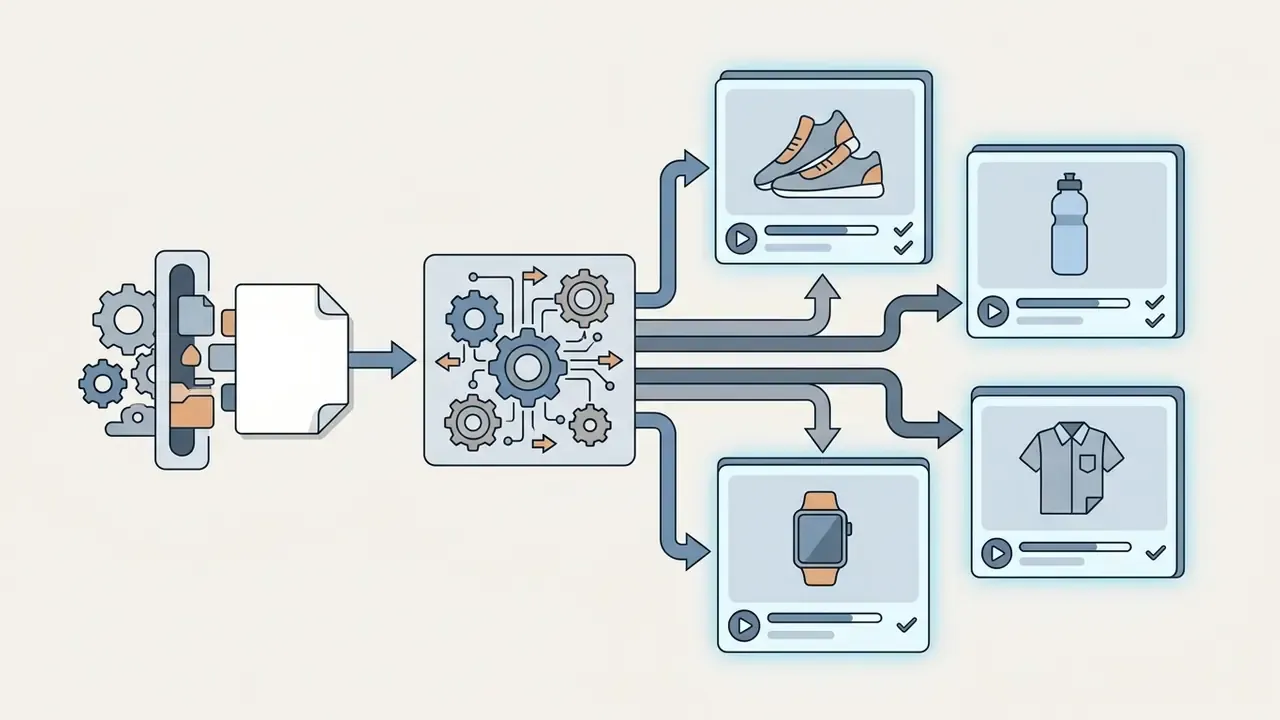
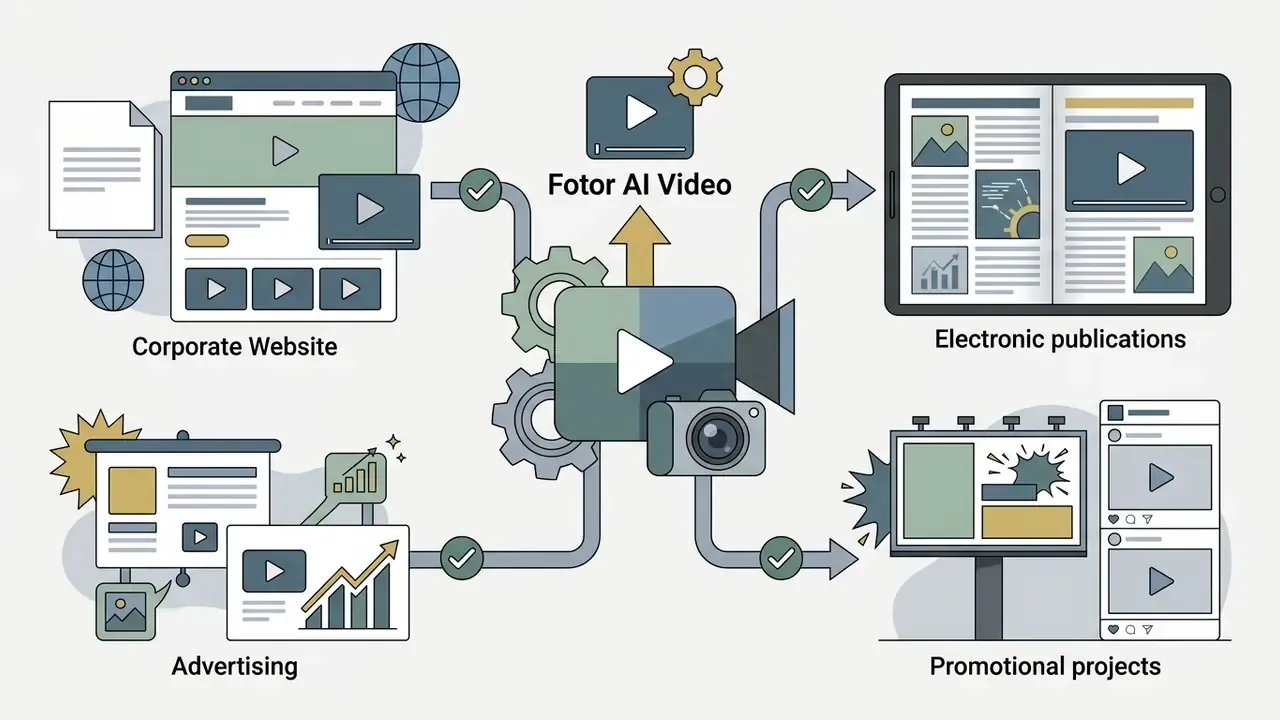
With a paid subscription, Fotor AI clips can be used for the following business purposes:
A consolidated database of legal precedent in AI is maintained in AI Litigation and Case Timelines, and the marketing-side analysis sits in the AI Media Commercial-Use Hub.

Data security, privacy and Shadow AI
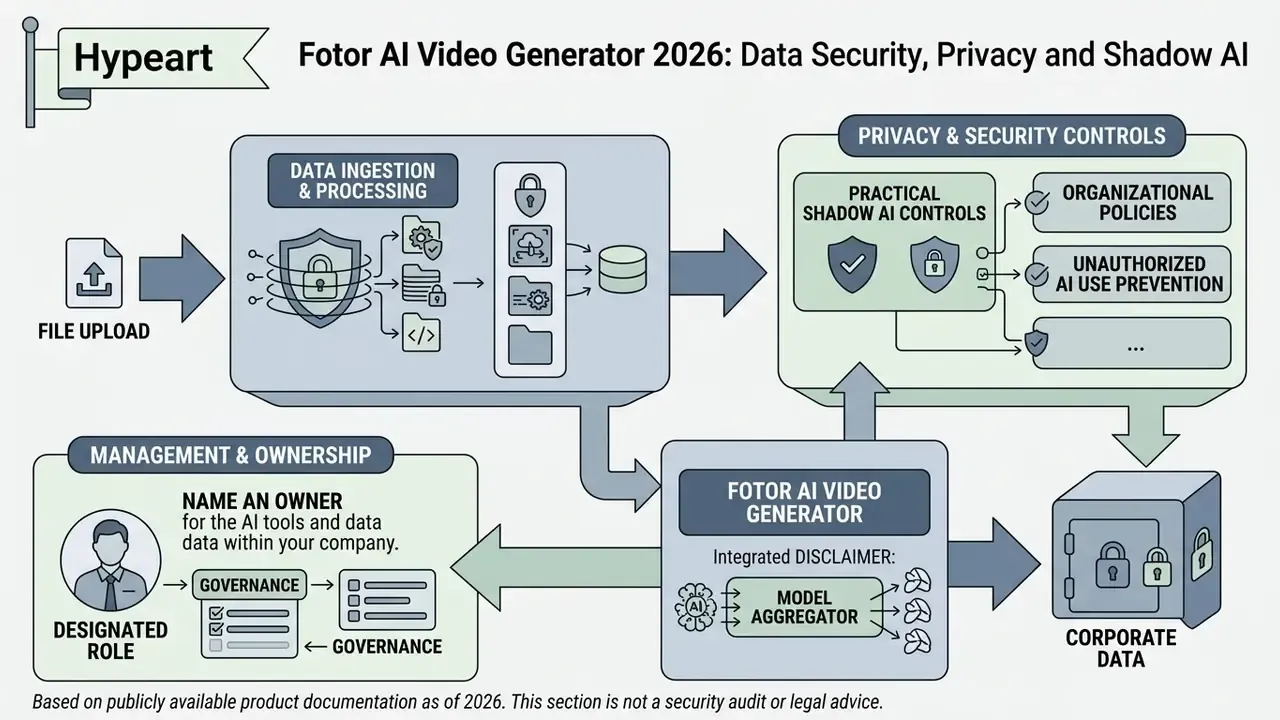
This section addresses the question a consumer review never asks: what happens to the file after upload, and what does that mean for a regulated organisation?
Fotor is a model aggregator. Prompts, uploaded images and reference videos are processed through third-party generation engines operated by different vendors and hosted in different jurisdictions: Google (Veo), OpenAI (Sora), Kuaishou (Kling), ByteDance (Seedance) and Alibaba (Wan) among them. That architecture is what delivers the feature breadth described above; it is also what makes the tool a Shadow AI exposure if employees use it uncontrolled.
| Control question | Publicly documented status | What to do |
|---|---|---|
| Retention of uploads and outputs | Free tier: 30-day creation storage, 512 MB cloud storage. Retention terms for prompts passed to third-party engines are not published per-model. | Request a written retention and deletion schedule covering sub-processors. |
| Training on user content | No public per-model opt-out switch is exposed in the video generator UI. Fotor's image-to-video page states secure processing with "no data sharing", but this is a marketing claim, not an attestation. | Treat as requires verification; do not rely on the marketing wording. |
| Sub-processor list and data location | Model vendors are named on product pages; processing regions are not disclosed. | Obtain a sub-processor list and regional processing map under a DPA. |
| SOC 2 / ISO 27001 for the video pipeline | Not published on the pages reviewed. | Request the attestation report; absent it, classify as unassessed. |
| Enterprise administration (SSO/SAML, roles, pooled credits) | Not documented; plans are individual Basic, Pro and Pro+ tiers with concurrency limits. | Assume no centralised identity or entitlement control. |
| Audit logging of prompts and generations | Not exposed to users. | See the model risk section below. |
Practical Shadow AI controls. Publish an explicit rule that no customer-identifying imagery, internal screenshots containing production data, unreleased financial figures, employee likenesses or confidential product designs may be uploaded to any consumer AI video tool, Fotor included. Restrict the tool to synthetic, stock or already-public visual material. Where marketing teams need it, procure it centrally so that spend and usage are visible rather than paid on personal cards, which is the single biggest driver of undetected Shadow AI in creative functions.
One more thing, and it is unglamorous: name an owner. A tool with no named owner has no escalation path, and no escalation path means no control.
Model risk management: reproducibility and model lineage
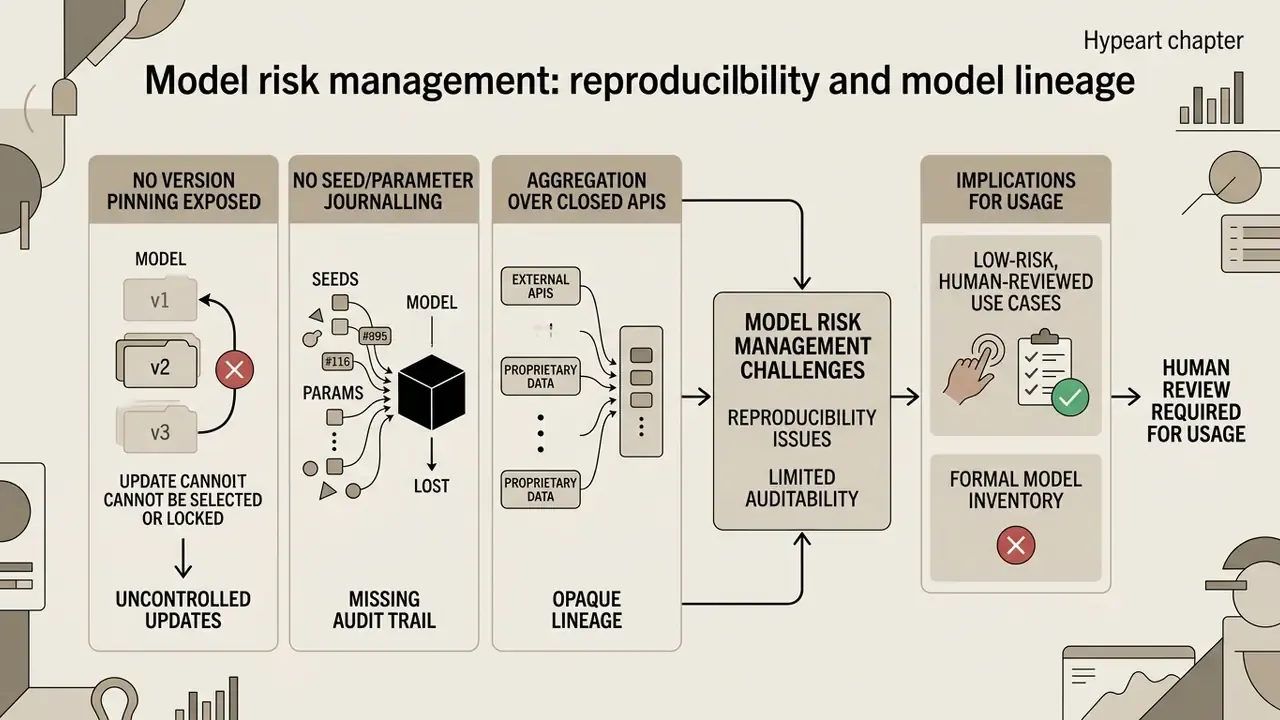
Buyers who operate under a formal model inventory should note three structural limitations.
- No version pinning exposed. A 2026 third-party review states that Fotor does not publicly expose the underlying video model version and does not let users choose it beyond the named engine families. Fotor's own pages name Kling, Seedance, Veo, Sora and Wan, and separate model pages reference specific releases (Veo 3.1, Seedance 2.5, Kling Motion Control, Wan 2.7), but the mapping between a given generation and an immutable model build is not surfaced in the output metadata.
- No seed or parameter journalling. Seed values, sampler parameters and safety-filter versions are not returned to the user, so a generation cannot be deterministically reproduced for independent review. In practice, re-running the same prompt yields a different clip.
- Aggregation over closed APIs. Because generation is delegated to third-party endpoints that the vendor may update without notice, output stability over time cannot be guaranteed. A campaign asset regenerated in six months may not match the original.
The implication is not that the tool is unusable, but that it belongs in the low-risk, human-reviewed category of the inventory: every output must pass human review before publication, and no generated asset should feed a downstream decision process. If reproducibility is a hard requirement, evaluate direct API access to a named engine version instead. Our Google Veo implementation guide covers versioning, cost and limits at the API layer.
Use cases: enterprise, social media, marketing and creativity
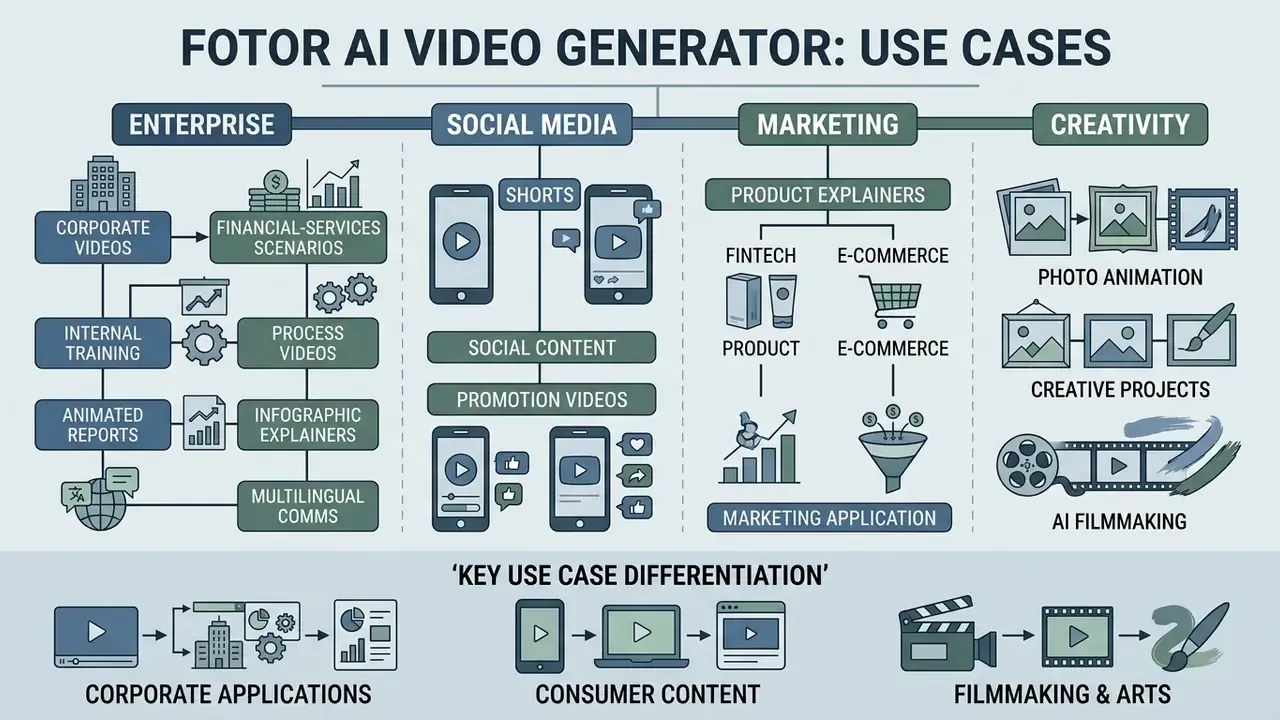
Parameter flexibility makes Fotor practical across several niches, including corporate ones that consumer reviews ignore.
Corporate and financial-services scenarios
- Internal training and process videos. Turn a static screenshot sequence or a diagram into a short animated explainer for onboarding and procedure updates. The multi-photo mode (1 to 7 frames with per-frame prompts) is well matched to step-by-step instructional flow.
- Animated report and infographic explainers. Convert charts and static reporting slides into short motion clips for investor updates, quarterly reviews and town halls, then assemble them in an external editor with narration.
- Product explainers for fintech and e-commerce. Short, disclaimer-friendly clips illustrating a product journey, with the crucial caveat that any promotional financial content must pass the normal marketing-review and disclosure process before publication.
- Multilingual comms. The Talking Avatar plus AI voiceover combination supports several languages, useful for distributing one message across regions. Human review of translated scripts remains mandatory.
- What it is not for. Anything containing client data, unreleased results, real employee likenesses without consent, or content requiring reproducible, auditable generation.
Photo animation, creative projects and AI filmmaking
In digital art, Fotor is used to revive old family photographs (the Animate Old Photos flow accepts JPG, PNG and WEBP with prompts for expression, body movement or camera angle and returns a clip in under a minute), to build dynamic locations for indie games, and for conceptual AI filmmaking.
By combining short-scene generation with subsequent timeline editing, authors produce full music videos and short animated films. Creators comparing engines for this work often benchmark Fotor against PixVerse AI, which Fotor also offers as one of its selectable image-to-video models. Developers planning to integrate third-party networks through a programmatic interface should consult the AI Media API Guides.
FAQ: user questions and compliance questions
Can Fotor AI Video Generator be used for free without limits?
No. The free version provides a limited number of starter credits (about 5 on signup, extendable via daily check-ins), exports video with a watermark, caps cloud storage at 512 MB, allows one concurrent generation and grants no commercial rights.
What is the maximum duration of a single generated clip?
Standard output is 4 to 8 seconds; some models reach 10 or 15 seconds, and Seedance 2.5 supports up to 30 seconds at 480p or 720p in a single pass. Longer pieces are assembled by joining several generated fragments in an editor.
Does Fotor support 4K generation?
Export up to 4K is advertised for selected models on the Pro+ tier, but base generation resolution is 720p or 1080p, so 4K should be understood as an upscaled export path rather than native generation.
How many credits does one 1080p clip cost?
About 50 credits for 4 seconds. A 4-second 720p clip costs roughly 20, an 8-second 720p clip about 40, and a 4-second 360p draft about 10.
Which input image formats are supported, and what is the output format?
Input: JPG, JPEG, PNG, WEBP, HEIF and HEIC. Output: MP4 only.
Which aspect ratios are available?
16:9, 9:16 and 1:1 are the core options, with 4:5 additionally available in the short-form tool; durations run from roughly 3 to 4 seconds up to 15 seconds depending on the model.
Can I combine several photos into one video?
Yes. The multi-photo mode accepts 1 to 7 images with an individual prompt per image and organises them into a coherent clip with smooth camera movement and consistent transitions.
Can I make a photo talk?
Yes. The Talking Avatar module adds an AI voiceover with lip-sync; Magic Sync makes the subject reproduce motion from a reference video. Consent for real likenesses is your responsibility, not the vendor's.
Do credits expire?
Subscription credits renew monthly and accumulate for up to 5 months; one-time purchased credits are valid for 2 years from purchase.
Is there an Enterprise plan with SSO, role-based access and a shared credit pool?
No such plan is documented on the public pricing pages, which list individual Basic, Pro and Pro+ tiers differentiated by credits and concurrency. Organisations needing centralised identity, entitlement management and consolidated billing should raise this with Fotor sales directly and treat the capability as unconfirmed.
Does Fotor provide IP indemnification for generated video?
Not according to the publicly available terms. Fotor claims no copyright in the output and places responsibility for the output on the user; no indemnity against third-party training-data claims is advertised. Request written indemnity terms before using output in high-exposure campaigns.
Can I export generation metadata, seeds or an audit log for independent review?
No such export is documented. Seeds, sampler parameters and model build identifiers are not returned, which limits reproducibility and makes the tool unsuitable where an auditable generation trail is mandatory.
Where is my uploaded data processed?
Fotor names its model partners (Google, OpenAI, Kuaishou, ByteDance, Alibaba) but does not publish processing regions or a per-model retention schedule. Assume multi-jurisdictional processing until a data-processing agreement states otherwise.
Is the free plan safe for confidential material?
No consumer AI video tool should be treated as safe for confidential material without a signed DPA and documented retention controls. Restrict use to synthetic, stock or already-public visuals.
Appendix A: corrections and superseded claims
For transparency, the following statements appeared in earlier versions of this article and have been revised. The original wording is preserved here so readers can see what changed and why.
| Original claim | Status | Revised position |
|---|---|---|
| "According to an AI Journal (2025) review, cloud AI generators reduce the time cost of preparing draft animations by 70 to 80%." | Unsupported, since no URL, methodology or sample was published. | Retained as a practitioner-level qualitative observation about draft-stage speed; the percentage is not cited as measured evidence. |
| "InstanceCap (2024) confirms that locking anchor frames reduces interpolation artefacts by 42%." | Unsupported figure. The qualitative finding is sound, the number is not verifiable. | Replaced with the paper's qualitative conclusion on instance-oriented structured captioning. |
| "AIGVE-60K (2025) notes that clear foreground and background separation reduces morphing probability by 28%." | Unsupported figure, and attributed to the wrong work. | Replaced with the InstanceCap conclusion on subject and background separation; AIGVE-60K is now cited for its actual contribution: 120,000 human ratings across 58,500 videos from 30 models. |
| "A 1080p clip may cost from 20 to 50 credits." | Imprecise, because the range conflated resolutions. | Replaced with the exact grid: 360p/4 s about 10, 720p/4 s about 20, 720p/8 s about 40, 1080p/4 s about 50 credits. |
| "The free Basic plan provides 5 to 8 credits on signup." | Partially supported. Fotor support documents 5 credits on signup; reviews report 5 to 8. | Retained with the clarification that the bonus is below the 10-credit minimum for a single 360p render, so daily check-ins are required for a real test. |
| "Upload images in JPG, PNG or WEBP." | Incomplete | Extended to JPG, JPEG, PNG, WEBP, HEIF and HEIC, with MP4 noted as the only export format. |
| "Aspect ratios: 16:9 for YouTube, 9:16 for Reels and TikTok." | Incomplete | Extended with 1:1 for square feed posts, and 4:5 in the short-form tool. |
| "Export up to 4K on Pro+." | Supported but conditional | Retained with the caveat that Fotor's own pages conflict (4K on the generator page, 1080p on the editor page, 720p generation on Seedance 2.5), so 4K is best read as an upscaled export path. |
Appendix B: AI-governance evaluation checklist
A short pre-approval checklist for teams that must document a decision on this class of tool:
- Classify the data.Is any input customer-identifying, market-sensitive, or a real person's likeness? If yes, do not proceed on a consumer tier.
- Confirm the sub-processor chain.Which model vendors receive the prompt and the image, and in which regions?
- Obtain retention and deletion termsin writing, covering both Fotor storage and third-party engines.
- Check the training opt-out.Is there a contractual commitment that inputs are not used to train models?
- Confirm the licence tier matches the intended use.Free equals personal only; Pro covers free plus Pro-marked material; Pro+ covers all material; no sublicensing under any tier.
- Request IP indemnification termsbefore using output in paid media or high-visibility campaigns.
- Assume no reproducibility.Record the prompt, the model family, the date and the approver manually if you need any audit trail at all.
- Mandate human reviewof every published asset for factual accuracy, disclosure requirements, likeness rights and brand safety.
- Centralise procurementso credit spend and usage are visible; individual card purchases are the main Shadow AI vector in creative teams.
- Set a review date.Because generation runs on closed third-party APIs that change without notice, re-validate the tool at least every two quarters.
A safe next step, if the tool looks useful: approve a bounded pilot on synthetic and stock imagery only, with one named owner, a fixed credit budget, and a written review at 90 days.
More definitions, comparisons and control templates: AI Media Glossary.