Quick Answer
- Core mechanism upload audio, separate the vocal stem, transcribe or align existing lyrics with a forced-alignment model, style kinetic typography, render MP4/MOV up to 4K.
- Two output modes a traditional lyric video keeps the original lead vocal; a karaoke / sing-along video applies vocal removal so only the instrumental remains.
- Input hygiene decides quality strip
[Verse 1],[Chorus], chords, credits and timestamps, and write out every repeated chorus in full before processing. - Quality thresholds caption sync within roughly 100 ms of vocal onset, minimum 4.5:1 text contrast (WCAG 2.2), 2 to 3 frame gaps between cues.
- Enterprise reality check free consumer tools are a Shadow AI risk vector. Unreleased masters, sync-licensed stems and unpublished lyrics should only reach vendors with documented retention, training opt-out and audit controls.
How to Use This Guide
This page is written for two readers at once, and the sections serve them differently.
The first reader is a creator or label producer who wants a finished asset this week. Start with the workflow steps, the transcript hygiene rules, and the pre-export checklist. Those three blocks resolve most quality complaints on their own.
The second reader is a risk, compliance or brand-governance owner inside a regulated organization. Start with the governance section, the vendor due-diligence checklist, and the commercial licensing alert. Then read the workflow, because you cannot write a sane policy for a process you have never watched end to end.
Everything here separates three categories: documented standards, vendor-published claims, and open measurement gaps. Where evidence is thin, the text says so.
What Is a Lyric Video Maker and How Does It Work?
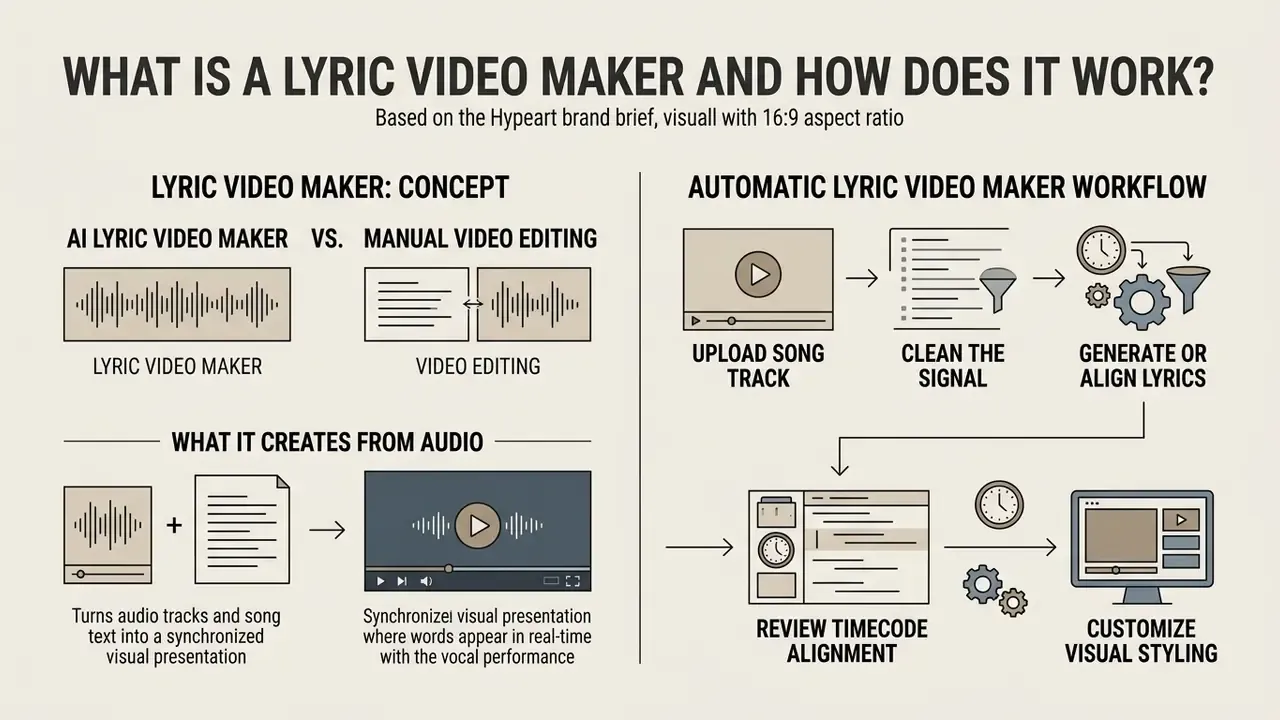
A lyric video maker turns audio tracks and song text into a synchronized visual presentation where words appear in real time with the vocal performance. The software processes audio signals using speech-to-text algorithms or forced alignment frameworks to establish word-level timestamps. Users upload an audio file, review the generated caption timing, choose typography and visual backgrounds, then export a finished video file optimized for digital streaming platforms.
Cloud editors now expose the same pipeline through browser interfaces and APIs, so distributed teams can create AI media workflows for short-form production. The operational benefit is measured in fewer manual keyframes rather than in guaranteed creative quality, and output still requires human review. That distinction sounds pedantic until an auto-generated caption misspells an artist's name on a premiere.
AI lyric video maker vs. manual video editing
An ai lyric video maker automates vocal transcription, timestamp alignment, and scene generation. Manual editing, by contrast, requires frame-by-frame text layer creation and hand keyframing. In traditional editors such as Adobe Premiere Pro or After Effects, creators place separate text blocks for each line or word, setting opacity and position keyframes along the timeline. Automated systems instead use forced alignment models, for example the NeMo Forced Aligner or WhisperX architectures, to calculate time-aligned tokens (NVIDIA, 2024).
«Contrastive learning lets models capture audio–lyrics correspondence, achieving state-of-the-art results on two music captioning datasets.»
Manual editing still wins on granular frame-level precision for complex motion design. Automated pipelines win on first-draft assembly speed: vendors such as Tunee advertise a styled kinetic-typography render in roughly 90 seconds, and Youka states that most standard songs are previewable within a few minutes. Those are vendor-published production times, not independently benchmarked reductions. Treat "hours to minutes" as a workflow claim to validate on your own reference track.
Creators evaluating tool stacks often compare desktop rendering flexibility against automated web pipelines. Readers researching adjacent generation engines can review how AI video generators handle scene synthesis before committing to a single vendor.
What the automatic lyric video maker creates from audio
An automatic lyric video maker extracts vocal signals from an uploaded track, generates timed karaoke-style captions, and pairs the text with dynamic backgrounds or tempo-synced animation effects. The underlying speech-processing pipeline isolates vocal frequencies from polyphonic backing tracks using separation models. Once isolated, the audio is analyzed for acoustic onset points, measure boundaries, and tempo dynamics.
The tool then produces three core outputs:
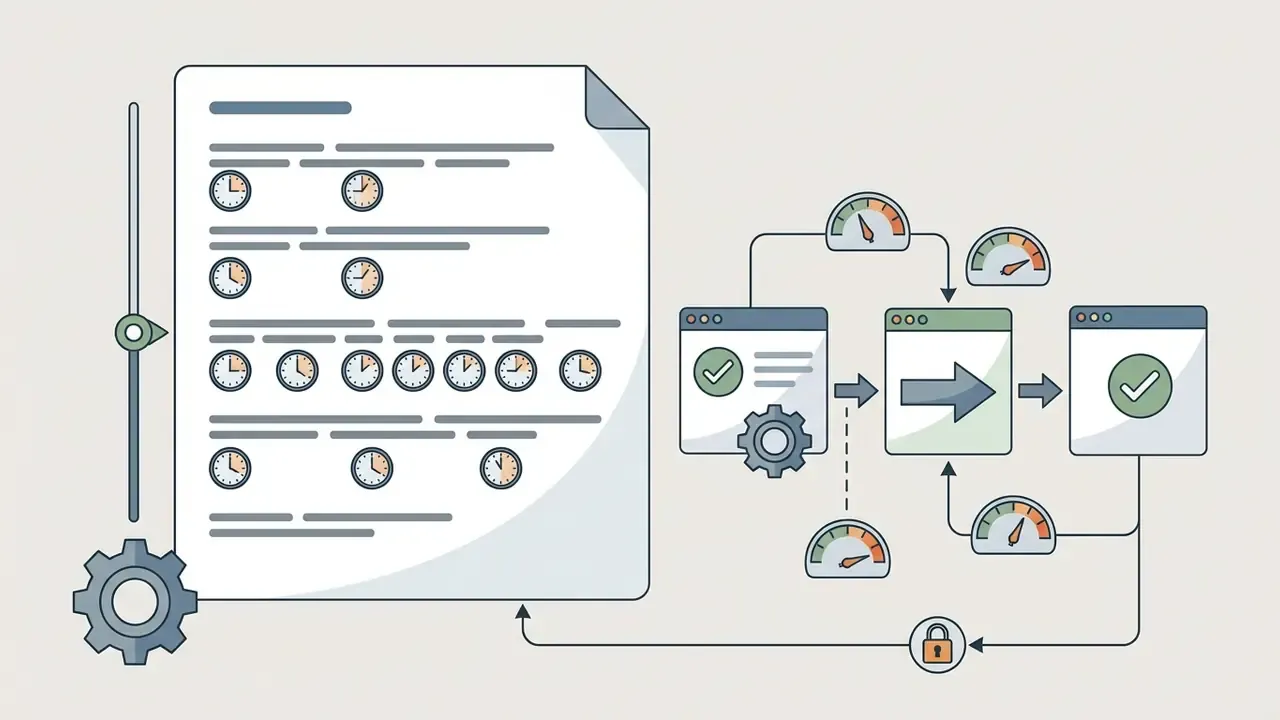
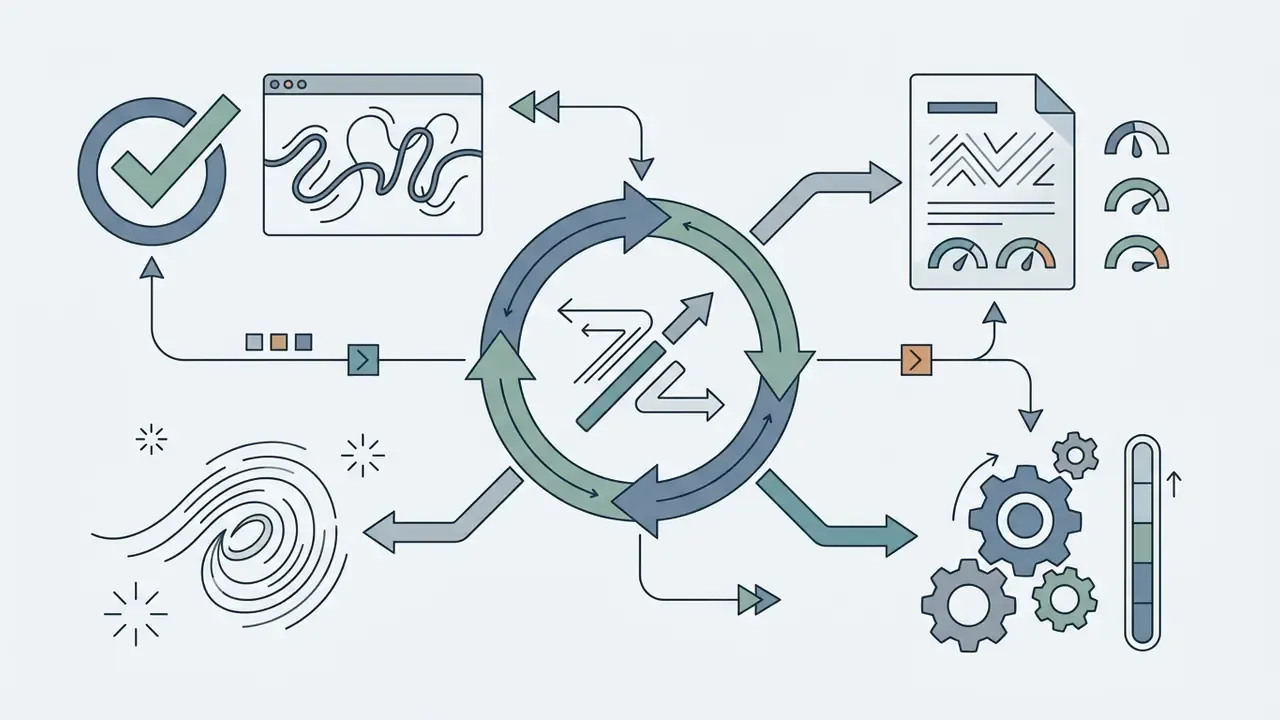
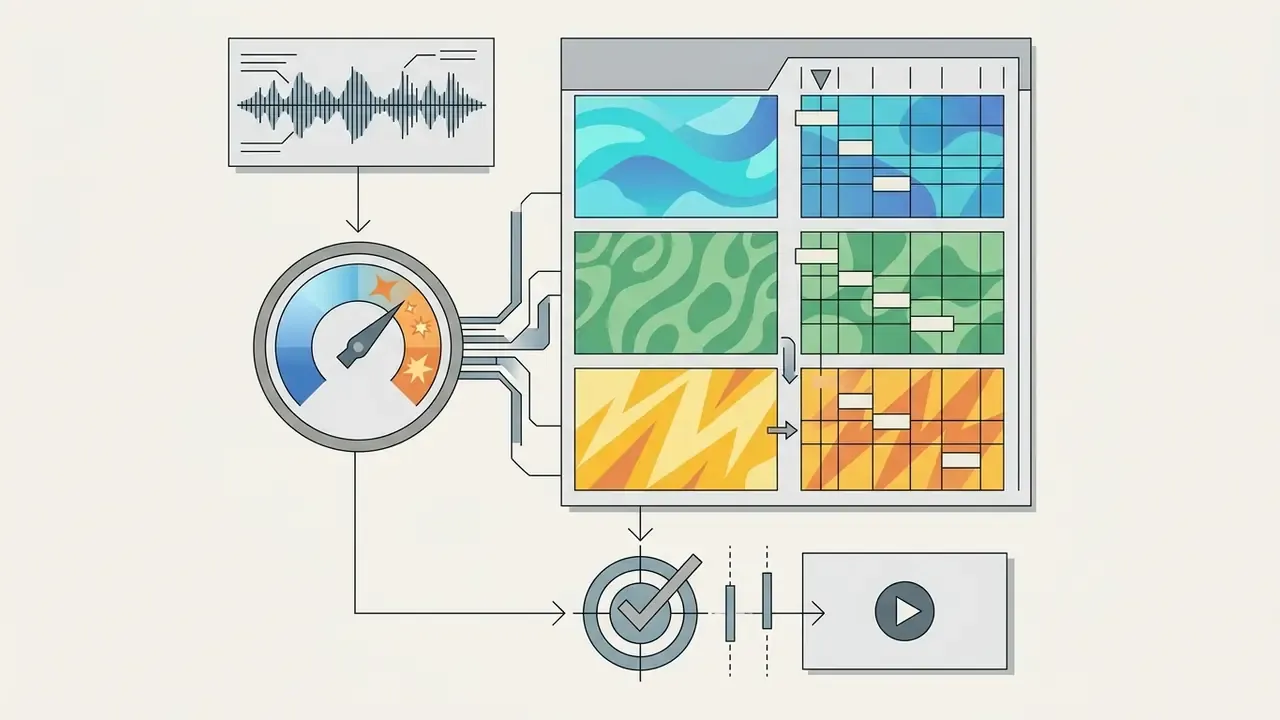
Automatic Lyric Video Maker Workflow
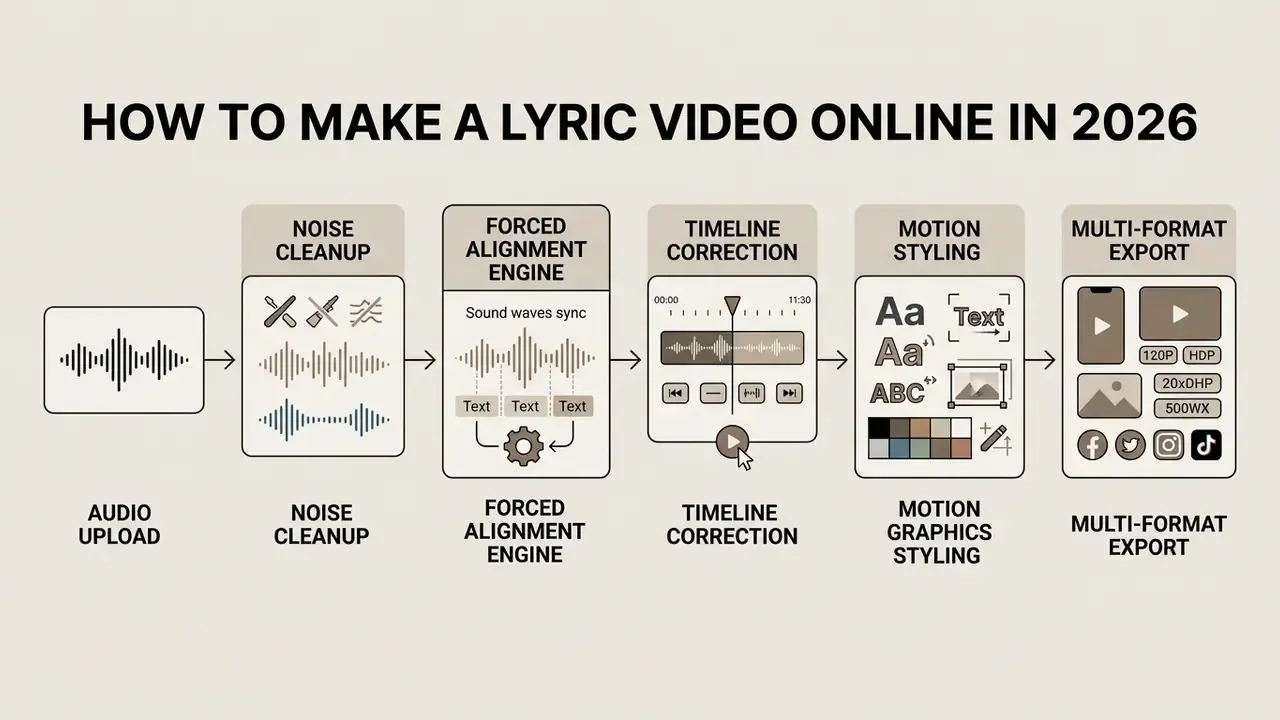
The operational sequence that converts raw audio files into synchronized online lyric videos:
- Upload song track.Ingest lossless WAV, FLAC, or AIFF audio, or compressed MP3, M4A, and AAC files, into the browser editor. The system isolates vocals and calculates track tempo.
- Clean the signal.Apply spectral noise gating and band-pass vocal isolation so stage noise, wind, and low-frequency rumble do not corrupt onset detection.
- Generate or align lyrics.Automatic speech-to-text transcribes the vocal, or pre-written text is mapped via forced alignment.
- Review timecode alignment.The editor shows a visual timeline with word-level timestamps superimposed over the waveform for manual verification.
- Customize visual styling.Apply kinetic typography presets, check colour contrast ratios, upload brand fonts, and set motion backgrounds.
- Export video file.Render the composition into MP4 or MOV containers formatted for target social distribution channels.
Lyric video mode vs. karaoke / sing-along mode (vocal removal)
The single most common configuration error is choosing the wrong output mode. A lyric video and a karaoke video share the same alignment engine but make opposite audio decisions: one preserves the lead vocal as the promotional asset, the other suppresses it so an audience can sing the part. Youka states the rule plainly in its own troubleshooting guidance: use vocal removal when the goal is a sing-along instrumental, keep the original vocal when the goal is a traditional lyric video.
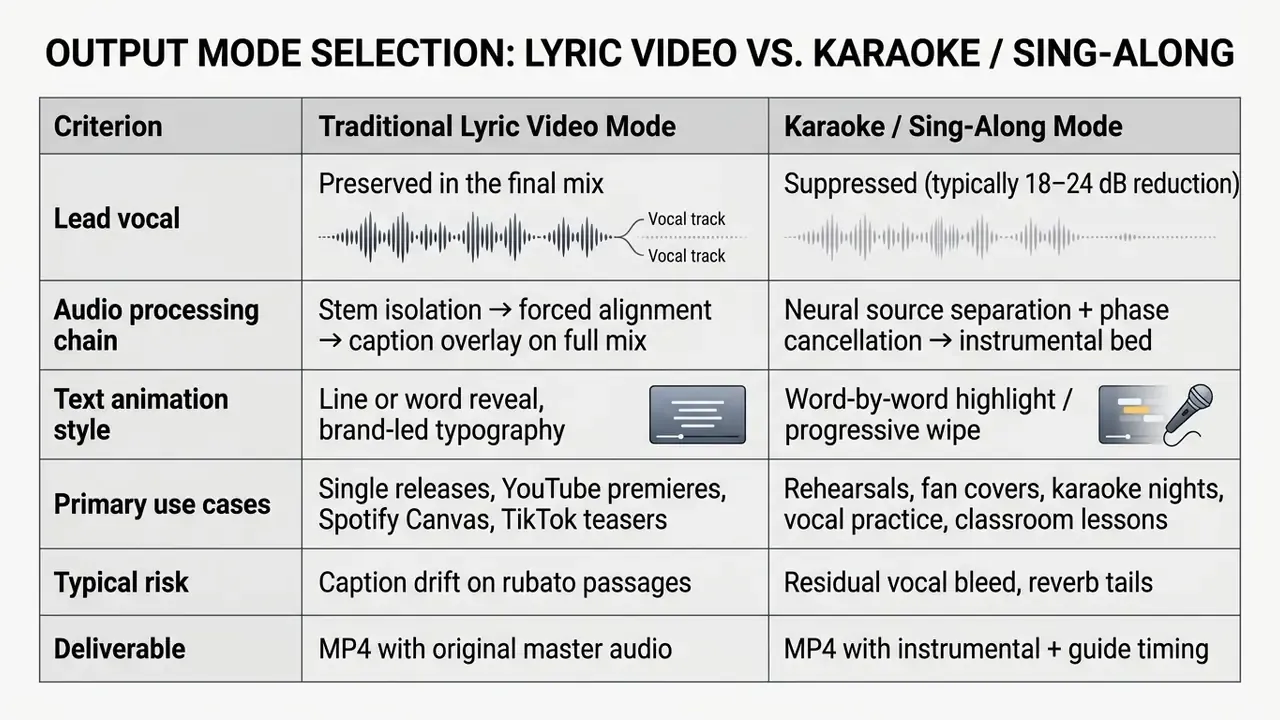
Practical note: separation quality degrades on dense mixes with heavy sidechain compression or wide stereo reverb on the vocal bus. If residual vocal bleed is audible on the chorus, prefer an official instrumental or a stem export from the session rather than fighting the separation model. Fighting it rarely ends well.
Conversational editing and multi-model AI orchestration
The 2025 to 2026 generation of tooling behaves less like a template renderer and more like a director layer that routes each task to a specialist model. Instead of one engine doing everything, an orchestration agent may call a cinematic video model (Google Veo, Runway) for wide establishing shots, a stylized animation model (Pika) for hook sections, a music model such as Suno for original arrangement beds, and WhisperX or NeMo for word-level timing. The result is a multi-scene narrative that evolves across verse, chorus and bridge, not one looping background behind scrolling text.
«Training-free multi-agent systems can generate coherent full-length music videos directly from audio by coordinating analysis, prompt generation, and video synthesis.»
The second shift is prompt-based editing. Rather than manipulating keyframes, the operator issues a natural-language instruction and the system re-renders only the affected sections. A representative command: "Make the second chorus more dynamic, add neon light trails and cut faster on the kick drum." In documented tests of agentic tools, only the chorus segments were regenerated while verse scenes, typography and timing stayed untouched.
For governance purposes this is a double-edged capability. It removes the learning curve, and it also removes the audit trail that a timeline-based project file naturally provides. So export prompt histories, or keep a change log beside each render version. A digital worker without a log is just an unexplained edit.
Which Lyric Video Maker Is Best for Your Project?
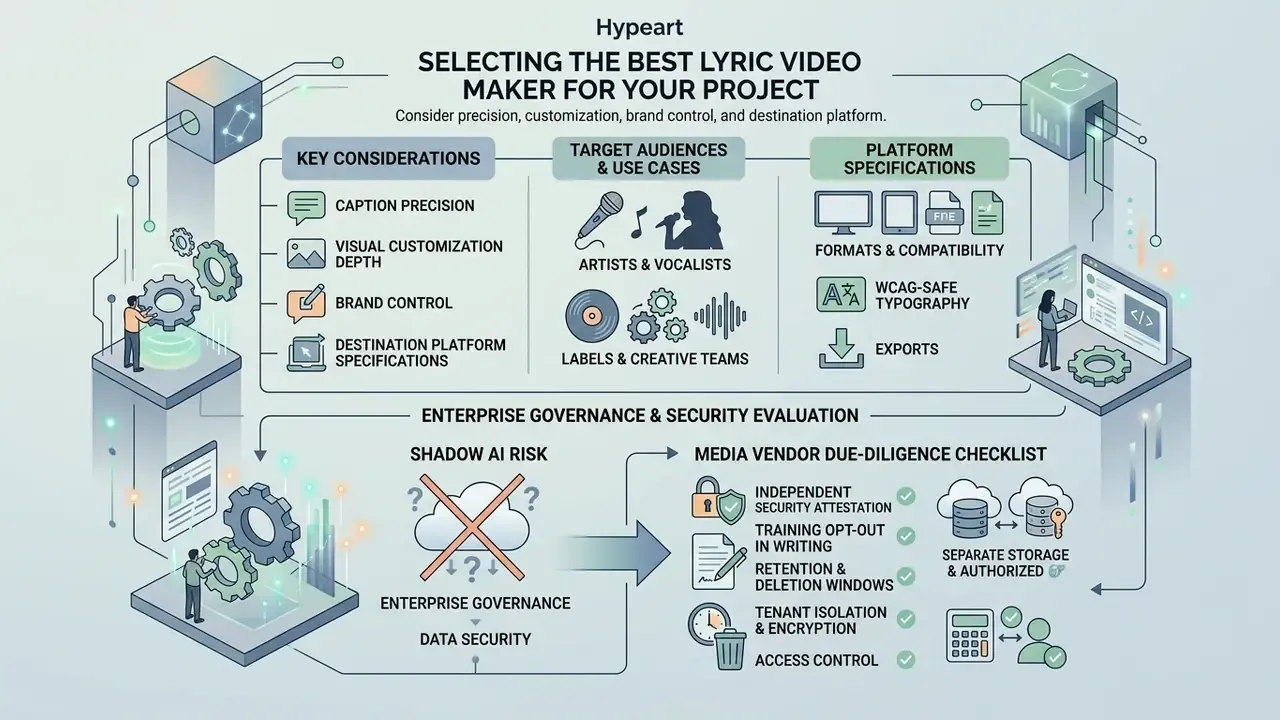
Selecting the best lyric video generator depends on required caption precision, visual customization depth, brand control, and destination platform specifications. Independent vocalists and social media managers usually prioritize turnaround using automated web tools. Commercial record labels need strict adherence to style guidelines, high-bitrate exports, and verifiable licensing terms. Enterprise media groups projecting production costs routinely consult AI Media Pricing Guides before scaling rendering across a large catalogue release.
Search behaviour reflects that split. Queries for a best lyric video maker ai or a best ai lyric video maker tend to come from solo creators, while procurement teams search for licensing, retention and API terms.
Tools for artists, vocalists, labels, and creative teams
A professional lyric video maker provides high-precision timecode editing, multi-track visual layering, custom font uploads, and uncompressed audio passthrough for commercial music releases. Independent artists often use automated lyric video creator suites to produce promotional clips for upcoming singles fast. Vocalists and rappers need transcription tuned to sung phrasing, ad-libs and rapid delivery rather than to conversational speech. Labels and production teams require multi-user collaboration, sidecar caption exports (SRT or VTT files), and compliance with digital delivery standards.
«Models that infer musical time signature from lyrics alone reach an F1 score of 97.6% and AUC of 0.996, confirming high accuracy in rhythmic analysis.»
Institutional production teams building custom media workflows frequently consult the AI Media Commercial-Use Hub to review rights management frameworks before scaling automated video generation. Procurement leads comparing engines at catalogue scale can review the best AI video generators before standardizing a stack.
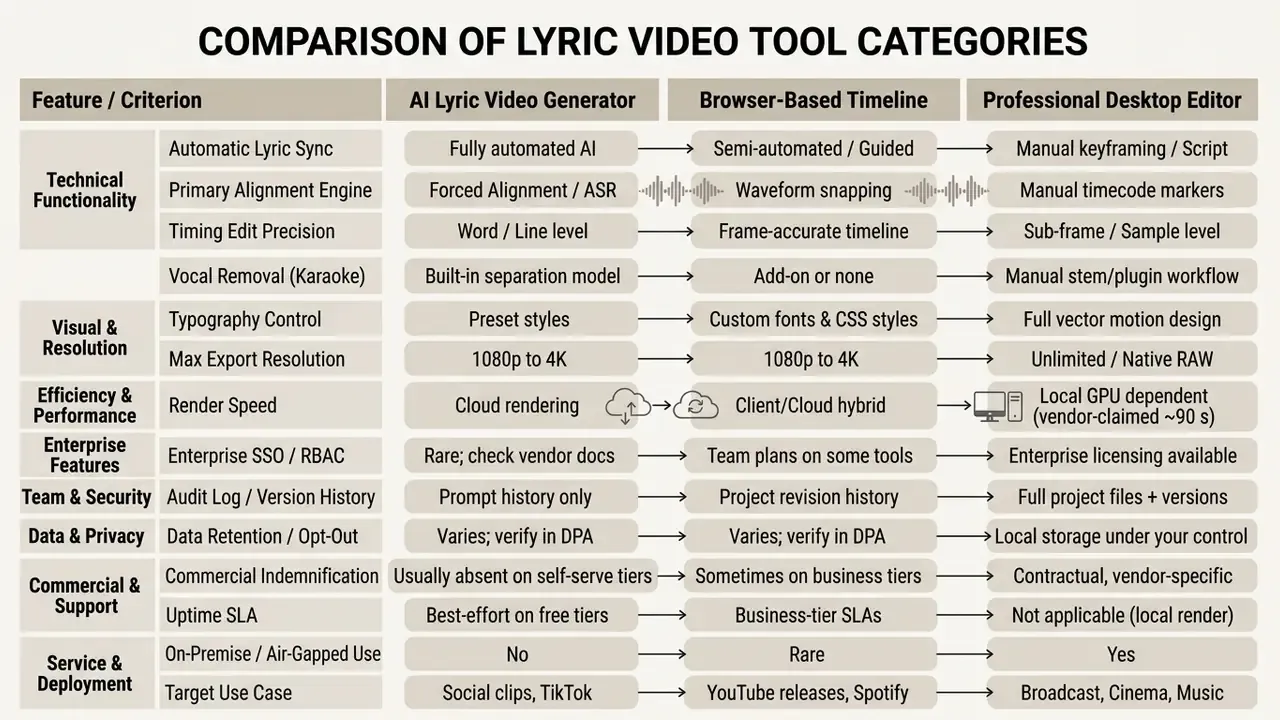
Read the table as a control map, not a feature beauty contest. The rows that decide enterprise adoption sit in the lower half: audit log, retention, indemnification, air-gapped use. A music video lyric maker with beautiful presets and no data processing addendum is still a policy exception waiting to happen.
Enterprise governance, data security, and Shadow AI risk
For marketing, brand and media teams inside regulated organizations, the material risk in lyric video production is rarely aesthetic. It is data movement. A consumer-grade generator that accepts a drag-and-drop file may store that master indefinitely, use it to improve models, or replicate it across regions. Uploading an unreleased single, a sync-licensed stem, an artist's unpublished lyric sheet, or an internal announcement track to an unvetted browser tool is a textbook Shadow AI event: sanctioned intent, unsanctioned infrastructure.
Media Vendor Due-Diligence Checklist
- Independent security attestation SOC 2 Type II or ISO/IEC 27001 report available under NDA, covering the rendering environment, not only the marketing website.
- Training opt-out in writing contractual confirmation that uploaded audio, lyrics and exported renders are excluded from model training and human review.
- Retention and deletion windows documented retention period for source audio and rendered output, plus a verifiable deletion endpoint or admin action.
- Tenant isolation and encryption encryption in transit and at rest, logical tenant separation, and named sub-processors with region controls.
- Access control SSO/SAML, role-based permissions, and admin audit logs showing who exported which asset and when.
- Rights posture written commercial-use grant, stock-asset licence chain, and any IP indemnification limits.
- Approved-tool register the service is listed on the internal AI tool inventory with a named business owner and a review date.
A practical mitigation for pre-release material is a two-tier policy. Cleared or already-published catalogue may be processed in approved SaaS editors, while embargoed masters are rendered in a locally controlled desktop or self-hosted pipeline until release day.
Model-risk owners should also stress-test the alignment engine itself. Run a fixed reference set (clean studio vocal, live recording with crowd noise, fast rap, heavily processed vocal) and record word error rate and maximum timecode drift per condition. That turns an accuracy claim into a measurement. No evidence, no autonomy.
Choosing formats for YouTube, TikTok, and short clips
Canvas aspect ratio and bitrate matter more than most creators expect when configuring a lyric video maker for youtube, TikTok, or Instagram Reels. Long-form music releases on YouTube target 16:9 widescreen at 1080p (1920×1080) or 4K (3840×2160). Short-form mobile platforms, including TikTok, YouTube Shorts, and Instagram Reels, need a vertical 9:16 canvas (1080×1920). Square formats (1:1 at 1080×1080) remain common for embedded feed posts.
Teams assembling a cross-platform toolchain can compare desktop options in our guide to free video editing software, and channel-specific publishing steps sit in the YouTube video editor workflow guide.
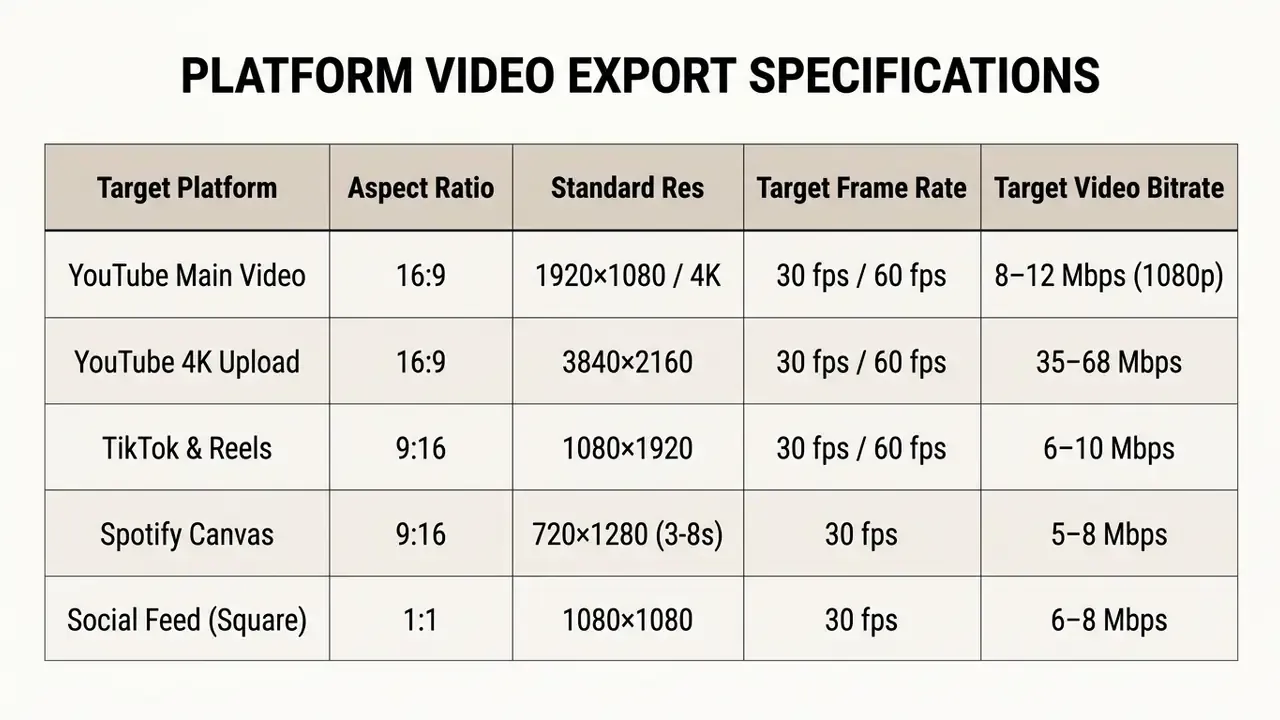
One caution on cropping. A 16:9 master reframed to 9:16 usually pushes lower-third captions off canvas or into the platform's UI safe zone. Re-layout the text, do not just crop.
Features That Define a Professional Lyric Video
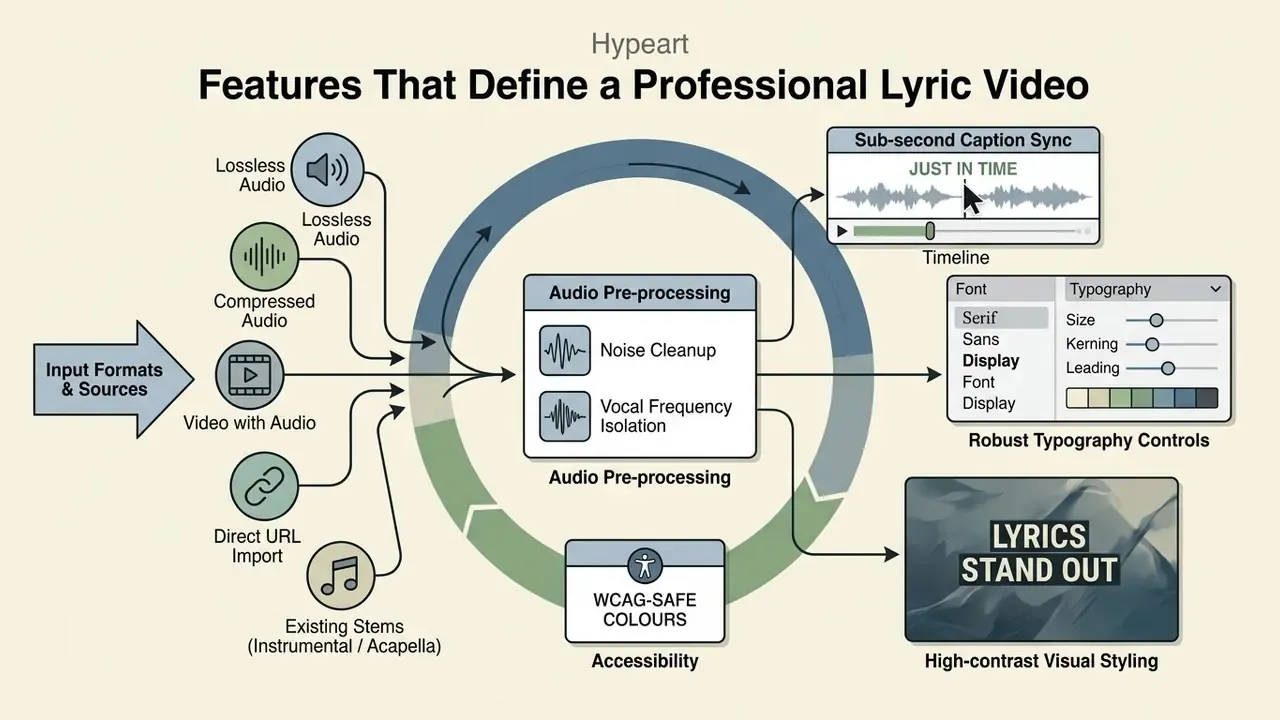
A music lyric video maker reaches professional production quality when it offers sub-second caption synchronization, robust typography controls, high-contrast visual styling, and uncompressed export delivery. Automated systems must handle vocal variance, non-speech musical interludes, and awkward verse-to-chorus transitions. Organizations integrating rendering components into internal software stacks often use specialized api endpoints to handle video encoding at scale.
Supported input formats and import sources
Format breadth decides how much transcoding happens before the creative work begins. A production-grade lyrics video maker should accept the following without an external conversion step:
- Lossless audio WAV, FLAC, AIFF, ideally 24-bit / 48 kHz masters.
- Compressed audio MP3 up to 320 kbps, M4A, AAC, OGG.
- Video sources with usable audio MP4, MOV, MKV, AVI, WebM. Useful when the only available copy of a mix sits inside a rough edit.
- Direct URL import ingestion from a public video or cloud-storage link, so a file never touches a local drive first.
- Existing instrumental or acapella stems to choose the karaoke or lyric path deliberately rather than relying on separation.
- Background media JPEG/PNG artwork, MOV/MP4 loops, plus solid colours and gradients.
Practical ceilings matter as much as format lists. Consumer tools commonly cap audio uploads around 100 MB and roughly six minutes of runtime, with separate limits for artwork (around 50 MB) and background video (up to 1 GB). Long-form releases, DJ mixes and live sets exceed those limits regularly, which pushes the project toward a segmented workflow or a desktop pipeline. When file weight rather than length is the blocker, our video compressor guide covers safe size reduction before upload.
Audio pre-processing: noise cleanup and vocal frequency isolation
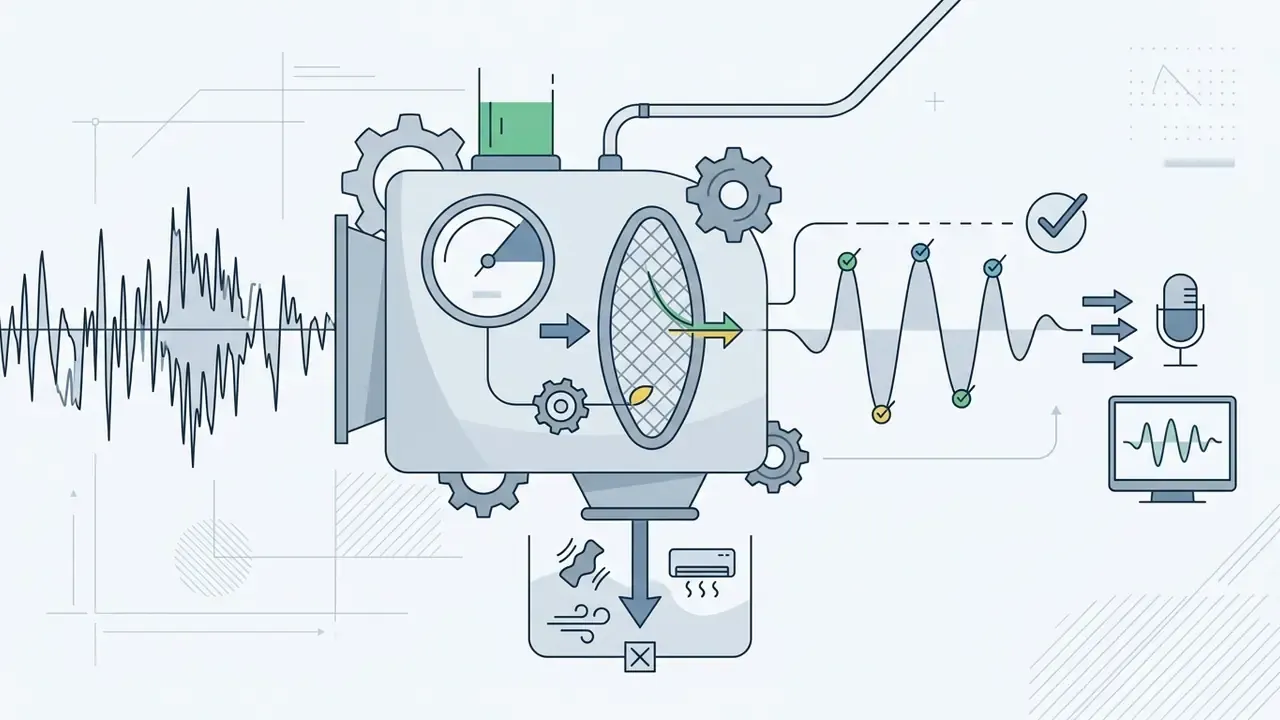
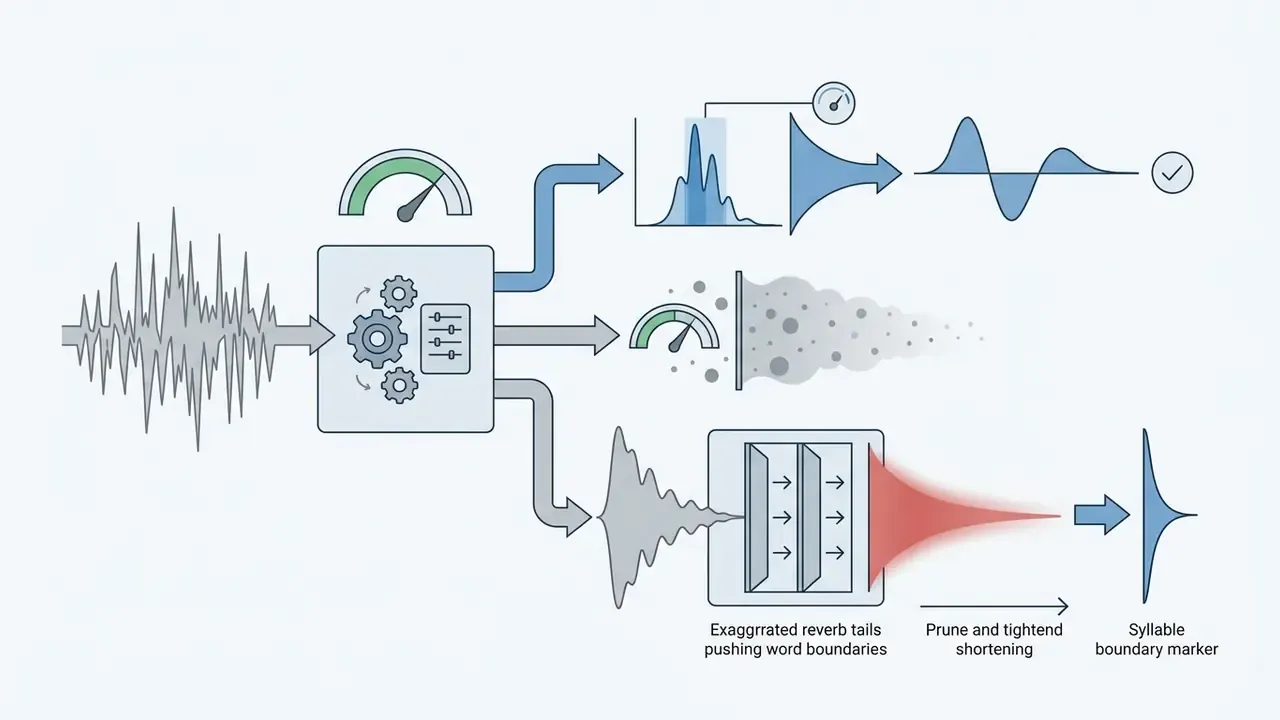
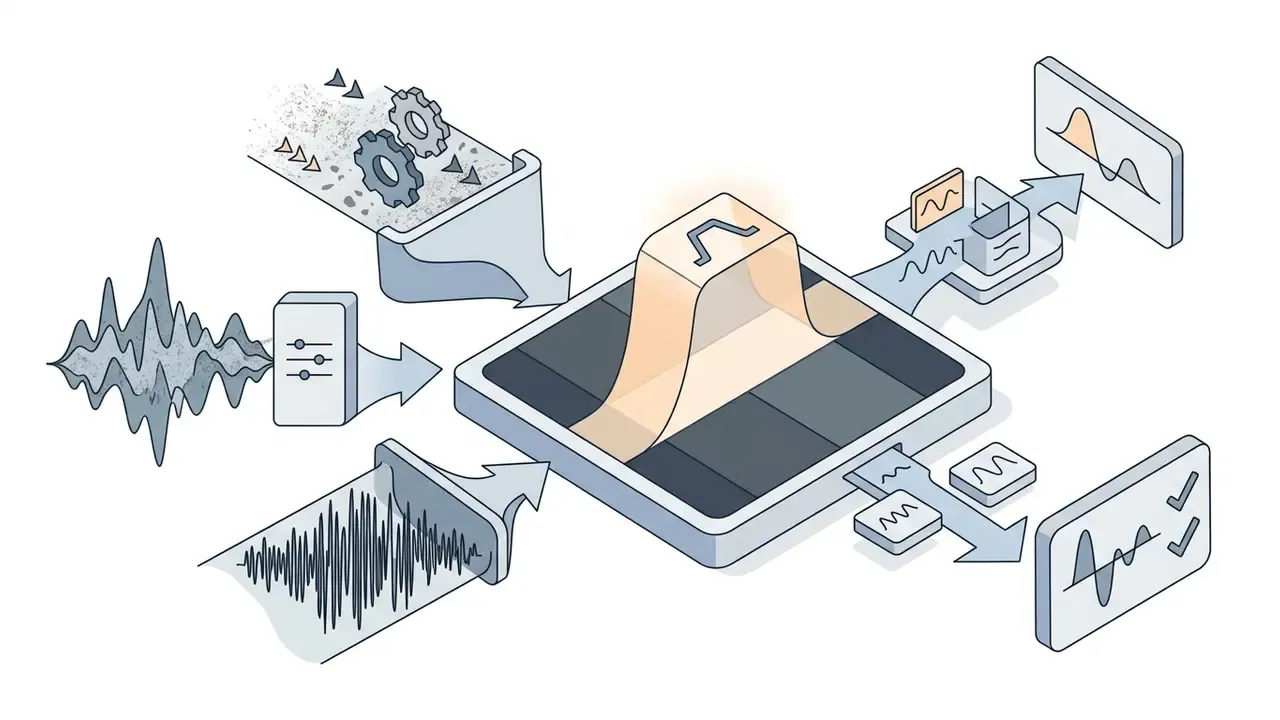
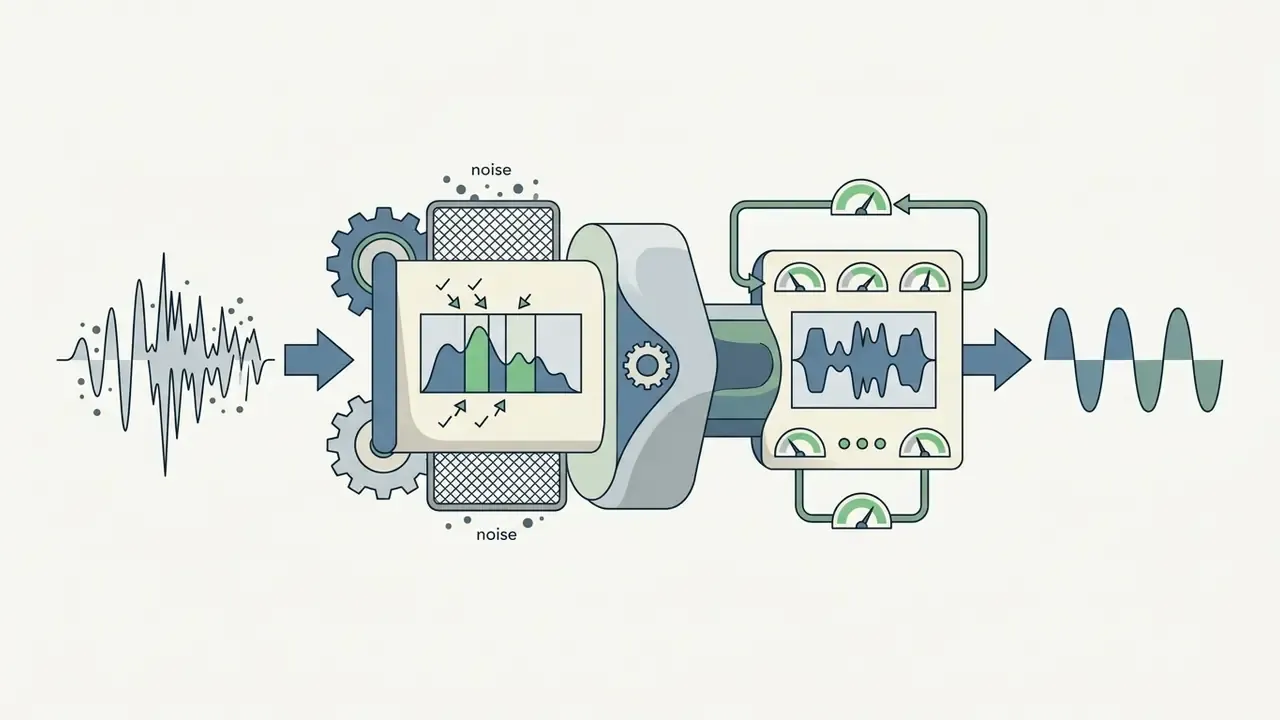
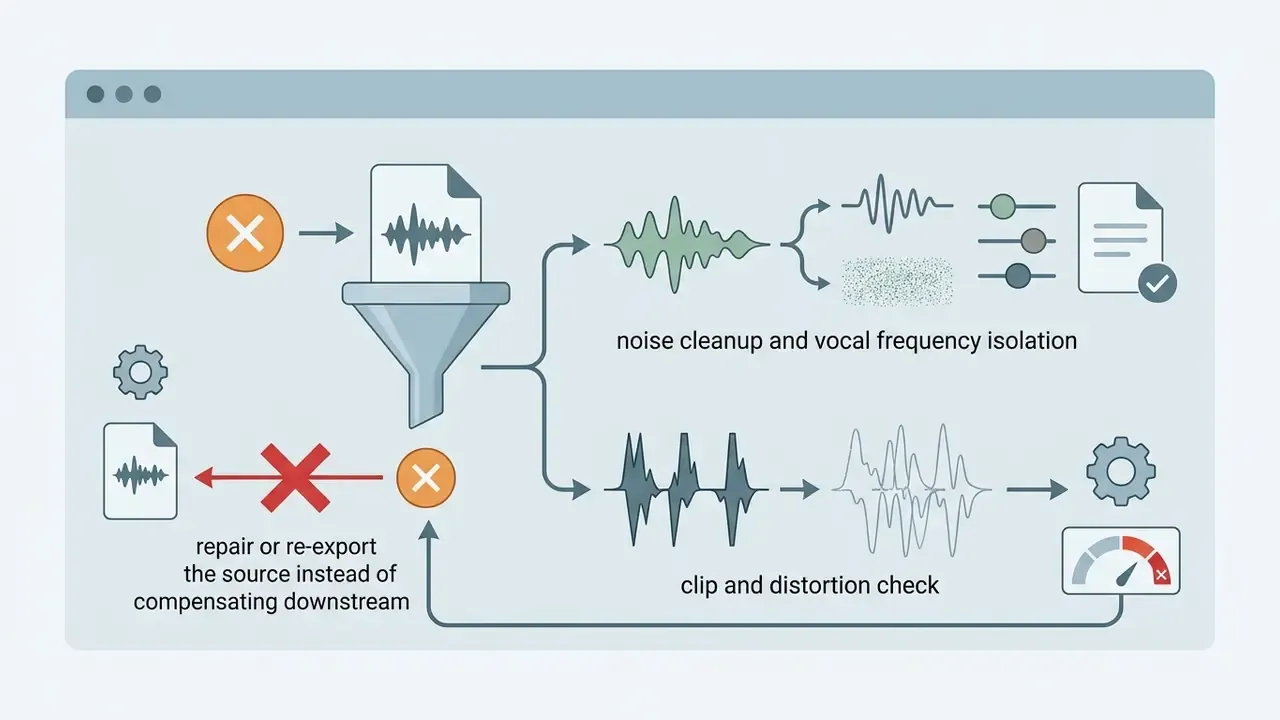
Automated alignment assumes a reasonably dry, intelligible vocal. Live recordings, demos and phone captures rarely provide that, so professional pipelines insert a cleanup stage before the forced aligner ever sees the file. Competing consumer tools describe the same requirement in plainer terms: their audio cleanup detects wind, humming and traffic noise and strips it automatically.
Sequence discipline matters: clean, separate, align, style. Reverse any two steps and you reintroduce the errors the previous stage removed.
Accurate lyric transcription, line breaks, and timing
Accurate transcription needs vocal stem separation combined with natural language chunking, otherwise text wraps break across phrase boundaries. Research in audio-lyrics alignment shows that timecode drift disrupts viewer perception and fails accessibility benchmarks.
«Caption display for recorded material should preserve synchronization within 100 milliseconds of the caption timestamp.»
Line breaks should align with grammatical pauses and musical measures rather than arbitrary character counts. Subtitle events must not flash briefly during vocal pauses, and text should not sit frozen on screen through a long instrumental solo. Readability guidance from university accessibility offices adds two useful ceilings: keep reading speed at or below roughly 180 words per minute, and hold each cue on screen for at least two seconds where the phrasing allows.
Text animation, fonts, and visual style controls
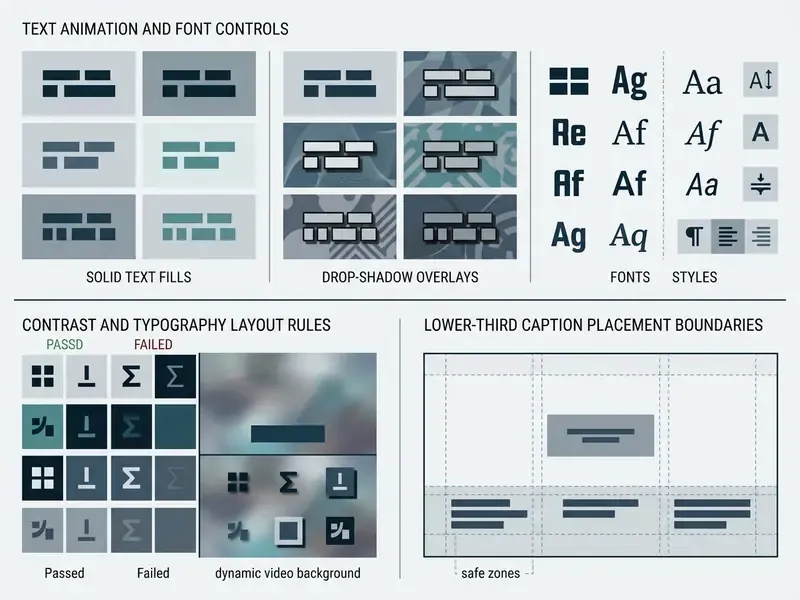
A song lyric video maker needs deep control over kinetic typography, motion speed, font weight, and colour palettes. Legibility stays the primary design requirement. Viewers must read synchronized lyrics effortlessly against moving backgrounds, at phone size, often with sound on and attention split.
Designers hit that ratio with drop shadows, semi-transparent background boxes, or inverted text masks where video plays inside the letterforms. W3C media guidance adds a motion constraint that lyric videos routinely violate: avoid content flashing more than three times per second. That rules out the strobe-cut treatment common in high-energy EDM edits, however well it tests on a feed.
Export quality and downloadable video files
Professional distribution requires finalized media in standard containers such as MP4 (H.264/AAC) or MOV (ProRes/PCM audio). Export settings should match source audio sampling rates, typically 24-bit / 48 kHz, to preserve fidelity. Standard frame rates include 30 fps for web releases and 60 fps for ultra-smooth typography transitions. Sidecar caption files (SRT, VTT, ASS or iTT) should ship alongside the render so platforms can index lyrics independently of burned-in text.
Readers who want the underlying encoding concepts can review video editor workflows, and developers building automated media chains can explore integration patterns in our guide to Google Veo video generation.
Multi-language lyric overlays and subtitle translation
Localization is where a lyric video stops being a domestic promo asset and becomes a global discovery asset. Modern subtitle engines translate an aligned lyric track into additional languages and re-fit timing to the translated phrase length. That re-fit is essential, because translated lines routinely run 20 to 40% longer or shorter than the original.
- Bilingual overlay original lyric on the primary line, translation on a secondary lower line at reduced weight, so neither competes for the viewer's reading order.
- Timing re-fit without rhythm loss cue boundaries stay locked to musical measures while character-per-second load is rebalanced across lines.
- Sidecar delivery per language publish translated SRT/VTT files rather than burning every language into a separate master, which keeps one render serving many markets.
- Script and directionality handling verify glyph coverage for non-Latin scripts and right-to-left layouts before locking the font. A brand font without Cyrillic, CJK or Arabic coverage will substitute silently.
- Human review pass idiom, slang and profanity are the highest-error category in machine translation. A native reviewer should sign off before release.
Feature Verification & Audit Protocol:
How to Make a Lyric Video Online
Creating an ai lyric video online follows a structured workflow that moves from raw audio ingest to final delivery. Cloud editors remove the local GPU bottleneck by running alignment models and compositing on remote clusters. Technical teams building autonomous media tools often lean on frameworks to create your own ai assistant for internal workflow orchestration and queue management.
Step 0: Preparing lyric transcripts for AI processing
Alignment quality is decided before upload. A lyric sheet copied from a tab site or a streaming service usually carries markup that the model reads as sung words, which produces phantom cues and cascading drift. Clean the text first:
- Remove structural tagsdelete
[Verse 1],[Chorus],[Bridge],[Outro],(Guitar Solo),(x2)and similar annotations. - Strip non-lyric metadataguitar chords above lines, songwriter and producer credits, contributor names, advertising text, page headers and third-party timestamps.
- Expand every repeat in fullif the chorus is sung three times, write it three times. Alignment engines cannot interpret "repeat chorus ×2". They align the text once and leave the remaining audio unmatched.
- Match the exact recordingverify the transcript against the version being uploaded. Radio edits, remixes, live takes, covers and extended cuts change verse order, drop sections and add ad-libs.
- Write ad-libs and backing vocals explicitlywhere they should appear on screen, and omit them where they should not, rather than leaving the model to guess.
- Normalize punctuation and casingconsistently. Erratic capitalization propagates straight into the on-screen typography.
- Save as plain text(UTF-8) with one lyric line per line break, so the chunker inherits your intended phrasing.
Boring work. It also removes most of the errors people later blame on the model.
Upload a song or start with a video and template
To begin making a lyric video, launch a new project in the browser and drop a master audio file (WAV, FLAC, or MP3) onto the canvas, or supply a public URL for direct ingest. Creators can start from a blank canvas or pick a pre-designed template with responsive typography layouts. Many web tools also allow stock background footage or custom video loops; teams that need motion assets built from scratch can review dedicated animation makers. Creators managing complex graphic workflows can review browser options in our online photo editors guide.
Generate lyrics and review the synced timeline
Once ingest completes, the auto lyrics generator ai transcribes the vocal track or aligns pre-pasted lyric text to the timeline. The editor displays a multi-track waveform with individual word blocks and their start and end timestamps. Play the composition back and inspect each cue against the vocal onset. If a word is misrecognized or a cue sits late, inline correction is possible without disturbing surrounding timecodes: word-level editors preserve the existing timestamp when a single token is replaced, so a typo fix does not force a re-time of the whole cue.
That is also the moment to catch a wrong-version mismatch. If the tail of the song has no captions at all, the transcript almost certainly collapsed a repeat.
Customize visuals and export the finished video
After verifying caption accuracy, customize fonts, text animations, background effects, and canvas dimensions. Kinetic typography presets such as word-by-word highlights, typewriter reveals, or smooth vertical scrolls reinforce rhythmic alignment with the music.
«Video generation guided jointly by text and audio synthesizes visual sequences consistent with both modalities, enabling dynamic backgrounds for lyric videos.»
With styling locked, select render settings (for example 1080p MP4 at 60 fps) and start cloud rendering. Render a short preview segment before spending credits on a full-length export, then watch the complete playback once, end to end, before publishing. Creators building custom audio components can examine synthesis models in our AI voice generator guide.
Lyric Video Quality Checklist Before Export
How to Improve Lyrics, Sync, and Visuals Before Export
Even advanced neural alignment models hit edge cases. The usual suspects: timecode drift during tempo changes, misheard lyrics caused by vocal effects, and unreadable overlays over busy footage. A systematic review protocol before publishing is what keeps those errors private. Creators looking for troubleshooting frameworks can consult AI Media Support and Troubleshooting resources.
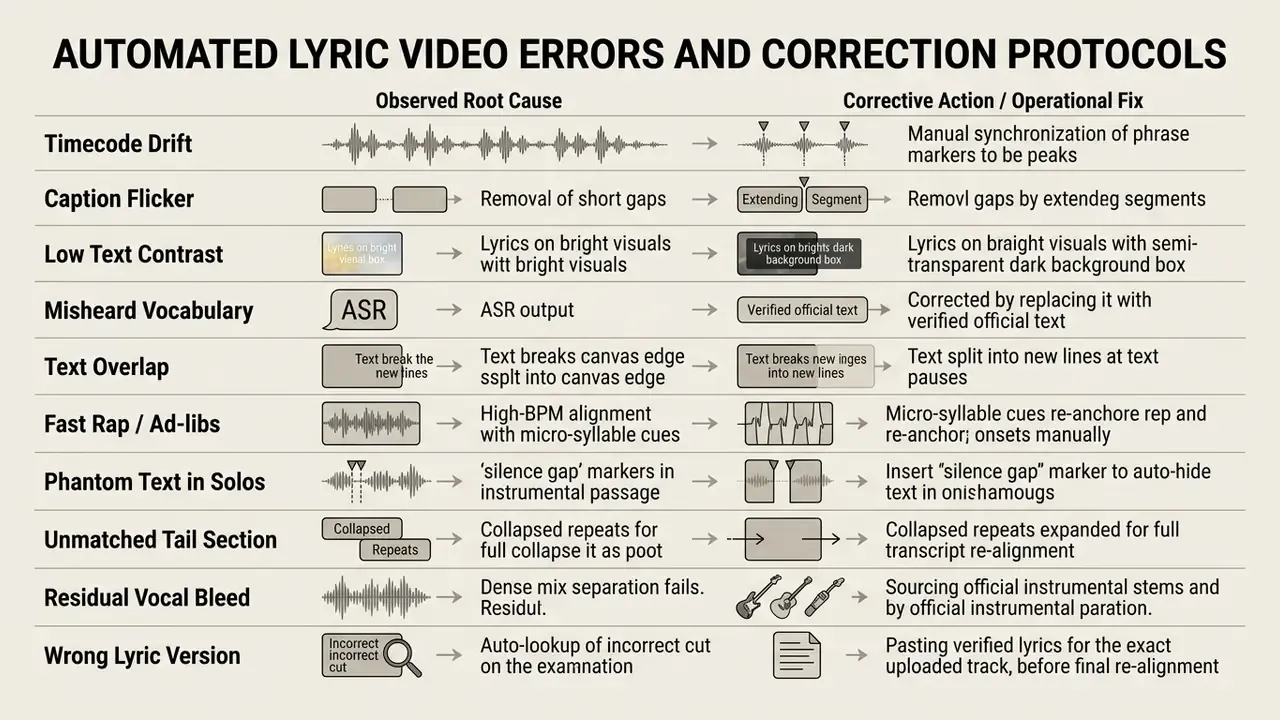
Fix incorrect words and timing before publishing
Speech recognition models stumble on stylized singing, heavy distortion, and overlapping harmonies. Compare the automatic transcript against an official lyric sheet every time. To fix misalignment, open the timeline view and drag cue boundaries until text appearance matches the vocal onset on the waveform. Keeping a consistent 2 to 3 frame gap between adjacent cues prevents that distracting caption flicker.
«Maintain a consistent interval between adjacent cues to prevent visually distracting subtitle flicker.»
Platform delivery specifications tighten this further. Broadcast and streaming timed-text guidance commonly requires the in-time to land on the first audio frame or within one to two frames of it, with a minimum two-frame separation between consecutive cues. Worth checking your target distributor's spec sheet, since the tolerance is not universal.
Avoid unreadable text and mismatched visual styles
Unreadable typography ruins engagement no matter how good the render looks in a still frame. Avoid decorative script fonts that collapse at small sizes on mobile. Hold strong colour contrast between text and background across the entire runtime, not only in the first chorus. And let visual motion complement the musical tone rather than fight it: fast-cut flashing visuals suit high-energy electronic music, but they clash badly with a minimalist acoustic ballad.
Creators comparing browser tools with granular style control can review free AI video generators, and those building custom graphic overlays can explore typography techniques in our create word art guide.
Free Trials, Pricing, and Commercial Use of AI Lyric Video Makers
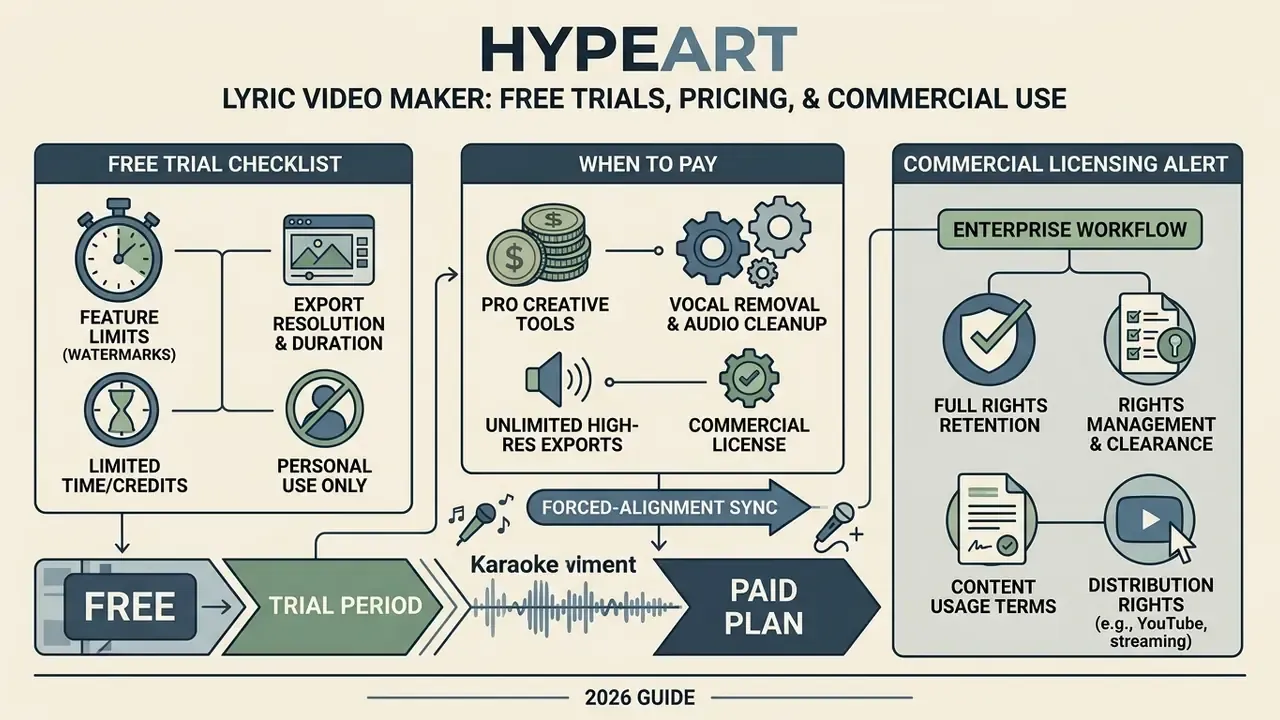
Pricing structures and commercial licensing terms deserve attention before any lyrics to video generator enters an enterprise publishing workflow. Most cloud platforms run freemium tiers: basic browser features are open, while high-resolution rendering, watermark removal, and commercial usage rights sit behind paid plans.
«LP-MusicCaps contains approximately 2.2M captions paired with 0.5M audio clips; models trained on it outperform supervised baselines in zero-shot transfer.»
Dataset scale like that explains why output quality varies so sharply between vendors. The underlying training corpus, not the interface, sets the ceiling on transcription and captioning behaviour. Organizations comparing licensing models can also review structures in our free photo editors guide, and budget owners can model per-release cost with our interactive AI Media Calculators.
What to check in a free lyric video maker trial
Free tiers let you test transcription accuracy, editor responsiveness, and the style library. Two trial models dominate: an always-free tier with permanent restrictions, and a credit grant, commonly around 15 starting credits, which funds one or two full test songs. Either way, expect rendering limits:
- Permanent platform watermarks burned into the output file.
- Export resolution capped at 720p on some tools, or 1080p at 24 fps on others.
- Monthly duration or credit ceilings, for example three minutes of total export.
- No commercial monetization on YouTube or social platforms. Several vendors classify free output as personal, non-commercial use only.
- Locked premium capabilities such as custom font upload, brand kits, vocal removal, or subtitle translation.
Use the trial the way an evaluator would, not the way the demo invites you to. Upload your hardest real track, a live take, a fast rap verse, or a heavily processed vocal, instead of the polished sample the vendor supplies.
When paid credits and professional tools make sense
Paid subscriptions or credit bundles become cost-effective once monthly production volume passes one-off project needs. Paid tiers unlock 1080p and 4K exports, watermark-free downloads, custom fonts, and full commercial rights. Labels and agency media teams producing at high frequency should evaluate a lyric music video maker subscription against a custom desktop workflow. The break-even point is simply the volume at which per-video subscription cost falls below the labour cost of manual alignment.
Published vendor tiers currently range from roughly $9 to $40 per month for self-serve plans, up to enterprise agreements with team seats and API access. Annual prepayment usually lowers the effective per-video cost for sustained output. One-off credit purchases stay rational only for irregular production below that break-even volume, so a video lyrics maker bought per render is a signal that your production cadence is still experimental.
Readers can also review commercial use rights for AI-generated content and compare free AI video generators to analyze feature limits across market tools.
Commercial Licensing Alert:
«Purely AI-generated material without human creative authorship cannot claim copyright protection.»
FAQ About Lyric Video Makers
Short answers to the questions that follow most evaluations: browser requirements, required experience, asset preparation, karaoke output, localization, and enterprise data handling.
Do I need video editing experience to create a lyric video?
No prior editing experience is required to use an automated lyric video creator. Cloud platforms automate vocal transcription, timecode synchronization, and motion graphics styling. Beginners can pick a pre-built template and let the model align text to the audio, while keeping the option to adjust timing or fonts manually through drag-and-drop controls. Judgement still helps, particularly on line breaks.
Can I create a lyric video in a browser?
Yes. Modern web applications let creators build, edit, render, and export a complete lyric video online entirely inside a standard browser such as Google Chrome, Apple Safari, or Microsoft Edge. Rendering runs on cloud clusters, so no heavy desktop install or dedicated GPU is needed. Vendors typically specify recent browser versions, Chrome 90+, Firefox 88+, Safari 14+, or Edge 90+, with JavaScript and cookies enabled for authentication.
What should I prepare before using a lyrics video maker?
Before launching a music lyrics video maker, prepare three assets: a high-quality master audio file (lossless WAV/FLAC or 320 kbps MP3), a verified plain-text lyric file with all repeats written out and structural tags removed, and high-resolution brand visuals such as cover art, background loops, or custom fonts. Official lyric text speeds up alignment and prevents recognition errors. A short style reference covering mood, palette, and typographic direction also improves generated backgrounds.
What is the difference between a lyric video and a karaoke video?
A lyric video keeps the original lead vocal in the mix and displays synchronized words as a promotional asset. A karaoke or sing-along video applies vocal removal so the listener performs the lead part over the instrumental. Both use the same alignment engine; only the audio treatment and the animation emphasis differ. Choose the mode before rendering, since switching afterwards usually means reprocessing the audio.
Which audio and video formats can I upload?
Production-grade tools accept WAV, FLAC, AIFF, MP3, M4A, and AAC audio, plus MP4, MOV, MKV, AVI, and WebM containers where audio is embedded in an existing edit. Many platforms support direct import from a public video or cloud-storage URL. Watch the practical ceilings: consumer tiers frequently cap audio uploads near 100 MB and around six minutes of runtime, with separate limits for artwork and background video.
Can I translate the lyrics into other languages?
Yes. Subtitle engines translate an aligned lyric track into additional languages and re-fit cue timing to the translated phrase length, producing bilingual overlays or separate sidecar SRT/VTT files per market. Because lyrics lean heavily on idiom and slang, a native-speaker review pass before release is strongly recommended, and brand fonts should be checked for glyph coverage in the target script.
Is it safe to upload an unreleased master to a free lyric video tool?
Treat it as a data-governance decision, not a convenience one. Before uploading embargoed masters, sync-licensed stems, or unpublished lyrics, confirm the vendor's retention window, deletion mechanism, encryption posture, sub-processor list, and written opt-out from model training and human review. Where those controls are unavailable, render pre-release material in a locally controlled or self-hosted pipeline and reserve SaaS editors for already-published catalogue.
Why is my fast rap verse mistimed?
High syllable density creates overlapping vocal tokens, so the aligner merges or skips words. Fixes, in order: clean the source audio with noise gating and band-pass vocal isolation, enable high-BPM or word-level alignment mode if available, then split the affected phrase into micro-syllable cues and re-anchor onsets manually against the waveform.
Technical Summary & Strategic Takeaways
- Input hygiene before automation.Alignment accuracy is decided in the transcript. Remove structural tags, chords and credits, expand every repeat in full, and match text to the exact audio cut before processing.
- Automated forced alignment.AI speech models handle baseline vocal-to-text synchronization and sharply reduce manual keyframing. Readers exploring adjacent generation stacks can review text-to-video AI tools for scene-level automation.
- Signal conditioning is part of the pipeline.Spectral noise gating, de-reverberation and band-pass vocal isolation should precede the aligner, especially for live, demo and high-density vocal material.
- Mode discipline.Decide between a traditional lyric video (vocal retained) and a karaoke sing-along (vocal removed at roughly 18 to 24 dB) before rendering, because the audio chain differs downstream.
- Human-in-the-loop verification.Automated systems still need manual proofreading and waveform inspection to catch mishearings, drift, and line-break errors before publication.
- Distribution-specific formatting.Exports must match destination specs: 16:9 containers for standard YouTube releases, 9:16 canvases for TikTok and Instagram Reels, with captions re-laid out rather than cropped.
- Legibility and accessibility standard.Typography overlays require strong contrast (minimum 4.5:1 under WCAG 2.2) and sub-100 ms timecode accuracy, plus no flashing above three times per second.
- Localization as distribution strategy.Translated sidecar subtitle tracks extend a single render across markets without duplicating masters, provided timing is re-fitted and reviewed by native speakers.
- Governance and Shadow AI control.Vet vendors for SOC 2 Type II or ISO 27001 attestation, training opt-out, retention limits, SSO/RBAC and audit logs before any pre-release audio leaves the organization.
- Commercial rights audit.Audit platform terms so stock assets, AI-generated backgrounds, and exported files carry complete monetization rights, and keep "editorial use only" material out of promotional releases.
Appendix A: Revised Statements and Source Notes
For transparency, the following statements from earlier revisions of this guide have been qualified or reworded rather than deleted, so readers can see how the evidence base changed.
- Original wording
- "Automated audio processing can eliminate up to 80% of repetitive timeline alignment in music video production." Updated: the figure now appears in the opening quotation only as a practitioner estimate attributed to the interviewee. No peer-reviewed benchmark in our source base quantifies an 80% reduction. Measure keyframe reduction on your own reference material before using the number in a business case.
- Original wording
- "Modern cloud systems allow teams to create AI media workflows that streamline short-form content production." Updated: reworded to state that cloud editors expose the alignment pipeline via browser and API access, with benefits expressed as fewer manual keyframes and human review still required.
- Original wording
- "AI-driven workflows reduce production time from hours to minutes." Updated: reframed as vendor-published production times (approximately 90 seconds for a styled render on one platform, a few minutes to first preview on another), flagged as claims to validate rather than measured averages.
- Original table cell
- "Render Speed, Cloud rendering (~90s)." Updated: relabelled "Cloud rendering (vendor-claimed ~90 s)" because the figure originates from marketing documentation, not independent testing.
- Citation placement fix
- the reference to Gu et al. (ACM TOMM, 2024) previously followed a general statement about audio analysis with no supporting quotation. A direct quotation on automatic lyric transcription and its accuracy dependencies now precedes the citation.
- Standing measurement gap
- word error rate and maximum timecode drift per vocal condition (studio, live, fast rap, heavily processed) are not published by most vendors. Teams that need assurance should generate these figures internally using a fixed reference set, as described in the governance section.
- Author attribution
- The commentary by Marcus Hale is retained for context, with his author credit shown at the top of the page.
Internal Hub Reference
Explore additional technical guides, software comparisons, and media processing calculators inside our main glossary. Creators investigating conversational agent architectures can review our framework guide on how to create your own synthetic voice, examine enterprise roles in our analysis of the creator of ai ecosystem, or read the adjacent entry on how consumer platforms create your ai personas, useful mainly as a contrast in data-handling norms. For automated production budgeting, use our interactive AI Media Calculators.