Executive Summary
- Format is non-negotiable 9:16 vertical, 1080×1920 px, MP4/H.264, 30 FPS, 8 to 15 Mbps target bitrate. TikTok's own ad specs accept 9:16 from a minimum of 540×960 px and allow durations up to 10 minutes, but performance guidance favors 9 to 15 seconds for ads.
- Browser-first is now viable cloud rendering removes local GPU dependency; a modern 64-bit Chrome or Edge build with WebGL2 and 8 GB RAM is the realistic floor.
- Captions are structural, not optional speech appears in 99% of top-performing TikTok videos and is captioned in 96.7% of them (CHI 2024, 300-video dataset). But 19.7% of those caption tracks contain errors, so review is mandatory.
- AI cuts cost, not judgment an MIT field experiment measured roughly 90% lower video ad production cost and +9.4 percentage points CTR for AI-personalized video versus personalized images.
- Music licensing is the top compliance trap business accounts must use TikTok's Commercial Music Library (CML) or explicitly licensed stock audio, then verify the track with a copyright detector before export.
How to Use This Guide
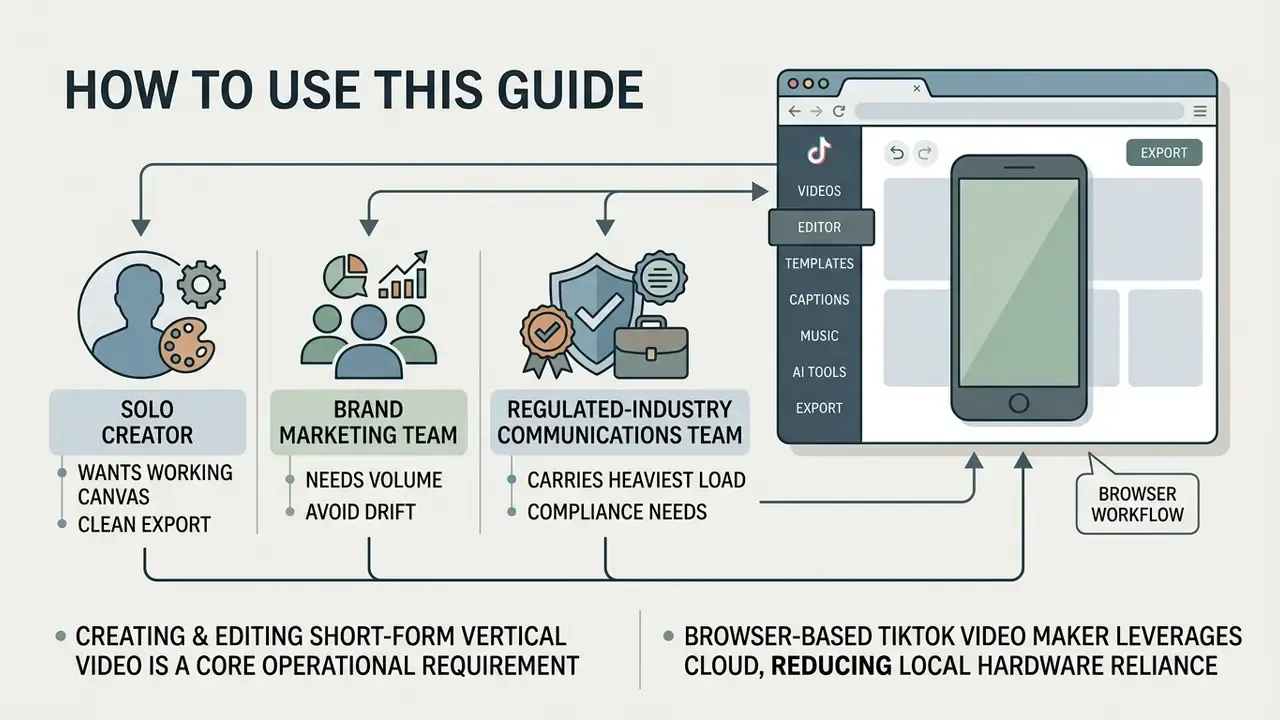
The solo creator wants a working canvas and a clean export. Read the format section, the step-by-step workflow, and the watermark rules in the free-tier comparison. Skip the provenance checklist unless you take brand deals.
The brand marketing team needs volume without drift. Focus on video templates, the hero-plus-cutdown asset set, the AI features that compress editing time, and the commercial licensing rules for music and stock media.
The regulated-industry communications team carries the heaviest load. Everything here matters, but the audio licensing controls, the synthetic-media disclosure checklist, and the total-cost-of-ownership formula are the parts that survive contact with an internal audit. One caveat worth stating early: platform specs change quietly, so treat every number below as a snapshot to re-verify, not a permanent standard.
Creating and editing short-form vertical video has become a core operational requirement for digital communications, marketing teams, and content creators. According to the Semrush Digital Trends Report (2024), short-form video achieved an average engagement rate of 5.54% on TikTok, outperforming legacy social formats.
"25% of marketers planned to invest more in short-form video than in any other format in 2024."
A browser-based tiktok video maker lets teams create tiktok video online without relying on local hardware rendering or heavyweight desktop installations. By combining automated workflows, cloud-based rendering, and standardized video templates, organizations can publish high-volume vertical content while holding a consistent quality bar. Teams evaluating adjacent automation can also review how AI video generators fit into the same pipeline.
What an Online TikTok Video Maker Does
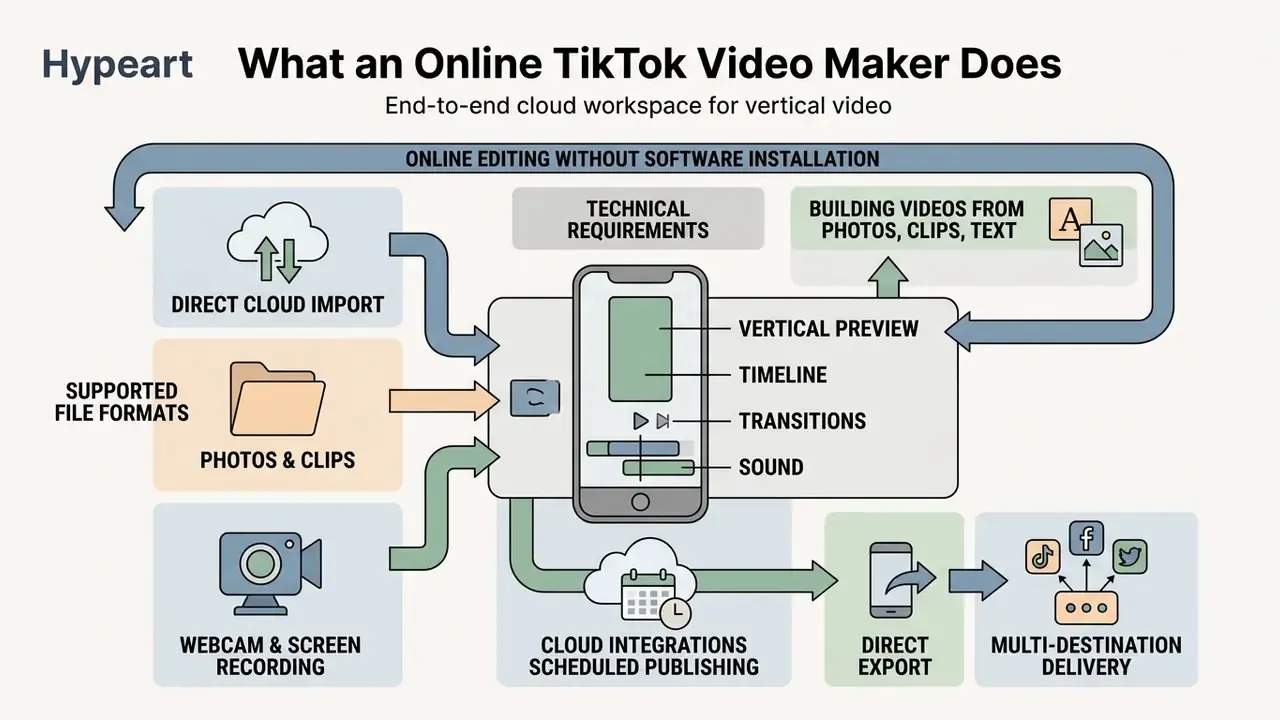
An online video editor built for TikTok provides an end-to-end cloud workspace that aggregates, edits, and exports vertical video clips directly in a web browser. It simplifies short-form production with timelines, multi-track audio layering, text overlays, and AI-assisted automation, and it does so without a local install.
According to a 2023 study presented at the American Geophysical Union (AGU) on cross-platform communication, short-form educational and promotional content achieved median views three times higher on TikTok than on Instagram Reels and twenty-five times higher than on YouTube Shorts. A dedicated tiktok video maker helps creators tap that distribution efficiency by supplying tools tuned specifically for vertical consumption.
"Median views on TikTok were three times higher than on Instagram Reels and twenty-five times higher than on YouTube Shorts for educational content."
Table: capabilities and practical applications of online TikTok video editors
| Feature category | Technical capabilities | Practical operational use |
|---|---|---|
| Media ingestion | Direct upload of MP4, MOV, WEBM, MKV, AVI, GIF, PNG, JPG, HEIC and SVG files via cloud storage, direct link, or local disk | Aggregates user-generated clips, product photos, and branded graphics in one workspace |
| Timeline editing | Multi-track trimming, splitting, scene stacking, and speed adjustment (0.1x to 10x) | Allows precise pacing and quick pattern interrupts that retain viewer attention |
| Text and captions | Timed text overlays, auto-captioning via ASR, custom font styling, safe-zone alignment | Protects message retention for muted viewing and supports Section 508 accessibility standards |
| Audio integration | Sound replacement, voiceover recording, audio trimming, Commercial Music Library access | Aligns video pacing with audio trends while keeping copyright compliance for business accounts |
| AI and automation | Text-to-video generation, image-to-video animation, auto-dubbing, video translator features, silence removal, intelligent script structuring | Scales creative output and reduces manual production effort and cost by up to 90% for enterprise campaigns* |
| Integrations and publishing | Google Drive, Dropbox, Zoom, Twitch and YouTube import; webcam and screen capture; one-click push to TikTok; scheduled publishing | Removes intermediate downloads and centralizes review, approval, and release timing |
* Cost-side substantiation for the 90% figure:
"A field experiment measured an approximately 90% reduction in video advertising production costs when generative AI pipelines replaced manual creative production."
Budget-constrained teams comparing entry-level options can start with free AI video generators before committing to a paid production stack.
Technical Requirements and Supported File Formats
Format failures are the most common cause of rejected or visibly degraded uploads. Boring, avoidable, and expensive. The table below consolidates editor-side ingestion limits and platform-side upload limits into a single reference.
| Media type | Supported formats | Max file size | Recommended parameters |
|---|---|---|---|
| Video | MP4, MOV, WEBM, MPEG, AVI, MKV, GIF | Up to 1 GB (cloud upload) | 1080×1920 (9:16), 30 or 60 FPS, H.264, 8 to 15 Mbps (10 to 12 Mbps typical for 1080p30) |
| Images | PNG, JPG/JPEG, WEBP (static only), HEIC/HEIF, WEBM | Under 50 MB; not more than 250 million total pixels (width × height) | Minimum 1080 px on the short edge, RGB color space |
| Vector graphics | SVG (Profile "SVG 1.1") | Under 3 MB | 150 to 200 px width, fonts converted to outlines |
| Audio | MP3, WAV, M4A, AAC | Up to roughly 100 MB | 44.1 kHz, up to 320 kbps, voiceover peaking near −3 dB |
| TikTok app upload ceiling | MP4 / MOV | ~287.6 MB (iOS) / ~72 MB (Android)* | Duration up to 10 minutes; 9 to 15 seconds for ads, 15 to 60 seconds for organic |
| TikTok ad specs (minimums) | MP4, MOV, MPEG, AVI | Per Ads Manager limits | 9:16 from 540×960 px; 16:9 from 960×540 px; 1:1 from 640×640 px |
| Transparency workflows | GIF (preferred for transparent backgrounds), PNG | Per format row above | Export alpha assets as GIF or PNG sequences, not MP4 |
* The 287.6 MB (iOS) and 72 MB (Android) ceilings apply to direct import through the TikTok mobile application and are widely reproduced in vendor documentation, for example Canva's TikTok FAQ. Treat them as mobile-app import constraints rather than a universal server-side limit, and verify against current in-app behavior before building a delivery spec around them. Browser uploads and Ads Manager ingestion generally accept larger files. For oversized masters, run the file through a video compressor before upload instead of letting the platform re-encode aggressively.
Building TikTok Videos from Photos, Clips, and Text
Combining static photos, raw video clips, and dynamic text overlays into one vertical asset requires multi-track editing and scene synchronization. Creators can upload B-roll footage, product imagery, and voiceover audio to build structured 15-to-60-second social media assets. Static catalogs can also be animated directly with image-to-video AI tools instead of being re-shot.
When a retail brand needed to scale product promotions across several categories, the team moved from manual editing to a web-based free tiktok video creator workflow. By pairing high-resolution product photography with 9:16 background motion clips and automated text overlays, they assembled several dozen distinct video variants in a single working session and reported a material drop in cost per asset. Hypothesis label: the internal figures behind this account, roughly 40 assets per session and about 75% lower cost per asset, are self-reported project estimates from one workflow migration, not audited benchmarks. Treat them as directional until you validate them against your own CRM and finance data.
Using a web tool to edit video tiktok online lets users sequence assets without friction. Editors can apply transitions between static images and video clips to preserve visual momentum across the whole scene sequence. Source stills are worth color-correcting first in a photo editor so product tones stay consistent across an entire campaign batch; a free photo editor is usually enough for simple exposure and white-balance fixes.
Online Editing Without Software Installation
Cloud video processing shifts rendering workloads from local hardware to remote server infrastructure, which removes performance bottlenecks on standard workstation laptops. According to NIST cloud computing definitions, on-demand browser access provides scalable compute resources, so complex H.264 rendering can happen off-device.
Using an online video editor requires only a modern 64-bit browser such as Chrome or Edge with WebGL support. Current vendor requirements are concrete: Adobe's browser video editor specifies Chrome or Edge version 144 with a minimum of 8 GB RAM on Windows 10 or macOS 12, while professional web editors such as ArcGIS Web Editor additionally require a 1024 px minimum screen width and WebGL-enabled 64-bit browsers. Teams can review the full category landscape in our overview of video-editing tools.
This architecture enables cross-platform collaboration between colleagues on Windows, macOS, and ChromeOS without software version conflicts or plugin installs. Browsers run client-side timeline previews while offloading final file compilation to cloud servers. The result is consistent 1080p export speed regardless of the local graphics card. Operationally, it also means one large export can render in the background while the next project is already being edited, which matters more than raw speed when a launch calendar is tight.
Cloud Integrations and Scheduled Publishing
A modern browser editor removes the need to download source footage to a local disk before editing. Connect external storage and conferencing sources directly:
- Direct cloud import link Google Drive and Dropbox, and pull webinar or stream recordings from Zoom, Twitch, or YouTube by direct URL, the same integration pattern Flixier exposes for TikTok workflows.
- Webcam and screen recording capture talking-head footage, product walkthroughs, and voice commentary straight into the project timeline without third-party utilities.
- Direct export and content scheduling publish the finished MP4 to a TikTok profile in one click (the CapCut-to-TikTok pattern), or plan date and time through a built-in content scheduler in the style of Adobe Express, queueing Reels, TikTok posts, and Stories together.
- Multi-destination delivery push the same render to TikTok, YouTube, Google Drive, or Dropbox, then repurpose the horizontal master through our YouTube video editing workflows.
- Governance benefit because assets never leave managed cloud storage, access logs and version history stay auditable, which is a direct mitigation for Shadow AI file sprawl.
TikTok Video Format: Aspect Ratio, Text, and Music
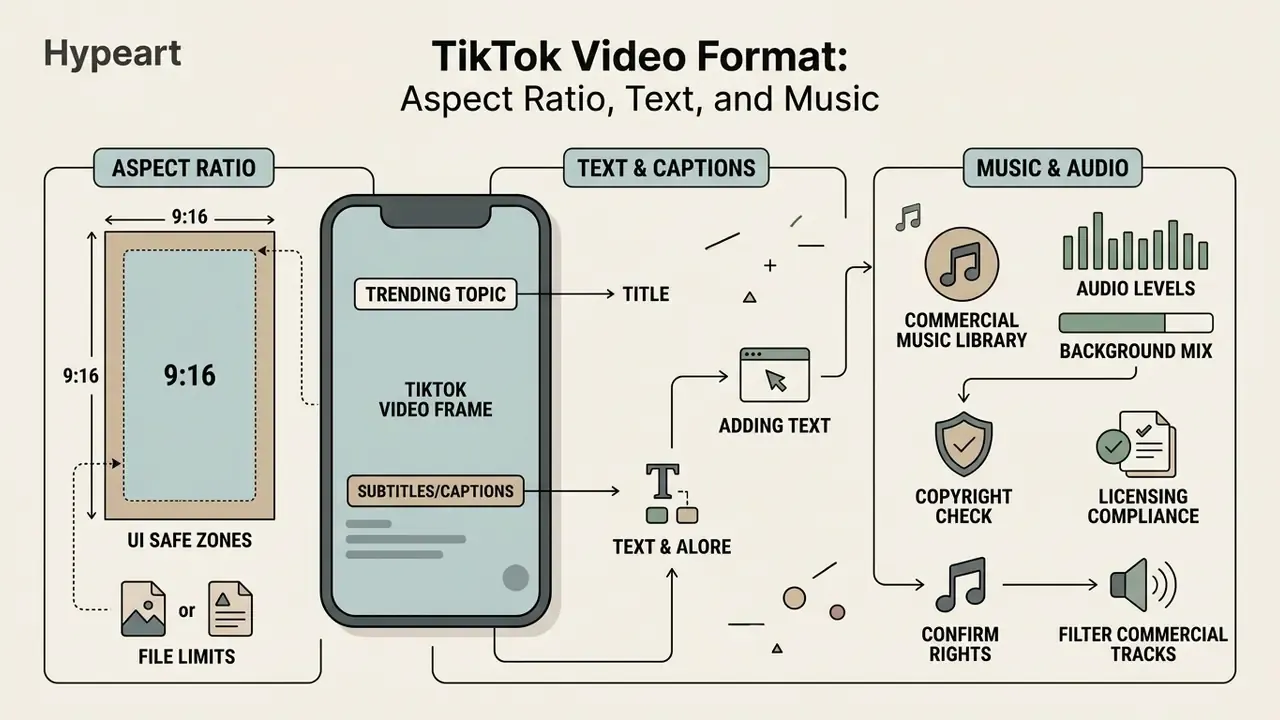
Optimizing vertical short-form content requires strict adherence to aspect ratio standards, UI safe zones, and audio formatting. Get any of the three wrong and engagement leaks before the message lands. A dedicated free tik tok video editor provides predefined canvas boundaries that align media assets to TikTok's technical specifications automatically.
How to Set the Aspect Ratio for TikTok Video
The required aspect ratio for TikTok video is 9:16 portrait orientation, delivered at a standard resolution of 1080×1920 pixels. According to IAB Vertical Video Advertising Best Practices, content filmed and edited natively in 9:16 achieves higher full-screen engagement than letterboxed horizontal media. TikTok's own creative guidance says it plainly: shoot vertical, keep the subject centered.
To configure canvas dimensions in an online editor, select the 9:16 portrait preset before you position any media. Critical visual subjects and text overlays must stay centered inside the UI safe area so in-app buttons, captions, and account handles do not cover them. Practical rule: build all essential copy inside the middle third of the frame, leave the top 130 px or so clear of the header row, and keep the bottom 480 px free of key information where the caption block, handle, and action rail sit. Exact margins vary by app version and ad format, so confirm placement in preview before publishing.
Horizontal 16:9 video clips dropped into a 9:16 canvas should be cropped or padded with background blur. Keeping portrait orientation prevents unwanted black bars and lets the video fill the smartphone display completely.
How to Add Text, Captions, and Music
Timed text, synchronized captions, and background audio raise viewer retention, especially for people watching without sound. A CHI 2024 study of TikTok captioning practices analyzed a dataset of 300 videos and found that human speech appears in 99% of top-performing videos and is captioned in 96.7% of cases. Captions are not a courtesy; they are structural.
Attention research points the same way. A 2024 peer-reviewed eye-tracking study found that when sound was removed, mean fixation duration and total reading time on subtitle areas increased while subtitle skipping decreased. Muted viewers actively read. U.S. Section 508 guidance then sets the quality bar: captions must be synchronized with audio, include dialogue and meaningful non-speech sounds, stay on screen long enough to read, and label speakers consistently.
To add text effectively, place title overlays in the upper-middle third of the frame so they clear TikTok's native interface elements. Auto-generated captions produced by speech recognition should be reviewed line by line to fix terminology and adjust timing. Brand names, product SKUs, and regulated terminology are the most frequent ASR failures, and in financial content a single mistranscribed product name can turn a compliant script into a supervisory finding.
For audio, pick trending sounds or cleared commercial tracks from accessible media collections. The platform lets editors add music, trim audio duration, balance background levels against voiceovers, and drop in sound effects that create scroll stopping cues in a fast-moving feed.
How to Check Audio for Copyright Before Publishing
- Run the built-in copyright detector.Before final rendering, scan the audio track against the protected-recordings database. CapCut exposes this as a pre-publish check specifically to avoid muted or blocked uploads. Resolve every flag before export, not after upload.
- Filter the Commercial Music Library.When picking a track from the built-in library, switch the filter to commercial use only so non-cleared trending sounds never enter the picker.
- Confirm rights for original or third-party sound.If you use original sound or audio sourced outside the CML, TikTok requires you to confirm that you hold the necessary rights or licenses and that the post contains no unauthorized copyrighted music.
- Balance levels so music reads as background.With a third-party voiceover, hold background music around −18 dB to −22 dB relative to speech. The bed stays unmistakably secondary and the voice track survives phone speakers.
- Log the license.Record track ID, source library, license scope, and campaign in your asset register. This is the cheapest control you can add to a paid-media workflow, and the first one auditors ask for. Platform enforcement precedents are tracked in our AI Litigation and Case Timelines.
How to Create a TikTok Video Online: Step-by-Step
Producing a high quality vertical video in a web browser follows a predictable five-stage workflow. A structured editing process helps creators create online tiktok video assets efficiently without sacrificing visual quality.
Checklist0 / 5
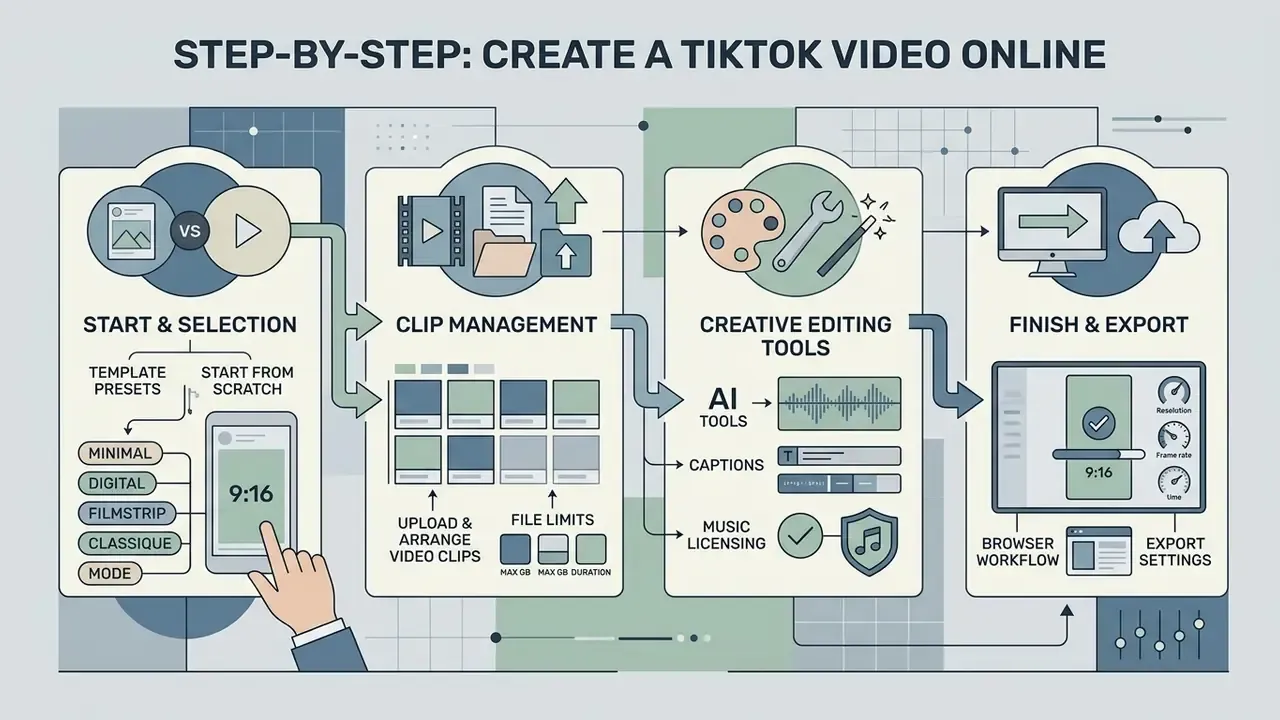
Choose a Template or Start from Scratch
A pre-designed template accelerates production by supplying structured pacing, motion graphics, and text placeholders built for a specific content goal. Creators swap in their own media and keep the optimized transitions. Official template guidance agrees on one point: a template is a baseline to customize, never a finished asset to ship unchanged.
Starting from a blank project makes more sense when you work against precise corporate brand guidelines or an unusual video structure. A blank canvas gives full control over layer positioning, animation timing, and brand color palettes. Production-planning practice suggests defining objective, target audience, format, runtime, and destination platform before touching the timeline. That brief is what decides whether a template is a shortcut or a straitjacket.
| Decision factor | Template-first | Build from scratch |
|---|---|---|
| Turnaround time | Hours | Days |
| Brand-guideline precision | Moderate | High |
| Volume production (10+ variants) | Strong fit | Inefficient |
| Regulated or legal-review content | Risky (baked-in copy) | Preferred |
| Cost per asset | Lowest | Highest |
Both approaches support full customization. Designers can still adjust background elements, transition styles, and graphic overlays regardless of the initial project setup.
Template Style Presets People Actually Search For
Search demand clusters around visual styles, not features, which is why template libraries are usually organized by look. A few recurring patterns:
- Minimal. A free online minimal video maker for tiktok preset relies on flat backgrounds, one typeface, and generous negative space. It ages well and survives brand review with minimal edits.
- Digital. The free online digital video maker for tiktok style leans on UI-inspired overlays, glitch transitions, and data callouts. Useful for product and fintech explainers.
- Filmstrip. A free online filmstrip video maker for tiktok layout stacks sequential frames into a strip motif, which suits before-and-after reveals and multi-step tutorials.
- Classique. The free online classique video maker for tiktok family uses serif typography, film grain, and slower cuts. It reads as premium, though it fights TikTok's default pacing.
- Mode. A free online mode video maker for tiktok preset is the fashion-editorial look: high-contrast type, beat-synced cuts, runway-style framing.
Pick the style before the script if brand consistency matters more than novelty. Pick it after if you are chasing a trend.
Upload and Arrange Video Clips
Importing source media means uploading high-resolution files straight to the editor's cloud timeline. Arrange video clips chronologically, and put the most visually striking scene in the first one to three seconds. That is where attention is either won or lost.
Dynamic pacing depends on precise trimming and splitting. TikTok's Help Center documents the trim and split functions but publishes no official second-based pacing standard. The 1.5-to-3-second cut cadence often cited as an "industry standard" comes from 2025 and 2026 creator and agency pacing guides, which converge on 1 to 3 seconds per cut in hooks, 1 to 2.5 seconds for B-roll, and a pattern interrupt at least every 3 to 5 seconds in explanatory content. Treat it as editorial convention, not platform policy.
Timeline trimming and split workflow (text schematic):
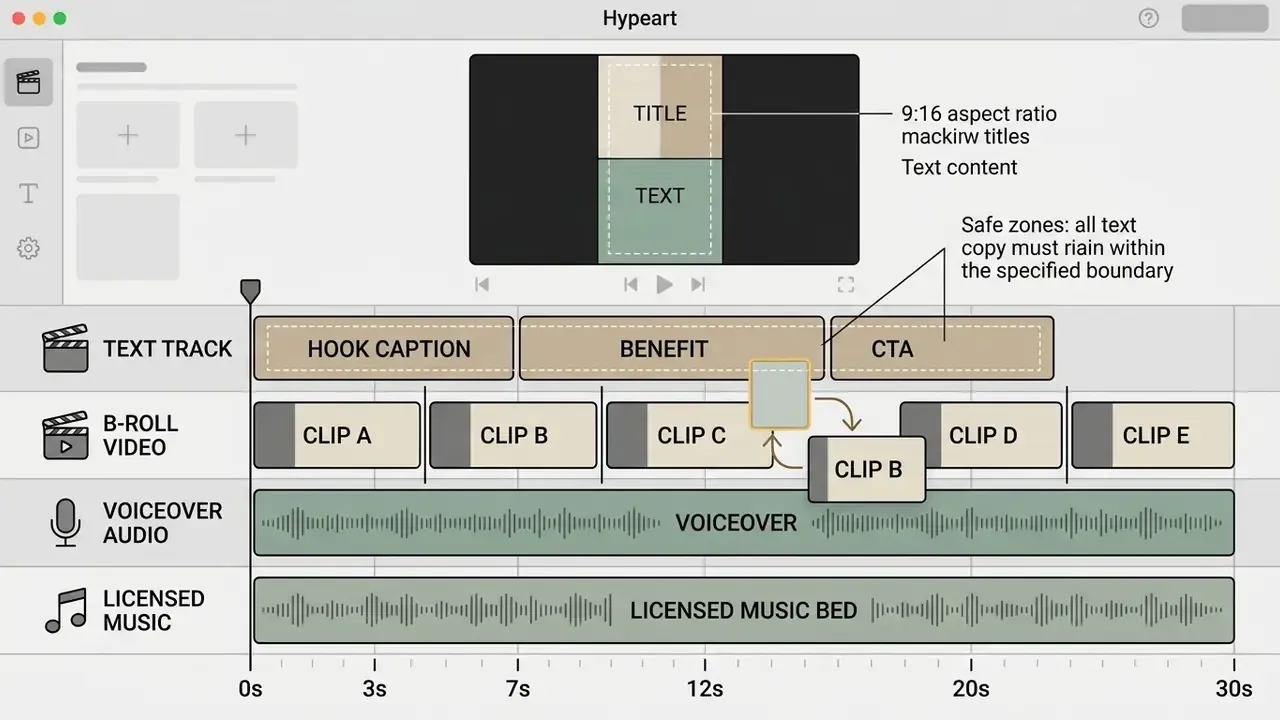
Editors can also alter playback speed for fast-motion tutorials or slow-motion emphasis shots. Adjusting clip timing so cuts land on the beat of the background track is, honestly, the cheapest perceived-quality upgrade available in a browser editor.
Edit and Export the Final File
Finalizing a project means balancing audio levels, checking text readability, and choosing export parameters that survive platform re-encoding. Per platform specifications, exporting at 1080×1920 in MP4 with H.264 compression at 30 FPS gives the best playback clarity on mobile screens.
| Export parameter | Recommended value | Notes |
|---|---|---|
| Resolution | 1080×1920 | 540×960 is TikTok's ad-spec minimum, not a quality target |
| Container and codec | MP4 / H.264 | H.265/HEVC is accepted by some tools; H.264 is compatibility-first |
| Frame rate | 30 FPS | Use 60 FPS only when the source footage is 60 FPS |
| Video bitrate | 10 to 12 Mbps (1080p30) | Broader accepted range: 8 to 15 Mbps; 12 to 20 Mbps for 1080p60 |
| Audio | AAC, 44.1 kHz, 128 to 320 kbps | Normalize dialogue before export |
| Watermark | None | Verify the export preview before the final render |
AI Tools for TikTok Video Creation
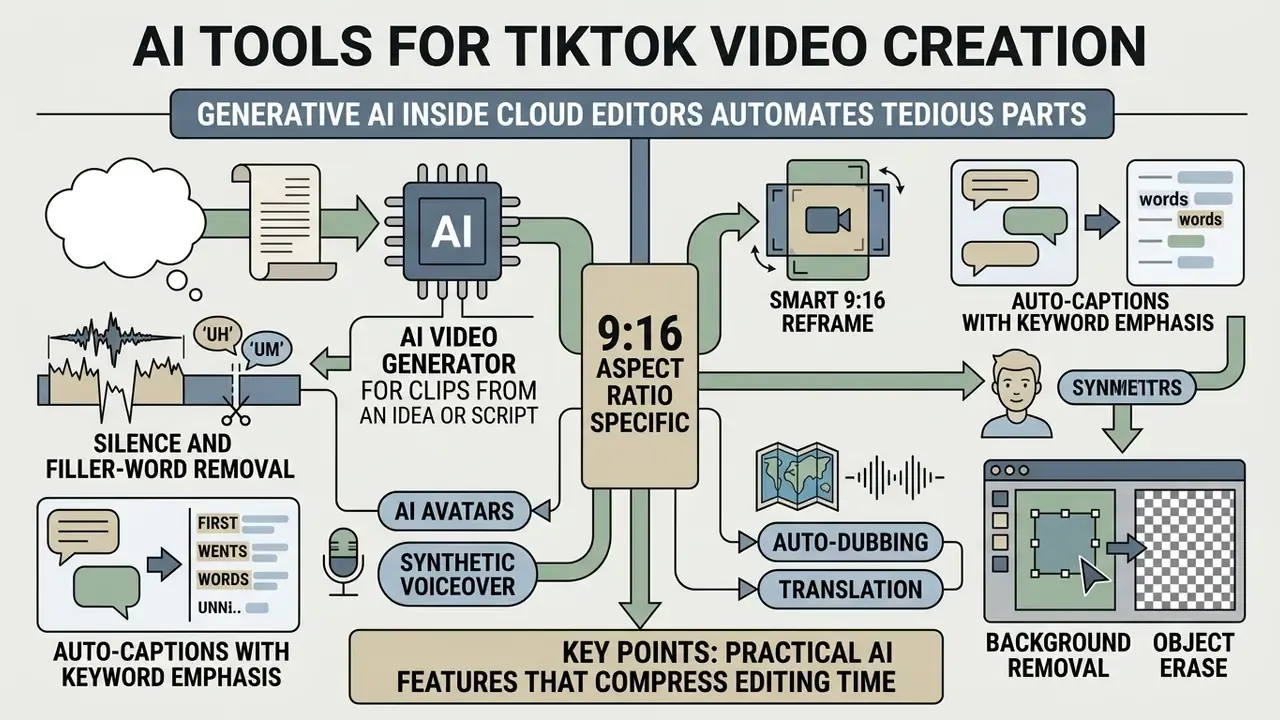
Generative AI inside cloud editors automates the tedious parts: script generation, scene drafting, auto-captioning, multilingual dubbing. An ai tiktok video workflow lets teams produce targeted variations of top-performing ad creative at scale. TikTok's own Symphony suite now documents text-to-video, image-to-video, avatar generation, translation, and dubbing as first-party capabilities, so AI-assisted production is platform-endorsed rather than a workaround.
AI Video Generator for Clips from an Idea or Script
An ai powered video generator turns written prompts or marketing briefs into structured video drafts. The model reads prompt semantics, selects relevant stock clips, generates synthetic voiceovers, and lays scenes onto the timeline. Research prototypes and shipping products follow the same pipeline: prompt or script input, then LLM script and storyboard generation, then asset generation (images, voice, motion), then render, then preview and download.
"Across 21,000+ consumers, AI-personalized video ads increased click-through rates by 9.4 percentage points over personalized image ads and 6.5 points over generic video."
The same experiment measured an approximately 90% reduction in creative production cost.
Traditional versus AI-assisted video workflow (measured and estimated deltas):
| Dimension | Manual production | AI-assisted pipeline | Delta |
|---|---|---|---|
| Production cost per ad asset | Baseline | ~10% of baseline | ~ −90% (MIT, 2024) |
| CTR versus personalized image ads | Baseline | +9.4 pp | MIT field experiment |
| CTR versus generic video ads | Baseline | +6.5 pp | MIT field experiment |
| Time from brief to first draft | Days | Minutes to hours | Directional (hypothesis) |
| Variant count per campaign | 1 to 3 | 10 to 40 | Directional (hypothesis) |
| Human review requirement | Standard QA | Mandatory QA plus provenance labeling | Increases |
Note the last row. AI lowers unit cost and raises review obligation at the same time, which is exactly why control cost belongs in the ROI model. Creators can use text-to-video AI tools to draft initial storyboards, cutting setup time for review videos, educational explainers, and campaign assets. Generated drafts then get refined with standard timeline editing. Developers wiring generation into an internal pipeline can start from the Google Veo Implementation Guide and the broader AI Media API Guides.
Practical AI Features That Compress Editing Time
- Silence and filler-word removal the engine detects pauses longer than roughly 0.5 seconds plus filler words, then strips them from the voice track in one pass. The single largest time saver on talking-head footage.
- Smart 9:16 reframe subject tracking crops a horizontal 16:9 master into 1080×1920 while keeping the speaker centered, which turns webinar and Zoom recordings into publishable vertical clips.
- Auto-captions with keyword emphasis ASR converts speech to timed text, animates keyword highlights, and counts characters per line so copy never spills outside the UI safe zone.
- AI avatars and synthetic voiceover avatar libraries and product avatars generate presenter-led clips without filming; pair them with AI voice generators for consistent brand narration.
- Auto-dubbing and translation one master edit becomes several language variants, so a single hero asset covers cross-border reach.
- Background removal and object erase isolate a subject or clean a frame without a green screen.
Automatic Captions and Video Editing Enhancement
Automatic speech recognition (ASR) engines generate timed subtitle tracks straight from spoken audio. That reduces manual transcription time and improves accessibility for Deaf and hard-of-hearing audiences. TikTok's auto-captions can be language-selected at upload, previewed, edited line by line, or removed before posting.
Accuracy remains the constraint. A 2022 analysis of AI-generated captions across platforms reported average caption accuracy of 89.8%, below accessibility expectations, and the CHI 2024 dataset cited above found a 7.9% average word error rate on TikTok. Vendor-cited A/B testing also indicates that captioned video reached roughly 16% more viewers on average than uncaptioned video. So caption QA is a performance task, not only a compliance one.
On translation and dubbing: a 2025 exploratory consumer study of AI video translation found that synthetic dubbing scored lower on perceived naturalness and accent neutrality than human dubbing, yet showed no measurable difference in customer engagement intention. Sourcing note: the primary publication was not available with a verifiable URL at the time of writing, so it is cited here as an exploratory consumer study and should be treated as preliminary until the peer-reviewed record can be linked. Directionally, it supports using an automated video translator to expand cross-border reach while reserving human dubbing for flagship brand assets.
Integrated AI tools inside a free online tiktok video editor can also detect and trim silent pauses, strip filler words, and reframe horizontal footage into vertical 9:16 compositions using smart subject tracking.
AI Content Provenance and Governance Checklist
For regulated organizations, the compliance question is no longer "can we generate this?" but "can we prove how it was made?" Use this pre-publish checklist:
Checklist0 / 7
One owner per line, ideally. A checklist with no named owner is documentation theatre.
Free TikTok Video Maker for Business and Social Media
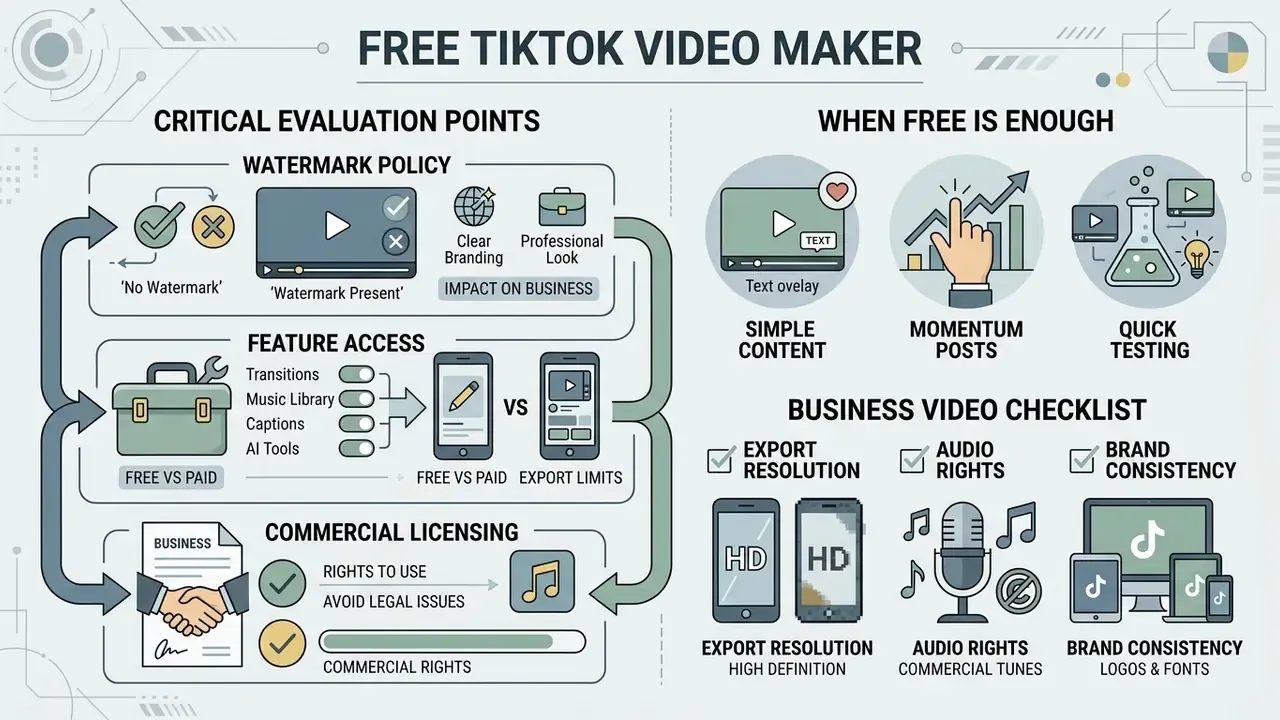
Evaluating a free online video editor for tiktok means analyzing feature access, export resolution caps, watermark policies, and commercial licensing terms. A free online tiktok video maker covers the essentials for personal accounts and pilot marketing campaigns, and sometimes that is genuinely enough.
Table: comparison of free and premium features in online TikTok video editors
| Feature category | Free online tier | Paid or business tier |
|---|---|---|
| Maximum export resolution | 720p or 1080p HD, frequently watermarked on non-partner tools | Uncompressed 1080p HD and 4K Ultra HD without watermarks |
| Watermark restrictions | May include vendor branding on exported MP4 files | Clean export with full white-label rights |
| Export volume | Capped renders per month on some tools, for example a single watermark-free export | Unlimited or high-volume exports with longer maximum duration |
| AI processing credits | Limited monthly credits, for example 5 to 10 minutes of auto-captions | High or unlimited AI generation, dubbing, and script translation |
| Stock media access | Basic royalty-free music and a limited set of video templates | Full access to Commercial Music Library and premium stock assets |
| Template availability | Broad template libraries on consumer tiers | Varies; some business and education plans exclude template access entirely |
| Commercial usage rights | Restricted to personal or non-commercial content | Full commercial license for paid ad campaigns and corporate branding |
Documented vendor patterns make the trade-off concrete. One browser editor's free plan exports at 720p with a vendor watermark while its business plan unlocks 1080p and 4K watermark-free renders with more storage. Another caps free users at a single 720p watermark-free export per month. A third offers watermark-free 1080p on free and reserves 4K for premium, but blocks export entirely if the project contains a premium asset. Before choosing a tier, compare options among leading AI video generators and review current AI Media Pricing Guides.
Total cost of ownership, not sticker price. A usable TCO formula for a browser video stack:
TCO / month = (seats x subscription)
            + (AI credits consumed x credit price)
            + (editing hours x loaded hourly rate)
            + (QA + caption review hours x loaded hourly rate)
            + (legal/licensing review hours x loaded hourly rate)
            + risk reserve (expected cost of takedown, mute penalty, or rework)
Worked illustration (hypothesis, replace with your own finance data): 4 seats at $30 = $120; 60 AI minutes at $0.40 = $24; 20 editing hours at $45 = $900; 6 QA hours at $45 = $270; 1 legal hour at $120 = $120; risk reserve at 5% of the above = $72. Monthly TCO lands around $1,506 for roughly 24 published assets, or about $63 per asset. That per-asset number, not the $120 subscription line, is what belongs next to an agency quote.
When a Free Online Video Editor Is Enough for TikTok
A free tiktok video maker is sufficient for independent creators, personal vlogs, and early social media testing. Basic timeline trimming, simple text overlays, and standard filters support high quality creation with no recurring subscription. See our comparison of free video editing software for feature-by-feature limits, and free AI video generators for credit and export caps on the AI side.
A free tier clears the bar for a personal TikTok account when it can do four things: export native 9:16 at 1080×1920, render without a forced watermark, handle trimming, overlays, and captions, and produce a clean publish-ready MP4. If any of those four fails, especially the watermark, the tool is a prototyping environment rather than a publishing one.
When a digital marketing consultant launched a pilot campaign on a tight budget, they used a free online social media video maker for tiktok to test five promotional variations. The tool delivered watermark-free 1080p exports and basic trimming, which let the client validate audience engagement before committing budget to a premium tier. Modest setup, useful answer.
If the free editor supports 1080×1920 vertical export without destructive watermarks, it meets every core requirement for routine personal publishing. Business publishing is a different conversation, and it starts with licensing.
What to Check Before Producing a Business Video
Before publishing promotional content built with a free online business video maker for tiktok, review asset licensing terms carefully. Using royalty-free music or stock footage intended solely for personal use inside a commercial ad can trigger copyright strikes or legal disputes. TikTok's advertising policy separately prohibits unauthorized third-party names, logos, and brands in ad creative, and TikTok's brand guidelines bar use of TikTok's own logos and icons without prior written permission.
"Fully AI-generated advertising increased click-through rates by up to 19% compared with ads created by human experts."
Verify whether the platform permits commercial distribution of rendered files at all. Commercial assets need verified licensing for corporate promotion, paid placements, and branded channels. Confirm three things in writing: the export license covers paid media, the stock and music licenses cover commercial distribution, and the AI output license permits commercial reuse without attribution constraints.
Then review export resolution settings so rendered files meet platform standards. Our AI Media Pricing Guides and AI Media Comparison Matrices are the fastest way to check tool licensing limits before an enterprise campaign goes live.
TikTok Content Ideas for Creators, Marketing, and Business
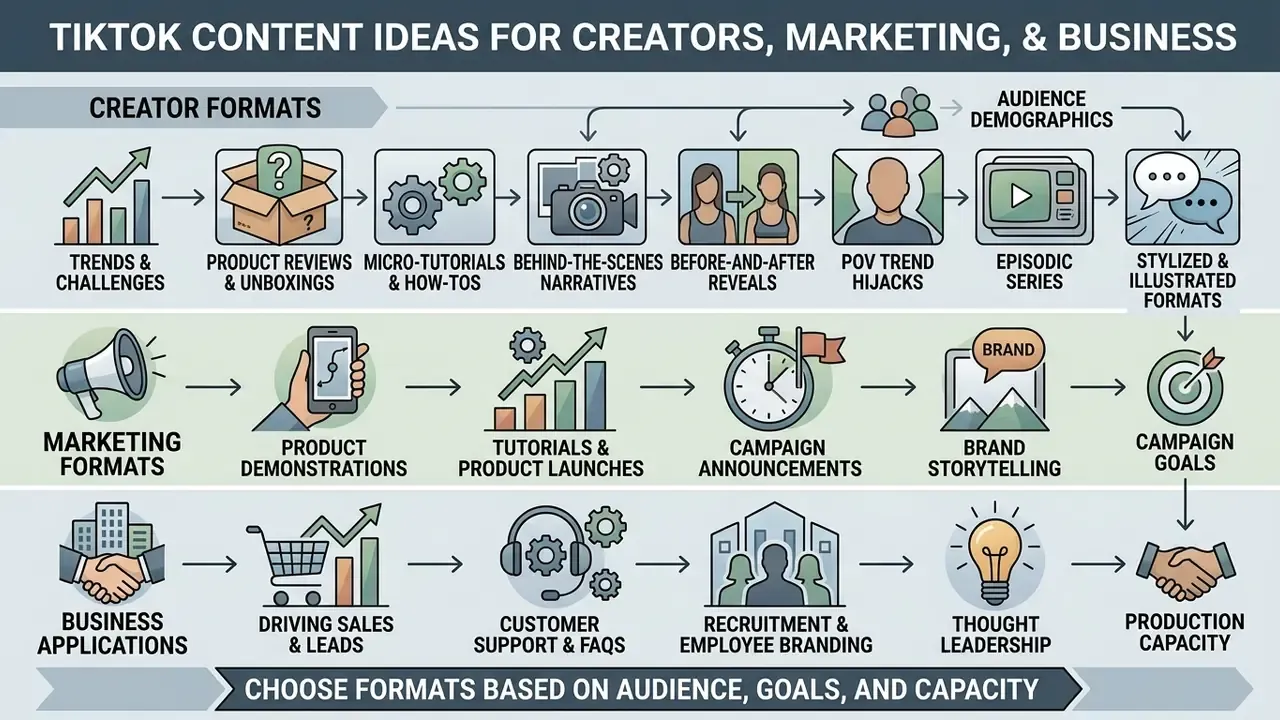
Choosing a content format depends on audience demographics, campaign goals, and production capacity. Standardized video structures let teams create videos consistently while holding production quality steady. TikTok's 2026 marketing materials group the surface into seven repeatable formats: short-form video, photo carousels, Stories, Duets and Stitches, Live, Series, and UGC-style creator-led posts.
"More than 50% of marketers already using short-form video planned to increase investment in the format."
Creator Formats: Trends, Reviews, and Short Stories
Independent creators usually chase rapid trend adoption, product review clips, direct-to-camera commentary, and episodic storytelling. Talking-head videos with direct eye contact build trust and pull comments, which is why the format refuses to die on any social media platform.
- Product unboxings and first impressions tight close-ups of product details with fast text captions calling out key specifications.
- Micro-tutorials and how-to guides break a complex task into three clear steps, with pattern interrupts every two seconds to hold focus.
- Behind-the-scenes narratives show real operational process, using voiceovers over dynamic B-roll. Synthetic narration from AI voice generators keeps tone consistent across a whole series.
- Before-and-after reveals and POV trend hijacks high-contrast transformation formats that read instantly in a muted feed.
- Episodic series numbered installments that turn one-off viewers into returning followers.
Stylized and illustrated formats. Not every clip needs live footage. Animated and illustrated looks travel well on TikTok because they read clearly at thumbnail size and sidestep filming logistics entirely. Explainer sequences can be built with an ai cartoon video generator or assembled frame by frame in an ai cartoon maker. For static thumbnails, reaction stickers, and recurring mascots, an ai cartoon generator works, and there are ai cartoon generator online free options if you are testing a concept before paying for anything. Community-facing accounts often lean on an ai caricature generator for lighthearted host intros, while automotive and dealership channels use an ai car generator to visualize trims and color options without a photo shoot. Motion graphics for lower thirds and animated logos can be handled with our guide to animation makers.
Creators can read platform analytics to find the best video structures, then duplicate what works using reusable editor project templates. TikTok Studio's built-in analytics and trending-similar-videos panel make that loop measurable inside the app.
Marketing Formats: Products, Tutorials, and Launches
Corporate marketing teams use short-form video to drive product discovery, educate prospects, and feed paid acquisition funnels. Business video needs clear branding, professional typography, and an explicit call to action.
Four-stage structure for a high-converting commercial TikTok:
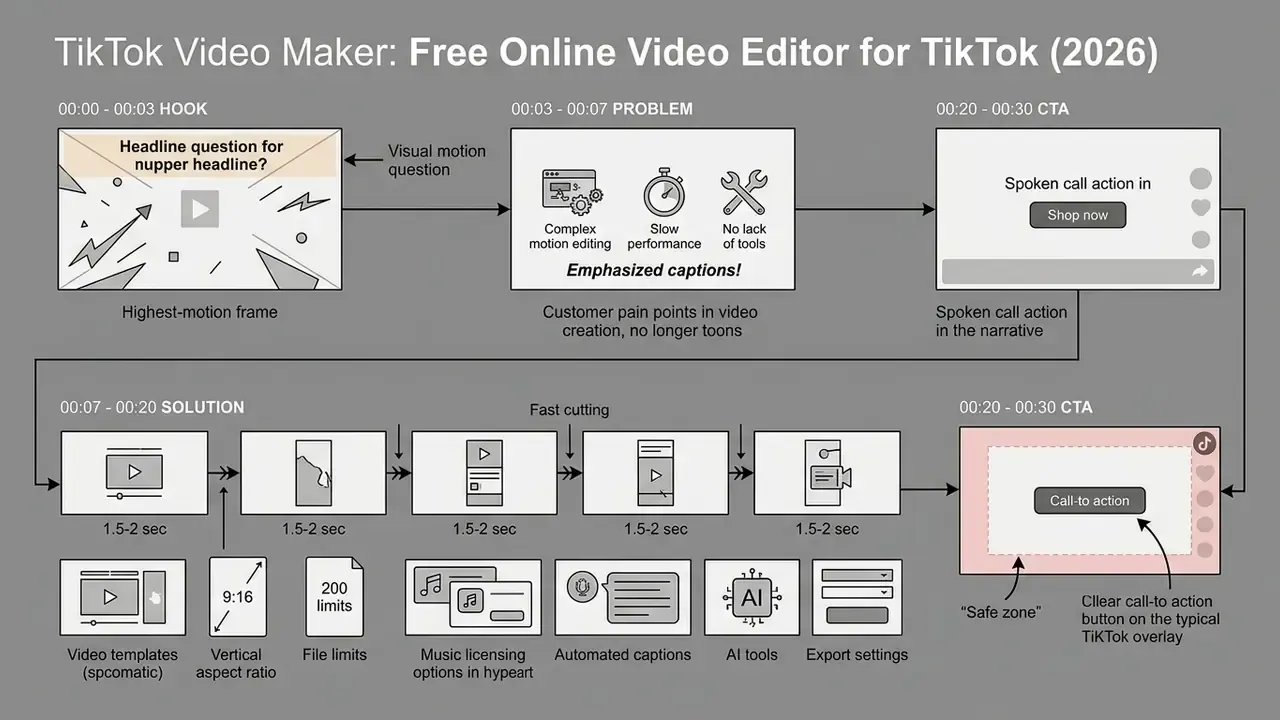
Launch guidance converges on the same skeleton: open with the problem or payoff within the first 5 to 10 seconds, keep the main script to 30 to 60 seconds, then cut it down into shorter variants and re-export per channel (9:16, 16:9, 1:1) from the same master.
Standardized corporate video workflows keep brand consistency across channels, and the same master can be repurposed through our YouTube video editing workflows so a long-form YouTube video and a vertical TikTok share one production run.

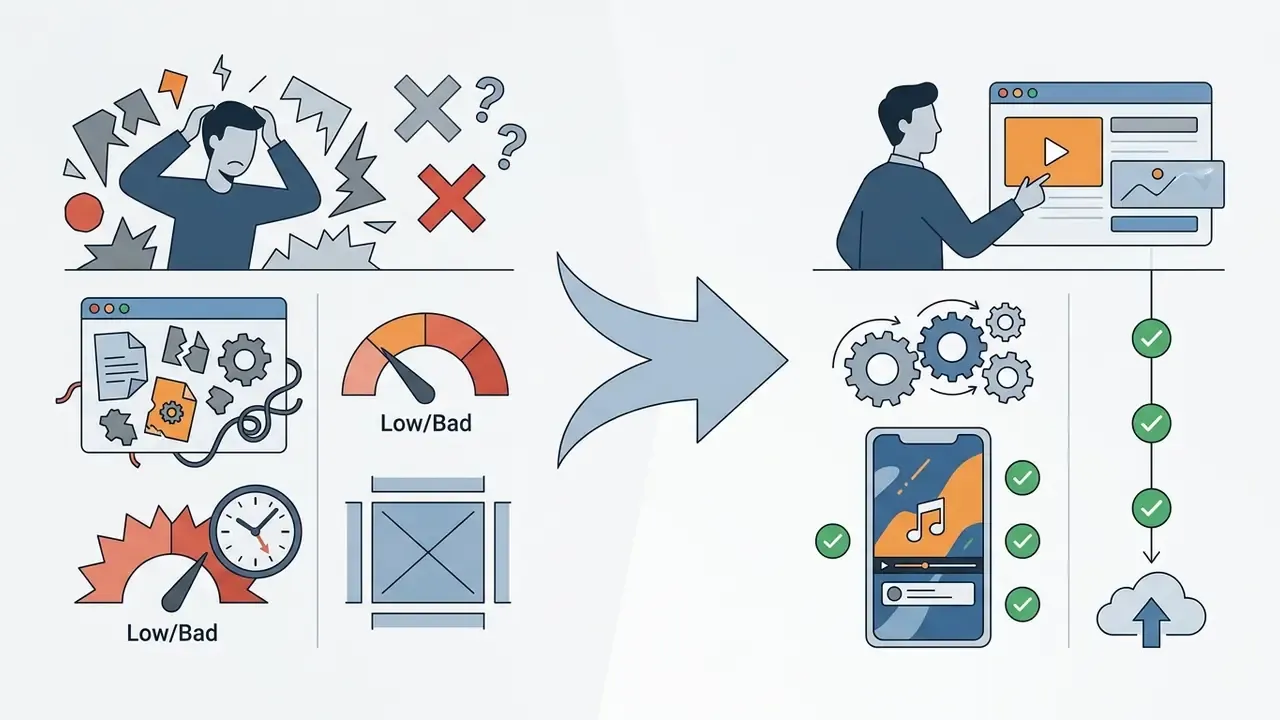
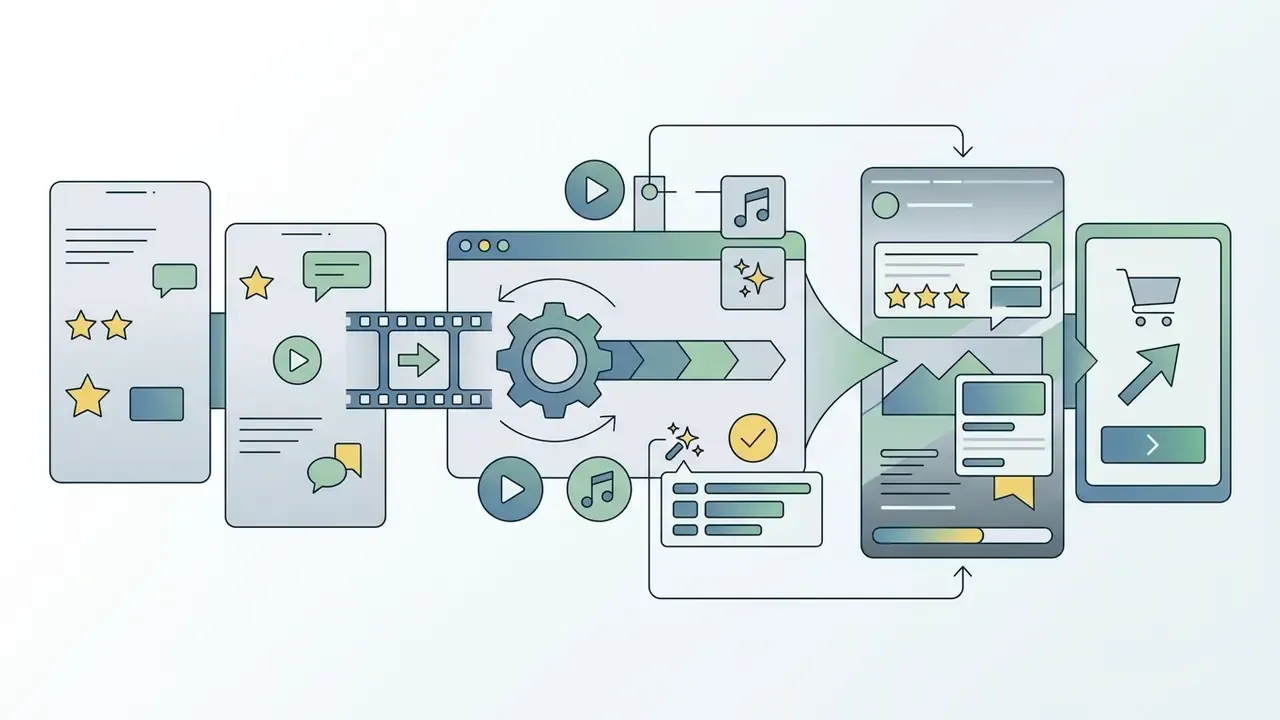
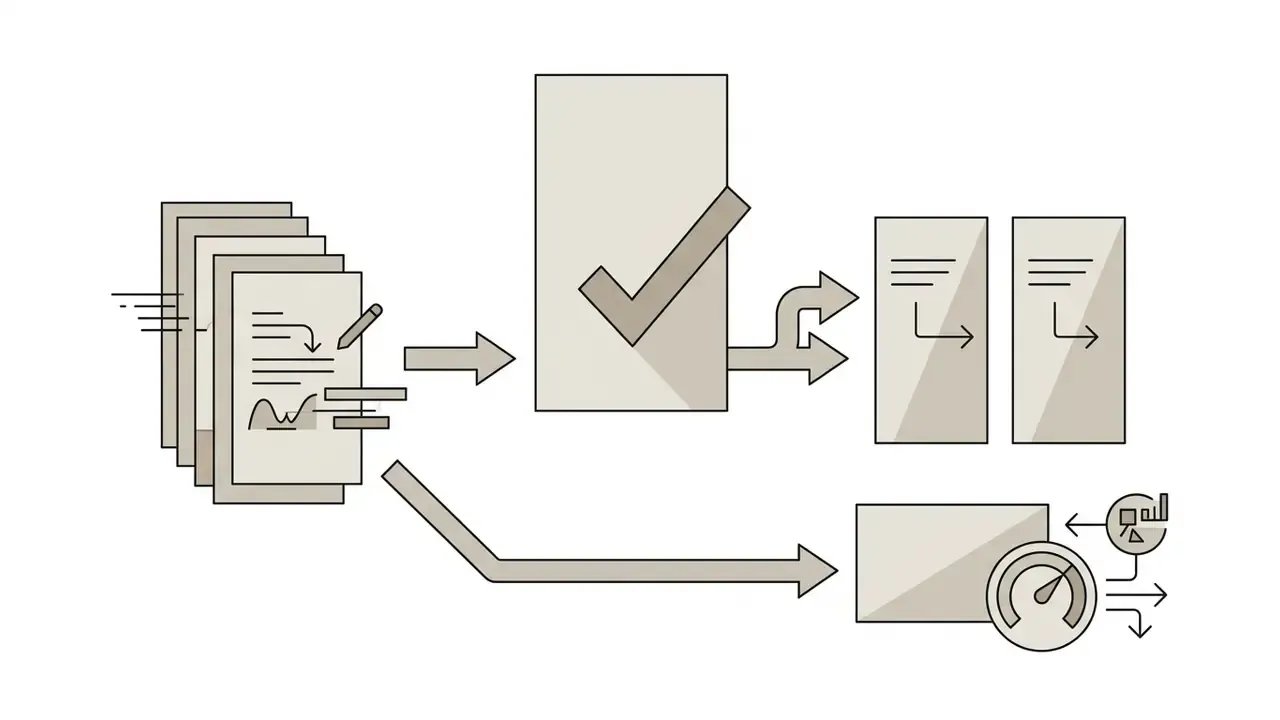
FAQ: TikTok Video Editors and Online Production
Does a TikTok video editor work on a PC in the browser?
Yes. Modern browser-based TikTok video editors run entirely on PC and Mac without a local install. They work inside current browsers such as Google Chrome, Microsoft Edge, Mozilla Firefox, and Apple Safari. Minimum hardware recommendations include 8 GB of system RAM and a stable internet connection for server-side cloud rendering. Current vendor specs also require recent 64-bit browser builds with WebGL2 support, and some professional web editors require at least a 1024 px screen width. Users can manage project assets, edit timelines, and export 1080p MP4 files directly through the browser interface.
Which video and photo files can I upload to the editor?
Most web-based TikTok video editors accept standard video, image, and audio containers. Accepted video extensions include MP4, MOV, WEBM, MPEG, MKV, AVI, and GIF, encoded with H.264 or HEVC, typically up to 1 GB per file. Supported image formats usually include PNG, JPG/JPEG, HEIC/HEIF, WebP (static files only), and WEBM graphics for transparent overlays, generally under 50 MB and under 250 million total pixels. SVG uploads are commonly capped at 3 MB with an "SVG 1.1" profile. Audio uploads support MP3, WAV, M4A, and AAC for custom voiceovers and background soundtracks. For transparent-background footage, GIF is the safest container.
Can I create TikTok videos without filming every day?
Yes. Creators and businesses can publish consistently and still produce videos without daily shooting. Teams lean on stock libraries, AI-generated avatars, text-to-video prompts, photo slideshows, and repurposed long-form content. TikTok's own Symphony Creative Studio exposes text-to-video, image-to-video, and voiceover or product-avatar generation, while Canva, Adobe Express, and CapCut supply TikTok-sized video templates and pre-licensed stock. AI video generators can synthesize short clips from written scripts or blog posts. Editors can also trim existing webinar recordings or YouTube videos into vertical 9:16 clips with smart reframe, then apply automated captions to ship fresh social content from an old asset.
What aspect ratio and resolution does TikTok actually require?
Vertical 9:16 is the native format. TikTok's Ads Help Center accepts 9:16 from a minimum of 540×960 px, 16:9 from 960×540 px, and 1:1 from 640×640 px, with durations up to 10 minutes. Still, 1080×1920 is the practical quality target, and TikTok's creative guidance favors ads of roughly 9 to 15 seconds. Keep critical copy in the middle third of the frame so the header row and bottom action rail do not cover it.
Will my video be watermarked if I use a free editor?
It depends entirely on the vendor. Several free tiers render at 720p with a permanent service logo. Others allow watermark-free 1080p but cap you at one export per month, or block export when a premium stock asset sits in the project. Check the export preview before the final render, and confirm whether the free license permits commercial distribution at all.
How do I avoid muted or blocked audio on a business account?
Use TikTok's Commercial Music Library or explicitly licensed stock audio, run the editor's copyright detector before export, enable the commercial-content disclosure toggle for any brand promotion, and archive the license record for every track. Non-commercial trending audio on a business account remains the single most common cause of mute penalties and takedowns.
Can I publish directly to TikTok from the browser editor?
Yes. Mature browser editors either push the finished MP4 to a connected TikTok profile in one click or queue it through a built-in content scheduler alongside Reels and Stories. Multi-destination export to YouTube, Google Drive, and Dropbox usually sits in the same dialog, which removes the download-then-reupload step and keeps the published file identical to the approved render.
Limitations and Open Questions
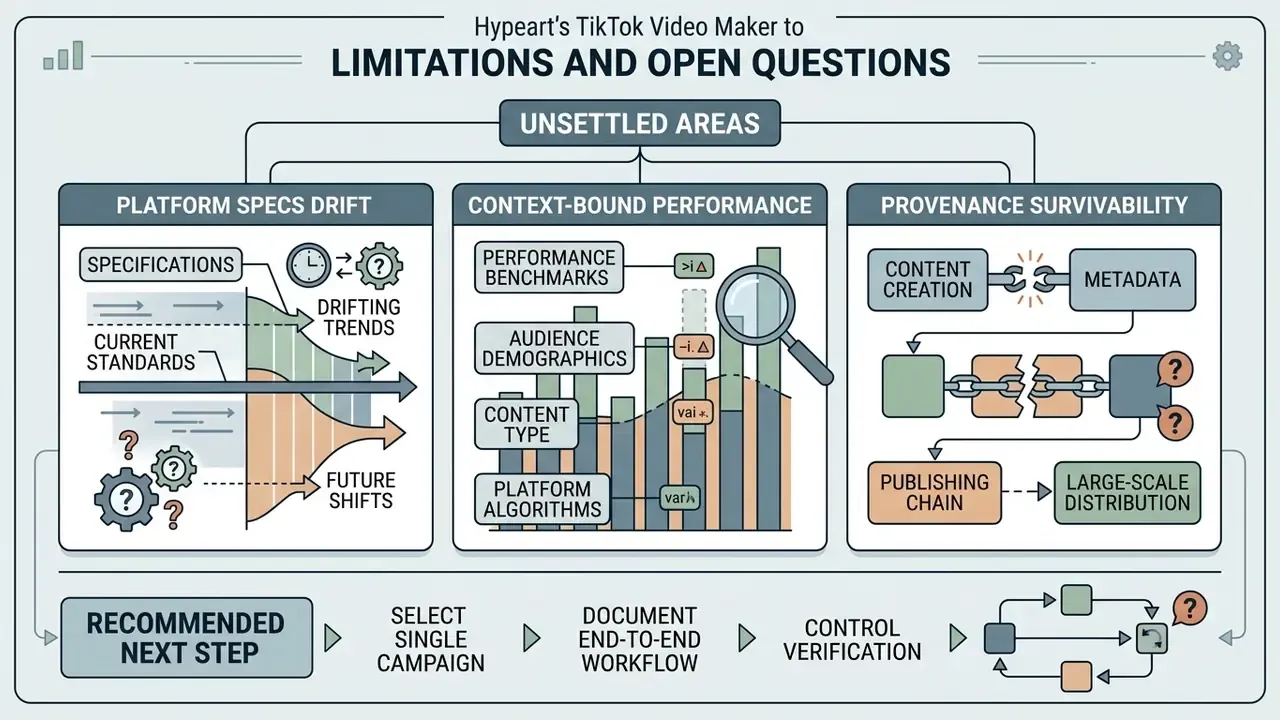
Three areas in this guide are genuinely unsettled, and pretending otherwise would be dishonest.
Platform specs drift. Upload ceilings, ad minimums, and safe-zone margins change without announcement, and vendor documentation lags the app. Any delivery spec built on the numbers above should carry a review date, ideally quarterly.
Performance benchmarks are context-bound. The MIT cost and CTR figures come from one field experiment in a specific advertising context. They are strong evidence that AI-assisted production changes unit economics, not a promise that your campaigns will see identical deltas. Control cost, QA time, and residual risk belong in the same model.
Provenance survivability is unproven at scale. C2PA metadata often does not survive platform re-encoding, so an internal asset register may be your only durable record of how a clip was made. Whether that register satisfies a future disclosure requirement is, at this point, an open question.
A reasonable next step is small: pick one campaign, document the workflow end to end, and see which control breaks first. Standardize from that evidence rather than from a vendor deck.
Appendix A: Editorial Corrections and Sourcing Notes
For transparency, the following claims were revised during editing. Original phrasing is preserved so readers can audit the change.
| Original phrasing | Status | Correction applied |
|---|---|---|
| "they generated 40 distinct video assets in a single afternoon... reducing creative production costs per asset by 75%" | Unverified internal figures | Reframed as a self-reported project estimate with an explicit hypothesis label |
| "exporting at 1080p with a target video bitrate of 10 to 12 Mbps prevented compression artifacts during TikTok ingestion" (attributed to a fintech media group) | Unsourced case | Retained as an internal benchmark, contextualized against the 8 to 15 Mbps range in 2026 upload guides |
| "scene cuts should occur every 1.5 to 3 seconds... according to short-form editing industry standards" | Attribution unclear | Clarified as creator and agency editorial convention; TikTok publishes tools, not pacing standards |
| "A CHI 2024 study... captioned in 96.7% of cases" | Missing URL and sample size | Added the 300-video sample size, the 19.7% error rate, the 7.9% WER, and the publication URL |
| "A 2025 consumer study on AI video translation found..." | Primary source not linkable | Retained with an explicit sourcing note marking it preliminary |
| "reduces manual editing time by up to 90%" | Cost versus time conflation | Substantiated on the cost side via the MIT field experiment and footnoted in the capabilities table |
| Placeholder blocks for schematic and infographic assets | Removed | Replaced with a text timeline schematic, a workflow comparison table, and a four-stage structure diagram |
| Footer list of stylized-generator links | Relocated | Moved into a contextual paragraph on illustrated and animated TikTok formats, where the tools are actually relevant |
| Duplicated SEO metadata block at the end of the page | Removed | Replaced with a limitations and open-questions section |
Additional Internal and System Resources
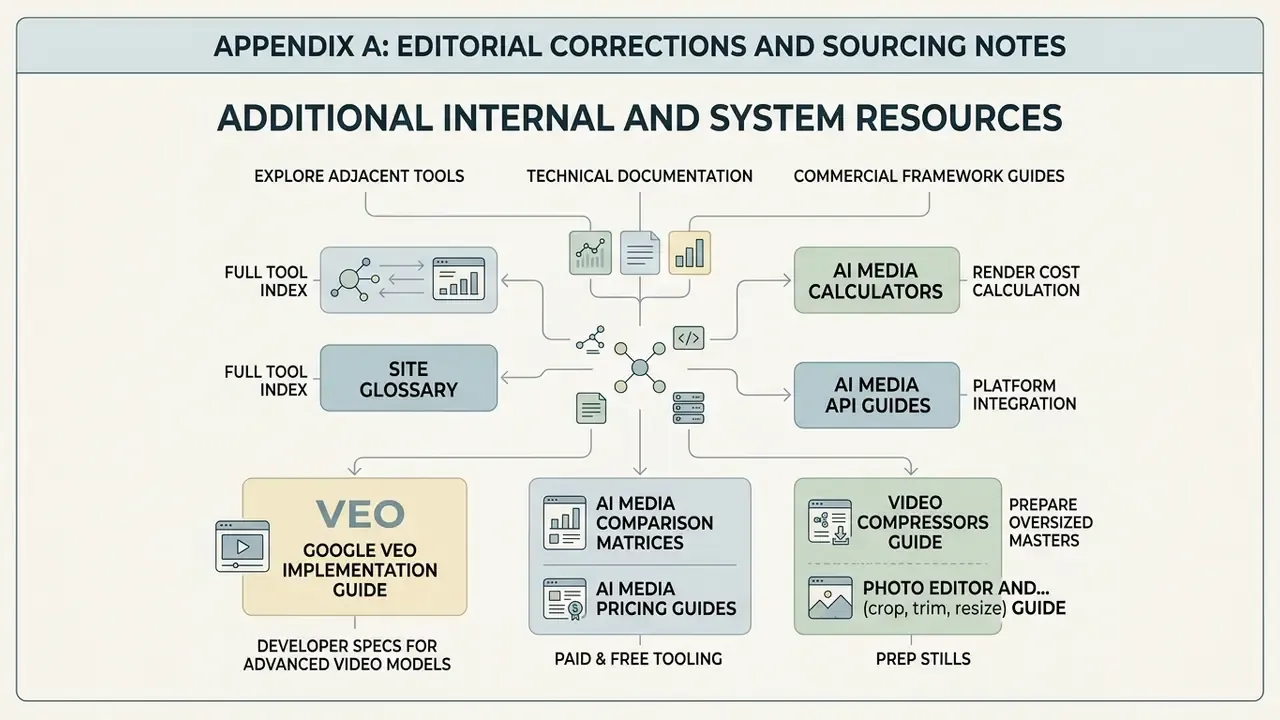
To explore adjacent tools, technical documentation, and commercial framework guides, consult our specialized hubs:
- Access the full tool index in the site glossary.
- Calculate project rendering costs using AI Media Calculators.
- Learn about platform integration through AI Media API Guides.
- Review developer specs for advanced video models in the Google Veo Implementation Guide.
- Compare paid and free tooling in AI Media Comparison Matrices and AI Media Pricing Guides.
- Prepare oversized masters with our guide to video compressors, and prep stills with our photo editor and free photo editor overviews.
- Add motion graphics using our guide to animation makers.
- Review platform legal updates in AI Litigation and Case Timelines and licensing terms in the AI Media Commercial-Use Hub.
- Get technical help via AI Media Support and Troubleshooting.
General guidance only. Licensing, advertising-disclosure, and copyright requirements vary by jurisdiction and change frequently. Verify current TikTok policy and consult qualified legal counsel before launching commercial campaigns.