Last updated: June 2026 · Tested build: VSDC Free Video Editor 11.2 (64-bit) on Windows 11 23H2 · Licensor: FLASH-INTEGRO LLC
Five Things to Know Before You Install VSDC
- No watermarks, no export duration caps, no trial countdown. The free edition renders 4K/8K projects with clean output, which is rare among free-tier editors that usually stamp branding onto exports.
- Free is licensed strictly for personal and educational use. Commercial deliverables, client work, and revenue-generating corporate video require a paid VSDC Video Editor Pro subscription under the Flash-Integro EULA.
- Rendering in the free edition is CPU-bound. GPU hardware acceleration (NVENC, Quick Sync, AMD encoders), motion tracking, masking, stabilization, and 10-bit export sit behind Pro.
- Download only from videosoftdev.com or official app stores. The current stable release is version 11.2 (roughly a 107 to 126 MB installer), shipped as separate 32-bit and 64-bit builds.
How to use this guide
Three readers usually land here, and they need different answers.
An individual creator mostly needs the download path and the feature list. A small studio needs the free versus Pro boundary before it quotes a client. A compliance or IT asset owner inside a larger organization needs something narrower: proof of licensed scope, a defensible install source, and a record that survives an audit question six months later.
The sections below run in that order. Product definition first, then the licensing filter, then the tier comparison, then safe deployment, then capabilities, formats, and the open questions we could not close with public documentation. If your only question is «can we use the free build for paid client video», skip to the licensing section and stop there.
What is VSDC Free Video Editor and Who Is It For?
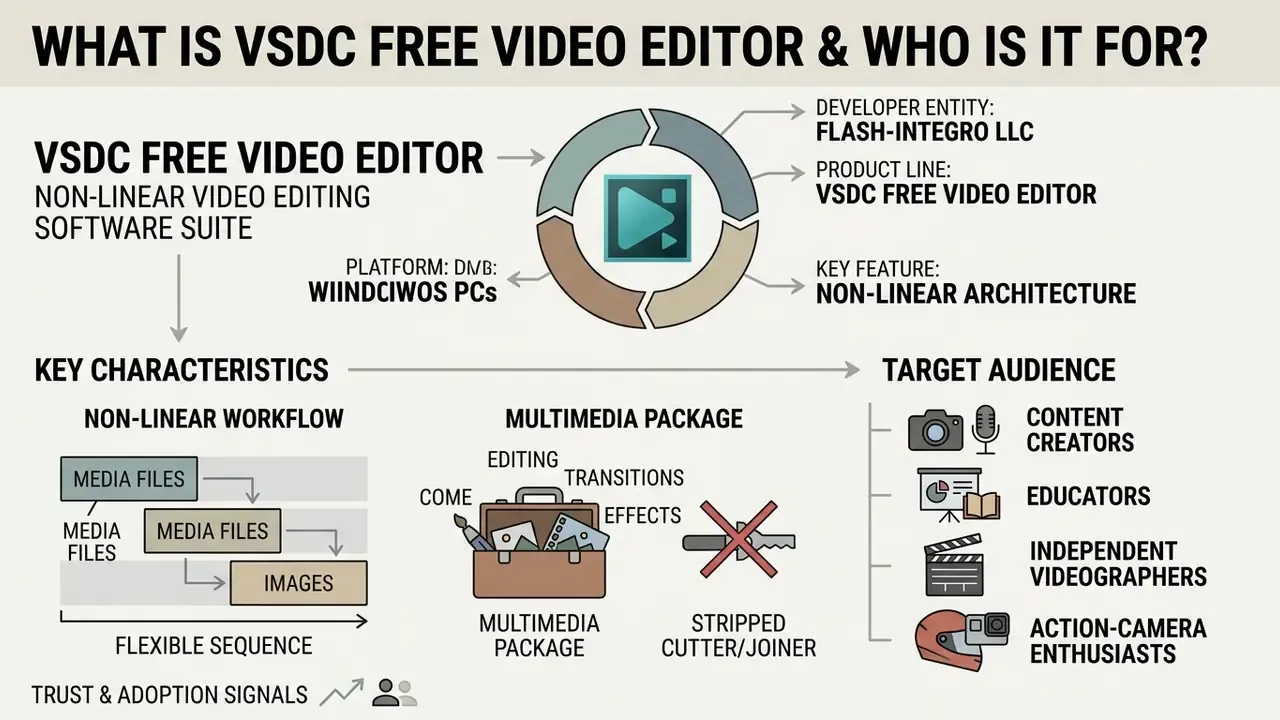
VSDC Free Video Editor is a non-linear video editing software suite developed by Flash-Integro LLC for Windows PCs. It provides multi-layer timeline processing, visual effects, color correction, desktop screen capture, and audio editing without applying watermarks or duration limits to exported video projects.
The application serves content creators, educators, independent videographers, action-camera enthusiasts, and social media producers who need non-linear editing without recurring software fees. Users build projects ranging from a simple trim to multi-track compositing for social platforms. The developer frames the target scope broadly: everything «from a family greeting card to a company presentation».
«VSDC is a non-linear editor that lets clips, text, and effects sit anywhere on the timeline, unlike linear editors with strictly sequential assembly.»
In practice, non-linear architecture means media files and images do not have to follow a direct sequence. They can appear at different positions in the scene, synchronously with other objects, at any point in time. That is what makes picture-in-picture, split-screen, and animated overlay compositions achievable inside a free-tier product. Before committing to a toolchain, many evaluators benchmark VSDC against other free video editing software to confirm whether a desktop NLE or a browser-based alternative fits their throughput needs.
It is fair to call this a full fledged multimedia software package rather than a stripped video cutter joiner. The installer bundles an editor, a converter, a capture utility, and a disc-authoring module in one solution.
Trust and adoption signals. As of 2026, VSDC reports serving over 5 million active users globally. Independent software verification platforms show a consolidated score of roughly 4.5 out of 5 stars across 200+ Trustpilot reviews and 89 Capterra ratings. Reviewers keep citing the same four things: chroma key quality, picture-in-picture, export presets for social platforms, and the absence of watermarks. Technology media coverage (TechRadar, PCAdvisor, The Guardian, Digital Trends, The New York Times) has profiled the editor as a feature-packed Windows NLE that competes with several paid solutions.
One caveat on those numbers. Aggregate star ratings tell you about satisfaction, not about licensing fitness, and they say nothing at all about whether your compliance team can approve the install. Different question, different evidence.
Is VSDC Free Allowed for Commercial Use?
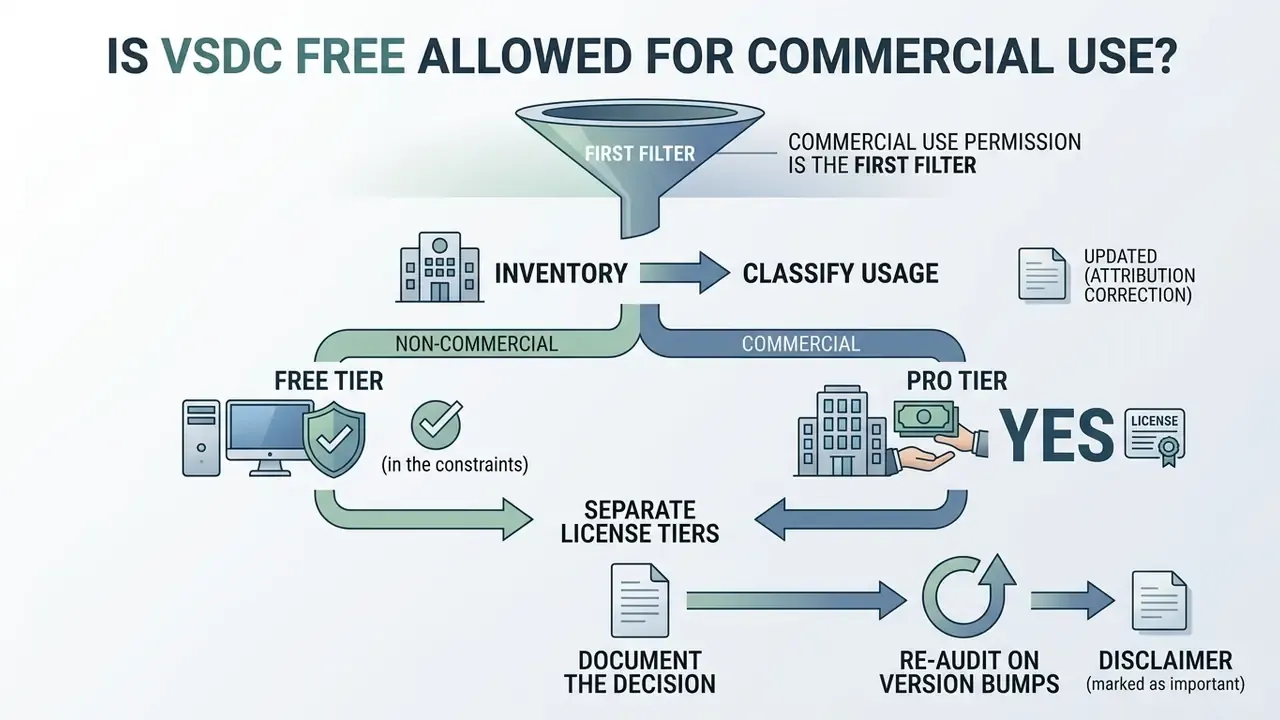
This is the first filter for any business evaluator, so it belongs before the feature comparison. The official End User License Agreement from Flash-Integro LLC restricts VSDC Free Video Editor to personal and educational use. Any commercial deployment, client deliverable, or corporate video production requires an active VSDC Video Editor Pro subscription.
«The free version is granted free of charge for personal and educational use; the Pro subscription is granted for personal and commercial use.»
Practical compliance algorithm for organizations
- Inventory.Query managed endpoints for the installed product name and publisher (
Flash-Integro) through your endpoint management console, WMI/CIM software inventory, or a registry sweep ofHKLM\SOFTWARE\...\Uninstall. - Classify usage.For each host, record the purpose of the edited output: internal training and education, personal, or commercial and client-facing.
- Separate license tiers.Assign Pro keys to every host producing commercial output. Keep free installs only on hosts with documented educational or personal scope.
- Document the decision.Store the EULA snapshot with its retrieval date, the host list, and the purpose classification in your software asset register.
- Re-audit on version bumps.Licensing text and feature gating can change between major releases on the 11.x cadence, so re-verify terms at each major upgrade.
Does monetized corporate YouTube count as commercial use? Yes. If a channel is operated by or on behalf of a company, earns ad or sponsorship revenue, promotes products, or feeds lead generation, the output is commercial and Pro is required. Purely internal, non-monetized educational material, say a classroom lesson or an onboarding clip that sits outside any revenue activity, is the scenario the free license was written for. When in doubt, license Pro. It costs less than a licensing dispute, and the paperwork is shorter.
Teams building repeatable publishing pipelines can align tooling decisions with our YouTube video editor workflow guide, compare license terms across alternatives when planning commercial use of video tools, and review broader policy patterns in the AI Media Commercial-Use Hub.
Free Edition vs. VSDC Video Editor Pro
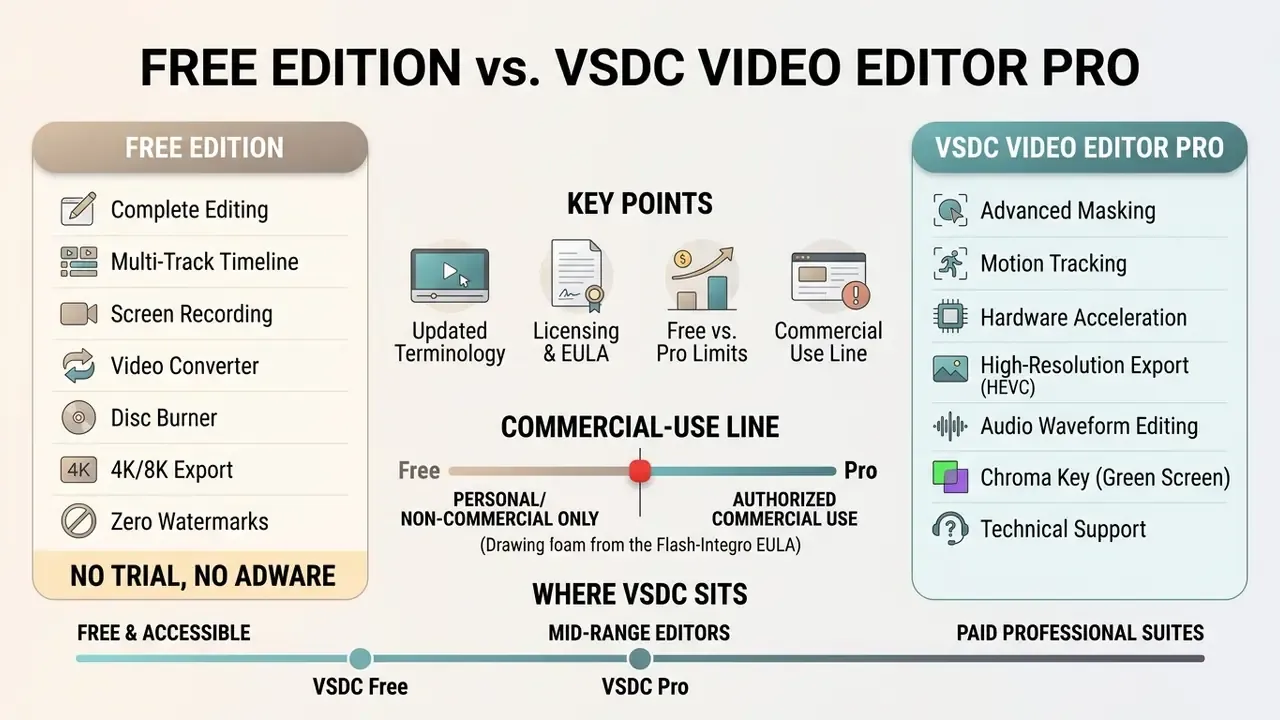
VSDC Free Video Editor covers complete editing, multi-track timeline support, screen recording, a video converter, a disc burner, and 4K/8K export with zero watermarks and no time limits. Pro extends that base by unlocking hardware acceleration, motion tracking, video stabilization, masking tools, HDR10 and HDR10+ workflows, and advanced chroma key controls for an annual subscription fee.
Updated (terminology). The free build is not a trial version. It is a permanent, non-expiring license for personal and educational use, not a time-boxed evaluation. Base editing tools stay available indefinitely, and upgrade prompts appear only when a user tries to render or apply a Pro-exclusive feature such as 10-bit export, hardware-accelerated encoding, motion tracking, or masking. For a broader primer on how this tier model compares with other video editors offering a free plan, see our terminology hub.
Comparison table: VSDC Free vs. VSDC Video Editor Pro
| Capability | VSDC Free | VSDC Video Editor Pro |
|---|---|---|
| License scope | Personal and educational use only; unlimited copies | Personal and commercial use; 1 user, 2 activations, 1-year term |
| Watermark on export | None | None |
| Export resolution | Up to 4K/8K | Up to 4K/8K |
| Multi-layer NLE timeline | Yes | Yes |
| Hardware acceleration (NVENC / Quick Sync / AMD) | No (CPU-bound rendering) | Yes |
| Motion tracking | No | Yes |
| Video stabilization | No | Yes |
| Masking (clipping, inverted, censorship) | No | Yes |
| Chroma key | Standard green-screen removal | Multi-color chroma key plus advanced parameters |
| Color grading | Basic correction, LUT editor, RGB curves | Advanced grading, HDR10/HDR10+ |
| 10-bit export | No | Yes |
| Real-time voice-over recording | No | Yes |
| Audio waveform editing / effect-to-audio sync | Limited | Full (sound graph, effects synced to volume and frequency) |
| Screen recorder, video capture, converter, disc burner | Included | Included |
| GPS telemetry widgets | Basic set | Premium templates and advanced widgets |
| Support priority | Community/standard | Subscriber support |
| Indicative price | $0 | ~$19.99 to $29.99 per year (varies by page and storefront) |
Read the table as a feature gate, not a quality gate. Resolution, watermarks, and timeline depth are identical across tiers. What Pro buys is speed and a handful of advanced tools, plus the commercial right itself.
Where VSDC sits against other free and paid editors
A quick market bearing helps, because procurement rarely evaluates one tool in isolation. DaVinci Resolve remains the deepest free option for color and finishing, at the cost of a steeper learning curve and heavier hardware demands. Clipchamp video editor and BeeCut video editor trade capability for simplicity and browser convenience. Filmora video editor and HitFilm Express sit in the mid-market with consumer-friendly effect libraries and their own licensing tiers. Adobe Premiere is the reference professional suite, priced accordingly.
VSDC's distinguishing claim is different: a versatile video editor that behaves as a comprehensive video tool on modest hardware, with lossless video splitting, efficient video conversion, and a screen recorder in the same package. If your evaluation criterion is «watermark-free 4K export on a 2 GB RAM office laptop», the shortlist gets short fast. And no, VLC media player is not an editor, though it still earns a place in the review workflow for media playback checks.
For organizations comparing software costs across visual production toolchains, our AI Media Pricing Guides offer detailed financial benchmarks, and teams weighing desktop NLEs against generative tools can review free AI video generators for adjacent budget scenarios.
How to Download VSDC Free Video Editor Safely on Windows
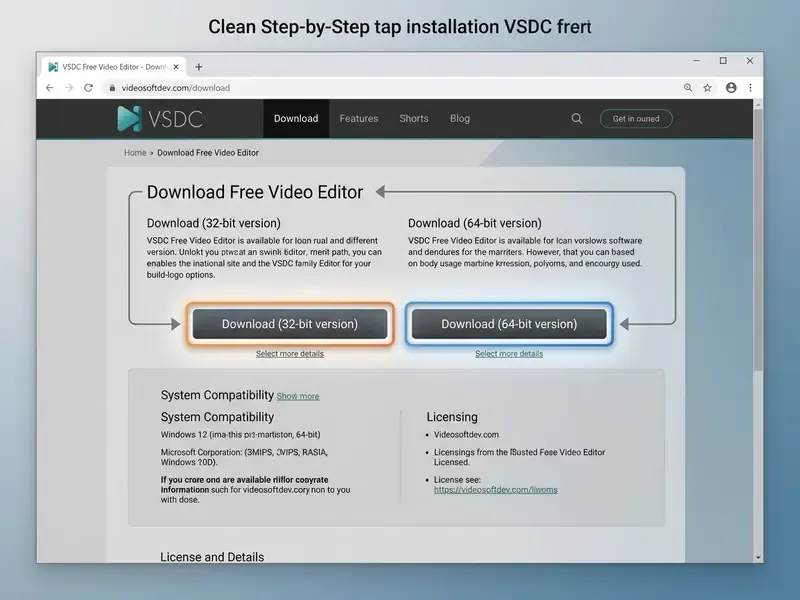
To download VSDC free safely, take the installer directly from the official website (videosoftdev.com) or the Microsoft Store. Third-party mirrors and aggregator pages are where malware and bundled adware enter the picture. The software runs on Windows PCs with Windows 7, 8, 10, and 11 across separate 32-bit and 64-bit builds. Windows 11 support is documented from VSDC 6.7 onward on the official system requirements page (https://www.videosoftdev.com/free-video-editor/system-requirements).
System Requirements & App Specs:
- Developer / Licensor: Flash-Integro LLC
- Current Stable Version: 11.2 (separate 32-bit and 64-bit builds)
- Installer File Size: ~107 MB - 126 MB (standalone installer; size varies by package)
- Operating Systems: Windows 7, Windows 8, Windows 10, Windows 11 (VSDC 6.7+)
- Minimum Hardware: 1.5 GHz Intel/AMD-compatible CPU, 2 GB RAM, 500 MB free disk
  space, 1024x768 display at 16-bit color or higher
- Recommended Hardware (4K / Pro): Intel 7th Gen / AMD Ryzen CPU, 16 GB RAM,
  4 GB VRAM GPU, SSD scratch disk
- Available Languages: 13 interface localizations
- Source: Official VSDC system requirements and download pages (2026)
Legacy OS note: official v11.2 installers require Windows 7 or newer. For legacy deployments on Windows XP or Windows Vista, request a compatible legacy build from the developer's support team at [email protected]. The vendor confirms it will supply a compatible version for pre-Windows 7 systems on request.
Localized download queries (télécharger, descargar, herunterladen, scarica, pobierz, unduh, indir, and their non-Latin equivalents) all resolve to the same official installer. The language of the query does not change the safe source, and an unfamiliar domain promising a localized «faster» build is a red flag, not a convenience.
«The current stable VSDC release is offered in 32-bit and 64-bit variants; install only from the developer's site or the Microsoft Store to avoid malicious repackaging.»
Step-by-step installation
- Open the official website at videosoftdev.com in a secure browser.
- Go to the download VSDC free page and check the latest version details and file size against what the page advertises before proceeding.
- Pick the installer package that matches your system: the 64-bit build for modern Windows PCs, the 32-bit build for legacy architectures.
- Save the executable installer to local disk and confirm you have administrator privileges.
- Run the setup wizard, read the license terms, uncheck optional promotional software offers, and finish the installation.
- Launch the application and confirm the version number on the About screen matches the release you intended to deploy.
IT security and deployment checklist
Checklist0 / 9
For teams managing software troubleshooting and technical installations, see our AI Media Support and Troubleshooting resource section.
VSDC Core Capabilities: Editing, Effects, and Screen Capture
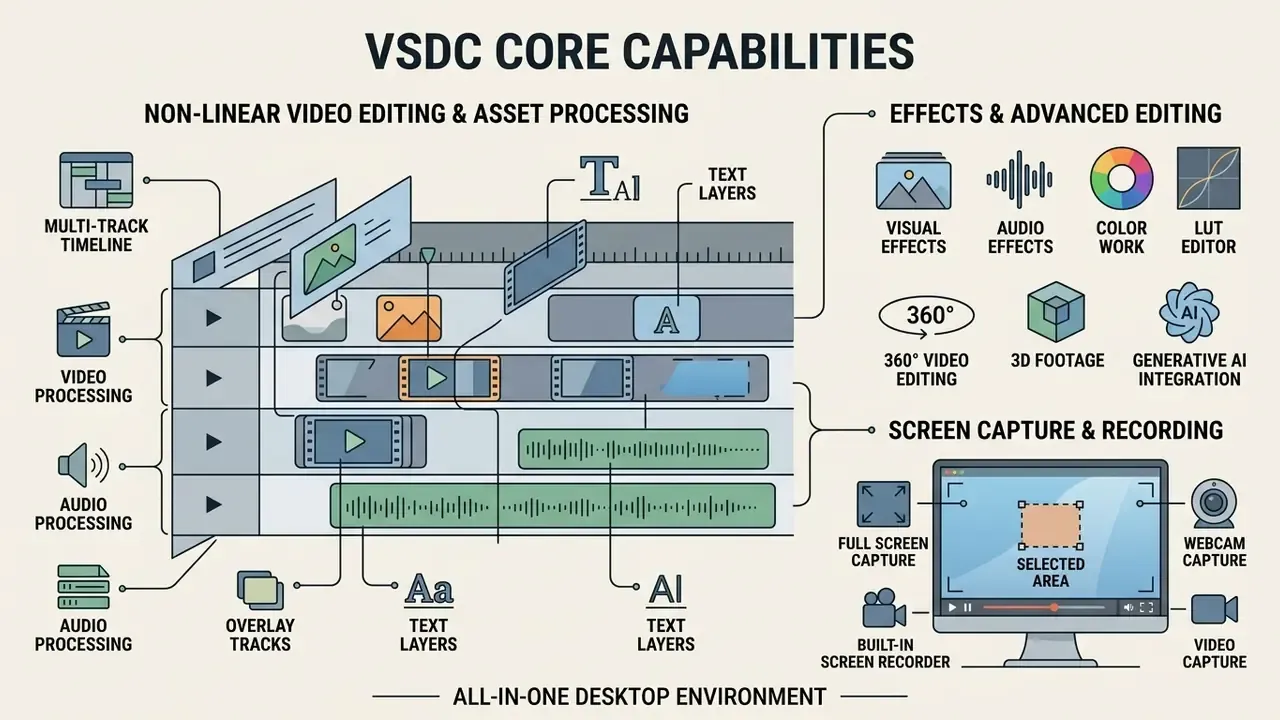
VSDC handles video processing, audio processing, screen recording, and visual effects inside one desktop environment. The suite combines timeline editing with a built-in free screen recorder, which removes the need for a secondary capture tool, and adds a converter, a disc-authoring module, and a capture utility for external devices such as webcams, tuners, and capture cards.
When engineers design automated production pipelines, they often compare desktop video utilities against generated-asset platforms. Detailed comparisons of automated design tools are available in our Canva AI Generator review.
Non-Linear Video Editing and Asset Processing
The non-linear editing engine lets media objects, overlay tracks, audio files, and text layers sit independently on any timeline level. Files on the same layer play in a linear sequence. Files spread across different layers form non-linear, overlapping compositions, and when a layer is already occupied VSDC can drop the new object onto a fresh layer automatically. Users run simple trim actions, cut edits, and video splitting while tuning each object's adjustable parameters settings: position, duration, keyframes, layer order, and effect values.
«Users can split video with Ctrl+K, cut the beginning or end with the Trim command, and remove fragments using range selection.»
Beyond standard timeline work, VSDC supports 360-degree and VR video editing, 3D footage processing, and multicam editing for multi-angle productions. Action-camera creators can use integrated GPS telemetry tools to overlay dynamic speedometers, gauges, altitude graphs, and route maps onto GoPro or Insta360 footage. Power users extend the default libraries with legacy VirtualDub plug-ins. Heavy 4K/8K and RAW projects (BRAW, ProRes RAW) edit more smoothly through proxy video technology, which substitutes lightweight versions during editing while preserving full-resolution output at export.
Color work runs through a LUT Editor, RGB Curves, quick styles, and cropping tools. A mask tool enables selective filter application, though masking itself is a Pro capability. Chroma key removal lives under Video effects → Transparency → Background remover, with YUV, HSL, and mask-based modes for green-screen compositing. The result on well-lit footage is a genuinely professional look, provided the source is clean; no keyer rescues a shadowed backdrop.
Creators who mix desktop editing with generative asset production often pair these workflows with free AI video generators for B-roll and motion backgrounds, and with an ai sketch generator or an ai smile filter when static assets need a quick pass before they hit the timeline.
Built-in Screen Recorder, Video Capture, and Audio Effects
The integrated VSDC free screen recorder captures the desktop screen in four modes: full screen by default, a specific window or manually selected area, a preset area by resolution, or a region that tracks the cursor. It records desktop video at 30 fps by default while capturing concurrent microphone input, and the frame rate can be changed in export settings before recording starts. A separate video capture module records from external devices, which still matters for teams digitizing tape or pulling a feed from a capture card.
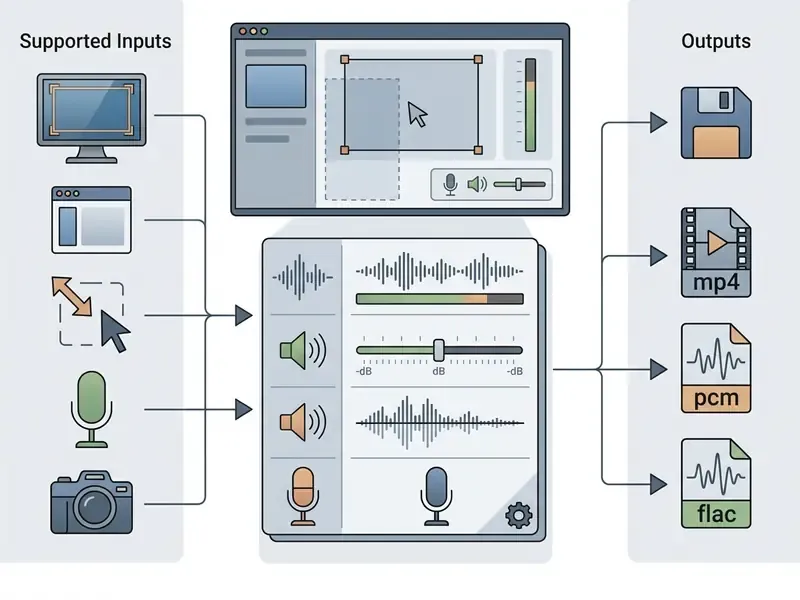
The audio editing suite offers volume attenuation, fade-in and fade-out parameters, basic equalizer adjustments, waveform-level editing, and the option to split a video into separate audio and video layers. Workflows that need synthetic narration or music can be evaluated through our AI voice generators guide, the ai singing generator entry, and the ai song creator free overview.
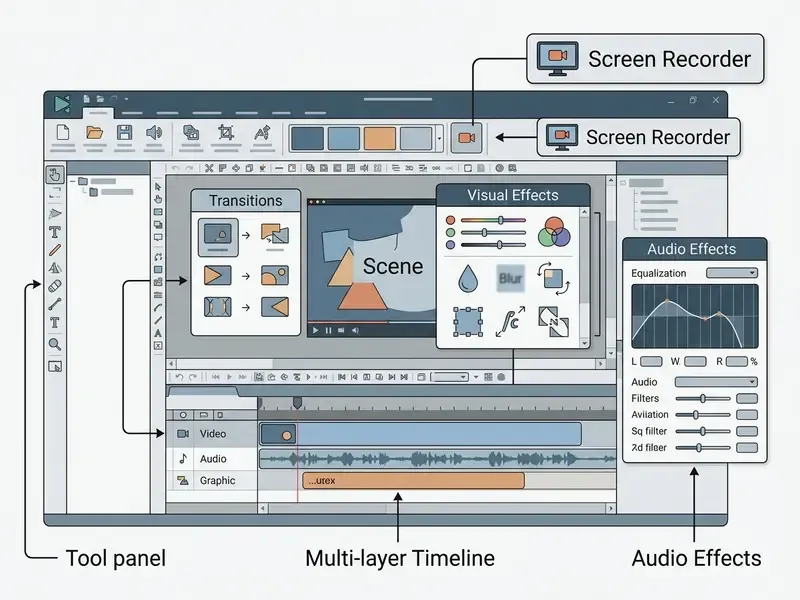
Interface reference for the annotation: the Timeline area sits beneath the Scene area and is the primary editing surface, a time scale with multiple layers for media files, graphical objects, and applied effects. The Video effects tab holds quick filters, color adjustments, transitions, transformational and transparency effects; applying one spawns a dedicated timeline tab for that effect. Audio editing is reached through object properties, for example Audio track and Don't use audio, plus waveform adjustment on the timeline. The screen recorder and the other utilities launch from the tools area of the start screen.
Formats, Codecs, Export Profiles, and Video Conversion
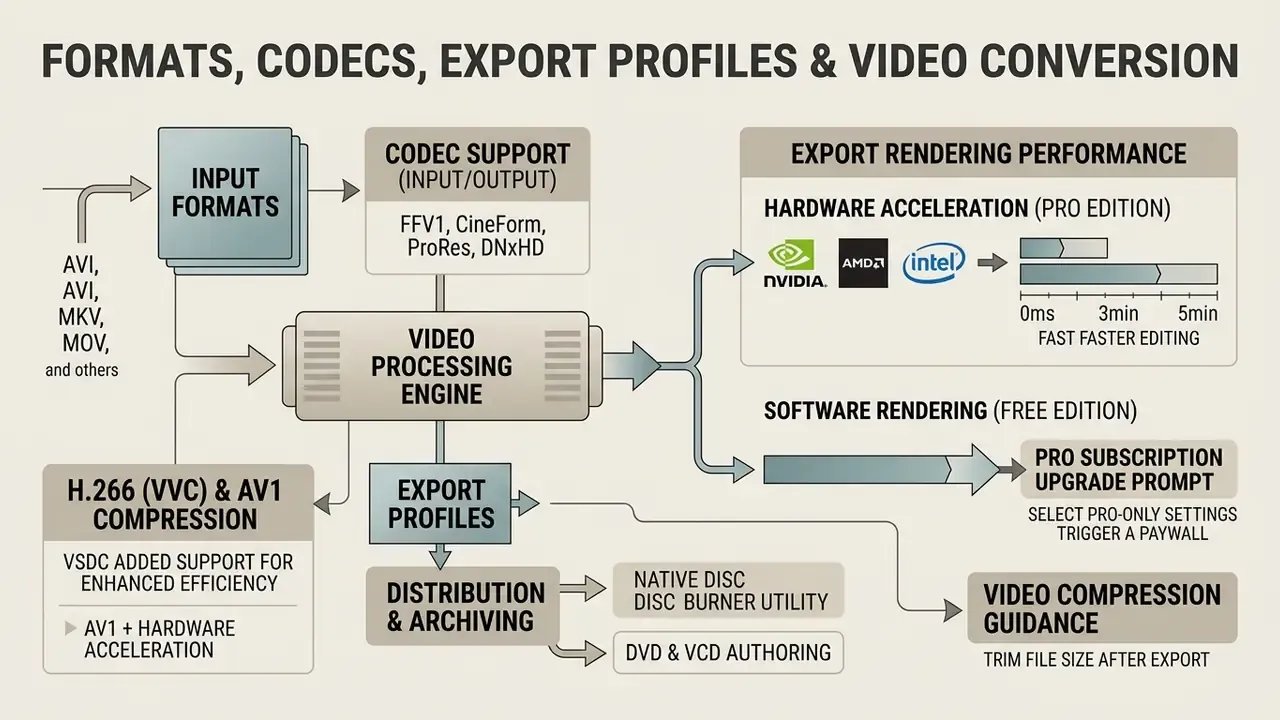
VSDC supports a broad selection of formats and codecs, working simultaneously as video editing software and a standalone video converter. It handles legacy containers alongside modern codecs including H.265/HEVC, AV1, H.266/VVC, VP8 and VP9, DivX, XviD, MJPEG, BRAW, and Apple HEIC image files.
The matrix below maps common video processing tasks to the internal VSDC module that does the work, which is usually the fastest way to decide where a job belongs.
| User task | Source file formats | VSDC tool / module | Result and export |
|---|---|---|---|
| Non-linear editing and overlays | MP4, MOV, MKV, AVI, ProRes, BRAW | Timeline / Scene Editor (NLE) | High-quality MP4/MOV, 4K/8K video projects |
| Format and codec conversion | WMV, FLV, WebM, H.264, AV1 | Built-in Video Converter | Converted file with custom bitrate and resolution |
| Recording tutorials | Desktop screen, microphone input | VSDC Free Screen Recorder | Raw screen capture imported straight to the timeline |
| Lossless splitting | Large MP4, AVI, MOV video files | Lossless Video Splitting Tool | Split clips with no re-encoding quality loss |
| Social media export | Multi-track projects, HEIC, PNG | Export Project (web presets) | Optimized MP4 for YouTube, TikTok (1080x1920) |
| Audio track processing | WAV, MP3, AAC, OGG, FLAC | Audio Editing / Properties Panel | Processed master audio, 32-bit PCM export |
| 360°/VR and action-cam projects | Insta360, GoPro, equirectangular MP4 | 360 editing plus GPS telemetry widgets | Rendered 360/VR output with telemetry overlays |
| Disc authoring and archiving | Finished timeline projects | Disc Burner module | DVD and VCD media written directly from the project |
For distribution and archiving, VSDC ships a native Disc Burner utility that authors DVD and VCD media directly from timeline project files, next to direct upload profiles for social platforms. Recent major releases (v9.2 and later) also introduce automated AI-powered Segmentation for background removal and subject isolation without manual chroma masking, which helps when footage was shot without a green screen. Delivery speeds up through the VSDC Template Store, with 300+ customizable presets for intros, animated titles, lower thirds, logo reveals, glitch transitions, LUT color grading, and GPS telemetry widgets (all customizable up to 4K in 16:9). Optional VSDC Cloud integration adds remote asset backup, project versioning, and file exchange between devices. Note that cloud sync is exactly the sort of outbound traffic your egress policy should see before rollout, not after.
Hardware acceleration for export rendering is limited to Pro subscribers with Nvidia (NVENC), AMD, or Intel Quick Sync encoders. Recent releases also list hardware-accelerated Intel Motion JPEG and Intel VP9 paths. Free edition users export through CPU-bound rendering, which keeps output quality high but stretches processing time on large 4K files.
How large is the gap in practice? It depends on source codec, timeline complexity, effect count, CPU core count, and GPU encoder generation, so treat any single number as indicative rather than universal. In editorial testing on a mid-range 8-core workstation, a 10-minute 1080p timeline with light effects exported in the low single-digit minutes on CPU. The same duration at 4K with several effect layers moved into the tens of minutes. Enabling a hardware encoder typically compresses that 4K figure by a large multiple, so a large size HD or 4K render can finish in a few minutes instead of an afternoon. These figures are editorial estimates from one configuration and need independent benchmarking before they inform procurement. Request vendor benchmarks or run a pilot render on your own hardware profile before sizing a workstation fleet.
Teams planning throughput can also review our video compression guidance to trim file size after export, and consult comparisons of video generation and editing tools when performance is the deciding criterion.
Practical workflow tip: when a «Buy Pro» prompt appears during export in the free edition, a Pro-only feature is active somewhere on the timeline. Resolve it in three steps. First, open the effects list for each object and remove Pro-flagged effects such as masking, motion tracking, or stabilization. Second, switch the export profile away from 10-bit or hardware-accelerated encoder options to a standard CPU H.264 or H.265 profile. Third, re-run the export. The dialog is a feature gate, not a watermark or a time limit, and free exports stay clean once the Pro-only element is gone.
For comparative analysis of media tools and file size management, explore free photo editors, our online photo editor guide, or technical benchmarks in the AI Media Calculators. Cross-tool performance data lives in our AI Media Comparison Matrices, developer integration specifications in the AI Media API Guides, and campaign-side copy tooling in the ai slogan generator and ai social media post generator entries.
Organizations tracking software licensing enforcement or IP compliance developments can review historical trends in our AI Litigation and Case Timelines repository.
FAQ for Business and IT Teams
Is VSDC Free Video Editor genuinely free, or is it a trial?
It is genuinely free and non-expiring for personal and educational use, with no watermark, no export duration cap, and no countdown timer. Pro features are gated. The base editor is not.
What happens if employees use the free edition for company videos?
That falls outside the licensed scope of the free edition under the Flash-Integro EULA and creates compliance exposure for the organization. Remediation usually means retroactive licensing, and in escalated cases vendor claims. The mitigation is straightforward: license Pro for every host producing commercial output and record the classification in your asset register.
Does monetized or promotional YouTube content count as commercial use?
Yes. Ad revenue, sponsorships, product promotion, and lead generation are commercial activities. Only non-monetized personal or educational output fits the free license.
Is there a corporate or volume subscription?
Published terms describe a one-year Pro subscription bound to a single user with two activations and no transfer rights. Multi-seat or organization-wide arrangements are not documented in the public terms, so contact [email protected] about volume licensing before planning a fleet rollout.
How do I remove the «Buy Pro» dialog at export?
Remove Pro-only effects such as masking, motion tracking, and stabilization from the timeline, then select a standard CPU encoding profile instead of 10-bit or hardware-accelerated output.
Can VSDC run on Windows XP or Vista?
Not with current 11.x installers. The vendor supplies a compatible legacy build on request via [email protected]. Log a documented security exception if you deploy it.
Does the free edition support 4K and 8K export?
Yes. Resolution is not the differentiator between tiers. Hardware acceleration, 10-bit export, and advanced tooling are.
Can I extend the effects library?
Yes. VSDC supports legacy VirtualDub plug-ins, plus 300+ paid and free template packs from the VSDC Template Store.
Is there a Mac version?
The product line documented on the official site targets Windows PCs and laptops. macOS users should evaluate alternative NLEs or run a Windows virtual machine.
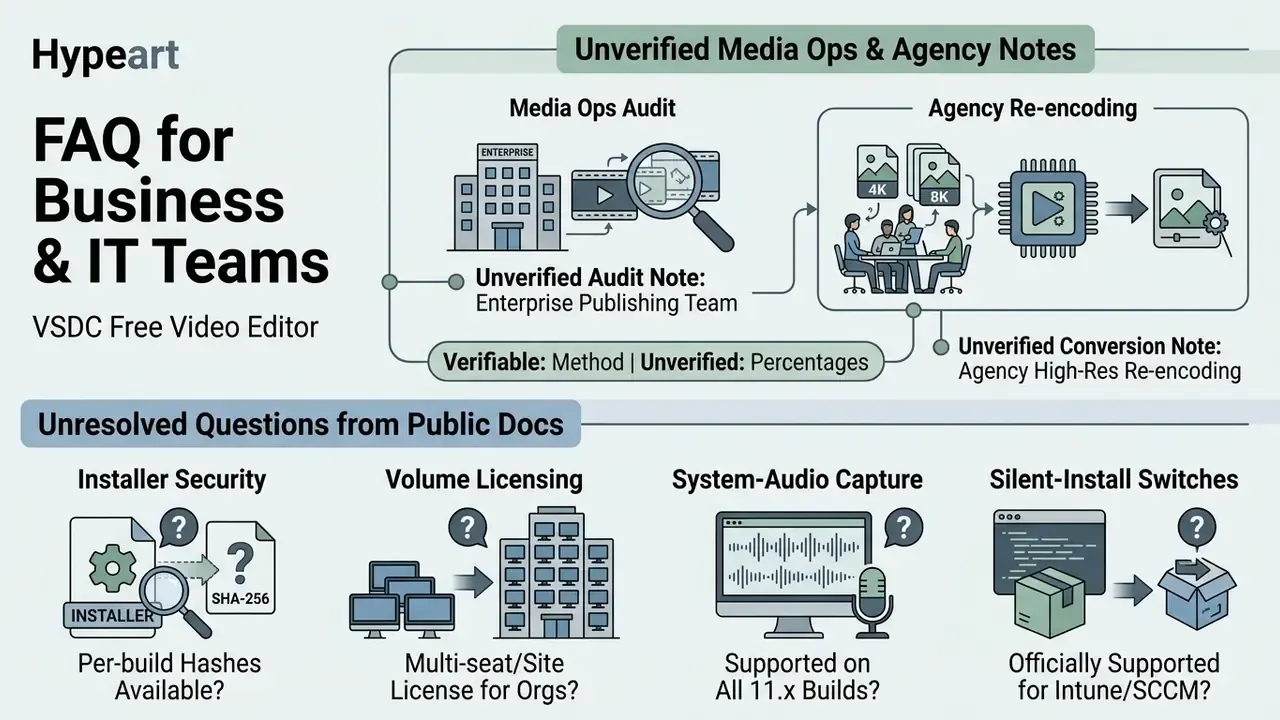
Appendix A: Editorial Notes and Unresolved Questions