Executive summary for busy readers
- What it is A "gay AI image generator" is not a separate architecture. It is a standard text-to-image diffusion pipeline (text encoder → latent diffusion → VAE decoder) prompted toward same-sex relationships, LGBTQ+ themes, and male aesthetic portraiture.
- Main technical risk Over-moderation. CLIP-based safety filters flag LGBTQ+ vocabulary more often than neutral demographic baselines, which breaks legitimate creative and marketing workflows.
- Main legal risk In the United States, purely machine-generated output is not registrable for copyright; in the EU, the AI Act pushes synthetic-content labelling and copyright-compliance policies for model providers. Contractual usage rights from a vendor are not the same as copyright ownership.
- What to choose Mainstream engines (DALL·E 3, Adobe Firefly, Midjourney, Stable Diffusion) for commercially safe, auditable assets; niche platforms (SeaArt, PixAI, StarryAI, Nectar AI, Soulgen, NightCafe, Neural Love, Candy AI) for sub-genre styles such as Yaoi/BL, furry art, or anime.
- What you can generate Text-to-image stills, Image-to-Image style transfer ("remix") from your own photos, and increasingly Image-to-Video and Text-to-Video animation.
- Governance minimum Log prompt, seed, model version, sampler, and licence tier for every exported asset; never place PII into a public prompt box.
Who this guide is for. Three readers, roughly. The independent creator who wants to create gay ai art without hitting a false-positive block on every third prompt. The brand or content lead who needs commercially safe assets with a paper trail. And the governance function that inherits the question later, usually after an asset is already live. The sections below move from mechanics to styles to controls, so you can stop where your role ends.
One more framing note before the technical part. A consumer image tool inside a regulated company is still a third-party system processing your inputs. Treat it like one: named owner, approved use cases, retention terms read rather than skimmed, and an exit path if the vendor changes its policy overnight. If you want a broader catalogue of vendors and use cases first, compare options across the wider media stack.
What a gay AI image generator is and what images it produces
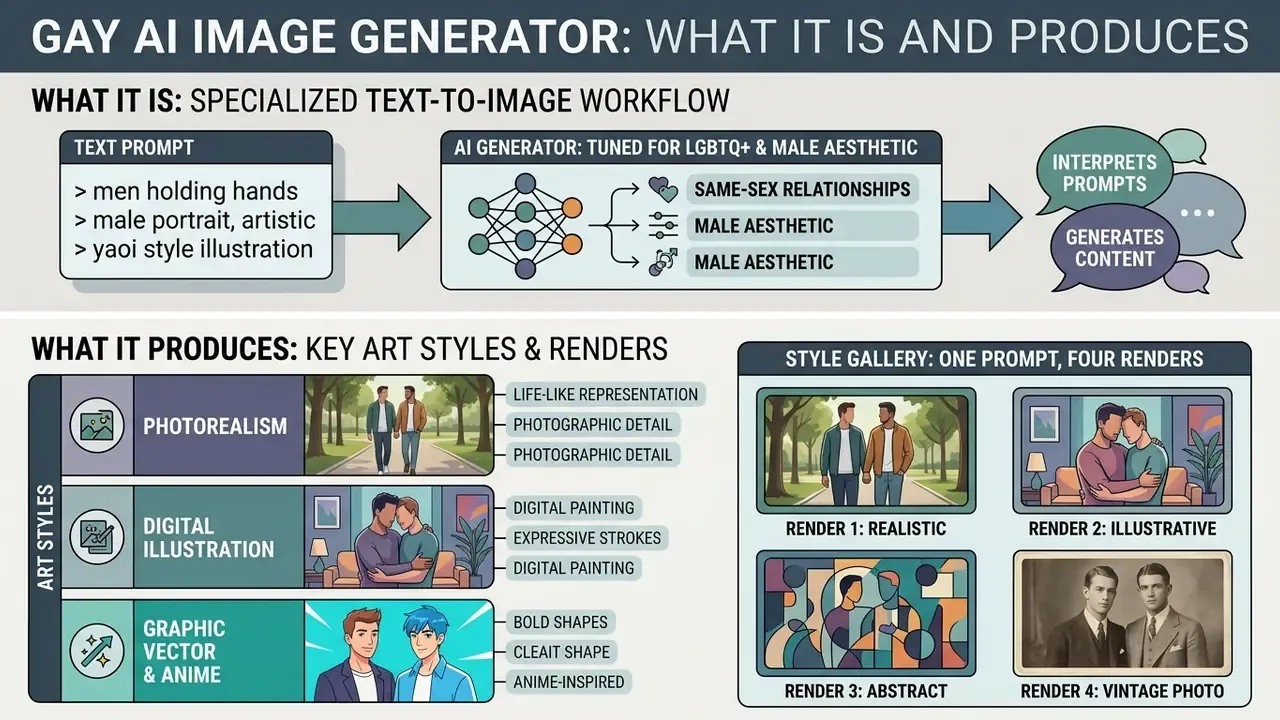
A gay ai image generator refers to a specialized text-to-image workflow or platform tuned to interpret prompts depicting same-sex relationships, LGBTQ+ themes, and male aesthetic portraiture. Rather than operating as an entirely separate technical architecture, an ai powered art generator leverages foundational diffusion or transformer models to convert text embeddings into generated images via cross-attention mechanisms.
That systemic framing matters before any tooling decision. The defaults of a general-purpose model are not neutral, and prompt design becomes partly a corrective act. If you want to evaluate alternative platforms across broader visual categories, review our overview of AI image generators to assess baseline model performance and usage rights.
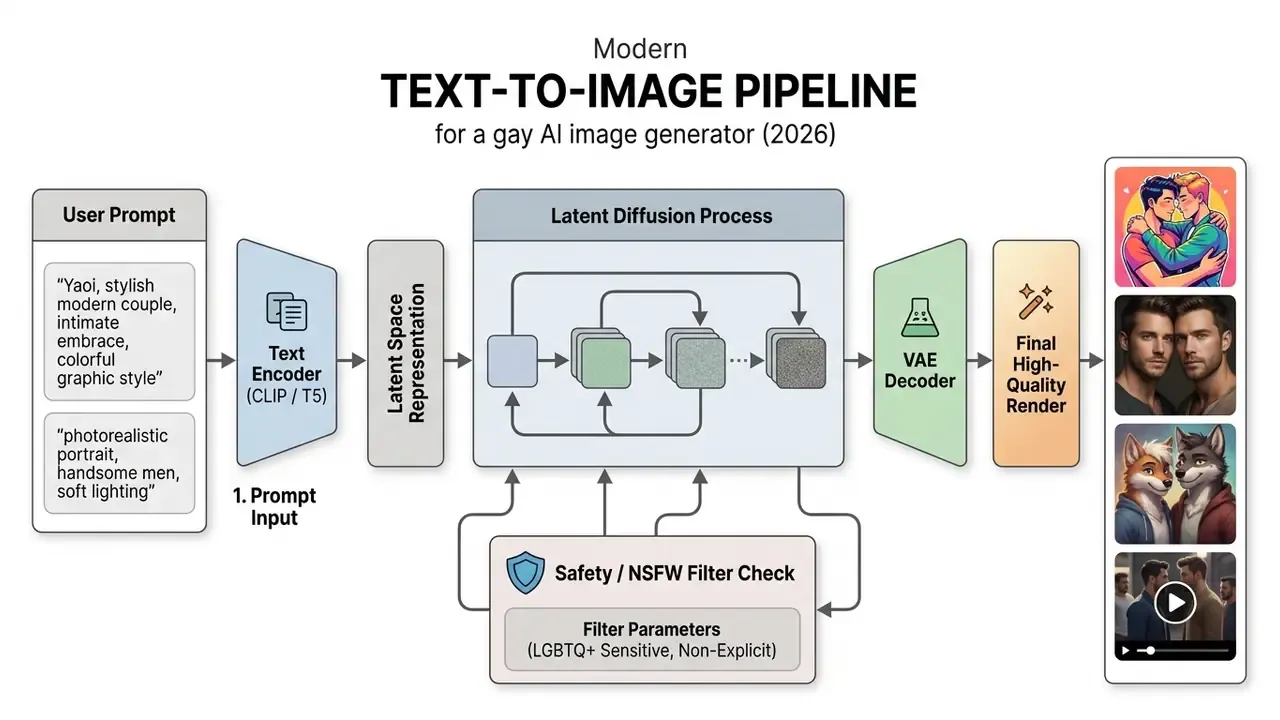
Modern text-to-image architectures process user prompts through text encoders like CLIP or T5, mapping prompt tokens to spatial features in a latent diffusion model. When generating gay art, the system weighs subject, style, context, and lighting tokens to render the final composition. Cross-attention heatmaps show that content tokens mostly drive object regions, while style tokens shape background and texture. Which is exactly why the ordering of your prompt changes the result.
Creating gay AI images from a text description
To create ai gay images effectively, specify high-signal prompt attributes: main subject, emotional context, background environment, and rendering style. The underlying ai generator turns descriptive words into visual representations by adjusting latent features across sequential denoising steps.
Structured prompts that front-load explicit subject keywords and visual style outperform conversational sentences in semantic fidelity. When users request an ai gay photo, the encoder maps subject attributes to early spatial shapes, while secondary tokens refine lighting and facial structure.
Practical consequence: never rely on implicit description. If the scene requires two men, state it explicitly, name the relationship, and describe the emotional register. Otherwise the model resolves ambiguity using its own statistical defaults, and you burn credits arguing with them.
Styles for gay AI art: illustration, photo, and artistic treatment
An ai gay photo generator can output diverse visual formats: photorealistic portraiture, digital painting, vector graphics, anime aesthetics. Choosing the appropriate style depends on the intended application, whether commercial media, editorial design, or creative experimentation. To compare tools on output quality and licence terms, see our roundup of the best AI image generators.
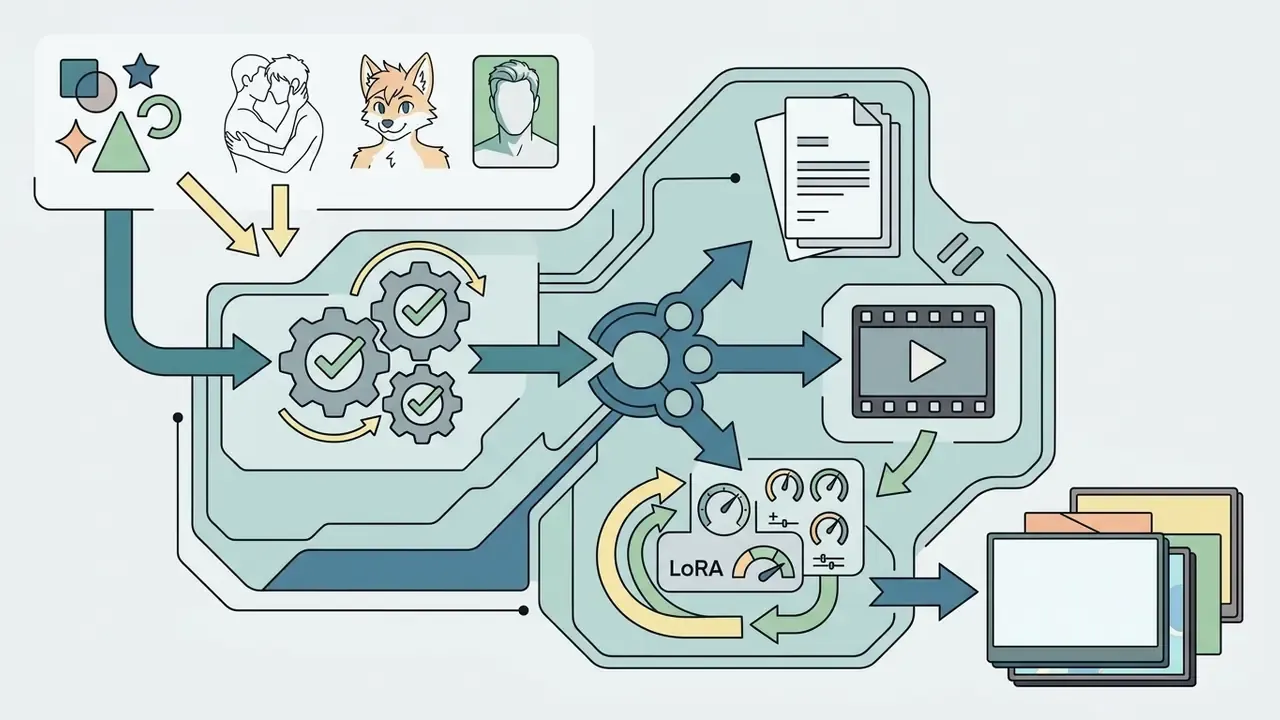
An ai gay men generator prompt set usually splits along the same three lines, and the split is worth respecting: mixing painterly and photographic vocabulary in one prompt produces mush. To examine how different generative tools handle varied asset types, you can explore the hub for technical breakdowns of media synthesis workflows, or compare style-heavy engines in our best AI art generator comparison.
Style gallery: one prompt, four renders
The gallery below documents a single narrative prompt executed across four visual treatments. Each entry is published as a semantic figure element with a descriptive caption and descriptive alt text. The render markup is handled at template level, not pasted into the article body.
| # | Style | Caption / annotation | Alt-text pattern |
|---|---|---|---|
| 1 | Photorealistic AI Photo | Focused lighting, natural skin texture, 85mm lens parameters | gay AI art generator - photorealistic style example |
| 2 | Digital Illustration | Soft brush texture, emphasis on contrasting palette and stylized proportions | gay AI art generator - digital illustration style example |
| 3 | Gay AI Art (stylized) | Vivid neon treatment with halftone graphics and dynamic composition | gay AI art generator - stylized gay AI art example |
| 4 | Fine Art Impressionism | Oil-painting imitation with broad strokes and a blurred background | gay AI art generator - impressionist treatment example |
Purpose of the gallery: show how far output diverges between visual styles when the textual seed stays identical. It is the fastest way to calibrate expectations before spending credits, and the cheapest way to settle an internal argument about "which look we want".
Popular directions and styles: from Yaoi to furry art
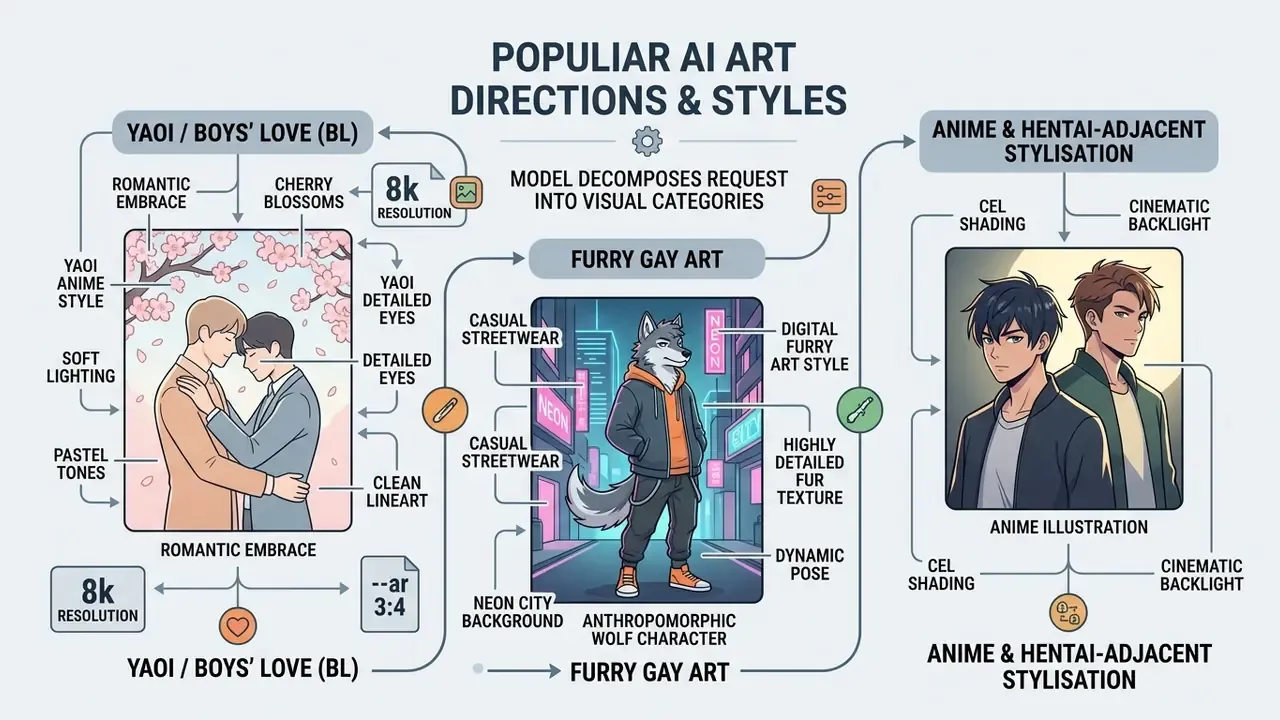
During generation, the model decomposes your request into visual categories. To transmit intent precisely, use explicit stylistic markers. The prompts below are copy-ready; paste them into the prompt box and adjust only the bracketed variables.
1. Yaoi / Boys' Love (BL). A Japanese stylised genre focused on romantic relationships between male characters, popular both in Japan and internationally. Emphasis falls on emotion, expressive eyes, and soft palettes.
Yaoi anime style, romantic embrace under cherry blossoms, soft lighting,

detailed eyes, pastel tones, clean lineart, 8k resolution --ar 3:4
2. Furry gay art. Stylised anthropomorphic characters with detailed fur rendering; heavily requested in fan-art and original-character (OC) workflows.
Anthropomorphic wolf character, digital furry art style, wearing casual

streetwear, neon city background, highly detailed fur texture, dynamic pose
3. Anime and hentai-adjacent stylisation. Cel shading, high-contrast linework, expressive framing. Note that most mainstream platforms prohibit explicit sexual content: Adobe's generative guidelines forbid pornographic material and explicit nudity, and Google's Gemini image policy forbids sexually explicit output. Explicit work therefore migrates to niche, age-gated services with their own terms, and with weaker governance documentation.
Anime illustration of two male characters, cel shading, cinematic backlight,

expressive faces, detailed hair strands, manga panel composition, 4k
4. Photorealistic male portraiture. Hyper-realistic paired or solo portraiture for editorial, campaign, and social formats. This is where an ai gay picture generator gets judged hardest, because viewers spot uncanny hands and teeth instantly.
Cinematic studio portrait of two men, 85mm lens, f/1.8, realistic skin texture,

dramatic side lighting, shallow depth of field, 4k photographic quality
5. Fanart and original character (OC) sets. For recurring characters, lock the seed and reuse a fixed character description block so facial structure stays consistent across a series.
Original character sheet, same man in three poses, consistent facial features,

short dark curls, olive skin, minimalist background, flat illustration style
Image-to-Image and remix: transforming existing photos
Text-to-image is only half of the workflow. If you already own a reference photo, sketch, or previous render, Image-to-Image (often branded "remix" or "transform style") re-renders it into a new aesthetic while preserving composition anchors.
Step-by-step:
0.20–0.40preserves facial features and pose; changes only lighting, colour grade, and texture.0.45–0.55keeps the layout but re-interprets clothing, background, and material detail.0.60–0.80fully repaints the frame into the target style (photo → digital painting, photo → anime).
For a broader survey of transformation tooling, see our overview of image-to-image generators and the related AI outpainting comparison.
Gay AI video and animation: from stills to motion
Contemporary pipelines produce not only static art but short motion clips, either from text (Text-to-Video) or from an existing still (Image-to-Video). Consumer platforms now expose both paths behind the same interface, which makes animation a natural extension of an existing prompt library.
How to turn art into video
Slow camera zoom in, subjects turning their heads toward the camera and smiling,

gentle breeze moving hair, warm golden-hour light, 60fps cinematic video
- Choose the engine.Motion is model-specific: Runway Gen-family, Luma Dream Machine, Kling AI, Google Veo, or the video modules bundled into niche companion platforms. For API-level economics and limits, see our Google Veo implementation guide.
- Write motion prompts.Specify camera dynamics and subject action separately from appearance.
- Control physics.For paired scenes, keep
motion strengtharound 3 to 5 on a 1 to 10 scale. Higher values distort hands, fingers, and facial geometry, the two most common failure modes in two-subject animation. - Budget for credits.Free video tiers are far tighter than image tiers. Documented 2026 examples include 50 daily credits on Google Flow (spendable only on Veo generations, watermarked with SynthID), roughly 66 daily credits on Kling AI's free tier with watermarked exports capped at 720p to 1080p depending on mode, and 3 videos per month with a one-minute ceiling on HeyGen's free plan.
- Label synthetic output.The EU Code of Practice on Transparency of AI-generated Content requires synthetic output to carry machine-readable, detectable marking. Plan for it rather than stripping it.
Compare zero-cost options in our best free AI video generator breakdown before committing to a paid tier.
How to choose the best free gay AI image generator
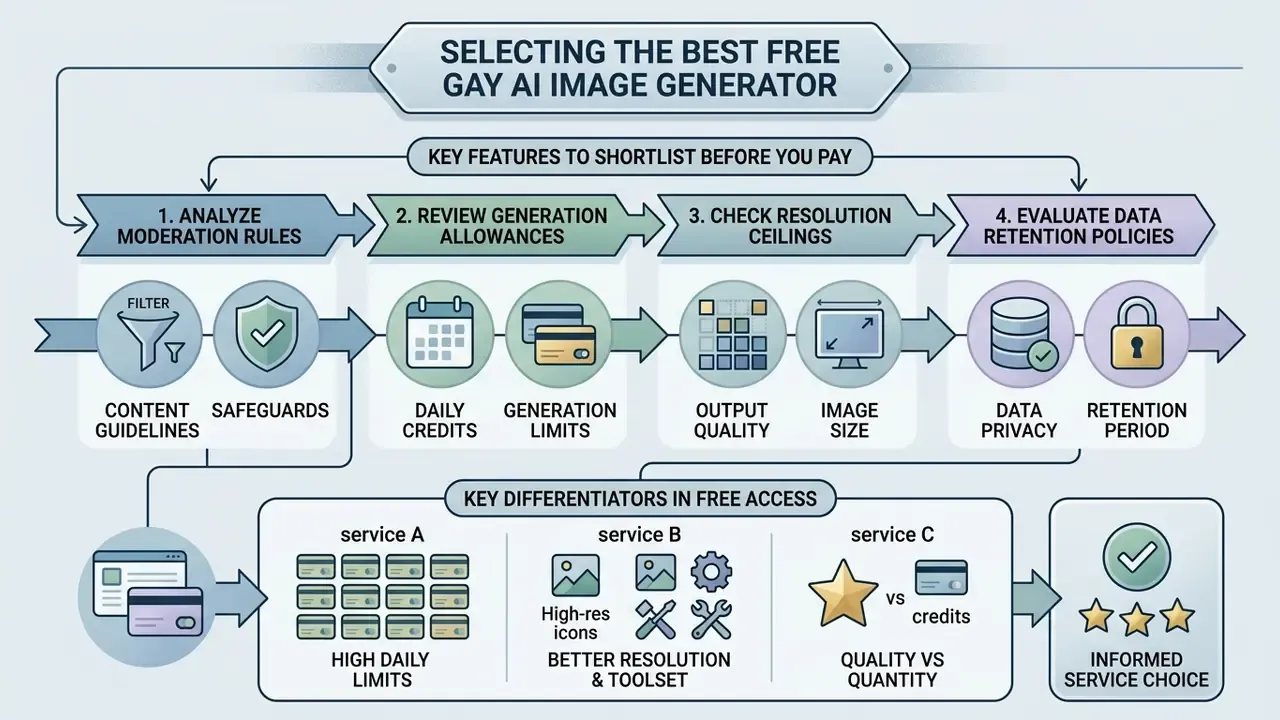
Selecting the best free gay ai image generator requires analysing platform moderation rules, daily generation allowances, resolution ceilings, and data retention policies. Many general-purpose platforms run strict automated moderation that occasionally misclassifies benign LGBTQ+ intimacy as policy-violating content. That is a documented pattern in independent filtering research, not an anecdote from a forum thread.
Independent evaluations show that CLIP-based safety filtering pipelines disproportionately flag LGBTQ+ keywords compared with neutral demographic baseline prompts (Carroll et al., 2024).
«CLIP-filtering excludes data associated with LGBTQ+ identities at significantly higher rates than other content, trends comparable to Dodge et al. (2021).»
Consequently, a robust free gay ai image generator must offer clear content guidelines, a documented appeals path, and reliable governance controls. NIST's Generative AI Profile for the AI Risk Management Framework (NIST AI 600-1, 2024) recommends tracking policy violations, takedown requests, and IP-infringement signals. Treat a vendor's willingness to publish that information as a selection criterion, not a nicety.
Key features to shortlist before you pay:
- transparent moderation policy plus an appeals channel;
- credit renewal cadence and export resolution ceiling;
- seed, sampler, and negative-prompt exposure (reproducibility);
- explicit commercial-rights language with an effective date;
- retention and training-opt-out settings for uploads.
Free access, free credits, and generation limits
Most free gay ai generator platforms run a freemium model, using free credits daily or monthly caps to regulate server load. Free tiers frequently impose resolution constraints, queue delays, and mandatory watermarks on exported files.
Public generation tiers often cap download resolutions at 720p or 1080p, reserving higher resolutions and fast processing for paid subscribers. OpenAI's consumer pricing page lists image generation on the Free plan as limited, while its API image models list no free generation tier at all, a plan-level difference worth confirming before you build a pipeline. Adobe Firefly, by contrast, grants free daily generations against commercially safe models trained on licensed Adobe Stock and public-domain content.
When testing tools like a custom ai image utility, review daily credit renewal terms so project testing does not stall mid-sprint. If you want to avoid account creation entirely, see our list of free AI generators with no sign-up. One caveat from experience: no-signup tools rarely give you a retrievable generation history, which makes them a poor fit for anything auditable.
Quality, customization, and the AI toolset
Comparative analysis of AI generators
| Platform / Model | Free access | Daily limits / credits | Available styles | Customization | Output quality | Commercial rights | IP indemnification |
|---|---|---|---|---|---|---|---|
| OpenAI ChatGPT / DALL·E 3 | Limited free access | 2–5 images per day | Photo, painting, vector | Basic (via text) | High (1024×1024) | Yes (per ToS) | Enterprise-tier terms only |
| Adobe Firefly | Free tier available | 25 generative credits/month | Extensive style catalogue | High (filters / ratios) | High (commercially safe) | Yes (full rights) | Yes, for eligible enterprise plans |
| Midjourney (v6+) | None (paid only) | N/A (from $10/month) | Unlimited (parameterised) | Very high (params / inpaint) | Very high | Yes (paid subscriptions) | Not offered |
| Stable Diffusion (open source) | Fully free | Unlimited (local) | Custom LoRA / checkpoints | Maximum (ControlNet / ComfyUI) | Hardware- and model-dependent | Yes (depends on model licence) | Not applicable (self-hosted) |
| SeaArt AI | Yes (free tier) | Daily credit top-up | Anime, furry, cyberpunk, Img2Img | High (Img2Img, style transfer) | High | Yes, for content you create | Not offered |
| PixAI Art | Yes | Daily check-in credits; plans from ~$10/mo | Anime, Yaoi/BL, custom LoRA | Very high (model + LoRA + negative prompt) | High (model-dependent) | Depends on the LoRA / model licence | Not offered |
| StarryAI | Yes | ~5 free credits/day; plans from ~$11.99/mo | 3D art, moody, cyberpunk, portrait, anime | Medium (style presets, canvas size on Pro) | Medium–high | Yes (user retains rights) | Not offered |
| NightCafe | Yes (daily credits) | Credit packs from ~$4.79 | SDXL, DreamShaper, Real Cartoon XL, vibrant, mecha | Medium–high (model choice, batches) | High | Per platform terms | Not offered |
| Neural Love | Yes (free generations) | Paid credits from ~$10 / 100 credits | Fantasy, anime, painting, sci-fi, cyberpunk, pixel art | Medium (categories, outpainting) | Medium | Per platform terms | Not offered |
| Soulgen | Limited trial | Plans ~$9.99/mo, ~$69.99/yr | Anime and realistic; edit / extend / outpaint | High (action, clothing, body, face) | Medium–high | Per platform terms | Not offered |
| Candy AI | Limited | Plans from ~$9.99/mo | Companion-style realistic and anime models | High (appearance, personality traits) | Medium–high | Per platform terms | Not offered |
| Nectar AI | Limited (free chat on sign-up) | Trial credits; premium for art/video | Erotica, virtual companions, Image + Video | Very high (traits, poses, outfits) | High | Defined in ToS | Not offered |
Notes: pricing and credit allowances change frequently; verify on the vendor's own terms page before committing budget. Niche platforms trade governance transparency for stylistic range, and the correct trade-off depends on whether the asset will ever be published commercially.
Advanced customization: LoRA, Flux components, and negative prompts
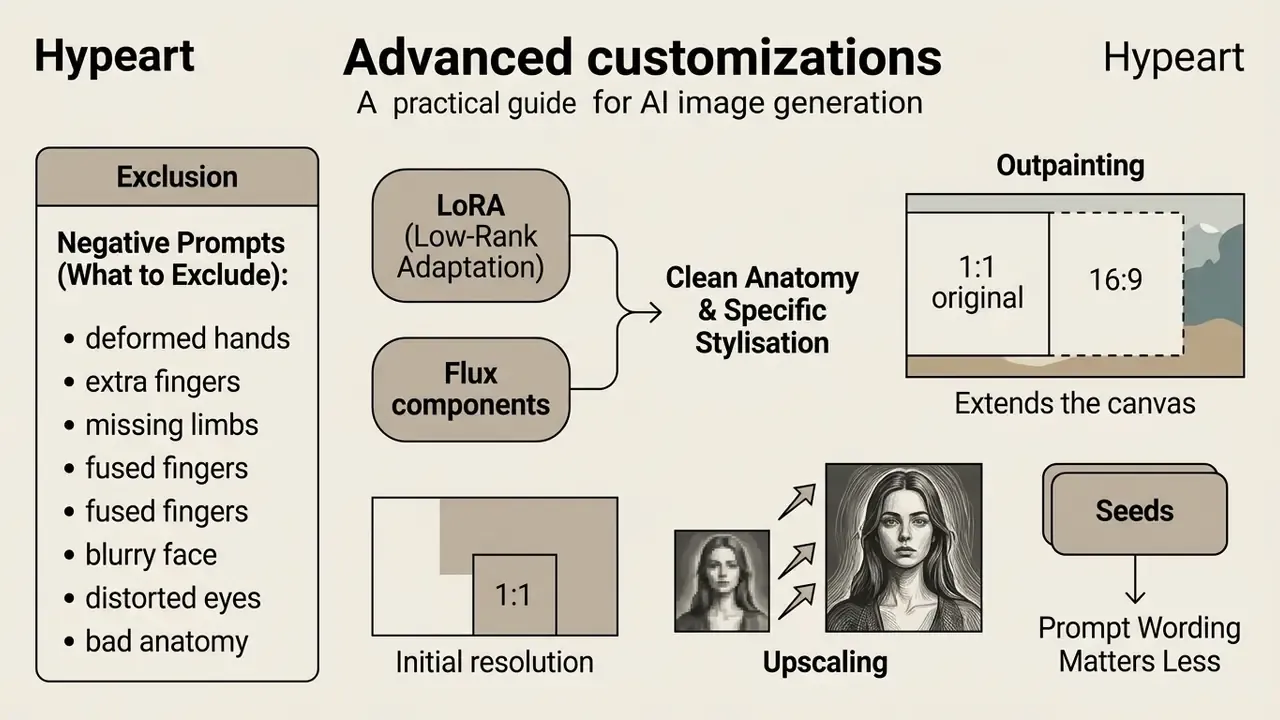
Professional creators reach clean anatomy and specific stylisation through micro-models and exclusion prompts, not longer descriptions. Adding adjectives is the most common beginner reflex and the least effective one.
Negative prompt (what to exclude). To suppress deformed fingers, blur, and anatomical errors, keep a base block in the Negative Prompt field on every run:
deformed hands, extra fingers, missing limbs, fused fingers, blurry face,
distorted eyes, bad anatomy, bad proportions, low resolution, jpeg artifacts,
watermark, text, signature
LoRA (Low-Rank Adaptation). Small adapter files, roughly 10 to 200 MB, that fine-tune a base model such as Stable Diffusion or Flux toward a specific character, body type, or micro-style. Platforms such as PixAI expose an explicit "AI model + LoRA" selector; local stacks load LoRAs with a weight value, commonly 0.6–0.9. Two caveats: stacking more than two or three LoRAs degrades coherence, and commercial rights follow the LoRA's licence, not only the base model's.
Flux components. Modular generation blocks that improve in-image text rendering and multi-subject interaction. Useful when two characters must interact plausibly in one frame instead of looking composited side by side.
Outpainting. Extends the canvas beyond the original frame, turning a 1:1 portrait into a 16:9 banner or adding environment around a tight crop. Set the expansion direction, then prompt only the new region's content; see our AI outpainting tools comparison for tooling options.
Upscaling. Free tiers cap resolution, so final delivery usually needs a separate pass through AI image upscalers to reach print or large-format web specs without visible softness.
Seeds. Prompt wording matters less than most guides claim. Running the same prompt across several seeds reveals the model's actual range far faster than rewriting the sentence. Record the winning seed; it is the only reliable way to reproduce a render later, and the only way to prove which render you approved.
How to create gay AI images: the process from idea to download
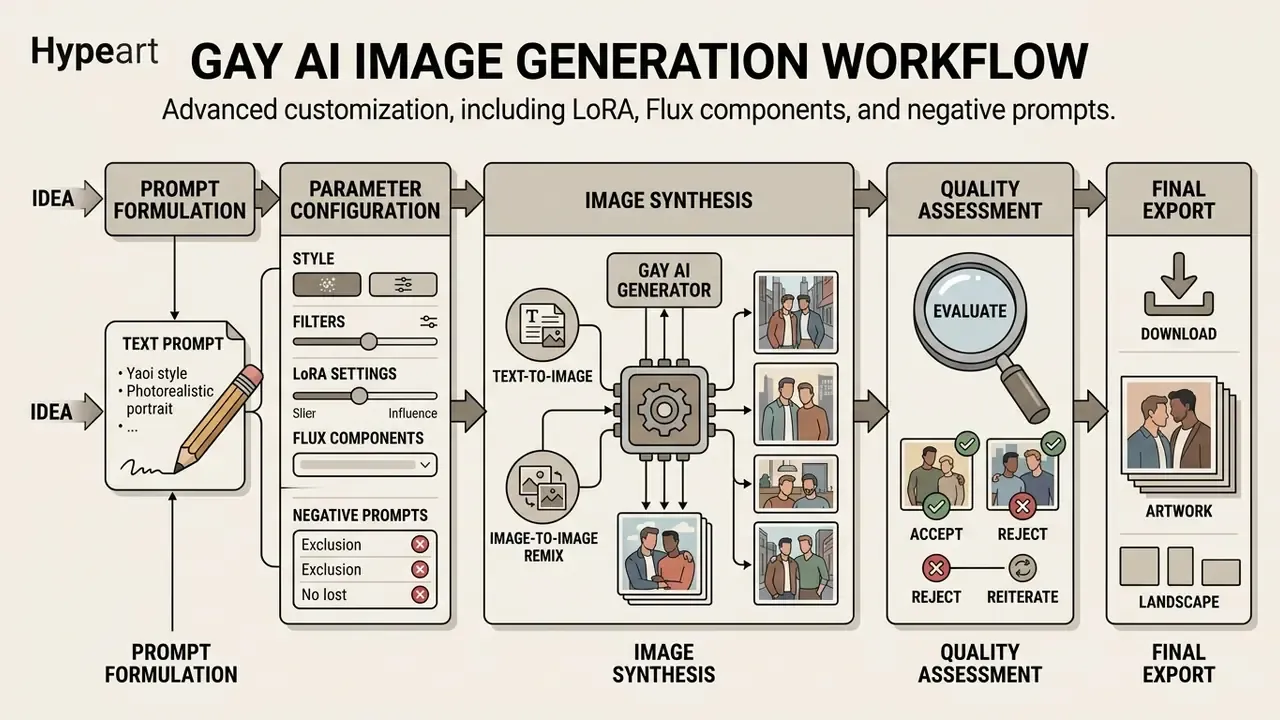
Because of that documented skew, the review steps below are not cosmetic QA. They are the point where stereotyping gets caught before an asset is published.
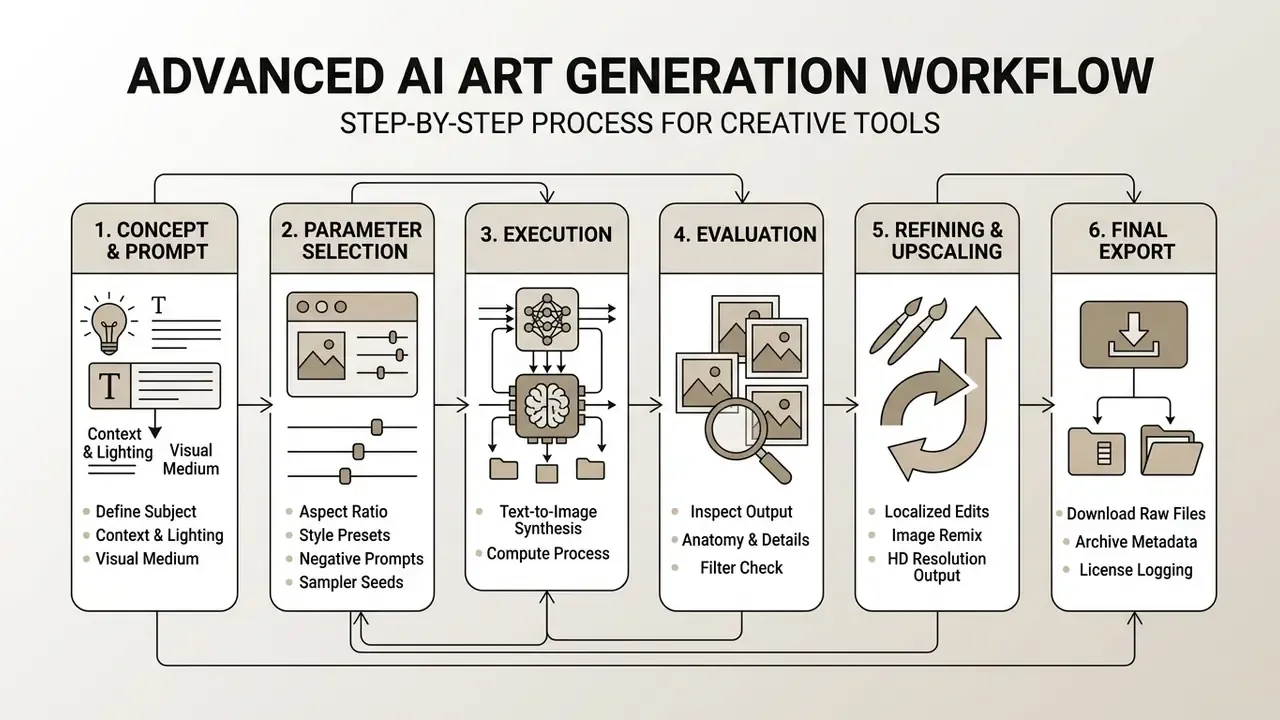
Describe the idea and prepare the request for the AI generator
To describe your vision effectively, structure the text prompt in a predictable sequence: core subject, surrounding scene, lighting conditions, colour palette, then camera or artistic parameters.
Updated guidance. Vendor prompting documentation converges on the same field order rather than on any single proprietary formula: subject → context/background → style/medium → composition → lighting → palette → technical quality. Google's Vertex AI imaging documentation frames a good prompt as subject plus context plus style (for example, "small boat on water in the morning, watercolour illustration"), while OpenAI's image-prompting guidance recommends stating the intended result first, then visible details, materials, lighting, colours, and medium, splitting complex requests into short labelled segments. Adobe Firefly's guide offers a reusable template: [Style] image of [subject], [lighting], [color palette], [mood].
For instance, when constructing prompts for a dalle ai image generator model, clear natural language statements produce fewer visual artifacts than disjointed keyword lists. If you are weighing conversational prompting against parameter-driven engines, compare behaviour in our DALL·E / ChatGPT picture generator evaluation.
Configure style, filters, and customization
Before triggering synthesis, configure generation parameters in the interface panel. Adjusting aspect ratios (16:9 for landscape, 4:5 for social portraiture) and applying style filters shapes how the underlying model interprets latent space vectors.
Advanced platforms allow reference images or "remix" tools, taking an existing layout and applying fresh prompt criteria while maintaining composition anchors. The full parameter ladder for that path sits in the Image-to-Image section above and in our review of image-to-image generators. Moderation strictness is itself a parameter on some APIs (for example moderation=auto versus a less restrictive setting), so document which mode produced each asset. If you are examining alternative text synthesis tools alongside visual generators, deep ai text solutions offer complementary text-formatting options.
Generate, evaluate, and download the image
Click generate, then review the resulting batch against two distinct criteria: semantic consistency (alignment with your prompt) and perceptual quality (absence of blur, distorted hands, unnatural lighting). Public evaluation frameworks such as ImagenHub formalise exactly this split, scoring semantic consistency separately from perceptual quality, with the lowest quality band reserved for obvious distortion and artifacts, plus an explicit defect checklist covering watermarks, scratches, blurred faces, unusual body parts, wrong subject distance, and inconsistent shadow or lighting.
If minor defects appear, use localized editing (inpainting) or rerun the prompt with a different seed rather than rewriting the whole prompt. Change one variable at a time, then re-inspect. Simultaneous edits make the cause of any improvement unknowable, which is fine for hobby work and useless for a validated pipeline. Once satisfied, export in lossless PNG for post-processing. For additional editing workflows, view the guide covering standardized media asset preparation, or route finishing work through a dedicated online photo editor.
Audit trail: logging generations for compliance
For regulated teams, the asset is only half the deliverable. The other half is provenance. Store one record per exported file and link it to your AI inventory entry for the model in use. A minimal schema:
Security-checked { "asset_id": "gai-2026-02-0148", "created_utc": "2026-02-11T09:42:17Z", "requester": "brand-studio/creative-02", "ai_inventory_ref": "MODEL-REG-0091", "platform": "Adobe Firefly", "model_version": "firefly-image-3", "mode": "text-to-image", "prompt": "Cinematic studio portrait of two men, 85mm lens, f/1.8, ...", "negative_prompt": "deformed hands, extra fingers, watermark, text", "seed": 884512037, "sampler": "default", "steps": 30, "aspect_ratio": "4:5", "denoising_strength": null, "lora_stack": [], "moderation_mode": "auto", "moderation_events": [], "licence_tier": "enterprise", "commercial_rights": "granted_by_terms", "indemnification": "eligible", "synthetic_label": "c2pa_content_credentials", "human_edits": "colour grade + crop in editor", "pii_in_prompt": false, "reviewer": "m.hale", "review_outcome": "approved" }Two fields carry disproportionate weight in an audit.
human_edits, because copyright claims attach only to human-authored contributions. Andpii_in_prompt, because it evidences that no personal data entered a third-party prompt box. Public-sector guidance is unambiguous here: U.S. CMS AI guidance (2025) instructs staff never to input PII, PHI, or sensitive data into publicly accessible AI platforms or prompts, and Australian government guidance (2026) bars personal information and "OFFICIAL: Sensitive" material from public generative tools.One practical note on ownership. A log nobody owns decays within a quarter. Name the accountable role (brand studio lead, not "the team"), define where the records live, and set a review cadence that matches your publication volume rather than your appetite for process.
Can gay AI art be used in commercial projects?
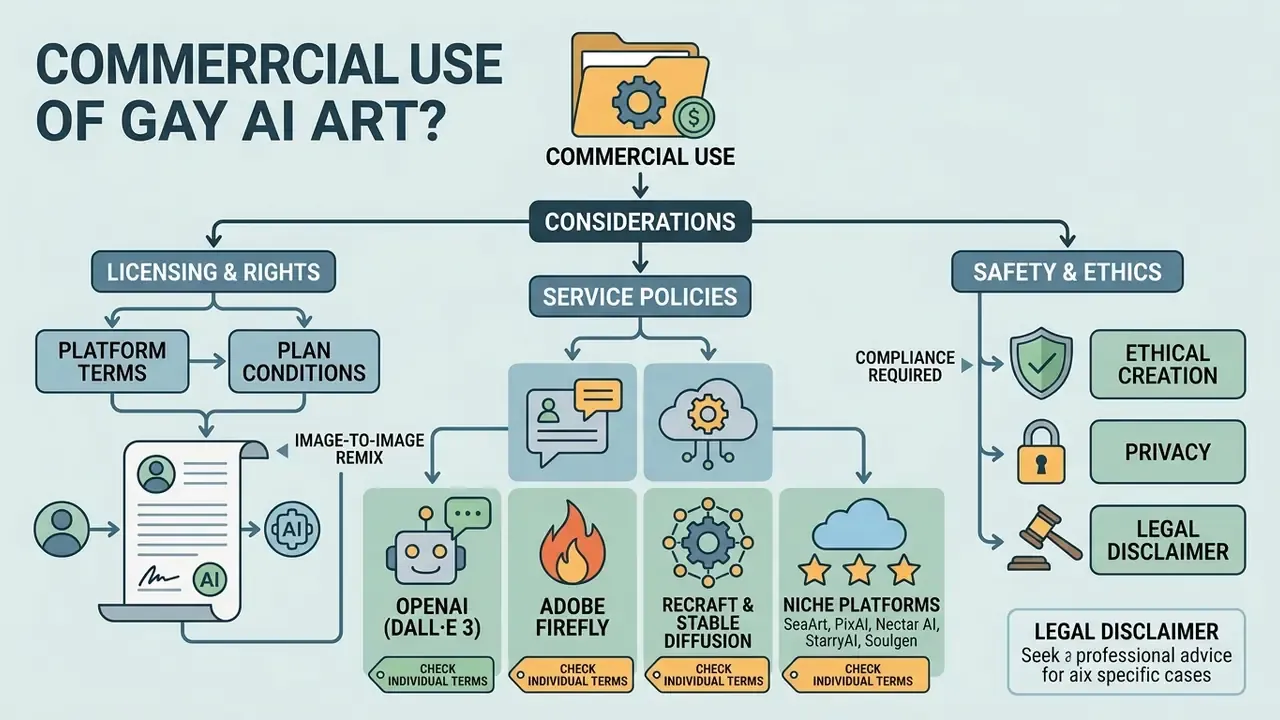
Commercial usage permissions for art created via generative AI depend on provider terms of service and prevailing legal statutes on machine-generated content. Broadly, major cloud providers grant commercial usage rights to outputs, provided users follow content usage policies and subscription tier conditions.
Technical compliance matters as much as contractual permission, because safety filters are demonstrably porous:
For a commercial team the reading is defensive: a passing filter is not proof of a compliant asset, so human review stays mandatory before publication.
Under United States copyright guidance, purely machine-generated outputs lacking human creative intervention remain ineligible for traditional copyright registration (US Copyright Office Guidance, 2024). The Office's position is that material is not registrable where AI determines the expressive elements; applicants must exclude AI-generated portions and may claim only their own human-authored contributions.
However, users keep contractual rights to publish, commercialise, and merchandise images created under compliant commercial subscriptions. In the EU, the 2025 copyright study and EUIPO briefing note require model providers to maintain a copyright-compliance policy and respect rights-holder opt-outs, while European Parliament materials restate that fully AI-generated content failing human-creativity criteria should remain outside copyright protection. Net effect: a vendor can grant you usage rights it controls, but no vendor can grant you a copyright that the law does not recognise.
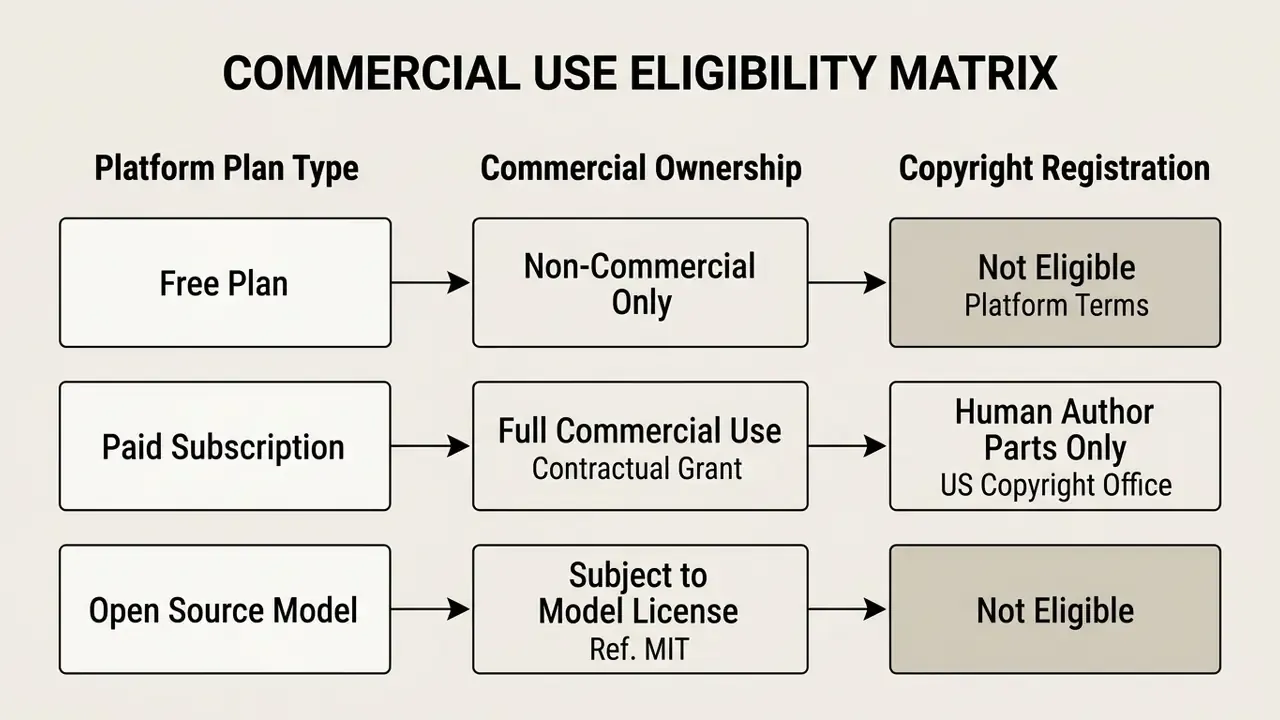
Licensing, rights to generated images, and plan conditions
Commercial rights vary sharply between free tiers and monthly subscription plans. Midjourney restricts free-trial outputs to non-commercial usage while granting full commercial rights to paid subscribers; see our Midjourney AI image generator comparison for how those terms stack up against rival engines.
- OpenAI (DALL·E 3) Users own generated images and hold rights to reprint, sell, and merchandise outputs, provided terms are met.
- Adobe Firefly Trained on licensed Adobe Stock and public domain assets, providing commercially safe outputs across free daily and paid tiers; enterprise agreements are the layer where IP indemnification typically appears.
- Recraft & Stable Diffusion Commercial rights depend on specific model licence terms and account creation dates. Recraft's own FAQ, for example, distinguishes images created before its 12 August 2024 terms update from those created after it. A reminder that rights can shift under your archive by policy date alone.
- Niche platforms (SeaArt, PixAI, Nectar AI, StarryAI, Soulgen) rights are defined per service and, for LoRA-based output, per adapter. None of the niche services reviewed here advertise indemnification.
Current terms pages worth bookmarking for verification include OpenAI's Terms of Use (updated 4 September 2026), Adobe's Generative AI User Guidelines (updated 2 September 2026), Canva's AI Product Terms (updated 29 March 2026), Kling AI's Terms of Service (21 April 2026), and Google's Gemma Terms of Use (modified 1 April 2026). Record the date you checked each one next to the asset it governs.
When evaluating automated generation systems for commercial asset pipelines, teams often compare platforms such as deep ai image and deep image ai to test licensing transparency, alongside vendor-specific breakdowns like our Canva AI generator, Microsoft AI image generator, and Google AI image generator overviews.
Safety, privacy, and ethical creation of gay art
When evaluating realistic portrait tools, teams frequently consult risk resources such as our deepfake ai image generator analysis to implement appropriate safety controls, and verify provenance of incoming files with AI image detectors or reverse-image search tools.
Can ready-made gay AI prompts be reused in other generators?
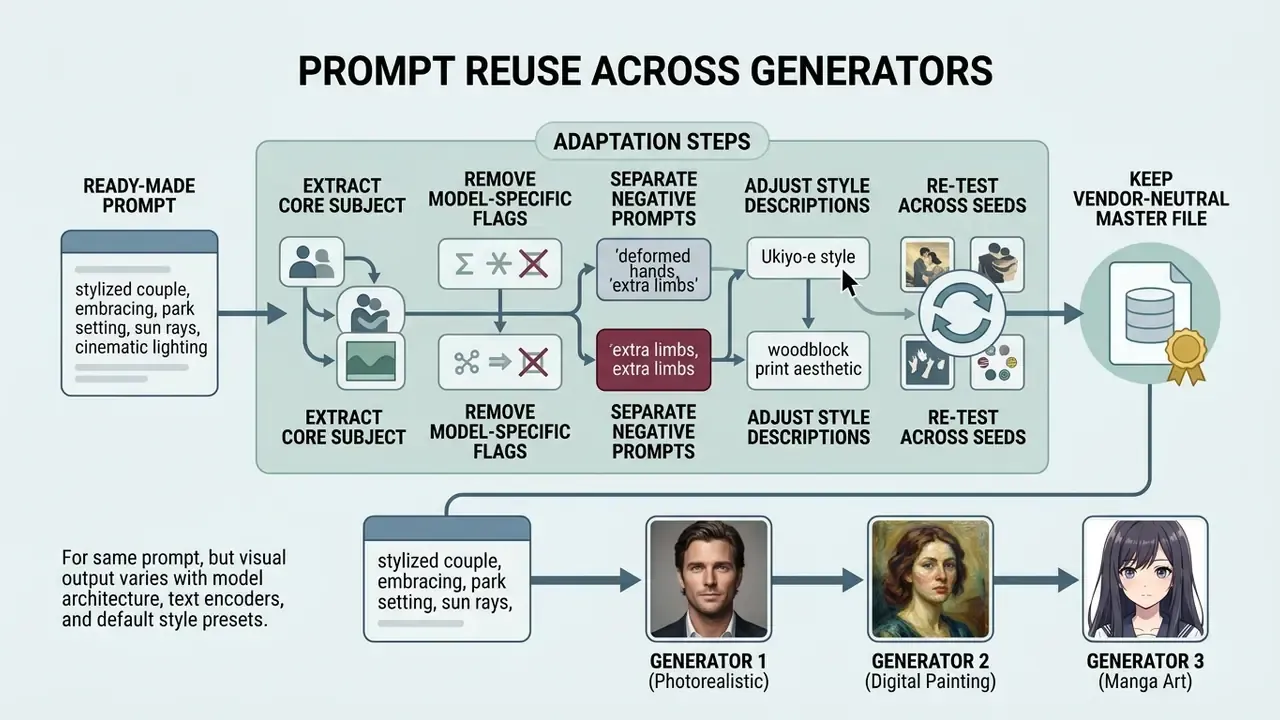
Ready-to-use prompts generally transfer across different image generators, but visual output varies with model architecture, text encoders, and default style presets. A prompt tuned for Midjourney's parameter syntax will behave differently when pasted into Stable Diffusion or DALL·E 3.
That mismatch explains a familiar frustration. An identical prompt can pass on one platform and be rejected on another, with no change in intent. Plan for per-platform calibration instead of assuming portability.
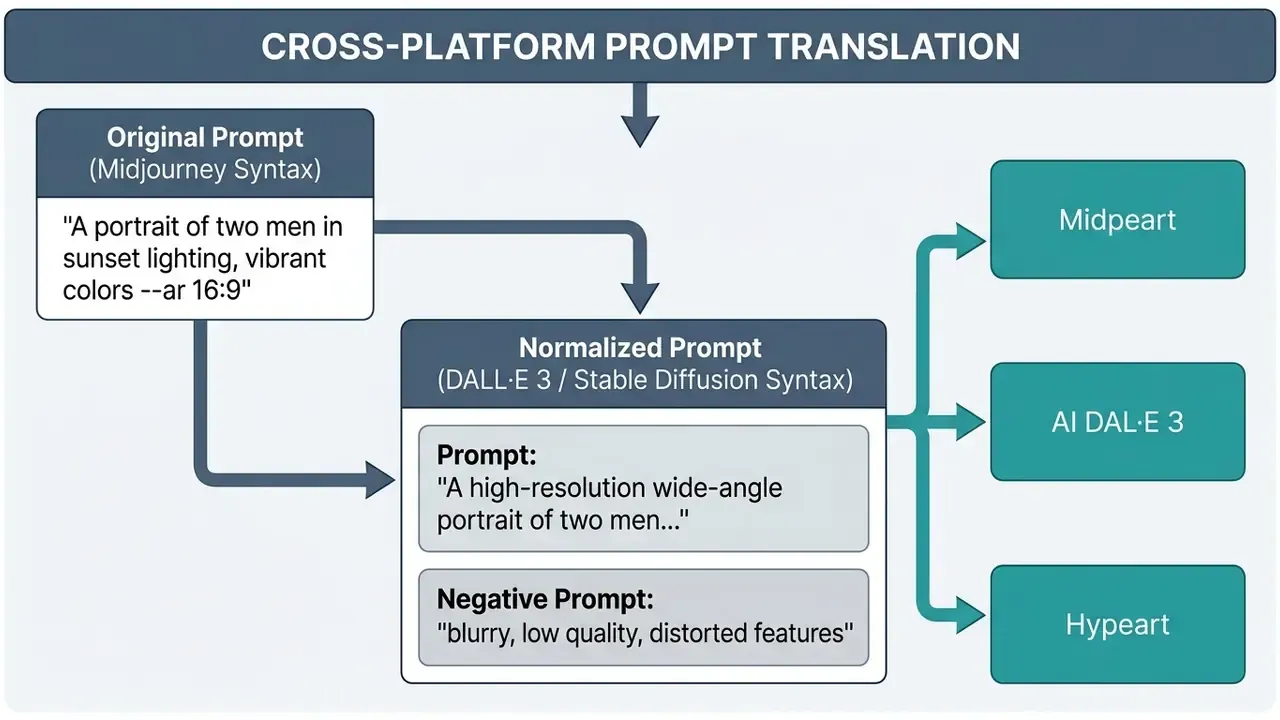
To adapt prompts effectively across platforms:
Compare stylistic control and portability across engines in our best AI art generators comparison. If your team evaluates broader legal implications or pending disputes regarding generative asset ownership, view the guide detailing industry litigation trends and compliance standards.
FAQ: Frequently Asked Questions
How do I correct a false-positive moderation block when generating gay art?
Treat it as a calibration task, not an attempt to bypass controls. Rewrite the prompt in descriptive, neutral language: describe relationship, context, lighting, and artistic style instead of relying on terms that trigger NSFW classifiers on benign scenes. Log the rejected prompt and the rejection reason, then escalate persistent false positives through the vendor's appeals channel. Documented cases are what drive filter retraining. Never route requests around corporate proxies or platform safeguards.
Is it safe to upload personal photographs to free AI generators?
Most public free services retain user uploads for model improvement. For confidential work, use locally hosted models or enterprise tooling with contractual privacy commitments. Government guidance is consistent on this point: personal, sensitive, or classified data should not enter publicly accessible AI prompts at all.
How do AI-art copyright rules differ between the US and the EU?
The U.S. Copyright Office refuses registration for wholly machine-generated works without substantial human authorship; applicants must disclaim the AI-generated portions. In the EU, the AI Act framework requires labelling of synthetic content and copyright-compliance policies from general-purpose model providers, while purely AI-generated output without meaningful human creative input generally falls outside copyright protection.
Can I turn one of my existing photos into gay AI art?
Yes, use Image-to-Image ("remix" or "transform style"). Upload the source, set denoising strength to 0.2–0.4 to preserve identity and pose, or 0.6–0.8 for a full restyle into anime or digital-painting aesthetics, and prompt only the target style. Confirm you hold the rights to the source photo and have consent from anyone depicted before publishing.
Can I generate gay AI video, not just images?
Yes. Text-to-Video and Image-to-Video engines animate a prompt or an existing still. Keep motion strength moderate, roughly 3 to 5 on a 1 to 10 scale, for two-subject scenes to avoid hand and face distortion. Expect tighter free-tier limits than for images, and preserve any synthetic-content watermark or label required in your jurisdiction.
What is a LoRA, and do I need one?
A LoRA is a small adapter file that biases a base model toward a specific character, body type, or micro-style. It is the most reliable route to consistent recurring characters and to sub-genres like Yaoi or furry art. Load one or two at weights around 0.6–0.9, and check the adapter's own licence, because it governs your commercial rights, not the base model.
Which parameters should I log for auditability?
At minimum: platform, model version, prompt, negative prompt, seed, sampler, steps, aspect ratio, denoising strength, LoRA stack, moderation mode, licence tier, synthetic-content label, and a description of any human edits. That record is what supports a copyright claim on your human contribution and a compliance response if the asset is challenged.
Are free tiers good enough to generate stunning results for a campaign?
Sometimes, with caveats. Free tiers can generate stunning single frames, yet they cap resolution, add watermarks, and rarely expose the seed you need for a consistent series. For paid media, budget for one paid tier plus an upscaling pass; for concepting and mood boards, a free gay ai art generator is usually enough.
Final checklist for choosing a gay AI image generator
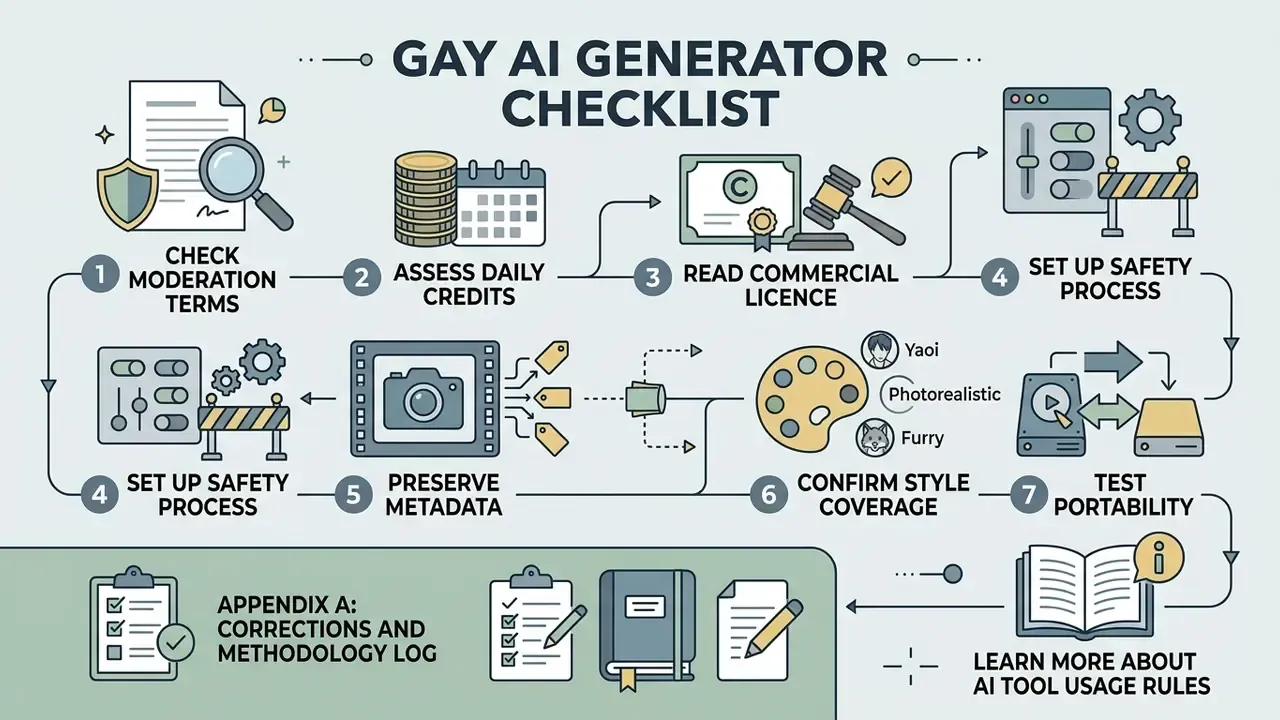
- Check the moderation terms. Confirm the platform does not block baseline LGBTQ+ themes and that it publishes an appeals path.