«In enterprise AI governance and creative automation, autonomy without structural grounding creates unquantifiable residual risk. Sketch-to-image diffusion pipelines demonstrate how spatial conditioning transformed generative AI from unpredictable synthesis into controlled, reproducible visual architecture.»
Executive Summary for Design, Risk, and Governance Leads
- Sketch conditioning removes spatial variance.Text-only prompting cannot specify coordinates. A sketch layer (ControlNet Scribble, Lineart, Canny, Depth) injects spatial features into a frozen diffusion backbone, so objects render exactly where they were drawn. That single change converts generative output from stochastic synthesis into a reproducible, reviewable artifact.
- Control is a dial, not a switch.Control Weight 0.8 to 1.0 enforces production-grade geometric fidelity for technical drawings and architecture; 0.3 to 0.5 grants creative latitude for ideation. Documenting the chosen value is part of your model risk evidence, not a nice-to-have.
- Two operating modes exist.Static or batch file upload (300 to 1,200 DPI scans, 20 to 50 diffusion steps) for precision work; a real-time interactive canvas (SD-Turbo, LCM adapters, sub-200 ms latency) for live ideation. Both use the same conditioning logic at different step budgets.
- Legal protection depends on the human layer.Per U.S. Copyright Office guidance (2025), prompts alone create no authorship; the hand-drawn sketch plus human retouching is the protectable contribution. Retain sketch source files, seeds, prompts, input hashes, and model versions as an evidence chain for audit (SR 11-7-style model risk review, NIST AI RMF 1.0 monitoring).
Last reviewed: 2026 edition. Reviewed by: Marcus Hale, AI Governance & Model Risk Analyst .
Who This Guide Is For and What It Helps You Decide
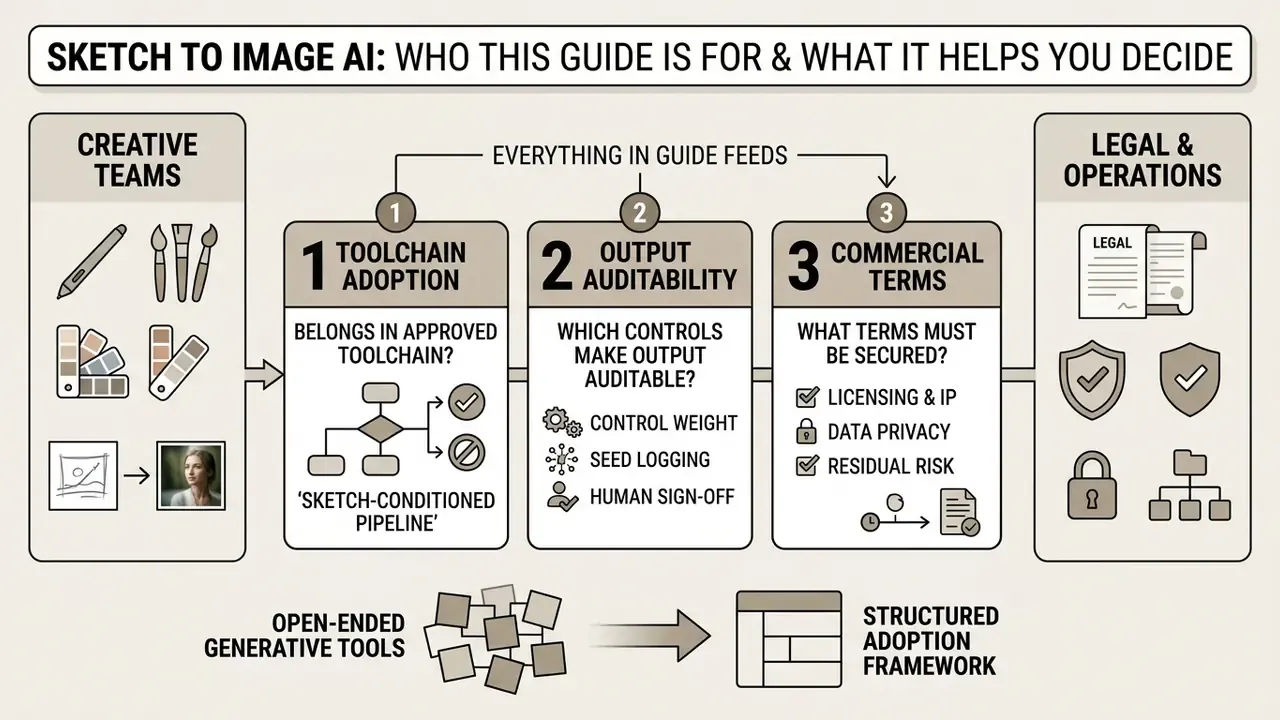
Three decisions are in scope:
- whether a sketch-conditioned pipeline belongs in your approved toolchain at all;
- which controls (Control Weight, seed logging, human sign-off) make the output auditable;
- what licensing, privacy, and residual-risk terms you must secure before the first commercial asset ships.
Everything else in this guide feeds one of those three questions. If you only take away one habit, make it seed logging.
An organizational decision to adopt generative tools often stalls during the transition from open-ended prompting to structured workflow control. Text-only image generation introduces variance that fails strict design standards, compliance guidelines, and compositional requirements. Integrating conditional spatial controls, specifically sketch inputs, allows engineering and creative teams to constrain AI outputs to exact visual boundaries. This guide analyzes how sketch to image ai tools operate, their underlying mechanics, preparation requirements, and legal compliance considerations for commercial deployment.
What Is Sketch to Image AI and What Problems the Generator Solves
A sketch to image ai generator is a conditional machine learning system that uses hand-drawn line art, scribbles, or structural contours as spatial guidance to synthesize polished visual outputs. Unlike unconstrained text-to-image models, a sketch-based AI image generator constrains neural diffusion to the precise spatial layout provided by the user.
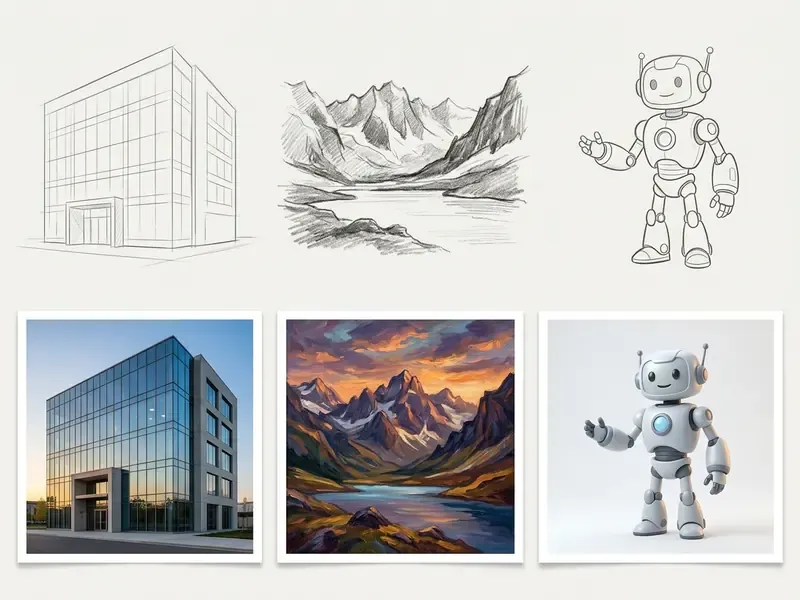
Enterprise teams use an ai drawing to image tool to eliminate guess-and-check prompt iterations. By converting rough sketches and pencil sketches into structured inputs, teams preserve essential composition while directing the generative ai model to supply realistic textures, lighting, and materials. In practical terms, the sketch replaces dozens of failed prompt attempts with a single unambiguous spatial contract between the designer and the model.
One more thing worth naming early. An ai draw to image workflow does not make a weak drawing strong; it makes a clear drawing faster to finish.
How AI Image Generation from Sketch Differs from Text-to-Image
AI image generation from sketch incorporates a dedicated visual conditioning pipeline alongside text prompts, whereas standard text-to-image generation relies solely on natural language tokens. Standard text guidance provides high-level semantic direction but lacks spatial coordinates.
In research published by the visual computing community, dual-pass sketch scaffolding measurably outperforms single-pass scribble conditioning.
The mechanism behind those numbers is procedural separation. A first pass follows coarse blocking strokes to lock composition, then surrounding regions are renoised in a second pass so fine detail strokes define silhouettes without fighting the layout. By injecting visual spatial features directly into the UNet or transformer layers of a diffusion backbone, an image to ai prompt system ensures that objects appear precisely where drawn. This structural anchor lets an ai generator drawing to image workflow maintain spatial governance across repeated generation cycles, which is why reviewers can compare two generations of the same sketch side by side without re-litigating composition.
Diffusion backbones are unusually well suited to this task, because shape representation is already latent in their weights.
«Pilot studies show diffusion models carry a pronounced shape bias that bridges the gap between sketches and photographs in sketch-based retrieval.»
For teams comparing platforms before committing a workflow, our overview of AI image generators maps conditioning support across vendors.
What Kinds of Images You Can Get from an AI Sketch
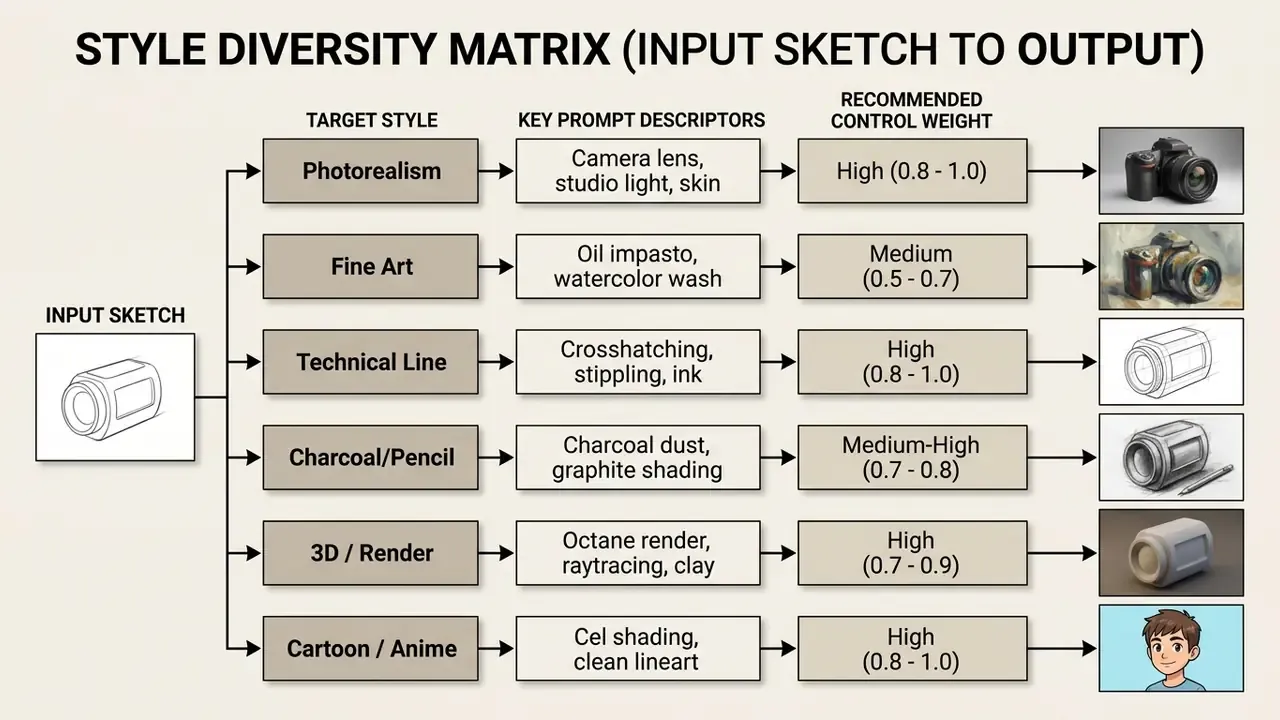
An ai sketch generator produces diverse visual assets, ranging from photorealistic architectural renders to stylized digital artwork, 3D assets, and ai cartoon graphics. The underlying generative model adapts to target style prompts without altering the foundational geometry of the sketch.
An ai drawing to picture pipeline, in other words, is style-agnostic. Geometry stays; the surface changes.
- Photorealistic imagery
- converts pencil sketches into photo-like images with realistic lighting, camera depth of field, and material textures. This is the ai drawing to photo direction most marketing teams start with.
- Digital painting and concept art
- translates structural line art into oil, watercolor, or matte painting styles for media exploration.
- 3D renders and vector graphics
- converts wireframes into volumetric 3D character models or clean graphic design elements.
- Animation and manga panels
- turns quick character drafts into finished anime panels or stylized visual storyboards, often as reference frames for later video generation.
- Technical line output
- produces crosshatched, stippled, or ink-outline renderings when the target is graphic rather than photographic.
How AI Convert Drawing to Image Works
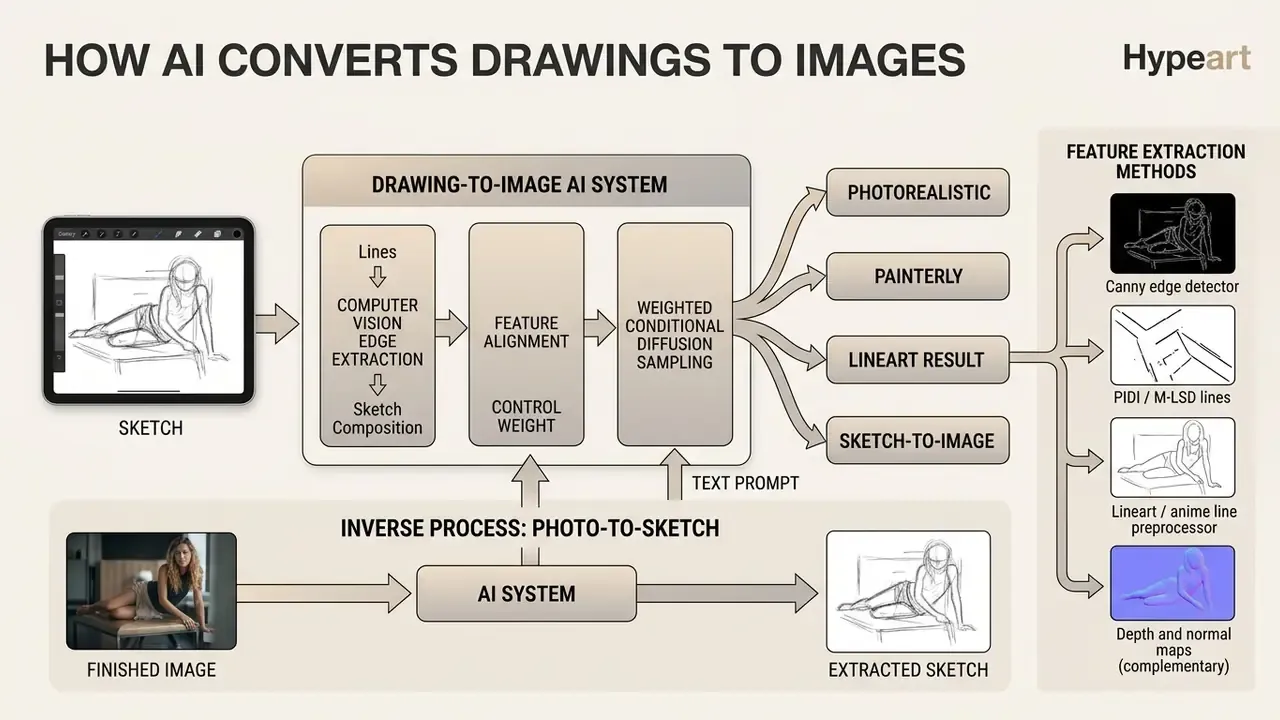
Modern AI systems convert drawings into photo-like outputs or polished art through computer vision edge extraction, feature alignment, and weighted conditional diffusion sampling. The system maps input strokes to spatial coordinates, guiding latent noise reduction without overriding structural boundaries.
[FLOW DIAGRAM: Sketch-to-final-image conversion process]
Purpose: Visualize the technical and user-facing stages of the algorithm.
Semantics: vector diagram or accessible layout wrapped in a figure element with caption;
alt text: "Diagram of ai convert drawing to photo".
Stage-by-stage transcript:
1. Sketch upload: The input file (JPG/PNG) is passed to the client or server interface.
2. Contour analysis (AI vision): The network (ControlNet / Scribble / Lineart) extracts vector
   gradients, masks, and key geometry.
3. Text prompt entry: The user describes style, materials, lighting, and environment.
4. Parameter configuration: Control Weight (Strength) balances sketch fidelity against
   model creativity.
5. Generation (click generate): The diffusion process denoises latent space under spatial
   constraints.
6. Editing and export: The built-in image editor performs upscale and inpainting, then exports
   the final high-quality file.
An image reader ai preprocessor converts user sketches into standardized edge maps. Neural adapters such as ControlNet process these edge maps using small zero-convolution layers that inject control signals into the frozen base model, keeping spatial integrity intact during generation. Because base weights remain frozen, the same checkpoint can serve unconstrained text-to-image and sketch-constrained generation without retraining, an operationally important property for teams that must document a single approved model version.
How AI Interprets Lines, Shapes, and Sketch Composition
Neural vision models analyze drawings through gradient shifts, boundary thresholds, and spatial feature maps rather than human artistic concepts. Classical edge detectors like Canny map line intensity changes, while deep convolutional layers and graph neural networks extract structural relationships between shapes. In classical terms, the Canny pipeline smooths the image, computes gradient magnitude and orientation, suppresses non-maxima, and thresholds the result, converting a drawing into thin contour candidates; Hough voting then groups those points into lines.
«Graph neural networks process vector drawing structures while preserving delicate line geometry, a property critical for technical and manufacturing applications.»
Studies on pretrained diffusion models also reveal an inherent shape bias, which explains why loose human strokes align with learned real-world object geometry instead of being read as noise. Early and intermediate network layers encode object drawings through learned contour features, so proportion errors in the sketch propagate into the render. The model corrects style, not anatomy. Worth repeating in any onboarding session.
Inverse Process: Extracting a Sketch from a Finished Image (Photo-to-Sketch)
The generation pipeline can be reversed: a finished photograph or render becomes a clean line sketch. This is a required step for producing patterns, tattoo stencils, coloring pages, and structural templates, and it is the fastest way to build a reusable control layer from an existing asset.
Technical algorithm for line extraction:
- Canny edge detector extracts hard pixel-level contrast transitions. Ideal for architecture, hardware, and product objects with defined silhouettes.
- PIDI / M-LSD lines extracts straight geodesic lines and structural segments while ignoring material texture. Best for interiors, façades, and floor plans.
- Lineart / anime line preprocessor uses a neural model to generate a clean, human-looking ink drawing from any photo, with foreground and background separation.
- Depth and normal maps (complementary) when silhouette alone is insufficient, depth conditioning retains volumetric relationships that pure edge maps discard.
Application scenario: convert a photograph of a real object into a vector contour, then re-stylize that contour through a new text prompt. Think of turning a product photo into a patent-style ink drawing, a coloring template, or a Blackwork tattoo stencil. The same inversion supports style migration: extract lineart from an approved brand asset, then regenerate it in a new seasonal palette while composition stays fixed.
Contour conditioning is strict enough to be used in regulated visual domains.
«ContourDiff demonstrates that contour conditioning applied at every diffusion step preserves anatomical structures during cross-modality translation, without using source-domain data.»
Why Add a Text Prompt to an Uploaded Drawing
Which Sketches Work for AI Drawing to Realistic Image
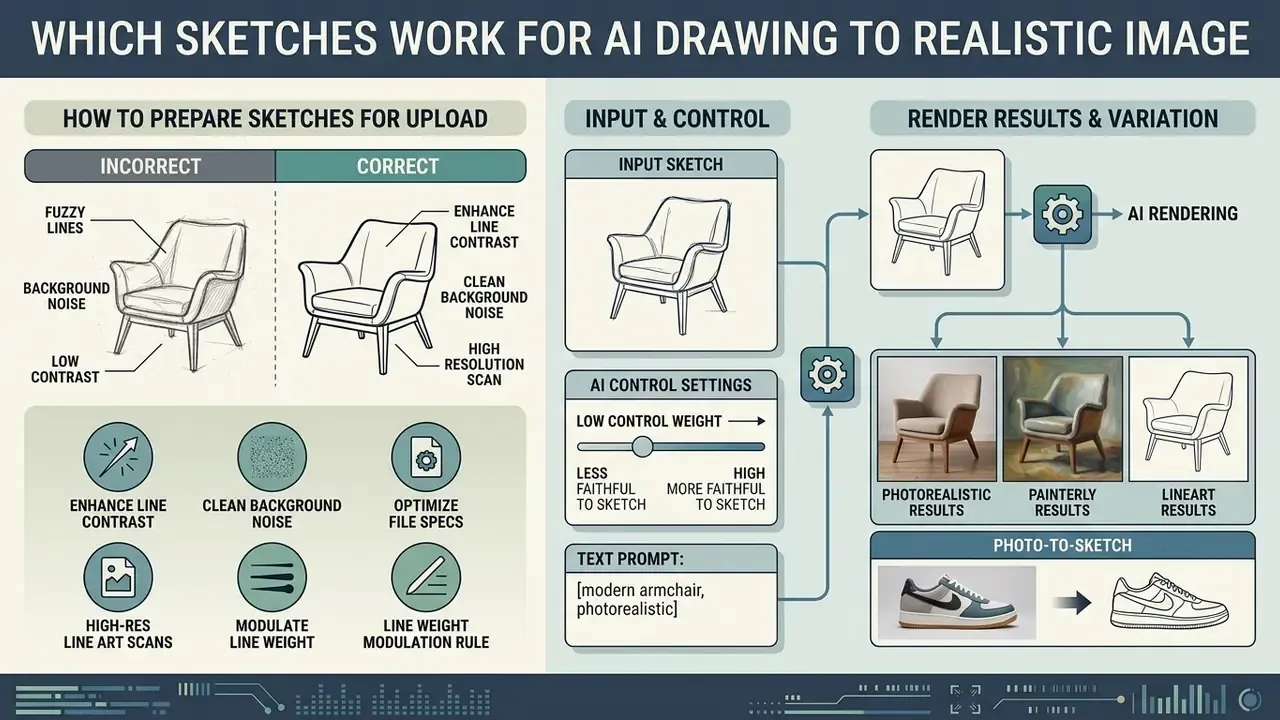
To successfully convert a drawing to a realistic image, the input sketch must feature clear line contrast, unambiguous structural boundaries, and minimal background noise. The neural network requires legible spatial cues to separate foreground subjects from surrounding environments.
Preparing high-quality jpg png source files reduces structural ambiguity. Advanced models tolerate loose scribbles, yet an ai make drawing realistic result still depends on well-defined contours and accurate relative proportions between scene elements. Vendor specifications are permissive on style but strict on format: Adobe Firefly, for example, accepts rough hand-drawn outlines, doodles, wireframes, loose concepts, digital sketches, or partially finished artwork in JPEG, PNG, or WEBP, with a 512 by 512 pixel minimum and up to 100 MB per file.
How to Prepare Rough Sketches and Pencil Sketches for Upload
When You Need a Detailed Sketch and When an Idea Is Enough
A loose rough sketch is sufficient when exploring conceptual ideas, general color blocking, or early-stage layout options. A detailed technical sketch is required when exact mechanical proportions, specific facial features, or rigid architectural forms must be preserved. Engineering research reaches the same conclusion from the opposite direction: sketch detail correlates with design phase, with simple line sketches dominating early ideation and annotated, dimensioned drawings required once form must be defined for fabrication or review.
- Conceptual ideation (rough sketches): rough wireframes allow the model greater creative flexibility.
«ScribbleGen was trained with 10% random dropout of scribble labels, substituting a learned embedding for missing regions, so the model interprets unmarked areas as "not yet specified" rather than empty.»
That training trick is precisely why partial sketches behave predictably. Unguided regions are filled from learned priors instead of rendering as voids or noise.
- Production and component control (detailed sketches): tasks requiring exact structural fidelity, such as facial reconstruction or product design, benefit from detailed line art.
«The Component-Aware Sketch-to-Image framework improves FID by 21%, Inception Score by 58%, KID by 41%, and SSIM by 20% on CelebAMask-HQ versus prior methods.» - Component-Aware Sketch-to-Image (CelebAMask-HQ benchmarks, 2024 to 2025)
Explicit component-wise sketch encoding, which separates eyes, hair, and apparel boundaries into distinct control channels, is what produces those gains. Request it by name when facial or part-level fidelity is contractual.
How to Use an AI Sketch to Image Generator: Step-by-Step Process
Operating an ai sketch to image generator requires a systematic workflow: uploading structural source files, configuring control weights, entering descriptive prompts, executing generation, and refining high-resolution outputs.
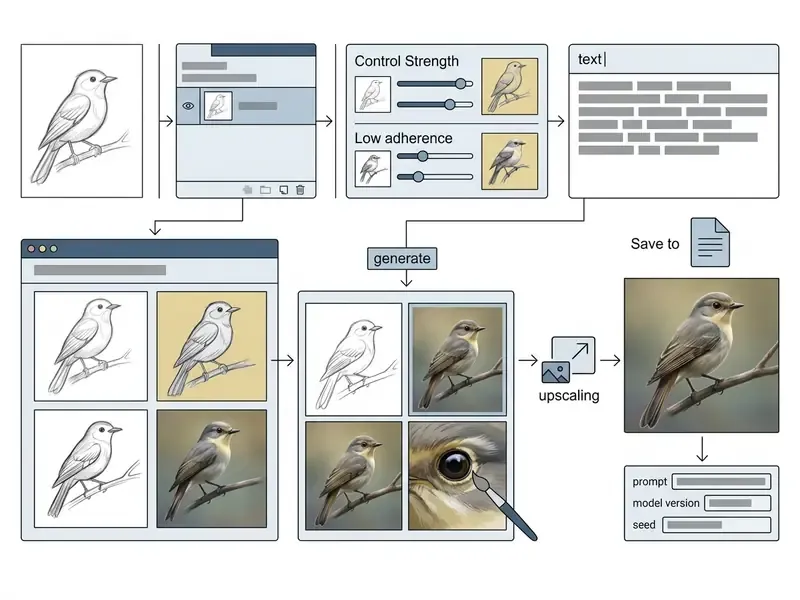
Systematic execution prevents resource waste and keeps outputs inside production specifications. Adjusting control parameters during generation lets teams balance layout precision with creative synthesis.
Real-Time Canvas vs. Static Sketch Processing
Modern generative pipelines support two operating modes for sketch input, and choosing the wrong one wastes either time or precision.
- Batch or static processing (file upload)suited to highly detailed drawings, scans at 300 DPI and above, and complex architectural projects. Executed through classical diffusion sampling (20 to 50 steps) with maximum detail control via ControlNet. This is the mode that belongs in audited workflows, because every parameter is explicit and reproducible.
- Real-time generation (interactive canvas)uses accelerated distilled models (SD-Turbo, LCM LoRAs). The image is generated on the fly as the brush moves across a browser canvas, with latency under roughly 200 ms delivered over WebSocket or streaming inference. Strokes update continuously, giving immediate creative feedback and enabling rapid iteration.
Working rule for interactive canvases: apply Line Weight Modulation. Keep outer object contours heavy (8 to 10 px) and interior details or textures thin (2 to 3 px). This lets the network instantly distinguish silhouette from internal filling without an explicit Control Weight adjustment. Real-time canvases typically expose fewer parameters, so stroke discipline becomes the primary control surface.
Selection guidance: use the real-time canvas for exploration, pose search, and style testing; switch to static batch processing the moment an output is destined for production, client delivery, or an audit trail. Many teams run both: rough on canvas, final on file upload with a documented seed.
Upload Your Sketch and Set the Foundation of the Future Image
Begin by importing the digitized sketch into your chosen image tool. Set the control layer parameter, often labeled Control Weight, Structure Reference, or Strength, to establish how rigidly the algorithm follows your linework.
A Control Weight between 0.8 and 1.0 enforces strict adherence to the source drawing, ideal for technical design and architectural layouts. A lower setting between 0.3 and 0.5 gives the model freedom to adjust proportions, which suits broader creative exploration in an advanced AI generation workflow, sometimes marketed as a hot ai generator preset. Vendor documentation maps these bands consistently: roughly 0.5 is described as basic compositional control, while 1.0 is described as high-precision control.
Describe Style and Detail Through the Text Prompt
Formulate a clear text prompt that specifies visual characteristics absent from the sketch. Avoid vague hype words like "photorealistic" or "ultra-detailed"; focus on concrete physical terms, camera parameters, and lighting conditions.
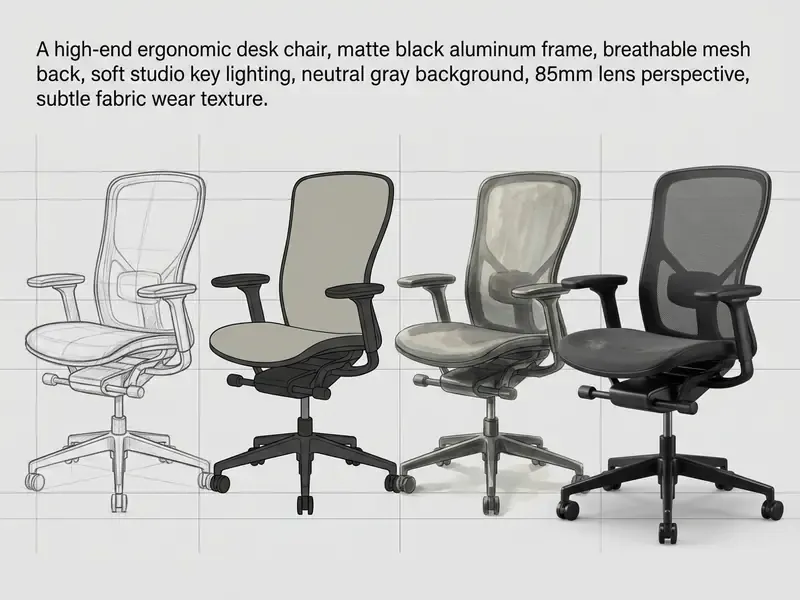
Specifying explicit materials (aluminum, breathable mesh) and lighting parameters (studio key lighting, neutral background) guides the diffusion model to render realistic textures without disrupting the underlying structural lines. Texture imperfections, pores, wrinkles, fabric wear, are what push output away from an illustration look toward a photograph.
Generate Variations, Refine, and Download the Image
Click generate to produce an initial set of image variations. Evaluate the outputs against your spatial requirements, select the most accurate result, and apply localized refinement tools like inpainting to fix minor visual inconsistencies. Rarely is the first candidate the keeper; plan for one round of masked correction.
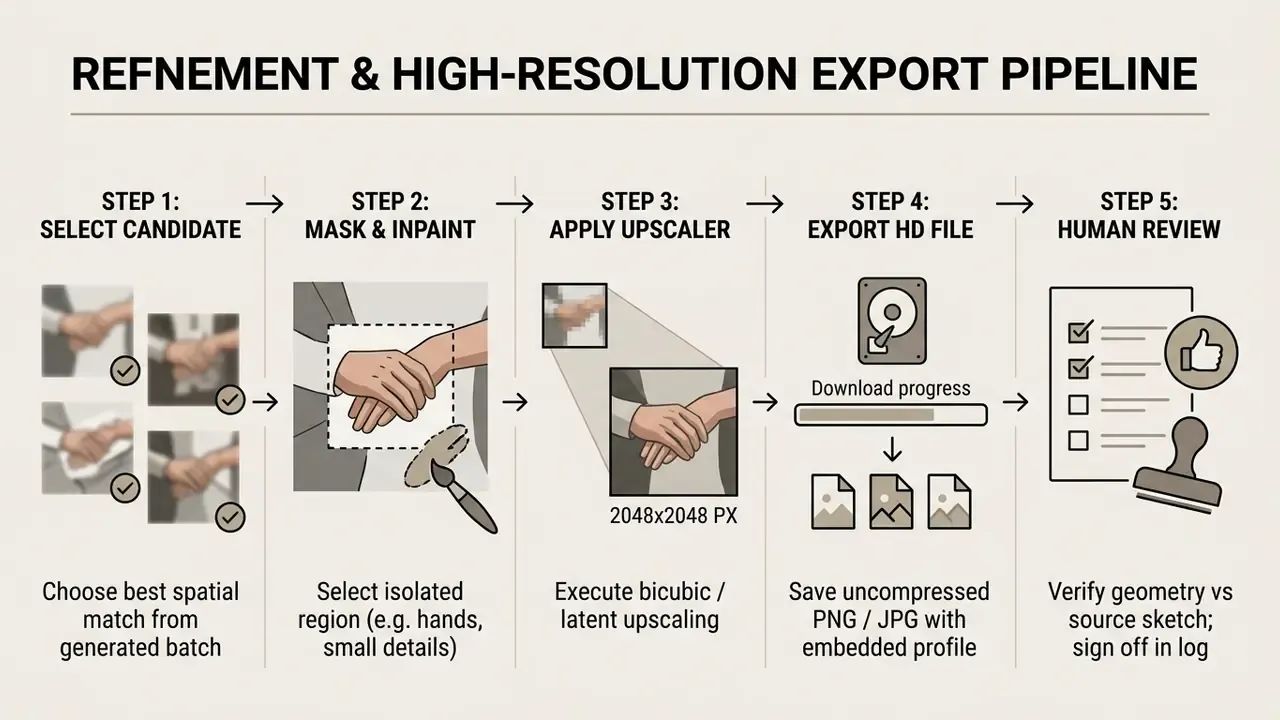
Modern pipelines use two-pass high-resolution refinement: an initial low-resolution latent sampling pass establishes overall layout, followed by bicubic upsampling and a second diffusion pass to sharpen high-frequency textures before exporting the high quality image. Inpainting requires three inputs, the initial image, a mask defining the editable region, and a prompt, so document masks alongside prompts when the edit is material. If the final asset must fill a wider banner, an image extender ai step outpaints the frame instead of restretching pixels.
Human-in-the-Loop Review and the Evidence Chain
A generation is not finished when it looks correct. It is finished when it can be defended. For model-risk-governed environments (US Interagency Guidance on Model Risk Management, SR 11-7, and NIST AI RMF 1.0 monitoring expectations), attach a structured log to every published asset.
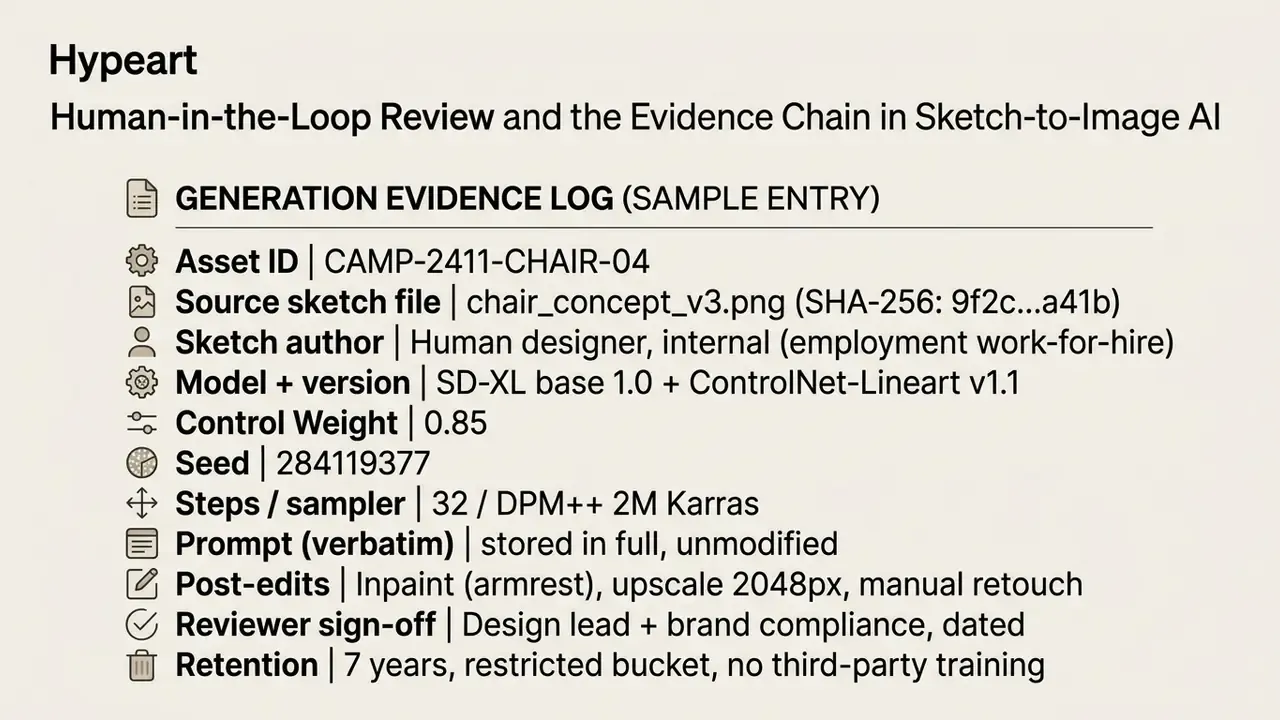
Seed plus fixed parameters is what makes a generation reproducible. Without it, an auditor cannot distinguish a controlled output from an unrepeatable one. Keep the sketch file itself, since it is both the technical control input and the primary evidence of human authorship.
Which Styles AI Turns Drawings and Sketches Into
Generative neural networks transform simple drawings into a broad spectrum of visual styles: photorealistic photographs, digital watercolor or oil paintings, volumetric 3D renders, stylized anime or cartoon art, and classical graphic techniques such as crosshatching or stippling.
Graphic technique descriptors that materially change output:
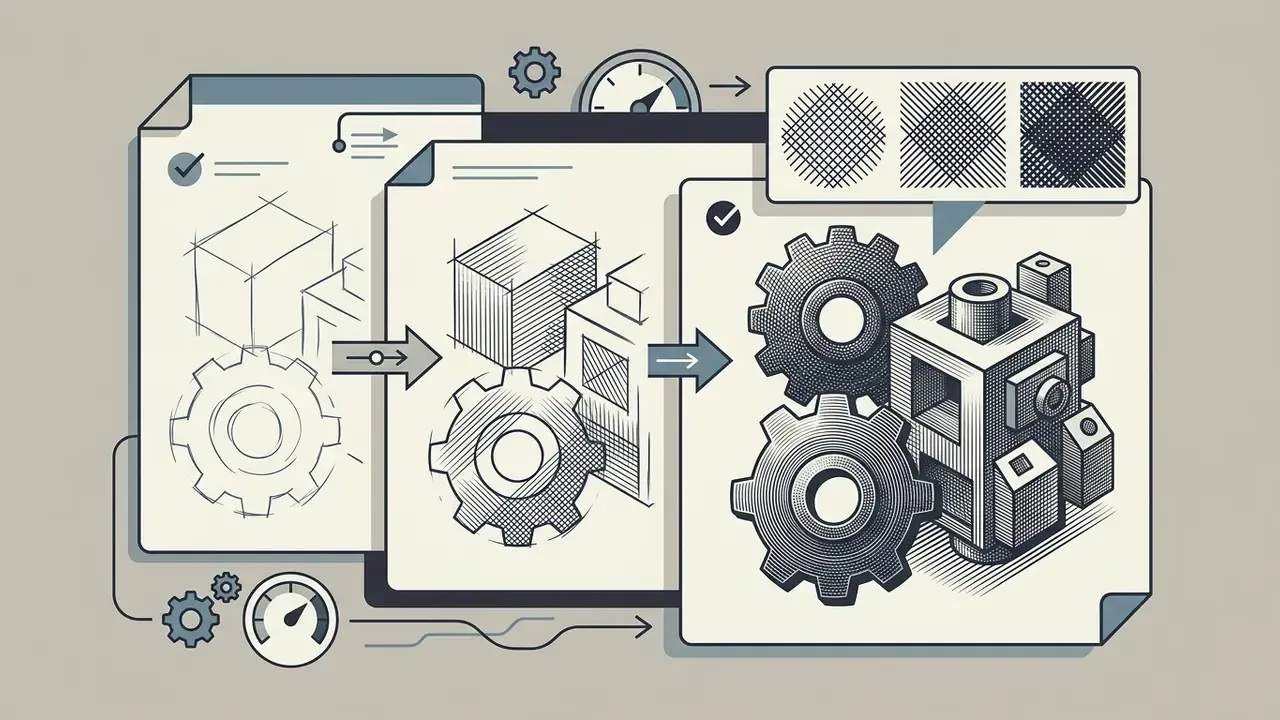
dense crosshatch shading, engraving style, uniform stroke direction and keep Control Weight high, so hatch density does not erase the silhouette.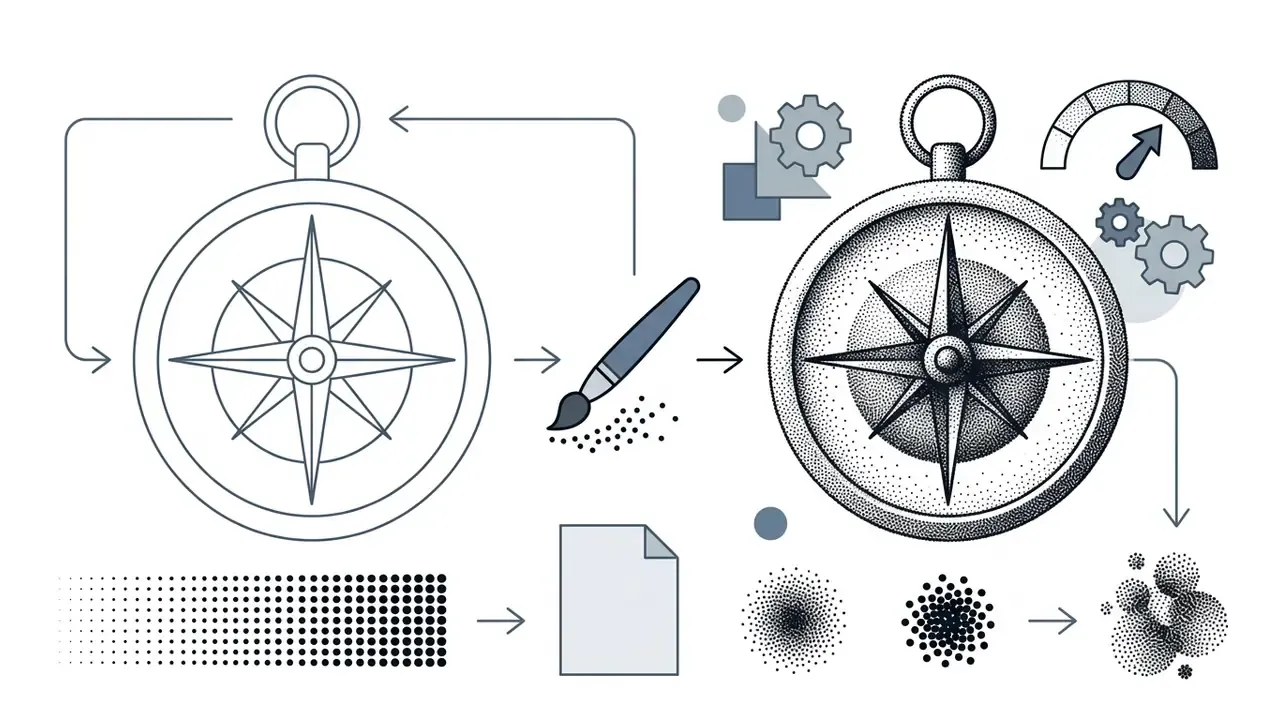
stippled ink illustration, dot shading, high contrast.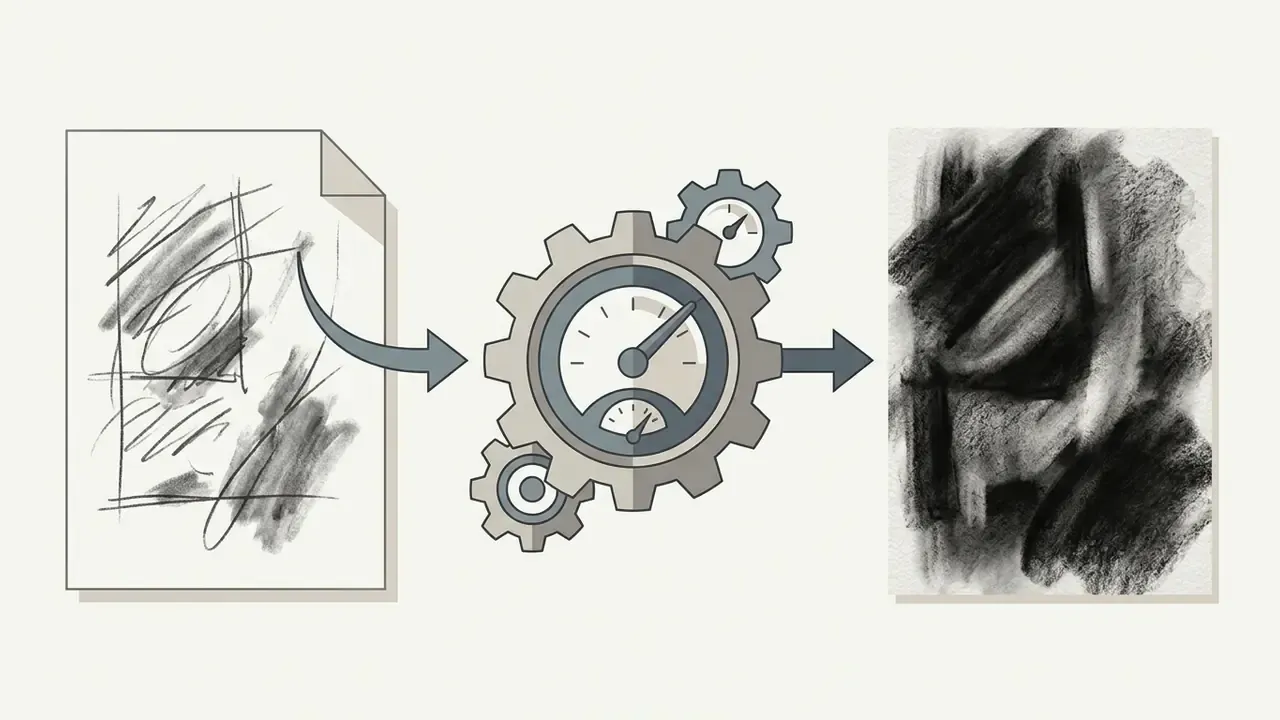
charcoal on toothed paper, smudged highlights, heavy value contrast.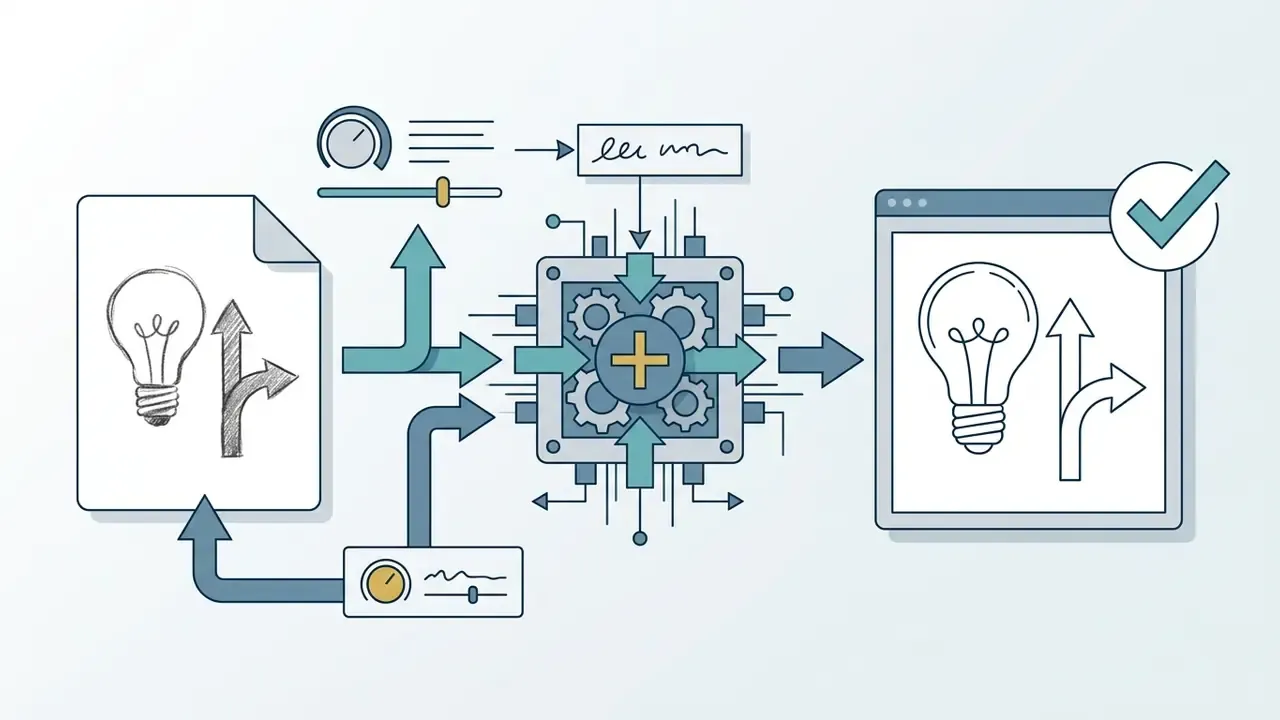
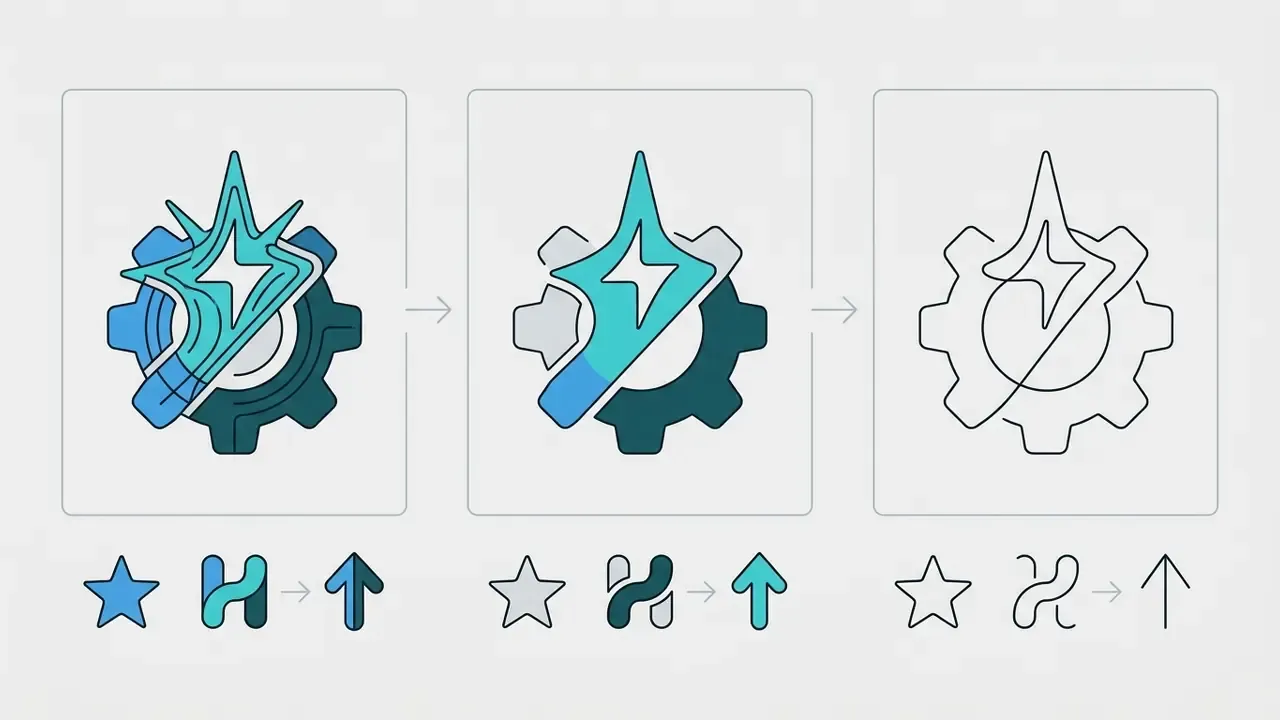
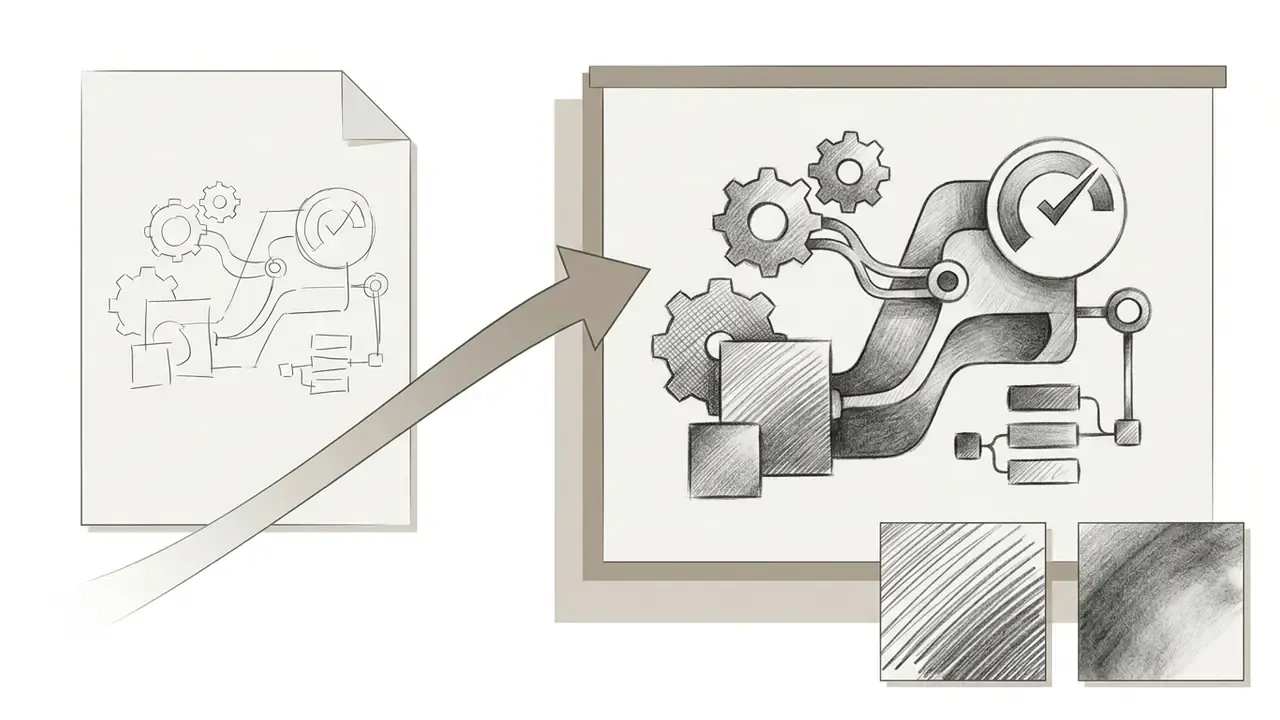
The underlying spatial control network preserves the sketch's compositional blueprint regardless of the target style, which enables rapid cross-style experimentation from a single line drawing using an image fx ai styling approach. Vendor style presets confirm the breadth: platform documentation lists photographic, anime, comic-book, cartoon illustration, and 3D cartoon as discrete, selectable style targets for sketch-conditioned generation. One drawing, six briefs. That is the real efficiency story in the creative process.
Realistic Images and AI Photo Generator from Drawing
Converting a drawing into a realistic photograph requires an ai photo generator from drawing setup that emphasizes natural physical traits, believable camera mechanics, and realistic lighting. Preserve the sketch's layout and perspective, then add plausible materials, environment, lens language, and texture imperfections in the prompt.
A financial design team needed compliant marketing materials featuring realistic customer interaction scenes. By pairing approved pencil sketches with prompts specifying natural studio lighting and soft depth of field, the team produced visually consistent marketing assets from internally owned sketch inputs and reported a reduction in stock photography licensing spend. The magnitude of that reduction is organization-specific and depends on prior licensing volume, so treat it as a directional outcome rather than a benchmark. Measure your own baseline before and after adoption, otherwise the saving is a story, not a number.
Geometric consistency is where multi-view sketch pipelines now compete directly with staged photography.
«A multi-view sketch-to-scene system reduces FID by more than 60%, improves geometric consistency (Corr-Acc) by 23%, and accelerates inference up to 3.7 times versus two-stage baselines.»
For portrait-grade realism specifically, see our comparison of AI headshot generators, where identity retention and lighting control are the deciding criteria.
Illustrations, Painting Styles, and AI Art Sketch
Translating a sketch into a fine art painting involves applying surface textures such as thick oil impasto, watercolor washes, or digital concept art shading to the underlying drawing boundaries. Classical techniques modeled in the literature give you usable prompt vocabulary: watercolor stylization depends on edge darkening, pigment turbulence, color bleeding, paper distortion, and granulation, while oil effects depend on stroke trajectory and bump-mapped paint thickness.
«Combining structural sketch constraints with reference style feature maps allows painterly attributes to transfer without displacing original object positions.»
Cartoon, Manga, and Character Graphics from Sketch
An ai cartoon generator transforms character line drawings into clean manga panels, animated series concepts, or stylized vector graphics while preserving key pose dynamics.
This segmentation allows an ai cartoon pipeline to apply vibrant flat fills, cel shading, and stylized line weights over hand-drawn character concepts. Vendor sketch-to-comic tooling extends the same principle to full pages, refining uploaded sketches into finished panels while preserving the original characters, poses, and composition, which is what makes character consistency achievable across a sequence rather than a single frame.
Where to Apply AI Image from Sketch in Work and Creative Practice
Organizations and creative teams apply AI sketch-to-image technology across concept art development, industrial design, storyboarding, social media asset creation, and art education.
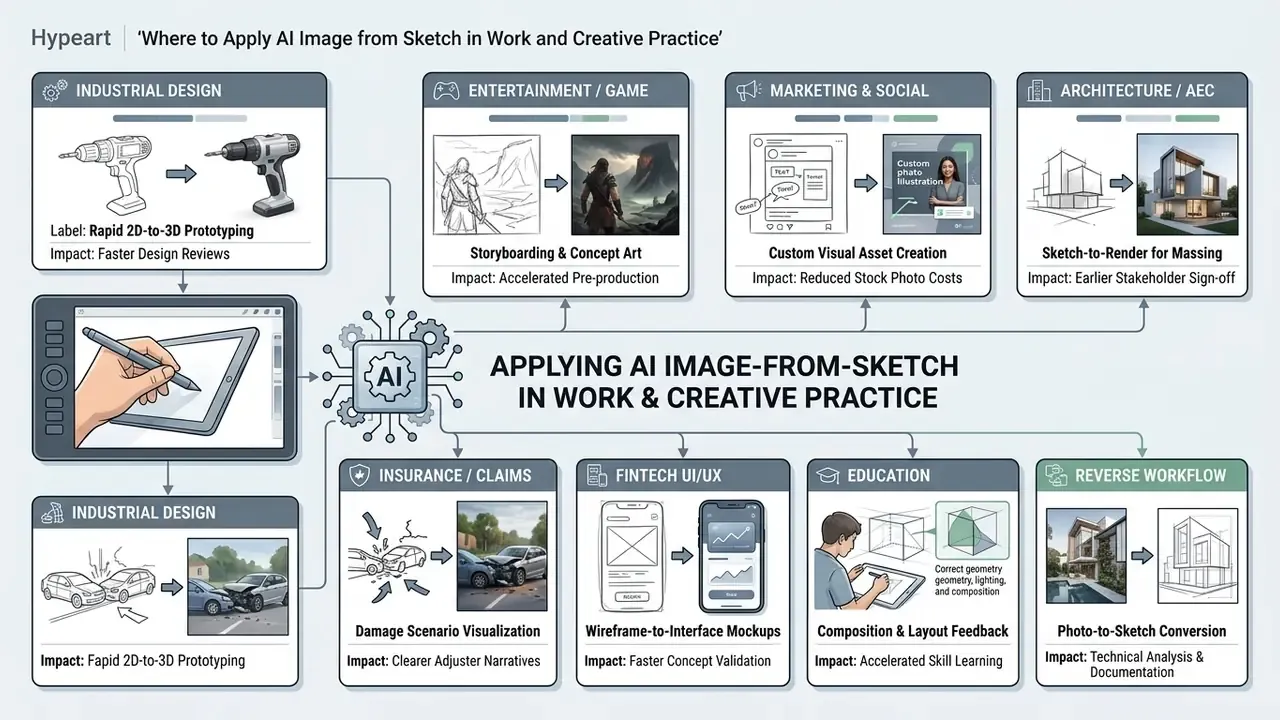
Integrating sketch controls into creative workflows allows teams to iterate visual ideas quickly while keeping spatial governance intact. For definitions of the underlying terms, use the glossary; for end-to-end process templates, explore the hub.
Concept Art, Design, and Fast Validation of Visual Ideas
Designers use sketch-conditioned generative AI for rapid ideation, converting hand-drawn product outlines into rendered visual concepts in minutes. Peer-reviewed work supports the pattern: Sketch2Prototype (2024) converts a hand-drawn sketch into 2D images and 3D prototypes through sketch-to-text, text-to-image, and image-to-3D stages, specifically to widen early-stage design exploration.
A product design group evaluated new consumer hardware concepts by uploading raw wireframe drawings into a local diffusion model, generating material variations across brushed steel, matte polymer, and anodized aluminum finishes within a single working session. The team reported a substantial compression of early conceptual cycles relative to its previous manual rendering process. Exact throughput and cycle-time figures depend on hardware, model size, and review cadence, so validate them against your own pipeline rather than adopting them as fixed benchmarks.
Learning to Draw and Finding Inspiration with AI Tools
Novice artists and design students use sketch generators as interactive educational tools to study composition, lighting distribution, and spatial balance.
Educational tools like AutoDraw provide real-time motor assistance by matching loose line drawings with polished visual forms, narrowing the gap between intent and hand control for early learners. Beginners upload rough sketches to observe how a system that uses artificial intelligence interprets light, shadow, and perspective, then use these AI-generated references to refine their physical drawing technique. A third documented educational role is structured critique: analysis tools evaluate an uploaded drawing for composition, lighting, color, and anatomy, returning written explanations plus concrete correction steps, feedback that pairs well with the Line Weight rules described earlier.
How to Choose an AI Sketch to Image Tool for Personal and Commercial Tasks
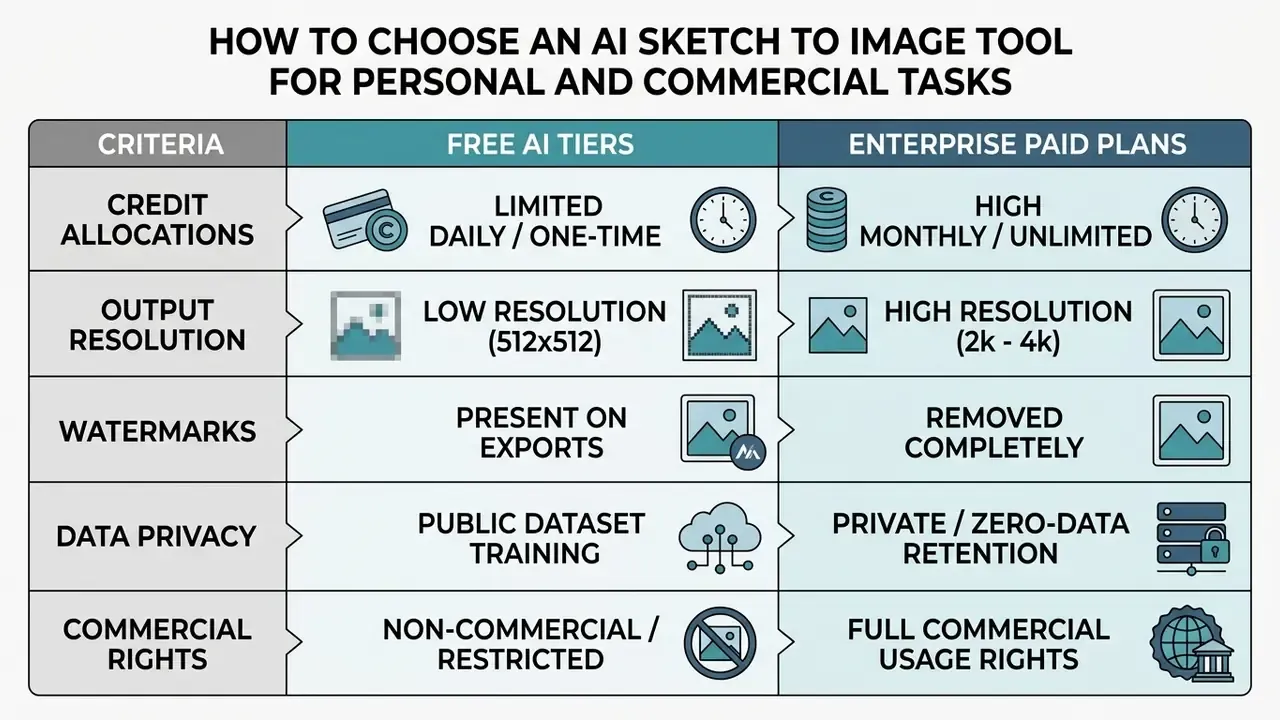
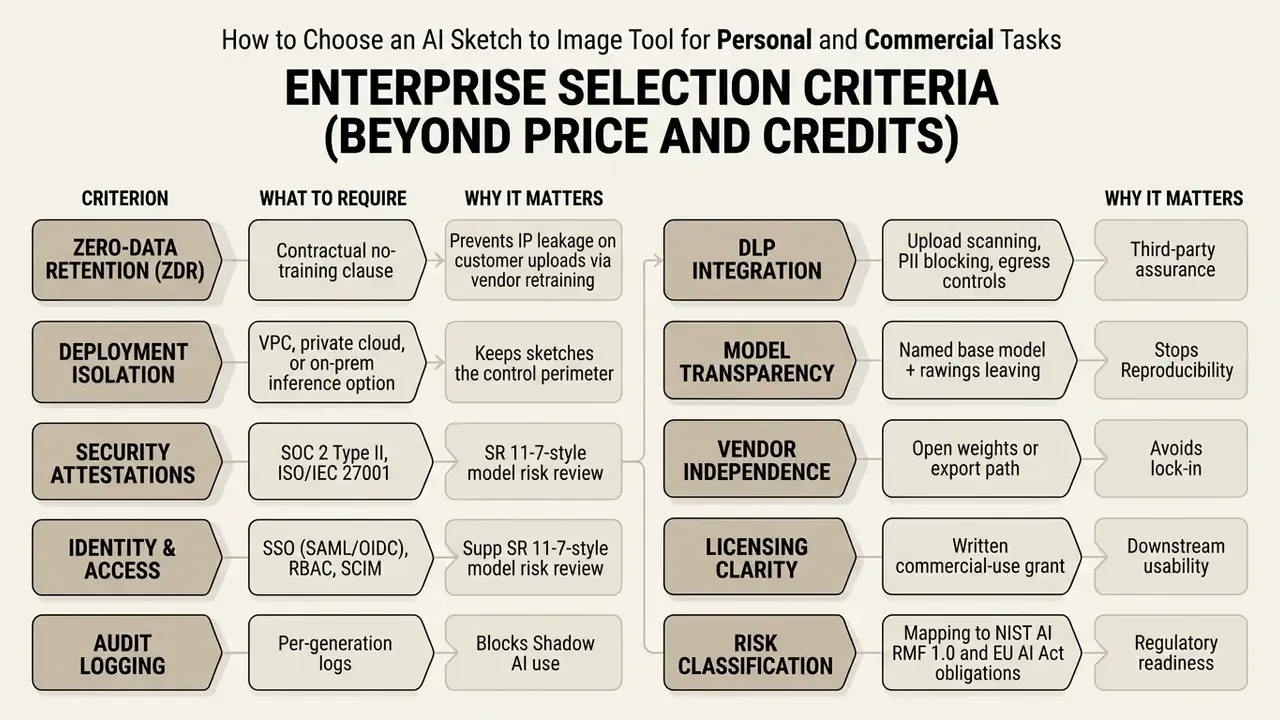
Selecting an appropriate AI sketch to image platform requires evaluating subscription pricing, credit models, export resolutions, data privacy standards, deployment isolation, and commercial licensing rights.
«In enterprise AI governance, autonomy without structural grounding creates unquantifiable residual risk; sketch-to-image pipelines show how spatial conditioning turns generative AI from unpredictable synthesis into controlled visual architecture.»
Simple cost model for build-versus-buy decisions. Net value is not just seat price. Use:
Net Value = (Asset Volume x Baseline Cost per Asset) - (Subscription + Compute) - (Review Labor) - (Residual Risk Reserve)
Here Review Labor is human-in-the-loop verification time per asset (geometry check, brand check, legal check), and Residual Risk Reserve prices the probability of rework, takedown, or licensing dispute on unverified outputs. Tools that reduce spatial variance reduce Review Labor directly, and in regulated environments that term usually dominates the equation. For a broader pricing comparison across general-purpose platforms, see our reviews of the Canva AI Generator, Microsoft's image generator, and Google's image generation stack.
Evaluating these parameters keeps the chosen software inside operational requirements while limiting data security and IP compliance exposure.
Free Tools, Free Credits, and Paid Plans
Free AI tools offer introductory access via daily or one-time free credits, but they often restrict export resolution, apply watermarks, and limit model access.
Commercial Use, Privacy, and Output Control
Deploying AI-generated visual assets commercially requires verified subscription licenses, compliance with intellectual property guidelines, and adherence to enterprise privacy protocols.
Data loss prevention and Shadow AI. The most common enterprise failure is not a licensing dispute. It is an unsanctioned upload: a proprietary mechanical drawing, an unreleased product silhouette, or a customer photo pasted into a consumer-grade canvas at 11 p.m. Controls that materially reduce this exposure include browser-level DLP scanning of image uploads, blocklists for non-approved generative domains, SSO-enforced access to approved tools only, and mandatory metadata stripping before upload. Where classification is high, keep inference inside a VPC or on-premises deployment, so no sketch leaves the perimeter.
Risk classification. Map each sketch-to-image use case to your existing frameworks rather than inventing a new one: NIST AI RMF 1.0 for monitoring, privacy, and incident response; US Interagency Guidance on Model Risk Management (SR 11-7) for validation, documentation, and independent review of any model whose output drives a business decision; and EU AI Act transparency obligations where generated visual content is published to consumers. Most marketing and concept-art applications land in low-risk transparency territory. Applications that touch identity, claims evidence, or regulated disclosures require documented human review.
Enterprise teams should also confirm that software providers adhere to transparent privacy standards, so uploaded user sketches are not used to train public generative models without explicit consent. When evaluating legal exposure from generative AI deployment, reviewing current frameworks on AI litigation and compliance helps protect organizational IP. For provenance verification of third-party assets entering your pipeline, AI reverse image search is a practical pre-publication check. Editorial guidance for this article sits within Hypeart AI Media Decision Support, which publishes comparison and workflow material for commercial buyers.
Limitations and Open Questions
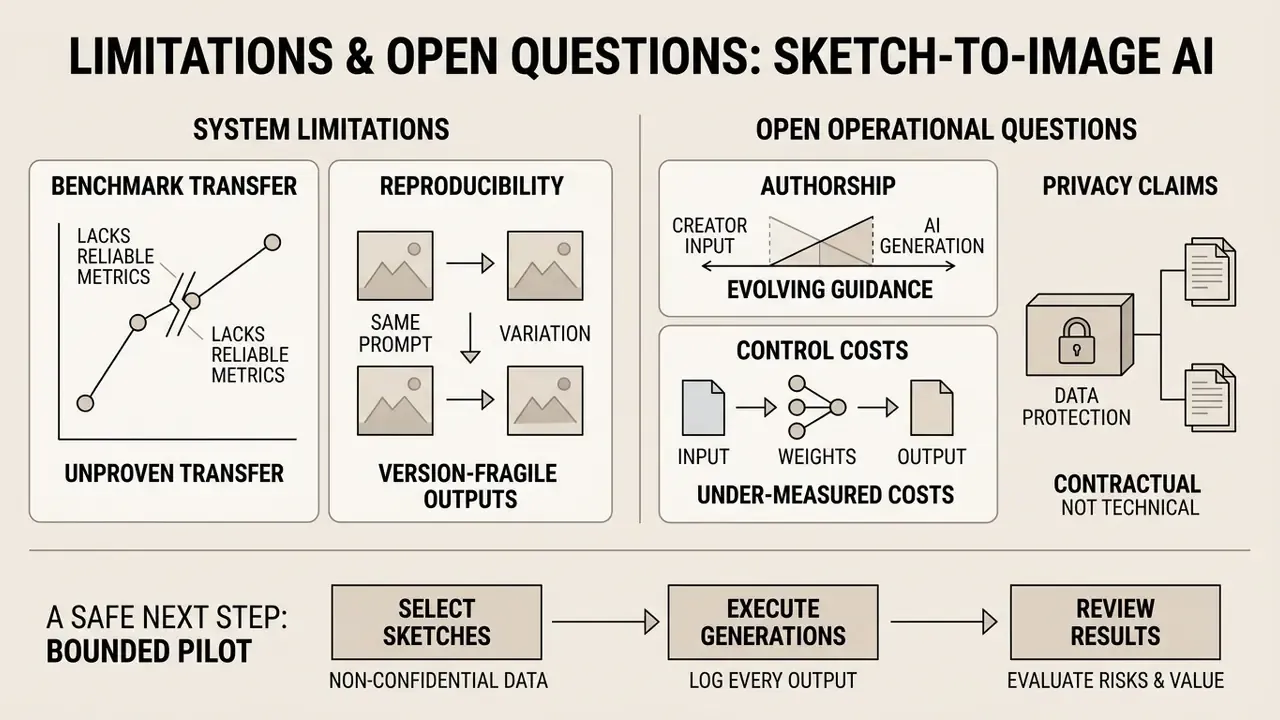
Honest scope note. Several things in this field are still unsettled, and pretending otherwise would be a disservice.
- Benchmark transfer is unproven. FID, KID, and SSIM gains reported on CelebAMask-HQ or FS-COCO do not automatically transfer to your asset classes, such as product silhouettes or floor plans.
- Reproducibility is version-fragile. A vendor-side model update can break seed reproducibility overnight. Ask, in writing, how long a pinned version remains available.
- Authorship guidance may evolve. U.S. Copyright Office positions and EU AI Act implementing detail are both moving; treat today's evidence chain as a minimum, not a ceiling.
- Control costs are under-measured. Most published ROI cases exclude review labor and residual risk. Until you log verification minutes per asset, your business case is incomplete.
- Vendor claims on privacy are contractual, not technical. A ZDR clause reduces legal exposure; it does not by itself prove that uploads never touched a training pipeline.
A safe next step: run a bounded pilot on non-confidential sketches, log every generation, and review the evidence pack with model risk before any production commitment. No evidence, no autonomy.
FAQ: Frequently Asked Questions About Sketch to Image AI
Can free AI sketch generators be used in commercial projects?
Most free tiers are limited to personal or non-commercial licenses. Using results in advertising, product design, or commercial publications requires a paid plan that explicitly grants commercial rights. Verify the grant in writing, and check for revenue thresholds that escalate the required tier.
Which file format is best for uploading a sketch?
PNG and JPG (JPEG) are optimal. PNG is preferable for graphics with crisp contours and transparency, while JPG suits high-contrast digitized pencil drawings. The minimum recommended resolution is 512 by 512 pixels; leading platforms accept JPEG, PNG, and WEBP up to roughly 100 MB.
How do I preserve the original composition of the drawing during generation?
For strict composition retention, use tools that support control maps (ControlNet or Structure Reference) and set control strength between 0.8 and 1.0. Fix the seed as well. Identical seed plus identical parameters is what makes a composition reproducible across review cycles.
Is a long text prompt mandatory when I already have a sketch?
The sketch defines spatial structure but carries no information about materials, style, or lighting. A short, precise prompt naming style, light sources, and textures is required for a high-quality result. Follow the order [Subject] + [Environment] + [Style/Medium] + [Lighting] + [Texture/Atmosphere].
What is the minimum sketch resolution needed for a quality render?
The minimum acceptable input is 512 by 512 pixels. For detailed high-definition results (4K), upload scans between 1024 by 1024 and 2048 by 2048 pixels as uncompressed PNG. For print-grade line art, scan the physical drawing at 300 to 1,200 DPI before cropping, then downscale for upload if the platform caps dimensions.
How does neural sketch generation differ from ordinary photo sketch filters?
Classical photo filters merely invert colors and overlay gradient noise on existing pixels. A sketch-conditioned AI generator interprets volumes and the 3D geometry of the scene, building the image from scratch according to light physics, selected materials, and the context of the text prompt. The practical difference shows in occlusion, cast shadows, and material response, areas where filters have no model of the world at all.
Who signs off on an AI-generated visual asset in a governed environment?
A named human owner, not a tool. In practice that means a design lead for geometry and brand fit, plus a compliance or legal reviewer where the asset touches regulated messaging. Record both sign-offs in the generation log with a date.
Appendix A: Revision Notes and Superseded Formulations
For transparency, the following earlier formulations were replaced with more precisely sourced versions in the body text above. Originals are preserved here.
- Superseded: "systems like the Block and Detail framework (arXiv, 2024) demonstrate that dual-pass sketch conditioning prevents structural distortion by separating coarse blocking strokes from fine detail lines." Replaced with the quantified user-study result (84% / 81% preference).
- Superseded: "Studies on scribble-conditioned diffusion (ScribbleGen, 2024) demonstrate that models can fill unguided regions with plausible details using learned priors." Replaced with the documented training method (10% scribble dropout with a learned embedding substitute).
- Superseded: "Research on component-aware generation (CelebAMask-HQ benchmarks, 2026) shows that explicit component-wise sketch encoding improves Structural Similarity (SSIM) by 20% compared to unconstrained baselines." Replaced with the full metric set and a corrected publication window (2024 to 2025); the original "2026" date was a forward-dated reference.
- Superseded: "reducing stock photography licensing costs by 40%." Rephrased as a directional, organization-specific outcome pending verifiable case data.
- Superseded: "The team generated 20 distinct material variations per hour, cutting early conceptual design cycles from two weeks to two days." Rephrased as a qualitative compression of cycle time pending verifiable case data.
Appendix B: Enterprise Model Risk Assessment Checklist for GenAI Visual Tools
Use this as a pre-pilot gate. Any unchecked item is a documented exception, not a silent risk.
Checklist0 / 23