Artist AI is a mobile-focused artificial intelligence platform built to generate digital artwork from natural language text prompts and to convert existing photographs into stylized images. Published as Artist.ai — AI Art Generator by Livintis W.L.L. on the Apple App Store, and listed under similar titles such as ArtistAI: Ai Image Generator on Google Play, the application delivers mobile-first visual synthesis for creators, marketers, and casual users.
One caveat before we go further. Everything below reflects public store listings and developer terms; nothing here is a vendor briefing.
Executive Summary
- What it is A freemium consumer iOS/iPadOS/macOS/visionOS application combining a text-to-image ai art generator with photo-to-art restyling. Publisher: Livintis W.L.L.
- Pricing Free tier with daily generation credits and possible watermarks; paid access at $3.99/week, $6.99/month, or $39.99 lifetime (Apple App Store in-app purchases, verified Q1 2026).
- Speed Typical drafts render in 5 to 30 seconds. Pro subscribers receive priority queue placement.
- Commercial use Conditional. Platform Terms of Service and national copyright law operate as two separate layers. Purely machine-generated output without human creative control is not registrable for copyright in the United States, per US Copyright Office guidance (2025).
- Security verdict Insufficient public documentation on server-side image retention, model re-training on user uploads, SOC 2 attestation, SSO/SAML, or centralized audit logging. Not suitable for centralized enterprise deployment or for uploading confidential, regulated, or personally identifiable imagery.
- Who it fits Solo creators, social media managers, small marketing teams doing concept ideation. Who it does not fit: regulated enterprises requiring vendor attestations and indemnification.
How to read this review
Three different readers usually land on a page like this, and they want different things.
- The creatorwants to know whether the free tier is usable and how fast the ai image output arrives. Start with the features and step-by-step sections.
- The marketing leadwants export formats, style breadth, and whether an asset can legally ship in a paid campaign. Jump to pricing and commercial use.
- The risk ownerwants retention, training, and attestation answers. Go straight to the privacy and shadow AI section, then decide whether the app belongs on managed devices at all.
Verdict in one line: fine for ideation, weak for governed production.
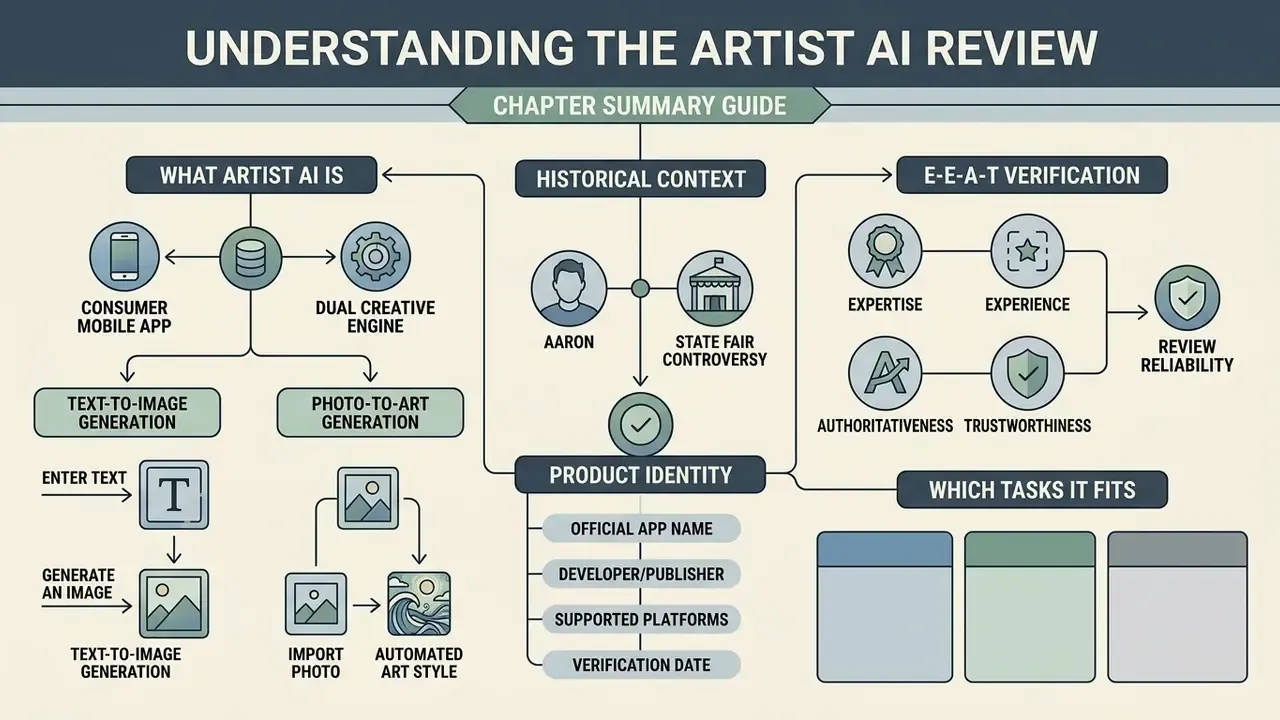
What Artist AI Is and Which Tasks It Fits
«Participants reported that image generation supports imagination and helps surface unexpected ideas through visual variations of text descriptions.»
Historical context: from AARON to the Colorado State Fair controversy
Image synthesis evolved from Harold Cohen's rule-based drawing program AARON (1973), which produced images strictly from hand-written code, to today's diffusion models trained on massive image and text corpora. The turning point for public perception arrived in 2022, when Théâtre D'opéra Spatial, created by Jason M. Allen with Midjourney, won first prize in the fine arts competition at the Colorado State Fair. It beat twenty traditional entrants and ignited a global debate about authorship, skill, and the definition of art. Mobile apps such as Artist AI sit at the consumer-facing end of that fifty-year trajectory.
Text-to-Image Generation From a Written Description
Text-to-image synthesis in Artist AI turns descriptive prompts into complete visual compositions by mapping natural language tokens to semantic image vectors. Users type detailed text describing subjects, environments, artistic mediums, and lighting to create unique ai generated art without manual drawing expertise.
Research on text-guided diffusion models indicates that prompt structure directly governs visual alignment and creative output. In plain terms: how you order the words matters more than how many words you use.
«The number of goals expressed in a prompt and their orientation influence design ratings more strongly than text length or editing time.»
Rather than demanding technical coding skills, the tool lets non-specialists synthesize complex generated images by naming visual attributes in ordinary language.
Transforming a Photo Into an Artistic Image
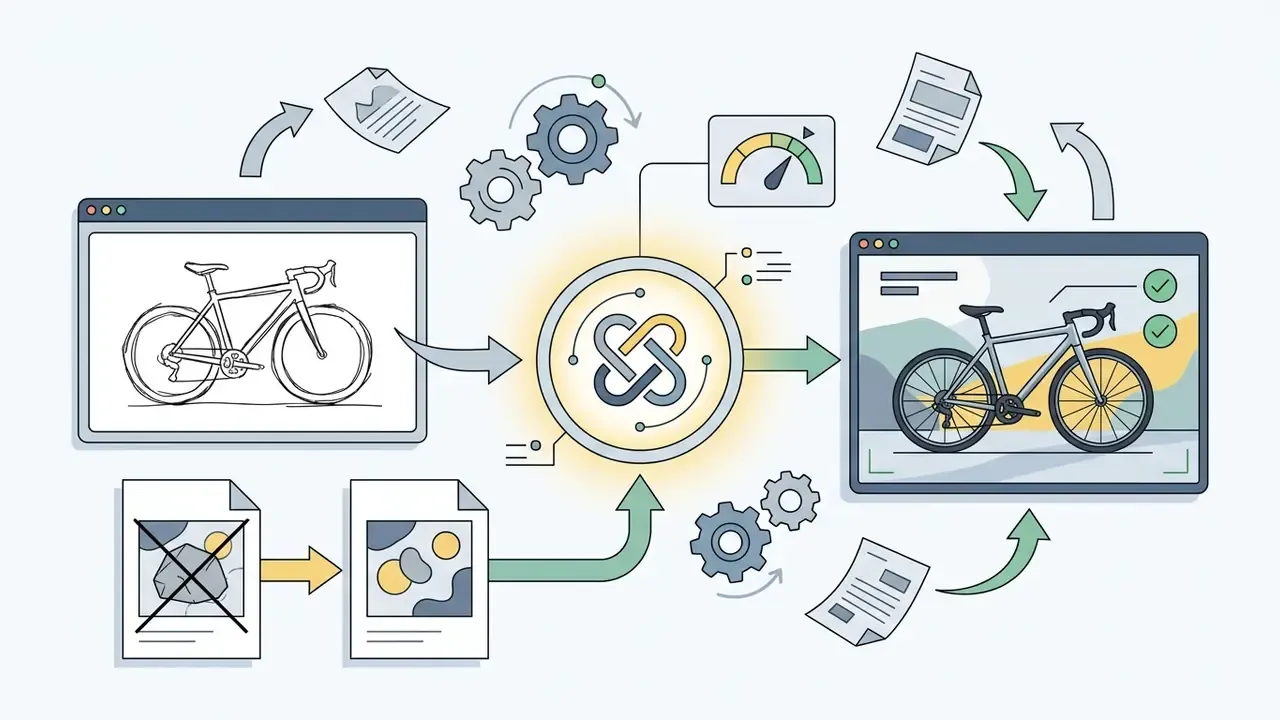
The photo-to-art feature uses image-to-image diffusion pipelines to apply artistic filters, anime styling, and painterly textures to uploaded photographs. This function preserves the structural contours and facial geometry of the source photo while altering surface aesthetics, lighting, and medium characteristics.
Empirical studies on structural image transformations show that generative models can reconstruct and restyle photographs effectively using edge-conditioned guidance.
«A system based on text prompts and edge maps achieves an average bandwidth saving of 92.6% while preserving perceived similarity to the original.»
Creators lean on this ai photo generator capability for personalized avatars, social profile pictures, and stylized marketing collateral. Outputs that need pixel-level correction afterwards are usually finished in dedicated AI photo editors before publication.
E-E-A-T Verification and Product Identity
Artist AI Features for Creating and Editing Images
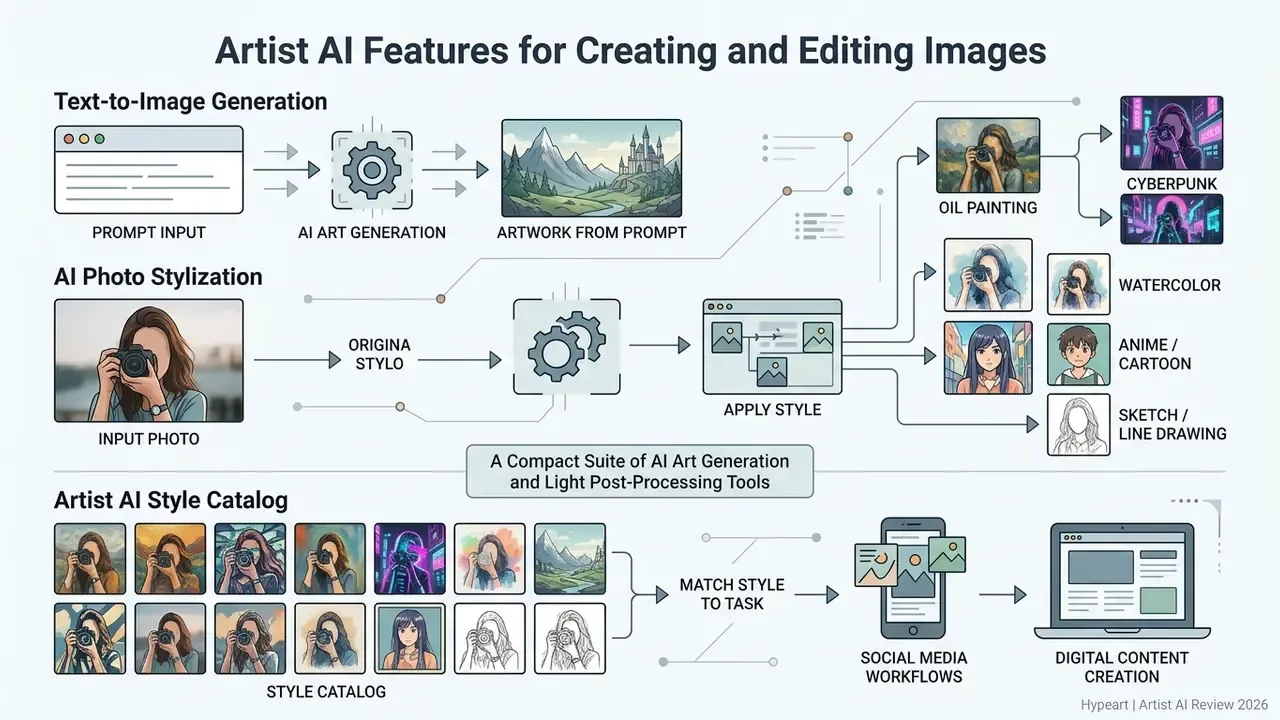
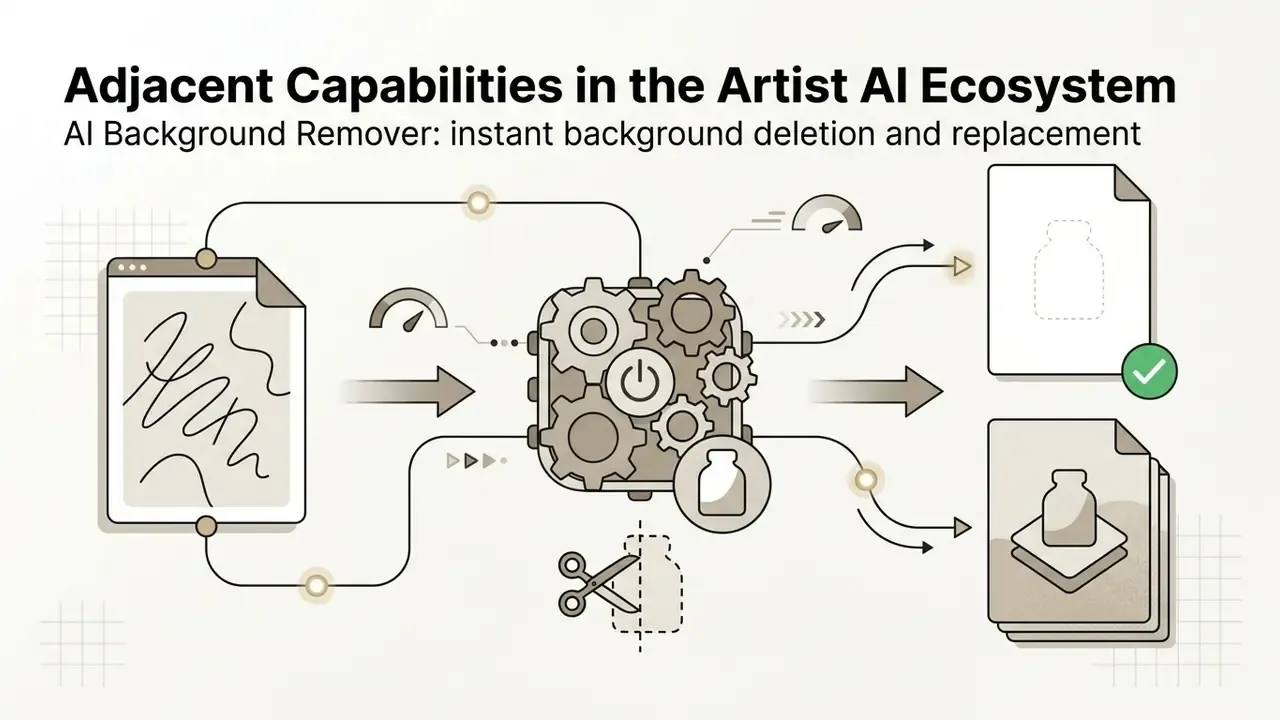
Artist AI offers a compact suite of ai art generation and light post-processing tools aimed at social media and digital content workflows. Users run text-to-image generation, photo restyling, background replacement, and basic aspect ratio adjustments directly on mobile hardware.
Beyond simple synthesis, managing a modern visual asset library means evaluating adjacent utilities: a photo editor for granular retouches, or a free photo editor while you are still testing budgets.
Text-to-Image: Creating Artwork From a Prompt
The engine processes text prompts to produce high-resolution generated art across many themes and artistic disciplines. Users steer composition, color palette, camera angle, and atmospheric mood by refining descriptive terms in the prompt field.
According to research on prompt language and visual diversity, specific descriptors deliver substantially better visual alignment than generic quality buzzwords. Stacking words like "masterpiece" rarely helps.
«Repeated prompts account for 40 to 50% of all platform requests, and lexical similarity correlates directly with reduced visual diversity of generations.»
Concise, structured prompts let the artist ai art photo generator engine resolve complex subjects and intricate backgrounds with fewer retries.
AI Photo Generator and Photo Stylization
The artistai: ai photo generator feature converts standard camera photos into stylized artwork using predefined visual themes such as anime, oil painting, cyberpunk, and 3D digital renders. That transformation helps creators hold a consistent visual identity across digital channels, a workflow that pairs naturally with image-to-image generators for iterative restyling and with AI logo generators when the same aesthetic must extend to brand marks.
Studies on human image synthesis note that while image-to-image models keep outputs visually appealing, users should still inspect faces and hands for local artifacts before public release. Yes, manually. Automation has limits here.
«The study introduced the first dataset with annotated defective regions in generated human images, enabling automatic artifact detection.»
The Artist AI Style Catalog and How to Match Style to Task
Style presets are not interchangeable filters. Each one changes texture, lighting logic, and edge behavior, which decides whether the output reads as premium or amateur on a given channel.
Prompt markers: thick brushstrokes, canvas texture, Rembrandt lighting, oil on canvas, impasto.
Prompt markers: neon lights, dystopian cityscape, holographic displays, futuristic architecture, volumetric fog.
Prompt markers: soft color washes, paper texture, delicate splatters, watercolor bleed, wet-on-wet.
Prompt markers: cel shaded, vibrant colors, detailed line art, clean outlines, expressive eyes.
Prompt markers: graphite pencil, cross-hatching, monochrome, rough sketch lines, white background.
Prompt markers: concept art, cinematic lighting, subsurface scattering, octane render, matte painting.
- Oil Painting.Recreates thick, directional brushwork associated with Renaissance and Impressionist canvases. Ideal for portraits, heritage branding, and print collateral.
- Cyberpunk.Places the subject in a futuristic, neon-saturated environment with holographic surfaces and dystopian architecture. Strong for gaming, music, and tech launches.
- Watercolor.Produces soft gradients, translucent layers, and pigment bleed on textured paper. Suits editorial illustration, wellness, and lifestyle content.
- Anime / Cartoon.Converts faces and objects into Japanese animation or caricature aesthetics with clean linework and expressive eyes. The default choice for avatars and community content.
- Sketch / Line Drawing.Emphasizes contours and distinctive features while stripping color. Effective for storyboards, tattoo concepts, and technical ideation.
- Concept Art / 3D Render.Builds characters, environments, and props with volumetric lighting and material realism. Used for pitch decks and pre-production.
- Photorealism.Reproduces camera optics rather than painterly texture. The safest option for product mockups and e-commerce visuals.
Prompt markers: 85mm lens, shallow depth of field, natural light, skin pores, high dynamic range.
Because style catalogs on comparable platforms exceed eighty presets, creators comparing aesthetic breadth across tools can review the best AI image generators and the specialized Ghibli-style AI image generators breakdown before committing to a subscription.
Editing and Preparing Generated Images
Integrated editing features let users refine outputs, adjust framing, clear background elements, and prepare files for multi-platform export. Once generation finishes, files save to local storage or ship straight to social channels.
Typical export behavior on comparable mobile generators includes JPG and PNG output, resolution tiers (Standard / HD / 4K), and preset aspect ratios for Instagram Feed (1080×1080 or 1080×1350), Instagram Stories and TikTok (1080×1920), LinkedIn (1200×627), and X (1200×675).
For broader multi-format production, creators often combine a static art generator with an online animation maker, an AI voice generator for narration, and the AI Media Commercial-Use Hub to review enterprise licensing frameworks. Video-adjacent chores usually follow: teams resize video online for platform specs, rotate video online after a bad phone capture, and occasionally reverse video online for loop effects built around generated key art. Personal branding work sometimes drifts even further sideways, for example pairing a new AI avatar with a resume maker ai refresh before a portfolio launch.
Adjacent Capabilities in the Artist AI Ecosystem
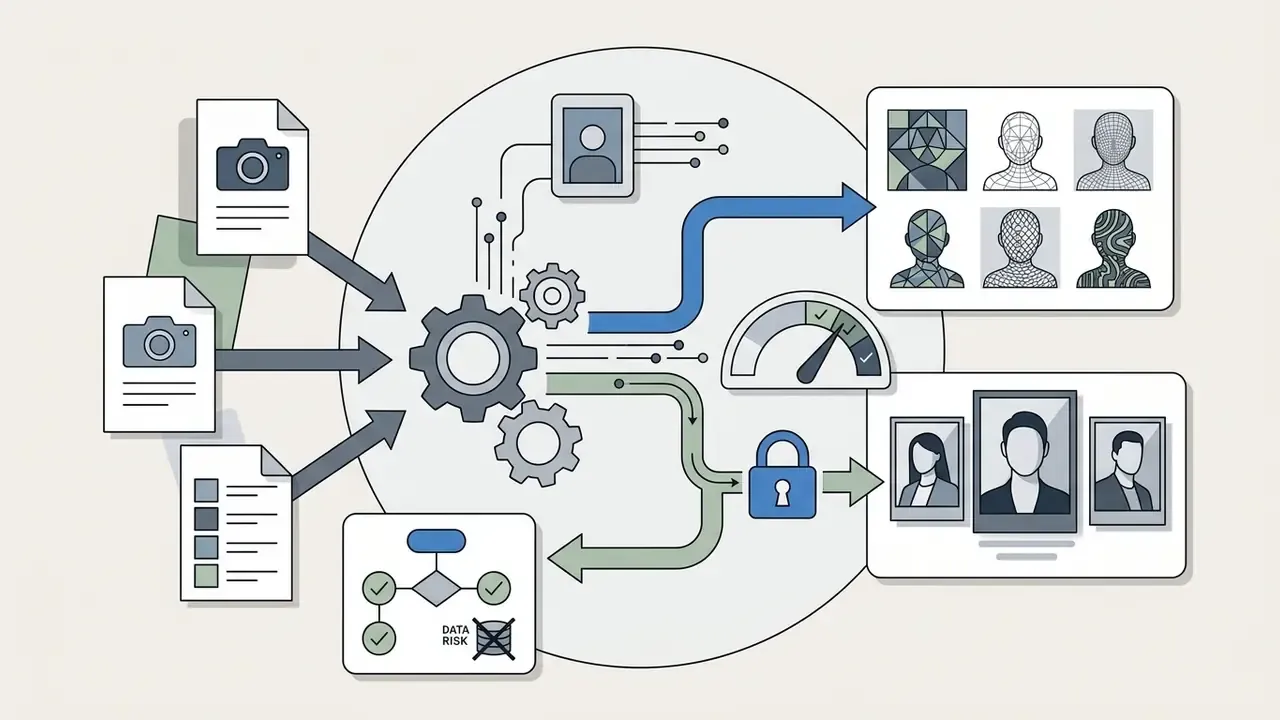
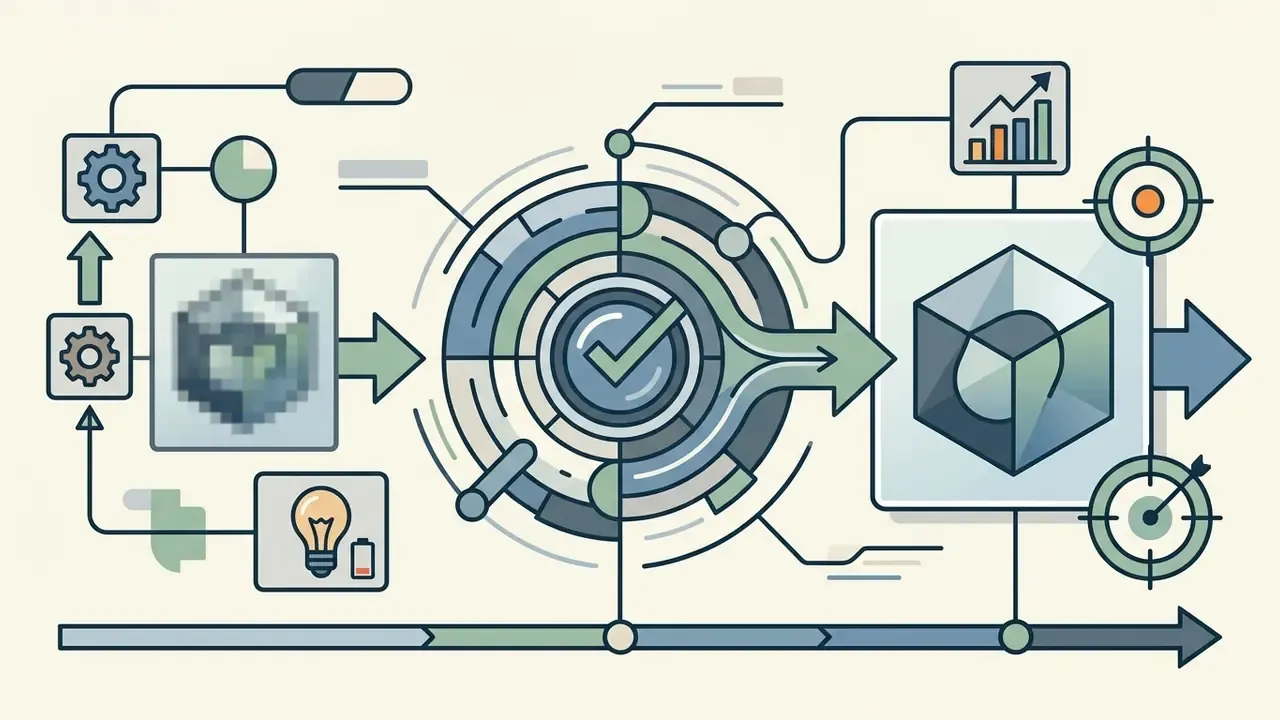
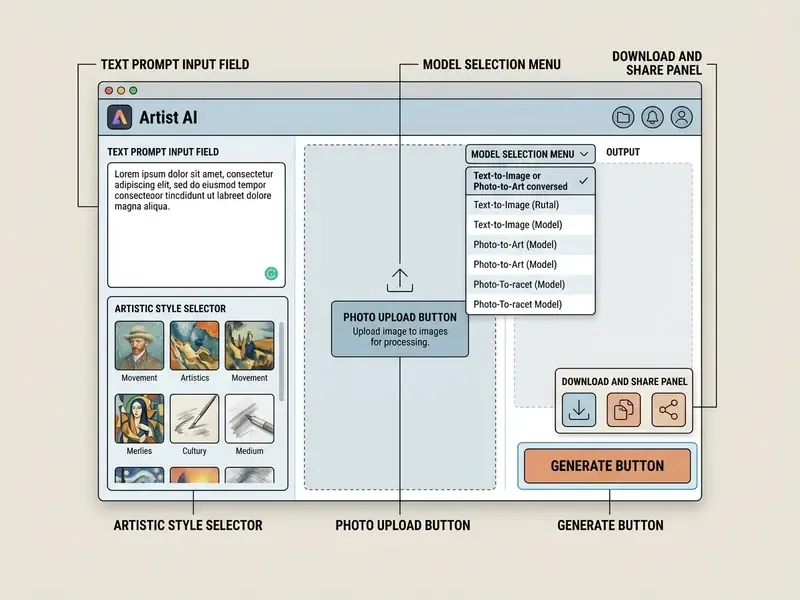
Interface elements in list form (DOM duplication for accessibility): prompt input field, then photo upload control, then style selector, then model picker, then generate button, then download and share panel.
How to Create AI Art in Artist AI: Step-by-Step
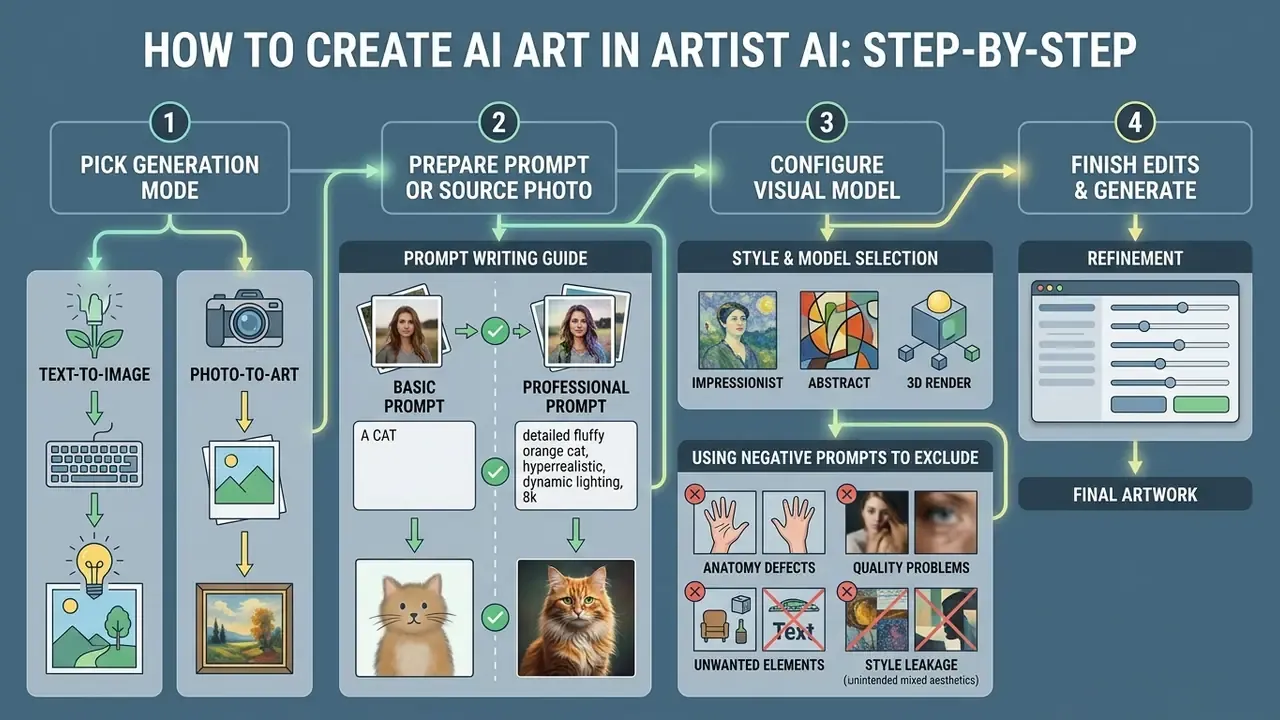
Creating digital art here means picking a generation mode, preparing a prompt or source photo, configuring the visual model, and finishing the edits. The workflow is tuned for rapid iteration on a phone screen.
How to Write a Prompt for Precise Results
An effective text prompt follows a structure: name the main subject, set the background context, specify the artistic style, then define lighting and camera perspective.
Research on generative prompting frameworks shows that structured ordering (Subject, then Context, then Style, then Technical Constraints) achieves better visual fidelity than unorganized text strings.
«Prompts explicitly oriented toward feasibility and novelty during broad exploration receive higher design ratings than unstructured text strings.»
Structure Breakdown:
1. Primary Subject: "A modern electric sports car"
2. Context/Environment: "Parked on a rain-slicked neon street in Tokyo"
3. Artistic Medium/Style: "Cinematic photography, dramatic reflections"
4. Technical Parameters: "Wide-angle lens, 35mm, highly detailed, no watermarks"
Using Negative Prompts to Exclude Unwanted Detail
Mobile generators increasingly expose a second field, effectively a "describe what you don't want to see" input. Filling it is the fastest way to suppress recurring artifacts without rewriting the main prompt.
What to place in the negative prompt:
- Anatomy defects
extra fingers, distorted hands, blurry eyes, missing limbs, fused fingers, asymmetrical face. - Quality problems
low resolution, blurry, pixelated, bad anatomy, jpeg artifacts, watermark, signature. - Unwanted elements
text, frame, border, logo, ugly, deformed, cropped head, duplicate subject. - Style leakage
cartoonwhen you need photorealism,3d renderwhen you need painting, plusoversaturated colors.
If the interface offers no dedicated negative field, append the exclusions to the main prompt as an explicit constraint clause: ...no watermark, no extra text, preserve original facial identity.
Basic vs Professional Prompt: Side-by-Side
| Prompt type | Example prompt | Expected result in Artist AI |
|---|---|---|
| Basic (weak) | A sports car in Tokyo | Flat rendering of a generic car, undefined background, no mood or lighting logic. |
| Advanced (Pro) | A modern electric sports car, parked on a rain-slicked neon street in Tokyo, cinematic photography, dramatic reflections, 35mm lens, highly detailed, with negative: blurry, watermark, text, deformed wheels | High-detail artwork with layered lighting, realistic wet-asphalt reflections, coherent atmosphere, clean edges. |
How to Choose Style and Model for an Image
Artist AI provides multiple visual styles, from photorealism and classical painting to anime and 3D digital sculpture. The right pick depends on the distribution channel and brand aesthetics. Creators benchmarking alternatives can consult the roundup of best AI image generators and the Midjourney comparison.
Controlled user studies in product design suggest that choosing explicit style parameters early improves aesthetic consistency and task feasibility later.
«At early stages, multi-criteria prompts oriented toward feasibility and novelty outperform single-criterion prompts in reaching design goals.»
Practical mapping observed across comparable model catalogs: painting modes for portraits, outline modes for flat-color character art, landscape modes for scenery, anime modes for simplified characters, and sketch modes for draft-stage ideation.
Which Devices Support Artist AI
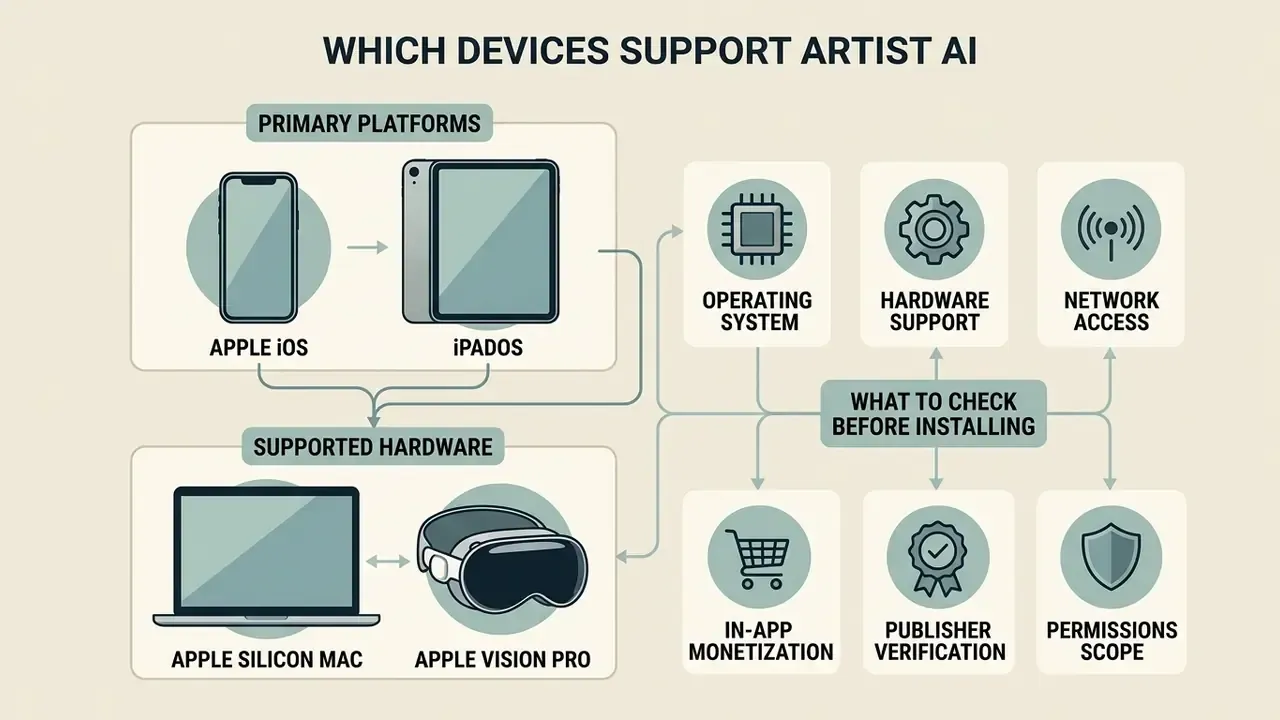
Artist AI ships primarily as a mobile application for Apple iOS and iPadOS devices, with supported compatibility for Apple Silicon Macs and Apple Vision Pro hardware.
When selecting creative software across mobile and desktop environments, organizations should review the AI Media Comparison Matrices to verify cross-platform parity and deployment prerequisites.
Mobile Use of the AI Art Generator
The mobile build of the ai artist app is engineered for touch interaction, letting creators snap photos, generate visual assets, and publish content straight from a smartphone or tablet.
App Store documentation confirms native optimization for iPad screens, with multi-touch navigation, gesture-based prompt editing, and direct access to system photo libraries. Third-party interface breakdowns additionally describe multi-input creation (text prompts, reference images, sketches), a "Projects" tab for saved work, and a reference-image strength slider that trades fidelity against stylistic freedom.
What to Check Before Installing the Application
Before installing, evaluate hardware requirements, storage availability, pricing tiers, and connectivity constraints.
- Operating System iOS 15.0 or later for iPhone and iPad; macOS 12.0+ with M1 chip or later for Mac.
- Hardware Support visionOS 1.0+ for Apple Vision Pro headsets.
- Network Access A stable internet connection is required for cloud-based inference. No offline or on-device generation is documented.
- In-App Monetization Free tier available, with weekly, monthly, annual, or lifetime Pro upgrades.
- Publisher Verification Confirm the developer name (Livintis W.L.L. on the App Store) to avoid look-alike clones.
- Permissions Scope Review requested access to camera roll, notifications, and analytics identifiers before first launch.
Artist AI Pricing: Free Features, Limits, and Pro
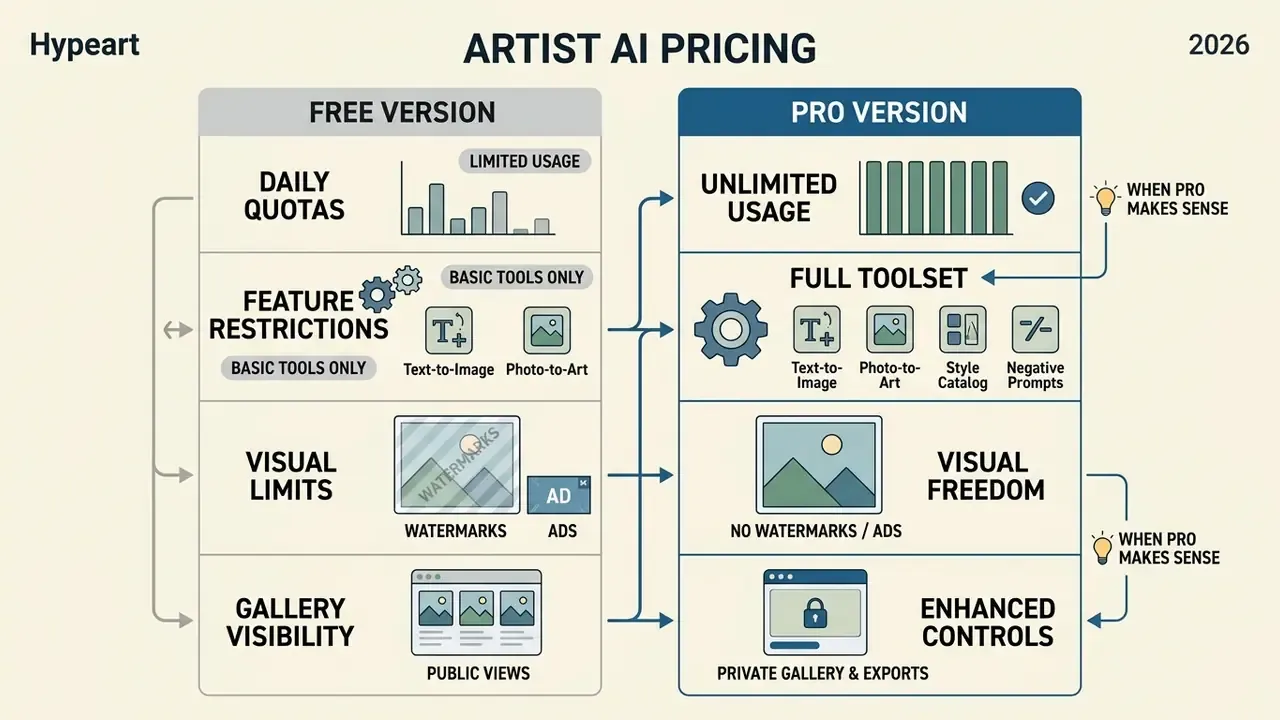
Artist AI runs a freemium monetization model. The app downloads free and unlocks basic generation, while advanced styles, higher resolution exports, and processing priority sit behind subscriptions or a one-time purchase. Before paying, it is worth benchmarking against free AI image generators with comparable style coverage.
Teams sizing software budgets can compare current structures in the AI Media Pricing Guides or model projections with the AI Media Calculators.
What Is Available in the Free Version
The free tier lets users test core text-to-image and photo-to-art capabilities under operational constraints.
- Daily Quotas Free users typically receive a restricted number of daily generation credits. Comparable products publish caps around 50 generations per day.
- Feature Restrictions Standard processing speed, standard export resolutions, and basic style catalogs.
- Watermarks and Ads Free exports may include digital watermarks or require watching promotional ads.
- Gallery Visibility On comparable platforms, free-tier generations may appear in public galleries. Check privacy settings before generating anything sensitive.
When Pro Makes Sense
| Parameter / Feature | Free Access (Artist AI) | Paid Pro / Lifetime Access |
|---|---|---|
| Price (USD) | $0.00 (with ads and limits) | $3.99/week, $6.99/month, or $39.99 lifetime |
| Daily generation cap | Limited credit allowance | Unlimited or expanded quota |
| Processing speed | Standard queue | Priority generation, no queue |
| Style and model catalog | Basic styles | Full access to premium styles and Avatars |
| Resolution and quality | Standard resolution | High HD/4K export resolution |
| Watermarks | Possible on the free tier | No watermarks |
| Commercial rights | Limited by ToS and applicable law | Expanded rights per subscription terms |
| Copyright indemnification | Not offered | Not documented, assume none |
Note: Pricing and functionality reflect the Apple App Store listing and developer terms as verified in Q1 2026. The Google Play listing separately advertises premium features starting around $5.99, so cross-platform pricing may diverge.
Data Privacy, Security, and Shadow AI Risk
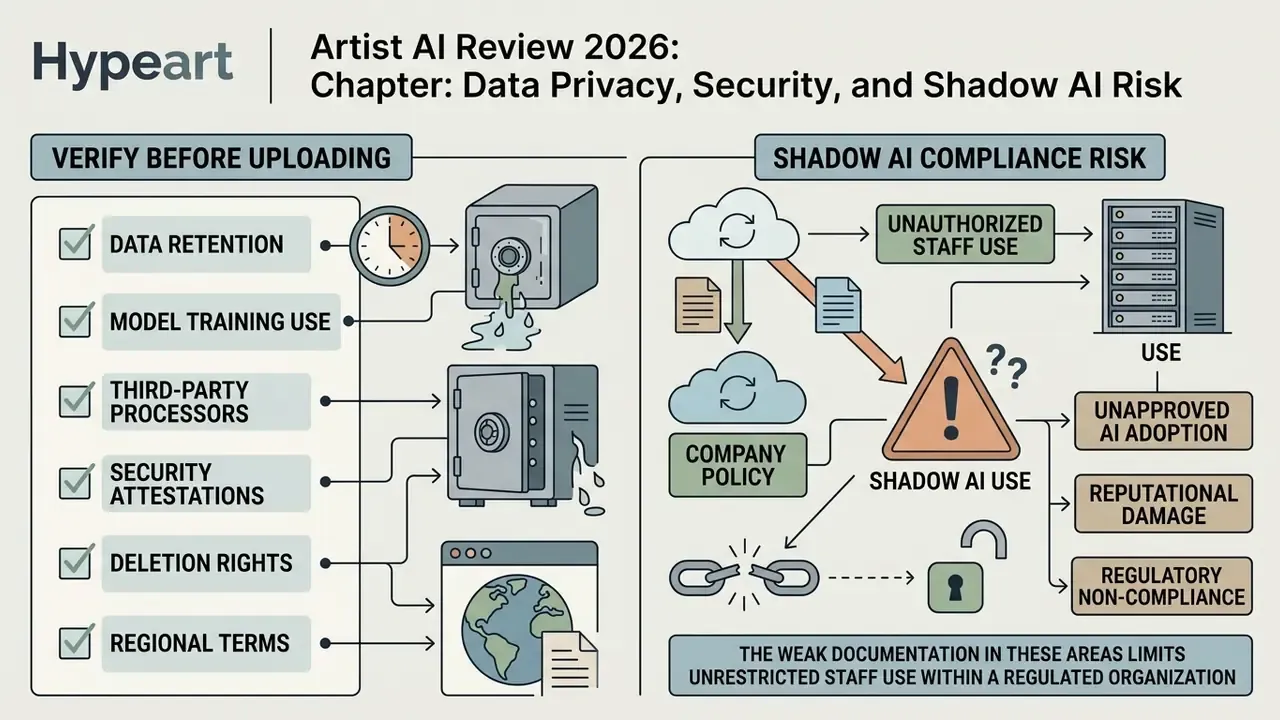
This is the weakest documented area of the product, and the main reason it should not be approved for unrestricted staff use in a regulated organization.
What to Verify in the Privacy Policy Before Uploading Anything
- Retention Whether uploaded photos and generated outputs persist on Livintis W.L.L. infrastructure after the session ends, and for how long.
- Model training Whether user uploads are reused to fine-tune public or shared models. Public documentation for the app does not confirm an opt-out.
- Third-party processors Which cloud inference providers, analytics SDKs, and advertising networks receive image or device data.
- Attestations No SOC 2 Type II report, ISO 27001 certificate, or DPA template is publicly published for this consumer listing.
- Deletion rights Whether in-app account deletion also purges server-side copies of generated media.
- Regional terms Some regional distributions publish separate Terms of Service documents, so the governing text may differ by storefront.
Do not upload: identity documents, bank statements, medical images, unreleased product designs, internal roadmaps or dashboards, customer photographs without consent, or any image containing personally identifiable information.
Shadow AI Compliance Checklist
- InventoryDetect installations of consumer generative apps on managed and BYOD devices. Classify Artist AI as an unsanctioned image-generation tool until reviewed.
- Data boundaryPublish an explicit rule prohibiting upload of confidential, regulated, or customer-identifiable imagery to consumer AI apps.
- Approval pathRequire a documented business justification plus prompt and asset logging for any marketing use of outputs.
- Licensing evidenceStore the applicable ToS version, the purchase receipt, and a screenshot of the commercial-use clause as of the asset creation date.
- ProvenanceRetain prompts, negative prompts, seeds, source photos, and post-editing files for each published asset.
- Periodic re-reviewRe-check developer terms every quarter. Mobile ToS documents change without notice.
Enterprise vs Consumer Boundary
Artist AI is sold as a per-user consumer subscription. It lacks the controls a governance function normally requires: no SSO or SAML, no centralized license administration, no tenant-level audit logging, no data processing agreement, no documented indemnification against third-party copyright claims, and no published API for controlled integration.
Total cost of ownership degrades fast at team scale, too. Individual weekly or monthly subscriptions multiplied across a design team usually exceed the cost of one seat-managed enterprise generator that already bundles usage rights and support SLAs. And the control cost is the part most ROI decks quietly omit.
Can You Use Artist AI Generated Art Commercially
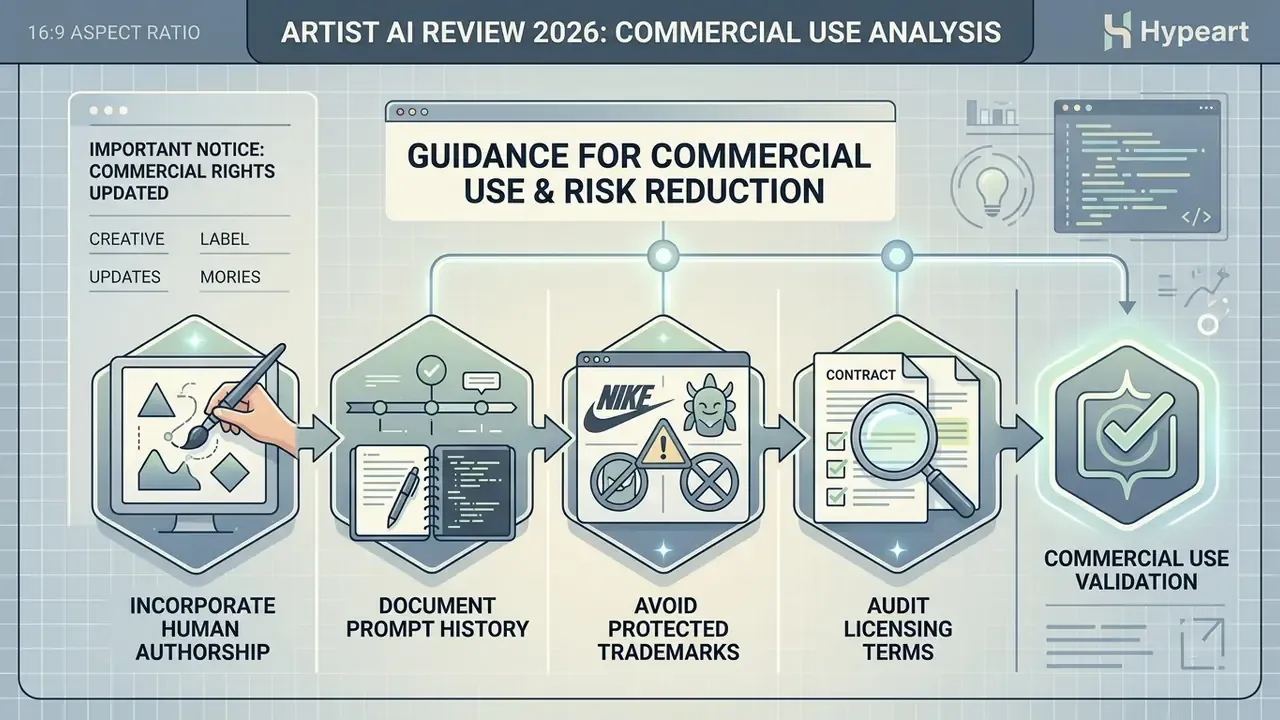
Commercial deployment of AI-generated imagery involves two distinct layers: platform Terms of Service contracts, and national copyright legislation on non-human authorship. A structured overview of both sits in the guide to commercial use of AI image generators.
«More than 60% of survey participants consider model users the primary rights holders, while only about 19 to 27% attribute rights to the AI model itself.»
For deeper analysis of specialized generative domains and their legal boundaries, creators can review comparative evaluations such as the guide to rule 34 ai art generation, look at niche tools like this rule 34 ai generator breakdown, or scan the best free ai art generator roundup.
ALERT: Important Commercial Rights Notice
Copyrightability for AI-generated media depends on the degree of human creative control and on regional precedent, such as Li v. Liu in China or US Copyright Office rulings. Purely autonomous generations without human authorship additions cannot be registered for copyright protection in the United States. Always verify the current End User License Agreement before placing generated images on commercial products or paid campaigns.
«Each case of copyright infringement by AI generations must be assessed individually, accounting for training data, model behavior, and output characteristics.» Infringing AI: Liability for AI-generated outputs under international, EU, and UK copyright law, SSRN (2024).
Which Terms of Use to Check Before Publishing
«Most generative-platform Terms of Service grant users rights to output "to the extent permitted by applicable law," while reserving the company's right to use generations for model improvement.»
Note also that no copyright indemnification is documented for the consumer tiers. Enterprise-grade generators frequently offer contractual defence against infringement claims. Assume it is absent here.
How to Reduce Risk When Creating Commercial Artwork
To limit copyright and trademark exposure, apply clear human authorship controls and keep protected third-party brand assets out of your prompts.
Official guidance from the US Copyright Office states that purely machine-generated visual content lacking human expressive control is ineligible for copyright protection (US Copyright Office Guidance on AI-Generated Content, 2025).
«Text prompts may possess originality because they reflect the author's creative contribution; in some jurisdictions this can ground authorship claims.»
«In January 2025 the US Copyright Office approved registration of an AI-assisted image, the first such precedent in American copyright history.»
FAQ About Artist AI
How Long Does Image Generation Take
Standard generation typically takes 5 to 30 seconds per draft, depending on network latency, prompt complexity, chosen resolution, and current queue load. Pro subscribers get priority placement, which noticeably cuts latency during peak hours. Technical research on diffusion inference indicates that multi-turn conditioning and complex style matching raise server computation time compared with a simple base prompt.
«Proactive agents that ask clarifying questions achieve at least twice the VQAScore compared with standard single-pass text-to-image generation.» Proactive Agents for Multi-Turn Text-to-Image Generation Under Uncertainty, evaluated on ImageInWords, COCO, and DesignBench (2024).
Can Images Be Created in Different Artistic Styles
Yes. Artist AI supports a broad spectrum of mediums and visual styles, including photorealism, Japanese anime, impressionist oil painting, digital watercolor, vector illustration, 3D claymation, and cyberpunk concept art. Users pick presets inside the app or write custom aesthetic descriptors into the prompt field for tailored results. Style breadth varies sharply between vendors, so compare against the free AI art generators list before committing to a lifetime purchase.
Is Artist AI Safe for Company or Client Photographs
Not without a documented review. There is no public confirmation that uploads are excluded from model training, and no SOC 2 or ISO attestation is published for the consumer listing. Treat any image uploaded to the app as potentially retained by a third party.
Are Free-Tier Images Watermarked
Free exports may carry a watermark or require ad views. Watermark-free export is a paid feature. Verify current behavior in-app, since freemium limits shift between releases.
Does Artist AI Offer an API or Team Plan
No public API, SSO, or centralized team administration is documented. Organizations needing programmatic generation should evaluate vendor platforms with published developer documentation instead.
What Should a Risk Owner Decide First
Start with the data boundary, not the price. If staff can upload client imagery from a personal phone, the subscription cost is irrelevant to your exposure. Approve the tool for non-sensitive ideation, log the assets, and revisit quarterly.
Verification Log: What We Checked and When
- Apple App Store listing, publisher name, platform requirements, in-app purchase tiers: verified Q1 2026, version 38.0.
- Google Play listing title, publisher contact domain, advertised premium price point: verified Q1 2026, mismatch noted above.
- Regional Terms of Service clause on private use: page dated 29 September 2025, Japanese-language distribution.
- Security attestations (SOC 2, ISO 27001, DPA availability): searched, none found publicly at time of writing.
- Nothing in this review was supplied, reviewed, or approved by the developer.
Technical Resources and Service Support
For integration options, troubleshooting, or wider comparisons of generative software:
- Review integration protocols in the AI Media API Guides.
- Resolve execution issues through AI Media Support and Troubleshooting.
- Explore desktop and web alternatives in the guide to the best ai art generator. Footer Navigation / Authority Flow: Explore full terminology definitions and enterprise compliance guides in our comprehensive AI Media Glossary.