A modern video meme maker turns single clips, static images, GIFs and text prompts into publishable media for feeds and messengers. Sounds trivial. It rarely is, once a brand, a legal team or a regulated employer is involved. Effective multimedia production balances three things at once: editing speed, copyright control, and adaptation to how recommendation systems actually distribute short video.
Executive summary
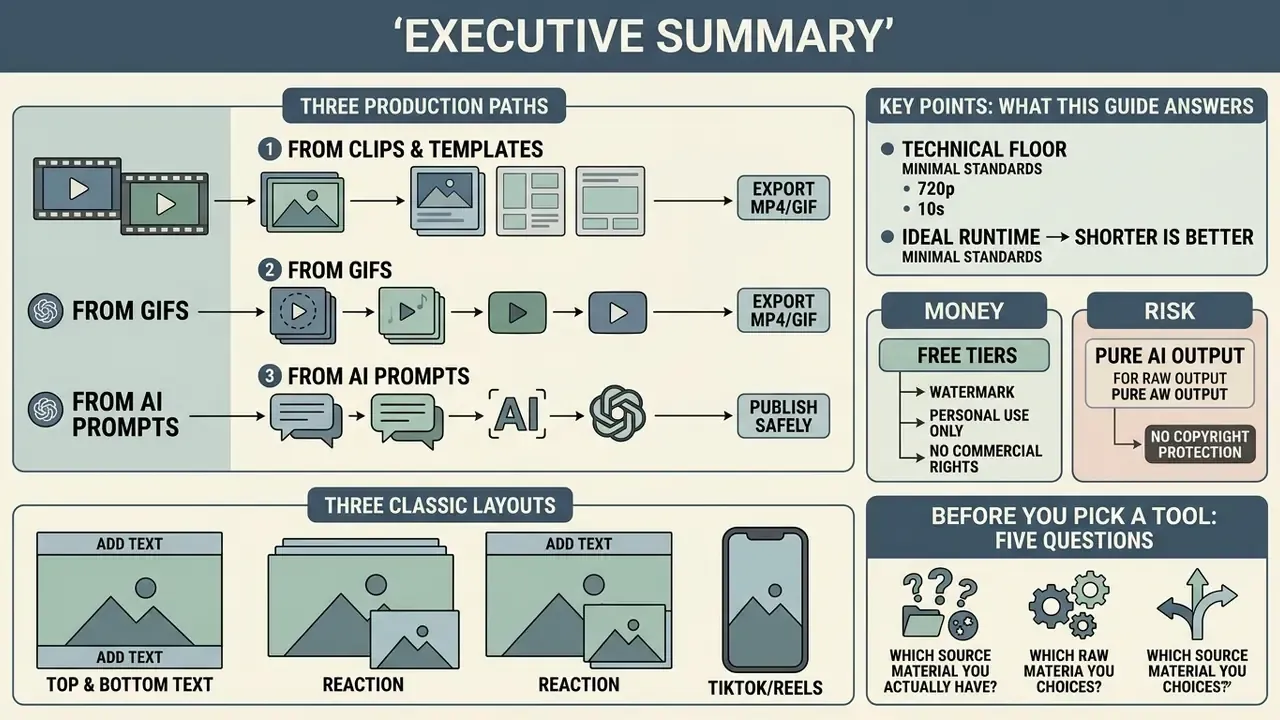
- Three production paths. Customize your own clip, edit a ready meme template, or generate a meme from a text prompt with an ai meme engine. Input control is the real difference here: templates constrain structure, own clips preserve authentic footage, AI builds the scene from a written description.
- Three classic layouts. Border layout (black or white bars with top and bottom text), overlay layout (outlined text sitting on the footage) and split screen (reaction or before/after comparison).
- Technical floor. Vertical 9:16 at 1080×1920, square 1:1 at 1080×1080, horizontal 16:9 at 1920×1080. Export MP4 for feeds, GIF for messengers and forums.
- Ideal runtime. Three to fifteen seconds for maximum retention. The joke must be readable inside the first two or three seconds.
- Money. Free tiers usually mean 720p, a watermark and personal, non-commercial rights only. Paid tiers unlock 1080p or 4K, premium stock, team seats and a commercial licence.
- Risk. Pure AI output without meaningful human creative input is not protected by copyright, and commercial intent counts against a fair-use defence. Enterprise teams need a vendor security and governance checklist before rollout, covered in its own section below.
What this guide answers
Before you pick a tool, five questions usually decide the outcome: which source material you actually have, which layout carries your joke, how long the clip should run, whether the export is licensed for commercial use, and who inside your organization signs off on publication. Everything below is organized around those five decisions, with the technical specs, the research evidence and the legal caveats attached where each decision is made. If you only need one number to start with, start with runtime.
What a video meme maker is and which creation path to choose
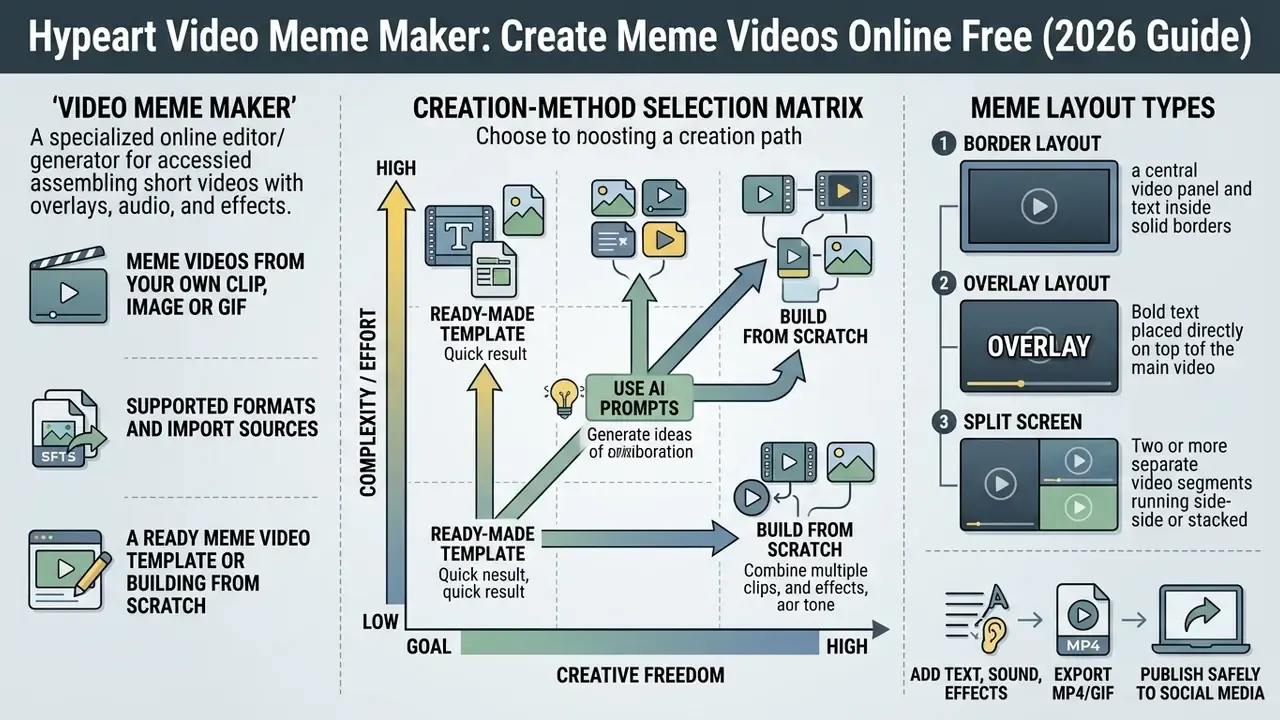
A video meme maker is a specialized online editor, sometimes marketed as a meme video generator, built to assemble short videos with text overlays, audio tracks and visual effects. Three core scenarios are available: customizing your own clip, using a ready meme template, or automatic generation through ai meme services. The choice depends on budget, on whether you already hold a usable source media file, and on how unique the visual content needs to be.
Meme videos from your own clip, image or GIF
Creating a video meme from your own material delivers the highest uniqueness and the most precise transfer of the author's idea. You upload a custom video, photo or GIF animation, then crop it and apply your own context. According to platform technical specifications, the optimal size of short GIFs is up to 8 MB with a duration of up to 6 seconds (15 seconds maximum), while video clips in MP4, MOV or WEBM are scaled to vertical 9:16 (1080×1920) or square 1:1. Customizing your own footage preserves the authenticity of the reaction, which matters most when the meme carries a brand name.
«Remixed media with humorous framing receives statistically significantly more likes and shares than neutral content.»
Supported formats and import sources. Modern editors accept far more than the three "safe" containers. Besides MP4, MOV and WEBM, mainstream meme tools ingest legacy and professional containers such as AVI, WMV and VOB, image formats JPEG, TIFF, BMP, PNG, GIF, and standalone audio in MP3. Upload is not limited to local storage either. You can import directly from cloud accounts (Google Drive, Dropbox) or paste a public URL so the editor pulls the file server-side, with no prior download to the device. For heavy source files, run them through a video compressor first so upload and render stay fast on a mobile network. One practical note from testing: a 4K screen recording of 90 seconds can stall a browser editor on 4G, while the same clip at 1080p loads in a few seconds.
A ready meme video template or building from scratch
Using a ready meme video template shortens production from tens of minutes to a few clicks. A library of video templates provides a pre-built scene with configured timing, text animation and placed graphic plates. You only replace the standard text with your own and, if needed, add a logo. The alternative path, building from scratch on an empty timeline, gives full freedom over layer order but demands basic video-editing skills. Template libraries in mature tools range from a handful of classic meme layouts to thousands of video, image and GIF formats refreshed for pop culture, sports, politics and seasonal trends. To compare approaches and platform feature sets, review our roundup of the best AI video generators and the shortlist of free AI video generators.
Creation-method selection matrix
| Scenario | Source material | Customization level | Skills required | Primary tasks |
|---|---|---|---|---|
| Own clip / GIF | Uploaded file (MP4, MOV, AVI, WMV, VOB, GIF, PNG) | High (timing, framing, layer control) | Basic editing (trim, crop, split) | Unique reactions, product memes, brand content |
| Meme video template | Template from the service library | Medium (text, font and plate replacement) | Minimal (drag-and-drop) | Fast trend response, serial SMM content |
| AI generation (prompt) | Text description or reference photo | High on concept, medium on detail | Prompt-writing skills | Rapid ideation, conceptual ai video memes |
Read the table as a cost curve, not a ranking. Own footage costs time and buys authenticity. Templates cost almost nothing and buy speed. AI generation costs credits and buys volume of ideas, with weaker control over fine detail.
Meme layout types: border, overlay, split screen
Whether you build from scratch or start from a template, one of three classic layouts carries the joke:
- Border layout.White or black bars are added above and below the frame. Text sits on the clean bar and never covers the image, which makes it the most readable option for dense footage and the historical "black and white frame" meme look.
- Overlay layout.Outlined text is placed directly over the footage. Compact and native to TikTok and Reels, though it demands contrast control so captions stay legible on bright scenes.
- Split screen.Two clips or GIFs sit side by side, vertically or horizontally, to show a comparison, a reaction or a before-and-after pairing.
A fourth hybrid deserves mention: background removal plus a solid colour or image backdrop, which turns almost any clip into a reaction meme GIF. If you prepare stills for those backdrops, a free photo editor handles cutouts and colour fills before import.
Editing tools for meme videos
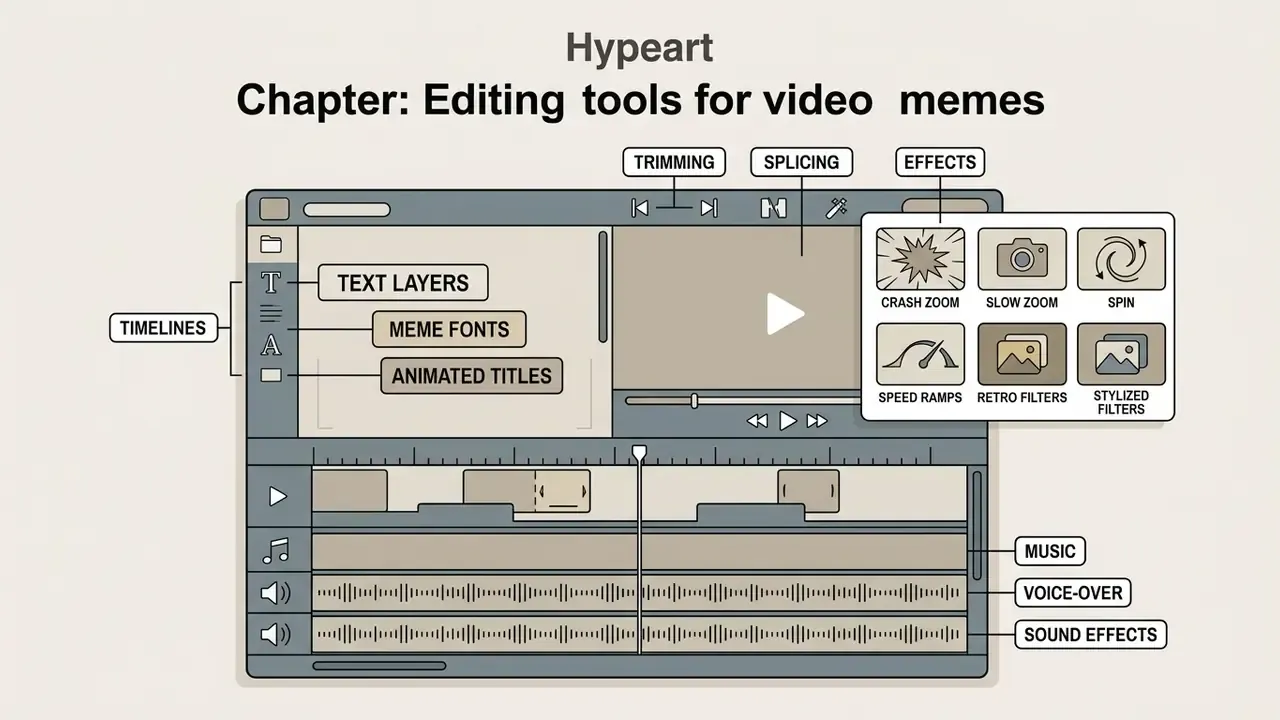
A quality custom video meme maker includes text layers, a multi-track timeline and separate audio channels. A professional video editor adapts the visual sequence to mobile screens while preserving caption legibility and precise synchronization of audio accents. Three toolsets matter more than the rest.
Text, meme fonts and animated titles
The add text tool is responsible for the visual delivery of the humorous thesis. The industry's classic standard remains the bold grotesque Impact typeface with a black outline, though current editorial practice leans on Arial, Helvetica Bold, Comic Sans and Montserrat for readability on small smartphone screens. Institutional video style guidance limits a title to one or two lines, keeps it on screen for three to five seconds, sets the primary line larger than secondary lines, and never drops below size 50, a sensible baseline for meme captions too (University of Colorado video style guidance, 2024–2025). Editorial-style experts recommend simple fade-in and fade-out animation, or skipping complex spatial text transformations entirely, so attention is not pulled away from the joke.
«Second-person address in meme captions strengthens narrative transportation and reliably increases the number of comments.»
Trimming, splicing and effects for video content
Cropping, trimming and track splitting form the base on which the dynamics of video content are built. To shape a comic effect, the editor cuts pauses, speeds up climactic moments, or freezes the frame at the instant of the key reaction. Basic visual effects include panning, camera zoom-in and colour accents. Compare hands-on toolsets in our guide to free video editing software.
Specific effect presets. To amplify comedy, meme editors rely on a small set of named zoom and filter presets:
- Crash zoom. An instantaneous push-in onto a character's face at the punchline.
- Slow zoom. A gradual build to a close-up that creates dramatic or bewildered context.
- Spin and speed ramps. Rotation plus fast or slow motion for exaggerated reactions.
- Retro and stylized filters. 35mm for a vintage film look, duotone for a bold two-colour animated feel.
Direct GIPHY library integration inside the editor lets you search reaction GIFs and GIPHY stickers by mood or category mid-edit and drag them onto the timeline over existing footage, which is the fastest way to assemble a meme compilation. Background removal isolates the subject so stickers and animated effects can be layered behind or in front of them. For animated overlays built from scratch, see our overview of animation makers.
Music, voice-over and sound effects
Audio in funny meme clips usually consists of three balanced layers: the narrator's or character's voice, background music at low volume, and specific sound effects. Popularizing a format joke almost always requires recognizable audio samples, whether that is canned laughter, a falling sound, or a quoted meme line. The built-in music video module in a free video meme generator places tracks directly on the timeline and controls fade-in and fade-out. Practical guides describe the same three-track stack: primary voice on top, a meme sound effect beneath it, and a music or ASMR loop held quiet underneath. Synthetic narration in any language can be produced with AI voice generators and dropped onto the audio track alongside the original dialogue. One caution worth repeating: trending audio is the single most common licensing trap in commercial meme production.
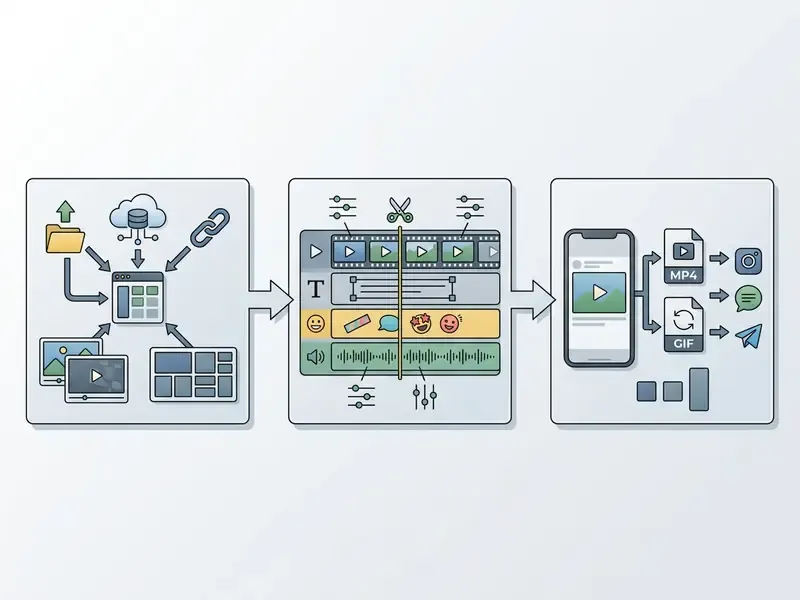
How to create a video meme online in 3 steps
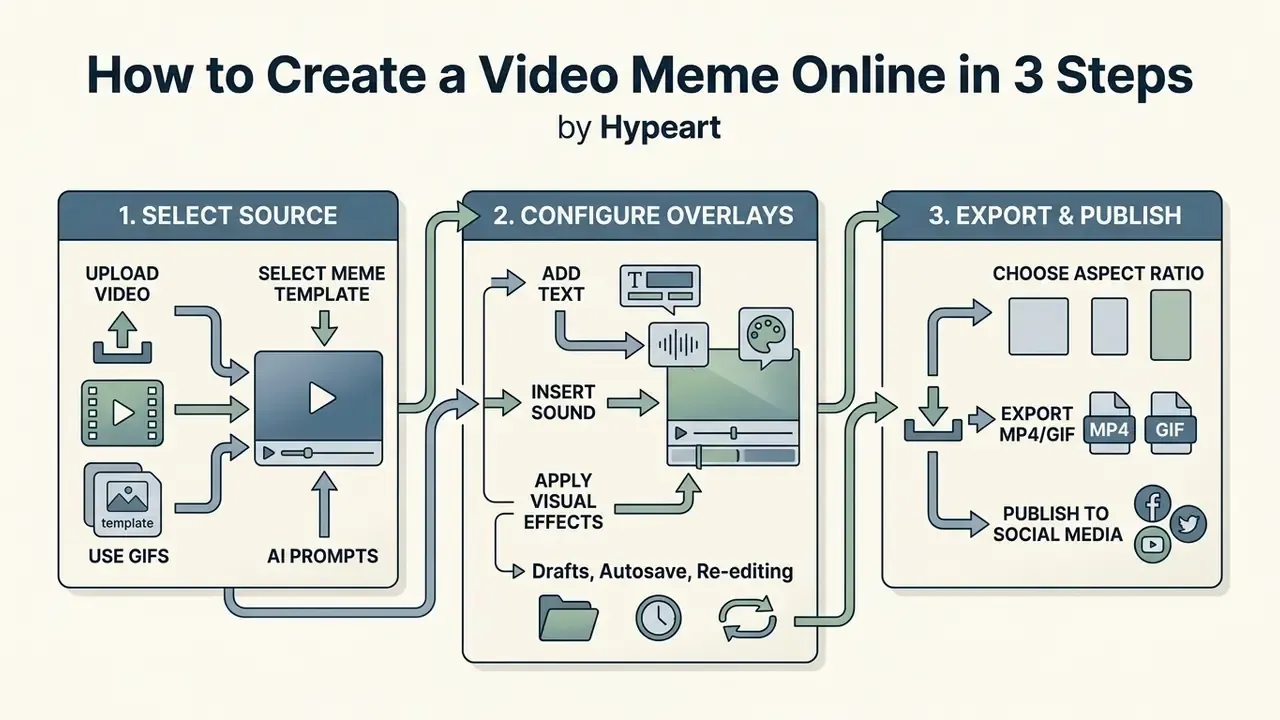
To create video meme online, you need three sequential actions: select a source media file, configure text and audio overlays, then export in the required aspect ratio. This algorithm lets users with no editing experience make video meme online on a first attempt.
Upload a video or select a meme template
First you open the web editor and decide on the base: upload your own clip (MP4, MOV, AVI, WMV), a GIF, or select a ready meme template from the catalogue. At this point you also choose the layout, meaning a border template with black or white bars, a borderless overlay, or a split screen. If the task requires a fast reaction to a news event, templates let you skip the hunt for suitable footage. Files can come from the device, from cloud storage, or from a pasted public URL. This stage defines the structure of everything that follows.
Add text, sound and visual effects
Second, the meaning gets assembled. Text blocks are added above and below the frame, sound effects are configured, meme fonts are chosen. You set the exact timing of caption appearance on the multi-track timeline so the line lands on the facial expression or action in the frame. Stickers, GIFs and emoji are separate overlay layers, each with its own start and end point that can be dragged along the timeline. Miss the sync by half a second and the joke dies quietly.
Export and publish the meme to social media
Finally, you select save parameters: MP4 for video platforms or GIF for messengers, plus resolution (1080×1920 for vertical Reels and TikTok, 1080×1080 for the feed, 1920×1080 for YouTube). The clip is saved to the device and is ready for publication on social media platforms to go viral, with caption, hashtags, cover frame and mentions prepared before posting. Comment moderation is part of the job too, and teams handling volume sometimes draft replies with an ai response generator before a human edits and sends them.
«Meme content reaches roughly 60% organic reach on Instagram and Facebook versus 5% for standard marketing images.»
Drafts, autosave and re-editing. When you work in a cloud editor with an account, the project saves automatically to a "Drafts" section. That makes it possible to return later and edit the caption, swap the font, change the layout or correct timing without rebuilding the meme from zero, which is the practical difference between a one-shot generator and a reusable production workflow. Teams publishing serially should also review the YouTube video editor workflow for repackaging the same master file across channels. When a render fails or an export hangs, the usual culprits are unsupported codecs and premium assets in a free project; both are covered in AI Media Support and Troubleshooting.
How an AI video meme generator works
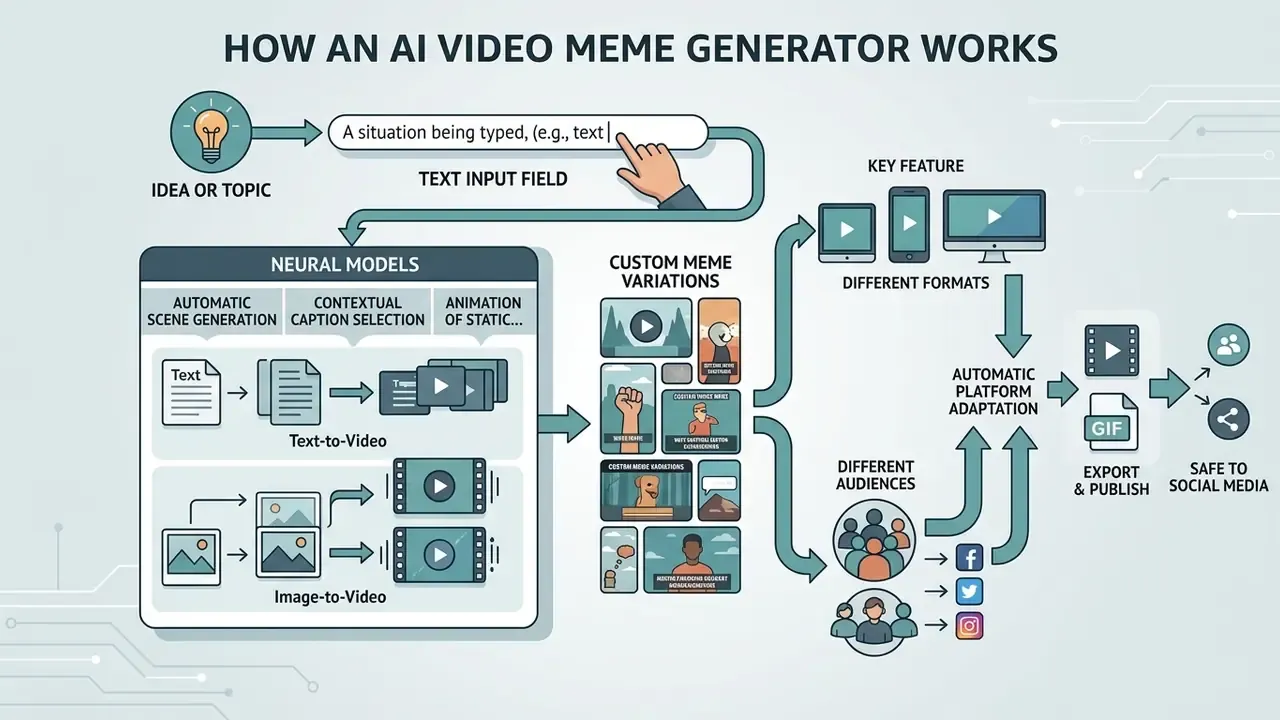
A modern free ai video meme generator uses neural models, Text-to-Video and Image-to-Video, for automatic scene generation, contextual caption selection and animation of static pictures. Background on the underlying model classes is collected in our references on AI video generators and image-to-video AI. The algorithm parses the prompt, breaks it into visual frames and returns a finished clip without manual timeline assembly. A typical prompt structure for meme clips: subject and action, then camera movement, then light and atmosphere, then style, with two or three variants generated for selection. The same prompt-to-output pattern shows up across unrelated categories, from an ai resume generator to video tools, which is why prompt discipline transfers between them.
«A layout-aware AI system outperformed the baseline model on all three evaluation parameters in a user study with 720 votes from 24 participants.»
Creating an AI meme from an idea, topic or text
Generation starts with an idea or situation typed into the text field. The ai video generator recognizes entities, selects a visual style (realism, 3D animation, classic meme), and forms a short sequence. Research on automatic meme-generation systems such as MemeCraft (Wang & Lee, arXiv, 2024) shows that combining language models with visual-language translators transfers a specified satire or social context with reasonable accuracy. The same pipeline exposes explicit parameters for social cause, stance and persuasion technique, which is precisely why governance teams pay attention to it.
«AI memes on average surpass human ones in creativity, humour and virality, yet the funniest memes are still made by people.»
Custom meme variations for different formats and audiences
Neural networks can adapt the same custom meme to different platforms automatically. The model recalculates frame composition, moves the text and reassembles clip duration for YouTube Shorts, Instagram Reels or TikTok. All three share a 9:16 / 1080×1920 master, so adaptation is mostly automated recutting, captioning and hook packaging rather than reshooting. For prompt-driven scene generation and format variants, see our reference on text-to-video AI tools. At scale, batch generation and format variants are usually wired through documented endpoints; integration parameters live in the AI Media API Guides.
«Meme format is a stronger predictor of engagement than the AI-generated content itself: synergy appears when AI visuals sit inside a recognizable template.»
How to make a meme video stand out on social media
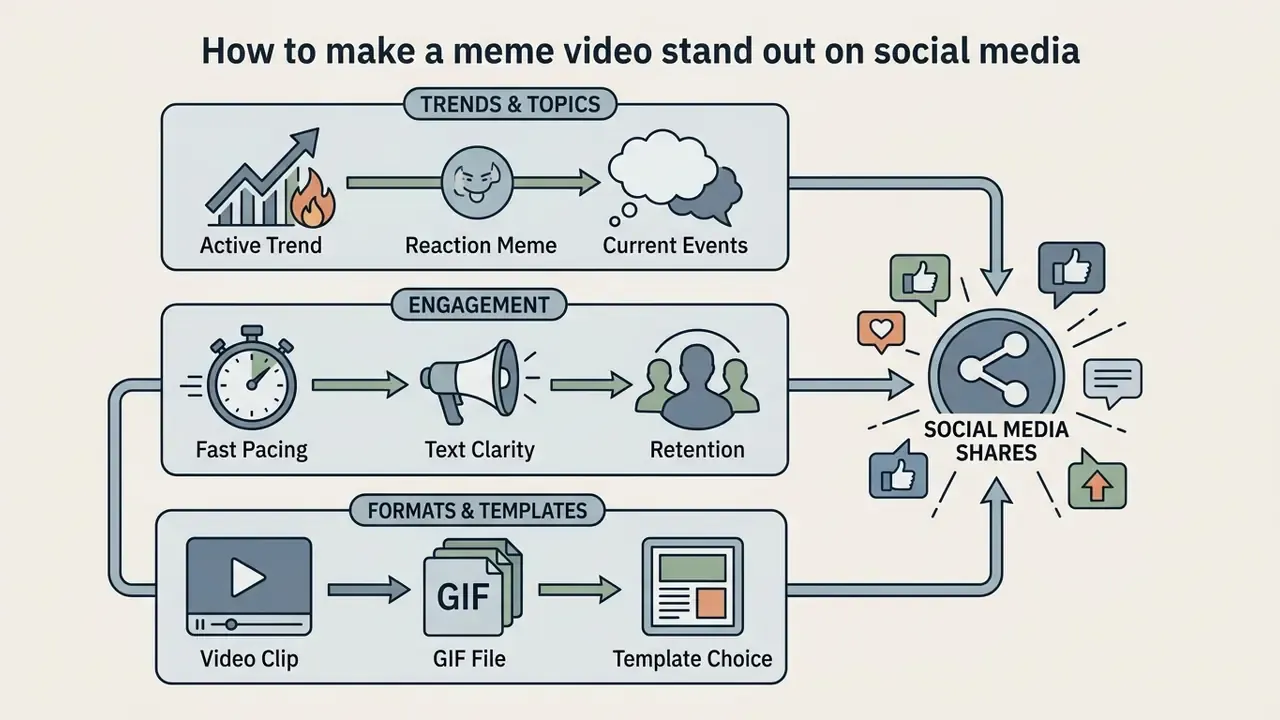
Meme-video virality comes down to how fast the humour reads, how well it matches an active trend, and how high retention holds. For a funny video meme generator to deliver reach, clip dynamics must suit mobile viewing. Research also points to creator popularity as the strongest single virality factor, with close-up or medium framing and a second-person point of view adding measurable lift. Popularity, unfortunately, is not a setting in the export dialog.
Trending topics, reaction memes and current events
Using trending topics and current events raises engagement in the first hours after publication. Reaction memes work by showing one clear human or character emotion in response to a familiar situation. Analysis of recommendation algorithms indicates that clips reflecting fresh news events receive several times more re-shares. The practical rules are narrow: confirm the trend is still active in your niche, pick one reaction format (split-screen, caption-led, green screen, voice-over, remix, stitched response), and build the clip from four parts, namely a visible setup, an immediate emotional response, a small twist, and a caption naming the situation.
«Memes that imitate recognizable social-media storytelling templates consistently predict growth in likes, shares and comments.»
Format, pace and text for audience engagement
Rapid shot changes and concise text are the key retention factors. A video meme must deliver its point within the first two or three seconds. The optimal runtime of a viral video meme is 3 to 15 seconds. Clips shorter than three seconds fail to establish context, while videos longer than fifteen seconds face a sharp retention drop in recommendation feeds. Hard platform ceilings are far higher, up to three minutes on Shorts and Reels, but those are limits rather than targets. According to Journal of Retailing and Consumer Services (2024), second-person pronouns in meme text strengthen narrative transportation and increase comment volume.
«Across three experiments (N=300, 300, 253), branded memes using second-person address generated significantly higher engagement and more favourable ad attitudes.»
Video, GIF and choosing the right meme template
The choice between video and GIF depends on the distribution surface. Animated GIFs suit messengers and web forums thanks to instant autoplay with no sound. Video clips with background audio hold the advantage on algorithmic platforms, because the audio track itself becomes the trend. The evidence is metric-dependent: one 2024 meme-marketing study found static image memes most engaging while short video memes were most persuasive for product information, and GIF-focused research linked motion and high frame count to higher virality. Choose by objective first, then pick tooling from our comparison of free AI video generators.
Free video meme maker, pricing and commercial use
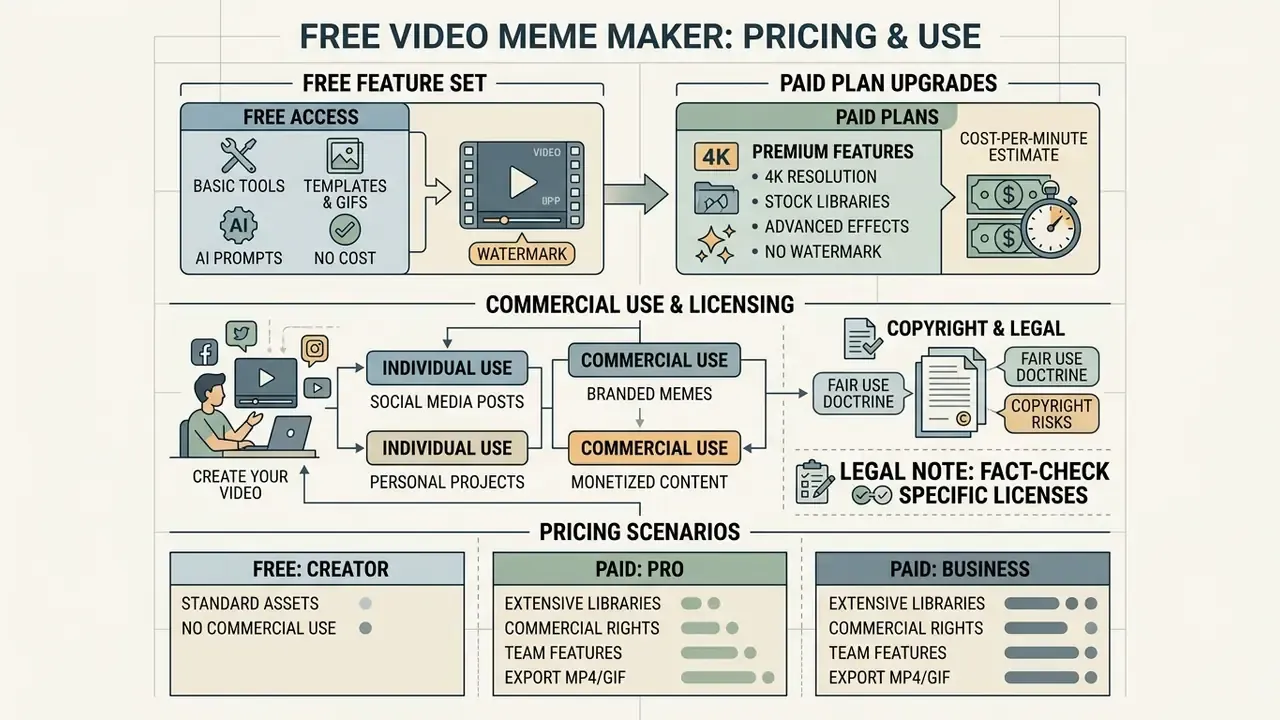
Many services position themselves as a free video meme maker, offering a basic feature set at no cost. The interesting question is where the free tier stops.
«Meme marketing delivers roughly 30% engagement on social platforms versus 1% for Google AdWords campaigns.»
For business tasks and marketing video production, the limits usually appear around watermarks, music licensing and commercial-use rights rather than around features.
What a free video meme maker gives you
The free tier of a free meme video maker online normally allows export at 720p, use of basic video templates and standard text overlays. Enough for personal use or a quick hypothesis test. The output clip often carries the platform's branded watermark, and some services additionally cap export length, from one to seven minutes, or block export entirely once a premium asset enters the project. A free online meme video maker also tends to keep drafts for a short retention window only, which matters if you plan to reuse masters.
When a meme video needs a paid plan
A paid subscription is required for watermark-free export at 1080p or 4K, access to premium stock video and audio libraries, brand kits and team collaboration. If you plan to create meme content for commercial advertising campaigns, the paid plan also provides a legally cleaner licence for the media used. Pricing models across services are reviewed on the AI Media Pricing Guides page.
Cost-per-minute estimate. A simple planning formula for one finished minute of meme video: (hourly rate × production hours) + (AI credits consumed × credit price) + (licensed stock/audio fees) + (share of monthly subscription ÷ minutes produced). Teams publishing thirty or more memes a month almost always find the paid tier cheaper per minute than paying per licensed asset. Run your own inputs through the AI Media Calculators before committing to an annual plan, and keep a line for review time, because human sign-off is a real cost.
Commercial use, copyright and branded memes
Creating commercial-grade video memes requires strict attention to copyright. Using excerpts from popular films, copyrighted music or branded characters in paid advertising without a licence creates direct legal exposure. Brands frequently fall back on custom graphics or permissive licences instead. Rather than claiming copyright on the meme itself, many creators simply place their social handle as a text layer to capture followers once the clip travels. For deeper legal practice, visit AI Litigation and Case Timelines and the AI Media Commercial-Use Hub; for rights on generated visuals specifically, see commercial use of AI image generators and design-tool licensing in the Canva AI Generator overview.
Pricing scenarios for video meme generators
| Parameter / Feature | Free plan (personal use) | Paid / Pro plan (commercial SMM) |
|---|---|---|
| Export resolution | 720p HD | 1080p Full HD / 4K |
| Watermark | Present on most services | Removed |
| Export length limit | Often 1 to 7 minutes | Extended or unlimited |
| Stock media access | Basic set | Premium (Getty Images, Shutterstock, and similar) |
| Commercial rights | None (personal, non-commercial only) | Full commercial licence |
| AI credits / generations | Limited per day or month | Extended quota or unlimited |
| Team collaboration | Single seat | Multiple seats, shared brand kit |
| Project storage / drafts | Short retention | Persistent cloud drafts and versioning |
Note that plan names and exact quotas change often, so treat the table as a shape of the market rather than a price list.
Enterprise use: security, model risk and AI governance checklist
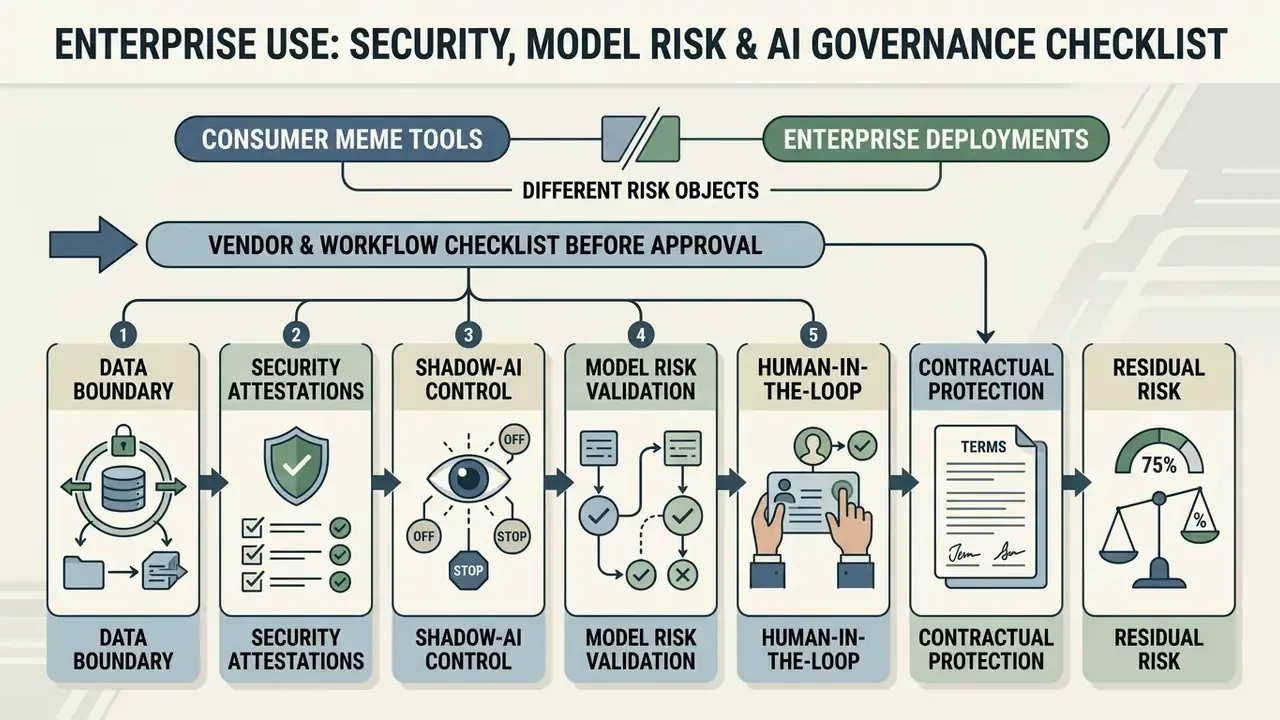
Consumer meme tools and enterprise deployments are different risk objects. This section is written for CROs, heads of AI governance and marketing-risk owners who must authorize a public web tool inside a regulated perimeter. The core editorial principle stays the same as in any other AI adoption question: no evidence, no autonomy.
Post-publication workflow: what to measure and where it breaks
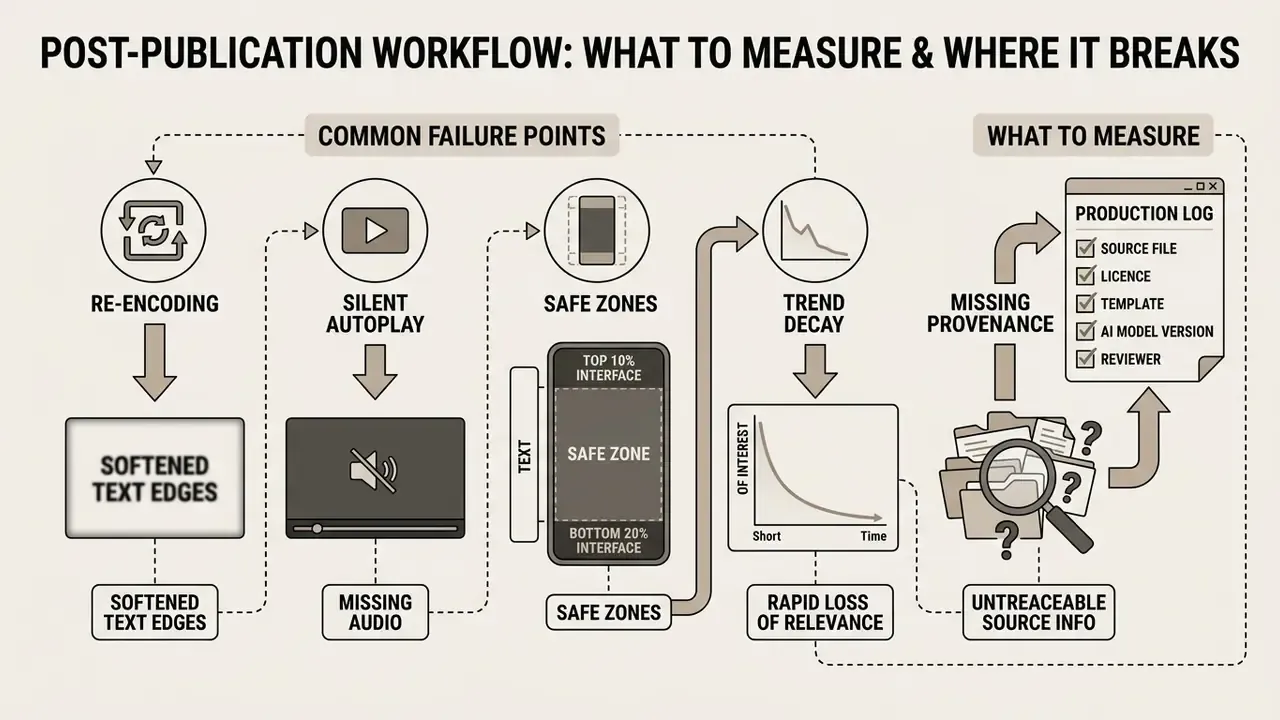
Publishing is not the finish line, and most avoidable losses happen after export. Four metrics tell you almost everything: three-second view rate, average watch time against clip length, share-to-view ratio, and saves. If three-second retention is weak, the problem sits in the first frame or the caption, not in the edit. If watch time collapses near the end, the clip is simply too long for the joke it carries.
Common failure points, in rough order of frequency:
- Re-encoding. Platforms may convert GIFs into video or recompress MP4, which softens text edges. Export captions slightly larger than looks necessary.
- Silent autoplay. If the joke depends on audio, burn a caption. Many viewers never hear the punchline.
- Safe zones. Interface elements cover roughly the top 10% and bottom 20% of a vertical frame, so keep text inside the middle band.
- Trend decay. A sound or format can die within days. Check the trend's current velocity before spending an afternoon on it.
- Missing provenance. For regulated publishers, an asset without a recorded source and licence is a future audit finding.
Keep a simple production log: source file, licence, template, model version if AI was used, reviewer, publication date. Boring, yes. It is also the fastest way to answer a legal question six months later.
FAQ about video meme makers
This section collects answers to the technical and organizational questions users hit most often while working with online meme-video editors.
Do you need a free video meme maker app to make memes on a phone?
Installing a separate mobile application is not mandatory. Modern web versions of online editors are adapted to smartphone browsers on iOS and Android, and support cropping, text overlays and export directly in the cloud. A dedicated free video meme maker app can still run faster on a weak connection, works offline, and gives direct access to the local gallery. Benchmark comparisons in 2025 showed native apps roughly 74% faster on 3G, while web apps consumed 384 to 532 MB of memory. For preparing source stills on the same phone, see our guide to free online photo editors and the broader photo editor overview.
What file formats does a meme maker support?
Most mature tools handle images (JPEG, TIFF, BMP, PNG, GIF), video (MP4, MOV, WEBM, AVI, WMV, VOB) and audio (MP3), and export to MP4, GIF, JPG or PNG. Always confirm the destination platform's own media spec, because social networks may re-encode GIFs into video or apply separate size and aspect-ratio limits.
Can I edit a meme after I have made it?
Yes, if you work in a cloud editor with an account. Projects are stored as drafts, so text, fonts, layout and timing can be changed later and re-exported without rebuilding the meme from scratch.
How long should a video meme be?
Keep it between three and fifteen seconds for the highest engagement. The punchline should be readable within the first two or three seconds.
How do I add trending meme clips and GIFs?
Search the built-in GIPHY library by mood or category, drag the GIF straight onto the timeline, and layer it over existing footage. Stacking several short clips is the usual way to build a meme compilation.
Can a meme be copyrighted?
Technically yes, though most creators do not pursue it, because free resharing is exactly what makes a format spread. Purely AI-generated material is not protected without human authorship. A practical alternative is adding your social handle as a text layer so redistribution still drives followers.
Do I need editing skills to use a meme video generator?
No. Template-driven workflows need only text replacement and a drag-and-drop timeline. Skills start to matter when you cut your own footage, sync audio accents, or build layered effects, and even then a few hours of practice covers most meme use cases.
Knowledge base navigation
- Glossary of terms and guides: AI Media Glossary
- Tool comparisons: AI Media Compare Hub
- Commercial-use decisions: AI Media Commercial-Use Hub