Generative artificial intelligence has moved out of the sandbox. It now sits inside production pipelines, marketing calendars, and, increasingly, inside the model inventories that risk teams have to defend. Adobe Firefly is Adobe's primary generative AI ecosystem, letting users generate, modify, and manage visual assets across stand-alone web applications and Creative Cloud software. Deploying an adobe ai generator responsibly means analysing four things at once: model architecture, prompt structure, commercial licensing, and integration controls.
Not glamorous. But that is where the exposure lives.
Executive Summary for Risk, Compliance, and Finance Leaders
- Commercial safety posture Native Firefly models are trained on licensed Adobe Stock, openly licensed material, and public-domain content. Adobe states outputs from non-beta Firefly models may be used commercially, and offers contractual IP indemnification for qualifying enterprise agreements.
- Provenance and auditability Every native Firefly export carries C2PA Content Credentials recording issuer, date, application, AI tool, and edit actions. Adobe's terms prohibit removing or altering these credentials.
- Model inventory implications Firefly is multi-model. Native Adobe engines coexist with partner models (Google, OpenAI, Black Forest Labs, Runway, Pika, Ideogram, Luma AI, Moonvalley, ElevenLabs). Partner models are not developed by Adobe, carry different usage terms, and must be inventoried and validated separately.
- Validated limitations Independent 2025 academic testing found Firefly leads on demographic representativeness but records extremely low domain-specific diagnostic accuracy (0.94%), which rules out unsupervised use in clinical, medical, or other specialised-accuracy contexts.
- Economics Free tiers use daily refreshing generation allowances, not fixed monthly prompt counts. Paid entry pricing starts at $9.99/month for 2,000 generative credits with unlimited standard generations; enterprise tiers use pooled allocations with managed governance.
- Hard technical limits Uploads accept JPG, PNG, WebP (HEIC via Safari) up to 100 MB and no smaller than 512 × 512 px; native downloads export as JPG or PNG at a maximum of 2000 × 2000 px; prompts are capped at 750 characters.
Who Should Read This and What It Answers
This guide is written for the people who sign off on creative tooling, not only for the people who use it. Heads of model risk, compliance officers, marketing operations leads, and finance transformation owners tend to arrive with the same five questions:
- Is the output legally usable in client-facing and regulated marketing material?
- Which model actually produced the asset, and can we prove it later?
- What does the capability cost once validation and human review are priced in?
- Where does unmanaged consumer usage leak sensitive context?
- What breaks when the vendor rotates a model version without warning?
Everything below is organised around those questions. Practitioners can jump straight to the workflow and prompt sections; approvers will find licensing, entitlement design, and control patterns first, because in a regulated environment those decisions gate the rollout entirely. Teams wanting to benchmark alternatives before committing budget can view the guide to the broader comparison hub.
What is Adobe AI Generator and Adobe Firefly
Adobe Firefly is a suite of generative AI models built by Adobe to create and edit visual media through natural language prompts and structural controls. It works as a unified generative workspace for raster images, vector graphics, photo modifications, and video elements. By embedding an ai generator adobe firefly engine directly into enterprise design workflows, teams speed up content production while keeping control over asset provenance.
Adobe describes the Firefly Workspace as an AI creative studio that centralises generation, editing, project media, and generation history inside one interface. In practice that means operators move from prompt to refinement without losing project context, and without exporting half-finished assets to three different tools.
How Adobe Firefly Differs From a Standard AI Image Generator
Three things separate Firefly from a general-purpose image generator: training dataset composition, integrated editing mechanics, and automated metadata tracking. Unlike open-source models trained on unvetted web scrapings, native Firefly models are trained exclusively on licensed Adobe Stock content, openly licensed material, and public-domain media where copyright has expired. Teams benchmarking that approach against prompt-only platforms often review Midjourney and competing generators to compare licensing exposure alongside output quality.
Firefly also embeds Content Credentials (C2PA metadata) automatically into generated files, recording model provenance, edit history, and tool attribution. That structural traceability is what lets an organisation audit visual media before public deployment instead of reconstructing history from Slack threads.
«During the first nine months of the Firefly beta, more than 6 million users generated over 1 billion images, contributing to $1.2 billion in Creative Cloud revenue growth across 2023–2024.»

What You Can Create With Firefly
An ai generator adobe solution like Firefly produces raster photographs, digital illustrations, vector graphics, promotional video extensions, synthesised speech, and background audio. Inside the workspace, creators render high-resolution firefly ai art, re-colour vector graphics for packaging designs, and extend video sequences up to 1080p resolution. Design leads also use it as an adobe ai design generator for layout templates, typographic effects, and campaign variants rather than one-off hero images.
Independent testing highlights clear functional differences across media types, and comparison work across leading AI image generators shows that representativeness and factual accuracy do not always move together. In a 2025 dermatologic image evaluation published in the Journal of the European Academy of Dermatology and Venereology, researchers assessed 4,000 AI-generated images across four major models. Adobe Firefly demonstrated superior demographic alignment, producing 38.1% dark-skin representations that matched US Census demographics (), whereas competing models significantly underrepresented dark skin tones (). The same evaluation, however, recorded a diagnostic accuracy rate of just for specialised medical conditions. Strong general commercial design; weak domain-specific truth. Human verification is not optional there.
«Firefly produced 38.1% dark-skin images (χ²(1)=0.320, p=0.572), while competing models produced only 3.9–8.7% (p<0.001).»
For model risk functions, this dataset is useful less as a dermatology finding and more as a reusable validation template. It shows, concretely, how to test a generative model for demographic bias and hallucination rate before registering the tool in a unified model inventory under frameworks such as the NIST AI Risk Management Framework or OCC Bulletin 2011-12 model risk expectations. Borrow the method, ignore the clinical context.
Where Adobe Firefly Operates
Technical Specifications and System Limits
To keep asset processing predictable and avoid upload errors inside the Firefly workspace, operations teams need to respect explicit file format and resolution constraints:
| Parameter | Operational Specification / Limit | Supported Details & Browsers |
|---|---|---|
| Supported Upload Formats | JPG, PNG, WebP, HEIC | HEIC format is supported exclusively via Safari browser on desktop/laptop. |
| Max Upload File Size | 100 MB per single image | Applies to Structure and Style reference uploads. |
| Min Input Dimensions | 512 × 512 pixels | Lower-resolution source files are rejected by the processing pipeline. |
| Max Export Resolution | 2000 × 2000 pixels | Native download output standard for JPG and PNG formats. |
| Prompt Length Ceiling | 750 characters | Hard system cap in the Firefly prompt field. |
| Supported Environments | Web, mobile, desktop host apps | Chrome, Microsoft Edge, Firefox, Safari; standalone iOS and Android Firefly mobile apps. |
Two limits cause most friction in practice: the 2000 × 2000 px export ceiling, which surprises print teams, and the 512 px minimum, which quietly rejects thumbnails pulled from old brand archives.
Adobe Firefly Free Access, Generative Credits, and Commercial Use
Monetisation model, credit consumption mechanics, copyright policy. Understanding those three is what makes a compliant rollout possible. This section deliberately sits before the workflow instructions, because in regulated environments entitlement design and licensing clarity decide whether operational rollout is permitted at all.
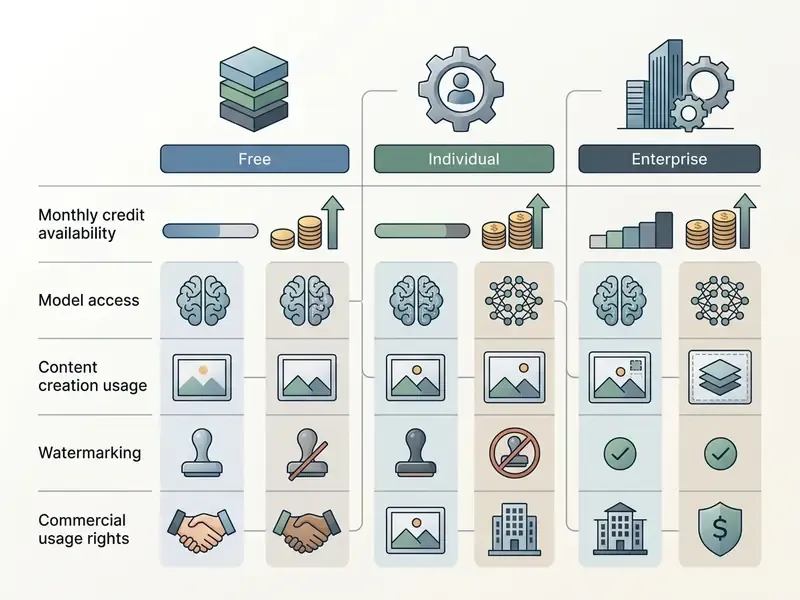
| Subscription Tier | Monthly Generative Credits | Access to Models | Watermarking / Exports | Commercial Rights |
|---|---|---|---|---|
| Free Adobe ID | Daily allocations (refresh every 24 hours) | Base Firefly Models, limited Nano Banana access | Potential watermarks on select free exports | Commercial use allowed for non-beta outputs |
| Paid Single App / CC | 100 to 1,000 credits/month | Full Firefly suite, premium partner models | No visual watermarks, full C2PA metadata | Commercial use allowed |
| Firefly Standard / Premium Plan ($9.99/month) | 2,000 credits/month (unlimited standard generations) | Priority access, full partner model suite | High-resolution exports, C2PA metadata | Commercial use allowed |
| Higher Firefly Tiers | 4,000 / 10,000 / 50,000 credits/month | Full native and partner model catalogue | High-resolution exports, C2PA metadata | Commercial use allowed |
| Enterprise Plan | Custom pooled allocations | Enterprise API, custom model training | Managed enterprise export governance | Commercial use + IP indemnification eligible |
Can You Use Adobe Firefly for Free?
Adobe offers an adobe firefly ai art generator free access tier to anyone with a standard Adobe ID. Free access provides a limited pool of daily generations across standard image creation features and select partner models such as Nano Banana. Those daily limits refresh every 24 hours rather than accumulating across a monthly billing cycle, a mechanic that third-party guides frequently misreport as a fixed allotment of ten monthly prompts.
So yes, adobe firefly ai art free usage is real, and adobe firefly free ai image generation is enough to test prompt patterns, validate style consistency, and run a small proof of concept. What it is not is a production entitlement. Watermarks may appear on selected free exports, and the adobe firefly ai image generator free path runs under an individual Adobe ID, which sits outside enterprise logging and outside indemnification scope. Heavy production usage means a paid plan from $9.99 per month. Note also that searches for an adobe firefly ai art generator free download or a standalone adobe firefly ai art download installer usually land on unofficial mirrors; Firefly ships as a web app, mobile app, and Creative Cloud feature set, not as a separate free desktop binary. If you are unsure which entitlement you actually hold, compare options before publishing anything client-facing.
What Are Generative Credits and How They Impact Generation
Generative credits are the meter for AI resource consumption across Creative Cloud applications. Standard text-to-image and vector generations typically consume 1 credit each, whereas computationally intensive tasks such as video extension, premium audio synthesis, or multi-model rendering draw larger allotments. Credits reset monthly on the subscriber's billing date and never roll over. They are assigned per user and cannot be shared between seats. If an organisation drains its monthly pool, extra credit packages can be purchased or the plan upgraded to keep production moving.
Because export resolution is capped at 2000 × 2000 px, teams producing large-format print or billboard assets frequently pair generation with AI image enhancement tools rather than burning credits on repeated regeneration attempts.
To review broader subscription options across creative software suites, teams can explore the hub to evaluate plan structures, and finance owners modelling per-asset unit economics can view the guide to the calculator set.
Modelling Total Cost of Ownership With Control Costs
Licence fees alone understate the real cost of a governed deployment. A defensible TCO model for a generative image capability includes three cost layers plus retained exposure:
- Direct platform cost seat licences (from $9.99/user/month), pooled enterprise credits, and overage packages purchased when monthly credits run out.
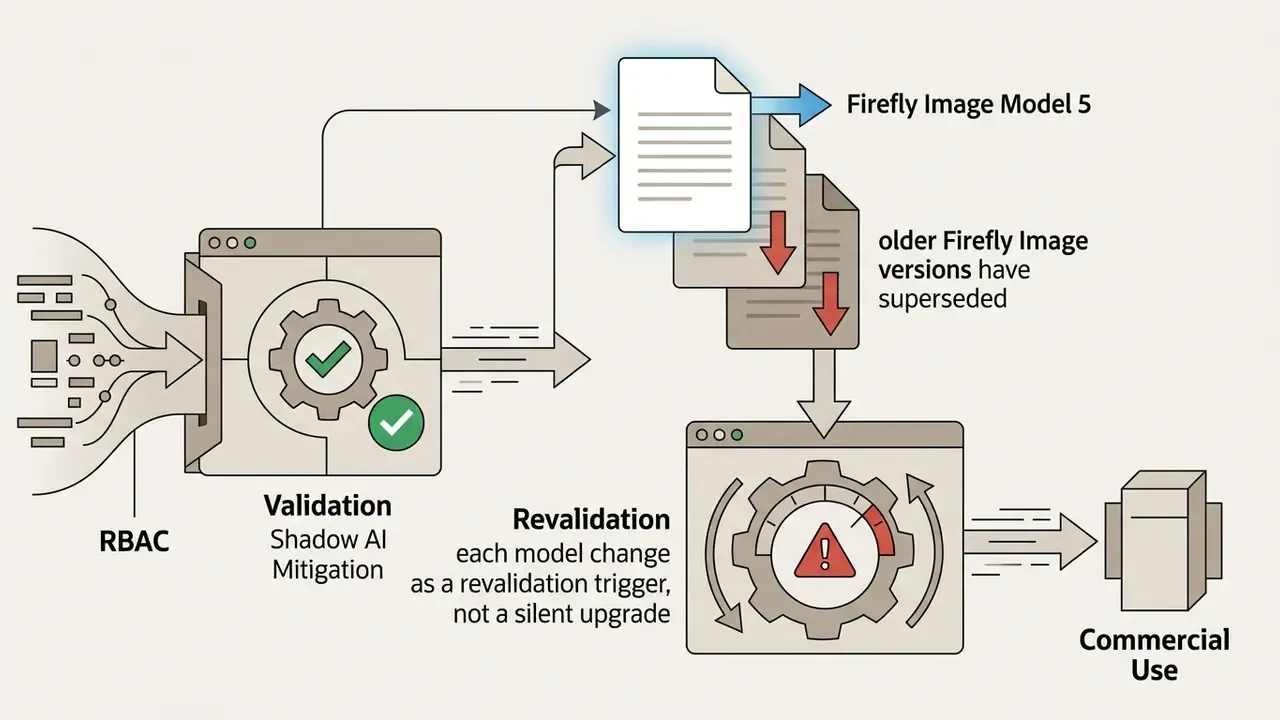
- Control cost initial model validation and bias testing, inclusion in the unified model inventory, periodic revalidation when Adobe rotates model versions, C2PA verification checks, and human-in-the-loop review hours per published asset.
- Residual risk exposure estimated cost of an IP claim, brand-safety incident, or regulatory finding, net of contractual indemnification coverage.
Return on investment should therefore be expressed as displaced production hours and reduced external stock or agency spend, minus the control layer. Not as raw generation volume. A team that generates 40,000 images and publishes 200 has not created value; it has created review debt.
Workforce planning belongs in the same conversation. Before restructuring a creative department around generative tooling, it is worth reading the arguments about will ai create net new roles rather than assuming headcount simply falls out of the model.
Enterprise Integration, RBAC, and Shadow AI Mitigation
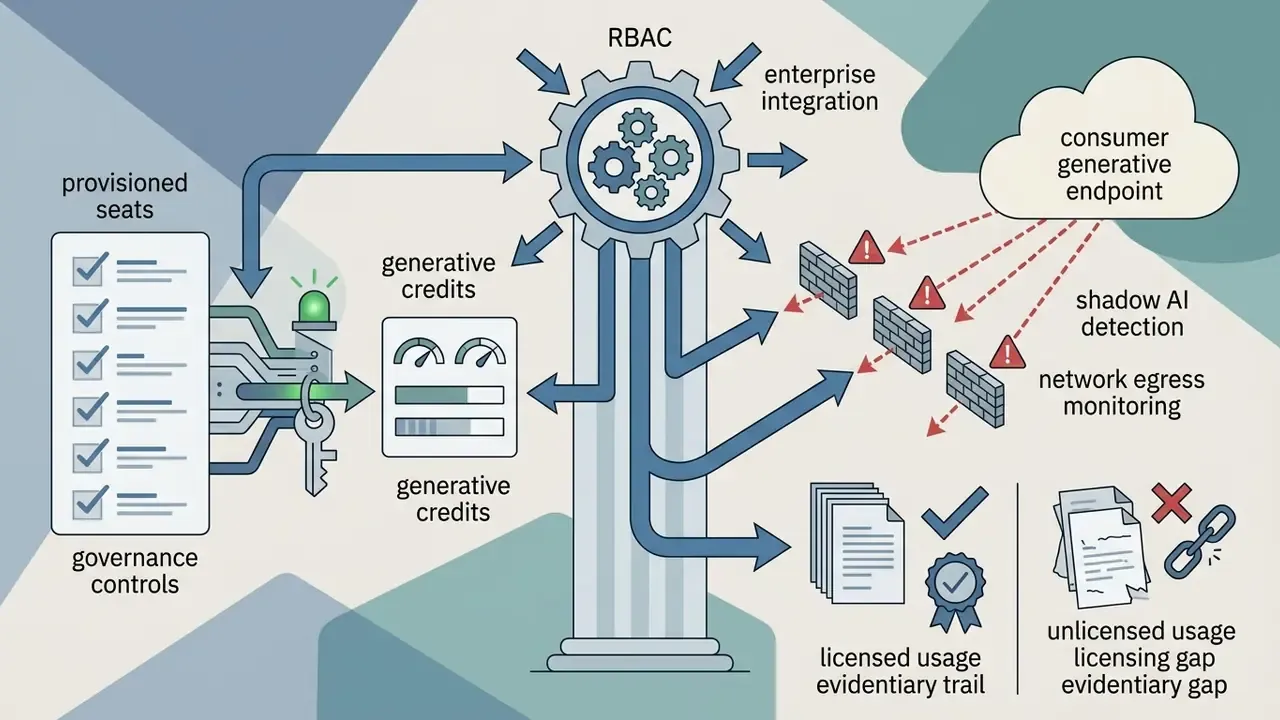
Firefly reaches an organisation through three access paths, each with different governance weight: the public web app under an individual Adobe ID, licensed seats managed through the enterprise Admin Console, and the Firefly API embedded into internal asset pipelines. Unmanaged individual accounts are the primary Shadow AI vector, because those generations happen outside corporate logging and outside any enterprise indemnification entitlement.
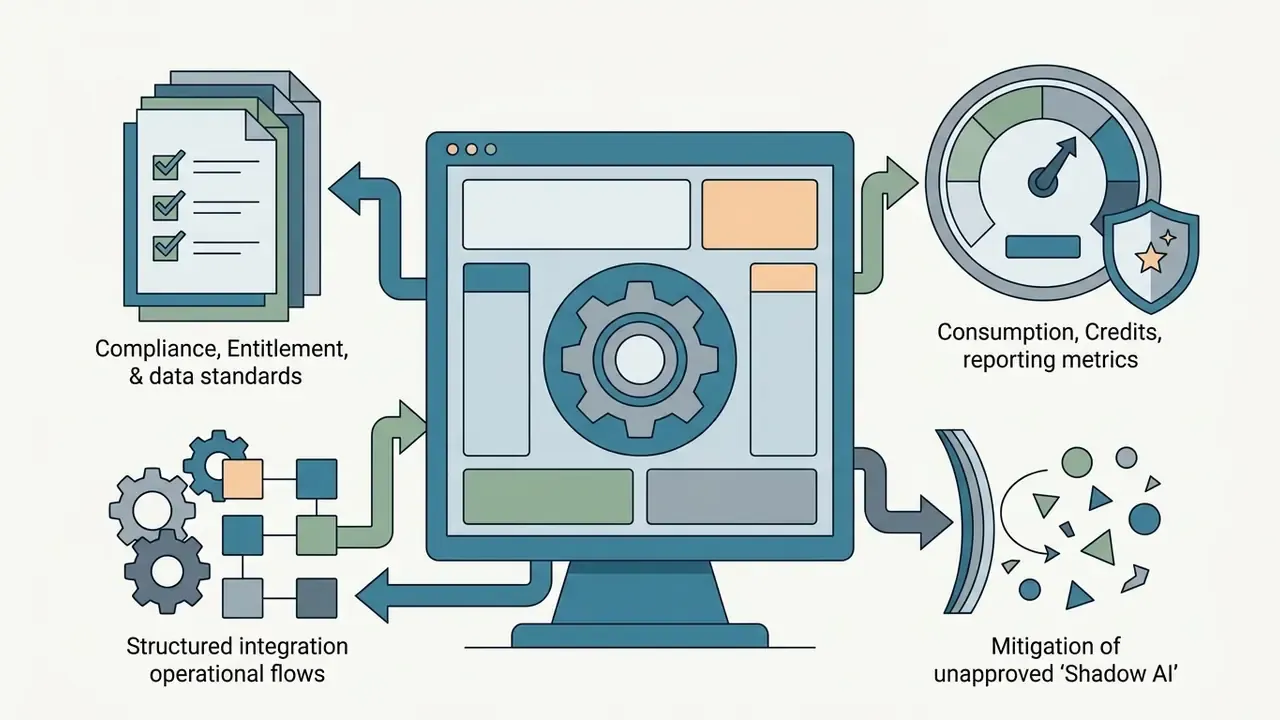
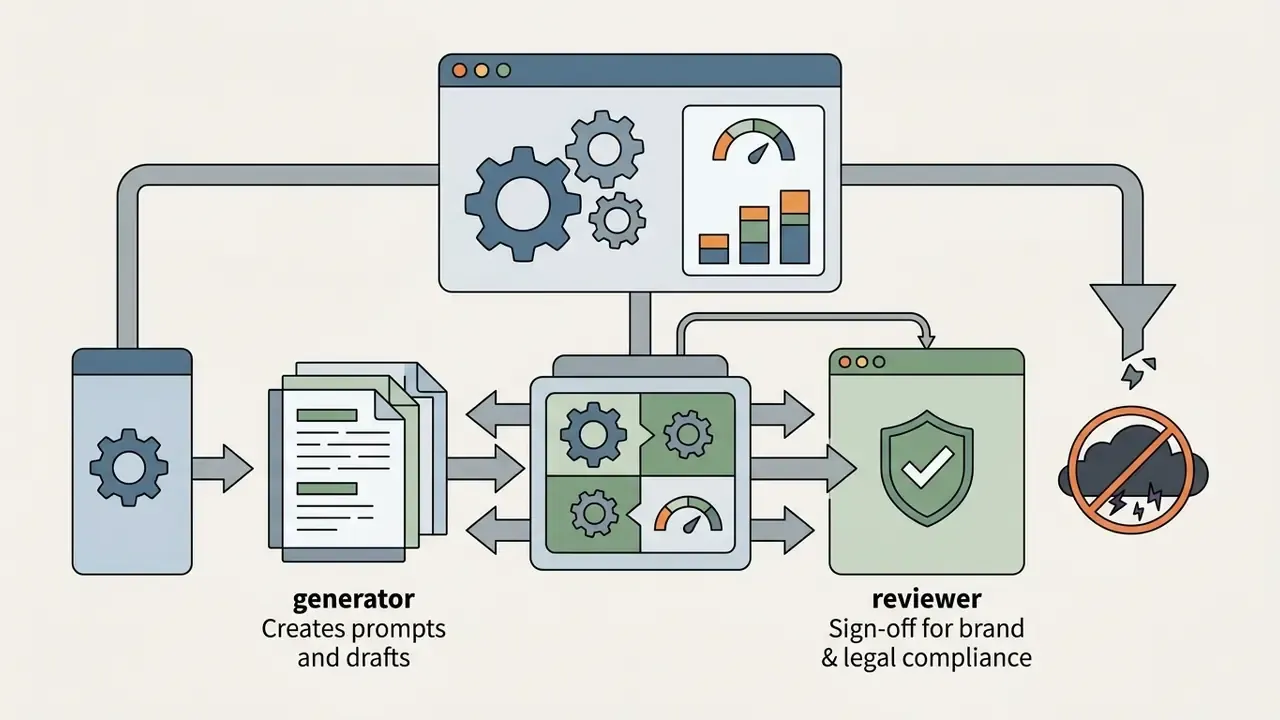
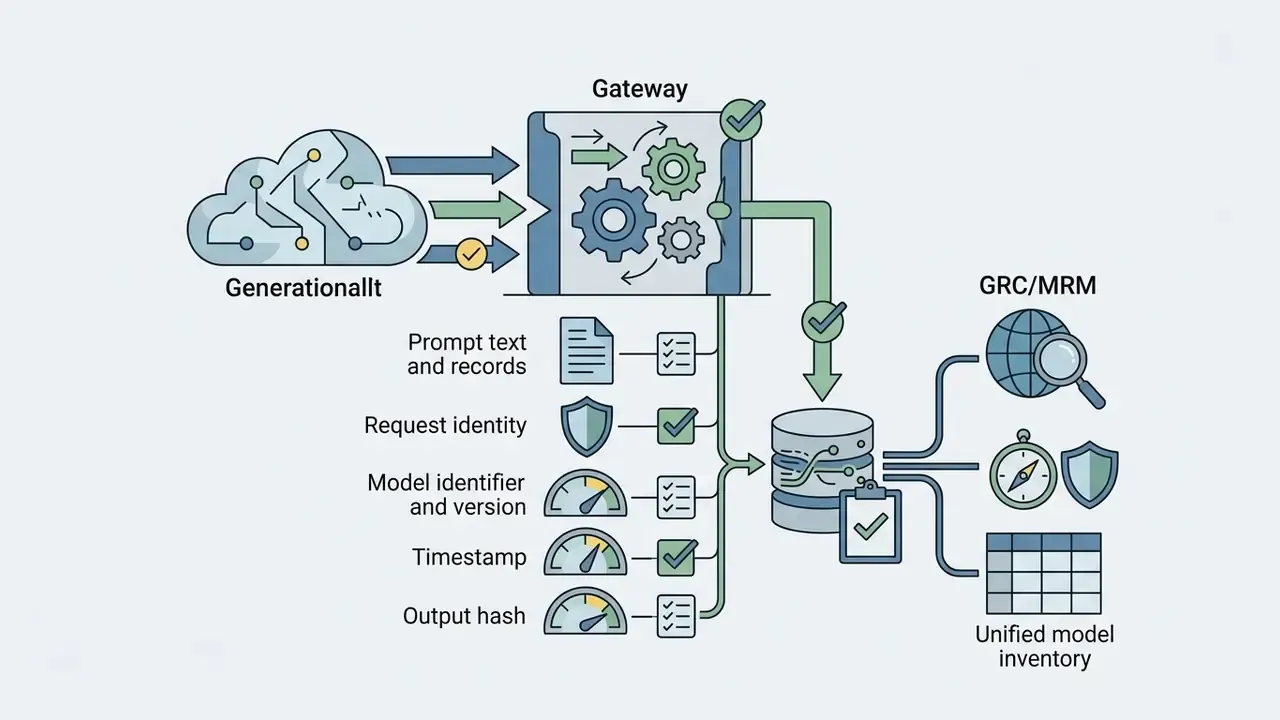

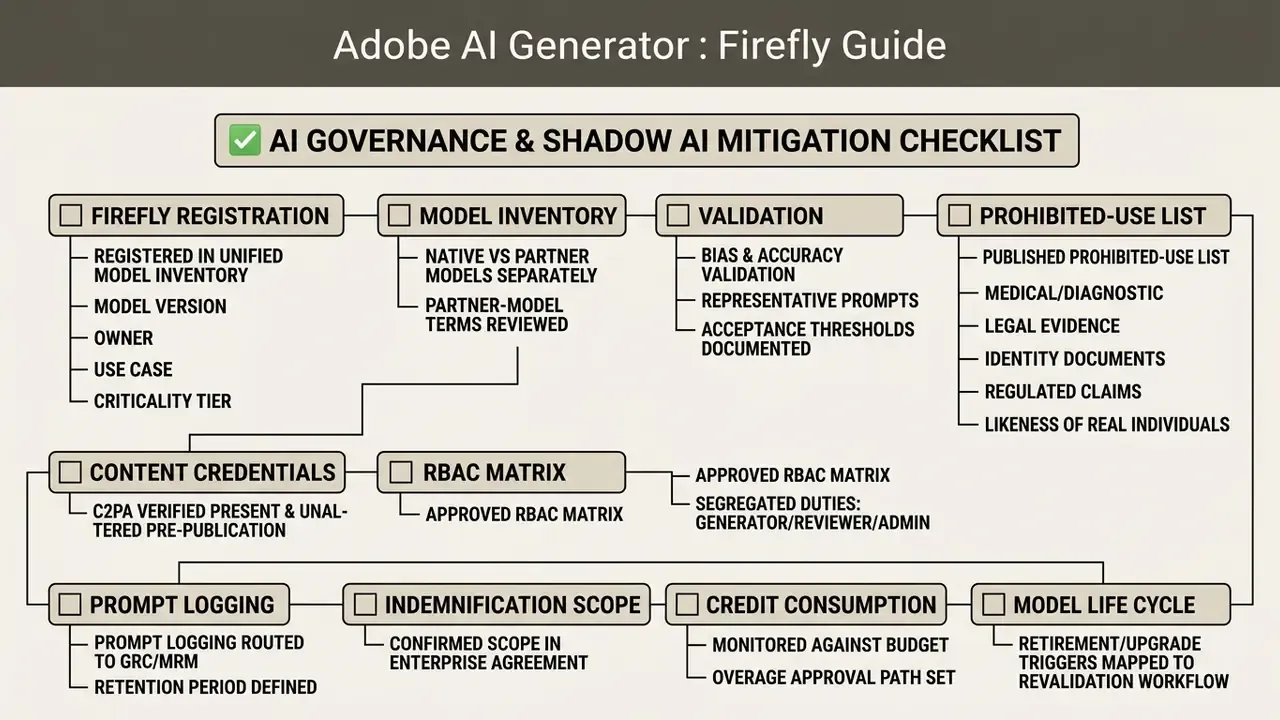
Enterprise Governance Checklist
Can You Use and Sell Firefly Images in Commercial Projects?
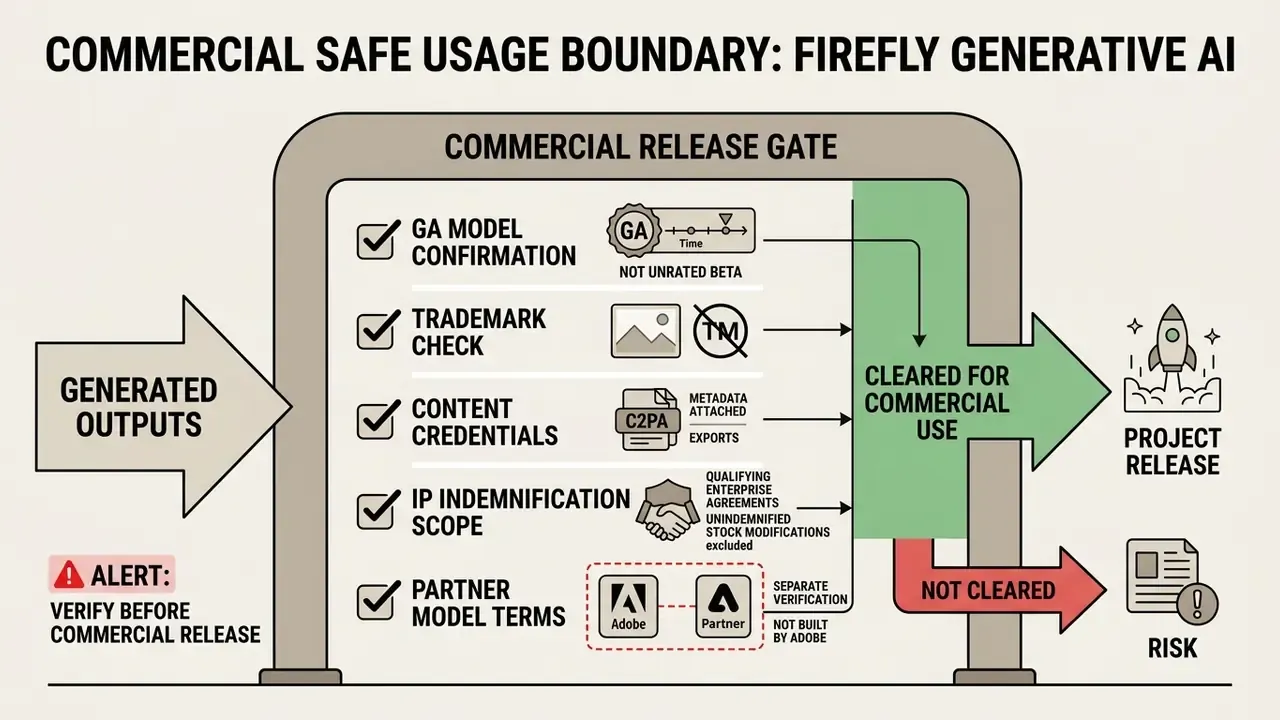
Outputs generated with commercially released (non-beta) Firefly models are licensed for commercial use: marketing materials, client deliverables, commercial product packaging. Because native Firefly models are trained on licensed Adobe Stock and public-domain data, Adobe structures its terms to support those workflows.
For enterprise customers, Adobe provides contractual IP indemnification options against third-party copyright claims on qualifying Firefly outputs. Adobe's enterprise FAQ scopes that protection to claims that qualifying Firefly output directly infringes patent, copyright, trademark, publicity, or privacy rights, with exclusions for customer modifications and customer-supplied or custom-training content. Teams benchmarking rights terms across vendors can see the overview of licensing positions, then dig into the wider landscape of commercial use of AI image generators, including platform-specific comparisons such as Canva AI Generator licensing and Google AI image generator usage rights.
«The 2025 evaluation recorded Firefly diagnostic accuracy at 0.94%, far below competing models (12.2–22.5%), excluding clinical application.»
FAQ: Data Protection and Prompt Confidentiality
Does Adobe train Firefly models on our prompts or generated outputs?
Adobe states that Firefly models are trained on licensed Adobe Stock and public-domain content, and that it does not train generative models on customers' personal or generated content. Enterprise teams should still confirm the exact non-training and retention language in their executed agreement rather than relying on marketing pages.
Can confidential or client-identifying data be entered into prompts?
Treat the prompt field as an external interface. Even with vendor non-training commitments, prompts transit third-party infrastructure and may be retained for abuse monitoring. Restrict prompts to non-sensitive descriptive language and keep confidential context out of the request entirely.
Do we retain ownership of generated assets?
Adobe's general terms state that users retain rights and ownership of their content, and enterprise FAQs state that Adobe does not assert intellectual property rights in customer output. Ownership under local copyright law for purely AI-generated material remains jurisdiction-dependent.
Are Content Credentials mandatory?
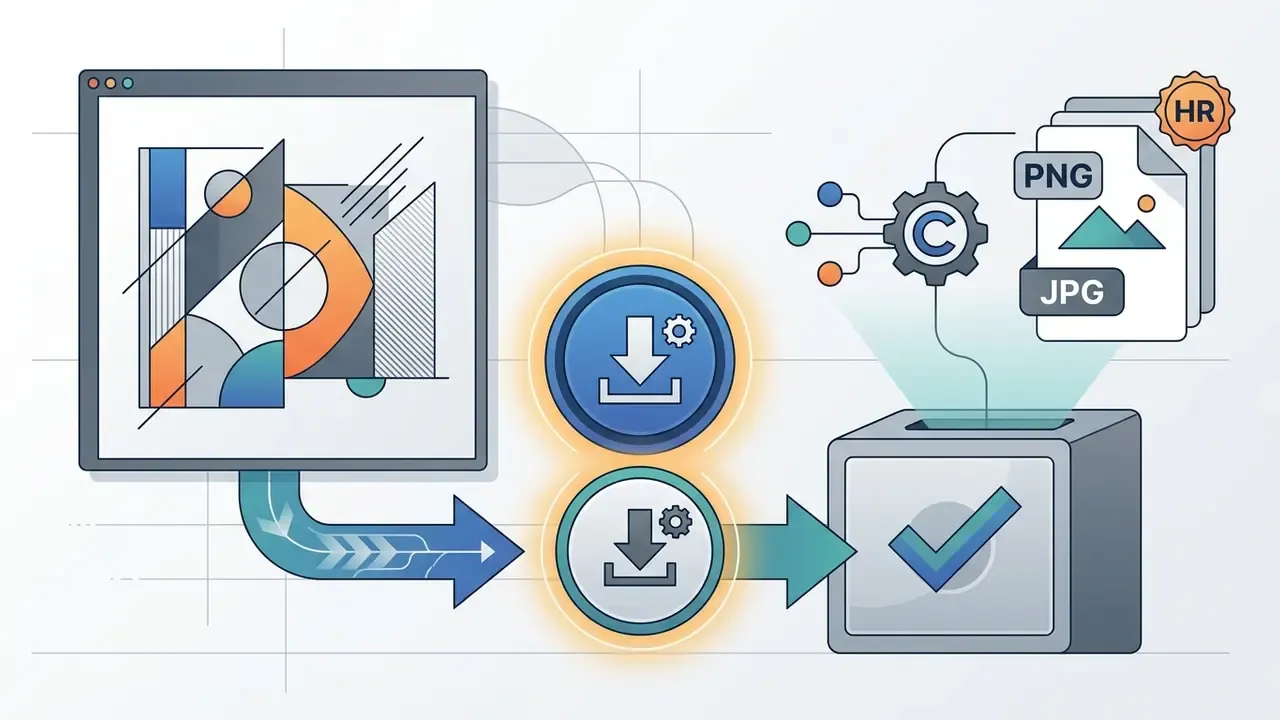
Adobe applies Content Credentials automatically to Firefly exports, and Adobe's generative AI terms prohibit removing, altering, or disabling that metadata. For audit purposes, this metadata is the primary evidentiary artefact proving how an asset was produced.
How are partner models governed differently?
Partner models are third-party engines surfaced inside Firefly. Adobe explicitly notes that customers are responsible for deciding whether a partner model suits a given project, so each partner model needs its own entry in the model inventory and its own terms review.
What should we log for an internal audit trail?
At minimum: prompt text, selected model and version, generation timestamp, requesting identity, reviewer sign-off, and the exported file hash. If the asset was upscaled or retouched after export, log that step too, otherwise the provenance chain has a silent gap.
Firefly Models, Partner Models, and Creative Cloud Integration
The Firefly ecosystem pairs Adobe's native proprietary models with vetted third-party partner models, producing a multi-model workspace inside Adobe Creative Cloud. By 2026 Adobe describes Firefly as offering more than 30 selectable models across image, video, vector, and audio generation.
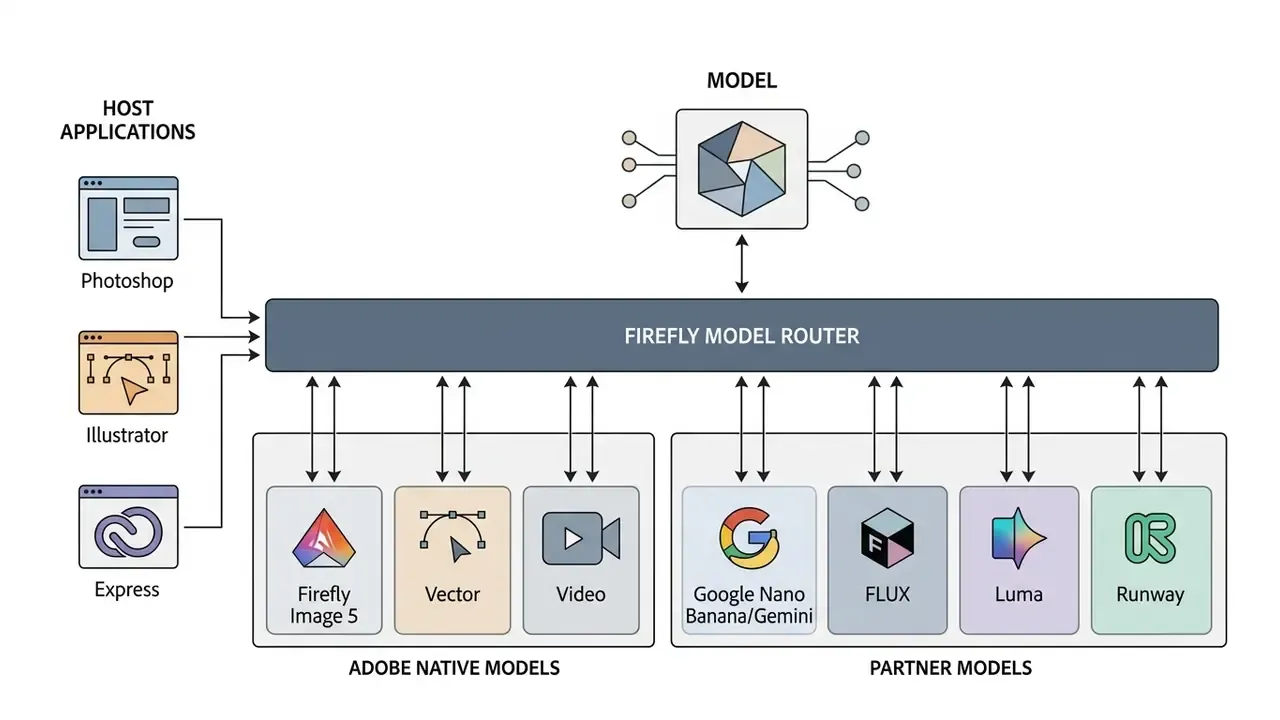
Available AI Models in Adobe Firefly
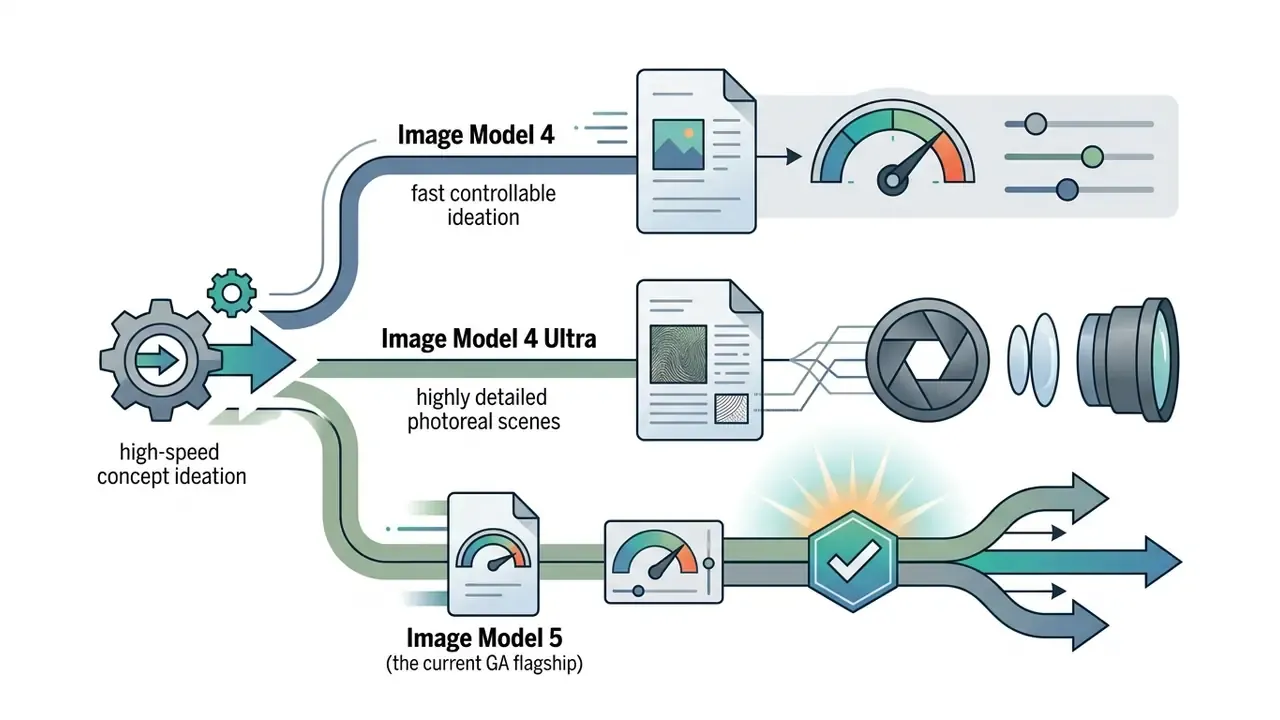
Adobe deploys specialised native models tailored to specific visual media:
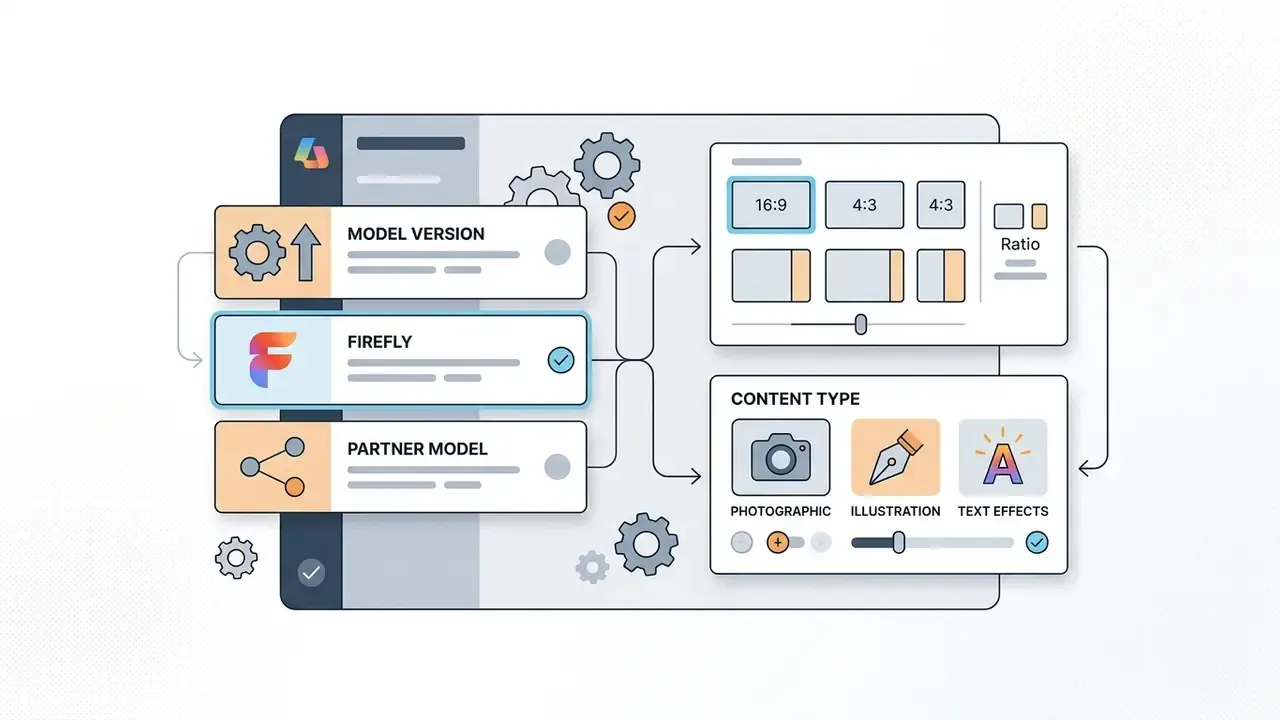
From a model-risk perspective, this catalogue is the single most important governance detail in the platform. Selecting a different entry in the Model dropdown changes the underlying vendor, the training-data provenance, the commercial terms, and the credit cost of the generation, without changing the interface the operator sees. One click, four different risk profiles.



Generating Images With Nano Banana in Firefly
Adobe surfaces third-party partner models directly in the Firefly workspace. Google's Nano Banana models (Gemini 2.5 Flash Image and Gemini 3 / Nano Banana Pro) appear in the Model dropdown inside the Generate Image panel and Firefly Boards.
Nano Banana handles precise text characters inside synthesised images unusually well, resolving a long-standing weakness of generative image models. Free-tier users reach it through daily generation allotments; higher tiers draw from monthly credit pools. One caveat that matters for approvals: because Nano Banana is a Google model presented inside Adobe's interface, its outputs sit outside Adobe's native "commercially safe" claim and need independent terms review.
How Firefly Integrates With Photoshop and Creative Cloud
Integrating Firefly into Creative Cloud host applications, specifically through the adobe ai firefly image photoshop image processing loop, enables non-destructive generative workflows. In Photoshop, features such as Generative Fill create a dedicated Generative Layer. The original pixels stay intact while generative edits live as non-destructive layers inside standard PSD files. In Illustrator, Firefly powers Generative Recolor, Generative Shape Fill, and Text to Pattern. In Adobe Express, Firefly supplies text-to-image and text-effect generation with multilingual prompt support.
Teams standardising on native OS tooling for light retouching sometimes keep a windows photo editor and a windows video editor in the same pipeline, purely to avoid spending credits on crops and trims that need no generation at all.
«Adobe deployed the Firefly model family on AWS within nine months, integrating it into Photoshop, Illustrator, Substance 3D and Express so designers work inside their existing environment.»
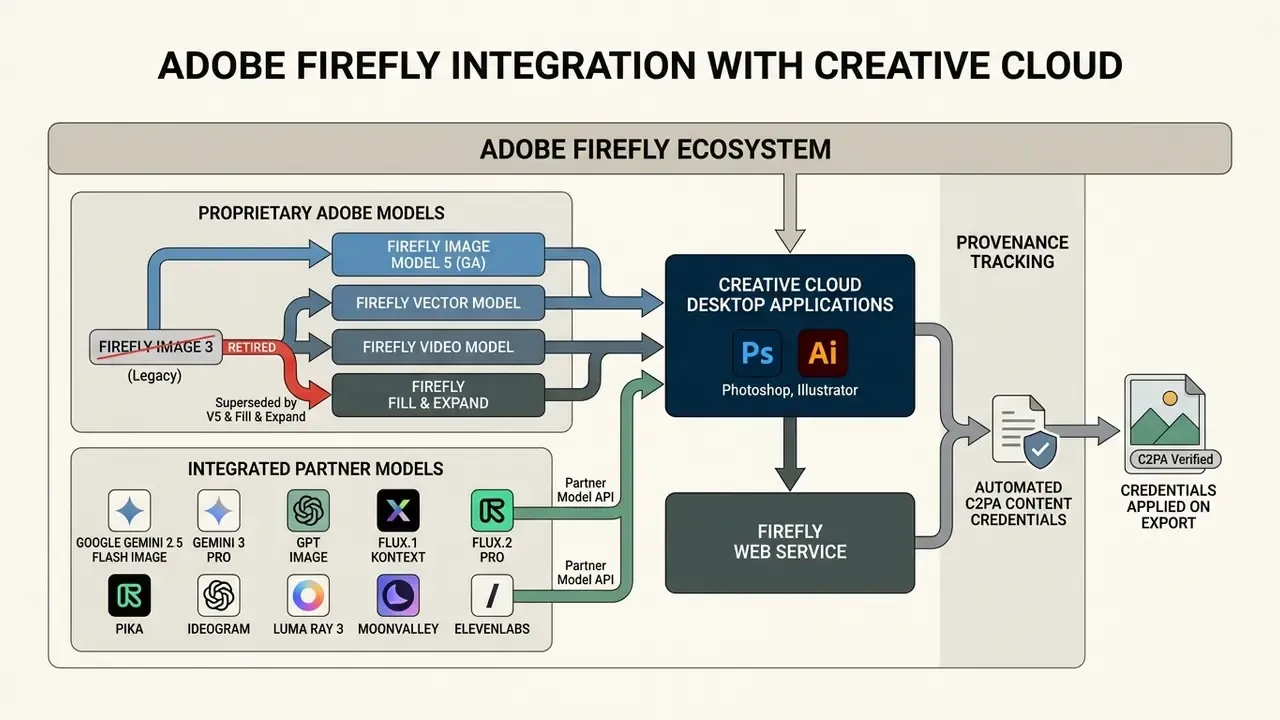
For video editing workflows, teams can evaluate dedicated AI video generators and production-oriented options such as a YouTube video editing workflow when building end-to-end pipelines.
Extended Firefly Ecosystem Capabilities
Beyond raster and vector image generation, the workspace bundles specialised generative tools across media formats:
For copy production rather than visual work, the equivalent tooling category is a word ai generator, which sits under a separate governance policy because text output raises different disclosure and accuracy obligations.
Adobe Firefly Capabilities for Generating and Editing Images
An adobe firefly ai image generator combines text-driven synthesis with image-to-image transformation, giving operators granular control over generated visual assets. You can build new visual media from nothing, or run targeted edits on existing photographs.
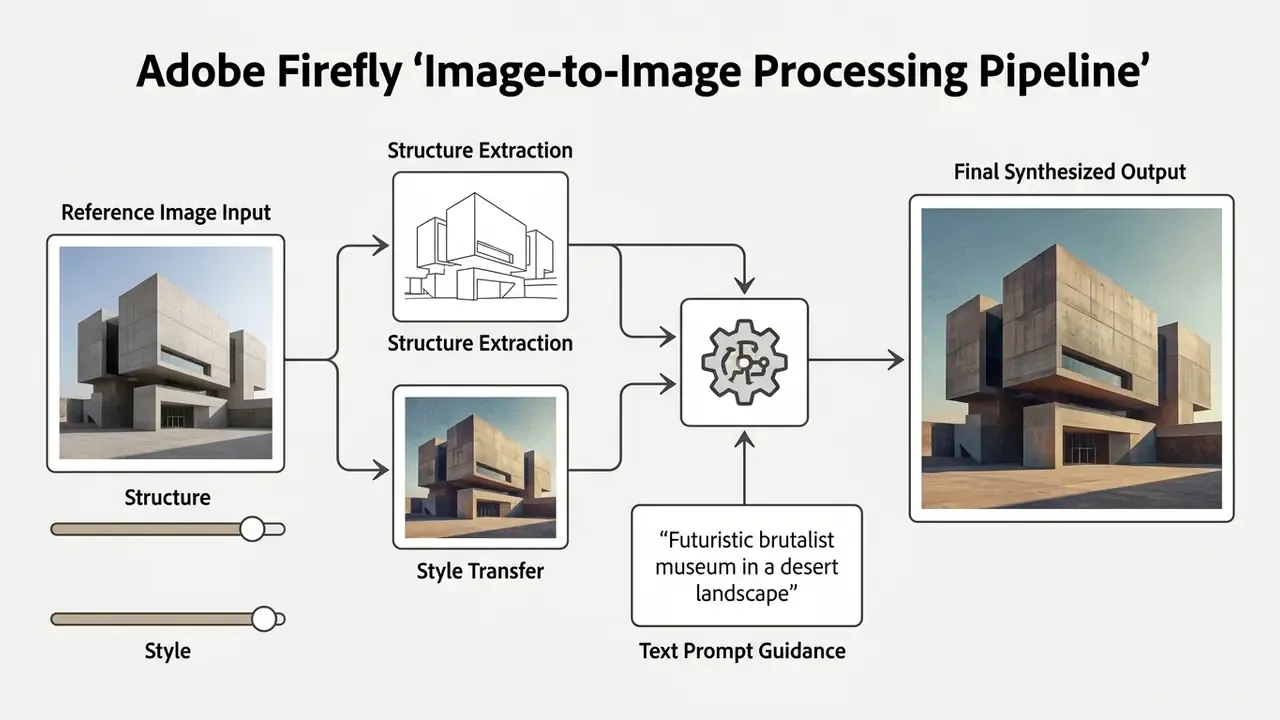
Text-to-Image: Creating AI Art From a Text Prompt
Text-to-image synthesis turns descriptive natural language into high-resolution artwork or photorealistic imagery. Operators type prompts into the adobe firefly ai generator interface, select a target aspect ratio (Square 1:1, Portrait 3:4, Landscape 4:3, Widescreen 16:9, or Vertical 9:16 on supported models), and specify visual attributes such as lighting, camera angle, and artistic style.
Inside Additional settings, the Content type selector defines whether the engine renders Art, Photo, Raw, Vector, or Auto output. Think of it as the coarse rendering mode you set before any style refinement.
Image-to-Image: Transforming Photos, Sketches, and Reference Images
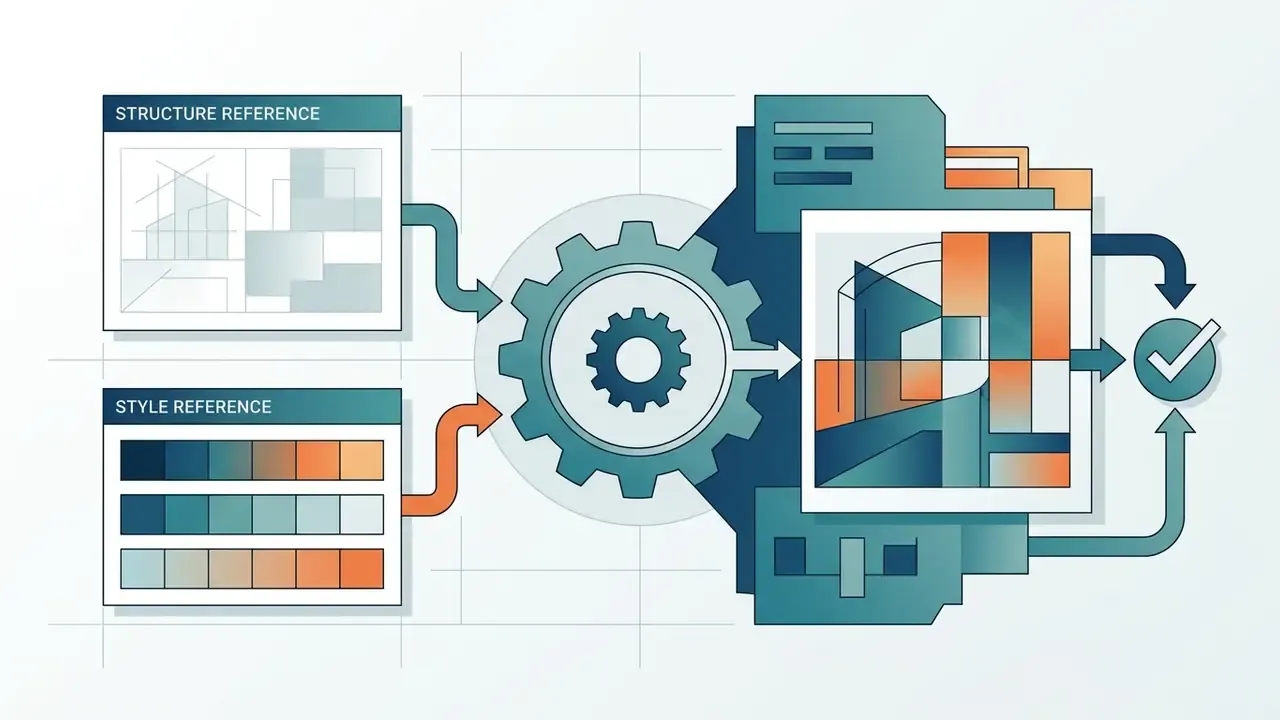
Firefly's image-to-image capabilities let operators upload reference images or rough sketches to guide composition, layout, and aesthetic. With Structure Reference, the model extracts outline and depth maps from a source file and applies an adjustable strength parameter (1 to 100, default 50) to enforce layout compliance.
Style Reference pulls colour palettes, lighting characteristics, and artistic textures from a reference file and transfers those traits to new prompts. When converting low-fidelity sketches into polished illustrations, Structure Reference holds the composition while the adobe image ai engine renders lighting, surface textures, and fine material detail. The two can be combined in a single generation, carrying composition and aesthetic at the same time. Teams evaluating alternatives can compare capability sets across image-to-image generators before standardising on one engine.
Editing AI-Generated Images and Photos
Targeted editing runs on non-destructive generative tools: Generative Fill, Generative Expand, and object removal controls. Generative Fill uses a brush selection to isolate specific coordinates; operators either enter a prompt to insert or swap elements, or leave the prompt blank so Firefly samples surrounding pixels for seamless removal. Each generation returns multiple variations to keep, discard, or re-request via More variations. Generative Expand enlarges the canvas, synthesising contextual edge extensions across custom aspect ratios or Freeform boundaries. That is the same capability category covered in comparisons of image expansion tools.
For non-generative retouching, colour balancing, and crop work that should not consume credits, operators can fall back to conventional AI photo editors and standard online photo editing platforms as part of the same pipeline. Cheaper, faster, and no provenance questions attached.
How to Create an Image in Adobe Firefly: Step-by-Step Guide
Producing usable visual media in Firefly is a sequence, from authentication to file export. A standardised workflow keeps credit consumption low and prompt accuracy high.
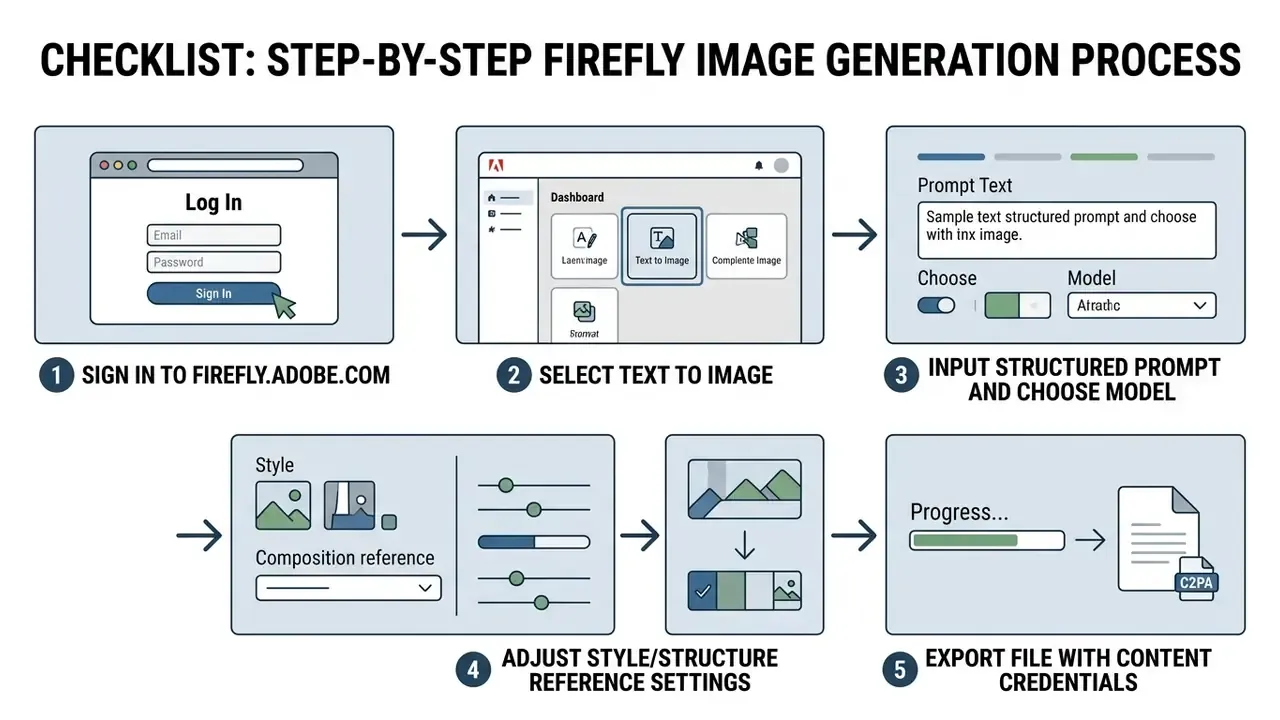

firefly.adobe.com and log in with an authenticated account.


Opening Firefly and Selecting the Generate Image Tool
Operators start by opening the adobe firefly ai art generator interface in a browser or inside a Creative Cloud host app. After authentication, the workspace presents functional modules: Text to Image, Generative Fill, Text to Vector Graphic, Generative Expand. Selecting Generate Image opens the primary canvas with active generation controls, aspect ratio choices, and style presets.
Entering a Text Prompt and Generating Variations
Inside the generator workspace, the operator types a descriptive prompt into the main text box. The ai image generator adobe firefly engine parses natural language across more than 100 languages. Standard model configurations return a grid of four distinct variations; high-detail ultra models return a single, more refined asset. Every generation lands in the History strip, which works as a de facto audit trail inside the workspace, though it is not a substitute for logging on the enterprise side.
If the first outputs miss, select Use Settings to keep configuration parameters while regenerating, or Generate more to reuse both settings and the original prompt. Small distinction, meaningful credit savings over a month.
Customizing, Exporting, Saving, and Sharing the Result
Once a candidate looks right, operators either make localised adjustments or export directly. Firefly saves active projects to cloud storage (Firefly Boards) for collaborative review, and pushes results into Photoshop or Illustrator for layered refinement. The export menu downloads media as a high-resolution PNG or JPG capped at 2000 × 2000 px. Every exported file carries C2PA metadata documenting that the asset came from an ai generator adobe firefly engine, which is exactly what an auditor will ask for six months later.
Organisations weighing zero-cost alternatives can review a curated comparison of free AI image generators for visibility into output limits, watermarks, and resolution constraints, while free photo editor feature limits clarify where free tiers throttle export quality.
How to Write Prompts for Better Firefly Results
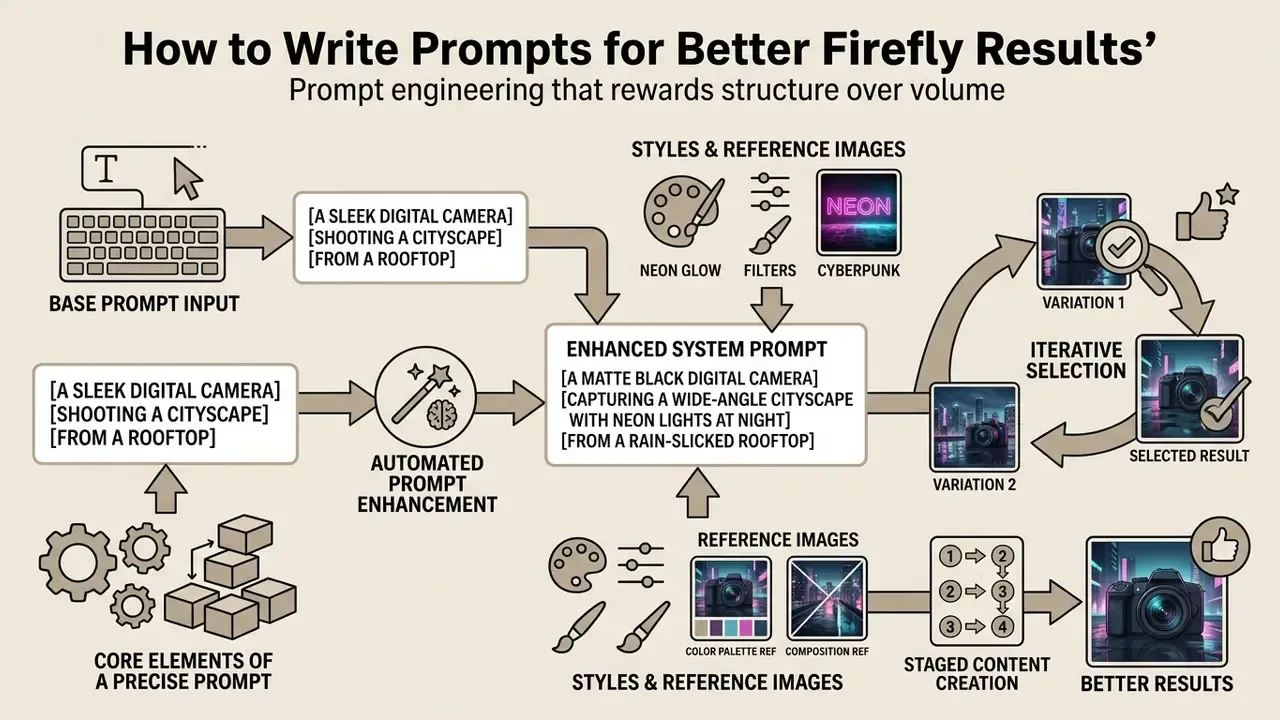
Prompt engineering in Firefly rewards structure over volume. Precise spatial, stylistic, and environmental detail produces consistent output across iterative generation cycles; a wall of adjectives does not.
Core Elements of a Precise Prompt
An effective prompt for an adobe ai generator follows a six-part template:
Instead of a vague request like "a photo of an executive," write: "A photorealistic corporate portrait of a financial officer sitting at a conference table, eye-level medium shot, soft diffused window lighting, cool blue and slate palette, professional atmosphere." Filler terms such as "hyperrealistic" or "4K" add noise rather than fidelity, and Adobe's own guidance recommends dropping instruction verbs like generate or create from the prompt itself.
| Prompt Component | Purpose | Recommended Terminology Examples |
|---|---|---|
| Style | Defines the primary visual medium | Photorealistic, vector illustration, oil painting, watercolor |
| Subject | Identifies the central focal entity | Executive, architecture, machinery, landscape |
| Composition | Sets framing, perspective, and depth | Wide shot, macro close-up, eye-level, shallow depth of field |
| Lighting | Dictates shadow distribution and exposure | Volumetric lighting, golden hour, rim light, diffused studio |
| Color/Mood | Establishes chromatic palette and tone | Monochrome, vibrant neon, desaturated earth tones, moody |
Leveraging Automated Prompt Enhancement and Iterative Selection
When manual framing yields ambiguous results, toggle Firefly's built-in Prompt Enhancement engine. It expands short natural language descriptions into structured prompts by injecting environmental detail, camera properties, and lighting attributes.
- Base Prompt Input
"A dog running through a field with a ball in its mouth." - Enhanced System Prompt
"A small, energetic terrier running through a lush green field, mouth open holding a bright red ball. Tousled shiny fur, playful expression, tall grass, purple and yellow wildflowers, soft warm lighting, shallow depth of field, clear blue sky."
The enhanced version stays fully editable. Swap terrier for golden retriever, or clear blue sky for overcast, and you steer the result without rebuilding the structure. For teams onboarding non-specialist contributors, this is the fastest way past the prompt-writing learning curve the Utah State study describes.
During standard four-grid rendering, the Show Similar control locks the primary visual parameters of a preferred candidate: composition, colour balance, subject positioning. The engine then produces four sub-variations from that structure, no manual reconfiguration needed.
Using Styles and Reference Images to Control the Output
The built-in style panel controls visual output without cluttering the text field. Presets under Content Type (Photo, Art) instruct the model to apply particular rendering mechanics. Effects presets extend that with looks such as doodle drawing, minimalism, anime, and art deco, alongside dedicated Color and tone, Lighting, and Camera angle controls.
Uploading a custom file to Style Reference applies its aesthetic attributes to the output. Adding a reference image activates the Strength slider, which controls how aggressively the model matches the reference colour, texture, and mood, exposed in the Firefly API as a numeric strength parameter from 1 to 100. Brand teams typically settle somewhere between 35 and 60; above that, outputs start to look like copies of the reference rather than new assets.
Why Staged Content Creation Produces Better Results
Building complex visuals in stages beats trying to render a full scene in one shot. Generate the base environment and central subject first, verify framing and perspective, then use Generative Fill for secondary objects or localised adjustments.
«Designers using Structure Reference and Style Reference reported visualising concepts in minutes and cutting manual production steps.»
Illustrative workflow: a creative team needed an intricate editorial graphic. Rather than generating a crowded composite in one pass, they synthesised a clean room architecture, used Generative Fill to add specific hardware components, and finished with Generative Recolor in Illustrator. Staging cut the number of full regenerations, because corrections stayed isolated to one layer instead of triggering a new global generation. Revision counts vary by asset complexity and reviewer strictness, so baseline your own revisions-per-asset metric before and after adopting the method. Otherwise the improvement is a feeling, not a number.
Final-stage refinement follows the same discipline. Re-apply Generative Fill to smaller regions rather than the whole frame, then finish with conventional brightness, contrast, and sharpness adjustments so generated regions blend with original pixels.
Operators evaluating text-driven graphic generation frequently benchmark AI art generators for stylised typographic and illustrative output alongside Firefly's native Text Effects module, and an ai art generator firefly comparison is worth rerunning each time Adobe ships a new image model.
Firefly Operational Troubleshooting Quick Reference
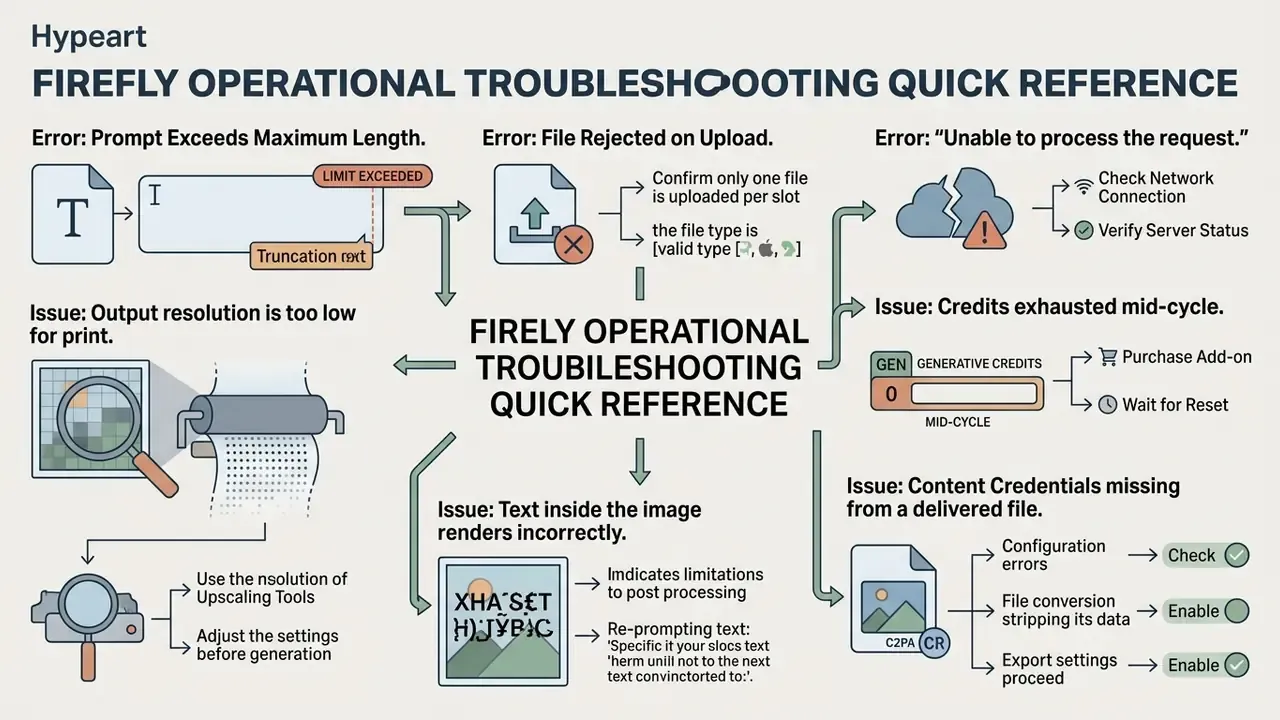
- Error: Prompt Exceeds Maximum Length. Prompts are hard-capped at 750 characters. Strip conversational filler and move visual mechanics into the Style Reference, Effects, and Lighting panels instead of the text field.
- Error: File Rejected on Upload. Source images for Structure or Style reference must sit between the 512 × 512 px minimum and the 100 MB maximum, saved as JPG, PNG, or WebP (or HEIC when operating in Safari on desktop or laptop).
- Error: "Unable to process the request." Confirm only one file is uploaded per slot, the file type is supported, and the prompt does not violate content policy. Then retry with a shorter, more literal prompt.
- Issue: Output resolution is too low for print. Native export tops out at 2000 × 2000 px. Upscale after export instead of regenerating repeatedly, and record the upscaling step so provenance metadata stays meaningful.
- Issue: Credits exhausted mid-cycle. Monthly credits reset on the plan's billing date and never roll over. Buy an additional credit package or upgrade the tier; on eligible paid plans, standard image generations may continue without drawing premium credits.
- Issue: Text inside the image renders incorrectly. Switch the Model dropdown to a partner model optimised for in-image typography (Gemini / Nano Banana, for example), or generate the graphic without text and set live type in Photoshop or Illustrator.
- Issue: Content Credentials missing from a delivered file. Check whether the asset passed through a third-party compression or CMS pipeline that strips metadata. Re-export from the source project and validate before publication.
Summary & Next Steps
Deployed carefully, Adobe Firefly lets creative teams accelerate visual asset production without giving up operational control. Licensed training data, automated C2PA metadata, explicit technical limits, and non-destructive Creative Cloud integration make it a workable platform for commercial image synthesis, provided partner models, prompt hygiene, and human review are governed as deliberately as the licences themselves.
To implement controlled AI image generation in your organisation: Open questions remain, and it is better to name them than to paper over them. Ownership of purely AI-generated work is still jurisdiction-dependent. Indemnification scope varies by executed agreement. Model rotation cadence is set by the vendor, not by your validation calendar. Plan for those uncertainties instead of assuming they resolve themselves.
- Audit visual content workflows and identify candidate tasks for generative acceleration.
- Register Firefly and each enabled partner model in the unified model inventory, with owners, use cases, and validation evidence attached.
- Establish prompt engineering guidelines, Prompt Enhancement usage rules, and structural reference templates across design teams.
- Configure enterprise access tiers and RBAC to manage credit consumption, suppress Shadow AI, and enforce C2PA compliance.
- Model TCO with control costs and residual risk included, not licence fees alone.
- Integrate human-in-the-loop review for all public-facing visual media, with mandatory pre-publication verification of Content Credentials.