- A free AI cartoon generator turns a text prompt or an uploaded photo into cartoon images, avatars, characters, pets, family scenes and comic panels. No drawing skills needed.
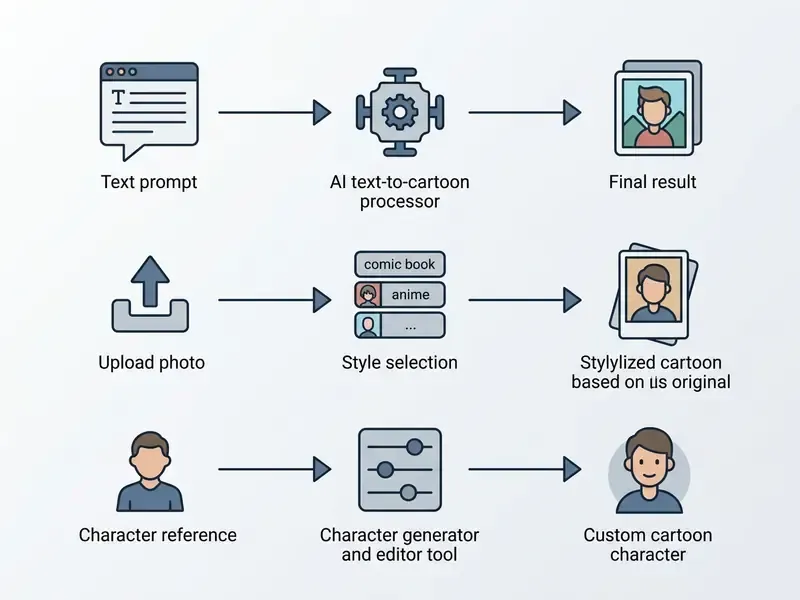
- Three working pipelines exist: text-to-cartoon, photo-to-cartoon (img2img) and character creation with identity locking (reference sets, LoRA, identity adapters).
- "Free" almost always means capped credits, resolution ceilings or watermarks. Adobe Firefly caps free downloads at 2000×2000 px; ZSky AI gives 200 signup plus 100 daily credits with a watermark; Pixelbin allows 3 watermark-free HD generations per month; Renderforest advertises unlimited basic cartoon creation on its free plan.
- Styles that work reliably: flat 2D vector, anime/manga, 3D CGI (Pixar-like), comic/pop-art, caricature, cut-out and paper aesthetics.
- Commercial use is not automatic. Purely AI-generated output is not registrable for copyright in the U.S.; commercial rights depend on each platform's Terms of Service and often on your paid tier.
- Print-ready merch needs 4K or upscaled output, transparent PNG layers and CMYK conversion for physical products.
- Ahead: 10 copy-paste prompt templates, a pop-culture style matrix, a model-engine comparison (FLUX, SDXL, Seedream, Nano Banana Pro, Higgsfield Soul), animation and voiceover workflows, and a ToS checklist.
Generative artificial intelligence has changed how visual assets are made. One sentence or a single selfie is now enough to produce a custom illustration, a branded mascot or a full character sheet. For a hobbyist that means a new avatar in thirty seconds. For a marketing team it means a repeatable production pipeline, and, alongside the creative upside, a set of practical questions about output quality, data handling and usage rights.
This guide walks the whole path: what these tools actually generate, the three input routes, the style families, prompt structure, post-processing, free-tier arithmetic, licensing checks, and the places cartoon assets earn their keep. Both sides are covered, the fastest route to a good cartoon and the checks that keep the result usable in a commercial project.
What Is a Free AI Cartoon Generator and What Cartoons It Creates
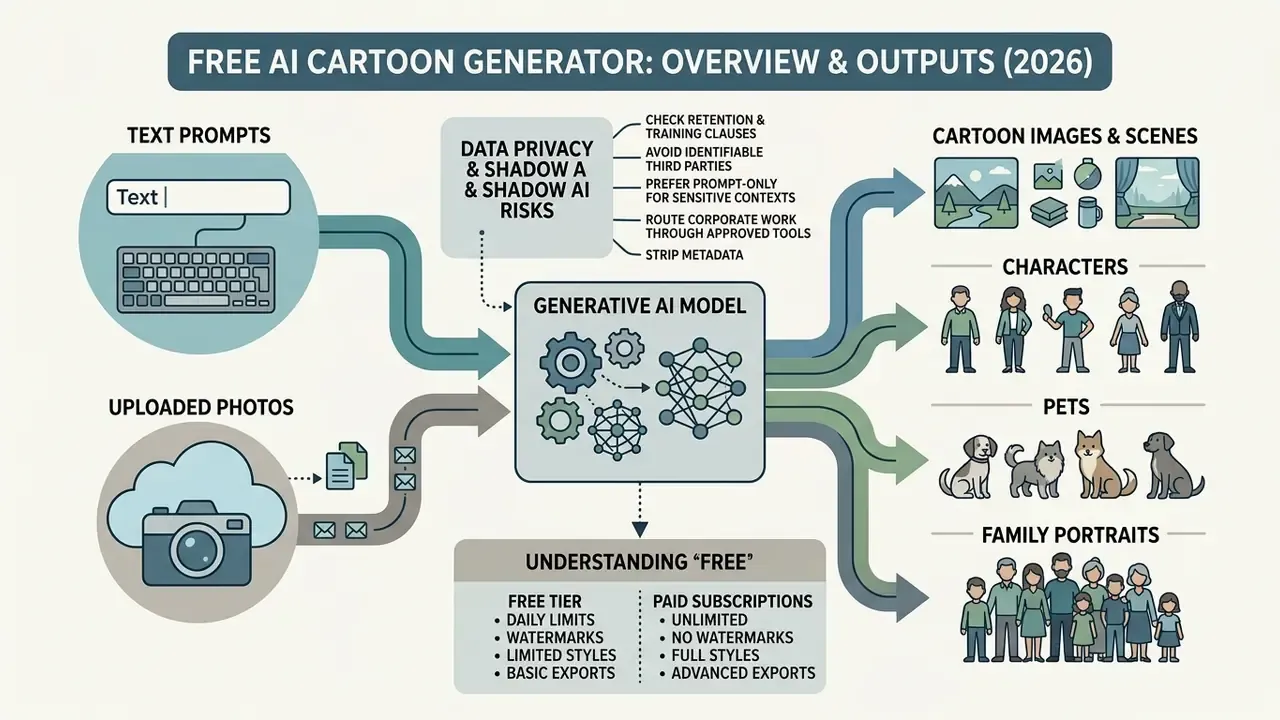
A free AI cartoon generator is a generative software tool powered by latent diffusion or neural image synthesis models that transforms text prompts or uploaded photographs into stylized cartoon images. These platforms let individuals and production teams produce vector-style graphics, character sheets, digital avatars and narrative background scenes without manual sketching.
Modern cartoon generation architectures are built mainly on latent diffusion models, including specialized derivatives of Stable Diffusion XL (SDXL). In latent diffusion, an autoencoder compresses image space into lower-dimensional latent representations where the denoising process happens. That compression is what makes complex visual synthesis affordable on consumer hardware.
"Latent diffusion compresses image space into low-dimensional representations where denoising occurs, reducing compute cost while preserving synthesis quality."
The same survey reports that Stable Diffusion reaches an FID of 12.63 on standard benchmarks, approaching the output quality of much larger proprietary systems (Imagen: FID 7.27). That is the practical reason free, openly derived cartoon tools can compete with paid ones on visual quality.
Fine-tuned systems trained on curated illustration datasets, such as the Illustrious model family, achieve crisp line work, dynamic color range and distinct cartoon stylization.
"Illustrious v2.0 was trained on 20 million images at 1536×1536 resolution using tag-based prompts and multi-level captions."
In enterprise and creative workflows, these tools generate digital assets ranging from simple social media stickers to complex multi-character compositions. For organizations reviewing digital asset tools, examining the underlying model family sets clearer expectations about output quality than marketing claims do. A side-by-side review of the best AI art generators shows how much the base model, not the interface, determines final style fidelity. While evaluating creative tools across digital asset workflows, a structured AI Media Glossary helps categorize generative media formats and terminology.
Cartoon Images, Characters, and Scenes Created by AI
AI cartoon generators produce three main output categories: standalone cartoon images, consistent cartoon characters, and multi-object narrative scenes. Single cartoon images are isolated graphic elements: icons, background landscapes, promotional banners, all created from natural language text prompts.
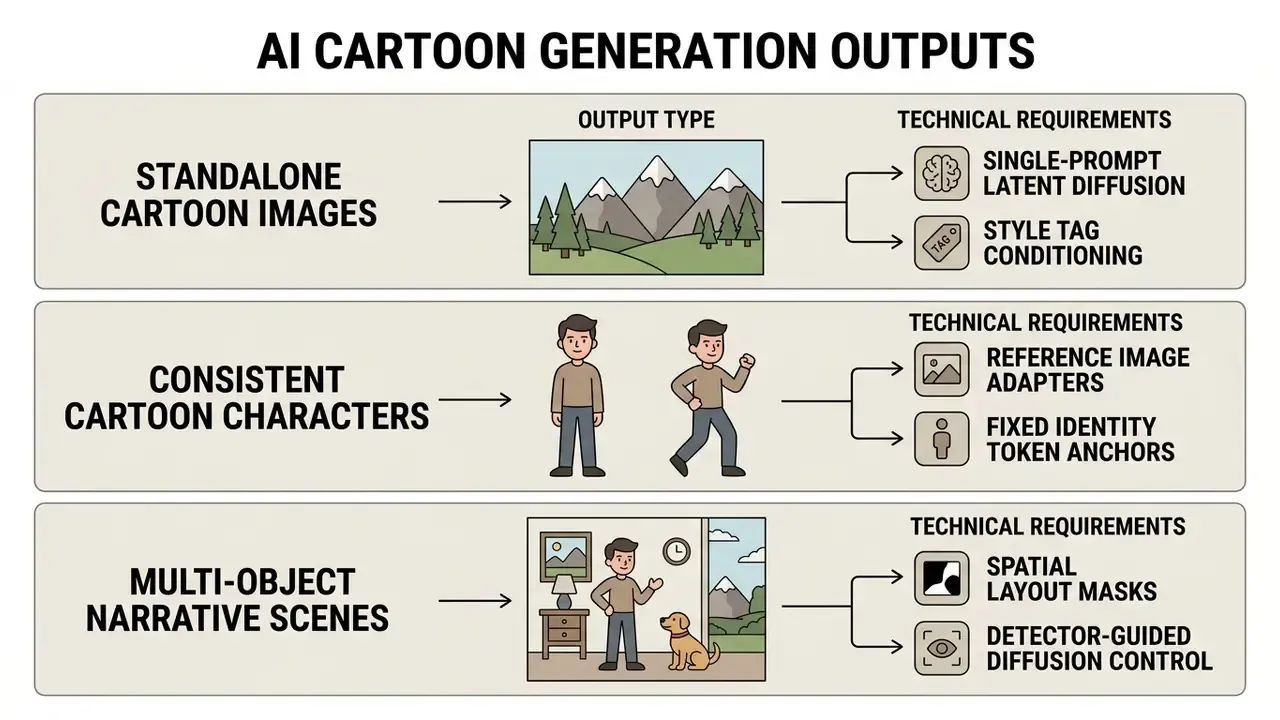
Generating an individual cartoon character requires specialized conditioning to hold visual identity across different poses. Systems using identity adapters or token-level masking allow an AI generator for cartoon characters to preserve facial features, hair color and costume traits across multiple generations. Complex narrative scenes combine several characters with environmental elements. Advanced frameworks add detector guidance or layout conditioning to enforce correct spatial arrangement and object placement (Detector Guidance for Multi-Object Text-to-Image Generation, 2023. https://arxiv.org/abs/2306.02236).
Worth noting: the same engine that renders a polished mascot will happily produce an AI funny cartoon generator result, a caricature or a rough AI cartoon sketch generator line study. The difference lives in the prompt, not the platform.
What "Free" Actually Means in a Cartoon Generator
Free access in an AI cartoon generator usually means a freemium model governed by usage quotas, resolution limits or platform watermarks rather than unrestricted generation. Vendors structure free tiers to allow testing while reserving advanced compute controls and high-resolution exports for paid subscriptions.
Standard free-tier structures involve daily generation credits or capped monthly usage. Adobe Firefly, for example, provides daily generation credits on free accounts and caps free image downloads at 2000×2000 pixels, with free video output at 5 seconds in 1080p (Adobe Firefly Documentation, 2026). Canva's AI generator also runs on daily free credits without watermarking output, while other tools ship free exports with a platform watermark and unlock clean, high-definition downloads only on paid plans. Animaker watermarks free video exports; Viggle allows up to five watermark-free animated clips per day; NightCafe issues free daily credits with no payment method required.
Free-tier limits also shape behaviour, because prompt work is iterative rather than one-shot:
"Users iteratively refine prompts, starting from broad descriptions and progressively adding style tags, a documented prompt journey."
Practically, a "10 free generations" allowance is closer to two or three finished assets, since most creators spend several renders converging on the look they wanted. Do that arithmetic before embedding a generator into a commercial workflow. Teams analyzing software spend across media generation tools often start with a comparison of free AI art generators and structured AI Media Pricing Guides to match tier structures against real production volume.
Data Privacy and Shadow AI Risks When Uploading Photos
Photo-to-cartoon features require uploading a real face, often a colleague's, a client's or a child's. That single step turns a fun tool into a data-processing decision, and it is the most common source of shadow AI exposure in creative teams.
- Check retention and training clauses. Some free tiers reserve a broad license to host, reproduce and use uploaded inputs and generated outputs for service improvement, including model training. Public-gallery modes on certain platforms make outputs, and their prompts, visible by default.
- Avoid uploading identifiable third parties without consent. Employee headshots, customer photos and minors' images should be processed only on tools with documented deletion policies and a signed business agreement.
- Prefer prompt-only generation for sensitive contexts. A text-described mascot carries no biometric payload; a converted selfie does.
- Route corporate work through approved tools. Ad-hoc use of consumer generators for brand assets is how unlicensed, unattributable files enter production pipelines. If your team needs professional portrait output rather than cartoons, a vetted AI headshot generator with explicit privacy terms is the safer route.
- Strip metadata before upload and after export, and store the source photo, prompt and model name together so the asset can be reproduced or defended later.
One more habit that costs nothing: keep a one-line log of who approved each upload. Boring, yes. It answers most audit questions in a single sentence.
3 Ways to Generate AI Cartoons: Text Prompts, Photo Conversion, and Character Creators
Creating cartoons through generative artificial intelligence relies on three entry pipelines: text-to-cartoon generation, photo-to-cartoon transformation, and dedicated character creation. Each method uses distinct input data and algorithmic constraints to produce the final stylized graphic.
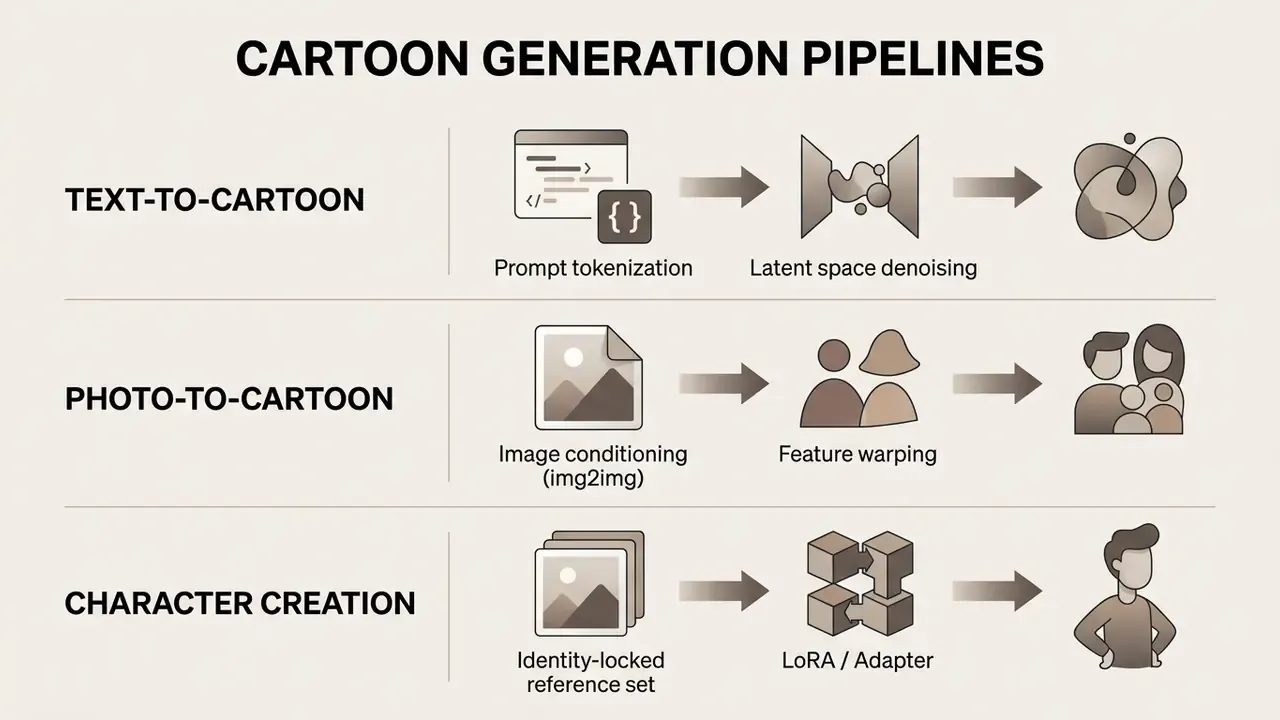
Choosing the pathway depends on your source material and the level of output control you need. Text-based workflows offer maximum creative freedom, while photo conversion keeps structural fidelity to a real subject. When planning creative asset strategy across media formats, the AI Media Commercial-Use Hub covers how generated outputs fit into corporate publishing pipelines.
Generating Cartoon Style from a Text Prompt
An AI text-to-cartoon generator creates stylized artwork directly from written descriptions with no input image. The language encoder maps prompt tokens into conditioning vectors that steer the latent diffusion model toward specific subject features, artistic styles and environmental details.
Effective prompt engineering for cartoon style relies on structured input formulas. Prompts typically specify subject, artistic rendering style, lighting, composition and color palette. Domain-specific models such as Illustrious use tag-based prompt structures and multi-level captions, allowing precise control over visual attributes (Illustrious Technical Report, 2024. https://arxiv.org/abs/2409.19946). Explicit style descriptors, "cel-shaded 2D illustration" or "minimalist vector art", stop the diffusion backbone from defaulting to photorealistic textures.
Specificity beats brevity. "Cartoon dog" returns a generic result. "Cartoon corgi in a superhero cape, Pixar-style 3D render, bright teal background, three-quarter view" returns something usable on the first or second attempt.
Turning a Photo into a Cartoon Image
Photo-to-cartoon conversion uses image-conditioned diffusion (img2img) or geometric warping algorithms to translate a real photograph into a cartoon style while preserving the subject's structural identity. You upload a source photo, and it serves as a structural baseline for the neural network. This is the same conditioning principle used across image-to-image AI generators for outpainting and background extension.
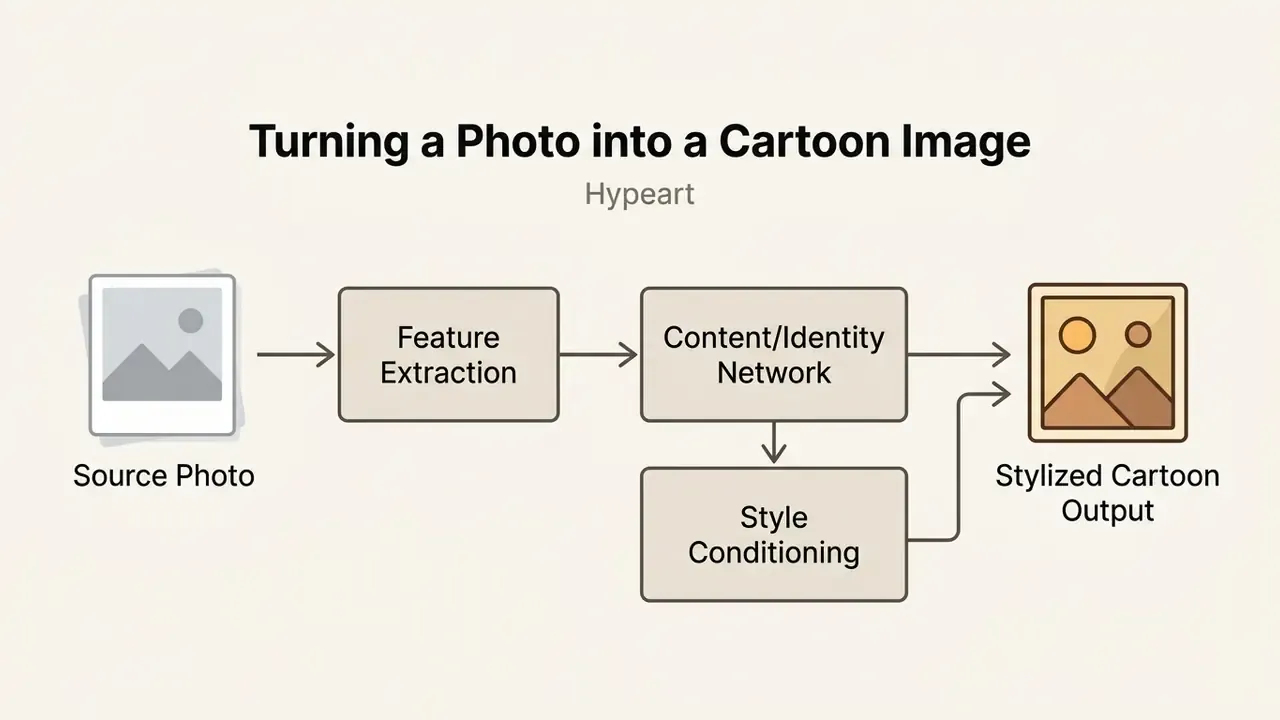
Modern photo cartoonization methods maintain facial recognition and proportion using content-preservation loss networks (AutoToon, WACV 2020; Face translation with content networks, PMLR 2018). Training-free approaches exist too: CartoonDiff performs image cartoonization with diffusion transformer models without additional fine-tuning (2023. https://arxiv.org/abs/2309.08251).
Diffusion architectures like AnimeAdapter decouple appearance from pose, so one portrait can be re-rendered in different environments without manual redrawing:
"AnimeAdapter injects CLIP patch tokens into decoupled cross-attention with foreground masking, enabling pose and scene edits without losing character appearance."
Practical upload checklist for photo-to-cartoon:
Creators refining raster output after conversion usually clean edges, layer masks and color balance in an online photo editor or a free photo editor before export. For layered, offline work with full curve control, the open-source gimp photo editor still handles cartoon linework and alpha channels better than most browser tools.
Building an Original Cartoon Character from Scratch
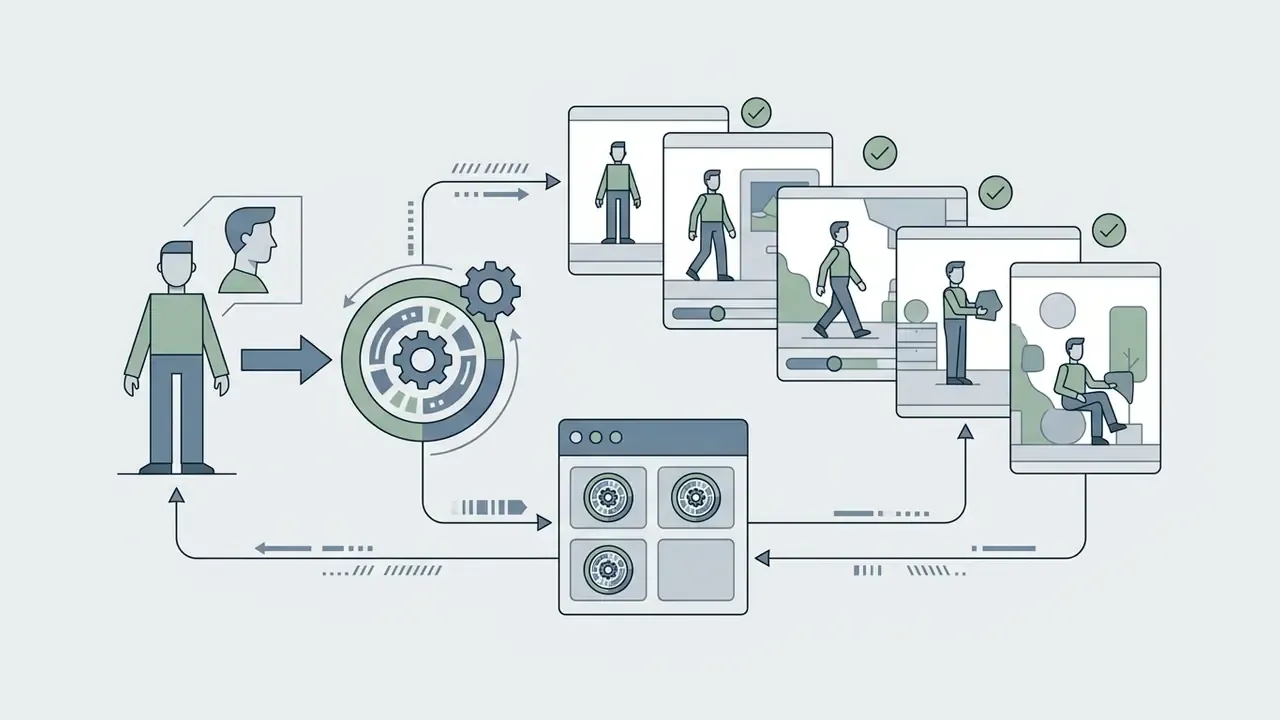
Developing an original cartoon character with AI means holding visual consistency across emotional states, clothing choices and camera angles. An AI cartoon character generator achieves that by fixing visual anchors before any full scene is generated.
Research on character consistency stresses building a reference dataset that locks core identity features before production starts:
"Locking head shape, eye geometry, hairstyle and signature apparel in a reference set prevents character drift across subsequent generations."
The same body of work recommends a reference pack with horizontal and vertical head positions plus five emotion shots (joy, sadness, anger, surprise, fear) reused as conditioning for every later render. Related work on consistent characters in text-to-image diffusion models (The Chosen One, 2025) formalizes identity extraction from prompt-only generations. Used with that discipline, an AI cartoon character creator lets a solo creator produce a stable character sheet for storyboarding, sticker packs or animation.
Some platforms extend this into trainable identity: upload a small dataset, assign a unique trigger token, and train a lightweight adapter, typically 10 to 30 minutes, that reproduces the same character on demand. Free plans rarely include training, which is where an AI cartoon character generator free online stops being enough for series work.
Transforming Pets and Family Photos into Cartoon Keepsakes
Group scenes and pets require multi-subject identity preservation. When generating family AI cartoons or pet cartoon portraits, modern engines analyze facial landmarks and anatomical quirks (a dog's coat markings, a child's hair part) to translate real photos into stylized artwork that still reads as that subject.
- Pet portraits Upload a high-contrast photo of your pet to generate breed-accurate cartoon avatars for merchandise, mugs, stickers and canvas prints. Breed silhouette, ear shape and markings are the anchors worth naming explicitly ("tabby with white chest blaze", "rockhopper penguin crest").
- Pet plus owner scenes Two-subject prompts benefit from spatial instructions ("woman crouching in a sunny grass field hugging a Dalmatian, soft warm lighting") so the model does not merge subjects.
- Family keepsakes Group photo-to-cartoon pipelines align multiple identity anchors on one canvas, keeping recognizable features for every family member in a single unified 3D or comic style. Best results come from photos where all faces are unobstructed and similarly lit.
- Series consistency Once a family or pet character is established, reuse the same reference set for birthdays, holidays and anniversary variants instead of regenerating from scratch.
Commercially, these are the highest-volume consumer use cases: gifts, greeting cards, nursery prints and pet-shop merch.
Cartoon Styles: 2D, Anime, 3D, and Comic Art
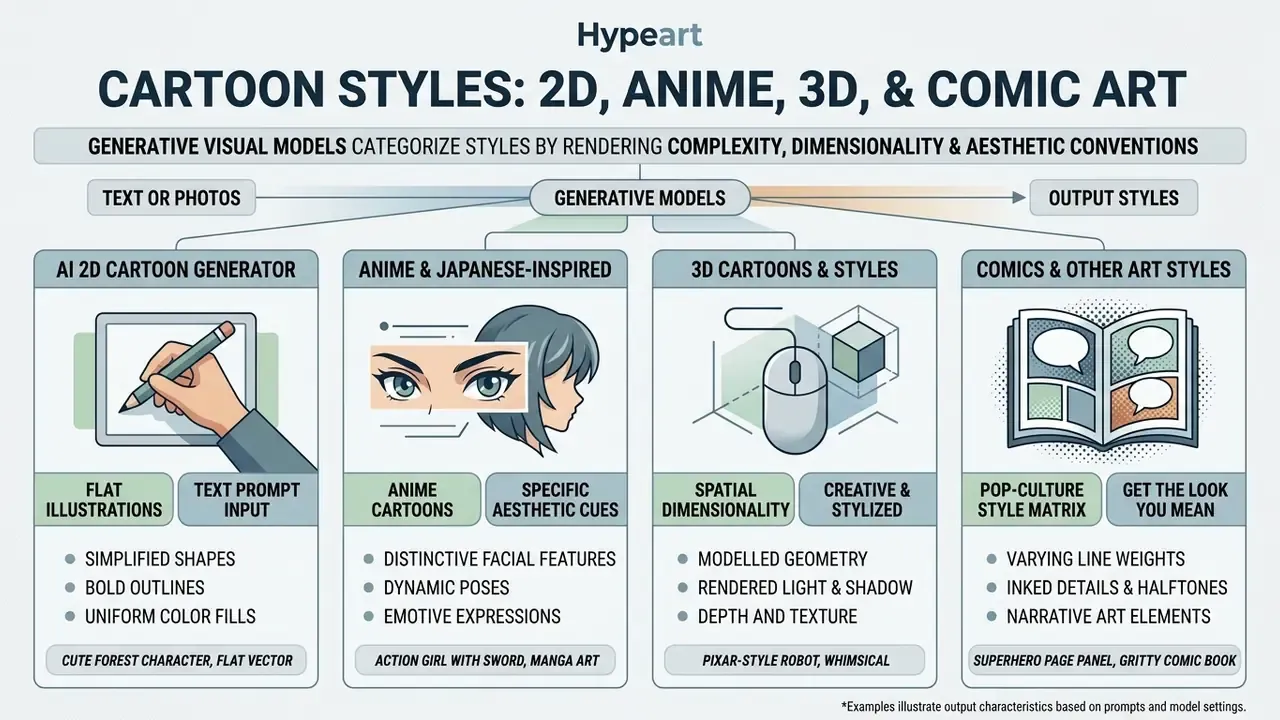
Generative visual models categorize cartoon styles by rendering complexity, spatial dimensionality and cultural aesthetic conventions. Modern platforms support four main visual families: classic 2D flat illustration, Japanese anime, 3D CGI animation and sequential comic book art, plus caricature and cut-out variants.
Style selection alters latent sampling parameters, color distributions and line rendering rules. Reviewing style options first helps align visual output with channel requirements, whether that is a social feed or a digital marketing banner. Broader comparisons of AI art generators show how differently each engine reads the same style tag.
AI 2D Cartoon Generator for Flat Illustrations
An AI 2D cartoon generator synthesizes flat graphic artwork defined by geometric shapes, solid color fills, clean vector outlines and minimal depth shading. This style dominates web icons, corporate UI graphics, editorial illustration and explainer decks.
Federal guidance on generative AI evaluation notes that flat visual styles make output verification easier, thanks to clear structural boundaries:
"Clear structural boundaries in flat visual styles simplify verification of generative system outputs."
Specialized flat-design generators expose presets (Classic Flat, Retro Vintage, Minimalist) and export vector-style art from 1K to 4K. Creators benchmarking playful 2D formats for social channels can compare outputs across free AI art generators before committing to one engine.
Anime Cartoons and Japanese-Inspired Styles
An AI anime cartoon generator relies on models trained on large anime image repositories, such as Danbooru, to reproduce Japanese animation conventions: oversized expressive eye geometry, detailed hair shading, dynamic action poses and vibrant color gradients.
Frameworks like NovelAI Diffusion V3 and DiffSensei (CVPR 2025) add dedicated MLLM identity adapters to enforce multi-character consistency and dialogue layout control across manga pages. Dataset scale explains much of the quality gap between anime checkpoints:
"Illustrious v1.1 was trained on 12M images at 1536×1536, while Animagine XL v3.1 (2.1M) and SanaeXL (7.8M) train at 1024×1024."
Fine-tuning with Low-Rank Adaptation (LoRA) targets sub-genres: Chibi, shojo manga, classic Studio Ghibli-adjacent aesthetics. GAN-era work is still instructive here. A 2020 study trained on more than 60,000 Miyazaki-style frames and outperformed two earlier cartoonization methods in a 117-response preference survey. For that specific look, a focused comparison of Ghibli-style AI image generators covers style accuracy and usage rights side by side.
3D Cartoons, Comics, and Other Creative Styles
Generating 3D cartoon visuals and comic panels requires networks to simulate volumetric depth, surface illumination or sequential storytelling layouts. 3D cartoon styles emulate modern CGI animation with soft global illumination, tactile textures, subsurface scattering on skin and rounded physical proportions.
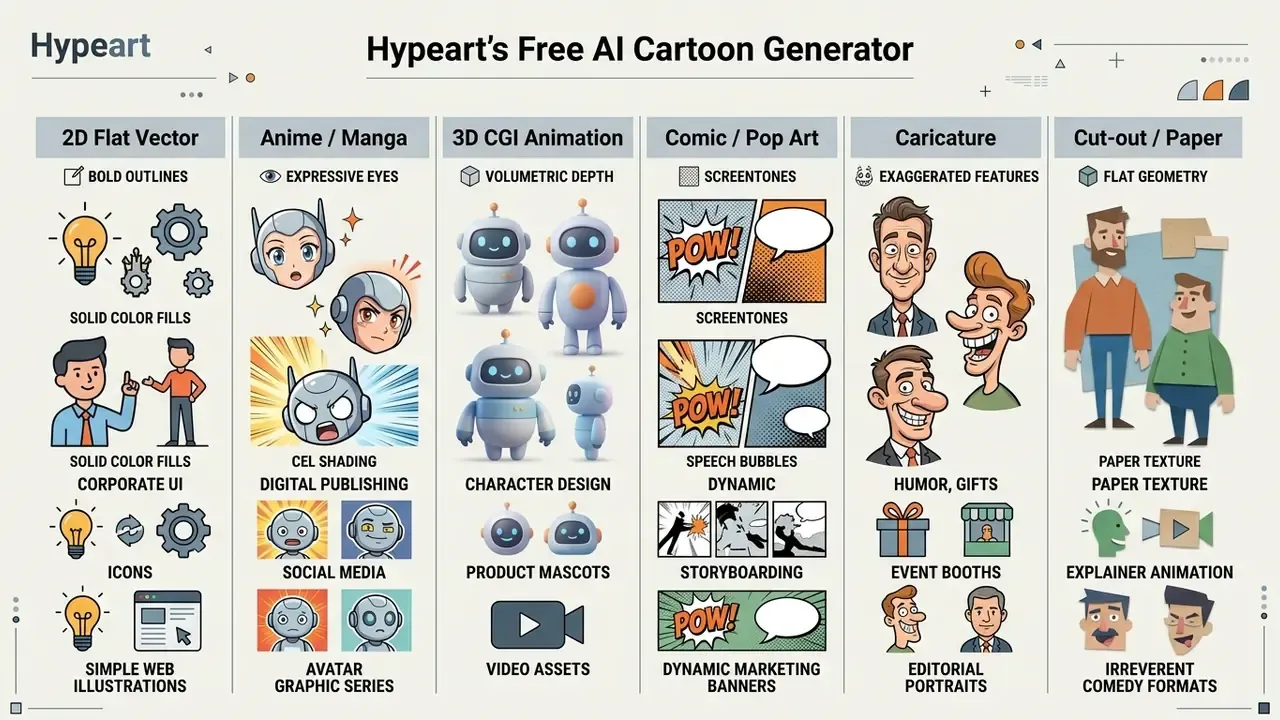
Comic art generation uses neural style transfer and retrieval-augmented systems to keep characters stable across panels:
"RaCig combines a retrieval-based character assignment module with regional feature injection to preserve identity and expressive gestures across panel sequences."
Video-to-comics pipelines add a two-stage process, keyframe selection followed by style transfer, for turning real footage into panel art. Meanwhile 3D-aware stylized neural fields improve consistency of cartoonized faces across viewpoints.
Pop-Culture Style Matrix: What to Write to Get the Look You Mean
Most users do not search for "flat 2D vector". They search for a show they grew up with. Naming the visual grammar rather than the trademark gets closer results and stays on the safe side of brand imitation.
| Reference look people ask for | Visual grammar to put in the prompt | Best-suited engine family |
|---|---|---|
| Simpsons-like | Flat 2D, yellow skin tone, thick uniform outline, overbite mouth shapes, minimal shading | SDXL fine-tunes, GPT Image |
| Family Guy-like | Flat 2D, rounded heads, simple two-tone shading, sitcom staging | SDXL fine-tunes |
| Pixar or Disney-like | Volumetric 3D render, expressive oversized eyes, subsurface scattering, soft cinematic key light | Seedream, FLUX, Nano Banana Pro |
| Studio Ghibli-like | Hand-painted watercolor backgrounds, soft palette, gentle cel shading, pastoral scenery | Illustrious, LoRA-tuned SDXL |
| South Park or cut-out | Paper-cutout geometry, flat fills, minimal animation shapes, visible construction paper texture | SDXL, GPT Image |
| Marvel or DC comic | Bold ink linework, halftone dots, dramatic rim lighting, dynamic low-angle framing | FLUX, RaCig-style pipelines |
| Retro 90s anime | Cel-shaded, grain overlay, VHS color cast, oversized eyes, dramatic speed lines | Illustrious, NovelAI-class models |
| Chibi or kawaii | Head-to-body ratio 1:2, blush marks, pastel palette, sticker-friendly outline | Illustrious, LoRA fine-tunes |
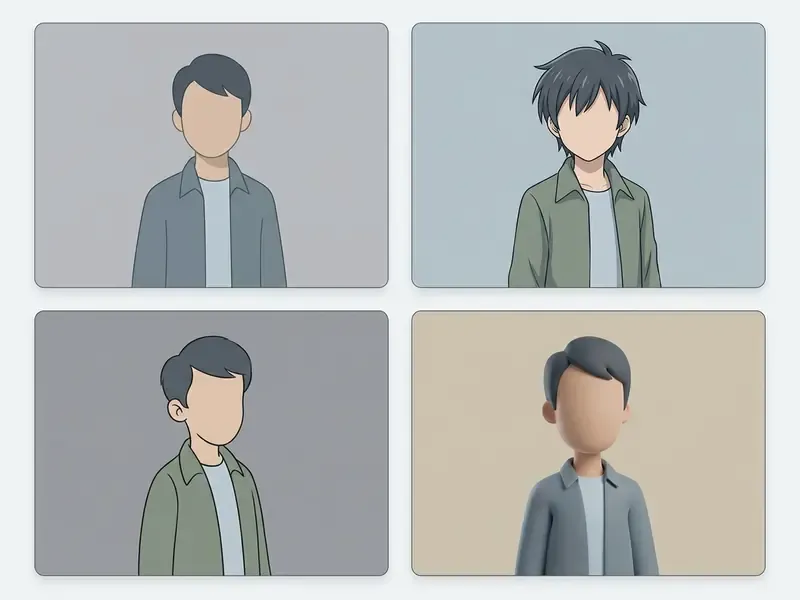
Comparative reference gallery: one character prompt rendered across four cartoon style families, with the exact modifiers used
| Style Category | What the render looks like | Key visual attributes and prompt modifiers |
|---|---|---|
| 2D Flat Illustration | Red panda mascot reduced to clean geometry: solid orange fills, single-weight black outline, no gradients, flat background. | Minimalist geometry, bold vector outlines, solid color blocks, flat lighting. Tags: "flat 2D vector, minimalist artwork, clean line art, no gradients." |
| Anime / Manga | Same mascot as an anime character: large glossy eyes, hair highlights, cel-shaded fur, speed lines behind the shoulders. | Large expressive eyes, cel shading, gradient hair highlights, dynamic composition. Tags: "anime style, detailed cel shading, expressive eyes, dynamic pose." |
| 3D CGI Cartoon | Same mascot rendered volumetrically: soft fur shading, ambient occlusion under the chin, glossy eye reflections, studio key light. | Volumetric depth, ambient occlusion, smooth surface textures, studio lighting. Tags: "3D CGI cartoon, stylized proportions, global illumination, soft lighting, 4k." |
| Comic / Pop Art | Same mascot as a comic panel: heavy ink contours, halftone shadow field, high-contrast dramatic lighting, action framing. | Half-tone screentones, sharp ink linework, high contrast, action panel framing. Tags: "comic book panel art, pop-art style, halftone dots, bold ink outlines." |
To build your own comparison sheet, keep the identity anchors fixed (age, face, hair, outfit, palette and one signature prop) and change only style cues, camera terms and rendering vocabulary. That single technique is the most reliable way to run a fair four-panel style test.
How to Create a Cartoon with AI: From Idea to Download
Running a cartoon generation workflow follows a set sequence: concept definition, prompt structuring, initial generation, post-processing refinement, human verification, and final file export. Standardize it and results become repeatable rather than lucky.
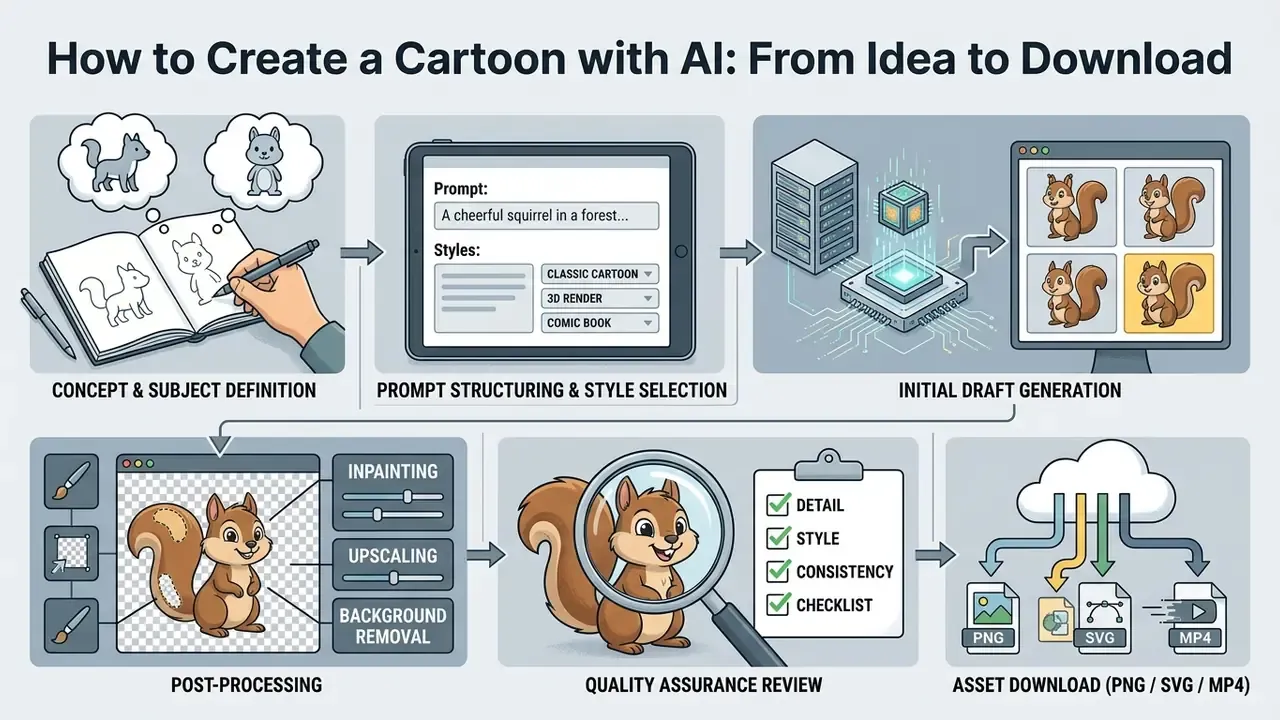
Municipal and enterprise operational guidelines make step 5 non-optional:
"Human review, editing, fact-checking, validation and testing are required before any AI-generated content is used officially."
How to Write a Prompt for a Cartoon Character
Structuring an effective prompt for an AI cartoon character generator means combining five descriptor fields into one clear statement: subject identity, artistic rendering style, lighting setup, emotional expression and camera shot angle.
Prompt Formula: [Subject] + [Artistic Style] + [Lighting/Environment] + [Emotion/Pose] + [Camera Angle/Framing]
- Subject "A friendly red panda character dressed in a blue hoodie"
- Artistic Style "3D CGI cartoon style, smooth textures, vibrant colors"
- Lighting "Soft studio lighting, rim light effect"
- Emotion/Pose "Curious expression, standing upright, holding a digital tablet"
- Camera Angle "Three-quarter front view, eye-level medium shot"
Combined into one coherent prompt, these fields guide the latent sampler and reduce structural artifacts or unwanted photorealistic blending. Add negative constraints where the model drifts ("no photorealistic skin, no extra fingers, no text"), and save the template so every character in a series shares the same lighting and camera vocabulary.
Copy-Paste AI Cartoon Prompt Templates
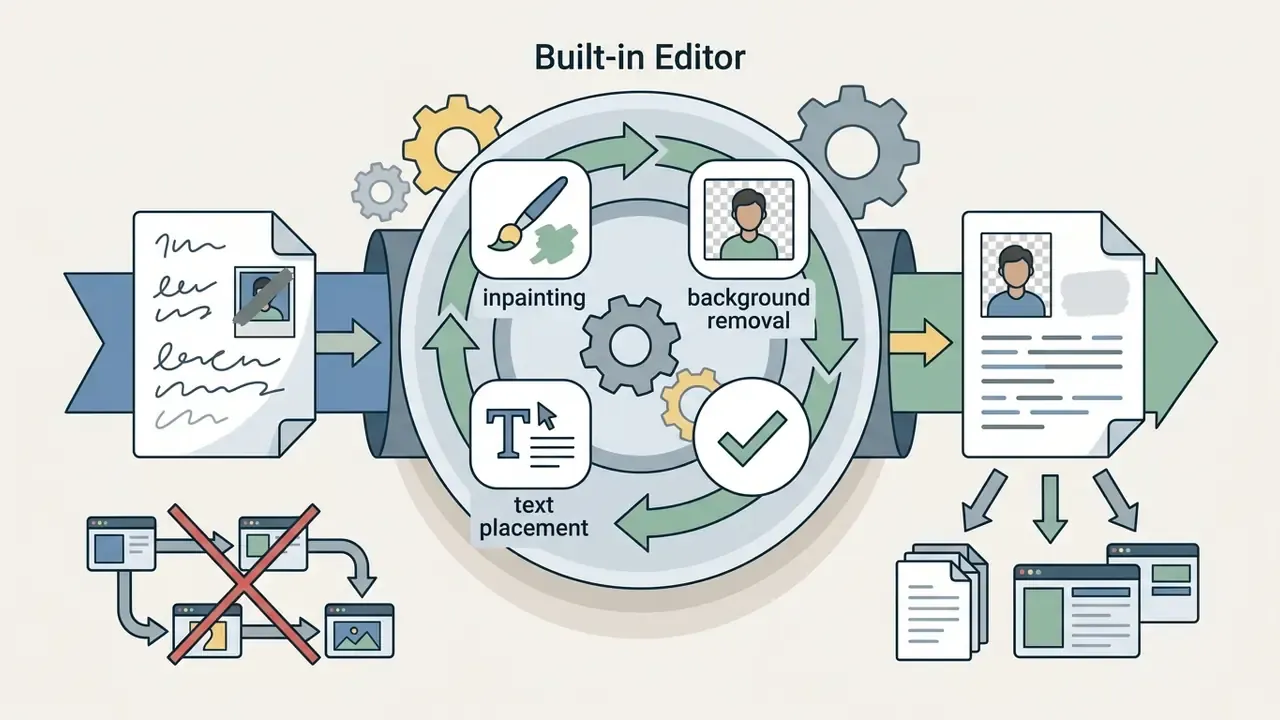
How to Customize, Edit, and Download Your Cartoon
Post-processing generated cartoon assets involves targeted defect editing, resolution upscaling, background isolation and file format selection. Raw drafts often show minor anatomical anomalies (hands, teeth, eye asymmetry) or background clutter needing localized correction.
- Mask-Based Inpainting masking a specific region lets the diffusion engine regenerate hands, eyes or background details while leaving the rest of the character untouched (ComfyUI Inpainting Workflow, 2026).
- Resolution Upscaling AI spatial upscalers lift dimensions from 1024×1024 to 4K, keeping linework crisp for digital display or 300 DPI print. Models trained at higher native resolution reduce this step: Illustrious trains at 1536×1536 versus the 1024×1024 standard used by competing checkpoints (Illustrious Technical Report, 2024. https://arxiv.org/abs/2409.19946).
- Background Removal isolating the character on a transparent background enables flexible layering across web pages, decks and merch templates.
- File Format Export PNG for transparent raster layers, SVG only when the artwork is genuinely vector-based, MP4 or GIF for animated sequences. "HD" is a resolution label, not a format, so check what the export dialog actually offers.
When troubleshooting export artifacts or canvas framing issues, structured diagnostics live in AI Media Support and Troubleshooting; heavy video exports can be trimmed for delivery with a video compressor.
Print-Ready Export Specifications for Merch
Cartoon assets headed for mugs, T-shirts, canvas or books face stricter requirements than social posts.
- Resolution minimum 3840×2160 (4K), or AI-upscaled to hit 300 DPI at the physical print size.
- Color space convert to CMYK for physical printing. RGB neons, especially cyan and magenta, shift noticeably on mugs and fabric.
- Background export transparent PNG layers using background-isolation models so print vendors can place the artwork on any product color.
- Bleed and safe area book covers typically need 0.125-inch full-bleed margins; interior illustrations should be supplied at 300 DPI.
- Line weight flat 2D art with hairline strokes can disappear at small print sizes. Thicken outlines before export or regenerate at higher resolution.
- Vector conversion logos and mascots benefit from SVG tracing after generation. Raster upscaling cannot recover true vector edges.
How to Choose a Free AI Cartoon Generator: Features, Models, and Limits
Choosing a free AI cartoon generator means evaluating model capability, control mechanisms, quota structures and licensing constraints. Identify the limits in advance and you avoid bottlenecks when visual production scales.
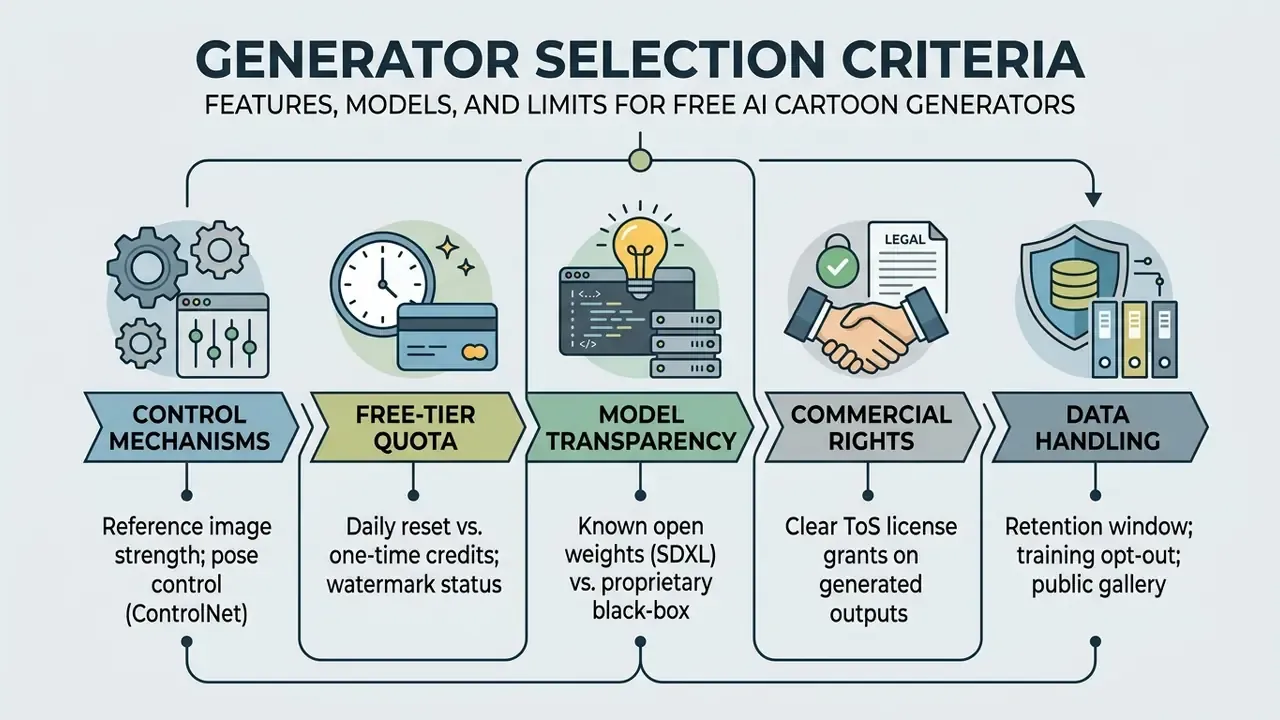
Comparing tools against these criteria keeps creative quality and internal risk requirements aligned. Systematic feature comparisons are collected in the AI Media Comparison Matrices, while platform-specific reviews such as the Canva AI generator overview, the Microsoft AI image generator overview and the Google AI image generator overview detail access rules and export terms per vendor.
Which Features Matter for Cartoon Character Generation
High-quality cartoon character generation needs control parameters beyond basic text prompting.
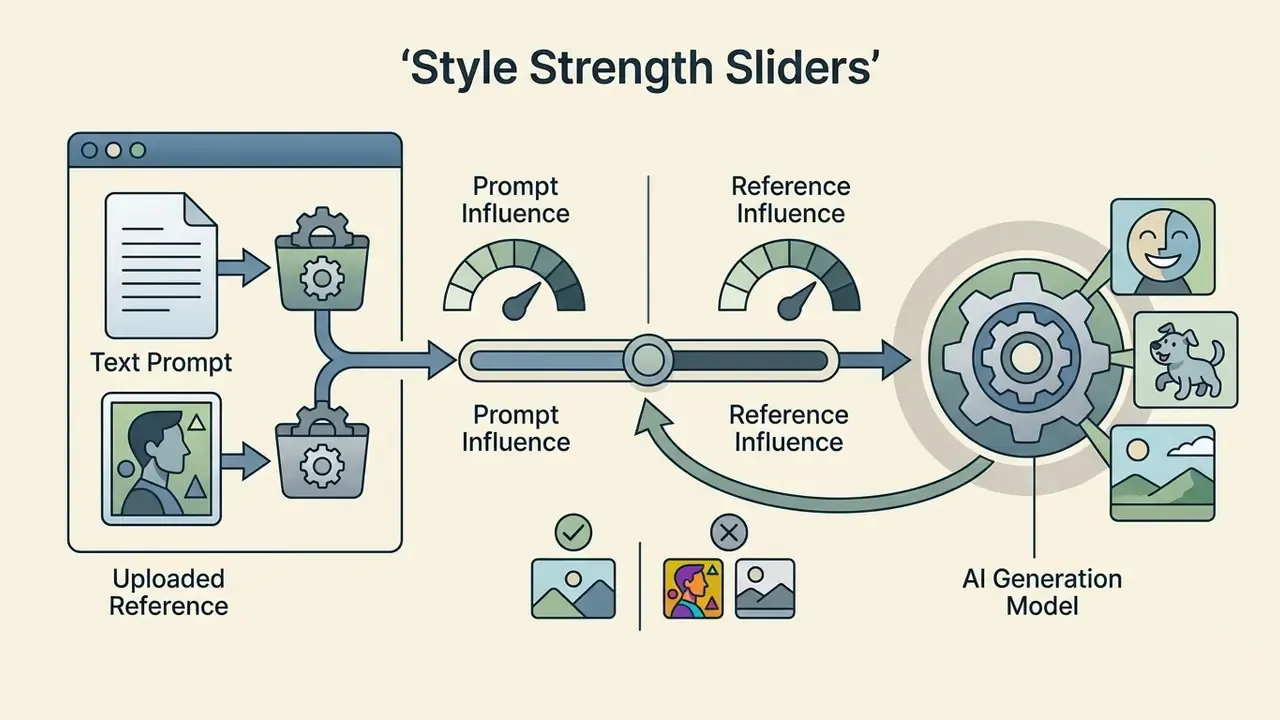
- Reference Image Conditioning upload a character sheet or pose sketch to guide structure, with a strength slider governing adherence (Adobe Firefly Reference Controls, 2026).
- Pose Control Adapters skeletal pose tracking such as OpenPose enforces specific stances across frames. Google's Vertex AI style customization additionally uses subject images plus a facemesh control image to place a subject "in the pose of the control image".
"AnimeAdapter uses OpenPose conditioning and token-level foreground masks to separate appearance from pose without per-character fine-tuning."
Research on diffusion control also reports that pose fidelity improves as more keypoints are supplied to the adapter, which is why "pose control" implementations differ so much in practice.
Choosing the Right AI Model Engine for Cartoon Generation
Multi-model workspaces are now the norm. Instead of one house model, you pick an engine per task and compare outputs side by side. Base models bring distinct stylistic strengths:
- FLUX.1 / FLUX.2 Pro: superior prompt adherence and complex multi-character compositions. Best for group and family scenes.
- SDXL and Illustrious: strongest for fine-tuned 2D vector art, anime sub-genres and custom LoRA integration. Open weights make behaviour auditable.
- Seedream and Midjourney-class models: cinematic lighting, rich volumetric depth and soft 3D CGI renders. Gift-quality portraits.
- Nano Banana Pro-class editors: precise local cartoon edits, element swaps and reference-driven characters built from several photos.
- GPT Image: instruction-led design that follows written style and scenario descriptions predictably. Useful for non-expert prompters.
- Identity-preservation models (for example Higgsfield Soul): lock the same face across every scene in a series.
A hands-on comparison of prompt adherence between conversational and dedicated engines is covered in the ChatGPT picture generator evaluation and the Midjourney image generator evaluation.
Free Generation, Downloads, and Access Limits
Free tiers vary widely on usage limits, output resolution and export permissions. Check them against your real weekly volume, not against the headline number.
Feature and licensing comparison matrix across selected AI cartoon generation tools (2026 data)
| Platform Name | Input Modalities | Style Support | Free Tier Allocation | Export Quality and Watermark | Commercial Use Terms |
|---|---|---|---|---|---|
| Adobe Firefly | Text prompt, photo reference, text-to-avatar | 2D, Anime, Comic, Vector | Daily credit allotment with free account | Up to 2000×2000 px images; 5-second 1080p video; no platform watermark | Allowed under Firefly Commercial Terms |
| Canva AI Generator | Text prompt, element upload | 2D, Anime, 3D, Minimalist | Daily credit limits for free accounts | Standard web export; watermark-free | Allowed per Canva AI Product Terms; users own input and output |
| ZSky AI | Text prompt, photo upload | 2D, Anime, 3D Cartoon | 200 signup credits plus 100 daily credits | Standard resolution; platform watermark on free tier | Requires tier upgrade for full commercial ownership |
| Pixelbin | Photo to cartoon upload | Vector 2D, Stylized Portrait | 3 free generations per month after signup | HD resolution; watermark-free export | Personal and commercial usage rights granted |
| Renderforest | Text or script prompt, style presets | Storybook, playful, 3D, dramatic, anime (video-first) | Unlimited access to basic cartoon creation | Free-plan export quality limited; HD and watermark removal on paid plans | Check plan tier before commercial publishing |
| OpenArt-style character generators | Text prompt, base character presets | 2D, comic, fantasy, 3D | Unlimited generations on basic models plus trial credits for premium | Standard web resolution; upscaling on credits | Commercial use permitted, with attribution requirements on some tiers |
Two takeaways from the table. First, watermark-free is not the same as commercial-safe: Pixelbin's three monthly generations are clean but scarce, while ZSky's 300 first-day credits arrive watermarked. Second, "unlimited" almost always applies to the basic model only. Teams estimating credit burn across projects can model it with the AI Media Calculators, and those extending into motion should check limits in the comparison of free AI video generators.
Commercial Use: Can You Use AI Cartoons in Client and Brand Projects
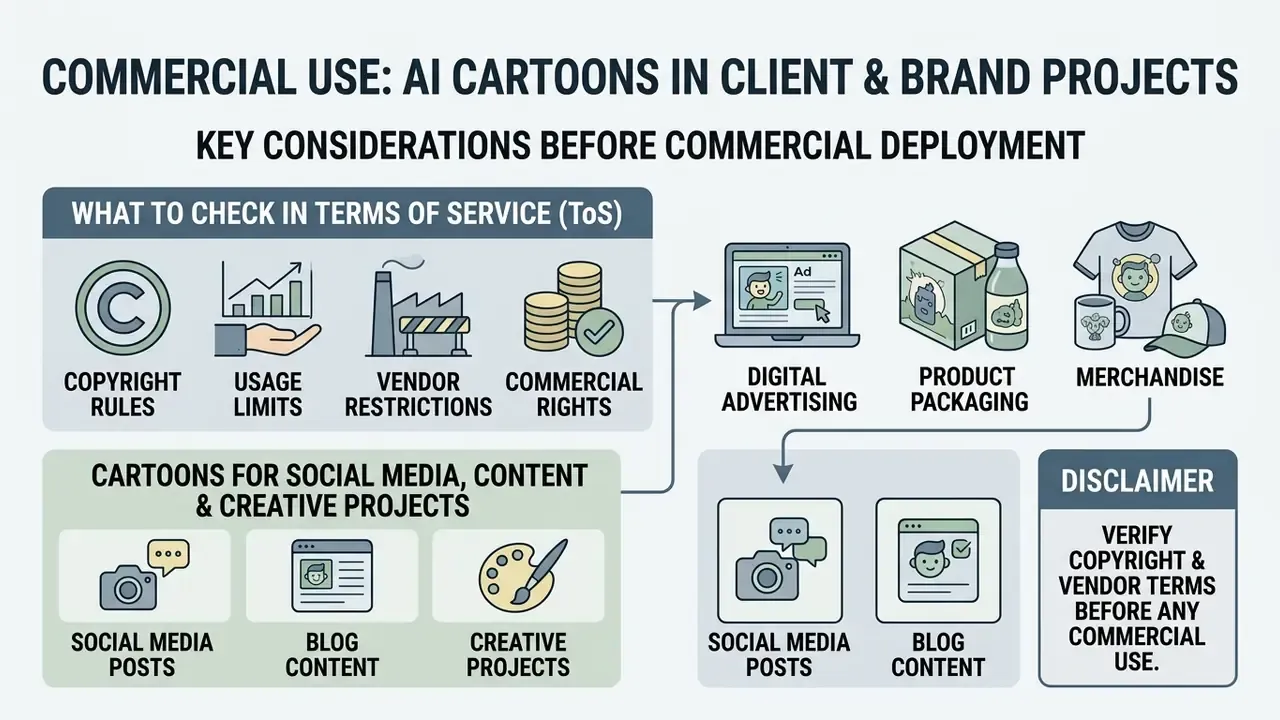
Deploying AI-generated cartoons commercially, in digital advertising, product packaging, corporate branding or merchandise, requires verifying copyright rules and vendor Terms of Service. Legal frameworks for AI-generated visuals turn on two axes: human authorship thresholds, and identity or publicity rights.
"Copyright protection extends only to human-authored elements, original arrangements, manual edits, or integrated text compositions."
Under that guidance, purely AI-generated visual outputs produced without substantial human creative control are not eligible for copyright registration, applicants must disclose AI-generated material, and any non-de-minimis AI output must be excluded from the claim. Separately, U.S. Patent and Trademark Office analysis (2025) notes that avatar creative elements may be copyrightable while name, image and likeness elements fall under right-of-publicity analysis. That distinction matters the moment a cartoon resembles a real, identifiable person. Congressional Research Service reporting (2025 to 2026) confirms there is still no comprehensive federal right of publicity in the U.S. Teams tracking exposure across campaigns monitor updates via AI Litigation and Case Timelines.
What to Check in Terms of Service Before Commercial Use
Before publishing generated cartoon graphics commercially, verify these contractual provisions:
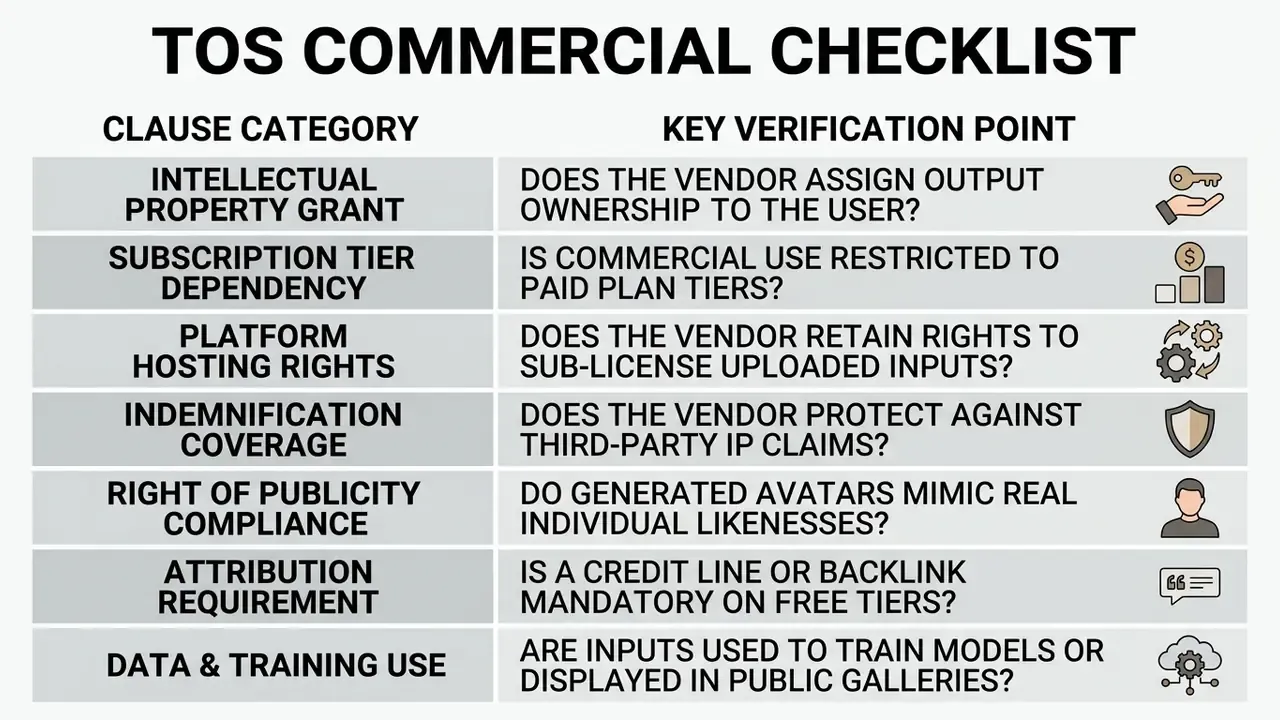
Two clauses catch teams out most often. First, tier dependency: a generation can be free while its commercial license is not. Several platforms grant commercial rights only for the duration of an active subscription, which means assets created on a free plan may not be licensed for client work. Second, attribution: some free tiers permit commercial use only with visible credit and a backlink. Reading these terms before publication prevents unauthorized deployment and reduces exposure to copyright or publicity-right claims.
Where to Apply AI-Generated Cartoons
AI-generated cartoons and animated avatars work across corporate communication, digital marketing, educational publishing, retail merch and video production. Standardizing deployment channels maximizes reuse of every asset.
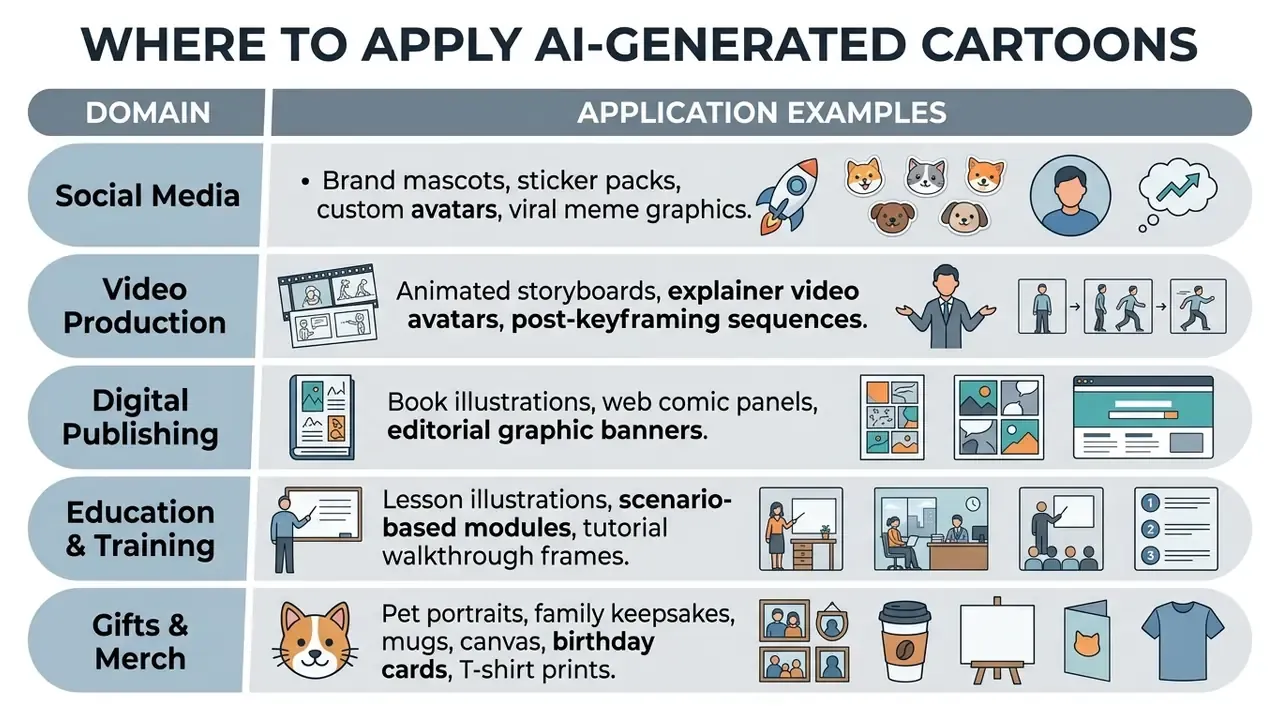
Slotting cartoon assets into structured media pipelines keeps visual messaging consistent while compressing traditional design timelines. It also pairs naturally with animation makers when static art needs to move.
Scenes, Storytelling, and Animated Characters for Video
In video production and digital storytelling, AI cartoon graphics form the foundation for automated storyboards, narrative comics and animated clips. Systems like FairyGen generate story-driven cartoon videos from a single child's drawing while preserving its style, and colorization pipelines automate the most labour-intensive animation steps:
"ToonComposer uses a DiT architecture and a post-keyframing process: sparse keyframe sketches plus one color reference become a fully colorized animation sequence."
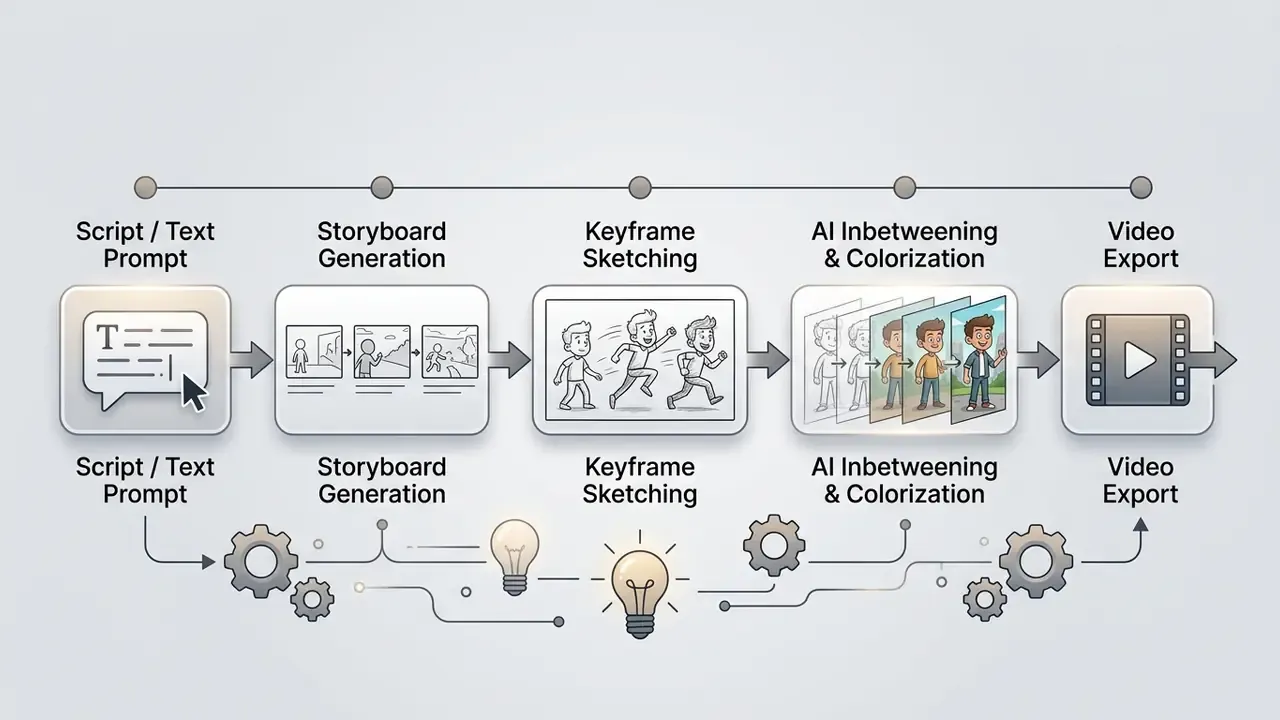
Research on AI-assisted storyboard design (2025) documents a working combination of Stable Diffusion 1.5, a CNN feature extractor and GPT-3.5 to produce narrative-focused storyboards and character sheets from a script. Enterprise video platforms add avatar presenters for training modules, recorded-meeting summaries and product tutorials. Kaltura's Avatar Video Production Studio (beta, March 2026) turns recorded media into avatar-narrated summaries, and MIT's 2025 draft report describes a brand-ambassador avatar built from 10 to 15 minutes of template footage and reused for personalized customer videos. These script-driven presenters sync synthetic audio with lip movement, which makes scalable video output possible without a crew. Teams wiring generation into a backend pipeline can start from an AI Media API endpoint or the Google Veo implementation guide.
Animating Static Cartoons: Video, Motion, and Voiceovers
Modern generative pipelines let a single cartoon image become a full animated sequence:
- Image-to-Video Animationframe-interpolation and motion models (Runway Gen-3, Luma Dream Machine and comparable engines) add camera moves, idle motion and action beats to 2D or 3D cartoon characters. Subtle looping motion is often enough for social formats; full scene animation needs keyframe control.
- AI Voiceover and Lip-Syncsynthetic text-to-speech drives facial keyframe distortion, so cartoon avatars deliver dialogue in explainer videos, YouTube Shorts and course modules. Voice casting, pacing and language coverage differ sharply between engines. The AI voice generator guide covers quality, language support and commercial licensing of synthetic voices, and teams building an audio-first companion format can compare it with a google ai podcast generator workflow.
- Music, transitions and pacingscene-based editors generate transitions automatically and align them to soundtrack tempo, so each scene can be regenerated independently without re-rendering the whole video.
- Watermarking and brandingadding a logo or custom watermark to animated cartoons keeps attribution intact when clips get reshared.
Free tiers are meaningfully tighter here than for still images. Expect 5-second clips at 1080p, a handful of daily renders, or watermarked exports until you upgrade. The comparison of free AI video generators tracks current caps.
FAQ: Free AI Cartoon Generators
Do I need manual drawing skills to use an AI cartoon generator?
No manual drawing skills are required. Text-to-image diffusion models synthesize cartoon characters and background scenes directly from natural language prompts or reference photos (Text-to-image Diffusion Models in Generative AI, 2023. https://arxiv.org/abs/2308.09388). Hitting a specific visual outcome, though, does require learning structured prompt construction and iterating. One caveat from user research: "Users often overestimate how linearly prompts control output; diffusion behaviour is non-linear when style tokens interact." Perceptions and Realities of Text-to-Image Generation, CHI (2024). https://dl.acm.org/doi/10.1145/3613904.3642798 Expect two to five iterations per finished asset rather than one.
Can an AI turn my personal photo into a cartoon while keeping my face recognizable?
Yes. Photo-to-cartoon pipelines use image-conditioned diffusion (img2img), geometric warping and content-loss networks to preserve facial geometry while applying stylization (AutoToon, WACV 2020). Frameworks such as AnimeAdapter decouple appearance from pose, so one portrait can be re-rendered across poses and environments (2025. https://arxiv.org/abs/2501.09354). Front-facing, evenly lit photos give the strongest identity retention.
Can I cartoonify my pet or a whole family photo?
Yes. Multi-subject pipelines align several identity anchors on one canvas, keeping each face, and for pets the breed silhouette and coat markings, recognizable in a single unified style. Name distinguishing features explicitly in the prompt, use a photo where no face is obscured, and generate a small batch before choosing the render you send to print.
Why does my AI-generated character change appearance between images?
Standard diffusion samplers generate each image independently from random latent noise, so identity drifts. Consistency requires conditioning: a reference image set, token-level identity adapters, a trained LoRA, or a dedicated consistency framework (Addressing Character Consistency Challenges in AI Filmmaking, ICNC 2025. https://arxiv.org/abs/2502.01234). Lock head shape, eye geometry, hairstyle, palette and signature clothing before producing a series.
Which cartoon styles do AI models reproduce most accurately?
Flat 2D vector art and Japanese anime are the most reliable, thanks to large tagged training corpora (Illustrious Technical Report, 2024. https://arxiv.org/abs/2409.19946). 3D CGI and sequential comic panels are also well supported through style transfer, 3D-aware latent diffusion and retrieval-augmented systems (RaCig, 2024. https://arxiv.org/abs/2408.09462). Highly specific studio looks are approximated by describing the visual grammar rather than naming a franchise.
How do I fix wrong hands, eyes or proportions?
Use mask-based inpainting on the defective region rather than regenerating the whole image, then upscale. A 2024 taxonomy groups AI-image defects into anatomical, stylistic, functional, physics and sociocultural implausibilities, and anatomy is the most common cartoon failure mode. Stock-platform guidelines also require checking for anatomically correct features before submission, so build that check into your review step.
What resolution do I need for printing on mugs, shirts or canvas?
Target 300 DPI at the final physical size, which practically means 4K native output or an AI-upscaled equivalent. Export transparent PNG for product placement, convert to CMYK for physical print, and allow 0.125-inch full bleed on book covers. Free tiers frequently cap downloads (Adobe Firefly: 2000×2000 px), and that cap is often the real reason a merch project needs a paid plan.
Is it safe to upload employee or client photos to a free generator?
Treat it as a data-processing decision, not a creative one. Check retention, deletion and training-use clauses, avoid uploading identifiable third parties, especially minors, without consent, and prefer prompt-only generation for sensitive contexts. Public-gallery defaults on some free tiers expose both the image and the prompt.
Does the spelling of my search change which tool I should use?
Not really, and it is worth saying plainly. Queries like "ai cartoon creater", "ai cartoon creation", "ai for drawing cartoons" and "ai for making cartoons" all land on the same three pipelines described above. What changes the outcome is which base model runs underneath, whether the plan allows watermark-free download, and whether the licence covers your intended use.
Can I legally use AI-generated cartoons for commercial projects?
It depends on the platform's Terms of Service and your plan tier. U.S. Copyright Office guidance states that protection applies only to human-authored creative elements and that AI-generated material must be disclosed in registration (2023. https://www.copyright.gov/ai/). Midjourney ties commercial use to paid tiers and company revenue; Canva and Fotor describe broader permissions for subscribers; some free tiers require attribution. Verify the correct document, since Business or Commercial Terms take precedence over general Terms of Use.
Are AI-generated comics and storyboards subject to narrative bias?
Yes. Multi-panel formats show higher social-bias rates than isolated images. Proprietary models averaged 25.9% biased outputs for single photos, rising 9.6 points in storyboards and 18.2 points in comic panels (Investigating Social Bias in Narrative Image Generation, 2026. https://arxiv.org/abs/2502.07987). The same study notes that bias in comics surfaces through event ordering, character positioning and narrative resolution, more explicitly than in single photos. That is why human editorial oversight belongs inside the workflow, not after it.
Can I animate a static cartoon and give it a voice?
Yes. Image-to-video models add motion to a finished cartoon, and synthetic speech engines drive lip-sync for talking avatars. Post-keyframing systems such as ToonComposer convert sparse keyframe sketches plus one color reference into a fully colorized sequence (2025. https://arxiv.org/abs/2501.09780). Free plans typically limit clips to a few seconds at 1080p. Creators evaluating broader audio-visual tooling, synthetic narration, dubbing, multilingual voice, often review the AI voice generator guide alongside image tools to plan a single multimodal pipeline.
Conclusion
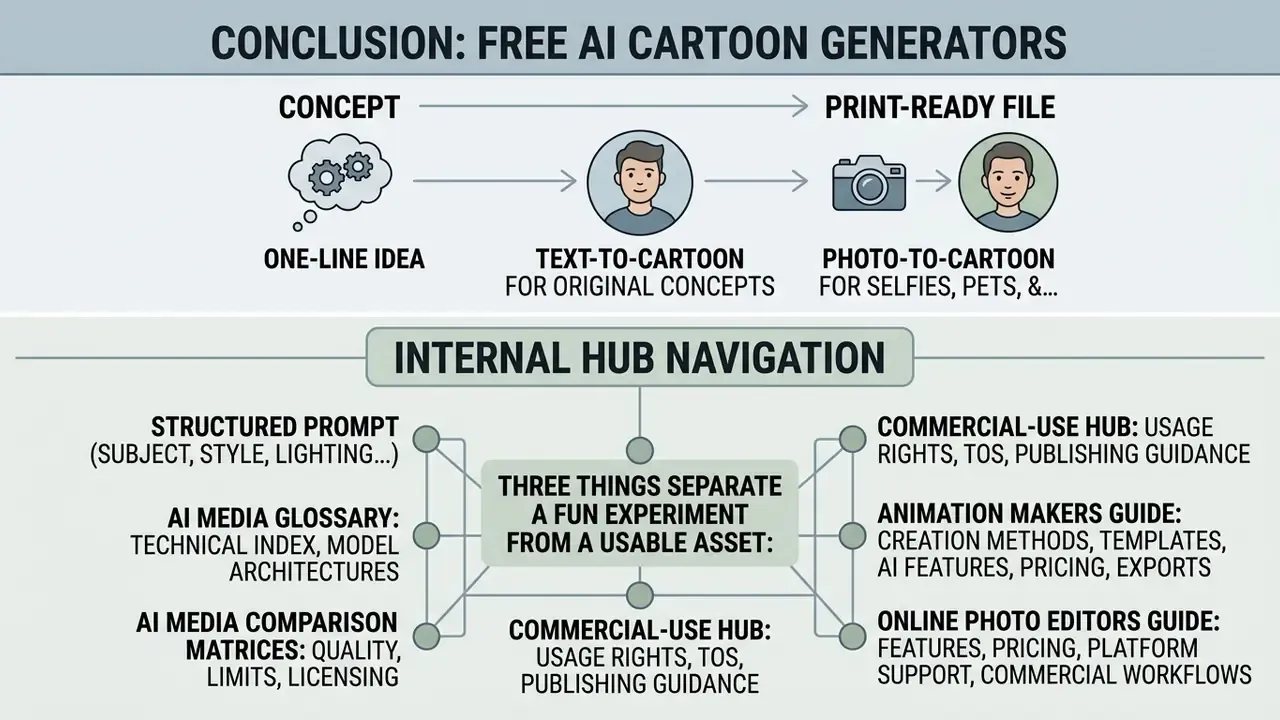
Free AI cartoon generators now cover the full path from a one-line idea to a print-ready file: text-to-cartoon for original concepts, photo-to-cartoon for selfies, pets and family keepsakes, and identity-locked character creation for series work. Output quality tracks the base model far more than the interface, so knowing whether you are prompting an SDXL fine-tune, a FLUX-class engine or a proprietary editor tells you more than any feature list.
Three things separate a fun experiment from a usable asset: a structured prompt (subject, style, lighting, emotion, framing), a real post-processing step (inpainting, upscaling, background removal, print specs), and a documented check of the platform's data-handling and commercial terms before the file ships. Handle those, and generative cartoons behave like any other dependable production tool. Fast on the front end, defensible on the back end.