Enterprise deployment of generative video needs the same discipline you already apply to decision models: rigid controls, reproducible evidence chains, and unambiguous asset licensing. The luma dream machine ai video generator operates as a multimodal generative transformer platform that converts natural language descriptions and static visual references into high-fidelity video outputs. This guide documents the platform's model families, prompt syntax, camera-control vocabulary, pricing tiers, licensing boundaries, data-handling posture, and the practical limits that decide whether Dream Machine can be admitted into a governed production pipeline.
One caveat before you scroll. Nothing here replaces the vendor's current documentation, and nothing here is legal advice.
Executive Summary for Leadership and Risk Functions
| Question | Short answer for decision-makers |
|---|---|
| What is it? | A commercial text-to-video and image-to-video platform from Luma AI (Luma Labs), publicly launched 12 June 2024, running on the Ray model family (Ray2, then Ray3, Ray3.14 and Ray3.2). |
| Output ceiling | 540p / 720p / 1080p / native 4K; 16-bit EXR HDR export on Ray3-class models; base clips of 5 to 10 seconds, extendable to roughly 30 seconds in SDR. |
| Typical render time | About 90 to 120 seconds for a 5-second clip; free-tier users share a public queue where peak-hour waits can stretch to tens of minutes (some historical reports cite hours). |
| Commercial rights | Granted only on Plus / Pro / Ultra / Enterprise plans, and only for assets generated while a qualifying paid subscription is active. Free and Lite tiers are personal-use only and watermarked. |
| Cost anchor | $0 (Free) · $9.99 (Lite) · $29.99 (Plus) · $89.99 (Pro) · $299.99 (Ultra) per month, credit-metered; API billed separately. |
| Main governance gaps | Publicly documented seed-locking, retention windows, model-training opt-outs, SOC 2 / ISO attestations and C2PA provenance signalling must be confirmed contractually with the vendor before onboarding. |
| Shadow-AI risk | High. Free-tier output cannot be legitimised retroactively by a later upgrade, so uncontrolled personal accounts create direct IP exposure. |
| Verdict | Production-viable for short-form marketing, previsualisation and storyboard animation on paid tiers; not yet a substitute for long-form editorial production, and not for workflows that ingest confidential customer imagery without a signed data-processing agreement. |
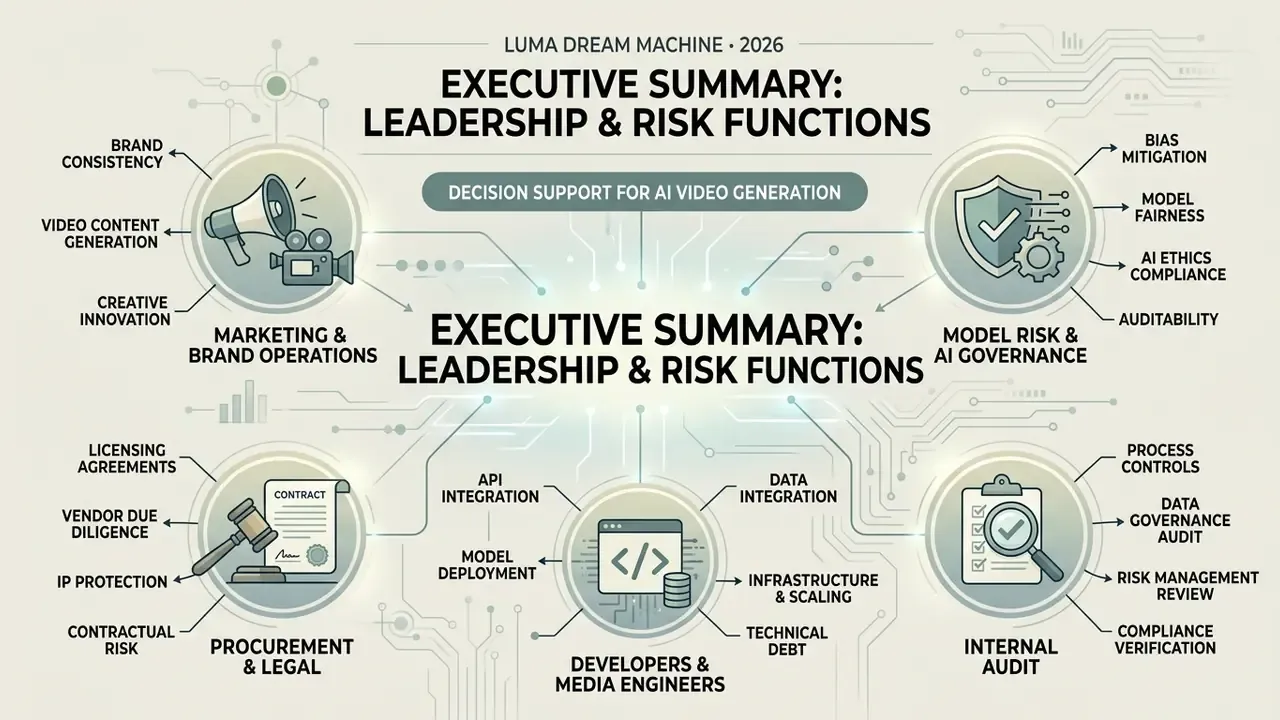
Who this guide is written for, and which decision it supports
- Marketing and brand operations deciding whether short-form generative video can enter an approved publishing channel this quarter.
- Model risk and AI governance owners who must register the tool in an AI inventory with an owner, data boundary and re-validation cadence.
- Procurement and legal comparing plan tiers, licence conditions and indemnity language before a corporate seat purchase.
- Developers and media engineers costing the API per accepted second rather than per successful render.
- Internal audit looking for the minimum evidence set that makes a published clip defensible after the fact.
Search variants matter here too, because entity confusion is common. Queries such as "ai video generator dream machine", "ai video generator luma", "luma video generator", "dream machine video generator" and even the misspelling "lunaai text to video generator" all resolve to the same Luma AI product. And a query about a luma dream machine ai video generator launch 2025 almost never refers to a new product; it refers to the Ray3 generation shipped during 2025 and the retirement of the legacy engine.
What the Luma Dream Machine AI Video Generator Actually Is
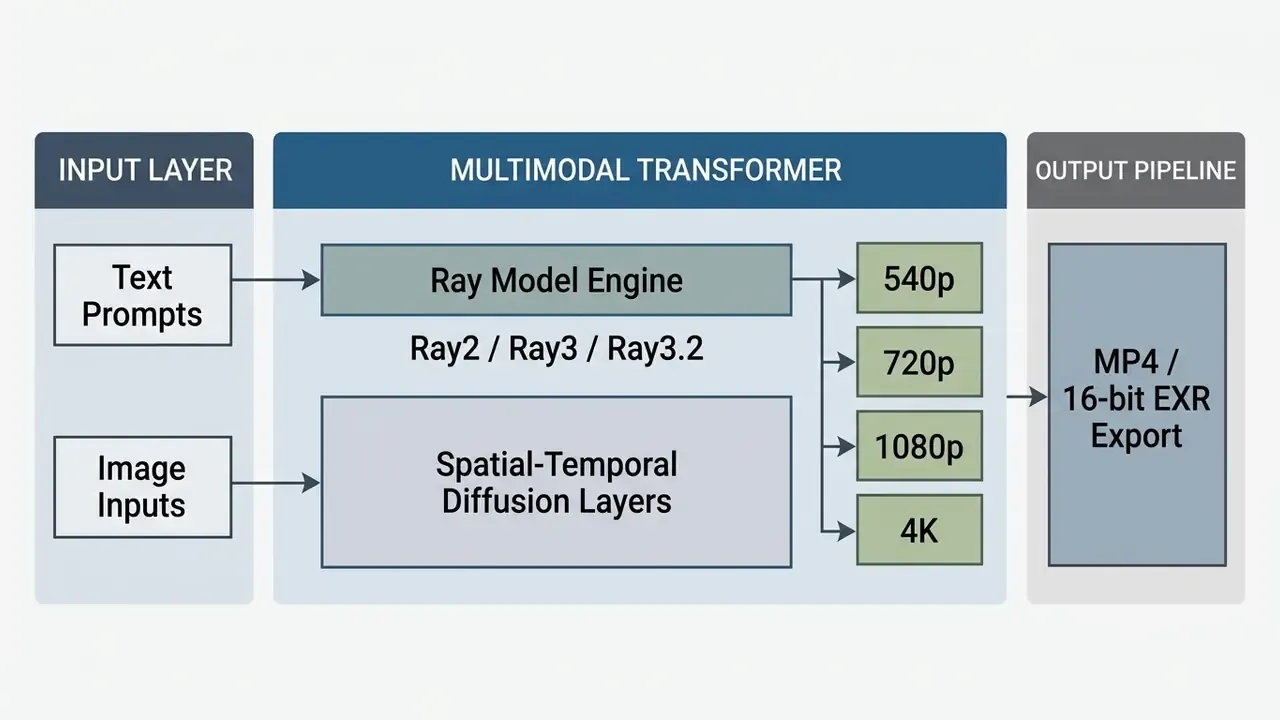
The luma dream machine ai video generator is a commercial generative media tool developed by Luma AI (Luma Labs) that converts text prompts and static images into dynamic video clips. Launched publicly in June 2024, the dream machine ai video generator uses a scalable multimodal transformer architecture trained directly on unified video and language data to deliver high-fidelity motion synthesis.
«Dream Machine is built on a scalable generative transformer trained directly on language and visual data, enabling precise and creative outputs.»
Luma AI, Dream Machine and the Video Generation Models
Luma AI built the luma ai dream machine video generator 2025 framework around proprietary multimodal model families, progressing from the initial Ray releases to Ray2, Ray3 and Ray3.2. The company retired its legacy base models in early 2025: the original Dream Machine engine sunset on 31 January 2025, following the new Dream Machine interface released in November 2024. Enterprise workflows were migrated to the modern luma dream machine 2 2025 video generation pipeline, which outputs resolutions from 540p up to native 4K through the developer API (Luma Labs API Documentation, 2026).
«By November 2024 Dream Machine had reached 25 million registered users, under six months after its public launch in June 2024.»
Comparing Luma Dream Machine, OpenAI Sora and Runway Gen-2
Procurement decisions are rarely single-vendor, so the table below positions Dream Machine against the two engines it is most often benchmarked against. Values reflect publicly documented behaviour and should be re-verified at contract stage.
| Parameter | Luma Dream Machine | OpenAI Sora | Runway Gen-2 |
|---|---|---|---|
| Availability | Open public access (web app plus REST API) | Restricted or staged access historically; limited invite waves | Open public access (web plus API) |
| Average generation time | About 120 seconds per short clip, queue-dependent | Not publicly disclosed | About 60 to 90 seconds |
| Max base resolution | Up to native 4K (Ray3 / API) | Up to 1080p | Up to 1080p |
| Clip length | 5 to 10 s base, extension to about 30 s (SDR) | Up to about 60 s | 4 to 16 s |
| Camera control | Named text vectors (orbit, crane, push in, pull out) | Prompt-level description only | Motion Brush plus prompt |
| Input modes | Text, image, keyframe pairs, video-to-video (Modify) | Primarily text, plus limited image conditioning | Text, image, video |
| Native audio | Not generated natively; pair with external voice tooling | Audio in later Sora generations | Not native |
| Community and support | Web app, iOS app, Discord, documented REST API | Limited public channels | Web app, API, community forum |
Competitor commentary is consistent on one point: accessibility is Dream Machine's structural advantage. Public reviews of the June 2024 beta framed it as "available to the public, offering free access through a public beta" while Sora "remains accessible only to a select group". That distribution asymmetry drove the early adoption curve, and it also explains the queue times.
What Kinds of Videos You Can Create With Dream Machine
The platform generates cinematic visual sequences, realistic motion graphics, watercolour stylisations and anime aesthetics from plain text or paired visual keyframes. Using the luma dream machine ai video generation tool, creative operations can turn static concept art into short motion clips while enforcing consistent camera behaviour across iterations.
| Capability | Input Mode | Resolution | Motion and Camera Control | Primary Enterprise Application |
|---|---|---|---|---|
| Text-to-Video | Natural language prompt | 540p, 720p, 1080p, 4K | Directives via prompt (pan, zoom, orbit) | Concept design, ad pre-visualisation |
| Image-to-Video | Static image URL (CDN) | 540p, 720p, 1080p, 4K | Frame extension and camera motion anchors | Animating storyboards and visual assets |
| Keyframe Interpolation | Dual keyframe images | Up to native 1080p / 4K | Smooth transition vectors between frames | Dynamic scene transitions |
| Video Extension | Existing generated clip | 720p, 1080p | Temporal extension forward in time | Extending short clips up to 30s (SDR) |
| Modify / Video-to-Video | Existing footage plus prompt | Model-dependent | Instruction-driven restyling, character reference | Restyling brand footage, look development |
Readers evaluating the wider category, including where prompt-driven engines outperform template-driven tools, can use our reference explainers on text-to-video AI tools and on classic animation makers for template-based motion graphics.
Luma Dream Machine Free Tier, Pricing and Commercial Use
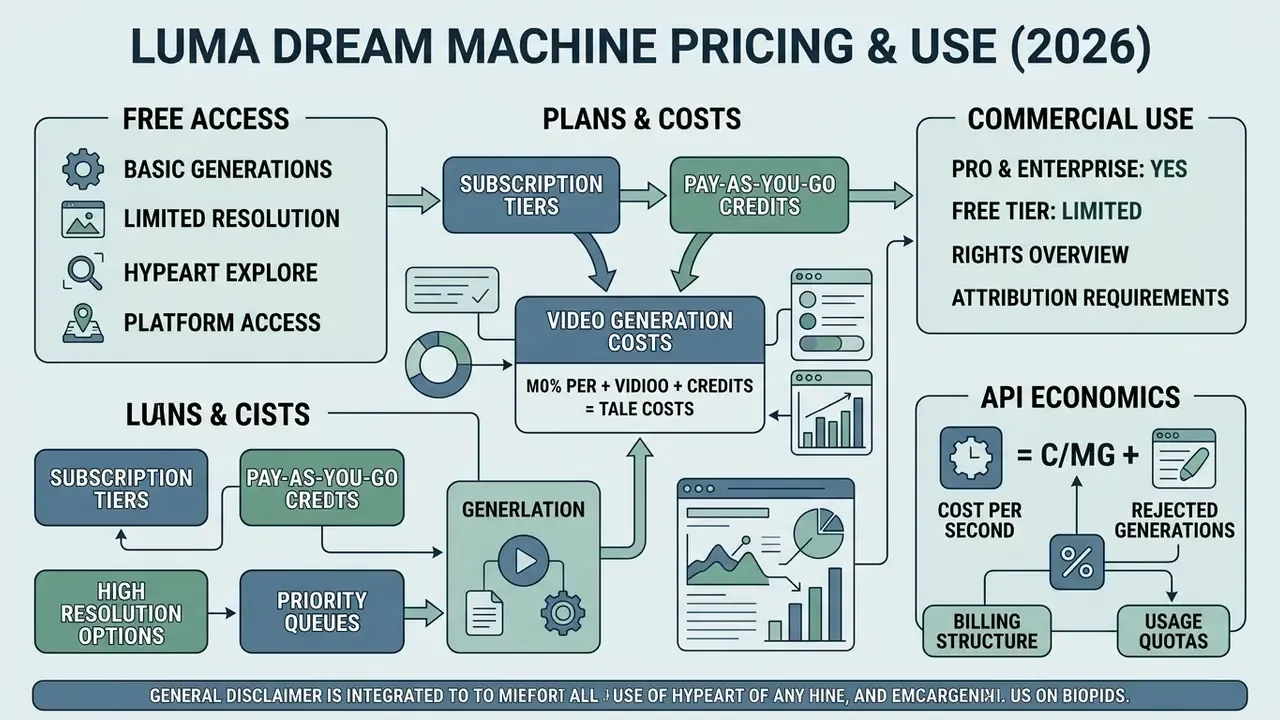
"Controlling generative media in production demands the same governance rigour as financial decision engines: clear input parameters, measurable output limits, and verifiable commercial licensing." Marcus Hale, author
Commercial deployment of the luma dream machine free ai video generator requires strict adherence to vendor licensing terms. Because the licensing boundary, not render quality, is what usually blocks enterprise adoption, this section sits before the production workflow.
| Plan Tier | Monthly Cost (USD) | Monthly Credit Allocation | Max Resolution | Commercial Rights | Watermark Status | Queue Priority |
|---|---|---|---|---|---|---|
| Free / Draft | $0 | About 80 credits/day (varies) | Draft / 720p | No (personal only) | Permanent watermark | Shared public queue |
| Lite | $9.99 | 3,200 credits | 720p / 1080p | No (personal only) | Standard watermark | Priority processing |
| Plus | $29.99 | 10,000 credits | Native 1080p / 4K | Yes (full rights) | Watermark removed | Priority processing |
| Pro | $89.99 | 40,000 credits | Native 1080p / 4K | Yes (full rights) | Watermark removed | Priority processing |
| Ultra | $299.99 | 150,000 credits | Native 1080p / 4K | Yes (full rights) | Watermark removed | Highest priority |
| Team / Enterprise | Quote-based | Pooled credits | Native 1080p / 4K | Yes (full rights) | Watermark removed | Contractual SLA |
What Free Access to Dream Machine Gives You
The luma dream machine free video generation tier grants draft-resolution access for personal experimentation. Outputs from the dream machine ai video generator free plan carry a permanent watermark and explicitly prohibit commercial usage under Luma AI's Terms of Service. Public sources disagree on the exact free allowance: some describe roughly 80 credits per day with a daily reset and no carryover, others cite about 30 generations per month at 720p. Treat free-tier volumes as variable vendor policy, not a contractual guarantee.
How to Compare Plans and Video Generation Costs
Organisations should model tier selection against real monthly volume using our AI Media Pricing Guides. The choice between Lite, Plus and Enterprise turns on four variables: required clip volume per month, priority queue access, resolution and HDR needs, and whether the workflow runs through the API rather than the browser. For quick sensitivity checks on volume and reject rates, our AI Media Calculators are faster than rebuilding a spreadsheet.
API Economics: Cost per Second and Rejected Generations
Web-tier pricing tells you almost nothing about programmatic cost at scale, because API consumption is metered per generation job against credit balances that vary by resolution, duration and model checkpoint. Use the framework below and populate it with the current published credit rates before budgeting.
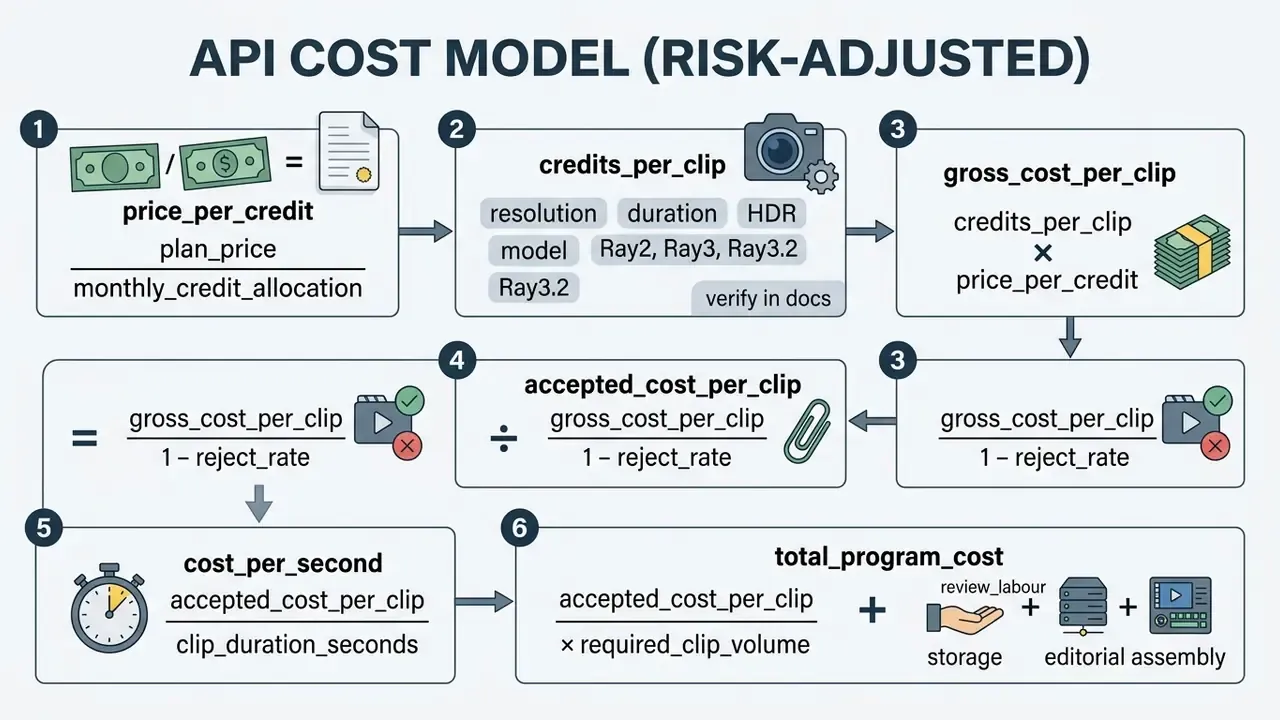
A worked illustration, with values used only for arithmetic demonstration (confirm current credit consumption in the vendor dashboard): at the Plus tier, $29.99 for 10,000 credits gives a price per credit of roughly $0.003. If a 5-second 1080p clip consumes 150 credits, gross cost is about $0.45 per render. Apply a realistic 30% reject rate for prompt-adherence or artifact failures and the accepted cost becomes about $0.64 per usable clip, or roughly $0.13 per accepted second. A 500-clip campaign therefore carries around $320 in raw generation spend plus review labour, and review labour, not tokens, is usually the dominant line item. Never model generative video cost without a reject-rate multiplier. Unadjusted forecasts routinely understate spend by 30% to 60%.
One more line most business cases forget: storage and versioning. Four-K masters plus every rejected take add up faster than the credits do.
Can You Use Luma Videos in Commercial Projects
Commercial usage is prohibited on Free and Lite tiers. Under Luma AI's official licensing terms, commercial rights are granted only for content generated during an active paid subscription to Plus, Pro, Ultra or Enterprise (Luma AI Terms of Service, 2026). The Terms also state that the customer owns and retains right, title and interest in the Output, and that Luma assigns its rights in that Output to the customer. That ownership grant is still conditioned on the output having been produced during an active qualifying subscription term.
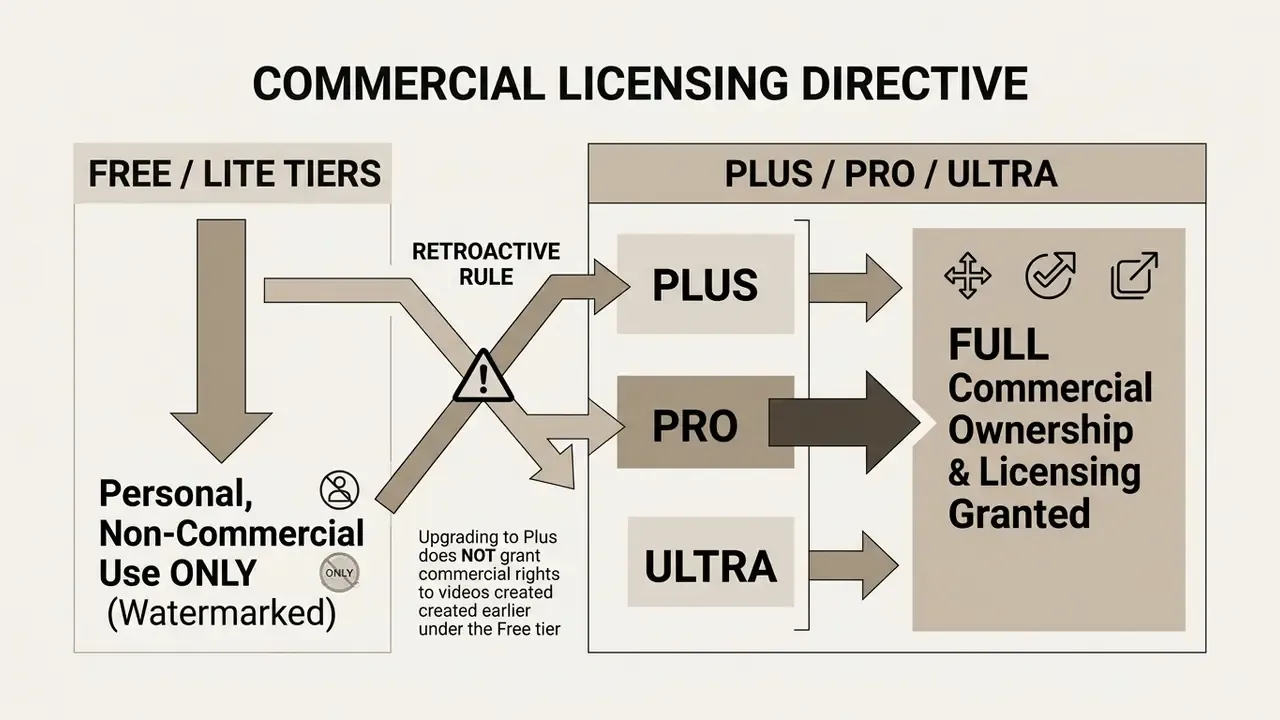
«Luma AI positions Dream Machine for professional content creators, including commercial use in marketing and production, provided an active paid subscription is in place.»
Anti-shadow-AI controls. Because the licensing boundary is tied to the account that rendered the asset, the highest-yield control is centralised procurement:
For broader guidance on IP ownership and commercial generative media rules, risk officers can consult our AI Media Commercial-Use Hub and the adjacent analysis of commercial use of AI image generators. Teams tracking legal exposure across platforms should also review our updated AI Litigation and Case Timelines, plus vendor-specific breakdowns such as the Canva AI Generator commercial terms.
Data Security, PII and Model Risk Governance
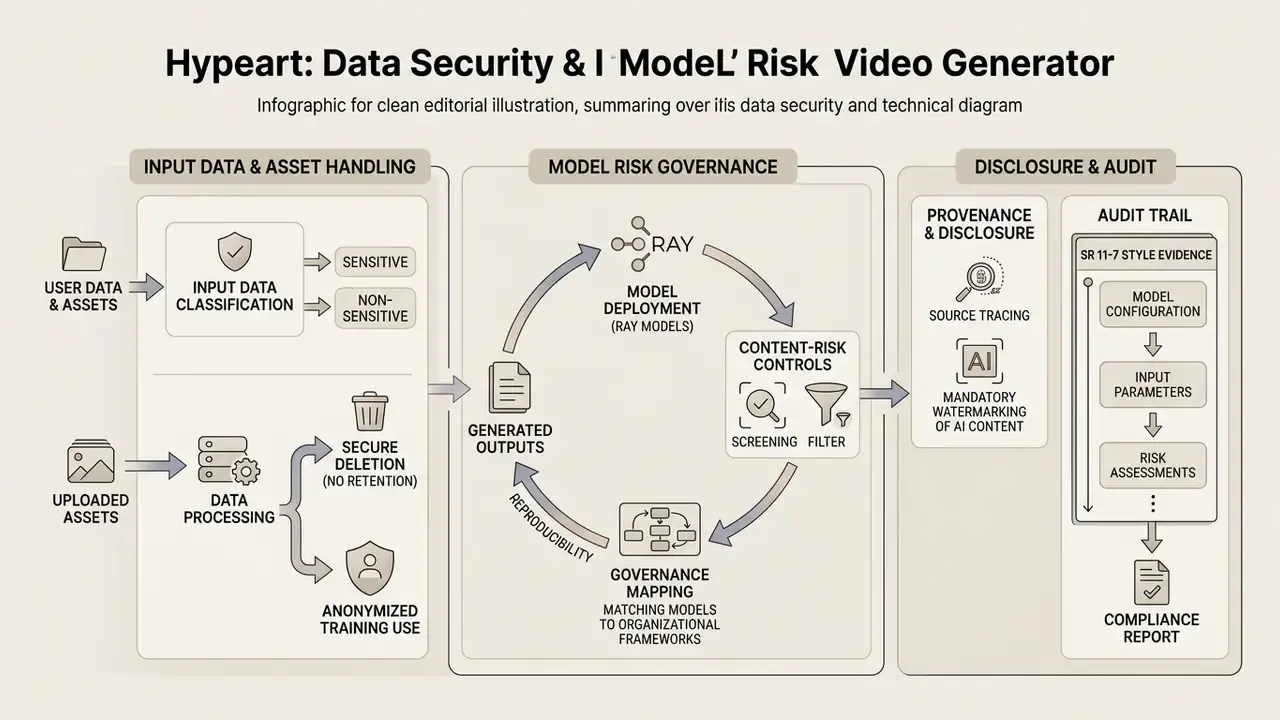
This section addresses the questions that decide whether Dream Machine can be entered into an AI inventory at all: what happens to uploaded assets, what evidence the platform emits, and which controls you must layer on top yourself.
1. Input data classification. Image-to-video and Modify workflows require uploading source material, frequently through a public CDN URL. Treat every upload as an egress event. Customer photographs, screenshots of internal systems, unreleased product renders, contract fragments and identifiable faces are all in scope. Set a hard policy: no classified, confidential or personally identifiable material through consumer web tiers, and only sanitised or synthetic references through the API. Where a screenshot must be used, pre-process it (crop, redact, flatten) with tooling described in our guide to online photo editors and, for zero-budget teams, our free photo editor comparison.
2. Retention and training use. Whether uploads and prompts are retained, for how long, and whether they may be used to improve models is a contractual question, not a documentation question. Before onboarding, get written answers on: retention window for inputs and outputs; availability of a training opt-out or zero-retention mode; sub-processor list and hosting geography; deletion SLA on request; and breach-notification timelines. Product pages do not settle these points. Require them in the DPA or enterprise agreement. Vendor data required: specific retention periods and the existence of a zero-retention mode are not officially published as of this update.
3. Reproducibility and audit trail (SR 11-7 style evidence). Model-risk validation demands that an output can be re-derived or, at minimum, fully described. Generative video is stochastic, so build an evidence record per asset containing: verbatim prompt text, negative and style modifiers, reference image hashes, model checkpoint (Ray2 / Ray3 / Ray3.2), resolution, aspect ratio, loop flag, keyframe IDs, seed value where exposed, the job ID returned by the API, timestamp, requesting user, plan tier, and reviewer sign-off. Store the record immutably next to the rendered file. Where the platform exposes no seed parameter, document that gap explicitly as a residual risk in the model inventory instead of claiming reproducibility you cannot demonstrate.
4. Content-risk controls. Generative video introduces brand and legal exposures that no vendor SLA removes: unintended likeness resemblance, protected trademarks appearing in backgrounds, anatomical distortions, illegible or hallucinated on-screen text, and the reputational risk of outputs that read as deepfakes. These need human review gates, not model settings. There is no parameter for taste.
5. Provenance and disclosure. Align with emerging labelling expectations: attach or preserve content-credential metadata (C2PA-style provenance) where the toolchain supports it, keep an internal register of AI-generated assets, and apply visible or metadata-level AI disclosure in jurisdictions and channels that require it. Confirm the vendor's current position on provenance signalling and on third-party security attestations (SOC 2 Type II, ISO 27001) during due diligence, and treat any unverified claim as unverified. Vendor data required: current certifications and C2PA support are subject to confirmation.
6. Governance mapping. Register the tool in the AI inventory with an owner, use-case boundary, approved data classes, plan tier, licence evidence method, review gate and re-validation cadence. Map controls to your framework of choice (NIST AI RMF functions, EU AI Act transparency obligations for synthetic media) and record which obligations are met by vendor controls and which rely on your own compensating controls. The distinction is the first thing an examiner will ask about.
Core Luma Dream Machine Features for AI Video Generation
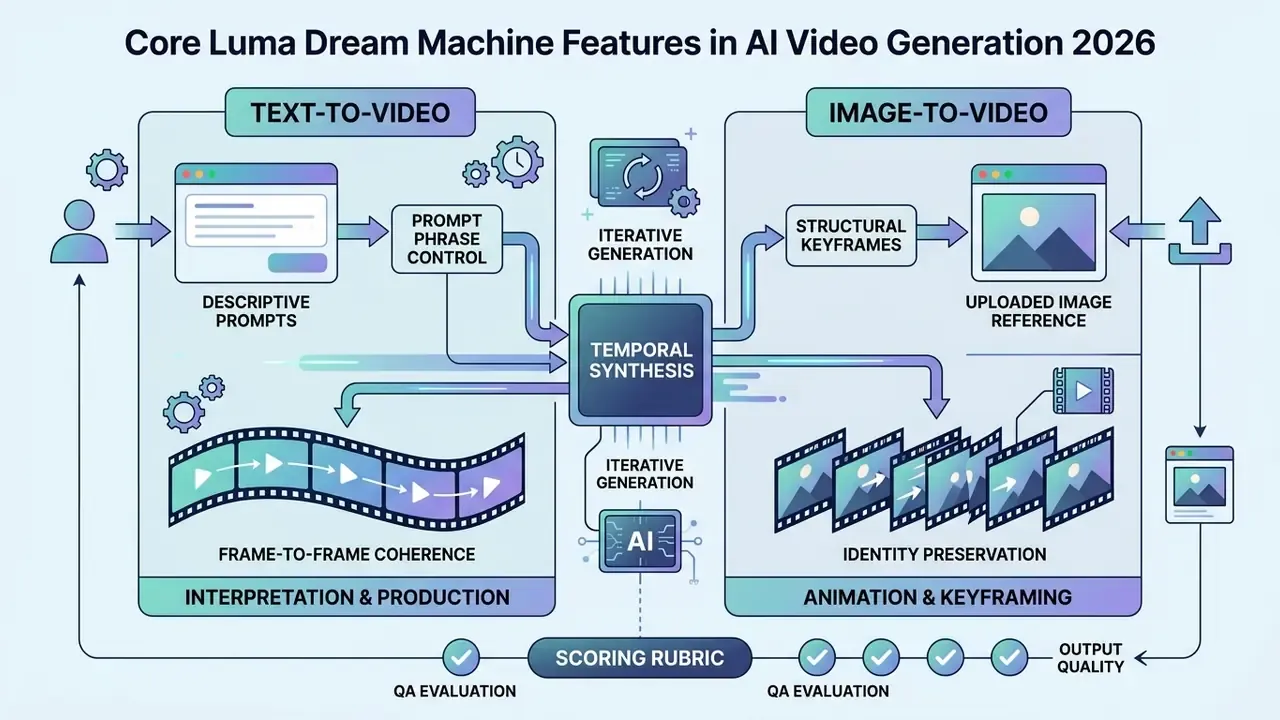
Evaluating the luma dream machine ai video generator features means examining two things: how prompts are interpreted, and how frame-to-frame synthesis holds identity. The platform separates generation into distinct text-driven and image-conditioned workflows to keep visual consistency manageable.
Text-to-Video: Creating Video From a Text Description
The luma dream machine text to video generator converts descriptive prompts into temporal video frames by parsing scene subjects, environmental lighting, camera perspective and action dynamics. Vendor guidance is explicit: prompts should be action-focused, present-tense, roughly 100 words, and should name one clear camera move rather than several competing ones.
«VidProM contains 1.67 million unique real user prompts and 6.69 million videos, the largest corpus for studying how phrasing shapes generated output.»
The practical implication for production teams: prompt phrasing is a controllable variable with a measurable effect on acceptance rates. Which is precisely why prompts belong in the audit record described above, not in someone's browser history.
Image-to-Video: Animating Images and References
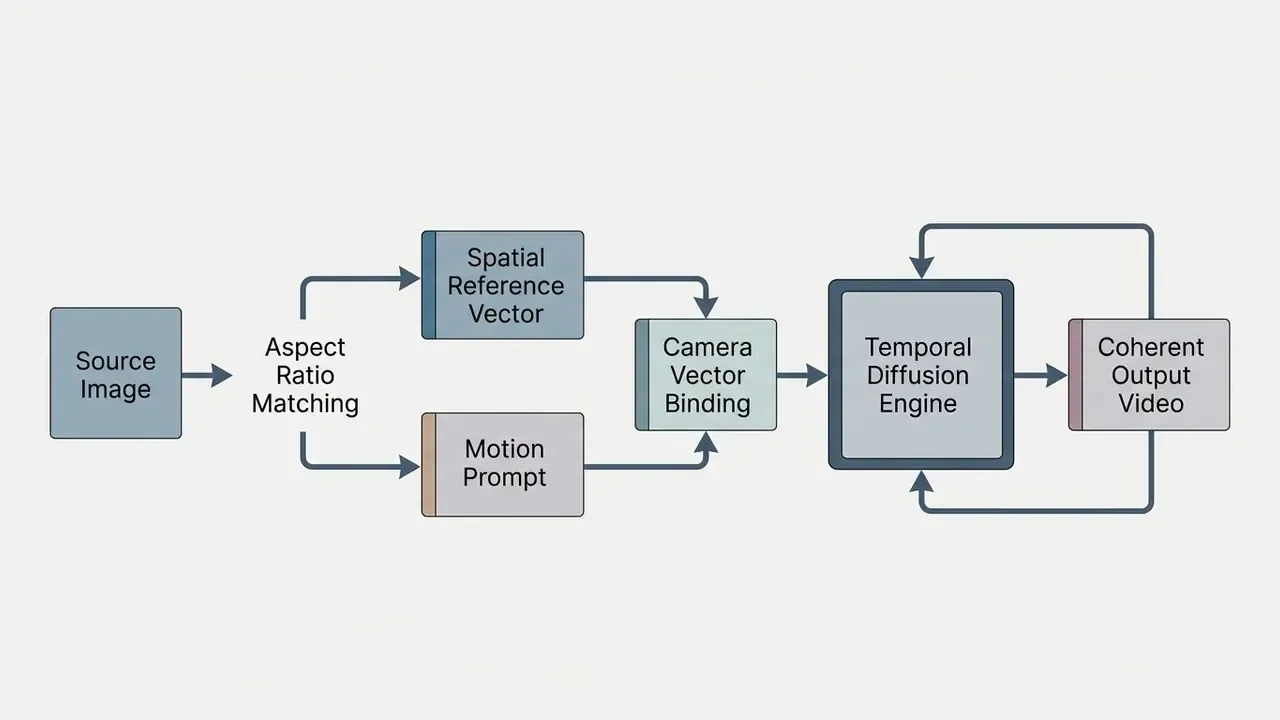
The luma dream machine image to video ai pipeline uses uploaded static images as structural keyframes to anchor subject identity and spatial geometry before applying temporal motion. Vendor materials describe the workflow as animating a reference image forward in time while holding style and subject identity, supported by character-reference and style-reference options. This is the workflow of choice for animating finished artwork produced elsewhere, including Midjourney, DALL·E 3 and Stable Diffusion renders, and for turning product photography or storyboard frames into motion. Teams building that upstream art step can compare engines in our review of the best AI art generators and our evaluation of Midjourney versus competing image generators; the broader category is mapped in our explainer on image-to-video AI tools. To prevent asset loss during web ingestion, many teams pre-process source images with the tools detailed in our guide to online photo editors.
«AIGVQA-DB spans 36,576 videos from 15 models with 370,000 expert ratings across four axes: static quality, temporal smoothness, dynamic degree and text-video correspondence.»
Those four axes are a ready-made scoring rubric for internal QA. Rate every candidate clip on static fidelity, motion smoothness, dynamism and prompt correspondence before it enters editorial assembly, then track the distribution over time to detect drift after vendor model updates. Drift detection is dull work. It is also the only way you will notice a checkpoint change that nobody announced.
How to Use Luma Dream Machine: From Prompt to Finished Video
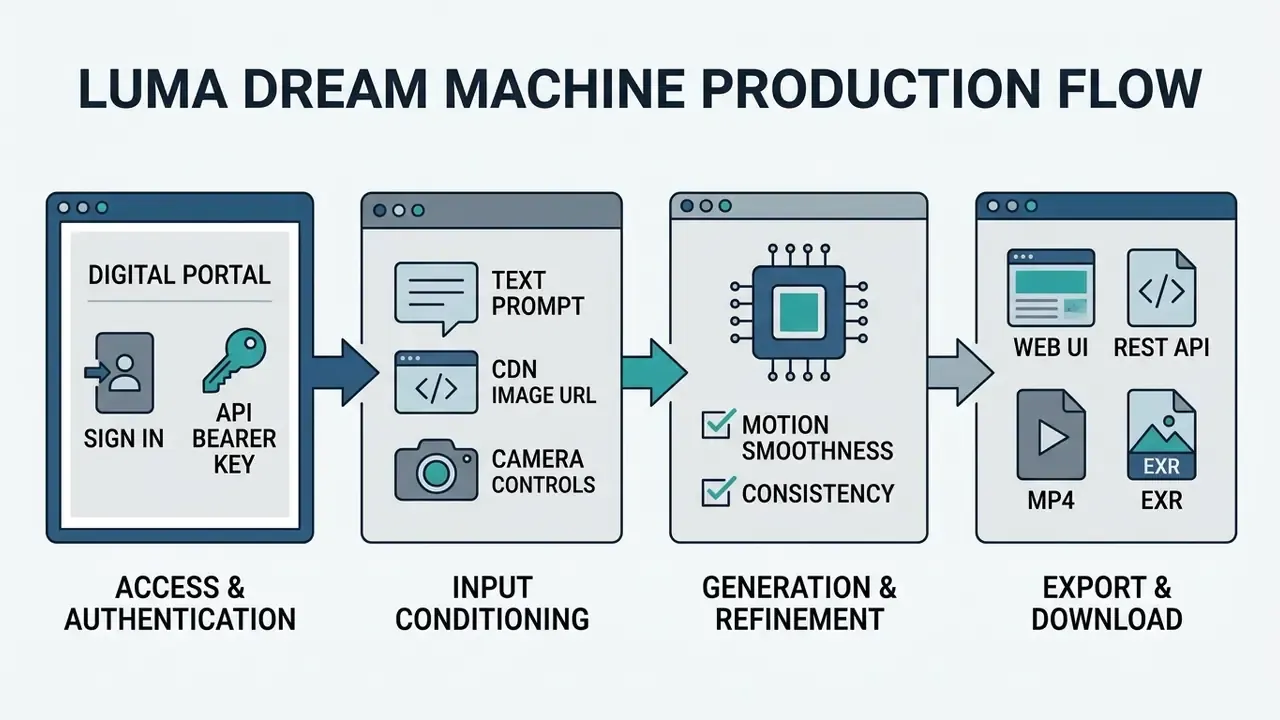
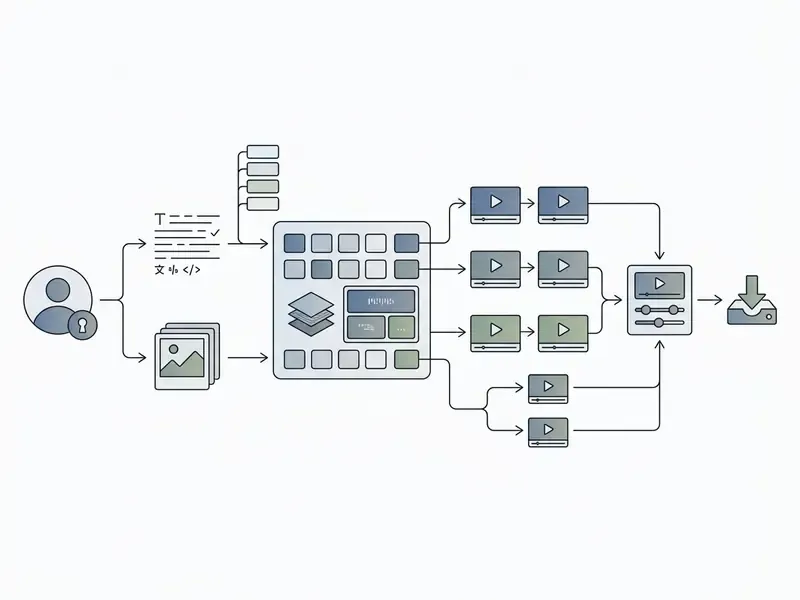
Operating the luma dream machine video generator involves a structured four-stage workflow: authentication, prompt conditioning, draft validation, and final export retrieval. Newcomers to the category may want the conceptual overview in our primer on AI video generators first.
Sign-Up and Access to Luma Dream Machine
Users reach the web-based luma dream machine video generation site at app.lumalabs.ai, or connect programmatically through platform.lumalabs.ai. Sign-up is available by email, Google or Apple identity, with an iOS client alongside the browser app; legacy Dream Machine accounts were migrated to the current interface. The three access paths are functionally distinct: the browser app is the consumer surface, the iOS app mirrors it with mobile capture flows, and the API is the only path with programmatic auditability. That last point deserves emphasis in any governance review. Organisations managing large media pipelines often evaluate external ingestion methods such as the ability to upload video online to maintain reproducible intake logs.
How to Write a Prompt for Video Generation
Constructing prompts for the luma dream machine video generation tool 2025 onwards follows a structured syntax: Subject + Action + Environment + Camera Motion + Lighting/Mood + Visual Style.
Ready-made prompt templates for common tasks
"Slow subtle movement, character breathing naturally, soft wind blowing hair, cinematic lighting, push in slow"
Why it works: the source image already carries composition and style, so the prompt only describes what changes. The vendor's own keyframe guidance advises describing motion, not static elements.
"Two historical figures warmly hugging under sunny skies, emotional lighting, medium shot, camera orbit left, photorealistic 8k"
Why it works: a single named camera move plus one emotional beat avoids the multi-action conflicts that trigger limb and face artifacts. Note the likeness-risk gate before publishing any output featuring recognisable or historical individuals.
"A street dancer performing in neon-lit city street, dynamic motion, wet asphalt reflections, crane down, 35mm film grain"
Why it works: high-contrast lighting and reflective surfaces give the model strong motion cues, while crane down supplies a deterministic camera path.
"Aerial drone view floating over misty pine forest at sunrise, cinematic fly-through, seamless motion, soft volumetric sunlight"
Why it works: landscape subjects contain no faces, hands or text, the three weakest areas of current video diffusion, so acceptance rates are typically the highest of any category.
- Define the primary subject.State the focal entity plainly, for example "a corporate compliance officer".
- Specify temporal action.Use present-tense verbs, for example "examining audit records on a tablet".
- Anchor the camera vector.Pass recognised strings such as
camera orbit left,push inorcrane up. - Define lighting and aesthetics.Add environmental parameters, for example "cinematic soft overhead lighting, 35mm lens, photorealistic".
- Animating art from Midjourney or DALL·E 3 (image-to-video)Animating art from Midjourney or DALL·E 3 (image-to-video):
- Emotional interaction (AI hug / AI kiss)Emotional interaction (AI hug / AI kiss):
- Dynamic motion scene (AI dance / action)Dynamic motion scene (AI dance / action):
- Drone shots and landscapesDrone shots and landscapes:
- Product or marketing loop (enterprise)Product or marketing loop (enterprise):
"Product on matte concrete pedestal, slow turntable rotation, studio softbox lighting, shallow depth of field, camera orbit right, loop"
Why it works: a closed camera path plus the loop flag produces seamless social-ready assets without external editing.
One camera move per clip, the most important visual element first, and roughly 100 words. In our own template testing that configuration carried the lowest retry cost by a clear margin.
Reviewing Output, Refining and Exporting Videos
After generation, operators validate frame continuity, subject identity retention and motion artifacts. Iterative refinement runs through the platform's own controls (regenerate, "more like this", brainstorm variations, and Modify-with-instructions on existing footage) plus API-side parameters such as aspect ratio, loop, resolution, model selection and keyframes.
Generation speed and queue limits. Average render time for a 5-second clip runs from about 90 to about 120 seconds. On the Free tier during peak load, the shared public queue can stretch waiting time to tens of minutes; early-beta users historically reported waits measured in hours when demand spiked after launch. Paid tiers (Lite, Plus, Pro, Ultra) receive priority processing, which is the single most under-appreciated reason production teams outgrow the free plan. Budget wall-clock time as queue_wait + render_time + human_review, never render time alone.
Version note: third-party services and early release notes still label the engine Dream Machine v1.0 / v1.5; in the official Luma Labs API those iterations correspond to the updated Ray2, Ray3 and Ray3.2 families.
When managing large video archives post-export, teams frequently consult our guide to video compressors to cut storage overhead without sacrificing visual fidelity. Users retrieving assets across secondary endpoints can also use a validated url video downloader to preserve asset integrity and checksums.
How to Improve Video Quality in Luma Dream Machine
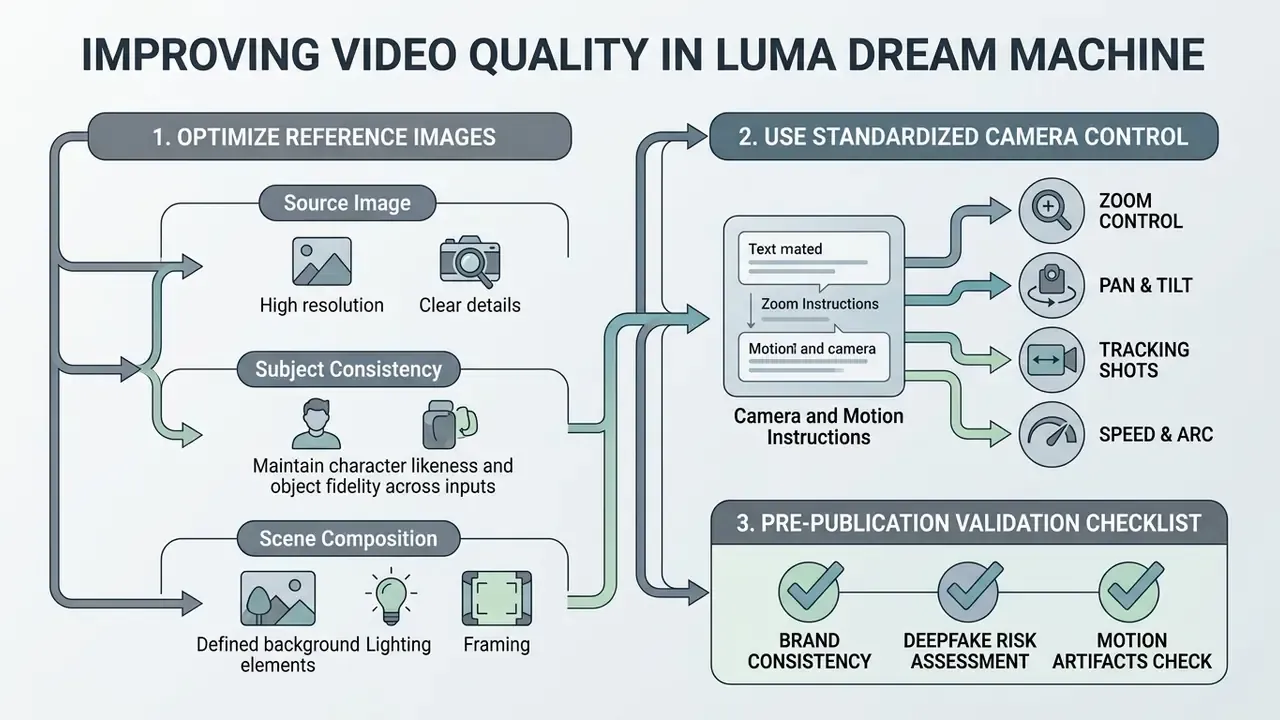
Maximising output quality in luma dream machine video generation comes down to two levers: reference image specification, and standardised camera control syntax.
Source Image, Subject Consistency and Scene Composition
For solid image-to-video performance, input images should match the target aspect ratio (a workable range of roughly 2:5 to 5:2), carry a short edge above about 300 pixels, and arrive in a standard web format (JPG, JPEG, PNG, WebP) within the platform's upload size ceiling. Treat these as engineering defaults to confirm against the Luma Dream Machine API documentation and your own ingest tests, not as a universal specification. Resolution ceilings and maximum upload sizes differ by model checkpoint and by vendor.
High-contrast source images with clean background separation appear to preserve subject identity across frames more reliably than cluttered inputs in practitioner testing. Note the hedge: no primary source in our reference set formalises composition or contrast requirements, so this remains an empirical heuristic rather than a documented specification. Vendor data required: the quantitative relationship between background contrast and subject consistency is not officially normalised. What the literature does support is that richer, better-posed visual conditioning improves geometric stability:
«Multiple unposed images used as keyframes let the model interpolate a camera trajectory, outperforming baselines on geometric and visual consistency.»
Operationally: supply the cleanest, highest-resolution reference you have; match aspect ratio before upload rather than letting the pipeline crop; and where the workflow supports paired keyframes, use them to constrain the camera path instead of hoping the model infers it.
Controlling Camera and Motion Through Text Instructions
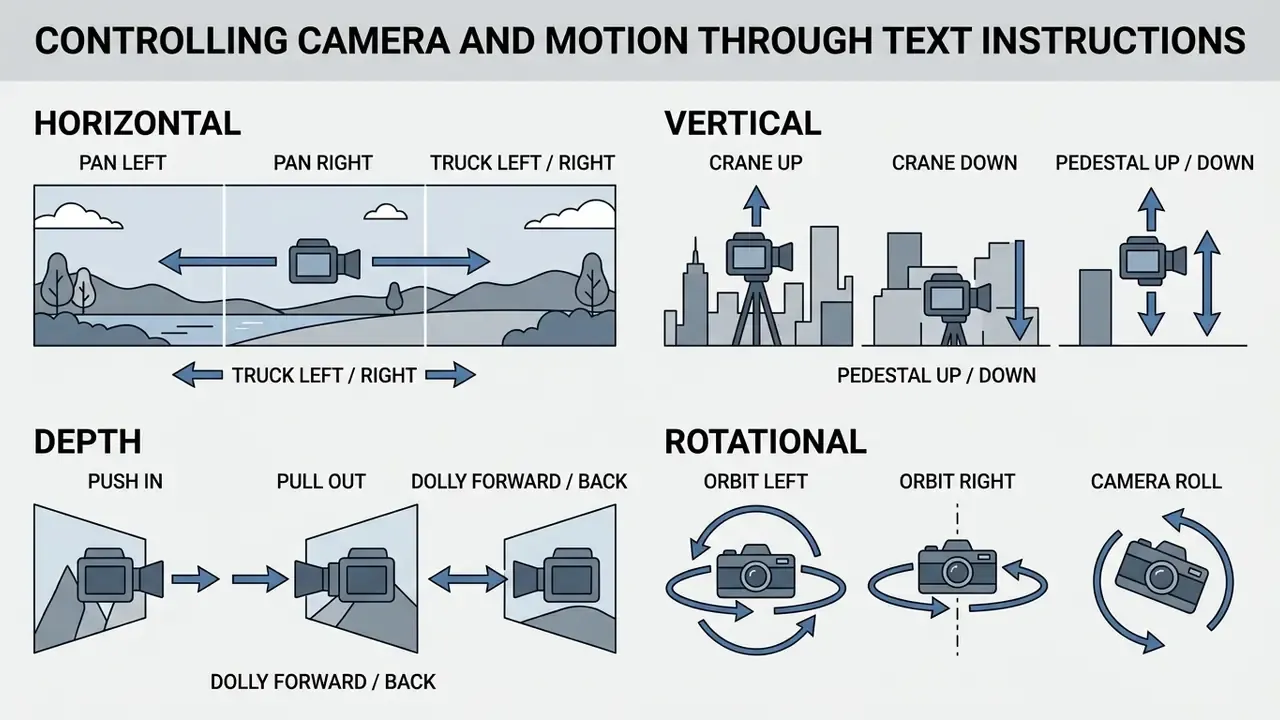
The luma dream machine video generation ai engine responds to explicit camera commands defined in its API specs: pan left, pan right, orbit left, orbit right, crane up, crane down, push in and pull out. The API also exposes a camera-motions listing endpoint, so supported strings can be retrieved programmatically and validated before job submission. That small integration step eliminates a whole class of silent prompt failures, where an unsupported phrase is simply ignored and you pay for the render anyway. Vendor documentation describes these camera-motion concepts as providing reliable, composable control over camera movement.
Camera vocabulary solves framing. It does not solve compositional binding, meaning the model's ability to place the right number of the right objects in the right spatial relationship:
«VIDEOREPAIR reports relative gains on T2V-CompBench of +8.16% for spatial relationships, +8.69% for numeracy and +15.87% for attribute binding, even over strong models.»
Read that as a warning label. If your prompt depends on "three identical devices on the left of the desk", expect failures and plan the iteration budget accordingly.
Pre-Publication Validation Checklist (Brand and Deepfake Risk)
Run every candidate clip through this gate before it enters an approved channel:
Checklist0 / 9
Enterprise Use: A Financial-Sector Case (Illustrative)
A financial software provider needed to automate video generation for customer onboarding tutorials. The team's first approach used unstructured natural-language prompts written ad hoc by content authors, which produced inconsistent framing and a high share of unusable renders. The remediation was procedural rather than technical: prompts were rewritten against a fixed template using standardised camera vectors (push in on the interface, orbit right around the subject), export parameters were locked to 1080p, and each prompt was version-controlled alongside its model checkpoint.
Method and measurement. Artifact rate was defined internally as the share of renders rejected by a two-reviewer QA gate applying the validation checklist above, measured across a fixed sample of onboarding scenes before and after the prompt-standardisation change. On that internal measure the rejection rate fell from roughly one in three renders to under one in sixteen, which made the pipeline predictable enough to integrate into automated media publishing. These figures are one organisation's internal QA statistics, not a vendor benchmark and not an independently audited result. This scenario is composite and illustrative. Treat it as directional evidence that prompt standardisation, not model switching, is usually the highest-leverage intervention, and re-measure on your own scene mix before setting acceptance targets.
The transferable lessons: standardise camera vocabulary before scaling volume; lock export parameters at pipeline level rather than per user; keep simultaneous actions per clip to one; and assemble multi-shot sequences in an external editor instead of asking the model for long continuous takes.
Results and Limits of Luma Dream Machine
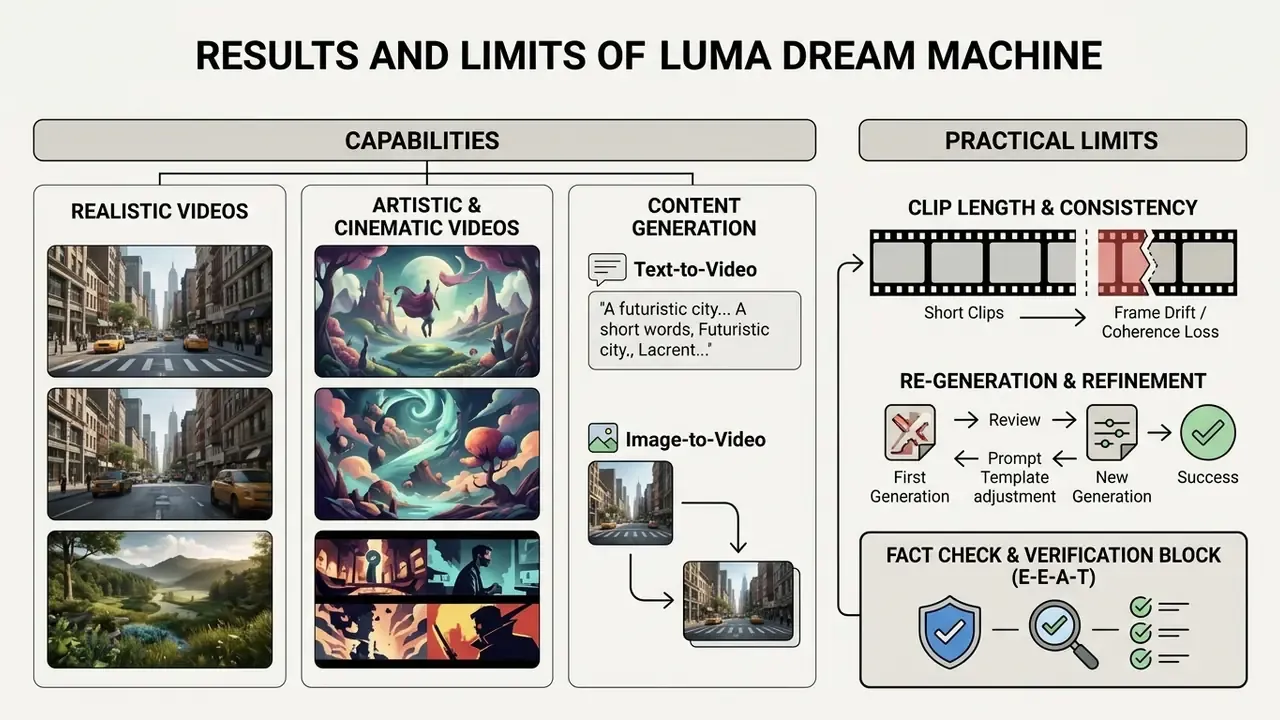
Understanding the practical limits of the dream machine video generator prevents expensive deployment failures in production media pipelines.
Realistic, Artistic and Cinematic Videos
The platform is strong at cinematic framing, photorealistic lighting and render styles ranging from watercolour to photorealistic 3D. Vendor style-reference material explicitly covers anime, cinematic and watercolour aesthetics, and Ray3-class models add native HDR output aimed at professional finishing. Teams weighing this against zero-cost options can review our overview of free AI video generators, and those comparing stylistic range across engines may find our profile of PixVerse AI a useful counterpoint.
«LanDiff (5B parameters) scores 85.43 overall on VBench T2V, surpassing Sora (84.28) and other commercial systems via hybrid token compression of roughly 14,000x.»
That benchmark context matters for expectation setting. Leading engines now cluster within a few points of one another on aggregate visual alignment, so differentiation for enterprise buyers rests increasingly on controllability, licensing clarity and API auditability rather than raw output beauty. Beauty is table stakes. Evidence is not.
Clip Length, Consistency and Re-Generation
Native generation defaults to short clips, 5 to 10 seconds. The extend feature permits temporal extension up to 30 seconds in SDR mode, but repeated extensions introduce visual drift, character morphing and fine-structure degradation. Vendor documentation across model generations reflects this moving ceiling: older guidance described 4-second defaults extendable to about 9 seconds with an image keyframe, while current Ray2 and Ray3-era FAQs describe 5- and 10-second bases extendable to about 30 seconds, with an explicit warning that quality falls after repeated extends. The degradation pattern below comes from practitioner testing and vendor caveats rather than a published quantitative study. Vendor data required: a frame-level degradation metric for sequential extension operations has not been published.
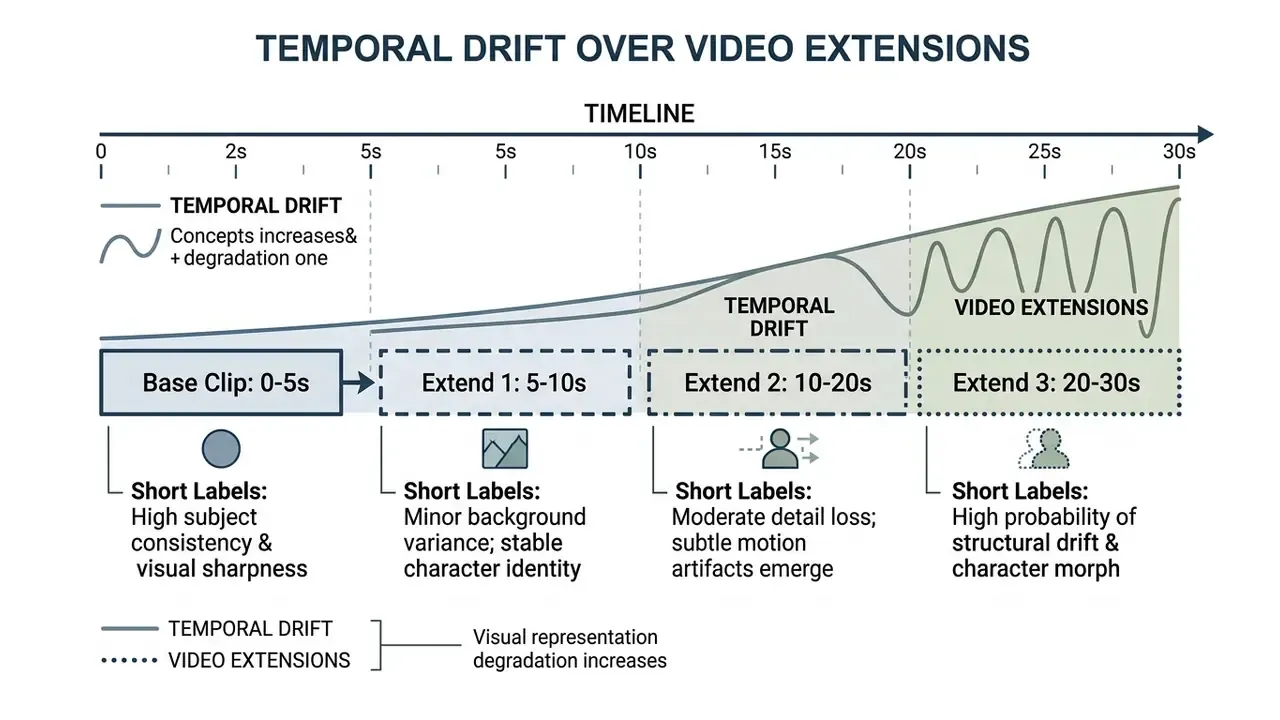
«CogVideoX generates 10-second videos at 16 frames per second and 768x1360 resolution, leading both machine metrics and human evaluation among diffusion transformers.»
A useful reality check on the state of the art: ten seconds at high resolution is the current competitive frontier for single-shot generation. Any content plan requiring minutes of continuous footage has to be architected as a multi-clip assembly, not a single render.
Other documented constraints worth registering as residual risks: no native audio generation, so voice and sound design must be produced separately; weak rendering of small text and thin structures; sensitivity to prompt phrasing; and variable character consistency between separate generations.
Fact check and verification block (E-E-A-T):
FAQ on the Luma Dream Machine AI Video Generator
Do You Need Video Editing Skills to Use Luma AI
No prior video editing experience is required to generate base clips with the luma dream machine ai video generation tool. Prompt literacy, not timeline skill, is the entry requirement, and instruction-driven Modify workflows extend that to basic footage editing. Assembling multi-shot commercial productions is a different job: it needs post-processing in timeline editors such as the veed video editor, general-purpose video editing tools, or the specialised platforms outlined in our guide to YouTube video editors. Budget-constrained teams can start from our comparison of free video editing software. Creators handling dialogue or voice tracks usually pair video outputs with tools from our guide to AI voice generators, since Dream Machine does not generate audio natively.
Is There an API for AI Video Generation at Scale
Yes. Luma AI exposes a REST API at https://api.lumalabs.ai/dream-machine/v1 supporting programmatic text-to-video, image-to-video, keyframe interpolation, extension, camera-motion listing and status polling, authenticated with a Bearer token issued from the Luma API Platform. Developers building enterprise media pipelines can consult our AI Media API Guides and our Google Veo implementation guide to benchmark API response latencies and token economics.
«T2V-CompBench provides 1,400 prompts across seven compositional categories; models show measurable weaknesses in spatial relationships, numeracy and attribute binding.» T2V-CompBench: A Comprehensive Benchmark for Compositional Text-to-Video Generation, arXiv (2024). https://arxiv.org/abs/2407.07357 For integrators, that benchmark is the basis of a sane acceptance test suite. Probe your own prompt families for spatial, numeric and attribute failures before shipping automation that assumes deterministic compliance.
Is Dream Machine Suitable for Long Video Generation
The platform is designed primarily for short clips, 5 to 10 seconds per prompt. Long-form media requires generating sequential short clips with consistent keyframes and stitching them in external editors, or adding captioning overlays through a video caption generator. The recommended pattern is shot-chaining: use the final frame of clip N as the start keyframe of clip N+1, hold wardrobe, lighting and lens language constant across prompts, and cut on motion to hide the seams. Teams comparing zero-cost tools for rapid prototyping can examine our market analysis of the best free AI video generators.
Does Luma Dream Machine Understand Non-English Prompts
The model is optimised for English. Wrapper services may auto-translate input, but for reliable interpretation of camera commands (push in, orbit right, crane down) and to minimise artifacts, author prompts in English. A practical compromise for multilingual teams: draft the scene description in your working language, translate it into English, then append the camera vector verbatim from the supported-strings list rather than translating it.
Where Do Uploaded Images and Prompts Go, and Are They Used for Training
Retention windows, training-use policy, sub-processor lists and deletion SLAs are contractual matters to confirm with the vendor in a data-processing agreement, not points to infer from product pages. Until those answers are in writing, restrict uploads to sanitised or synthetic references and prohibit confidential or personally identifiable material entirely. Vendor data required.
Can Dream Machine Output Satisfy Audit and Model-Validation Requirements
Partially, and only with compensating controls. The API returns job identifiers and accepts explicit parameters (model, resolution, aspect ratio, loop, keyframes), which lets you reconstruct what was requested. Because generation is stochastic and seed exposure varies by surface, exact re-derivation may not be possible. Document that as a residual limitation, and compile the per-asset evidence record described in the governance section so every published clip carries a reproducible request trail and a named reviewer.
Does the Platform Label AI-Generated Content or Support Provenance Metadata
Visible watermarking exists as a plan-tier feature, present on Free and Lite, removed on paid tiers. Watermark removal is a licensing feature, not a provenance mechanism, and it is worth saying plainly because the two get conflated in vendor comparisons. Organisations subject to synthetic-media transparency obligations should implement their own labelling and content-credential handling, then confirm the vendor's current provenance support during due diligence. Vendor data required: the official position on C2PA is subject to clarification.
Is There IP Indemnification if a Generated Clip Triggers a Copyright Claim
Luma's Terms assign output rights to the customer and condition commercial use on an active qualifying paid subscription. Ownership assignment is not indemnification. Any indemnity, liability cap or defence obligation must be negotiated and evidenced in the enterprise agreement; do not assume standard consumer terms carry one. This material is informational, not legal advice. Have counsel review the current Terms of Service, API Terms of Use and Enterprise Terms before high-exposure campaigns.
What About Rate Limits, SLAs and Support Escalation
Free-tier throughput is governed by a shared queue with no availability guarantee. Paid tiers add priority processing, and Team or Enterprise agreements are where SLAs, pooled credits and usage analytics get negotiated. Vendor support runs through documented email channels and the Learning Hub, with refunds available on request within 30 days of subscription initiation or renewal under the published payments policy. For automated pipelines, implement exponential backoff on status polling, idempotent job submission, and a fallback engine so a queue spike does not stall a publishing calendar. Our AI Media Support and Troubleshooting notes cover the common failure modes in more detail. A Safe Next Step If you are deciding this quarter, keep the first move small and reversible. A workable sequence:
- Run a two-week bounded pilot on a single Plus or Pro seat under corporate billing, restricted to non-confidential marketing assets.
- Log the full evidence record for every render, including prompt, checkpoint, job ID, tier and reviewer.
- Measure reject rate on your own scene mix, then recompute cost per accepted second with the model above.
- Register the tool in the AI inventory with an owner, approved data classes and a re-validation date before any wider rollout.
- Only then negotiate Team or Enterprise terms, with retention, provenance and indemnity language on the table. If step 2 cannot be completed with the tooling you have, that is your real finding. Fix the evidence pipeline first.
Appendix A: Revised Statements and Withdrawn Attributions
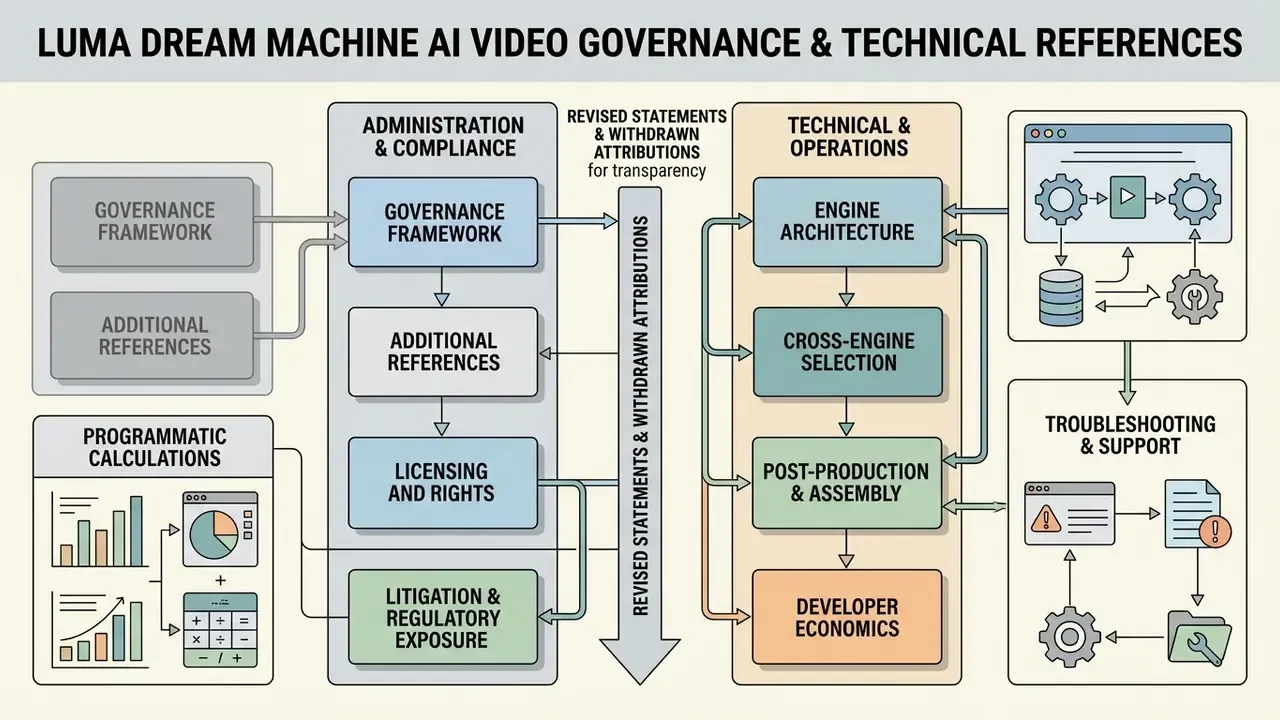
Additional Governance and Technical References
For specialised media workflows, technical directors and risk owners can explore focused analyses across our knowledge base:
Disclaimer: this material is provided for informational purposes and does not constitute legal, financial or compliance advice. Licensing terms, pricing, model capabilities and data-handling policies change frequently. Verify all commercial and regulatory conclusions against the vendor's current official documentation, and with qualified counsel, before deployment.
Footer navigation: AI Media Glossary
- Cross-engine selection
- comparison of AI video generators and free-tier comparison
- Licensing and rights
- AI Media Commercial-Use Hub and commercial use of AI image generators
- Litigation and regulatory exposure
- AI Litigation and Case Timelines
- Developer economics
- AI Media API Guides and the Google Veo implementation guide
- Programmatic calculations
- AI Media Calculators
- Post-production and assembly
- YouTube video editor workflows and video compressors
- Troubleshooting and support
- AI Media Support and Troubleshooting