Why does a bank risk owner care about a short-form video toy? Because someone in marketing has probably already uploaded a product shot to it.
Marcus Hale, author. All positions attributed to him are illustrative.
Last updated: January 2026 · Review scope: product capabilities, model architecture, subscription terms, licensing constraints, data-handling controls.
Executive Summary for C-Level, Model Risk and AI Governance
| Decision question | Short answer | Where to verify |
|---|---|---|
| What is it? | A browser-based generative video engine (text-to-video, image-to-video, keyframe interpolation, in-frame editing, lip sync, audio effects) operated by Mellis, Inc. under the Pika brand. | pika.art, pika.me |
| Is it production-ready for regulated marketing? | Conditionally. Output fidelity is measurable (AIGCBench SSIM around 0.800; CLIP frame similarity around 0.996), yet composition control, reproducibility, and audit logging stay weak against enterprise DAM standards. | AIGCBench, T2V-CompBench |
| Shadow AI exposure | High. Sign-up is self-service, free-tier accounts accept arbitrary image uploads (product shots, unreleased creative, screenshots holding customer data), and no publicly documented enterprise SSO/SAML gate exists on the consumer tier. | Pika Privacy Policy, Acceptable Use Policy |
| Commercial licensing | Free/Basic output is personal, non-commercial only. Paid tiers grant commercial rights to the extent the selected plan expressly permits it, and Pika's own FAQ has stated commercial use applies to Pro/Fancy, which conflicts with broader "all paid tiers" summaries. Verify per plan, per invoice date. | Pika Terms of Service |
| Budget profile | Consumer credit tiers from $0 to $76/mo (annual billing). No publicly published enterprise SKU with SSO, centralized billing, DPA, or committed API throughput at time of audit. | pika.art/pricing, dev.pika.art |
| Recommended posture | Register the tool in the AI inventory, restrict it to non-confidential creative assets, require paid-tier accounts for anything published, and mandate human review of every export before distribution. | Internal AI RMF register |
Who This Review Is For, and What It Deliberately Leaves Open
This review is written for the people who sign off on tools, not only for the people who use them: heads of model risk, compliance officers, AI governance leads, and the CFO organization funding creative automation. The evaluation questions follow that order. Business question first, regulatory context second, control framework third, measurable impact fourth.
Three limits are worth stating up front. First, benchmark scores quoted here come from public academic sources with their own methodological caveats. Second, vendor terms for consumer AI products change quietly, so any pricing or licensing line in this article must be re-verified against the live page before a purchase decision. Third, statements about how buyers behave, including the assumption that marketing teams adopt video tools ahead of formal approval, remain hypotheses until confirmed by your own analytics, interviews, or CRM data.
One more caveat. Market-share and ranking claims about Pika circulate widely and rarely survive scrutiny. Treat them as marketing colour, not evidence.
What Pika AI Video Generation Is, and Where the Official Site Lives
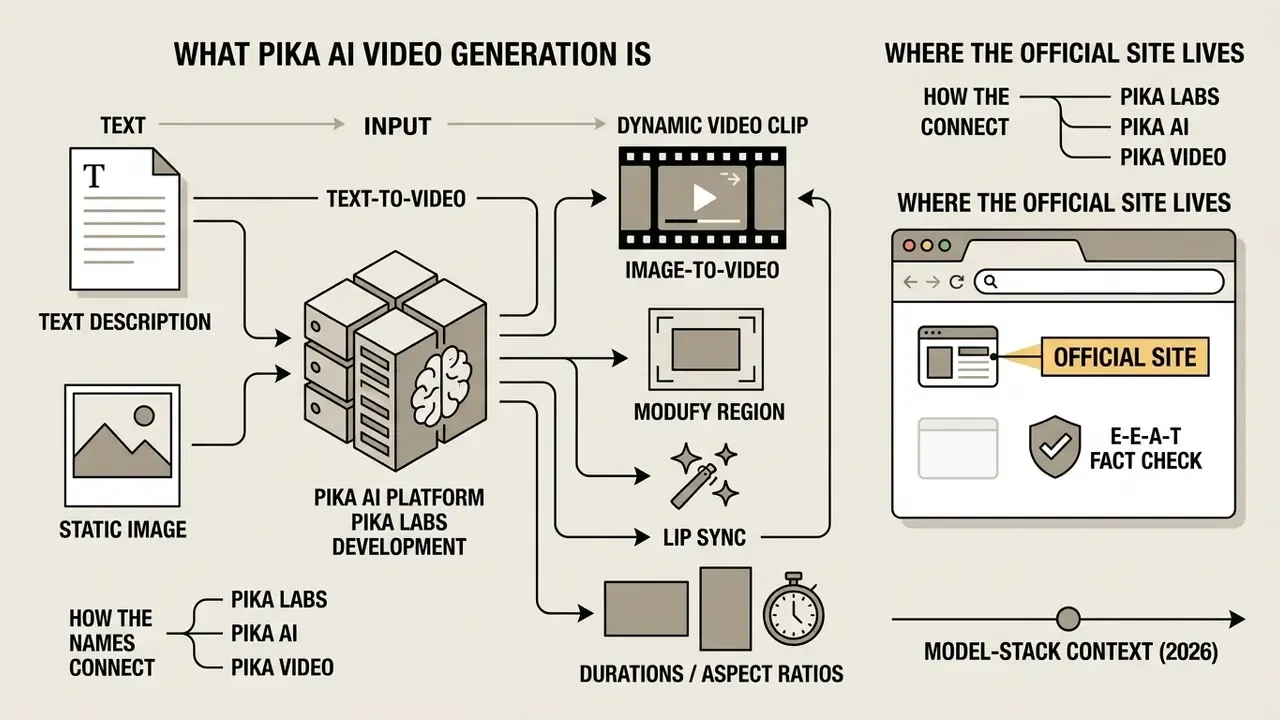
Pika AI Video Generation is an artificial intelligence platform developed by Pika Labs that converts text descriptions and static images into dynamic video clips. The platform gives enterprise teams and independent creators an automated engine for concept rendering, motion modeling, and visual asset production.
«Pika is described as an idea-to-video platform that produces short clips in under 90 seconds with no video editing experience.»
Pika AI, Pika Labs and Pika Video: How the Names Connect
The terms Pika Labs, Pika AI, and Pika video describe distinct operational layers of one video generation ecosystem. Search demand mixes them freely, which is why queries such as pika ai video generation pika still return the same product surface.
- Pika Labs is the underlying technology company, founded in April 2023 by former Stanford AI researchers Demi Guo and Chenlin Meng. Public reporting places disclosed funding at $55 million by November 2023, plus a further $80 million in June 2024, so $135 million in total.
- Pika AI refers to the proprietary generative model stack and software platform that powers pika ai video generation. Product milestones cited in coverage: Pika 1.0 (November 2023), Pika 1.5 (October 2024), Pika 2.0 (December 2024), followed by the 2.2 and 2.5 generations documented in the developer portal.
- Pika video denotes the end product: the clips, renders, and animated media files exported by users from the pika ai video generation site.
«The TIP-I2V dataset collected more than 1.70 million real user prompts from official Pika Discord channels between July 2023 and October 2024.»
The practical implication of that scale is governance-relevant. Prompts submitted to community channels became a publicly analysable corpus. Any organization that treats prompt text as internal know-how must assume community-surface interactions are not private by default. In other words, a prompt describing an unannounced product is a disclosure, not a draft.
What Kinds of Videos You Can Create in Pika AI
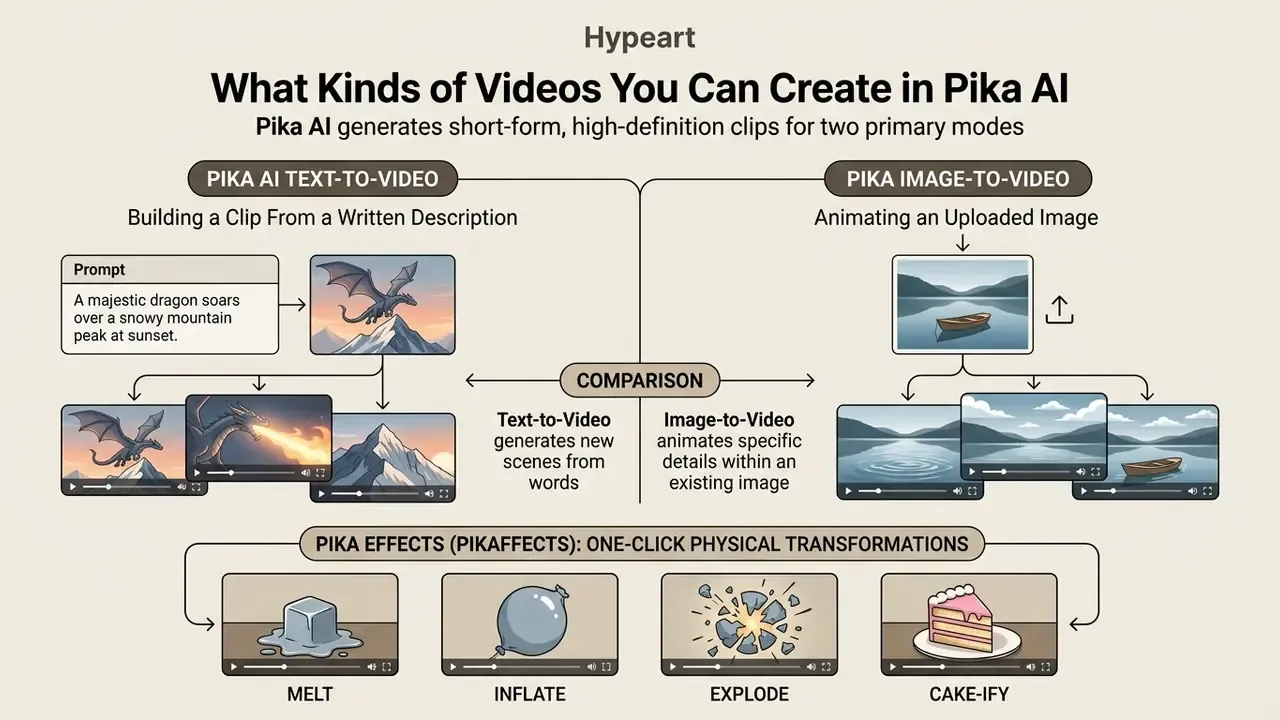
Pika AI generates short-form, high-definition clips through two primary modes: pika ai text to video and pika image to video. Output sequences typically run 3 to 10 seconds, configurable up to 15 seconds on current models, which suits conceptual mockups, marketing media, visual effects, and dynamic web content.
Using diffusion architectures, the pika ai generator translates unstructured text or a static image keyframe into a continuous frame sequence. Users can generate videos with control over camera motion, object trajectory, atmospheric lighting, and rendering style. Beyond raw generation, four capability groups sit on top: one-click physical effects (Pikaffects), character speech synchronization (Lip Sync), sound-effect synthesis (Generate Audio), and canvas-level editing (Modify Region, Expand Canvas).
Pika AI Text-to-Video: Building a Clip From a Written Description
The pika ai text to video mode synthesizes complete scenes from written prompts with no initial visual input. The model interprets subject descriptions, spatial movement, camera technique, and environmental lighting, then generates frames from scratch.
In the pika ai video generator text to video interface, the prompt structures the outcome. According to current public model documentation, base outputs render at 720p or 1080p (480p on the free tier), with standard durations of 5 or 10 seconds and frame rate exposed in integration layers up to 24 fps. Pika's own FAQ notes that some legacy models are fixed at 5 seconds, so resolution and duration must be confirmed per model version rather than assumed platform-wide. Teams benchmarking Pika against other text-to-video AI tools should record model version, resolution, and duration in the test log, because every generation of the stack changes defaults.
Prompt precision drives object interaction fidelity and spatial consistency across frames.
«T2V-CompBench found that current models systematically fail at binding attributes to objects and holding spatial relations over time.»
For regulated communications, that is the core control weakness. If a prompt specifies "the blue card in the left hand," compositional benchmarks show attribute binding and spatial relations can drift between frames. So any claim-bearing visual, whether product colour, an on-screen figure, or a document layout, needs frame-level human verification before publication. Not spot checks. Every claim-bearing frame.
Pika Image-to-Video: Animating an Uploaded Image
The pika image to video workflow treats a user-uploaded photograph or graphic as the foundational keyframe. The pika image to video ai tool reads structural detail, composition, and lighting from the source file, then animates selected elements while preserving core visual identity.
Using pika image to video delivers noticeably higher fidelity and control than pure text generation.
«On AIGCBench, Pika reaches first-frame SSIM of 0.800 and CLIP similarity between adjacent frames of 0.996, the highest among tested algorithms.»
| Evaluation aspect | Pika text-to-video | Pika image-to-video |
|---|---|---|
| Primary input | Natural language text prompt only | Static source image (PNG/JPG) or media URL, plus optional guidance prompt |
| Visual predictability | Lower; composition and styling are inferred by the model | High; composition, characters, and branding mirror the source file |
| Structural fidelity (SSIM) | Variable, depends on prompt detail | High initial-frame alignment (SSIM around 0.800; AIGCBench) |
| Best use cases | Abstract scenes, rapid concept design, storyboarding | Animating product photos, headshots, logos, visual graphics |
| Prompt complexity | High; must detail subject, background, lighting, and style | Moderate; focuses on motion and camera movement |
| Data-exposure profile | Prompt text only | Prompt text plus an uploaded binary asset, so higher confidentiality risk |
Key takeaway in plain text, for readers skipping the table: text-to-video is for exploration, image-to-video is for anything that carries your brand. Governance sits mostly on the second column, because that is where files leave the perimeter.
Pika Effects (Pikaffects): One-Click Physical Transformations
Since Pika 1.5, the platform ships Pikaffects, a library of preset physical and surreal transformations applied to a detected subject. The model isolates the primary object in an image or described scene and applies a destructive or physics-defying change without complex prompt engineering:
- Melt the subject liquefies and collapses.
- Inflate the object swells into a balloon-like form.
- Explode the subject bursts into fragments.
- Cake-ify a blade slices the object as if it were sponge cake.
- Squish / Crush the object is compressed or flattened.
- Deflate, Levitate, Ta-da and related presets: pressure loss, lift-off, and reveal transitions.
Pikaffects launch from an interface control attached to the selected object rather than from typed prompt syntax, which makes them the fastest route to social-first content. Governance note: because Pikaffects visibly destroy or deform the uploaded subject, applying them to third-party products, competitor packaging, or regulated goods creates trademark disparagement and advertising-standards exposure. Restrict the preset library to owned brand assets and internal concepts, and write that restriction into the use-case policy rather than leaving it to taste.
Lip Sync and Generated Audio Effects
Pika includes a Lip Sync tool that aligns a character's mouth movement and facial articulation with an audio track. Users can upload a prepared voice file (MP3/WAV) or type text for speech synthesis, then attach the result to the clip. Teams building voiceovers at scale usually pair this with a dedicated AI voice generator, so tone, language, and the licensing terms of the synthetic voice stay controlled separately from the video model.
The platform also exposes a Generate Audio toggle. The model reads the visual dynamics of the scene, whether engine roar, surf, footsteps, or crowd noise, and synthesizes a matching background layer synchronized to the render. Additional post-generation operations documented in the web and bot layers include reprompt or video edit, adjust (inpainting or outpainting), extend by 4 seconds, and upscale.
⚠️ Risk flag for compliance teams: synchronized lip movement plus synthetic speech is, functionally, a deepfake production pipeline. Any use of a real person's likeness or voice, whether employee, executive, customer, or public figure, requires documented written consent, likeness-rights review, and, in several jurisdictions, visible AI-disclosure labelling. If your institution has an executive-impersonation fraud playbook, this tool belongs in the same conversation.
Enterprise Security, Data Privacy and Shadow AI Control
Pika AI Free Plan and Pricing: What to Check Before Use
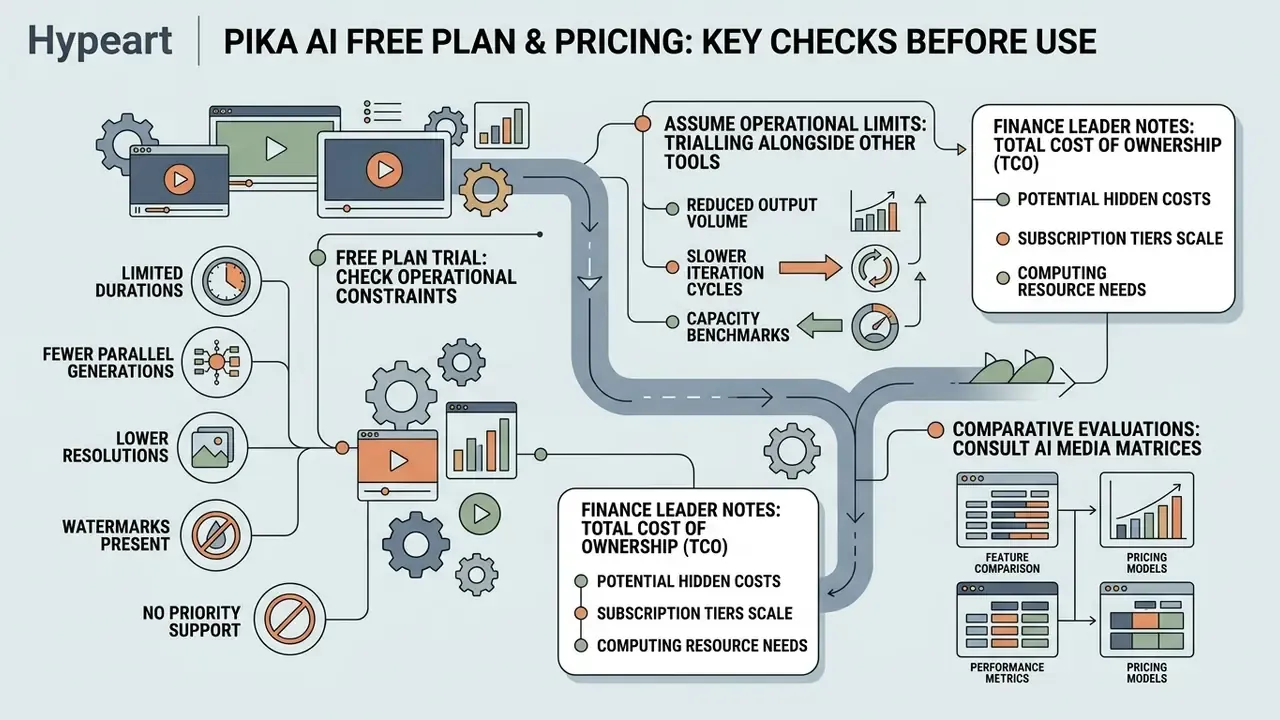
Before deploying Pika AI in organizational workflows, decision-makers should evaluate subscription tiers, monthly credit allocations, watermark conditions, and export limits. The platform runs a credit-based pricing model spanning the free tier and paid commercial subscriptions.
Subscription and pricing audit (E-E-A-T data verification)
Pricing information here is general and may age quickly. Confirm current terms on the official site at pika.art before subscribing.
Pika AI subscription tiers and feature matrix (verified January 2026)
| Subscription tier | Monthly cost (USD) | Monthly credit allowance | Max resolution | Watermark status | Commercial usage rights |
|---|---|---|---|---|---|
| Basic (free plan) | $0 | 80 credits | 480p | Mandatory watermark | No; personal, non-commercial only |
| Standard | $8/mo billed annually | 700 credits | 1080p HD | Removed | Yes, but confirm plan wording (see legal alert) |
| Pro | $28/mo billed annually | 2,300 credits | 1080p HD, high priority | Removed | Yes, full commercial rights |
| Fancy | $76/mo billed annually | 6,000 credits | 1080p HD, max speed | Removed | Yes, full commercial rights |
| Enterprise / API | Not publicly published at audit date | Negotiated; developer portal exposes per-generation API billing | Model-dependent (720p/1080p) | Contract-dependent | Contract-dependent; request DPA and no-training clause |
Evaluating the pika image to video free plan exposes clear operational constraints. Free account outputs cap at 480p, carry a permanent visual watermark, and include no commercial usage permission. Queries such as pika image to video free plan 2025 and pika image to video free tier 2025 still circulate in search, and the underlying limits have not loosened in the 2026 stack, so treat older summaries as historical rather than current.
«According to a 2026 ToolJunction review, Pika's free plan provides 80 credits per month, caps resolution at 480p, and supports image-to-video only.»
Organizations trialling pika ai video generation free alongside other free AI video generators should assume free-tier renders are unusable for external communication. Watermarking, resolution, and licensing fail brand-standard checks simultaneously. One failure would be manageable; three at once is a policy answer.
TCO notes for finance leaders. Credits are consumed per task attempt, not per accepted output, so the real cost driver is iteration count rather than headline price. In practice, budget three to six generations per usable clip for text-to-video and two to three for image-to-video, then add storage and delivery costs, since a video compressor step is usually needed before web publication. For programmatic pipelines, per-generation API billing documented in the developer portal is the relevant unit, and it should be modelled against alternatives such as the Google Veo API implementation path and the broader AI Media API Guides. Teams that need a defensible unit-economics model can build it with the AI Media Calculators before the first invoice lands.
For comparative evaluations across competitive AI video suites, consult our AI Media Comparison Matrices, the head-to-head review of free AI video generators, and adjacent tooling benchmarks such as the free photo editor overview.
Can Pika AI Videos Be Used in Commercial Projects?
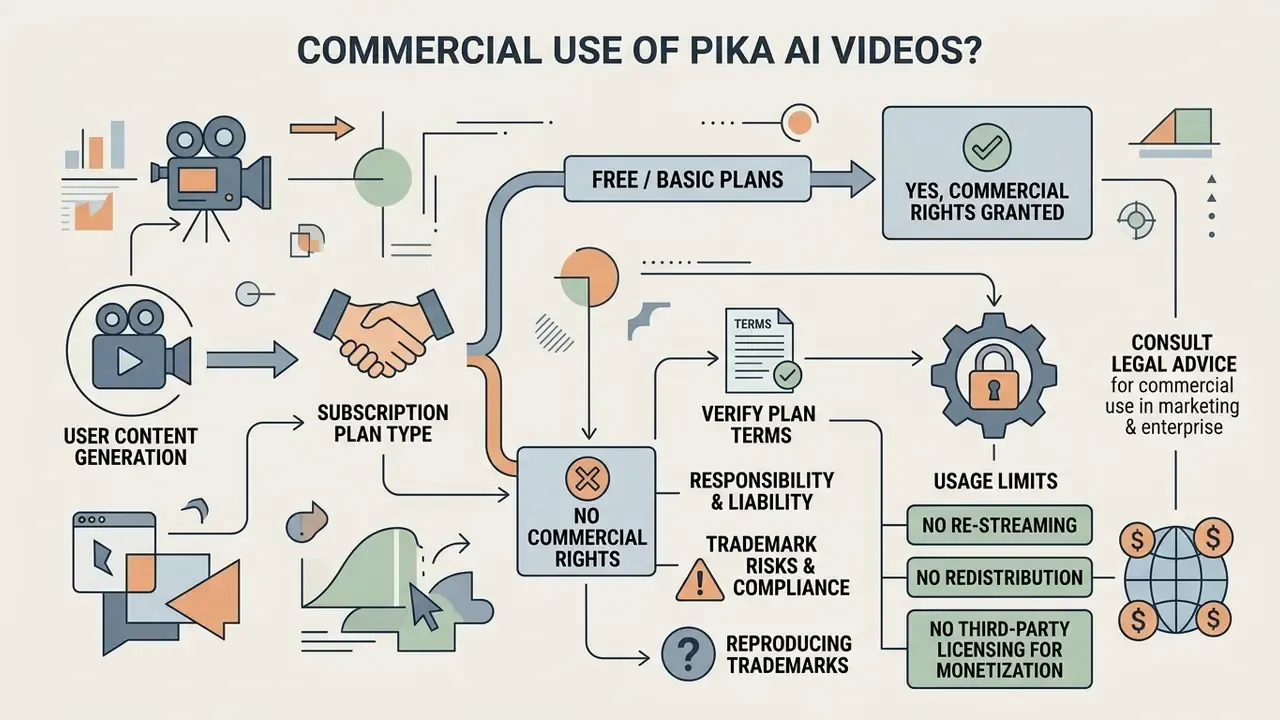
Videos created with pika ai video generation can be used commercially only under an active paid subscription whose plan terms expressly grant commercial rights. Assets generated on the pika ai free tier are restricted to personal, non-commercial use. Readers building a broader policy can start from our hub on commercial use of AI content.
⚠️ Legal and compliance alert: commercial rights and licensing
According to the Pika Terms of Service, operated by Mellis, Inc., content generated on the Basic or free plan is licensed strictly for personal, non-commercial evaluation. Publishing free-tier outputs in advertising, client deliverables, or monetized channels breaches those terms. Commercial exploitation requires an active paid tier at the moment of generation. Additional documented constraints:
- Commercial rights extend to generated content "only under your subscription plan". The plan, not the payment status, defines the right.
- Pika's own FAQ has stated that Pro or Fancy subscriptions permit commercial use while Basic or Standard do not. That conflicts with generalized "all paid tiers" claims, so confirm your specific plan in writing.
- Re-streaming, redistribution, or third-party licensing of AI Self content for monetization outside the Services requires prior written consent.
This information is general and does not replace legal advice. Licensing terms change; check the current Terms of Service on the official Pika site.
Enterprise teams building marketing campaigns must verify that every visual asset satisfies commercial licensing criteria before the media buy, not after.
«Models trained on protected data create copyright infringement risk when their outputs are used commercially.»
Who carries the liability if a render reproduces someone else's trademark? In consumer generative-video terms, the answer is almost always the publisher, not the vendor. Platform terms typically disclaim warranties on output originality, place responsibility for lawful use on the account holder, and route indemnification toward the vendor. Practical mitigations:
- run reverse-image and trademark checks on any logo-like, character-like, or slogan-bearing element before release;
- prohibit prompts that name living artists, studios, franchises, or competitor brands;
- keep an evidentiary record of source images and the rights under which they were licensed;
- treat "style of [studio]" requests as blocked by policy rather than as a creative option;
- require legal sign-off for any clip showing a recognizable person, uniform, or regulated product claim.
«TIP-I2V is distributed under CC BY-NC 4.0 in line with Pika's terms for Discord messages: commercial use of the dataset is prohibited.»
That licensing detail matters beyond academia. Research corpora derived from Pika's community channels are non-commercial by construction, so they cannot be reused as commercial training or benchmarking material inside a product pipeline. Teams that quietly do so inherit a defect they cannot document.
For legal guidelines and IP tracking frameworks, visit the AI Media Commercial-Use Hub and monitor case developments through AI Litigation and Case Timelines.
Organizations designing integrated visual workflows normally connect Pika to adjacent production tooling instead of running it alone: an animation maker for structured motion graphics, AI outpainting tools for reframing static source art before animation, an AI voice generator for licensed narration, and a YouTube video editor workflow for assembly, captioning, and publication compliance. Every added tool brings its own licensing terms, and the weakest link defines the commercial safety of the finished asset.
Process documentation is part of that stack too. Enablement teams often build approval maps with an ai flowchart generator, collect sign-off data through an ai form generator, and train reviewers with an ai flashcard maker covering prohibited prompts and disclosure rules. Small artifacts, but they are what an auditor actually reads.
The Pika AI Video Generation Interface: From Idea to Finished Clip
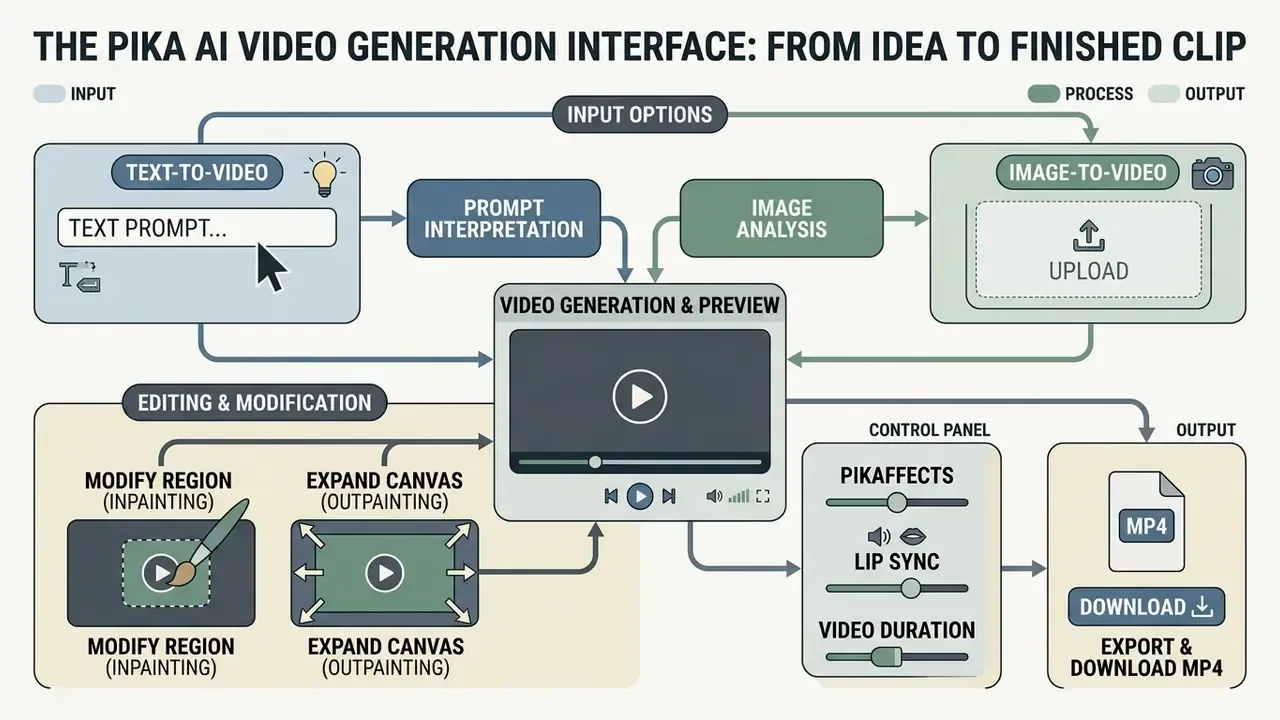
The pika ai video generation interface is a browser-based workspace built to move users from input to a downloadable MP4. It combines prompt submission fields, visual upload zones, camera controls, and output revision tools in a single view.
Operating the pika ai video generation tool means selecting a rendering model, configuring generation parameters, launching the cloud diffusion process, and reviewing clips in the generation history panel. In controlled environments, that same sequence should run as a documented procedure: fixed model version, logged parameters, logged prompt, named reviewer.
- Placement beneath the setup instructions in this section.
- DOM duplicate key UI controls are described in the adjacent text blocks.
How to Create a Video in Pika AI From Text
- Open the web interface at
pika.artand find the generation prompt bar at the bottom of the dashboard, then sign in with a company-owned account. - Select the text model mode, confirm the model version, and enter a detailed prompt defining subject, action, lighting, and camera movement.
- Configure the output frame in the generation parameters. Pika supports aspect ratios 16:9, 9:16, 1:1, 4:3, 3:4, 21:9 plus an Adaptive mode that matches the source asset, with additional documented ratios such as 4:5, 5:4, 3:2 and 2:3 on image-conditioned models. Clip length runs from 4 to 15 seconds (defaults of 5 or 8 seconds depending on model), resolution covers 480p, 720p and 1080p, and frame rate is selectable up to 24 fps. A scene can be lengthened afterwards with the Add 4s control.
- Enable Generate Audio if the deliverable needs synchronized sound effects.
- Click Generate, review the finished pika ai video in the output library, then export the MP4 and record model version, prompt, and parameters in the asset log.
How to Upload an Image and Create Image-to-Video
- Click the pika image to video upload image feature button in the main creation window, after confirming the asset is cleared for third-party processing.
- Upload a high-resolution source file (PNG or JPG, or a public media URL) to establish the primary frame. In API workflows, local files go through a presigned upload: request the upload URL,
PUTthe file bytes withcontent_typeandsize_bytes, then pass the returned URL into the image-to-video call. - Enter an optional prompt in the pika image to video tool specifying target movement, atmospheric effects, or camera direction. A single directional move performs best.
- Set the Motion Score parameter (documented range 1 to 4 in the bot layer, though some community references cite 0 to 4) to dictate movement intensity, choose aspect ratio and resolution, then click Generate.
- Produce alternative takes by re-running the same source image with modified motion, camera, or style wording, and pick the best variant instead of accepting the first render.
Editing Frames: Modify Region (Inpainting) and Expand Canvas
Pika exposes two canvas-level tools that avoid full regeneration when only part of a frame is wrong.
- Modify Region (inpainting).Brush-select a specific area of the frame, whether a garment, a background object, or a signage element, and describe the replacement in the prompt field. The model repaints only the masked region and keeps the surrounding scene, which is the cheapest way to fix one non-compliant detail without losing an approved composition.
- Expand Canvas (outpainting).Extends the frame boundaries and changes the aspect ratio, for example 1:1 to 16:9, generating the surrounding environment in the existing visual style. This is how one approved vertical render becomes a horizontal placement without a reshoot.
Both operations are recorded as new generations and consume credits, and both need re-review. A localized edit can introduce fresh artifacts or new IP-bearing elements that passed no prior check.
To analyze full operational cost structures across media automation tools, review our detailed AI Media Pricing Guides.
Managing Distortion Risk: How to Get More Predictable Pika AI Videos
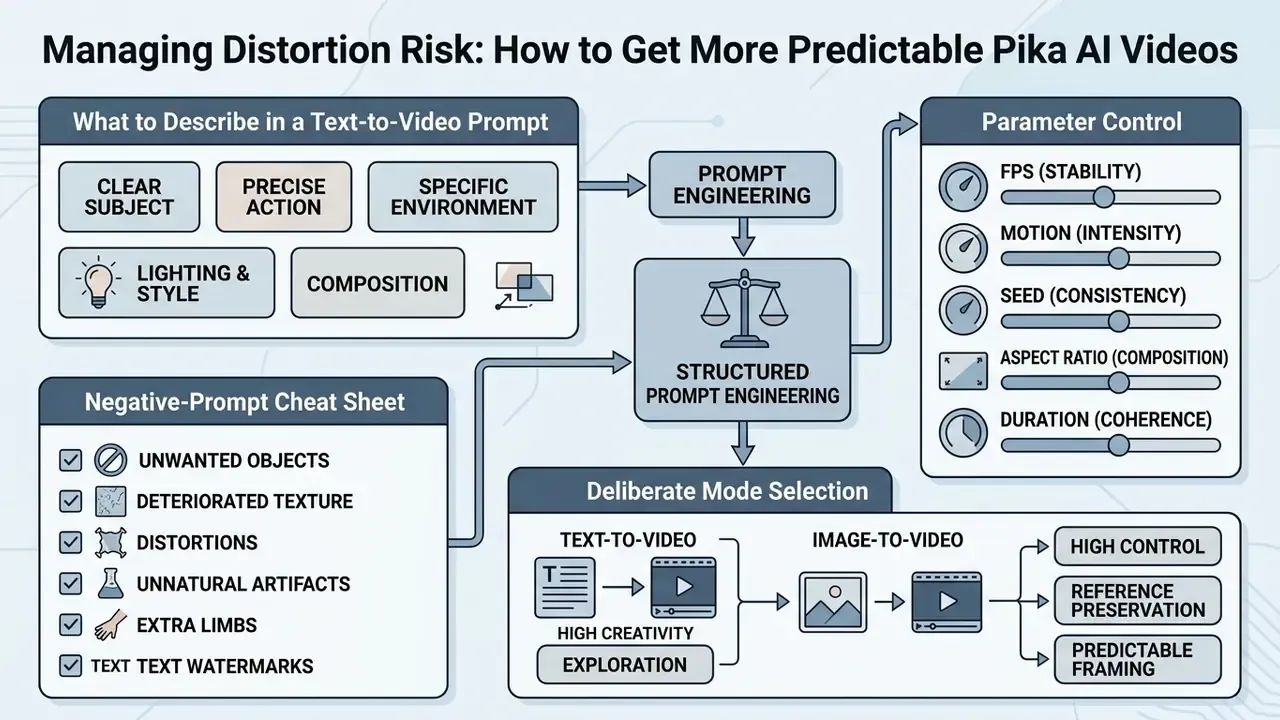
Consistent, professional-grade output from the pika ai video generation tool 2025 era onward requires structured prompt engineering and deliberate mode selection. Unpredictable distortion, unintended morphing, and temporal flickering can be reduced through standardized control parameters. In a governance context, each of those failure modes should be treated as a measurable defect class, not an aesthetic quirk.
Methodological caveat. When auditing generative AI implementations in risk-sensitive environments, teams should establish validation controls before scaling usage. In an illustrative compliance review with a digital asset group, the team introduced input filtering rules, a fixed prompt template, and a defect taxonomy covering face warping, text illegibility, physics violation, and flicker, then tracked rejected renders across a 90-day window. Artifact-related rejections declined materially over that period. Because the sample, model versions, and grading were internal and not independently audited, we report the direction of change rather than a precise percentage, and we recommend that each organization set its own baseline before claiming improvement. This example is composite and illustrative.
Reproducibility and auditability. Public documentation does not expose a stable, user-controlled seed guarantee across model versions, so bit-identical regeneration cannot be assumed. For audit purposes, do not rely on "we can regenerate it". Archive the rendered file itself, together with prompt text, model version, parameter set, source image hash, generation timestamp, and reviewer identity. That record, not the model, is your evidence.
What to Describe in a Text-to-Video Prompt
To maximize output quality in pika ai text to video, prompts should follow a modular hierarchy:
[Subject] + [Action/Dynamic] + [Environment/Setting] + [Camera Control] + [Lighting/Mood] + [Style/Quality Constraints] + [Avoid List]
For example: "A vintage red sports car driving down a coastal highway, camera tracking shot from behind, golden hour lighting, cinematic film grain, 8k resolution, smooth motion."
Restricting camera parameters to one directional movement, such as zoom-in or pan-left, prevents conflicting instructions and cuts spatial warping.
«VidProM, with 1.67 million unique text-to-video prompts, shows users routinely combine style modifiers, technical camera terms, and multi-clause instructions.»
The operational lesson from that corpus is that prompt length alone does not raise quality. Ordered, non-contradictory clauses do. Documented realism constraints worth keeping in a house template include "sharp subject", "smooth motion", and "realistic physics", paired with an explicit avoid list covering flicker, warped faces, extra limbs, and garbled text.
Parameter and negative-prompt cheat sheet
| Parameter | Syntax example | Effect | Practical guidance |
|---|---|---|---|
| Camera move | -camera zoom in / pan left / rotate cw | Sets one virtual camera motion | Use a single move per generation; combined moves cause warping |
| Frame rate | -fps 24 | Output frames per second | 24 fps for a cinematic feel; lower values look stepped |
| Motion strength | -motion 2 | Movement intensity (1 to 4) | 1 to 2 for products and faces, 3 to 4 for action and effects |
| Aspect ratio | -ar 16:9 / 9:16 / 21:9 | Output frame shape | Match the placement before generating, not after |
| Guidance scale | -gs 12 | Prompt adherence versus freedom | Higher values track the prompt but can flatten motion |
| Negative prompt | -neg "blurry, distortion, extra fingers, watermark, text" | Suppresses defect classes | Maintain a standard corporate avoid list |
| Duration | 4s to 15s (UI selector) | Clip length | Generate short, then extend approved shots with Add 4s |
| Seed | -seed 1234 (where exposed) | Attempts variation control | Log the value; do not rely on exact reproducibility |
When Image-to-Video Gives You More Control
A pika image to video ai tool offers stronger structural stability than text-only generation whenever brand identity, subject appearance, or exact composition must stay fixed.
«TIP-I2V holds more than 1.70 million prompts from Pika's Discord; the authors note image-to-video is critical for preserving subject identity across iterations.»
Academic work on image-conditioned video generation points the same way. Identity, pose, and subject-conditioned pipelines report stronger image retention and detail fidelity than text-only baselines, precisely because the reference frame constrains the output distribution. In practice, conditioning generations on a reference image prevents character morphing and keeps visual consistency across sequential iterations. That is why regulated marketing teams should default to image-to-video for anything carrying a logo, a face, or a product form factor. Teams comparing control levels across vendors can consult our review of the best AI video generators. Queries like pika image to video 2025 update still surface older feature lists, so verify capabilities against the current 2.2 and 2.5 endpoints.
For specialized creative assets, teams often prepare static source files before animation using dedicated generators: AI logo generators for mark-based assets, an ai font generator for typographic elements, an ai flyer generator for layout compositions, and an AI headshot generator for consistent presenter imagery. Preparing a clean, rights-cleared keyframe upstream is the single highest-leverage step for predictable video output downstream.
FAQ About the Pika AI Video Generator
Do I need to install software to use Pika AI?
No installation is required for the core platform. The pika ai video generation site runs entirely in modern browsers at pika.art. Users create, preview, and download renders online without desktop software or a high-performance local GPU, and public documentation lists no minimum CPU, RAM, GPU, or OS requirements for browser use. A mobile application is also available for iOS through the Apple App Store. Readers comparing browser-native alternatives often review PixVerse AI alongside Pika, since both run server-side.
Is Pika AI suitable for users with no video editing experience?
Yes. Pika AI is built for accessible operation. The browser interface replaces multi-track timelines and manual keyframing with automated controls, preset operations (generate, lip sync, adjust, extend, upscale), and default values for aspect ratio, frame rate, motion, and guidance scale. Users can produce complete clips from a basic natural language description or a single image upload. Beginners usually prepare source frames in AI photo editors first, because a clean, correctly cropped still produces far more predictable motion than a low-quality upload.
Can I change individual elements of a video without regenerating it?
Yes, use the Modify Region tool. Mask the area you want changed, enter a new description in the prompt field, and the model repaints only the selected fragment while the rest of the scene stays intact. For reframing rather than repainting, Expand Canvas extends the borders of the shot into a new aspect ratio. Both actions create a new generation record and should be re-reviewed before publication.
Does Pika AI create sound for videos?
Yes. With the Generate Audio toggle enabled, the model synthesizes sound effects from the scene description and the visual dynamics of the clip. Separately, the Lip Sync tool aligns a character's mouth movements with an uploaded audio file or synthesized speech. Music licensing is not covered by the platform's audio synthesis, so any commercial soundtrack must be licensed independently.
What is the maximum duration, and which frame formats are supported?
Current models support clip lengths from 4 to 15 seconds, with typical defaults of 5, 8, or 10 seconds depending on the model version. Resolutions run from 480p to 1080p, and aspect ratios include 16:9, 9:16, 1:1, 4:3, 3:4, 21:9 and Adaptive, plus 4:5, 5:4, 3:2 and 2:3 on image-conditioned endpoints. Approved shots can be lengthened in 4-second increments with the Add 4s control.
Does Pika AI offer an enterprise plan with SSO, API access and centralized billing?
At the time of this audit, Pika publishes consumer credit tiers from $0 to $76/mo on pika.art/pricing, while programmatic access is documented in the developer portal with per-generation billing for Pika 2.2 and 2.5 text-to-video, image-to-video, Pikascenes and Pikaframes endpoints. A public enterprise SKU listing SSO/SAML, SCIM, centralized billing, committed throughput, and a signed DPA was not published. Organizations requiring those controls should request them directly and treat their absence as a gating condition for approval.
Can Pika AI videos be monetized on YouTube or in advertising?
Only under a paid plan whose terms expressly permit commercial use, and only for content you have the right to publish. Free-tier renders are watermarked, capped at 480p, and licensed for personal, non-commercial use. Note the documented restriction that monetization of AI Self content is permitted through the Services while Pika operates the AI Self, and that separate re-streaming, redistribution, or licensing for monetization outside the Service requires prior written consent. Confirm the wording of your specific plan before any paid-media flight.