Generating AI images of yourself for free means passing a reference photo, or a text description, into a diffusion model. The model extracts identity features and conditions the neural network to synthesize new poses, backgrounds, and styles. Online platforms hand out zero-shot adapters and daily generative credits, so you can produce custom avatars and realistic headshots straight from a browser tab. No install, no GPU rental, no design degree.
the short version
- How it works.Reference-guided generators pull a facial embedding, and usually a landmark map, out of your selfie and inject it into the diffusion process. Your identity survives; the prompt controls scene, wardrobe, and lighting. Text-only prompts cannot preserve a real identity. They synthesize a plausible stranger.
- How to do it free.Pick a browser tool with daily credits or a free trial, upload 1 to 3 clean front-facing selfies, write a layered prompt (identity lock, then subject, then environment, then optics), generate, then repair defects with inpainting instead of a full regeneration.
- What "free" really means.Free tiers are freemium: one-time signup credits, rolling 24-hour caps, watermarks, capped resolution (often 512×512 or 720p), and in most cases no commercial rights.
- What to watch legally.A facial upload is biometric personal data. Verify retention, deletion, and model-training terms before you upload. Commercial use of a recognizable likeness needs consent, and EU deployers of deepfake-capable systems must label synthetic outputs.
This article covers general technical, licensing, and compliance information. It is not legal advice. Consult qualified counsel on intellectual property, biometric data protection, and commercial licensing in your jurisdiction.
Who this guide is for, and how to read it
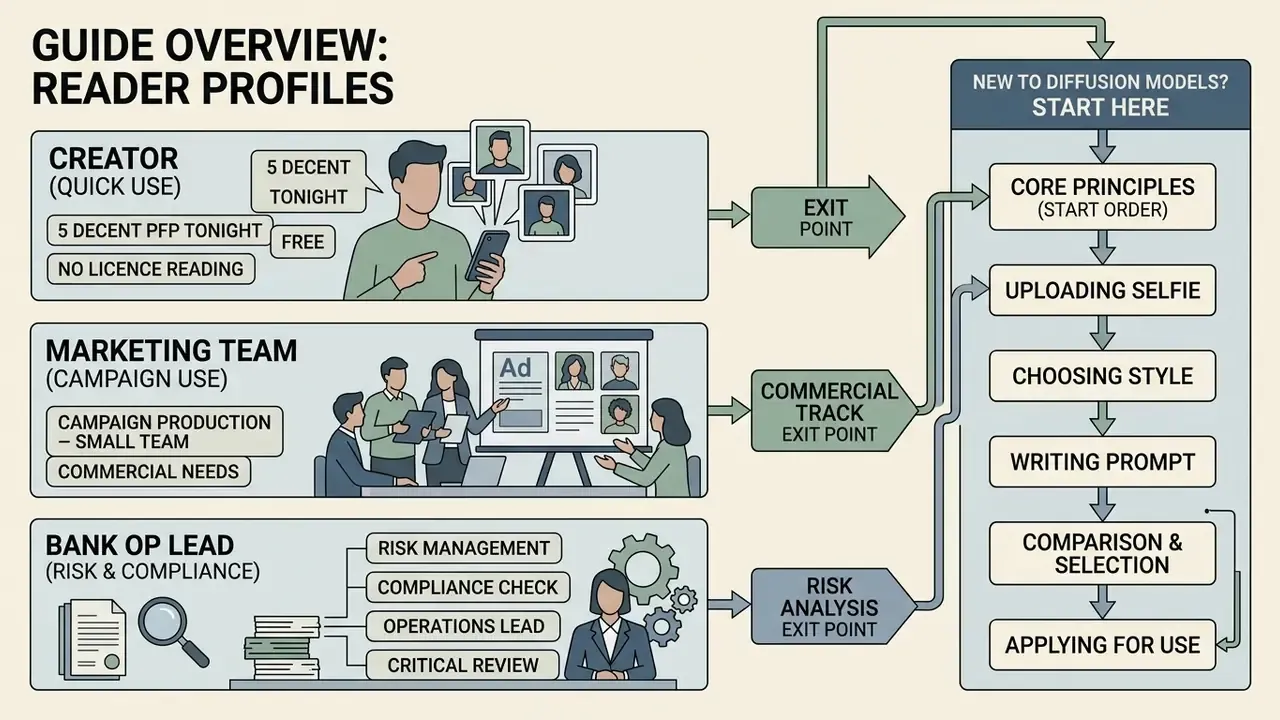
Three reader profiles keep landing on this question, and each needs a different exit point.
The first is a creator who wants five decent profile pictures tonight, for free, without reading a licence. Sections on preparation, prompts, and inpainting are the ones that matter there.
The second is a small marketing team producing a campaign. That reader needs the free-tier table, the commercial-use rules, and the identity-sheet workflow, because consistency across twelve assets is harder than one good frame.
The third profile is the one most people underestimate: a risk, compliance, or operations lead inside a bank or fintech, who just discovered that an employee uploaded staff headshots to a consumer generator. That is Shadow AI with a biometric payload. For that reader, the biometric checklist and the total-cost section are the core of the page, and the prompt rules are context.
Read in order if you are new to diffusion models. Jump if you are not.
How AI-generated images of yourself work
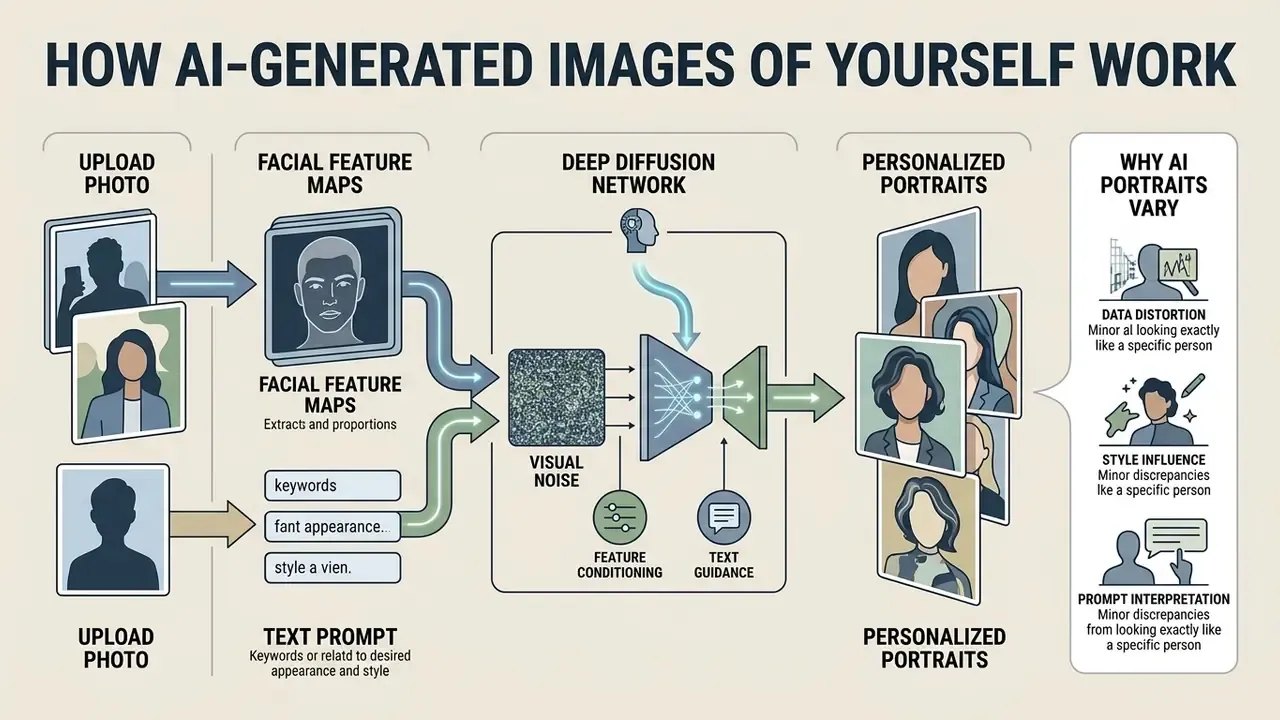
An AI image generator builds personalized portraits by using deep diffusion networks to condition visual noise against facial feature maps and textual prompts. Modern web platforms combine a text-to-image semantic pipeline with an image-to-image identity encoder, so the synthetic portrait mirrors a specific facial structure while background, clothing, and lighting change freely.
Think of it as two forces pulling on the same canvas. One force says "keep this face." The other says "make this scene." The output quality of any AI image generator depends on how well those two forces are balanced.
Upload a photo or generate a portrait from text
Reference-guided generation conditions the diffusion process on an uploaded facial photo. Text-to-image mode invents an entirely synthetic subject from descriptive prose alone. In reference-photo workflows, dedicated vision encoders extract facial embeddings, meaning vector representations of eye spacing, jawline geometry, and skin texture, then inject those tokens into the latent space during the noisy reverse-diffusion steps.
Pure text prompts do something different. They instruct the model to sample from learned statistical distributions of human faces, which produces a generalized character rather than a specific individual. So if you want a recognizable likeness, the reference-photo path is mandatory. If you only need a believable human being in frame, text conditioning alone is enough, and readers still wondering can ai draw a person from words alone will find the short answer there: yes, but not you.
Before you spend credits, it is worth checking how image-to-image AI generators differ from purely descriptive text pipelines.
- can ai draw
- image-to-image AI generators
Why an AI portrait may not look exactly like you
Your AI portrait can drift from your real appearance because diffusion models juggle competing mathematical targets: hold the identity tokens, satisfy the prompt semantics, enforce general aesthetic quality. Models relying on standard CLIP text-image embeddings optimize for semantic context rather than facial identity metrics, which invites identity drift. Research on identity-preserving architectures, including FlashFace (2024) and InstantID (2024), shows that exact facial resemblance needs specialized feature maps and landmark controls, not simple image-level alignment.
Training-data priors add a second problem. They quietly beautify and smooth, turning a raw selfie into a studio-polished stranger who happens to share your haircut.
In practice you get two distinct failure modes. Your face can drift structurally: wrong jaw width, altered eye spacing, a nose that belongs to someone else. Or it can drift cosmetically: airbrushed skin, symmetrized features, that plastic sheen everyone recognizes instantly. The first is an architecture problem, solved by a better adapter. The second is a prompt problem, solved by explicit texture instructions and negative prompts. Different causes, different fixes, and confusing them wastes credits.
How to generate an AI photo of yourself for free
To generate a personalized AI photo for free: pick a browser-based tool, upload a high-resolution selfie, build a structured text prompt describing style and environment, then run the generation. A systematic sequence protects facial features and stretches a small free-tier balance further than trial and error ever will.
- Select an AI generator.Choose an online tool offering free initial credits or watermark-based daily generations. A shortlist of free AI image generators helps match quotas to your real output volume.
- Upload a reference photo.Use a clear, well-lit, front-facing selfie where your face fills at least 60% of the frame.
- Configure generation settings.Set aspect ratio, style preset (professional headshot, photorealistic, artistic), and reference-strength parameters.
- Write a structured prompt.Define lighting, background, attire, and camera details, and add explicit identity-preservation instructions.
- Generate and evaluate.Run the task (usually 5 to 30 seconds) and judge outputs on facial similarity first, aesthetics second.
- Edit and download.Apply inpainting or crop adjustments where needed, then export as PNG or JPEG.
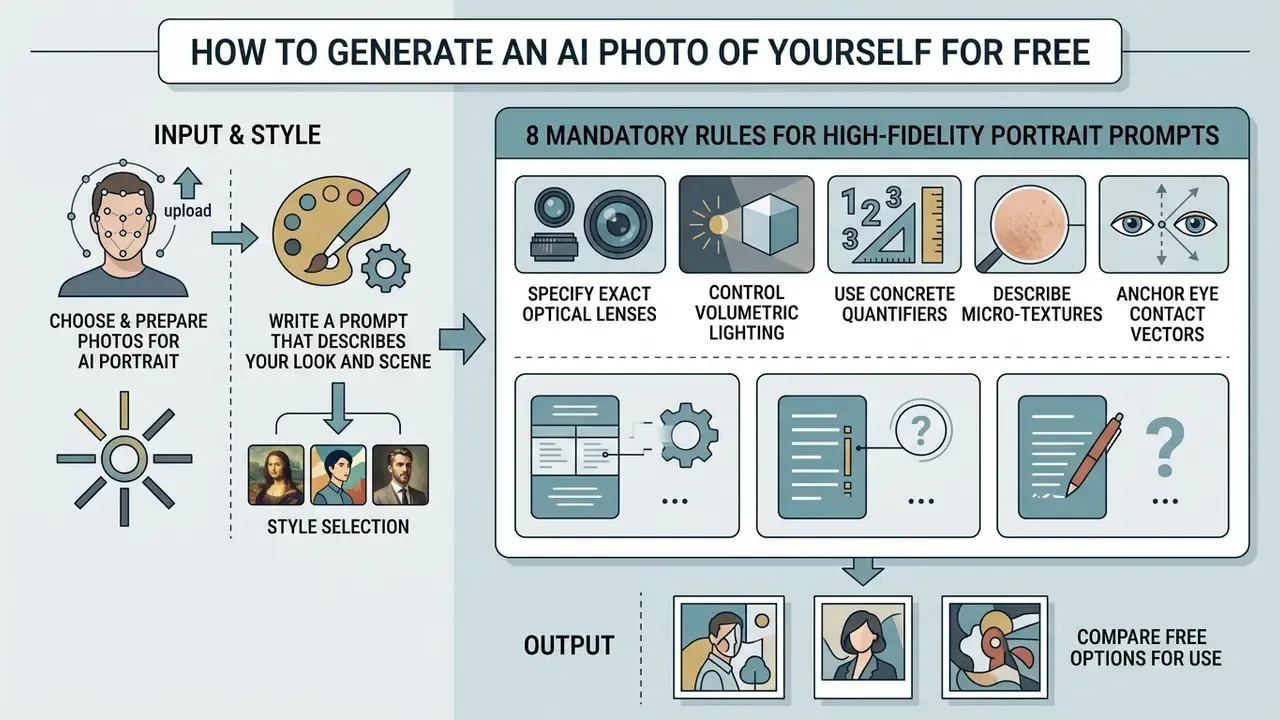
Choose and prepare photos for an AI portrait
Input selection is the single biggest lever on face similarity. Face recognition encoders need clear, unobstructed landmarks, so your uploaded selfie should have uniform front-facing light, a neutral expression, visible eyes, and an uncluttered background. Low-resolution, blurry, or heavily filtered sources destabilize the face embedding, and the diffusion steps downstream then invent whatever they please.
«InstantID encodes both the face and a landmark map: clear facial features in the source photo are critical for reliable personalization without model fine-tuning.»
Concrete input specifications, drawn from facial-image guidance, are worth applying literally rather than approximately.
| Parameter | Recommended value | Why it matters |
|---|---|---|
| Resolution | ≥1,000 px wide (about 1 MP); eye-to-eye distance around 150 px | Stabilizes face-embedding extraction |
| Lighting | Even, diffuse, no blown highlights or hard shadows | Prevents shadow artifacts baked into geometry |
| Angle | Full-frontal or slight ±15° turn, both face edges visible | Gives the encoder complete landmark coverage |
| Expression | Neutral, eyes open, no hair across the eyes | Reduces expression bleed into every output |
| Background | Plain, smooth, light or neutral, no objects | Stops clutter from entering the latent |
One small observation from repeated testing: the photo people like most is rarely the photo that works best. Flattering side-angle shots with dramatic lighting produce the worst embeddings. The boring passport-style frame wins almost every time.
Write a prompt that describes your look and scene
Effective prompt engineering for personalized AI photos leans on a layered structure. Identity commands come first, then subject details, then environment, then lighting, then camera parameters. Strict ordering stops the model from overwriting your face while it chases a complicated scene request.
IDENTITY LOCK: retain exact facial structure and identity of the reference photo.
SUBJECT: professional business portrait, confident expression, navy blue blazer.
ENVIRONMENT: modern minimalist office with soft window light, blurred background.
PHOTOGRAPHY: 85mm lens, f/1.8 depth of field, natural skin texture, 4K resolution.
A useful discipline borrowed from identity-lock templates: split the prompt into an explicit Keep list (same face, same skin texture, same apparent age) and a Change list (clothing, setting, lighting mood). That removes ambiguity about which attributes the model may reinterpret. Ambiguity is where identity leaks out.
8 mandatory rules for engineering high-fidelity portrait prompts
To eliminate facial drift and artifacting when you generate AI images of yourself, hold to these syntax constraints.
- Specify exact optical lenses.Skip vague words like "photographic." Define focal length:
85mm lensfor tight headshots (prevents facial widening),50mm lensfor torso shots,35mm lensfor environmental context. - Control volumetric lighting.State light-source vectors explicitly:
golden hour side-lighting,softbox studio key light,neon rim lighting. This forces natural shadow mapping across skin contours. - Use concrete quantifiers.Replace plural nouns with numbers.
Three background office windowsbeatsoffice windowsand prevents ambient blurring artifacts. Collective nouns (a row of bookshelves) also outperform bare plurals. - Describe micro-textures.Enforce skin realism through material language:
natural skin pores,subtle freckles,unfiltered skin texture,brushed cotton fabric. - Anchor eye contact vectors.Direct the gaze precisely:
subject maintaining direct eye contact with camera lens, which prevents cross-eyed diffusion errors. - Handle typography with quotes.When rendering text on clothing or backdrops, wrap terms in double quotes, for example
a t-shirt with "CREATIVE" printed on the chest, to trigger strict text-encoder alignment. Name the font family (serif,bold sans) where the model supports it. - Define aperture and depth of field.Control background separation with physical camera stops:
f/1.8 aperture,creamy bokeh backdrop,deep depth of field f/8. - Enforce negative prompt anchors.Always append structural exclusions:
--no extra fingers, asymmetric eyes, airbrushed skin, oversaturated colors, plastic sheen. Positive phrasing outperforms negation inside the main prompt, so "no buildings" reliably produces buildings. Exclusions belong in the negative field, nowhere else.
Advanced multi-reference fusion: combining multiple identity and style inputs
Standard zero-shot generation leans on a single source photo, which caps angle diversity. Advanced diffusion pipelines support multi-image fusion, sometimes up to 8 reference assets at once, letting you separate identity, pose, and background.
Execution tip: set identity conditioning weight to 0.75 to 0.85 for facial anchors, and cap the style reference at 0.35 so stylistic elements do not deform key features. In adapter terms, an IP-Adapter scale near 0.5 balances text and image conditioning, while 1.0 effectively ignores the text prompt altogether.
- Primary face anchor (images 1 to 3).
- Upload front, 45-degree, and profile selfies to build a fuller 3D feature map.
- Style reference (image 4).
- Upload a target visual style, such as an oil painting or a corporate lighting grid, without touching face geometry.
- Pose and garment anchor (image 5).
- Pass a posture or outfit template to lock body composition.
- Environment plate (images 6 to 8).
- Supply the backdrop, colour palette, or brand-consistent set design that must repeat across a series.
What "free" means in AI image generators
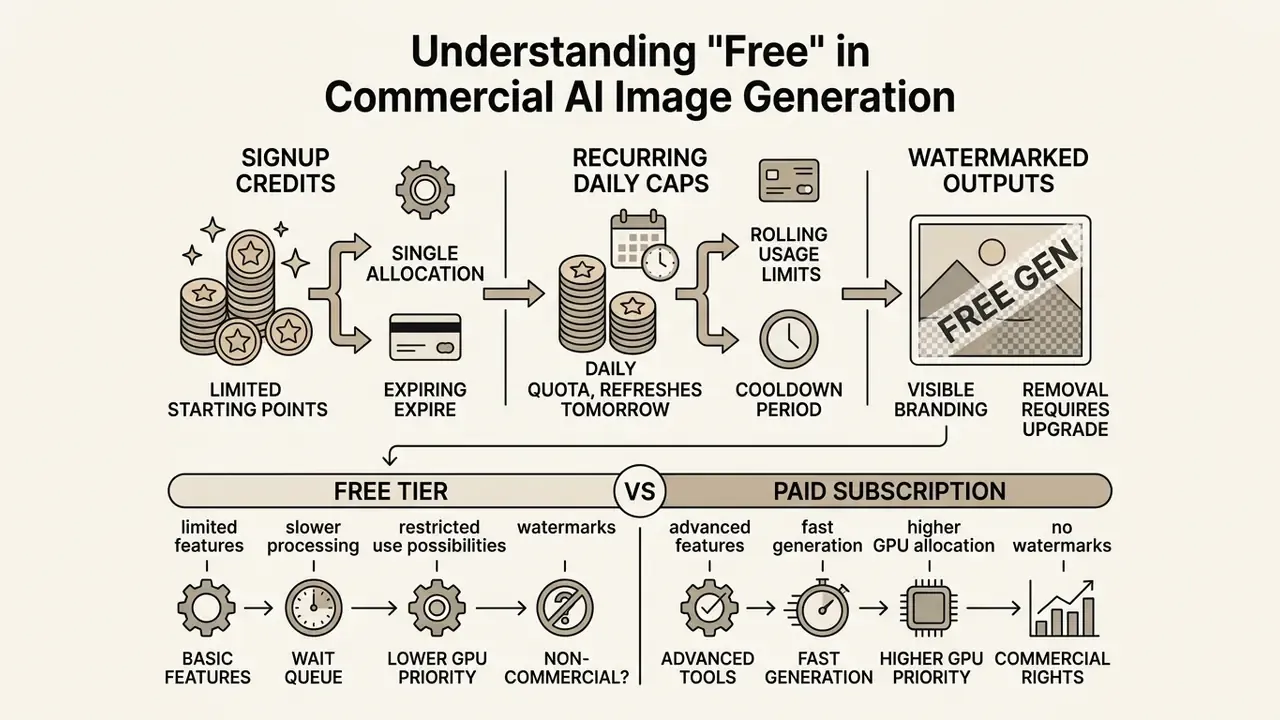
In commercial AI image generators, "free" almost always means freemium: signup credits, recurring daily caps, or watermarked outputs. It rarely means unrestricted access. Understanding those boundaries in advance prevents an awkward stop halfway through a portrait series.
| AI generator option | Free tier allowance | Update schedule | Output resolution and watermark | Commercial rights |
|---|---|---|---|---|
| Fotor | 8 free credits | One-time on signup | Watermark included | Non-commercial only |
| Canva AI | 2 free credits | Resets every 24 hours | 720p, no watermark | Limited personal use |
| HeadshotPro free trial | 1 free HD headshot | One-time trial | 1024×1024, no watermark | Personal review only |
| NightCafe | 5 free credits | Resets every 24 hours | Standard, no watermark | Terms depend on base model |
| Adobe Firefly (free account) | Limited daily generations | Monthly credits, daily caps | No watermark on out-of-beta output | Commercial use permitted for qualifying outputs |
Terms verified March 2026. Allowances shift frequently, so re-check before you plan a campaign around them.
A third scenario sits outside that table entirely: running open-weight models locally, where "free" means unlimited iterations paid for in your own GPU time and electricity.
«The Stability AI Community License (2024) permits free commercial use of SD3 Medium for organisations under USD 1 million in annual revenue, with no cap on generation volume.»
Design-suite plans behave differently again. Teams standardizing on one workspace usually weigh the Canva AI generator's licensing and export terms against standalone portrait tools, and the two rarely match on rights.
Free credits, generation limits and account requirements
Free platforms allocate access through static signup balances or rolling daily windows. A web tool might grant 5 to 10 credits on registration, with each text-to-image or image-to-image transformation deducting between 1 and 4 credits depending on model complexity. Hit the ceiling and the service either pauses until the next 24-hour reset or nudges you toward a subscription.
Two structural patterns recur across vendors.
- Expiring credit grants. Cloud and creative platforms issue a fixed balance on signup that lapses after a defined window. Adobe Firefly free credits expire after one month; comparable cloud trials expire after 90 days or on exhaustion, whichever lands first.
- Rolling usage caps. Other services publish no balance at all, only a daily ceiling. When you reach it, the interface shows a reset timestamp instead of a paywall.
Signup requirements are just as inconsistent. Some portrait tools generate without an account, others demand email verification, and a stubborn minority want a billing method even for the trial tier. If your workflow is recurring rather than one-off, compare quotas across free AI art generators before you invest hours building a prompt library locked to one interface.
Features that may require a paid plan
Advanced capabilities cluster behind the paywall with depressing consistency: 4K upscaling, high-throughput batch generation, private generation modes, custom model fine-tuning, direct API access. Power users who need high-resolution output or local deployment should read subscription tier pricing and GPU allocations alongside commercial usage rights, and can see the overview of cost calculators before committing a budget line.
Documented paid-only boundaries include the following.
- High-factor upscaling. Midjourney documents a 4× upscale producing 4096×4096 pixel output inside its paid product.
- Private generation. Stealth-style modes that keep generations off public galleries are a subscription feature, never a free-tier default. That matters enormously when the subject of the portrait is a real employee.
- Custom model fine-tuning. Provider API documentation marks fine-tuning as unsupported on free tiers. Dedicated LoRA or DreamBooth training needs paid compute, so unlimited free custom training is economically impossible for web platforms. For programmatic access patterns and rate limits, view the guide to API tiers.
How to choose a free AI image generator for yourself
Choosing the right free AI image generator comes down to matching your target output, whether that is a professional headshot, an anime avatar, or a full-body game character, with the architecture best suited to it. Platforms diverge sharply on image-to-image identity preservation, prompt adherence, and style customization. A structured comparison of leading AI image generators shortens the evaluation, and the wider compare hub is worth a look too, so view the guide if you are still mapping the landscape.
Four evaluation criteria cover almost every portrait use case, and they mirror the axes used in the NIST GenAI pilot evaluation plan for image generators (2025): instruction following, text correctness, locality or preservation of unedited regions, and context fit.
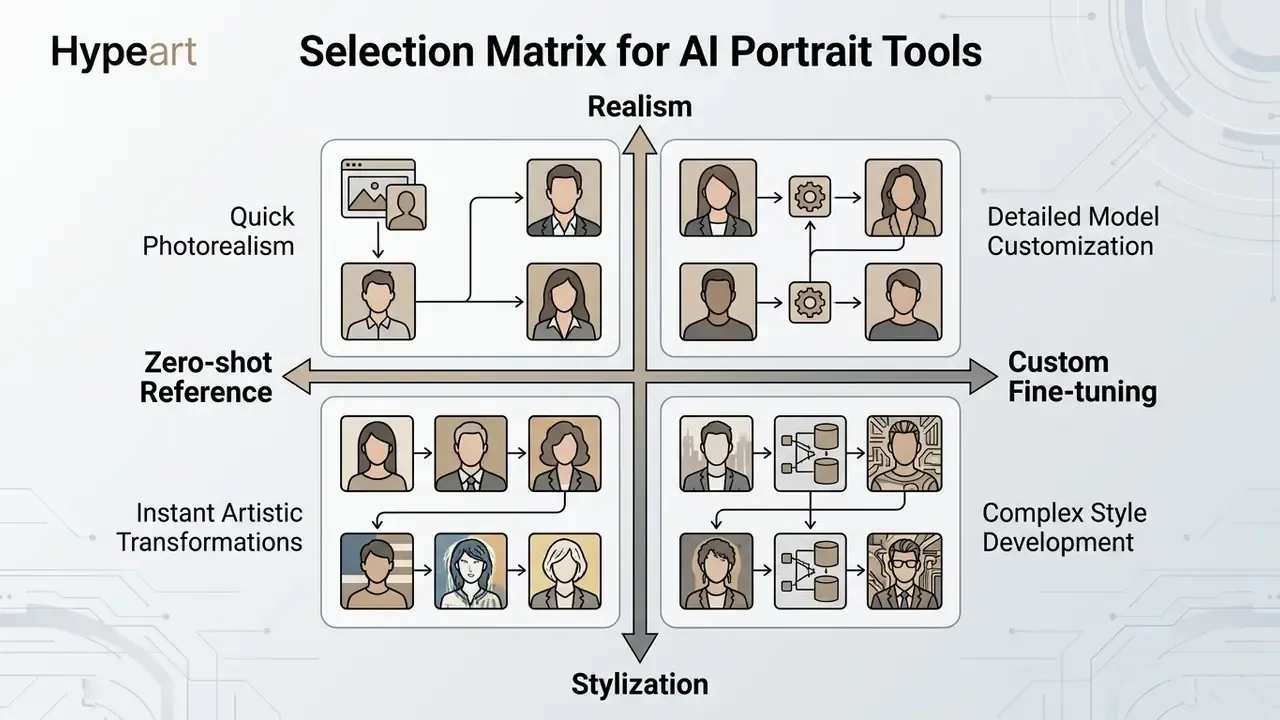
Choose by goal: realistic photo, art portrait or character
For realistic professional photos, prioritize high-fidelity diffusion backbones (OpenAI's GPT Image stack, Google Imagen) paired with zero-shot face adapters that keep natural skin texture and sane anatomical proportions. For artistic avatars and fantasy characters, stylized base models such as anime-tuned SDXL or Flux variants give stronger style alignment while retaining coarse facial structure. For game-ready characters, weight silhouette stability, proportion consistency, and outfit continuity across shots above single-frame beauty, which is also the standard applied when studios prepare promo art before you buy video game online.
When creative workflows extend into motion and short-form media, most creators reuse the same identity assets inside AI video generators rather than rebuilding the character from scratch.
Compare text-to-image, photo reference and trained models
Text-to-image mode gives creative flexibility and zero identity continuity. Photo-reference tools such as InstantID or IP-Adapter insert facial feature maps to hold resemblance across generations with no training at all. Custom-trained models like DreamBooth fine-tune weights on multiple user photographs, delivering the highest identity consistency across complex poses and lighting, at the cost of several minutes of GPU compute per subject.
«UniPortrait reaches 67.3% face similarity versus 38.0% for FastComposer on the same backbone: architectural ID-embedding design nearly doubles the identity metric.»
Adapter research reaches the same conclusion at a fraction of the parameter cost. An IP-Adapter with roughly 22M trainable parameters matches or beats fully fine-tuned image-prompt models, and IP-Adapter-FaceID swaps the generic CLIP image embedding for a face-ID embedding, adding LoRA layers specifically to stabilize identity.
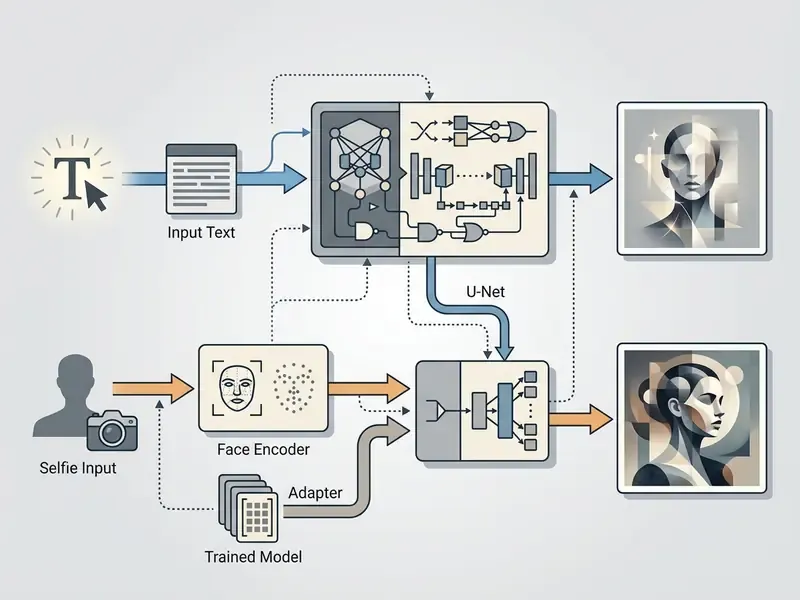
Engine comparison: matching foundation models to portrait goals
| Model architecture | Primary identity adapter | Best use case for self-portraits | Strength | Weakness |
|---|---|---|---|---|
| FLUX.1 (Dev/Schnell) | PuLID / InstantID | Photorealistic professional headshots | Unmatched skin realism and prompt adherence | High computational cost |
| Midjourney v6 | --cref (character reference) | Artistic, cinematic and stylized avatars | Superior aesthetic defaults out of the box | Proprietary; free tier restricted to non-commercial use |
| SDXL 1.0 | IP-Adapter-FaceID | Custom fine-tuning (LoRA / DreamBooth) | Full local control and unlimited free iterations | Requires strict prompt engineering |
| GPT Image / DALL·E 3 | Zero-shot native | Conceptual and text-in-image generation | Excellent natural-language understanding | Lower facial identity retention accuracy |
If your decision hinges on one engine's licensing and control surface, a focused breakdown of Midjourney's image generation versus competing tools covers pricing tiers, stealth mode, and output rights in detail.
AI image styles and ideas for pictures of yourself
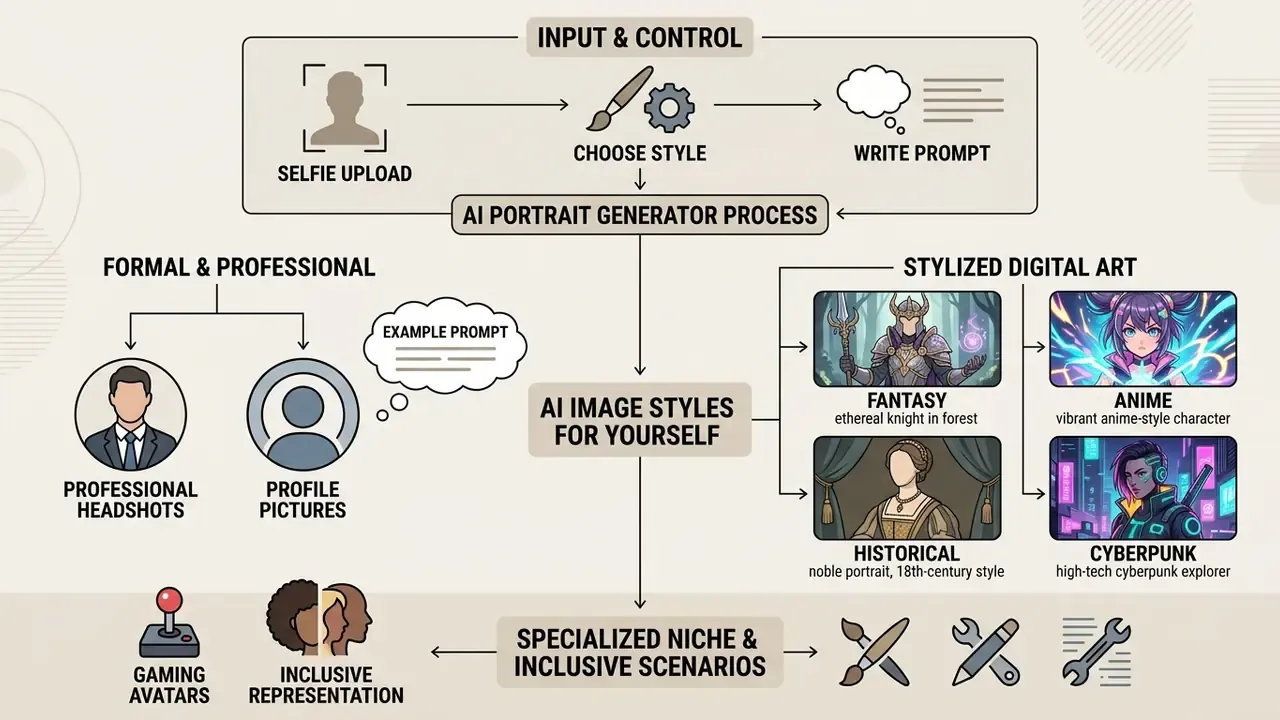
AI portrait generators cover a wide aesthetic spectrum, from formal corporate photography to heavily stylized digital art and gaming avatars. Tailored prompt structures for specific themes are what make outputs consistent across professional and social channels, instead of a bag of unrelated experiments.
Professional headshots and profile pictures
Corporate portraits want neutral lighting, shallow depth of field, business attire, and a simple office or studio background. An 85mm virtual focal length prevents perspective distortion, producing clean profile photos suitable for directories and executive bios. Specialized AI headshot generators automate most of those parameters behind presets.
For printed résumés, switch to a 3:4 or 4:5 ratio and add butterfly lighting, confident friendly expression, sharp focus on eyes to match conventional print composition.
Higher perceived quality is not the same as permission to publish, though. When standardizing media assets across a company, confirm the terms governing commercial use of AI-generated images before employee portraits reach a customer-facing page. The broader AI Media Commercial-Use hub collects the licence summaries per tool.
Fantasy, anime and historical portraits
Stylized portraits use domain-specific aesthetic tokens to render faces in artistic or historical settings. Anime presets apply cel-shading and expressive line work. Historical prompts pull in era-specific wardrobe, such as Victorian coats or Renaissance silk. Fantasy prompts fuse dramatic environmental lighting with mystical props. Naming the era explicitly (Victorian attire, 1920s art deco studio) beats a lazy "vintage" by a wide margin.
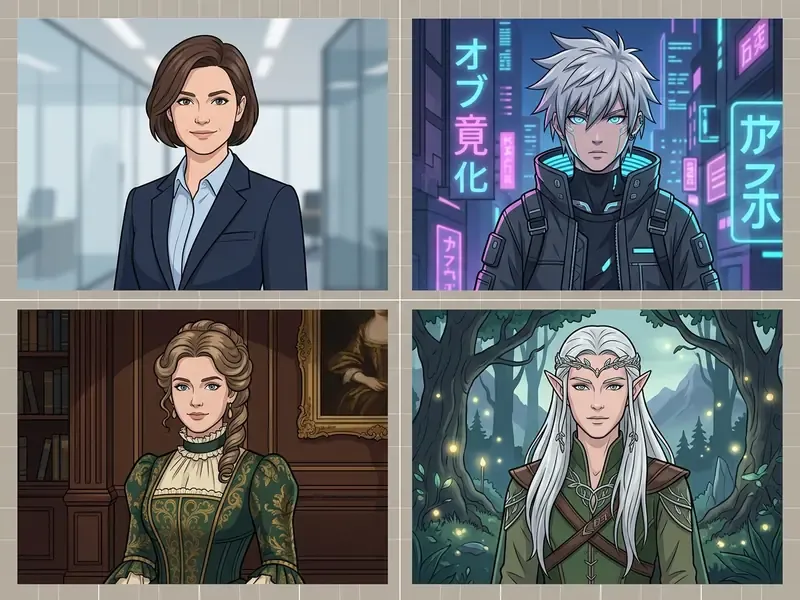
Style prompt patterns that survive identity locking:
- Fantasy
portrait of an elven envoy, silver circlet, moss-lit forest cathedral, volumetric god rays, 85mm, identity lock: same face - Anime
anime portrait, short silver hair, clean line work, balanced flat colors, rain-soaked neon alley, cyberpunk palette - Historical
Victorian formal portrait, high-collar wool coat, sepia studio lighting, plate-camera grain, neutral expression - Cyberpunk
neon rim lighting, cyberpunk rooftop in heavy rain, reflective wet surfaces, f/1.8, no plastic skin
Toy and doll aesthetics deserve a mention as well, since they push identity into caricature on purpose; a blythe doll ai generator exaggerates eye scale and head proportion while keeping recognizable features, which is a useful stress test for any adapter. Marketing teams use the same style stack to keep campaign visuals coherent across channels, and comparable style-transfer economics appear in the review of Ghibli-style AI image generators.
Specialized niche and inclusive portrait scenarios
- Inclusive and non-binary identity portraits. To generate gender-neutral representations without forcing binary traits, use neutral structure parameters:
gender-neutral features, balanced jawline, natural textured haircut, soft ambient lighting, natural proportions. - Couple and group identity preservation. Synthesizing two specific people needs dual-adapter conditioning. Pass separate facial embeddings for Subject A and Subject B into dedicated regional masks to stop facial blending, and keep each adapter weight below
0.8so one identity does not dominate the frame. - Child and yearbook portraits. For youth portraits, raise smoothing slightly while locking age tokens:
natural age-appropriate expression, soft school studio lighting, neutral background, school-friendly outfit, balanced colour tones. Parental consent and stricter retention checks apply before a minor's photograph goes anywhere near a third-party service. No exceptions worth arguing about. - Family portraits. Describe relationships and staging explicitly (
three subjects seated, warm window light, cozy living room, cinematic 4:5), then inpaint per face instead of regenerating the whole group. - Full-body and occupational portraits. Add profession and wardrobe tokens (
doctor in scrubs,firefighter turnout gear) plus posture and camera height, which keeps proportions plausible in full-length frames.
How to improve AI-generated portrait results
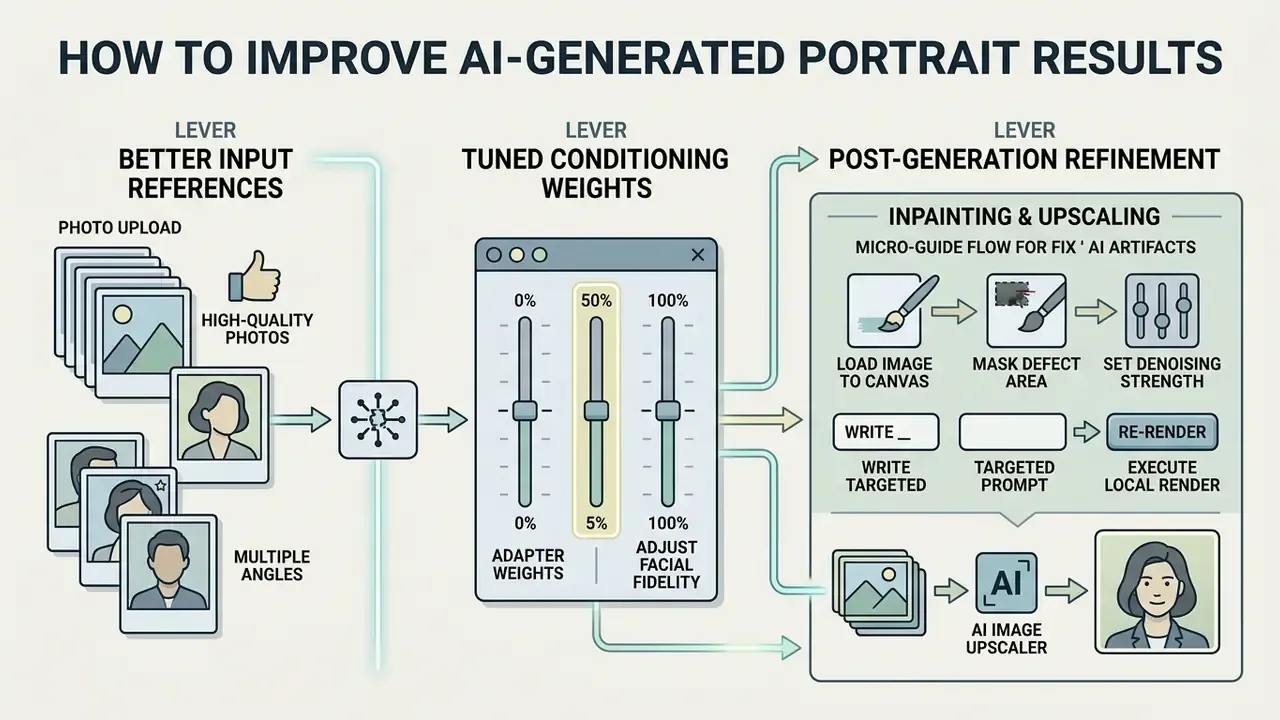
Better facial similarity and realism come from three levers: cleaner input references, tuned adapter conditioning weights, and post-generation inpainting, with AI image upscalers handling the final resolution step. Fix anatomical defects and prompt drift methodically and outputs move from obvious render to plausible photograph.
Improve face similarity with better photos and references
Resemblance improves when the conditioning pipeline receives clean identity data. Upload 2 to 3 references shot from slightly different angles, frontal plus three-quarter, under even natural light, and the encoder can build an accurate 3D feature map. Avoid heavy makeup, harsh shadows, extreme angles, and wide-angle distortion. Those artifacts propagate through diffusion and quietly rewrite output geometry.
Architectural context worth knowing while you evaluate tools: PhotoMaker (CVPR 2024) stacks ID embeddings to hold identity while raising realism, ConsistentID derives fine-grained multimodal identity prompts from a single reference, and InstaFace (2025) adds 3DMM conditionals plus a face-recognition feature module to preserve hair, accessories, and background alongside identity.
Refine prompts, styles and backgrounds after generation
If the first portrait comes back with oversaturated skin, waxy texture, or a cluttered background, refine rather than restart. Add photographic negative prompts and explicit environmental parameters. Targeted inpainting lets you swap a busy background for a clean office without touching the facial region, and AI image enhancers then recover micro-detail lost during recompositing.
Two operational rules from image-editing documentation prevent most background failures. First, describe what the whole image should look like after the edit, not what should be deleted. Second, mask generously: a mask that fully encompasses the element works better than one tracing its exact contour, because over-tight outlines leave halo seams. If the composition needs more room instead of more detail, AI outpainting tools extend the frame without disturbing the face. When the portrait becomes one frame in a longer sequence, standard video editing tools handle focus, blur, and pacing downstream, and you can also blur video online to obscure bystanders or confidential background details before publishing.
Step-by-step micro-guide: fixing AI artifacts via inpainting
When an otherwise perfect portrait carries a small defect, a distorted hand, an unnatural iris, a smeared earlobe, do not regenerate the whole image. Follow this correction loop.
- Load the image into an inpainting canvas.Import the generated portrait into an inpainting-capable editor.
- Mask the defect area.Draw a precise mask over only the affected region, for example the misshapen eye, extending roughly 5 pixels past the boundary so the model has context for seams and lighting.
- Set denoising strength.Drop it to
0.30to0.45. Anything above0.70invents unrelated features and you start over. - Write a targeted prompt.Describe only the masked area, for instance
symmetrical detailed human eye, sharp focus, natural iris. - Execute a local render.Generate the patch, blend edges into the base frame, then repeat per defect. Batching unrelated fixes into one mask is how good portraits die.
Free-tier inpainting is widely available. Several browser editors allow watermark-free trial inpainting with JPEG and PNG support, and open-model web front-ends expose inpainting and outpainting without payment, though free plans frequently cap output at 512×512. General-purpose free photo editors cover the remaining crop, colour, and export steps.
Beyond static photos: animating your AI self-portrait
Once you have a high-similarity static portrait, you can turn it into a motion asset or talking avatar with image-to-video diffusion models such as Runway Gen-3, Kling AI, or Luma Dream Machine. Pass the high-resolution PNG as the initial keyframe, apply a restrained camera-motion prompt (slow pan right, subject breathing, subtle smile), and keep keyframe strength above 0.85 to prevent facial collapse across animation cycles. Photo-to-avatar APIs follow the same pattern at product level: one uploaded photo becomes an asset, the asset becomes an avatar, the avatar drives a talking-head video. Short-form pipelines behave similarly, including any brainrot video generator built for rapid feed content.
Animated likenesses raise the disclosure stakes sharply. A moving synthetic portrait of a real person sits squarely inside the deepfake transparency obligations discussed next.
Privacy, ownership and commercial use of AI images of yourself
This section summarizes publicly documented standards and platform terms for general orientation. It is not legal advice and does not replace counsel on intellectual property, personal-data protection, or commercial licensing in your jurisdiction.
Uploading personal facial photographs to a third-party platform triggers specific legal, privacy, and IP questions about retention, model training, and licensing. Read the terms of service, check the relevant regulatory framework, and your biometric data stays where you expect it to stay.
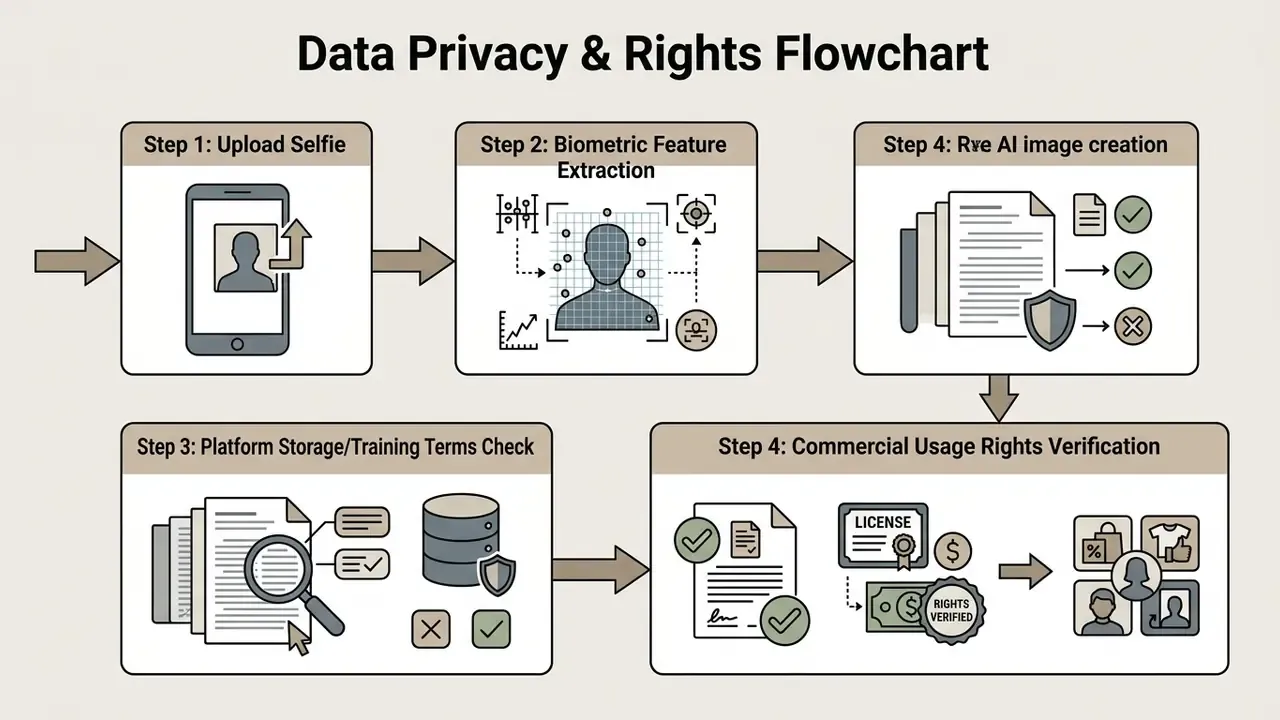
What to check before uploading selfies or faces
Before you upload a face to any online AI generator, confirm three data controls in the privacy policy: whether images are deleted immediately after inference, whether biometric feature maps are stored or shared with third parties, and whether user photos train general foundation models. According to NIST SP 800-63-4 Digital Identity Guidelines (2025), organizations processing biometric reference data must provide explicit consent mechanisms, publish clear retention schedules, and allow users to request full deletion.
Regulators treat the output side as personal-data processing too. Australian privacy guidance (OAIC, 2024) states that generating or outputting images containing personal information engages collection obligations, and the EDPS/GPA resolution on generative AI (2023) requires a lawful basis, a specific purpose, and minimization across collection, storage, and downstream processing.
Biometric safety checklist before you upload a selfie
When generated AI images can be used commercially
Commercial rights for AI-generated portraits depend on three stacked layers: platform licence terms, the underlying base model licence, and applicable right-of-publicity law. Under standard platform terms, including Midjourney and most commercial web generators, free-tier generations are limited to non-commercial personal use, while paid tiers grant exploitation rights for marketing, advertising, and merchandise.
Beyond the platform licence sits an independent question: the rights of the person depicted. US Congressional Research Service materials describe the right of publicity as preventing unauthorized commercial use of a person's name, image, likeness, or voice, while the US Copyright Office's 2025 digital-replicas report states that the human identity identified by a replica is not itself protected by federal copyright. Other jurisdictions route the same problem through data protection or personality rights. Philippine privacy authority guidance (2026) treats generating and sharing AI images of a real person's face as processing of personal data requiring lawful grounds, and Russian civil law (Art. 152.1) forbids commercial use of an identifiable person's image without consent even when copyright in the source photo belongs to the photographer. Where disputes escalate, compare options for documenting provenance and consent before counsel gets involved.
«Professional deployers of AI systems generating deepfakes must implement machine-readable marking of synthetic content and disclose that the content has been artificially generated or manipulated.»
Practically, the compliance answer is a conjunction, not a menu. You need a commercial licence from the generator, consent from the depicted person, and disclosure or watermarking wherever deepfake transparency rules bite. For audit trails, teams checking whether a circulating asset is synthetic can lean on AI image detectors alongside embedded provenance metadata, though detector confidence should be logged as evidence, not treated as proof.
E-E-A-T verification and regulatory terms assessment:
When free tiers stop being enough: TCO and self-hosted deployment
Free credits are a discovery mechanism, not an operating model. Escalate to a paid tier or a self-hosted deployment the moment any of these thresholds is crossed.
| Trigger | Why the free tier fails | Recommended move |
|---|---|---|
| Recurring volume (dozens of portraits per campaign cycle) | Daily caps and 4 to 26 credits per image make throughput unpredictable | Paid tier with credit pooling or batch generation |
| Commercial publication (ads, packaging, merch, covers) | Most free tiers grant no commercial rights | Paid commercial licence, or open-weight model under a permissive community licence |
| Confidential subjects (unreleased hires, executives, minors) | Public galleries and broad training licences expose the asset | Private or stealth mode, or on-premise / VPC deployment |
| Biometric data residency | Third-party retention terms cannot be negotiated on a free plan | Self-hosted open model; no selfie leaves your network |
| Brand-locked identity across hundreds of assets | Zero-shot adapters drift; free tiers block fine-tuning | LoRA or DreamBooth fine-tune on dedicated GPU capacity |
| 4K+ output or print | Free resolution frequently caps at 512×512 or 720p | Paid upscaling (up to 4096×4096 documented) plus print-grade export |
A simple cost model: multiply monthly image demand by credits-per-image, convert to the vendor's credit price, then set that against GPU-hour cost for local generation plus engineering time. Below roughly a few hundred images per month, subscriptions almost always win. Above that, and especially where biometric data cannot leave the perimeter, self-hosting turns out cheaper and lower-risk. Which is a rare combination, so it deserves a proper calculation rather than a hunch.
FAQ about creating AI generated images of yourself free
Can I generate AI photos of myself on a mobile phone?
Yes. Most free online AI image generators run directly inside mobile browsers such as Safari or Chrome on iOS and Android, with no specialized desktop hardware and no app install. Native apps exist as well. You upload a selfie from the camera roll, enter a prompt, and download the generated portrait in seconds.
How long does it take to generate an AI portrait?
Generation usually takes 5 to 30 seconds per image on cloud tools, depending on GPU queue load, model architecture, and resolution. Vendors do not publish a single cross-platform average, because latency varies by device, model, and queue depth. Custom fine-tuning jobs such as DreamBooth or LoRA take minutes, not seconds.
Do these tools support non-English prompts, including Russian?
Support is product-specific. Adobe Firefly's mobile documentation lists Russian among interface languages and accepts JPG, PNG, and WebP uploads, and several mobile generators claim Russian prompt support in their store listings. Others accept English only, or translate internally with reduced prompt fidelity. Test a control prompt in both languages before committing credits.
Which export formats and resolutions do free plans offer?
PNG and JPEG are near-universal. WebP appears often, and vector-oriented tools sometimes add SVG or PDF. Free-tier resolution is commonly capped at 512×512 or 720p, with 1024×1024 offered by some headshot trials. Upscaling to 4K and beyond is generally a paid feature.
Do I need graphic design or prompting skills to create an AI photo?
No prior design skill is required. Most consumer platforms ship style presets, for example "Corporate Headshot", "Anime", or "Studio Portrait", which structure background and lighting parameters automatically, so you supply only a reference selfie. Prompt-enhancer features expand a few words into a full composition description. The eight rules above simply give you manual control when presets fall short, which they will eventually.
Are free AI generated images watermarked?
Some free services stamp a small visual watermark or platform logo on outputs, removable by upgrading or paying a one-time export fee. Others offer watermark-free exports within their daily free credit allowance. Separately, EU-regulated deployers may be required to embed machine-readable synthetic-content markers whether or not a visible watermark exists.
Can I use my free AI generated portrait for commercial advertising?
Generally no. Most platforms restrict free-tier outputs to personal, non-commercial use. Advertising campaigns, product packaging, and monetized media typically require an active paid subscription with verified commercial licence rights. A minority of services do grant commercial rights on free tiers, and open-weight models under permissive community licences allow free commercial use below defined revenue thresholds. Always read the specific licence text rather than a marketing page.
Can I use an AI-generated portrait for a passport or official ID?
No. Generated or edited facial images are not acceptable for official identity documents, and NIST guidance (2026) states that identity match decisions must be based on the original unedited image rather than a generated one. Keep AI portraits for profiles, marketing, and creative work.
How many variations should I generate before choosing?
Plan for 5 to 10 seeds per concept. Identity-preserving pipelines vary run to run, so fixing the seed once you find a good result is what delivers consistency across a series. Rewriting the prompt again and again mostly burns credits.
Verification and methodological note
Methodology: technical claims here are drawn from peer-reviewed identity-preservation research (FlashFace, InstantID, PhotoMaker, ConsistentID, UniPortrait, InstaFace), published vendor documentation on free-tier limits and paid-only features, and public regulatory sources including NIST SP 800-63-4, NIST SP 800-63A-4 (draft), NIST IR 8334 (draft), and Article 50 of the EU Artificial Intelligence Act. Free-tier allowances, credit costs, and watermark policies change frequently and by region, so verify current terms directly with each provider before relying on them. Review cadence: pricing and licence rows in this article are re-checked quarterly, and the regulatory references are reviewed whenever a cited standard is revised. Terms were last confirmed in March 2026. Scope note: no proprietary product claims, commercial terms, or executive representations are asserted for Hypeart in this article. Marcus Hale, author. All control frameworks and model governance principles discussed here reflect generalized industry benchmarks and publicly available standards. Audience assumptions about compliance workflows remain hypotheses until validated through interviews, analytics, or documented customer research. Explore comprehensive definitions and technical standards across our AI Media Glossary, including the reference entry on online photo editors.
Social media visuals, avatars and full-body characters
Full-body characters and lifestyle social visuals need explicit scene prompts covering attire, posture, location, and camera angle. Character consistency across a posting schedule depends on fixed prompt seeds, stable face-adapter weights, and standardized aspect ratios such as 4:5 or 9:16 for mobile feeds, commonly exported at 1080×1350.
One production pattern worth copying is the six-frame identity sheet: neutral front portrait, three-quarter portrait, profile, full-body front, full-body side or back, plus one expression or style variant. That sheet becomes the reusable reference set for every scene afterwards.
In a documented asset workflow, a digital marketing team needed 12 consistent lifestyle photos of a brand ambassador for a multi-week schedule. Using an IP-Adapter pipeline with one high-resolution reference photo and fixed seed parameters, the team produced 12 distinct environments (office, coffee shop, outdoor park) while holding facial similarity high across every output, and skipped the on-location shoot entirely. Similarity there was measured with cosine similarity of ArcFace-family embeddings, the same comparator used in identity-preservation research, not by eyeballing the grid.
At the other end of the taste spectrum sit the deliberately chaotic formats, and yes, brainrot ai images follow the same identity mechanics even when the aesthetic goal is absurdity.
That prevalence figure is the practical argument for disclosure. Synthetic avatars remain rare enough that platforms and audiences treat an undisclosed one as a trust problem rather than a style choice.