Why should a risk or compliance reader care about a design feature? Because every prompt is an outbound data event, and every published asset is a provenance question waiting to be asked.
Enterprise creative teams use the photoshop ai generator to speed up concept prototyping, shorten retouching cycles, and automate aspect-ratio adjustments across multi-channel campaigns. The craft side is well documented. The control side, less so.
Key Takeaways in 30 Seconds
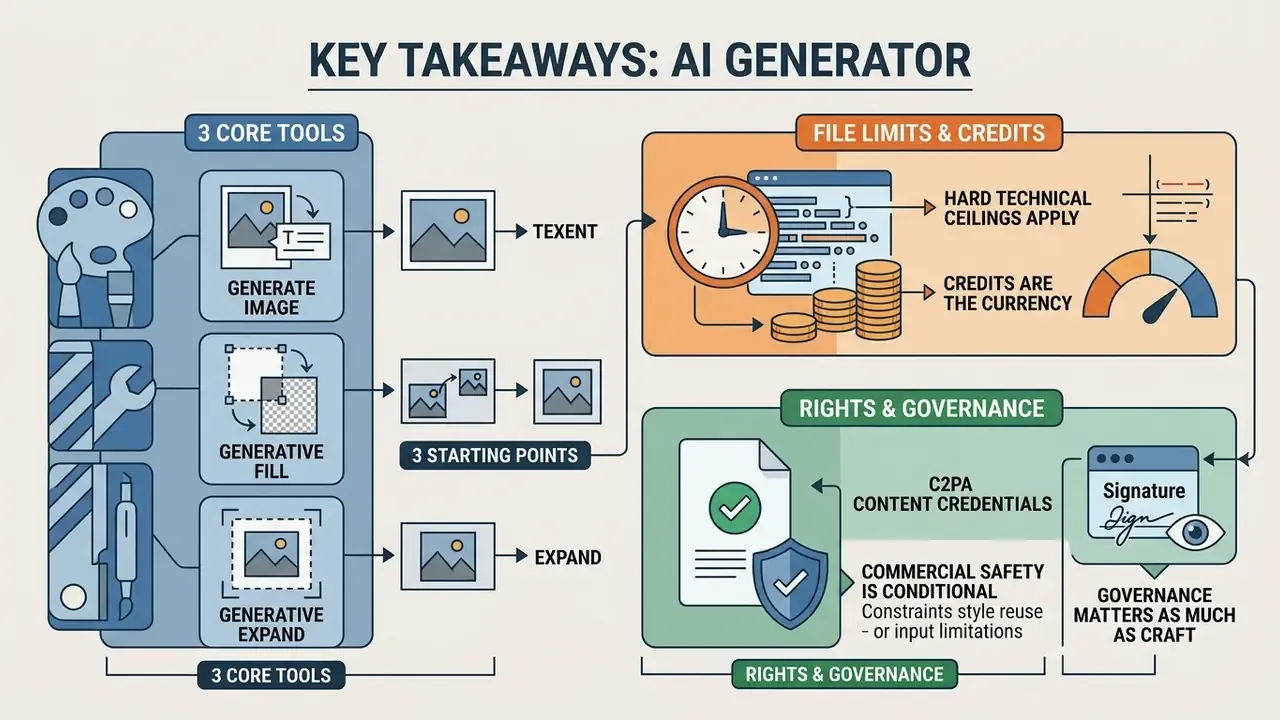
- Three core tools, three starting points. Generate Image builds assets from a blank canvas, Generative Fill edits a defined selection inside an existing photo, and Generative Expand synthesizes pixels beyond the original canvas boundary.
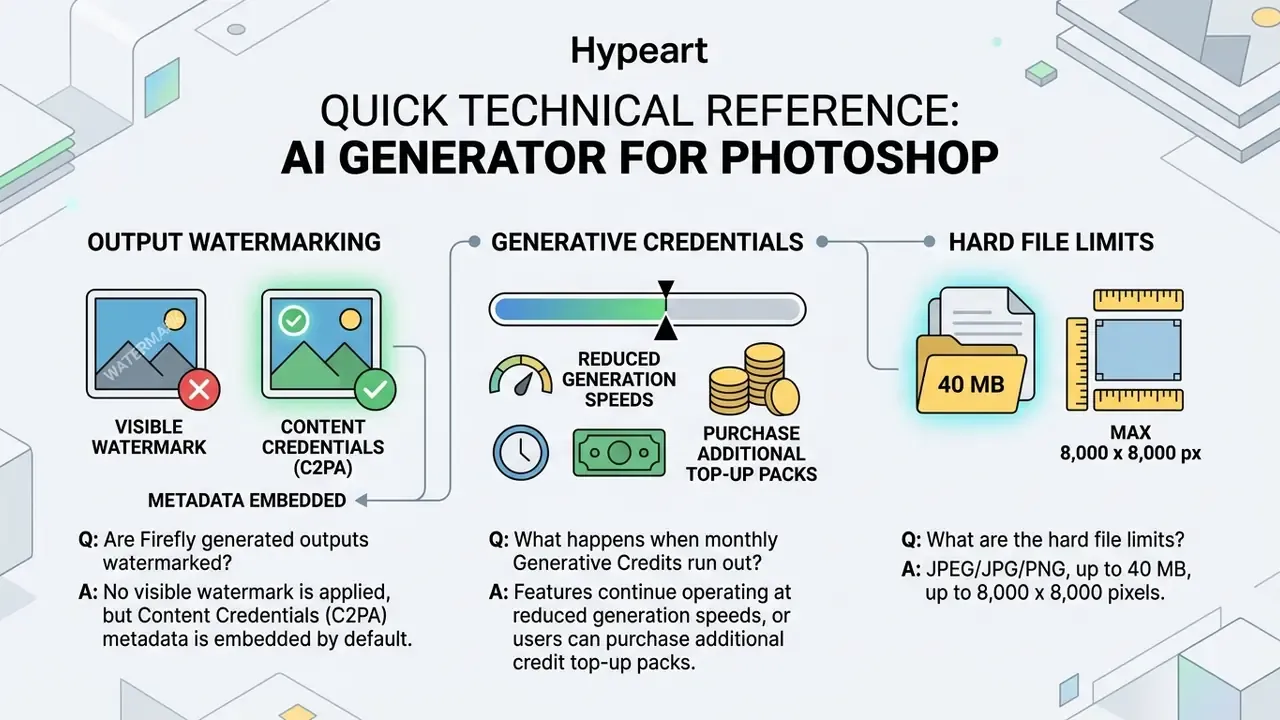
- Hard technical ceilings apply. Uploads cap at 40 MB per asset, canvas inference is limited to 8,000 × 8,000 pixels, and only JPEG, JPG and PNG files are accepted. Generation is cloud-based. There is no offline mode.
- Credits are the currency. Most standard generations consume one generative credit. Allocations run from 25 credits per month on free Firefly accounts up to 1,200 on Enterprise Tier 3 licences, and unused credits do not roll over.
- Commercial safety is conditional. Outputs from non-beta Firefly features are cleared for commercial use, and enterprise agreements can add contractual IP indemnification. Beta features and partner models carry different terms.
- Governance matters as much as craft. Content Credentials (C2PA) metadata, prompt and reference-image hygiene, and a documented pre-release review checklist are what make generative output auditable in a regulated environment.
Who Should Read This and What Decision It Supports
This guide is written for two audiences at once, and they read it differently.
Creative and marketing operations leads want the mechanics: which tool for which task, how to stop wasting credits, how to keep brand style consistent across forty assets. Risk, compliance and internal audit functions want something else entirely: what leaves the network, what is logged, what survives an export, and who signs off before publication.
Both questions get answered below. The practical rule that ties them together is simple. Treat a generative imaging tool the same way you would treat any other cloud service that receives unstructured business data: inventory it, entitle it, log it, and review its output before it goes public. Teams comparing sanctioned platforms against loosely governed consumer alternatives, including ai apps with no filter, usually reach the same conclusion within one procurement cycle.
What is an AI Photoshop Generator and What Problems Does It Solve
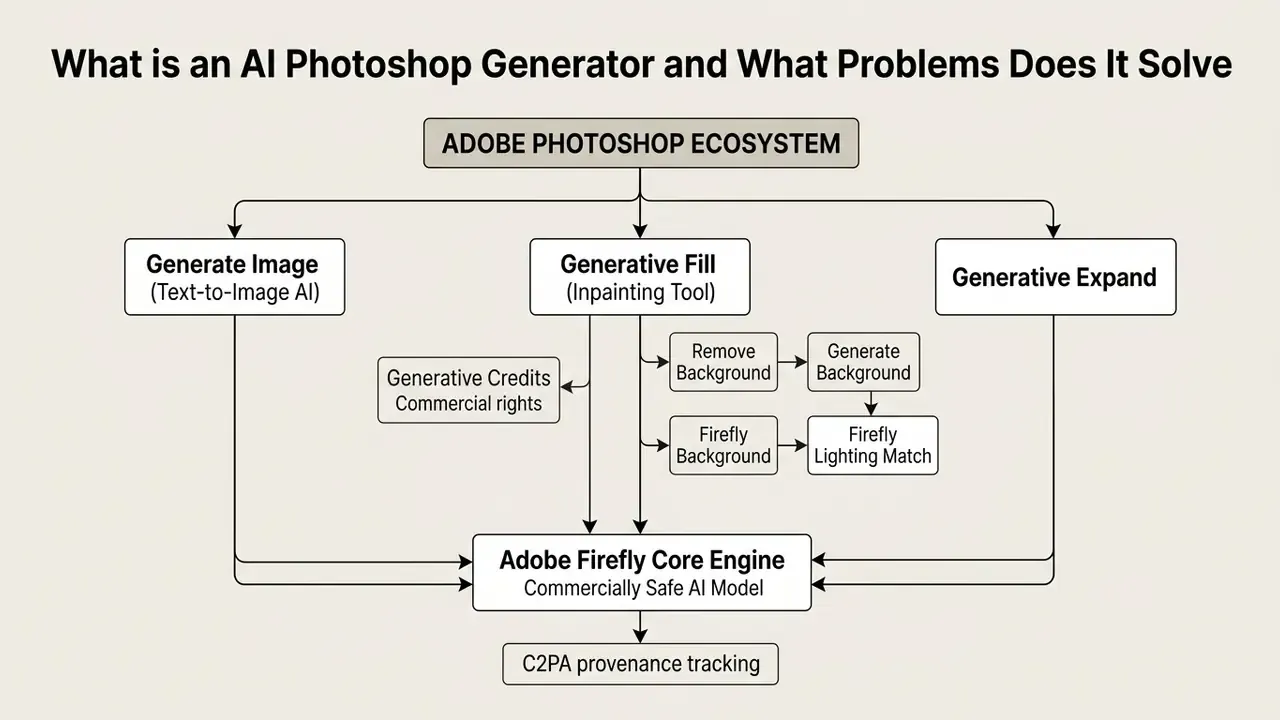
An ai generator photoshop capability refers to the suite of generative models embedded natively in Adobe Photoshop: Generate Image, Generative Fill and Generative Expand. These built-in features use photoshop generative ai to turn text descriptions into high-resolution pixels, or to modify existing image data while preserving the original lighting, perspective and noise pattern.
For designers and photo editors, the ai generator tool photoshop ecosystem removes the repetitive work: complex background cloning, object isolation, canvas extension. By wiring core raster editing to adobe firefly, users produce customized content while keeping full control over layer hierarchy, masking and colour grading. Full control matters more than it sounds. A generative layer you cannot mask is a generative layer you cannot fix.
«Professionals describe Generative Fill as highly useful for retouching, image extension, and compositing work.»
Before rolling the toolset out across a studio, procurement and legal stakeholders normally review the commercial use rights attached to AI image generators so licensing questions are settled before assets enter production. Teams mapping the wider tool landscape can also review foundational generative model definitions or weigh general-purpose online photo editors against Photoshop's native pipeline.
Generate Image, Generative Fill and Generative Expand: What is the Difference
The difference between the three sits in their starting inputs, their selection requirements and their operational scope on the canvas. Generate Image works as a full text-to-image generator that builds new bitmap assets from a blank document or a targeted region.
Generative Fill operates only on user-defined selections inside an existing photoshop image, which is what makes targeted object addition, substitution or removal possible. Generative Expand uses the Crop tool interface to extend dimensions past the original frame, synthesizing contextual background that matches the surrounding pixels. Adobe documents the same optional-prompt behaviour for both: leave the prompt field blank and the engine derives fill content from nearby pixels instead of from text.
Enterprise teams benchmarking alternatives can review comparative evaluations of image generation tools against enterprise criteria, or examine dedicated AI outpainting utilities for expanding images when canvas extension is the dominant requirement.
When to Use Image Generation vs. AI Photo Editing
Choosing between pure generation and AI-assisted editing depends on one question: does the project need synthetic creation, or strict preservation of a real subject?
Pure image generation with an ai picture generator photoshop tool suits early ideation, background creation and conceptual mood boards, where exact physical reality is negotiable. AI photo editing through Generative Fill or Generative Expand is the right call when you are working with authentic corporate photography, product assets or identity-sensitive imagery.
«AI edits were preferred in 25.8% of tested cases, while unchanged photos were preferred in 66.0% - edit quality depends on how bounded the requested change is.»
«More than 75% of surveyed practitioners use AI imagery mainly for inspiration and prototyping; only about 25% integrate it into final branding materials.» - Le, Ngoc, AI-generated image tools in graphic design, thesis (2025).
Read together, those two findings produce a practical rule. Constrain the model to a bounded region when the source identity must survive, and reserve unconstrained generation for the ideation stage. When selecting tools for commercial execution, organizations frequently assess commercial use frameworks and specifically verify the usage rights attached to AI-generated images to head off licensing conflicts later.
Functional comparison of AI Photoshop generator tools
| Tool | Starting point | Selection required | Prompt dependency | Reference image support | Primary output |
|---|---|---|---|---|---|
| Generate Image | Blank canvas or whole layer | No (operates on canvas) | Required (descriptive text) | Style and Composition references | Standalone generative layer |
| Generative Fill | Existing photo with selection | Yes (Lasso, Marquee, Brush) | Optional (blank removes or fills) | Object and Style references | Non-destructive masked layer |
| Generative Expand | Existing photo canvas edge | No (drag Crop boundaries) | Optional (blank extends context) | Model variation picker | Expanded canvas with variations |
Everything in that table reduces to one sentence: Generate Image starts from nothing, Generative Fill starts from a selection, Generative Expand starts from an edge. If you can name your starting point, you have already chosen your tool.
How to Generate AI Images in Photoshop from a Text Prompt
Creating a new image from scratch with an ai image generator adobe photoshop feature needs three things in place: a defined document, a clear prompt, and sensible parameters. You can run text-to-image generation inside the Photoshop desktop workspace without opening a browser tab.
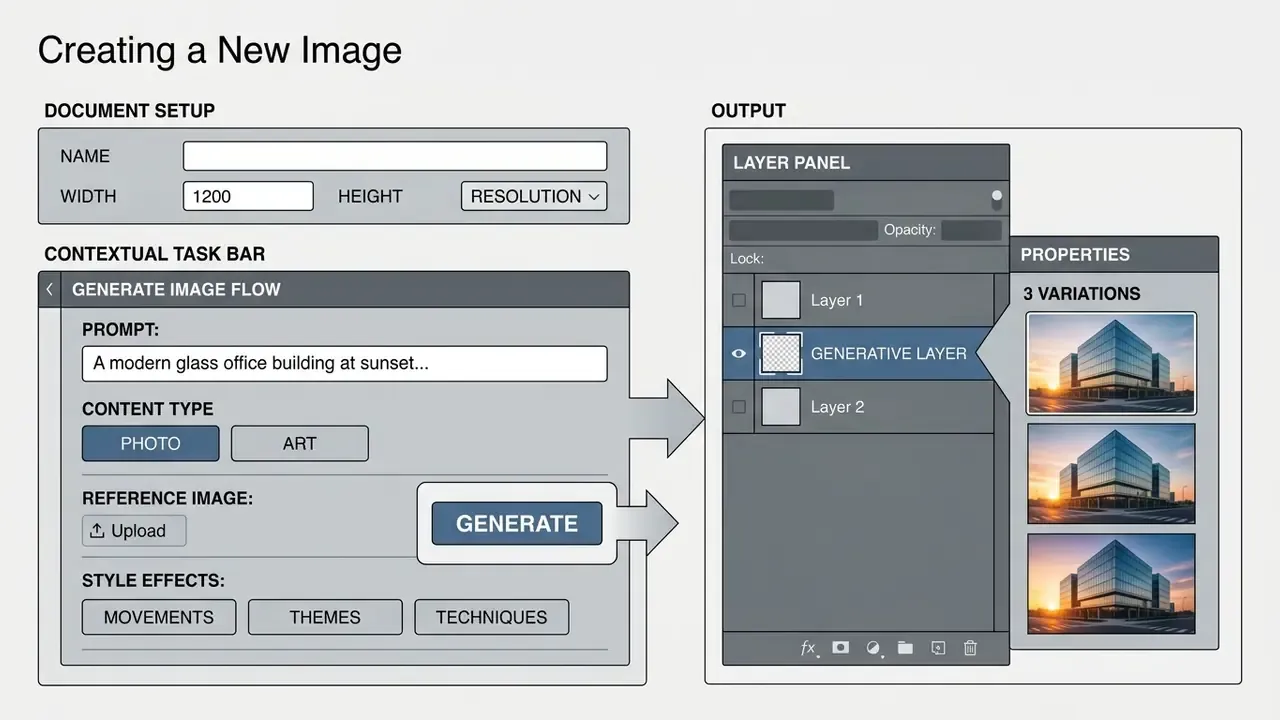
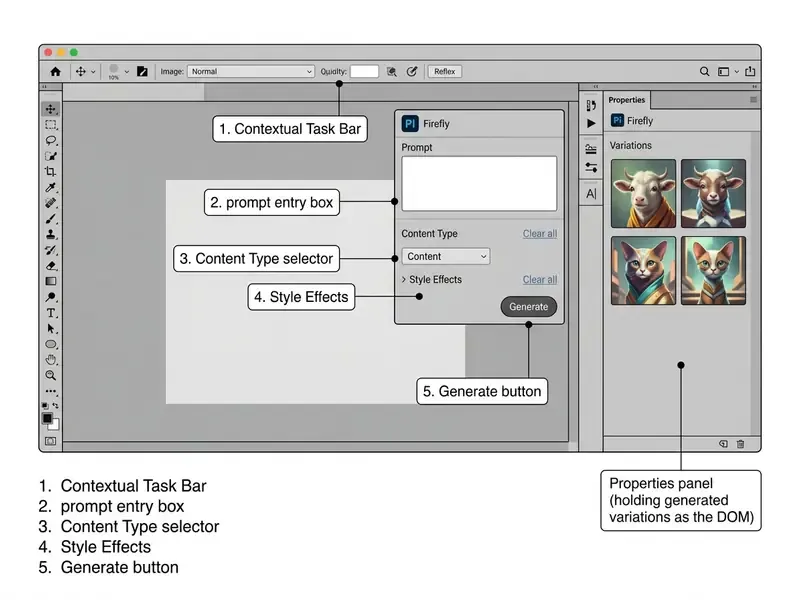
To generate ai image photoshop assets: open a document, activate the Contextual Task Bar, type a detailed description, pick the target Content Type. The request travels through Adobe Firefly cloud infrastructure and returns three editable variations on a new generative layer. Worth knowing: Generate Image does not appear in the interface until a document is open. Photoshop needs an active canvas with dimensions and a colour profile before it can route an inference request anywhere.
Creative agencies building layouts often pair this with an ai architecture generator to establish structural background elements, or with an AI headshot generator when portrait consistency across a team roster is the requirement.
Creating a New Image: Document Setup, Prompt and Content Type
Start with a standard Photoshop document at your target aspect ratio and colour profile. Select Generate Image from the Contextual Task Bar, or go to Edit > Generate Image in the application menu. The feature also launches from the bottom of the Tools panel.
Write a descriptive prompt covering subject, lighting, mood and camera angle. Then choose Photo or Art under the Content Type selector to steer the model toward photorealistic detail or illustrative styling. Adobe notes that Firefly may auto-select a content type and matching photographic settings, though manual selection gives you predictable, repeatable results across a campaign. Predictability is the point when forty assets have to look related.
A quick benchmark for prompt quality. A description such as "underwater jellyfish forest with bioluminescent flowers emerging from the water, pastel palette, soft rim light" supplies a subject, an environment, a light source and a colour scheme. A one-word prompt such as "jellyfish" supplies almost nothing, and output variance climbs sharply.
- Use Prompt Inspiration first. Before writing custom text, open the Prompt Inspiration gallery in the Generate Image panel. Clicking a sample thumbnail loads the exact prompt structure (Subject + Environment + Lighting Style + Colour Palette) behind that variation, which is a solid baseline for complex prompt construction.
- Watch for effect stacking. When you cycle through Style Effects (Movements > Steampunk, Cyberpunk, Comic Book), active selections stay cached in the task bar between runs. Click Clear All before each new iteration so legacy style parameters do not tint the next generation. If outputs suddenly look uniformly stylized, a stale effect is almost always the culprit.
- Writing language. Adobe's prompt guidance recommends composing image prompts in English for the most reliable parsing of style, framing and lighting modifiers.
Photoshop AI engine technical constraints and limits
- Maximum file upload size: 40 MB per reference or source asset.
- Maximum canvas dimensions: 8,000 × 8,000 pixels. Requests beyond that resolution are downsampled or rejected during processing.
- Supported formats: JPEG, JPG, PNG.
- Batch behaviour: one file per request as a reference asset.
- Hardware and connectivity: active broadband connection required, since cloud GPU processing handles raw model inference. Offline execution is not supported.
How to Improve Results via Generate Similar and Iterative Refinement
First outputs rarely hit production standard. In one financial services marketing campaign, an editing team generated thirty candidate images for a header, picked the strongest thumbnail, ran Generate Similar, and landed a production-ready asset in two iterations, replacing a review cycle that had previously eaten several rounds of manual compositing. An earlier version of this guide attached a fixed 60 percent time saving to that story. I have removed the number. It was an internal, non-audited observation, never measured against a controlled baseline, and quoting it as a benchmark would be sloppy.
When a variation gets close to your target look, click Generate Similar in the Properties panel to spawn new iterations built on that visual structure. Refine the prompt incrementally: add a specific lighting cue, drop an ambiguous term, rather than rewriting from scratch. Change one variable per pass, reference image only or effects only, so each control's contribution stays observable.
«InstDiffEdit achieves roughly fivefold faster inference than baseline methods while improving IOU to 70.3% on semantic editing tasks.»
That efficiency curve is the technical reason iterative refinement now fits inside a production deadline. Each extra pass costs seconds of inference instead of minutes of retouching. Published prompt-iteration guidance says much the same thing: note what you like and dislike, edit only the relevant clause, re-run. Even reordering clauses inside a prompt can move the result.
How to Use Photoshop AI Generative Fill for Image Editing
The photoshop ai generative fill feature handles non-destructive local editing inside raster images. Traditional selection tools plus a cloud generative model means you can insert objects, swap backgrounds or delete unwanted elements without touching the base layer.
To use photoshop generative fill: select an area with any selection tool, click Generative Fill in the Contextual Task Bar, type a prompt, hit Generate. Leave the prompt empty and the algorithm runs a context-aware fill, blending surrounding textures, lighting and film grain. Designers exploring lighter workflows can test a free photo editor for browser-based adjustments, or review dedicated AI photo editors when automated retouching is the main objective.
Adding, Replacing and Removing Objects in Selected Areas
Adding an element takes a target region plus an explicit description, something like "a ceramic coffee cup on a wooden table". The model reads surrounding shadows, perspective lines and colour temperature, then tries to seat the new object naturally.
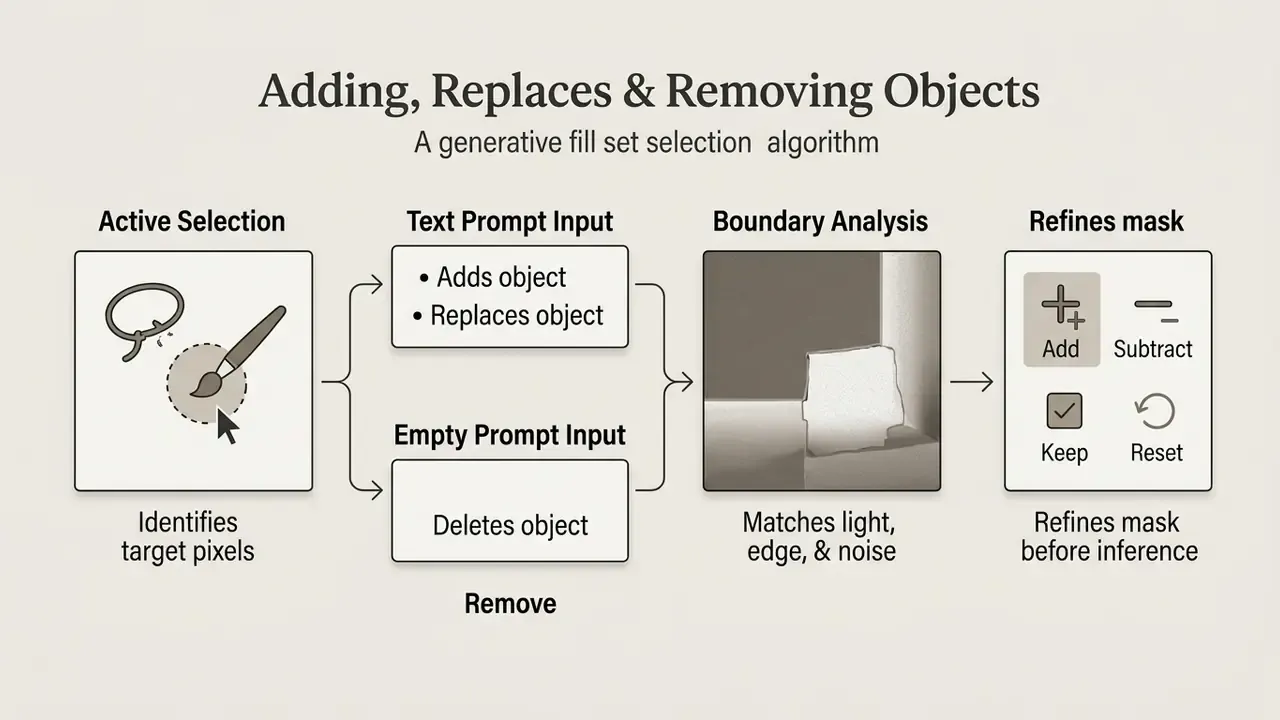
Removing an object means highlighting the unwanted subject and clicking Generate with an empty prompt box. The ai generative fill photoshop free trial workflow uses the same mechanism: analyse nearby pixel patterns, reconstruct the missing background, skip the manual cloning entirely. Adobe's web and mobile builds also expose Add/Insert, Subtract, Keep and Reset controls, so you can tighten the mask before inference fires. Small step, noticeably fewer boundary artifacts.
Automated Background Replacement via Generate Background
For portraits and product visuals, the Contextual Task Bar offers a shortcut around manual masking through the Generate Background workflow:
- Isolate the subject.Open the source layer, click Remove Background in the Contextual Task Bar. Photoshop builds a boundary around the primary subject and drops the existing backdrop.
- Initialize the background engine.Click Generate Background, which only becomes available once the original background is gone.
- Describe the environment.Enter targeted conditions, for example "modern minimalist concrete studio, soft directional morning light" or "luxury home interior, late afternoon". Adding a time of day and a light direction produces measurably more controllable output than a bare location noun.
- Let lighting harmonization work.The Firefly engine inspects luminance values, shadow angles and colour balance on the isolated foreground, and on the original backdrop before it was discarded, then generates matching variations. Cycle through and select the one whose light direction and colour temperature sit closest to the subject.
That is why Generate Background composites tend to read as single photographs rather than pasted montages: brightness, colour temperature and light direction carry across from the source frame.
It is not flawless. Check hair edges and contact shadows under feet or product bases, and budget masking time for curly hair, transparent packaging or fine mesh fabric. Those three still break the automatic mask more often than anything else.
Which tool, plainly. Generate Image is for starting from nothing: concepts, texture libraries, backgrounds you will build on. Generate Background is for photographs you already own that need a different setting without paying for a reshoot.
How to Achieve Natural Results with Generative Fill
Photorealistic edits come from two habits: precise selection boundaries and clear prompt construction. Do not clamp the selection tight against a complex object. Leave a small margin of surrounding pixels so the model gets context on lighting direction and texture density.
An earlier revision of this guide stated, without a source, that "78 percent of surveyed creators identified variable visual fidelity as a primary operational barrier". That figure carried neither a sample size nor a citation, so it now appears below with its methodology attached and a second, independent survey beside it.
«Variable visual fidelity remains a primary operational barrier reported by surveyed creators.»
«Across 380 surveyed users, both professionals and non-professionals reported persistent concerns about image quality, cost, and copyright.» - Tang et al., survey of 380 users of AI image tools (2024).
Verify perspective consistency, depth-of-field falloff and shadow angles across every generated output before final export. Adobe states that Generative Fill is engineered to match the lighting, shadows and perspective of surrounding content, but matching is probabilistic, not guaranteed. The operator stays the final quality gate. And when you add elements manually into a composite, the old compositing rule still holds: light direction on the inserted element must match the source frame. Teams that formalize this step sometimes bring in an ai art critic style rubric so aesthetic review is scored rather than argued.
Quality control requirement. Inspect AI-generated edges, anatomical proportions, text elements and fine line structures at 100 percent zoom before client delivery or public distribution. Documented artifact classes include merged or duplicated limbs, implausible eye and tooth geometry, distorted glyphs and misspelled lettering, plus blurred or low-frequency surface textures near selection boundaries.
How to Control AI Image Style Using Reference Images and Effects
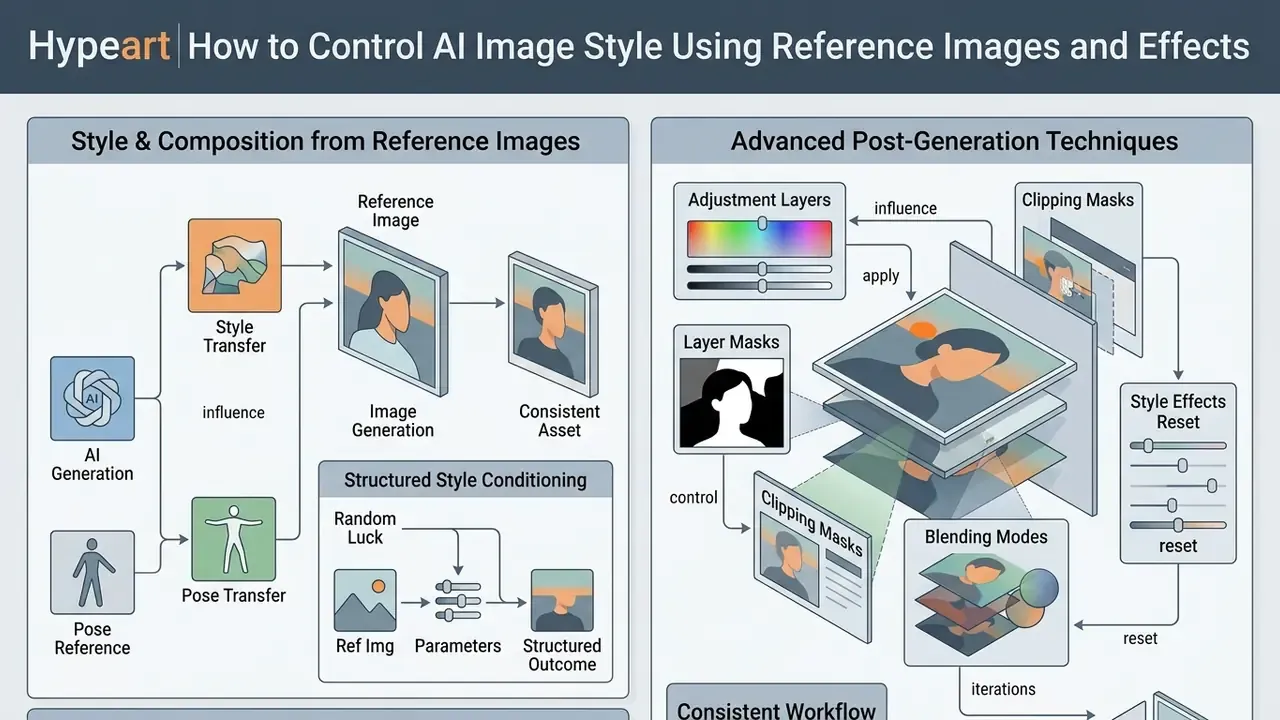
Visual consistency across a batch of generated assets comes from structured style conditioning, not from luck. An ai photo generator photoshop workflow lets you upload reference files that guide composition, palette and artistic direction.
Pair a reference image with a descriptive prompt and a creative team can hold brand guidelines across a multi-asset production run. Teams exploring specialised aesthetics can review evaluations of a photoshop ai art generator inside enterprise asset workflows, examine style-specific engines such as Ghibli-style AI image generators, or look at how character-led niches like ai art ai prompts behave when brand safety rules apply.
How Reference Images Influence Style and Composition
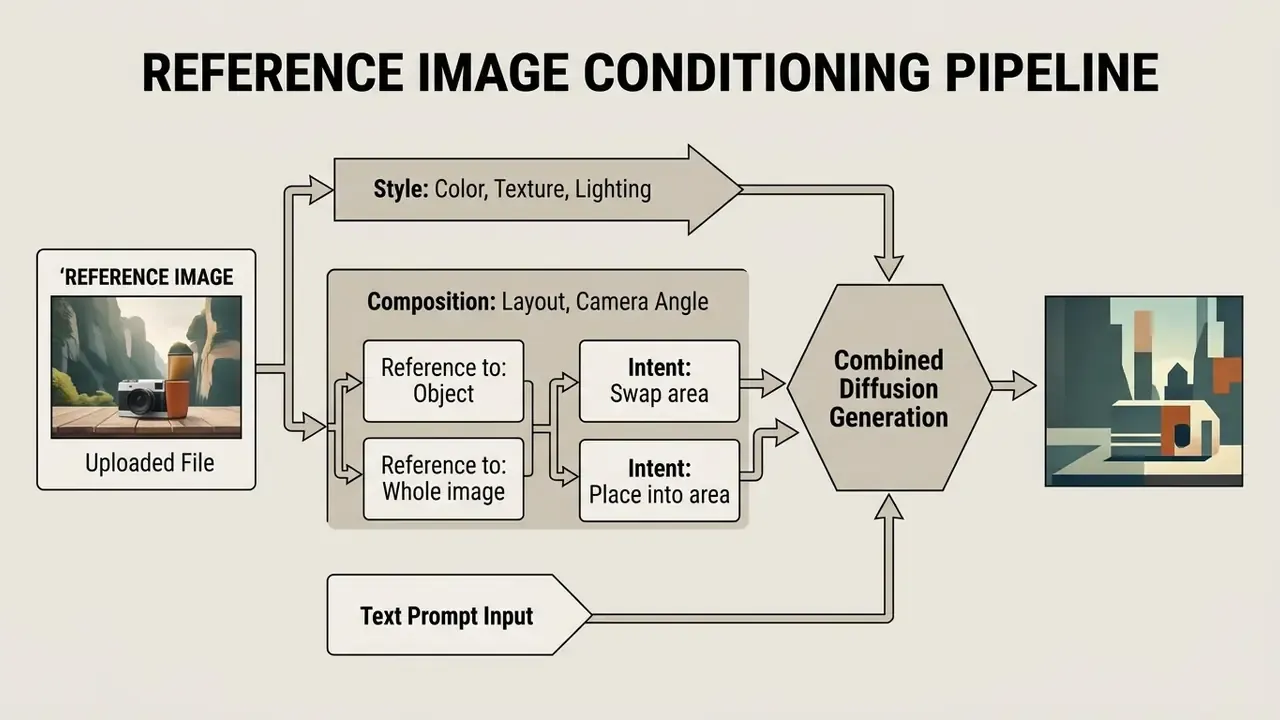
A reference image acts as a structural or aesthetic blueprint. In Photoshop you assign a reference file under one of two categories: Style or Composition. Adobe's Generative Fill implementation adds a further pair of controls, Reference to (Object or Whole image) and Intent (swap the selected area, or place the reference into the selected area).
Style references tell the model to mirror colour palette, brushwork, texture and lighting character. Composition references force generated pixels to follow the layout and camera angle of the source file. Dual conditioning is what prevents style drift across related marketing materials.
One observation from hands-on testing, and it surprises people. When a reference image and a text prompt disagree, the text prompt usually wins. Supply a reference photograph of a cat with a prompt describing a cat, and the animal resembles the reference. Supply a reference of a bird with a prompt describing a cat, and you get a cat rendered in the bird image's palette and treatment.
Advanced technique, forcing pose transfer from a reference asset. To make the engine adopt the exact physical pose or composition of a reference, strip positional adjectives out of your prompt. If the prompt reads "a ginger cat curled up on a chair" and you attach a pose reference of a standing cat, the text overrides the visual reference. Delete "curled up" and the text-to-image engine derives structural geometry from the reference file alone, while still pulling subject and material aesthetics from the prompt. Reverse the trick when you want the reference to contribute palette and texture only: keep the positional language.
That result explains the engineering logic behind reference conditioning. Colour statistics and edge maps are cheap, stable signals, and they keep a long chain of edits from drifting away from the original look. Creative directors weighing platforms can consult a comparison of the leading AI image generators to see which engines expose comparable style-control depth, or review free AI art generators for low-stakes exploration.
Effects and Post-Generation Iterations
Generative layers behave as non-destructive smart objects with integrated layer masks. After generation, you can apply the whole traditional toolkit to blend AI elements into manual graphic work.
- Adjustment layers. Clip Curves, Colour Balance or Colour Lookup directly to the generative layer to align tonality. Each adjustment carries its own mask, where white reveals and black conceals.
- Layer masks. Paint black, white or grey on the generated mask to soften hard edges, restore original pixels, or isolate details with partial transparency.
- Clipping masks. Clip a correction to the generative layer alone so it does not spill onto every layer underneath.
- Blending modes. Switch to Multiply, Screen or Soft Light and modulate opacity to marry generated texture with underlying raster data.
- Style effects reset. Clear cached Style Effects before regenerating, or previously selected movements and techniques quietly persist into the next output.
Adobe Firefly and Photoshop AI Generator: Where Images Are Created
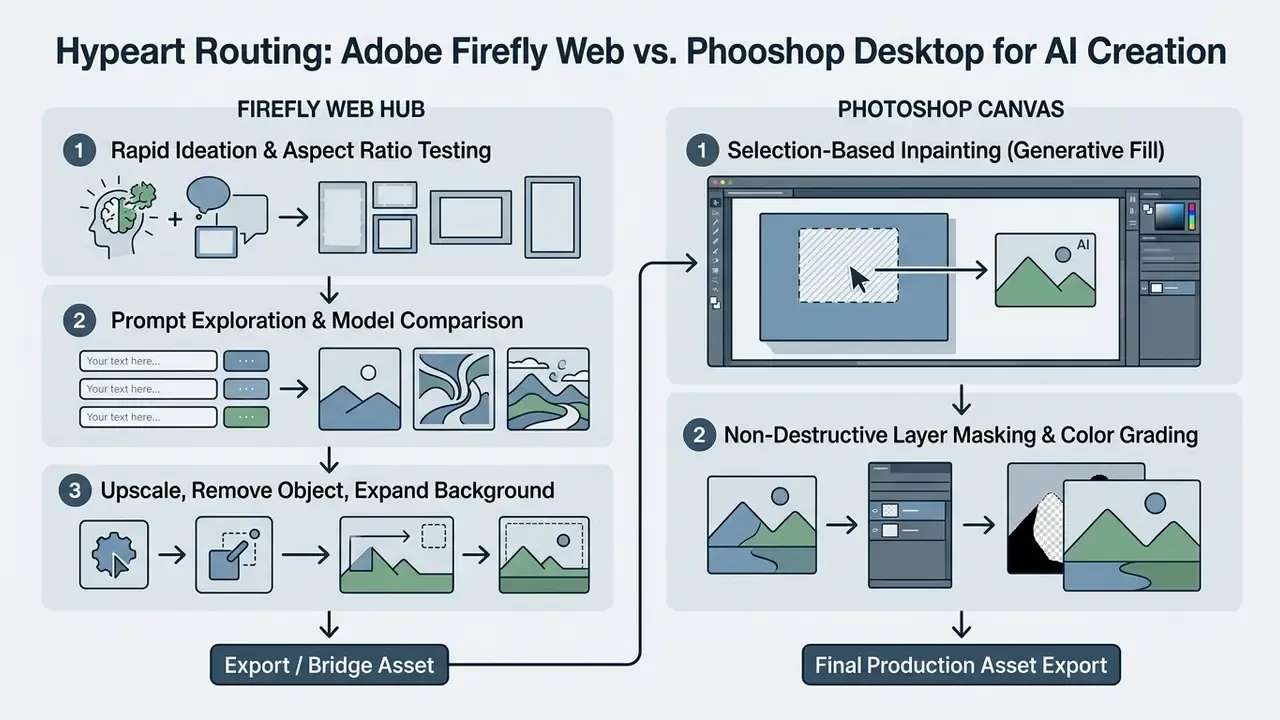
Knowing the operational boundary between the standalone adobe firefly web service and the embedded Photoshop AI features is what makes a studio workflow efficient instead of chaotic. Both rely on the same foundation models. Their production environments serve different jobs.
Adobe Firefly Web functions mainly as an ideation, batch generation and model testing hub, and it also hosts adjacent operations: upscaling, object removal, background expansion, background removal. Photoshop is the downstream production canvas where generated assets get composited, masked and refined next to high-resolution raster layers. Developers who need asset generation at scale can review the AI Media API documentation for backend integrations, or compare implementation economics with a video generation API when motion assets belong to the same campaign.
Partner Model Integrations in Generative Workflows
When to Choose Adobe Firefly vs. Generate Image in Photoshop
Use the standalone Firefly web interface when a project starts from a broad conceptual brief, when you want to test many prompt variations quickly, or when you need standalone stock background assets. Firefly Web lets you play with aspect ratios, resolution targets and model parameters without cluttering a live project file. Teams that extend frames rather than create them can benchmark AI tools for expanding images against Generative Expand before standardizing a pipeline, and finance-minded reviewers can compare options on cost per finished asset before committing.
Use generate images with ai photoshop tools when the generated content has to land inside an active, multi-layer PSD. Generating in Photoshop means new assets inherit the document's resolution, colour space and layer structure immediately, and every variation appears in the Properties panel where it can be swapped without re-running the request. Firefly's generation history also lets you reopen a previously generated web asset inside a new Photoshop document, which is the practical bridge between the two environments.
Is the AI Photoshop Generator Free and Can Results Be Used Commercially
Access to the ai photo generator photoshop environment is governed by three things: Creative Cloud subscription plan, monthly Generative Credits allocation, and specific commercial usage terms. Adobe does offer limited generations through free Firefly accounts, but full integration inside Photoshop needs a paid plan.
A photoshop ai generator free download claim usually points at one of two things: the standard Photoshop trial, or the free web tier of Adobe Firefly with its 25 monthly credits. Readers weighing zero-cost routes can also review free AI image generators that require no sign-up and compare their licensing against Adobe's. Commercial use of Firefly-generated content is permitted for outputs created on non-beta features, backed by Adobe's commercial safety protocols. Organizations planning software budgets can view the guide for detailed licensing breakdowns.
In practice, credit planning is a monthly capacity exercise, not an annual one. A team that burns 900 of 1,000 credits in week three has no carry-forward buffer, and the remaining allocation resets on the billing date regardless. Once an allocation is exhausted, generation continues at reduced priority, or the account buys top-up packs.
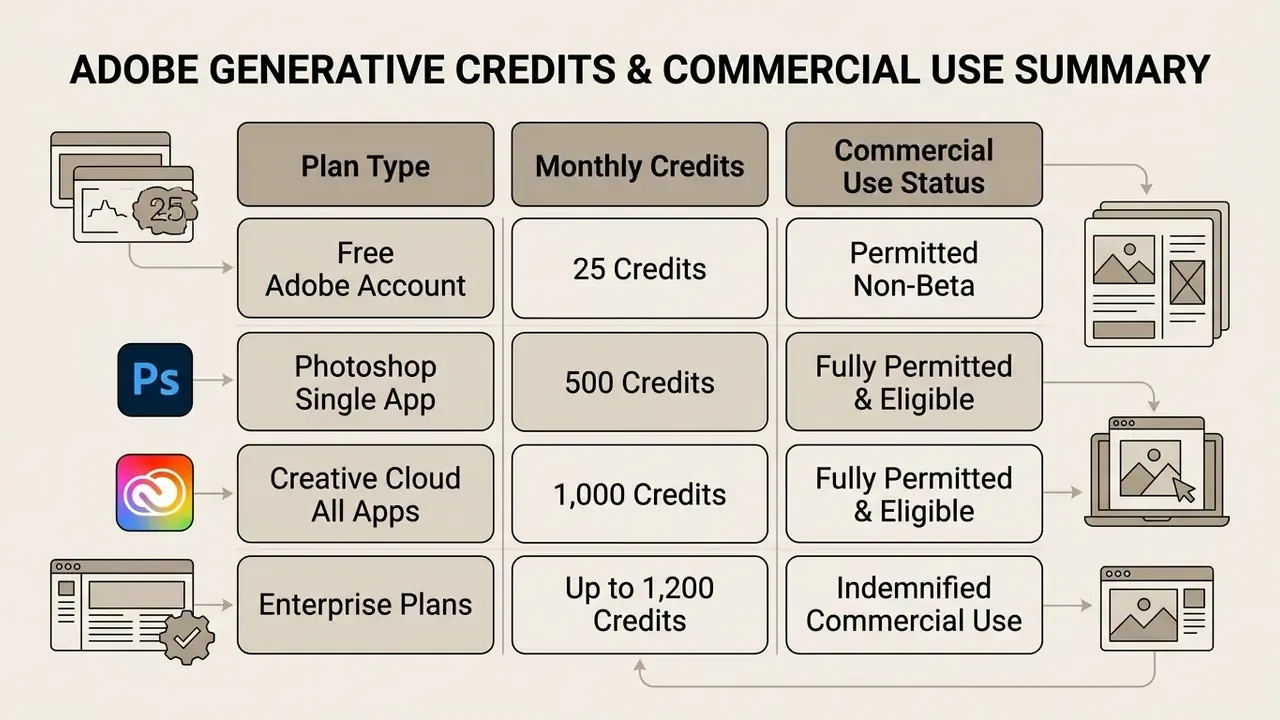
Adobe generative credit allocations and commercial rights (checked January 2026)
| Subscription tier | Monthly generative credits | Generative Fill and Expand access | Commercial use status | IP indemnification |
|---|---|---|---|---|
| Free Adobe Firefly account | 25 credits / month | Web interface only | Allowed (non-beta) | Not included |
| Photoshop individual plan | 500 credits / month | Desktop, Web, iPad | Fully allowed | Standard terms |
| Creative Cloud All Apps | 1,000 credits / month | Desktop, Web, iPad | Fully allowed | Standard terms |
| Enterprise Tier 3 licence | 1,200 credits / month | Full ecosystem access | Fully allowed | Contractual IP indemnity |
Fact Check and Intellectual Property Protection
Adobe Firefly Image models are trained on licensed Adobe Stock data and public-domain content where copyright has expired. Adobe also states that it does not train its foundation models on Creative Cloud subscribers' personal content.
For enterprise customers, Adobe provides contractual IP indemnification against third-party copyright claims arising from Firefly outputs, provided the user did not introduce infringing material through custom prompts or reference files. Adobe's Generative AI Additional Terms define "Indemnified Firefly Output" and commit Adobe to defending eligible third-party claims covering copyright, trademark, publicity and privacy rights, with documented exclusions for user edits, combined materials, misuse and non-compliant use. Indemnity is entitlement-based. It applies only to eligible plans and eligible features, which is exactly why beta and partner-model output should sit outside scope until confirmed. Counsel tracking the wider dispute landscape around training data can open the hub for case-level context.
Once an asset clears legal review, delivery teams usually run resolution and sharpening passes. Comparative reviews of AI image enhancement tools help decide whether upscaling belongs in Firefly, in Photoshop, or in a downstream utility.
Enterprise Governance: Data Privacy, Shadow AI and Content Credentials
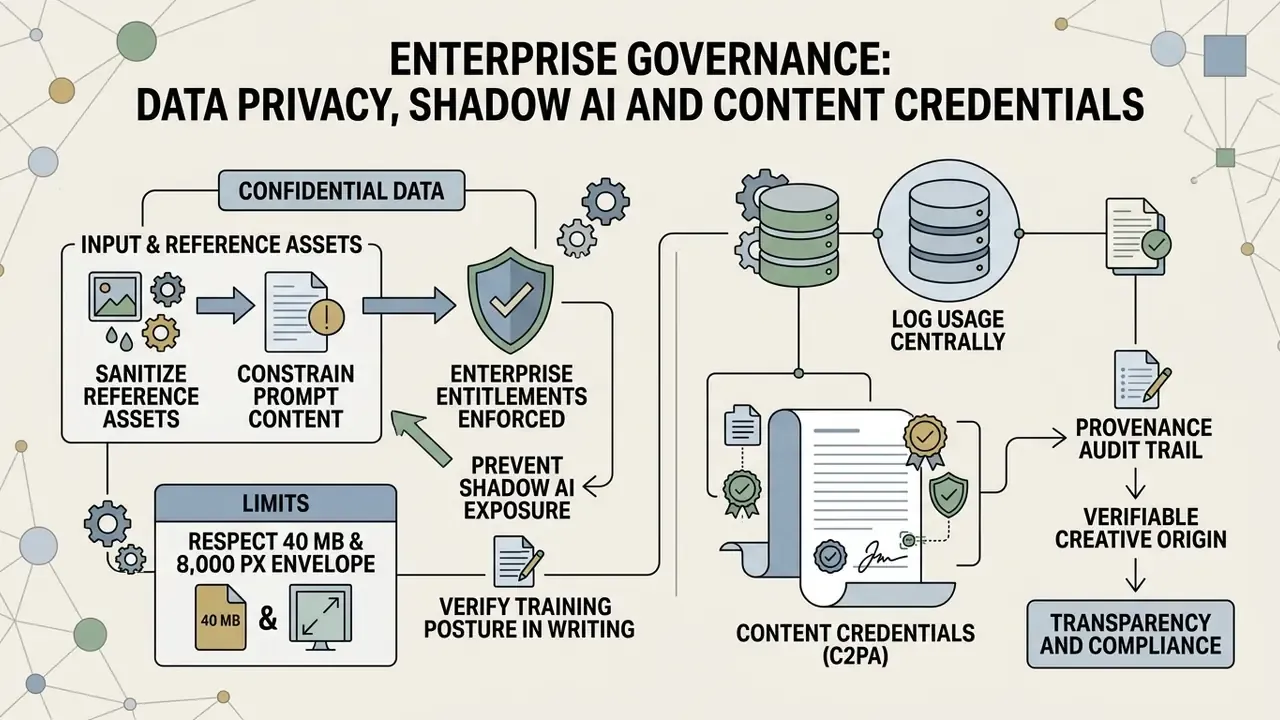
Creative capability and creative governance are separate problems. A studio can master Generative Fill and still fail an audit, because prompts leaked confidential material, or provenance metadata was stripped on export, or generative use spread quietly through unmanaged personal accounts. This section covers the controls that risk, compliance and audit functions ask for before generative imaging gets production approval.
Confidential Data, Reference Images and Shadow AI Exposure
Every prompt and every uploaded reference file travels to cloud infrastructure for inference. That single architectural fact defines the exposure surface. Text describing an unannounced product, a reference frame containing customer PII, a source PSD carrying an embargoed campaign layout: all of it leaves the local machine.
Controls that actually reduce this exposure:
- Enforce enterprise entitlements. Route generative usage through managed Adobe enterprise accounts, not personal Adobe IDs, so entitlements, indemnification and admin visibility apply consistently. Unmanaged personal accounts remain the primary Shadow AI vector inside creative teams.
- Sanitize reference assets. Crop, redact or substitute reference images containing identifiable individuals, account numbers, internal dashboards or unreleased packaging before upload.
- Constrain prompt content. Prohibit prompts that restate confidential facts: unannounced product names, deal terms, internal codenames. A prompt describing "a modern glass office building at sunset" carries no risk. A prompt naming an unlaunched product does.
- Respect the 40 MB and 8,000 px envelope deliberately. Downscaling a master file before upload satisfies the technical ceiling and cuts the volume of sensitive pixel data leaving the environment. Two benefits, one action.
- Verify training posture in writing. Adobe states that Creative Cloud subscribers' personal content is not used to train its foundation models, and that enterprise custom models can be trained on company data without feeding the foundation model. Confirm those commitments against your executed agreement, not against a marketing page.
- Log usage centrally. Credit consumption reports are a workable proxy signal for spotting unsanctioned generative activity concentrated in particular accounts or projects.
Content Credentials (C2PA) and the Provenance Audit Trail
Adobe attaches Content Credentials to Firefly outputs by default. These credentials implement the C2PA provenance standard and behave as a tamper-evident manifest describing how an asset was produced.
What the manifest is designed to record:
- That generative AI was used in producing or modifying the asset.
- Which tool, and where applicable which model family, performed the generation.
- Editing actions applied inside supporting Adobe applications, forming a chained history rather than a single flag.
- Optional issuer identity, when the producing organization or individual chooses to sign the credential.
Three operational realities for audit teams.
- No visible watermark is applied.Provenance lives in metadata, not on the pixels. Visual inspection is therefore not a compliance check.
- Export paths matter.Metadata can vanish when assets pass through platforms, converters or compression pipelines that do not preserve credentials. Test publish workflows end to end, and retain a credential-preserving master internally regardless of what survives on a downstream channel.
- Provenance is evidentiary, not exculpatory.A credential documents that generation occurred. It does not certify that output is licensed, non-infringing or brand-appropriate. Human review stays the control.
For organizations facing AI-disclosure expectations, the recommended pattern is to keep one evidence bundle per published asset: the credential-bearing master, the prompt text, the reference-file inventory, the model or feature used, and the reviewer sign-off. Assembled at the point of publication, it takes minutes. Reconstructed a year later under audit pressure, it usually cannot be assembled at all.
Pre-Release Audit and Risk Checklist
Limitations and Open Questions
Honesty about gaps is part of the control environment, so here is what this guide cannot settle for you.
Version and build numbers move. Adobe ships Photoshop and Firefly updates on a fast cadence, so any specific build reference should be re-verified before it lands in an IT standard. Partner-model availability moves faster still, and a model exposed in a beta build this quarter may be renamed, repriced or withdrawn next quarter.
Indemnification scope is contract-specific. Public terms describe the shape of the protection, not the wording of your agreement. Only your executed contract answers the question of what is covered.
Quality benchmarks remain thin. The academic work cited above measures preference and inference speed on controlled tasks, not brand-safe output rates on your asset library. Treat every published figure as directional. Where you need a defensible number, measure your own baseline: count rework passes per hundred assets before and after adoption, and keep the sample honest.
A Safe Next Step
Do not start with a platform decision. Start with a two-week bounded pilot on non-sensitive assets, run under managed enterprise accounts, with the pre-release checklist applied to every output and the evidence bundle stored from day one. Measure rework rate, credit consumption and review time. Then decide whether the workflow deserves scale.
Teams that want implementation and policy support can compare options before committing budget.
FAQ About AI Generator for Photoshop
What Version of Photoshop is Required for Generate Image and Generative Fill
Running photoshop generative ai tools requires Adobe Photoshop version 25.0 (build m.2181) or higher for Generative Fill. Adobe's general troubleshooting guidance simply points users to the latest available release, so re-verify the specific build number against current Adobe documentation before writing it into an IT standard. Generative features process inference in the cloud, which means an active internet connection, a valid Adobe ID and sufficient Generative Credits. Desktop system requirements include at least 8 GB RAM, 1.5 GB of GPU memory (VRAM), 10 GB of available disk space and a display resolution of 1280 × 800 or better.
Disclaimer: this information is general and does not replace professional advice. System requirements and version numbers are updated regularly by Adobe. Confirm current specifications on Adobe's official site before deployment.
Organizations seeking platform comparisons can see the overview across commercial creative suites.
Can You Use the AI Generator for Photos, Not Just AI Art
Yes. The photoshop ai photo generator tools are built for real-world photography: retouching, aspect-ratio adjustment, composite editing. Unlike consumer AI art generators that apply heavy stylization by default, Firefly models read source grain, dynamic range and lens distortion to produce believable photographic extensions.
«Users valued Generative Fill for the time it saved, while expressing concern about the blurring boundary between human and algorithmic authorship.» - Swift & Chattopadhyay, reflexive thematic analysis of 566 forum posts (2024).
One technical limitation deserves flagging for photographic work. Most diffusion pipelines still output 8-bit, low-dynamic-range data by default, so clipped highlights and crushed shadows inside a generated region may not match the latitude of a raw source file. HDR-oriented research presented at CVPR 2025 (LEDiff) targets recovery of detail in clipped regions, which shows direction of travel rather than current default behaviour. Practical workaround: generate into the region, then grade the generative layer with clipped adjustment layers to reconcile dynamic range with the surrounding photograph.
For broader tool evaluation, teams can consult guides on an ai art app, review a comparison of Midjourney against competing generators for quality and licensing trade-offs, examine ChatGPT image generation versus alternative tools, or assess enterprise terms for Microsoft's AI image generator and Google's AI image generator. Where the provenance of a third-party asset is in doubt, AI reverse-image-search tools give you a first-pass verification step, and teams standardizing on Adobe may also want to check the commercial licensing terms of Canva's AI generator.
How to Access Generative Beta Features in Photoshop
To test pre-release capabilities such as partner model integration or experimental background features:
- Open the Creative Cloud Desktop application.
- Go to the Beta Apps tab in the left navigation sidebar.
- Click Install next to Photoshop (Beta).
The Beta build installs as an independent application alongside your standard Photoshop, sharing subscription entitlements without altering your primary workspace settings. The two do not interfere with each other. Beta features change frequently, so if a control described here has moved or been renamed, remember that the underlying workflow (prompt, reference, effects, regenerate) is the constant. Because beta output holds non-commercial status until promotion to general release, keep beta experiments out of client deliverables.
How Do Generative Credits Reset for Paid Subscription Plans
Generative Credits reset monthly on the exact billing date of the subscription. Unused credits do not roll over into the next cycle. Most standard generations consume one credit, while partner-model and premium features may draw on premium credits instead.
Can I Use Custom Reference Images Under a Commercial Licence
Yes, provided you hold the legal rights or copyright to the uploaded reference file. Uploading third-party copyrighted images without permission breaches Adobe's Terms of Service and voids the applicable indemnification protections.
Does Generative Fill Work Offline Without an Internet Connection
No. Generative Fill and Generate Image depend on cloud-based Firefly GPUs for model inference, so they require an active network connection, a valid Adobe ID and available credits.
Why Do My Generations Suddenly All Look Stylized the Same Way
Style Effects stay cached between runs. Click Clear All in the effects panel, then regenerate. This is the single most common cause of unexpectedly uniform output.
Which Partner Models Are Available in the Beta Build
Recent Photoshop Beta releases expose FLUX.2 pro and Gemini 3 (with Nano Banana Pro) inside Generative Fill and Generative Expand, alongside a new Firefly Fill and Expand model in beta. Reference-image limits and credit consumption differ by model.
Is My Company's Confidential Imagery Used to Train Adobe's Models
Adobe states that it does not train its Firefly foundation models on Creative Cloud subscribers' personal content, and that enterprise custom models can be trained on company data without feeding the foundation model. Confirm the specific commitments in your executed enterprise agreement, and apply prompt and reference-image sanitization regardless of what the documentation promises.
Appendix A: Superseded Statements Retained for Transparency
For editorial transparency, statements from earlier revisions of this guide were revised in the main text and are preserved here in original form:
- "...they converged on an production-ready asset in two iterations while cutting turnaround time by 60 percent." The 60 percent figure was an internal, unmeasured estimate and now appears in the main text as an unquantified observation.
- "Research on AI-generated image tools by Le (2025) noted that 78 percent of surveyed creators identified variable visual fidelity as a primary operational barrier." Retained above with methodological context and paired with an independent 380-participant survey (Tang et al., 2024).
- Consumer-oriented outbound references previously placed inside the FAQ were removed and replaced with comparative resources relevant to enterprise tool selection and licensing review.
Reference library and terminology: open the hub.