Executive Summary for Decision-Makers
- Quality. PixVerse runs on the V6 engine, plus the C1 cinematic and reference line, producing 1 to 15 second clips at 360p to 1080p with native audio. In T2VWorldBench (2025), PixVerse V4.5 scored an average of 0.63 across six world-knowledge domains, close to Wan2.1 (0.68), with physics (0.59) and causality (0.58) as the weakest dimensions.
- Cost. A freemium tier gives 90 signup credits plus 60 daily credits at 540p, watermarked. Paid plans start at $9.99 per month; core generations cost 10 credits each, and metered 720p rendering with audio is priced around $0.06 per second, roughly $0.30 per 5-second attempt.
- Legal status. Commercial use is available to active paid subscribers only. Free-tier renders are non-commercial assets. Deployers must clear third-party rights for source images, faces and audio, and comply with EU AI Act Article 50 disclosure for synthetic content.
Fast verdict. Safe for social drafts, product animation and creative pre-visualisation on a paid tier with documented prompt and seed lineage. Not yet a drop-in replacement for regulated customer-facing media without human review.
Who This Guide Is For and What It Helps You Decide
Three readers, three different questions.
A marketing lead wants to know whether one subscription can replace a week of storyboard illustration. A finance or operations lead wants the credit maths before approving a card. A risk or compliance lead wants to know what leaves the building when someone uploads a portrait.
This guide answers all three in order: capability, price, then control. One naming note before we start, because it affects how people find the product at all. Users search for pix ai video, pix video ai, pix ai video generator and ai video generator pix; the actual entity is PixVerse, reachable at app.pixverse.ai. Same tool, several spellings, and that matters when you audit which platforms staff are really using.
What PixVerse AI Video Generator Is and Which Tasks It Fits
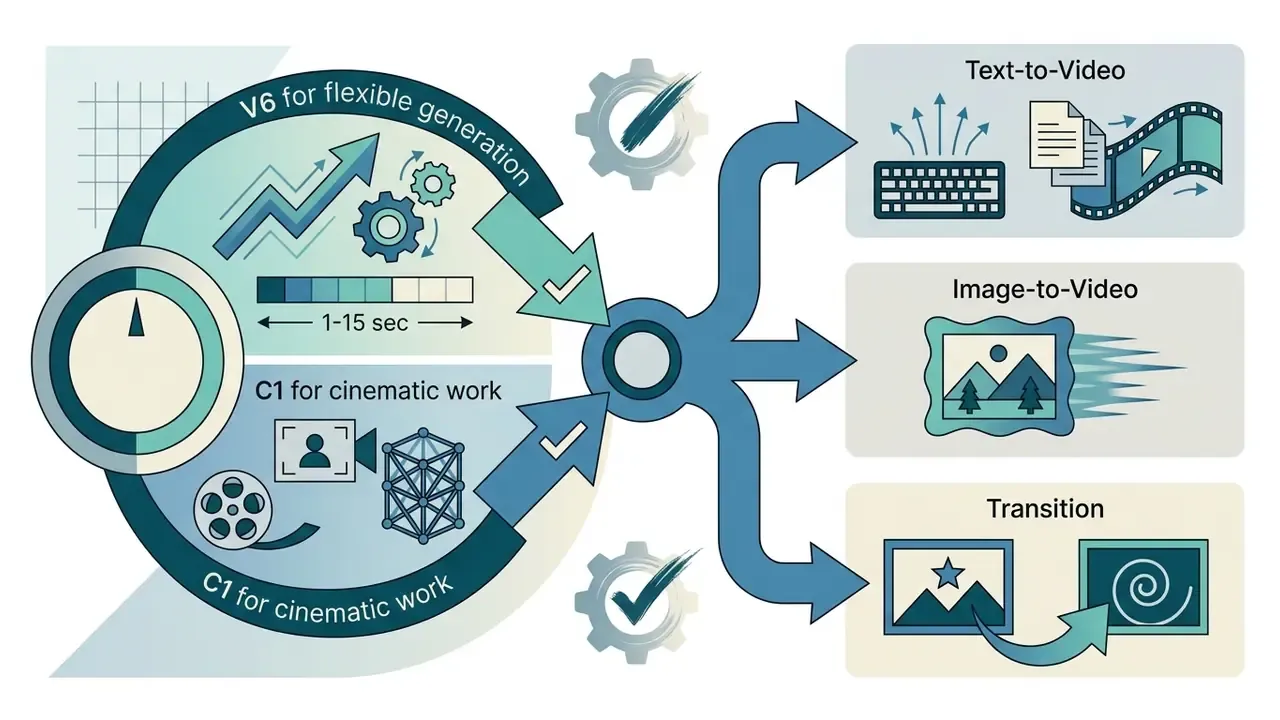
PixVerse AI Video Generator is a cloud-based multi-modal generative platform powered by its V6 engine. It converts text prompts and static images into dynamic 1 to 15 second video clips with native audio. The design target is rapid content generation: creative pre-visualisation, social media campaigns and marketing asset drafting without heavy post-production overhead. For broader market context, see our overview of AI video generators and how they differ by engine architecture.
The platform is strong at synthesising motion, camera behaviour and stylised visuals directly in a browser window. According to empirical benchmarks in T2VWorldBench (2025), which evaluated world-knowledge integration across 1,200 prompts, PixVerse V4.5 achieved an average score of 0.63 across physics, nature, activity, culture, causality and object domains, positioning it competitively alongside models such as Wan2.1 (0.68).
«T2VWorldBench evaluated 10 models across 1,200 prompts in six domains; all models, including PixVerse, show significant difficulty integrating world knowledge.»
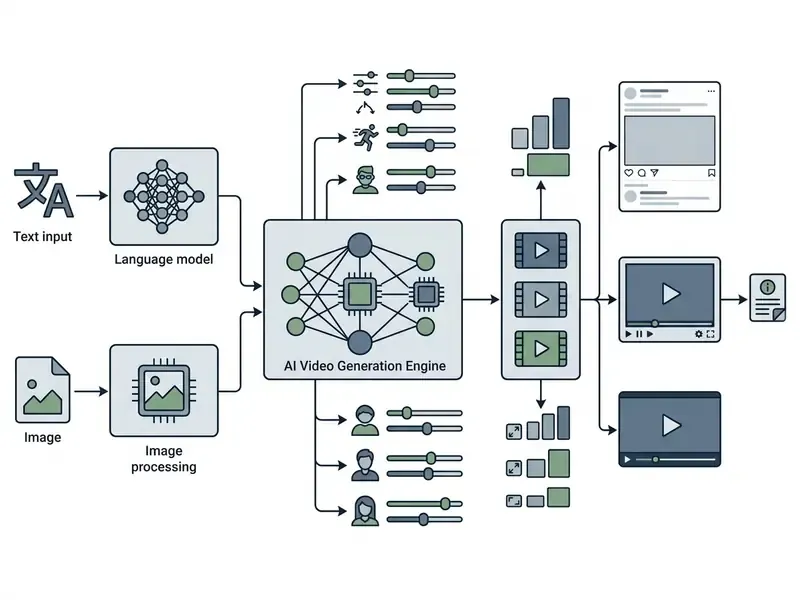
One illustrative case. A marketing team needed 20 social video variations for a campaign draft inside a 48-hour deadline, and used the text-to-video engine to generate 5-second 720p clips. (Updated) Batch generation compressed the visual drafting stage from days of storyboard illustration to a single working session, which let risk and compliance officers review concepts before full media production began. The team logged prompts and generation IDs for every accepted variation, so the final creative could be traced back to its source input. That last habit is the whole difference between a fun experiment and an auditable asset.
Application Scenarios by Role and Industry
- Education and corporate training. Teachers and trainers turn written lesson plans, static schemas and slide diagrams into short explanatory clips, converting abstract concepts into visual sequences. Pair the output with an AI voice generator for narration in several languages.
- E-commerce and small business. Animate flat product photography into motion creatives for paid social without a studio, a camera crew or a motion-graphics contractor. When the source photo is the wrong shape for a 9:16 placement, extend the canvas first with AI outpainting tools.
- Content creators and SMM specialists. Generate B-roll, background transitions and Reels or Shorts drafts from a script, then test three to five hooks before committing budget to one direction.
- Marketing and brand teams. Produce campaign variations, teasers and ad concepts for stakeholder review, using image-to-video whenever a product shape or brand asset must stay recognisable.
- Video makers and agencies. Build animatics and pitch pre-visualisations in hours rather than days, then hand the approved direction to production.
Text-to-Video: Creating Video From a Text Prompt
Text-to-video in PixVerse translates natural language into synthetic video sequences complete with synchronised ambient audio, camera movement and stylistic framing. The default generation creates 5-second 720p clips at an estimated cost of about $0.06 per second, or 10 platform credits per attempt. Still choosing an engine? Compare mechanics and alternatives in our guide to text-to-video AI tools.
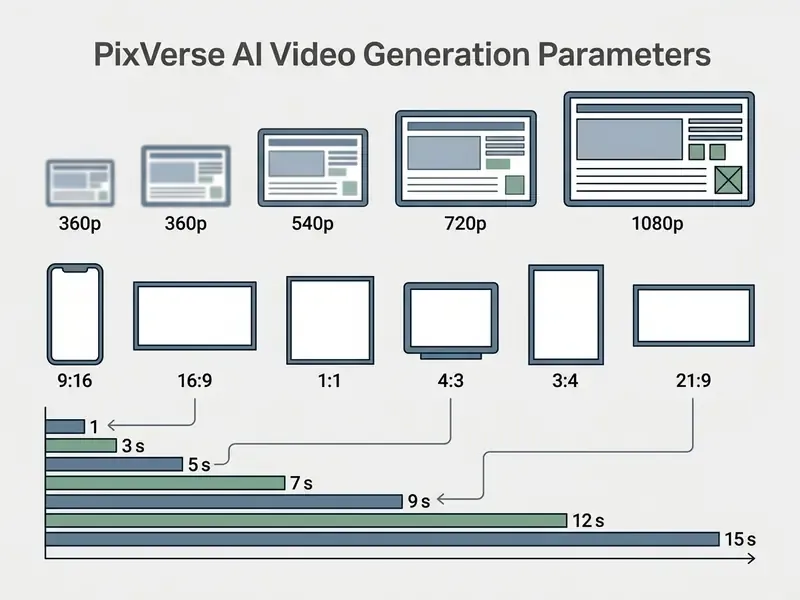
Users specify subjects, actions, lighting and explicit camera trajectories such as zoom_in, zoom_out, crane_up, pan_left, pan_right, whip_pan, hitchcock or camera_rotation. Documented durations depend on the version: older prompt tips describe a 4-second default, while current platform and API documentation lists 5, 8 or 10 seconds for the v5.5 line and 1 to 15 seconds for V6, with 1080p limited to shorter takes.
Benchmark frameworks show that text-to-video accuracy depends heavily on prompt structure. Explicit physical verbs yield noticeably higher temporal stability and text-video alignment than mood adjectives do.
«EvalCrafter tests models on 700 prompts drawn from real user data, measuring visual quality, content quality and motion quality across 17 objective metrics.»
Image-to-Video: Animating an Image in PixVerse
Image-to-video in PixVerse converts static source images, for example product photography, concept art or portrait stills, into animated clips by applying motion dynamics derived from user prompts and model priors. The mode inherits the aspect ratio and composition of the source image automatically, which makes pre-upload framing critical. For a wider comparison of animation engines, see our reference on image-to-video AI tools.
The engine accepts JPG, JPEG, PNG and WebP files up to 10,000 pixels in dimension and under 20 MB each, with 1024×1024 pixels as a practical minimum. Reference-based workflows in the Gemini Omni Flash and C1 lines accept up to five reference images (@image1 to @image5) for identity-critical scenes.
«AIGCBench (2024) proposes 11 metrics for image-to-video: control-video alignment, motion effects, temporal consistency and video quality.»
In practice, control-video alignment relies on clean subject boundaries and consistent lighting. Both prevent structural distortions during motion synthesis. Anything ambiguous in the still tends to warp once the camera moves.
Generating Transitions Between Two Frames (Start Frame and End Frame)
To build a controlled transformation in PixVerse V6 or C1, upload the opening image into the Start Frame field and the closing image into the End Frame field, which the API exposes as the last_frame_image parameter. The engine then interpolates intermediate frames, producing a directed morph or transition rather than free-form motion.
Practical rules for clean interpolation:
- Match aspect ratios.Both frames must share the same ratio, for example 16:9 or 9:16; mismatched inputs force the engine to crop and introduce edge artifacts.
- Match colour temperature and lighting direction.A warm-lit start frame against a cool-lit end frame produces visible colour swimming mid-clip.
- Keep the subject in a comparable position and scale.The smaller the positional delta, the fewer morphing artifacts appear on faces and hands.
- Keep the prompt about the transition, not the content.Describe the change ("the closed flower opens, camera holds steady"), because both frames already encode the visual identity.
- Respect the upload envelope.JPG, JPEG, PNG or WebP, up to 20 MB per frame, ideally at least 1024×1024 pixels each.
Typical uses: before and after product reveals, wardrobe or season changes, logo transformations, and storyboard frame-to-frame animatics.
PixVerse AI Capabilities for Video Creation
PixVerse AI provides a fairly deep set of creative controls: realistic and stylised visual presets, multi-axis camera motion, customisable aspect ratios, native audio synthesis and V6 frame-transition tools. Together they let teams create videos and marketing drafts across several distribution formats, and you can benchmark them against rivals in our roundup of the best AI video generators.
«VBench++ (2024) decomposes video generation quality into 16 dimensions, from motion smoothness to background consistency, and supports evaluation of both text-to-video and image-to-video models.»
Styles, Cinematic Motion and Visual Effects
PixVerse ships built-in style presets such as anime, 3d_animation, clay, comic and cyberpunk, alongside 46 template-based visual effects and advanced camera movement parameters. The V6 engine supports multi-shot transitions and 1080p rendering for cinematic depth. Worth flagging: the official documentation is not fully consistent across pages. One API parameter page also lists day as a style, so verify the preset set for the exact model you call.
The C1 model line supports reference-based generation to maintain subject identity across frames. Built-in camera commands such as whip_pan, hitchcock, left_follow, right_follow, fix_bg and camera_rotation allow director-level motion control without manual keyframing, which is what makes PixVerse usable as an AI animation tool rather than a slideshow animator. The vendor's homepage positions V6 with an internal ELO score of 1,343. Useful as quality signalling. Not an independent audit.
Video Extension, Lip Sync, Character Reference and Agent Mode
The PixVerse ecosystem exposes several post-generation tools directly in the web interface, and they materially change how a single clip becomes a finished asset:
If your pipeline needs frame-accurate trimming, captions or brand overlays afterwards, combine PixVerse output with a conventional video editor or an animation maker for kinetic typography.
- Video Extension.
- Lengthens a finished clip by continuing existing motion instead of cutting to a new shot, which preserves camera direction and physics continuity. Use short, physics-consistent extension prompts; abrupt new actions are exactly where seams appear.
- Lip Sync and audio.
- Attach an MP3 or WAV file, or generate speech from text, and the engine aligns mouth movement to the phonetic track. Front-facing, well-lit portraits with a clearly visible mouth line give the most stable results.
- Character Reference (C1).
- Lock a character's face, hairstyle and wardrobe against a control photo, so a series of separately generated scenes reads as the same person. Official guidance: prioritise identity over action in the prompt, keep wording identical between shots, and use negative prompts to block morphing.
- MultiShot and multi-frame control.
- Chain several shots inside one generation request, so a 10 to 15 second clip can carry a beginning, a turn and a resolution instead of one static beat.
- Agent mode.
- An assisted workflow that expands a short brief into prompt, shot and format decisions. Helpful for teams without a prompt specialist, though it still needs review, because agent-written prompts are not automatically logged in a form your compliance team will accept.
- Transition and reference-to-video.
- The same generation family as Start and End Frame, exposed as dedicated endpoints for interpolation and identity-anchored output.
How to Use PixVerse AI: Step-by-Step Clip Creation
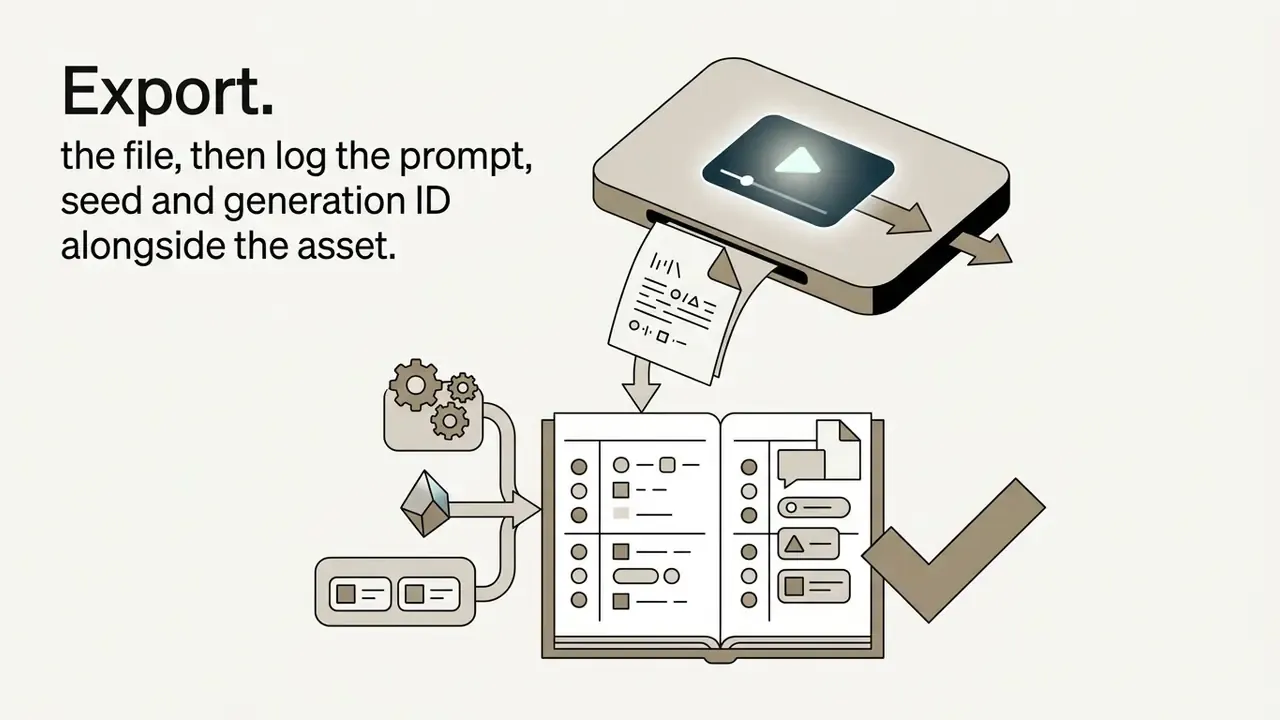
Creating a video in PixVerse is a six-step loop: sign in at app.pixverse.ai, choose the generation mode, define prompt and parameters, start generation, review the output, export the file. The PixVerse AI interface is deliberately plain, and that is a feature, not a compromise.
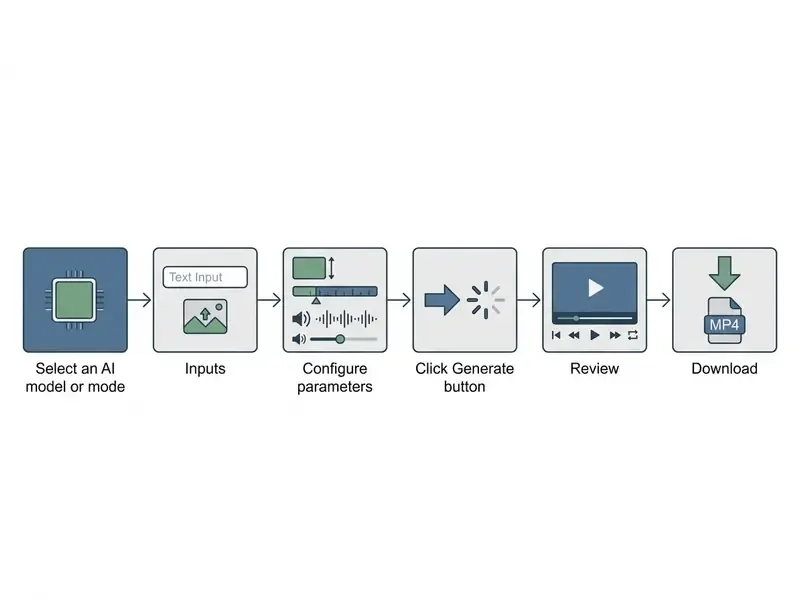

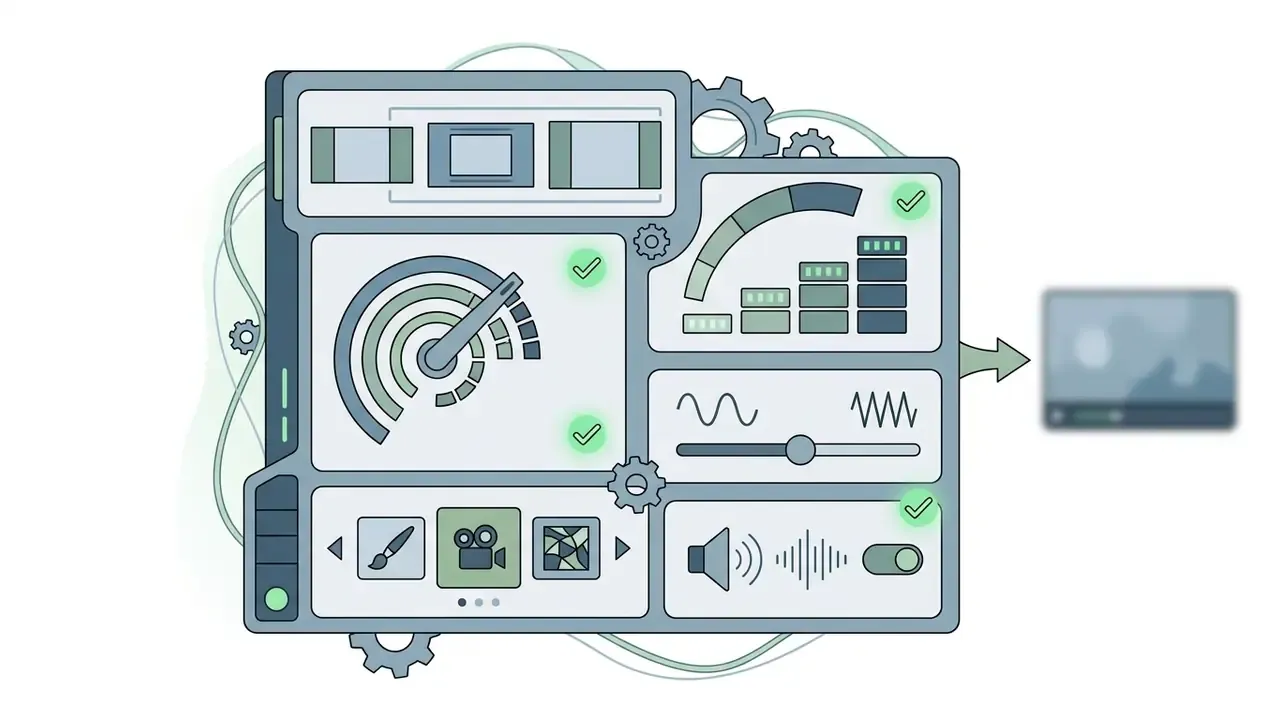
normal or fast), style preset and audio generation.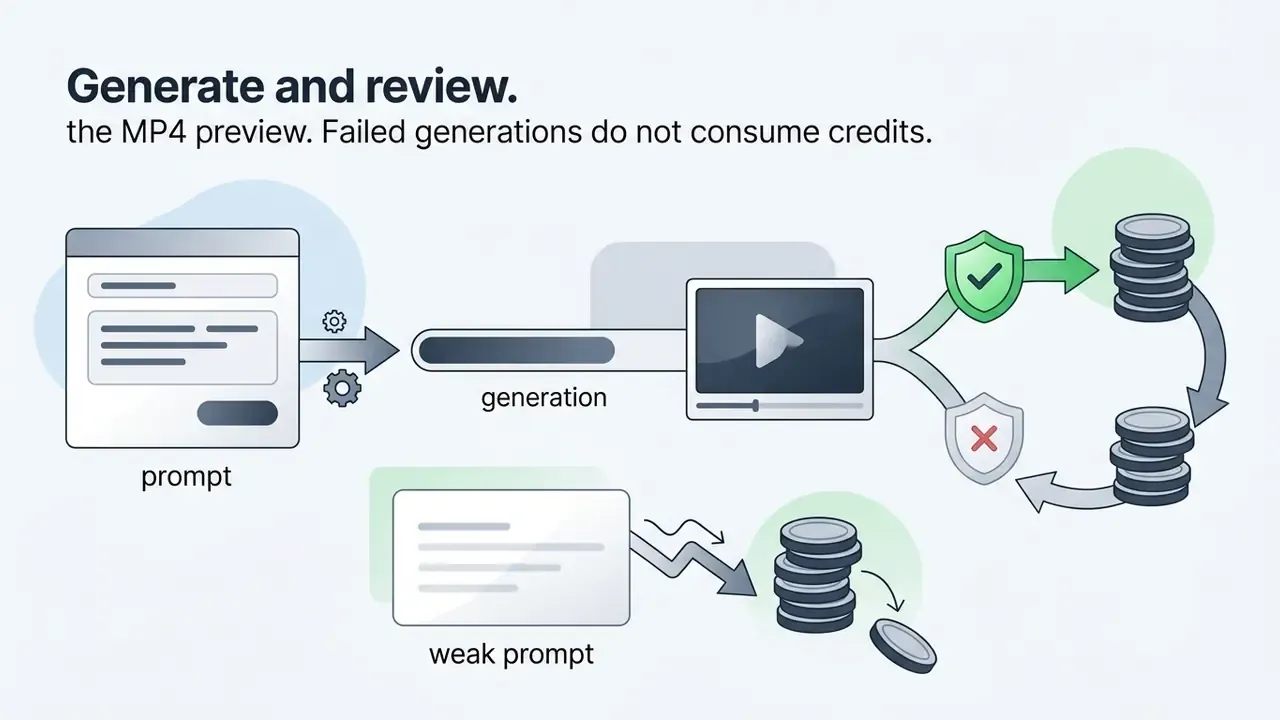
How to Write a Prompt for the PixVerse AI Video Generator
An effective prompt follows a structured formula: Subject + Subject Description + Action + Environment + Camera Movement + Lighting/Style, kept between 25 and 200 words. Swap vague adjectives for concrete physical verbs and prompt fidelity improves immediately.
«Include the subject, the action, camera behaviour and lighting in the prompt, for example: "Cinematic drone shot over a misty mountain valley at sunrise".»
So instead of "a fast car," write: "a black sports car accelerates down a rain-slick asphalt street, camera tracks low from the side, night setting with neon reflections."
Additional documented rules worth following:
- One action per shot. The official 2026 prompt guide reduces the pattern to
[Subject] + [one action] + [location], then adds constraints. - One camera move per clip. Stacking
zoom_inwithwhip_paninside a 5-second take produces smear artifacts. - Replace mood words with visual cues. "Cinematic" is ambiguous; "low-key lighting, shallow depth of field, 35 mm framing" is not.
- State what must stay stable and what must not appear. Positive constraints ("face unchanged, logo readable") plus negatives ("no extra limbs, no morphing") reduce anatomical failures.
- Length. Platform docs specify 25 to 200 words; PixVerse's own guidance suggests 50 to 80 words as a productive starting range.
How to Upload an Image for Image-to-Video
To upload an image for image-to-video, open the creation panel, select the Image tab, drop a JPG, JPEG, PNG or WebP file at 1024×1024 or larger and under 20 MB, then check subject centration before attaching motion instructions. The API additionally accepts an image URL or a base64-encoded reference image.
Crop the source photo to your target aspect ratio, such as 9:16 or 16:9, before upload, because the image to video mode inherits the original input dimensions. Working a transition-style flow instead? Supply the second image as the last frame, and keep both frames aligned in scene context, framing and lighting.
How to Download Videos Generated in PixVerse
Once generation completes in the online dashboard, review the MP4 preview and use the download button to export the file to local storage, at resolutions up to 1080p depending on account tier. API users retrieve the file from the returned video URL, which is also the cleanest place to hook your own logging.
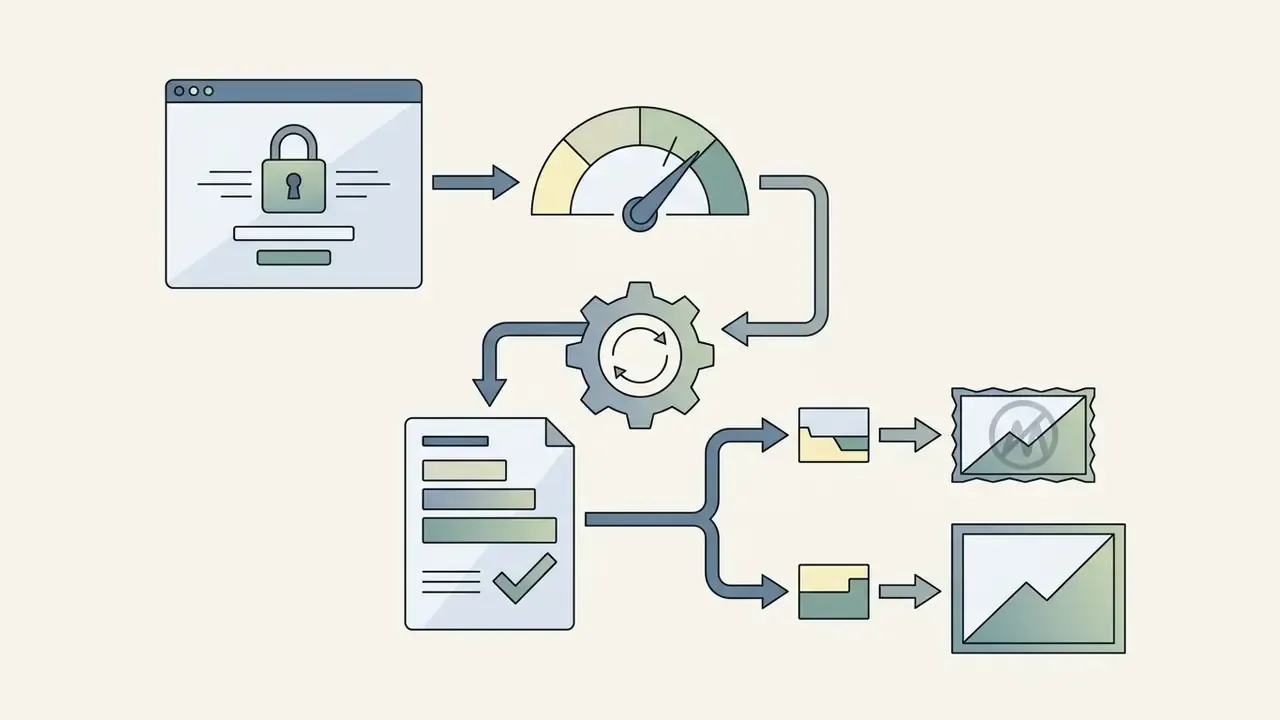
Free-tier downloads carry an embedded watermark at 540p, while paid tiers export unwatermarked files suitable for professional editing. If watermarking blocks your budget tier, compare conditions across platforms in our review of free AI video generators. One documentation gap deserves a line in procurement notes: official PixVerse model docs publish resolution options but do not state frame rate, and the PixVerse AI download watermark policy appears only in third-party 2026 summaries rather than in the model documentation itself.
How to Get High-Quality Image-to-Video Output in PixVerse
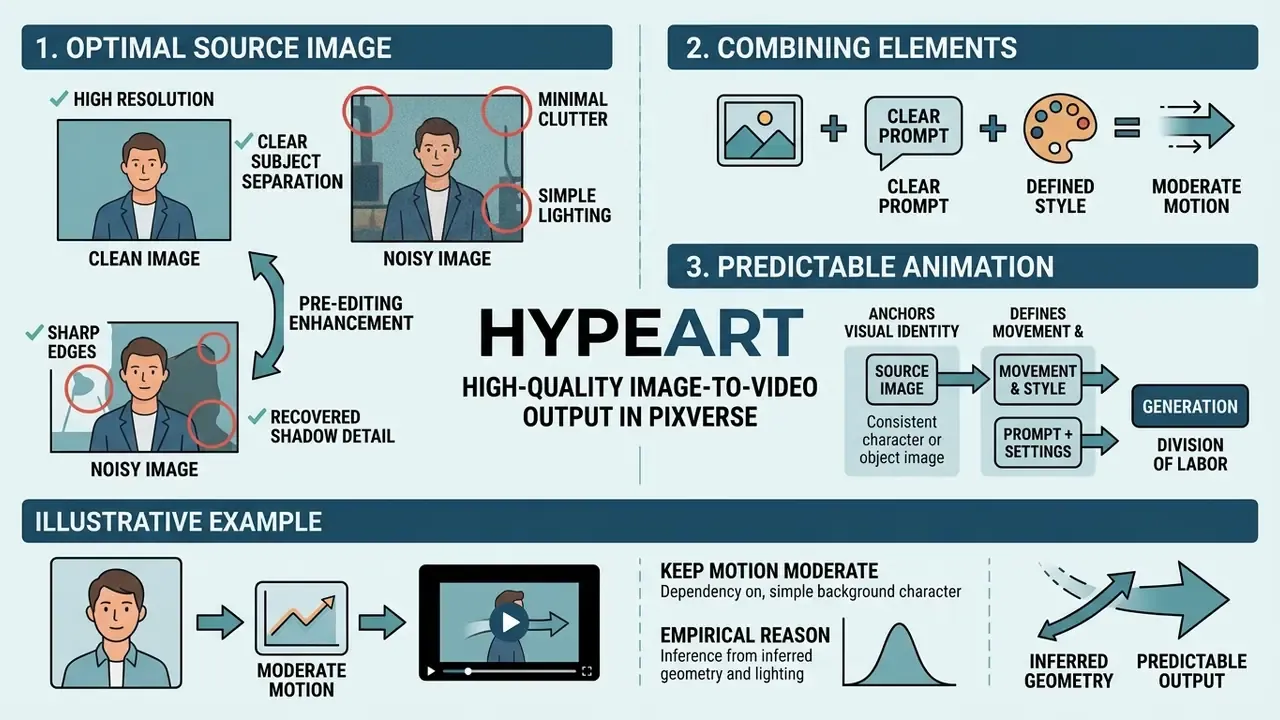
Good image-to-video output in PixVerse comes from two things: high-resolution source images with clear subject separation, sharp edges and simple lighting, and prompts that describe motion only, instead of re-describing what the still already shows.
Which Images Work for PixVerse AI Image-to-Video
Optimal source images have clear subject lighting, minimal background clutter, well-defined edges, and a resolution between 1024×1024 pixels and a 10,000-pixel maximum, under 20 MB per file. Official guidance adds three points: leave space around the subject, keep lighting and contrast good, and avoid heavy text overlays or watermarks in the source.
«Accurate 3D structure estimation from a single frame is critical for high-quality animation.»
That dependency on inferred geometry is precisely why lighting cleanliness and edge sharpness matter so much. The model reconstructs implicit depth from one still, and ambiguous edges become warping the moment motion starts.
Images pre-edited in a general-purpose photo editor, with background noise cleaned, shadow detail recovered and subject boundaries sharpened, show lower rates of pixel artifacts during motion synthesis. Budget-constrained teams get most of that from a free photo editor before upload. Studios standardised on Creative Cloud usually run the same prep in an adobe photo editor or, for raw batches, in adobe lightroom photo workflows where exposure and white balance can be matched across a whole product set.
How to Combine Image, Prompt, Style and Motion
Predictable animation comes from a clean division of labour: the source image anchors visual identity, the text prompt describes action and camera trajectory, style presets apply the aesthetic filter, and moderate motion settings (a motion score around 0.55, for instance) prevent anatomical warping. Put simply: reference image is what must stay fixed; prompt is what must change; style is the look; motion control is how strongly movement is expressed.
Illustrative example. An e-commerce creative team animated static product photography with a moderate motion score and a slow camera rotation prompt. (Updated) By avoiding drastic structural changes in the prompt, they removed the background distortions that had appeared in earlier high-motion attempts, and moved nearly all generated variants through creative review without re-shoots. A qualitative improvement they tracked internally, not an audited figure, and it should be read that way.
«T2VWorldBench (2025) records PixVerse V4.5's lowest scores in physics (0.59) and causality (0.58), precisely the scenarios involving complex object interaction.»
That benchmark distribution is the empirical reason to keep motion moderate. The engine is strongest at camera movement and ambient motion, weakest at multi-body contact and cause-and-effect chains. Teams comparing engines for image generation as well as animation can review how a rights-cleared stack behaves in our notes on adobe firefly ai art technology features, which take a different approach to training-data provenance.
PixVerse AI for Viral Effects, Kiss, Kissing and K-pop Videos
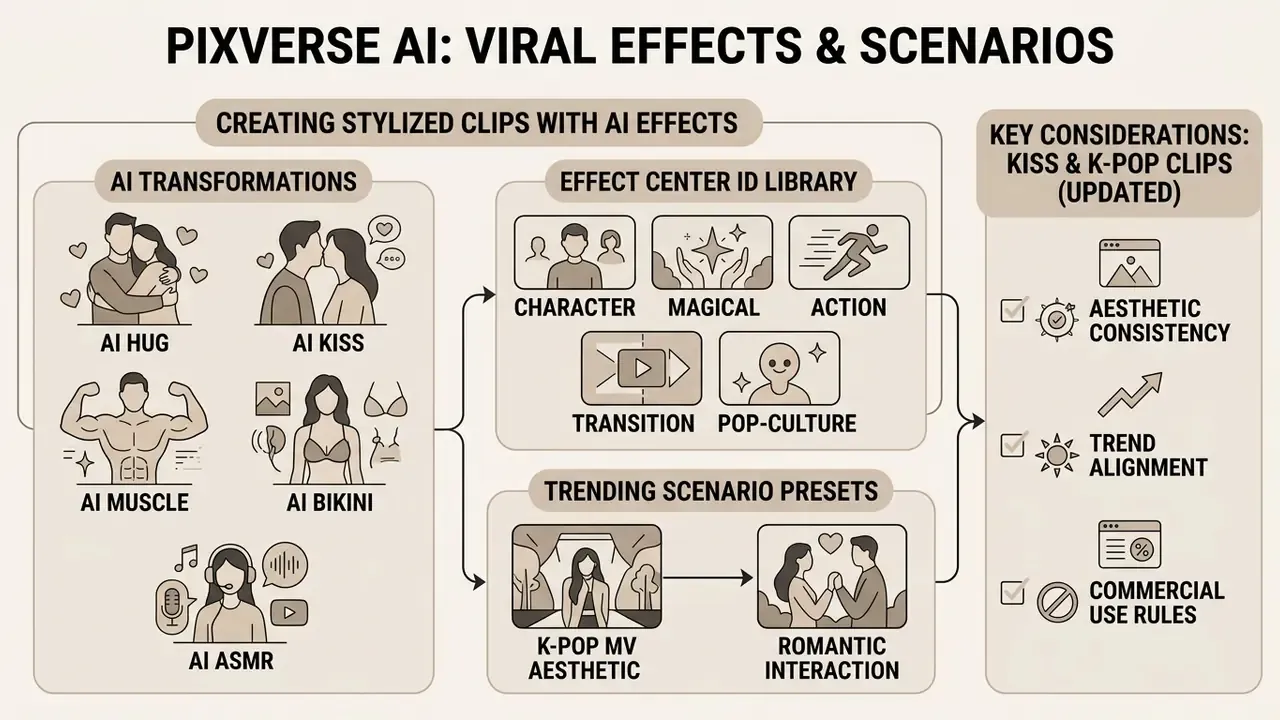
PixVerse AI ships a template and effects library, reachable through Effect Center IDs, that applies viral visual transformations, romantic interaction templates and stylised K-pop aesthetics to static photos or existing clips. This is where most of the platform's consumer traffic actually lives.
How to Create Stylized Clips With AI Effects
Stylised viral clips are produced by picking a preset in the Effect Center, extracting its template_id, and passing the template parameter alongside an uploaded image or video prompt in the creation interface. For image-to-video or extend requests, the prompt can be as short as the effect name.
The Effect Center library covers the high-demand intents behind most short-form searches:
- AI Hug and AI Kiss. Interaction scenes built from one or two separate portrait photos. Both faces should be front-facing, unobstructed and similar in resolution. This is the mechanism behind queries for PixVerse AI kiss and PixVerse AI kissing clips.
- AI Muscle and AI Bikini. Body and wardrobe restyling of a subject in a photo; full-body framing with visible limb outlines produces fewer anatomical errors.
- AI ASMR. Macro-scale clips with high-detail native sound design (crushing, rustling, dripping), where the source image should be a tight close-up with a single material in focus.
- Character, magical, action, transition and pop-culture templates. Forty-six template-based transformations documented for the V5.5 line, including advertising-oriented presets.
- Trending scenario presets (private helicopter, emotional close-up and similar). Useful as hooks, but treat vendor coverage of individual named templates with caution: official docs confirm the template mechanism and Effect Center IDs, while specific preset names such as "KissKiss" appear mainly in third-party reporting.
Creators who also need static assets for thumbnails and covers can compare engines in our guide to the best AI art generators, or check how a bundled suite handles it in our breakdown of the adobe ai generator line.
What to Consider When Creating Kiss and K-pop Clips
Complex multi-subject interactions, kissing scenes and PixVerse AI K-pop choreography included, need three things: simplified high-level action prompts, strong negative prompting against limb distortion, and single-subject focal composition to hold anatomical consistency.
(Updated) Academic evaluation in T2VWorldBench (2025) records a physics score of 0.59 for PixVerse V4.5, among the lowest of the six evaluated domains. That reflects the difficulty of multi-body contact scenes specifically in this model family, rather than a generic limitation of all video models. Keeping action prompts high-level ("two people embrace softly in cinematic light") yields fewer anatomical distortions than overly detailed physical descriptors.
Practical guardrails:
- Describe one interaction beat, not a choreographed sequence.
- Keep hands and faces away from frame edges in the source photo.
- Add negative constraints against morphing, duplicated limbs and face swapping.
- For dance content, prefer medium shots with a single dancer over group formations. Group choreography multiplies exactly the contact events the engine handles worst.
- Never upload a recognisable person's likeness without documented consent. That is a legal requirement, not a quality tip.
Free PixVerse AI: Free Credits, Limits and Paid Features
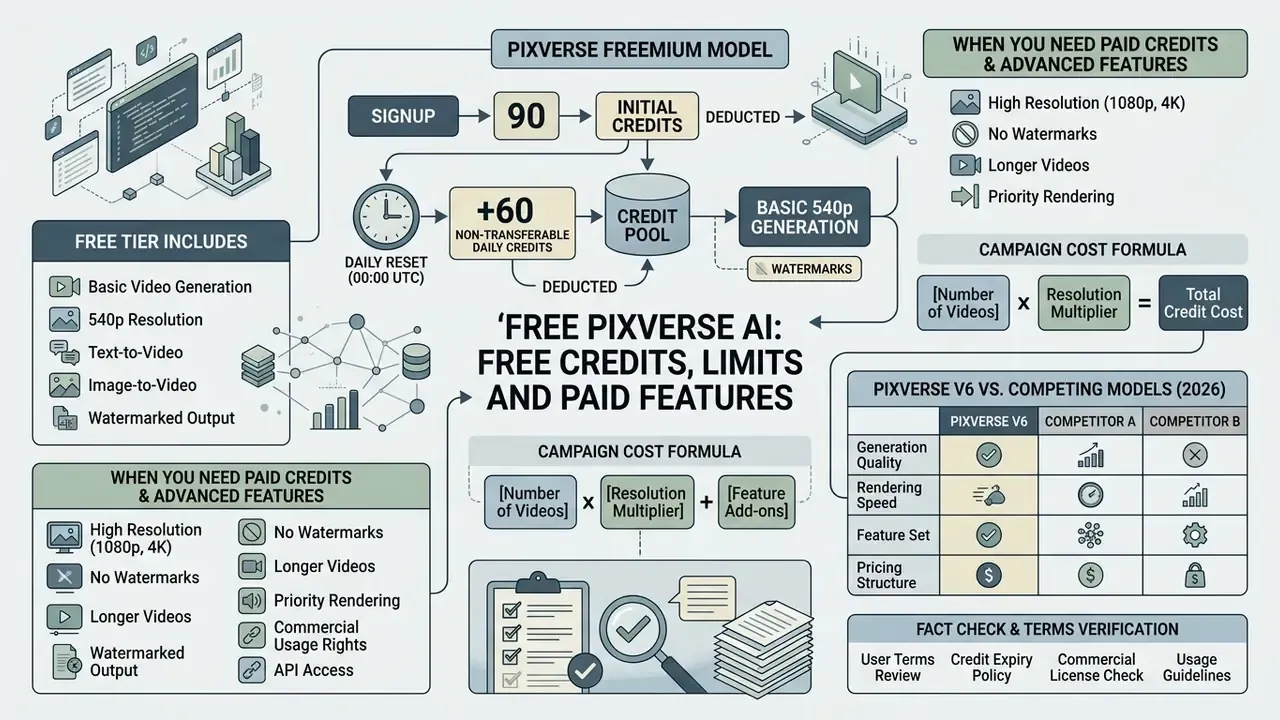
PixVerse runs a freemium model: 90 initial signup credits plus 60 non-transferable daily credits that reset at 00:00 UTC, enabling basic 540p generation with watermarks. Paid subscriptions remove watermarks, unlock 720p to 1080p and 4K output, and grant commercial licensing rights. Before committing, weigh the alternatives in our AI video generator comparison.
What the Free PixVerse AI Tier Includes
Free PixVerse AI gives 90 signup credits and 60 daily credits, which works out to roughly one to three short generations per day at 540p with an embedded PixVerse watermark and standard queue processing. Daily credits expire at midnight UTC and do not roll over.
«Each generation, text-to-video, image-to-video or upscale, deducts 10 credits; failed generations do not consume credits.»
Free-tier constraints to plan around: low-resolution export, watermark, no access to premium models, slower queue placement. Reported daily allowances vary between 30 and 60 credits across third-party summaries and by account age, and guides written for pixverse ai image to video free credits 2025 still quote the older numbers, so treat the in-app balance as the authoritative figure. To see how these terms compare with other platforms, review our roundup of free AI video generators with watermarks.
Is PixVerse usable for free, then? For learning prompt structure and testing whether the engine holds your product shape, yes. For anything client-facing, no: the watermark and the licence both stop you.
When You Need Paid Credits and Advanced Features
Paid plans, Standard at $9.99 a month for 500 to 1,200 credits, Pro at $30, Premium at $60, and Business API tiers from $100 to $6,000, are required for watermark removal, 1080p and 4K output, priority queueing, API automation and commercial usage rights.
| Plan | Monthly credits | Resolution | Watermark | Commercial rights | Generation speed |
|---|---|---|---|---|---|
| Free Tier | 90 signup + 60/day | 540p | Yes | No (non-commercial) | Standard queue |
| Standard ($9.99/mo) | 1,200 per month | 720p / 1080p | No | Yes | Priority |
| Pro ($30/mo) | 6,000 per month | 1080p | No | Yes | High priority |
| Premium ($60/mo) | 15,000 per month | 1080p / 4K | No | Yes | Maximum priority |
| Business API ($100+) | 15,000+ API units | Up to 4K | No | Yes | Parallel jobs |
«720p generation with audio costs $0.06 per second; a standard 5-second clip therefore costs about $0.30 per attempt on the metered V6 engine.»
Official platform documentation lists API membership bundles separately from consumer plans: Essential at $100 for 15,000 credits, Scale at $1,500 for 239,230 credits, Business at $6,000 for 1,069,500 credits. API and app pricing do not map one to one. Note also that one public FAQ reports 20, 40 or 60 credits per generation depending on model and resolution, against the documented 10-credit baseline for core generations. Confirm the deduction rule for your specific model before you forecast anything.
Campaign cost formula. Because image-to-video and multi-subject scenes need retries, budget by attempts, not by deliverables:
Total credits = (Deliverables × Attempts per accepted clip) × Credits per generation
Worked example for 100 finished 5-second 720p clips, at a realistic three attempts per accepted asset and 10 credits per generation:
100 × 3 × 10 = 3,000 credits, roughly $90 of metered generation, which maps to a Pro plan ($30 per month, 6,000 credits) rather than Standard. For 1080p rendering, documented at 18 to 23 credits per second for advanced output, the same 100-clip campaign can exceed 25,000 credits, pushing the requirement to Premium or a Business API bundle. Add a 20 to 30 percent contingency for prompt iteration on multi-subject scenes, where physics scores are weakest. That contingency line is the one most first-year AI budgets forget.
Comparison of PixVerse V6 With Competing Models in 2026
| Platform | Strength | Max resolution | Audio generation | Duration |
|---|---|---|---|---|
| PixVerse V6 | Motion physics, cinematic camera control, native audio, templates | 1080p, 4K on top tiers | Yes (native) | Up to 15 s |
| Luma Dream Machine | 3D lighting, depth, cinematic image-to-video | 1080p | No | About 5 s |
| Runway Gen-3 | Professional motion-brush control and generative editing | 1080p | Partial | 5 to 10 s |
| Kling AI | Long, coherent action sequences | 1080p | No | Up to 10 s |
PixVerse's own comparison content positions Runway as stronger for camera control and generative editing, and Luma Dream Machine as stronger for 3D lighting, depth and cinematic image-to-video, while claiming multi-shot storytelling and native audio as its own differentiators. Read that as vendor framing, then validate on your own source assets. Developers evaluating enterprise video APIs can also review our Google Veo implementation guide for cost and limit comparison, and our notes on adobe ai video tooling if licence provenance ranks above raw motion quality.
Fact check and terms verification.
To model credit consumption across different media tools, explore our AI Media Calculators and review transparent costs on AI Media Pricing.
Can You Use PixVerse AI Videos in Commercial Projects
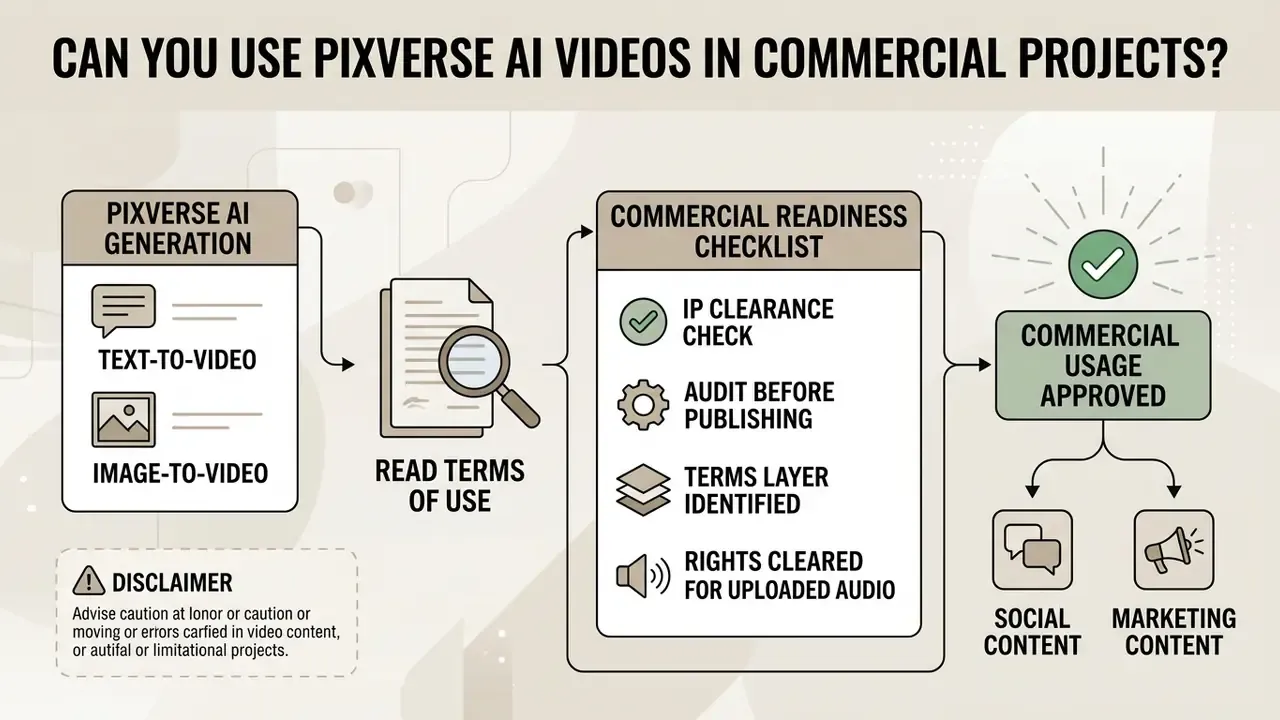
Commercial use of PixVerse-generated videos is limited to active paid subscribers under the official Terms of Service. Free-tier outputs are non-commercial assets, full stop. Users must also confirm that all input images, audio tracks and depicted likenesses carry cleared copyright authorisations. For general principles of rights on generated media, see our overview of commercial use of AI generators.
An important nuance for legal review: the terms are layered. The main Terms of Service state that PixVerse does not claim ownership of outputs, that non-commercial users retain output rights, and that commercial use requires separate authorisation or a commercial-use licence. The Platform (API) Terms, by contrast, state that intellectual property rights in generated video content belong to users or their authorised parties, and that commercial use of AI-generated content is "not restricted", while still prohibiting advertising use without legal authorisation. The difference reflects product scope, consumer app versus platform and API, rather than a drafting error. Practically, the clause that applies to you depends on which product you are billed for.
What to Check in the Terms of Use Before Commercial Publication
«PixVerse's commercial-use policy permits subscribers to monetise output in social media, advertising, client work and e-commerce, subject to content rules and copyright compliance.»
Further considerations that appear in official materials or applicable law:
- PixVerse's own music-video guidance states that the user remains responsible for rights to songs, lyrics, voices, samples and any uploaded reference images.
- The PixVerse privacy policy notes that photo uploads may involve facial data extraction for AI video generation, which makes consent documentation a prerequisite for any recognisable person.
- The European Parliament study on generative AI and copyright concludes that purely AI-generated output without substantial human intervention is not copyrightable in the EU. A licence to use an asset is therefore not the same as exclusive ownership of it.
For complete compliance frameworks around commercial generation, consult our AI Media Commercial-Use overview and review AI Litigation and Case Timelines.
Audit and IP Clearance Checklist Before Publishing a Commercial Clip
Checklist0 / 10
Data Privacy, Retention and Auditability
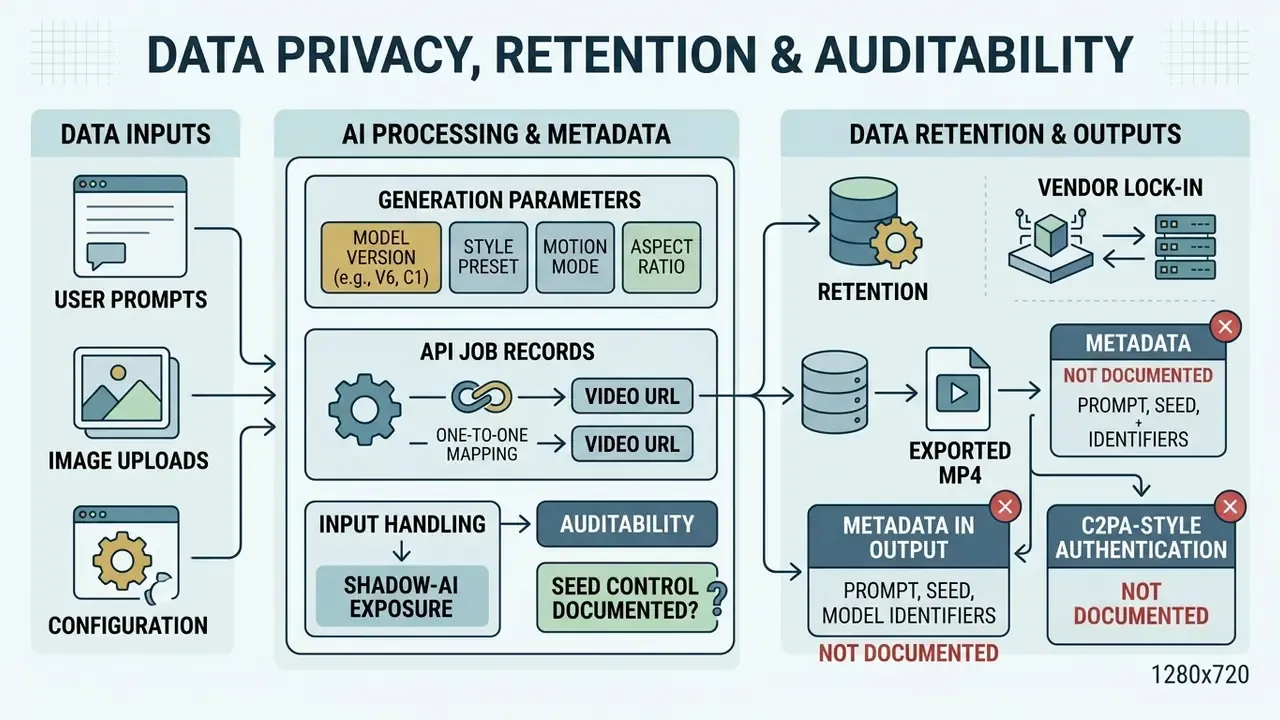
For enterprise and regulated buyers, the decisive questions are not about visual quality. They are about what happens to inputs, and whether outputs can be reconstructed on demand.
Input handling. PixVerse's privacy policy acknowledges that uploaded photos may involve facial data extraction for the purpose of generating video. Uploading customer photography, employee portraits or unreleased product renders therefore constitutes processing of third-party and potentially biometric data, and should be assessed under your own DPIA process before pilot approval. The official documentation reviewed here does not publish an explicit, unambiguous statement on whether user prompts and uploads are used to retrain public models, nor does it publish SOC 2 or ISO 27001 attestations. Verified data required: request written confirmation of training-data usage, retention windows, deletion SLAs and security attestations from the vendor before onboarding, and treat any third-party summary of these points as unverified.
Shadow-AI exposure. Because the consumer app runs entirely in a browser and offers a free tier, marketing teams can adopt it without procurement involvement. Nothing to install, nothing to approve. The practical control is a documented policy: paid organisational accounts only, no upload of customer or employee imagery, and no client deliverables from free-tier renders. Add the domain to your AI inventory even if the spend is zero, because inventory coverage, not licence cost, is what your examiner will ask about.
Auditability and lineage. The platform exposes several primitives that support a model-risk record:
- Generation parameters, prompt, model version (V6, C1, v5.5), style preset, motion mode, aspect ratio, duration and
template_id, are all explicit request fields. They can be captured in your own logs when generation runs through the API rather than the UI. - API job records return a video URL per generation, giving a one-to-one mapping between request and asset.
- Seed control appears in third-party tutorials and interface walkthroughs, but it is not documented as a guaranteed reproducibility feature in the official model pages. Verified data required: confirm whether an identical seed plus prompt plus model version reproduces a byte-comparable render.
- Exported MP4 metadata is not documented as carrying prompt, seed or model identifiers, and C2PA-style provenance marking is not published in the model docs, even though EU AI Act Article 50 pushes toward machine-readable marking. Assume metadata does not travel with the file, and maintain lineage in your own asset register.
Vendor lock-in. Engine generations change output character. Prompts tuned for V4.5 do not reproduce identically on V6, and style-preset sets differ between documentation pages and model versions. Version-pin the model in API calls where possible, and re-validate brand-critical prompt libraries after each engine release.
Open questions we could not close. Frame rate is unpublished. Watermark policy is documented only by third parties. Training-data reuse is unstated. None of these is disqualifying on its own. Together they set the honest ceiling on how far a regulated organisation should push this tool without a signed vendor answer.
For teams building the surrounding pipeline, see our comparative material on free AI video generators and cost modelling for generation APIs.
PixVerse AI Video Generator FAQ
PixVerse is a web-based platform that needs no prior programming or video editing expertise for basic clips, while deeper pipeline integration runs through its official Command Line Interface and API.
Do You Need Technical Skills to Start Using PixVerse?
No. The dashboard relies on plain text prompts, simple dropdown selectors and automated rendering, and beginner walkthroughs describe the whole path in four moves: sign up, upload an image, add an optional prompt, press create. The learning curve is low to moderate. The only genuinely new skill is prompt structure, and the official formula, subject plus description plus action plus environment, with one camera move, compresses that into a single pattern. Teams that outgrow the dashboard have a second, deeper track. For enterprise automation, developers can use the PixVerse CLI, which requires Node.js 20 or newer, to run generation jobs from terminal commands, and the platform API to execute batch jobs with logged parameters. That transition is optional; treat the CLI as the scaling step after the manual workflow proves out. For finishing work such as trimming, captioning and colour matching, plug the render into a conventional video editor for post-production, including free video editing software if budget is tight. For technical support details, visit AI Media Support and Troubleshooting or review competitive evaluation matrices on AI Media Comparison Matrices.
How Long Does Generation Take?
Most clips render within minutes, depending on prompt complexity, requested resolution, duration and current platform load. Paid tiers receive priority or parallel queue placement; free-tier jobs sit in the standard queue. Failed jobs do not consume credits, so retries cost time rather than balance.
What Resolutions and Durations Are Available?
Documented video quality options are 360p, 540p, 720p and 1080p, with 4K available on top consumer tiers. Duration runs 1 to 15 seconds on V6, and 5, 8 or 10 seconds on the v5.5 line, with 1080p restricted to shorter takes. Frame rate is not published in the official model documentation.
Can PixVerse Generate Videos From Prompts in Other Languages?
Multilingual prompts work in practice, though English prompts remain the best-documented path. Every official prompt formula, style preset and camera parameter is published in English, so a non-English prompt adds a translation layer between your intent and the parameter the engine actually recognises.
Is Image-to-Video Better Than Text-to-Video?
Image-to-video wins when a product shape, character design, storyboard frame or brand visual must stay recognisable. Text-to-video wins when you are exploring a scene from scratch. Most production workflows use both: text-to-video for ideation, then image-to-video once a reference image matters.
Can ChatGPT Generate Video Instead?
No. OpenAI's mainline chat models generate static images, not video. Video generation needs a dedicated video model or platform such as PixVerse, Veo, Runway, Kling or Luma. Comparing those options is exactly what our best AI video generator matrix is for.
Does PixVerse Have a Mobile App?
PixVerse is primarily a web platform reachable from any browser, with mobile app distribution also available. No download is required to try PixVerse or to use the generator, and browser access removes device-storage and compatibility constraints.
Appendix A: Corrected and Superseded Statements
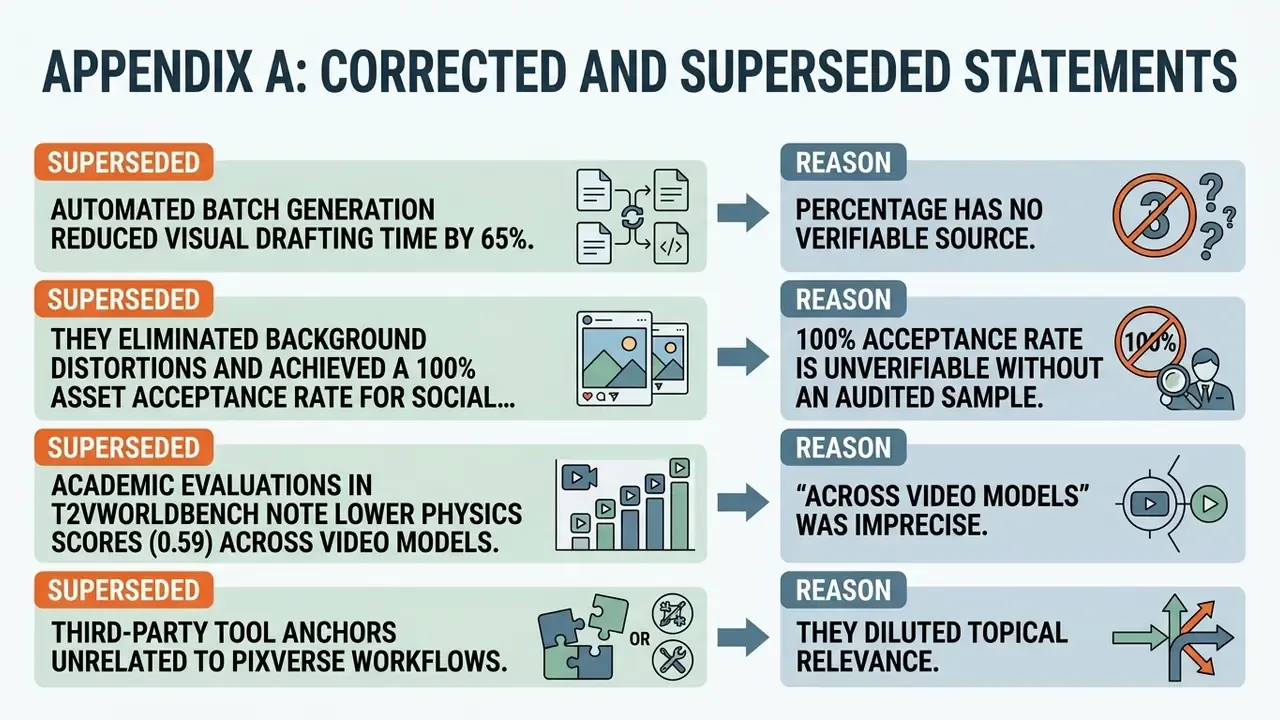
For transparency of the editorial record, the following claims from earlier versions of this material were replaced because they could not be verified against a primary source. Corrected versions appear in the main text above.
- Superseded: "The automated batch generation reduced visual drafting time by 65%."
Reason: the percentage has no verifiable source. Replacement: a qualitative description of the compressed drafting stage.
- Superseded: "they eliminated background distortions and achieved a 100% asset acceptance rate for social advertising campaigns."
Reason: a 100 percent acceptance rate is unverifiable without an audited sample. Replacement: a description of removed high-motion distortion and a near-complete internal review pass, marked as an internal metric.
- Superseded: "Academic evaluations in T2VWorldBench note lower physics scores (0.59) across video models."
Reason: "across video models" was imprecise. Replacement: the 0.59 physics score attributed specifically to PixVerse V4.5 in T2VWorldBench (2025).
- Superseded: third-party tool anchors unrelated to PixVerse workflows.
Reason: they diluted topical relevance. Replacement: contextual links to image preparation, editing, compression and comparison resources that sit inside a real PixVerse workflow.
Social Clips and Video Formats for Content
PixVerse supports the standard aspect ratios: 9:16 vertical for TikTok, Instagram Reels and YouTube Shorts, 16:9 for landscape marketing placements, plus 1:1, 4:3 and 3:4 for feed and carousel use. Plan the ratio before generation rather than after, because re-cropping a rendered clip costs resolution you already paid for.
For publishing workflows after generation, review our guide to YouTube video editors and, if file weight matters for ad platforms, our reference on video compressors. Teams already inside a Creative Cloud pipeline can also compare finishing options such as the adobe express video editor for captions and brand templates.