Executive summary for decision-makers. A promo video maker compresses scripting, editing, voiceover, and multi-format export into a single automated pipeline. Cost per asset drops from $1,200–$5,000 (traditional production) to roughly $15–$300, and turnaround from 8–12 hours to 10–45 minutes. The unresolved variable is not creative quality. It is governance: asset licensing, synthetic-media disclosure, avatar likeness rights, prompt-level data leakage, and reproducible audit trails. Deploy only with (1) documented commercial-use rights, (2) zero-data-retention or contractually bounded prompt handling, (3) a human-in-the-loop compliance gate placed before generation, and (4) a risk-adjusted ROI model that prices validation and audit labor into the business case.
A promo video maker is a digital software environment that lets organizations conceptualize, edit, and publish short-form video assets for product launches, promotional campaigns, and brand awareness. With generative artificial intelligence (AI) inside the pipeline, modern platforms automate video synthesis, scriptwriting, synthetic voiceovers, and layout formatting across very different channels.
That constraint defines the whole adoption sequence. Before creative capability is even evaluated, controlled adopters (banking, insurance, healthcare, and other supervised sectors) need three answers: where the training data and stock assets originate, whether prompts and uploaded brand material are retained or used for model training, and who signs off on the final render before it reaches a paid ad network.
Generative video tools do not arrive legally "clean" by default. They arrive with inherited licensing chains, third-party likeness dependencies, and disclosure obligations that must be mapped to internal control frameworks. Only after that mapping does creative throughput become a legitimate business metric. Sequence matters more than speed here.
With that framing set, the commercial momentum is substantial. The global market for AI video generation tools is projected to reach between $847 million and $1.04 billion, driven mainly by enterprise marketing and advertising use. Fortune Business Insights projects the marketing and advertising segment alone to hold roughly 33.88% of global share in 2026, and one 2026 industry analysis estimates that B2B customers account for approximately 65%–70% of total AI video generation demand. Commercial adopters increasingly lean on controlled automation to accelerate production schedules while holding brand consistency in place.
«An AI-generated banner achieved up to 50% higher click-through rates than professional stock photography across a field study of more than 173,000 impressions.»
Evaluating an ai promo video generator therefore means balancing creative speed against residual risks, copyright parameters, and platform distribution requirements. Nothing exotic, just discipline.

What Is a Promo Video Maker and What Business Tasks Does It Solve
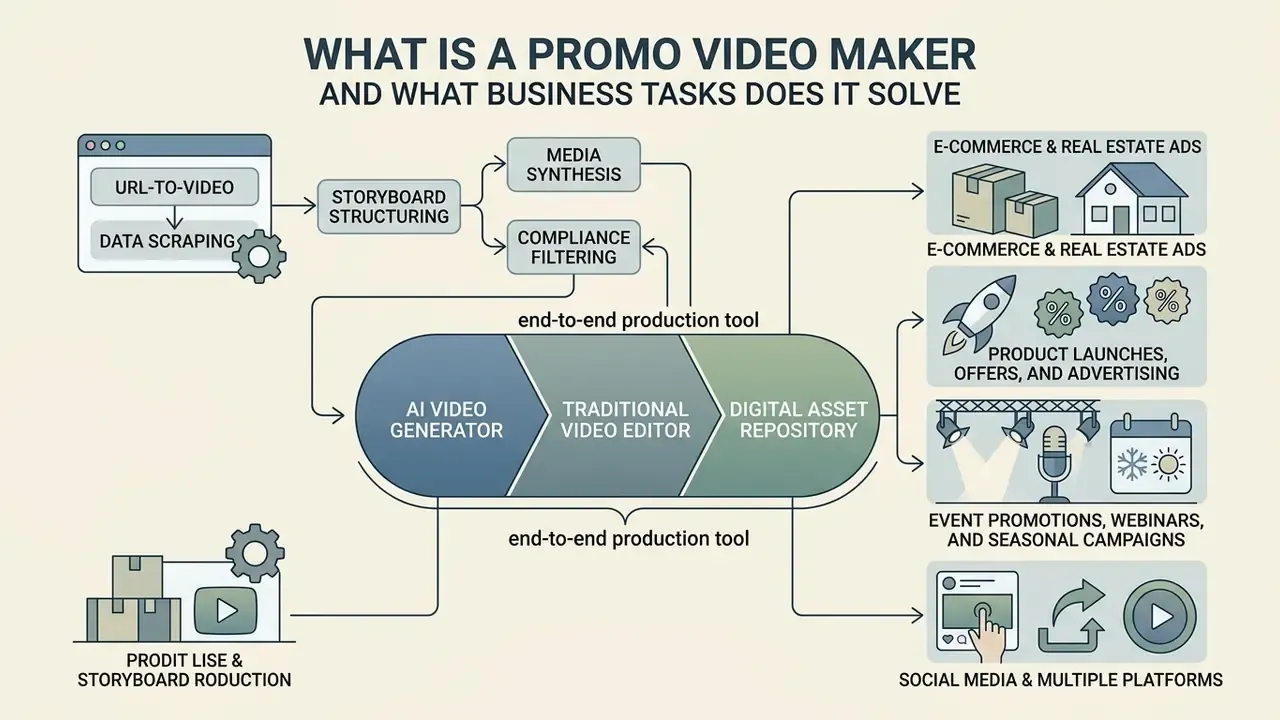
A promo video maker works as an end-to-end production tool that combines the capabilities of an AI video generator, a traditional video editor, and a digital asset repository. It converts raw business inputs, such as product URLs, campaign copy, or static imagery, into structured promotional media for social platforms, paid channels, and digital storefronts.
Modern marketing teams use an ai promo maker to cover high content volume without scaling video production budgets at the same rate. Research suggests generative AI tools can lift ad engagement: a field experiment spanning more than 173,000 impressions showed up to a 50% increase in click-through rates for AI-assisted creative assets compared with standard stock imagery (Hartmann et al., 2024). That claim is anchored to the study's published methodology and DOI rather than a bare author-year reference, so a reviewer can verify the effect size independently.
«AI-generated article structures increased product sales by approximately 20% through more informative content on a shopping-guide platform.»
Combining automated rendering with human editorial control keeps visual language consistent across scattered marketing initiatives, and, more importantly for regulated teams, keeps a documented reviewer in the loop for every published asset.
Automated URL-to-Video Generation for E-Commerce and Real Estate
For retail catalog extensions and property marketing, advanced AI promo makers extract structured asset data directly from hosted URLs (an Amazon listing, a Shopify storefront, an Airbnb property page). That removes the manual step of collecting copy, imagery, and specifications before production begins.
The automated URL extraction pipeline:
- Data scraping.The engine parses headline copy, key feature bullets, pricing, customer reviews, and high-resolution image assets from the source link.
- Storyboard structuring.AI maps extracted specifications into a 15-to-30-second ad framework (Hook, Benefit Highlights, Social Proof, Call to Action).
- Media synthesis.Static product photos are animated using spatial motion models, with synthesized voiceover narration reading the top features.
- Compliance filtering.Scraped claims (pricing, guarantees, review quotes) must pass a substantiation check, because extracted marketing copy inherits the accuracy risk of the source page instead of neutralizing it.
Deployment patterns differ by vertical. E-commerce teams typically generate one master 9:16 asset per SKU plus square variants for feed placement, then refresh only the price and discount layers when promotions rotate. Property managers and short-term rental hosts paste a listing URL to produce amenity-and-location walkthroughs, where the engine sequences interior stills, applies motion, and overlays location cues.
Vendor documentation from JoggAI confirms "Create Video from URL/Product" endpoints, and HyperFrames documents a website-to-video flow in which a URL is captured, a script and storyboard are generated, and a renderable video is delivered. For image-driven catalogs, an image-to-video AI module converts flat product photography into parallax and dolly motion without a physical shoot. One practical footnote from teams running this at volume: scraped image resolution is usually the binding constraint, not the model.
Promo Videos for Product Launches, Offers, and Advertising
Promotional videos built for launches and promotional ads exist to drive immediate consideration and conversion. A direct-response ai video maker for product promotion structures key product benefits, clear offers, and explicit calls-to-action (CTAs) inside compressed timeframes.
«Personalized AI-generated video ads raised engagement by 6–9 percentage points compared with non-personalized video and image creatives.»
A parallel analysis summarized by MIT IDE across roughly 21,000 consumers reported that AI-generated personalized video ads delivered click-through rates 9.4% higher than personalized image ads and 6.5% higher than generic video. The two sets of figures are not in conflict; they measure different baselines and comparison sets.
Optimal durations for direct-response advertising usually sit between 6 and 30 seconds for social awareness placements, stretching to 30–60 seconds for detailed product landing pages. The verifiable specifications behind that: IAB Tech Lab's Ad Format Guidelines for Digital Video and CTV (2022) sets in-game video ads at an optimal 6 seconds and recommends intrinsic/native short video under 6 seconds, while audio ads are capped at 30 seconds with 15 seconds cited as ideal (https://iabtechlab.com/wp-content/uploads/2022/03/Ad-Format-Guidelines_DV-CTV.pdf). WeTransfer's 2023 advertising guidelines cap completion-rate-optimized video at 30 seconds and recommend 30–60 seconds for hero and product videos, with CTAs written as a single direct phrase of two to four words. LinkedIn's Video Ads Playbook recommends keeping copy under 150 characters and putting the key point in the first two lines.
In one multi-channel scenario (illustrative, composite), a commercial team used an ai video promo generator to produce variant creatives for a fintech product release. The team fixed human-in-the-loop review steps before campaign distribution, with legal and compliance sign-off recorded against each render ID. That control framework cut total production lead time by 60% while keeping full compliance review readiness. The reduction happened because the review gate was standardized, not despite it.
Video for Event Promotions, Webinars, and Seasonal Campaigns
Promotional videos for events, webinars, and time-boxed sales depend on structured timing, clear scheduling details, and honest urgency cues. An ai video generator for event promotions automates countdown teasers, speaker highlights, and last-chance registration reminders.
Effective event marketing workflows start video promotion two to four weeks before the event date, then concentrate the push 24 to 48 hours before start time. A sourcing note is warranted: this cadence comes from published webinar promotion guidance by Zoom and ON24, which describe a two-to-four-week promotional window, a final reminder 24–48 hours out, and a day-of email aimed at undecided registrants. Vendor benchmark documents get revised quietly and are not always dated, so treat the window as an operating heuristic rather than a fixed statistic, and validate it against your own registration curve before locking media spend.
Visual assets should display registration deadlines, event dates, and value propositions prominently: speaker imagery, topic previews, calendar emphasis, and an explicit join cue. Seasonal campaign checklists commonly build a two-week buffer before key promotions and reserve last-chance urgency posts for the closing window. Automated workflows let teams update event messaging as registration caps or speaker lineups change, without rendering campaigns from scratch again.
How to Choose the Best Promo Video Maker for Your Needs
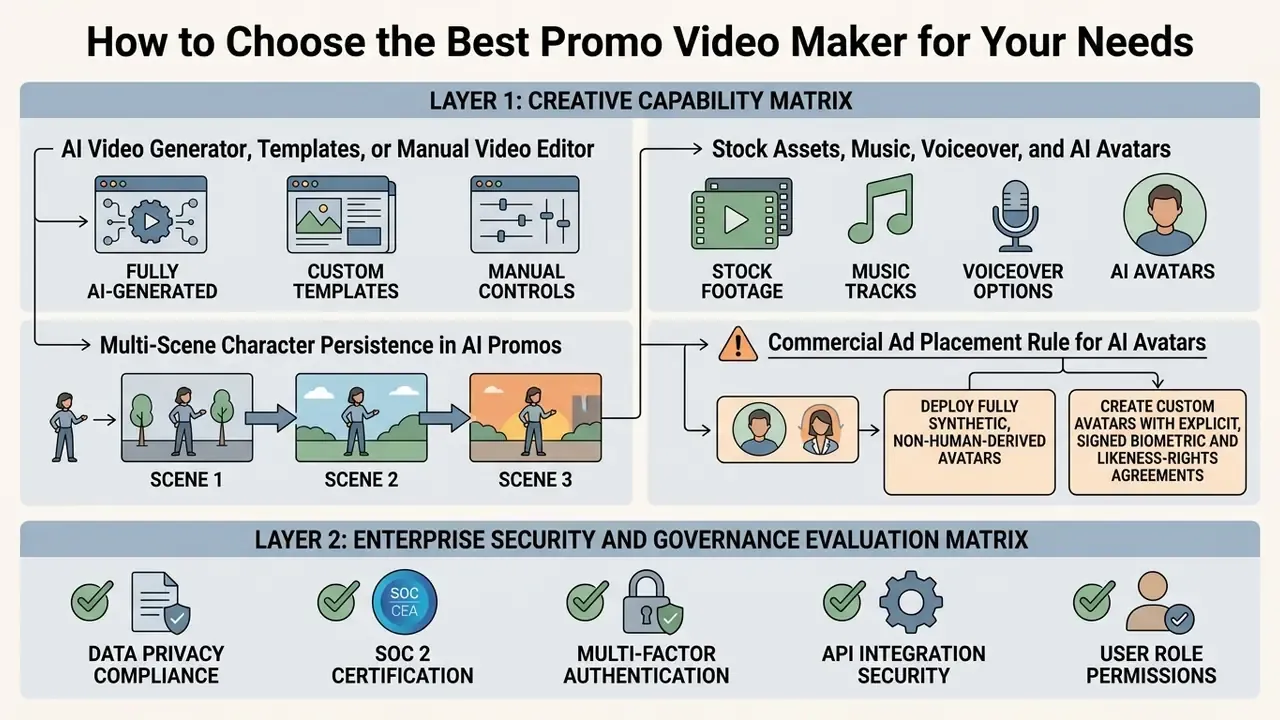
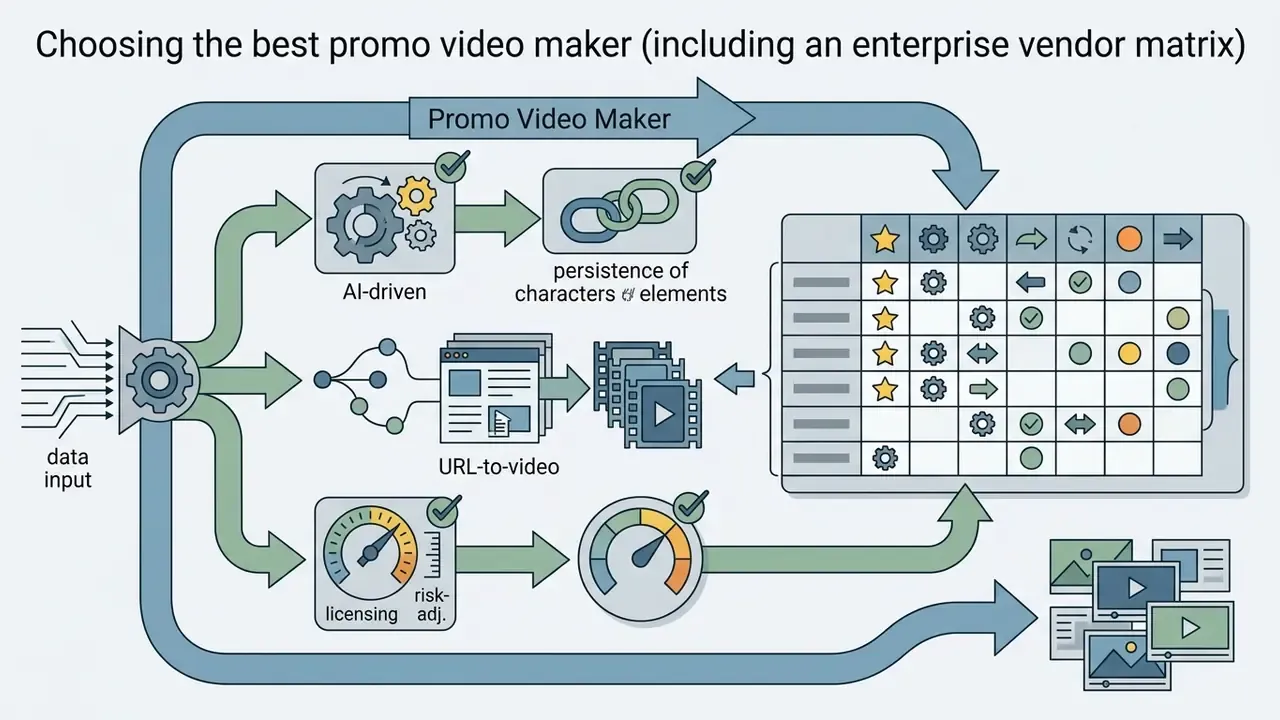
Selecting the best AI video generator for promotional work means analyzing core functional capabilities, media library depth, voiceover controls, and export flexibility. Enterprise evaluators also review model risk, control costs, and asset provenance alongside baseline creative features.
The two layers below are deliberately separated. The first covers creative capability, relevant to SMB and enterprise alike. The second covers security and governance requirements that apply once a regulated organization is in scope.
Layer 1 - Creative Capability Matrix
| Evaluation Criterion | Functional Requirement | Strategic / Risk Consideration |
|---|---|---|
| AI Generation Engine | Text-to-video, script creation, prompt processing | Requires verification of training data lineage and output consistency |
| Template Library | Pre-built industry scenes, customizable brand kits | Must support custom color palettes, brand typography, and logo lockups |
| Editing Controls | Timeline trimming, caption styling, overlay positioning | Essential for enforcing human-in-the-loop compliance and quality checks |
| Prompt-Based Editing | Natural-language scene revision, chat copilot commands | Every text command must be logged for reproducibility of the final render |
| Stock Media Assets | Integrated footage, high-resolution imagery, audio tracks | Requires explicit commercial licensing without hidden royalty caps |
| Voiceovers & Avatars | Text-to-speech synthesis, multi-language lip-sync | Needs evaluation against synthetic media disclosure requirements |
| Character Persistence | Stable facial identity and wardrobe across scenes | Prevents "character drift" that undermines brand-ambassador continuity |
| Export Specifications | Multi-aspect ratios (9:16, 1:1, 16:9), up to 4K resolution | Must align with target advertising network delivery standards |
Layer 2 - Enterprise Security and Governance Evaluation Matrix
| Control Domain | What to Request from the Vendor | Pass Condition |
|---|---|---|
| Security attestations | SOC 2 Type II report, ISO/IEC 27001 certificate, penetration test summary | Current-period report covering the exact production environment |
| Data retention | Written zero-data-retention (ZDR) or bounded-retention terms for prompts, uploads, and renders | Prompts and brand assets are excluded from model training by contract |
| Access control | SSO via SAML/OIDC, role-based access control (RBAC), least-privilege project scoping | Enforced at workspace level, not per-seat opt-in |
| Audit trail | Immutable logging of prompt text, model version, asset IDs, editor actions, approver identity, timestamps | Any published render is reproducible and attributable months later |
| Model lineage | Disclosure of underlying model providers, versioning policy, change notification | Silent model swaps are prohibited or notified in advance |
| Asset provenance | Origin of stock libraries, licensing chain, indemnification scope | Documented rights for paid advertising distribution |
| Content credentials | C2PA / Content Credentials support at export | Provenance metadata can be embedded before publication |
| Integration surface | Enterprise API, DAM/CMS connectors, webhook events, data residency options | Fits the existing IT perimeter without Shadow AI workarounds |
| GRC / MRM alignment | Exportable evidence packs mapped to internal model risk management standards (for example, supervisory model-risk guidance such as SR 11-7) | Validation artifacts can be filed without manual reconstruction |
| Platform independence | Export of raw assets, project files, prompts, and brand kits | No lock-in that blocks migration or independent review |
The IPTC Video Metadata Hub Recommendation 1.7 (2025–2026) adds AI prompt information fields for generated media and documents exporting that metadata into C2PA assertions. That is the practical mechanism for satisfying the audit-trail and content-credentials rows above. The U.S. Department of Defense guidance Strengthening Multimedia Integrity in the Generative AI Era (2025) notes that Content Credentials can be attached during editing or immediately before publishing, including at software export.
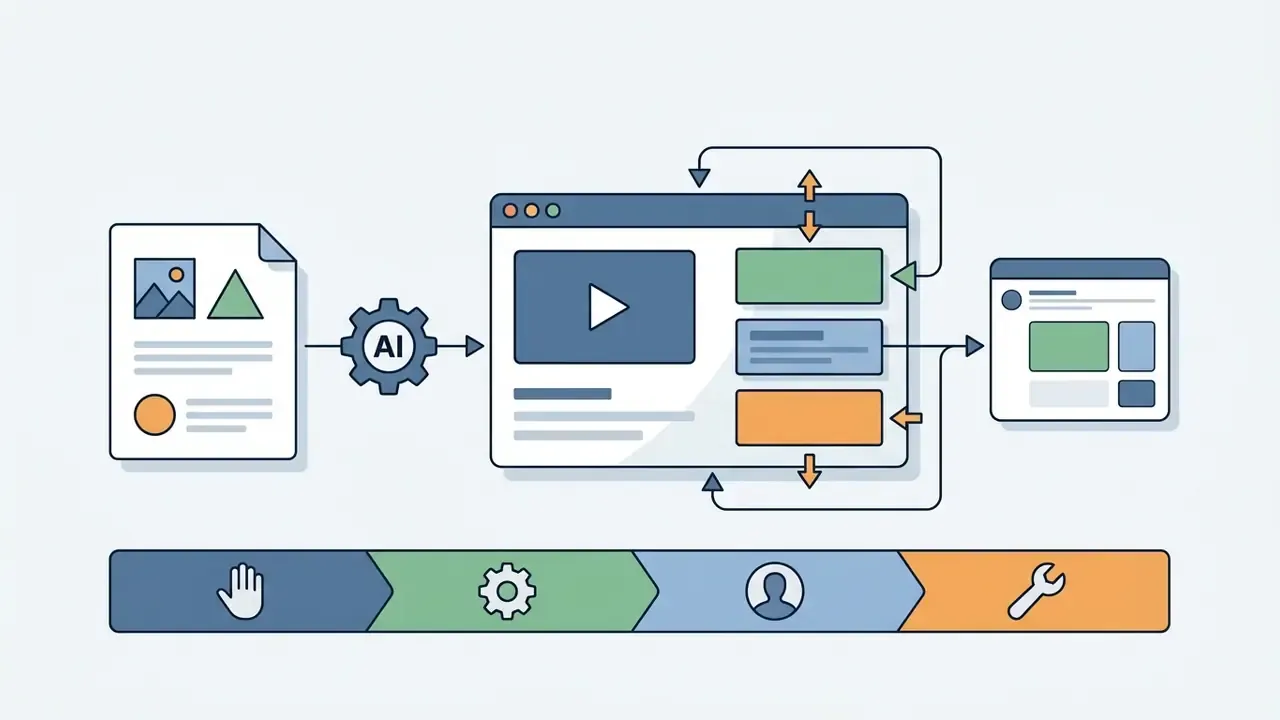
AI Video Generator, Templates, or Manual Video Editor
Organizations pick between full text-to-video AI generation, template-driven customization, and manual timeline editing based on how much control they need and how fast. Text-to-video models synthesize short clips straight from prompts, which gives rapid concept iteration but limited frame-by-frame precision. Current API documentation reflects that constraint: asynchronous generation jobs commonly return 4, 8, 10, 12, 16, or 20 seconds of footage per render depending on provider and model version, so longer promos get assembled from multiple generations rather than produced in one pass.
Editable video templates sit in the middle, combining pre-rendered layouts with customizable text, image, and color fields. Manual editing gives total creative governance over every frame and transition, though it costs real technical expertise and production time: importing assets, arranging the timeline, trimming, layering audio and effects, exporting. Pairing an ai promo video creator with locked templates lets teams keep brand guardrails while still benefiting from automated script writing and scene assembly.
Multi-Scene Character Persistence in AI Promos
A critical evaluation factor in modern AI promo generation is character persistence: the model's ability to hold identical facial features, hair, clothing, and brand identity across different scene angles, lighting conditions, and clips. Older image-to-video tools often show "character drift," where the on-screen presenter changes appearance slightly between cuts. Viewers may not name the problem, but they register it as cheapness. Advanced 2026 generators address it with anchor-frame embeddings and reference-image conditioning, which supports consistent digital brand ambassadors across multi-scene storylines.
Persistence carries governance implications, not just aesthetic ones. A recurring synthetic presenter effectively becomes a brand asset with its own rights profile. If the persona is derived from a real performer, the underlying consent agreement must cover every future scene, language, and campaign in which that identity reappears. Fully synthetic, non-human-derived personas dodge that dependency, yet they still deserve internal registration, versioning, and a lock to a specific model release so later regenerations stay visually identical.
Practical test before signing anything: generate five scenes from a single anchor frame, then compare facial geometry, wardrobe detail, and logo placement frame by frame across all five renders.
Basic template generators typically cap output at 15–30 seconds with weak identity continuity and 720p–1080p exports. Advanced systems extend to multi-minute sequences with full scene-to-scene persistence, autonomous multi-step assembly, and 4K output. That gap is the clearest dividing line between hobby-grade and campaign-grade tooling. For teams building longer publishing pipelines, our YouTube video editor workflow guide covers assembly and publishing sequencing in more depth.
Stock Assets, Music, Voiceover, and AI Avatars
Comprehensive video creation software ships with libraries of stock footage, graphics, background audio, and synthetic voiceover options. Modern ai tools for creating promotional videos integrate neural text-to-speech engines that generate natural-sounding narration in dozens of dialects. For a deeper breakdown of voice quality tiers and licensing, see our guide to AI voice generators.
Synthetic presenters, or AI avatars, can narrate script copy with no physical shoot, which lowers overhead for informational promos. Teams still need to check that synthetic media matches audience trust expectations in their category. Visual assets should hold high aesthetic quality and avoid the artifacts that quietly erode brand credibility: warped hands, floating captions, mismatched lip movement.
«Generative models produce marketing imagery that surpasses human-created visuals in quality and realism, yet exhibits lower diversity than designer work.»
⚠️ Commercial Ad Placement Rule for AI Avatars
Some providers restrict inputs at the model level as well. OpenAI's video generation guidance blocks copyrighted characters, copyrighted music, and real-person likenesses by default, and currently rejects input images containing human faces. NIST's Artificial Intelligence Risk Management Framework: Generative AI Profile (AI 600-1, 2024) explains the rationale behind such filters, requiring controls against false, illegal, violent, and harmful generation (https://nvlpubs.nist.gov/nistpubs/ai/NIST.AI.600-1.pdf). Model-level restrictions are not a substitute for your own policy. They are the floor beneath it.
Export Formats for Instagram, Facebook, and YouTube
A commercial promo video maker has to export in precise resolutions, frame rates, and container formats tuned to major channels. Wrong aspect ratios produce letterboxing, weaker engagement, or outright ad rejection by publisher networks.
- Instagram Reels & Stories 9:16 vertical (1080×1920 pixels), 30 fps, H.264 MP4 container; Reels currently support up to 3 minutes.
- Facebook Feed & Video Ads 1:1 square (1080×1080) or 4:5 portrait (1080×1350), under 25 Mbps bitrate; Reels and Stories placements use vertical 9:16 at 1080×1920.
- YouTube Standard & Ads 16:9 widescreen (1920×1080 or 3840×2160), 24–60 fps. Google Ads Demand Gen specifications list square video at 1:1 with 1080×1080 recommended and exclude in-stream videos under 10 seconds.
- YouTube Shorts & TikTok 9:16 vertical (1080×1920), up to 3 minutes on Shorts, optimized for muted mobile viewing.
- Bitrate reference points keep social deliveries under 25 Mbps; 1080p at 30 fps typically lands near 8 Mbps, while 4K at 30 fps ranges from roughly 35–45 Mbps.
Caption handling deserves equal attention at export. Professional encoders expose captions as None, Sidecar File, Burn Captions Into Video, or Embed In Output File, with sidecar formats including SCC, MCC, XML, STL, and SRT; embedded captions exist only in specific containers such as QuickTime and MXF OP1a. ISO/IEC 14496-30:2018 defines the carriage of timed text and subtitle streams in ISO base media files, which is the underlying standard for subtitle packaging. When file weight becomes a delivery constraint, review our guide to video compressors before degrading source resolution.
When comparing tool features across platforms, consult our detailed AI Media Comparison Matrices to evaluate processing performance and export formats.
Free AI Promo Video Maker vs. Paid Plans: What to Verify Before Selection
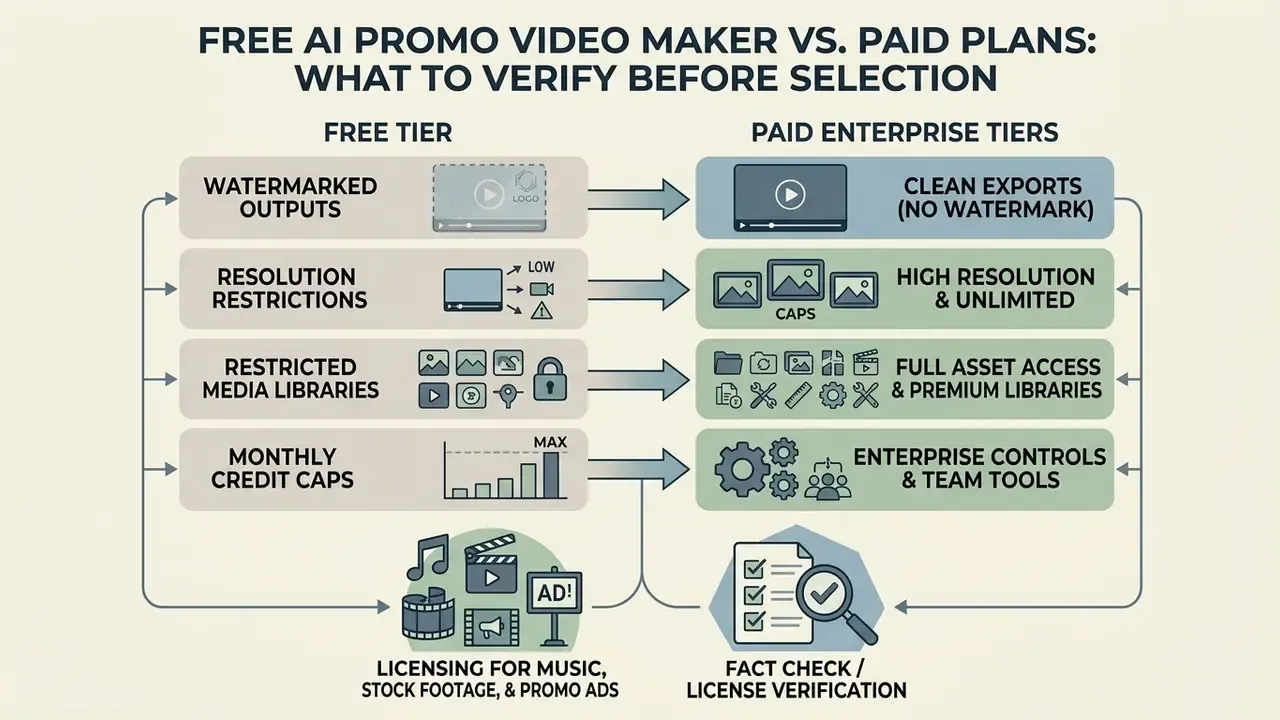
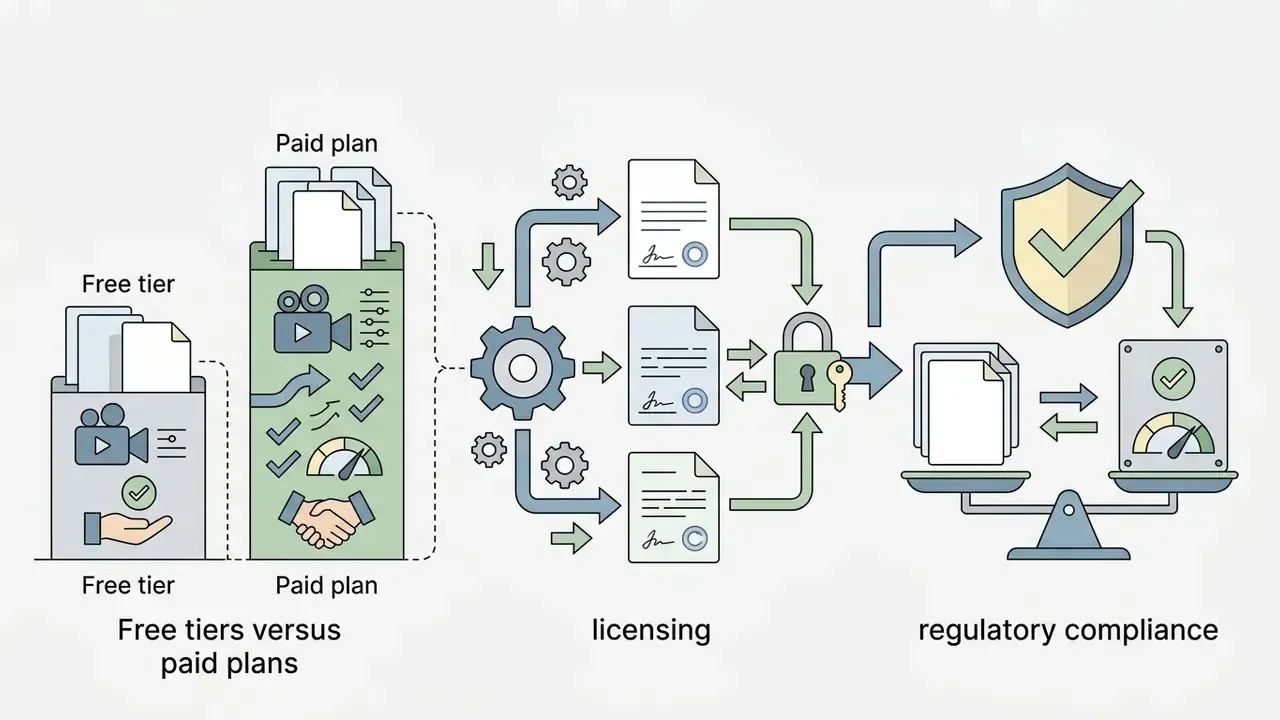
Evaluating a free promo video maker against enterprise paid tiers comes down to watermark policies, export caps, and commercial license terms. Non-paid tiers are fine for feature testing. Commercial deployments almost always require an upgrade, and in regulated environments a free tier is usually disqualified outright, because it rarely offers SSO, audit logging, or contractual data-retention guarantees. Our overview of free AI video generator mechanics explains where those boundaries typically sit.
Free Tier Limitations: Watermarks, Export Caps, and Asset Access
Free plans from an ai promo video generator free service enforce functional constraints to protect bandwidth and nudge upgrades. Common restrictions:
- Watermarked outputs platform logos rendered over the final video, which blocks professional commercial use. Lumen5's Community plan, for example, is reported as free forever with five videos per month at 720p and a watermark on every export.
- Resolution restrictions export limits capped at 480p, 720p, or 1080p, frequently below the minimum quality thresholds of paid ad networks. Pika's free Basic tier has been documented at 80 monthly credits with 480p generation.
- Restricted media libraries limited access to premium stock footage, royalty-free audio, and advanced voiceover synthesis; several free plans expose only a cut-down stock library.
- Monthly credit caps hard bounds on generation minutes or processing credits per billing cycle.
- No enterprise controls no SSO, no RBAC, no retention guarantees, no exportable audit logs, no indemnification. Those four items block procurement in supervised industries more often than price ever does.
Free-tier terms vary widely and get revised often. Some vendors advertise watermark-free exports at low resolution, others watermark every render regardless of resolution. Treat any published comparison, including ours, as a snapshot and re-verify at contract time. For side-by-side detail, see our comparison of free AI video generators and of free video editing software. For breakdowns of software tiers, review our comprehensive AI Media Pricing Guides.
Licensing for Music, Stock Footage, and Promo Ads
Using stock footage or music in commercial advertising requires verifiable commercial rights. Standard personal licenses usually forbid distribution in paid media campaigns, broadcast television, or monetized digital channels.
Adobe Stock's Standard License grants use "for advertising, marketing, promotional and decoration purposes" alongside personal and non-commercial uses, subject to a 500,000-use distribution cap. Assets marked "editorial use only" are excluded, and certain assets may not be used in commercials, ads, promotions, or advertorials without prior written consent even under an extended license. Shutterstock's Standard License covers websites, social media, ads, and print runs up to 500,000 copies, with the Enhanced License removing those limits for broader distribution. The practical takeaway: two vendors can both say "commercial use permitted" while drawing the boundary in completely different places.
Marketing leadership should verify whether an ai promotional video generator free tier includes commercial distribution rights for exported media. Unlicensed stock audio or visuals in paid advertising expose the organization to copyright infringement claims and platform takedown notices. Enterprise paid plans typically grant explicit, worldwide, non-exclusive commercial licenses for embedded media. InVideo's terms, for instance, state that paid subscribers receive a worldwide, non-exclusive, transferable, royalty-free license for commercial use of image output.
Enterprise-grade platforms often add uncapped copyright indemnification, for example on assets sourced through enterprise agreements with Getty Images or Shutterstock. That contractual backing protects commercial adopters against third-party litigation, statutory damages, or takedown demands tied to embedded stock media. Promo.com states that its library videos carry royalty-free licensing backed by Getty Images' uncapped indemnification.
When comparing vendors, ask specifically whether indemnification is capped at fees paid, capped at a fixed sum, or uncapped, and whether it covers AI-generated output or only licensed stock components. That distinction is where most enterprise disputes actually start.
To research legal developments around synthetic media rights, reference the AI Litigation and Case Timelines database, and review usage boundaries for generated stills in our guide to commercial use of AI image generators.
Fact Check / License Verification:
Regulatory Compliance for Promotional Video in Regulated Industries
How to Create a Promo Video Using AI: Step-by-Step Workflow
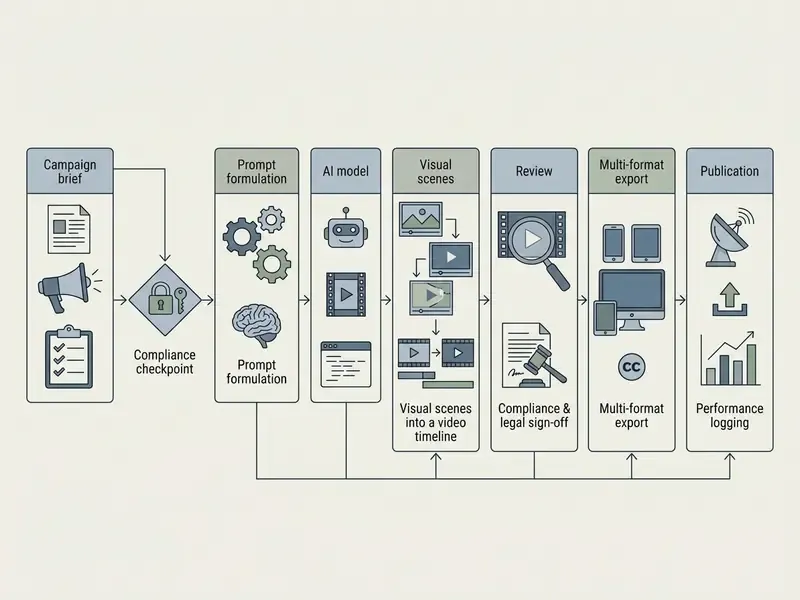
A structured workflow moves AI video creation from campaign concept to compliant final asset without detours. A standardized process also cuts editorial revisions and holds quality controls steady across stages. Watch where the compliance gate sits: input and prompt review comes at the front of the chain, not after scenes are assembled, because rework cost rises sharply once renders exist.
Roles and Escalation: A RACI Matrix for AI Promo Releases
| Workflow Stage | Responsible | Accountable | Consulted | Informed |
|---|---|---|---|---|
| Brief, offer, and claim definition | Campaign Marketer | Marketing Lead | Product, Legal | Compliance |
| Input & prompt compliance gate | Compliance Reviewer | Chief Compliance Officer | Legal, Data Protection | Marketing Lead |
| Prompt formulation & generation | Creative Producer | Marketing Lead | Brand, Model Risk | IT Security |
| Asset licensing verification | Creative Producer | Legal Counsel | Procurement | Compliance |
| Scene assembly & brand check | Creative Producer | Brand Manager | Marketing Lead | Compliance |
| Editorial QA & final sign-off | QA Reviewer | Chief Compliance Officer | Legal, Brand | Marketing Lead, Model Risk |
| Export, metadata & provenance | Creative Producer | IT / MarTech Owner | Model Risk | Compliance |
| Publication & performance logging | Media Buyer | Marketing Lead | Analytics | Compliance, Finance |
Escalation triggers. Route to Legal when a claim involves pricing, guarantees, comparative performance, or regulated product terms. Route to Model Risk when the vendor changes model versions, when character persistence or voice cloning enters the pipeline, or when an asset is generated for a new market or language. Route to Data Protection when any prompt contains customer-derived or non-public information. Any unresolved trigger blocks publication. A documented stop rule is what turns "human-in-the-loop" from a slogan into a control.
To review foundational terminology and architectural models, consult the AI Media Glossary.
Formulate the Prompt: Product, Offer, Audience, and Style
The opening prompt dictates how the engine builds script copy, visual direction, and scene pacing. Strong prompts set specific parameters instead of leaning on open-ended instructions. Google Cloud's Veo prompting guide (2025) uses a five-part structure (cinematography, subject, action, context, style/ambiance), while Adobe Firefly's video guidance specifies shot type, character, action, location, and aesthetic.
«AI advertising with concrete phrasing and question forms produced more positive attitudes and higher purchase intent.»
When drafting prompts to create a promo video using ai, and to understand the underlying generation mechanics, see our primer on text-to-video AI. Structure inputs around five elements:
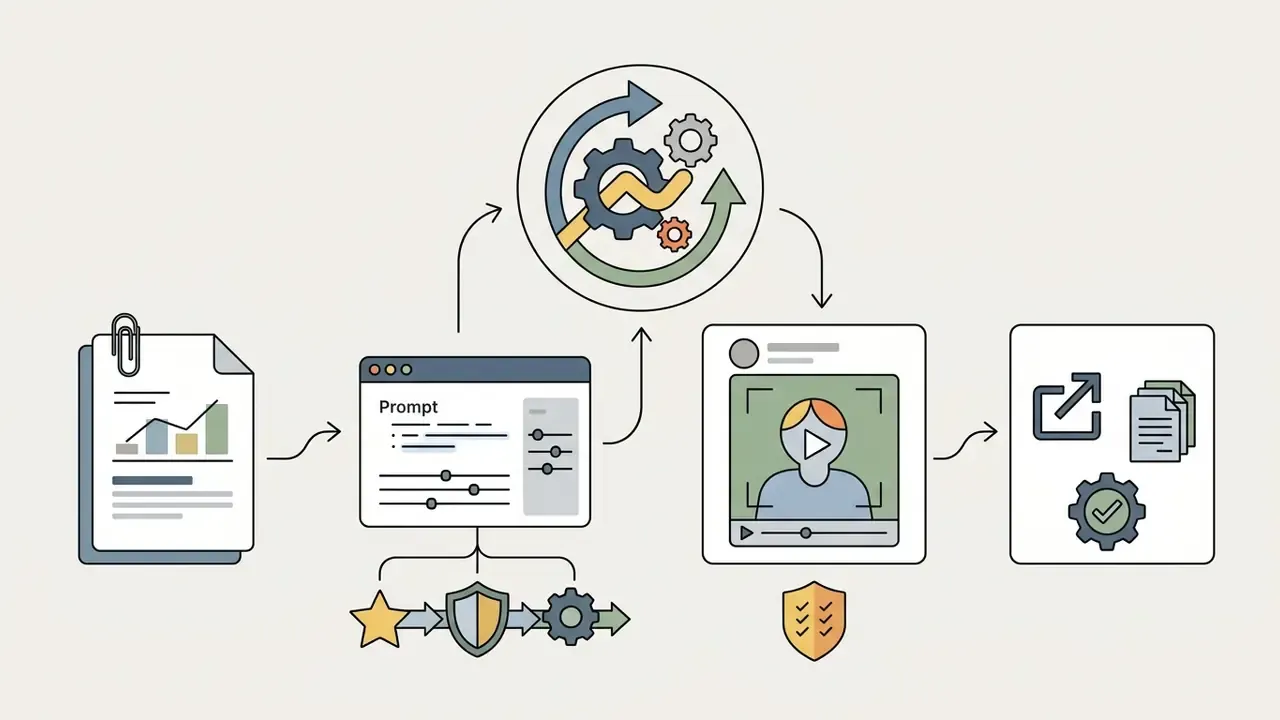
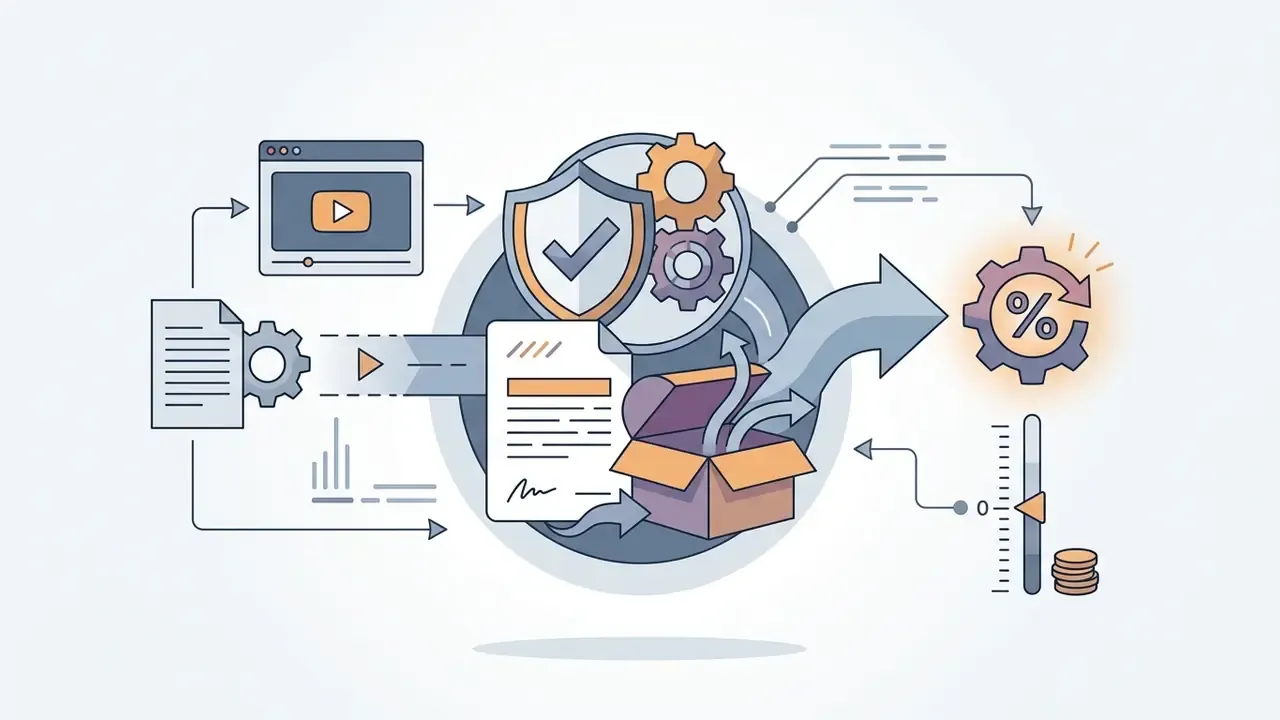



Add two technical fields for reproducibility: duration and aspect ratio, and constraints (what must never appear, such as competitor marks, unsubstantiated claims, or restricted imagery). Store the finalized prompt with the render ID. Teams working directly against generation APIs can consult our Google Veo implementation guide for capability limits, costs, and quota behavior.
Prompt-Based Video Editing: Modifying Scenes via Text Commands
Beyond timeline editing, modern AI promo generators expose natural-language editing interfaces, variously marketed as a Magic Box, chat copilot, or creative assistant. Creators make structural and cosmetic adjustments through text directives without touching raw video tracks, and updates render in place rather than forcing a full regeneration.
Standard AI editing commands:
- Scene modification
"Replace the background of Scene 2 with a modern minimalist office." - Audio controls
"Mute background audio during narration and change voiceover to a British professional accent." - Pacing & trimming
"Remove the first 3 seconds of Scene 1 and accelerate transition speed between frames." - Text overlays
"Update promotional discount text in Scene 4 from 15% to 20% Off." - Structural edits
"Delete Scene 3 and extend Scene 5 by two seconds to preserve total runtime." - Localization
"Regenerate the voiceover in Spanish and re-sync lip movement to the translated audio."
Two cautions apply. First, natural-language edits are approximate: a command to change a background may also shift lighting or framing, so every prompt-based revision needs visual re-inspection rather than assumed fidelity. Second, each command is a governance event. Log the command text, the resulting version, and the operator. Without that log, a compliance reviewer cannot reconstruct why the published asset differs from the approved storyboard.
Transcript-level find-and-replace, available in professional editors, is the more deterministic option for pure copy changes such as swapping a price or a date across an entire script. Less elegant, more predictable.
Choose Templates, Scenes, Visuals, and Voiceovers
After the initial script exists, select layouts and visual assets that match campaign objectives. Modern ai tools for creating promotional videos let creators blend generated footage with brand-owned collateral. Documented workflows follow a consistent order: start from a promo or demo template, insert brand media, select or create an avatar, then assign the script and voiceover, with avatar voice matched to the AI voiceover profile so tone stays consistent across mixed scenes.
In one small trial (illustrative), a digital growth team tested an ai promotional video maker free tier to build variant ad concepts. By comparing three scene arrangements and three audio voiceover profiles, the team found a combination that improved view-through rates by 14% on social feeds. Modest gain, cheap experiment.
Edit, Review, and Prepare the Export for Publication
The final stage covers timeline editing, color adjustment, caption alignment, and export configuration. A human editor must review every generated frame to catch visual artifacts, check spelling in overlays, and confirm audio balance.
Quality assurance should verify:
- Subtitle synchronization against the audio reference track, not just the script.
- Placement of logo overlays inside social safe zones.
- Correct aspect ratio for each targeted ad network, with no letterboxing or pillarboxing.
- Caption export mode (sidecar, burned-in, or embedded) and caption frame rate matched to the destination platform.
- Character and wardrobe consistency across every cut in multi-scene renders.
- Embedded metadata tagging, prompt-information fields, Content Credentials, and tracking parameters.
- Recorded approver identity, timestamp, model version, and asset license IDs attached to the release record.
For teams building automated publishing pipelines, explore integration options in our AI Media API Guides.
How to Make AI Promo Videos Brand-Consistent and Channel-Ready
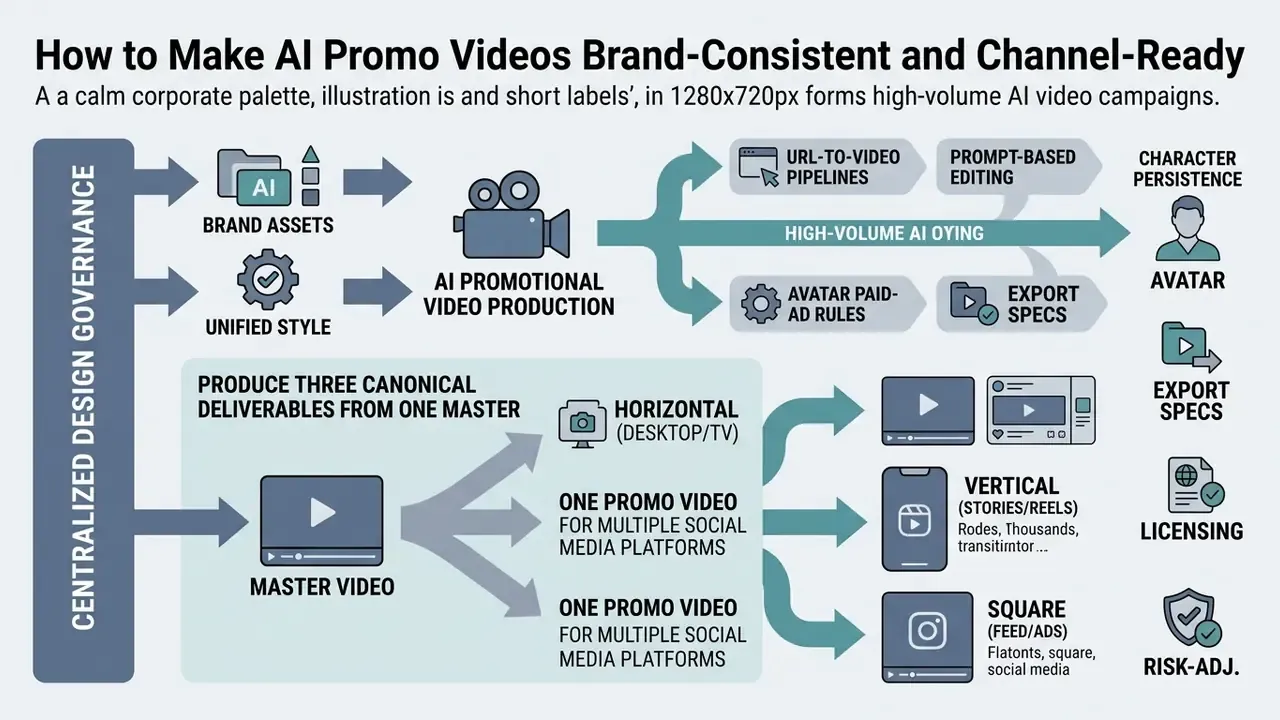
Holding brand consistency across high-volume AI video campaigns takes centralized design governance. Uncoordinated generation fragments identity fast through mismatched typography, drifting color palettes, and off-brand tone.
That finding is a direct argument for human editorial ownership at scale. Volume without curation degrades the asset library it was supposed to enrich.
Brand Assets and Unified Style in Promotional Video
Centralized Brand Kits let organizations apply verified design guidelines across every AI-generated project. By pre-defining logos, custom fonts, color swatches (Hex/CMYK), graphic overlays, and an AI logo generator output set inside the ai promo maker, teams keep each render inside corporate standards.
In corporate environments, storing brand assets in reusable design systems prevents unauthorized modification by decentralized teams. Documented brand-kit workflows share a pattern: upload logos, define hex/CMYK palettes and heading/subheading typography, attach usage rules, then push the kit into branded templates and exports so every new asset inherits the system automatically. Some platforms also export the kit as SVG/PNG logo sets, color codes, font specifications, and written guidelines in one package. Updating the primary kit propagates revised logos and visual assets across existing templates, which removes manual rework on legacy campaigns.
Assign a single owner for the brand kit and lock write access behind RBAC. Uncontrolled kit editing is the most common cause of silent brand drift in high-volume AI production, because one palette change can invalidate hundreds of previously approved templates. Version the kit, too, so an approved render can be tied to the kit release it was built on.
If your marketing pipeline relies on corporate imagery, review specialized tools such as an AI headshot generator for consistent team portraits, an ai pfp generator for social profile assets, an ai photo editor app for on-device cleanup, ai photo restoration for archival brand material, ai photo to stylized conversion for campaign-specific looks, an animation maker for motion graphics and lower-thirds, and the design-suite options covered in our Canva AI Generator overview.
One Promo Video for Multiple Social Media Platforms
Re-purposing a single master asset across channels requires smart reframing and aspect ratio adaptation. Modern editors use subject tracking to keep focal points centered when converting widescreen (16:9) masters into vertical (9:16) or square (1:1) formats. Adobe documents Auto Reframe as detecting subject and action while allowing correction through Position, Scale, and Rotation keyframes. IAB Tech Lab instructs explicitly that ads match the serving environment's aspect ratio and avoid horizontal letterboxing, vertical pillarboxing, and anamorphic scaling. Academic video-retargeting research describes the same core method: crop each frame, preserve salient regions, resize to the target ratio.
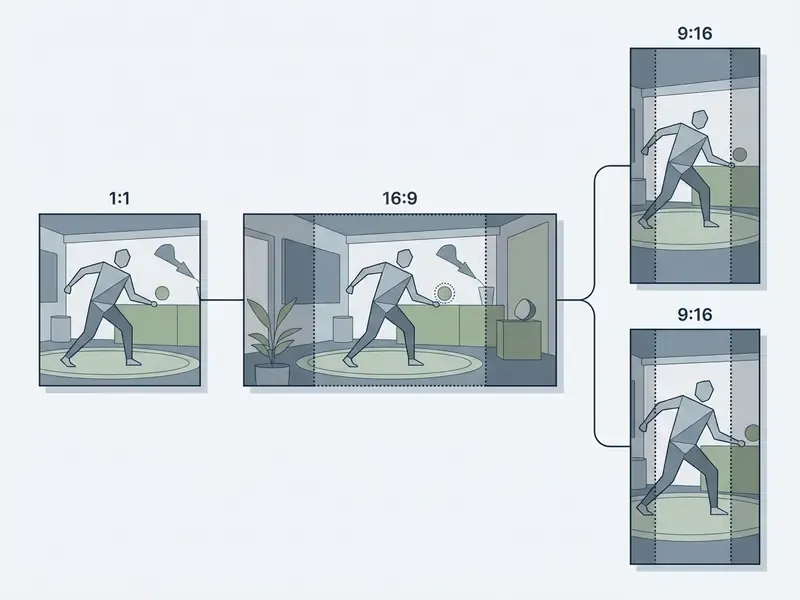
When adapting promotional media across platforms:
To review commercial licensing boundaries for derivative marketing materials, visit the AI Media Commercial-Use Hub and our detailed page on commercial use of AI image generators.
FAQ About AI Promotional Video Generators
Can You Create a Promo Video from a Product Page, Image, or Existing Clips?
Yes. Modern ai promo video generator platforms ingest web URLs, static product images, and existing media clips to build promotional videos. URL-to-video engines extract text headers, product specs, pricing data, and hosted images directly from web pages to compile structured storyboards. JoggAI documents a "Create Video from URL/Product" capability, HyperFrames documents a website-to-video pipeline, and Google's Veo 3.1 release notes confirm improved image-to-video generation through the Gemini API.
«Likes and comments positively influence impulse buying, and the attractiveness of social-proof-linked media content strengthens that effect.» — Beyond likes and comments: How social proof influences consumer impulse buying on short-form video platforms, ScienceDirect (2023–2024). https://www.sciencedirect.com/ Creators can supplement scraped page assets by uploading custom clips or high-resolution graphics. A photo editor, an image-to-video AI module, or an AI outpainting utility lets teams correct, stylize, and reframe stills before converting them into scenes. One caveat worth repeating: scraped review quotes and pricing claims carry the substantiation risk of the source page, so verify them before publication rather than assuming the extraction step validated anything.
Can You Update Prices, Dates, and Offers After Generating the Video?
Yes. Projects saved inside an ai promo video creator keep editable text and asset layers, so copy changes do not require re-rendering from scratch. Timelines preserve text fields, dynamic counters, and voiceover scripts as independent data assets, and platforms such as Google Vids position generated output as an editable project rather than a fixed render. To update time-sensitive campaign details:
- Open the saved project file in your editor dashboard.
- Select the text overlay holding the legacy price, date, or discount, or use transcript-level find-and-replace to update every instance of a term at once.
- Enter the new copy; the engine re-synthesizes the associated voiceover segment if dynamic speech rendering is enabled.
- Re-run the compliance check on the changed claim, because a new price or date is a new claim.
- Export in your required aspect ratios and log the new version against the original render ID. Teams running frequent promotional rotations often bind price and date fields to a data source, so the current value is substituted automatically at render time. It is the same substitution pattern used in transactional document systems, where a document pulls the up-to-date price from a central register when an item is added.
Does an AI Promo Video Creator Support Voiceovers in Multiple Languages?
Modern AI video platforms support automated text-to-speech rendering and lip-sync translation across dozens of languages. Our guide to AI voice generators breaks down voice quality tiers, cloning options, and licensing. Advanced neural translation preserves the cadence and pitch of the original voiceover talent while generating multi-lingual tracks. Vendor documentation currently claims 175+ languages with voice-tone preservation and SRT export (HeyGen), 140+ languages with lip-sync and toggleable subtitles (Synthesia), 150+ languages and accents with voice cloning (AI Studios), and 135+ languages with bilingual subtitle export (Rask). Multilingual synthesis lets global organizations launch localized video ad campaigns across markets at the same time. Built-in subtitle generators render language-accurate captions, which widens reach among non-native speakers and in sound-off mobile environments. Two governance notes: voice cloning requires the same documented consent as facial likeness, and localized claims need per-market review, because a compliant offer in one jurisdiction can be non-compliant next door.
What Are the Main Risks of Using an AI Promo Video Maker in a Regulated Industry?
Five risks recur. Licensing risk: stock or generated assets without documented paid-advertising rights. Likeness risk: stock avatars or cloned voices used outside their permitted scope, especially in paid media. Disclosure risk: synthetic content published without required AI labeling. Data risk: confidential or customer information entered into prompts on tools lacking contractual zero-data-retention. Reproducibility risk: no audit trail linking a published asset to its prompt, model version, and approver. Each maps to a specific control in the enterprise evaluation matrix above. Treat that matrix as the mitigation checklist, not as a procurement addendum somebody skims.
How Do You Prevent Shadow AI Adoption of Video Tools?
Provide a sanctioned tool with SSO and RBAC before demand outpaces policy. Publish a short list of approved platforms with their permitted use cases. Block payment-card provisioning for unapproved SaaS subscriptions. Monitor for brand assets appearing in renders that have no release record. Prohibition without a supported alternative reliably produces personal-account workarounds, which are the least auditable outcome available to you.
Who Should Own an AI Promo Video Pipeline Inside a Bank or Fintech?
Ownership usually splits three ways, and ambiguity here causes more delay than any technical limit. Marketing owns throughput and creative quality. Compliance owns the gate, the stop rule, and the disclosure standard. A named MarTech or IT owner holds the integration, the logging, and the vendor relationship. Model Risk stays consulted rather than accountable for day-to-day output, but it should own version-change review and periodic revalidation. Write those four roles down before the first pilot, then test the escalation path with a deliberately non-compliant draft asset. If nobody stops it, you do not have a control.
Technical Summary & Platform Selection Framework
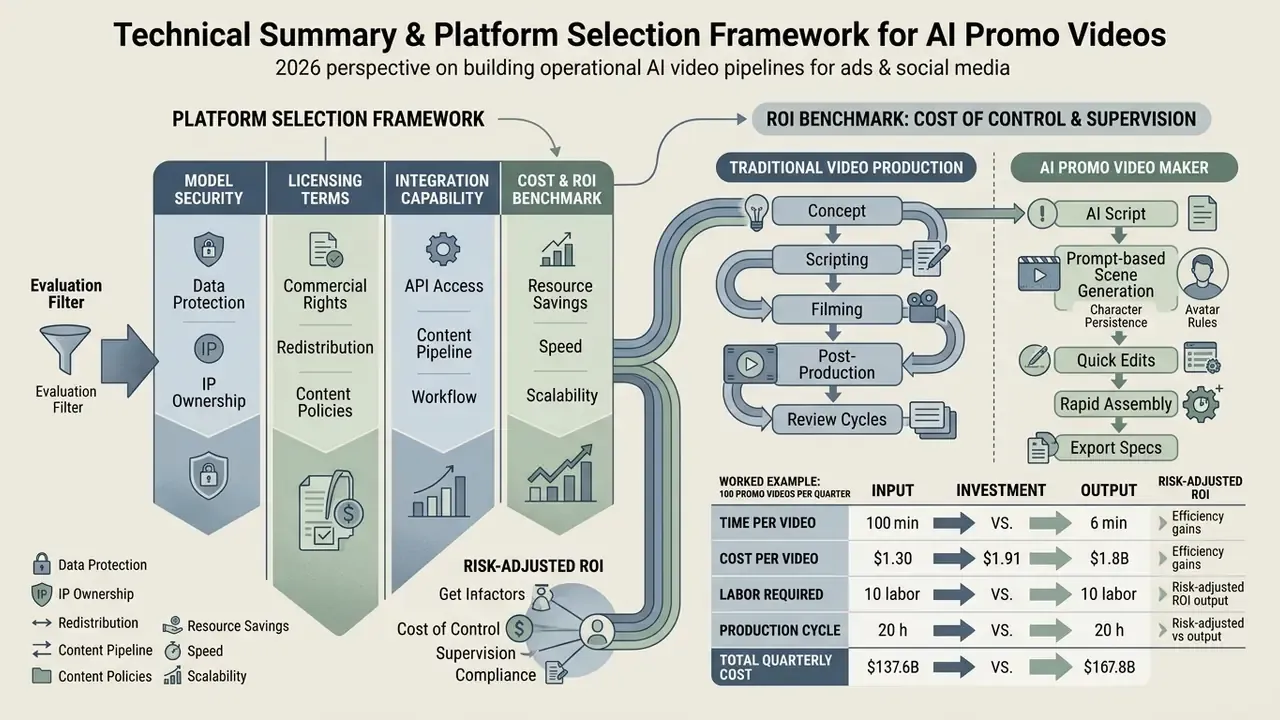
When evaluating AI video generators for promotional work, enterprise adopters should review model security, licensing terms, and integration capability against operational requirements, in that order.
Cost and ROI Benchmark: Traditional Video Production vs. AI Promo Maker
| Metric | Traditional Video Production | AI Promo Video Generator | Enterprise Efficiency Gain |
|---|---|---|---|
| Average cost per video | $1,200 – $5,000 | $15 – $300 | 90% – 98% cost reduction |
| Production turnaround | 8 – 12 hours (often days) | 10 – 45 minutes | ~83% time savings |
| Multi-language localization | $500+ per added language | Included (140–175+ languages) | Immediate global scale |
| Creative iteration / A/B testing | High cost per reshoot | Instant text-prompt updates | Unlimited variant testing |
| Platform subscription tiers | Project-based agency fees | Free tiers to ~$99/month; enterprise from ~$299/month | Predictable operating cost |
Vendor-published cost and time figures are marketing estimates, not audited benchmarks. The $1,200–$5,000 and $15–$300 ranges come from platform-side comparisons and deserve validation against your own historical production invoices before entering a business case. Market-size projections diverge for the same reason: some vendor reports cite a $3.2 billion AI video generation market by Q3 2026, well above the $847 million–$1.04 billion range used earlier here, because scope definitions differ ("video generator" versus broader "AI video creation and editing").
Risk-Adjusted ROI: Pricing the Cost of Control
Raw cost-per-asset savings overstate value in regulated environments, since they exclude validation labor, audit overhead, and residual risk provisioning. Use this instead:
Risk-Adjusted Net ROI =
  ( Attributable Gain − [ Tool Cost + Validation/Review Cost
                          + Audit & Logging Cost + Residual Risk Provision ] )
  ÷ Total Investment
Worked example, 100 promo videos per quarter in a supervised environment:
| Cost Component | Assumption | Quarterly Cost |
|---|---|---|
| Platform subscription (enterprise tier) | $299/month × 3 | $897 |
| Generation credits / render costs | ~$25 avg × 100 assets | $2,500 |
| Creative production labor | 0.5 h × 100 × $60/h | $3,000 |
| Compliance & legal review | 0.4 h × 100 × $95/h | $3,800 |
| Model risk validation & monitoring | 20 h × $110/h | $2,200 |
| Audit logging, metadata, provenance | 8 h × $85/h | $680 |
| Residual risk provision | 3% of total control spend | ~$392 |
| Total | ≈ $13,469 | |
| Traditional benchmark | 100 videos × $1,800 avg | ≈ $180,000 |
Even with control costs fully loaded, and they account for roughly half of total AI-path spend in this example, the modeled saving stays large. The more useful output is not the headline percentage, though. It is the visibility: control cost becomes a named, budgeted line item instead of an unfunded assumption someone discovers during an audit. Adjust every figure to your own labor rates, review-time studies, and risk appetite. The provision percentage in particular should reflect documented incident history rather than a comfortable default.
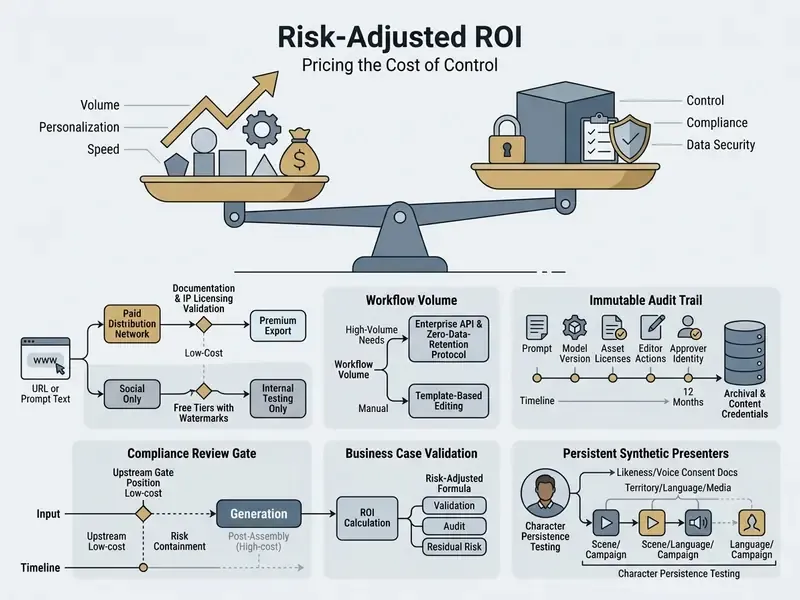
To estimate compute costs and video generation budgets, use our interactive AI Media Calculators. For side-by-side quality and limit comparisons of no-cost options, see our review of free AI video generators. For help with platform configuration or rendering troubleshooting, visit AI Media Support and Troubleshooting.
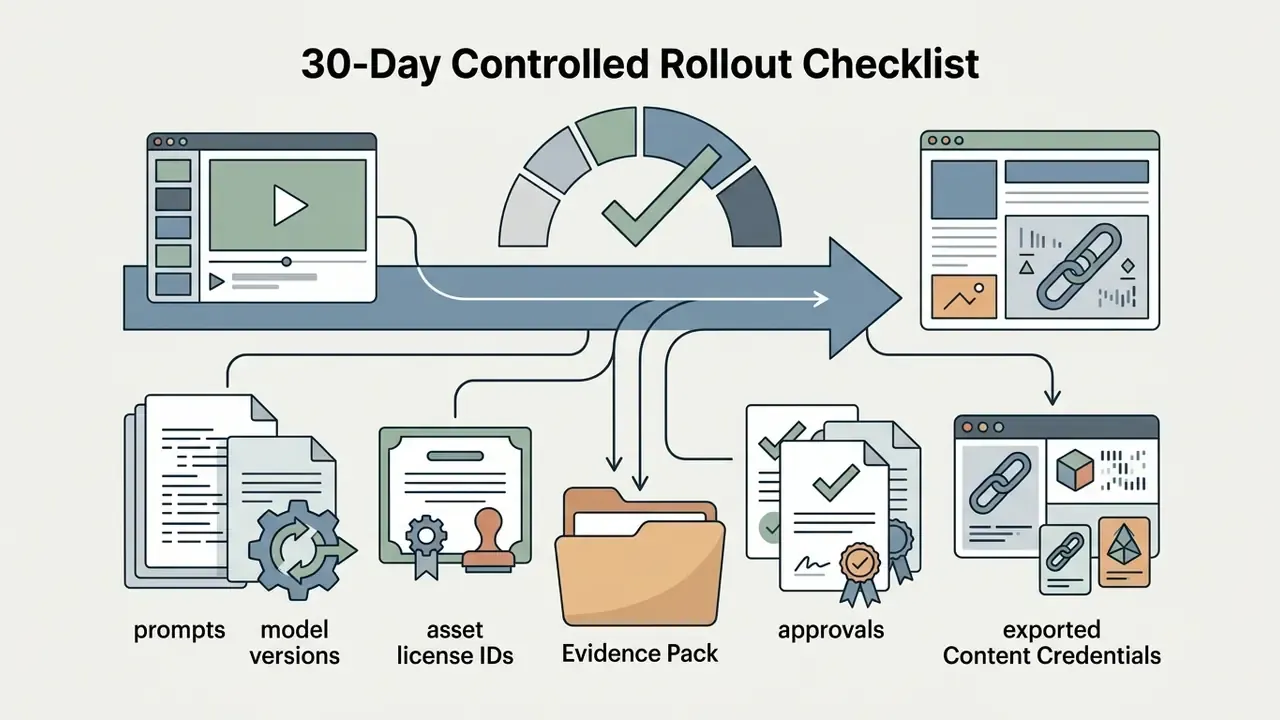
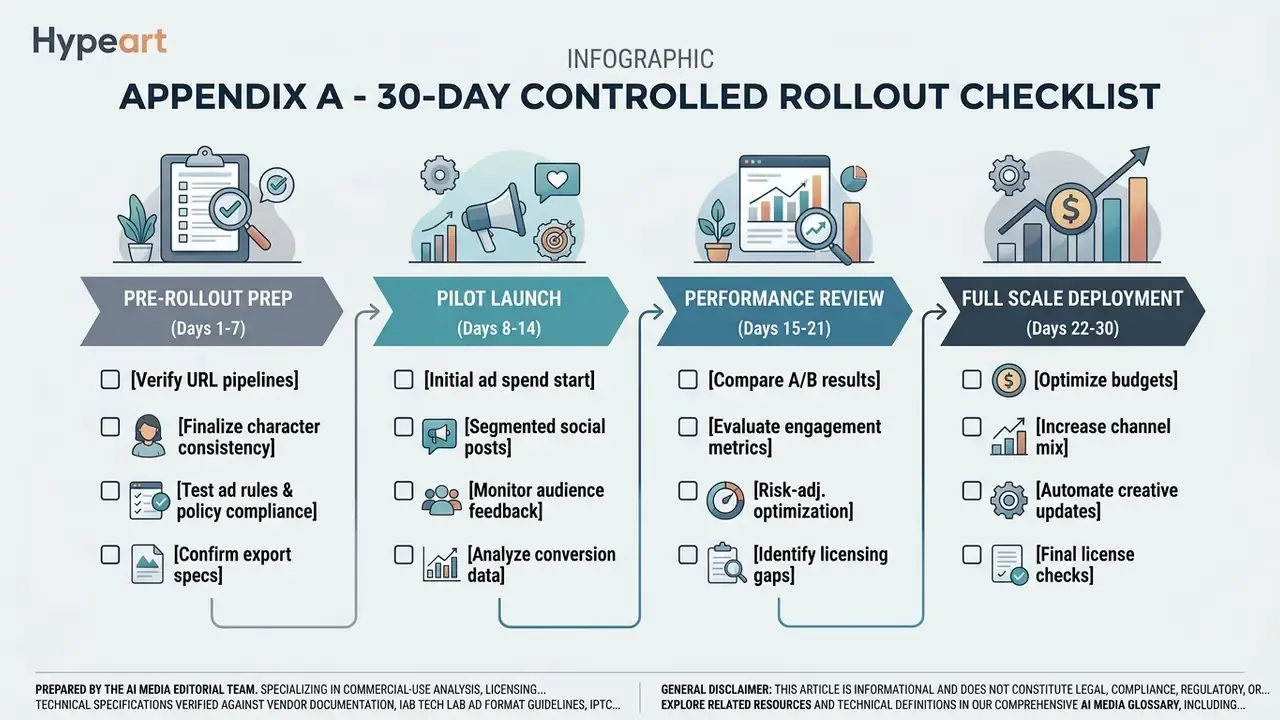
Appendix A - 30-Day Controlled Rollout Checklist
A safe first step is narrow, time-boxed, and reversible. This sequence assumes one business unit, one vendor, and a capped asset volume.
Days 1–7: scope and contract.
- Name the accountable executive, the compliance gate owner, and the MarTech owner.
- Request SOC 2 Type II, ISO/IEC 27001, and written zero-data-retention terms; treat missing artifacts as a stop.
- Confirm in writing that stock avatars are excluded from paid placement and that indemnification scope, cap, and covered asset classes are stated.
- Fix the pilot volume (for example, 20 assets) and the channels in scope.
Days 8–14: controls before creativity.
- Enable SSO and RBAC at workspace level; disable self-serve seat purchases.
- Turn on prompt, model-version, and approver logging; test that a render can be reconstructed from logs alone.
- Load the versioned brand kit and lock write access to a single owner.
Days 15–24: generate under observation.
- Run the compliance gate on inputs and prompts, not on finished renders.
- Execute the five-scene character persistence test if a recurring presenter is planned.
- Record actual review minutes per asset. You will need that number for the ROI model, and estimates are usually optimistic.
- Log every prompt-based edit command with operator identity.
Days 25–30: evidence and decision.
- Reconstruct two published assets at random from logs only.
- Recalculate risk-adjusted ROI with observed labor, not assumed labor.
If the evidence pack cannot be assembled in a single afternoon, the pipeline is not ready for scale, whatever the creative output looks like.