Author and review note: prepared by the Hypeart AI Media editorial desk, with framing input from the Marcus Hale . Every parameter range below was reproduced in internal image-to-image test runs before publication. Last reviewed: Q1 2026.
Before you upload: five things that decide the outcome
Most disappointing results come from decisions made before the first click, not from the model itself. Worth pausing on.
- Source quality.Sharp edges and even light beat megapixels. A soft phone snapshot stays soft.
- Denoising strength.This single slider separates a retouch from a full repaint.
- Structural adapter.Depth, Canny or Lineart conditioning is what keeps a face a face.
- Rights to the input.You need them before you upload, not after publication.
- Retention terms.Where does the uploaded file live, and for how long?
Keep those five in view and the rest of this guide becomes a set of dials rather than a lottery.
What is an AI art generator from photo and how does it work?
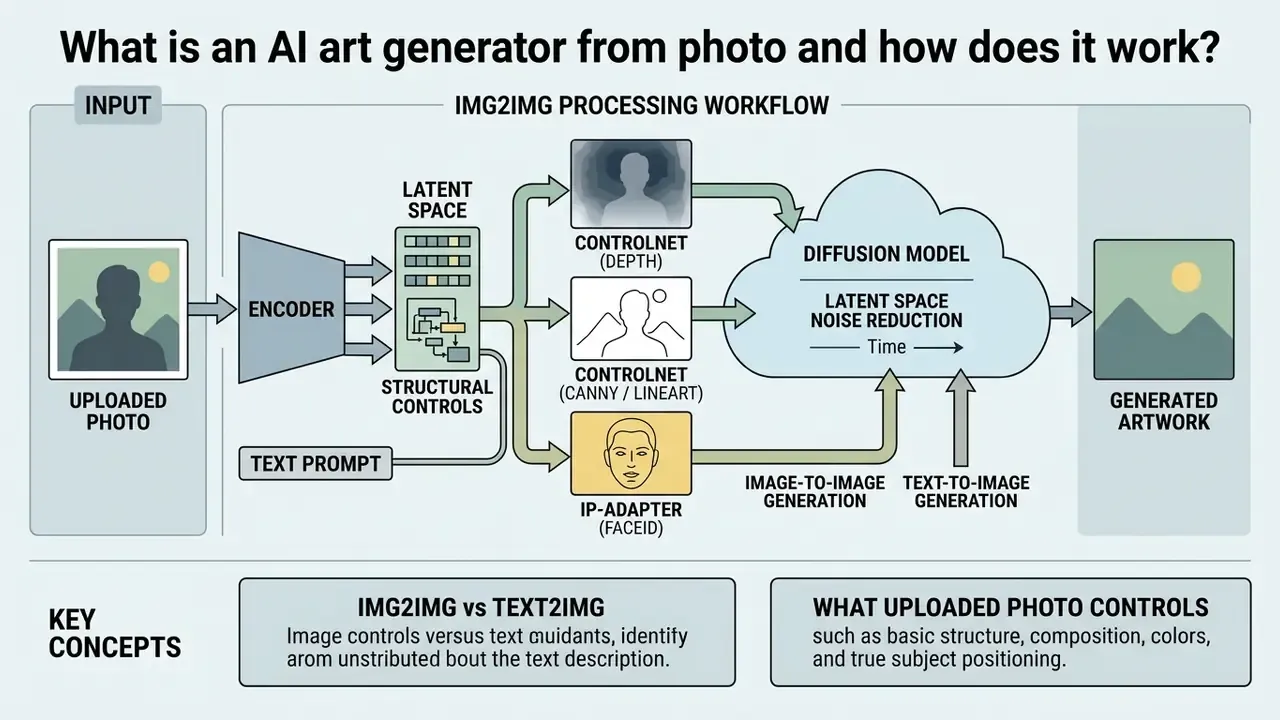
An ai art generator from photo is a conditional generative system. It processes an uploaded source photograph alongside textual instructions and synthesizes new artwork while retaining structural geometry. Unlike pure text-to-image models that build visual concepts from random noise, image-conditioned generation uses the source photo as a structural prior in latent space.
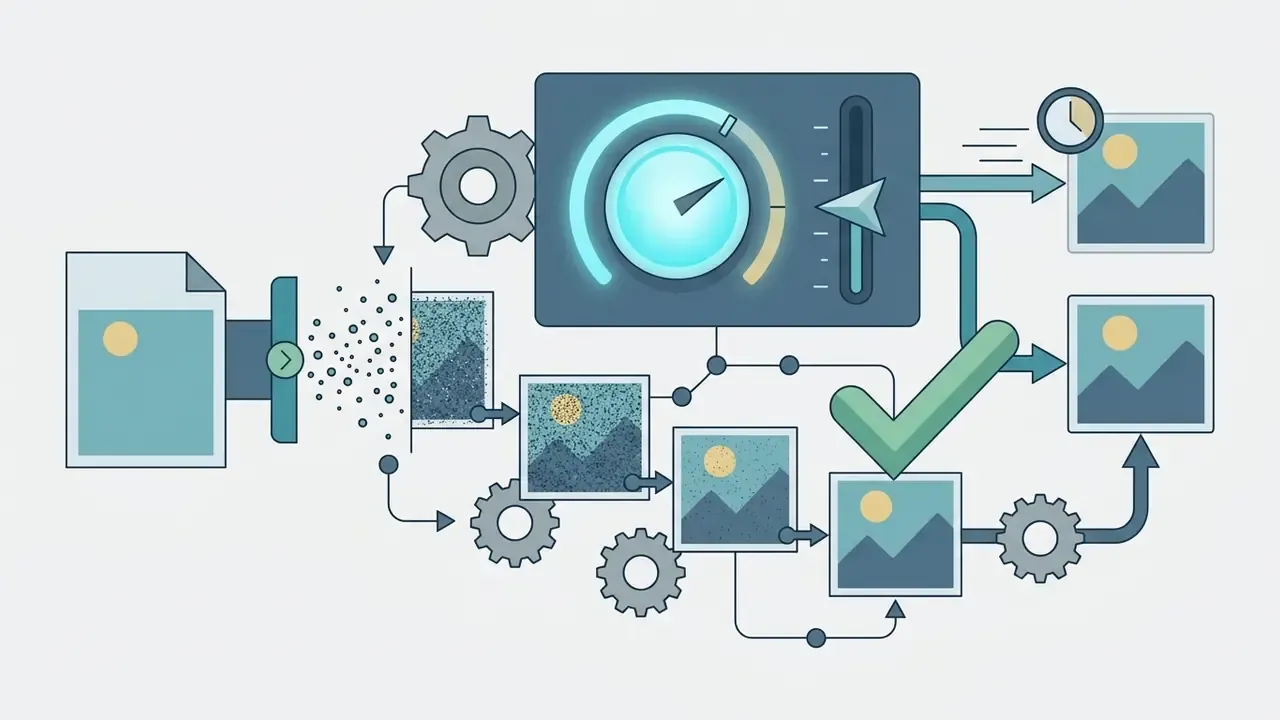
During processing, an autoencoder maps the uploaded photo into a compressed latent space. A diffusion network then adds controlled Gaussian noise and iteratively denoises the representation under the guidance of text embeddings and neural adapters (Zhang et al., 2023/2024). The architecture can rewrite surface texture while preserving subject composition, facial identity and spatial perspective. Put plainly: the photograph decides geometry and framing, while the text prompt plus the model's learned priors decide style and any newly invented content.
That is also the governance point. When the input image is treated as evidence, output variance drops, and reviewers can actually explain why an asset looks the way it does.
Image-to-image generation versus text-to-image generation
Text-to-image generation starts diffusion from unstructured noise conditioned only on text. Image-to-image generation conditions the denoising trajectory on an existing image latent. That structural prior restricts spatial hallucination and shifts the model from unconstrained creation to controlled visual translation.
In pure text-to-image synthesis, the model estimates object positions and relationships entirely from training priors, which is why layout drifts between iterations. An ai art generator from image system instead borrows the source photo's latent coordinates to enforce spatial boundaries, so the generated artwork lines up with the original composition. Teams that want to compare specific tools can review our overview of image-to-image generators before committing to a production stack.
One practical consequence: if you need twenty variations that all sit on the same product silhouette, an ai art from image generator is the right class of tool. Text-to-image alone will fight you.
What an uploaded photo controls in the generated artwork
An uploaded photo controls spatial composition, object placement, subject identity and perspective within the generated artwork. Neural mechanisms carry those geometric boundaries through self-attention layers, which is what prevents structural drift during stylistic updates.
Research into Stable Diffusion attention mechanisms shows a clean division of labour: self-attention layers preserve source geometry and object shapes, while cross-attention layers inject textual semantics.
Structural adapters such as ControlNet condition generation on depth maps, Canny edge maps or pose skeletons extracted from the source image, while IP-Adapter transfers subject appearance and identity from a reference photo. A few concrete examples make the mechanism less abstract:
Creators keep creative control by adjusting guidance strength, balancing source preservation against style transformation. That is the whole game.
Figure 1: Img2Img processing workflow (text version)
- Upload source photo
- select a high-resolution reference image with clear subject boundaries.
- Select AI model and style
- choose the underlying diffusion architecture and target aesthetic preset.
- Input text prompt
- define visual modifications, lighting cues and style parameters.
- Configure parameters
- set guidance scale and denoising strength (for example 0.35 to 0.50).
- Click generate
- run conditional denoising to output style-aligned variations.
- Refine and export
- inspect spatial fidelity, edit details, download high-resolution files.
- Log metadata
- record prompt, seed, denoising value, model version and source hash for auditability.
How to generate AI art from a photo online
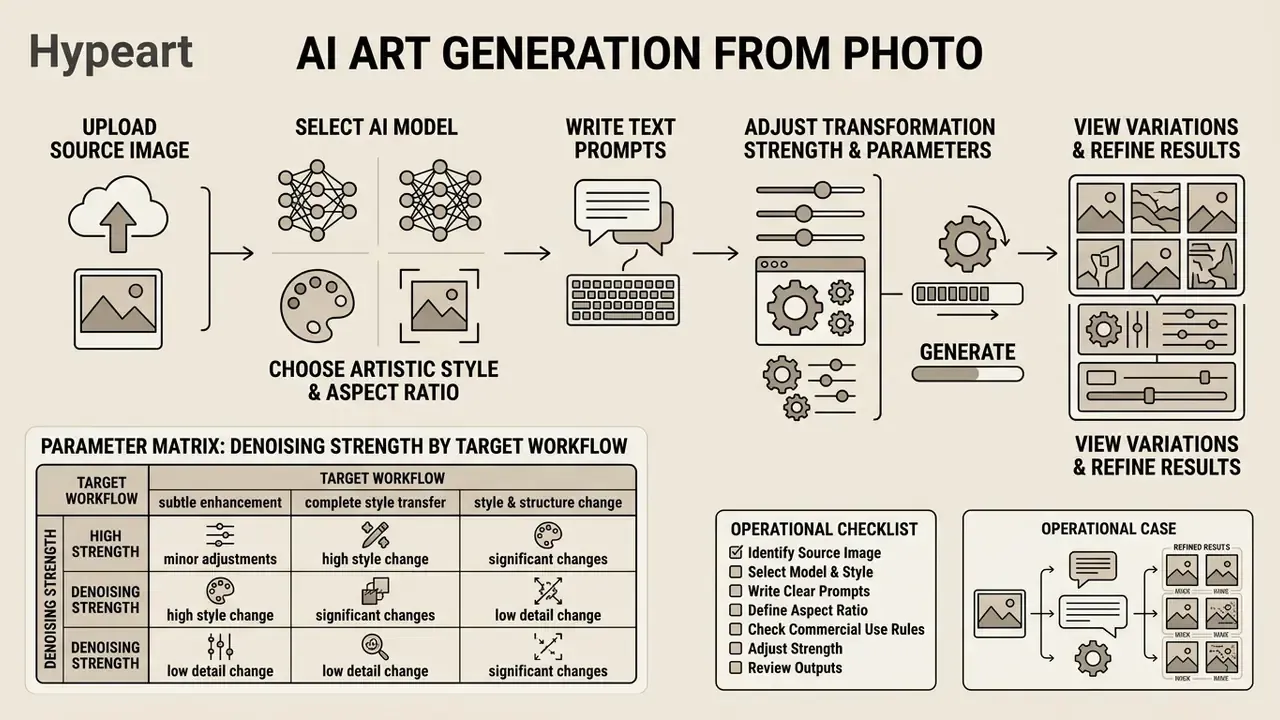
To generate AI art from a photo online, you upload a source image, select a diffusion model, write targeted text prompts, then adjust transformation strength before generating. That sequence keeps style translation predictable and prevents visual distortion.
Modern web interfaces fold image conditioning into a few screens. Users adjust denoising strength, classifier-free guidance and seed numbers to control how aggressively the network rewrites the uploaded photograph. Latency now varies by an order of magnitude between architectures, which matters when you need images fast.
Upload a source image or reference image
Preparing a source image means choosing a high-contrast photograph with sharp object separation and minimal digital noise. Clear edge definition lets the encoder build an accurate latent representation without structural artifacts.
For portrait transformations, guidance standards recommend a minimum resolution of 1200×1600 pixels and a minimum inter-eye distance of 90 pixels (ICAO, Portrait Quality for Reference Facial Images, 2018). When using an ai art generator free with reference image tool, avoid heavy motion blur and overexposure so structural adapters can extract usable depth maps and pose skeletons. If the only available source is a low-light phone snapshot, run it through an AI image enhancer first. Denoising strength cannot recover detail that never existed in the input. I have watched teams burn a full afternoon relearning that.
Choose AI models, artistic styles and aspect ratio
Model, style and aspect ratio together set the rendering ceiling and the framing limits of the generated image. Foundation architectures such as FLUX, Stable Diffusion or Midjourney trade computational speed against prompt adherence and texture realism in different proportions. A broader survey of platform capabilities and usage rights sits in our overview of AI image generators.
Midjourney enforces aspect ratio through explicit parameter flags (for example --ar 16:9, with square 1:1 as the default), while FLUX exposes preset aspect ratios instead of free-form pixel dimensions, defaulting to 1:1 at 1024×1024 (Midjourney documentation; Black Forest Labs FLUX documentation). Google's Gemini image model, widely known by its nano banana nickname, took a different route again, optimising conversational multi-turn editing where you refine one uploaded photo across several instructions. Nano banana style interfaces suit iterative retouching; flag-driven tools suit repeatable batch output. To analyze underlying model benchmarks and technical tradeoffs across platforms, browse the hub for comparative evaluations.
Add a prompt, generate variations and refine results
A good prompt is short, ordered and specific: background context, subject modifications, lighting adjustments, with denoising strength between 0.30 and 0.60. After you click generate, iterate on seed values or nudge parameters to refine the ai generated art.
Effective prompts follow a structured hierarchy: [Environment/Background] + [Primary Subject] + [Artistic Style] + [Lighting and Constraints] (OpenAI image-generation prompting guide; Google Vertex AI image prompt guide). Prompt precision is measurable, not a matter of taste.
Denoising strength behaves as a continuous dial between touch-up and reinvention. Values of 0.20 to 0.35 give subtle retouching. Values of 0.35 to 0.50 deliver a clear style shift while preserving subject identity. From 0.50 to 0.65 you get visible reinterpretation, and 0.65 to 0.80 effectively rebuilds the scene. At strength = 1.0 the pipeline adds maximum noise and essentially ignores your uploaded image (Hugging Face Diffusers img2img pipeline documentation). Parameter-efficient fine-tuning keeps these ranges stable without retraining a full model.
Parameter matrix: denoising strength by target workflow
| Target workflow | Denoising strength | Recommended control adapter | Key prompt modifiers |
|---|---|---|---|
| Photorealistic portrait retouch | 0.20 – 0.35 | IP-Adapter + FaceID | studio lighting, skin texture preservation, 8k detail |
| Oil painting / painterly portrait | 0.35 – 0.50 | ControlNet Depth | impasto brushwork, canvas texture, chiaroscuro lighting |
| Watercolour illustration | 0.40 – 0.55 | ControlNet Canny (low threshold) | wet-on-wet washes, soft bleeding pigment, white paper grain |
| Anime / cel-shaded digital art | 0.45 – 0.60 | ControlNet Lineart | cel shaded, vibrant line art, studio anime style |
| Cyberpunk scene | 0.40 – 0.55 | ControlNet Canny / Depth | neon lights, rain reflections, volumetric fog |
| Sketch / line drawing | 0.50 – 0.65 | ControlNet Scribble / Lineart | graphite hatching, contour emphasis, white background |
| Concept art environment | 0.55 – 0.75 | ControlNet Depth + Tile | matte painting, atmospheric perspective, epic scale |
| Product photo background swap | 0.30 – 0.45 | Depth + subject mask (inpainting) | label legibility preserved, soft studio gradient |
Pre-generation operational checklist
Artistic styles available for AI art from image
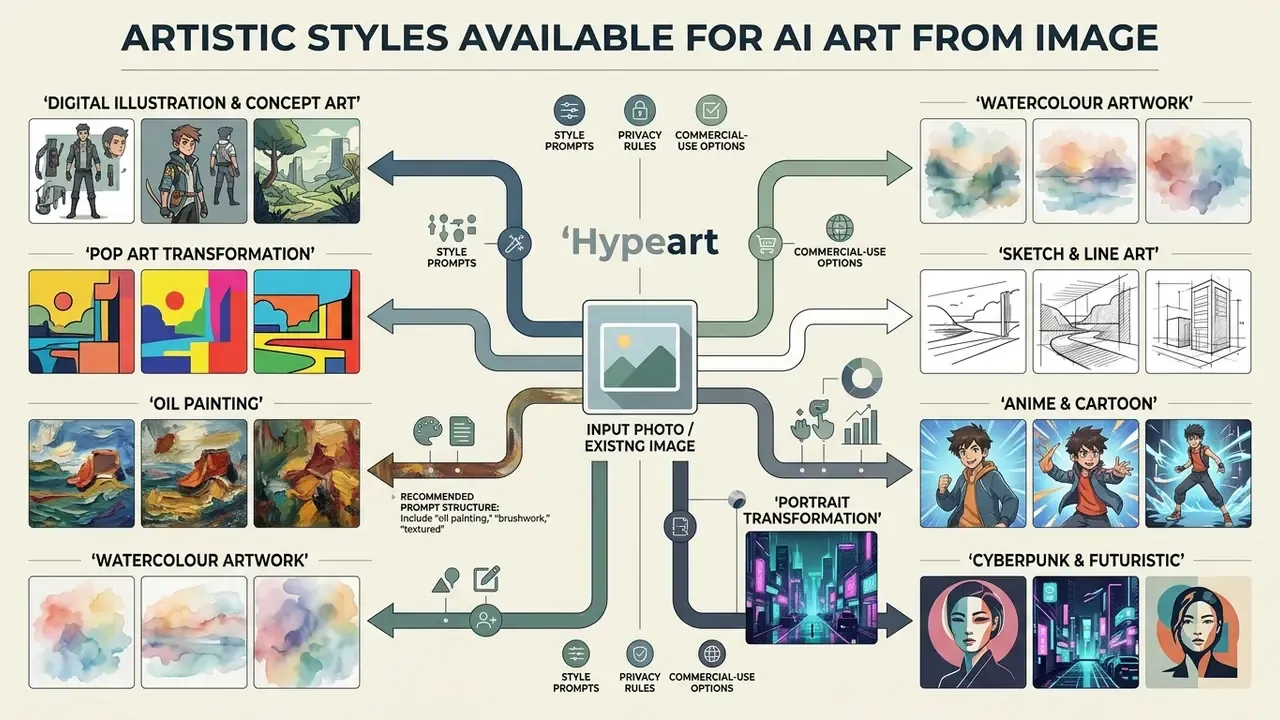
Artistic styles available for image-to-image generation include digital illustration, pop art, oil painting, watercolour, sketch and line art, anime and cartoon, cyberpunk, and stylized concept art. These transformations rely on style transfer algorithms and neural feature alignment that keep semantic content while replacing surface texture.
Modern diffusion pipelines separate structural feature maps from stylistic appearance vectors. That separation lets an ai art generator from photo free online tool re-render photographs across classical and modern art movements without distorting the subject. The subsections below give a reproducible prompt structure for each of the most requested looks. Copy the pattern, replace the bracketed subject, then pair it with the denoising range from the matrix above.
How to transform photos into oil paintings
Oil-painting conversion reproduces visible brush direction, impasto relief and varnished colour depth. Keep denoising at 0.35 to 0.50 with a depth adapter, so facial planes and horizon lines survive the texture rewrite.
Recommended prompt structure: [Original photo subject], classical oil painting on linen canvas, thick impasto brushwork, Renaissance chiaroscuro lighting, warm ochre and umber palette, visible varnish sheen, gallery photography --no digital smoothing, plastic skin, text
Portraits and vintage landscape sources respond best. Heavily backlit phone photos tend to flatten into muddy midtones, so lift contrast in the source before generation.
How to turn photos into watercolour artwork
Watercolour styling depends on controlled pigment bleed and preserved paper white. Use a low-threshold Canny adapter to hold contours while washes spread, with denoising at 0.40 to 0.55.
Recommended prompt structure: [Original photo subject], loose watercolour painting, wet-on-wet pigment bleeding, granulating washes, preserved white paper highlights, cold-pressed paper texture, soft natural daylight --no harsh outlines, oversaturation, digital gradient
How to convert photos into sketches and line art
Sketch conversion is about outline hierarchy and hatching density rather than colour. Scribble or Lineart adapters keep distinctive features intact even at a high denoising value of 0.50 to 0.65.
Recommended prompt structure: [Original photo subject], detailed graphite pencil sketch, confident contour lines, cross-hatched shading, subtle smudged tonal transitions, clean white paper background, studio reference lighting --no colour, blur, background clutter
How to transform photos into cartoons and anime
Cartoon and anime transfer needs decoupled identity handling: flat cel shading with strong line weight, while eye spacing and face proportions stay recognisable. Pair ControlNet Lineart with an identity adapter and keep denoising at 0.45 to 0.60.
Recommended prompt structure: [Original photo subject], cel-shaded anime illustration, bold uniform line art, flat vibrant colour blocking, expressive highlight in the eyes, soft rim lighting, studio animation key-frame quality --no photorealism, extra fingers, distorted proportions
How to transform photos into cyberpunk and futuristic art
For a neon-lit cyberpunk scene, set denoising strength to 0.40 to 0.55 and apply structure-preserving edge adapters (ControlNet Canny or Depth), so architecture and subject pose stay stable under aggressive relighting.
Recommended prompt structure: [Original photo subject], futuristic cyberpunk aesthetic, neon holographic displays, rain-slicked dystopian street background, cinematic blue and magenta rim lighting, volumetric fog, high-contrast visual detail --no blurry, oversaturated, warped text signage
Portrait, illustration and pop art transformations
Turning personal photographs into digital portraits, pop art or illustrations requires decoupling facial identity vectors from style layers. Identity-preserving editing frameworks combine content-consistency objectives with learned subject embeddings, so face recognition survives aggressive stylisation.
Concept art and stylized visuals from existing images
Building concept art from existing images lets designers convert plain studio photos or environmental snapshots into fantasy or science-fiction scenes. Conditioning generation on structural depth maps means you can explore ambitious visual concepts while keeping environmental perspective intact.
Professional production still mixes photobashing, matte painting and 3D paintovers with image-to-image diffusion, iterating on lighting, mood and architectural detail across many passes. Semantic-mask driven diffusion research shows the same principle at work: conditioning on segmentation layouts allows lighting and scene detail to be re-rendered repeatedly while spatial arrangement stays fixed (Liu and Chang, semantic image synthesis with implicit-image diffusion, 2024). Designers structuring a complete visual pipeline can view the guide on automated media editing workflows.
How to preserve the source image while changing the style
Preserving source geometry during style transfer means combining low-to-moderate denoising strength (0.30 to 0.45) with explicit prompt constraints and structural control adapters. Vendor prompting guidance recommends instructing the model to "change only X, keep everything else the same", repeating the preserve list on every iteration, and stating hard exclusions such as "no extra elements, no added text" to reduce drift across passes (OpenAI image-generation prompting guide).
Setting high input fidelity parameters (input_fidelity="high") tells the model to protect distinctive facial contours, product logos and rigid geometry. Tile ControlNets and modified self-attention layers hold the spatial layout while new artistic texture lands on top (Liu et al., 2024), and parameter-efficient adaptation keeps identity stable without retraining the base checkpoint (Chen et al., FastEdit, 2024).
Localized editing: object removal, typography and multi-image fusion
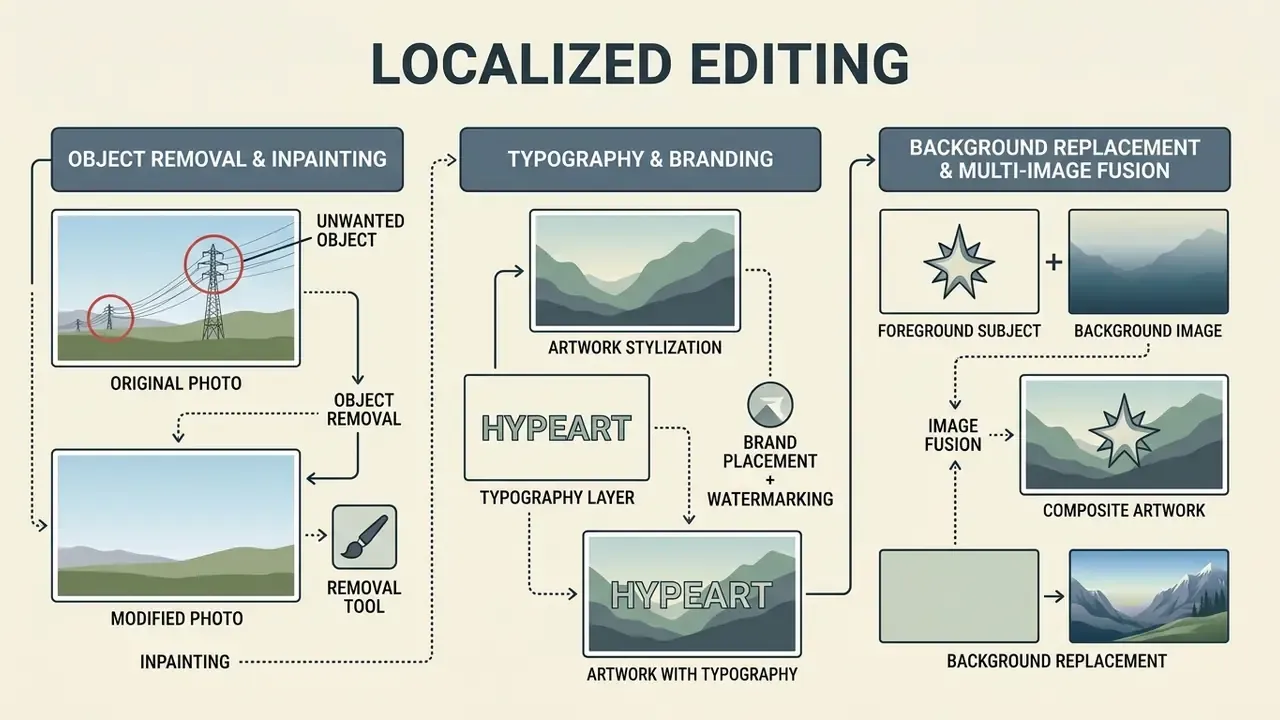
Beyond full-style transfer, advanced photo-to-art pipelines support region-level adjustments that leave the rest of the frame untouched. These micro-workflows consume most of a production team's time once the first stylised draft is approved. A free ai art editor free tier often handles the stylisation well and then fails precisely here, on masks and text.
Object removal and inpainting
Masked inpainting isolates designated pixel regions for prompt-driven editing while preserving surrounding scene geometry. Diffusion editing surveys classify inpainting as a core conditional editing task, because the unmasked area is reconstructed from the original latent rather than regenerated (Huang et al., Diffusion Model-Based Image Editing: A Survey, arXiv, 2024).
Practical rules for clean erasure:
- Mask generously. Extend the mask 8 to 15 px beyond the object, so cast shadows and contact points disappear with it.
- Prompt the replacement, not the removal:
continuous polished concrete floor, even soft shadowbeatsremove the chair. - Keep denoising for the masked pass at 0.60 to 0.85. Surrounding pixels are protected by the mask, so aggressive values are safe.
- Run a second low-strength full-frame pass at 0.15 to 0.20 to unify grain and lighting across the seam.
Typography, watermarks and brand placement
Integrating sharp text overlays, captions or watermarks into stylized art needs multi-modal editors that adjust perspective, shadow cast and lighting interaction, so injected type matches its environment. Ask explicitly for legible text reading "EXACT STRING", matched perspective, consistent light direction, no duplicated letters, then verify letterforms at 100% zoom. Diffusion models remain weakest at small glyphs. For legally sensitive assets, place final typography in a vector editor instead of the generator, so wording stays editable and audit-friendly.
Background replacement and multi-image fusion
Background replacement is a masked edit of the background region while the subject mask stays locked, the standard e-commerce move for turning one studio shot into dozens of contextual scenes. Multi-image fusion goes further: several reference images contribute identity, garment, product or style features to a single composite. This is where an ai art creator from image workflow starts to resemble a small production line.
For canvas extension rather than replacement, see our guide on how to ai expand image. Creators exploring open-source and specialized environments can evaluate platforms like tensor art ai or base models such as stable diffusion ai.
AI art generator free from photo: what free tools usually include
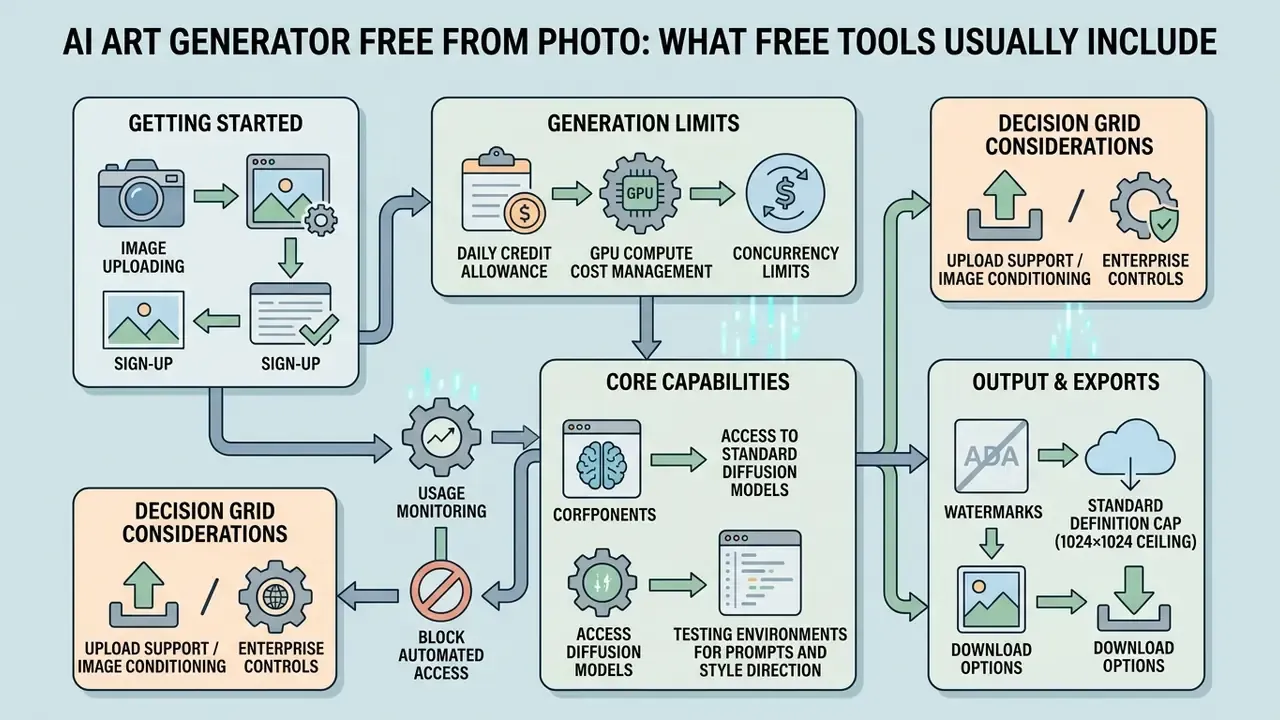
An ai art generator free from photo tool normally offers basic image uploading, access to standard diffusion models and a daily credit allowance. Free tiers also impose operational constraints: lower export resolution, processing queues, public image visibility or embedded watermarks.
Providers manage GPU compute costs through credit allocation. Anyone chasing an ai art creator free online experience is really trading resolution, export rights and generation speed for a zero invoice. A side-by-side breakdown sits in our comparison of free AI image generators.
Free generation limits, sign-up and download options
Free platforms control infrastructure cost with daily credit caps, concurrency limits or mandatory registration. Figma enforces a daily cap of 150 credits for Starter plans and View seats, with automatic reset, while infrastructure services such as fal.ai start new accounts at two concurrent requests and queue any overflow until a slot frees up. API platforms like OpenAI apply tiered per-model request and token limits tied to the account or workspace instead of one universal daily image cap.
An ai art generator free website usually requires registration to monitor usage tiers and block automated scraping. For users who refuse to register, our overview of no-sign-up AI image generators lists the trade-offs in privacy and output rights. Anyone comparing an ai art generator free from image option against paid tiers can also review our breakdown of free ai art tools for credit limits and export restrictions. Searches for ai art from picture free and ai art from image free land on much the same set of platforms; the differences live in the licence text, not the interface.
Watermarks, resolution, models and enterprise controls
Free plans often cap export files at standard definition, for example a 1024×1024 ceiling, and may append visual watermarks or branding metadata. Access to state-of-the-art foundation models is usually reserved for paid tiers to manage server overhead.
| Platform / Service | Reference upload support | Available AI models | Max free resolution | Watermark policy | Commercial usage rights | Enterprise controls (paid tiers) |
|---|---|---|---|---|---|---|
| Canva Free | Yes (photo / reference) | Standard Canva AI | 1024×1024 px | No watermark | Personal and commercial (standard terms) | SSO, team brand controls, admin permissions |
| MyEdit Free | Yes (Img2Img) | Select proprietary models | Up to 4K | No watermark (select exports) | Commercial allowed | Limited, consumer-oriented account model |
| Adobe Firefly Free | Yes (style and composition) | Firefly base models | 2000×2000 px | Content Credentials attached | Non-commercial preview only | Enterprise plans add SSO, admin console, IP indemnification |
| Leonardo Free | Yes (image-to-image, style reference) | Multiple in-house checkpoints | Platform-limited | Plan-dependent | Allowed under platform terms | SOC 2 Type I and Type II accreditation |
| Raphael AI Free | Yes (Img2Img) | Standard diffusion checkpoints | 1024×1024 px | Embedded watermark | Personal preview only | None documented |
Read the table as a decision grid rather than a ranking: upload support tells you whether image conditioning exists at all, watermark policy and resolution decide whether the output is publishable, and the last two columns decide whether it is defensible.
Free tiers are effective test environments for prompts and style direction. Commercial production generally requires a paid upgrade to strip watermarks, unlock high resolution exports and secure licensing terms. When a free plan caps exports at 1024 px but print or large-format placement demands more, route the approved output through an AI image upscaler rather than regenerating at a larger size and losing the approved composition. Teams comparing general-purpose editors alongside generators can consult our guides to the photo editor and free photo editor categories, which document feature limits, export restrictions and privacy terms in the same format.
How to choose the best AI art generator for photos
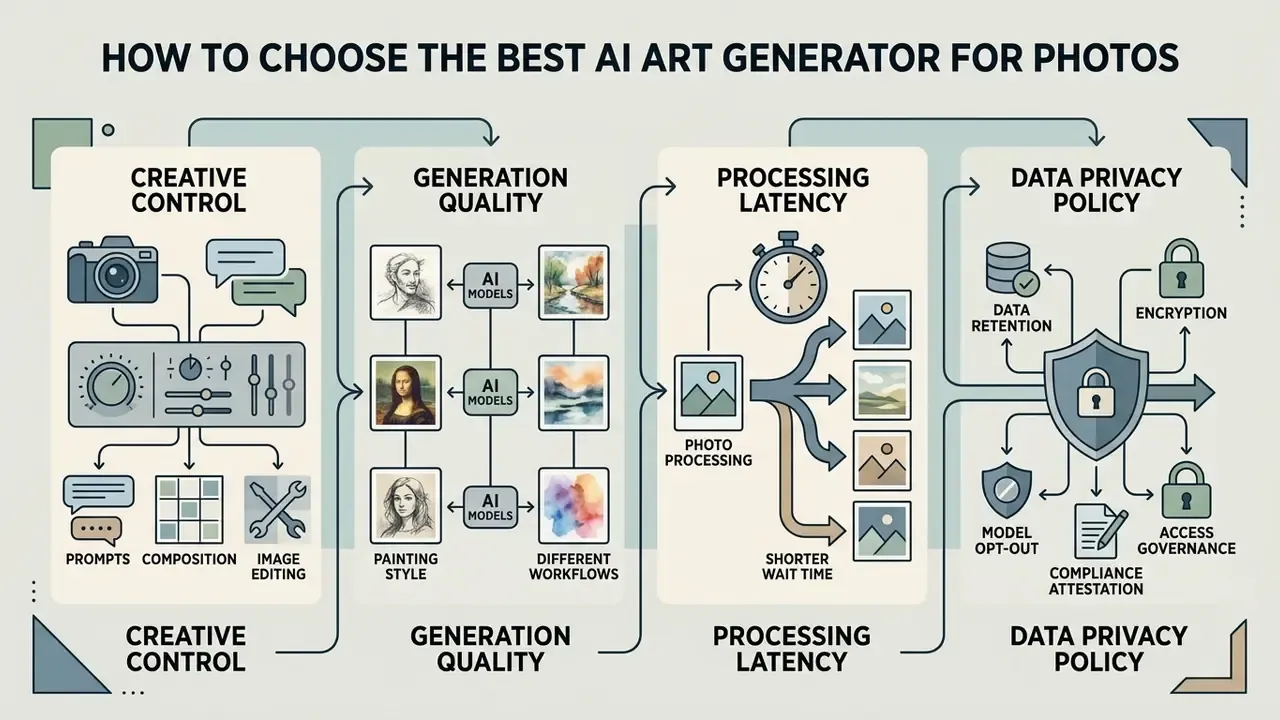
Choosing the best ai art generator for photos comes down to four things: generation quality, fine-grained control, processing latency and data privacy policy. Enterprise workflows favour platforms that combine solid ai image editor tools, control adapters and explicit content security guarantees, the same evaluation logic described in our AI photo editor reference.
An ai art generator for photos also has to fit the pipeline you already run. Ask whether the platform offers web canvas editing, API access, or native integration with design software. A risk-based selection method mirrors the NIST AI Risk Management Framework functions, Govern, Map, Measure, Manage, applied to visual output: define intended use, map failure modes (identity drift, unreadable typography, brand-colour deviation), measure them on a fixed internal test set, then manage residual risk with human review gates (NIST AI RMF 1.0, 2023).
Creative control: prompts, composition and image editing
Real creative control depends on localized inpainting, outpainting canvas extension, background replacement and precise mask selection. Integrated editing lets you fix one element without regenerating the whole composition from scratch. The practical control points are the mask itself, placement coordinates, expansion direction and pixel count, plus boundary blur or dilation. Those settings decide exactly where new content is synthesized, and nothing else does.
AI models and generation quality for different workflows
Generative model performance varies by artistic task, and comparative scoring on standardised benchmarks remains the only defensible basis for model selection.
Vendor documentation adds task-specific signals: diffusion models tuned for portraiture advertise natural facial structure, lighting and skin-texture rendering, while speed-optimised checkpoints report 1K images in roughly three seconds with 4 to 8× throughput gains. Treat those vendor claims as directional and re-score them on your own reference set, because prompt distribution shifts ranking more than parameter count does. Matching the model to the specific design task prevents artifacts and cuts iteration cycles. Design teams can review our comparison of the best ai art generator platforms and the parallel ranking of the best AI image generators by quality and licensing terms.
Data privacy, enterprise security and image retention
Exporting AI art into professional design workflows
Generated artwork almost always needs post-processing before commercial placement. The stronger platforms bridge generative output into professional suites rather than ending at a download button:
- Adobe Photoshop and Adobe Express export high-resolution PNG or JPG with embedded Content Credentials, then apply layer masking, colour management and vector tracing. Firefly's cross-app workflow moves an asset from ideation to final design without leaving Creative Cloud.
- Figma and Canva transfer generated textures and backgrounds straight into UI layouts or template systems via plugins or API, then scale assets across formats with brand kits locked.
- Illustrator and vector finishing rebuild typography and logos as vectors, so wording stays editable and legally reviewable.
- DAM and version control store approved variants with generation metadata attached, so a reviewer can reproduce any asset from prompt plus seed plus model version.
- Downstream media pipelines stills frequently feed motion work. Our YouTube video editor guide covers publishing workflows once art assets are signed off.
| Destination | What to export | Why it matters |
|---|---|---|
| Photoshop / Express | PNG with Content Credentials, layered TIFF for composites | Non-destructive retouching, provenance retained |
| Figma | PNG/WebP at 2× UI scale | Direct placement into design systems |
| Canva | High-resolution JPG/PNG plus brand kit | Fast multi-format campaign scaling |
| Illustrator | Raster reference plus rebuilt vector type | Editable, legally reviewable typography |
| Print production | 300 DPI upscaled TIFF/PDF, CMYK-converted | Prevents banding and colour drift |
Can you use AI-generated art from photos for commercial purposes?
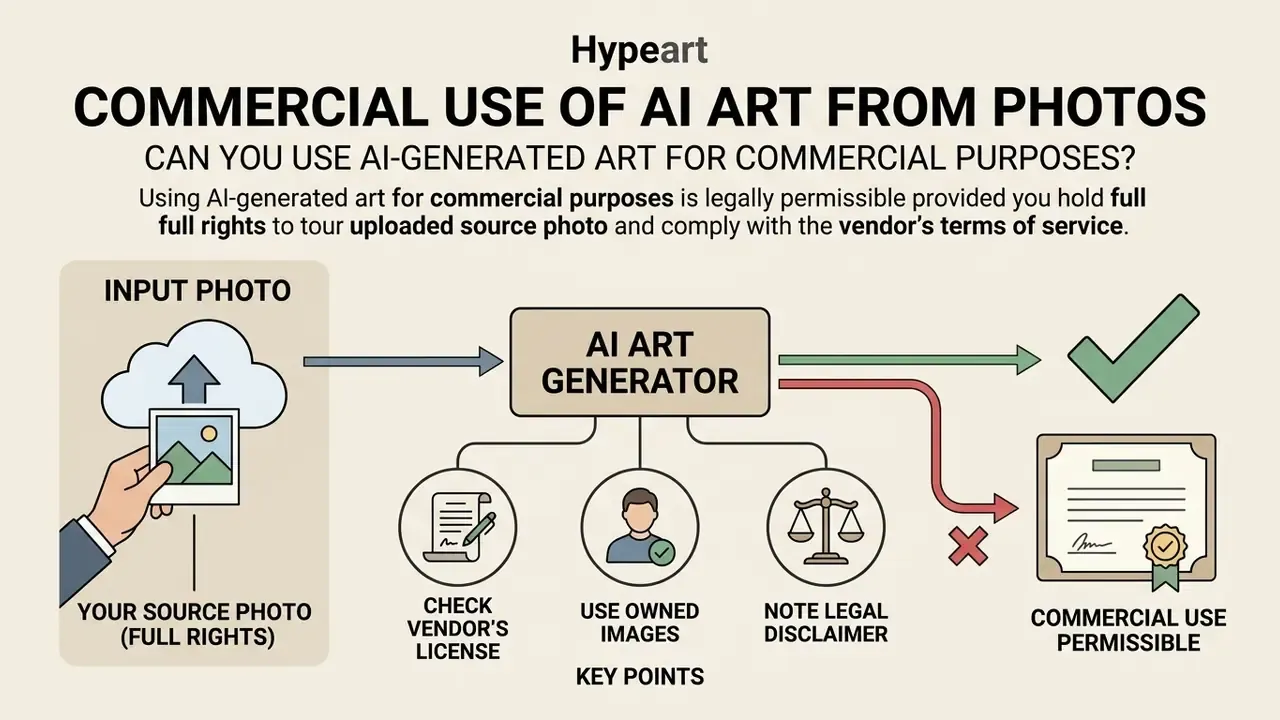
Using AI-generated art for commercial purposes is legally permissible provided you hold full rights to the uploaded source photo and comply with the vendor's terms of service. Under U.S. copyright law, though, protection attaches only to human-authored creative elements. Purely machine-generated output remains uncopyrightable.
Commercial deployment therefore requires verifying both input rights and output licensing. Confirm that source images do not violate third-party trademarks or publicity rights, and that the platform explicitly grants commercial usage rights for generated outputs. Fair-use analysis of a source photograph stays fact-specific and weighs all four statutory factors, including whether the use is commercial and whether the output is substantially similar to the original photograph (Congressional Research Service analysis of generative AI and copyright, 2025).
Check the license for generated images and AI models
Platform agreements govern commercial rights, and vendors set different terms for free and paid tiers. OpenAI states that users own the images they create and may reprint, sell or merchandise them regardless of whether the image was generated with a free or paid credit. OpenArt restricts commercial use to Plus tiers and above. Kittl grants exclusive ownership of AI-generated images only on Pro or Expert subscriptions, publishing free-plan outputs to the community for personal, non-commercial use.
Enterprise buyers should also compare indemnification. Some vendors trained on licensed and public-domain libraries offer contractual IP indemnity for generated outputs on business plans, while open-weight checkpoints run locally leave the entire infringement risk with the deploying organisation. Document which model applies to each approved tool, because that single clause often decides whether an asset can run in paid media.
Review platform documentation before launch, not after. Detailed licensing terms are analyzed in our dedicated overviews for bing ai image, canva ai generator, microsoft ai image generator and google ai image generator.
Use only images you have rights to upload
Uploading third-party copyrighted photographs, celebrity likenesses or trademarked brand assets into public generators creates exposure under reproduction and right-of-publicity law. Enterprise policy should enforce source photo validation before any image-to-image transformation starts.
Public platform terms commonly prohibit reference images containing a third party's copyrighted content, and UK government guidance notes that using copyrighted material without a licence can infringe reproduction and communication rights, particularly when the service copies inputs or reproduces a substantial part of a protected work in the output. Providers that retain inputs for training add another exposure path, so confirm retention and training terms before uploading proprietary or regulated material.
Political and public-figure edits illustrate how quickly a stylised photo becomes a legal and reputational problem rather than a design exercise. Our case notes on the widely circulated trump ai image and the trump ai pope example trace how publicity rights, platform policy and misinformation risk collide in a single generated frame. Where provenance of a source image is uncertain, check it first with an AI reverse image search tool. Organizations assessing legal exposure and copyright risk can view the guide on intellectual property compliance.
Practical uses for AI art generated from photos
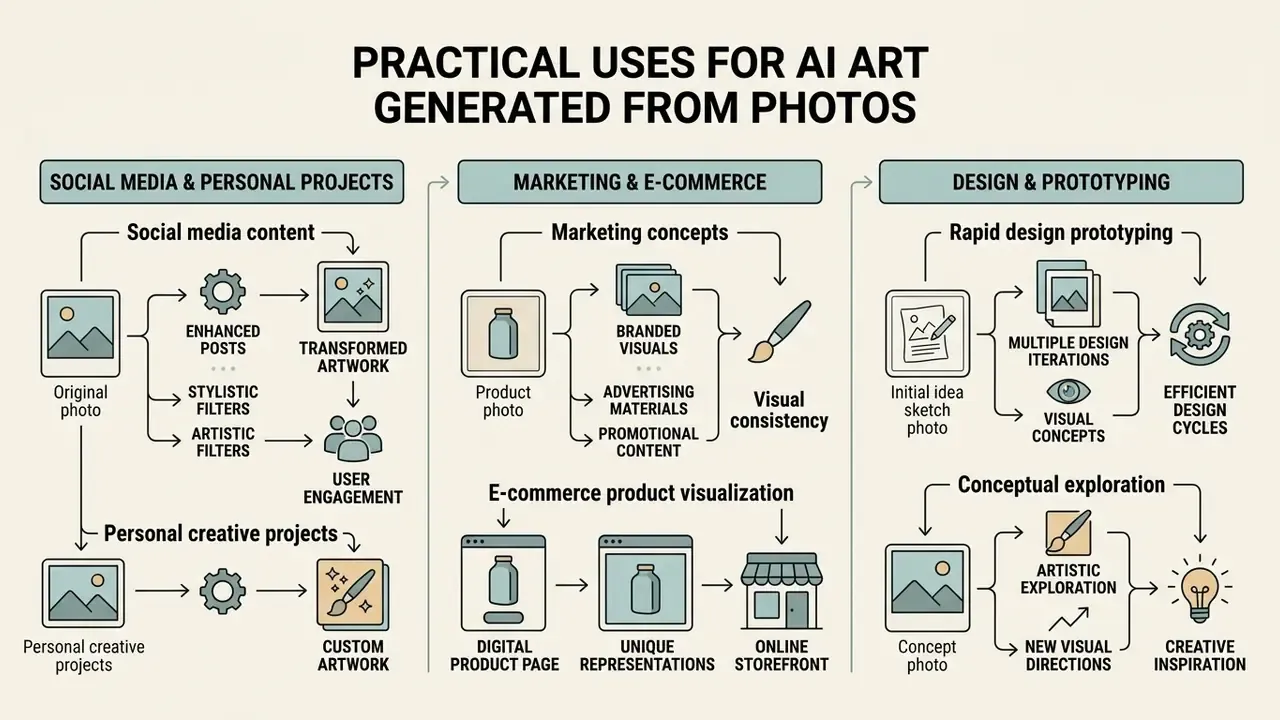
Practical applications for photo-based AI art span commercial marketing, e-commerce product visualization, social media content and rapid design prototyping. Transforming existing product photos or environmental shots lets teams scale visual output while keeping core brand geometry.
Anchoring generative models on real photographs removes most spatial hallucination and produces consistent branded visuals across digital channels. Industry analyses list art creation and image editing, logo and image generation, and campaign visual production among the most common business applications of generative AI (Deloitte AI Institute, generative AI use-case overview, 2024).
Marketing, e-commerce and design concepts
In e-commerce and marketing, image-to-image workflows power virtual try-on, packaging mockups, key-visual localisation and automated product background replacement. Vendor documentation for diffusion-based virtual try-on explicitly targets product visualization, catalogue generation and fitting-room applications with garment-detail preservation, while layout-preserving img2img services are marketed for rewriting text elements in key visuals, flyers and social sets without rebuilding the design. Peer-reviewed work on diffusion-based try-on and try-off reconstructs standardised garment images from photographs of dressed subjects, which maps directly onto rapid apparel prototyping. Design teams spin up multiple concepts from a single studio shot, and campaign development accelerates accordingly.
FAQ about AI art generators from photos
What technical skills are required to use an AI art generator from photo?
No coding or machine learning skills are required. Modern web platforms are user friendly by design: upload a photo, enter a text prompt, adjust a few sliders, then create artwork within seconds and a few clicks. API-based workflows need only a simple asynchronous pattern, submit the request, receive a task ID, then poll or accept a webhook callback.
How fast do online AI photo generators process images?
Generation speed depends on the diffusion architecture and current server load. One-step diffusion models such as SwiftEdit process edits in roughly 0.23 seconds, at least 50 times faster than earlier multi-step methods at comparable quality, while standard multi-pass models typically need 5 to 15 seconds per image (Nguyen et al., 2024).
Are my uploaded photos safe, and are they deleted after generation?
It depends entirely on the vendor tier. Consumer tools commonly describe encryption during upload and automatic deletion of processed images after a few days, while enterprise platforms back their claims with SOC 2 Type I and Type II attestation plus contractual data-processing terms. Before uploading anything sensitive, confirm the retention window (ideally 24 to 72 hours), TLS 1.3 encryption in transit, explicit opt-out from training datasets and hosting region. Never upload biometric data, identity documents, client photographs or unreleased product material into a free public tier.
Can I reproduce the same result twice?
Yes, within limits. Fixing the seed, prompt, negative prompt, denoising strength, guidance scale, sampler, step count and model version usually reproduces a near-identical output on the same platform. Reproducibility breaks when the vendor silently updates a checkpoint, which is exactly why model version or hash belongs in your audit log next to the seed.
Can I upload multiple reference photos into a single AI art generator?
Yes. Advanced multi-image editing frameworks accept several reference images; MMIE-Bench documents 274 evaluation cases with two to five inputs covering addition, replacement, style transfer and mixed transformations. The system extracts spatial, identity or style features from each input and synthesizes a unified composite.
How do I stop the AI from distorting faces or geometry?
Lower denoising strength to 0.30 to 0.45, attach a structure-preserving adapter (Depth or Lineart), add an identity adapter for portraits, restate the preserve list on every iteration, and use hard negative constraints such as no extra limbs, no warped text, no added elements. Then verify at 100% zoom before export.
Is it possible to convert an AI-generated photo into an AI video?
Yes. Generated artwork can be fed into image-to-video generators such as Google Veo or LTX Video to animate camera motion, lighting shifts and subject movement. Official documentation describes image-to-video generation with support for multiple reference images and latencies ranging from seconds to several minutes at peak load. Background on the format sits in our reference on image-to-video generators, while developer implementation details and API costs are covered in our technical guide on the google veo ai video generator.
Social media content and personal creative projects
Content creators use photo-to-art tools to produce eye catching social media avatars, stylized profile pictures and thematic banners. Image-to-image stylization builds a consistent visual identity across channels without repeated photoshoots, which is why an ai art generator from images usually earns its keep fastest in social workflows.
Avatar pipelines convert an ordinary selfie into anime, 3D, illustrated, retro or fantasy profile pictures sized for Instagram, X, Discord and LinkedIn. Policy literature now treats this format as a distinct category of AI human representation (University of Reading policy report on AI human avatars; Commonwealth Parliamentary Association handbook citing stylised AI self-portrait apps). Creators can also explore specific aesthetic transformations, converting drawings with sketch to image ai or applying animation-inspired looks with a ghibli ai image generator.