Why does a governance-minded reader care? Because these tools are cheap, anonymous, and everywhere. That combination is exactly how unmanaged AI usage enters a company through the side door.
Key Takeaways
- What it is a latent-diffusion image model fine-tuned on anime illustration datasets that converts prompts (or reference images) into original character art.
- How to use it fast define identity, add outfit and setting, attach a style anchor (Ghibli, Shinkai, Ufotable, 90s OVA), generate, fix defects with negative prompts, export PNG.
- Consistency identical seeds are not enough. Character LoRA adapters plus identity adapters such as IP-Adapter FaceID keep a face stable across new poses and camera angles.
- Pose control OpenPose skeleton extraction plus ControlNet conditioning strength of
0.75–0.90locks limb placement without destroying the art style. - Animation static portraits can be animated through image-to-video diffusion with motion intensity between 12 and 25 for clean linework.
- Companions visual generation and conversational AI companions are different architectures. Bridging them requires a character card, a voice model, and a chat frontend.
- Free tiers no-sign-up tools exist, but they usually cap daily generations (roughly 5 to 60 images per day) and export compressed files.
- Commercial use purely AI-generated output is not registrable for copyright in the United States, yet commercial deployment may still be permitted by platform contract terms.
- Governance anonymous SaaS generators create Shadow AI and data-retention exposure. Local model weights require provenance checks before loading.
This article is informational and does not constitute legal advice.
What Is an AI Waifu Generator and What Can It Create?
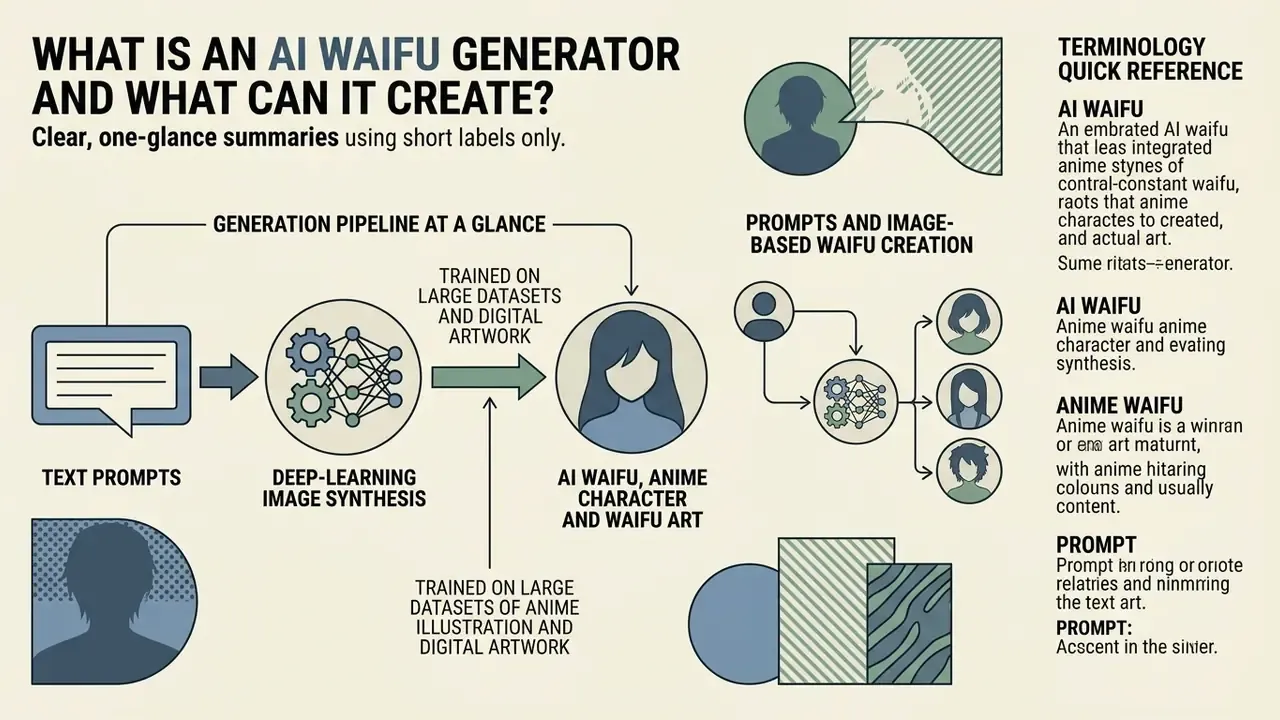
An ai waifu generator is a deep-learning image synthesis tool trained on large datasets of anime illustration and digital artwork. Using latent diffusion, a waifu ai generator interprets a text prompt and produces detailed depictions of original characters, stylised heroines, and fantasy scenes.
Modern anime waifu ai generator platforms convert text embeddings into pixel representations step by step. These models handle single-character portraits, multi-character compositions, full-body concept designs, and thematic backgrounds across many subgenres.
That iterative denoising is what gives you fine-grained control over colour palette, lighting, and linework. Each sampling step nudges the latent representation closer to the semantics encoded in your prompt. Advanced illustration architectures such as Illustrious v2.0 use parameter bases above 2.5 billion parameters, trained on more than 20 million illustration records.
«Illustrious is trained on roughly 20 million illustrations with multi-level tag annotation and resolution scaling up to 1536×1536.»
Generation Pipeline at a Glance
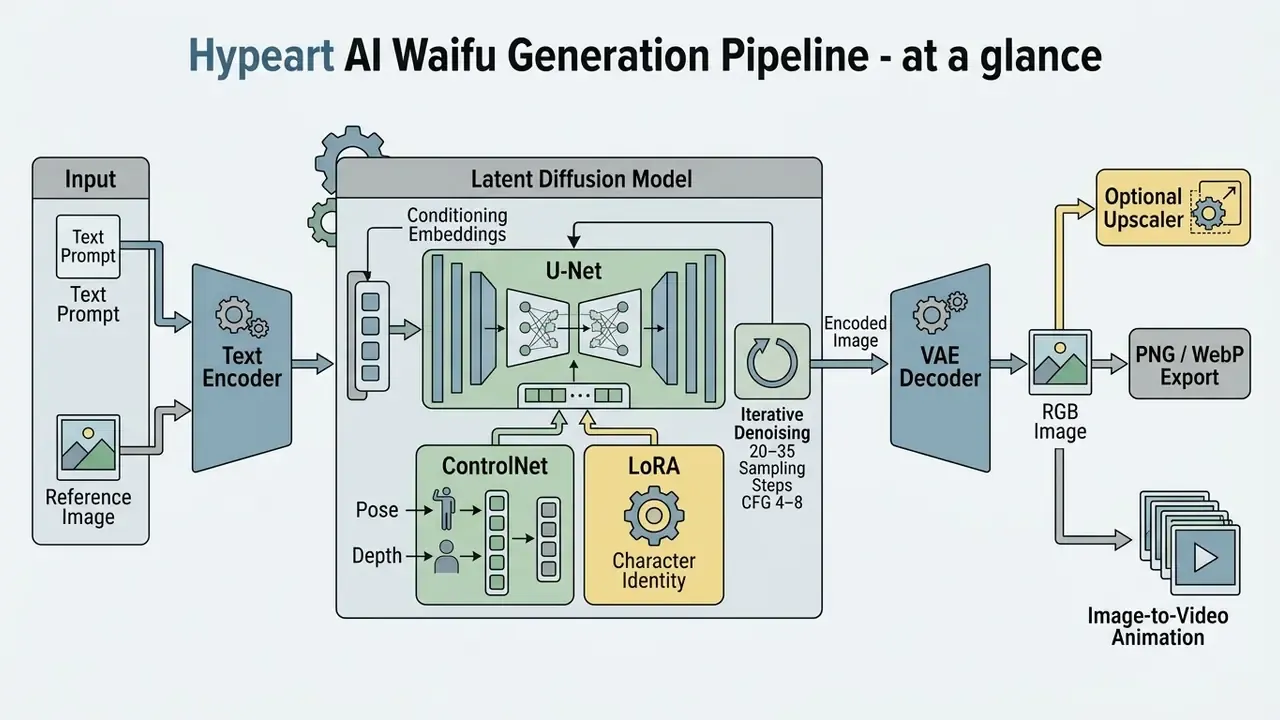
Read the diagram as a chain of dependencies. A prompt becomes an embedding, the embedding steers denoising, ControlNet and LoRA constrain space and identity, and the decoder finally returns pixels. Break any link and the output drifts.
AI Waifu, Anime Character and Waifu Art
An AI waifu is a custom, computer-generated anime-style persona. A traditional anime character is a copyrighted figure from an existing manga or animated series. That difference is not fandom trivia; it is the line between an original asset and a trademark problem.
Waifu art is the finished visual output: digital paintings, cel-shaded graphics, character reference sheets. In fandom vocabulary, a "waifu OC" is an original anime girl designed from scratch rather than borrowed from an existing show, and that distinction maps directly onto licensing and trademark exposure.
Creating an original character through an ai waifu creator differs fundamentally from filling in static templates. Prompt-driven generation lets you define unique identity markers such as heterochromia, a specific braid pattern, or a tailored uniform, producing new entities rather than reproducing existing media. Teams comparing engines before standardising a pipeline can review the best AI art generators by output quality, style control, and licensing terms. Research on specialised illustration models shows that tag-based dataset annotation lets users isolate individual features, such as eye geometry or clothing folds, without disturbing overall character identity (Illustrious, arXiv, 2024). Creators exploring adjacent editing tools often consult the AI Media Glossary for standardised technical definitions.
Text Prompts and Image-Based Waifu Creation
Text-to-image generation builds output directly from written descriptors. Image-to-image workflows use a reference input to guide structure, pose, and composition. An ai waifu image generator can run either modality, or combine both for tighter control.
Text prompting relies on natural-language descriptions or structured tag lists. Prompts define character attributes, environmental lighting, camera angle, and rendering style. Image-conditioned generation instead applies latent transformations through an added input-image branch on the same diffusion backbone, constraining silhouette and composition. Systems using LLM-based encoders show that richer language representations improve multi-turn prompt comprehension and zero-shot alignment on complex descriptions. A waifu ai image generator with an LLM front end will usually forgive vague phrasing; a bare CLIP encoder will not.
«Integrating LLM encoders into diffusion pipelines improves FID and CLIP alignment under zero-shot conditions for both English and Chinese prompts.»
For teams building automated media pipelines, standardising image parameters through the AI Media API Guides keeps asset production reproducible across environments. Developers benchmarking generative video endpoints can compare cost structures in the Google Veo implementation guide.
Terminology quick reference
- AI Waifu. A fictional, anime-styled character generated by machine-learning models from user-defined visual attributes and text prompts.
- Anime Waifu. An idealised female character rendered in Japanese animation or manga art styles, taken either from existing media or from original digital generation.
- Prompt. A structured string of keywords or natural-language instructions given to a model to steer visual synthesis.
- Waifu Art. Digital artwork depicting an AI waifu: static portraits, full-body character sheets, dynamic scenes.
- Character Design. The visual configuration of appearance, costume, facial expression, and overall aesthetic posture.
- Image Generator. A generative software framework, typically latent-diffusion based, converting text or image inputs into visual media.
- Character Card. A metadata bundle, often JSON embedded in a PNG, defining traits, backstory, speech style, and greeting for conversational frontends.
- Seed. The integer initialising the random latent noise. Same seed plus same prompt plus same sampler equals a reproducible image.
How to Create an AI Waifu from a Prompt
To create ai waifu art reliably, specify identity attributes, choose a target visual style, generate a base image, then refine the prompt in small steps. A structured framework reduces visual artefacts and renders complex details more accurately.
When you use a waifu art generator, building the prompt in a fixed order yields predictable results. Prompt-engineering guidance from major AI labs converges on the same logic: subject first, then environment, then key details, then explicit negative constraints. Google's Vertex AI documentation recommends putting style descriptors last, while OpenAI's image guidance advises iterating with single-variable edits instead of rewriting everything. To generate waifu designs that match your original concept, drop vague adjectives and name concrete visual markers. That is the whole loop. Idea, prompt, style, generate, inspect, refine, download. Nothing about it is mystical; the discipline is in step six.
- Define character identity.Establish hair colour, eye shape, apparent age, and distinct physical traits.
- Specify outfit and setting.Describe clothing, accessories, environment, background elements, and atmospheric lighting.
- Select artistic style.Choose an aesthetic preset: 90s cel-shaded anime, modern digital illustration, dark fantasy.
- Execute generation.Run the model with your initial prompt and default sampler parameters.
- Inspect the output.Check anatomy, detail alignment, and unwanted background artefacts.
- Refine iteratively.Adjust keyword weighting, add missing details, or apply negative prompts to resolve rendering errors.
- Export the final asset.Download the high-resolution file once quality satisfies the project brief.
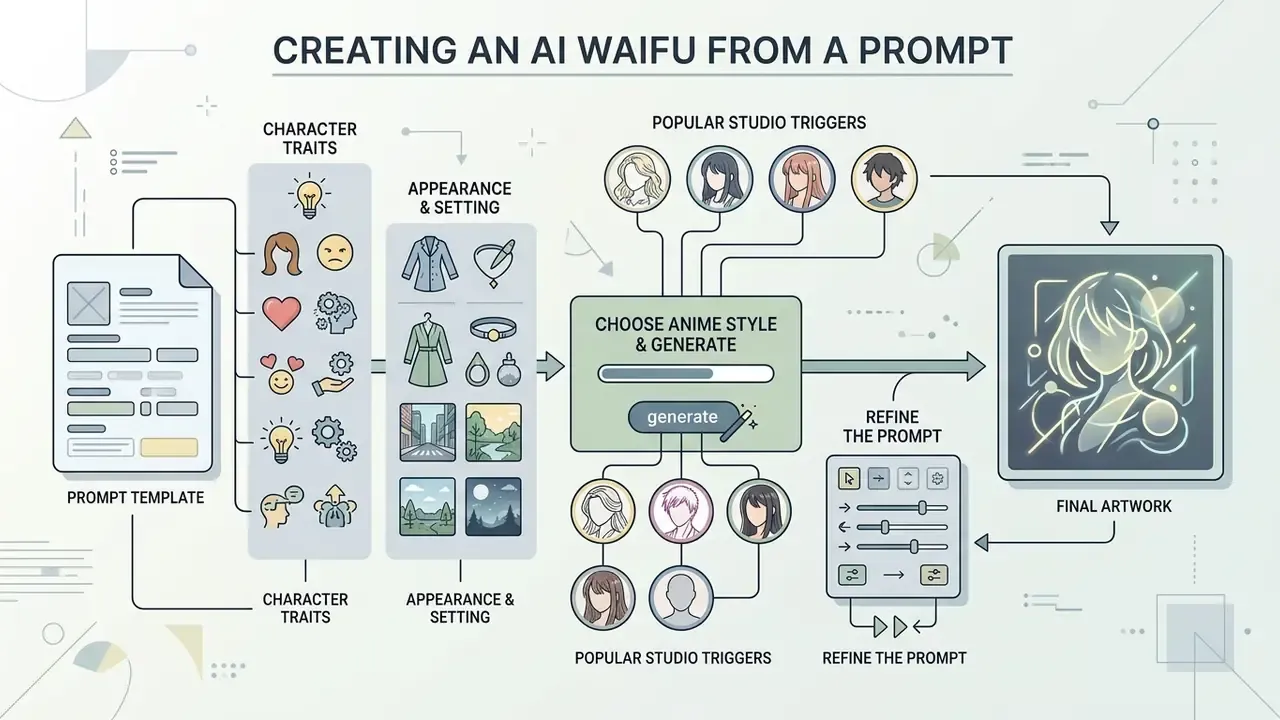
Ready-to-Use Prompt Template
Copy the block below and swap only the bracketed variables. Keeping permanent identity traits on the first lines and scene variables lower down makes the character reusable across dozens of renders.
POSITIVE PROMPT
masterpiece, best quality, highly detailed, 1girl, solo, original character,
[long silver braided twin tails], [heterochromia, blue left eye, amber right eye],
[fair skin, small mole under left eye],
wearing [navy sailor uniform with red ribbon, black thigh-high socks],
[gentle half-smile, half-lidded eyes],
[standing on a rooftop at golden hour], [warm rim lighting, soft volumetric haze],
[bust shot, looking at viewer], [modern digital anime illustration, clean line art]
NEGATIVE PROMPT
blurry, low resolution, jpeg artifacts, grainy, bad anatomy, bad hands,
extra fingers, missing fingers, mutated hands, extra limbs, fused limbs,
distorted eyes, asymmetrical eyes, watermark, signature, text, logo,
cropped head, out of frame, multiple views, duplicate character
Store the filled template with its seed and model version. That single habit saves hours later, and it is also the minimum evidence trail if the asset ever ships commercially.
Describe Character Traits, Look and Setting
To create a waifu with precise features, layer the prompt: physical identity, clothing, emotional expression, scene. Strong prompts separate permanent character traits from temporary scene variables.
Start with identity. Name facial structure, hair length and style, eye colour, and distinctive markers such as animal ears or a signature hair ribbon. Then detail the outfit: a traditional school uniform, tactical armour, casual streetwear. Finally set context: time of day, atmospheric lighting, location. Keeping keyword clusters separate prevents attribute bleed, so character features do not leak into the background palette.
«Users treat prompting as an exploratory journey: they start with broad descriptions and adjust keywords based on returned results.»
Empirical work on anime faces supports that precision pays. Eye openness graded across five levels (0%, 25%, 50%, 75%, 100%), plus hair and iris colour, are among the strongest drivers of perceived personality. Half-lidded eyes read as calm or detached. Wide pupils with pronounced highlights read as excitement or surprise. Small dial, large effect.
Choose an Anime Style and Generate the Image
Style selection determines rendering technique, colour palette, line weight, and overall tone of the resulting ai waifu art. Most generators offer presets, and nearly all accept explicit stylistic anchor tags.
Popular directions? Retro 90s anime, with bold linework, hand-painted simulation, and film grain. Modern digital styles reminiscent of high-budget features, with cinematic lighting, detailed environments, and soft gradients. Chibi, using compressed proportions of roughly two heads tall, simplified anatomy, and oversized eyes for mascots, stickers, and reaction icons. Dark fantasy, when a scene needs a moody, high-contrast RPG tone.
Choosing style before generation helps the diffusion model map text embeddings onto the intended visual domain. Creators who want broader performance comparisons across engines can reference the AI Media Comparison Matrices, or narrow the shortlist to free AI art generators when budget is the binding constraint.
Popular Anime Studio Prompt Triggers
To reach recognisable aesthetics, append a style anchor to your prompt. The table lists production-proven tags and what they change.
| Studio / Director Style | Recommended Prompt Tags | Visual Characteristics |
|---|---|---|
| Studio Ghibli style | hand-drawn anime, Ghibli aesthetic, painterly background, soft cel shading, lush nature | Vibrant watercolour textures, expressive faces, nostalgic hand-painted environments |
| Makoto Shinkai style | dramatic atmospheric lighting, detailed sky, hyper-realistic reflections, lens flare, volumetric clouds | Photorealistic backgrounds, intense light, intricate cloudscapes and water reflections |
| Kyoto Animation style | soft pastel palette, delicate character acting, warm interior lighting, detailed eye highlights | Slice-of-life warmth, refined micro-expressions, meticulous everyday interiors |
| Ufotable / action anime | dynamic lighting, sharp line art, cinematic visual effects, elemental particle aura | High-contrast digital linework, bold rim lighting, dense effects in action beats |
| Cyberpunk / neon edge | neon-lit night city, chromatic aberration, holographic signage, rain-slick asphalt reflections | Saturated magenta-cyan lighting, heavy contrast, dense urban set dressing |
| 90s retro OVA | retro 1990s anime style, classic cel animation, vintage film grain, sharp shadows, muted pastel palette | Simulated VHS grain, blocky shadow shapes, nostalgic character proportions |
| Chibi / mascot | chibi, two-head-tall proportions, oversized eyes, simplified limbs, sticker sheet layout | Compressed anatomy, flat shading, high readability at icon size |
Use one primary studio anchor per render. Stacking three or more competing style tags dilutes the conditioning signal and produces muddled shading. Creators chasing a painterly look specifically can also review dedicated Ghibli-style AI image generators and their usage rights.
Refine the Prompt Until the Waifu Looks Right
Iterative refinement and negative prompting remove distortions, extra limbs, and blurry textures. Fixing an ai generator waifu output usually needs a targeted keyword change, not a full rewrite.
When flaws appear, add explicit negative prompts to suppress them. Standard negative quality keywords include blurry, low resolution, bad anatomy, extra fingers, distorted eyes, and watermark.
Recent work on negative-prompt optimisation reports measurable gains in image quality and text-image alignment when negative guidance is tuned rather than copied blindly. Practical workflow: log recurring failures, group them by artefact type (hands, eyes, duplicated heads, stray background text), and maintain a reusable negative template that you revise every few weeks. If a generation drifts from the intended look, change one variable at a time so you can attribute the effect. Tedious, yes. It also cuts wasted renders sharply.
Customize Anime Waifu Style, Pose and Character Design
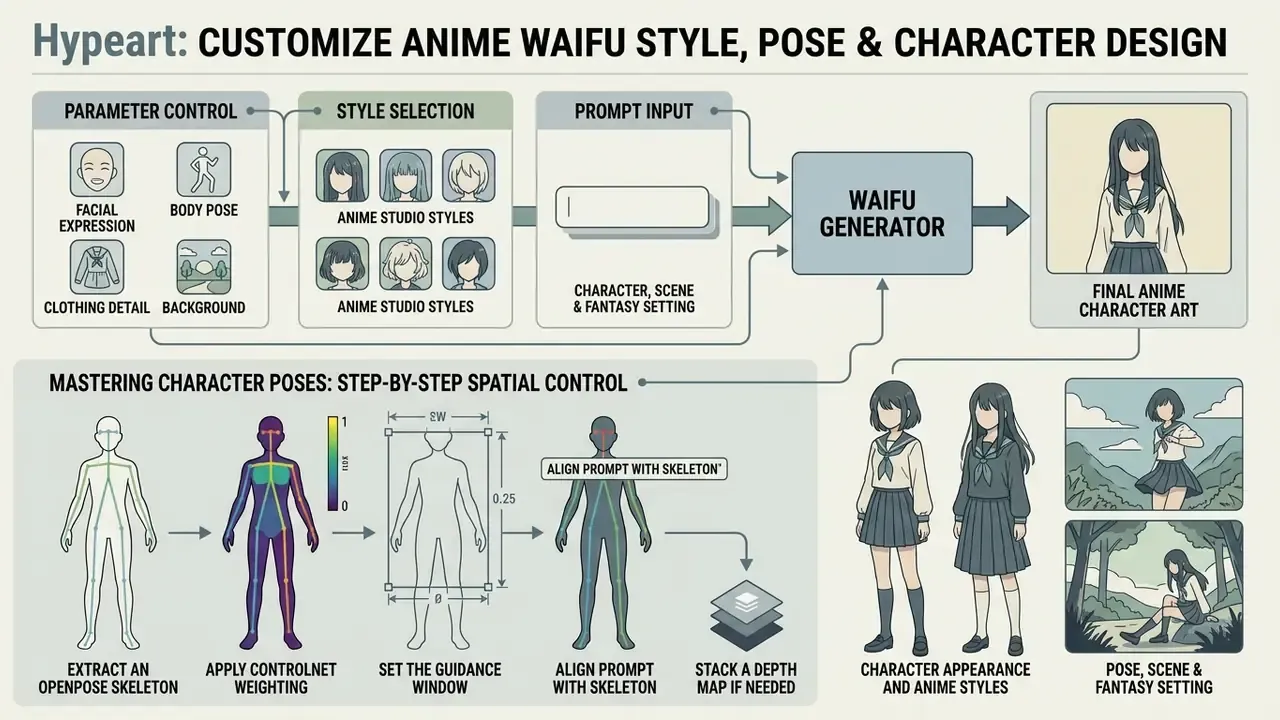
An ai anime waifu generator exposes granular parameters for facial expression, body pose, clothing detail, and background. Stronger platforms add conditioning controls that lock posture while leaving the scene fully promptable.
Customisation is what moves you past static headshots. An ai waifu maker with multi-parameter adjustment lets creators render the same character across many contexts. Tweak variables systematically and identity holds while pose and environment change.
| Customisation dimension | Available control parameters | Primary use case |
|---|---|---|
| Face and features | Eye shape, iris colour, hairstyle, blush intensity, mouth expression | Establishing core identity and emotional tone |
| Outfit and accessories | Clothing style, colour scheme, headwear, jewellery, weapons, props | Defining role, faction, or thematic setting |
| Pose and camera angle | Full-body stance, dynamic action pose, close-up framing, low-angle shot | Storyboard frames, character sheets, action scenes |
| Environment and lighting | Fantasy landscape, cyberpunk street, golden hour, neon illumination | Placing the character inside a narrative world |
| Motion (image-to-video) | Motion intensity, camera drift, blink and hair micro-movement | Animated avatars and short promotional clips |
Character Appearance and Anime Styles
Fine-tuning an ai waifu creator workflow comes down to manipulating keyword clusters. Change hair colour, eye shape, or expression, and the perceived identity shifts fast.
Aesthetic analysis in animation research confirms that eye openness, pupil scaling, and hair colour strongly influence perceived personality. Half-lidded eyes read calm or detached; wide pupils with strong highlights read excited or startled. Precise tokens such as heterochromia, braided twin tails, or subtle blush guide the text encoder toward unambiguous detail.
Anime emotional shorthand is learnable too. Blush signals embarrassment. A prominent canine tooth signals feral energy. Animal ears signal playfulness. Glowing eyes signal extreme intensity. Combine those tokens with subgenre descriptors such as dark fantasy or cyberpunk to align the whole render with the brief. This is where ai art waifu work starts to feel like art direction rather than slot-machine pulls.
Pose, Scene and Fantasy Setting
Controlling posture and background turns a portrait into a finished illustration. Spatial control frameworks let you define exact body positions without sacrificing style consistency.
Spatial conditioning maps a reference skeleton onto latent spatial structure, freeing the text prompt to handle aesthetics and lighting.
«StoryMaker separates character identity from pose using segmentation masks and MSE-based constraints, preserving clothing and facial features across scenes.»
Mastering Character Poses: Step-by-Step Spatial Control
Illustrative Pilot Example: Locking Poses Across 200 Renders
In an illustrative internal pilot evaluating synthetic media workflows for pre-visualisation storyboards, a creative team needed repeatable pose execution rather than lucky seeds. They wired a ControlNet OpenPose pipeline to an SDXL-class anime checkpoint. Operators then locked joint positioning across roughly 200 distinct test renders while independently changing outfits and backgrounds.
Reported pattern: pose deviation became visually negligible at conditioning strength 0.8, while outfit and lighting stayed fully promptable. Treat these figures as a hypothetical composite example, not a benchmarked public study. The point is the control logic, not the number.
How to Animate Static AI Waifu Art into Short Video Clips
Turning a static anime portrait into a clip means feeding your high-resolution artwork into a temporal diffusion pipeline that adds motion while holding identity steady. Peer-reviewed work frames this as an identity-preservation problem, not a motion problem.
- Select a clean base portrait.Use a PNG of at least 1024×1024 px with clear facial boundaries, separated hands, and minimal background clutter. Busy backgrounds are the leading cause of frame warping.
- Apply motion prompts.Ask for micro-expressions, not choreography:
gentle hair blowing in the wind, soft blinking, subtle smile transition, camera slow zoom-in. - Configure motion bucket parameters.Set motion intensity between 12 and 25. High values distort fine linework; low values preserve structure but can look inert.
- Constrain clip length.Keep the first pass to 2 to 4 seconds. Longer sequences accumulate identity drift, usually around eyes and hair partings.
- Render and loop.Export MP4 or GIF at 24 FPS, apply frame interpolation such as RIFE to smooth hair and fabric, then trim to a seamless loop with an online video cutter before publishing.
- Quality check.Scrub frame by frame for finger morphing and pupil jitter. If identity slips, lower motion intensity or re-render with a tighter crop.
«Animate Anyone applies pose-driven motion to a reference character image while maintaining appearance consistency and temporal continuity.»
Portrait-animation research through 2025 extends the same principle to facial expression, lip movement, and head pose driven by audio or text conditions. Survey work from the same period groups these methods by temporal consistency, motion control, and metrics such as FID, KID, and SSIM. Creators evaluating tooling can compare options among free AI video generators or plan longer sequences with an animation maker.
One governance caveat on reference material. If you pull motion or pose references from existing footage using an online video downloader or an online video grabber, the source licence still applies to that footage. Convenience of retrieval is not permission. When it comes time to distribute finished loops, choose an online video platform or dedicated online video hosting whose terms match your intended commercial use.
From Visual Art to Interactive AI Companion: Workflow Integration
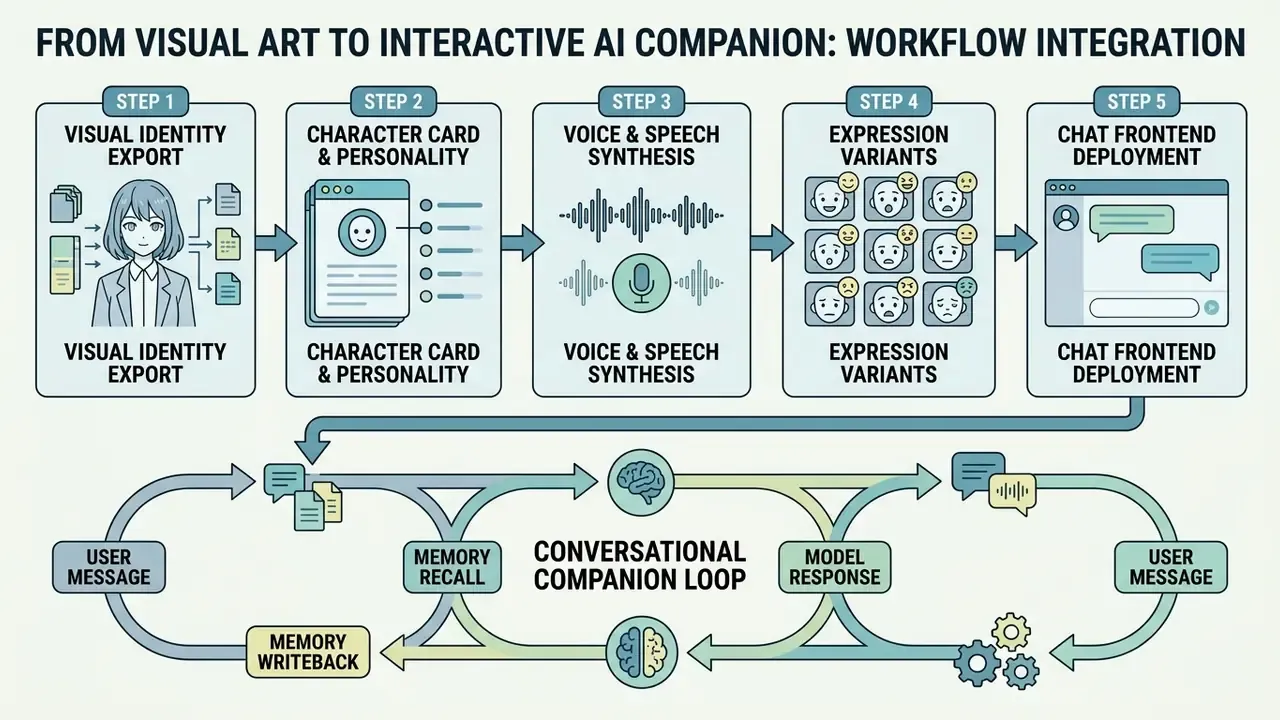
Building a complete virtual character means bridging visual asset generation with a conversational large language model. The two systems are architecturally distinct. One produces pixels; the other maintains dialogue state.
- Step 1, visual identity export. Generate a front-facing reference sheet (neutral expression, three-quarter view, full body) so facial traits stay stable across later renders.
- Step 2, character card and personality. Export the art as PNG and embed JSON metadata: traits, backstory, speaking tone, boundaries, greeting lines. The LLM reads this card, not the image.
- Step 3, voice and speech synthesis. Pair the profile with an expressive text-to-speech voice matching apparent age and demeanour. The guide to AI voice generators covers quality, language coverage, and commercial licensing.
- Step 4, expression variants. Render four to eight expression sprites (neutral, smile, surprised, embarrassed, angry, sad) from the same seed and LoRA so the frontend can swap visuals per emotional state.
- Step 5, chat frontend deployment. Import avatar and personality card into an open-source LLM frontend such as SillyTavern, or a dedicated companion platform, then attach a memory layer so preferences persist between sessions.
Conversational companions run a loop: user message, memory recall, model response, memory writeback, usually backed by vector retrieval, speech synthesis, and session state. Waifu art generators synthesise static assets with no persistence between requests. Understanding that split prevents a common procurement mistake, namely buying an image tool and expecting conversational behaviour, or the reverse.
«Interacting with an AI companion reduced loneliness comparably to talking with another person; mean loneliness fell from 36.26 to 27.53 after a single session.»
Informational note: this section describes technology, not therapy. If AI companion use affects your psychological wellbeing, consult a qualified mental-health professional.
Free AI Waifu Generator: Signup, Limits and Downloads
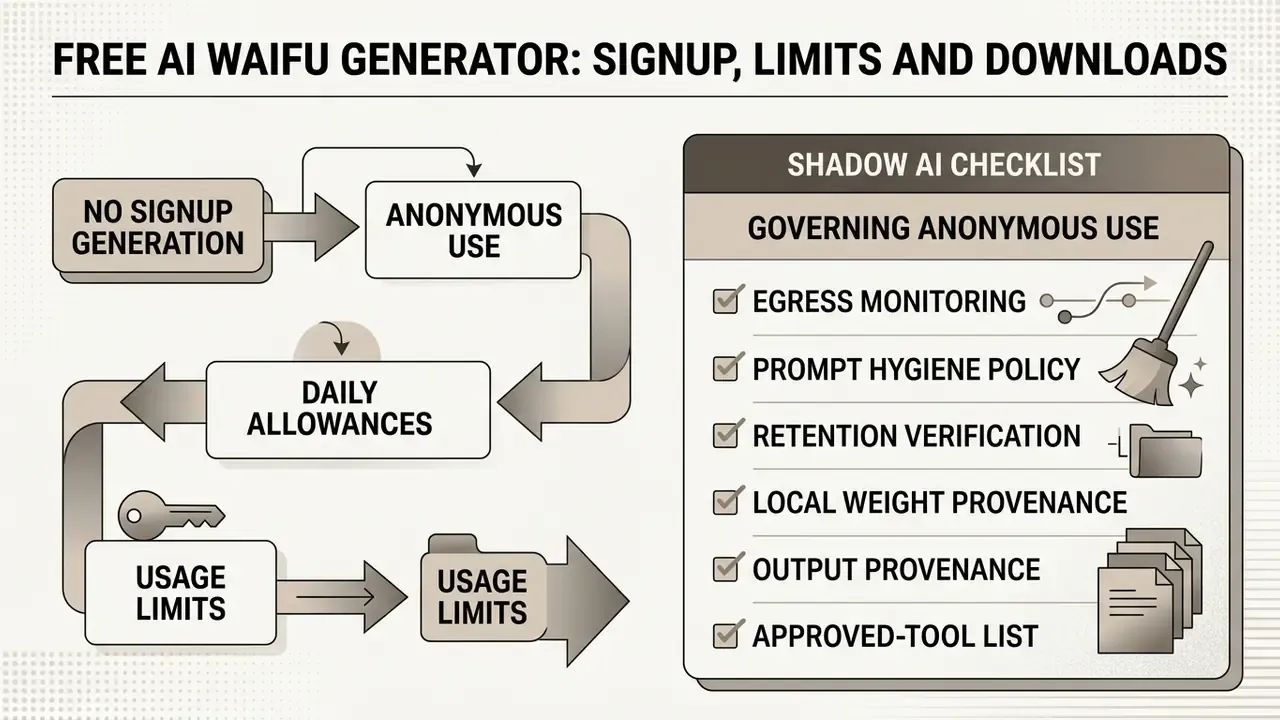
Using a free ai waifu generator means navigating service tiers, daily allowances, and registration requirements. Knowing the policy before you invest an afternoon of prompting saves rework.
Access models vary widely across web platforms offering waifu ai generator free tools. Some grant immediate access without registration. Others require an account to unlock higher resolution, larger credit quotas, or watermark-free downloads. Readers comparing zero-cost options across categories can also review free AI art generators and free photo editors for export and privacy limits.
Can You Generate a Waifu Without Signing Up?
Choosing an ai waifu generator no sign up platform lets you test in seconds, but anonymous access carries trade-offs around data privacy, image retention, and quotas. Buyers weighing free against paid access can also compare terms on the Bing AI image and Microsoft AI image generator overviews.
No-sign-up generators process prompts in the browser or through public server queues. Convenient, certainly. They also tend to enforce strict per-IP rate limits, and several publish statements that prompts and outputs are deleted immediately after processing, a claim users cannot verify independently. Public platforms additionally apply global safety filters in line with mainstream provider policies: no sexualising minors, no use of a real person's likeness without consent, no illegal material, account or not. Age gates of 13+ or 18+ apply on many "no account" tools as well, so anonymity is not the same thing as unrestricted access.
Anyone needing dedicated storage or reproducible prompt histories will eventually create an account. Teams modelling cost structures across media utilities can reference the AI Media Pricing Guides for detailed breakdowns, or estimate throughput and spend with the AI Media Calculators.
Shadow AI Checklist: Governing Anonymous Generator Use
What to Check Before Downloading Generated Waifu Art
Before you pull files from a free waifu ai generator, inspect export specifications: resolution caps, file format compression, watermark overlays.
Free tiers frequently export compressed JPEG or WebP, which introduces artefacts along fine line art. You see it first on thin hair strands and tapering eyelashes. WebP usually gives the smallest file at comparable quality, while PNG preserves transparency and lossless edges. For professional editing or print, uncompressed PNG remains the safe default.
If output resolution is capped, generate at native model resolution and enlarge afterwards. Techniques for that live in guides to expanding and enhancing images with AI, and file-weight trade-offs for animated delivery are covered in the video compressor guide. Also verify whether the platform embeds visible logos or invisible steganographic watermarks in exported media.
«Users retain rights to generated media without restrictive licensing consequences for organisations under $1M in annual revenue.»
Under standard open-source deployments, therefore, generated files stay unwatermarked and downloadable at native model resolution. Users hitting compression problems during export can consult AI Media Support and Troubleshooting for optimisation strategies, or a general photo editor guide for post-processing steps such as cropping, colour correction, and background cleanup.
Can You Use AI Waifu Art for Commercial Projects?
"Evaluating generative media requires balancing creative agility with empirical rigour. Anime image generation models have reached impressive visual fidelity, yet enterprise risk and intellectual property governance still demand systematic evaluation of licensing, model architecture, and data lineage before operational deployment."
— Marcus Hale, AI Governance and Model Risk Lead. Marcus Hale, author.
Commercial use of waifu art ai output depends on three things: the model's software licence, the platform's Terms of Service, and national copyright rules for machine-generated media.
Deciding whether you can deploy media from a waifu ai art generator means reading contract law and IP standards together. The commercial-use hub for AI image generators collects platform-level terms for comparison. In the United States, the Copyright Office has affirmed that copyright attaches only to human-authored expression, so purely AI-generated artwork lacking human authorship cannot be registered (U.S. Copyright Office, 2023–2025). Mixed works can be registered for the human contribution, provided AI-generated portions are disclaimed. In the EU the picture stays fragmented: national law plus platform terms govern exploitation, and human creativity remains the core criterion.
«Study participants recommended litigation more often and perceived substantial similarity more readily when a work was labelled AI-generated rather than human-made.»
| Operational criteria | Free access tier | Paid / enterprise tier | Self-hosted open models |
|---|---|---|---|
| Commercial usage rights | Typically restricted to personal, non-commercial use | Full commercial licence during an active subscription | Granted for entities under $1M annual revenue (for example SD 3.5) |
| Watermark overlay | Visible service logo or metadata tag often enforced | Removed on export | None enforced by default |
| Output copyright ownership | Disclaimer of exclusive copyright, public-domain equivalent | Contractual assignment of generated asset rights | User retains output rights per licence terms |
| Infringement liability | User assumes full legal liability | Partial indemnification sometimes offered | User assumes full legal liability |
| Data retention exposure | Prompts and outputs may be retained or reused | Contractual retention and confidentiality terms available | No third-party transmission when run locally |
Read the table as a checklist, not a verdict. Each cell must be confirmed against the specific service you actually used, on the date you used it.
Check License Terms for Free and Paid Generations
Platform terms differ sharply on commercial rights for free versus paid generations from an ai waifu art generator.
Many hosted platforms state that free-tier outputs are limited to personal, non-commercial use such as social avatars or private fan art. Commercial rights, including game development, publishing, and merchandising, frequently require an active paid subscription or a single-asset licence purchase. Some vendors instead grant output ownership on every tier while retaining a hosting and display licence. Others say plainly: no copyright ownership on the free plan, full ownership on paid. There is no single industry rule. Read the clause, not the marketing page.
Open-source models deployed locally under community licences, such as Stable Diffusion 3.5, grant commercial usage rights to individuals and smaller enterprises without recurring fees (Stability AI, 2024). Teams choosing between subscription platforms can weigh licensing alongside output quality in the comparison of the best AI art generators, the Canva AI generator overview, and Midjourney versus competing image tools. Enterprise teams managing legal compliance across generative visual tooling should review the resources in the AI Media Commercial-Use Hub.
Pre-Deployment Validation Checklist
- Confirm the tier you generated on grants commercial rights, and screenshot the terms with a visible date.
- Verify that no visible or embedded watermark remains in the exported file.
- Run a similarity check against existing franchise characters. Reverse image search tools are covered in the guide to AI reverse-image-search.
- Document human authorship contributions such as composition edits, retouching, and layout, for any registration attempt.
- Record model name, version, LoRA adapters, seed, and prompt in an asset ledger.
- Check marketplace rules separately. Stock platforms require you to hold all necessary rights and to verify the generating tool's terms before submission.
Commercial Uses for Waifu Character Design
Original designs from a waifu art generator work as visual assets in visual novels, indie games, graphic novels, streaming overlays, VTuber concept sheets, brand mascots, and merchandise.
In game development, studio artists use generators for preliminary concept art, character turnarounds, and background illustration, compressing early visual development from weeks into days. In digital publishing, authors commission or generate custom anime illustration for light novel covers and promotional graphics. Merchandising covers t-shirts, posters, acrylic stands, and collectibles. Creators publishing character content to video platforms can plan distribution with the YouTube video editor workflow guide. Whatever the channel, make sure the figures do not duplicate recognisable features of trademarked media characters.
«Infringement decisions were reached more frequently against AI-created works even when visual content was identical.»
That asymmetry makes visual originality your primary control. Avoid franchise-specific costume signatures. Avoid named-character trigger tokens in production prompts. Avoid style anchors that reproduce a living artist's protected expression rather than a general aesthetic. Organisations tracking exposure can follow relevant rulings through the AI Litigation and Case Timelines.
AI Waifu Generator FAQ
Can You Keep the Same Waifu Character Consistent?
Yes. Consistency across generations comes from combining character-trained Low-Rank Adaptation (LoRA) models, reference sheets, and identity-preserving adapters such as IP-Adapter FaceID. A fixed seed alone will not hold a face. Practitioner workflow guides note that the same seed and prompt only reproduce identity when the composition stays nearly identical, and faces drift as soon as pose or scene changes. For a narrative sequence, train lightweight LoRA adapters on a consistent reference set, or use cross-attention masking frameworks such as StoryMaker. These separate facial identity vectors from pose conditioning, so facial structure, hair colour, and eye shape persist while body position and background move (StoryMaker, arXiv, 2024).
«ORACLE generates a candidate grid, filters outliers via mutual information, and fine-tunes a personalised model that preserves visual identity across scenes.» — Akdemir & Yanardag, ORACLE: Leveraging Mutual Information for Consistent Character Generation with LoRAs, arXiv (2024). Research on character adapters also warns that LoRA-only fine-tuning can lose reference detail and cause concept fusion in multi-character scenes. That is why hybrid LoRA plus face-adapter stacks are the practical default for series work.
What If You Do Not Want to Write Prompts?
If typing prompts is not your thing, many platforms offer visual attribute selectors, style preset menus, and automated prompt enrichment. Modern only waifu ai generator tools ship point-and-click interfaces. You pick hair style, eye colour, outfit type, and mood from dropdowns or icon grids. Documented implementations show those choices being compiled directly into the prompt string before it reaches the diffusion model, which explains why selector output often looks more consistent than freehand typing. Three non-manual paths exist in practice: clickable presets that pre-fill prompt and parameters; selector panels that assemble tag strings; API-level presets where a language model rewrites a vague request into a detailed visual prompt. Readers curious how conversational front ends handle this can compare the ChatGPT picture generator approach with dedicated anime tools.
How Do You Choose a Better Waifu AI Generator?
Judge a better waifu ai generator on five criteria, in this order: anime-specific model quality, style and pose control, export fidelity, licence clarity, and data-retention terms. Model quality shows fastest in hands, eye symmetry, and complex clothing folds. Control shows in whether the tool exposes negative prompts, seeds, ControlNet, and LoRA loading, or hides everything behind a single button. Export fidelity means native-resolution PNG rather than a downscaled WebP. Licence clarity means a dated clause you can screenshot. Retention terms decide whether the tool is usable at all inside a regulated organisation. Any ai image generator waifu offering that cannot answer the last two questions in writing is a personal-use tool, not a production one.
Can an AI Waifu Be Animated or Used as an AI Companion?
Static images can be animated with image-to-video diffusion, but image generation and interactive conversation are different products. To animate a portrait, run it through a video diffusion framework that applies motion vectors to expression, hair, and pose while preserving identity (Animate Anyone, CVPR, 2024, https://arxiv.org/abs/2311.17117). The step-by-step procedure with motion parameters sits in the animation section above. Conversational "AI girlfriend" platforms are a separate stack: persistent memory through vector retrieval, speech synthesis, and dialogue loops. An anime waifu generator ai tool synthesises assets with no session state at all.
How Do You Fix Distorted Hands and Extra Fingers in Waifu Art?
Add negative terms such as bad anatomy, extra limbs, extra fingers, mutated hands, missing fingers. If artefacts persist, inpaint the damaged hand region specifically instead of re-rolling the whole image, or add ControlNet depth and pose maps to guide hand structure during generation. Hands remain the hardest region in anime diffusion, so budget an extra pass for them.
What Is the Best Resolution for Generating Anime Waifu Art?
Most modern anime diffusion models, including SDXL-based architectures and Illustrious, are optimised for native output at 1024×1024, 832×1216, or 1216×832 pixels. Generating directly at higher resolutions tends to duplicate limbs or heads. For 4K delivery, render at native resolution first, then upscale.
Are AI Waifu Generators Safe to Use on Desktop Computers?
Web-based generators run on remote servers and need no local install. If you run open-source models locally through ComfyUI or WebUI, download weights and UI extensions only from verified repositories, prefer safetensors over pickle formats, and verify file hashes before loading. Extensions execute code on your machine, which is the actual risk surface here.
What Resolution and Motion Settings Work Best for an Animated Avatar?
Start from a 1:1 PNG at 1024×1024 px, keep motion intensity between 12 and 18, limit clips to 2 to 4 seconds, and export at 24 FPS. Confine movement to hair and blinking so the face stays stable when the loop repeats.
Can I Sell Merchandise Printed With AI Waifu Art?
Technically yes, on tiers that grant commercial rights. Two checks are mandatory: confirm the platform's terms permit merchandising, and confirm the design does not reproduce protected character features or trademarks. Remember that purely AI-generated output generally cannot be registered for copyright in the United States, which limits your ability to stop copycats later. About this guide. Written and reviewed by the editorial team covering generative media governance, with technical review focused on diffusion pipelines, licensing terms, and model-risk documentation. Claims are sourced to published research, official model licences, and copyright-office guidance. Vendor marketing claims, for example "3 to 5 second generation" or "unlimited free use", are excluded unless independently verifiable. Legal notice. This article is informational and does not constitute legal advice or a formal opinion on intellectual-property rights. Verify licence terms and jurisdictional rules with qualified counsel before commercial deployment. Explore related utilities and technical specifications in the AI Media Glossary. For tool selection and rights research, see the comparison of the best AI art generators, the guide to free AI art generators, the Google AI image generator usage-rights overview, the Ghibli-style generator comparison, and the AI reverse-image-search guide for originality checks. For animation and delivery, review the animation maker guide, free AI video generators, and the Google Veo API implementation guide, or compute project economics using the AI Media Calculators.