Marketing teams rarely ask permission before uploading a brand asset to a free web tool. That single habit is why an article about converting images into video belongs on a risk officer's reading list, not only a designer's. The tooling is cheap, the licence terms are not, and the audit trail is usually missing.
Executive summary
What an online image-to-video converter can create
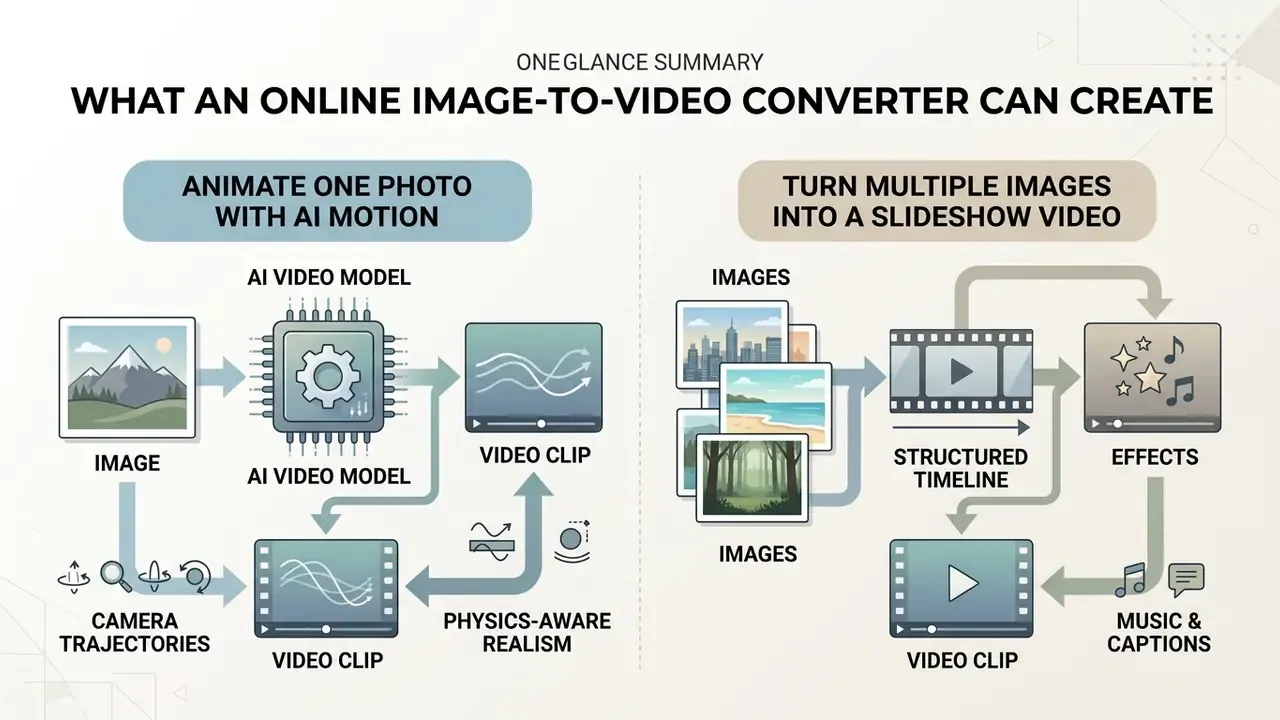
An online image-to-video converter transforms a static image into a dynamic video clip using either artificial intelligence motion models or sequential animation timelines. Modern web tools bridge the gap between a standalone video converter and a generative video generator, producing animated visuals, camera movements, and synchronized sound.
«Image-to-video methods span VideoGAN, Imagen-Video, Make-a-Video and Video LDM, each accepting different input modalities and supporting static-to-dynamic animation.»
That taxonomy matters operationally. The architecture behind a web interface determines whether motion is synthesized, meaning new pixels are inferred between frames, or composited, meaning existing pixels move along a timeline. So the capability of an online image-to-video converter depends heavily on whether it processes a single image or a sequence of images. Single-photo animation relies on generative AI models that infer 3D depth, surface vectors, and temporal continuity. Multi-photo workflows assemble still images into ordered video clips using timed slide transitions, visual effects, and audio tracks.
Animate one photo with AI motion
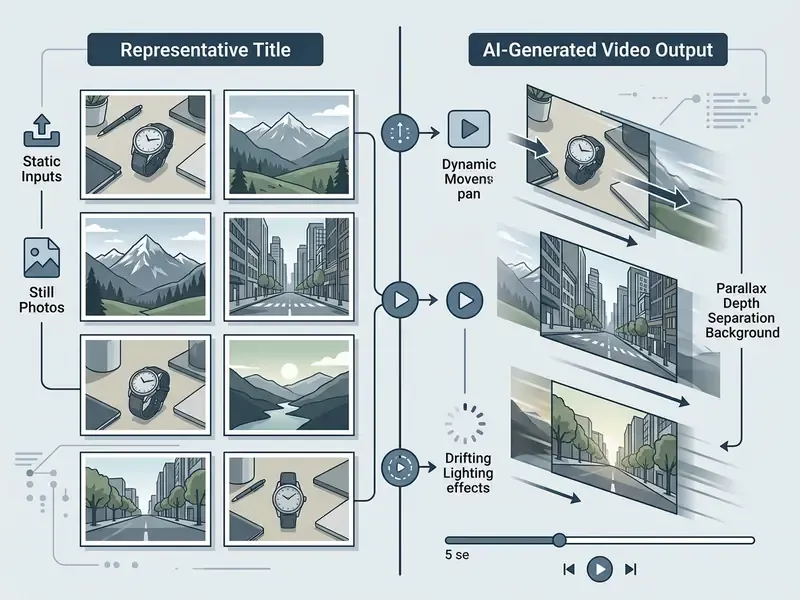
To animate one photo with AI motion, an image-to-video tool processes a single static image and synthesizes frame-by-frame movement across a temporal timeline. The short answer for single-photo animation: generative diffusion models accept a visual reference frame, then apply camera paths, environmental motion, or subject movement while attempting to preserve subject identity.
Recent computer vision work shows how single-frame synthesis behaves in practice. Generative video diffusion architectures such as Stable Video Diffusion, Pika, and Runway Gen-2, compared side by side in our overview of the best AI video generators, use the original uploaded asset as an anchor frame. According to the AIGCBench benchmark study, commercial systems like Runway Gen-2 and Pika achieved first-frame structural similarity (SSIM) scores of 0.803 and 0.800 respectively, confirming high fidelity to the reference input (AIGCBench, 2024).
«Pika reached image-to-video CLIP similarity of 0.930 against the source image, Gen-2 reached 0.939, while Stable Video Diffusion reached 0.919 on the same measure.»
Users guide these video models by setting camera trajectories, such as pan, zoom, tilt, or orbit, or by supplying textual prompts that define atmospheric motion like rising smoke or moving water. For a deeper feature-by-feature breakdown, see our reference on image-to-video AI tools, which covers pricing tiers, credit systems and clip-length caps.
Physics-aware research is closing the realism gap for single-image animation:
«PhysGen converts a single image into a video with realistic rigid-body dynamics using a geometry-understanding module coupled with a physical simulator.»
Turn multiple images into a slideshow video
To turn multiple images into a slideshow video, an online tool sequences still images along a structured timeline with configurable frame durations and visual transitions. The core mechanism assembles discrete photo assets into a continuous video container rather than synthesizing new pixel geometry between frames.
Slideshow converters operate much like web-based presentation software, where each uploaded image serves as an individual scene node. Users set advance timers, apply transition effects such as fades or wipes, and overlay background music or voiceovers. In PowerPoint, transition Duration and Advance Slide timing are configured on the Transitions tab, with the auto-advance timer starting only after the final animation on the slide finishes (Microsoft Support documentation); Google Slides exposes equivalent controls through transition speed and On click / After previous / With previous animation triggers. Web converters replicate this logic in a browser timeline.
Platforms like Canva and Disign convert an image series into standardized video files such as MP4 for marketing presentations, product catalogs, and social channels. Our guide to free AI video generators documents where credit limits and watermarks apply on these tiers. Slideshow generation does not require heavy GPU-bound diffusion inference, and combining sequential stills with dynamic captions and audio still produces an engaging video image presentation without the risk of AI visual artifacts.
One platform constraint deserves attention. TikTok Shop's video requirements state that promotional videos must be dynamic and interactive, and content relying primarily on still, looping or scrolling images covering more than half the screen is not permitted. Pure slideshow output may therefore pass on YouTube or LinkedIn but fail commerce-feed review. A good reason to add genuine motion layers even to multi-image projects.
How to convert image to video online free
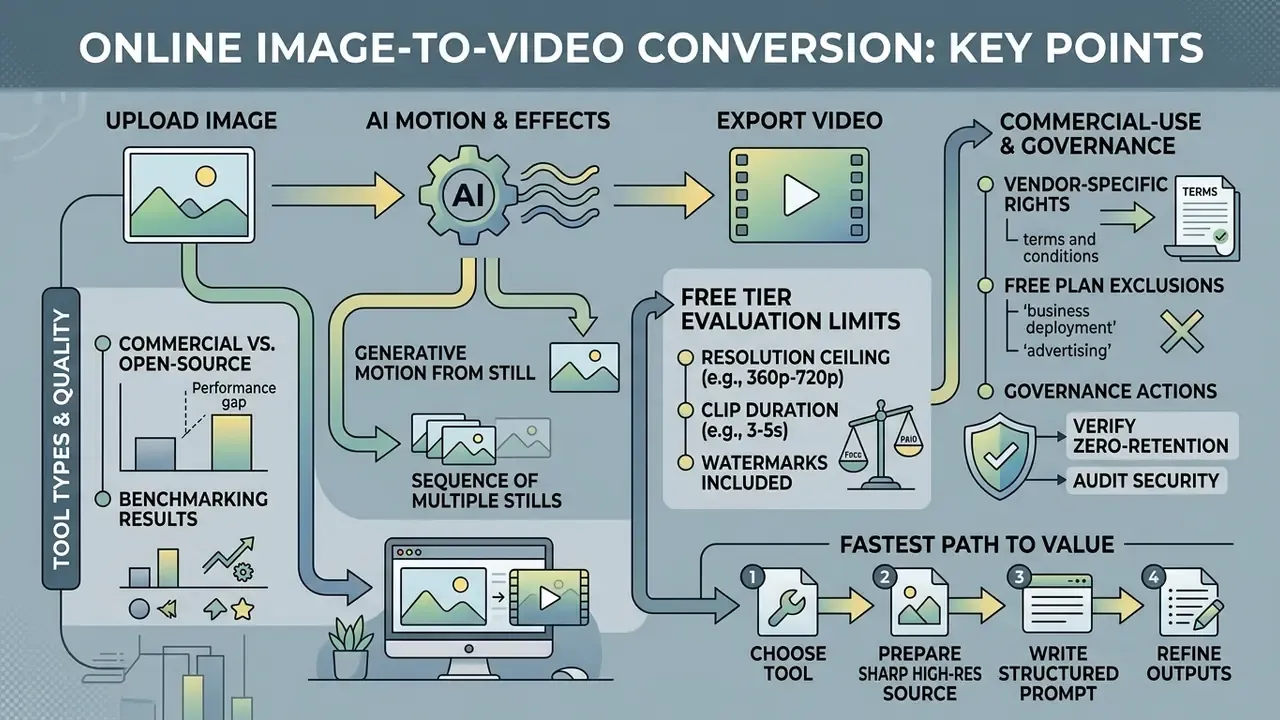
To convert an image to video online free, you upload a source file, define motion parameters or text prompts, render the video asset, and export the final clip. The process follows a four-step workflow accessible through standard web browsers, with no local software installation.
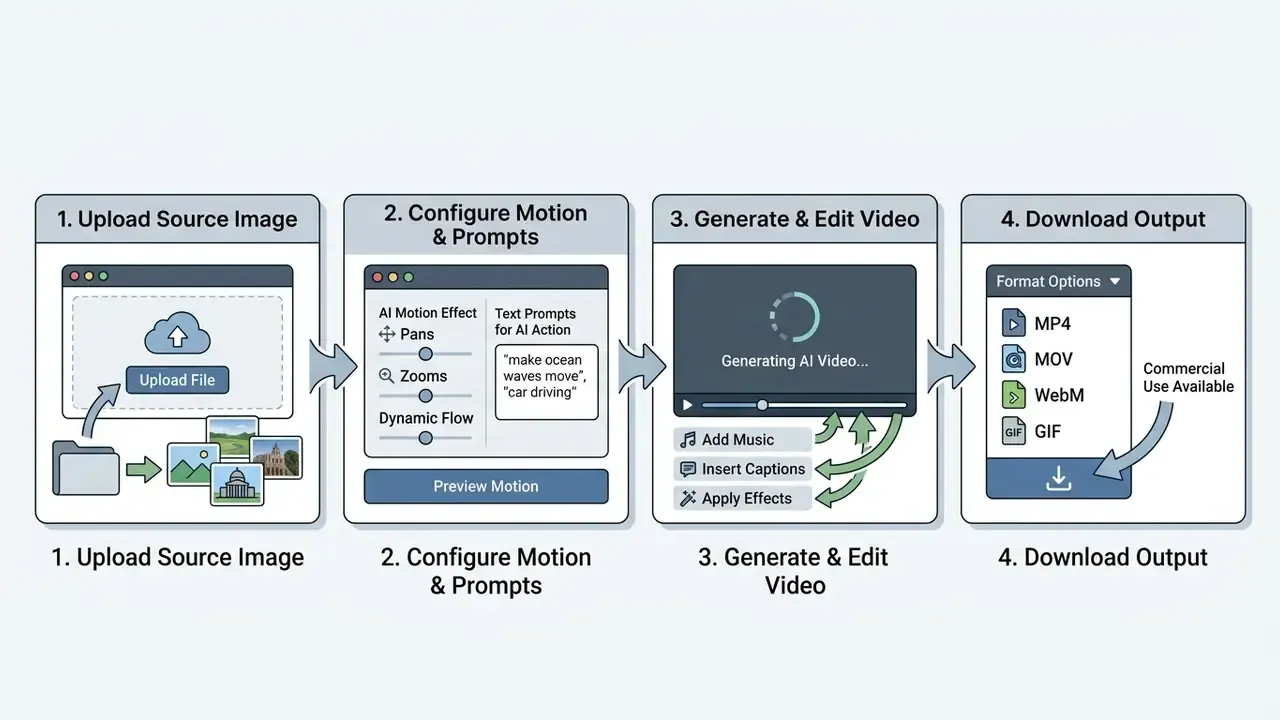
The underlying generation pipeline processes the input frame through cloud-hosted GPUs, applying motion diffusion or timeline rendering before delivering a downloadable video file.
Upload an image and choose the video format
To begin conversion, upload an image in a standard format such as JPG, PNG, WebP or HEIC, and select the target aspect ratio for your intended distribution channel. High-resolution input assets yield cleaner edge definition and reduce generation artifacts during temporal synthesis.
| Parameter | Recommended Specification | Enterprise Operational Context |
|---|---|---|
| Input File Formats | JPG, PNG, WebP, HEIC (also TIFF, BMP, AVIF, PSD and RAW on converter-class tools) | Standard web formats preserve metadata and color profiles; HEIC covers iPhone-native camera rolls. |
| Minimum Resolution | 1280×720 pixels (HD) | Higher pixel density prevents model interpolation blur. |
| Aspect Ratios | 16:9 (Landscape), 9:16 (Vertical), 1:1 (Square), 4:5 (Feed) | Align output geometry with feed placements (Shorts, Reels, MLS listings, marketplace cards). |
| File Size Ceiling | 10 MB to 25 MB | Prevents browser upload timeouts on cloud processing queues. |
| JPEG Compression Quality | Quality 70 or higher, no visible ringing | Heavy compression is misread by structural encoders as texture noise. |
Selecting the correct aspect ratio before generation is critical. Restructuring aspect ratios after AI rendering often distorts subject geometry or forces lossy cropping.
Multi-format export and asset mixing. MP4 remains the default container for web streaming, standardized as the MP4 file format in ISO/IEC 14496-14:2020. Enterprise-grade image-to-video converters go wider and support lossy and lossless exports across additional dynamic formats:
- GIF Best for lightweight email headers, changelogs and documentation embeds where media controls and audio are unavailable.
- MOV and WebM Preferred for transparent background overlays, alpha-channel renders, and hand-off into high-fidelity desktop editors. WebM also reduces delivery weight for web hero sections.
- AVI and MKV Legacy and archival delivery targets still requested by broadcast, retail-display and internal AV teams.
- Mixed-media timelines Advanced converters let creators merge static source photos (JPG, PNG, WebP, HEIC) with pre-recorded MP4 or MOV clips, animated GIFs, stickers, emoji layers, screen recordings and webcam captures on a unified multi-track timeline. Integrated recorders that capture audio, webcam, screen, or all three at once remove the need to switch tools between capture and edit.
Before publishing, compress the finished file to fit platform bitrate ceilings. Our guide to video compressors covers quality-loss thresholds by codec.
Add a prompt, motion and animation style
Adding a prompt, camera controls, and motion parameters gives the AI model explicit guidance on how objects and camera angles should move over time. Structuring your text prompt with clear spatial and temporal directions minimizes unpredictable generation behavior.
Effective video prompts follow a structured ordering formula: [Shot Type] + [Subject Action] + [Camera Movement] + [Lighting & Style]. For example: "Medium close-up shot of a corporate office desk, gentle pan right, subtle natural window lighting, photorealistic cinematic style."
Models such as HunyuanVideo and the Runway Gen-3 Alpha / Gen-4 architecture family use these prompt constraints to direct pixel displacement across consecutive frames (HunyuanVideo Prompt Handbook, Tencent, 2025; Gen-4 Video Prompting Guide, Runway, 2025). Tencent's handbook publishes a comparable core formula, Subject plus Motion plus Scene plus Shot Type plus Camera Movement plus Lighting plus Style plus Atmosphere, and maps camera verbs to concrete moves such as dolly in, pan, orbit and static camera. Commercial naming conventions change between releases, so validate the model version in the vendor's own documentation before locking a prompt library. Advanced web interfaces also expose directional motion vectors or camera control sliders, which let creators dial in precise zoom speeds or panning angles.
Generate, edit and download the final video
After configuring your motion settings, submit the job to the rendering queue, review the output preview, perform light timeline edits, then download the finished video file. Render latency is queue-dependent and vendor-reported rather than benchmarked. Observed waits range from seconds on dedicated priority queues to multi-minute waits on shared free tiers, and vendors do not publish standardized latency methodology. Treat published render times as marketing estimates and measure them yourself during a paid trial.
When reviewing the rendered clip, examine key frames for visual stability, identity preservation, and motion consistency. Professional pipelines formalize this step. Adobe Premiere Pro exposes Use Maximum Render Quality to preserve detail when output size differs from source media, and Adobe Acrobat's Preflight model, Analyze then Analyze And Fix before output, works as a useful template for pre-export QC on video too. If the output shows facial distortion or physics violations, reduce prompt motion intensity and re-render. Once satisfied, export the clip using a standard container format like MP4. For complex asset workflows, teams often integrate specialized tools covered in our ai editing software directory to handle multi-track adjustments.
Step-by-step conversion checklist:
- Select and upload assetUpload a high-resolution JPG, PNG, WebP or HEIC source image (minimum 1280×720 px, JPEG quality 70+).
- Choose canvas geometrySelect 16:9 for landscape presentations, 9:16 for vertical social channels, 1:1 or 4:5 for marketplace cards.
- Define motion promptsInput precise camera and subject action descriptions using clear motion verbs and a single dominant camera move.
- Execute AI generationSubmit the task to cloud servers and wait for multi-frame inference to finish.
- Review qualityInspect for edge tearing, facial drift, physics violations and temporal jitter across the first and last frames.
- Brand and captionApply logo, brand typography, captions and audio in the timeline editor.
- Export and compressDownload as MP4, MOV, WebM or GIF, then compress to the target platform bitrate.
Add music, text, transitions and effects to image videos
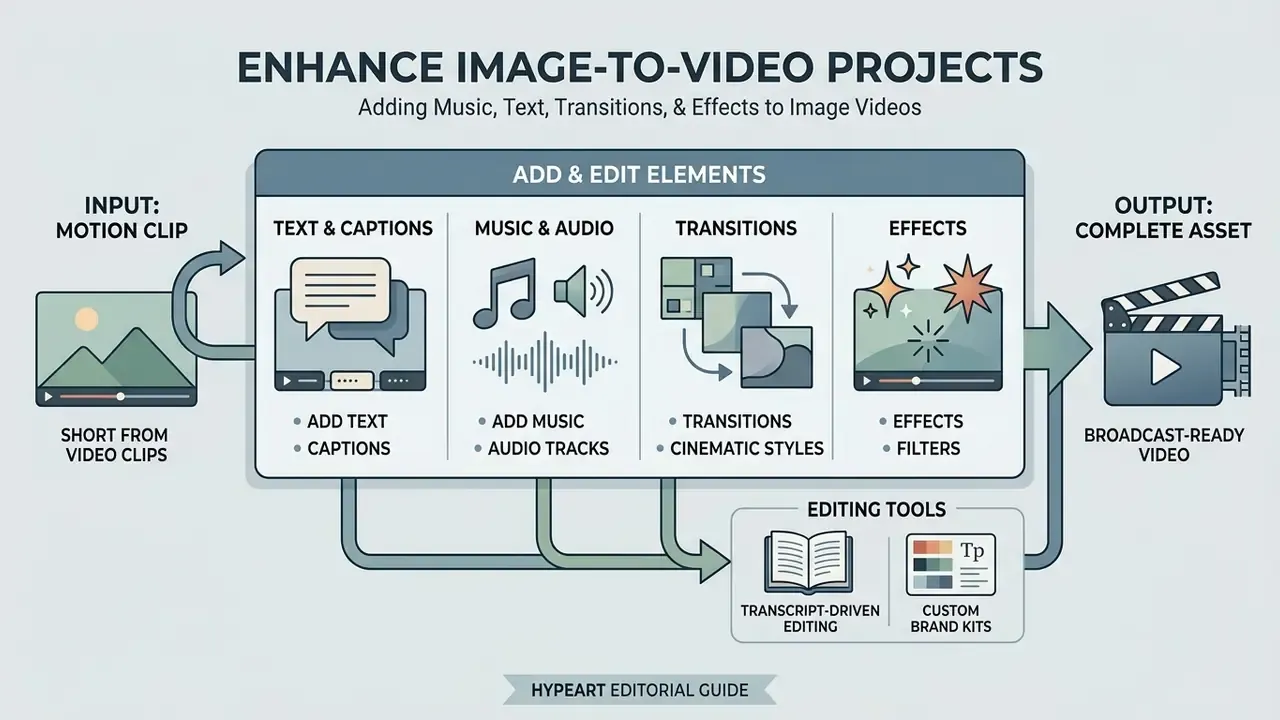
Enhancing an image-to-video project with audio tracks, text captions, and transition effects turns short motion clips into complete, broadcast-ready creative assets. Integrated web video editors combine generative video layers with multi-track timeline controls.
Adding secondary elements keeps video content engaging and informative even when played on mute. Standard web production environments let creators overlay dynamic titles, insert synthetic background audio, and smooth visual cuts between adjacent video clips.
Add text, captions, music and audio
Adding synchronized text captions, voiceover narration, and background music improves viewer retention and supports web accessibility standards. Modern web editors provide automated speech-to-text generation and transcript-driven timeline alignment.
According to W3C Web Content Accessibility Guidelines (WCAG 2.2), on-screen captions must accurately synchronize with audio cues and cover non-speech audio, including sound effects, music, laughter, speaker identity and location, to serve hearing-impaired audiences (W3C, 2023). Production-side timing rules are stricter still. The Netflix Timed Text Style Guide instructs editors to place subtitle in-times on the first audio frame or within one to two frames of it, and to hold out-times at least 0.5 seconds past the end of speech when no subsequent subtitle follows.
Accessibility gains are measurable on the authoring side as well:
«An AVscript study (N=12) found statistically significant reductions in cognitive load for script-based video editing compared with traditional tools.»
Integrated tools like Google Vids and the Adobe Firefly Video Editor let creators generate custom sound effects from text prompts, set effect duration, record a voice reference for timing, or place voiceovers directly on specific timeline frames. Our guide to AI voice generators compares voice quality, language coverage and commercial licensing across those engines. For automated campaign communications, organizations frequently pair video assets with tools listed in our ai email generator and ai email response documentation to unify copy across messaging formats.
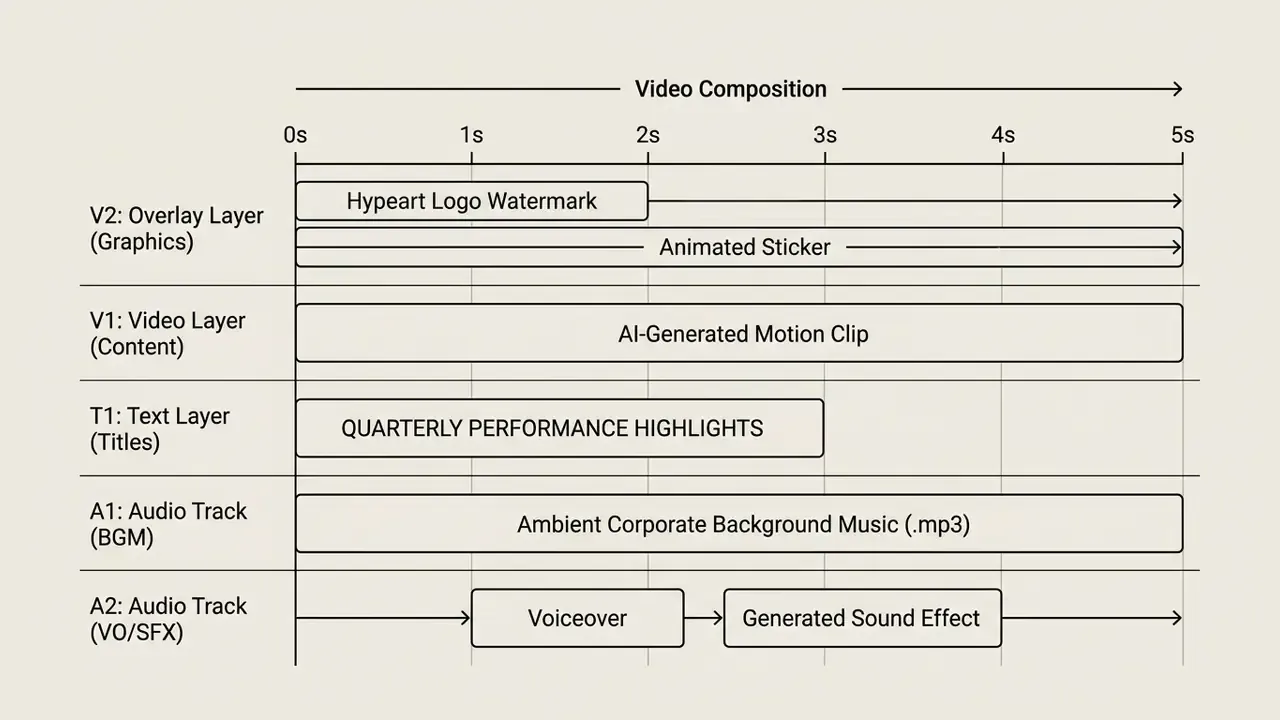
Transcript-driven editing and custom brand kits. Beyond standard timeline cuts, modern editors integrate automated speech recognition (ASR) and expose the transcript as the primary editing surface. Creators select text in the generated transcript and delete it. Removing filler words, stumbles or unwanted audio segments instantly updates the corresponding video track, the model popularized by transcript-first editors such as Descript and now standard in Vimeo and Google Vids. Enterprise teams should also upload custom typography (OTF/TTF fonts), SVG brand logos, PNG watermarks with adjustable size, position and opacity, and predefined color palettes to enforce strict visual alignment across converted photo-to-video assets. Sticker, shape, emoji and stock-image libraries fill the remaining gaps for social formats. See our ai emoji generator documentation for custom accent assets.
Use transitions, effects and cinematic styles
Applying cinematic visual styles, camera lens effects, and seamless scene transitions gives image-based videos a polished aesthetic suited for commercial advertising and social channels.
Popular visual styles include slow cinematic push-ins, subtle depth-of-field blurs, motion-blur transitions, wipes, dissolves, push reveals and audio-led cuts. Vertical 9:16 formats built for TikTok, Reels and Shorts rely on early action, centered subject framing inside platform safe zones, and 1080×1920 canvas sizing, the specification used in current government and brand social design guidelines. Rather than citing an unverifiable "three-second rule," treat opening pacing as a testable variable and validate it against your own retention curves. The peer-reviewed evidence base does confirm that short-form video demonstrably shifts audience perception:
«Short videos on TikTok and Instagram Reels produced documented instances of user view change after exposure.»
When building multi-scene marketing campaigns, combining subtle zoom transitions with bold visual typography creates a cohesive narrative without distracting from the core product image. For long-form assembly and chaptering, our guide to video editors and the YouTube video editor workflow cover publishing-side requirements.
What "free" image-to-video tools include and limit
Free online image-to-video tools let users test core generation capabilities, but they impose operational limits on rendering resolution, video duration, credit quotas, and commercial usage rights. Understanding these plan boundaries prevents unexpected project bottlenecks.
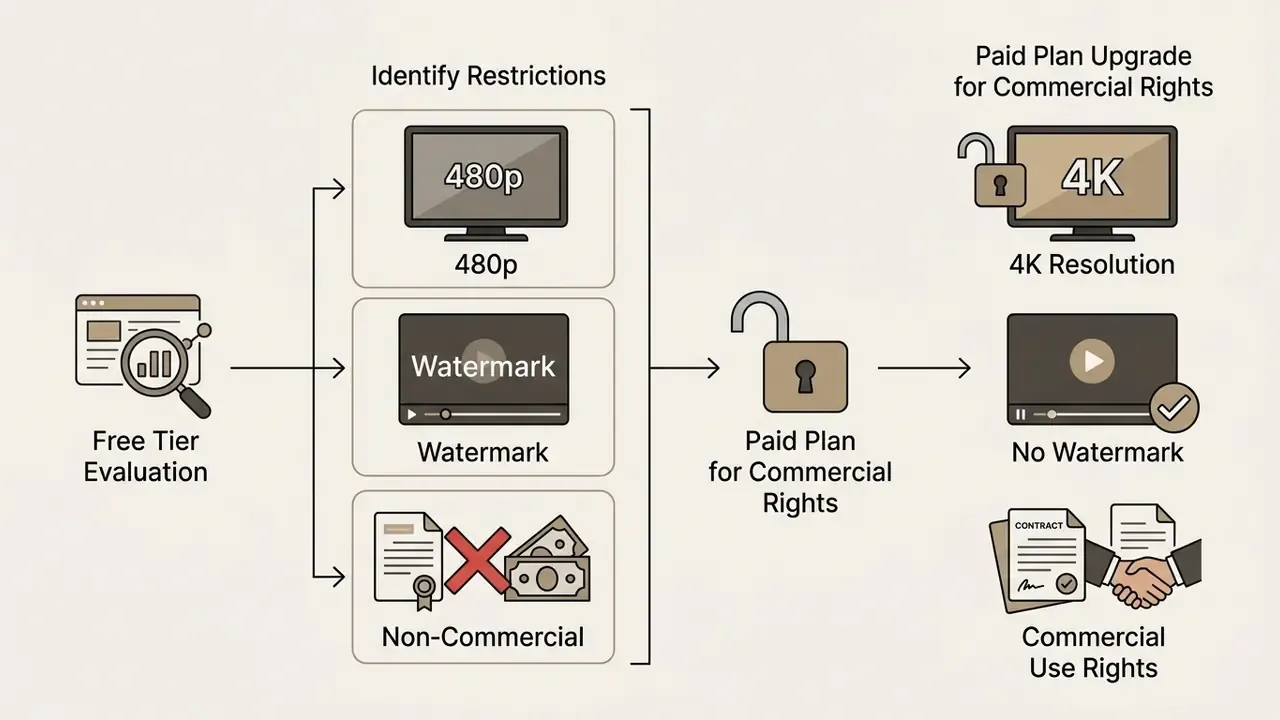
Free tiers function primarily as evaluation environments. They let creators convert images to animated video online free of upfront charges, yet commercial deployment usually requires upgrading to a paid tier to remove watermarks and secure commercial licensing rights. Our comparison of free AI video generators with credit limits and watermarks tracks those thresholds platform by platform.
Free generation, editing and export conditions
Free plans typically restrict video output to 720p or 480p resolution, limit clip durations to 3 to 5 seconds per render, and attach a visible platform watermark to exported files.
Illustrative scenario, not a named client case: a mid-market marketing team evaluating free-tier AI video for paid social hits three predictable blockers in sequence. First, a 480p or 720p export ceiling that fails brand-quality review. Second, a vendor watermark that fails ad-platform creative specs. Third, a licence clause limiting output to personal evaluation. The remediation pattern is equally predictable: audit the licensing tier matrix, move production onto named subscription seats, and document 1080p+ exports, watermark removal and commercial rights in a reproducible audit trail. This scenario is a composite operational pattern rather than a verified single-company case study.
Comparative platform testing highlights the operational distinctions between free and paid tiers:
| Feature Dimension | Typical Free Tier Conditions | Typical Paid / Enterprise Tier Conditions |
|---|---|---|
| Output Resolution | 360p, 480p, or 720p HD maximum | 1080p Full HD up to 4K Ultra HD |
| Generation Durations | 3 to 5 seconds per clip | 5, 8, 10 and 15+ seconds with clip extension |
| Watermark Enforcement | Mandatory visible vendor logo (occasional watermark-free exceptions under hard credit caps) | Watermark removal on all exported assets; custom PNG watermark upload |
| Export Formats | MP4 only, single preset | MP4, MOV, WebM, GIF, AVI, MKV with bitrate control |
| Processing Priority | Shared standard queue (longer wait) | Dedicated high-priority rendering queue |
| Project Persistence | Session-only editing for unregistered users | Saved projects, version history, team libraries |
| Commercial License | Personal / non-commercial evaluation only | Full commercial distribution rights granted |
Vendor-reported free-tier conditions differ materially, which is why a like-for-like matrix matters more than headline "free" claims:
| Platform (free tier) | Reported free allowance | Resolution ceiling | Clip length | Watermark |
|---|---|---|---|---|
| Runway | ~125 one-time credits | Limited free footage time | Short clips | Runway watermark on free plan |
| Pika | ~15 to 80 credits (plan-dependent) | 480p on Free; 720p/1080p on paid | 5 s image-to-video | Watermark-free download is a paid feature |
| Kling AI | ~66 credits per day | 720p | 5 s | Visible watermark |
| PixVerse | Daily credit refresh | 360p | 5 s | Reported watermark-free |
| Canva (photo-to-video) | Free editor access | Template-dependent | Slideshow length | Exports advertised without watermark |
Figures reflect vendor pricing pages and 2026 third-party roundups; credit economics change frequently, so re-verify before procurement. For a worked example of a credit-based free tier, see our PixVerse AI overview.
Benchmarking confirms that the resolution gap is not the only difference between free and paid model access:
«Gen-2 scored 0.775 on DOVER video-quality assessment, Pika 0.715, while open-source VideoCrafter reached only 0.518.»
For post-generation assembly on a zero budget, compare options in our roundup of free video editing software, which flags export limits and watermark behaviour per tool. Cost modelling for credit-based plans can be sketched with our calculators resource before you commit a campaign calendar.
How to actually get 4K without a watermark. Four conditions usually must hold at once: (1) an active paid or enterprise subscription rather than a trial; (2) a model version that supports high-resolution output, since many image-to-video models cap native generation at 720p or 1080p and rely on an upscaling pass for 4K; (3) a source image with sufficient pixel density, because upscaling a 720p render to 4K amplifies artifacts rather than adding detail; and (4) an export preset that explicitly selects 3840×2160 instead of inheriting the project canvas. Some editors also preserve original quality on export "unless changed," so verify the render preset instead of assuming it. Watermark removal is a plan entitlement, not a post-processing task. Erasing a vendor mark with an object-removal tool does not grant distribution rights.
Commercial-use rights, plans and content safety
Commercial usage rights depend heavily on platform terms of service, and free tier exports are frequently restricted to non-commercial, evaluation, or personal use.
Vendor licensing frameworks vary significantly across the generative AI ecosystem. Runway's help documentation states that users retain ownership of uploaded and generated content and may use it commercially, including monetized YouTube uploads, social posts, festival entries and product advertising, while its Terms of Use frame Inputs and Outputs as "Your Content" for which the user is responsible. Pika's FAQ, by contrast, states that Pro or Fancy subscribers may use created content commercially while Basic and Standard subscribers may not, and its Terms restrict external monetization of certain content types without prior written consent. These are platform policy statements, not research findings. Vendor pages conflict with each other and sometimes internally, so reconcile the Terms page against the help-center page before signing off.
Advertising platforms add a second layer: explicit disclosure labels when publishing synthetic or digitally altered media in promotional campaigns. Google's synthetic-content requirements mandate disclosure for election ads containing synthetic or digitally altered content that inauthentically depicts real people or events, with prominent disclosure required in other formats (Google Ads Policies, 2024. https://support.google.com/adspolicy/answer/13755589). The IAB's transparency framework similarly treats synthetic video in advertising as a disclosure category, pairing consumer-facing labels with machine-readable metadata.
The licensing environment upstream of these tools is also shifting:
«Market-based licensing of publishers' works for training generative AI models is technically and economically feasible; major technology companies are already concluding such agreements.»
Enterprise teams should review vendor licensing terms carefully before deploying generated assets in commercial campaigns. Our AI Media Commercial-Use Hub collects the legal and licensing frameworks, and the adjacent analysis of commercial use of AI image generators covers rights questions affecting the source stills you feed into a video model. Pending disputes are tracked in our AI Litigation and compliance hub.
How to choose the best image-to-video converter online
Selecting the best image-to-video converter online means evaluating tool architecture against your operational requirements, quality expectations, and data privacy constraints. Make this decision before committing a recurring campaign calendar to a platform. Migration costs rise sharply once prompt libraries, brand kits and template presets are locked into one vendor.
Organizing your selection framework around core workflow priorities, such as generation speed, precise motion control, export format coverage, collaboration, or corporate data protection, keeps the tooling viable over a longer horizon.
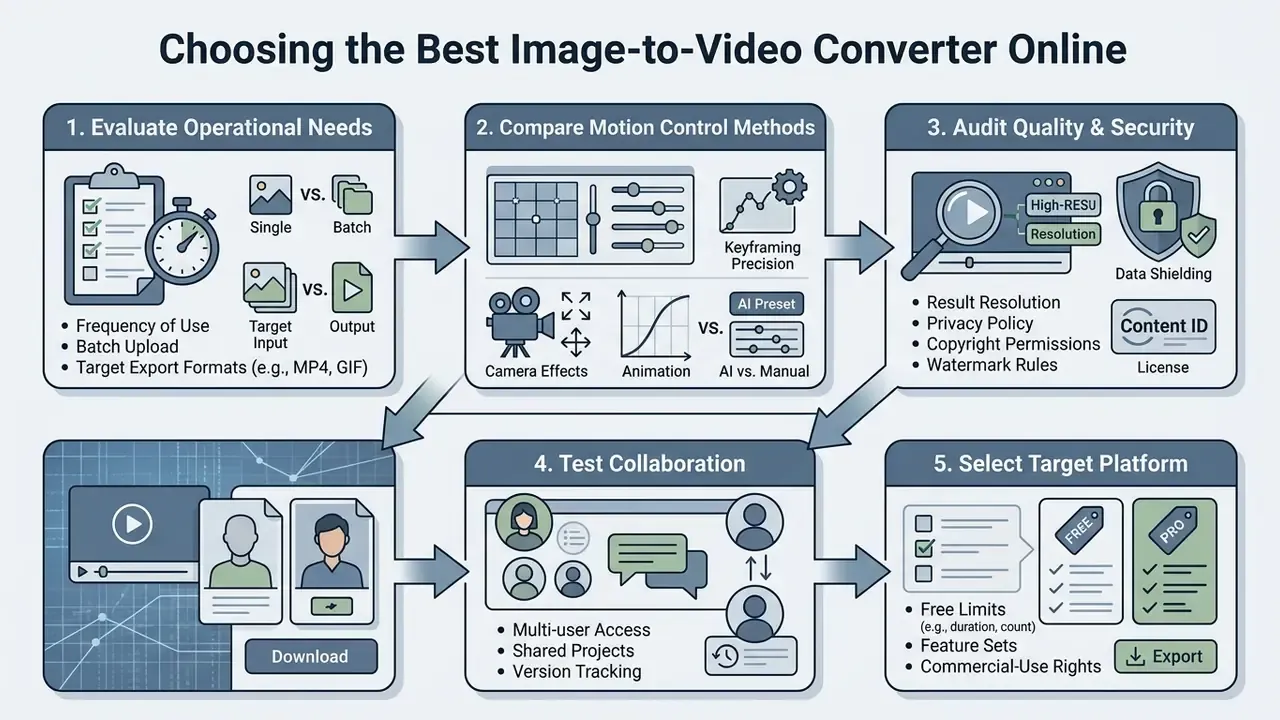
Concrete decision parameters exposed by vendor documentation include: MP4/MOV/WebM/GIF export coverage; per-image duration control; output resolution selection; transition and audio libraries; batch-file and slide limits by tier; watermark policy; and AI-specific quality measures such as motion range, smoothness and object consistency.
Choose between AI motion, templates and manual editing
Decision-makers choose between automated AI prompt motion, structured template workflows, and manual multi-track video editing based on the balance of speed and creative control they need.
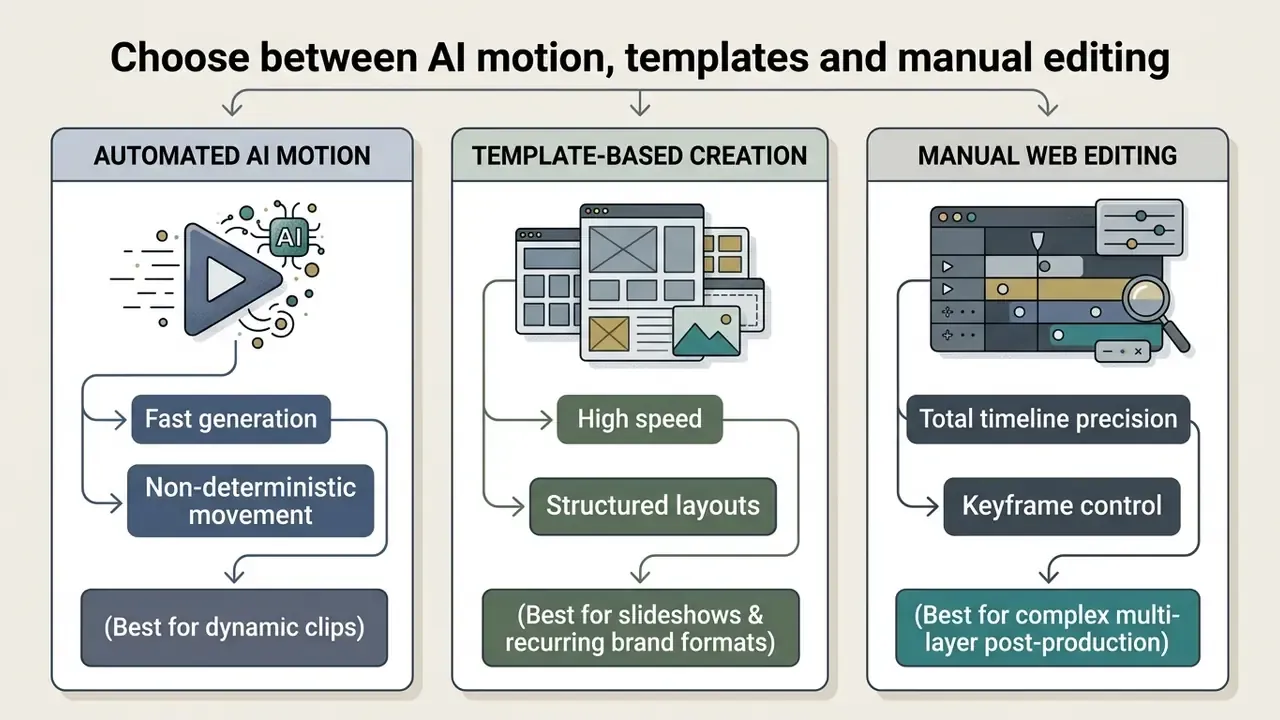
Prompt-driven AI motion excels at producing fluid, novel animations from a single image. Prepare that image first with the tools covered in our AI photo editors guide. Template-based systems offer structured consistency for high-volume asset production; vendors describe templates as "a starting point, not a locked configuration," which means preset motion patterns still accept prompt overrides. Manual editors provide precise keyframe control for complex post-production workflows, and that is where captions, logos, CTAs and brand text are typically finalized.
Compare output quality, formats and creative control
Evaluating output quality requires assessing frame consistency, motion stability, supported export formats such as MP4, MOV, WebM or GIF, and fine-grained camera control.
Independent benchmarks show model performance varies significantly across metrics. In AIGCBench evaluations, Stable Video Diffusion achieved an adjacent-frame CLIP consistency score of 0.974, whereas commercial platforms like Pika achieved 0.996, indicating higher temporal stability across frames (AIGCBench, 2024).
«In the same benchmark SVD scored 0.974 adjacent-frame CLIP consistency, VideoCrafter 0.980 and I2VGen-XL 0.971, confirming the advantage of commercial systems on combined metrics.»
Evaluate real-time collaborative editing
Producing a marketing video series requires cross-functional feedback, and file-export ping-pong is the primary hidden cost in image-to-video production. Web-based converters remove that bottleneck through real-time workspace sharing. Check whether team members can leave frame-accurate timestamp comments, adjust AI motion prompts asynchronously, run review-and-approval cycles inside the studio rather than across Slack, Teams or email, and manage version control directly in the browser without rendering intermediate preview files. Additional enterprise criteria: role-based permissions (viewer, commenter, editor, admin), shared brand-kit libraries so fonts and logos cannot drift between contributors, project persistence for unregistered versus licensed seats, and single sign-on with audit logging. Cloud-native studios also remove local install requirements, which shortens security review for contractor access.
Check privacy and suitability for business content
Enterprise deployment of image-to-video converters demands strict verification of user data handling policies, opt-out controls for model training, and adherence to regional data privacy regulations.
Under privacy frameworks like the EU General Data Protection Regulation (GDPR) and the Singapore Personal Data Protection Act (PDPA), processing photos containing identifiable individuals requires an explicit legal basis and secure storage practices (Autoriteit Persoonsgegevens, 2025. https://www.autoriteitpersoonsgegevens.nl/en).
«Photos and videos featuring identifiable people are personal data; business or event publication requires a GDPR legal basis, consent must be explicit and withdrawal must be easy.»
US regulatory statutes also enforce strict removal windows for unauthorized personal media. The Federal Trade Commission states that covered platforms must remove nonconsensual intimate images and known identical copies within 48 hours of a valid request under the Take It Down Act. Organizations should confirm that online vendors offer encrypted asset handling, zero-retention policies for user uploads, and clear legal protections against unauthorized training data usage. The same criteria we apply when reviewing AI image enhancement tools used earlier in the pre-processing chain.
Ways to use image-to-video AI for content and marketing
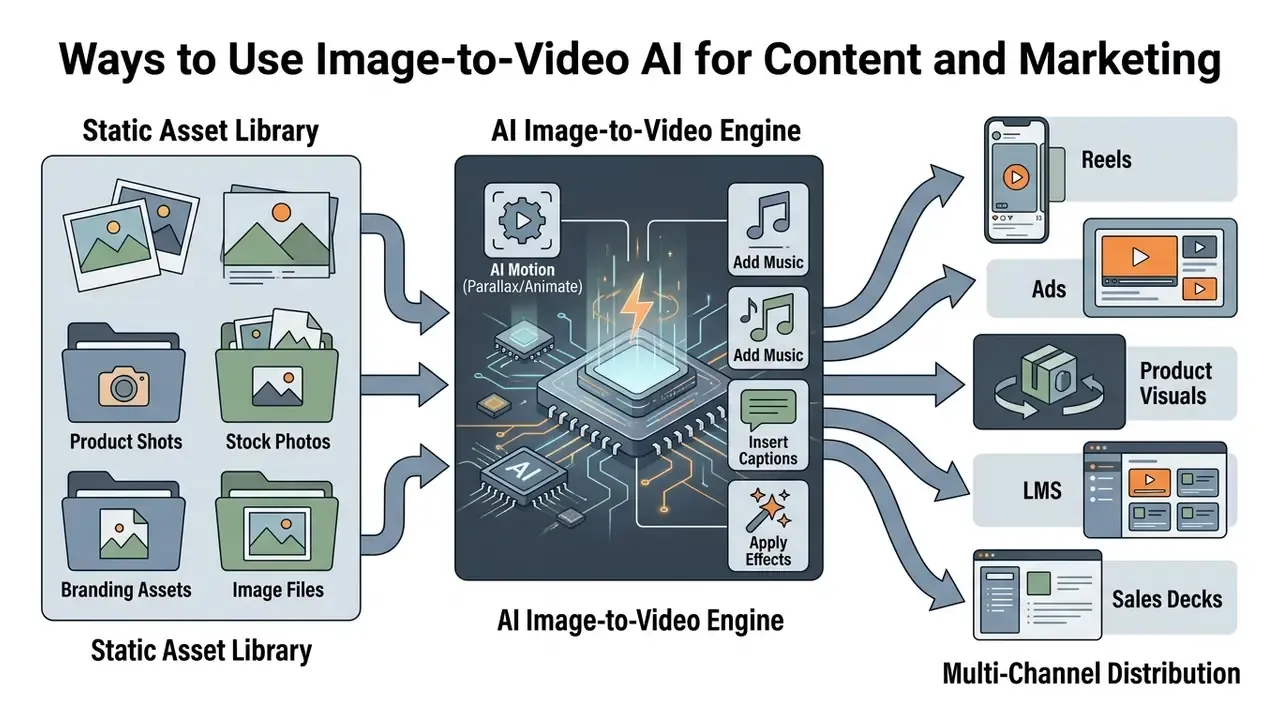
Deploying image-to-video AI lets marketing and media teams repurpose static media assets into dynamic video content across multiple communication channels.
From vertical social media feeds to interactive e-commerce product pages, converting photos to motion clips expands asset reach while controlling production overhead.
Make product videos, ads and business visuals
Converting flat product photography into dynamic video cards allows e-commerce retailers and B2B organizations to present items with immersive 3D-style camera motion.
A standardized commercial video production pipeline follows five stages:
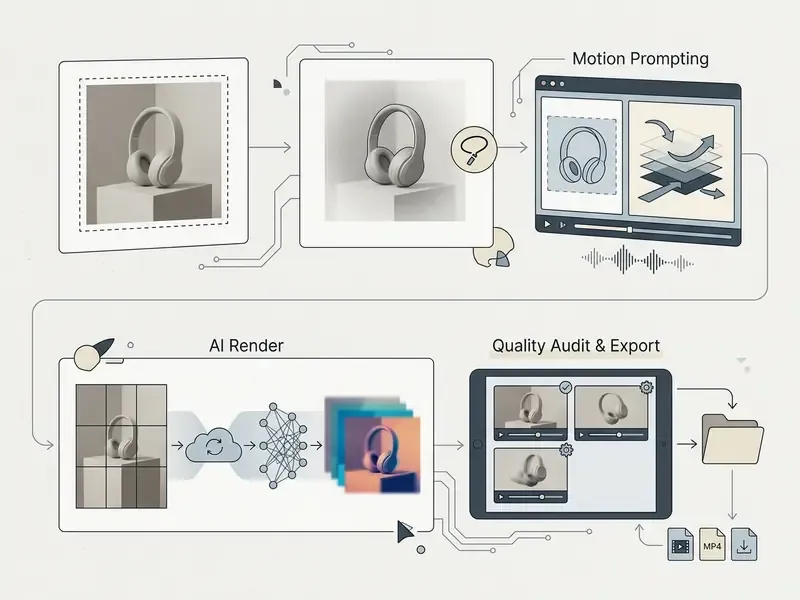
Start with a high-resolution product image, extended where needed using AI image expansion tools to fit a vertical canvas. Then apply subtle camera moves such as a slow orbiting push-in, steam or light-shift effects, or controlled lighting drift to highlight product texture and depth. Keep logos and on-pack text legible, because motion that blurs typography fails marketplace review. Where no usable photograph exists, text-to-video AI tools generate the base scene from a written description instead. This approach produces ad-ready video cards for product pages and digital campaigns at a fraction of traditional studio production costs. For teams comparing generative art tools for promotional graphics, explore our compare section, the guide to the best free ai art generator and the broader ranking of the best AI art generators. Teams producing written campaign material alongside video often lean on an ai essay generator for long-form drafts, and content policy should flag restricted categories such as an ai erotic story generator as out of scope for brand channels.
Industry-specific image-to-video workflows
Generic "marketing" framing understates how differently teams use these tools. The matrix below maps source assets to motion treatments and final deliverables by role.
| Industry / Role | Source Asset Input | AI Motion & Editing Application | Final Asset Output |
|---|---|---|---|
| Real Estate & Architecture | Static listing photos, exterior wide shots, floor plans | Slow ambient pan plus orbital push-in to simulate physical walkthroughs; agent logo and contact overlays | 9:16 video tours for Instagram, portals and MLS listings |
| Education & E-Learning | Diagrams, infographics, charts, lesson slides | Layered AI voiceover, auto-generated subtitles, kinetic text highlights, sequential reveal | MP4 explainer clips for LMS and revision playlists |
| E-Commerce & Retail | Flat product photography, studio packshots | Synthetic 3D rotation, background lighting shifts, price and promo overlays | High-converting TikTok, Meta and marketplace video ads |
| Photographers & Artists | Portfolio stills, high-resolution portraits | Subtle motion watermarks, depth-of-field parallax, particle and grain effects | Protected showcase reels and web gallery loops |
| SMM & Content Creators | Campaign key visuals, quote cards, memes | Quick cuts, trending audio sync, sticker and caption layers | Daily vertical posts across Reels, Shorts and TikTok |
| Small Business Owners | Phone photos of products, storefront, staff | Template-based slideshow with brand colors, music and CTA end card | Promo clips for local ads, Google Business Profile and WhatsApp broadcast |
| Coaches & Consultants | Testimonial screenshots, session snapshots, frameworks | Text-on-screen sequencing, subtle zoom, brand typography | Trust-building lead-gen videos for LinkedIn and landing pages |
| Designers & Creative Directors | Drafts, concepts, mockups | Layer reveals, parallax between mockup planes, annotation callouts | Short concept reels for client review and portfolio |
| Corporate Communications | Charts, team photos, product shots | Data reveal animations, lower thirds, brand-kit typography | Pitch-deck video segments, internal updates, town-hall inserts |
| Events & Community | Photo galleries, speaker portraits | Recap montage with beat-matched transitions and date/venue overlays | Recap and teaser clips for email and social |
Each row implies a different quality threshold. Real estate and e-commerce workflows need identity preservation and geometric stability, so short clips and conservative camera moves win. Education workflows tolerate simpler motion but demand caption accuracy and audio sync. Photography workflows prioritize watermark integrity over motion complexity.
How to improve image-to-video generation quality
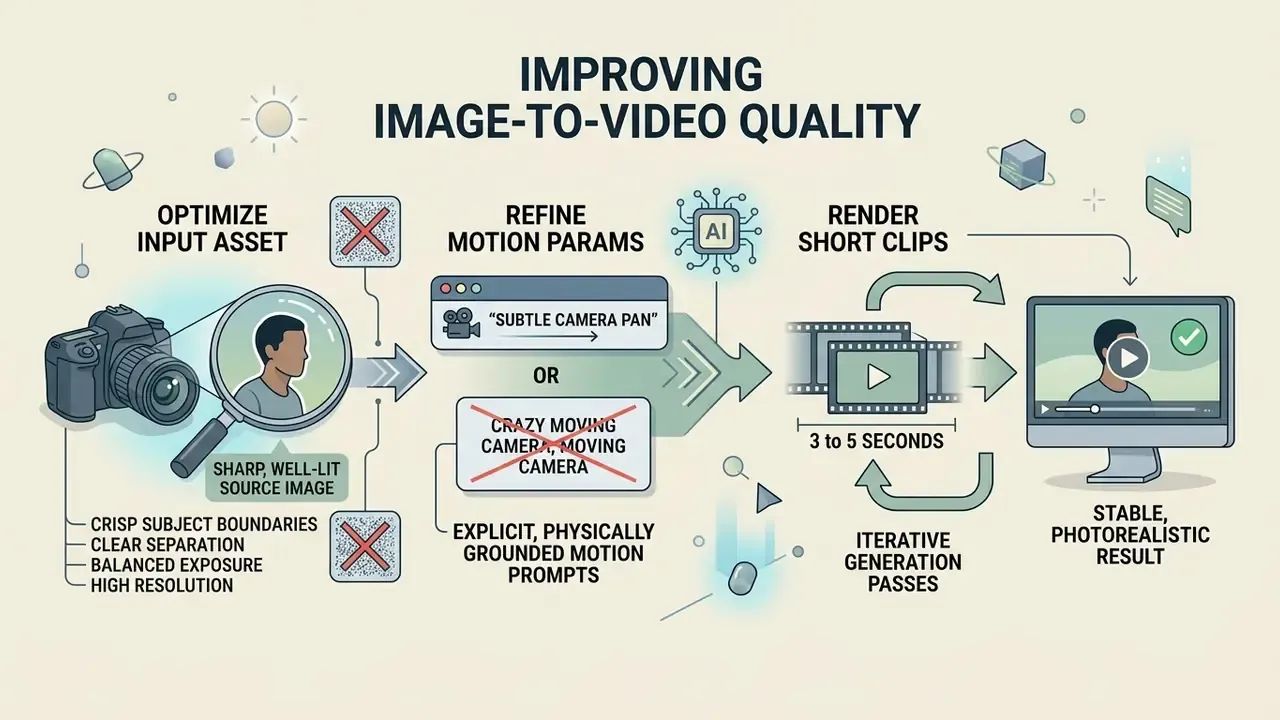
Achieving photorealistic, stable image-to-video results requires optimizing input asset quality and refining motion prompt parameters through iterative generation passes.
Eliminate the source flaws first, then apply structured prompt constraints. That order prevents most common AI motion artifacts: edge tearing, temporal jitter, facial drift.
Start with a clear, high-quality source image
Supplying a sharp, well-lit source image with crisp subject boundaries is the single most important factor in achieving stable AI video generation.
Latent diffusion models are documented to be sensitive to input noise and compression artifacts. Peer-reviewed work presented at ICLR 2024 links divergence artifacts in latent diffusion to insufficient numerical stability regions, where latent magnitudes exceed the expected range and the solver fails. CVPR 2024 supplemental research shows a degradation-robust encoder prevents generative models from misreading input artifacts as image content. In practice, low input resolution or heavy JPEG compression confuses the model's structural encoder, which produces visual instability and unnatural frame warping.
«AIGCBench metrics confirm the pattern: VideoCrafter's first-frame SSIM reached only 0.300 against 0.803 for Gen-2, reflecting model sensitivity to input and conditioning quality.»
Clear subject-background separation, balanced exposure, and high resolution stop the AI engine from misinterpreting static noise as motion vectors. Where the original file is too small, run it through the tools reviewed in our guide to AI image upscalers before generation. For pre-processing source photography, see our comprehensive guide to online photo editors and free photo editors.
Describe realistic motion and refine the generated result
Writing precise, physically grounded motion prompts and rendering short 3 to 5 second clips significantly reduces physics distortions and maintains visual coherence.
When prompting AI motion, avoid broad or conflicting terms like "crazy moving camera." Use explicit directional verbs such as "slow camera dolly in" or "gentle horizontal pan left," and keep to a single dominant camera move per clip.
«Motion-I2V uses a diffusion-based motion field predictor with a sparse trajectory ControlNet, letting users specify precise object paths and motion regions.»
Artifact taxonomies published in 2025 classify facial problems as anatomical implausibilities and physics failures as violations of shadows, reflections, depth and perspective. Exactly the failure modes that explicit identity, lens and trajectory descriptions suppress. Keeping generation durations short prevents motion drift. Longer sequences can be built by chaining multiple short, high-fidelity clips end-to-end in a video editor, passing the last frame of each clip as the conditioning image for the next to preserve identity, then optimizing the final master with a video compressor before upload. Document prompt versions and model builds as you iterate; NIST's AI documentation guidance emphasizes structured, repeatable records of model use and outputs rather than one-shot prompting. If technical issues appear during production, consult our AI Media Support and Troubleshooting portal.
Verified user metrics and industry feedback
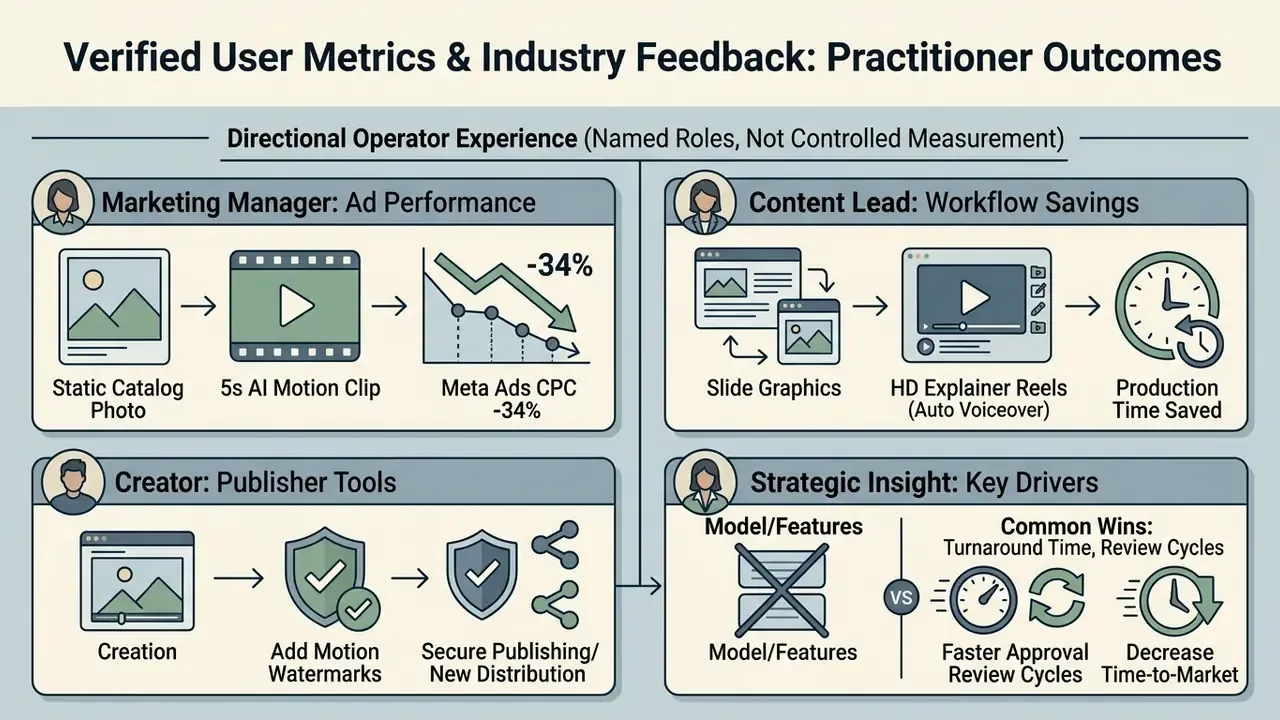
Practitioner-reported outcomes below are attributed to named roles and should be read as directional operator experience, not controlled measurement. For controlled effect sizes, see the SSRN field experiment cited earlier.
Common thread across these reports: the measurable gain sits in turnaround time and review-cycle compression, not in replacing studio production. Treat AI image-to-video as an asset-multiplication layer over existing photography.
FAQ: image formats, 10-second videos and free software
What image formats are supported by online video converters?
Most online image-to-video converters support standard web image formats, including JPG, PNG, WebP, and HEIC; converter-class tools extend that list to TIFF, BMP, AVIF, GIF, PSD and RAW. For optimal generation stability and color preservation, use uncompressed PNG or high-quality JPG assets at 1280×720 pixels or larger, with JPEG quality of 70 or higher.
What video formats can I export to?
MP4 (H.264) is the default delivery container and the format standardized in ISO/IEC 14496-14:2020. Depending on the platform tier you can also export MOV for alpha-channel and desktop-editor hand-off, WebM for lightweight web embedding, GIF for email headers and documentation, and AVI or MKV for legacy and archival delivery.
Can I mix photos with existing video clips, GIFs and screen recordings?
Yes. Multi-track web editors accept static photos, pre-recorded MP4 or MOV footage, animated GIFs, stickers, emoji, stock images, and audio, webcam or screen recordings captured inside the tool. Drag each asset onto the timeline and order it in the required sequence; the project renders as a single video regardless of source-format mix.
Can I convert an image to a 10-second video online for free?
Yes, certain AI video platforms let users generate 5 to 10 second video clips from a single image. Runway's Gen-4.5 documentation, for example, lists 5, 8 and 10 second durations. Rendering a 10-second clip on a free tier often consumes double the standard credit quota, applies a visible watermark, or caps output resolution at 480p or 720p.
How does an online image-to-video converter differ from desktop software?
Online converters process video rendering using cloud-based GPUs via web browsers, requiring no local hardware installation, and several run without registration. Desktop software relies on local CPU and GPU performance, offering advanced offline timeline editing but demanding substantial local compute capacity. Cloud tools additionally enable multi-user review and version control that desktop files cannot match.
How many images do I need for a slideshow, and how long should it be?
Two images are enough to start a slideshow, and most tools impose no upper limit. For social distribution, 15 to 60 second durations generally perform best; for internal or client projects, prioritize pacing that matches narration over a fixed target length.
Can teams collaborate on the same image-to-video project?
On cloud platforms, yes. Look for real-time workspace sharing, frame-accurate timestamp comments, role-based permissions, shared brand-kit libraries, saved project history and single sign-on. Note that unregistered or free users are often limited to session-only editing with no project save.
Are AI-generated image videos free for commercial use?
Commercial usage rights depend on individual vendor licensing terms. Most platforms restrict free-tier exports to personal, non-commercial evaluation. Using generated video clips in corporate advertising or paid marketing typically requires an active paid subscription tier. Where the creative depicts real people or events synthetically, advertising platforms may also require a disclosure label.
How can I remove watermarks from converted image videos?
Removing vendor watermarks requires upgrading to a paid subscription tier on the target platform. Some third-party editing tools offer object-erasure features, but erasing a mark does not transfer distribution rights; upgrading through official platform channels ensures clean, high-resolution exports and grants legitimate commercial distribution rights. Paid tiers additionally allow uploading your own PNG watermark with size, position and opacity control.
How do I add captions or subtitles that meet accessibility requirements?
Generate an automatic transcript, then verify that captions cover non-speech audio such as music and sound effects as WCAG 2.2 requires, place in-times within one to two frames of the first audio frame, and maintain sufficient contrast between caption text and the underlying footage. Transcript-based editors let you fix both wording and timing in one pass.
Where can I find calculators and legal guides for AI media tools?
For cost estimations, license evaluations, and legal compliance frameworks across AI media tools, explore our integrated resources:
- Estimate media processing bandwidth and usage costs using our calculators resource.
- Review ongoing intellectual property developments via our AI Litigation and compliance hub.
- Compare adjacent creation tools through our animation maker, AI video generator and AI voice generator guides.
Appendix A: pre-approval governance checklist
Use this checklist before authorizing any team to upload brand or customer imagery into a free or paid online converter. It is designed to close the Shadow AI gap between marketing velocity and risk oversight.
Checklist0 / 15
Appendix B: prompt templates and export presets
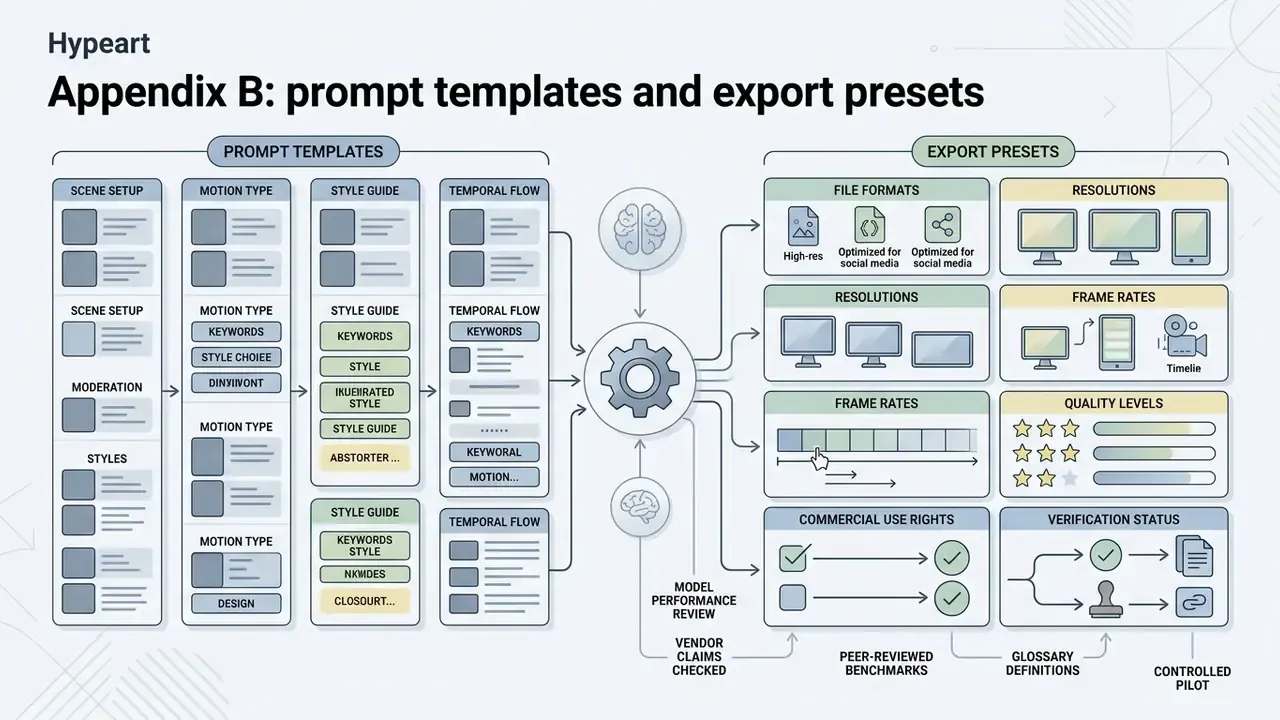
Prompt formula: [Shot Type] + [Subject Action] + [Camera Movement] + [Lighting & Style]
| Use case | Ready-to-adapt prompt |
|---|---|
| Product packshot | "Medium shot of the product on a seamless studio backdrop, product remains still, slow camera orbit right, soft key light with gentle specular roll-off, photorealistic commercial style." |
| Real estate exterior | "Wide establishing shot of the house exterior, foliage moves gently in the breeze, slow camera dolly in, warm late-afternoon sunlight, architectural photography style." |
| Educational diagram | "Flat graphic diagram centered in frame, elements hold position, very slow zoom in, even neutral lighting, clean vector explainer style." |
| Portrait / headshot | "Close-up portrait, subject blinks and breathes naturally, static camera, soft window light from the left, natural photographic style." |
| Food and hospitality | "Overhead shot of the plated dish, steam rises softly, slow camera push in, warm directional lighting, editorial food photography style." |
Export preset reference
| Channel | Aspect ratio | Resolution | Container | Notes |
|---|---|---|---|---|
| Reels / Shorts / TikTok | 9:16 | 1080×1920 | MP4 (H.264) | Central safe zone; burn-in captions |
| YouTube landscape | 16:9 | 1920×1080 or 3840×2160 | MP4 (H.264/H.265) | 4K requires paid tier and dense source image |
| Marketplace / product card | 1:1 or 4:5 | 1080×1080 / 1080×1350 | MP4 | Keep pack text legible under motion |
| Web hero / landing loop | 16:9 | 1920×1080 | WebM | Smaller payload; muted autoplay |
| Email header / docs | 16:9 or 1:1 | 800px wide | GIF | No audio, no media controls |
| Desktop editor hand-off | Source | Source | MOV | Preserves alpha channel where supported |
Editorial verification and vendor claim status