An AI invitation maker is a generative software application that transforms natural-language event descriptions into structured, production-ready digital or printable invitation cards. By combining natural language processing (NLP) with generative graphics models, these platforms automate layout composition, visual styling, typography pairing, and copy generation in seconds.
Seconds. That is the part that changes team behavior, and also the part that quietly creates governance work.
What Is an AI Invitation Maker and How Does It Work?
An ai invitation maker is an automated design tool that converts unformatted text prompts into visually balanced invitation layouts featuring dynamic background art, formatted event details, and typography. The system parses inputs such as event type, date, location, and dress code, then maps those variables onto compositional templates or algorithmically generated canvas grids.
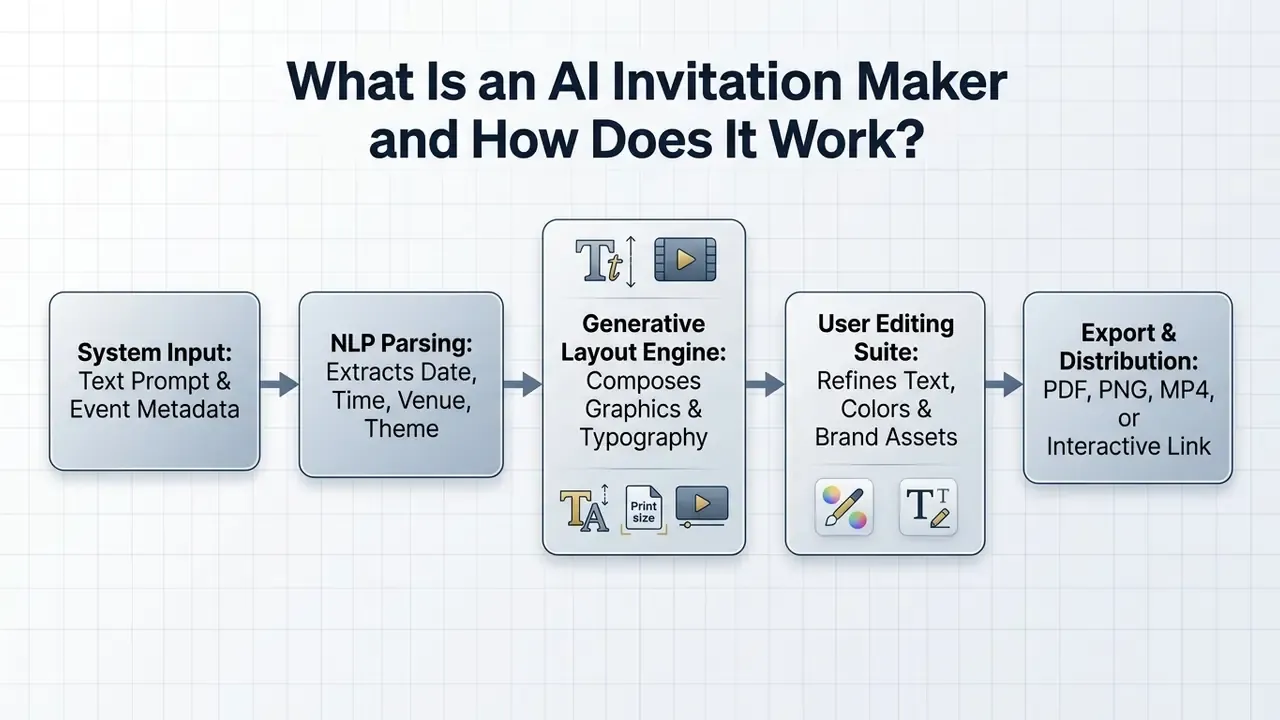
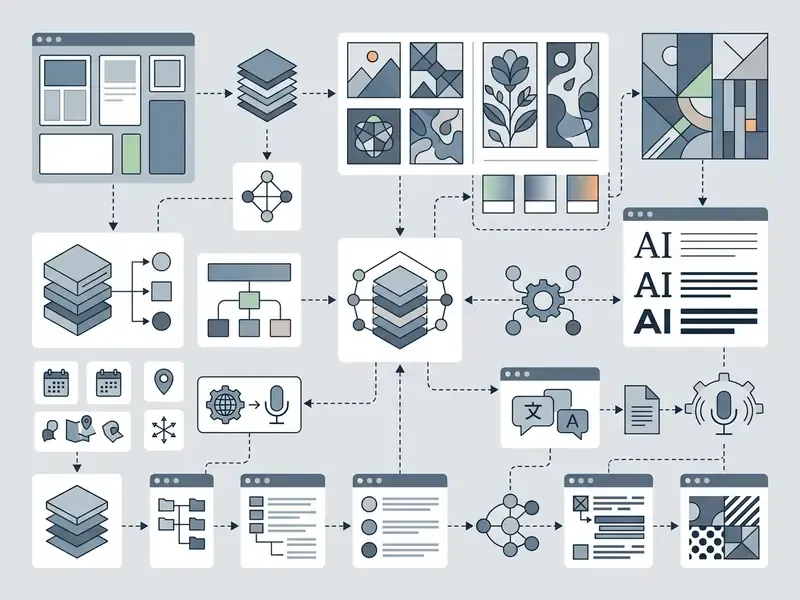
Modern ai invitation generator platforms operate via a prompt-to-layout pipeline. When a user enters event specifications into an ai invitation card generator, natural language processing models isolate key attributes like event purpose, location, host name, and desired visual tone. The underlying generative engine then synthesizes custom background graphics, assigns font hierarchies, and balances structural whitespace.
Adoption data confirms how central this workflow has become. Updated for accuracy: in a 2024 global study by Adobe surveying 2,541 creative professionals, image generation is the single most common generative AI task, and 78% of images produced by surveyed US creative professionals incorporate generative capabilities (earlier phrasing of this statistic is logged in the Editorial Corrections Log at the end of this guide).
«83% of creative professionals use generative AI in their work; 66% report improved content quality and 58% report higher content volume.»
These capabilities are used mainly to accelerate first drafts and layout exploration, not to replace a designer's judgement. Readers benchmarking the underlying engines can compare leading AI image generators and review platform-level feature sets such as the Canva AI generator overview or the Microsoft AI image generator terms.
From Event Description to AI Invitation Design
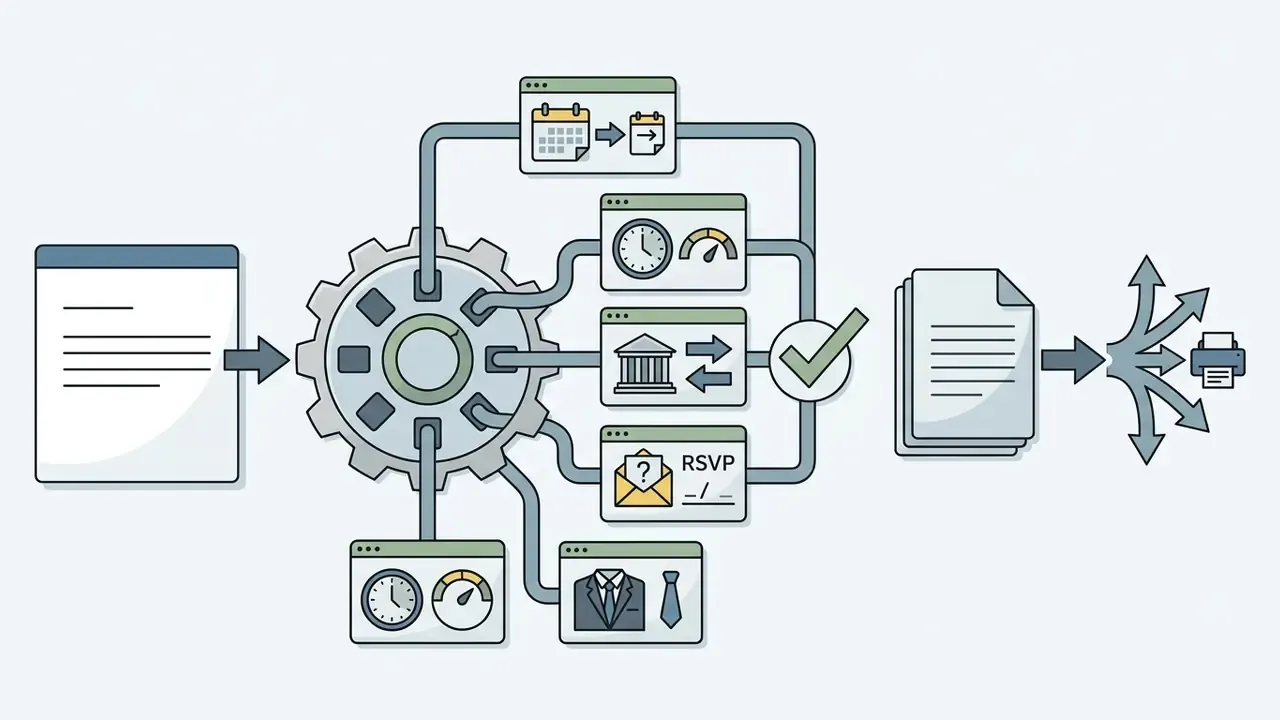
To translate a raw text prompt into a cohesive layout, an ai invitation design generator converts unstructured text strings into explicit visual parameters. The NLP model sorts information into distinct functional fields: title, event description, date and time, venue address, RSVP instructions, and dress code.
Research on human-AI co-creation by Guo et al. (2023) shows that designers keep creative agency by using prompts as intermediate boundary objects, refining specifications iteratively as the first visual outputs appear.
«Designers segment tasks, delegate parts to AI, and reintegrate outputs into coherent layouts through iterative prompt refinement.»
Once the user supplies a prompt, the invitation generator maps the visual tone (say, "minimalist gold-leaf watercolor") to decorative borders, color palettes, and typographic pairings, yielding a complete invitation design ready for review. Some tools also behave as an ai invitation letter generator, drafting the formal body copy of a printed letter rather than only the card art.
AI Invitation Card, Digital Invite, and Video Invitation
An ai invitation card generator free tier typically outputs three primary formats: static graphic cards, interactive digital invites, and dynamic video invitations. Static invitation cards render as high-resolution PDF, PNG, or JPG files suitable for physical printing or email attachments. Interactive digital invites wrap the layout in an HTML5 container, embedding clickable RSVP links, calendar integrations, and map directions. Dynamic video invitations export as MP4 files featuring motion graphics, animated text transitions, and background audio for mobile messaging and social channels. Teams building animated announcements alongside static cards often evaluate dedicated AI video generators, narration tools such as an AI voice generator, and longer-form tools like an ai movie maker.
Format choice depends on recipient engagement channels and delivery constraints. Static cards offer universal print compatibility; digital and video formats generally drive higher interactive engagement. In one enterprise event scenario, an operations team used an ai invite generator to draft digital graphics and video announcements at the same time. Updated (reformulated): by deploying automated formatting across email and messaging channels, the team compressed a multi-day manual design cycle into a same-session workflow while preserving brand consistency across all touchpoints. Exact time savings depend on approval layers and asset complexity; vendor-documented generation timings of 30 to 60 seconds per draft (Gamma product documentation, 2026) indicate where the savings originate, and the original unverified "five days to under twenty minutes" phrasing is retained in the Editorial Corrections Log.
Refining Video Invitations via Natural-Language Magic Box Commands
When modifying AI-generated video invitations (MP4 format), advanced editors use command-based prompt boxes, often styled as "Magic Box" interfaces, to adjust scenes, audio tracks, and voiceovers without opening a timeline.
Common execution commands for video invitation editing include:
- Voiceover & Accent Adjustment
"Change narration voiceover to a British formal accent with gentle background cello music." - Scene Pacing & Trim
"Delete scene 2 (generic party footage) and extend the venue address slide by 3 seconds." - Subtitles & Typography
"Animate title text with a fade-in gold foil effect and enforce high-contrast subtitles." - SFX Integration
"Add subtle champagne pop sound effects (SFX) when the RSVP deadline text appears." - Localization
"Translate all on-screen text and narration into Spanish, keep venue address in English."
Because these commands re-render segments rather than the entire timeline, they are the fastest route to fixing a mispronounced host name, a wrong RSVP date, or an off-brand music bed before distribution. Scriptwriting for a longer teaser is a separate job; for that, planners often reach for an ai movie script tool.
Figure 1: AI Invitation Generation Workflow
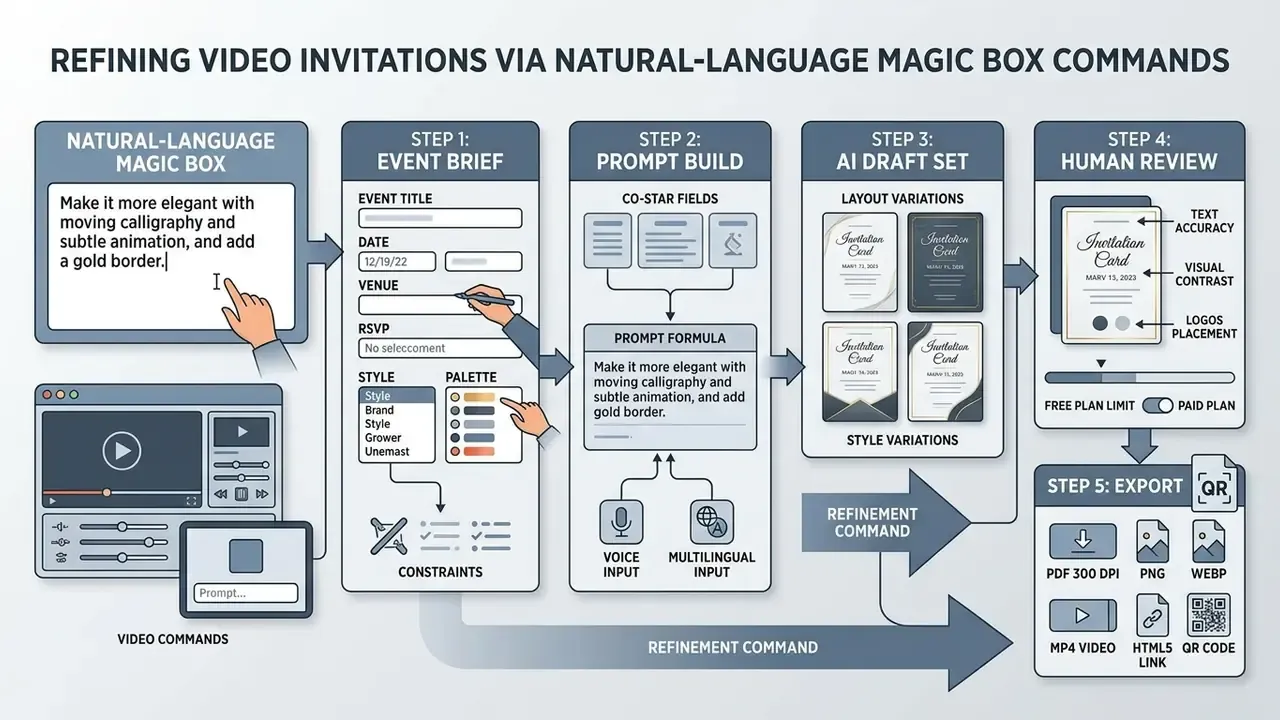
Visual pipeline illustrating the end-to-end transformation from raw text inputs to finalized multi-format exports using an ai invitation maker. Image alt text should read: "ai invitation maker workflow from event details to export".
How to Choose an AI Invitation Generator for Your Event
Choosing the right ai invitation creator means evaluating its template library, manual editing controls, export formats, and licensing rights. An effective ai invitation maker online balances automated prompt generation with precise graphic control over fonts, color palettes, and background layers.
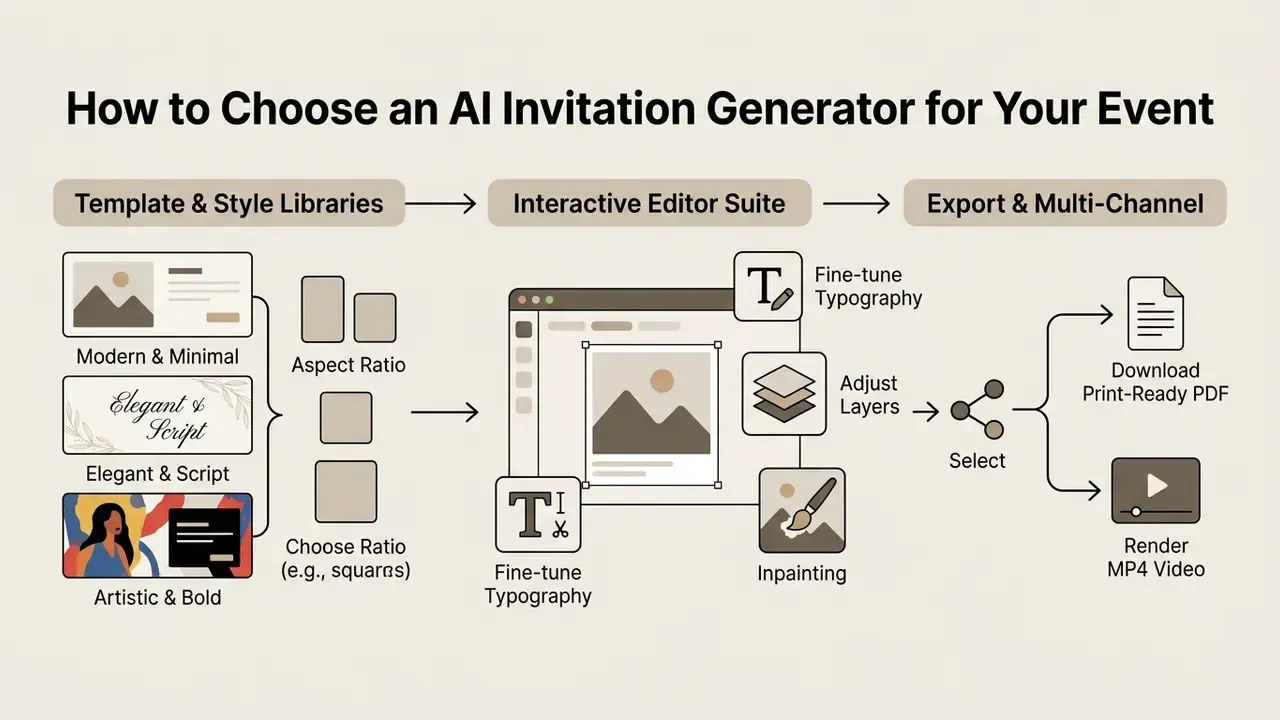
Evaluating an ai invite creator involves both generative speed and post-generation editability. A platform that produces attractive assets but hides its layers will stall production the moment someone spots a typo, because a simple text change forces a full regeneration.
Templates, Styles, and AI-Generated Visual Variations
A robust invitation maker provides pre-structured templates and visual style presets ranging from classic typography to modern graphic aesthetics. Templates act as structural baselines: essential event details stay legible while generative algorithms vary decorative elements, background textures, and color schemes. Vendor libraries in this category range from a few hundred curated layouts to 1,000+ ready-made event templates covering wedding, birthday, corporate, graduation, gala, and seasonal categories.
Empirical benchmark research by Hartmann et al. (2024) across 10,320 synthetic visual assets showed that AI-generated imagery can meet or exceed human aesthetic benchmarks when guided by structured briefs.
«In a field study with more than 173,000 impressions, AI-generated banners delivered up to 50% higher click-through rates than professional stock photography.»
With style presets inside an ai generator invitation, you can produce several visual variations for one event (casual, formal, botanical) without retyping the core details. To see how style control and prompt weighting differ between engines, review our breakdown of AI art generators and the ranked comparison of the best AI art generators.
Editor Features for Text, Images, and Layouts
In-app editing tools matter more than most buyers expect. High-performing platforms integrate canvas editors that support direct text editing, object replacement, generative fill (inpainting), and canvas expansion (outpainting). Practical parity checks: select-and-prompt object insertion, background removal or replacement, aspect-ratio expansion that generates new surrounding content, smart cropping for guest photos, and layer ordering with alignment guides.
Prioritize tools that expose discrete layers for text and background art. In a study of designer workflows by Uusitalo et al. (2024), professionals described generative AI as flexible "digital clay": you swap background elements, adjust font weights, or upload custom logos while holding alignment and brand standards steady.
«Designers treat generative AI as a material to work with: they steer, combine and refine outputs while remaining accountable for final quality.»
For asset preparation before import, whether retouching host portraits, cleaning venue photography, or normalizing exposure across a photo set, compare capabilities across AI photo editors and lightweight free photo editors.
Standard Print Dimensions and Canvas Resolutions
When preparing AI-generated invitations for commercial printing, select standard aspect ratios and hold a minimum density of 300 DPI (dots per inch) to prevent pixelation:
| Format / Usage | Physical Dimensions | Pixels at 300 DPI | Recommended Paper Stock |
|---|---|---|---|
| Casual / Save-the-Date | 4" × 6" (101.6 × 152.4 mm) | 1200 × 1800 px | 100 lb Gloss Cover |
| Formal / Wedding (A6) | 5" × 7" (127 × 177.8 mm) | 1500 × 2100 px | 120 lb Uncoated Cardstock |
| Half-Letter Versatile | 5.5" × 8.5" (139.7 × 215.9 mm) | 1650 × 2550 px | 110 lb Matte Linen |
| Detailed Corporate (A9) | 6" × 9" (152.4 × 228.6 mm) | 1800 × 2700 px | 140 lb Premium Felt |
| Digital Social Screen | 1080 × 1920 px (9:16 aspect) | N/A (72 DPI Web) | Mobile Display / MP4 |
Several generators output a fixed native canvas instead of a print size. For example 1120 × 1864 px, which equals roughly 3.73" × 6.21" at 300 DPI. That canvas prints cleanly on standard photo paper, yet it must be upscaled before it fills a 5" × 7" trim area. Add a 0.125" (3 mm) bleed on each edge and keep critical text inside a 0.25" safety margin so trimming never clips RSVP lines. Where native resolution falls short of the table above, run the export through AI image upscalers before sending files to a print vendor.
How to Create an Invitation Using AI in Five Steps
To create an invitation using ai, define event parameters, construct a structured prompt, generate visual variations, refine copy and graphics in the editor, then export the finalized file. A standardized workflow prevents generation errors, unreadable typography, and missing event information.
Follow those five steps and your ai create invitation workflow will yield professional, error-free results for personal or corporate distribution. Just testing concepts? Start with free AI image generators before spending credits on a paid plan.
- Gather Event Metadata (Title, Date, Time, Venue, RSVP)
- Formulate Prompt (Context + Objective + Style + Constraints)
- Generate Drafts via AI Generator
- Inspect & Edit (Verify Text Accuracy, Layers & Logos)
- Export & Distribute (PDF, PNG, MP4, or Share Link)
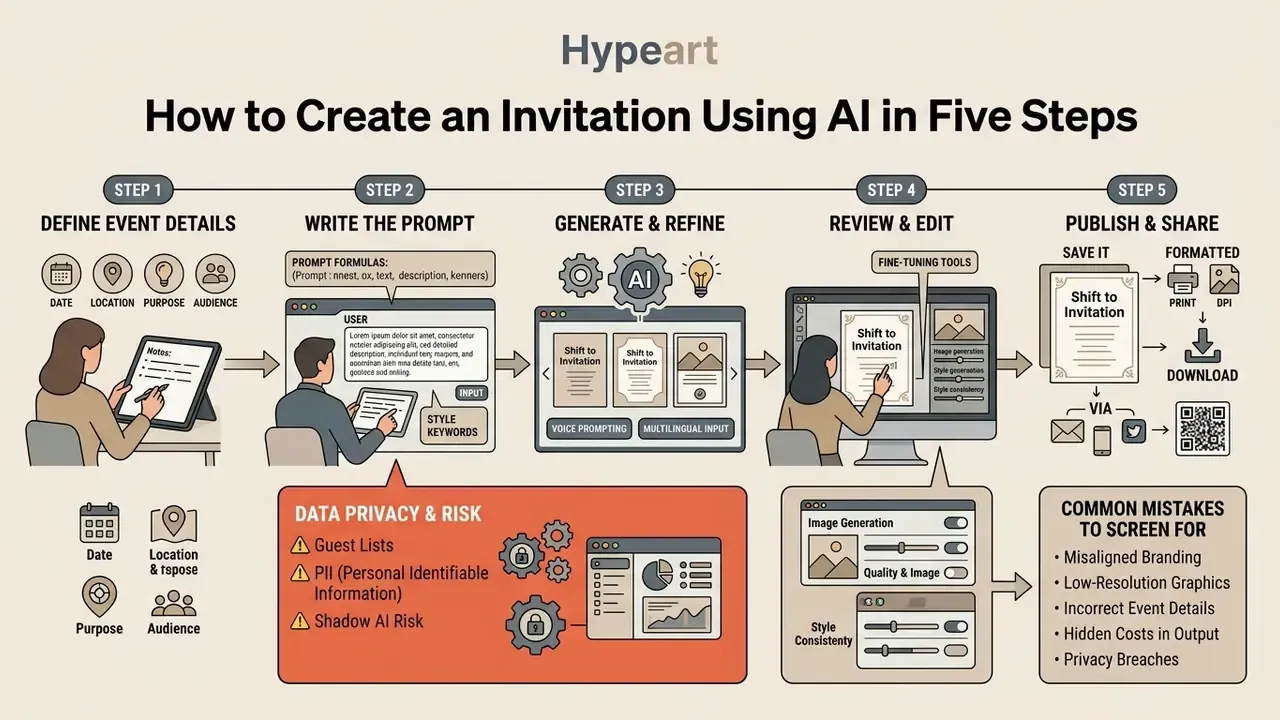
Define the Event Details Before You Generate
Before you fire off an ai create an invitation prompt, assemble every piece of mandatory event metadata in one document. Skip a logistic detail at prompt time and you will usually pay for it later, when a manually inserted line breaks the layout balance.
Every complete invitation brief must contain seven core details:
- Event Name & Purpose: A clear title indicating the nature of the gathering.
- Date & Time: Explicit calendar date, start time, and end time (include the time zone if the event is virtual).
- Venue & Physical Address: Complete street address, building or room numbers, or virtual access links.
- Host Information: Name of the individual, family, or corporate entity hosting the event.
- RSVP Deadline & Contact Method: Reply date plus phone, email, or web link instructions.
- Dress Code: Specific attire expectations (Black Tie, Business Casual, Tropical).
- Special Instructions: Parking directions, gift registry links, accessibility accommodations, dietary restrictions, or security check-in details.
⚠️ Data Privacy Callout: Guest Lists, PII, and Shadow AI Risk
Voice Prompting and Multilingual Generation
Modern generative invitation platforms accept event parameters via hands-free voice commands or text input across more than 20 global languages, including Spanish, Hindi, Arabic, Japanese, Korean, and Mandarin. Voice entry helps planners dictating details on site; multilingual output serves bilingual weddings, diaspora family events, and international corporate summits.
For non-English or mixed-language prompts, separate localized decorative commands from exact body text translations:
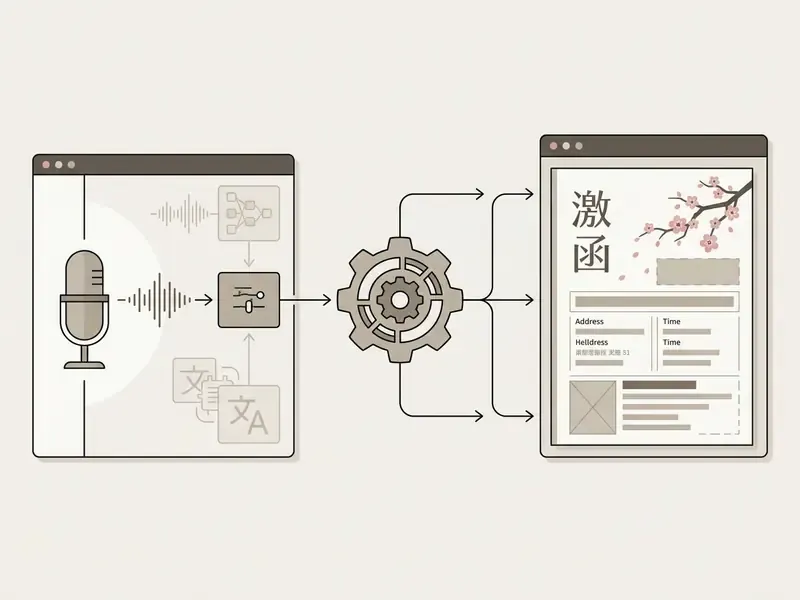
Two production rules matter for non-Latin scripts. First, verify that the selected font family actually contains the required glyph set: Devanagari, Arabic, CJK and Cyrillic characters frequently break in decorative display fonts and render as empty boxes. Second, proofread machine-rendered text with a native speaker before printing, because generative models can distort diacritics, ligatures, and right-to-left alignment even when the prompt itself is correct.
Write a Prompt for the Right Style and Content
To ai create invitation free of visual ambiguity, build the prompt with the CO-STAR framework: Context, Objective, Style, Tone, Audience, and Response format. Keep graphic background instructions separate from text copy requirements.
Research on text-to-image prompt journeys by Mahdavi Goloujeh et al. (2024) indicates that overview-plus-detail structures, combining an overall scene description with chunked visual descriptors, produce better layout coherence than unstructured keyword lists.
«Users apply several prompt structures , descriptive sentences, templates, overview-plus-detail, chunks and word sequences , to control global style and specific content.»
For example: "Create an elegant corporate gala invitation card, dark navy background with subtle gold geometric lines, modern serif typography, clean whitespace, formal tone." Then iterate. Draft, test, evaluate, refine, changing one variable per cycle so you can attribute each improvement to a specific instruction.
Review, Edit, and Publish the Final Invitation
After the model renders draft options, inspect each asset for typographical accuracy, visual contrast, and spatial balance. Confirm that every generated line is readable against background elements and free of rendering artifacts.
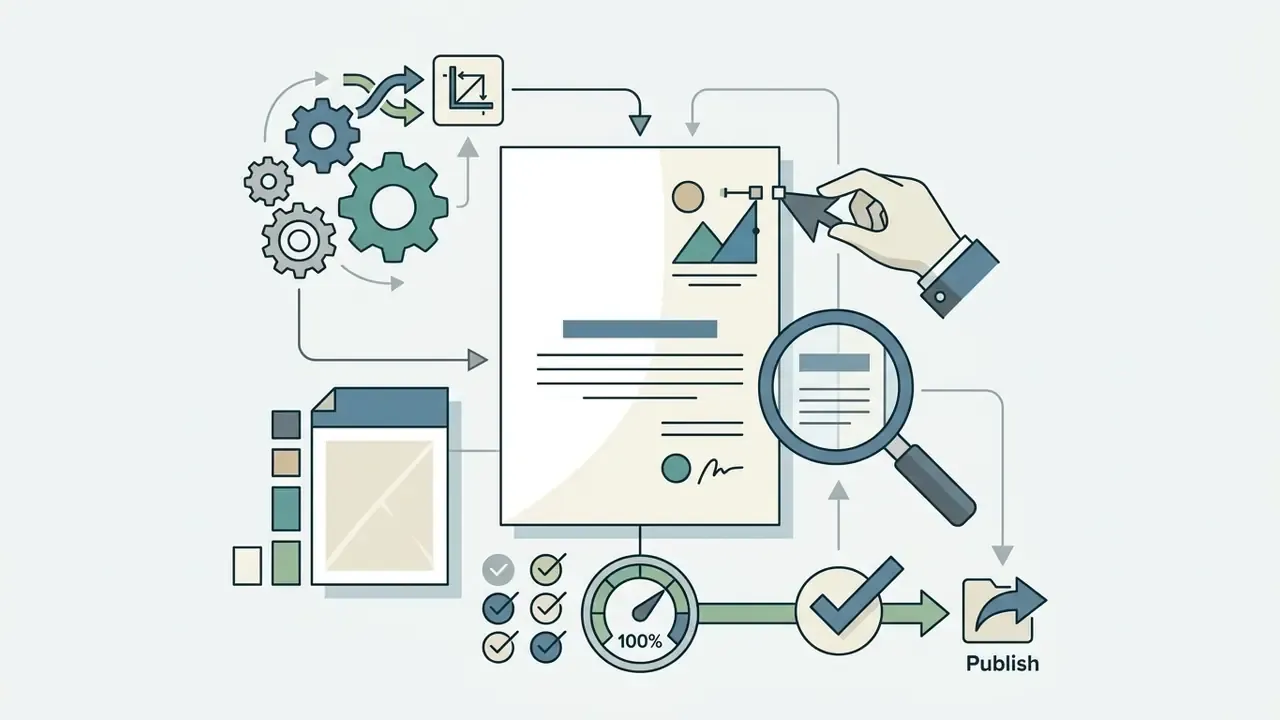
Use the built-in editor to replace generic placeholder art with high-resolution corporate logos or personal photography. Once verified, export in high-resolution PDF for commercial printing, or export optimized web graphics for email and social distribution. For corporate approvals, route the draft through a formal review state (needs work / approved) before any file leaves the workspace.
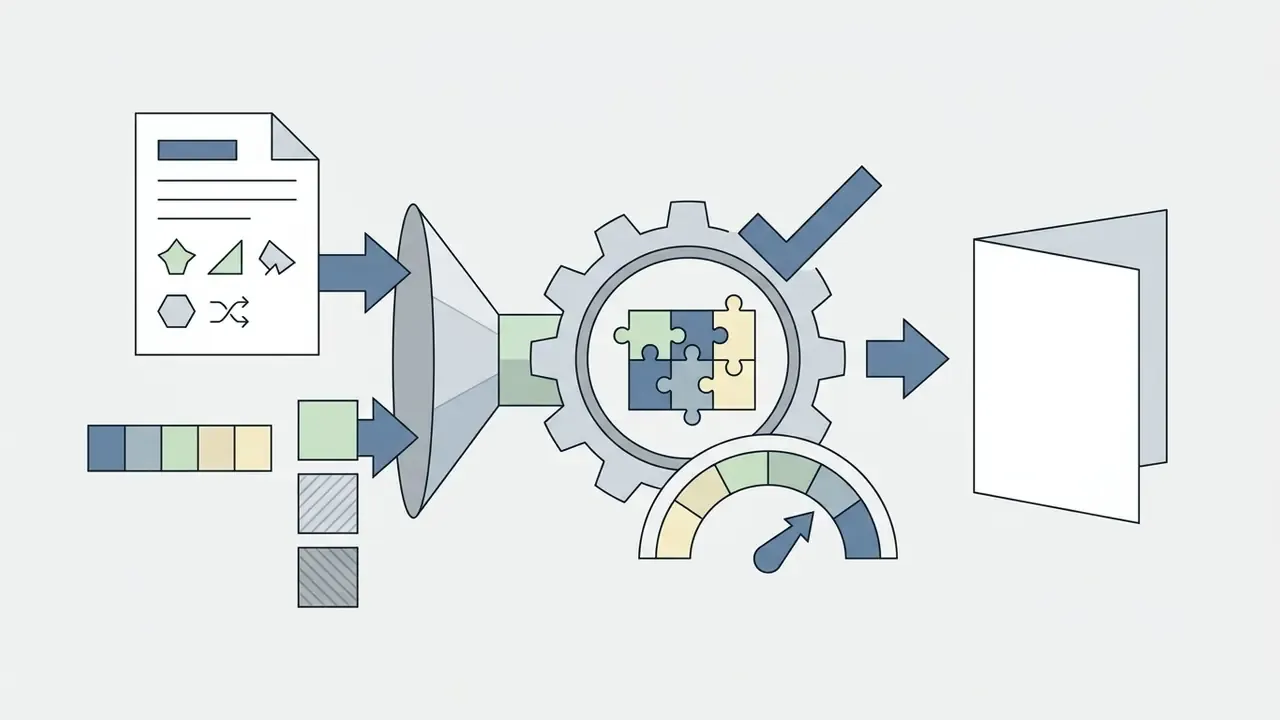
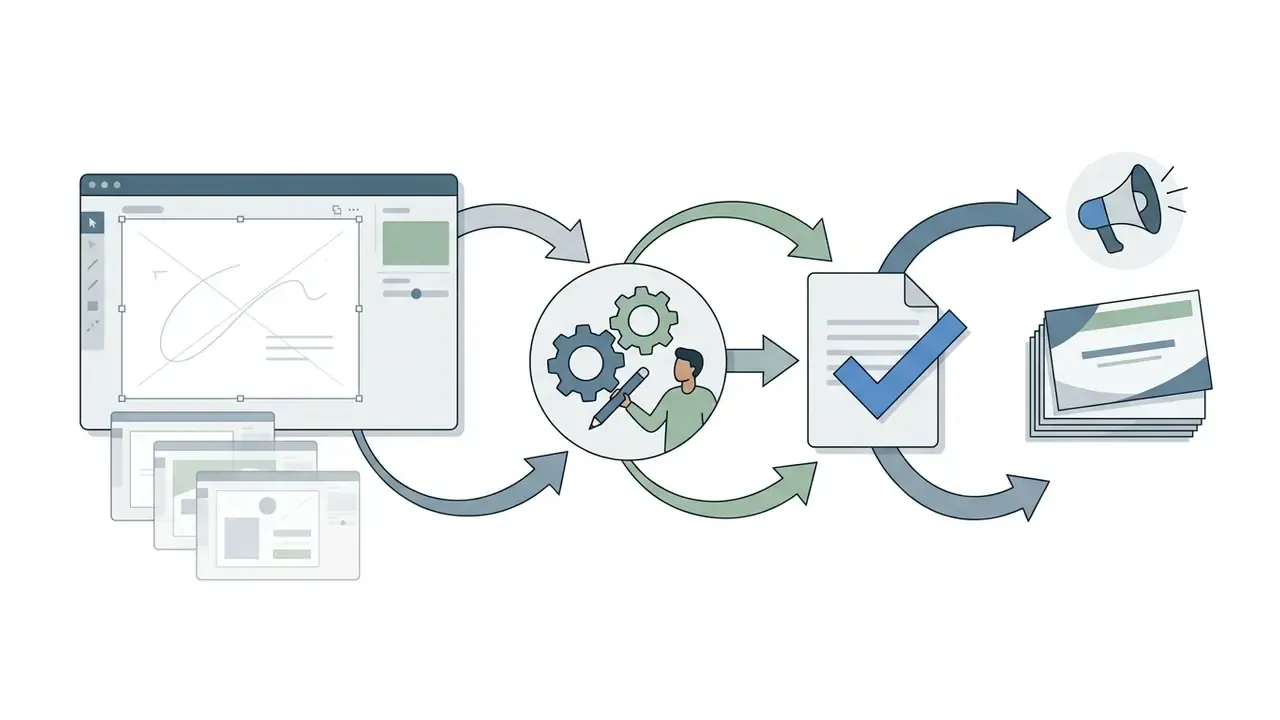
Checklist: 5 Steps to Create an AI Invitation
Common Mistakes and Risks to Screen For
Generative layout engines fail in predictable ways. Screen every draft against this list before approval:
| Failure mode | How it shows up | Fix |
|---|---|---|
| Text hallucination | Wrong weekday for the date, invented street numbers, garbled RSVP email | Retype critical fields manually in the editor; never trust generated text |
| Glyph corruption | Melted letterforms, doubled characters, broken diacritics | Replace generated text with a real editable text layer in a licensed font |
| Low effective resolution | Soft edges and visible pixels on the printed card | Regenerate at target size or upscale to 300 DPI before print |
| Contrast failure | Light script over busy floral background; unreadable at arm's length | Add a solid or scrimmed text panel; test in greyscale |
| Trim loss | RSVP line or logo clipped by the cutter | Keep a 0.25" safety margin and 0.125" bleed |
| Brand drift across a series | Save-the-date and main invite use different golds and fonts | Lock a Brand Kit and generate the whole suite from it |
| Licensing gaps | Stock photo or font not cleared for a commercial print run | Verify each embedded asset's license before distribution |
One more, less technical failure: nobody owns the final proof. Assign a single named approver.
AI Invitation Prompt Examples for Popular Events
«Experiments showed non-experts can evaluate and write descriptive prompts, but lack the stylistic vocabulary needed for fine visual control.»
That gap is exactly why reusable formulas beat improvised keyword lists: they supply the style vocabulary a non-designer would otherwise omit.
When generating invitations for personal or professional gatherings, tune the visual descriptors so the output matches attendee expectations.
Wedding and Formal Event Invitation Prompts
Formal wedding invitations need elegant typography, restrained color palettes, and a clear RSVP structure. Specify classic design elements: floral watercolors, embossed gold foil, or a clean minimalist grid. Etiquette convention favors third-person wording, spelled-out dates and times, and an RSVP line placed at the lower left or on a separate response card, with a reply-by date roughly three to four weeks before the ceremony.
Prompt Example 1 (Classic Elegance):
Prompt Example 2 (Modern Black Tie):
Prompt Example 3 (Response Card Set):
For campaigns with animated trailers or video announcements, creators often pair static invitation assets with free AI video generators and consult the comparison of free AI video generators to build a cohesive sequence without blowing the budget.
Birthday and Party Invitation Prompts
An ai party invitation generator free tier handles vibrant, high-energy designs for birthdays, anniversaries, and seasonal parties. Casual events reward expressive color schemes, festive motifs, and prominent timing cues.
Prompt Example 1 (Milestone Birthday):
Prompt Example 2 (Summer Garden Party):
Prompt Example 3 (Kids' Pool Party, 9:16 digital):
Anyone searching phrases like "create a invitation card ai" or "create ai invitation card" usually lands here first, in the casual tier, then graduates to formal templates once the print quote arrives.
Business and Baby Shower Invitation Prompts
Business event invitations demand crisp styling aligned with corporate brand identity; baby shower invites call for soft pastel palettes and gentle decorative motifs. Pastel prompts work better with explicit color assignments (blush pink background, mint accent shapes, cream text panel) so the model does not oversaturate the palette.
Prompt Example 1 (Corporate Summit):
Prompt Example 2 (Baby Shower):
Prompt Example 3 (Webinar / Virtual Event):
For specialized thematic workflows, such as cinematic posters or stylized graphics, users compare alternative image tools in our ai movie poster review, examine style-specific engines such as Ghibli-style AI image generators, or extend a card into an animated teaser with an animation maker.
Customize AI Invitations for Brand, Images, and Guests
Customizing an AI-generated invitation means replacing default background graphics with proprietary assets, applying corporate brand kits, and personalizing copy for attendee segments. That work turns a generic draft into an asset that actually reflects your organizational or personal identity. Teams without an existing mark can prototype one with AI logo generators before locking the brand kit.
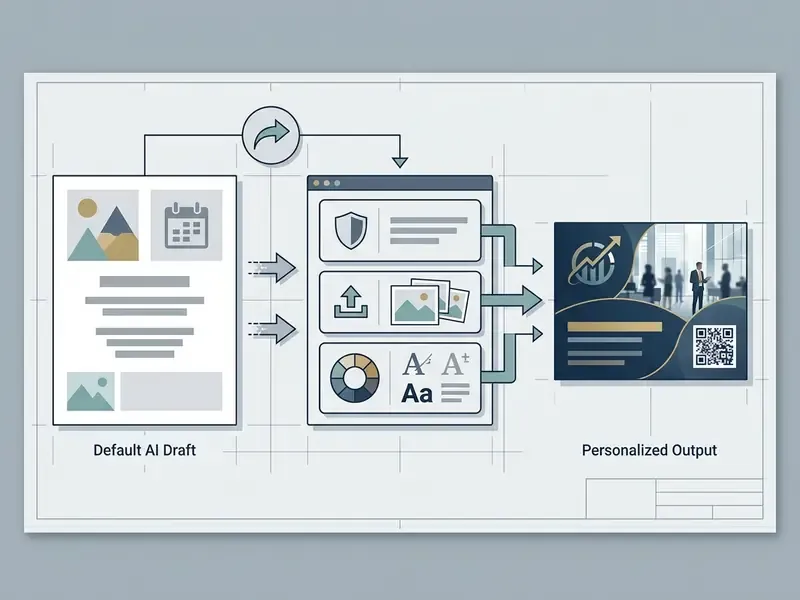
Layout discipline during customization prevents visual clutter and keeps legibility intact across digital screens and printed stock.
Add Custom Text, Logos, and Images
An ai invitation card maker online lets users import vector SVG logos, high-resolution product photography, and host headshots directly onto the generative canvas. Modern editors use object isolation, so you can swap background layers while foreground text stays put. Typical sequence: open the generated template in the editor, upload brand assets, select the placeholder object, replace it with your file or a generated alternative, then re-align to the layout grid.
When integrating custom visuals, check that uploaded files carry adequate resolution (minimum 300 DPI for print, 72 DPI for web). Replacing generic placeholder graphics with authentic photos raises trust and recipient engagement. For host portraits and speaker headshots, standardized outputs from AI headshot generators keep lighting and crop consistent across a speaker line-up, and AI outpainting tools can extend a tight photo to fill a full-bleed card.
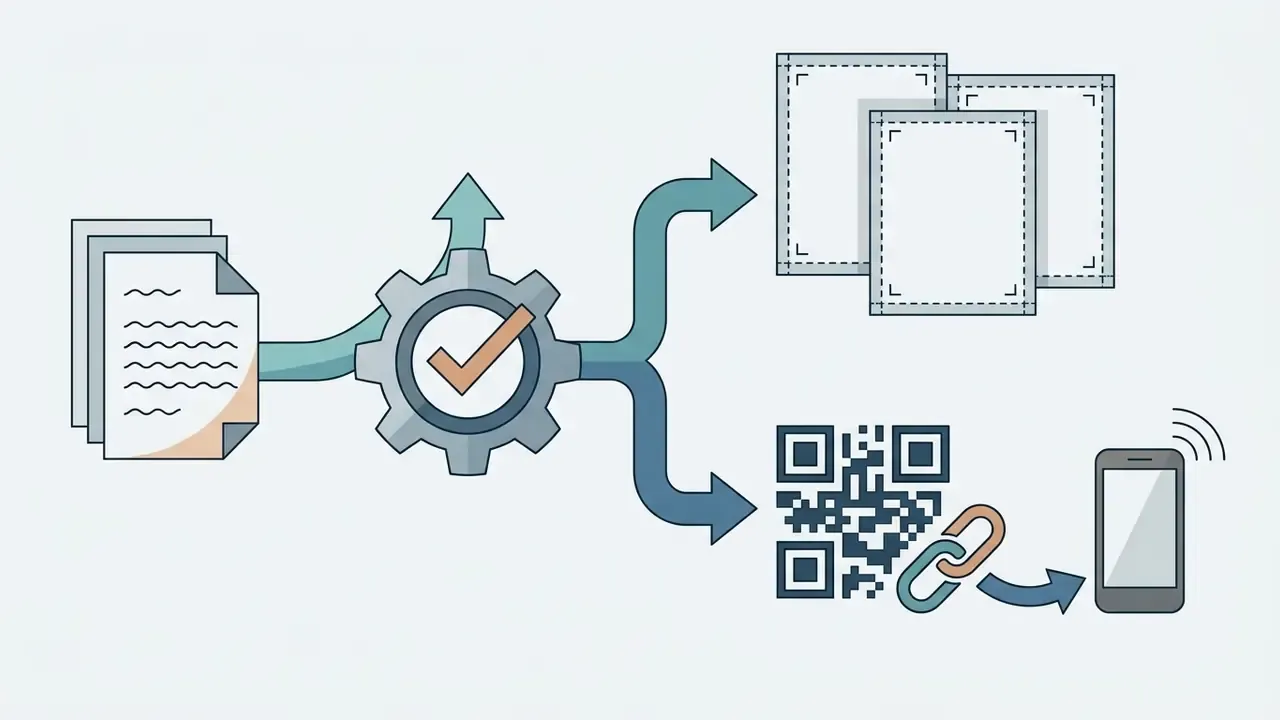
Integrating Dynamic QR Codes, Web Embeds, and Multi-Asset Event Suites
To connect printed cards with digital RSVP management, add dynamic vector QR codes and a unified design suite:
- Asset 1: Save-the-Date Card (minimalist teaser layout, 4" × 6").
- Asset 2: Primary Event Invitation (full detail card with venue details and QR code, 5" × 7").
- Asset 3: Post-Event Thank-You Note (matching aesthetic, photo placeholder overlay, 4" × 6").
- Dynamic QR Code EmbeddingGenerate a high-resolution (300 DPI) vector QR code linking to your digital RSVP portal or a map direction pin. Place it on the back or in the bottom-right margin with a minimum bounding box of 0.8" × 0.8" for reliable mobile scanning. Keep a quiet zone equal to four modules around the code and avoid patterned artwork behind it.
- HTML Web EmbeddingFor corporate event landing pages, export your interactive digital invitation as an IFRAME or web component. Paste the generated embed script into your CMS (WordPress, Webflow) so interactive RSVP forms keep working. Test on mobile viewports, since fixed-width invitation canvases overflow narrow screens more often than teams expect.
- Unified Multi-Asset Event Suites (Collages)Rather than designing isolated cards, generate a complete three-part event set from a single Brand Kit:
Distribution options for the finished suite include direct share links, QR codes, email, WhatsApp, LinkedIn, Instagram, and print vendor hand-off, all drawn from the same locked design system.
Real-Time Multiplayer Collaboration for Event Operations
Corporate galas and large family events both need team review, oddly for the same reason: too many stakeholders, one deadline. Modern AI invitation suites support multiplayer canvas editing so planners, designers, and hosts work at once:
- Role-Based Permissions 'Editor' access for copywriters, 'Viewer/Commenter' roles for client sign-offs.
- Live Version Control Track prompt revisions and revert visual layers to earlier generation states when manual edits break alignment.
- Centralized Asset Sharing Store corporate logos, brand palettes, and host signatures in a shared workspace directory.
- Comment Resolution Gate Require every open comment to be resolved and the file marked "Approved" before export, mirroring review states used in professional publishing workflows.
Keep a Consistent Brand and Event Style
For visual cohesion across multi-channel event promotion, lock specifications in an integrated Brand Kit. A standard kit defines approved color hex codes, primary and secondary font families, icon styles, and logo placement rules.
According to institutional event marketing guidelines (for example Bentley University Brand Standards, 2026), limiting typography to one or two font families per document and holding a two- to three-color palette preserves hierarchy and professional authority across event communications. University email-invitation standards add a further constraint: unit signatures, line breaks, and center alignment must stay consistent across every graphic in a series.
«Designers in UX and industrial design filter AI suggestions, adapting them to existing visual identities and brand guidelines.»
Free AI Invitation Maker Plans, Limits, and Commercial Use
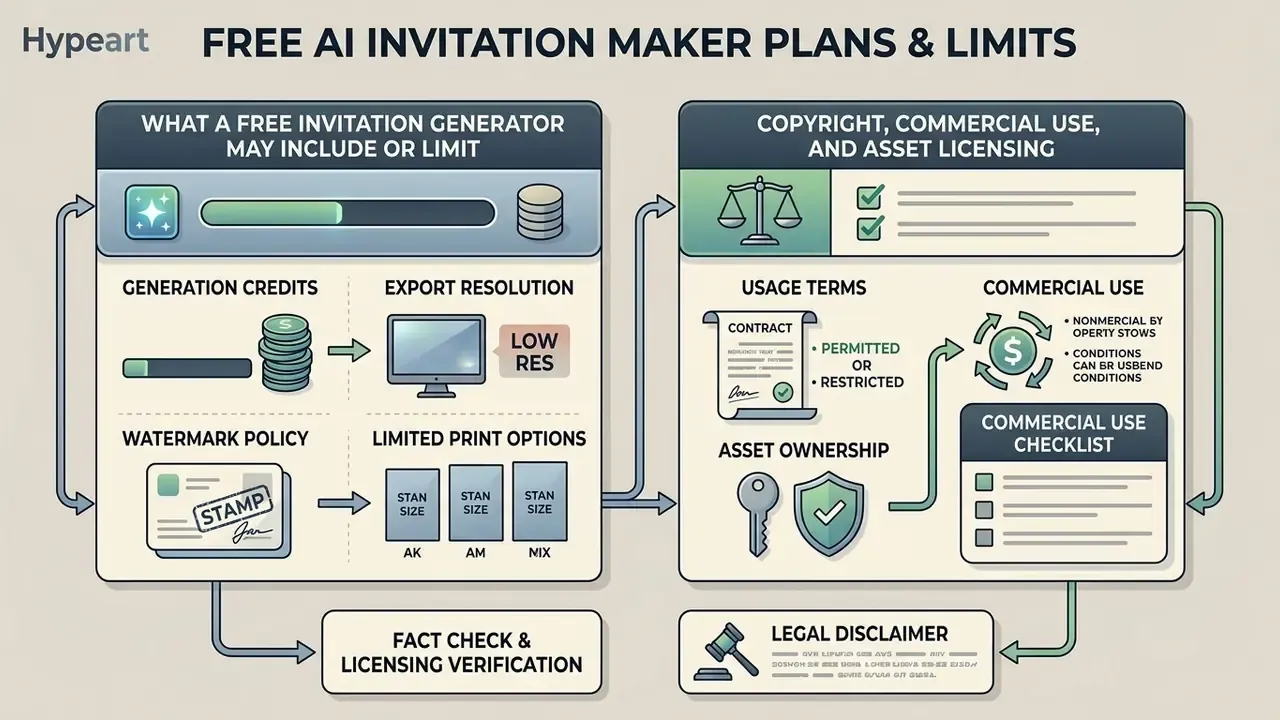
Choosing between a free and subscription-based ai invitation generator free platform comes down to generation credits, export resolutions, watermark policies, and commercial licensing terms. Free tiers cover basic personal creation; commercial distribution usually requires a paid plan or explicit asset licensing. Buyers comparing entry points can also review free AI image generators with no sign-up to test prompt quality before creating an account.
| Feature Category | Free Plan Tier | Paid Subscription Tier |
|---|---|---|
| Generation Quota | 5 to 50 registration credits per month | 200 to 2,500 recurring credits per month |
| Export Formats | Standard PNG, JPG (72 to 150 DPI) | Print-ready PDF, vector SVG, 4K video MP4 |
| Watermark Policy | Visible platform watermark added | Watermark-free clean exports |
| Editing Suite | Basic text swap and template picker | Advanced layer editing, inpainting, Brand Kit |
| Collaboration | Single-user workspace | Multiplayer editing, roles, version history |
| Commercial License | Personal / non-commercial use only | Full commercial exploitation and resale rights |
| Typical platforms in this category | Canva Free, Adobe Express Free, Microsoft Designer, Template.net free tier, MolyPix trial credits, InVideo AI free tier | Canva Pro, Adobe Express Premium, Visme Starter/Pro, InVideo paid plans, ImagineArt Standard/Ultimate |
Reading those boundaries early prevents surprise watermarks and licensing conflicts at launch. Credit accounting differs by vendor: some charge per generation (three credits per AI design, or four to twelve credits per invitation set), others cap monthly invitation counts, so normalize the unit before comparing prices.
What a Free Invitation Generator May Include or Limit
Free tiers from an ai invitation maker free or ai free invitation maker service usually restrict users to standard-definition image downloads, basic templates, and capped monthly generation credits. Free exports frequently carry a vendor watermark or attribution logo in the lower margin. Free video tiers commonly cap output at 480p to 720p and five to ten seconds per clip, while free image tiers limit daily generations and hide advanced aspect ratios.
A paid subscription unlocks high-resolution PDF exports with print bleed marks, uncompressed video rendering, background removal, priority queue processing during peak load, and, most important for businesses, documented commercial-use terms. Export problems still happen, of course; when they do, start with AI Media Support and Troubleshooting.
Copyright, Commercial Use, and Asset Licensing Checks
Legal rights over AI-generated visual assets depend on human creative input and platform-specific Terms of Service. In both the United States (US Copyright Office Guidance, 2025) and the European Union (EU IP Office Study, 2025), purely machine-generated graphics created without substantial human modification fall into the public domain and cannot be registered under traditional copyright.
«Purely machine-generated outputs without substantial human intervention are not protected by EU copyright and pass into the public domain.»
«Prompting alone is insufficient for authorship; a human must determine the expressive elements of the work.» , U.S. Copyright Office, "Copyright and Artificial Intelligence, Part 2: Copyrightability" (January 2025). https://www.copyright.gov/ai/copyright-and-artificial-intelligence-part-2-copyrightability-report.pdf
Two practical consequences for event teams. First, your human contributions, meaning the selection and arrangement of layout, edited copy, uploaded photography, and brand typography, can be protectable even when the generated background is not. Second, absence of copyright protection is not permission: commercial use is governed by the platform license plus the license of every embedded stock asset, font, and icon. Vendor terms diverge here, with several major providers assigning output rights to the customer while others attach plan-based or attribution conditions. Disputes in this area move fast, so it is worth watching case law and compare options before a large paid run.
Fact Check & Licensing Verification Notice:
When you add third-party stock photos, decorative graphics, or proprietary fonts to an AI layout, confirm that each asset grants commercial usage rights. A minimal pre-publication checklist: (1) confirm the plan tier that generated the file carries a commercial license; (2) confirm font EULAs permit embedding in print and PDF distribution; (3) confirm stock imagery is not restricted to editorial use; (4) confirm no recognizable person, trademark, or venue mark requires a release; (5) archive licenses and receipts with the final artwork. For complex deployment architectures, creative operations leaders and developers should read our API documentation, where you can see the overview, alongside the AI Media Commercial-Use guidelines.
AI Invitation Maker FAQ
What Should an Invitation Include and What Does RSVP Mean?
A complete invitation states the event title, host name or names, date, start and end time, venue name, physical address or virtual link, dress code, and RSVP instructions. The term RSVP comes from the French phrase "Répondez s'il vous plaît," which translates as "Please respond." An RSVP section should state the reply deadline, preferred contact channel (website, email, phone), attendance headcount options, and meal selection choices when applicable. Accessible invitations also list accommodation and dietary-request contacts.
How Long Does It Take to Make an AI Invitation?
Generating an initial invitation layout takes seconds rather than minutes; vendor documentation for comparable generative document workflows reports 30 to 60 seconds per draft (Gamma product documentation, 2026), and invitation platforms advertise batches of four cards in roughly one minute. Manual refinement, meaning copy editing, logo uploads, color adjustments, and export configuration, generally adds three to ten minutes depending on complexity. Peer-reviewed observation of prompt-based editing sessions reports a mean of 47 seconds per individual prompt edit, a useful planning figure for iteration-heavy projects.
«About 62% of creative professionals report generative AI cuts task time by roughly 20%, and 74% expect faster content creation.» , Adobe Global Creative Survey (2024). https://www.adobe.com/content/dam/www/us/en/about-adobe/pdfs/adobe-global-creative-survey-2024.pdf
What Is the Best Size and Resolution for a Printed AI Invitation?
Use 5" × 7" (1500 × 2100 px at 300 DPI) for weddings and formal events, 4" × 6" (1200 × 1800 px) for casual parties and save-the-dates, 5.5" × 8.5" for a versatile half-letter format, and 6" × 9" for detail-heavy corporate invitations. Always add 0.125" bleed and keep text inside a 0.25" safety margin.
Can I Generate Invitations in Languages Other Than English?
Yes. Leading platforms accept prompts and body text in 20+ languages, including Spanish, Hindi, Arabic, Japanese, Korean and Mandarin, and several accept voice input. Verify glyph coverage in your chosen font and have a native speaker proof the final card before printing.
Can I Add a QR Code for RSVPs?
Yes. Export a vector QR code at 300 DPI, size it at a minimum of 0.8" × 0.8", preserve a clear quiet zone, and link it to your RSVP portal or map pin. For web pages, use the platform's embed code to place the interactive invitation and RSVP form on your event site.
Are AI-Generated Invitations Safe for Confidential Corporate Events?
Only with controls. Keep guest lists and unannounced details out of consumer endpoints, choose plans with documented no-training-on-customer-data terms, merge personal data after generation, and route final assets through internal review before distribution. Assign one accountable owner per asset. No owner, no export.
Technical Specifications & Resource Navigation
For creative teams extending generative asset pipelines beyond invitation design, explore the wider suite of comparisons, converters, and workflow calculators:
- Inspect production pricing models and asset credits: Pricing Overview
- Compare leading generative tools and art engines: Best AI Art Generators
- Access workflow automation tools and estimation models: Calculators & Utilities
- Troubleshoot asset export errors and rendering bugs: Support and Troubleshooting
- Review legal frameworks and regulatory compliance: Litigation & Copyright Case Studies
- Plan animated invitation teasers for social channels: YouTube video editor workflows
- Explore related creative media tools such as the AI Voice Generator, the online photo editor guide, or the Free Photo Editor Guide
- Browse every definition in one place: AI Media Glossary
Editorial Corrections Log (Appendix A)
For transparency, the following earlier phrasings were superseded in this revision; corrected versions appear in the main text above.
- Superseded: "According to a 2024 global study by Adobe surveying 2,541 creative professionals, image generation represents the single most common generative AI task, with 78% of creative assets incorporating generative capabilities to accelerate initial drafting and layout exploration." Reason: the 78% figure applies to images produced by surveyed US creative professionals, not to creative assets overall.
- Superseded: "By deploying automated formatting across email and messaging channels, the team reduced initial production timelines from five days to under twenty minutes while preserving brand consistency across all touchpoints." Reason: the specific five-day-to-twenty-minute figures are not supported by a citable source; the claim has been reformulated around vendor-documented generation timings.