"In enterprise AI adoption, autonomy without verifiable controls is just unquantified liability. Evaluating an open-source AI video generator deserves the same rigor as any core software dependency: data lineage, auditable model weights, transparent hardware costs, and hard intellectual-property boundaries."
Last updated: February 2026 · Reviewed by: AI Governance & Model Risk editorial desk · Testing hardware: NVIDIA RTX 4090 (24 GB), RTX 3080 (10 GB), rented A100 80 GB instances
Executive Summary
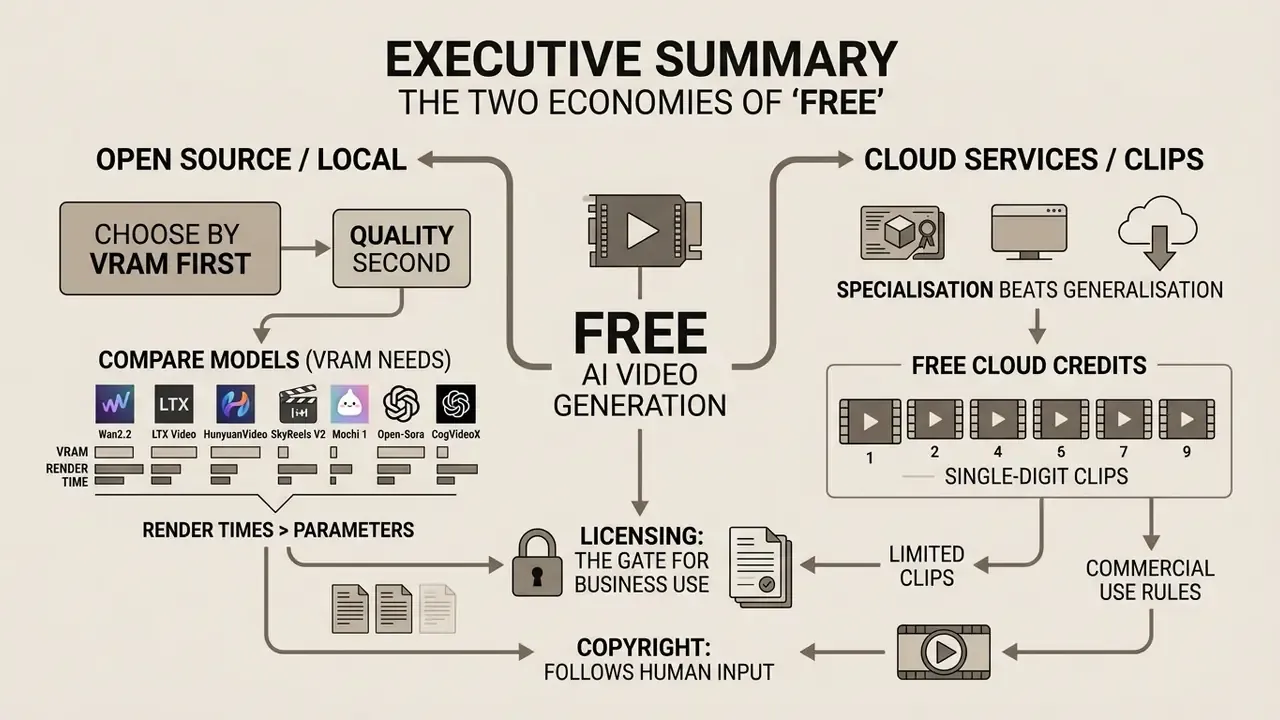
- "Free" splits into two economies. Open-weight models (Wan2.2, LTX Video, HunyuanVideo, Mochi 1, Open-Sora, CogVideoX) are free software: you pay in VRAM, electricity and setup hours. Hosted free tiers are free compute: you pay in credits, watermarks, queue position and restricted commercial rights.
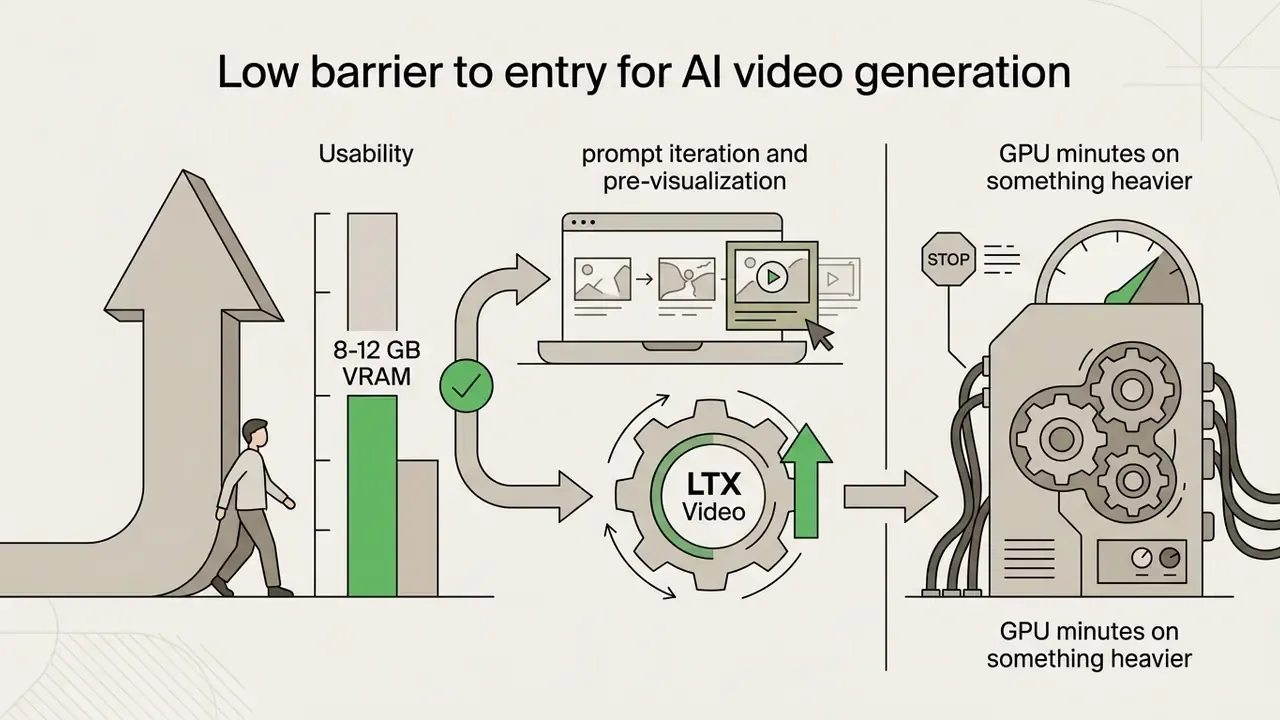
- Pick by VRAM first, quality second. 8-12 GB → Wan2.2-1.3B or LTX Video; 16-24 GB → Wan2.2-TI2V-5B, Wan 14B (FP8), LTX Video un-quantized; 24 GB+ → HunyuanVideo, Mochi 1 native, Wan2.2-14B BF16; 80 GB class → full-resolution HunyuanVideo and Open-Sora training runs.
- Render times matter more than parameter counts. On an RTX 4090 a 5-second 720p clip takes under 2 minutes with LTX Video and 3-5 minutes with Wan2.2-14B (FP8). On an RTX 3080 the same jobs take 6-8 and 12-18 minutes. First-time environment setup (Python, CUDA, PyTorch, ComfyUI, custom nodes) realistically costs 4-8 hours.
- Free cloud credits are measured in single-digit clips. Runway's 125 one-time credits cover roughly two 5-second Gen-4.5 renders (60 credits each). Pika's 80 monthly credits cover about six 480p clips (12 credits each). PixVerse V6 bills 9 credits/second at 720p, 12 with audio. Genmo's 250 lifetime credits equal two Mochi 1 generations (about $0.33 of H100 compute per clip).
- Specialisation beats generalisation. Wan 2.2 renders legible English and Chinese on-screen text. SkyReels V2 holds continuity across 15-30 second sequences. HunyuanVideo leads on human motion and facial stability. LTX Video wins on iteration speed. Pika's crush / melt / inflate / explode presets win on social novelty.
- Licensing is the gate for business use. Apache-2.0 covers Wan2.2, Mochi 1, Open-Sora and the LTX codebase, but Lightricks requires a paid commercial agreement above $10M annual revenue, and hosted free tiers frequently reserve commercial rights for paying subscribers.
- Copyright follows human input. Under U.S. Copyright Office guidance, fully automated output is not protectable. Documented human control over prompts, sequencing and grading is what makes a commercial video defensible.
What "Open Source AI Video Generator Free" Means in Practice
An open source ai video generator free model ships downloadable code and model weights under a permissive license. A free online service ships hosted generation, bounded by cloud credits, queue waits and vendor terms. Same word, two very different exposures.
Choosing an open-weight architecture lets an organization inspect the codebase, run inference locally, and drop recurring SaaS fees. It also shifts spend: away from software licensing, straight into GPU compute and infrastructure engineering. Nothing disappears, it just moves line items.
That distinction is the whole decision for technical buyers. For foundational terminology, our glossary hub covers the underlying concepts.
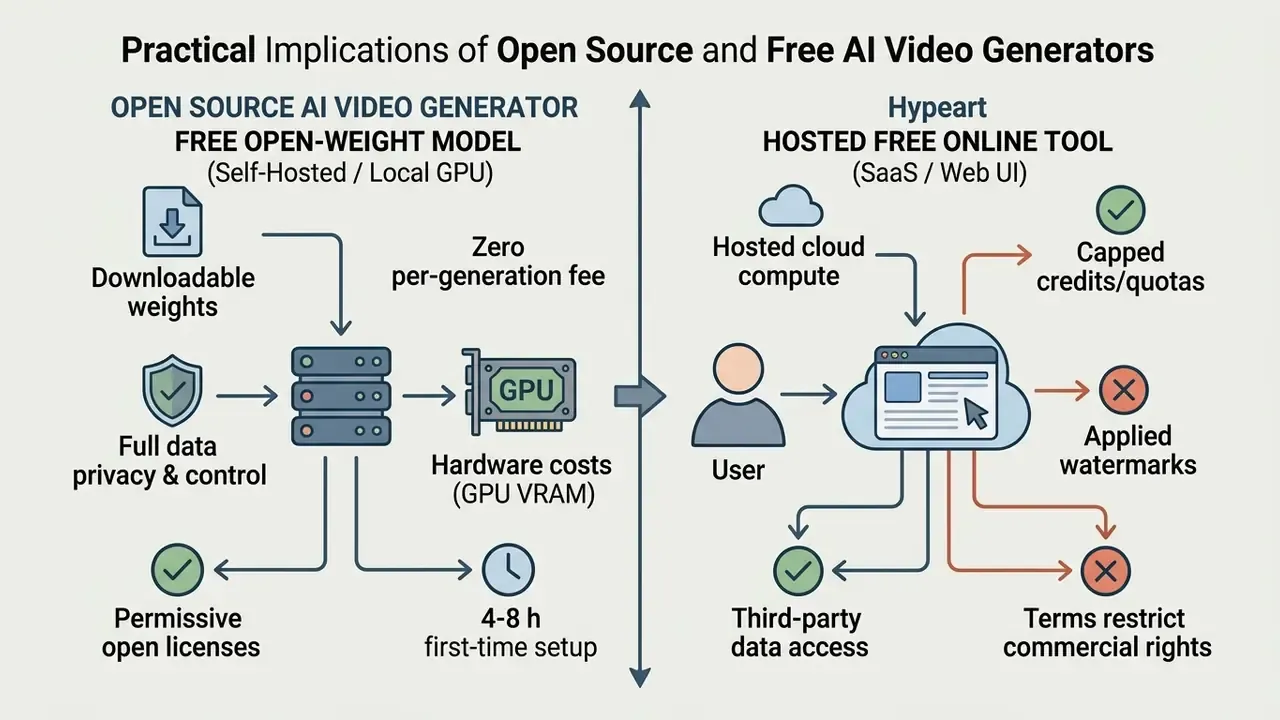
Open-Source Model, Free Service and Free Credits: Where the Difference Lies
An open-source model gives you weights and architecture to run on private hardware. A hosted free tier gives you cloud inference under credit limits and usage quotas. One is an asset; the other is an allowance.
When evaluating a free ai video generator open source pipeline, separate two things: model licensing and execution economics. Permissively licensed repositories allow unlimited local inference with no per-video fee. Cloud platforms, by contrast, hand out monthly or one-time credits that evaporate during iterative prompting. Anyone who has re-rolled a shot eight times to fix a hand knows how fast that goes.
Published cloud benchmarks put a single NVIDIA H100 node at roughly $1.00 per host-hour. So credit caps and watermarks are not stinginess. They are arithmetic.
«Hosting a single NVIDIA H100 node costs roughly $1.00 per host-hour, which makes free-credit ceilings an economic inevitability for hosted platforms». — AWS Marketplace Friendli Container Schedule (2025). https://aws.amazon.com/marketplace/pp/prodview-friendli-container
Teams that need predictable numbers can model cloud versus self-hosted ownership with our AI Media Pricing Guides. There is also a third category, frequently mislabeled as open source: "unlimited" consumer web tools. Community reports describe Meta.ai producing extendable, watermark-free clips up to 21 seconds, and Grok Imagine allowing more daily generations before reset. Neither publishes downloadable weights. So neither gives you data isolation, auditability or fine-tuning.
Shadow-AI control checklist for regulated teams. Free web tiers are frictionless, which makes them the most common route for uncontrolled data egress:
Checklist0 / 6
That last line is the governance principle in miniature: no evidence, no autonomy.
What Text-to-Video and Image-to-Video Models Actually Solve
Text-to-video (T2V) models build a whole dynamic scene from a written prompt. Image-to-video (I2V) architectures take a static source frame as a visual anchor, then animate motion across the following frames.
In T2V workflows, prompts must define subject appearance, lighting, camera trajectory and action. The network synthesizes identity and motion mechanics at once, from latent space. A deeper breakdown of prompt anatomy and model families sits in our guide to text-to-video AI tools.
I2V works the other way. It preserves the detail of the initial image, a product shot or a brand asset, and spends compute on smooth temporal movement instead. Practitioners handling product photography or character continuity should read our reference on image-to-video AI conditioning. The prompting rule inverts here: describe motion, not subject. Subject motion, background motion, camera motion. Those are the three levers, because the uploaded frame already fixes appearance.
Modern pipelines lean on I2V heavily to turn static promotional assets into reels and product demos. Teams scaling automated asset production often add the dedicated platforms analyzed in our ai content creation guide.
Which Open-Source AI Video Models Are Available for Free
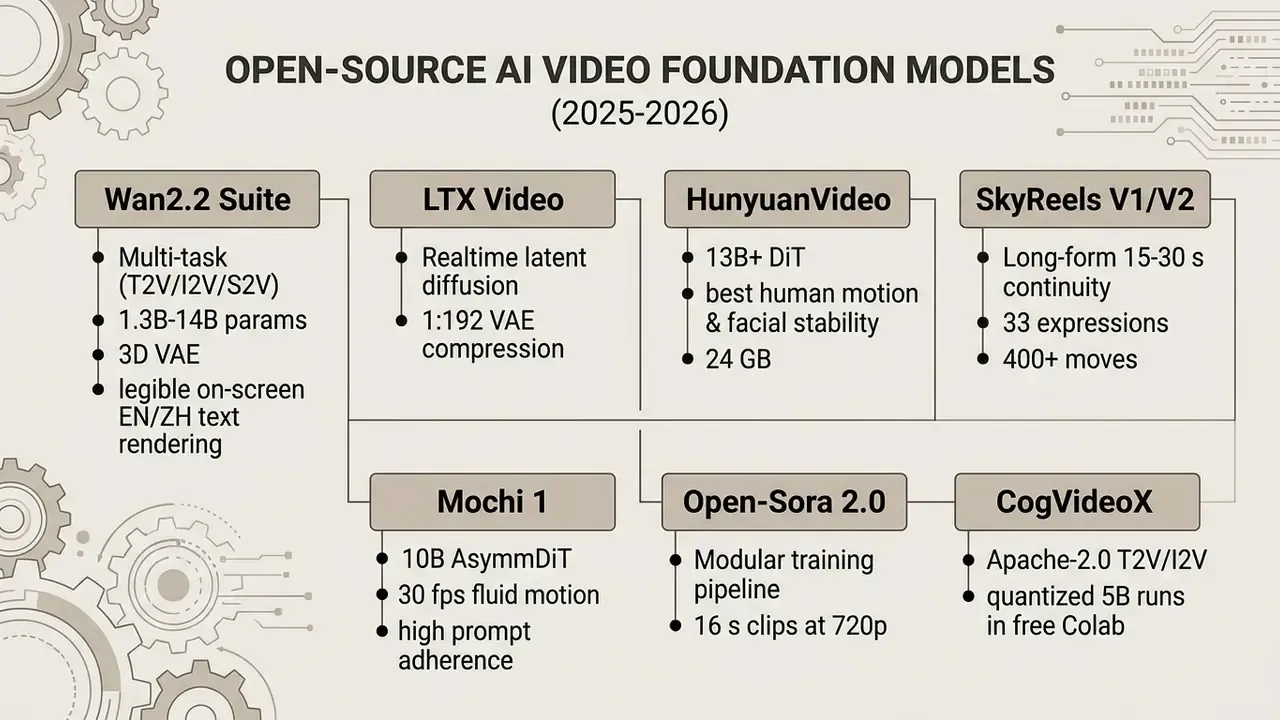
The leading free open source ai video generation tools in 2026 are Wan2.2, LTX Video, HunyuanVideo, SkyReels V2, Mochi 1, Open-Sora and CogVideoX. All ship open weights for text-to-video and image-to-video across local and cloud environments.
Choosing among them is mostly a hardware-matching exercise: parameter scale and architecture against the GPUs you actually have. The current landscape runs from lightweight models on consumer cards to foundation transformers that assume data-center accelerators.
Master Comparison Matrix
Shortlisting a free open source video generator means weighing prompt compliance, motion fluidity, VRAM appetite and license permissions together. The matrix below consolidates repository data, model cards and published benchmark reports. Read it first, then dive into the model notes.
| Model | Primary Generation Modes | Local Deployment Capability | Cloud / Hosted Options | Motion & Camera Control | VRAM Hardware Requirements | Free Tier Limitations (Service Side) | License & Commercial Use Terms |
|---|---|---|---|---|---|---|---|
| Wan2.2 | Text-to-Video, Image-to-Video, Speech-to-Video | Full GitHub repo & weight access; RTX 4090 for 720p TI2V-5B | Demos on wan.video, ModelScope, Hugging Face, slop.club | Advanced trajectory control via Wan-Move; camera conditioning via Wonder | 1.3B: ~8.2 GB; 5B: ~12-16 GB; 14B: 24 GB+ (FP8/offload) | Platform-dependent queue times and credit caps on public demos | Apache-2.0; repository maintainers claim no rights over output content |
| LTX Video | Text-to-Video, Image-to-Video, Synchronized Audio-Video | Full PyTorch / ComfyUI integration; Windows & Linux support | Hosted API endpoints & third-party partner playgrounds | Camera-aware motion logic, fine-grained LoRA splines | 12-16 GB VRAM minimum; 32 GB+ recommended un-quantized | Hosted third-party APIs enforce credit quotas; local runs uncapped | Apache-2.0 for code; commercial license required if enterprise revenue >$10M |
| HunyuanVideo | Text-to-Video, Image-to-Video | Diffusers + ComfyUI; FP8 weights and temporal tiling for consumer cards | Community Spaces, A100/H100 rentals | Prompt-level camera language; strongest physical plausibility | 24 GB comfortable; 8-16 GB only with FP8 + tiling (quality cost); 80 GB for full quality | Hosted demos throttle resolution and queue | Open weights under Tencent community license; verify per-repo terms before commercial release |
| SkyReels V1 / V2 | Text-to-Video, Image-to-Video, long-form sequences | Hunyuan-derived fine-tune; ComfyUI nodes available | Community hosted endpoints | 33 facial-expression presets, 400+ motion types, extended temporal window | 16-24 GB for usable output | Hosted demos limited by daily generations | Fine-tune inherits base-model terms; audit both licenses |
| Mochi 1 | Text-to-Video (480p at 30 fps, up to 5.4 s) | Open weights on Hugging Face; local CLI & ComfyUI nodes | Genmo Web Playground (credit-based free tier) | Superior fluid motion physics and prompt adherence | ~60 GB native single-GPU; ~20 GB optimized in ComfyUI | Genmo free tier: 250 lifetime credits (2 clips), watermarked exports | Apache-2.0 for model weights; hosted terms govern web platform exports |
| Open-Sora 2.0 | Text-to-Image, Text-to-Video, Image-to-Video (up to 16 s at 720p) | Complete end-to-end training and inference scripts | Developer spaces on Hugging Face & community deployments | Controllable motion dynamics across arbitrary aspect ratios | Inference: 16-24 GB; full training requires multi-GPU clusters | Self-hosted code has zero limits; external spaces impose quotas | Apache-2.0; permits commercial modification and derived model redistribution |
| CogVideoX (2B/5B) | Text-to-Video, Image-to-Video | Diffusers pipeline, quantized 5B runs on 12 GB | Free Google Colab notebooks (~30 min per clip) | Basic camera/motion prompting | 12-16 GB quantized; 24 GB comfortable | Colab session timeouts and compute-unit exhaustion | Apache-2.0 code; permissive commercial use with model-card review |
To weigh these against closed commercial services, see our AI Media Comparison Matrices, our ranking of the best AI video generator platforms, and our guide to the best free AI video generator tools.
Wan2.2: The Universal Model for Text-to-Video and Image-to-Video
Wan2.2, built by the Wan-Video team at Alibaba, is an open-weight diffusion transformer suite covering text-to-video, image-to-video, speech-to-video and character animation, across both resource-efficient and high-parameter variants.
The suite runs a custom 3D causal VAE with spatiotemporal compression of , which is what makes high-resolution latent modeling affordable on a single card.
«Wan2.2 is trained on billions of images and videos and consistently outperforms existing open-source models and leading commercial solutions across multiple internal and external benchmarks». — Wan Technical Report, Wan-Video / Alibaba (2025). https://github.com/Wan-Video/Wan2.2
The 1.3-billion parameter variant (T2V-1.3B) fits in 8.19 GB of VRAM, which brings basic T2V to mid-range consumer GPUs. The 5-billion parameter TI2V-5B delivers 720p at 24 fps on hardware like the RTX 4090.
Updated hardware note. TI2V-5B is comfortable on one 4090. The 14B variants are not: they do not fit natively below 24 GB. On 16-24 GB cards they need FP8 quantization plus sequential VRAM offloading, which stretches a 5-second 720p render from 3-5 minutes (4090, FP8) to 12-18 minutes on a 3080-class card. Full BF16 inference at 14B assumes 32-80 GB accelerators.
For high-end production, Wan offers 14-billion parameter models (T2V-A14B and I2V-A14B) plus specialized extensions:
- Mixture-of-Experts routing in the 14B tier splits high-noise and low-noise experts, handling scene layout and detail refinement in separate passes. That is the mechanism behind Wan's cinematic lighting and composition control: pan, tilt, dolly, arc, crane, orbit, plus last-frame conditioning.
On-screen text rendering, the underrated differentiator. Unlike most diffusion video networks, Wan 2.2 reliably renders readable text in English and Chinese inside the frame. That makes it the pragmatic default for advertising lower-thirds, packaging copy, price tags, UI mockups and localized training subtitles, categories where competing open models produce unusable glyph soup. Typographic perfection still belongs in post. Wan just reduces how often post is mandatory.
All Wan2.2 code and weights ship under Apache-2.0, so commercial use carries no model-level royalty.


LTX Video: The Fast Open-Source Option for Controllable Clips
LTX Video, from Lightricks, is an open-access latent diffusion transformer built for near-real-time synthesis. It generates a 5-second 768×512 clip in roughly 4 seconds on an RTX 4090 or H100.
The core trick is its spatiotemporal Video-VAE, compressing media at 1:192 through pixel downscaling per token.
«LTX-Video generates five seconds of 24 fps video at 768×512 resolution in two seconds on an NVIDIA H100, faster than real time». — HaCohen et al., LTX-Video Technical Report (2024). https://github.com/Lightricks/LTX-Video
Running global self-attention inside that compressed latent space cuts computational overhead while holding frame-to-frame structure together.
The honest trade-off is the quality ceiling. Complex multi-subject motion and fine texture detail are where LTX starts to strain. Treat it as the iteration model, not always the delivery model.
The codebase is Apache-2.0, but organizations above $10 million in annual revenue need a dedicated commercial agreement from Lightricks for heavy commercial weight deployment.

Mochi 1 and Open-Sora: Alternatives for Testing Video Generation
Mochi 1 (Genmo) and Open-Sora (HPCAI Tech) are the two strongest open source ai video creation tools free for physics-heavy output and for modular research pipelines respectively.
Mochi 1 uses a 10-billion parameter Asymmetric Diffusion Transformer (AsymmDiT), producing 480p (848×480) clips at 30 fps up to 5.4 seconds.
«Mochi 1 is the largest openly released generative video model to date, with exceptional prompt-adherence performance». — Genmo Architecture Preview / Mochi 1 (2024). https://github.com/genmoai/mochi
It shines on fluid dynamics: hair, water, human gesture. Prompt adherence is unusually literal. Released under Apache-2.0, Mochi 1 runs locally via CLI or ComfyUI, though native un-quantized inference is hungry, around 60 GB on a single GPU, or roughly 20 GB in optimized ComfyUI builds. On H100-class cloud hardware, batched inference lands near $0.33 per short clip, which is a useful anchor when comparing "free" credit grants against real compute value. LoRA fine-tuning is straightforward, so Mochi is the practical pick when a brand look must be baked into the model instead of re-prompted every shot. Its weak spot is stylized and animated content, where Wan is stronger.
Open-Sora 2.0 is an open reproduction of Sora-family techniques, shipping complete data filtering, training and inference scripts (HPCAI Tech Open-Sora Report, 2025). The 11B checkpoint handles T2V and I2V, generates up to 16 seconds at 720p across custom aspect ratios, and produces 256×256 output in about 60 seconds on a single H100 at 50 steps. Published comparisons put its VBench gap to Sora under one percent, with human-preference results near parity with HunyuanVideo-class models. Because the full training pipeline is exposed under Apache-2.0, it is the natural baseline for engineering teams training domain-specific video models on internal datasets.
HunyuanVideo and SkyReels V2: Photorealism and Long Scenes
HunyuanVideo (Tencent) is a 13B+ parameter open-weight foundation model with sequence-parallel architecture and FP8 weights. As of early 2026 it holds the highest quality ceiling among downloadable video models for human motion, facial stability and scene coherence.
In side-by-side testing on identical prompts, HunyuanVideo is where faces stop melting. Gait, hand articulation and expression retention under camera movement hold together far longer than in lighter models. Corporate b-roll, onboarding scenarios, anything people-centric: that is exactly what depends on it.
- Hardware reality: 24 GB is the comfortable floor (RTX 4090, RTX 6000 Ada). At 16 GB there is a visible quality cost. Below 12-16 GB the model is either unusably slow or quantized so hard that the realism advantage vanishes. Full-fidelity long renders assume A100/H100 80 GB. ComfyUI's temporal-tiling path has demonstrated 8 GB inference, but treat that as proof of concept, not a production route.
- Output envelope: up to roughly 15 seconds at 720p/24 fps, with Diffusers and ComfyUI integrations.
- HunyuanVideo 1.5: the 8.3B successor reports consumer-grade GPU inference for both T2V and I2V, which lowers the entry bar meaningfully for teams that cannot justify a 24 GB card.
SkyReels V1/V2 is the long-form specialist. Built as a Hunyuan-derived fine-tune, V1 ships 33 facial-expression presets and 400+ motion types, and V2 extends the temporal window specifically past the 6-8 second wall that constrains nearly every other open model. If the brief calls for a coherent 15-30 second shot with stable character identity, wardrobe and lighting across the whole run, SkyReels is the most purpose-built open option available. Narrower than the generalists. Decisively better at that one job.
ComfyUI is the connective tissue. Every model above runs best through it, because that is where model-specific custom nodes, community workflow graphs and quantization loaders live. Learning it is not optional for serious local work. Budget several hours for the first install; updates afterwards are quick.
Comparing Free Open-Source AI Video Generators by Task
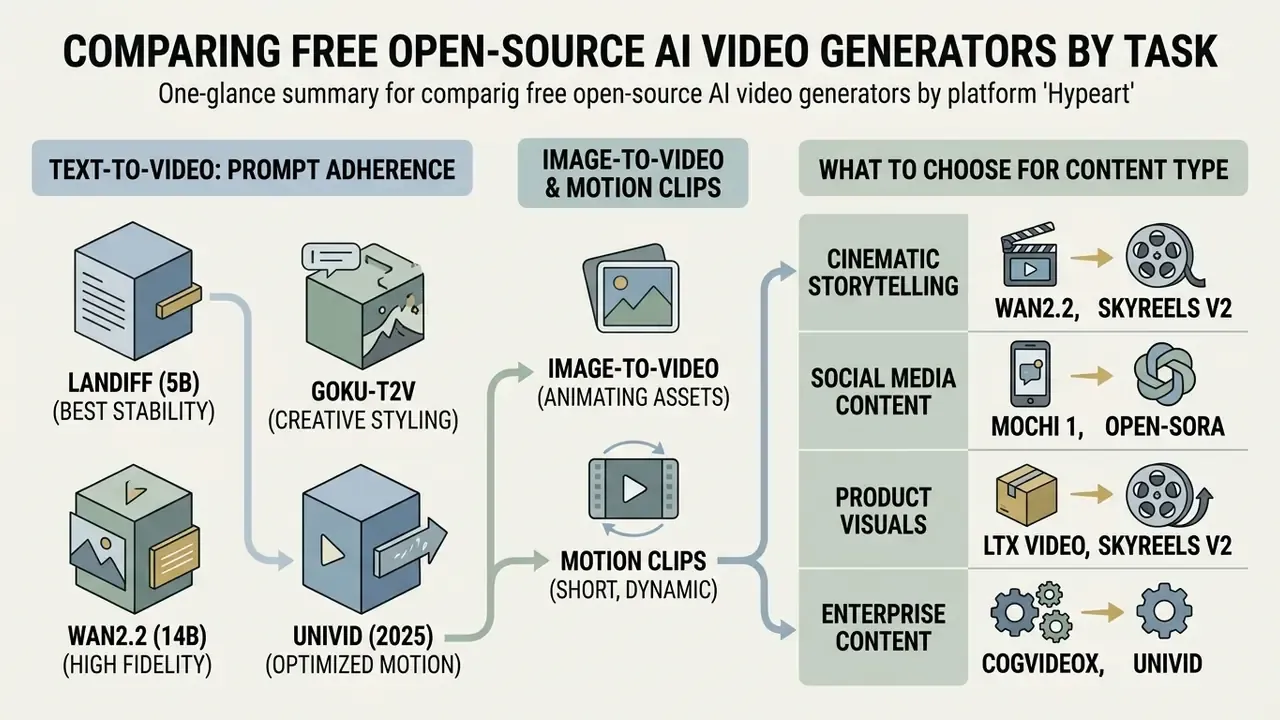
With the master matrix settled, what remains is task-level: which model wins for prompt-driven generation, which wins for animating existing assets, and which wins per content category.
Best Models for Text-to-Video Prompt Adherence
On standardized benchmarks, LanDiff and Goku lead prompt adherence on VBench, while Wan2.2, HunyuanVideo and Mochi 1 give the strongest practical open-weight performance on complex textual descriptions.
Evaluation leans on quantitative frameworks, chiefly VBench (Huang et al., CVPR 2024), which scores 16 dimensions including Subject Consistency, Motion Smoothness, Temporal Flickering, Spatial Relationship and Video-Text Alignment. Complementary suites reshuffle the ranking depending on what they measure. EvalCrafter applies 700 real-world prompts across 17 objective metrics. T2V-CompBench (CVPR 2025) isolates compositional binding across seven prompt categories. PhyWorldBench scores physics adherence across 1,050 prompts. VBench-2.0 (2025) adds Human Fidelity, Creativity, Controllability, Physics and Commonsense as top-level axes.
- LanDiff (5B): VBench T2V total of 85.43 and a semantic score of 82.61, combining language-model embeddings with a diffusion backbone.
«LanDiff (5B) scores 85.43 on VBench T2V total and 82.61 on the semantic dimension, surpassing HunyuanVideo (13B) and several commercial models including Sora and Keling». — LanDiff Report (2025). https://arxiv.org/abs/2503.12720
- Goku-T2V: VBench score of 84.85 using flow-based video foundation modeling, with low Fréchet Video Distance (FVD) on standard zero-shot benchmarks.
Best Options for Image-to-Video and Motion Clips
Wan2.2 (through Wan-Move) and LTX Video deliver the strongest image-to-video performance, preserving source identity while applying controlled pans, tilts and subject movement. HunyuanVideo takes the lead when the animated subject is a person.
I2V evaluation relies on specialized frameworks such as AIGCBench (Fan et al., 2024) and UI2V-Bench (Zhang et al., 2025), which isolate control-video alignment, motion realism and temporal attribute binding.
UI2V-Bench tests whether a model holds critical source attributes, object colors, spatial relationships, brand logos, without distortion once motion begins.
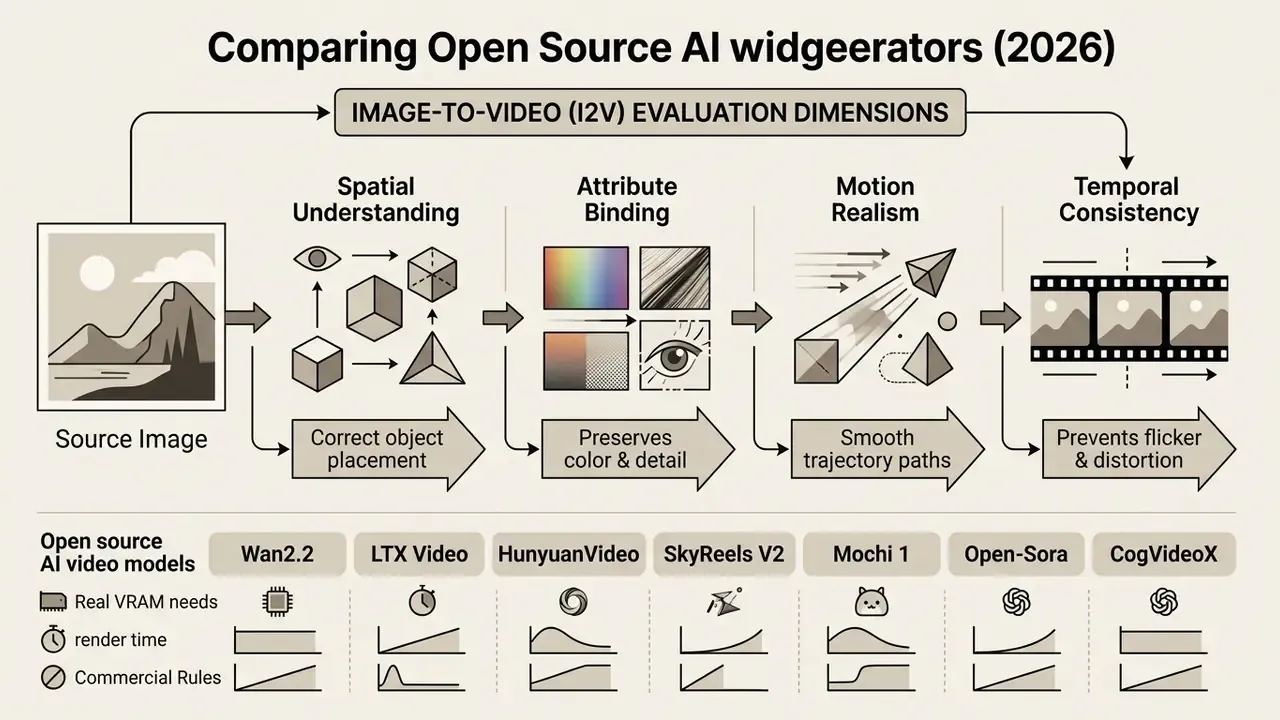
Wan-Move applies classifier-free guidance over decoupled cross-attention layers, which allows precise trajectory manipulation without disturbing the original background (Wan-Move Report, 2025). For creators producing animated visual assets, pairing an I2V generator with the tools in our ai content creator directory tends to lift output quality more than swapping models does.
Deployment Economics and Infrastructure Limits: Local vs Cloud
Running an open-source generator locally gives absolute data control, privacy and uncapped runs. Cloud deployment gives immediate access without buying a GPU. Neither is actually free: one bills in capital and setup hours, the other in credits and queue time.
Anyone weighing a free ai video generation open source strategy has to balance hardware cost against data-governance requirements and operational complexity. Readers still surveying the field can start with our overview of free AI video generators before locking a deployment model.
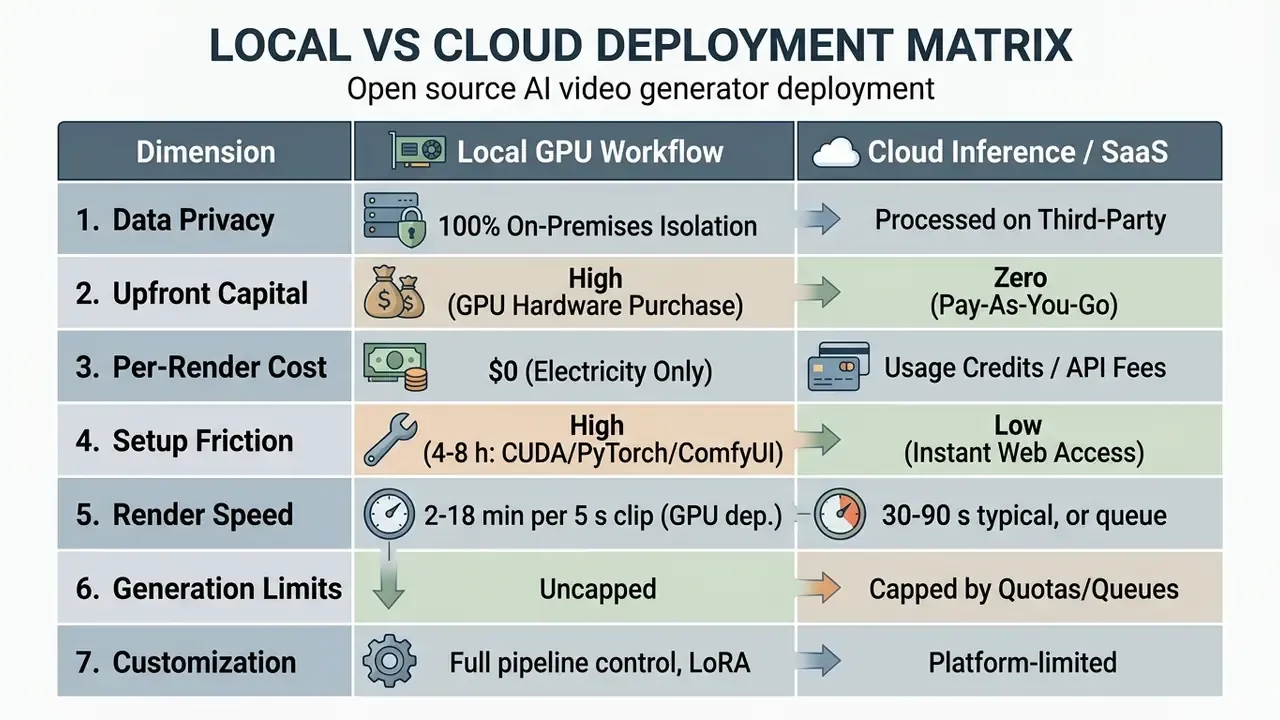
Break-even depends on volume. At 3-5 clips per week, cloud is usually cheaper once hardware amortization is counted. At 20-40 clips per day on a sustained project, local economics invert by roughly month two.
Local Execution: GPU, Software and Full Control
Local execution means downloading weights and running inference through orchestration software: ComfyUI, WebUI, Forge, or your own PyTorch scripts.
Hardware has to clear hard VRAM thresholds (ComfyUI GPU Buying Guide, 2026):
- 8-12 GB VRAM lightweight models only (Wan2.2-1.3B, LTX Video, or HunyuanVideo with FP8 quantization and temporal tiling). ComfyUI has documented HunyuanVideo inference at 8 GB using temporal tiling, down from an earlier 32 GB requirement.
- 16-24 GB VRAM comfortable local execution of Wan2.2-TI2V-5B, Wan 14B (FP8), SkyReels and LTX Video at 720p on consumer cards such as the RTX 3090 or 4090. Published per-model guidance sits at AnimateDiff 12/16 GB, SVD-XT 16/24 GB, Wan 2.2 12/24 GB, LTX 10/16 GB (minimum/recommended).
- 32-80 GB VRAM required for un-quantized 14B+ foundation models (Mochi 1 native, Wan2.2-14B BF16, full-fidelity HunyuanVideo) on enterprise hardware like the A100 or H100. LTX memory guidance shows 32 GB minimum with offloading and 48 GB+ recommended for 19B FP8 variants, with BF16 variants marked 80 GB+.
Practical Render-Time Benchmarks (5-second, 720p clip)
VRAM is a ceiling, not a guideline. No software trick makes a 14B model run well on 6 GB, and quantization buys headroom at a measurable quality cost. These are the numbers that shape a production day:
| GPU | LTX Video | Wan2.2-14B (FP8) | HunyuanVideo | Notes |
|---|---|---|---|---|
| RTX 4090 (24 GB) | < 2 min | 3-5 min | ~5-10 min | All mainstream open models run without compromise |
| RTX 3090 (24 GB) | 2-3 min | 5-8 min | 8-15 min | Same capability envelope, lower throughput |
| RTX 3080 (10 GB) | 6-8 min (reduced resolution) | 12-18 min (quantized + offload) | Not practical at usable quality | Quantization mandatory; iteration becomes painful |
| A100 / H100 (80 GB) | Faster than real time | 1-2 min | 2-4 min | Rented at $0.75-$1.00/host-hour |
- Friction and setup cost first-time deployment of the full stack, Python environment, CUDA toolkit, PyTorch, ComfyUI, custom nodes, multi-gigabyte weight downloads, realistically eats 4-8 hours of debugging for anyone not already fluent in Python environment management. Later installs and updates go fast.
- Cloud comparison hosted platforms deliver the same 5-second clip in 30-90 seconds. Local wins on volume, privacy and customization, not on single-clip latency. Worth being blunt about that.
Local workflows give complete control over sampler steps, CFG scales, LoRA weights and seed consistency, which are the levers that keep style stable across a 40-shot sequence. Teams pairing video nodes with specialized image generation can consult our ai couple photo guide.
Cloud Services: Fast Online Start Without Local Setup
Hosted environments, Hugging Face Spaces, Google Colab, Fal.ai, Replicate, let you run open-source models online with zero local configuration.
- Hugging Face Spaces: Static Spaces are free and CPU Basic hardware is listed as free, but Gradio/Docker compute Spaces need a paid plan, and GPU-accelerated video models need T4 (about $0.50/hr) or A10G instances. Free accounts also get a small monthly Inference Providers credit allowance, with overage billed pay-as-you-go.
- Google Colab: compute-unit notebooks ($9.99 for 100 units, $49.99 for 500) run PyTorch video generation code on cloud T4 or A100 GPUs without a local workstation. Colab Enterprise publishes hourly GPU rates from roughly $0.42/hr (T4) to $4.71/hr (A100 80 GB), plus management fees.
- Free Colab route for zero-GPU users: quantized CogVideoX (5B) runs in community Colab notebooks with no local GPU at all. Expect roughly 30 minutes per clip and occasional session timeouts, but it is a genuine free path to open-weight T2V and I2V output.
- Managed API endpoints: Fal.ai and Replicate host open weights (LTX Video, Wan2.2 and others), billing per generation second instead of requiring dedicated GPU rental. Dedicated inference on Hugging Face starts around $0.033/hr for small CPU workloads.
Fast web alternatives when there is no discrete GPU. When you need a usable clip today rather than an auditable pipeline, hosted models close the gap:
Developers wiring hosted endpoints into production apps can reference our technical guide on Google Veo AI video generator API workflows.
- Kling AI
- roughly 66 daily refreshing credits (about 4-6 short generations), up to 10 seconds at 720p on the free tier, with strong motion interpolation and character consistency. Free requests sit in a slower queue, 5-15 minutes at peak hours.
- HaiLuo (MiniMax)
- fastest free cloud renderer in our comparative testing, finishing 6-second clips in roughly 60-90 seconds, with convincing human motion and facial micro-expressions. Trade-off: short maximum length and a watermark on free output.
- Meta.ai
- community reports describe watermark-free, extendable generations up to 21 seconds at no cost. Fine for social drafts. No weights, no license clarity, no data isolation.
- Aggregators
- multi-model routers (WaveSpeedAI-class platforms) grant starter credits and let one prompt run against Wan, LTX, Kling, Vidu and HaiLuo side by side. Cheapest way to find out which model suits a shot before you invest setup time.
Choosing a Deployment Path by Speed, Privacy and Cost
The choice comes down to three inputs: data-security policy, render volume, budget structure. In that order for regulated environments.
Under that framework, processing unreleased commercial assets or proprietary corporate media on public cloud infrastructure introduces external exposure that has to be assessed, not assumed away. The NIST Privacy Framework treats data minimization as a design input rather than an afterthought. Local execution removes that exposure by keeping prompt text and generated frames inside internal network boundaries. And prompts themselves should be classified as data, because briefs routinely contain unreleased product names and launch dates.
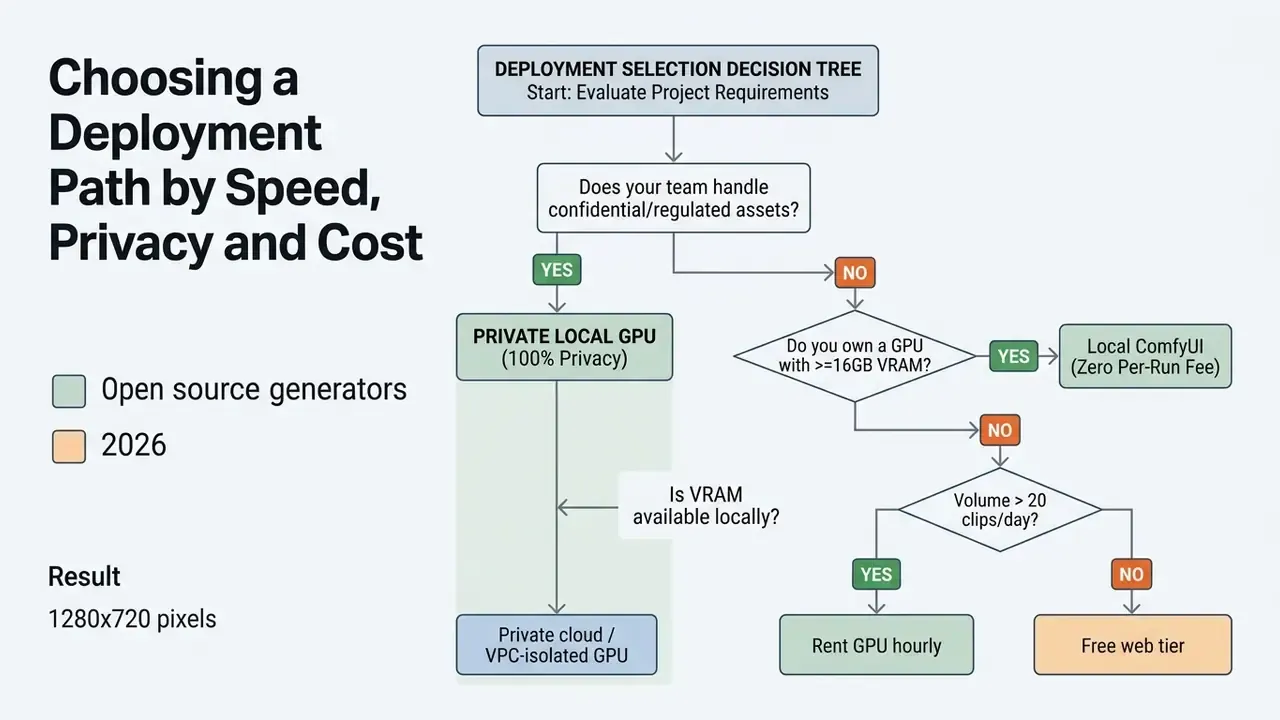
To model exact hardware versus cloud trade-offs, use our interactive AI Media Calculators.
Is Free AI Video Generation Really Unlimited?
Truly unlimited free generation does not exist on commercial cloud platforms, because GPU hosting carries non-zero electricity, bandwidth and capital costs. Somebody pays.
Promotional claims about an open source ai video generator free unlimited solution apply strictly to self-hosted code. The moment you use a managed web service, volume is constrained by system controls, whatever the landing page says.
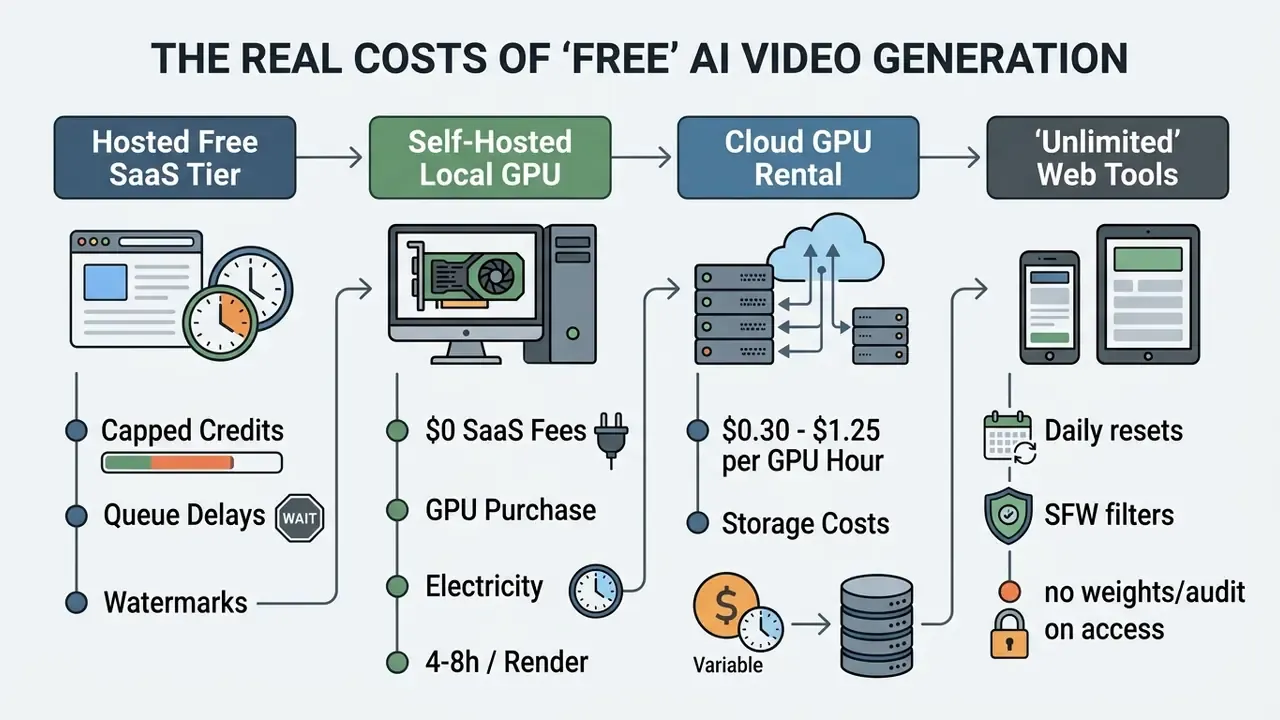
Independent 2025-2026 comparisons of free tiers converge on 2-10 exports per day, frequent watermarking, and no per-video electricity or GPU-rental disclosure from vendors. The compute cost is real. It is just hidden inside a shared GPU pool.
Credits, Monthly Limits and Free-Tier Restrictions
Hosted platforms use credit quotas, daily rate caps and queue throttling to bound free usage. The only honest way to evaluate a free tier is to convert its credits into finished clips.
| Platform | Free allowance | Credit cost per 5-second clip | Real test volume |
|---|---|---|---|
| PixVerse V6 | Daily refreshing credits (varies by account/region) | 9 credits/sec at 720p; 12 credits/sec with audio | ~3-5 clips per day |
| Runway Gen-4.5 | 125 one-time credits (no rollover) | 60 credits per 5-second video | Exactly 2 tests per account |
| Pika 2.5 (Basic) | 80 monthly credits (~30 s of video) | 12 credits at 480p, 5 s | ~6 clips per month |
| Genmo / Mochi 1 (cloud) | 250 lifetime credits | 100 credits per generation (~$0.33 of H100 compute) | Exactly 2 generations |
| Google Flow (Veo) | 50 credits/day for non-subscribers | Varies by model and resolution | A few short daily renders |
| Kling AI | ~66 credits/day, refreshing | Up to 10 s at 720p | 4-6 clips/day, 5-15 min queue |
| HaiLuo (MiniMax) | Several generations/day | Up to 6 s, 720p, watermarked | Fast: 60-90 s per render |
| Leonardo.Ai | 150 fast tokens/day | Varies by motion model | Daily motion experiments |
| Self-hosted open weights | Unlimited | $0 per render (electricity only) | Bounded only by GPU hours |
Free users also land in standard or lower-priority queues. During North American and European evenings, free generations on the largest platforms can wait 10-30 minutes while paid requests clear almost immediately. One caveat on sourcing: Runway's 125 credits are described inconsistently across secondary sources as monthly. The one-time-grant reading matches the platform's own plan language, so budget on that basis and verify in-app.
Readers comparing hosted allowances can also review our breakdown of free photo editor limits and Canva AI generator export restrictions.
Watermarks and Exporting Clips Without Platform Restrictions
Free cloud platforms embed visible brand watermarks and cap export resolution, which is the standard upgrade lever.
- Watermarking web platforms overlay brand logos on MP4 exports under free plans. Removing them requires a paid tier, and some tools (Pika Basic among them) grant no-watermark downloads only at reduced resolution.
- Resolution and frame rates free cloud renders usually cap at 480p or 720p, 24 fps. 1080p or 4K at 30-60 fps sits behind paid plans. Adjacent creative suites follow the same logic; Canva's free tier caps MP4 export at 1920×1080 and applies a watermark only when paid elements are used.
- Uncapped local renders self-hosting Wan2.2, LTX Video or HunyuanVideo means exports carry no watermark, no platform logo and no artificial frame-rate ceiling. Assembly then happens in your own tooling. See our overview of video editors for the finishing stage.
For post-processing and shrinking large raw exports, review our guide on video compressor software, plus our YouTube video editor workflow guide for publishing specs.
The Real Cost of Local GPU vs Cloud Generation
Operating open models carries genuine infrastructure cost, either as local capital expenditure or hourly cloud compute.
Published enterprise pricing shows managed GPU rates averaging:
- NVIDIA L40S $0.30 / host-hour
- NVIDIA A100 (80GB) $0.75 / host-hour
- NVIDIA H100 / H200 $1.00 / host-hour
- NVIDIA B200 $1.25 / host-hour
«Renting an A100 at $0.75/hour for 120 hours per month totals $1,080 per year; a $3,500 local workstation amortizes in 39 months while retaining full data confidentiality». — AWS Marketplace Friendli Container Schedule (2025). https://aws.amazon.com/marketplace/pp/prodview-friendli-container
Worked TCO example (illustrative model, not a vendor quote). A creative unit modelling 4,000 clips per month compared hosting LTX Video on rented cloud GPUs against buying an on-premises NVIDIA RTX workstation. Renting A100 capacity at $0.75/hr for 120 processing hours per month came to $1,080 annually in compute. A $3,500 workstation reached full amortization in 39 months while keeping every asset on-premises. Hardware pricing is a market estimate at time of writing and varies by configuration, region and procurement channel. Treat 39 months as a sensitivity anchor, not a fixed payback period.
Risk-adjusted TCO, the line most calculations omit. GPU-hours are the cheapest component of enterprise adoption. A defensible model adds model validation and benchmark testing hours, legal review of each license and hosted term sheet, prompt and asset provenance logging infrastructure, the 4-8 hour environment build plus maintenance across driver and node updates, and the opportunity cost of 12-18 minute render cycles on under-specified GPUs. In regulated environments those items regularly exceed raw compute spend. Which is why a mid-volume team can rationally buy a 24 GB card even when the spreadsheet says cloud is cheaper.
For configuration errors during local deployment, our AI Media Support and Troubleshooting portal covers the usual failure points.
Licenses and Commercial Use: Can AI Videos Be Used in Business?
Commercial use of AI-generated video is permissible when the underlying weights carry a permissive license and the output respects third-party intellectual property and likeness rights. Two conditions. Both have to hold.
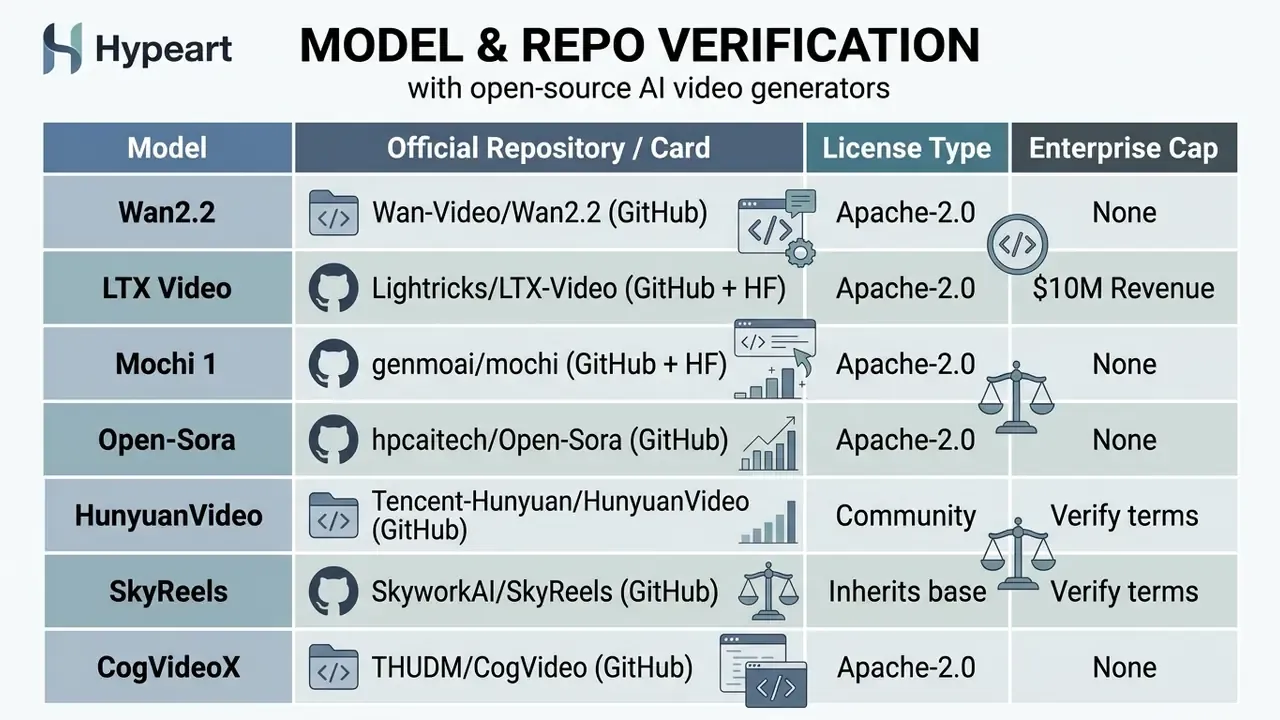
Before publishing anything made with an open source ai video creation tool free in paid advertising, legal teams should audit three documents: the software license, the cloud terms of service, and applicable output-copyright guidance.
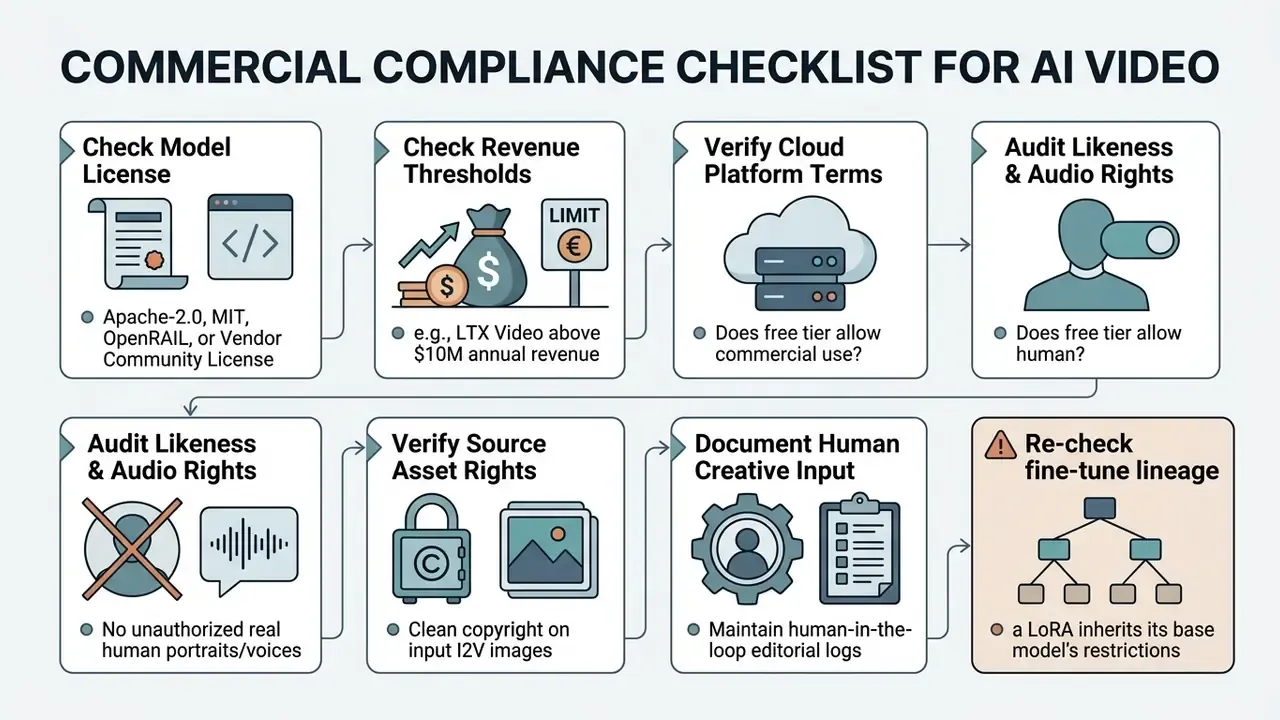
What to Check in the Model License and Cloud Platform Terms
Evaluate the software license (which governs local weights) separately from the cloud terms of service (which govern hosted tools). They are not the same instrument and they fail in different ways.
- Apache-2.0 and MIT: permissive licenses granting worldwide, royalty-free rights to run, modify, sublicense and commercially distribute the software and its outputs.
For deeper legal analysis, see our guide to AI Media Commercial-Use terms and our breakdown of commercial use for AI image generators.
How to Reduce Risk When Publishing AI-Generated Videos
Reducing exposure when you publish synthetic media is mostly a documentation discipline, not a technology choice.
Per formal guidance from the U.S. Copyright Office, fully automated machine output produced without human creative selection or arrangement is not eligible for copyright protection.
«To secure copyright protection for a commercial video, human editors must exercise creative control over prompt structuring, scene sequencing and colour grading». — U.S. Copyright Office, Copyright and Artificial Intelligence Report (2025). https://www.copyright.gov/ai/
The Office's Part 1 report on digital replicas adds that licensing of likeness rights should proceed only with "adequate knowledge and full disclosure of the intended uses". In practice, consent forms must name the campaign, the channels and the duration. Not simply "AI use".
Risk mitigation steps for corporate publishing:
- Likeness auditing: confirm no generated video reproduces a real face or voice without a consent agreement scoped to the intended use.
- Asset provenance logging: keep audit logs of source images, model versions, prompt strings, seeds and modification steps.
- Synthetic media disclosures: apply metadata tags or visible labels where platform policy or regional regulation requires them.
- License lineage checks: record the base model and every LoRA or fine-tune applied, because restrictions inherit downstream.
For active disputes on synthetic media and copyright, our AI Litigation and Case Timelines database tracks the docket.
Limitations and Open Questions
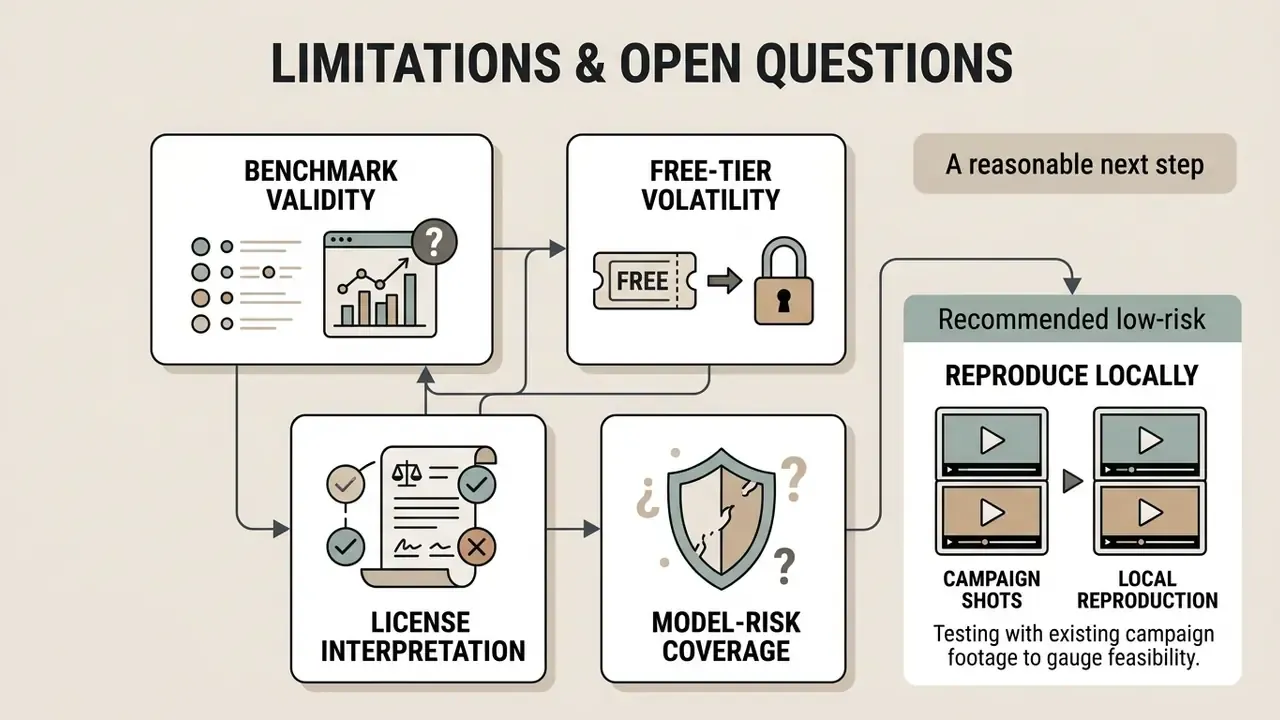
A guide like this should be honest about where the evidence thins out. Four gaps, stated plainly:
- Benchmark validity. VBench-class scores are computed on curated prompt sets. They correlate imperfectly with your prompts, your aspect ratios and your brand's aesthetic bar. Treat leaderboards as a shortlist mechanism, not as validation evidence.
- Free-tier volatility. Credit allowances, watermark rules and commercial-rights language on hosted platforms changed repeatedly through 2025 and into 2026. Every number in the credit table is a snapshot; re-verify before you plan a test budget or sign anything.
- License interpretation. Vendor community licenses use behavioural language that has not been extensively litigated. Counsel opinion, not editorial opinion, should drive publication decisions in regulated industries.
- Model-risk coverage. Generative video sits awkwardly inside traditional model-risk frameworks built for credit and market models. There is no settled validation protocol for aesthetic output, so most institutions we have seen treat it as a controlled tooling decision with a named owner, an approved use register and a documented escalation path, rather than as a validated model. Whether supervisors will accept that framing long term remains genuinely open.
A reasonable next step, and a low-risk one: pick two shots from an existing campaign, reproduce them locally with LTX Video and Wan2.2, log the provenance trail, and let legal review the output before anything reaches a paid channel. Small pilot, real evidence, no exposure.
FAQ: Open Source AI Video Generator Free
Short answers on Sora alternatives, API access, hardware floors and fine-tuning. For a broader ranked shortlist, see our comparison of the best free AI video generators.
Is there a completely free ai video generator open source alternative to OpenAI Sora?
Yes. Open-Sora 2.0 (HPCAI Tech), Wan2.2 (Wan-Video/Alibaba) and HunyuanVideo (Tencent) all work as open-weight alternatives. Open-Sora publishes full training and inference code under Apache-2.0 and generates up to 16 seconds at 720p, with published VBench gaps to Sora under one percent. Wan2.2's 14B models rival commercial generators on visual quality and temporal coherence, and HunyuanVideo leads on human realism. The software is free; running it still needs a compatible GPU or rented compute. Worth noting: OpenAI's own documentation lists the Sora 2 models and Videos API as deprecated with a scheduled shutdown on 2026-09-24, which strengthens the strategic case for weights you control.
Can I access an open-source AI video generator through an API?
Yes, by two routes. First, managed cloud APIs: Fal.ai, Replicate and Hugging Face host endpoints for LTX Video, Wan2.2, HunyuanVideo and others, billed by inference time or generation second. Second, self-hosted endpoints: wrap open models via ComfyUI API nodes or a PyTorch/FastAPI service on private GPU instances, giving you a custom pipeline with no per-generation vendor fee. LTX also publishes PyTorch API documentation for direct integration.
Is fine-tuning (LoRA) available for open video models?
Yes. Most major open video models support parameter-efficient fine-tuning. The ltx-trainer toolchain covers LoRA, IC-LoRA and full fine-tuning for LTX Video. VideoTuna documents LoRA and full fine-tuning commands for Wan Video, HunyuanVideo, CogVideoX, Open-Sora v1.0 and VideoCrafter. Mochi 1 was explicitly designed for LoRA adaptation. This is how you train on brand assets, specific character portraits or a proprietary visual style instead of re-prompting a house look every single shot.
Which model should I choose for a first free test?
With a mid-range consumer GPU (12-16 GB VRAM), start with LTX Video for speed, then move to Wan2.2-TI2V-5B for quality, both through local ComfyUI. At 24 GB, add HunyuanVideo for people-centric shots. Without a discrete GPU, test Wan2.2 or Mochi 1 on free Hugging Face or ModelScope spaces, or run quantized CogVideoX 5B in a free Colab notebook, roughly 30 minutes per clip. For instant results with no setup at all, Kling AI, HaiLuo and Meta.ai are the fastest hosted paths.
How much VRAM do I actually need?
8 GB is the entry floor, and only for lightweight or heavily quantized workflows. 12 GB opens LTX Video and Wan2.2-1.3B comfortably. 16 GB is the practical minimum for meaningful model choice: Wan 14B with FP8, SkyReels, LTX un-quantized at moderate resolution. 24 GB runs essentially everything currently released without compromise, HunyuanVideo included. Quantized FP8 and GGUF builds lower requirements at a quality cost that becomes visible at lower bit depths.
Is open-source AI video better than cloud tools?
Not across the board, no. The best open models now match mid-tier cloud platforms, but leading closed platforms still hold an edge on visual polish and prompt adherence in complex multi-subject scenes. Where open source wins decisively: cost at volume, data privacy, uncapped iteration, customization depth. For high-volume or confidential workloads those advantages dominate. For an occasional single clip, a hosted tool is simply more practical.
How do I keep visual style consistent across many short clips?
Lock prompts, seeds and camera parameters across the sequence, and generate every shot from a single model version. Wan 2.2's cinematic controls, lighting, composition, mood, help tune a consistent look. For strict brand consistency, LoRA-fine-tune Mochi 1 or Wan on reference footage. Then standardize the rest in post with brand-kit overlays, LUTs and titles, rather than hoping the model reproduces them shot after shot. It will not.
Can free-tier output be used for client or commercial work?
It depends on two separate documents. Self-hosted Apache-2.0 models (Wan2.2, Mochi 1, Open-Sora, CogVideoX, LTX code) generally permit commercial use, subject to revenue thresholds such as Lightricks' $10M clause and to any behavioural restrictions in vendor community licenses. Hosted free tiers commonly watermark output and reserve commercial rights for paid plans. For paid client deliverables, either self-host under a verified license or buy the paid tier on the platform whose look you need.
Appendix A: Methodology, Verification and Audit Templates
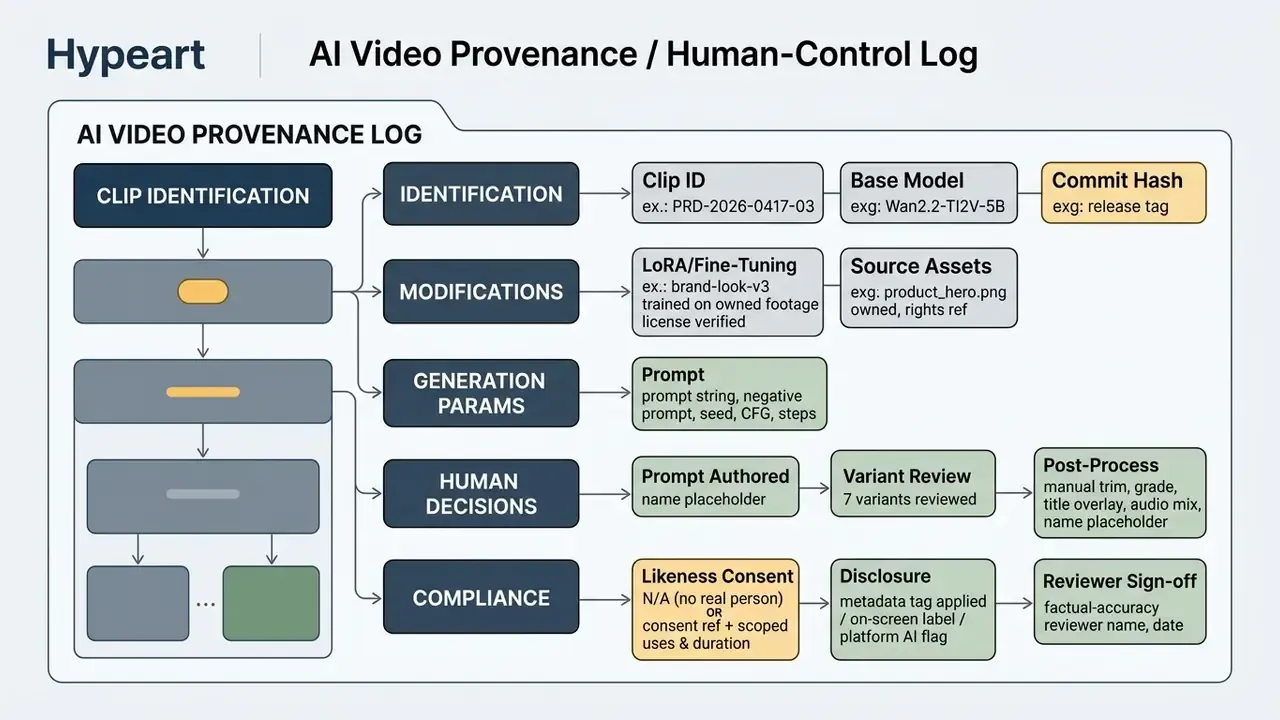
Model-by-model quick reference.
- HunyuanVideo
- best realism if you have 24 GB, ideally 80 GB; about 15 s at 720p; Diffusers plus ComfyUI.
- SkyReels V1/V2
- long-form 15-30 s continuity; 33 expressions, 400+ motions; Hunyuan-derived.
- Wan 2.2
- best all-rounder on consumer hardware; legible EN/ZH on-screen text; Apache-2.0; MoE 14B tier.
- LTX Video
- fastest iteration, lowest VRAM floor; camera-aware LoRAs; $10M revenue license threshold.
- Mochi 1
- permissive license, easy LoRA fine-tuning, strong photorealism; about 5.4 s at 480p/30 fps; roughly $0.33 per clip in cloud.
- Open-Sora 2.0
- full open training pipeline; up to 16 s at 720p; the research baseline.
- CogVideoX
- Apache-2.0 T2V/I2V; free Colab path with no local GPU.